Le 10 migliori app per i flussi di lavoro che ho provato nel 2026



Le migliori app per i flussi di lavoro riuniscono attività, approvazioni e processi in un’unica piattaforma, automatizzando le approvazioni ripetitive, instradando le richieste e monitorando i progressi per prevenire ritardi e smarrimenti.
Con oltre 20 anni di esperienza nella gestione di progetti digitali complessi per marchi globali, ho potuto constatare come flussi di lavoro frammentati possano compromettere anche le iniziative meglio pianificate. In qualità sia di recensore di software sia di project manager, ho valutato centinaia di strumenti per la gestione dei progetti e implementato sistemi di flussi di lavoro che eliminano i colli di bottiglia, semplificano la collaborazione e garantiscono la responsabilità per ogni attività.
In questo articolo ho individuato soluzioni affidabili di app per i flussi di lavoro che gestiscono l’instradamento delle richieste, il monitoraggio dei progressi e la coerenza dei processi per team di ogni dimensione. Questa selezione curata pone l’accento sull’efficacia pratica, sulla facilità d’uso e sulla scalabilità, sia per i piccoli team sia per le grandi aziende.
Perché fidarsi dei nostri consigli sui software
Il nostro team testa e recensisce software dal 2012. In quanto project manager noi stessi, sappiamo quanto sia difficile — e importante — scegliere il software giusto.
Per questa guida, abbiamo valutato gli strumenti attraverso test pratici e ricerche indipendenti, assegnando un punteggio agli strumenti in base ai nostri criteri di selezione. Ci basiamo inoltre sulle competenze di leader di pensiero del settore e di professionisti attivi nella gestione dei progetti.
Le nostre recensioni riflettono il nostro giudizio editoriale umano, non un discorso di vendita.
Revisori esperti:
Tabella comparativa delle app per i flussi di lavoro
Questa tabella comparativa riassume i dettagli dei prezzi delle mie migliori selezioni di app per i flussi di lavoro:
| Tool | Best For | Trial Info | Price | ||
|---|---|---|---|---|---|
| 1 | Ideale per l'automazione senza codice | Piano gratuito disponibile | A partire da $19.50/mese (fatturazione annuale) | Website | |
| 2 | Ideale per automatizzare i processi manuali | Una versione gratuita con funzionalità limitate per un massimo di due persone | A partire da $6/utente/mese | Website | |
| 3 | Ideale per creare dashboard personalizzati | Prova gratuita per ogni piano | Da $9.80 per utente al mese | Website | |
| 4 | Ideale per l'automazione dei flussi di lavoro creativi su larga scala | Demo gratuita disponibile | Prezzi disponibili su richiesta | Website | |
| 5 | Ideale per diagrammi di workflow collaborativi | Prova gratuita + piano gratuito disponibile | A partire da $9/mese | Website | |
| 6 | Ideale per modelli di flussi di lavoro personalizzabili | Piano gratuito disponibile | Da $8/membro/mese (fatturato annualmente) | Website | |
| 7 | Ideale per l'automazione dei workflow guidata dall'intelligenza artificiale | Prova gratuita disponibile + demo gratuita | Prezzo su richiesta | Website | |
| 8 | Ideale per la gestione completa dei progetti | Piano gratuito + demo gratuita disponibile | Da $7/utente/mese (fatturazione annuale) | Website | |
| 9 | Ideale per i team di prodotto | 14 giorni di prova gratuita | A partire da $49 al mese per fino a dieci membri del team e 40 progetti attivi | Website | |
| 10 | Ideale per creare app di workflow | Prova gratuita di 30 giorni + demo gratuita disponibile | A partire da $24 per utente al mese per un minimo di cinque utenti | Website |


Recensioni delle migliori app per i flussi di lavoro
Ecco una breve descrizione di ciascuna app per i flussi di lavoro, per illustrare il caso d’uso ideale e le funzionalità principali di ogni strumento.

Ideale per l'automazione senza codice
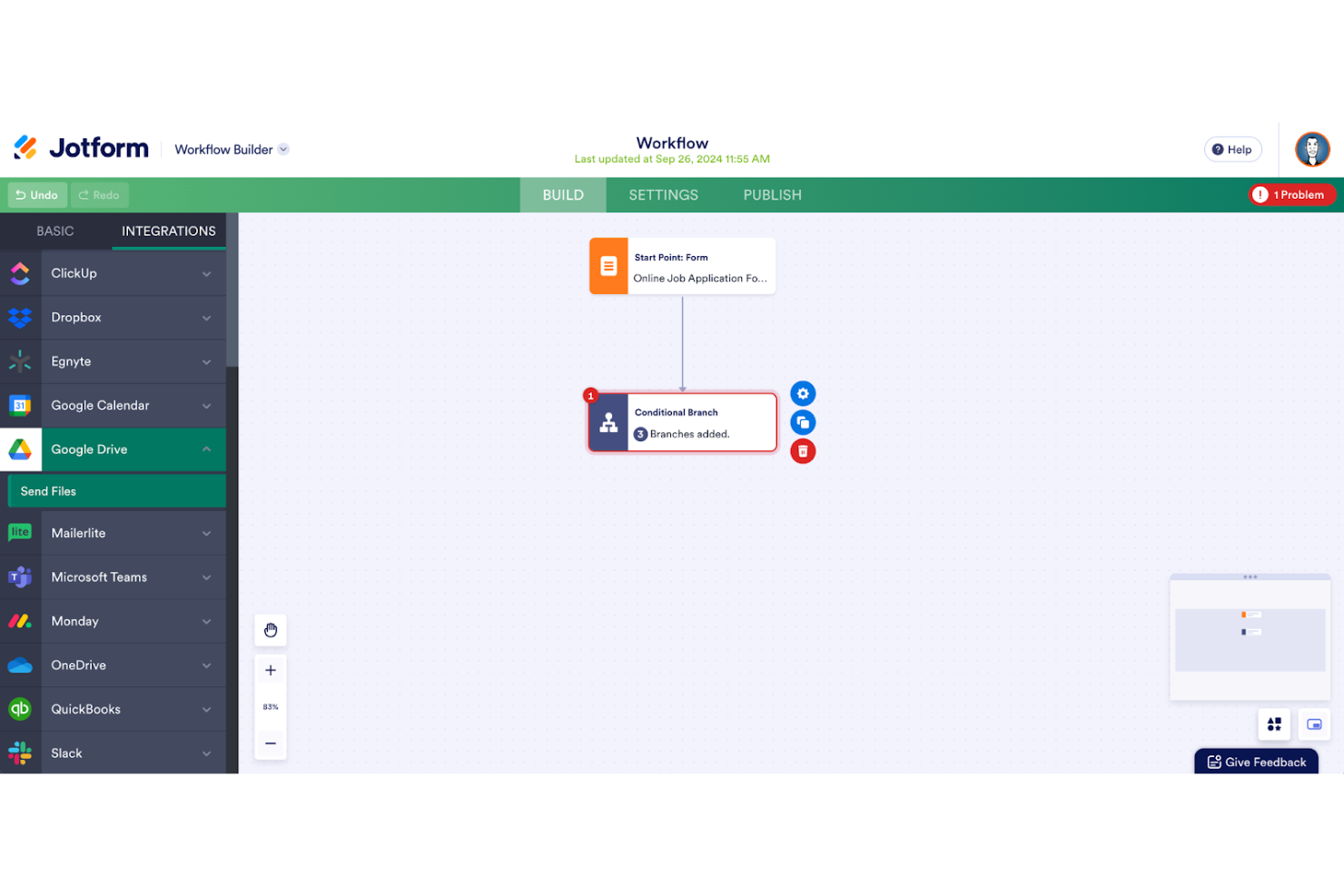
Per team e aziende che cercano di semplificare i propri processi complessi, Jotform Workflows offre una soluzione intuitiva e senza codice che può trasformare il modo in cui gestisci le attività. Progettato per settori che spaziano dall’assistenza sanitaria all’istruzione, questo strumento è ideale per i professionisti che hanno bisogno di un modo affidabile per automatizzare approvazioni, raccogliere firme elettroniche e gestire pagamenti, il tutto mantenendo un flusso continuo di informazioni. Jotform Workflows affronta la sfida dei processi manuali ingombranti, offrendo una piattaforma personalizzabile che migliora la produttività e il coinvolgimento degli utenti.
Perché ho scelto Jotform Workflows
Ho scelto Jotform Workflows per le sue capacità di automazione senza codice, che ti permettono di creare e gestire flussi di lavoro senza alcuna conoscenza di programmazione. Una caratteristica distintiva è il builder drag-and-drop, che semplifica la progettazione dei workflow, rendendola accessibile agli utenti di qualsiasi livello tecnico. Inoltre, la piattaforma offre oltre 200 modelli personalizzabili che consentono di configurare rapidamente flussi di lavoro adatti alle proprie esigenze specifiche. Queste funzionalità non solo fanno risparmiare tempo, ma risolvono anche la tipica sfida di gestire processi complessi in modo efficiente.
Funzionalità principali di Jotform Workflows
Oltre al suo builder intuitivo e ai modelli disponibili, Jotform Workflows offre diverse altre funzionalità che ne aumentano l’utilità per la gestione dei workflow:
- Logica condizionale: Questa funzione consente di creare flussi di lavoro dinamici che si adattano in base agli input degli utenti, garantendo che ogni passaggio del processo sia pertinente ed efficiente.
- Monitoraggio in tempo reale: Tieni traccia dello stato di avanzamento dei tuoi workflow con aggiornamenti in tempo reale, così da poter prendere decisioni tempestive e fare eventuali aggiustamenti.
- Elaborazione parallela: Gestisci più attività contemporaneamente, riducendo i colli di bottiglia e velocizzando l’intero processo.
- Personalizzazione del branding: Personalizza l’aspetto dei tuoi workflow per allinearli al tuo marchio, offrendo un’esperienza coerente agli utenti.
Integrazioni di Jotform Workflows
Le integrazioni includono Google Drive, Slack, Dropbox, PayPal, Stripe, Salesforce, Zoom, Microsoft Teams, Box e Asana.
Pros and Cons
Pros:
- Automazione dei flussi di lavoro senza codice
- Ampia libreria di modelli disponibile
- Ottime integrazioni e pagamenti
Cons:
- Le funzionalità avanzate costano di più
- Reportistica poco approfondita
New Product Updates from Jotform Workflows
Jotform Workflows Adds Wait Element for Timed Automation
Jotform Workflows introduces a Wait element for pausing and resuming workflows based on dates and times. This helps teams automate time-sensitive actions without manual follow-ups. For more information, visit Jotform’s official site.
 .
.
Ideale per automatizzare i processi manuali
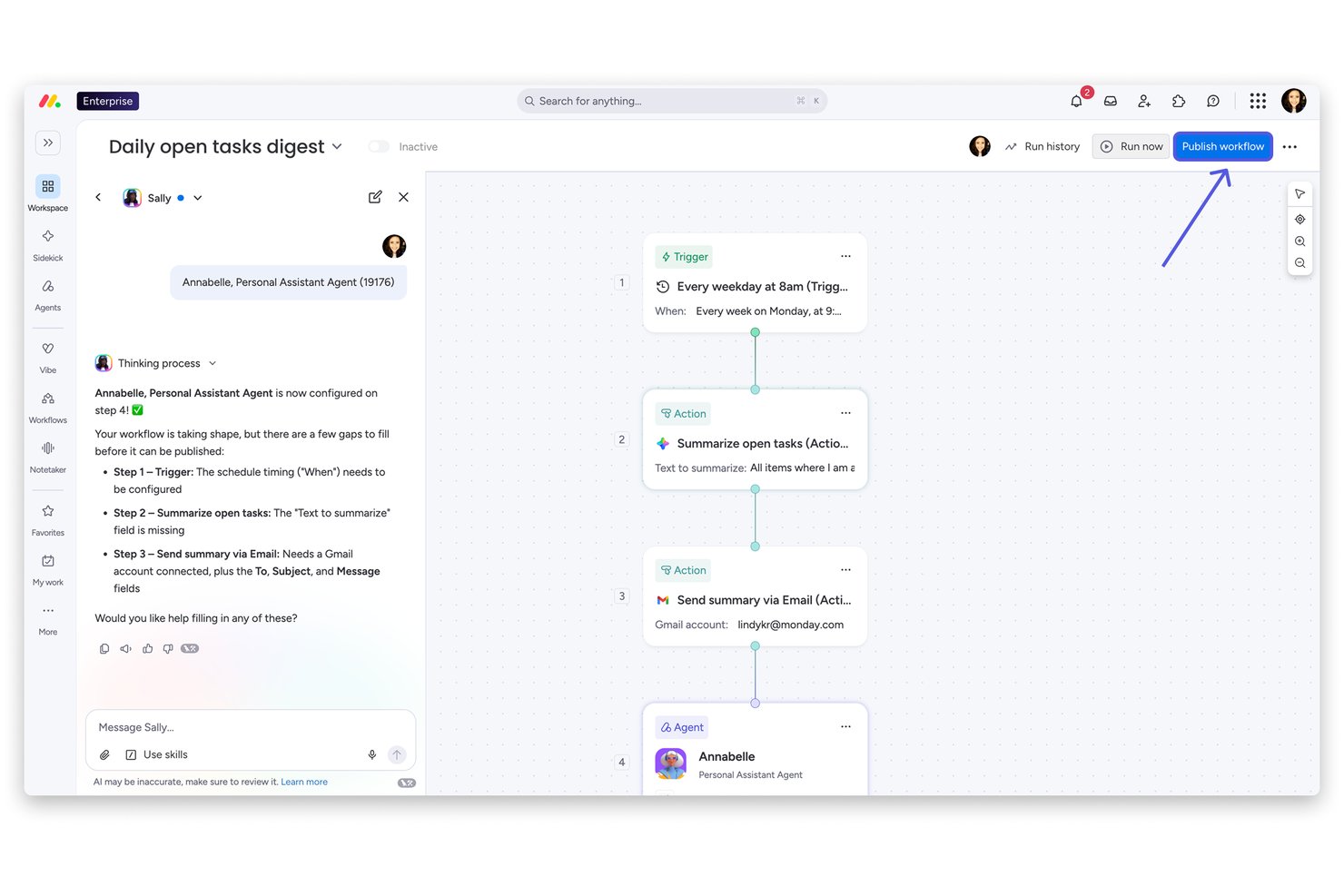
monday AI Workspace è una piattaforma di gestione del lavoro senza codice che combina la creazione visiva di flussi di lavoro, l'automazione basata sull'IA, il monitoraggio dei progetti in più viste e i moduli di raccolta richieste in un unico spazio di lavoro per i team interfunzionali.
Per chi è più adatto monday AI Workspace?
È particolarmente adatto ai responsabili delle operazioni e dei processi di aziende di medie e grandi dimensioni che gestiscono flussi di lavoro ripetitivi e interfunzionali e hanno bisogno di un'automazione su larga scala.
Perché ho scelto monday AI Workspace
monday AI Workspace si è guadagnato un posto nella mia lista ristretta perché nessun altro strumento che ho testato trasforma così rapidamente una semplice descrizione in linguaggio naturale in uno spazio di lavoro completamente strutturato e automatizzato. Apprezzo molto il generatore di flussi di lavoro con IA, che coordina l'automazione in più fasi tra le bacheche senza dover scrivere manualmente una sola regola. La forza lavoro di agenti IA fa un ulteriore passo avanti, gestendo su larga scala attività ripetitive come gli aggiornamenti di stato e l'assegnazione delle attività tra i progetti.
Funzionalità principali di monday AI Workspace
- Pannello di controllo del portafoglio: Crea viste in tempo reale che aggregano l'avanzamento, gli indicatori KPI e le tempistiche di più progetti attivi.
- Moduli personalizzati per la raccolta richieste: Crea moduli di richiesta che trasformano gli invii in attività strutturate e attivano flussi di lavoro personalizzati.
- Colonne per il monitoraggio del tempo: Registra e analizza direttamente in ogni attività di progetto le ore fatturabili o le stime dell'impegno.
- Accesso per ospiti/clienti: Consenti ai portatori di interesse esterni di visualizzare le bacheche dei progetti, inviare richieste e approvare i materiali con autorizzazioni personalizzate.
Integrazioni di monday AI Workspace
monday AI Workspace offre centinaia di integrazioni native e tramite il mercato, tra cui Slack, Salesforce, HubSpot, Google Workspace, Microsoft 365, Jira, GitHub, Zoom, Zendesk, Dropbox e Trello. Supporta inoltre Zapier e mette a disposizione un'API per le integrazioni personalizzate.
Pros and Cons
Pros:
- L'IA automatizza flussi di lavoro in più fasi senza bisogno di programmazione
- Struttura delle bacheche senza codice altamente personalizzabile
- Più viste, tra cui Gantt e carico di lavoro
Cons:
- Le esecuzioni delle automazioni sono limitate nei piani inferiori
- La reportistica non è abbastanza approfondita per esigenze PMO complesse
New Product Updates from monday AI Workspace
monday AI Workspace Adds Human Approval Routing
monday AI Workspace adds a human-in-the-loop approval block to AI Workflows, sending approval requests and routing workflow paths based on responses. For more information, visit monday AI Workspace's official site.

Wrike
Ideale per creare dashboard personalizzati
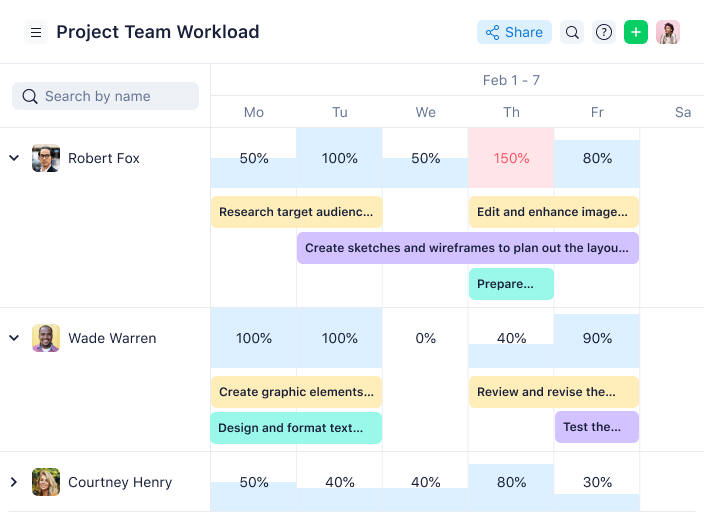
Wrike è uno strumento di gestione dei progetti flessibile che ti permette di creare dashboard e flussi di lavoro personalizzati in base alle tue esigenze specifiche. Oltre all'organizzazione interna del team, i suoi strumenti di revisione integrati semplificano anche la comunicazione con i clienti. Danilo Coviello, fondatore di Espresso Translations, ha sottolineato quanto questo abbia migliorato il suo flusso di lavoro: “Questo ha ridotto i nostri avanti e indietro da più di quattro round a meno di due. Le catene di email appartengono al passato.”
Perché ho scelto Wrike: Offre soluzioni per i team in tutta l’organizzazione e mette a disposizione modelli personalizzabili per diverse esigenze di progetto, inclusi la gestione di eventi, la creazione di contenuti e le iniziative di lancio sul mercato.
Creare progetti e suddividerli in compiti più piccoli è semplice. Poiché lo strumento aggiorna tutto in tempo reale, puoi individuare ostacoli potenziali man mano che si presentano. Puoi visualizzare questi progetti in diagrammi di Gantt e bacheche Kanban.
Caratteristiche e integrazioni principali di Wrike
Le funzionalità includono un’esperienza app personalizzata tramite AI Work Intelligence, dashboard condivisibili, visualizzazioni interattive dei flussi di lavoro, funzionalità di gestione del carico di lavoro di utenti e team, pianificazioni di lavoro a livello di account e molto altro.
Le integrazioni includono Slack, Salesforce, Adobe Creative Cloud, Microsoft Teams, Miro, Tableau, Zoom, Google Drive e Box. Inoltre, forniscono un’API ben documentata che può aiutare il tuo team IT a costruire integrazioni personalizzate con gli strumenti che già utilizzi.
New Product Updates from Wrike
Wrike Adds Klaxoon MCP Integration
Wrike’s Klaxoon MCP integration is now generally available, enabling AI agents to navigate between Wrike tasks and attached whiteboards, read task context, and manage whiteboard attachments via API. For more information, visit Wrike's official site.

Ideale per l'automazione dei flussi di lavoro creativi su larga scala

Screendragon è una piattaforma aziendale per la gestione del lavoro che combina automazione dei flussi di lavoro senza codice, moduli dinamici di raccolta richieste, approvazioni creative, pianificazione delle risorse e monitoraggio del budget in un unico sistema progettato per i team di marketing e delle agenzie.
Per chi è più adatto Screendragon?
Screendragon è particolarmente adatto ai team di marketing di medie e grandi dimensioni e alle agenzie creative che gestiscono grandi volumi di progetti articolati in più fasi e con stakeholder distribuiti.
Perché ho scelto Screendragon
Screendragon è entrato nella mia selezione perché il suo strumento di creazione di flussi di lavoro senza codice gestisce in modo approfondito la complessità dei processi creativi su larga scala. Apprezzo molto il fatto che i moduli dinamici di raccolta richieste siano collegati direttamente a sequenze automatizzate di passaggi, così l'invio di un singolo brief può avviare una catena di approvazione completamente instradata senza passaggi manuali. Il livello AI Hub, che consente ai team di integrare agenti di intelligenza artificiale governati nei flussi di lavoro attivi, offre una profondità che non ho riscontrato in strumenti comparabili.
Funzionalità principali di Screendragon
- Modulo di pianificazione delle risorse: Consente di assegnare, monitorare e bilanciare i carichi di lavoro su più progetti in un'unica vista.
- Strumenti di revisione creativa: Permettono di aggiungere annotazioni nell'app, confrontare le versioni e fornire feedback in thread direttamente sulle risorse creative.
- Dashboard personalizzate: Consentono di creare dashboard visive in tempo reale con riepiloghi dei progetti e widget KPI.
- Autorizzazioni basate sui ruoli: Offrono controlli di accesso granulari, fino ai singoli campi e alle fasi del flusso di lavoro, per garantire governance e sicurezza.
Integrazioni di Screendragon
Screendragon offre integrazioni native con Salesforce, SAP, Microsoft 365, Dynamics 365, NetSuite, PeopleSoft, Adobe, Jira, Trello, Box e Google Drive. Fornisce inoltre un'API per le integrazioni personalizzate.
Pros and Cons
Pros:
- La ramificazione granulare dei flussi di lavoro supporta processi creativi complessi
- I moduli di raccolta richieste instradano automaticamente il lavoro senza assegnazione manuale
- La pianificazione delle risorse e della capacità è integrata
Cons:
- La configurazione iniziale richiede tempo e attività significativi
- La personalizzazione dei report è limitata per la visibilità del PMO
New Product Updates from Screendragon
Screendragon Unveils New AI Hub
Screendragon introduced AI Hub, a new capability that lets teams build and manage AI agents directly within workflows. The update helps marketing teams automate tasks, maintain governance controls, and scale AI-driven operations more efficiently. For more information, visit Screendragon's official site.

Ideale per diagrammi di workflow collaborativi

Lucidchart Enterprise è una soluzione completa per la collaborazione visiva, progettata specificamente per i team aziendali. Unisce le funzionalità di creazione di diagrammi a una lavagna virtuale, facilitando la collaborazione sia in tempo reale sia asincrona.
Perché ho scelto Lucidchart: Lucidchart si distingue per le sue solide misure di sicurezza, tra cui restrizioni di dominio, permessi sui documenti e limitazioni alla pubblicazione, garantendo un ambiente sicuro per la creazione collaborativa di diagrammi. Il piano Enterprise è ciò di cui hai bisogno per sbloccare gli spazi di team, una lavagna virtuale e un'intelligenza artificiale collaborativa, utile per il brainstorming di nuove idee.
Lucidchart funziona come app per i workflow anche grazie alle sue funzionalità robuste pensate per la creazione di diagrammi sicuri e collaborativi. Nel panorama degli strumenti di project management, si distingue per l'attenzione alla comunicazione e alla collaborazione visiva. La possibilità di creare diagrammi di flusso, reti, organigrammi e altra documentazione visiva lo rende uno strumento unico nel campo della gestione digitale dei progetti. Permette ai team di visualizzare processi e sistemi complessi, fondamentale per comprendere e gestire i progetti digitali.
Caratteristiche principali e integrazioni di Lucidchart
Le funzionalità comprendono strumenti per la creazione di diagrammi, modelli, flowchart, mappe di processo, diagrammi di rete, una libreria di forme e linee, collaborazione in tempo reale, co-editing, chat integrata nell'editor, commenti, single sign-on (SSO), prevenzione della perdita di dati (DLP), gestione di accessi e permessi utente e spazi di lavoro per i team.
Le integrazioni includono Slack, Salesforce, GitHub e LinkedIn Sales Navigator, e Lucidchart si inserisce in una suite aggiuntiva di prodotti Lucid Software dedicati alla collaborazione e all'ideazione (Lucidspark) e alla visualizzazione in cloud (Lucidscale).

Miro
Ideale per modelli di flussi di lavoro personalizzabili

Miro è uno strumento di collaborazione online versatile progettato per facilitare la gestione dei progetti, la creazione di diagrammi, la mappatura dei processi e la visualizzazione dei contenuti.
Perché ho scelto Miro: Mi piace il fatto che Miro abbia una tela infinita, che consente agli utenti di creare flussi di lavoro completi e interconnessi senza vincoli di spazio. Questo è particolarmente utile per visualizzare processi complessi e garantire che ogni passaggio sia chiaramente definito e facilmente accessibile.
Un altro motivo per cui Miro si distingue è la sua gamma di modelli predefiniti e bacheche personalizzabili. Che tu stia gestendo un progetto, conducendo una sessione di pianificazione sprint o monitorando l'avanzamento tramite una board Kanban, Miro offre un'ampia varietà di modelli personalizzabili in base alle esigenze specifiche grazie a un'interfaccia drag-and-drop molto intuitiva.
La piattaforma offre inoltre funzionalità per l'assegnazione dei compiti, il monitoraggio delle scadenze e il controllo dei progressi. Le bacheche visive delle attività e le timeline di Miro aiutano a organizzare i compiti in modo efficace e a tracciare l'avanzamento degli sforzi sia individuali che di gruppo.
Caratteristiche e integrazioni principali di Miro
Le funzionalità includono flussi di lavoro agili, collaborazione a distanza del team, board Kanban, mappe mentali, strumenti per brainstorming, post-it digitali, modalità presentazione, diagrammi di flusso, creazione di schemi, modelli personalizzabili, strumenti per la gestione dei progetti, cicli di feedback, strumenti per lo schizzo, integrazione per videochiamate, condivisione schermo e mappatura di user story.
Le integrazioni includono Asana, Microsoft Teams, Google Drive, Box, Airtable, Notion, Azure, Webex, Jira, Slack, Monday.com, Confluence, Zoom e Figma.
New Product Updates from Miro
Miro Adds Japan Data Residency for Enterprise Customers
Miro has introduced Japan data residency for enterprise customers, offering in-region storage for production data, backups, and metadata, plus in-region compute infrastructure. For more information, visit Miro's official site.

TrailHQ
Ideale per l'automazione dei workflow guidata dall'intelligenza artificiale
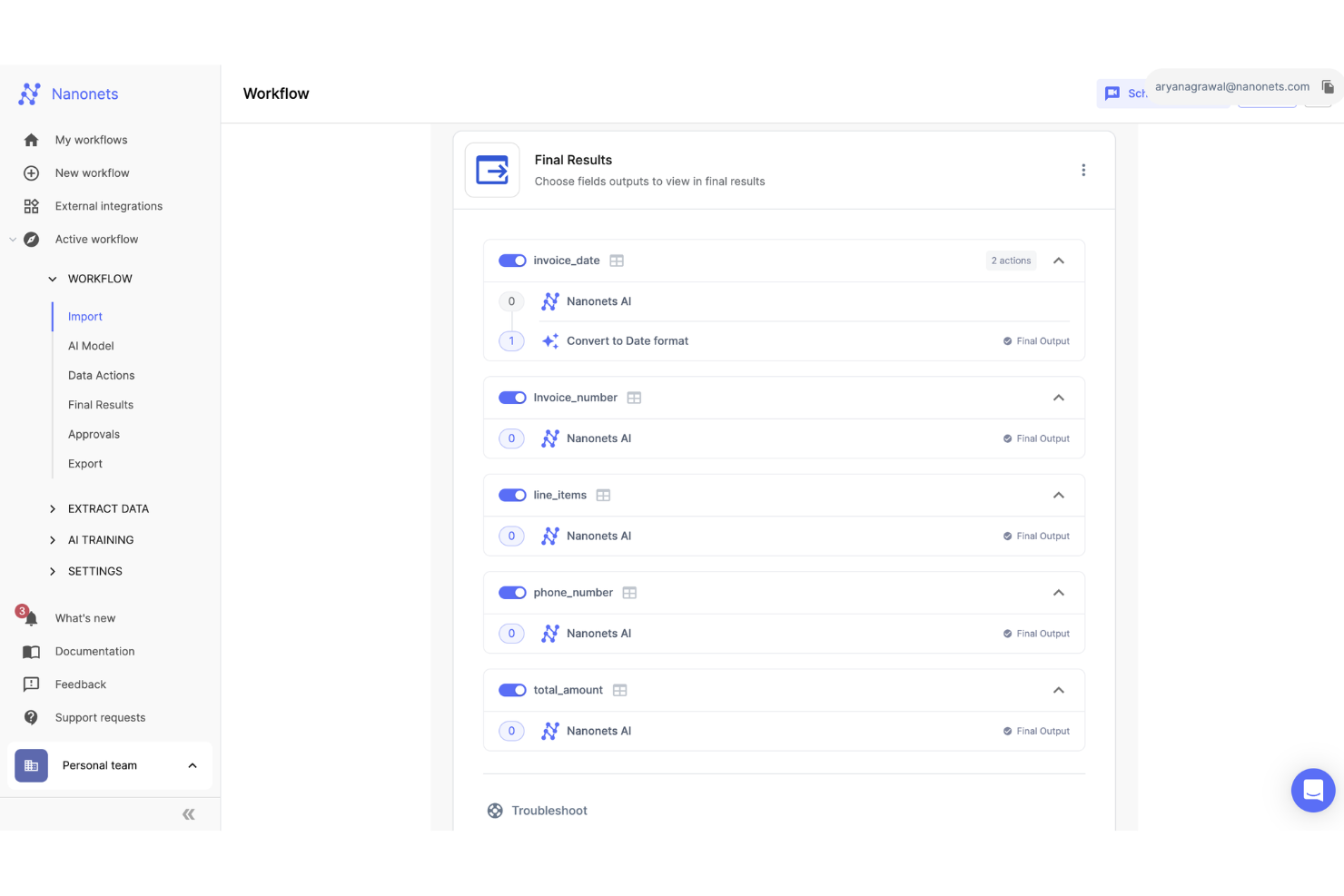
Nanonets è una piattaforma basata sull'intelligenza artificiale che automatizza l'elaborazione dei documenti e la gestione dei flussi di lavoro, apportando vantaggi a settori come finanza, sanità e logistica.
Perché ho scelto Nanonets: Mi piace la sua capacità di automatizzare processi aziendali complessi tramite una piattaforma no-code, che riduce la necessità di intervento manuale. Questo risultato si ottiene sfruttando l'intelligenza artificiale (AI) per automatizzare attività come l'elaborazione dei documenti, la gestione delle fatture e l'estrazione dei dati. L'integrazione dell'AI non solo accelera questi processi, ma ne aumenta anche la precisione e l'efficienza, aspetti critici per le aziende che mirano a migliorare la produttività.
L'inclusione di flussi di lavoro AI con supervisione umana è un altro aspetto vantaggioso, poiché consente alle aziende di integrare il controllo umano nei processi automatizzati dove necessario, contribuendo così a mantenere un elevato livello di accuratezza e conformità.
La piattaforma rispetta inoltre rigorosi standard di protezione dei dati come GDPR, SOC 2 e HIPAA, assicurando che i dati sensibili delle aziende siano trattati con attenzione. Questa attenzione alla sicurezza rende Nanonets una scelta affidabile per le organizzazioni che danno priorità alla privacy dei dati.
Funzionalità e integrazioni distintive di Nanonets
Le funzionalità includono estrazione di insight da dati non strutturati, estrazione dati da vari documenti come fatture, polizze di carico, ordini d'acquisto e carte d'identità, oltre a soluzioni su misura per settori come finanza, manifatturiero e assicurativo.
Le integrazioni comprendono Quickbooks, Salesforce, Google Sheets, Dropbox e Zapier.

ClickUp
Ideale per la gestione completa dei progetti
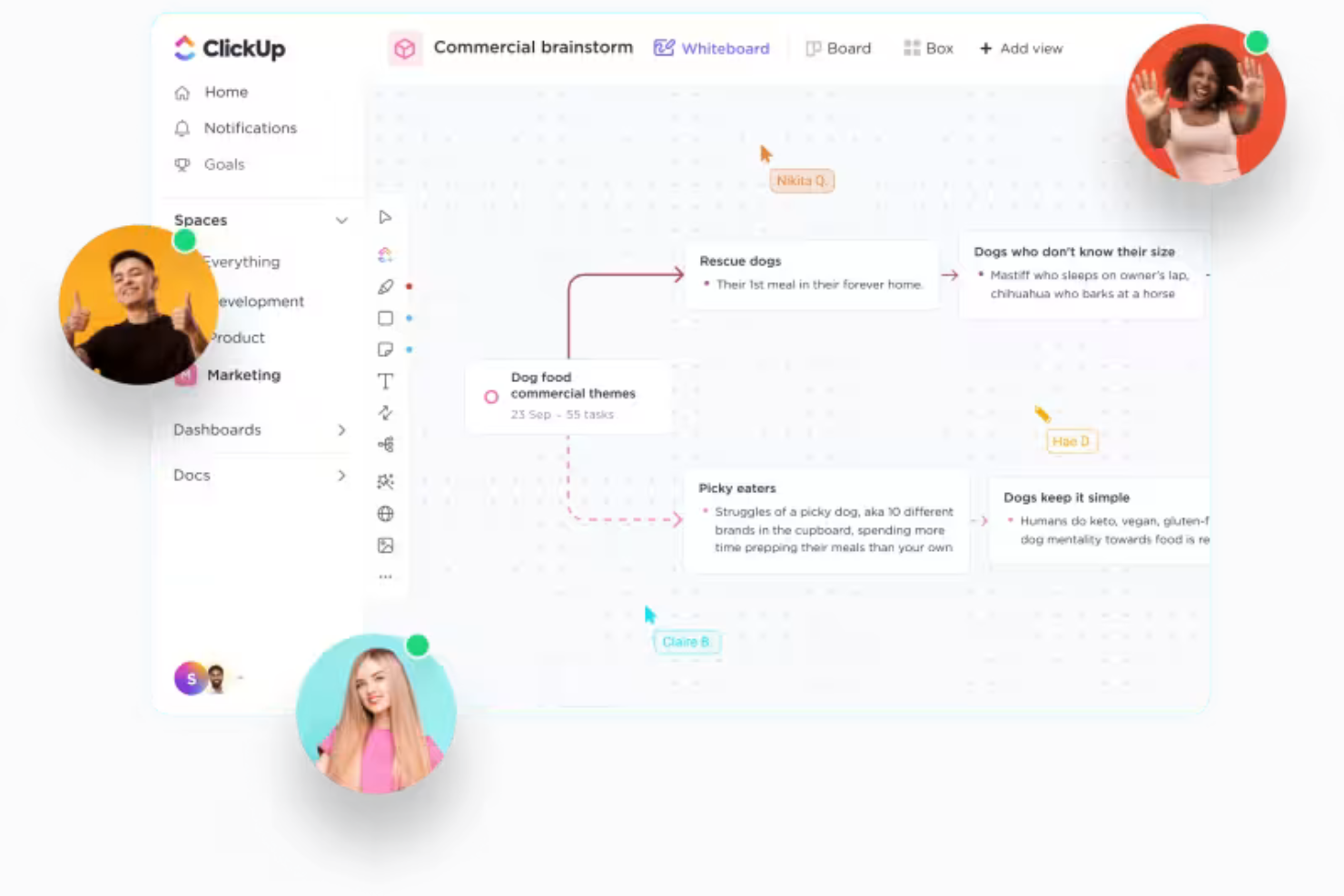
ClickUp è una soluzione robusta e completa per la gestione dei flussi di lavoro, dei progetti, delle risorse e delle conoscenze. Dispone inoltre di strumenti di collaborazione per favorire un migliore lavoro di squadra.
Perché ho scelto ClickUp: Questa piattaforma si è guadagnata un posto nella mia lista grazie alla sua suite di funzionalità complete che riunisce vari strumenti di gestione del lavoro in un unico hub centralizzato. Invece di collegare sistemi separati per gestire flussi di lavoro, risorse, progetti e altro ancora, puoi impostare tutto in un unico posto.
Gli strumenti di gestione dei flussi di lavoro del sistema includono automazioni, costruttori di moduli e campi e stati personalizzati. La lavagna integrata ti permette di mappare visivamente i tuoi flussi di lavoro, che poi puoi applicare alle bacheche di gestione dei progetti, alle checklist delle attività e altro ancora. Le capacità di reportistica del software ti aiutano a monitorare l'efficienza e i risultati insieme all'utilizzo delle risorse e ad altri indicatori chiave.
Funzionalità e integrazioni principali di ClickUp
Le funzionalità includono archivio documenti, lavagne, collaborazione e comunicazione in tempo reale, dashboard personalizzati per i report, gestione delle attività, visualizzazioni calendario e bacheca, monitoraggio degli obiettivi e modelli di attività.
Le integrazioni includono Dropbox, Figma, GitHub, Google Suite, HubSpot, Slack, Toggl Track e altro ancora. Zapier consente anche ulteriori integrazioni.
New Product Updates from ClickUp
ClickUp Adds Meetings Hub, Super Agent Templates, and ZoomInfo Integration
ClickUp adds a searchable Meetings Hub, new ways to clone and template Super Agents, and a ZoomInfo integration through the App Center. These updates improve meeting retrieval, agent reuse, and access to sales intelligence. For more information, visit ClickUp’s official site.

Nifty
Ideale per i team di prodotto

Immagina uno strumento che riunisce i progetti, i compiti e le comunicazioni del tuo team in un unico spazio organizzato: è qui che Nifty diventa il tuo alleato indispensabile. Progettato per professionisti di settori come marketing, IT e legale, Nifty ti aiuta a gestire con facilità le complessità della gestione dei progetti. Grazie a funzionalità come gestione delle attività, comunicazione in tempo reale e automazione dei flussi di lavoro, Nifty risponde all'esigenza di una piattaforma coesa che incrementa produttività e collaborazione.
Perché ho scelto Nifty
Ho scelto Nifty per la sua capacità di soddisfare in modo specifico le esigenze dei team di prodotto, offrendo funzionalità come i diagrammi di Gantt e la reportistica automatica degli sprint, fondamentali per la gestione di flussi di lavoro complessi. Con il suo portfolio prodotti centralizzato, Nifty consente al team di consolidare i flussi di lavoro e gestire la pianificazione delle funzionalità senza interruzioni. Apprezzo come la struttura di Nifty supporti la gestione del backlog e degli sprint, suddividendo lo sviluppo del prodotto in attività gestibili. Inoltre, gli embed personalizzati dei progetti e la creazione di documenti in formato ricco garantiscono che il team possa prendere decisioni informate e rimanere allineato sui requisiti delle funzionalità.
Caratteristiche principali di Nifty
Oltre ai vantaggi per i team di prodotto, Nifty offre una suite di funzionalità che migliorano la gestione dei flussi di lavoro per diversi gruppi di lavoro.
- Roadmap: Visualizza le tempistiche dei progetti e allinea gli obiettivi del team con roadmap chiare e interattive che tengono tutti aggiornati.
- Discussioni: Favorisci la collaborazione e il feedback in tempo reale grazie ai thread di discussione integrati all'interno dei progetti.
- Documenti & File: Crea e gestisci facilmente la documentazione dei progetti, con la possibilità di integrare Google Docs per una collaborazione senza intoppi.
- Moduli: Crea e personalizza moduli per raccogliere dati fondamentali e automatizzare la creazione delle attività nel tuo flusso di lavoro.
Integrazioni di Nifty
Le integrazioni includono Harvest, Webex, Zoom, Slack, GitHub, Microsoft Suite, Google Drive, Miro, Typeform e Google Calendar.
Pros and Cons
Pros:
- L'interfaccia intuitiva di Nifty semplifica la gestione dei progetti per i team.
- L'integrazione senza soluzione di continuità con Google Docs migliora la collaborazione sui documenti.
- La chat integrata facilita la comunicazione in tempo reale all'interno del team.
Cons:
- Le integrazioni native sono limitate rispetto ai concorrenti come ClickUp.
- Problemi tecnici occasionali possono interrompere l'esperienza utente.
Kintone
Ideale per creare app di workflow

Kintone è una piattaforma per il lavoro che consente ai team di creare e condividere flussi di lavoro personalizzati. Ogni team può utilizzare lo strumento per creare le app di cui ha bisogno, che si tratti di un CRM, di un report spese o di un calendario editoriale.
Lo strumento offre oltre 1.000 modelli che puoi utilizzare per distribuire le app che ti servono. Puoi anche personalizzarli per assicurarti che soddisfino le esigenze specifiche del tuo flusso di lavoro. Inoltre, l'interfaccia No-Code rende facile per chiunque nel tuo team creare gli strumenti di cui ha bisogno.
Lo strumento dispone anche di numerose integrazioni che puoi utilizzare per gestire dati esterni all'interno della tua app. Ad esempio, puoi aggiungere file Dropbox all'app o registrare informazioni raccolte tramite email.
Kintone parte da $24 per utente al mese per un minimo di cinque utenti. C'è anche un piano da $15 al mese per istituti scolastici, enti governativi e associazioni senza scopo di lucro.
Altre app per i flussi di lavoro
Ecco alcune altre app per i flussi di lavoro che non sono entrate nella lista principale. Questi strumenti potrebbero comunque essere una buona scelta per l’azienda giusta.
- Process Street
Ideale per flussi di lavoro e SOP senza codice
- Camunda Platform
Ideale per la gestione di progetti e team
- Admation
Ideale per team creativi e di marketing
- beSlick
Ideale per documentare i processi aziendali
- Kissflow Workflow
Ideale per facilità d'uso
- Next Matter
Ideale per flussi di lavoro interfunzionali
- Content Workflow
Ideale per i flussi di lavoro di produzione dei contenuti
- Ravetree
Miglior gestione dei flussi di lavoro per le richieste
- Pneumatic Workflow
La migliore piattaforma orientata ai flussi di lavoro
- Height
Ideale per i flussi di lavoro di gestione delle attività
- ReptonPOD
Ideale per progetti multifase
- Creatio CRM
Ideale per i flussi di lavoro legati ai clienti
- Creatio AI Studio
Ideale per l'automazione dei flussi di lavoro senza codice
- Quire
Ideale per flussi di lavoro con suddivisione delle attività
- Smartsheet
Ideale con viste multiple e integrazioni
- Connecteam
Ideale per monitorare i flussi di lavoro dei dipendenti in prima linea
- Hive
Ideale per lavorare con partner esterni
- GoodDay
Ideale per la gestione di progetti con metodologie multiple
- Qntrl
Ideale per l'automazione dei flussi di lavoro basati su schede
- TaskRay
Ideale per flussi di lavoro orientati al cliente


Come valuto le app di workflow
Valuto le app di workflow su due livelli: le funzionalità indispensabili—come la ramificazione condizionale e l'instradamento delle approvazioni—e i fattori di differenziazione che distinguono le soluzioni più performanti da quelle nella media.
Funzionalità di base (Requisiti indispensabili per questa lista)
Queste capacità di base rappresentano i criteri di accettazione per l'inclusione nella mia lista di app di workflow:
- Builder visivo di workflow: Cerco una superficie drag-and-drop in cui i team operativi possano mappare processi multi-step—come l'onboarding del personale o gli ordini d'acquisto—senza dover scrivere codice.
- Automazione di trigger e azioni: Ogni strumento dovrebbe offrire trigger basati su eventi (invio di moduli, variazioni di record, pianificazioni) che attivano azioni automatiche su più fasi.
- Logica condizionale e ramificazione: Valuto se è possibile impostare regole if/then, percorsi paralleli e instradamenti dinamici—come l'escalation di un'approvazione legata al valore di un contratto.
- Approvazioni e assegnazione dei compiti: Verifico la presenza di flussi di approvazione integrati con instradamento basato sui ruoli, delega e gestione escalation, poiché questi aspetti guidano la maggior parte dei casi d'uso reali dei workflow.
- Integrazioni con terze parti: Un'app di workflow deve avere connettori per gli strumenti già utilizzati dal tuo team—Slack, Salesforce, Jira, Google Workspace—oltre a webhook o API per esigenze personalizzate.
- Moduli e raccolta dati: Moduli configurabili che raccolgono dati strutturati per avviare o far avanzare un workflow sono essenziali, sia che si tratti di richieste IT, note spese o onboarding fornitori.
Valuto ogni fornitore su una scala da 0 (non offre la funzionalità) a 5 (eccelle in quest'area) per ogni criterio.
I fornitori devono raggiungere un punteggio medio minimo per poter essere considerati per l'inclusione nella mia lista. Da lì, considero ciò che rende unica ciascuna piattaforma.
Fattori differenzianti (Cosa distingue i fornitori)
Dopo aver selezionato la mia lista, ecco come confronto i diversi fornitori nel settore delle app di workflow:
Funzionalità distintive
Cerco assistenza ai workflow tramite intelligenza artificiale che semplifichi la creazione e l'ottimizzazione dei processi, come la generazione di flussi automatici da prompt testuali o l'analisi dei colli di bottiglia. Dashboard di analisi dei processi robuste aiutano i team a individuare inefficienze nei cicli di approvazione o nell'instradamento dei ticket. Un'esecuzione tramite app mobile nativa può fare la differenza per i team sul campo o per i manager che approvano richieste mentre sono in movimento. Valuto anche se la piattaforma offre controllo delle versioni e sandbox per testare in sicurezza workflow complessi prima di pubblicare i cambiamenti.
Oltre le funzionalità
La profondità dell'ecosistema di integrazione è fondamentale—verifico se una piattaforma si connette nativamente agli strumenti già usati dai team, come Jira, Salesforce o Microsoft 365, e se supporta integrazioni iPaaS tramite Zapier o Make. La sicurezza e la conformità sono altrettanto importanti, soprattutto per i team che gestiscono dati sensibili; cerco la certificazione SOC 2 Type II, il supporto SSO/SAML e controlli di accesso granulari basati sui ruoli. Valuto inoltre i controlli di governance, come le barriere di sicurezza per citizen-developer che impediscono l'attivazione non autorizzata di automazioni senza una revisione amministrativa.
Come scegliere un’app per i flussi di lavoro
È facile sentirsi sopraffatti da lunghi elenchi di funzionalità e prezzi complessi. Per aiutarti a rimanere concentrato durante il processo di selezione del software, ecco una lista di controllo dei principali fattori da tenere a mente:
| Fattore | Cosa considerare |
| Scalabilità | Assicurati che l’app possa crescere insieme al tuo team. Controlla i limiti di utenti, la complessità dei flussi di lavoro e l’automazione. Con l’espansione dell’azienda, dovrebbe supportare processi aggiuntivi senza richiedere una curva di apprendimento ripida. |
| Integrazioni | La tua app per i flussi di lavoro deve potersi connettere a strumenti come CRM, software per la gestione dei progetti, posta elettronica e archiviazione. Verifica la disponibilità di integrazioni native e API per evitare soluzioni manuali alternative. |
| Personalizzazione | Scegli un’app che adatti flussi di lavoro, campi e regole di automazione alle tue esigenze senza richiedere competenze di programmazione. |
| Facilità d’uso | Cerca un’interfaccia intuitiva, strumenti di creazione con trascinamento e requisiti minimi di formazione, così l’introduzione sarà rapida. |
| Budget | Confronta i piani tariffari e i costi aggiuntivi, come le tariffe per gli utenti, i limiti di automazione o i componenti aggiuntivi per le integrazioni. Assicurati che il valore corrisponda alle tue esigenze. |
| Misure di sicurezza | Assicurati che siano presenti crittografia, controlli degli accessi e conformità a standard come GDPR o SOC 2. |
| Funzionalità di collaborazione | Cerca aggiornamenti in tempo reale, notifiche e autorizzazioni basate sui ruoli per mantenere i team allineati. |
| Accessibilità da dispositivi mobili | Un’app ottimizzata per i dispositivi mobili garantisce una gestione fluida delle attività anche in mobilità. |
Se tutto questo ti sembra troppo complesso per le tue esigenze, valuta gli strumenti di orchestrazione dei flussi di lavoro o i software per la gestione dei processi aziendali. Entrambi aiutano ad automatizzare e coordinare i processi tra sistemi e team.
Tendenze nelle app per i flussi di lavoro
Nella mia ricerca, ho raccolto innumerevoli aggiornamenti sui prodotti, comunicati stampa e registri delle versioni di diversi fornitori di app per flussi di lavoro. Ecco alcune delle tendenze emergenti che sto tenendo d’occhio:
- Ottimizzazione dei processi basata sull’IA: un numero sempre maggiore di app utilizza l’IA per analizzare i flussi di lavoro e suggerire miglioramenti. Alcuni strumenti di automazione intelligente dei processi rilevano automaticamente i colli di bottiglia e modificano dinamicamente le priorità per ridurre le inefficienze senza interventi manuali.
- Creazione di regole senza codice: oggi le app per flussi di lavoro offrono strumenti per creare regole tramite trascinamento per approvazioni, notifiche e percorsi ramificati, consentendo ai team di personalizzare i flussi di lavoro senza ricorrere alla programmazione o al supporto IT.
- Pannelli di analisi integrati: i pannelli integrati monitorano i tempi di ciclo, i tassi di completamento e la distribuzione del carico di lavoro, consentendo di prendere decisioni in tempo reale senza strumenti di reportistica separati.
- Sincronizzazione delle attività tra piattaforme: la sincronizzazione bidirezionale tra strumenti di gestione dei progetti, comunicazione e documentazione mantiene coerenti le attività su tutte le piattaforme.
- Elaborazione dei documenti basata sull’IA: oggi l’IA classifica, estrae e riepiloga automaticamente i documenti, riducendo l’inserimento manuale dei dati per fatture, contratti e moduli.
Che cos’è un’app per flussi di lavoro?
Un’app per flussi di lavoro è uno strumento che automatizza, organizza e monitora attività, approvazioni e processi su un’unica piattaforma centralizzata.
È un tipo di strumento di automazione dei processi che aiuta i team a creare e gestire flussi di lavoro ripetibili, assegnare responsabilità, far rispettare le scadenze e monitorare i progressi. Utilizzate da responsabili di progetto, team operativi e aziende, le app per flussi di lavoro semplificano la collaborazione e garantiscono coerenza sia nei processi di routine sia in quelli complessi.
Funzionalità delle app per flussi di lavoro
Quando scegli le app per flussi di lavoro, presta attenzione alle seguenti funzionalità chiave:
- Automazione dei processi: questa funzionalità consente di configurare sequenze di attività che vengono eseguite automaticamente in base a determinati eventi attivatori. Puoi risparmiare tempo lasciando che i processi di routine si svolgano autonomamente, riducendo il lavoro manuale ripetitivo.
- Gestione delle attività: puoi assegnare, monitorare e stabilire la priorità delle attività all’interno dei flussi di lavoro. In questo modo tutti sanno chiaramente cosa deve essere fatto e quando, evitando che qualcosa venga trascurato.
- Strumenti di collaborazione: funzionalità come spazi di lavoro condivisi e discussioni mantengono connessi i membri del team. Puoi comunicare, condividere file e rimanere aggiornato con meno difficoltà.
- Flussi di lavoro personalizzabili: puoi adattare i flussi di lavoro ai tuoi esclusivi processi aziendali. Modifica i passaggi, aggiungi logiche condizionali o adatta i requisiti di approvazione affinché l’app rispecchi il tuo modo effettivo di lavorare.
- Notifiche e promemoria: ricevi avvisi tempestivi quando un’attività richiede la tua attenzione o quando si avvicina una scadenza. Questo aiuta te e il tuo team a mantenere un approccio proattivo anziché reattivo.
- Funzionalità di integrazione: collega la tua app per flussi di lavoro ad altri strumenti aziendali, come le app di posta elettronica, i calendari o l’archiviazione dei documenti, per mantenere tutto connesso e ridurre il doppio inserimento dei dati.
- Registri di controllo: ogni azione e aggiornamento viene registrato, così hai a disposizione uno storico chiaro. Questo rafforza la responsabilità e semplifica notevolmente i controlli di conformità.
- Reportistica e analisi: i pannelli visivi e i report dettagliati mostrano dove i processi scorrono fluidamente o si bloccano. In questo modo puoi individuare i colli di bottiglia e migliorare continuamente i tuoi processi.
Funzionalità dell’IA comuni nelle app per flussi di lavoro
Oltre alle funzionalità standard delle app per flussi di lavoro elencate sopra, i software di automazione dei flussi di lavoro basati sull’IA aggiungono funzionalità come:
- Automazione intelligente dei processi: l'IA identifica gli schemi ripetitivi nei flussi di lavoro e suggerisce automazioni, aiutandoti a ottimizzare ancora più attività con una configurazione manuale minima.
- Analisi predittiva: analizzando i dati storici dei flussi di lavoro, l'IA prevede i futuri colli di bottiglia o ritardi. Questo ti permette di individuare in anticipo i problemi e reindirizzare proattivamente le attività.
- Instradamento intelligente: l'IA valuta chi è disponibile o più qualificato per gestire una determinata attività, quindi assegna le responsabilità di conseguenza. Mantieni equilibrati i carichi di lavoro ed eviti di sovraccaricare i tuoi collaboratori più performanti.
- Elaborazione automatizzata dei documenti: con l'IA, le app per flussi di lavoro possono estrarre informazioni da file e moduli, inserire automaticamente i dati e segnalare le incoerenze. Niente più selezione manuale dei documenti o refusi che rallentano il lavoro.
- Elaborazione del linguaggio naturale: l'IA ti permette di interagire con l'app usando un linguaggio semplice e quotidiano, ad esempio «crea una nuova approvazione per il team di vendita». Questo riduce le difficoltà per chiunque entri a far parte del tuo flusso di lavoro, indipendentemente dalle proprie competenze tecnologiche.
- Rilevamento delle anomalie: l'IA monitora i dati del flusso di lavoro alla ricerca di attività o errori insoliti. Se qualcosa non è corretto, ad esempio un processo che richiede molto più tempo del solito, ricevi un avviso tempestivo per poter intervenire.
Vantaggi delle app per flussi di lavoro
L'implementazione di app per flussi di lavoro può offrire diversi vantaggi al tuo team e alla tua azienda. Ecco alcuni dei principali:
- Completamento più rapido delle attività: automatizza il lavoro ripetitivo e mantiene le attività in movimento con notifiche e azioni pianificate.
- Meno errori: riduce gli errori applicando flussi di lavoro strutturati, regole preimpostate e convalida automatica dei dati.
- Migliore coordinamento del team: mantiene tutti aggiornati con elenchi di attività condivisi, aggiornamenti sullo stato e strumenti di collaborazione.
- Maggiore visibilità sui processi: offre un monitoraggio in tempo reale, così i team possono vedere a colpo d'occhio i colli di bottiglia, le approvazioni in sospeso e l'avanzamento delle attività.
- Monitoraggio più semplice della conformità: registra azioni, approvazioni e modifiche, semplificando il rispetto dei requisiti normativi e la verifica dei flussi di lavoro.
- Approvazioni più efficienti: instrada le attività alle persone giuste per l'approvazione, riducendo i ritardi e i solleciti manuali.
- Processo decisionale più efficace: raccoglie i dati dei flussi di lavoro e genera report che aiutano i team ad analizzare le tendenze e migliorare i processi.
Costi e prezzi delle app per flussi di lavoro
La scelta delle app per flussi di lavoro richiede la comprensione dei diversi modelli di prezzo e dei piani disponibili. I costi variano in base alle funzionalità, alle dimensioni del team e ai componenti aggiuntivi. La tabella seguente mostra i piani più comuni, i prezzi medi e le funzionalità tipiche delle app per flussi di lavoro:
Tabella comparativa dei piani per le app per flussi di lavoro
| Tipo di piano | Prezzo medio | Funzionalità comuni |
| Piano gratuito | $0 | Automazione di base delle attività, utenti limitati, integrazioni di base e spazio di archiviazione minimo. |
| Piano personale | $5-$15/user/month | Automazione avanzata delle attività, flussi di lavoro personalizzati, assistenza prioritaria e accesso da dispositivi mobili. |
| Piano aziendale | $20-$40/user/month | Strumenti di collaborazione del team, report dettagliati, accesso API e limiti di automazione più elevati. |
| Piano per grandi aziende | $50+/user/month | Controlli di sicurezza avanzati, account manager dedicato, integrazioni personalizzate e flussi di lavoro illimitati. |
Domande frequenti sulle app per flussi di lavoro
Ecco alcune risposte alle domande più comuni sulle app per flussi di lavoro:
Qual è la differenza tra un'app per flussi di lavoro e uno strumento di gestione dei progetti?
Un’app per flussi di lavoro aiuta ad automatizzare e gestire processi ripetibili, come le approvazioni o l’inserimento dei nuovi dipendenti. Gli strumenti di gestione dei progetti si concentrano sulla pianificazione delle attività, sull’assegnazione delle responsabilità e sul monitoraggio dei progressi di progetti specifici. Molti responsabili di progetto utilizzano entrambi: le app per flussi di lavoro semplificano i passaggi prevedibili, mentre gli strumenti di gestione dei progetti aiutano a mantenere sotto controllo progetti complessi e scadenze.
Le app per flussi di lavoro possono essere personalizzate per adattarsi ai nostri processi?
Sì, la maggior parte delle app per flussi di lavoro offre opzioni di personalizzazione, così puoi mappare i passaggi, i moduli e gli attivatori unici della tua squadra. Di solito puoi modificare i flussi di lavoro, aggiungere o rimuovere campi, impostare approvazioni personalizzate e creare automazioni specifiche. Questo ti consente di allineare il nuovo software ai processi esistenti senza dover partire da zero.
Come posso trasferire i flussi di lavoro della mia squadra in una nuova app?
In genere, si inizia mappando i processi attuali e poi si utilizzano gli strumenti di importazione o i modelli forniti da molte app per flussi di lavoro. La maggior parte delle piattaforme offre supporto durante l’inserimento per aiutare i responsabili di progetto a ricreare passaggi, autorizzazioni e notifiche. Testare prima la nuova configurazione con una squadra ristretta può garantire una transizione senza intoppi.
Le app per flussi di lavoro sono sicure per la gestione di informazioni sensibili?
Sì, le app per flussi di lavoro affidabili utilizzano la crittografia e offrono strumenti per gestire l’accesso degli utenti. Cerca app con aggiornamenti di sicurezza regolari, certificazioni di conformità (come SOC 2 o GDPR) e registri di controllo. Per i dati sensibili, scegli un’app con una documentazione di sicurezza chiara e impostazioni di autorizzazione solide
In che modo le app per flussi di lavoro gestiscono le autorizzazioni degli utenti e il controllo degli accessi?
La maggior parte delle app per flussi di lavoro consente di definire chi può visualizzare, modificare o approvare ogni passaggio del flusso di lavoro. Puoi assegnare ruoli ai membri della squadra o ai reparti, limitare l’accesso alle informazioni sensibili e aggiungere o rimuovere rapidamente gli utenti quando le squadre cambiano. Questo aiuta i responsabili di progetto a mantenere i processi efficienti e sicuri.
Le app per flussi di lavoro offrono l'accesso da dispositivi mobili?
Sì, molte app per flussi di lavoro dispongono di app mobili o siti web adattivi, così puoi gestire le approvazioni, monitorare i progressi e aggiornare le attività direttamente dal tuo telefono. Questo è particolarmente utile se gestisci squadre da remoto o distribuite che devono lavorare in mobilità.