

Le 10 migliori soluzioni software per i flussi di lavoro di approvazione nel 2026

10 Elenco dei migliori software per flussi di lavoro di approvazione


I migliori software per flussi di lavoro di approvazione semplificano il modo in cui il tuo team invia, esamina e approva risorse, documenti e decisioni, evitando che qualcosa rimanga bloccato. Questi strumenti sostituiscono le lunghe e disordinate conversazioni via e-mail e i processi di approvazione poco chiari con flussi di lavoro strutturati, promemoria automatici e responsabilità ben definite.
Ho utilizzato i miei 10 anni di esperienza nella gestione di progetti digitali in ambito governativo, sanitario, della vendita al dettaglio e dei trasporti per testare più di 30 strumenti per flussi di lavoro di approvazione. Analizzerò quali riducono davvero i continui scambi e accelerano il processo decisionale. Ho lavorato con team in cui le approvazioni lente causavano ritardi costosi e ho visto come lo strumento giusto possa prevenirli.
In questa guida ti presenterò i migliori software per flussi di lavoro di approvazione sulla base di test pratici. Ho evidenziato come ciascuno aiuti a formalizzare le approvazioni, mantenere i progetti in movimento ed eliminare i colli di bottiglia legati alle approvazioni.
Perché fidarsi dei nostri consigli sui software
Il nostro team testa e recensisce software dal 2012. In quanto project manager noi stessi, sappiamo quanto sia difficile — e importante — scegliere il software giusto.
Per questa guida, abbiamo valutato gli strumenti attraverso test pratici e ricerche indipendenti, assegnando un punteggio agli strumenti in base ai nostri criteri di selezione. Ci basiamo inoltre sulle competenze di leader di pensiero del settore e di professionisti attivi nella gestione dei progetti.
Le nostre recensioni riflettono il nostro giudizio editoriale umano, non un discorso di vendita.
Revisori esperti:
Tabella comparativa: software per flussi di lavoro di approvazione per responsabili di progetto
Confronta prezzi e specifiche di ciascuna delle mie scelte tra i migliori software per flussi di lavoro di approvazione.
| Tool | Best For | Trial Info | Price | ||
|---|---|---|---|---|---|
| 1 | Ideale per i flussi di lavoro all'interno dei portali clienti | Piano gratuito + demo gratuita disponibile | Da $12/utente/mese (minimo 10) | Website | |
| 2 | Ideale per le approvazioni e le firme elettroniche dei clienti nei progetti AEC | Prova gratuita di 14 giorni | A partire da 5,50 € per progetto attivo/mese (minimo 15 progetti) | Website | |
| 3 | Ideale per approvazioni creative a più fasi | Piano gratuito disponibile | Da $169/mese (fatturato annualmente) | Website | |
| 4 | Ideale per moduli e board di approvazione | Piano gratuito disponibile | Da $8/utente/mese. | Website | |
| 5 | Ideale per workflow no-code | Demo gratuita disponibile | Prezzo su richiesta | Website | |
| 6 | Ideale per la sincronizzazione bidirezionale dei dati CRM | Demo gratuita disponibile | Da $399/mese (fatturazione annuale) | Website | |
| 7 | Ideale per automazioni delle approvazioni | 14 giorni di prova gratuita | Da 9,80/utente/mese | Website | |
| 8 | Ideale per flussi di lavoro di gestione dei progetti | Piano gratuito + demo gratuita disponibile | Da $7/utente/mese (fatturazione annuale) | Website | |
| 9 | Ideale per operations di marketing | Demo gratuita disponibile | Prezzo su richiesta | Website | |
| 10 | Ideale per il suo builder drag-and-drop | 14 giorni di prova gratuita | Da $25/utente/mese | Website |


Recensioni dei migliori software per flussi di lavoro di approvazione
Di seguito troverai le mie scelte tra i migliori software per flussi di lavoro di approvazione. Ho fornito un riepilogo dettagliato di ciascuno, incluse schermate, funzionalità principali, integrazioni e alcuni vantaggi e svantaggi.

Moxo
Ideale per i flussi di lavoro all'interno dei portali clienti

Moxo è una piattaforma di automazione dei flussi di lavoro progettata per i project manager e i team a contatto con i clienti che necessitano di coordinare approvazioni, gestire documenti e monitorare attività in modo sicuro all'interno di un portale digitale personalizzato con il proprio marchio.
Per chi è ideale Moxo?
Moxo è particolarmente adatto per aziende di servizi e project manager che gestiscono flussi di lavoro rivolti ai clienti in settori come servizi finanziari, legali e consulenza.
Perché ho scelto Moxo
Ho scelto Moxo tra i migliori per il modo in cui gestisce le approvazioni all'interno di un portale rivolto ai clienti invece di mantenere tutto chiuso in strumenti interni. Ciò che apprezzo di più è che stakeholder esterni—clienti, partner, fornitori—possono entrare in un flusso di lavoro, vedere esattamente quale azione devono svolgere e completarla senza bisogno di una guida all'accesso o di lunghe catene di email. Utilizzo inoltre il branching condizionale di Moxo per instradare dinamicamente i passaggi di approvazione in base agli input dei moduli o alle decisioni precedenti, il che significa che un cliente che invia documentazione incompleta attiva automaticamente un ciclo di revisione-modifica-ripresentazione anziché bloccare l'intero processo. Inoltre, ogni azione è registrata in un dettagliato audit trail collegato a passi specifici, così ho sempre una traccia temporale di chi ha approvato cosa e quando.
Caratteristiche principali di Moxo
- Instradamento basato sui ruoli: Assegna automaticamente i passaggi dei flussi di lavoro ai partecipanti corretti in base a permessi e regole logiche, senza passaggi manuali.
- Timer SLA ed escalation: Attiva escalation automatiche quando vengono superate le scadenze, evitando che le approvazioni vadano in sospeso.
- Percorsi di flusso di lavoro paralleli: Esegue più rami del flusso di lavoro contemporaneamente, così i team non rimangono bloccati in attesa di approvazioni non correlate.
- SDK integrabile: Estende le funzionalità di workflow di Moxo direttamente nelle applicazioni esistenti tramite SDK iOS, Android e JavaScript.
Integrazioni di Moxo
Le integrazioni includono Salesforce, HubSpot, Box, Stripe, Formstack, Jotform e Zoom.
Pros and Cons
Pros:
- Portali personalizzati per i flussi di lavoro dei clienti
- Approvazioni multi-parte nello stesso portale
- I modelli di flusso di lavoro permettono di ripetere i processi
Cons:
- Il costruttore di flussi di lavoro può richiedere formazione su logiche complesse
- Configurazione e personalizzazione iniziali richiedono tempo significativo

Ziggu
Ideale per le approvazioni e le firme elettroniche dei clienti nei progetti AEC

Ziggu è una piattaforma di flussi di lavoro per le approvazioni rivolta ai clienti, progettata per aziende che lavorano per progetti e che offre approvazioni attivate dalle tappe, firme elettroniche, un portale clienti personalizzato con il proprio marchio e un registro di controllo integrato.
Per chi è più adatto Ziggu?
Ziggu è particolarmente adatto ai project manager nei settori dell'architettura, dell'ingegneria e dell'edilizia che necessitano di un portale clienti personalizzato con il proprio marchio per approvazioni e firme elettroniche digitali.
Perché ho scelto Ziggu
Ziggu si è guadagnato un posto nella mia selezione perché è l'unico strumento qui presente progettato specificamente per le approvazioni rivolte ai clienti nei progetti di architettura, ingegneria ed edilizia. Mi piace il fatto che i clienti possano esaminare proposte, selezionare opzioni e apporre una firma elettronica legalmente registrata ai PDF direttamente all'interno di un portale personalizzato con il proprio marchio, senza dover disporre di un account a pagamento. Ogni decisione genera automaticamente un registro di controllo con indicazione della data e dell'ora, quindi quando un appaltatore contesta una modifica all'ordine, la documentazione è già disponibile.
Funzionalità principali di Ziggu
- Modelli di flusso di lavoro basati sulle tappe: I modelli di progetto riutilizzabili consentono di associare decisioni, attività e pubblicazioni di documenti a ogni tappa, attivando automaticamente le azioni quando una fase ha inizio.
- Caricamento di proposte da più parti: Fornitori e partner possono caricare proposte concorrenti direttamente in una richiesta di decisione, consentendo ai clienti di confrontarle e selezionarle dall'interno del portale.
- Analisi del visualizzatore di documenti: Monitora quali clienti hanno visualizzato i documenti condivisi, ottenendo visibilità sul coinvolgimento prima della scadenza per l'approvazione.
- Prezzi per progetto con utenti illimitati: La fatturazione varia in base ai progetti attivi, non al numero di utenti, così puoi invitare qualsiasi numero di clienti, appaltatori o parti interessate senza costi aggiuntivi.
Integrazioni di Ziggu
Ziggu offre oltre 13 integrazioni documentate, tra cui Microsoft SharePoint, Google Drive, Dropbox, Power BI, Salesforce, HubSpot e Microsoft Dynamics 365. La sua API REST pubblica supporta integrazioni personalizzate, ma non offre webhook né connettori nativi per Asana, Jira, Monday.com o ClickUp.
Pros and Cons
Pros:
- Portali clienti dedicati per le approvazioni digitali
- Parti interessate esterne illimitate incluse per progetto
- Registro di controllo integrato e acquisizione della firma elettronica
Cons:
- Nessuna logica di approvazione condizionale o parallela
- Mancano integrazioni native con i principali strumenti di gestione dei progetti
Ideale per approvazioni creative a più fasi

StreamWork è pensato per team creativi e project manager che devono coordinare flussi di lavoro di approvazione complessi, centralizzare i feedback e mantenere i progetti in movimento con approvazioni chiare e tracciabili a ogni fase.
Per chi è ideale StreamWork?
StreamWork è particolarmente adatto a team creativi e di marketing che gestiscono grandi volumi di contenuti visivi che richiedono una revisione strutturata e la firma di più stakeholder.
Perché ho scelto StreamWork
Ho incluso StreamWork nella mia selezione per la sua capacità di gestire approvazioni creative a più fasi senza trasformare il processo in un collo di bottiglia. Mi piace il fatto che si possano mappare fasi di approvazione distinte, assegnare revisori specifici per ciascuna e impostare scadenze per ogni fase—così un asset di campagna può passare da un copywriter, a un direttore creativo, fino a un revisore legale, in sequenza e in modo automatico. Il routing delle approvazioni si aggiorna in tempo reale, così posso vedere esattamente dove è bloccato un contenuto senza rincorrere nessuno. Inoltre, il controllo versione è collegato direttamente allo storico delle approvazioni, e quindi so sempre chi ha approvato quale versione e quando.
Caratteristiche chiave di StreamWork
- Approvazioni in massa con modelli riutilizzabili: Gestisci campagne di grande volume usando modelli di approvazione preimpostati che si ripetono in cicli creativi simili, senza dover ricostruire i flussi di lavoro da zero.
- Commenti precisi al frame: Lascia feedback puntuale, con riferimento temporale, direttamente su frame video, immagini e documenti, così i revisori possono annotare esattamente ciò che va modificato.
- Conversione da commento a task: Trasforma ogni feedback in un'attività assegnabile direttamente all'interno della piattaforma, mantenendo le azioni collegate allo specifico asset di riferimento.
- Accesso revisori senza account: Condividi link di revisione con stakeholder o clienti esterni che possono visualizzare e commentare senza registrarsi o configurare nulla.
Integrazioni StreamWork
Le integrazioni includono Asana, monday.com, Slack, Dropbox, Box, Google Drive e Adobe Creative Cloud.
Pros and Cons
Pros:
- Percorsi di approvazione personalizzati a più fasi
- Controllo versione e gestione degli asset durante le revisioni
- Strumenti di feedback integrati su immagini, video e altro
Cons:
- Meno adatto a flussi di approvazione semplici
- La personalizzazione richiede un periodo di apprendimento

Ideale per moduli e board di approvazione
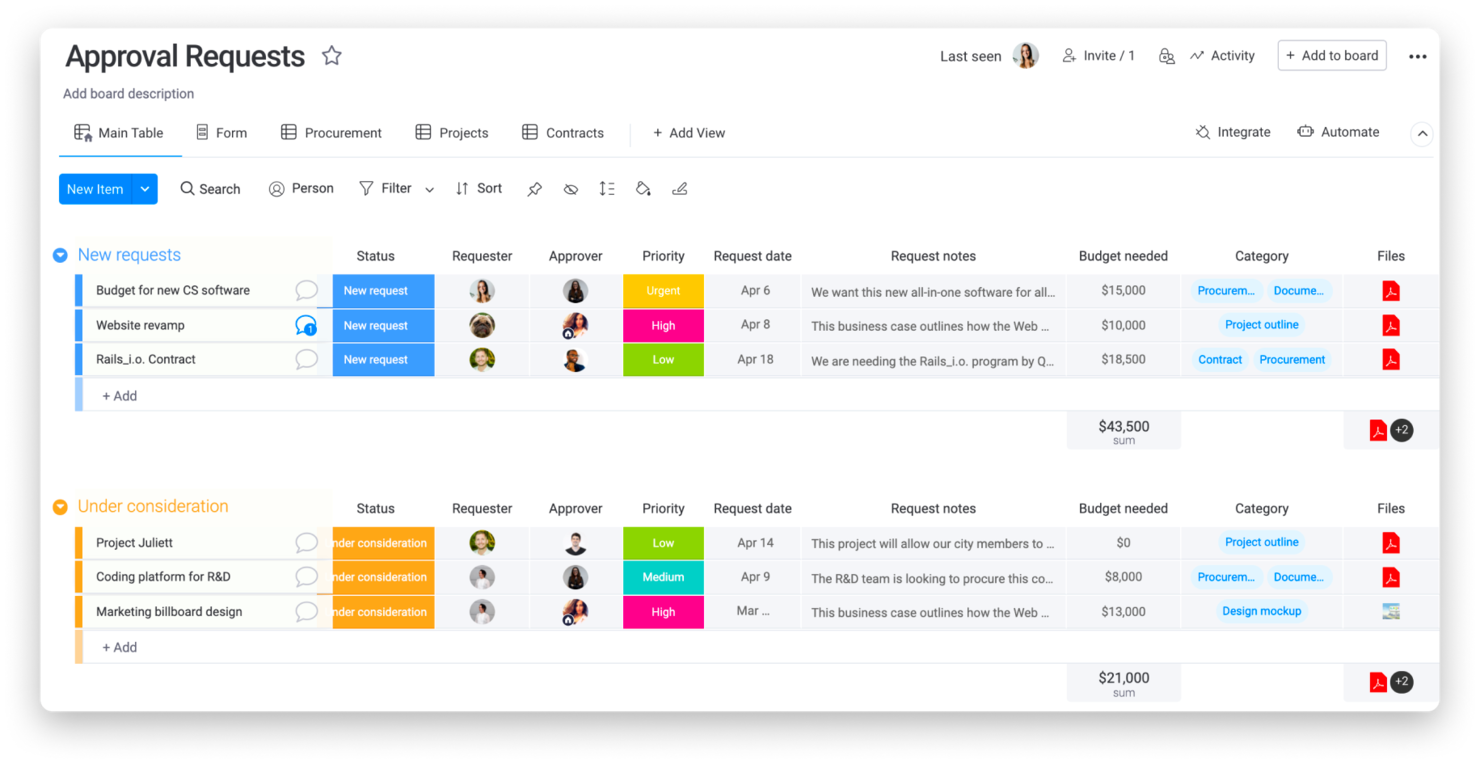
monday.com offre ai project manager dei team tecnologici e digitali una piattaforma flessibile per creare, automatizzare e monitorare i flussi di lavoro di approvazione, facilitando la gestione dei nulla osta, delle revisioni dei documenti e del feedback degli stakeholder in un unico luogo.
Per chi è più indicato monday.com?
monday.com è adatto a team interfunzionali di aziende tecnologiche di medie e grandi dimensioni che necessitano di un metodo visivo e personalizzabile per gestire le approvazioni su più progetti e reparti.
Perché ho scelto monday.com
monday.com si guadagna il suo posto tra i migliori nella mia lista per l'efficacia con cui i suoi moduli di approvazione e le sue board funzionano insieme come un sistema unico e integrato. Mi piace che si possa costruire un modulo di raccolta dati senza codice e con logica condizionale—così chi invia le richieste vede solo le domande rilevanti per la propria esigenza—e che le risposte arrivino direttamente su una board dove i revisori possono agire su di esse. Da lì, le automazioni gestiscono gli smistamenti: quando una colonna di stato passa a 'In attesa di approvazione', il revisore giusto viene notificato. Ho trovato particolarmente utile il modello Project Requests and Approvals come punto di partenza, poiché è già predisposto con moduli integrati, monitoraggio delle fasi e promemoria per le scadenze, tutto pronto all'uso.
Funzionalità principali di monday.com
- Colonne di stato approvazione: Tieni traccia della situazione di ogni richiesta con etichette di stato personalizzabili come 'In revisione', 'Approvato' o 'Rifiutato' direttamente sulla tua board.
- Vista carico di lavoro: Visualizza la capacità dei revisori nel tuo team per evitare colli di bottiglia quando vengono assegnate più richieste di approvazione contemporaneamente.
- Accesso ospite: Invita stakeholder esterni—come clienti o fornitori—a revisionare e approvare elementi senza dover concedere loro l'accesso completo all'account.
- Registro di controllo: Visualizza una cronologia con data e ora di ogni cambio di stato, commento e aggiornamento apportato a un elemento di approvazione per garantire responsabilità e tracciabilità ai fini della conformità.
Integrazioni di monday.com
Le integrazioni includono Salesforce, QuickBooks, HubSpot, Zendesk, Active Directory, GitHub, GitLab, Slack, Gmail e Microsoft Teams.
Pros and Cons
Pros:
- Monitoraggio e reportistica delle attività integrati
- Ampie opzioni di integrazione
- Workflow altamente personalizzabili
Cons:
- La configurazione iniziale può essere complessa
- Funzionalità offline limitate
New Product Updates from monday AI Workspace
monday AI Workspace Adds Human Approval Routing
monday AI Workspace adds a human-in-the-loop approval block to AI Workflows, sending approval requests and routing workflow paths based on responses. For more information, visit monday AI Workspace's official site.

Ideale per workflow no-code

Se desideri velocizzare e semplificare i tuoi processi di approvazione, Screendragon è perfetto per le operazioni di marketing e creative. La piattaforma no-code è ideale per i team aziendali che gestiscono flussi di lavoro complessi e offre anche strumenti integrati di automazione e gestione progetti per mantenere tutto in un unico posto. Le funzionalità di revisione e controllo delle versioni di Screendragon possono inoltre aiutarti a migliorare la produttività e il processo decisionale nei tuoi progetti.
Per chi è ideale Screendragon?
Screendragon supporta i team di gestione progetti e operazioni creative nelle aziende di medie e grandi dimensioni che necessitano di flussi di lavoro no-code per la pianificazione e i processi di approvazione. È adatto a aziende con collaboratori distribuiti che richiedono strumenti flessibili e visuali per progettare e gestire il lavoro strutturato senza risorse di sviluppo.
Perché ho scelto Screendragon
Ho scelto Screendragon per le sue funzionalità di flusso di lavoro no-code, che rispondono alle esigenze dei team di marketing e creativi che vogliono gestire i processi di approvazione senza competenze di programmazione. Il builder visuale dei flussi di lavoro della piattaforma consente di creare facilmente processi di approvazione complessi e include strumenti di automazione guidati dall’intelligenza artificiale che aiutano a eliminare i colli di bottiglia.
Screendragon offre inoltre informazioni in tempo reale sull’utilizzo delle risorse, permettendoti di monitorare chi sta lavorando su cosa e di gestire in modo più efficace le approvazioni di progetto. La piattaforma ti aiuta a concentrarti maggiormente su creatività e attività strategiche, invece di rimanere bloccato dalle incombenze amministrative.
Funzionalità principali di Screendragon
Screendragon dispone di diverse altre funzionalità che lo rendono utile come software per la gestione dei workflow di approvazione.
- Moduli personalizzabili dinamici: Questa funzione consente di creare moduli su misura per raccogliere i dati specifici necessari per le approvazioni, così da ottenere tutte le informazioni indispensabili in modo efficiente.
- Controlli avanzati dei permessi: Puoi impostare livelli di permesso dettagliati per controllare l’accesso a informazioni e attività sensibili e assicurarti che solo i membri autorizzati del team possano approvare o modificare i flussi di lavoro critici.
- Analisi e reportistica in tempo reale: Con l’analisi integrata, puoi visualizzare dati aggiornati sulle prestazioni dei flussi di lavoro e sulle tempistiche di approvazione, permettendoti di prendere decisioni informate rapidamente.
- Rispettare le scadenze: Screendragon applica automaticamente le scadenze e invia notifiche per mantenere il team allineato. Questo riduce al minimo il rischio di approvazioni mancate e ti aiuta a rispettare i tempi.
Integrazioni di Screendragon
Le integrazioni includono Microsoft Power BI, Slack, Microsoft Teams, Jira, Google Drive, Salesforce, HubSpot, Okta, Aprimo e SugarCRM.
Pros and Cons
Pros:
- Strumenti di feedback integrati che migliorano la collaborazione
- Reportistica completa che offre visibilità sui progressi
- Elevata adattabilità alle esigenze specifiche del settore
Cons:
- Configurazione e onboarding possono richiedere tempo
- La complessità può risultare eccessiva per team o organizzazioni di piccole dimensioni
New Product Updates from Screendragon
Screendragon Unveils New AI Hub
Screendragon introduced AI Hub, a new capability that lets teams build and manage AI agents directly within workflows. The update helps marketing teams automate tasks, maintain governance controls, and scale AI-driven operations more efficiently. For more information, visit Screendragon's official site.

altaFlow
Ideale per la sincronizzazione bidirezionale dei dati CRM

altaFlow è una piattaforma di automazione dei flussi di lavoro che aiuta i project manager e i team a semplificare processi di approvazione complessi, automatizzare l'instradamento dei documenti e garantire la conformità tra più sistemi aziendali.
Per chi è ideale altaFlow?
altaFlow è particolarmente indicato per team di medie e grandi dimensioni che gestiscono processi ricchi di approvazioni nell'ambito delle vendite, delle operazioni e della finanza.
Perché ho scelto altaFlow
altaFlow si è guadagnato un posto nella mia lista grazie al modo in cui colma il divario tra i flussi di lavoro dei documenti e i dati del CRM. La maggior parte degli strumenti di approvazione tratta il CRM come una destinazione finale: completi un flusso di lavoro e poi qualcuno aggiorna manualmente il record. Con altaFlow, la sincronizzazione è bidirezionale: preleva dati live da Salesforce per contratti e pacchetti di approvazione al momento della generazione, poi scrive automaticamente i dati dei documenti firmati, gli aggiornamenti di stato e i timestamp nel CRM una volta concluso il workflow. Apprezzo anche l'instradamento condizionale senza codice, che consente di impostare i percorsi di approvazione in base al valore della trattativa, al reparto o al livello di rischio senza dover ricorrere a uno sviluppatore.
Caratteristiche principali di altaFlow
- Instradamento automatico dei documenti: Instrada i documenti agli approvatori giusti in base a regole predefinite, ruoli o trigger di workflow.
- Registrazione della traccia di audit: Traccia ogni azione compiuta su un documento, incluse visualizzazioni, modifiche, approvazioni e rifiuti, con timestamp.
- Raccolta di firme elettroniche: Raccogli firme legalmente vincolanti direttamente all'interno dei flussi di approvazione senza passare a uno strumento separato.
- Controlli di accesso basati sui ruoli: Limita la visibilità e i permessi di modifica dei documenti in base ai ruoli dei membri del team o alla fase di approvazione.
Integrazioni di altaFlow
Le integrazioni includono Salesforce, NetSuite, SharePoint, Google Drive, OneDrive, Slack, Microsoft Teams, HubSpot, Microsoft Dynamics 365 e Box.
Pros and Cons
Pros:
- Supporta approvazioni multilivello e parallele
- Builder di workflow senza codice per approvazioni
- Conformità a SOC 2, HIPAA e GDPR
Cons:
- Meno modelli precompilati rispetto ad alcuni concorrenti
- Accesso API solo nei piani premium

Wrike
Ideale per automazioni delle approvazioni
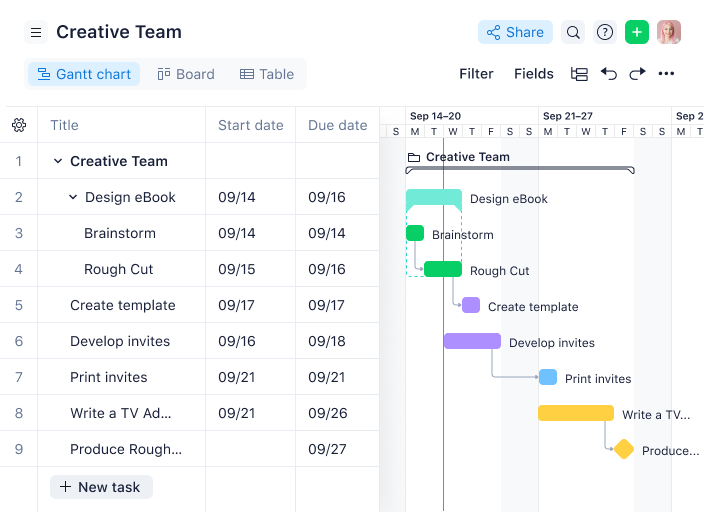
Wrike offre ai project manager nei team tecnologici e digitali una piattaforma centralizzata per automatizzare le approvazioni, gestire i flussi di lavoro dei progetti e mantenere il lavoro cross-funzionale in movimento senza colli di bottiglia.
Per chi è Wrike?
Wrike è particolarmente adatto ai team tecnologici di medie e grandi dimensioni che necessitano di una consegna strutturata dei progetti con processi di approvazione e revisione integrati.
Perché ho scelto Wrike
Wrike si guadagna un posto nella mia lista ristretta per quanto profondamente l'automazione delle approvazioni sia integrata nei flussi di lavoro dei progetti, e non aggiunta successivamente come un ripensamento. Mi piace che si possano incorporare le approvazioni direttamente nei flussi di lavoro di attività e progetti, così quando una consegna raggiunge uno stato specifico, il giusto responsabile dell'approvazione viene notificato automaticamente, senza che nessuno debba rincorrerlo. Anche i moduli di richiesta dinamici di Wrike fanno molto lavoro pesante in questa fase — utilizzano una logica condizionale per raccogliere esattamente le informazioni di cui gli approvatori hanno bisogno sin dall'inizio, riducendo i passaggi avanti e indietro prima ancora che inizi la procedura di approvazione. La dashboard delle approvazioni in sospeso offre al mio team una panoramica di tutto ciò che è in attesa di una decisione, così nulla si blocca silenziosamente a metà progetto.
Caratteristiche principali di Wrike
- Revisione online: Revisiona e commenta immagini, video e documenti direttamente nelle attività, senza scaricare file né passare ad altri strumenti.
- Visualizzazione diagramma di Gantt: Visualizza le tempistiche dei progetti, mappa le dipendenze tra attività e regola i programmi trascinando e rilasciando le attività su una timeline interattiva.
- Stati di workflow personalizzati: Definisci gli stadi delle attività che rispecchiano il vero processo del team, così il lavoro passa attraverso fasi chiaramente etichettate dall'inizio alla fine.
- Prenotazione delle risorse: Riserva membri del team per progetti specifici, stima le ore necessarie e verifica la disponibilità prima di assegnare il lavoro.
Integrazioni di Wrike
Le integrazioni includono Salesforce, Microsoft Teams, Google Drive, Adobe Creative Cloud, Zoom, Tableau, Power BI, QuickBooks, Miro e Google Sheets.
Pros and Cons
Pros:
- Definisci approvazioni condizionali per scenari specifici
- Tracciamento automatico delle decisioni
- Allega file e monitora le revisioni in un'unica attività
Cons:
- Può risultare eccessivo per semplici approvazioni
- Configurazione aggiuntiva delle regole di approvazione per casi non standard
New Product Updates from Wrike
Wrike Adds Klaxoon MCP Integration
Wrike’s Klaxoon MCP integration is now generally available, enabling AI agents to navigate between Wrike tasks and attached whiteboards, read task context, and manage whiteboard attachments via API. For more information, visit Wrike's official site.

ClickUp
Ideale per flussi di lavoro di gestione dei progetti

ClickUp offre ai team un modo flessibile per creare e automatizzare i flussi di lavoro di approvazione insieme alle attività di gestione dei progetti. È particolarmente adatto per le organizzazioni che desiderano personalizzare i processi di approvazione di documenti, materiali creativi o richieste operative all'interno di un'unica piattaforma. Grazie alla combinazione di stati delle attività, automazioni e campi personalizzati, ClickUp aiuta i team ad adattare i flussi di approvazione alle proprie necessità specifiche.
Per chi è ideale ClickUp?
ClickUp supporta team di progetto e operativi, dalle piccole imprese alle grandi aziende, che necessitano di flussi di lavoro strutturati integrati nella gestione dei progetti. Si adatta a società di ogni settore che richiedono coordinamento centralizzato delle attività, punti di controllo per le approvazioni e visibilità per collaboratori distribuiti.
Perché ho scelto ClickUp
Ciò che distingue ClickUp rispetto ad altri software di gestione dei flussi di approvazione è la possibilità di progettare processi di approvazione altamente personalizzabili per qualsiasi team o tipo di progetto. Puoi creare stati personalizzati delle attività per riflettere ogni fase del flusso di approvazione, dalla bozza alla revisione fino all'approvazione finale. Apprezzo come le automazioni di ClickUp consentano di attivare notifiche o modifiche di stato una volta completate le approvazioni, mantenendo tutti aggiornati. La flessibilità di aggiungere campi e modelli personalizzati permette di adattare i flussi di approvazione a tutto, dalle campagne di marketing alle richieste IT.
Funzionalità principali di ClickUp
Altre funzionalità rilevanti per i flussi di approvazione includono:
- Revisione e annotazione: I revisori possono aggiungere commenti e contrassegnare documenti o immagini direttamente nelle attività.
- Dipendenze tra attività: Imposta le attività in modo che necessitino di approvazione prima che altre possano iniziare.
- Accesso ospite: Invita stakeholder esterni a partecipare a specifiche fasi di approvazione.
- Registro attività: Traccia ogni azione e decisione presa durante tutto il processo di approvazione.
Integrazioni di ClickUp
Le integrazioni includono Slack, GitHub, GitLab, HubSpot, Everhour, Toggl, Harvest, Google Drive, OneDrive e Dropbox.
Pros and Cons
Pros:
- Allinea i flussi di lavoro dei progetti con le fasi di approvazione
- Campi e stati personalizzati consentono di raccogliere dati unici
- Le automazioni riducono il lavoro manuale
Cons:
- Le numerose funzionalità possono essere dispersive per i piccoli team
- Permessi e utenti ospiti necessitano di configurazione attenta
New Product Updates from ClickUp
ClickUp Adds Meetings Hub, Super Agent Templates, and ZoomInfo Integration
ClickUp adds a searchable Meetings Hub, new ways to clone and template Super Agents, and a ZoomInfo integration through the App Center. These updates improve meeting retrieval, agent reuse, and access to sales intelligence. For more information, visit ClickUp’s official site.

Ideale per operations di marketing
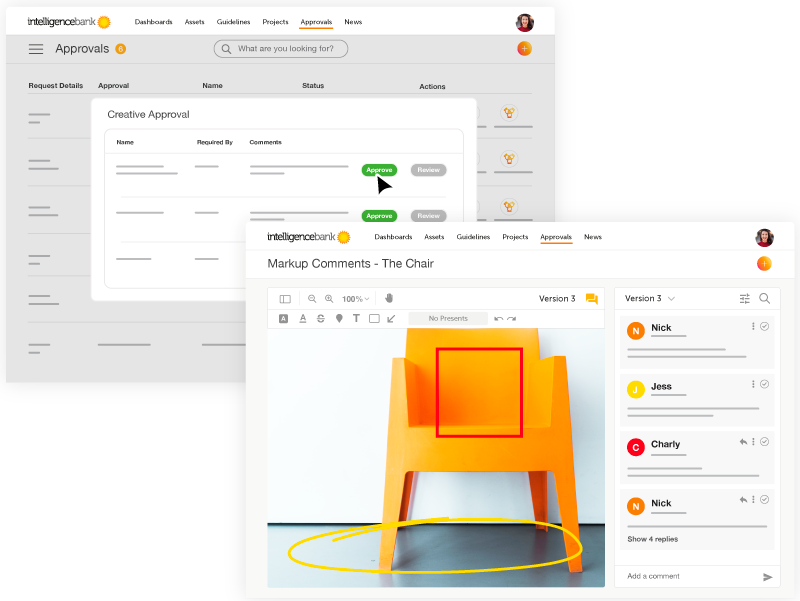
IntelligenceBank è una piattaforma di automazione dei flussi di lavoro e gestione delle risorse digitali per team di marketing e project manager che centralizzano le approvazioni, gestiscono la conformità e ottimizzano la collaborazione sui contenuti attraverso campagne e progetti.
Per chi è ideale IntelligenceBank?
IntelligenceBank è particolarmente adatto ai team di operations marketing di aziende di medie e grandi dimensioni che gestiscono grandi volumi di contenuti, asset e approvazioni con più parti interessate.
Perché ho scelto IntelligenceBank
Ho incluso IntelligenceBank nella mia lista perché collega i flussi di approvazione direttamente alla conformità—qualcosa di cui i team di operations marketing hanno davvero bisogno. Mi piace come i flussi di approvazione personalizzati siano integrati nella stessa piattaforma delle revisioni di conformità alimentate dall'AI; in questo modo, quando un contenuto passa attraverso il controllo legale o di brand, i rischi vengono segnalati automaticamente invece che a posteriori. Il modulo di gestione del lavoro di marketing consente inoltre al mio team di gestire brief creativi, assegnare compiti e supervisionare approvazioni multi-fase tramite bacheche Kanban e calendari marketing, mantenendo l'intero ciclo di produzione visibile in un unico luogo. Questa visibilità end-to-end—dal brief all'asset approvato—è ciò che rende IntelligenceBank particolarmente indicato per i team marketing che gestiscono grandi volumi di contenuti coinvolgendo molteplici stakeholder.
Caratteristiche principali di IntelligenceBank
- Revisione online e annotazione: Rivedi e annota asset creativi direttamente sulla piattaforma, con commenti collegati a specifiche parti di un'immagine, video o documento.
- Controllo delle versioni: Tieni traccia di ogni iterazione di un asset con una cronologia completa delle versioni, così gli approvatori controllano sempre il file più recente e possono confrontarlo con le versioni precedenti.
- Controllo degli accessi basato sui ruoli: Imposta permessi dettagliati per ruolo utente per decidere chi può visualizzare, modificare, caricare o approvare asset in ogni fase del flusso di lavoro.
- Gestione delle risorse digitali: Archivia, cerca e condividi tutti gli asset creativi in una libreria centralizzata, con tagging AI e riconoscimento facciale per un recupero rapido.
Integrazioni di IntelligenceBank
Le integrazioni includono Adobe After Effects, Adobe InDesign, Figma, Salesforce Marketing Cloud, Microsoft Teams, Shopify, Contentful, Google Docs e Asana.
Pros and Cons
Pros:
- Controllo delle versioni su asset e approvazioni
- Crea task direttamente dai moduli di richiesta
- Portale brand centralizzato con utilizzo delle risorse e permessi
Cons:
- L'implementazione richiede risorse interne significative
- La ricerca e la struttura delle cartelle possono risultare complesse

Ideale per il suo builder drag-and-drop
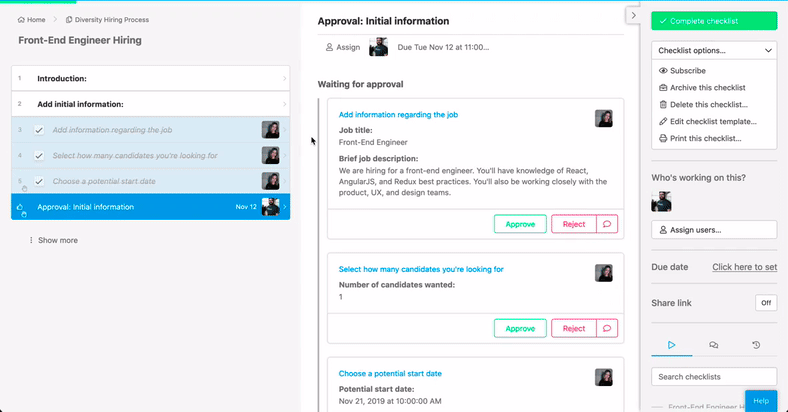
Process Street offre ai project manager nei team tecnologici e digitali un modo per creare, automatizzare e monitorare flussi di lavoro di approvazione, permettendo loro di gestire processi complessi, assegnare compiti e garantire che ogni fase sia completata con totale visibilità.
Per chi è più indicato Process Street?
Process Street è adatto per i team operativi e di progetto in aziende di piccole e medie dimensioni che desiderano standardizzare e gestire processi di approvazione ricorrenti senza un'impostazione tecnica complessa.
Perché ho scelto Process Street
Ho scelto Process Street come uno dei migliori perché adoro il suo costruttore di flussi di lavoro drag-and-drop che consente al mio team di progettare processi di approvazione multi-step senza scrivere una sola riga di codice. Il mio team può trascinare i compiti in sequenza, aggiungere logica condizionale così che il flusso si ramifichi in base a input specifici, e inserire task di blocco che impediscono il progresso finché non si riceve l'approvazione richiesta. Questo significa che una revisione del design o un'approvazione di budget non possono essere saltate—il flusso di lavoro impone il requisito. Mi piace anche che possiamo aggiornare un flusso in corso senza interrompere le esecuzioni già avviate; il mio team fa affidamento su questa funzione quando i requisiti di approvazione cambiano durante un progetto.
Funzionalità principali di Process Street
- Assegnazione dei compiti per ruolo: Assegna specifici passaggi di approvazione a singoli o gruppi in base al loro ruolo nel flusso di lavoro.
- Registrazione della cronologia di audit: Ogni azione, approvazione e commento viene automaticamente registrato con data e ora per garantire la completa responsabilità del processo.
- Campi modulo all'interno dei compiti: Raccogli dati strutturati direttamente all'interno di un compito, come note di approvazione, caricamenti di file o conferme di approvazione.
- Dashboard delle esecuzioni del flusso di lavoro: Monitora tutte le esecuzioni attive del flusso in un'unica vista, con indicatori di stato che mostrano dove si trova ogni processo di approvazione.
Integrazioni di Process Street
Le integrazioni includono Salesforce, Slack, Microsoft Teams, Google Sheets, Jira, Docusign, HubSpot, Mailchimp, Stripe e BambooHR.
Pros and Cons
Pros:
- Ampio ventaglio di modelli per vari processi
- Favorisce la conformità tramite documentazione pronta per audit
- Le funzioni di automazione fanno risparmiare tempo sulle attività ripetitive
Cons:
- Strumenti limitati per la gestione sequenziale dei compiti
- Manca di personalizzazione avanzata del flusso di lavoro
Altri software per flussi di lavoro di approvazione
Ecco alcuni altri strumenti che non sono entrati nella lista principale, ma che vale la pena provare se non hai trovato quello che cercavi sopra.
- Filestage
Ideale per revisori illimitati
- Adobe Workfront
Il migliore per le tracce di audit sulle approvazioni
- Admation
Ideale per approvazioni di routine
- Birdview
Ideale per agenzie e servizi professionali
- Kissflow Workflow
Ideale per workflow di approvazione personalizzati
- Ravetree
Ideale per CRM e approvazioni dei progetti
- Pneumatic Workflow
Ideale per semplificare le approvazioni
- Tallyfy
Ideale per utenti esperti nella creazione di workflow
- Gain
Ideale per flussi di lavoro collaborativi di approvazione
- Oppolis Cloud
Ideale per l'integrazione con Adobe Creative Cloud
- ReptonPOD
Ideale per il tracciamento delle approvazioni dei documenti
- Miro
Ideale per la collaborazione visuale e l'innovazione
- Jotform
Ideale per approvazioni dinamiche tramite moduli
- Quire
Ideale per approvazioni strutturate delle attività
- Jotform Workflows
Ideale per la creazione di workflow senza codice
- Smartsheet
Ideale per approvatori esterni
- Ziflow
Ideale per team creativi
- Celoxis
Ideale per app di workflow predefinite
- Hive
Ideale per le approvazioni interne
- Air
Ideale per l'approvazione delle risorse creative
- GoodDay
Ideale per la visualizzazione avanzata delle attività
- Hub Planner by Milient
Ideale per il monitoraggio delle approvazioni basato sulle risorse


Come Valuto il Software di Workflow di Approvazione
Valuto gli strumenti per il workflow di approvazione su due livelli: i requisiti fondamentali che consentono a un fornitore di entrare nella lista e i fattori differenzianti che rivelano la soluzione migliore per i team che gestiscono approvazioni di progetto a più fasi.
Funzionalità di Base (Requisiti Indispensabili per Questa Lista)
Quando seleziono gli strumenti per la mia lista, valuto ciascuno su una scala da 0 (non offre la funzionalità) a 5 (eccelle in quest'area) per ciascuna delle funzionalità di base sottostanti. In seguito, calcolo il punteggio totale dello strumento in percentuale. Ogni strumento deve raggiungere un punteggio totale minimo del 65% per essere considerato per l'inclusione.
- Workflow di Approvazione Personalizzabili: Valuto se è possibile costruire catene multi-step con logica condizionale, come l'instradamento di un brief creativo attraverso la revisione del design prima dell'approvazione legale.
- Instradamento Automatico delle Richieste: Ogni strumento dovrebbe indirizzare automaticamente le richieste alla persona giusta in base a regole o trigger, senza richiedere che ogni ordine o documento venga assegnato manualmente.
- Monitoraggio dello Stato & Notifiche: Cerco dashboard in tempo reale e promemoria configurabili che mostrino esattamente quali approvazioni sono in sospeso, approvate o rifiutate nei progetti attivi.
- Audit Trail & Cronologia delle Versioni: Un registro chiaro e con data e ora di ogni azione è essenziale, soprattutto quando è necessario tracciare chi ha approvato una modifica all’ambito e quale versione è stata revisionata.
- Integrazione con la Gestione Progetti: Controllo la disponibilità di connessioni native o tramite API con strumenti come Jira, Asana o Smartsheet, affinché le approvazioni restino legate alle consegne di riferimento.
- Strumenti di Collaborazione per gli Approvatori: I revisori devono poter commentare, richiedere modifiche, annotare file, o delegare approvazioni direttamente nel workflow, senza dover passare a email o chat.
Una volta identificati gli strumenti che soddisfano i criteri, considero cosa distingue ciascuna piattaforma dalle altre.
Fattori Differenzianti (Cosa Distingue i Fornitori)
Ecco come confronto e metto a confronto i diversi fornitori:
Funzionalità Distintive
Le capacità di approvazione da mobile sono essenziali quando le parti interessate viaggiano o lavorano su fusi orari diversi. Cerco app native che consentano agli approvatori di esaminare e agire sulle richieste senza rallentare i tempi del progetto. Gli strumenti di revisione e annotazione sono un notevole punto di distinzione per i team creativi che devono segnalare modifiche su design o video direttamente nel flusso di approvazione. Valuto anche se una piattaforma offre portali client white-label, essenziali per agenzie e consulenze che raccolgono approvazioni esterne senza obbligare i clienti a creare un nuovo account.
Oltre le Funzionalità
Valuto con attenzione l’ecosistema d’integrazione di ogni fornitore, verificando la presenza di connettori nativi con strumenti di project management, archiviazione documentale e piattaforme di comunicazione già utilizzate quotidianamente dal team. La struttura dei prezzi è un altro fattore chiave: alcuni strumenti applicano un costo per account approvatore, che può aumentare rapidamente quando si coinvolgono revisori occasionali come clienti esterni o dirigenti. Guardo anche alla sicurezza e conformità, in particolare alla certificazione SOC 2 e al supporto SSO, poiché i flussi di approvazione spesso coinvolgono materiale sensibile come contratti, budget e documenti legali.
Come scegliere un software per flussi di lavoro di approvazione
È facile perdersi in lunghi elenchi di funzionalità e strutture tariffarie complesse. Per aiutarti a rimanere concentrato mentre affronti il tuo particolare processo di selezione del software, ecco una lista di fattori da tenere a mente:
| Fattore | Cosa considerare |
|---|---|
| Scalabilità | Assicurati che il software possa gestire la crescita del tuo team, sia che aumentino gli utenti, i processi o le richieste. Cerca modelli di licenza flessibili o con prezzi a livelli. |
| Integrazioni | Verifica se il software si connette agli strumenti esistenti, come CRM, ERP o sistemi di archiviazione dei documenti. Le integrazioni possono semplificare i flussi di lavoro e far risparmiare tempo al team. |
| Personalizzazione | Assicurati di poter adattare i processi di approvazione alle esigenze specifiche del tuo team, ad esempio impostando fasi di approvazione o notifiche personalizzate. |
| Facilità d'uso | Il tuo team non dovrebbe aver bisogno di una formazione approfondita. Cerca interfacce intuitive e flussi di lavoro semplici per iniziare rapidamente. |
| Budget | Considera il costo totale del software, inclusi i canoni di abbonamento, la formazione e gli eventuali componenti aggiuntivi. Verifica che sia compatibile con i tuoi vincoli finanziari. |
| Misure di sicurezza | Verifica che il software soddisfi gli standard di sicurezza della tua organizzazione, grazie a funzionalità come le autorizzazioni basate sui ruoli e la conformità a normative come il GDPR o il SOC 2. |
| Accessibilità da dispositivi mobili | Verifica se il software offre un'interfaccia o un'app ottimizzata per i dispositivi mobili, in modo che il tuo team possa approvare le richieste anche in movimento. |
| Funzionalità di reportistica | Cerca strumenti di analisi avanzati per monitorare colli di bottiglia, tempi di approvazione ed efficienza dei processi, così da prendere decisioni migliori. |
Tendenze nei software per i flussi di approvazione
Nella mia ricerca ho raccolto innumerevoli aggiornamenti dei prodotti, comunicati stampa e registri delle versioni di diversi fornitori di software per i flussi di approvazione. Ecco alcune delle tendenze emergenti che sto seguendo:
- Raccomandazioni basate sull'IA: Gli strumenti ora offrono l'IA per suggerire gli approvatori o segnalare richieste insolite. Questo aiuta i team a risparmiare tempo e a individuare più rapidamente i problemi. Ad esempio, l'IA potrebbe segnalare approvazioni di spese che si discostano dai normali modelli di spesa.
- Blockchain per i registri di controllo: Alcuni fornitori stanno adottando la blockchain per garantire registri delle approvazioni a prova di manomissione. Questa tendenza è particolarmente utile per i settori con rigidi requisiti di conformità, come quello finanziario o sanitario, dove sono essenziali registri di controllo sicuri e verificabili.
- Progettazione dei flussi di lavoro senza codice: Sempre più piattaforme consentono agli utenti di creare e modificare flussi di lavoro senza scrivere codice. Questo riduce le difficoltà per gli utenti non tecnici e facilita l'adattamento dei flussi di lavoro alle esigenze dei team senza il supporto dell'IT.
- Approvazioni dinamiche basate sul contesto: I percorsi di approvazione che si adattano in base a condizioni come l'urgenza o le soglie di budget stanno diventando sempre più popolari. Ad esempio, una richiesta con un budget ridotto potrebbe richiedere una sola approvazione, mentre una con un budget elevato potrebbe passare automaticamente attraverso più livelli.
- Analisi integrate: Le piattaforme includono dati in tempo reale sui tempi di approvazione, sui colli di bottiglia e sull'attività degli utenti. I team possono utilizzare questi dati per identificare i ritardi e rendere i processi più efficienti. Ad esempio, una dashboard potrebbe evidenziare che una specifica fase di approvazione rallenta costantemente le richieste.
Che cos'è un software per i flussi di approvazione?
Il software per i flussi di approvazione è uno strumento che automatizza e monitora il processo di invio, revisione e approvazione di documenti o attività. Viene utilizzato da project manager, esperti di marketing, team legali e responsabili delle operazioni per eliminare i ritardi nelle approvazioni, ridurre gli errori e mantenere un registro di controllo.
Questi strumenti aiutano i team a indirizzare le richieste alle persone giuste, impostare scadenze e mantenere il lavoro fluido.
Funzionalità dei software per i flussi di approvazione
Quando scegli un software per i flussi di approvazione, presta attenzione a queste funzionalità fondamentali:
- Flussi di lavoro personalizzabili: puoi progettare percorsi di approvazione unici che corrispondono ai processi reali del tuo team, così non sei costretto ad adattare il tuo modo di lavorare a una struttura software rigida.
- Controllo degli accessi basato sui ruoli: ti consente di limitare chi può visualizzare, modificare o approvare le richieste assegnando autorizzazioni specifiche, riducendo gli errori e mantenendo al sicuro le informazioni sensibili.
- Notifiche automatiche: puoi avvisare immediatamente le persone giuste quando è necessaria un'azione, riducendo lo scambio continuo di email e i momenti del tipo «Non l'ho mai visto!».
- Registro di controllo e monitoraggio: ti consente di accedere a una registrazione chiara di ogni passaggio, commento e approvazione, facilitando la tracciabilità delle decisioni e il rispetto dei requisiti di conformità.
- Compatibilità con i dispositivi mobili: puoi inviare, esaminare o approvare richieste dal tuo telefono o tablet, agendo rapidamente da qualsiasi luogo quando necessario.
- Integrazione con gli strumenti esistenti: dovresti poter effettuare il collegamento ad app come email, CRM o sistemi di gestione dei documenti per mantenere fluidi i processi e aggiornate le informazioni.
- Libreria di modelli: ti aiuta a configurare rapidamente nuovi flussi di lavoro utilizzando modelli pronti all'uso, personalizzati per gli scenari di approvazione più comuni.
- Gestione delle scadenze: puoi impostare date di scadenza e promemoria per le approvazioni, evitando che il lavoro si trascini all'infinito e mantenendo i progetti in movimento.
Funzionalità di AI da cercare nei software per i flussi di lavoro di approvazione
Oltre alle funzionalità software standard elencate sopra, molte soluzioni per i flussi di lavoro di approvazione offrono funzionalità di AI come:
- Instradamento intelligente: questa funzionalità di AI può analizzare i dettagli della richiesta e assegnarla automaticamente all'approvatore corretto, riducendo il lavoro manuale e i ritardi.
- Analisi predittiva: puoi ottenere informazioni su potenziali colli di bottiglia o ritardi prima che si verifichino, affrontare proattivamente i problemi e mantenere tutto in movimento.
- Suggerimenti intelligenti: questo strumento di AI può consigliare i passaggi successivi o gli approvatori in base ai comportamenti passati, rendendo il flusso di lavoro più efficiente e riducendo l'affaticamento decisionale.
- Elaborazione automatizzata dei documenti: puoi utilizzare l'AI per estrarre le informazioni principali dai documenti allegati, evitando di inserire manualmente i dati.
- Rilevamento delle anomalie: questo strumento di AI può segnalare modelli insoliti o richieste anomale, aiutandoti a individuare tempestivamente errori o potenziali problemi di conformità.
- Elaborazione del linguaggio naturale: puoi inviare ed esaminare richieste utilizzando comandi in linguaggio naturale, rendendo il sistema più facile e veloce da usare.
- Analisi del sentiment: questa funzionalità di AI può analizzare i commenti e i feedback all'interno del processo di approvazione per identificare potenziali preoccupazioni o conflitti e consentirti di affrontarli in modo proattivo.
Vantaggi dei software per i flussi di lavoro di approvazione
L'implementazione di un software per i flussi di lavoro di approvazione offre diversi vantaggi al tuo team e alla tua azienda. Eccone alcuni di cui potrai usufruire:
- Approvazioni più rapide: automatizza i passaggi ripetitivi e invia avvisi in tempo reale per mantenere i processi rapidi.
- Maggiore precisione: riduce gli errori assicurando che tutte le richieste seguano gli stessi passaggi e regole predefiniti.
- Maggiore trasparenza: monitora ogni azione con registri di controllo dettagliati, così sai sempre chi ha approvato cosa e quando.
- Maggiore conformità: aiuta il tuo team a rispettare le politiche aziendali applicando le regole e creando percorsi di approvazione chiari.
- Collaborazione potenziata: facilita il lavoro di squadra fornendo una piattaforma condivisa per esaminare e approvare le richieste.
- Risparmio sui costi: riduce il lavoro manuale e i ritardi, facendo risparmiare tempo e diminuendo i costi operativi.
- Scalabilità: si adatta alla crescita della tua azienda gestendo più utenti, richieste o processi secondo necessità.
Costi & prezzi dei software per i flussi di lavoro di approvazione
La scelta di un software per i flussi di lavoro di approvazione richiede la conoscenza dei diversi modelli e piani tariffari disponibili. I costi variano in base alle funzionalità, alle dimensioni del team, ai componenti aggiuntivi e ad altri fattori. La tabella seguente riassume i piani più comuni, i relativi prezzi medi e le funzionalità generalmente incluse nelle soluzioni software per i flussi di lavoro di approvazione:
Tabella comparativa dei piani per i software per i flussi di lavoro di approvazione
| Tipo di piano | Prezzo medio | Caratteristiche comuni |
|---|---|---|
| Piano gratuito | $0 | Automazione di base dei flussi di lavoro, utenti limitati, notifiche via e-mail e reportistica semplice. |
| Piano personale | $5-$25/utente/mese | Flussi di lavoro personalizzabili, autorizzazioni basate sui ruoli, accesso da dispositivi mobili e integrazioni di base. |
| Piano aziendale | $30-$70/utente/mese | Personalizzazione avanzata dei flussi di lavoro, registri di controllo, logica condizionale e strumenti di analisi. |
| Piano per grandi aziende | $100-$200/utente/mese | Flussi di lavoro dinamici, sicurezza di livello aziendale, accesso API e assistenza dedicata. |
Domande frequenti sul software per i flussi di lavoro di approvazione
Trova le risposte alle domande più comuni che altre persone pongono su questo argomento.
In che modo le approvazioni influiscono sull'esecuzione dei progetti?
Le approvazioni influiscono direttamente sulla velocità, sulla responsabilità e sulla qualità del progetto. Approvazioni rapide e trasparenti aiutano a evitare ritardi e a mantenere le attività in movimento.
Brian Tracey, un noto autore canadese-americano di sviluppo personale, una volta disse “Ogni minuto che dedichi alla pianificazione ti fa risparmiare dieci minuti nell’esecuzione”. Credo che questa citazione sia accurata nel contesto dei flussi di lavoro di approvazione nella gestione dei progetti.
Dedicare tempo a pianificare e configurare correttamente i flussi di lavoro di approvazione ti farà risparmiare decine, se non centinaia, di ore all’anno durante l’esecuzione dei progetti. L’utilizzo di un software per i flussi di lavoro di approvazione garantisce che ogni decisione venga registrata e che nessun passaggio venga saltato, aiutandoti a consegnare i progetti nei tempi previsti.
Quali errori comuni dovrei evitare quando configuro i flussi di lavoro di approvazione?
La prima cosa da evitare è creare catene di approvazione eccessivamente complesse che rallentano le attività. Prevedi un’approvazione per ogni passaggio che ne ha bisogno e assicurati che tutti conoscano il proprio ruolo. Responsabilità poco chiare causeranno ritardi.
Un altro aspetto a cui prestare attenzione è saltare i promemoria automatici, poiché ciò può portare a non rispettare le scadenze. Infine, non esaminare regolarmente il processo può consentire ai colli di bottiglia di persistere.
Quando sei pronto per iniziare, è meglio testare prima il flusso di lavoro con un piccolo gruppo, così da individuare eventuali problemi prima dell’implementazione.
In che modo gli strumenti per i flussi di lavoro di approvazione aiutano con i registri di controllo e la conformità?
Gli strumenti per i flussi di lavoro di approvazione registrano automaticamente ogni azione, decisione e commento, creando un registro di controllo chiaro. Questa registrazione ti aiuta a dimostrare la conformità alle politiche aziendali o alle normative senza documentazione aggiuntiva.
Se hai bisogno di dimostrare chi ha approvato cosa e quando, puoi accedere facilmente a questa cronologia, una funzione ideale per i settori regolamentati o per gli audit dei clienti.
Come posso ottimizzare i flussi di lavoro di approvazione per i team da remoto o ibridi?
Per ottimizzare i flussi di lavoro per i team da remoto o ibridi:
- Usa un software di approvazione basato sul cloud, così tutti potranno accedervi ovunque si trovino.
- Configura notifiche automatiche per mantenere le attività visibili e sotto controllo.
- Chiarisci le scadenze e le responsabilità di ogni passaggio.
- Usa integrazioni con strumenti di chat o di progetto come Slack o Teams per fare delle approvazioni una parte della routine quotidiana.
Il software per i flussi di lavoro di approvazione può integrarsi con gli strumenti di gestione dei progetti che già utilizzo?
Sì, la maggior parte delle piattaforme per i flussi di lavoro di approvazione offre integrazioni con strumenti di gestione dei progetti diffusi come Asana o ClickUp. Le integrazioni consentono di attivare le approvazioni in base all’avanzamento delle attività, visualizzare gli aggiornamenti di stato in un unico pannello e ridurre il lavoro manuale. Verifica sempre la compatibilità con gli strumenti che utilizzi attualmente prima di scegliere un nuovo sistema.
Elenco correlato di strumenti: