

Le 10 migliori alternative a Todoist recensite nel 2026

Le migliori alternative a Todoist in sintesi


Le migliori alternative a Todoist offrono potenti funzionalità di gestione delle attività, un design intuitivo e la flessibilità necessaria per adattarsi alle esigenze del tuo team. Se Todoist non soddisfa pienamente le tue necessità, l’alternativa giusta ti aiuterà a semplificare la collaborazione, mantenere i progetti organizzati e lavorare in modo più efficiente.
Ho utilizzato la mia esperienza nella gestione dei progetti e oltre 3 anni di test di software per esaminare decine di strumenti e selezionare la mia lista delle migliori alternative a Todoist. Ogni mia raccomandazione si adatterà meglio al tuo flusso di lavoro, aiutandoti a gestire e monitorare le tue attività e a realizzare un lavoro di valore per i tuoi clienti.
Cosa sono le alternative a Todoist?
Le alternative a Todoist sono strumenti di gestione delle attività che puoi utilizzare per organizzare e tenere traccia del tuo lavoro. Liberi professionisti, project manager e chiunque debba gestire molte attività potrebbero cercare alternative a Todoist per trovare funzionalità più adatte al proprio modo di lavorare, un’interfaccia utente diversa o ulteriori opzioni di personalizzazione.
Perché fidarsi dei nostri consigli sui software
Il nostro team testa e recensisce software dal 2012. In quanto project manager noi stessi, sappiamo quanto sia difficile — e importante — scegliere il software giusto.
Per questa guida, abbiamo valutato gli strumenti attraverso test pratici e ricerche indipendenti, assegnando un punteggio agli strumenti in base ai nostri criteri di selezione. Ci basiamo inoltre sulle competenze di leader di pensiero del settore e di professionisti attivi nella gestione dei progetti.
Le nostre recensioni riflettono il nostro giudizio editoriale umano, non un discorso di vendita.
Revisori esperti:
Tabella comparativa delle alternative a Todoist
\u003cp data-pm-slice=\u00221 1 []\u0022\u003eUsa questa tabella comparativa per confrontare specifiche e prezzi delle mie principali alternative a Todoist.\u003c/p\u003e
| Tool | Best For | Trial Info | Price | ||
|---|---|---|---|---|---|
| 1 | Ideale per l'integrazione con Google Workspace | Prova gratuita di 14 giorni + piano gratuito disponibile | Da $4/utente/mese (fatturato annualmente) | Website | |
| 2 | Ideale per l'organizzazione gerarchica delle attività | Prova gratuita di 30 giorni + piano gratuito disponibile | Da $7.65/membro/mese (fatturazione annuale) | Website | |
| 3 | Ideale per la pianificazione delle attività basata su timeline | Prova gratuita di 15 giorni + piano gratuito + demo gratuita disponibile | Da $4/utente/mese (fatturazione annuale) | Website | |
| 4 | Ideale per l'integrazione con l'ecosistema Microsoft | Piano gratuito disponibile | Gratuito | Website | |
| 5 | Ideale per una gestione dei progetti adattabile | Prova gratuita di 14 giorni + piano gratuito disponibile | A partire da $8/utente/mese (fatturato annualmente) | Website | |
| 6 | Ideale per prendere appunti e gestire le attività | Piano gratuito disponibile | Da $8.33/mese (fatturazione annuale) | Website | |
| 7 | Ideale per una gestione completa delle attività | Piano gratuito disponibile | Da $35.99/anno | Website | |
| 8 | Ideale per l'integrazione con dispositivi Apple | Prova gratuita di 14 giorni | Da $9.99/utente/mese (fatturato annualmente) | Website | |
| 9 | Ideale per team di sviluppo software | Prova gratuita di 7 giorni + piano gratuito disponibile | Da $20/mese | Website | |
| 10 | Ideale per suddivisione delle attività | Piano gratuito disponibile + prova gratuita di 7 giorni | A partire da $3/utente/mese (fatturazione annuale) | Website |
Recensioni delle migliori alternative a Todoist
Di seguito fornirò un’analisi e una panoramica dettagliate di ciascuna alternativa a Todoist, esaminando i vantaggi e i limiti di questi strumenti. Scoprirai le loro funzionalità e capirai in quali situazioni danno il meglio di sé.

GQueues
Ideale per l'integrazione con Google Workspace
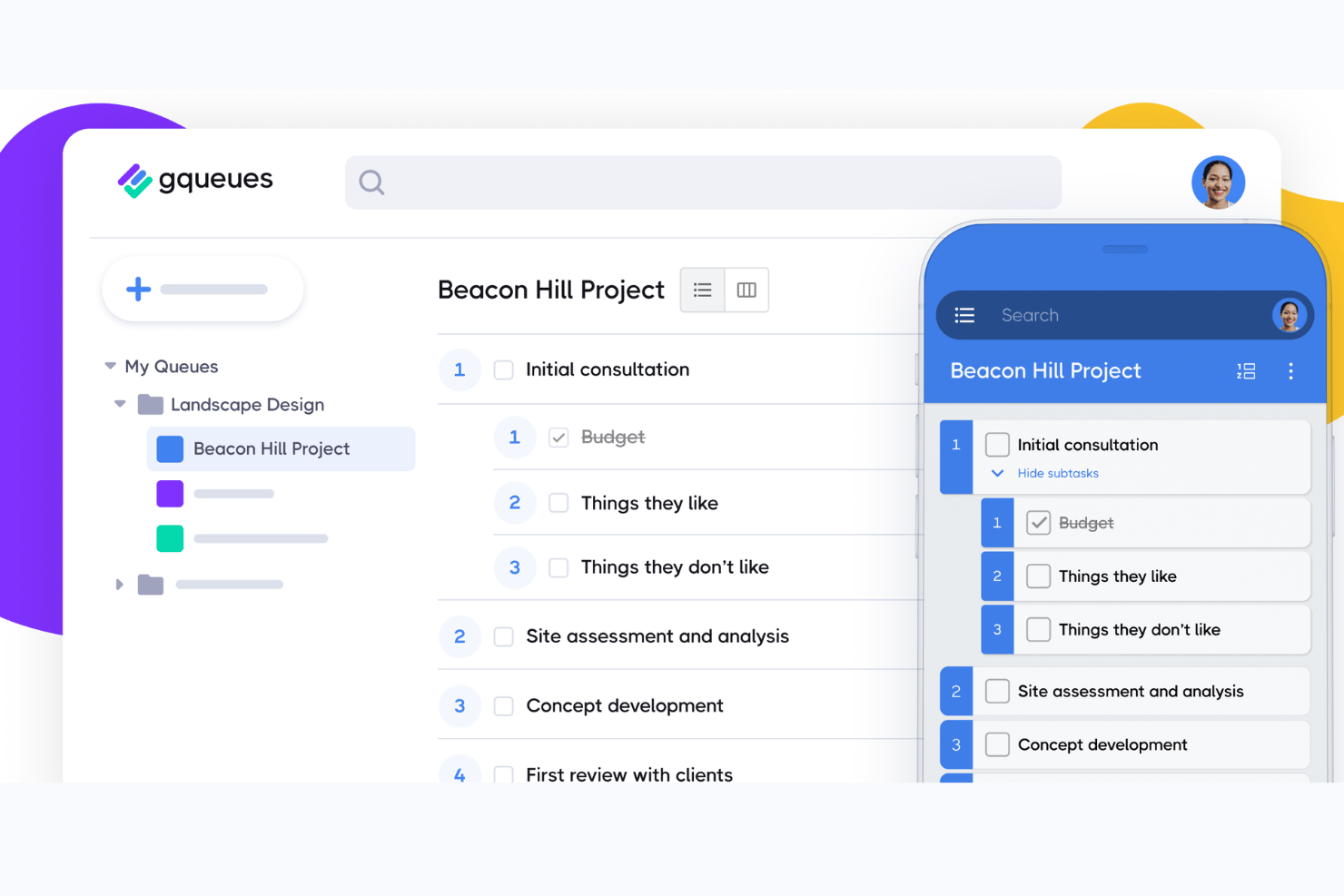
GQueues è uno strumento di gestione delle attività creato appositamente per team e singoli professionisti che utilizzano Google Workspace, aiutandoli a organizzare il lavoro, collaborare a progetti condivisi e mantenere le attività collegate ai flussi di lavoro esistenti di Google Calendar e Gmail.
Per chi è più adatto GQueues?
GQueues è una soluzione ideale per piccoli team e professionisti indipendenti che gestiscono tutta la loro attività lavorativa all'interno di Google Workspace e desiderano una gestione delle attività che si integri in modo naturale con esso.
Perché GQueues è una buona alternativa a Todoist
Ho scelto GQueues perché la sua integrazione con Google Workspace è più approfondita di quella di qualsiasi altro strumento presente nella mia lista. Quando converto un messaggio di Gmail in un'attività, questa arriva in GQueues mantenendo intatto il contesto completo, mentre la sincronizzazione bidirezionale con Google Calendar fa sì che le scadenze compaiano esattamente nel punto in cui sto già lavorando. Apprezzo anche il flusso di lavoro per gli allegati di Google Drive: posso creare un nuovo Doc o Foglio direttamente da un'attività, con autorizzazioni ereditate automaticamente dai ruoli dei membri del team.
Funzionalità principali di GQueues
- Code intelligenti: filtra automaticamente le attività in base a criteri di ricerca, tag o stato, per organizzare e monitorare più rapidamente.
- Azioni collettive: modifica le scadenze, assegna attività o aggiorna più elementi contemporaneamente, risparmiando tempo nella gestione di grandi volumi di attività.
- Visualizzazione a bacheca: visualizza i progetti come bacheche Kanban, trascinando le attività tra le colonne per gestire il flusso di lavoro.
- App per dispositivi mobili: accedi agli elenchi delle attività e gestisci gli aggiornamenti su dispositivi iOS e Android, mantenendo tutto il lavoro sincronizzato anche in movimento.
Integrazioni di GQueues
GQueues offre integrazioni native nell'ecosistema Google Workspace, tra cui Google Calendar, Gmail, Google Drive, Google Contacts e Chrome. È disponibile un'API per le integrazioni personalizzate.
Pros and Cons
Pros:
- Sincronizzazione bidirezionale approfondita con Google Calendar
- Attività create direttamente dai messaggi di Gmail
- Le code condivise funzionano bene per i piccoli team
Cons:
- Visualizzazioni limitate rispetto alla concorrenza
- Nessun inserimento in linguaggio naturale per aggiungere attività

Quire
Ideale per l'organizzazione gerarchica delle attività
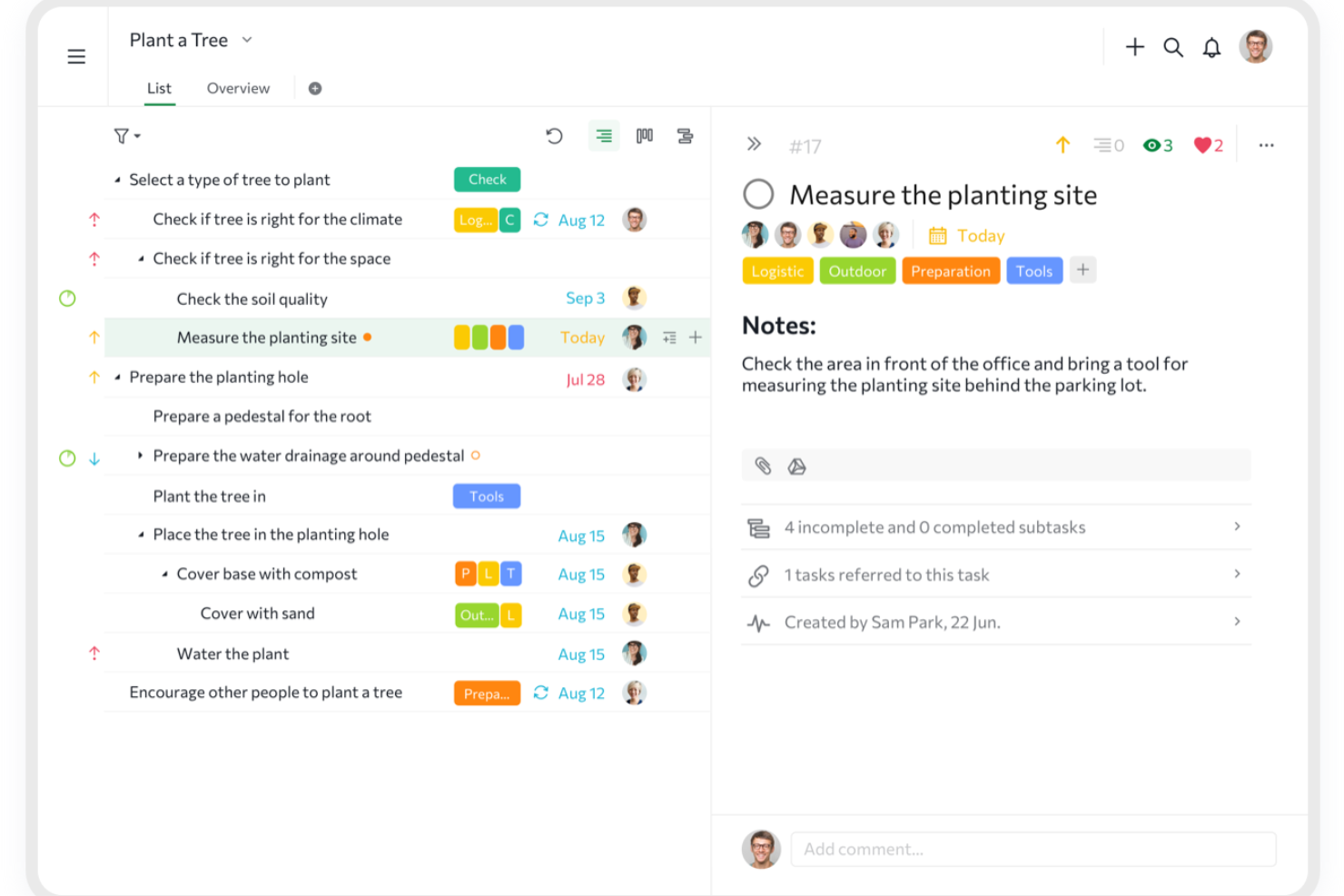
Quire è uno strumento di gestione dei progetti basato sull'idea di chiarezza grazie alla gerarchia. Ti aiuta a gestire carichi di lavoro impegnativi permettendoti di suddividere visivamente grandi obiettivi in passaggi più piccoli e realizzabili.
Perché è una valida alternativa a Todoist:
La sua vista a nidificazione infinita è un modo per suddividere progetti complessi in compiti gestibili. Questa capacità di creare attività e sotto-attività in una struttura gerarchica aiuta a mantenere chiarezza e concentrazione, assicurando che tu possa monitorare i progressi a ogni livello del progetto. Apprezzo anche la funzionalità delle subliste di Quire che ti permette di creare visualizzazioni personalizzate a partire dalla tua lista principale di attività, così puoi concentrarti su compiti specifici o priorità che rientrano nelle tue responsabilità immediate.
Funzionalità e integrazioni principali:
Le funzionalità includono la vista timeline dinamica, che offre una visualizzazione simile al diagramma di Gantt per aiutarti a pianificare e monitorare le scadenze dei progetti. Inoltre, la vista calendario permette di programmare le attività semplicemente trascinandole e rilasciandole sul calendario, rendendo la gestione delle scadenze più intuitiva.
Le integrazioni includono Google Calendar, Gmail, Slack, Outlook, Zoho Flow, GitHub, Apple Calendar Sync, Box, Dropbox, Google Drive e Microsoft Teams.
Pros and Cons
Pros:
- Facile collaborare con i membri del team
- Molteplici viste per i progetti, incluse liste, bacheche e timeline
- Possibilità di creare attività annidate e sotto-attività per una dettagliata suddivisione dei progetti
Cons:
- La versione mobile manca di alcune funzionalità disponibili sul desktop
- Possibile sovraccarico di notifiche, soprattutto con team numerosi
New Product Updates from Quire
Quire Adds Custom Field Locking and Comment Reaction API Support
Quire adds custom field locking and API support for reading and setting emoji reactions on comments. These updates give teams more control over field data and expand comment interaction options for developers. For more information, visit Quire’s official site.
 .
.
Ideale per la pianificazione delle attività basata su timeline
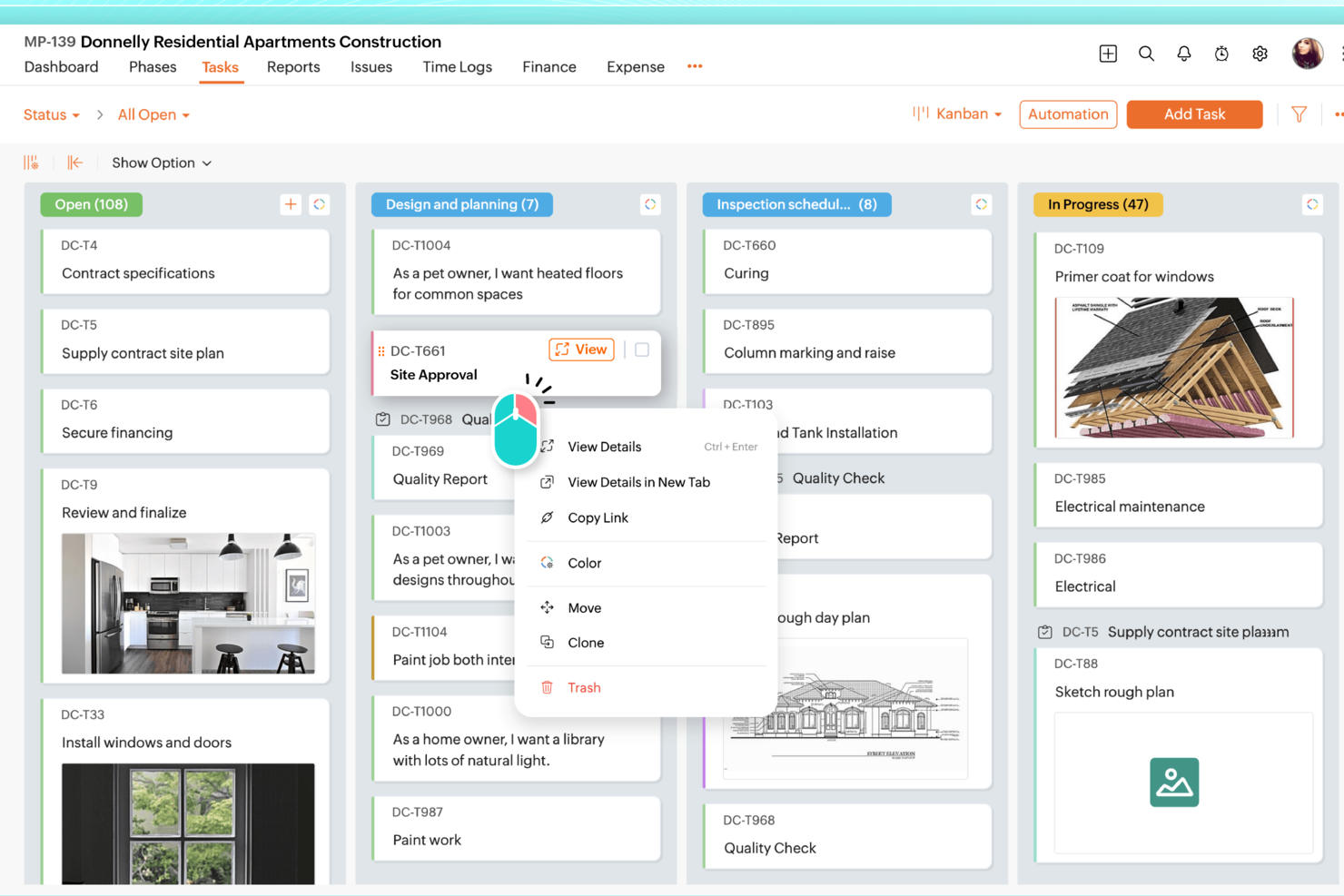
Zoho Projects è una valida alternativa a Todoist per i professionisti che necessitano di qualcosa in più rispetto a una semplice lista di attività. Si adatta bene a team nell'IT e nell'edilizia, così come a freelance che gestiscono più progetti, soprattutto quando è necessario pianificare scadenze, dipendenze e monitorare l'avanzamento in modo più chiaro. Oltre alla gestione delle attività, Zoho Projects include strumenti di monitoraggio del tempo e collaborazione di team che aiutano a mantenere il lavoro organizzato man mano che i progetti crescono in complessità.
Perché ho scelto Zoho Projects
Ho scelto Zoho Projects come alternativa a Todoist perché supporta una pianificazione e un monitoraggio dei progetti più dettagliati. I diagrammi di Gantt facilitano la visualizzazione delle scadenze, delle dipendenze e dell’andamento del lavoro nel tempo. Include anche la rilevazione del tempo e i fogli ore integrati, utili per i team che devono monitorare le ore lavorate, gestire il carico di lavoro o fatturare al cliente. Se hai superato le semplici liste di cose da fare, Zoho Projects ti offre più controllo senza obbligarti a una configurazione complicata.
Caratteristiche principali di Zoho Projects
Oltre alle robuste funzionalità di monitoraggio dei progetti, Zoho Projects offre diversi altri strumenti che ne migliorano l'usabilità:
- Gestione delle attività: Crea, assegna e priorizza le attività, con opzioni per attività secondarie e ricorrenti, per assicurare una pianificazione completa del progetto.
- Collaborazione nel team: Usa chat integrate, forum e condivisione di documenti per facilitare una comunicazione fluida tra i membri del team.
- Workflow personalizzati: Adatta i flussi di lavoro ai processi del tuo team con campi personalizzabili, stati e regole di automazione.
- Strumenti di reportistica: Genera report dettagliati su attività, fogli ore e progresso dei progetti per ottenere insight sulla produttività del team e sui risultati dei progetti.
Integrazioni di Zoho Projects
Le integrazioni includono Google Calendar, Google Drive, Microsoft Office 365, Dropbox, Slack, GitHub, Bitbucket, Microsoft Teams, Zapier e Zoho CRM.
Pros and Cons
Pros:
- Potente automazione e personalizzazione dei workflow
- Rilevazione del tempo e fatturazione integrati
- Prezzi accessibili per team in crescita
Cons:
- L’interfaccia ha una curva di apprendimento più ripida
- Esperienza su mobile meno completa
New Product Updates from Zoho Projects
Zoho Projects Adds CodeX Scripts for Custom Modules
Zoho Projects now supports CodeX Scripts for custom modules, enabling conditional logic and rules for creating, updating, and deleting records. For more information, visit Zoho Projects' official site.
 .
.
Ideale per l'integrazione con l'ecosistema Microsoft
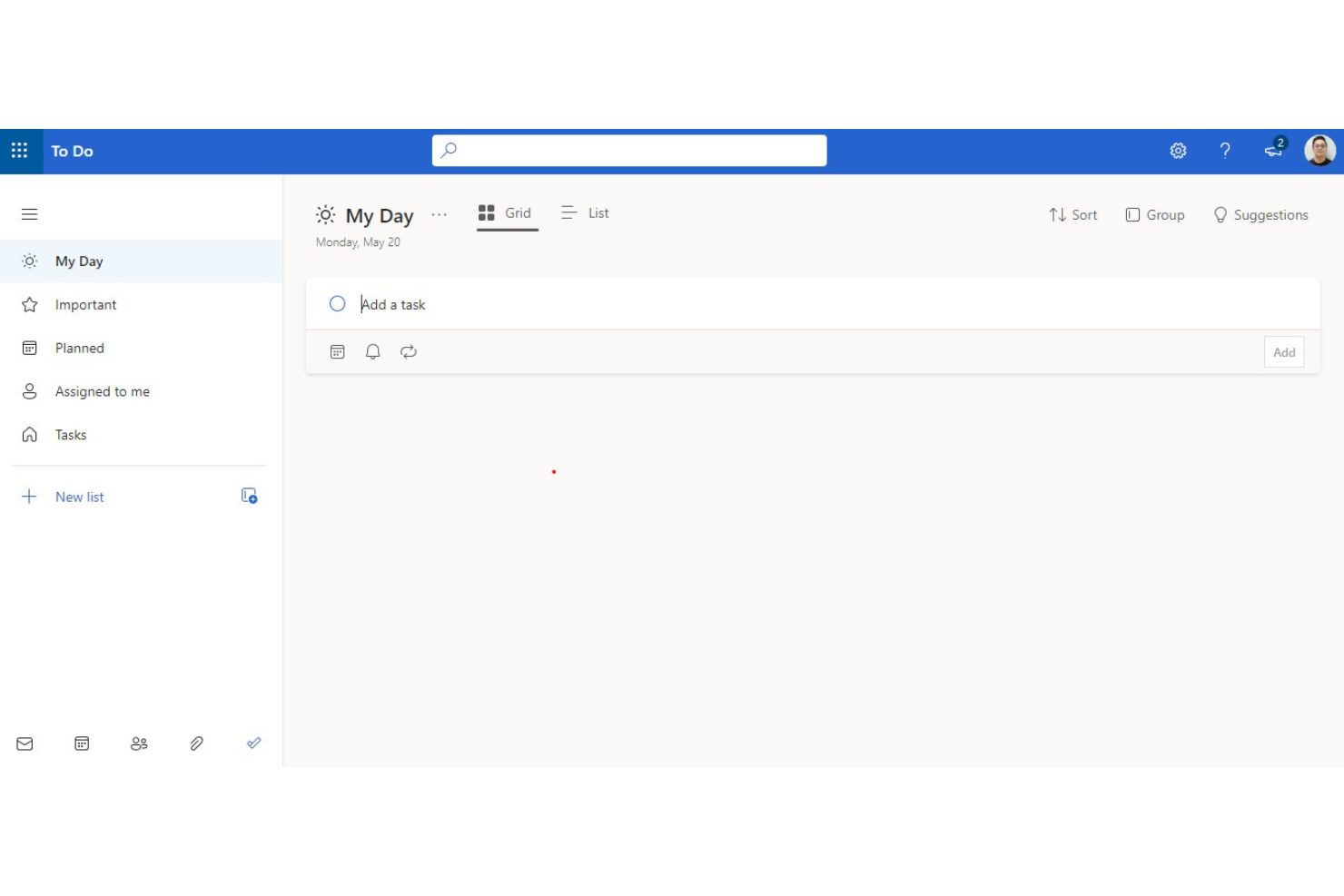
Microsoft To Do è un'app per la gestione delle attività che si integra perfettamente con l'ecosistema Microsoft. È ideale per gli utenti già immersi nell'ambiente Microsoft e offre un'integrazione fluida con altri servizi Microsoft come Outlook e Teams.
Perché è una valida alternativa a Todoist:
Microsoft To Do offre una solida soluzione per la gestione delle attività, integrandosi in profondità con l'ecosistema Microsoft. La sua interfaccia intuitiva e le funzionalità come le liste intelligenti, le date di scadenza e i promemoria rendono semplice organizzare e monitorare le attività in modo efficiente. Queste caratteristiche lo rendono una valida alternativa a Todoist, soprattutto per chi fa un uso intensivo dei prodotti Microsoft.
Funzionalità e integrazioni distintive:
Le funzionalità includono la priorità delle attività, le date di scadenza, la messaggistica, l'impostazione di promemoria, la possibilità di creare più liste, la condivisione e la collaborazione sui task.
Le integrazioni includono Microsoft Outlook, Microsoft Teams, Microsoft OneNote, Microsoft Planner, Cortana, Microsoft 365, Windows 10, Android e iOS.
Pros and Cons
Pros:
- Gratis
- Integrazione profonda con i prodotti Microsoft
- Prioritizzazione delle attività semplice
Cons:
- Funzionalità avanzate limitate
- Nessuna analisi o reportistica per il team

Zenkit
Ideale per una gestione dei progetti adattabile
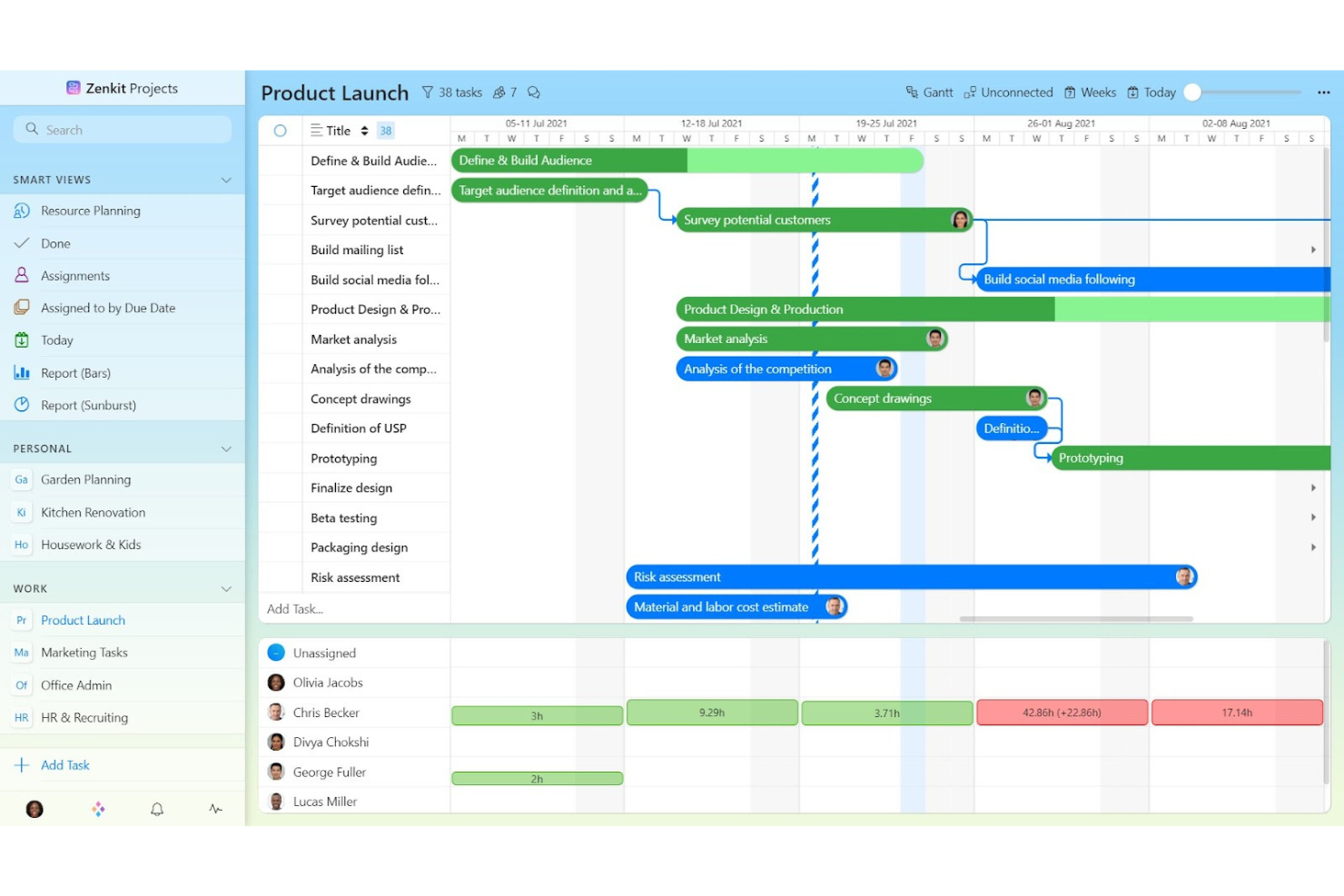
Zenkit è uno strumento di gestione dei progetti che offre organizzazione dei progetti, gestione delle attività, chat di gruppo e altro ancora. È l'ideale per la gestione adattabile dei progetti grazie alla sua scalabilità e opzioni di personalizzazione, rendendolo adatto a diverse metodologie di project management.
Perché è una buona alternativa a Todoist:
Zenkit si distingue come una soluzione di project management altamente adattabile che può crescere con le esigenze del tuo team. La sua capacità di integrare molteplici metodologie di progetto e la sua interfaccia intuitiva lo rendono una valida alternativa a Todoist.
Funzionalità principali e integrazioni:
Le funzionalità includono gestione multi-progetto, integrazione della chat di gruppo, gestione delle risorse, reportistica in tempo reale e migrazione dei dati da altri strumenti.
Le integrazioni comprendono Trello, Asana, Microsoft To Do, Zapier, Slack, Google Calendar, Dropbox, Evernote, GitHub e Microsoft Teams.
Pros and Cons
Pros:
- Altamente personalizzabile e scalabile
- Conforme al GDPR con server situati nell'UE
- Assistenza dedicata con tempi di risposta rapidi
Cons:
- Alcune funzionalità avanzate potrebbero richiedere un periodo di apprendimento
- Capacità offline limitate

Evernote
Ideale per prendere appunti e gestire le attività
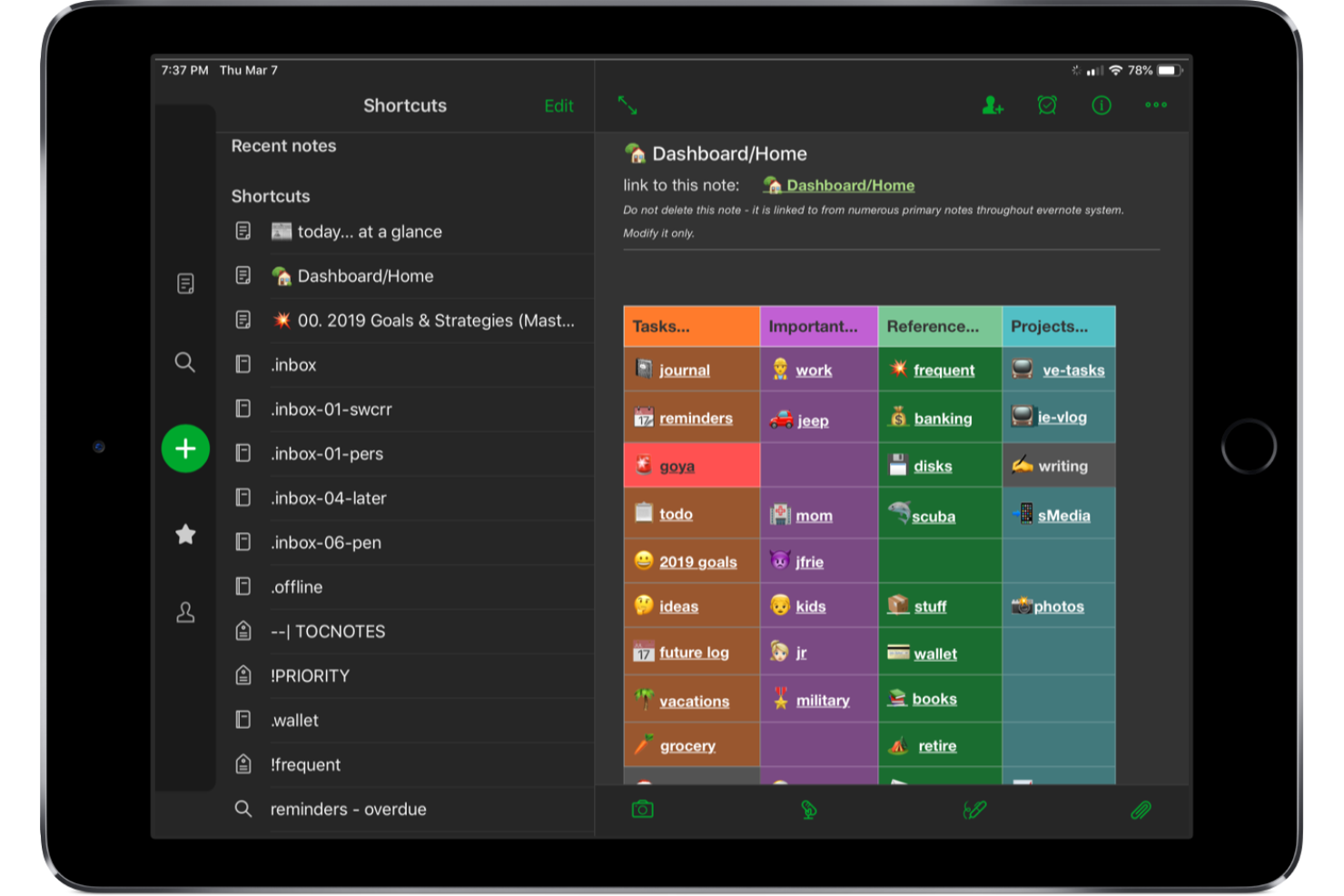
Evernote è un'app per prendere appunti che offre anche funzionalità di gestione delle attività, permettendo agli utenti di organizzare note, attività e programmi in un unico posto. È ideale per prendere appunti e gestire le attività grazie alle sue potenti capacità di ricerca e alla possibilità di raccogliere diversi tipi di informazioni.
Perché è una valida alternativa a Todoist:
Le versatili funzionalità di Evernote per prendere appunti si integrano perfettamente con la gestione delle attività. Questa combinazione consente un'organizzazione efficiente di note, attività e programmi all'interno di un'unica piattaforma. Inoltre, grazie all'integrazione con altri strumenti di produttività, il suo utilizzo è ulteriormente potenziato, rendendolo uno strumento versatile per organizzare sia appunti che attività.
Funzionalità e integrazioni principali:
Funzionalità includono presa di appunti, web clipping, scansione di documenti, gestione delle attività e integrazione con il calendario.
Integrazioni includono Google Drive, Slack, Microsoft Teams, Outlook, Salesforce, Zapier, Trello, Google Calendar e Microsoft OneNote.
Pros and Cons
Pros:
- Potenti funzionalità di ricerca e presa di appunti
- Cattura versatile delle informazioni
- Integrazione con diversi strumenti
Cons:
- Può risultare complesso per i nuovi utenti
- Funzionalità di project management limitate

TickTick
Ideale per una gestione completa delle attività
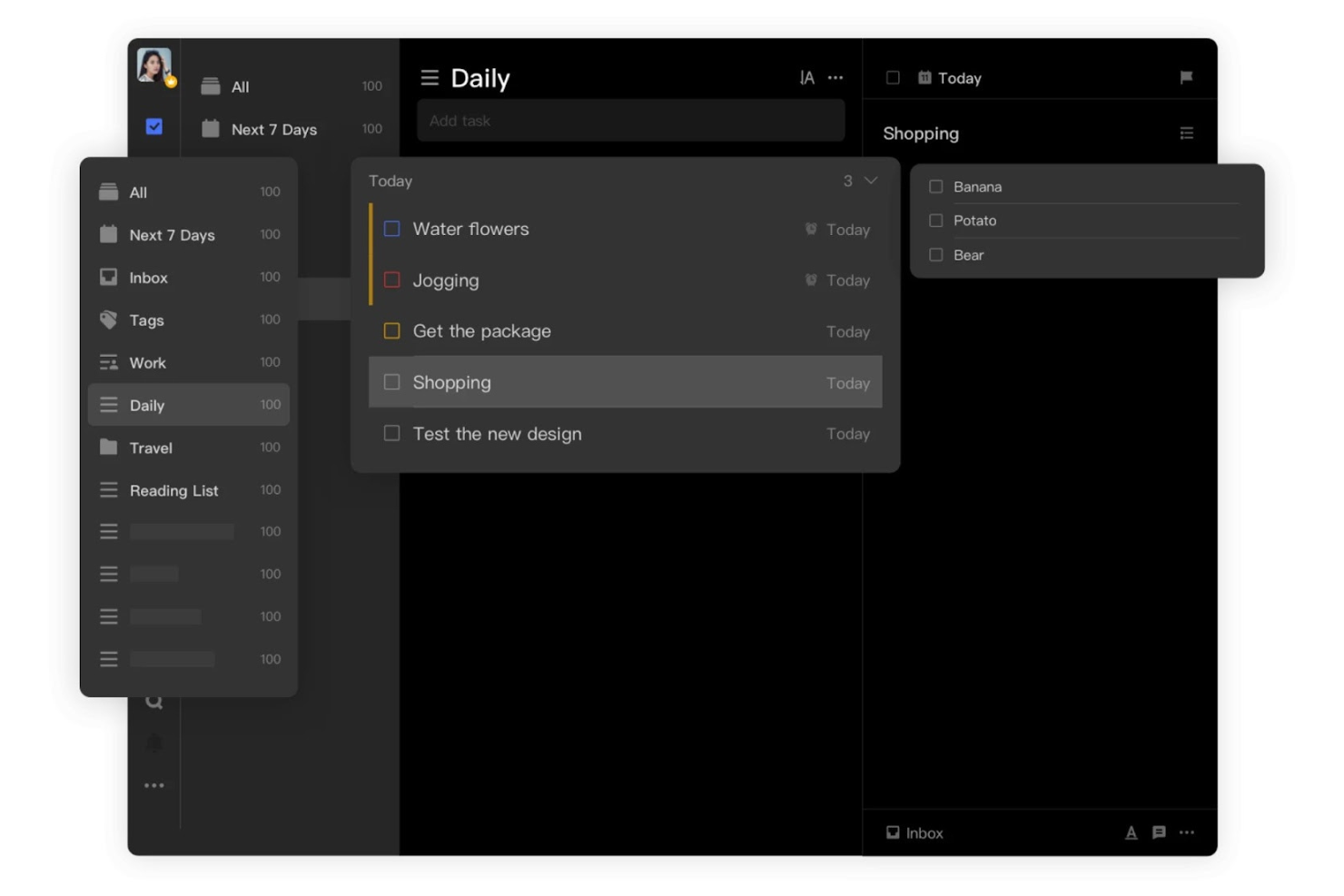
TickTick è un'app di gestione delle attività che aiuta gli utenti a rimanere organizzati grazie a funzionalità come promemoria, visualizzazioni del calendario e strumenti di collaborazione. È ideale per una gestione completa delle attività grazie al suo set di funzionalità esteso che include liste di attività, monitoraggio delle abitudini e sincronizzazione senza interruzioni su più piattaforme.
Perché è una valida alternativa a Todoist:
L’ampia selezione di funzionalità di TickTick va oltre la semplice gestione delle attività. Si distingue come una buona alternativa a Todoist perché offre visualizzazioni flessibili del calendario, strumenti di collaborazione e un tracker per le abitudini, rendendola adatta sia all'uso personale che professionale.
Funzionalità e integrazioni distintive:
Le funzionalità includono promemoria multipli, visualizzazioni flessibili del calendario, attività ricorrenti, un'interfaccia semplice e intuitiva, monitoraggio delle abitudini e un timer Pomodoro.
Le integrazioni includono Google Calendar, Outlook, Siri, Alexa, Slack, Zapier, IFTTT, Evernote, Gmail e Apple Calendar.
Pros and Cons
Pros:
- Set di funzionalità completo
- Compatibilità multipiattaforma
- Interfaccia semplice e intuitiva
Cons:
- Alcune funzionalità avanzate richiedono un abbonamento premium
- Occasionali problemi di sincronizzazione tra dispositivi

Ideale per l'integrazione con dispositivi Apple

OmniFocus è uno strumento di gestione delle attività pensato per i professionisti, che offre funzionalità dettagliate per catturare e organizzare le attività su tutti i dispositivi Apple. È ideale per l'integrazione con dispositivi Apple grazie alla sua profonda compatibilità con macOS, iOS e altre piattaforme Apple, assicurando un flusso di lavoro coerente.
Perché è una valida alternativa a Todoist:
OmniFocus offre agli utenti un'integrazione senza soluzione di continuità con i dispositivi Apple, rendendolo un'ottima alternativa per chi è fortemente inserito nell'ecosistema Apple. La capacità di sincronizzare le attività su tutti i dispositivi Apple garantisce una gestione efficiente delle attività, indipendentemente dal dispositivo utilizzato.
Funzionalità distintive e integrazioni:
Le funzionalità includono previsione, progetti, etichettatura, prospettive personalizzate e profonda integrazione con le notifiche di macOS e iOS.
Le integrazioni comprendono Apple Calendar, Apple Reminders, Siri, Mail Drop, iCloud, OmniPlan, OmniOutliner, OmniGraffle, Zapier e Slack.
Pros and Cons
Pros:
- Profonda integrazione con i dispositivi Apple
- Prospettive personalizzabili per la gestione delle attività
- Robuste funzionalità di previsione e etichettatura
Cons:
- Funzionalità completa solo all'interno dell'ecosistema Apple
- Curva di apprendimento più ripida per i nuovi utenti
Ideale per team di sviluppo software

Jira è uno strumento di gestione dei progetti progettato per aiutare i team di sviluppo software a pianificare, monitorare e rilasciare software. È ideale per i team di sviluppo software grazie alle sue funzionalità avanzate pensate per le metodologie Agile e alle ampie capacità di integrazione.
Perché è una buona alternativa a Todoist:
Jira offre strumenti specializzati per lo sviluppo software che mancano a Todoist. Le sue funzionalità di gestione progetti Agile e le integrazioni approfondite lo rendono una solida alternativa per i team di sviluppo che necessitano di più di una semplice gestione delle attività.
Funzionalità e integrazioni principali:
Funzionalità includono flussi di lavoro personalizzabili, reportistica avanzata e analisi, gestione delle dipendenze, automazione e suggerimenti basati sull'intelligenza artificiale.
Integrazioni includono Confluence, Bitbucket, GitHub, Slack, Microsoft Teams, Google Drive, Dropbox, Figma, Trello e Zoom.
Pros and Cons
Pros:
- Opzioni di personalizzazione approfondite
- Solido supporto alle metodologie Agile
- Robuste capacità di integrazione
Cons:
- Può essere complesso da configurare
- Curva di apprendimento più ripida per i nuovi utenti
nTask
Ideale per suddivisione delle attività
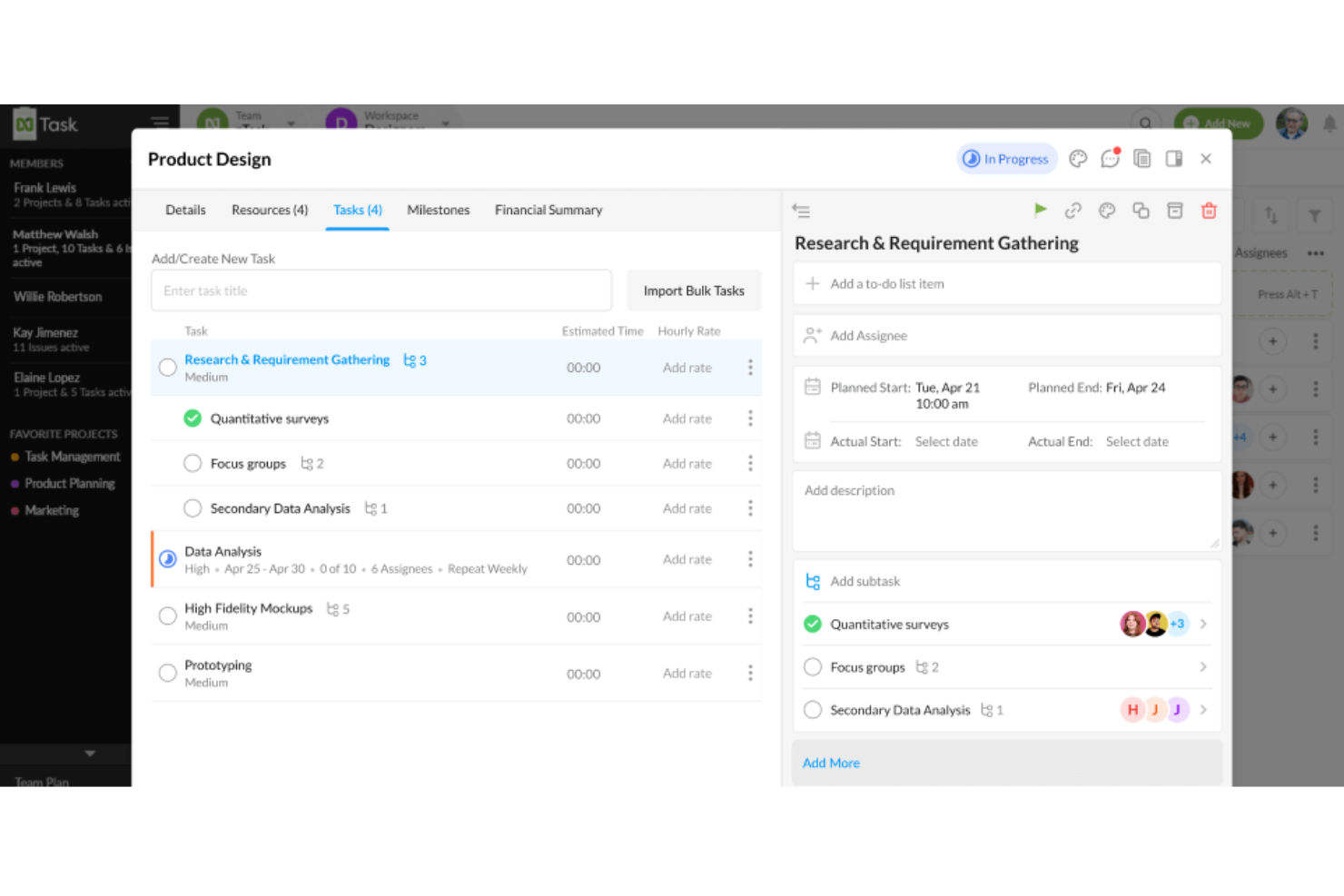
nTask è uno strumento di gestione progetti che aiuta i team a restare organizzati con attività, progetti e flussi di lavoro collaborativi. Progettato sia per utenti singoli che per team, nTask offre una gamma di funzionalità che vanno oltre le semplici liste di cose da fare.
Perché è una valida alternativa a Todoist:
Ho scelto nTask come ottima alternativa a Todoist grazie alle sue funzionalità di gestione delle attività che permettono una pianificazione e una prioritizzazione più dettagliate. nTask supporta diversi livelli di suddivisione delle attività, consentendo di assegnare sotto-attività, creare dipendenze e impostare livelli di priorità utili per strutturare anche i progetti più complessi. Con la possibilità di assegnare attività a membri specifici del team e configurare attività ricorrenti, nTask permette al tuo team di gestire le attività quotidiane insieme agli obiettivi di progetto a lungo termine senza mai perdere il filo.
Funzionalità e integrazioni principali:
Le funzionalità includono bacheche Kanban, diagrammi di Gantt, spazi di lavoro dedicati, reportistica di progetto, etichette personalizzate per le attività, monitoraggio dell’avanzamento, registrazione del tempo, prioritizzazione delle attività, ordini del giorno per le riunioni, monitoraggio dei rischi, promemoria di scadenze e allegati ai file.
Le integrazioni includono Google Calendar, Microsoft Teams, Outlook Calendar, Zapier, Asana, monday.com, ClickUp e Microsoft Outlook.
Pros and Cons
Pros:
- Gestione delle attività completa
- Funzionalità di collaborazione in tempo reale
- Grafici di Gantt intuitivi
Cons:
- Mancano funzionalità avanzate di automazione
- L’app mobile è meno performante della versione desktop
Altre alternative a Todoist
Di seguito trovi un elenco di ulteriori alternative a Todoist che ho selezionato. Anche se non sono rientrate tra le prime 10, sono comunque valide e meritano ulteriori approfondimenti.
- Trello
Ideale per il monitoraggio visivo dei progetti
- Things
Ideale per design elegante e facilità d'uso
- GoodDay
Ideale per spazi di lavoro personalizzabili
- Todo Cloud
Ideale per la sincronizzazione di attività tra piattaforme


Recensioni correlate dei software di gestione dei progetti
Se non hai ancora trovato quello che cerchi, dai un’occhiata a questi altri strumenti correlati che abbiamo testato e valutato:
- Software di gestione dei progetti
- Software di gestione delle risorse
- Software di automazione dei flussi di lavoro
- Software per il monitoraggio del tempo
- Software di gestione delle attività
- Strumenti di collaborazione
- Creatore di diagrammi di Gantt
- Strumenti per la produttività
- Software per il monitoraggio dei progetti
- Software per la pianificazione dei progetti
Come valuto le alternative a Todoist
Presto attenzione a due aspetti: funzionalità di base, come l'assegnazione delle attività e la sincronizzazione multipiattaforma, e fattori distintivi, come l'intelligenza artificiale, l'automazione e la reportistica, che separano le scelte migliori dalle altre.
Funzionalità fondamentali (requisiti minimi per questo elenco)
Quando seleziono gli strumenti per il mio elenco, assegno a ciascuno un punteggio su una scala da 0 (non offre la funzionalità) a 5 (eccelle in quest'area) per ognuna delle funzionalità fondamentali elencate di seguito. Poi converto il punteggio totale dello strumento in una percentuale. Ogni strumento deve raggiungere un punteggio totale minimo del 75% per essere preso in considerazione.
- Creazione e organizzazione delle attività: cerco una struttura flessibile delle attività — sottoattività, etichette, priorità, attività ricorrenti — così da poter suddividere qualcosa come il lancio di un prodotto in parti gestibili.
- Viste multiple dei progetti: verifico che gli strumenti offrano almeno due modi per visualizzare il lavoro.
- Collaborazione del team: progetti condivisi, assegnazione delle attività, commenti e feed delle attività sono tutti elementi importanti. Valuto quanto bene uno strumento gestisca il lavoro di squadra in tempo reale all'interno di uno spazio di lavoro condiviso.
- Disponibilità multipiattaforma: uno strumento deve funzionare dove lavori tu. Cerco app native per iOS, Android, web e desktop, così che le attività restino accessibili durante gli spostamenti, le riunioni o i periodi di lavoro concentrato.
- Integrazioni di terze parti: la connessione a calendari, Slack, e-mail e strumenti come Zapier è essenziale. Valuto l'ampiezza e la profondità dell'ecosistema di integrazioni di ciascuno strumento.
- Promemoria e notifiche: gli avvisi configurabili su tutti i dispositivi mantengono visibili le scadenze. Verifico la disponibilità di notifiche push, promemoria via e-mail e avvisi sulle date di scadenza, personalizzabili in base al tuo flusso di lavoro.
Una volta ottenuto un elenco di strumenti che soddisfano questi criteri, considero ciò che distingue ciascuna piattaforma.
Fattori distintivi (ciò che differenzia i fornitori)
Ecco come confronto i diversi fornitori:
Funzionalità di spicco
L'automazione dei flussi di lavoro è un importante fattore distintivo. Cerco strumenti che permettano di configurare regole come l'assegnazione automatica delle attività quando cambia lo stato o l'invio di notifiche quando si avvicina una scadenza. Anche il monitoraggio nativo del tempo e la reportistica sono importanti, soprattutto per i freelance che fatturano a ore o per i responsabili che monitorano la capacità del team tra i vari progetti. Oltre a questo, valuto se uno strumento supporta l'inserimento in linguaggio naturale per creare rapidamente le attività: digitare "rivedi la presentazione venerdì alle 15" e farselo interpretare automaticamente fa davvero risparmiare tempo a chi crea molte attività.
Oltre le funzionalità
La struttura dei prezzi è molto importante in questo caso. Verifico se uno strumento offre un piano gratuito utilizzabile per gli utenti singoli e se i costi per utente rimangono ragionevoli con la crescita dei team. Anche la facilità di migrazione è un fattore che considero: passare da Todoist è molto più semplice quando uno strumento supporta l'importazione diretta di progetti, etichette e date di scadenza, invece di costringerti a ricostruire tutto manualmente. Valuto inoltre l'affidabilità offline, poiché i team distribuiti che lavorano in fusi orari diversi e con connessioni instabili hanno bisogno di una sincronizzazione sicura, senza modifiche perse.
Perché cercare un’alternativa a Todoist
Sebbene Todoist sia un software popolare, potrebbe non funzionare bene per la tua azienda. Potresti cercare un’alternativa a Todoist se:
- Hai bisogno di un'opzione più conveniente: Todoist è un software relativamente economico, ma se hai bisogno di meno postazioni o hai un budget più limitato, una soluzione alternativa potrebbe essere più vantaggiosa.
- Hai bisogno di funzionalità avanzate: se ti servono funzionalità più avanzate, come una personalizzazione più approfondita o capacità avanzate di monitoraggio della produttività, un'alternativa a Todoist potrebbe essere un'opzione migliore.
- Vuoi maggiore flessibilità: un software flessibile aiuta ad aumentare la produttività e la redditività e, se Todoist non soddisfa le tue esigenze, potrebbe essere il momento di cambiare.
- Hai bisogno di una migliore integrazione: Todoist si integra con diverse opzioni software, ma se non funziona con il tuo attuale insieme di strumenti, potresti dover cercare un software alternativo.
- Preferisci un'interfaccia utente o un design diverso: con un'interfaccia più intuitiva, i team possono assumere il controllo dei propri progetti e, se una soluzione alternativa offre un'interfaccia migliore, non fa male fare il passo e cambiare software.
Caratteristiche principali delle alternative a Todoist
Ecco alcune caratteristiche principali di Todoist che il tuo software alternativo dovrebbe essere in grado di replicare o migliorare per adattarsi alle tue esigenze.
- Prioritizzazione delle attività: le funzionalità di prioritizzazione nelle alternative a Todoist consentono agli utenti di assegnare livelli di priorità alle attività, aiutandoli a concentrarsi prima sugli elementi più importanti. Questo è necessario per una gestione efficiente delle attività, poiché dirige l'attenzione verso quelle ad alta priorità.
- Scadenze e attività ricorrenti: questi strumenti consentono agli utenti di impostare scadenze specifiche per le attività e programmare attività ricorrenti, aspetto fondamentale per gestire i progetti continuativi e garantire progressi costanti senza dover reimpostare manualmente le attività.
- Etichette e filtri: utilizzando le etichette per classificare le attività e applicando filtri, gli utenti possono ottimizzare il proprio flusso di lavoro concentrandosi solo sulle attività che soddisfano determinati criteri. Questo semplifica la gestione di progetti di grandi dimensioni e il mantenimento dell'organizzazione tra vari tipi di attività.
- Sottoprogetti e sezioni: organizzare i progetti in sottoprogetti e sezioni aiuta gli utenti a mantenere una struttura chiara e a suddividere i progetti complessi in parti gestibili, elemento fondamentale per una pianificazione e un'esecuzione dettagliate dei progetti.
- Modelli di progetto: i modelli consentono di risparmiare molto tempo nelle alternative a Todoist, permettendo agli utenti di replicare strutture di progetto efficaci senza dover ricominciare ogni volta da zero. Questo è particolarmente utile per i team che gestiscono più progetti simili.
- Collaborazione: le funzionalità di collaborazione consentono di condividere progetti e attività con i membri del team e di assegnare ruoli specifici. Questo migliora il lavoro di squadra e garantisce che tutti abbiano ben chiare le proprie responsabilità, semplificando il monitoraggio dei progressi collettivi e individuali.
- Integrazioni: la possibilità di integrarsi con altre applicazioni come Slack, Google Calendar e Zapier amplia le funzionalità delle alternative a Todoist, facilitando un flusso di lavoro fluido e migliorando la produttività collegando i vari strumenti utilizzati quotidianamente.
- Riquadro Kanban: visualizzare le attività e le fasi del progetto su un riquadro Kanban è fondamentale per la gestione del flusso di lavoro, poiché consente agli utenti di vedere a colpo d'occhio lo stato delle diverse attività e di gestire i progressi attraverso un'interfaccia visiva.
- Inserimento in linguaggio naturale: questa funzionalità consente agli utenti di aggiungere rapidamente attività utilizzando il linguaggio naturale, rendendo la gestione delle attività più intuitiva ed efficiente. Semplifica il processo di impostazione delle scadenze, assegnazione delle priorità e aggiornamento delle attività.
- App per dispositivi mobili e computer: offrire app sia per dispositivi mobili sia per computer garantisce agli utenti la possibilità di accedere alle proprie attività e gestire i progetti ovunque si trovino, in ufficio, a casa o in movimento. Questa flessibilità è fondamentale per mantenere la produttività in ambienti diversi.