

10 WorkflowMax-Alternativen für die Auftragsverwaltung im Jahr 2026

10 Auswahlliste der besten WorkflowMax-Alternativen


Das Verwalten von Projekten kann schwierig sein. Du jonglierst mit Fristen, Ressourcen und der Dynamik deines Teams. Es ist nur natürlich, nach einem Projektmanagement-Tool zu suchen, das wirklich zu deinen Anforderungen passt.
Wenn WorkflowMax deine Erwartungen nicht erfüllt, bist du nicht allein. Vielleicht fehlen Funktionen oder die Bedienung ist nicht benutzerfreundlich genug. Ich verstehe das: Du möchtest Software, die dein Leben einfacher und nicht schwieriger macht.
Die Suche nach Alternativen zu WorkflowMax kann neue Möglichkeiten eröffnen. Ich stelle dir unvoreingenommene Bewertungen der besten Optionen vor, die besser zu den Anforderungen deines Teams passen könnten.
Du erhältst Einblicke in Funktionen, Benutzerfreundlichkeit und die Besonderheiten der einzelnen Optionen. Lass uns die richtige Lösung für deine Herausforderungen im Projektmanagement finden.
Was ist WorkflowMax?
WorkflowMax von BlueRock ist eine Projektmanagement-Software, die dich dabei unterstützt, deine Projekte von Anfang bis Ende zu verwalten. Sie wird häufig von Kreativprofis, Buchhaltern und Beratern eingesetzt, die ihre Arbeitszeit, Aufgaben und Abrechnung im Blick behalten müssen. Funktionen zur Zeiterfassung, Auftragsverwaltung und Rechnungsstellung helfen dir, deine Arbeit zu organisieren, dein Team zu verwalten und Fristen einzuhalten. Insgesamt bietet WorkflowMax eine zentrale Lösung für die effektive Verwaltung deiner Projekte.
Zusammenfassung der besten WorkflowMax-Alternativen
Diese Vergleichstabelle fasst die Funktionen und Preisinformationen meiner besten WorkflowMax-Alternativen zusammen, damit du die beste Lösung für dein Budget und deine geschäftlichen Anforderungen findest.
| Tool | Best For | Trial Info | Price | ||
|---|---|---|---|---|---|
| 1 | Am besten geeignet, um mehrere Tools zu ersetzen | Kostenlose 7-Tage-Testversion und kostenloser Tarif verfügbar | Ab $39/Monat | Website | |
| 2 | Am besten für einfache Aufgabenboards | 14-tägige kostenlose Testversion | Ab $5/Benutzer/Monat (jährlich abgerechnet) | Website | |
| 3 | Am besten für unternehmensweite Teams mit vielen Tools geeignet | Kostenloser Tarif verfügbar | Ab $10.99/Benutzer/Monat (jährlich abgerechnet) | Website | |
| 4 | Ideal für abrechenbare Projektteams | Kostenloser Tarif verfügbar | Ab $11.95/Monat | Website | |
| 5 | Am besten für Freelancer zur Verwaltung von Verträgen | 7-tägige kostenlose Testversion | Ab $9/Benutzer/Monat (jährlich abgerechnet) | Website | |
| 6 | Am besten für die Kommunikation in kleinen Unternehmen geeignet | 30-tägige kostenlose Testversion + kostenlose Demo verfügbar | Ab $15/Nutzer/Monat | Website | |
| 7 | Am besten für Projekte mit integrierter Nachrichtenfunktion | Kostenloser Tarif + kostenlose Testversion verfügbar | Ab $69/Organisation/Monat | Website | |
| 8 | Am besten für Zeiterfassung und Rechnungsstellung | Kostenloser Tarif + 30-tägige kostenlose Testversion verfügbar | Ab $9/Nutzer/Monat (jährlich abgerechnet) | Website | |
| 9 | Am besten für modulare CRM- und Projektverwaltung | 14-tägige kostenlose Testversion + kostenlose Demo verfügbar | Ab $15/Nutzer/Monat (jährlich abgerechnet) | Website | |
| 10 | Am besten für große Werbeagenturen | Kostenlose Demo verfügbar | Ab $47/Nutzer/Monat | Website |
Warum Sie unseren Software-Empfehlungen vertrauen können
Unser Team testet und bewertet Software seit 2012. Als Projektmanager wissen wir selbst, wie schwierig – und wichtig – es ist, die richtige Software auszuwählen.
Für diesen Leitfaden haben wir Tools mithilfe von praktischen Tests und unabhängiger Recherche bewertet und dabei unsere Bewertungskriterien angewendet. Zudem greifen wir auf Erkenntnisse von Branchenvordenkern und praktizierenden Projektmanagement-Experten zurück.
Unsere Bewertungen spiegeln unser menschliches redaktionelles Urteilsvermögen wider, keine Verkaufsstrategie.
Expertenprüfer:
Bewertungen der besten WorkflowMax-Alternativen
Nachfolgend findest du meine ausführlichen Zusammenfassungen der besten WorkflowMax-Alternativen, die es auf meine Auswahlliste geschafft haben. Meine Bewertungen bieten einen detaillierten Überblick über die wichtigsten Funktionen, Vor- und Nachteile, Integrationen und idealen Anwendungsfälle jedes Tools, damit du die beste Lösung für dich findest.

Flowlu
Am besten geeignet, um mehrere Tools zu ersetzen

Flowlu ist eine All-in-One-Software zur Unternehmensverwaltung, die für kleine bis mittelgroße Unternehmen entwickelt wurde. Sie bietet Werkzeuge für Projektmanagement, CRM, Rechnungsstellung und Finanzverwaltung.
Warum Flowlu eine gute WorkflowMax-Alternative ist: Flowlu bietet eine kostengünstige Lösung mit integrierten CRM- und Projektmanagement-Funktionen. Sie ermöglicht es Ihnen, Kundenbeziehungen und Projekte an einem Ort zu verwalten, wodurch der Bedarf an mehreren Tools reduziert wird. Die Funktionen für Rechnungsstellung und Finanzverwaltung helfen Ihnen, Ihre Unternehmensfinanzen effizient im Blick zu behalten. Dadurch ist Flowlu ideal für Unternehmen, die Kosten sparen und gleichzeitig ihre Abläufe verwalten möchten.
Hervorstechende Funktionen und Integrationen:
Funktionen umfassen Aufgabenverwaltung zur Organisation der Arbeit, Mindmapping für Brainstorming und Planung sowie eine Wissensdatenbank zum Speichern wichtiger Informationen. Diese Funktionen helfen Ihrem Team, zusammenzuarbeiten und auf dem Laufenden zu bleiben.
Integrationen umfassen Slack, Google Calendar, Trello, Dropbox, Stripe, PayPal, Mailchimp und mehr.
Pros and Cons
Pros:
- Kostengünstig für kleine Unternehmen
- Integriertes CRM und Projektmanagement
- Integrierte Finanzverwaltung
Cons:
- Die Benutzeroberfläche kann auf manche Nutzer überladen wirken
- Kann komplex zu erlernen und einzurichten sein

Trello
Am besten für einfache Aufgabenboards
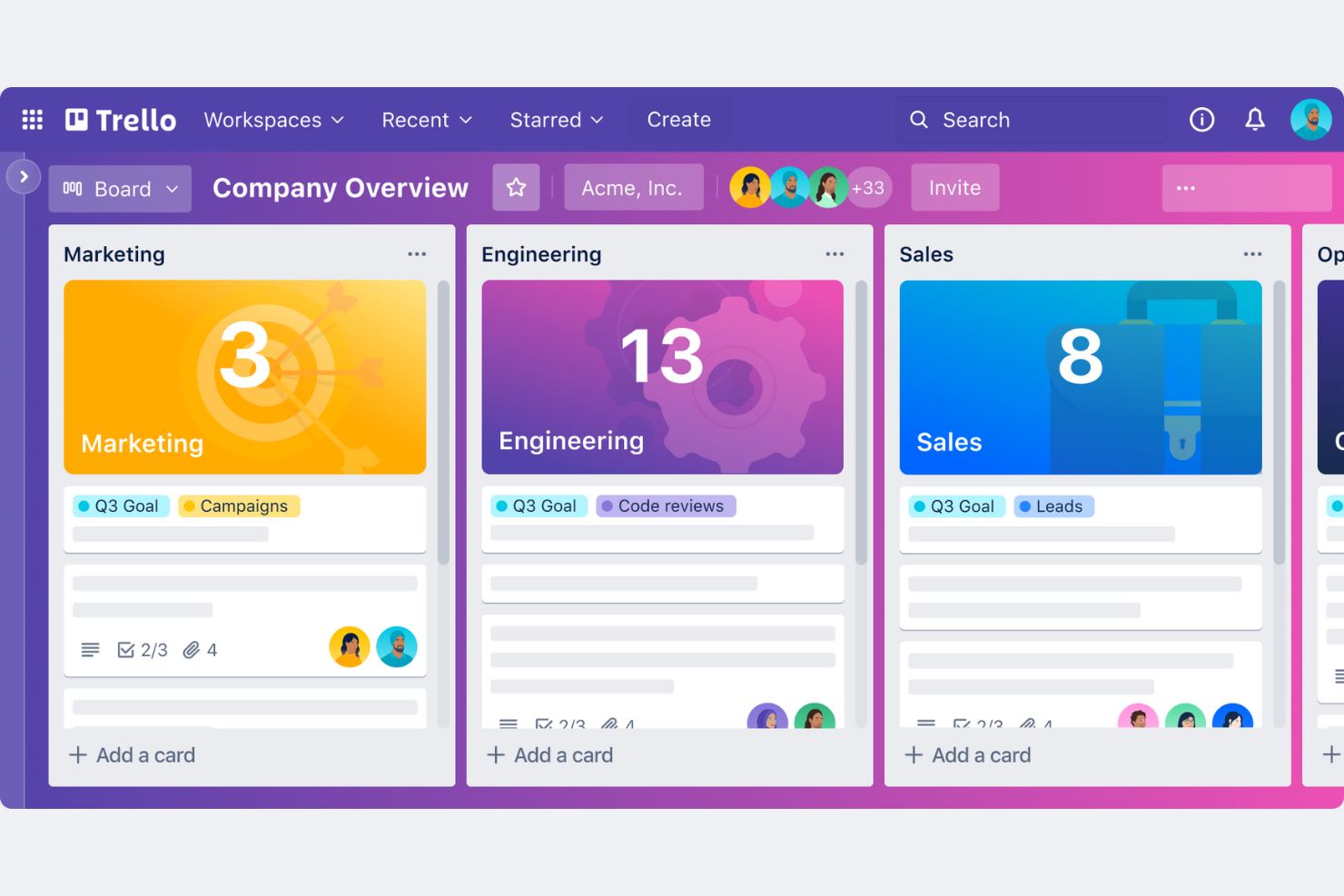
Trello ist ein visuelles Projektmanagement-Tool, das Boards, Listen und Karten verwendet, um Teams bei der Organisation von Aufgaben und Projekten zu unterstützen. Es wurde für kleine Unternehmen und Teams entwickelt, die eine unkomplizierte Möglichkeit zur Verwaltung von Arbeitsabläufen und Zusammenarbeit suchen.
Warum Trello eine gute WorkflowMax-Alternative ist: Trello bietet eine intuitive Benutzeroberfläche, die kleine Teams schnell übernehmen können. Das visuelle Boardsystem ermöglicht es Ihnen, Ihr gesamtes Projekt auf einen Blick zu sehen. Es ist flexibel und lässt sich an Ihren Arbeitsablauf anpassen. Die Einfachheit von Trello macht es ideal für kleine Unternehmen, die eine unkomplizierte Projektmanagement-Lösung benötigen.
Hervorstechende Funktionen und Integrationen:
Funktionen umfassen anpassbare Boards, die zu Ihrem Arbeitsablauf passen, eine Ziehen-und-Ablegen-Funktion für eine einfache Aufgabenverwaltung und Checklisten, um Aufgaben organisiert zu halten. Diese Funktionen helfen Ihrem Team, den Überblick über Aufgaben zu behalten, ohne überfordert zu werden.
Integrationen umfassen Slack, Google Drive, Microsoft Teams, Dropbox, GitHub, Evernote, Salesforce, Jira, GitLab, Zapier und mehr.
Pros and Cons
Pros:
- Einfach für kleine Teams
- Intuitive visuelle Benutzeroberfläche
- Schnell zu übernehmen
Cons:
- Kann für große Projekte zu einfach sein
- Keine integrierte Zeiterfassung

Asana
Am besten für unternehmensweite Teams mit vielen Tools geeignet
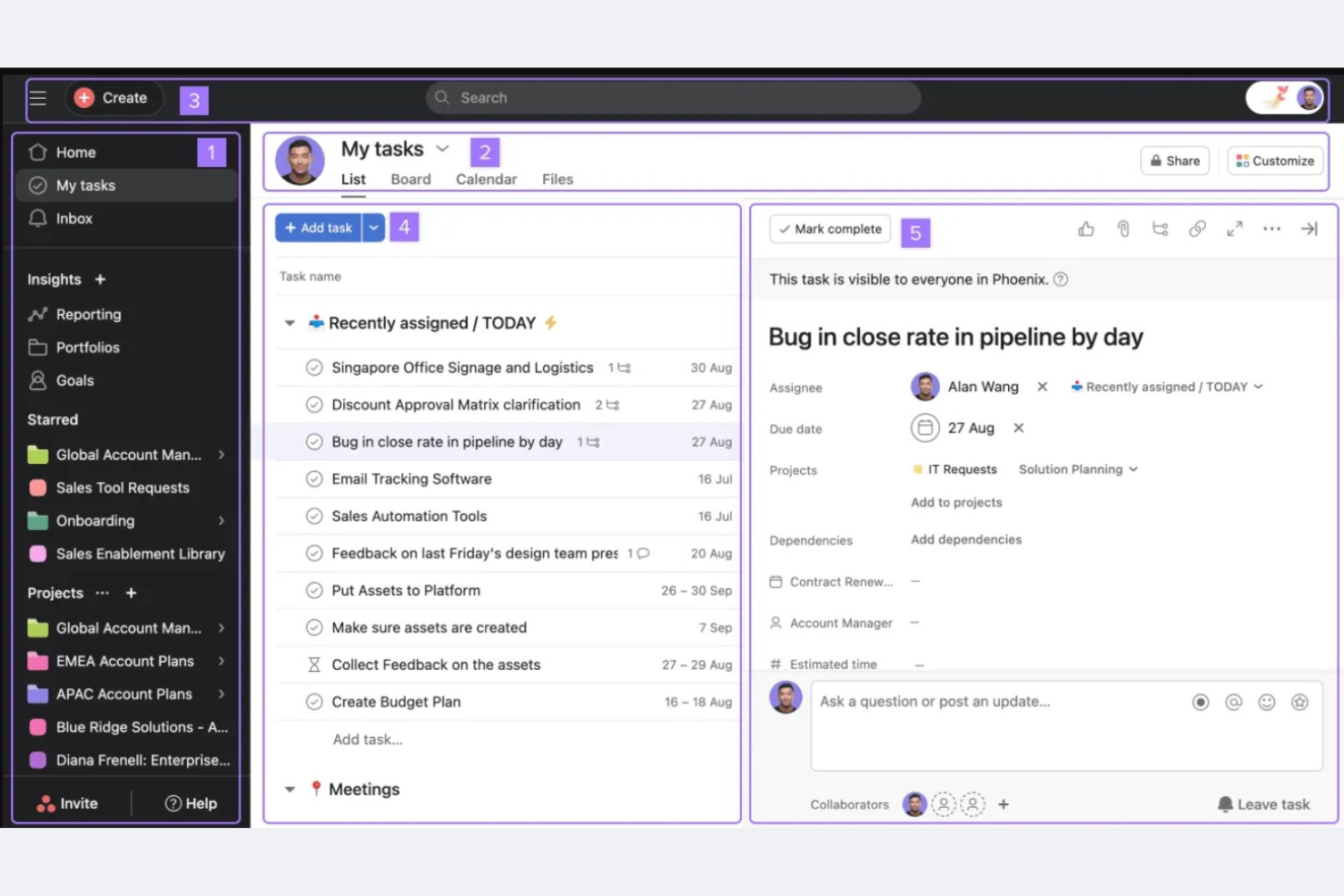
Asana ist ein Projektmanagement-Tool, das Teams dabei unterstützt, ihre Arbeit zu organisieren, zu verfolgen und zu verwalten. Es richtet sich an Unternehmen jeder Größe und bietet Funktionen für Aufgabenverwaltung, Projektverfolgung und Zusammenarbeit.
Warum Asana eine gute WorkflowMax-Alternative ist: Asana bietet umfangreiche Integrationsmöglichkeiten und ist daher eine ausgezeichnete Wahl für Unternehmen, die eine Verbindung zu anderen Tools benötigen. Es stellt fortschrittliche Funktionen zur Projektverfolgung bereit, damit alle Teammitglieder auf dem gleichen Stand bleiben. Mit dem Aufgabenverwaltungssystem können Sie Aufgaben zuweisen und Fristen für die zuständige Person festlegen. Die Flexibilität von Asana bei der Abwicklung komplexer Workflows unterstützt vielfältige Geschäftsanforderungen.
Hervorzuhebende Funktionen und Integrationen:
Zu den Funktionen gehören benutzerdefinierte Felder zur Anpassung von Projekten an Ihre Anforderungen, eine Zeitleistenansicht für die visuelle Projektplanung und Arbeitslastverwaltung zur Ausbalancierung der Teamaufwände. Diese Funktionen helfen Ihrem Team, organisiert zu bleiben und Fristen effektiv einzuhalten.
Zu den Integrationen gehören Slack, Microsoft Teams, Google Drive, Dropbox, GitHub, Salesforce, Trello, Zoom, Zapier und mehr.
Pros and Cons
Pros:
- Umfangreiche Integrationsmöglichkeiten
- Unterstützt komplexe Workflows
- Anpassbare Aufgabenverwaltung
Cons:
- Eingeschränkte Offline-Funktionalität
- Keine native Rechnungsstellung oder Buchhaltung
Avaza
Ideal für abrechenbare Projektteams
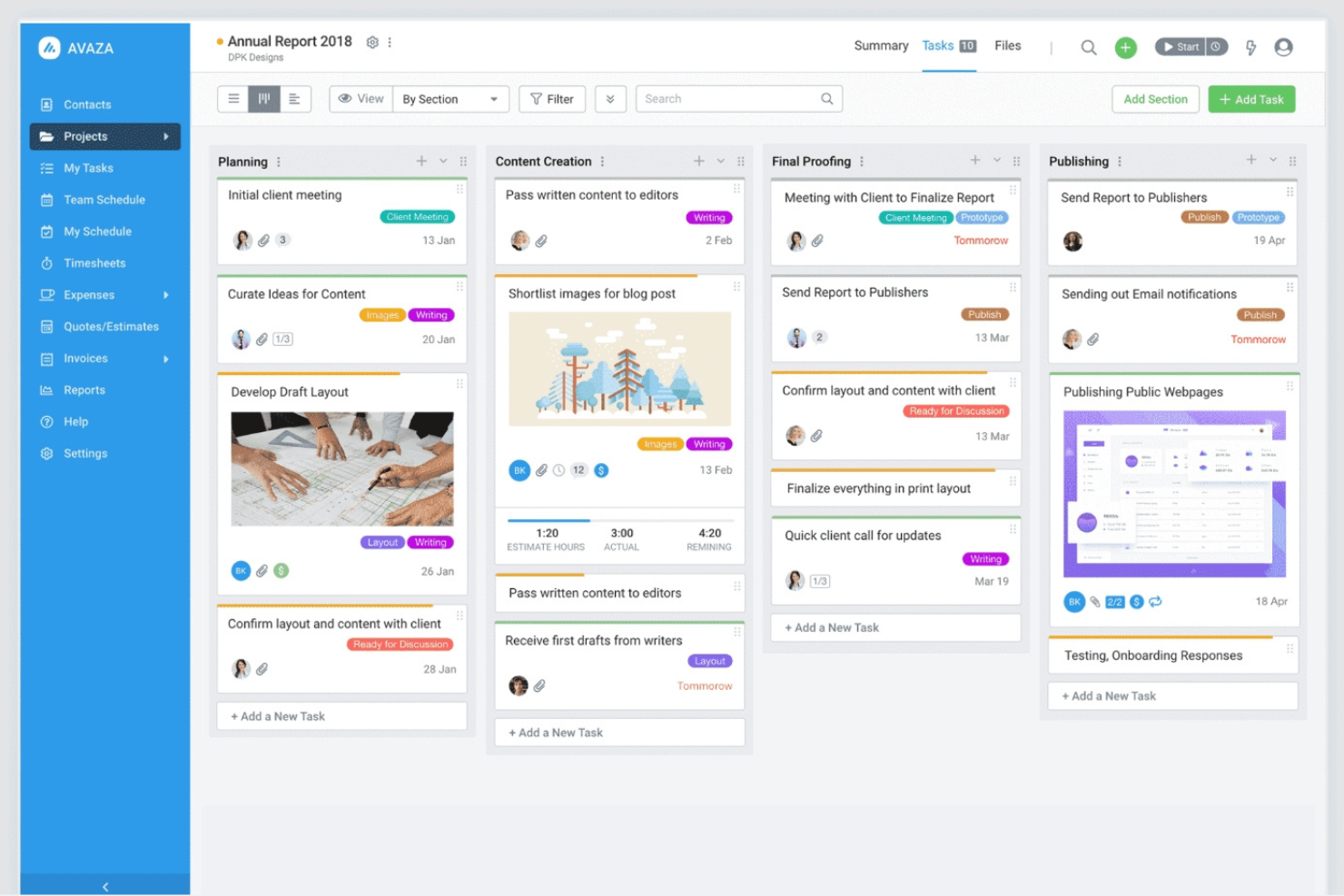
Avaza ist ein umfassendes Werkzeug für Projektmanagement und Zusammenarbeit, das für Unternehmen jeder Größe entwickelt wurde. Es unterstützt Teams dabei, Projekte zu verwalten, Arbeitszeiten zu erfassen und Rechnungen auf einer einzigen Plattform zu bearbeiten.
Warum Avaza eine gute Alternative zu WorkflowMax ist: Avaza kombiniert Zeiterfassung, Projektmanagement und Rechnungsstellung in einem einzigen Arbeitsablauf und ist daher besonders nützlich für dienstleistungsorientierte Teams, die nach Zeitaufwand oder Liefergegenständen abrechnen. Die Stärke der Lösung liegt darin, Projektarbeit direkt mit der Kundenabrechnung zu verbinden, ohne zusätzliche Erweiterungen.
Hervorstechende Funktionen und Integrationen:
Zu den Funktionen gehören anpassbare Aufgabenansichten passend zu Ihrem Arbeitsablauf, Kostenverwaltung zur Erfassung von Ausgaben und eine visuelle Ressourcenplanung für Projekte, damit Teams den Überblick behalten. Diese Funktionen unterstützen Ihr Team dabei, effizient zu arbeiten und organisiert zu bleiben.
Zu den Integrationen gehören Xero, QuickBooks, Slack, Google Drive, Dropbox, Zapier, Stripe, Evernote, Mailchimp und weitere.
Pros and Cons
Pros:
- Einfache Ressourcenplanung
- Umfangreiche Funktionen zur Rechnungsstellung
- Interner Team-Chat
Cons:
- Kann Einrichtungszeit erfordern
- Erfordert eine konsistente Dateneingabe

Bonsai
Am besten für Freelancer zur Verwaltung von Verträgen
Bonsai ist eine Plattform für Freelancer und Dienstleistungsunternehmen und bietet Tools zur Verwaltung von Verträgen, Angeboten und Zahlungen. Sie hilft dabei, Ihren Arbeitsablauf durch die Integration von Zeiterfassung, Rechnungsstellung und Kundenverwaltung zu optimieren.
Warum Bonsai eine gute WorkflowMax-Alternative ist: Bonsai konzentriert sich auf Freelancer und Dienstleistungsunternehmen und bietet Vorlagen für Verträge sowie die Erstellung von Angeboten. Die Rechnungsstellungsfunktion hilft Ihnen, pünktlich bezahlt zu werden, während die Zeiterfassung eine genaue Abrechnung gewährleistet. Schnelle Einrichtung mit minimaler Konfiguration macht Bonsai zu einer großartigen Wahl für alle, die eine Komplettlösung zur Verwaltung von Dienstleistungen benötigen, ohne einen langen Einführungsprozess.
Hervorstechende Funktionen und Integrationen:
Funktionen umfassen automatische Erinnerungen, die pünktliche Zahlungen sicherstellen, ein Kundenportal für einfache Kommunikation und Tools zur Steuerverwaltung, die finanzielle Aufgaben vereinfachen. Diese Funktionen helfen Ihnen, organisiert zu bleiben und sich auf das Wachstum Ihres Unternehmens zu konzentrieren. Die verfügbaren Integrationen hängen vom Tarif ab; für die Xero-Integration ist der Elite-Tarif erforderlich.
Integrationen umfassen QuickBooks, Xero, Zapier, Google Kalender, Calendly und mehr.
Pros and Cons
Pros:
- Integrierte Vertragsvorlagen verkürzen den Zeitaufwand für die rechtliche Einrichtung
- Angebote, Rechnungsstellung und Zahlungen befinden sich in einem einzigen Arbeitsablauf
- Schnelle Einführung mit minimalem Konfigurationsaufwand
Cons:
- Keine Integrationen in den Basic- oder Essential-Tarifen
- Fehlende erweiterte Berichtoptionen
Basecamp
Am besten für die Kommunikation in kleinen Unternehmen geeignet
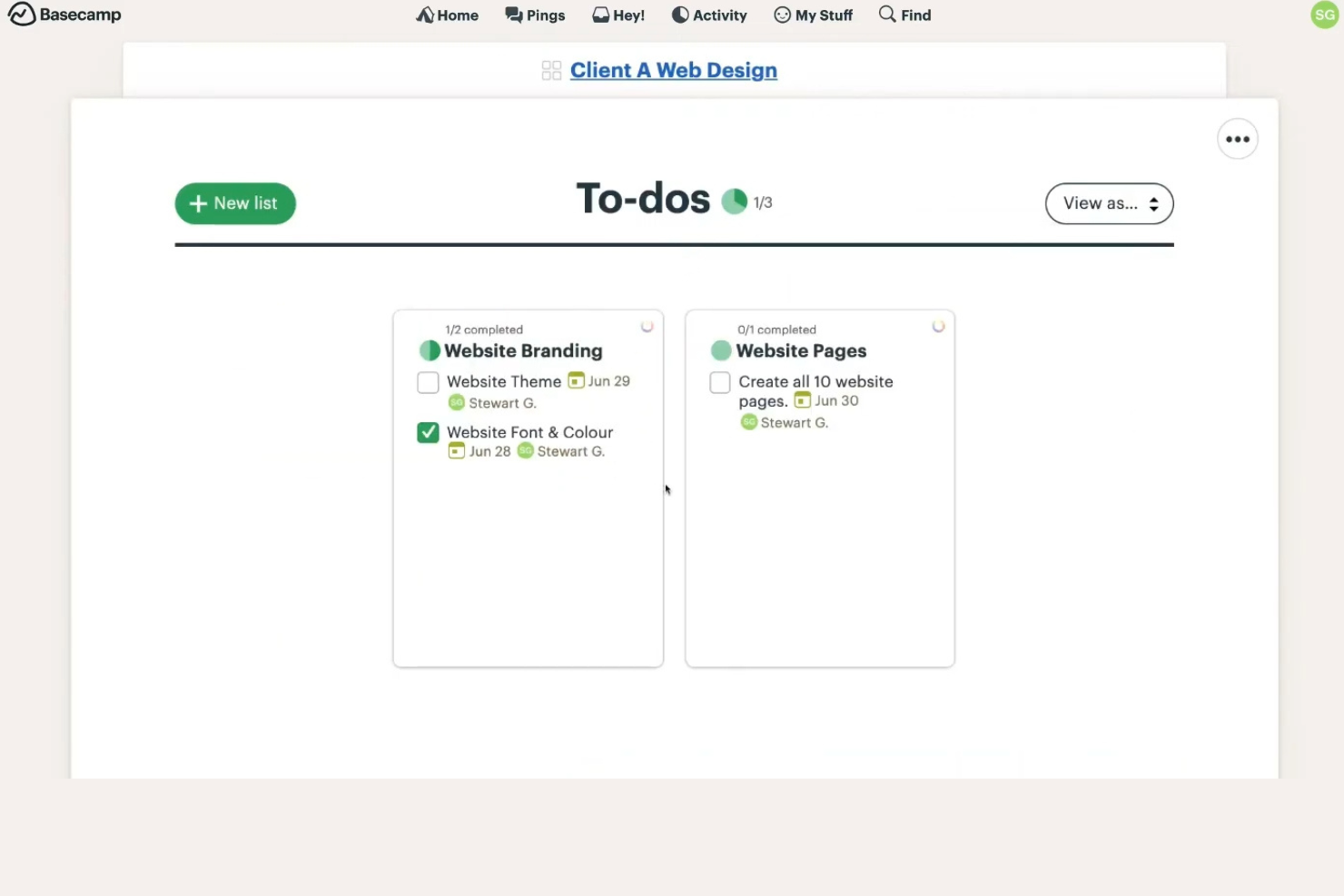
Basecamp ist ein Projektmanagement- und Teamkollaborationstool für kleine Unternehmen und Teams. Es hilft Nutzern, Projekte zu organisieren, Aufgaben zuzuweisen und effektiv zu kommunizieren.
Warum Basecamp eine gute WorkflowMax-Alternative ist: Basecamp bietet eine übersichtliche Benutzeroberfläche, die für kleine Unternehmen einfach zu bedienen ist. Es stellt Aufgabenlisten, Nachrichtenforen und Planungswerkzeuge bereit, damit Ihr Team den Überblick behält. Die zentrale Plattform ermöglicht eine reibungslose Kommunikation und gemeinsame Nutzung von Dokumenten. Die Einfachheit von Basecamp sorgt dafür, dass auch technisch unerfahrene Nutzer Projekte effizient verwalten können.
Herausragende Funktionen und Integrationen:
Zu den Funktionen gehören automatische Statusabfragen für Teamaktualisierungen, Dateispeicher, damit alles an einem Ort bleibt, sowie eine Hügeldiagramm-Funktion zur Visualisierung des Projektfortschritts. Diese Funktionen helfen Ihrem Team, organisiert zu bleiben und effektiv zu kommunizieren.
Zu den Integrationen gehören Zapier, Harvest, Everhour und weitere.
Pros and Cons
Pros:
- Einfache Benutzeroberfläche
- Zentralisierte Kommunikation
- Effektive gemeinsame Nutzung von Dokumenten
Cons:
- Keine integrierten erweiterten Arbeitsabläufe
- Die Funktionen zur Aufgabenverwaltung bieten keine Abhängigkeiten oder erweiterten Projektmanagement-Konstrukte

Bitrix24
Am besten für Projekte mit integrierter Nachrichtenfunktion
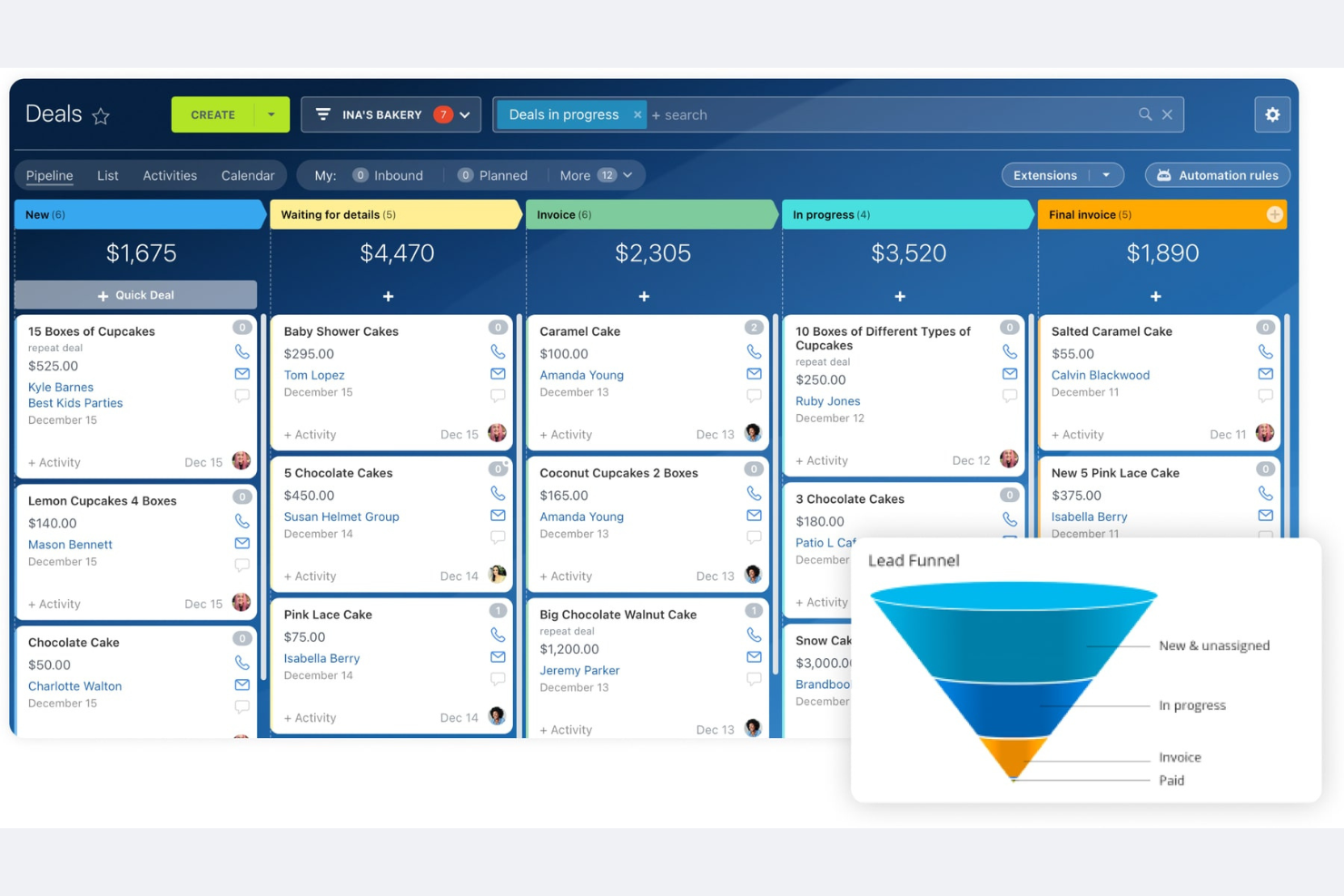
Bitrix24 ist eine Komplettplattform für Geschäftsmanagement, die Unternehmen jeder Größe passende Lösungen bietet, darunter Werkzeuge für CRM, Projektmanagement, Kommunikation und Zusammenarbeit. Sie unterstützt Teams dabei, Aufgaben zu verwalten, zu kommunizieren und Arbeitsabläufe effizient zu automatisieren.
Warum Bitrix24 eine gute WorkflowMax-Alternative ist: Bitrix24 bietet eine Komplettlösung, die Projektmanagement mit CRM- und Kommunikationstools verbindet. Sie können Aufgaben und Projekte verwalten und gleichzeitig Ihr Team über die integrierten Kommunikationsfunktionen verbunden halten. Mit den Automatisierungswerkzeugen können Sie Prozesse vereinfachen und die Produktivität steigern. Dadurch eignet sich die Plattform ideal für Unternehmen, die einen integrierten Arbeitsbereich zur Verwaltung mehrerer Funktionen suchen.
Besondere Funktionen und Integrationen:
Zu den Funktionen gehören die Automatisierung von Aufgaben zur Reduzierung manueller Arbeit, ein soziales Intranet für die Zusammenarbeit im Team und ein Dokumentenverwaltungssystem zur übersichtlichen Organisation von Dateien. Diese Funktionen helfen Ihrem Team, effizient zu arbeiten und in Verbindung zu bleiben.
Zu den Integrationen gehören Google Drive, Microsoft Office, Mailchimp, Dropbox, Xero und weitere.
Pros and Cons
Pros:
- Vollständiger Werkzeugsatz
- Integriertes CRM und Kommunikation
- Soziales Intranet für die Zusammenarbeit
Cons:
- Anspruchsvollere Einarbeitung
- Kann ressourcenintensiv sein

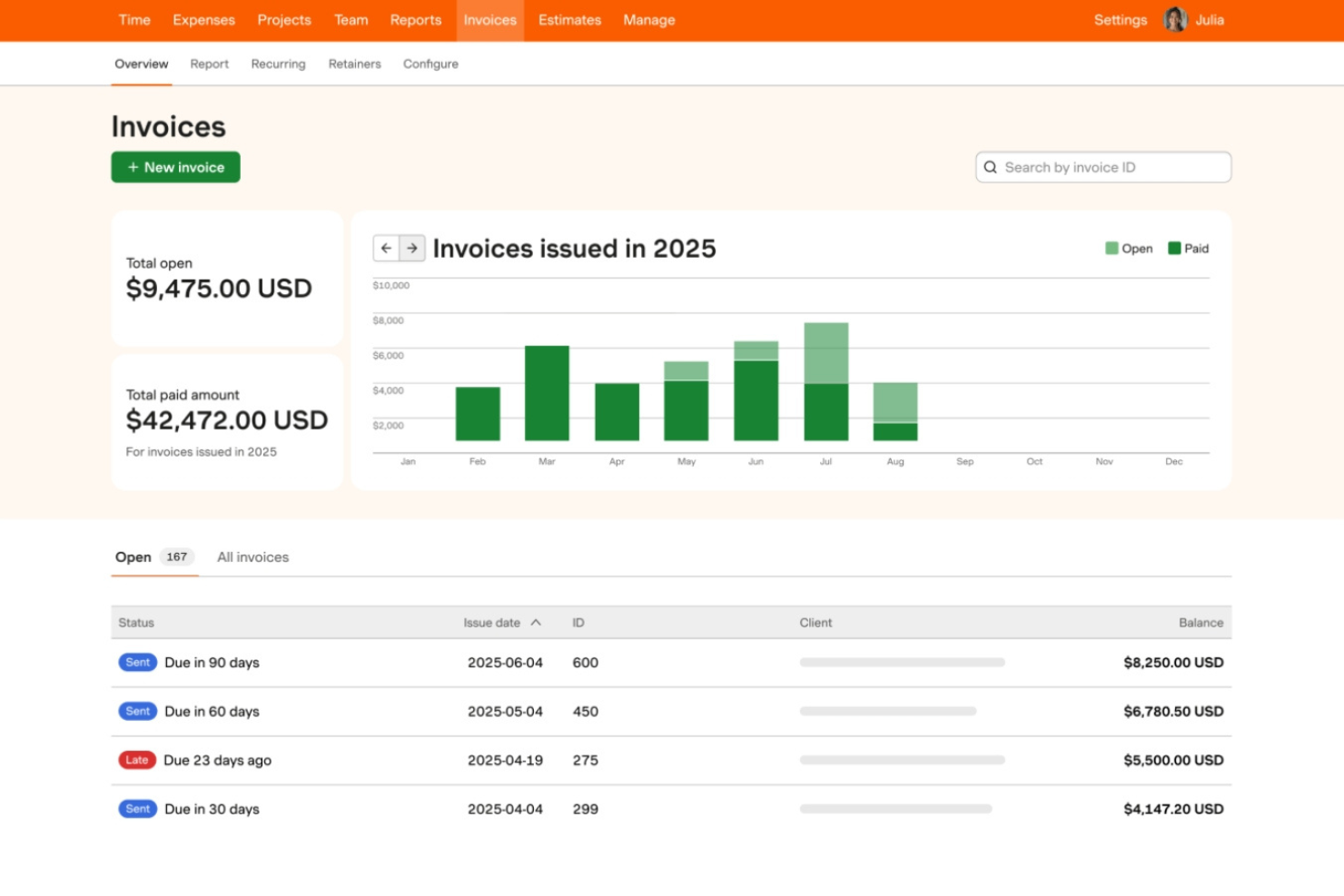
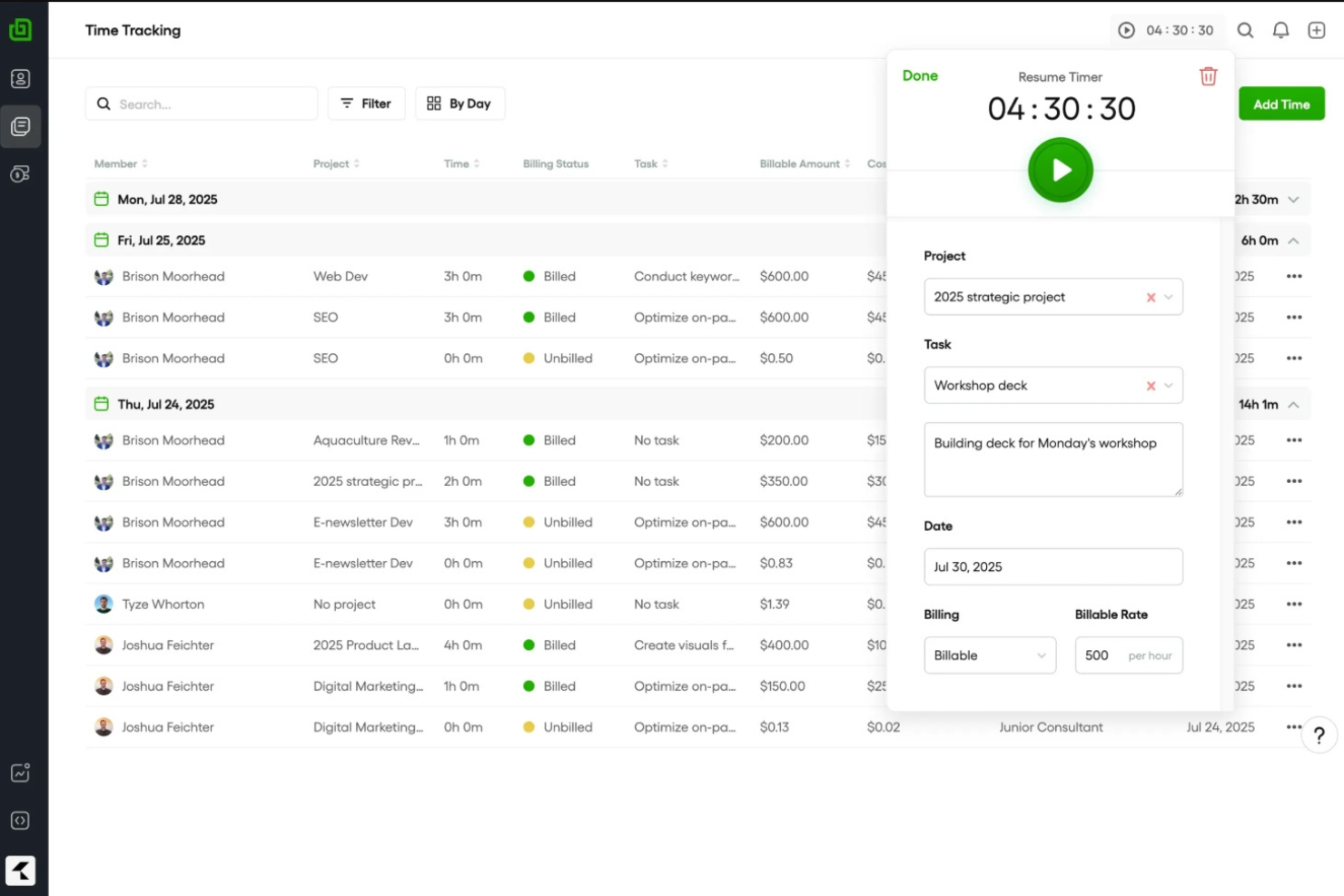
Harvest ist eine Zeiterfassungs- und Rechnungsstellungssoftware, die Freelancern, Beratern und kleinen Unternehmen dabei hilft, ihre abrechenbaren Stunden und Ausgaben zu verwalten. Sie ermöglicht es Nutzern, die Zeit zu erfassen, Rechnungen zu erstellen und Einblicke in Projektkosten zu gewinnen.
Warum Harvest eine gute WorkflowMax-Alternative ist: Harvest bietet eine benutzerfreundliche Zeiterfassung und eignet sich daher ideal für alle, die sich auf die Verwaltung abrechenbarer Stunden konzentrieren. Mit der Rechnungsstellungsfunktion können Sie schnell Rechnungen erstellen und versenden, sodass Sie schneller bezahlt werden. Die Berichtstools liefern Einblicke in Projektkosten und die Teamleistung. Damit ist Harvest ein wertvolles Werkzeug für Unternehmen, die Zeit und Finanzen genau im Blick behalten müssen.
Hervorstechende Funktionen und Integrationen:
Zu den Funktionen gehören die Erfassung von Ausgaben zur Vereinfachung des Finanzmanagements, detaillierte Berichte für bessere Einblicke und die Genehmigung von Stundenzetteln zur Vereinfachung von Teamprozessen. Diese Funktionen helfen Ihnen, Ihre Finanzen zu verwalten und die Projekteffizienz zu steigern.
Zu den Integrationen gehören Asana, JIRA, Trello, Slack, Zapier, Basecamp, GitHub, Google Calendar und weitere.
Pros and Cons
Pros:
- Ideal für kleine Unternehmen oder Freelancer
- Benutzerfreundliche Zeiterfassung
- Schneller Rechnungsstellungsprozess
Cons:
- Eingeschränkte Projektmanagementfunktionen
- Fehlende erweiterte Anpassungsmöglichkeiten

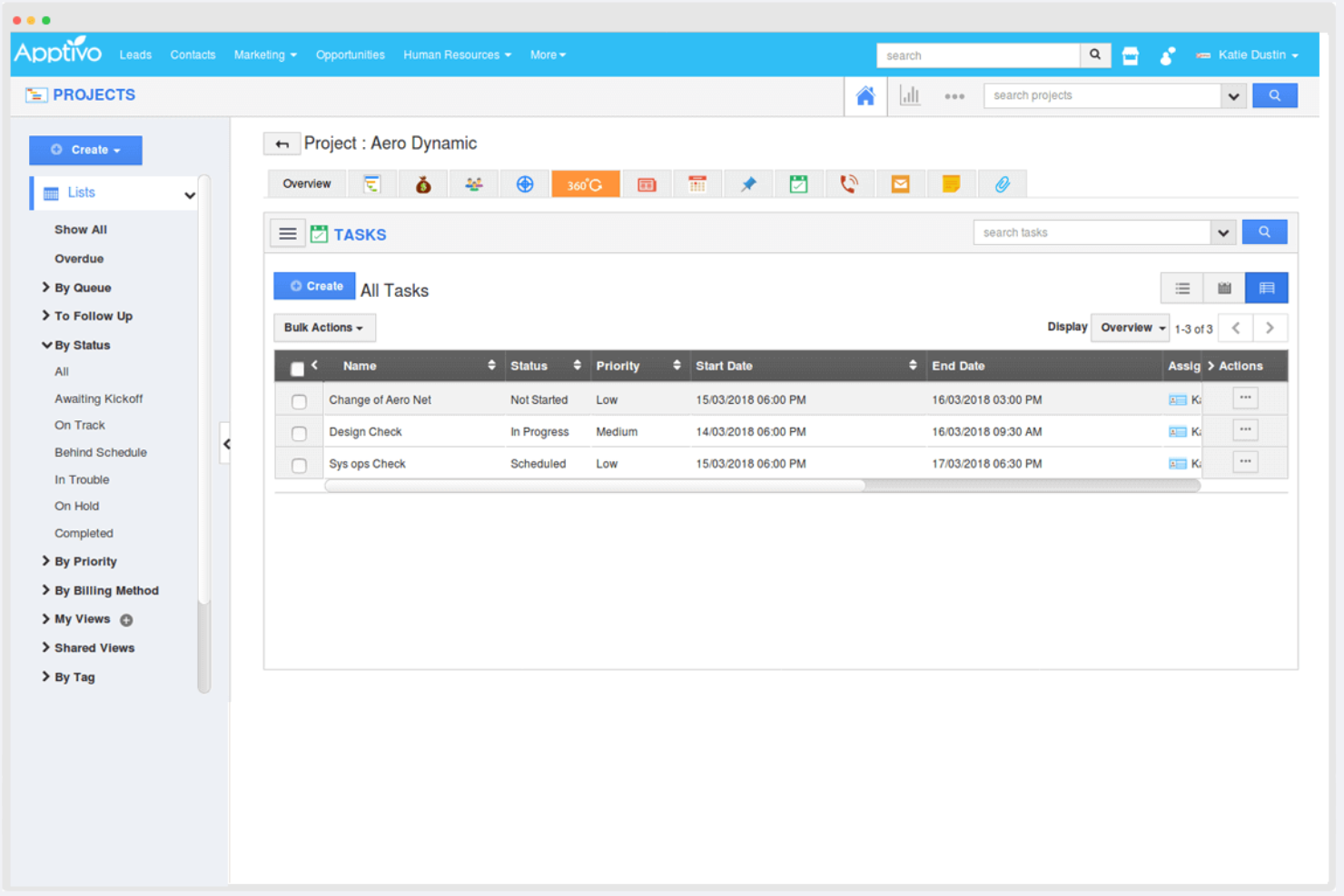
Apptivo ist eine Unternehmensverwaltungssoftware, die sich an kleine und mittelständische Unternehmen richtet und eine Reihe von Apps für CRM, Projektmanagement, Rechnungsstellung und mehr bietet. Sie unterstützt Unternehmen dabei, ihre Abläufe effizient zu verwalten, indem sie anpassbare Tools für verschiedene Geschäftsanforderungen bereitstellt.
Warum Apptivo eine gute WorkflowMax-Alternative ist: Apptivo bietet ein hohes Maß an Anpassbarkeit und ist daher ideal für Unternehmen, die maßgeschneiderte Lösungen benötigen. Mit den CRM- und Projektmanagementfunktionen können Sie Leads verfolgen und Projekte an einem Ort verwalten. Die Tools für Rechnungsstellung und Ausgabenverwaltung helfen dabei, Ihre Finanzprozesse zu optimieren. Diese Flexibilität unterstützt vielfältige Geschäftsabläufe und bietet eine All-in-one-Lösung für die Verwaltung.
Herausragende Funktionen und Integrationen:
Funktionen umfassen eine Vertriebspipeline zur Verfolgung von Leads, Projektmanagement-Tools zur Organisation von Aufgaben und Berichtsfunktionen für geschäftliche Einblicke. Diese Funktionen helfen Ihrem Team, Aufgaben zu verwalten und fundierte Entscheidungen zu treffen.
Integrationen umfassen Office 365, Slack, QuickBooks, PayPal, Dropbox, RingCentral, G Suite, Xero, Stripe und mehr.
Pros and Cons
Pros:
- Unterstützt vielfältige Geschäftsabläufe
- Zentralisierte Aufgabenverwaltung
- Flexible Finanzverwaltung
Cons:
- Für die Anpassung ist Zeit erforderlich
- Möglicherweise sind technische Kenntnisse erforderlich

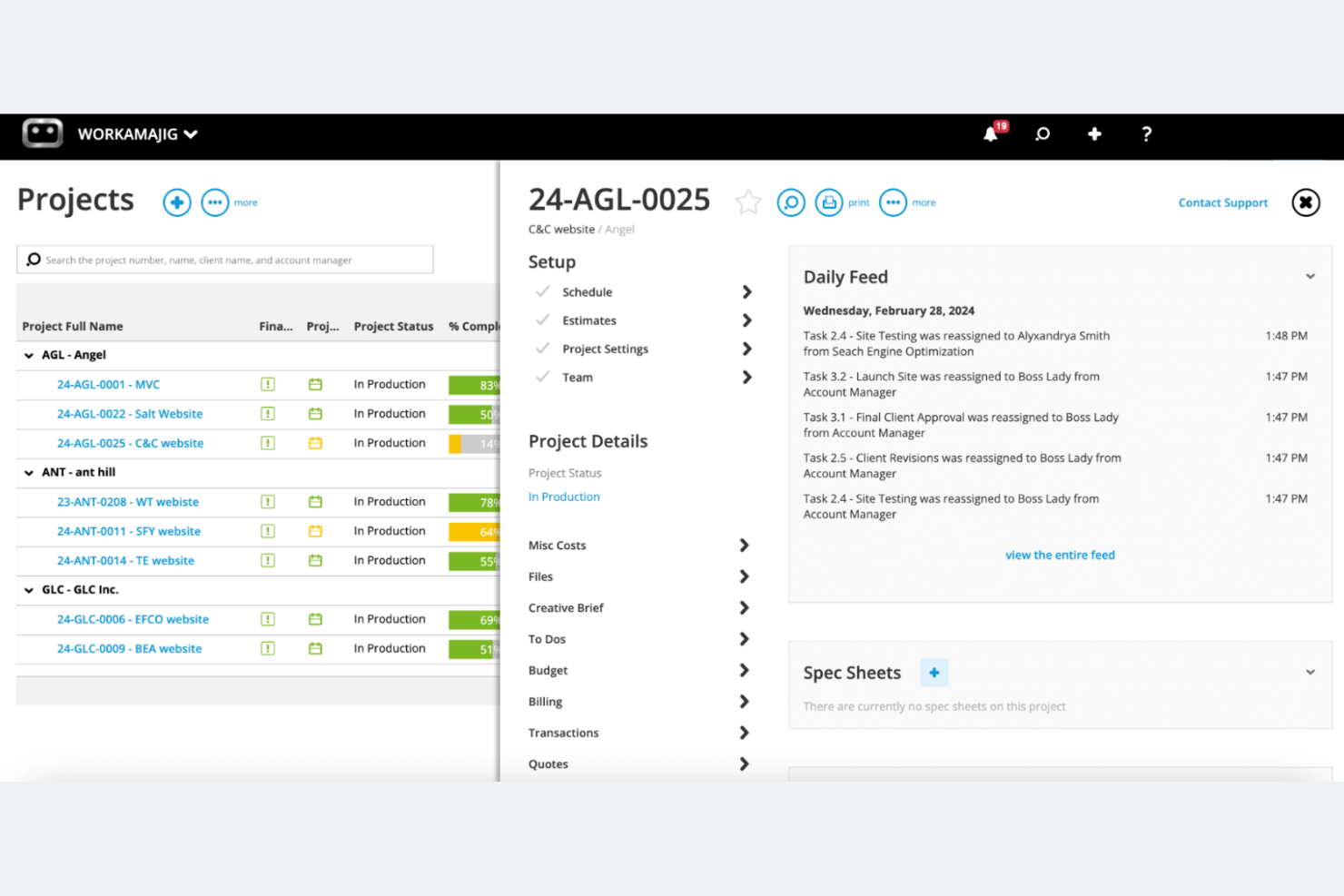
Workamajig ist eine Projektmanagementsoftware für Werbe- und Marketingagenturen. Sie bietet Projektmanagement, ein Vertriebs-CRM und Ressourcenmanagement in einem einzigen System.
Warum Workamajig eine gute Alternative zu WorkflowMax ist: Workamajig ist auf große oder wachsende Kreativagenturen und interne Kreativteams zugeschnitten und bietet Funktionen wie vollständig integrierte Buchhaltung, CRM und detaillierte Berichtstools. Diese Funktionen helfen Ihnen, Projekte, Ressourcen und Finanzen zu verwalten, ohne mehrere Tools miteinander verbinden zu müssen. Größere oder dezentral arbeitende Teams können damit Projektkosten, Zeitaufwand und Rentabilität innerhalb einer einzigen nativen Plattform verfolgen.
Herausragende Funktionen und Integrationen:
Funktionen umfassen integrierte Buchhaltung, fachkundige Unterstützung mit Schulungen und Echtzeit-Berichtstools. Diese Funktionen helfen Ihrem Team, Finanzen zu verwalten, Erkenntnisse zu gewinnen und sicherzustellen, dass Projekte termingerecht abgeschlossen werden.
Integrationen umfassen BIONIC, Edenred Pay, AvidXchange, Avalara, Google Kalender und weitere.
Pros and Cons
Pros:
- Auf große und wachsende Werbeagenturen zugeschnitten
- Integrierte Buchhaltungsfunktionen
- Fachkundige Unterstützung verfügbar
Cons:
- Komplexer Einrichtungsprozess
- Steilere Lernkurve als bei schlanken Projektmanagementtools
Weitere WorkflowMax-Alternativen
Hier sind einige weitere WorkflowMax-Alternativen, die es nicht auf meine Auswahlliste geschafft haben, die du dir aber trotzdem ansehen solltest:
- ManyRequests
Am besten für die Erstellung von Kundenportalen mit eigenem Branding
- Quire
Am besten für Agile- und Scrum-Teams geeignet
- ROLL
Am besten für die Umsetzung kreativer Projekte geeignet


Wie ich WorkflowMax-Alternativen bewerte
Ich teile jede Bewertung in zwei Ebenen auf: die grundlegenden Anforderungen wie Auftragskalkulation, Zeiterfassung und Rechnungsstellung, die ein Tool erfüllen muss, sowie Unterscheidungsmerkmale wie Migrationsunterstützung und Xero-Synchronisierung, die die besten Lösungen hervorheben.
Kernfunktionen (Grundvoraussetzungen für diese Liste)
Bei der Auswahl der Tools für meine Liste bewerte ich jedes einzelne Tool für jede unten aufgeführte Kernfunktion auf einer Skala von 0 (bietet die Funktion nicht an) bis 5 (zeichnet sich in diesem Bereich aus). Anschließend rechne ich die Gesamtpunktzahl des Tools in einen Prozentsatz um. Jedes Tool muss eine Mindestgesamtpunktzahl von 65 % erreichen, um für die Aufnahme berücksichtigt zu werden.
- Auftrags- und Projektmanagement: Ich achte auf eine strukturierte Auftragserstellung mit Aufgaben, Meilensteinen und Statusverfolgung, damit ein Team ein Projekt von der Einweisung bis zur Fertigstellung verfolgen kann.
- Zeiterfassung und Arbeitszeitnachweise: Das Tool sollte es Mitarbeitenden ermöglichen, abrechenbare und nicht abrechenbare Stunden bestimmten Aufträgen oder Aufgaben über Zeiterfassungen, Arbeitszeitnachweise oder mobile Eingaben zuzuordnen.
- Angebotserstellung und Rechnungsstellung: Ich bewerte, ob Sie ein Kundenangebot erstellen, genehmigen lassen und in eine Rechnung umwandeln können, die mit erfasster Zeit oder Festpreisen verknüpft ist.
- Auftragskalkulation und Budgetierung: Jedes Tool sollte Ihnen ermöglichen, ein Projektbudget festzulegen und die tatsächlichen Arbeits-, Ausgaben- und sonstigen Kosten während des Projektverlaufs damit zu vergleichen.
- Integration von Buchhaltungssoftware: Eine native Synchronisierung mit Xero oder QuickBooks ist hier wichtig, da die meisten WorkflowMax-Nutzer für Rechnungen und Zahlungen auf diese Verbindung zur Buchhaltung angewiesen sind.
- Berichte zu laufenden Arbeiten und Rentabilität: Ich prüfe, ob Berichte zu laufenden Arbeiten, Projektmargen und Auslastungsquoten vorhanden sind, die Inhabern von Unternehmen helfen, unrentable Aufträge frühzeitig zu erkennen.
Sobald ich eine Liste von Tools zusammengestellt habe, die dieses Kriterium erfüllen, prüfe ich, wodurch sich die einzelnen Plattformen voneinander unterscheiden.
Unterscheidungsmerkmale (Was Anbieter voneinander abhebt)
So vergleiche ich die verschiedenen Anbieter:
Herausragende Funktionen
Ressourcen- und Kapazitätsplanung ist ein wichtiges Unterscheidungsmerkmal. Ich suche nach Tools, die die Verfügbarkeit und Auslastung der Mitarbeitenden über mehrere parallel laufende Aufträge hinweg anzeigen, damit Manager eine Überlastung verhindern können. Ein Kundenportal bietet ebenfalls einen großen Mehrwert, da Kunden dort Angebote genehmigen oder den Projektfortschritt überprüfen können, ohne dass ständig E-Mail-Verläufe erforderlich sind. Für Gewerbe- und Außendienstteams macht eine mobile App, die die Zeiterfassung vor Ort und die Erfassung von Ausgaben unterstützt, einen deutlichen Unterschied bei der Genauigkeit der Auftragskalkulation.
Über die Funktionen hinaus
Migrationsunterstützung ist derzeit besonders wichtig. Ich prüfe, ob Anbieter spezielle Importtools oder geführte Migrationsprozesse für die Übertragung von Kundendatensätzen, Auftragshistorien und Zeiteinträgen aus WorkflowMax anbieten. Die Eignung für die jeweilige Branche ist ein weiterer Faktor, den ich berücksichtige – ein Tool für Kreativagenturen ist möglicherweise nicht für eine Ingenieurberatung geeignet. Daher bewerte ich, ob Vorlagen und Arbeitsabläufe zu Ihrer spezifischen Branche passen. Außerdem berücksichtige ich die Preistransparenz, insbesondere die Frage, wie sich die Kosten entwickeln, wenn Ihr Team von einer Handvoll Nutzern auf Dutzende wächst.
Warum nach einer WorkflowMax-Alternative suchen?
WorkflowMax ist zwar eine gute Wahl für Projektmanagement-Software, aber es gibt mehrere Gründe, warum manche Nutzer nach alternativen Lösungen suchen. Gründe, warum du nach einer WorkflowMax-Alternative suchen könntest, sind unter anderem:
- Du benötigst mehr Anpassungsmöglichkeiten
- Dein Team benötigt bessere Berichtstools
- Du möchtest umfassendere Integrationsmöglichkeiten
- Dein Unternehmen expandiert weltweit
- Du benötigst eine einfachere Benutzeroberfläche
- Dein Team benötigt Unterstützung für agile Methoden
Wenn du dich in einem dieser Punkte wiedererkennst, bist du hier richtig. Meine Liste enthält mehrere Optionen für Projektmanagement-Software, die für Teams mit diesen Herausforderungen besser geeignet sind als WorkflowMax.
Die wichtigsten Funktionen von WorkflowMax
Hier sind einige der wichtigsten Funktionen von WorkflowMax, damit du die Angebote alternativer Lösungen gegenüberstellen und vergleichen kannst:
- Auftragsschätzung und Angebotserstellung: Erstellen Sie anpassbare Angebote und Schätzungen, um Ihren Vertriebsprozess zu vereinfachen.
- Zeiterfassung: Erfassen Sie abrechenbare Stunden präzise, um sicherzustellen, dass Sie den Umsatz Ihres Teams maximieren.
- Rechnungsstellung: Erstellen Sie professionelle Rechnungen, um Zahlungen zu beschleunigen und den Cashflow zu verwalten.
- Verwaltung von Interessenten: Verfolgen Sie Interessenten und Vertriebspipelines, um Ihre Geschäftsentwicklungsmaßnahmen zu optimieren.
- Projektmanagement: Überwachen Sie Aufgaben und Fristen über eine zentrale Plattform, damit Ihre Projekte planmäßig voranschreiten.
- Dokumentenverwaltung: Zentraler Zugriff auf wichtige Projektdokumente für einfaches Abrufen und eine reibungslose Zusammenarbeit.
- Berichte und Übersichten: Nutzen Sie Echtzeitdaten, um fundierte Entscheidungen zu treffen und die Geschäftsleistung zu verbessern.
- Anpassungsmöglichkeiten: Passen Sie Rechnungen, Berichte und andere Dokumente an Ihre spezifischen geschäftlichen Anforderungen an.
- Integrationen: Verbinden Sie cloudbasierte Buchhaltungssoftware wie Xero und QuickBooks, um die Effizienz zu steigern und manuelle Arbeit zu reduzieren.
Wie es weitergeht:
Wenn Sie gerade Software für das Projektmanagement recherchieren, wenden Sie sich an einen SoftwareSelect-Berater, um kostenlose Empfehlungen zu erhalten.
Sie füllen ein Formular aus und führen ein kurzes Gespräch, in dem die Einzelheiten Ihrer Anforderungen besprochen werden. Anschließend erhalten Sie eine Auswahlliste von Software, die Sie prüfen können. Der Berater unterstützt Sie sogar während des gesamten Kaufprozesses, einschließlich der Preisverhandlungen.