

2026’nın En İyi 10 Ücretsiz Proje Planlama Yazılımı Çözümü

10 En İyi Ücretsiz Proje Planlama Yazılımları Kısa Listesi


Ücretsiz denemeler ve yazılımlarının ücretsiz sürümlerini sunan sayısız planlama aracı var. Ancak hangisinin sizin için doğru olduğunu bulmak zor olabilir. Görevlerin zamanında ve verimli bir şekilde tamamlanmasını sağlayarak proje planları oluşturmak, yönetmek ve optimize etmek istediğinizi biliyorsunuz; fakat bunu ücretsiz yapmanıza hangi aracın olanak tanıyacağını belirlemeniz gerekiyor. Size yardımcı olacağım! Bu yazıda, girişimlerde ve küçük ekiplerle düzinelerce farklı araç kullanma konusundaki kişisel deneyimlerimi paylaşarak en iyi ücretsiz proje planlama yazılımlarını seçtim ve kararınızı kolaylaştırmanıza yardımcı olacağım.
Why Trust Our Software Recommendations
Our team has been testing and reviewing software since 2012. As project managers ourselves, we know how difficult—and important—it is to choose the right software.
For this guide, we evaluated tools using hands-on testing and independent research, scoring tools using our selection criteria. We also draw on insights from industry thought leaders and practicing project management experts.
Our reviews reflect our human editorial judgment, not a sales pitch.
Expert reviewers:
Ücretsiz Proje Planlama Yazılımı Çözümleri Karşılaştırma Tablosu
Bu karşılaştırma tablosu, en iyi Ücretsiz Proje Planlama Yazılımı Çözümü seçimlerimin fiyatlandırma ayrıntılarını özetlemektedir:
| Tool | Starting Price | Website | |
|---|---|---|---|
| Best free scheduling for startups and freelancers | 4.6 out of 5 | $9/user/month Free plan + 14-day trial available | Book Demo |
| Best for customized solutions | 4.3 out of 5 | $10/user/month Free plan + 14-day trial + demo available | Book Demo |
| Best for scalability & flexibility | 4.3 out of 5 | Pricing upon request Free plan + 15-day trial + demo available | Website |
| Best for its wide selection of pre-made templates | 4.8 out of 5 | $8/user/month Free plan + 14-day trial available | Book Demo |
| Best no-code document builder | 4.7 out of 5 | $12/user/month Free plan + free trial available | Website |
| Best for simple Kanban boards | 4.5 out of 5 | $5/user/month Free plan + free trial available | Website |
| Best for creating beautiful PowerPoint Gantt charts | 4.5 out of 5 | Pricing upon request Free plan available | Website |
| Best for time tracking | 4.4 out of 5 | $9.99/user/month Free plan + 14-day free trial + free demo available | Website |
| Best productivity platform | 4.6 out of 5 | $12/user/month Free plan + free demo available | Book Demo |
| Best work management software for agencies | 4.6 out of 5 | $10/user/month 14-day free trial | Book Demo |
En İyi Ücretsiz Proje Planlama Yazılımı İncelemeleri
İşte, planlara dayalı olarak proje ilerlemesini izlemenize yardımcı olacak her bir ücretsiz proje yönetimi aracının açıklaması.

Best free scheduling for startups and freelancers
monday AI Workspace is a visual project management platform with timeline, Gantt, calendar, and Kanban views, built-in AI tools, task dependencies, and automation to help teams plan and track work across projects.
Who Is monday AI Workspace Best For?
It's a natural fit for startup founders and freelance project managers who need a structured but flexible way to manage multiple workstreams without a complex setup.
Why I Picked monday AI Workspace
monday AI Workspace earns its spot on my shortlist because the free plan gives solo founders and freelancers a genuine starting point, with 200+ project templates and flexible board structures that fit around how you already work. I particularly like the AI Sidekick assistant, which surfaces task context across boards so you're not chasing down updates manually. I also find the Vibe app builder useful because it lets you build lightweight custom scheduling tools around your workflow without any development work.
monday AI Workspace Key Features
- Multiple schedule views: Switch between Kanban, calendar, list, and Gantt views to match your project planning style.
- Task dependencies and milestones: Link tasks together and define key milestones to organize project execution.
- Resource assignment: Assign tasks to team members, set due dates, and manage workload across your board.
- Progress tracking columns: Add status and percentage complete columns to monitor how work moves through every stage.
monday AI Workspace Integrations
monday AI Workspace offers hundreds of native integrations through its built-in integrations and marketplace, including Slack, Google Workspace, Microsoft 365, Jira, Dropbox, Zoom, HubSpot, Salesforce, GitHub, and Outlook. It also supports Zapier and provides an API for custom integrations.
What's Free?
monday AI Workspace offers a free-forever plan for up to 2 users, with up to 3 boards and 200 items per board. The free plan doesn't include automations or integrations, so those features only become available when you upgrade to a paid tier.
Pros and Cons
Pros:
- Flexible board structure fits varied project types
- AI Sidekick surfaces task context across boards
- 200+ templates accelerate project scheduling setup
Cons:
- Gantt timeline view locked behind paid plans
- Free plan restricted to only two users
New Product Updates from monday AI Workspace
monday AI Workspace Adds Human Approval Routing
monday AI Workspace adds a human-in-the-loop approval block to AI Workflows, sending approval requests and routing workflow paths based on responses. For more information, visit monday AI Workspace's official site.
 .
Wrike
Best for customized solutions
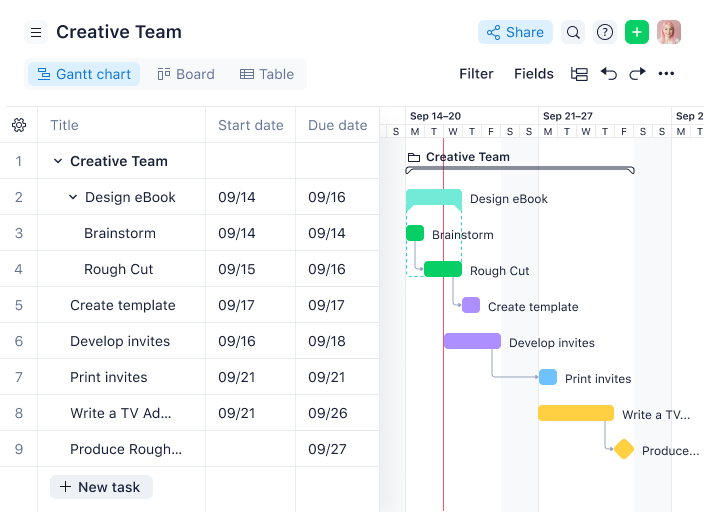
Wrike is a project scheduling and work management platform that lets teams organize tasks, build interactive Gantt charts, manage dependencies, and customize workflows for different project needs.
Who Is Wrike Best For?
Wrike is a good fit for mid-size to enterprise teams in tech, marketing, and professional services that need highly configurable project workflows.
Why I Picked Wrike
Wrike earns its spot on my shortlist because of how far it lets you push customization without touching a single line of code. I particularly like the custom item types feature, which lets my team rename and reshape work items to match how we actually talk about our projects—so instead of generic "tasks," we're working with terminology that maps directly to our process. Pair that with team-specific workflows where you can define custom statuses for every phase of a project, and you get a scheduling setup that reflects your actual delivery model. I've also found the dynamic request forms genuinely useful—they auto-generate tasks and workflows from incoming requests, which cuts down on the manual setup that usually eats up time at the start of a project.
Wrike Key Features
- Interactive Gantt charts: Visualize project timelines, adjust task durations by dragging and dropping, and map dependencies directly on the chart.
- Resource management: View team workloads across projects and reassign tasks based on capacity from a single dashboard.
- Real-time collaboration: Leave comments, tag teammates, and attach files directly on tasks to keep project communication in context.
- Cross-tagging: Add tasks to multiple project folders simultaneously so work stays visible across different team views without duplication.
Wrike Integrations
Wrike offers hundreds of integrations through its built-in integrations and marketplace, including tools like Google Workspace, Microsoft 365, Salesforce, and Slack. It also provides an API for custom integrations.
What's Free?
Wrike offers a free-forever plan for small teams with up to 5 users. The free plan includes basic task and project management features but limits access to advanced integrations and customization options.
New Product Updates from Wrike

Wrike Redesigns Workspace Search With New Filters
Wrike introduces a redesigned Workspace Search interface with recent search shortcuts, item type and location filters, and parent-task context. These updates help users find relevant work items and navigate search results efficiently. For more information, visit Wrike’s official site.
 .

Best for scalability & flexibility
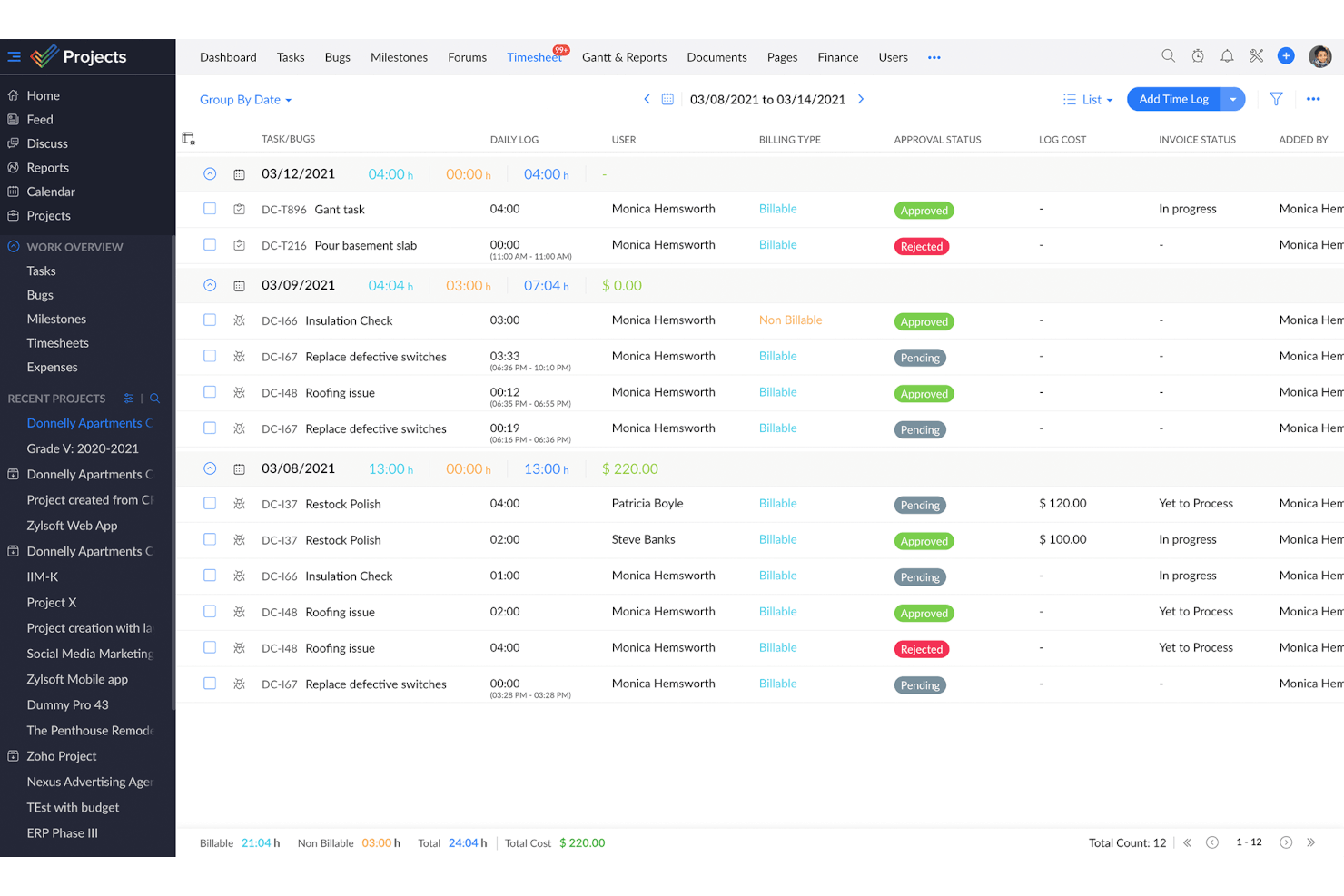
Zoho Projects is a project scheduling and management platform that gives teams tools for task planning, Gantt charts, time tracking, and team collaboration.
Who Is Zoho Projects Best For?
Zoho Projects is a good fit for growing teams that need a free project scheduling tool they won't outgrow as their headcount and project complexity increase.
Why I Picked Zoho Projects
Zoho Projects earns its spot on my shortlist because it's one of the few free project scheduling tools that genuinely scales with your team. I like that the free plan includes Gantt charts with finish-to-start task dependencies, which gives small teams real scheduling structure from day one. When your team grows and needs more, upgrading to Premium unlocks cross-project dependencies with all four dependency types, custom views, and task blueprints for repeatable workflows. The ability to add custom fields, modules, and statuses at higher tiers means you're not locked into a rigid structure as your projects get more complex.
Zoho Projects Key Features
- Milestone tracking: Set milestones within projects to mark key delivery points and monitor progress against your schedule.
- Resource management: View each team member's workload and reassign tasks when someone is over- or under-allocated.
- Project baseline: Capture a snapshot of your planned schedule at any point so you can compare actual progress against your original plan.
- Timesheet logging: Track time spent on tasks manually or with built-in timers, with admin controls to approve or reject entries.
Zoho Projects Integrations
Zoho Projects offers native integrations with Slack, Google Drive, Microsoft 365, Dropbox, GitHub, Bitbucket, Zoho CRM, Zoho Desk, and Zapier. An API is available for custom integrations.
What's Free?
Zoho Projects offers a free-forever plan for up to 3 users and 2 projects. The free plan has limited storage and does not include features like task automation, resource management, or advanced integrations.
New Product Updates from Zoho Projects
Zoho Projects Adds CodeX Scripts for Custom Modules
Zoho Projects now supports CodeX Scripts for custom modules, enabling conditional logic and rules for creating, updating, and deleting records. For more information, visit Zoho Projects' official site.
 .

Miro
Best for its wide selection of pre-made templates

Miro is a visual collaboration platform for project managers that offers interactive boards, project scheduling templates, and real-time team planning tools.
Who Is Miro Best For?
Miro is a good fit for cross-functional teams in tech and digital industries who need a flexible, visual space for collaborative project planning.
Why I Picked Miro
I've included Miro in my top picks because of the breadth of its template library—with over 7,000 templates, it's one of the most extensive collections I've seen in any visual collaboration tool. For project scheduling, you can pull up a ready-made Gantt chart, a project timeline, or an AI-powered roadmap planning template without building your structure from scratch. The Roadmap Planning AI template is particularly useful—it lets my team assign tasks, set deadlines, and track milestones directly on the board in real time. I also use the sprint planning and work breakdown structure templates regularly when kicking off new delivery cycles with cross-functional teams.
Miro Key Features
- Kanban boards: Build and manage Kanban boards directly on the canvas to track task status and visualize workflow stages across your project.
- Timeline maker: Create visual project timelines that map out deadlines, priorities, and task sequences for your team.
- Talktrack: Record async video walkthroughs of your Miro board so stakeholders can review project plans and leave comments on their own schedule.
- Infinite canvas: Expand your workspace without limits to map out complex project structures, dependencies, and workstreams in a single view.
Miro Integrations
Miro offers 100+ native integrations, including Asana, Jira, Trello, Microsoft Teams, Slack, Google Drive, Zoom, Notion, Airtable, and Dropbox. An API is available for custom integrations.
What's Free?
Miro offers a free-forever plan with unlimited team members and access to 3 editable boards per workspace. The free plan includes 5,000+ templates and core integrations, but advanced features and unlimited boards require a paid plan.
New Product Updates from Miro
Miro Adds Japan Data Residency for Enterprise Customers
Miro has introduced Japan data residency for enterprise customers, offering in-region storage for production data, backups, and metadata, plus in-region compute infrastructure. For more information, visit Miro's official site.
 .
Coda
Best no-code document builder

Coda is a no-code project scheduling platform that lets teams build custom schedules, interactive timelines, and collaborative documents using flexible tables, templates, and automation tools.
Who Is Coda Best For?
Coda is a good fit for project managers at small to mid-sized tech companies who need a flexible, no-code workspace to build custom project schedules without relying on engineering support.
Why I Picked Coda
I picked Coda as one of the best because I love how it lets you build a fully custom project scheduling doc without writing a single line of code. When my team needs a new project tracker, I can pull together a timeline view, a task table, and a status rollup all in one doc using Coda's building blocks—formulas, buttons, and linked tables. I especially like the cross-table referencing, where edits in one table sync automatically across the whole doc, so my schedule stays accurate without manual updates. The template gallery also gives me a solid starting point for things like sprint planning or roadmap tracking, which I can then reshape to fit exactly how my team works.
Coda Key Features
- Multiple table views: Switch between grid, calendar, kanban, and Gantt-style timeline views to visualize your project schedule in different formats.
- Workflow automation: Set up button-triggered or time-based automations to move tasks, send notifications, or update statuses without manual input.
- Coda AI: Use AI to generate tables, summarize project updates, or draft content directly inside your scheduling doc.
- Publishing: Share a polished, interactive version of your project schedule as a standalone webpage with stakeholders outside your workspace.
Coda Integrations
Coda offers native integrations with Google Calendar, Slack, Jira, GitHub, and Zoom. An API is available for custom integrations.
What's Free?
Coda offers a free-forever plan with unlimited users and docs, but limits doc size, version history, and some advanced features. Integrations and automation are available with usage caps on the free plan.
Trello
Best for simple Kanban boards

Trello is a project scheduling and task management platform that uses visual boards, lists, and cards to help teams organize projects and track progress.
Who Is Trello Best For?
Trello is a good fit for small teams and individual project managers who need a lightweight, visual way to manage tasks without a steep learning curve.
Why I Picked Trello
Trello is on my shortlist because its Kanban board is among the cleanest I've used. Cards move across lists with a simple drag-and-drop, and I can set up a full project board in minutes—no configuration overhead. I also like how checklists inside cards let me break down tasks into subtasks, with a visual progress bar that fills as items get checked off. Trello's built-in no-code automation (Butler) lets me set rules, such as moving a card to "Done" when all checklist items are complete, keeping boards accurate without manual updates.
Trello Key Features
- Calendar view: See all cards with due dates plotted on a monthly calendar to get a clear picture of your project timeline.
- Board templates: Start projects faster using pre-built templates for sprint planning, product roadmaps, and more.
- Power-Ups: Connect third-party tools and add extra functionality to your boards, like voting, time tracking, or custom fields.
- Card mirroring: Mirror cards across multiple boards so the same task stays visible in different team workspaces simultaneously.
Trello Integrations
Trello offers native integrations called Power-Ups, including Slack, Jira Cloud, and Miro. Additional integrations are available through its Power-Ups directory, and an API is available for custom integrations.
What's Free?
Trello offers a free-forever plan for up to 10 boards per workspace with unlimited cards and members. The free plan limits you to one Power-Up (integration) per board and 250 workspace command runs per month.

Best for creating beautiful PowerPoint Gantt charts

Office Timeline is a project scheduling add-in for PowerPoint that lets you create, customize, and present Gantt charts and timelines directly within your slides.
Who Is Office Timeline Best For?
Office Timeline is a good fit for project managers and business professionals who regularly present project schedules to stakeholders using PowerPoint.
Why I Picked Office Timeline
Office Timeline earns its spot on my shortlist because it's the only scheduling tool I've found that lives entirely inside PowerPoint. When I need to walk executives through a project schedule, I'm not exporting to a separate file or rebuilding a slide from scratch—I'm generating a polished Gantt chart directly on the slide using the built-in timeline wizard. I also like the drag-and-drop visual editor, which lets me shift tasks and milestones when dates change without manually redrawing anything. The designer-grade themes mean the output looks intentional and presentation-ready, not like something cobbled together in a spreadsheet.
Office Timeline Key Features
- Swimlane grouping: Organize tasks into swimlanes to separate workstreams or project phases on a single slide.
- Planned vs. actual tracking: Display baseline schedules alongside current progress to visualize schedule variance directly in your timeline.
- Data import from Excel and MS Project: Pull existing project data directly into Office Timeline to generate a visual without re-entering dates manually.
- Timeline scale options: Switch between multiple time scales to adjust the level of detail shown in your Gantt chart.
Office Timeline Integrations
Office Timeline offers native integrations with Microsoft PowerPoint, Microsoft Project, and Excel.
What's Free?
Office Timeline offers a free-forever plan with basic timeline and Gantt chart creation directly in PowerPoint. The free version limits the number of items per timeline and restricts access to premium templates and advanced features.
Best for time tracking

Teamwork.com is a project management platform for PMs that combines project scheduling, task management, Gantt charts, and built-in time tracking.
Who Is Teamwork.com Best For?
Teamwork.com is a good fit for client-facing teams and agencies that need to manage multiple projects, track billable hours, and report on delivery.
Why I Picked Teamwork.com
Teamwork.com earns its spot on my shortlist because its time tracking is built directly into every plan—including the free one—rather than locked behind a paywall like it is with most competitors. I use the native timers to log time against specific tasks in real time, and my team can bulk-log hours through timesheets when they need to catch up at the end of the day. The timesheet approval workflow provides a layer of financial control before hours are marked as billable. Coupled with Gantt chart views for scheduling, it creates a solid setup for managing project timelines alongside recorded time.
Teamwork.com Key Features
- Gantt chart view: Visualize your full project timeline, see task dependencies, and track what's due and when across multiple projects.
- Milestone tracking: Set checkpoints within a project so your team and clients always know what's expected and by when.
- Workload and capacity management: View your team's day-to-day capacity, spot scheduling conflicts in real-time, and reassign tasks to avoid bottlenecks.
- Project health reporting: Get a snapshot view across all active projects and monitor progress based on individual health status.
Teamwork.com Integrations
Teamwork.com offers native integrations with Slack, Google Drive, Dropbox, Microsoft Teams, HubSpot, Xero, QuickBooks, and Zapier. An API is available for custom integrations.
What's Free?
Teamwork.com offers a free-forever plan for up to 5 users and 2 projects. Some advanced features and integrations are only available on paid plans.
ClickUp
Best productivity platform

ClickUp is a project management platform for PMs that brings together project scheduling, task management, Gantt charts, and collaboration tools in one workspace.
Who Is ClickUp Best For?
ClickUp is a good fit for project managers and cross-functional teams at small to mid-sized companies who need a free, all-in-one workspace for scheduling and task management.
Why I Picked ClickUp
ClickUp earns its spot as one of the best on my shortlist because it genuinely functions as a full productivity platform, not just a task list. I like how my team can switch between Gantt chart views, sprint boards, and calendar views without leaving the workspace. ClickUp's task dependency mapping is something I use constantly—it lets me chain tasks across workstreams so nothing moves forward until its predecessor is done. The free plan includes all of this, which is rare at this level of scheduling depth.
ClickUp Key Features
- Workload view: See each team member's assigned tasks and capacity across a date range to spot over-allocation before it becomes a problem.
- Milestones: Mark specific tasks as milestones within a project timeline to track progress against key delivery dates.
- Custom fields: Add fields like priority, estimated effort, or status to tasks so your project data stays structured and reportable.
- Time tracking: Log time directly on tasks without a third-party tool, keeping effort data tied to the work itself.
ClickUp Integrations
ClickUp offers 50+ native integrations, including Slack, GitHub, GitLab, HubSpot, Everhour, Toggl, Harvest, Google Drive, OneDrive, Dropbox, Outlook, Google Calendar, Figma, Zoom, Bitbucket, Microsoft Teams, Intercom, Box, Zendesk, and Front. It also provides an API for custom integrations.
What's Free?
ClickUp offers a free-forever plan with unlimited tasks and members. The free plan has some feature limitations, such as restricted use of Gantt charts, limited automation, and fewer integrations compared to paid plans.
New Product Updates from ClickUp
ClickUp Adds List Automations, Time Off Scheduling, and Org Charts
ClickUp adds template-based List automations, personal time off scheduling, a unified picker, automatic task date syncing, and Org Charts. These updates help teams automate project setup, manage availability, and organize work. For more information, visit ClickUp’s official site.
 .

Productive
Best work management software for agencies
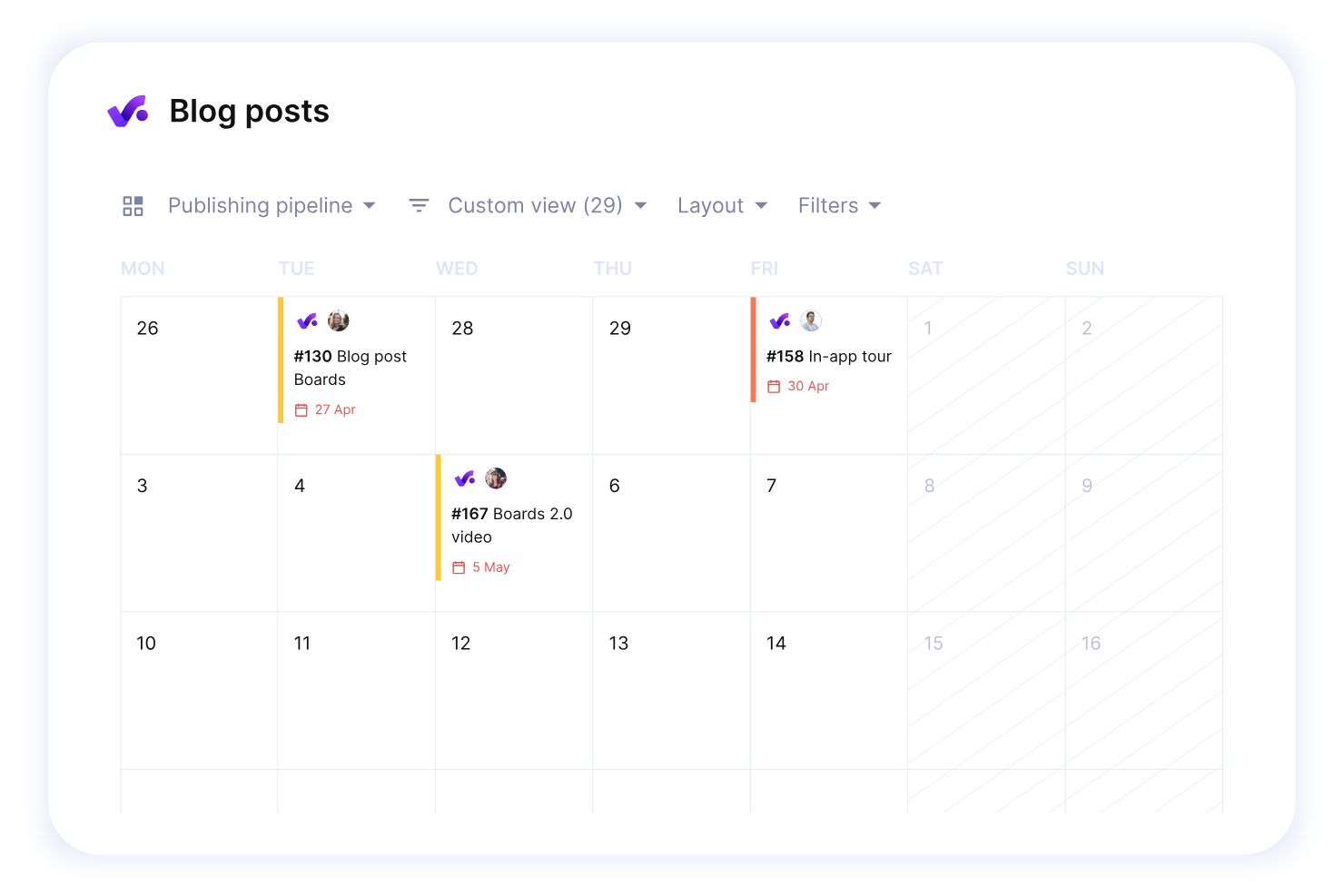
Productive is a project scheduling and work management platform designed for agencies, offering tools for task planning, resource allocation, budgeting, and time tracking.
Who Is Productive Best For?
Productive is a strong fit for agency project managers who need to connect scheduling, resourcing, and financial tracking in one place.
Why I Picked Productive
Productive earns its spot on my shortlist because it's one of the few project scheduling tools built specifically for agencies—not adapted for them. I love that the Gantt view, timeline view, and workload view all connect directly to live budget and resource data, so when I shift a task's start date, I can immediately see how that change affects project profitability. That lets my team catch a budget overrun before it happens rather than after the invoice goes out. The resource planning feature also lets me see team capacity months ahead, including approved time off, so I'm never scheduling work against someone who's already fully booked.
Productive Key Features
- Project templates: Duplicate full project setups—including tasks, subtasks, descriptions, and assignees—to spin up new client projects quickly.
- Automations: Trigger actions automatically, such as creating invoices or sending Slack messages, based on project activity.
- Time approval workflow: Review submitted time entries, mark hours as billable or non-billable, and request changes before they're finalized.
- AI-powered docs and forms: Create project specs or meeting notes with AI assistance, and turn form responses directly into tasks.
Productive Integrations
Productive offers native integrations with Slack, Google Calendar, Xero, QuickBooks, HubSpot, and Zapier. An API is available for custom integrations.
What's Free?
Productive offers a 14-day free trial with access to all features. After the trial, a paid plan is required to continue using the platform.
New Product Updates from Productive
Productive Adds Email and Calendar Integrations for Agents
Productive adds Gmail, Outlook, Google Calendar, and Outlook Calendar connectors for its AI agents. These integrations let agents manage emails and create calendar events directly within Productive. For more information, visit Productive’s official site.
 .
Diğer Ücretsiz Proje Planlama Yazılımı İncelemeleri
İşte göz atabileceğiniz birkaç ücretsiz proje planlama aracı daha.
- Zoho Sprints
For agile development teams
- Float.com
For prroject scoping
- GoodDay
For extensive visualization options
- Runn
Project scheduling for small teams
- Hub Planner by Milient
For businesses or teams that need to manage complex schedules and resources
- Asana
For integrations
- Basecamp
For businesses that also need communication features
- Freedcamp
Free plan with unlimited users, storage, projects, and task management.
- Airtable
For project scheduling via spreadsheets.
- Google Workspace
For those in the Google app ecosystem.
- TeamGantt
For Gantt charts
- Microsoft Online
Free project scheduling on the web using Excel, PowerPoint and the MS Office 365 suite.


How I Evaluate Free Project Scheduling Software
First, I define what counts as free. For project scheduling software, I look for a free-forever plan that keeps Gantt charts and task dependencies unlocked—not a trial that expires mid-sprint. From there, I split evaluation into core functionality a tool must have to qualify and differentiating factors that separate one vendor from another.
Core Functionality (Table Stakes For This List)
In addition to my free offer requirements, I also use a scoring system to select tools for my list. Here's how it works:
I rank each one on a scale from 0 (does not offer the functionality) to 5 (excels in this area) for each core functionality listed below. Then, I calculate the tool's total score into a percentage. Each tool needs to achieve a minimum total score of 65% to be considered for inclusion.
- Gantt Chart Scheduling: I look for interactive Gantt charts where you can drag tasks to reschedule them, not just static timeline images you can't edit.
- Task Dependencies & Milestones: A tool should let you link tasks so moving a design review deadline automatically shifts the dev sprint that follows it.
- Free Plan Availability: I check that the free tier includes real scheduling features for ongoing use, not a 14-day trial or a locked-down demo.
- Resource & Workload Assignment: Assigning tasks is table stakes, but I evaluate whether you can also see who's overloaded across the schedule at a glance.
- Calendar & Deadline Management: Due dates paired with calendar views and reminders matter, especially for coordinators juggling deliverables across client accounts.
- Schedule Collaboration & Sharing: I look at how many collaborators can edit the schedule on the free plan and whether you can share live timelines externally.
Once I have a list of tools that meet this criteria, I consider what sets each platform apart.
Differentiating Factors (What Sets Vendors Apart)
Here's how I compare and contrast different vendors:
Standout Features
I evaluate how many views a tool offers beyond the Gantt chart. Kanban and workload views, for instance, help agency coordinators spot over-allocated team members without switching tools. Built-in time tracking is another differentiator—freelancers can compare estimated vs. actual hours on scheduled tasks without a separate app. A templates library also carries weight, because a construction planner shouldn't have to build a phased timeline from scratch for every new project.
Beyond Features
Free plan generosity matters a lot here. I check whether core scheduling features like Gantt views and dependencies are available on the free tier or gated behind paid plans. Integrations are equally important—a consultant who can't sync their schedule with Google Calendar or Slack ends up duplicating work. I also look at scalability, specifically whether a tool handles 50+ tasks and multiple projects without slowing down, and whether it offers guest access so clients can view timelines without eating into your user cap.
Ücretsiz Proje Planlama Yazılımı Nasıl Seçilir?
Karmaşık özellik listeleri ve fiyatlandırma yapıları, ücretsiz proje planlama yazılımından gerçekten ne elde ettiğinizi anlamanızı zorlaştırabilir. Yazılım seçme süreciniz üzerinde çalışırken odağınızı korumanıza yardımcı olmak için göz önünde bulundurmanız gereken bazı faktörleri aşağıda bulabilirsiniz:
| Faktör | Dikkat Edilmesi Gerekenler |
| Ücretsiz Teklifin Kapsamı | Ücretsiz planda sunulan özelliklere bakın: görev bağımlılığı, takvim veya kullanıcı erişimi sınırları ihtiyaçlarınız için yeterli mi? |
| Ölçeklenebilirlik | Genişledikçe ücretli seçenekler veya gelişmiş özellikler sunarak aracın projeleriniz ya da ekibinizle birlikte büyüyebildiğinden emin olun. |
| Entegrasyonlar | Ekibinizin iş akışlarını kolaylaştırmak için Google Takvim, Trello veya Slack gibi uygulamalarla uyumluluğu doğrulayın. |
| Kullanım Kolaylığı | Ekibinizin hızlı bir şekilde başlayabilmesi için arayüzün basit olduğundan ve çok az ya da hiç eğitim gerektirmediğinden emin olun. |
| İş Birliği Araçları | Ekibinizin aynı bilgiye sahip olmasını sağlamak için görev yorumları, dosya paylaşımı ve bildirimler gibi özellikleri kontrol edin. |
| Özelleştirilebilirlik | Görünümleri, şablonları veya iş akışlarını ekibinizin özel ihtiyaçlarına uyacak şekilde ayarlama seçeneklerini arayın. |
| Mobil Erişim | Görevleri ve planları hareket hâlindeyken yönetmek için mobil cihazlarla uyumlu bir uygulama olduğundan emin olun. |
| Raporlama Özellikleri | Son tarihleri ve performansı izlemek için yazılımın temel raporlama veya ilerleme takibi içerip içermediğini değerlendirin. |
Ücretsiz Proje Planlama Yazılımı Nedir?
Ücretsiz proje planlama yazılımı, kullanıcıların proje zaman çizelgelerini, görevleri ve kaynakları ücretsiz olarak veya sınırlı ücretsiz sürümlerle planlamasına, düzenlemesine ve yönetmesine yardımcı olan bir araçtır. Proje yöneticileri, serbest çalışanlar ve küçük işletme sahipleri gibi profesyoneller, aşırı harcama yapmadan projeleri yolunda tutmak ve teslim tarihlerine uymak için bu araçları kullanır. Sürükle ve bırak özellikli planlama uygulamaları, görev bağımlılıkları ve takvim entegrasyonları gibi özellikler, birçok ücretsiz planlama aracında yaygın olarak bulunur; bu da onları zaman çizelgeleri oluşturmak ve iş yüklerini verimli bir şekilde yönetmek için ideal kılar.
Ücretsiz Proje Planlama Yazılımının Özellikleri
Proje planlama yazılımlarında yaygın olarak bulunan özellikleri ve bunlardan hangilerinin genellikle ücretsiz proje planlama yazılımlarında, hangilerinin ise ücretli planlarda sunulduğunu inceleyelim.
Genellikle Ücretsiz Proje Planlama Yazılımı Özellikleri
- Görev atama: Görevleri ekip üyelerine atamanıza ve teslim tarihleri belirlemenize olanak tanıyarak sorumluluk bilincini ve ilerleme takibini sağlar.
- Temel planlama araçları: Proje aşamalarını düzenlemek için proje zaman çizelgeleri veya Gantt çizelgeleri oluşturabileceğiniz basit bir arayüz sunar.
- İş birliği araçları: Ekip iletişimi ve dosya paylaşımı için seçenekler içerir.
- İlerleme takibi: Görevlerin tamamlanma durumunu gerçek zamanlı olarak izlemek için kontrol listeleri veya durum güncellemeleri gibi özellikler sunar.
- Proje şablonları: Projeleri sıfırdan başlamak zorunda kalmadan hızlı bir şekilde oluşturmanıza yardımcı olmak için önceden tasarlanmış şablonlar sunar.
- Sınırlı raporlama: Proje ilerlemesini veya görev tamamlama ölçümlerini analiz etmek için temel raporlama seçenekleri içerir.
Genellikle Ücretli Proje Planlama Yazılımı Özellikleri
- Gelişmiş entegrasyonlar: Ücretsiz bir planlama programından geçiş yapan işletmeler için ideal olan CRM'ler, zaman takip araçları veya finans yazılımları gibi üçüncü taraf uygulamalarla genişletilmiş işlevsellik amacıyla sorunsuz bağlantı kurulmasını sağlar.
- Özelleştirilebilir iş akışları: Proje aşamalarını ve görev bağımlılıklarını benzersiz ekip gereksinimlerine uyacak şekilde uyarlama olanağı sunar.
- Kaynak yönetimi: İş yüklerini ekip üyeleri veya projeler arasında atamak ve dengelemek için araçlar sunar; bu, bir inşaat planlama uygulaması veya genel olarak büyüyen kuruluşlar için olmazsa olmazdır.
- Gelişmiş analizler: Proje performansı hakkında daha derin içgörüler elde etmek için ayrıntılı raporlama ve veri görselleştirme seçenekleri içerir.
- Otomasyon özellikleri: Bildirimler veya hatırlatıcılar gibi tekrarlanan görevlerin otomatikleştirilmesini sağlar ve ücretsiz planlama uygulamalarına kıyasla önemli bir değer sunar.
- Sınırsız kullanıcı veya proje: Kullanıcı veya etkin proje sayısındaki sınırları kaldırarak en iyi ücretsiz planlama uygulamaları gibi araçları daha büyük ekipler için daha ölçeklenebilir hâle getirir.
- Öncelikli müşteri desteği: Kullanıcı sorunlarını verimli bir şekilde çözmek için daha hızlı yanıt süreleri veya özel destek ekipleri sunar.
- Mobil uygulama geliştirmeleri: Hareket hâlindeyken proje yönetimi için çevrim dışı erişim veya gelişmiş mobil özellikler içerir.
Ücretsiz Proje Planlama Yazılımının Faydaları
Ücretsiz proje planlama yazılımını uygulamak, ekibiniz ve işletmeniz için çeşitli faydalar sağlayabilir. Yararlanabileceğiniz avantajlardan bazıları şunlardır:
- Maliyet tasarrufu: Para harcamadan temel proje yönetimi özelliklerine erişim sunar; bu da küçük işletmeler veya yeni girişimler için idealdir.
- Görev düzenleme: Görevleri kolayca atamanıza ve takip etmenize yardımcı olarak hiçbir işin gözden kaçmamasını sağlar.
- Gelişmiş ekip iş birliği: Ekibinizin dosyaları ve güncellemeleri tek bir yerde paylaşmasını sağlayarak karşılıklı e-posta trafiği ihtiyacını azaltır.
- Temel planlama araçları: Proje zaman çizelgelerini etkili bir şekilde planlamak için Gantt çizelgeleri veya takvimler gibi basit araçlara erişim sağlar.
- Erişilebilirlik: Birçok ücretsiz araç mobil uygulamalar veya bulut tabanlı erişim sunar; böylece projelerinizi her yerden yönetebilirsiniz.
- Hızlı kurulum için şablonlar: Önceden tasarlanmış şablonlar, her şeyi sıfırdan oluşturmanıza gerek kalmadan projelere hızlıca başlamanızı sağlar.
- Sınırlı raporlama: Ücretsiz planlar bile genellikle ilerlemeyi takip etmenize ve gecikmeleri belirlemenize yardımcı olacak temel raporlama özelliklerini içerir.
Ücretsiz Proje Planlama Yazılımı için Maliyetler & Fiyatlandırma
Bu makaleye ücretsiz olarak sunulan en iyi proje planlama yazılımı seçeneklerini aradığınız için geldiğinizi biliyorum. Ancak ücretsiz planlar yalnızca sınırlı özellikler sunduğundan, gelecekte planınızı yükseltmeniz gerekme ihtimali oldukça yüksektir.
Aşağıdaki tablo, proje planlama yazılımı çözümlerinde yaygın olan planları, bunların ortalama fiyatlarını ve genellikle içerdiği özellikleri özetlemektedir:
| Plan Türü | Ortalama Fiyat | Yaygın Özellikler |
| Ücretsiz Plan | $0 | Temel görev yönetimi, proje şablonları, dosya paylaşımı ve sınırlı raporlama. |
| Kişisel Plan | $5-$15/kullanıcı/ay | Sınırsız proje, temel entegrasyonlar, öncelikli destek ve gelişmiş raporlama. |
| İşletme Planı | $20-$50/kullanıcı/ay | Özel iş akışları, ekip iş birliği araçları, gelişmiş raporlama ve entegrasyonlar. |
| Kurumsal Plan | $50-$100/kullanıcı/ay | Özel işe alım süreci, özel destek, gelişmiş analizler ve artırılmış güvenlik. |
Ücretsiz Proje Zamanlama SSS'leri
Bu konu hakkında diğer kişilerin sorduğu yaygın soruların yanıtlarını bulun.
Proje Zamanlama Yazılımı Nedir?
Proje zamanlama yazılımı, projelerinizi planlandığı şekilde ilerletmenize yardımcı olan bir araçtır. İşi tamamlamak için yapmanız gereken her şeye genel bir bakış sunar ve bu görevleri ekip üyelerine devretmenizi sağlar.
Proje zamanlama yazılımının hem proje yönetimi yazılımı hem de kaynak zamanlama yazılımı ile birçok ortak noktası vardır.
Ücretsiz proje zamanlama yazılımı seçerken hangi temel özellikleri aramalıyım?
Bu listedeki araçların tümü projeleri kendi yöntemleriyle zamanlamanıza yardımcı olur. Ancak genellikle aşağıdaki özelliklerin bazılarını bir arada sunarlar:
- Projeler: Görevleri ayrı tutmak için projelerinizin her biri için alanlar oluşturun. Bu, her projenin nasıl ilerlediğine ilişkin önemli bilgiler sunar. Ücretsiz araçlar genellikle oluşturabileceğiniz proje sayısını sınırlar; bu nedenle kaydolmadan önce istediğiniz aracın ihtiyaçlarınızı karşıladığını kontrol edin.
- Görevler: Görevler, bir projeyi tamamlamak için yapmanız gereken bireysel işlerdir. En iyi ücretsiz proje zamanlama araçları görevler oluşturmanıza, son teslim tarihleri belirlemenize ve her göreve ekip üyeleri atamanıza olanak tanır.
- Alt görevler ve bağımlılıklar: Alt görevler, her görevi adımlara ayırmanızı sağlar. Ayrıca bağımlılıklar oluşturarak işlerin her zaman doğru sırayla tamamlanmasını sağlayabilirsiniz.
- Birden çok görünüm: Görünümler, projeleriniz hakkında farklı bilgiler sunar. Bu listedeki araçlar Gantt, Kanban, takvim ve görev görünümlerinin bazılarını bir arada sunar.
- Otomasyon: Bazı araçlar iş akışınızı kolaylaştırmaya yardımcı olacak otomasyon özellikleri içerir. Örneğin, Trello görev kontrol listesindeki tüm kutuları işaretlediğinizde bir görevi otomatik olarak “Tamamlandı” panonuza taşıyan bir otomasyon oluşturmanıza olanak tanır.
Bir projeyi zamanlamanın en iyi yolu nedir?
Bir projeyi etkili şekilde zamanlamak, projenin başarısı için çok önemlidir. Dikkate alınması gereken temel uygulamalar şunlardır:
- Hedefleri ve kapsamı tanımlayın: Amaçları, teslimatları ve zaman çizelgesini açıkça belirleyin. Ana aşamaları veya görevleri tanımlayın.
- Görevleri parçalara ayırın: Bağımlılıkları da dahil ederek projeyi, başlangıç ve bitiş noktaları belirli daha küçük görevlere bölün.
- Süreleri tahmin edin: Karmaşıklığı, kaynakları ve riskleri göz önünde bulundurarak görev sürelerini tahmin etmek için ekiple iş birliği yapın.
- Kaynakları tahsis edin: Personel, ekipman ve malzemeleri görevlere atayın ve kullanılabilirliğin zamanlamayla uyumlu olmasını sağlayın.
- Bir zaman çizelgesi oluşturun: Görevleri, bağımlılıkları ve kilometre taşlarını görselleştirmek için Gantt grafikleri gibi araçları kullanın.
- İlerlemeyi takip edin: Değişiklikleri yansıtmak için zamanlamayı düzenli olarak gözden geçirip güncelleyin ve ilerlemeyi paydaşlarla paylaşın.
- Değişiklikleri yönetin: Gecikmeleri veya riskleri öngörün, etkilerini değerlendirin ve gerekli değişikliklere öncelik verin.
Ücretsiz proje zamanlama araçları, görevler, zaman çizelgeleri, roller ve sorumluluklar konusunda herkesin uyum içinde olmasını sağlayarak ekiplerin iş birliği yapmasına yardımcı olabilir.
Ücretsiz proje zamanlama yazılımı, Agile ve Scrum metodolojilerinin uygulanmasına nasıl yardımcı olabilir?
Ücretsiz proje zamanlama yazılımı araçları, sprint planlama, görev atama ve ilerleme takibi gibi özellikleri ücretsiz sunarak Agile ve Scrum metodolojilerini destekleyebilir. Proje yönetimi için ücretsiz yazılımlar sayesinde ekipler esnek zaman çizelgeleri oluşturabilir, iş listelerini yönetebilir ve değişen önceliklere uyum sağlayabilir. Bu ücretsiz zamanlama uygulamaları (örneğin, Coda’nın ücretsiz planı) ayrıca genellikle ücretsiz takvim zamanlama araçları ve Kanban panolarıyla entegrasyonlar sunarak iş birliğini ve kolaylaştırılmış iş akışlarını mümkün kılar.
Ücretsiz proje zamanlama araçları yapay zekâ veya otomasyon özellikleri sunuyor mu?
Bazı ücretsiz zamanlama uygulamaları görev önceliklendirme, zamanlama ayarlamaları ve hatırlatıcılar gibi temel yapay zekâ veya otomasyon özellikleri sunar. Ücretsiz çevrim içi zamanlama araçları gelişmiş yapay zekâ özelliklerine sahip olmayabilir; ancak genellikle otomatik bildirimler ve zaman kazandıran entegrasyonlar içerir. Daha gelişmiş işlevlere ihtiyaç duyan ekipler için kullanımı kolay bir zamanlama uygulaması, görev yönetimi ve takvim senkronizasyonu için sınırlı otomasyon da içerebilir.
Ücretsiz proje zamanlama araçları zaman takibi veya faturalandırma özellikleri sunuyor mu?
Birçok ücretsiz proje yönetimi ve zamanlama yazılımı, görev sürelerini ve proje ilerlemesini izlemeye yardımcı olacak temel zaman takibi özellikleri sunar. Bazı ücretsiz zamanlama uygulamaları faturalandırma seçenekleri de içerir; ancak bu özellikler ücretli sürümlere kıyasla sınırlı olabilir. Küçük ekipler için küçük işletmelere yönelik ücretsiz bir zamanlama uygulaması basit zaman kayıtları ve faturalandırma işlevleri sağlayabilir.
Açık kaynaklı ücretsiz proje zamanlama araçları var mı?
Evet, görev yönetimi ve zaman çizelgeleri için özelleştirilebilir çözümler sunan çeşitli açık kaynaklı ücretsiz proje zamanlama araçları mevcuttur. Genellikle ücretsiz proje yazılımı olarak kategorize edilen bu araçlar; Gantt grafikleri, kaynak tahsisi ve zaman çizelgesi takibi gibi özellikler sunar. Esneklik arayan ekipler için açık kaynaklı seçenekler, belirli proje ihtiyaçlarına göre uyarlanabilen ücretsiz zamanlayıcı yazılımı olarak işlev görebilir.
Ücretsiz proje zamanlama araçları ne tür veri güvenliği ve gizlilik özellikleri sunuyor?
En iyi ücretsiz takvim zamanlama uygulamaları gibi ücretsiz proje zamanlama araçları, genellikle şifrelenmiş depolama ve parola korumalı hesaplar gibi temel veri güvenliği özellikleri sunar. Bazı ücretsiz zamanlama web siteleri, hassas proje verilerini korumak için sınırlı erişim denetimleri de içerebilir. Ancak bu ücretsiz zamanlama yazılımı araçları temel gizlilik korumaları sunsa da gelişmiş uyumluluk veya kurumsal düzeyde güvenlik genellikle ücretli sürümlere ayrılmıştır.