

2026’da Strateji Oluşturmak İçin En İyi 10 Proje Yol Haritası Yazılımı

10 Proje Yol Haritası Yazılımı Kısa Listesi


En iyi proje yol haritası yazılımı, üst düzey öncelikleri iletmenize, stratejik hedeflere yönelik ilerlemeyi izlemenize ve birden fazla ekipte değişen zaman çizelgelerine uyum sağlamanıza yardımcı olur. Bu araçlar bağımlılıkları görselleştirmenize, kaynakları etkili bir şekilde tahsis etmenize ve paydaşların hedef birliğini kaybetmesini önlemenize olanak tanır.
Dijital proje yönetiminde 10 yılı aşkın deneyimimle, ekiplerin ekipler arası görünürlüğü artırmasına ve sonuçlara odaklanmasını sürdürmesine yardımcı olmak için 40'tan fazla yol haritası ve planlama aracını test ettim. Başarının anahtarı olan net bir yol haritası oluşturmanın önem taşıdığı kamu, sağlık hizmetleri, ulaşım ve perakende sektörlerindeki müşterilerle çalıştım.
Aşağıda, uygulamalı kullanıma dayalı olarak önereceğim en iyi proje yol haritası yazılımlarını inceledim. Her aracın stratejik planlamayı, paydaş iletişimini ve büyük ölçekli proje yürütmeyi nasıl desteklediğini vurguladım.
Why Trust Our Software Recommendations
Our team has been testing and reviewing software since 2012. As project managers ourselves, we know how difficult—and important—it is to choose the right software.
For this guide, we evaluated tools using hands-on testing and independent research, scoring tools using our selection criteria. We also draw on insights from industry thought leaders and practicing project management experts.
Our reviews reflect our human editorial judgment, not a sales pitch.
Expert reviewers:
Karşılaştırma Tablosu: Proje Yol Haritası Yazılımı veya Strateji Oluşturma
Bu karşılaştırma tablosu, strateji oluşturma için en iyi proje yol haritası yazılımı seçimlerimin fiyatlandırma ayrıntılarını özetlemektedir:
| Tool | Starting Price | Website | |
|---|---|---|---|
| Best with AI-assisted project risk detection | 4.6 out of 5 | $9/user/month Free plan + 14-day trial available | Book Demo |
| Best for project collaboration | 4.3 out of 5 | $10/user/month Free plan + 14-day trial + demo available | Book Demo |
| Best for timeline planning with Gantt charts | 4.3 out of 5 | Pricing upon request Free plan + 15-day trial + demo available | Website |
| Best for dynamic agile project management | 4.4 out of 5 | $1/user/month Free plan available | Website |
| Best for configurable scoring model | 4.6 out of 5 | Pricing upon request 14-day free trial | Website |
| Best for flexible virtual whiteboard with a template library | 4.8 out of 5 | $8/user/month Free plan + 14-day trial available | Book Demo |
| Best for sprint planning | 4.5 out of 5 | $8.50/user/month Free plan available | Website |
| Best for quick project visuals | 4.5 out of 5 | Pricing upon request Free plan available | Website |
| Best for agencies and consultancies | 4.4 out of 5 | $9/user/month 7-day free trial | Website |
| Best for visual project timelines | 4.2 out of 5 | $15/user/month 30-day free trial + demo available | Website |
En İyi Proje Yol Haritası Yazılımı İncelemeleri
İşte her bir yol haritası yazılımının kısa bir açıklaması. Her aracın en uygun kullanım alanını ve dikkat çeken özelliklerini ele alıyorum.

Best with AI-assisted project risk detection
monday AI Workspace is an AI-powered work management platform that combines visual roadmap planning, portfolio management, dependency mapping, and cross-team timeline views into a single, connected workspace.
Who Is monday AI Workspace Best For?
It's a strong fit for PMO leads and portfolio managers at mid-to-large organizations running multiple concurrent projects across cross-functional teams.
Why I Picked monday AI Workspace
monday AI Workspace earns its spot on my shortlist because of how its Portfolio Risk Insights feature works in practice. Every day, the AI scans across every project board in a portfolio and generates a prioritized list of risks, so my team isn't waiting for a status meeting to learn a deadline is slipping. The Risk Analyzer agent goes further, flagging cascading dependency failures before they spread across connected projects.
monday AI Workspace Key Features
- Visual roadmap builder: Drag-and-drop Gantt, timeline, and swimlane views make it easy to visualize projects and milestones.
- Multi-project portfolio management: Roll up work from multiple boards into consolidated, filterable portfolio roadmaps with resource and status views.
- Two-way Jira and GitHub integrations: Sync project updates and issues with development tools for unified execution tracking.
- Executive reporting dashboards: Share live dashboards with custom widgets to surface roadmap progress, KPIs, and status at a glance.
monday AI Workspace Integrations
monday AI Workspace offers hundreds of native integrations, including Jira, GitHub, GitLab, Slack, Microsoft Teams, Salesforce, HubSpot, Google Workspace, Zendesk, and Trello. It also supports Zapier and provides an API for custom integrations.
Pros and Cons
Pros:
- Portfolio rollups span hundreds of concurrent projects
- Gantt and timeline views are highly flexible
- AI flags portfolio risks before they escalate
Cons:
- Gantt dependency logic less mature than dedicated tools
- Advanced AI features locked behind higher tiers
New Product Updates from monday AI Workspace
monday AI Workspace Adds Human Approval Routing
monday AI Workspace adds a human-in-the-loop approval block to AI Workflows, sending approval requests and routing workflow paths based on responses. For more information, visit monday AI Workspace's official site.
 .

Wrike
Best for project collaboration
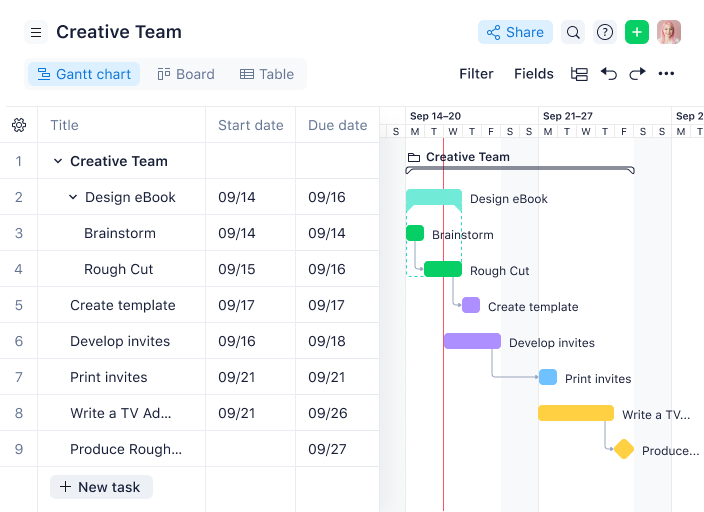
Wrike is a project management platform that caters to teams looking for comprehensive solutions to organize their work and manage projects. It offers a range of features designed to improve collaboration and workflows, which makes it a valuable tool for creating and managing project roadmaps.
Who Is Wrike Best For?
Program managers and cross-functional teams in mid-sized to enterprise organizations across marketing and technology. It suits groups that require structured collaboration around shared roadmaps and project deliverables.
Why I Picked Wrike
I picked Wrike because it excels in project collaboration, a key aspect for any team working on projects. Its customizable visual roadmaps and adjustable Gantt charts offer clear progress tracking, so every team member stays aligned.
The automatic calendar synchronization feature is particularly useful for coordinating across multiple teams, while advanced project portfolio management tools provide a comprehensive view of project health. With streamlined approval processes, Wrike helps speed up decision-making, which makes it an ideal choice for teams looking to boost collaboration and improve their product development processes.
Wrike Key Features
Wrike also offers several other features that make it a compelling choice for project roadmap software.
- AI Automation: You can use this feature to automate routine tasks and free up your team to focus on strategic initiatives.
- Visual Collaboration Tools: The whiteboard allows for interactive brainstorming sessions with visual aids, which helps with team collaboration.
- Dynamic Request Forms: These forms automate work intake processes, so you can make sure all necessary information is gathered from the start.
- Resource Planning: With tools like Gantt charts and workload charts, you can effectively manage project timelines and allocate resources efficiently.
Wrike Integrations
Integrations include Klaxoon, QuickBooks, Power BI, Google Sheets, Salesforce, Tableau, Microsoft Teams, Adobe Creative Cloud, Google Drive, Microsoft SharePoint, Slack, and Dropbox.
Pros and Cons
Pros:
- Web, desktop, and mobile apps for flexibility
- Enterprise-grade security features protect your data
- Custom workflows and automation help improve project processes
Cons:
- Time tracking and scheduling lacking compared to other tools
- Storage limits can be restrictive
New Product Updates from Wrike

Wrike Redesigns Workspace Search With New Filters
Wrike introduces a redesigned Workspace Search interface with recent search shortcuts, item type and location filters, and parent-task context. These updates help users find relevant work items and navigate search results efficiently. For more information, visit Wrike’s official site.
 .

Best for timeline planning with Gantt charts
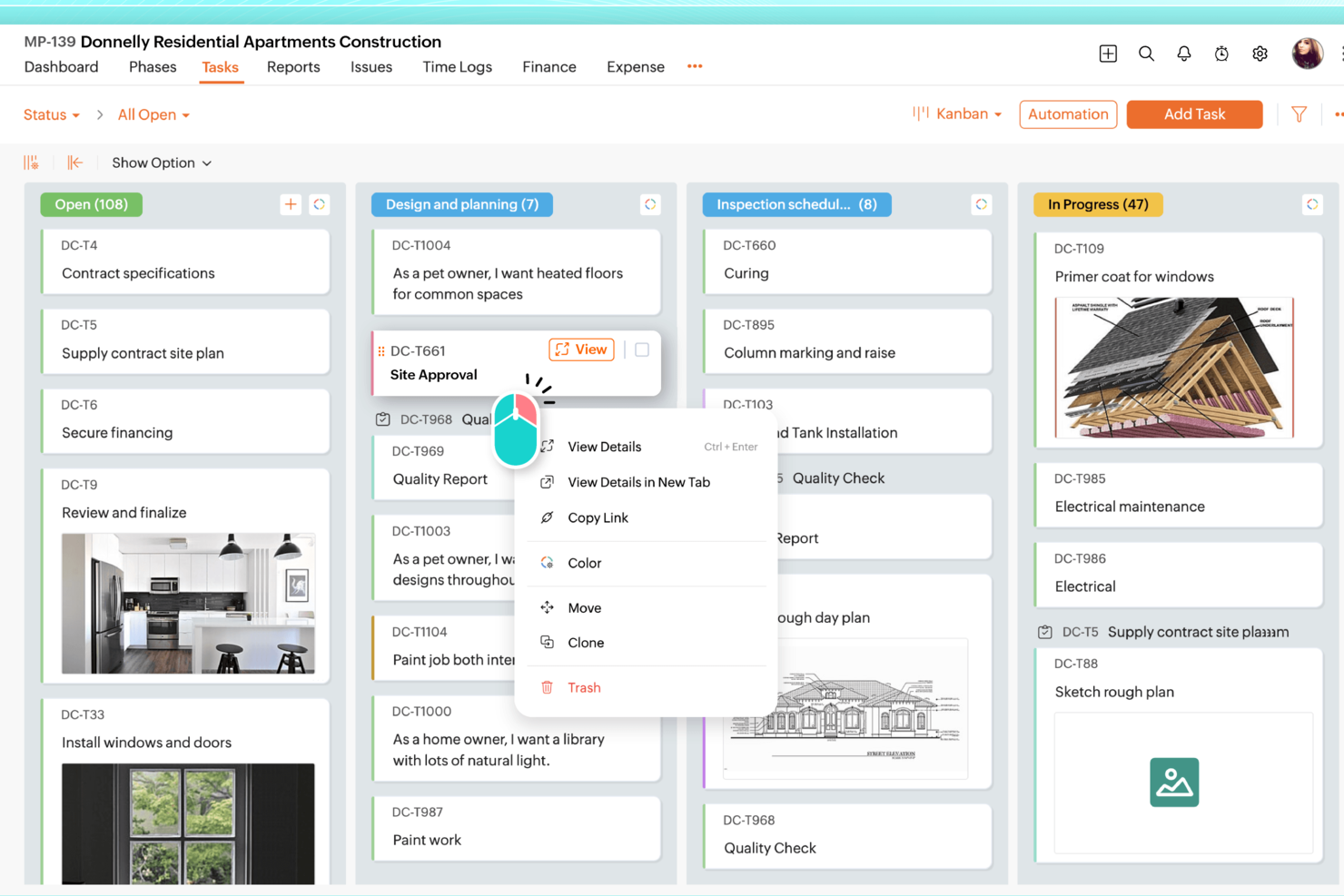
Zoho Projects is a practical option for teams that need project roadmap software with solid planning and tracking tools. It works well across industries like IT and marketing, especially for teams that rely on task automation and time tracking to stay organized. Its Gantt charts make it easy to map timelines and dependencies, giving project managers a clearer view of what’s moving forward, what’s blocked, and what needs attention to keep work on schedule.
Who Is Zoho Projects Best For?
Project coordinators and PMO teams in small to mid-sized organizations across IT and professional services. It supports groups that rely on Gantt-based timeline planning to map initiatives over time.
Why I Picked Zoho Projects
I picked Zoho Projects for its strong Gantt chart tools, which make it easier to build and manage a roadmap with clear timelines and task dependencies. This is especially helpful when priorities shift and teams need to adjust schedules without losing visibility into what impacts delivery. Zoho Projects also includes task automation to reduce manual follow-ups and keep work moving through each stage. Its time tracking feature adds another layer of clarity by showing how time is being spent across tasks, which can help with planning, workload decisions, and resource allocation.
Zoho Projects Key Features
Beyond Gantt charts and automation, Zoho Projects includes features that support day-to-day roadmap management:
- Issue Tracking: This feature helps your team identify, track, and resolve project issues efficiently, ensuring minimal disruption to your project roadmap.
- Document Management: You can store, share, and manage project-related documents, making collaboration seamless and organized.
- Zia Intelligence: Utilize AI-powered insights for smarter project management, assisting in predicting project outcomes and optimizing workflows.
- Customizable Dashboards: Tailor your project dashboards to display the most relevant metrics, providing your team with a clear view of project progress.
Zoho Projects Integrations
Integrations include Zoho CRM, Zoho People, Zoho Desk, Zoho Invoice, Zoho Analytics, JIRA, Microsoft Teams, Google Calendar, Slack, and Dropbox.
Pros and Cons
Pros:
- Affordable pricing for growing teams
- Built-in time tracking and billing
- Strong automation and workflow customization
Cons:
- Mobile experience less fully featured
- Interface has steeper learning curve
New Product Updates from Zoho Projects
Zoho Projects Adds CodeX Scripts for Custom Modules
Zoho Projects now supports CodeX Scripts for custom modules, enabling conditional logic and rules for creating, updating, and deleting records. For more information, visit Zoho Projects' official site.
 .

Best for dynamic agile project management

Zoho Sprints is an online agile project management tool designed to help teams plan, track, and execute projects efficiently. With features like backlog management and Scrum boards, it caters to the dynamic needs of agile teams that want to maintain a clear project roadmap.
Who Is Zoho Sprints Best For?
Agile coaches and product owners in startups and mid-sized software companies. It works well for teams that manage evolving roadmaps within sprint-based delivery cycles.
Why I Picked Zoho Sprints
Zoho Sprints offers comprehensive backlog management so you can prioritize tasks and keep your team focused on what truly matters. The Scrum and Kanban boards provide visual clarity and make it easy for your team to track progress and adapt to changes quickly. These dynamic features for managing agile projects help you maintain a clear project roadmap and make sure everyone is aligned with project goals.
Another reason I chose Zoho Sprints is the inclusion of epics and release management. These features help you break down complex projects into manageable segments for better planning and execution. With detailed reporting, you can track progress and performance and keep the team on course.
Zoho Sprints Key Features
Zoho Sprints offers a range of other features that make it useful as project roadmap software.
- Time Tracking: You can use timesheets and a global timer to manage team hours and get insights that will help you produce better estimations and resource allocations in future projects.
- Customization: This lets you tailor projects with templates, custom fields, and layout rules to meet your team's specific needs and get a personalized project management experience.
- Interactive Gantt Charts: These charts let your team visualize project timelines and dependencies and make it easier to manage project schedules and maintain timely delivery.
- Collaboration Hub: This feature includes activity streams and document co-authoring and facilitates teamwork and communication, especially for distributed teams working across different locations.
Zoho Sprints Integrations
Integrations include Zoho Cliq, Zoho Projects, Zoho Desk, Microsoft Teams, Google Workspace, GitHub, Jenkins, Zapier, Zoho Flow, Zoho Meeting, Zoho Mail, and Zoho Analytics.
Pros and Cons
Pros:
- Strong collaboration features for communication
- Effective sprint planning and tracking tools
- Customizable workflows to fit project needs
Cons:
- Limited mobile app functionality
- Customization options can be overwhelming
New Product Updates from Zoho Sprints

Zoho Sprints Adds ServiceDesk Plus Integration
Zoho Sprints now offers Zoho Sprints for ServiceDesk Plus in Zoho Marketplace, enabling IT teams to send requests, changes, and releases to developers and track progress in SDP. For more information, visit Zoho Sprints' official site.
 .
Best for configurable scoring model

Acuity PPM is a project portfolio management tool designed to simplify project tracking and resource management. It's built to help you visualize and manage project timelines and dependencies and make strategic planning more straightforward.
Who Is Acuity PPM Best For?
PMO leaders and portfolio managers in mid-sized to enterprise organizations across technology and financial services. It suits teams that require configurable scoring models to evaluate and prioritize initiatives across complex project portfolios.
Why I Picked Acuity PPM
Acuity PPM offers a centralized portfolio tracking feature that gives you real-time reporting and improved visibility into your projects. This feature helps you manage project timelines by providing a clear view of project timing and sequencing. With the ability to assess project value and risk through project scoring and prioritization, your team can make informed decisions about which projects to pursue. The software's risk-value bubble chart is handy for visualizing these factors.
Additionally, Acuity PPM helps you improve work intake management by making sure only quality project requests enter your portfolio. This helps maintain a streamlined project portfolio and avoids unnecessary clutter. Resource capacity planning is another strength of Acuity PPM. It provides visibility into resource utilization so you can allocate resources more effectively and make sure strategic execution aligns with organizational goals.
Acuity PPM Key Features
Acuity PPM offers several other features that help you manage your project roadmaps and portfolios.
- Portfolio Tracking: You can centralize status reports for real-time visibility, which lets you and your team make informed decisions quickly.
- Dynamic Resource Management: This lets you manage resources effectively across multiple projects and maintain optimal utilization and allocation.
- Strategic Alignment Scorecards: You can align projects with strategic objectives and prioritize initiatives that deliver the most value.
- Advanced Scenario Planning: This facilitates scenario analysis so you can evaluate potential project outcomes, which helps with strategic decision-making.
Acuity PPM Integrations
Integrations include monday.com, Asana, Smartsheet, Jira, Trello, and Wrike.
Pros and Cons
Pros:
- Dashboards for tracking progress and resource allocation
- High visibility into overall project status
- Reduces reliance on spreadsheets for prioritization and planning
Cons:
- Lack of task reminders and notifications
- Limited customization compared to other tools

Miro
Best for flexible virtual whiteboard with a template library

Miro is an online collaboration platform that offers digital whiteboards for teams to brainstorm, plan, and manage projects. It offers a range of tools designed to improve productivity and teamwork when your team is in different locations.
Who Is Miro Best For?
Product strategists and innovation teams in distributed organizations across technology and consulting. It suits groups that use flexible whiteboards and templates to visualize roadmap concepts collaboratively.
Why I Picked Miro
I picked Miro for its flexible virtual whiteboard, which is complemented by an extensive template library. This includes templates for agile product roadmaps and epic & feature roadmaps so you can boost collaboration and refine planning processes.
Miro's integrations with tools like Jira and Azure DevOps support smooth workflow management and keep your team aligned on goals and timelines. The real-time collaboration feature is particularly beneficial for teams in different locations and helps to facilitate effective communication and project alignment.
Miro Key Features
Miro also offers several other features that make it useful for managing projects and roadmaps.
- AI Tools: Features like flows and sidekicks provide insights into your projects and let you automate repetitive tasks.
- Customization Options: You can tailor templates and boards to meet specific project needs, and set up custom tasks, milestones, and deadlines.
- Progress Tracking: You and your team can update your roadmaps as projects advance, which helps maintain alignment with objectives.
- Presentation Mode: This lets you clearly share and present roadmaps to stakeholders and helps improve communication and transparency.
Miro Integrations
Integrations include Microsoft Teams, Jira, Slack, Confluence, Azure, Asana, Google Drive, and Dropbox.
Pros and Cons
Pros:
- Effective for team discussions and Scrum meetings
- Well-suited for remote project teams
- Built-in collaboration tools like whiteboards and templates
Cons:
- Limited offline access
- Occasional performance lags on large whiteboards
New Product Updates from Miro
Miro Adds Japan Data Residency for Enterprise Customers
Miro has introduced Japan data residency for enterprise customers, offering in-region storage for production data, backups, and metadata, plus in-region compute infrastructure. For more information, visit Miro's official site.
 .

Shortcut
Best for sprint planning
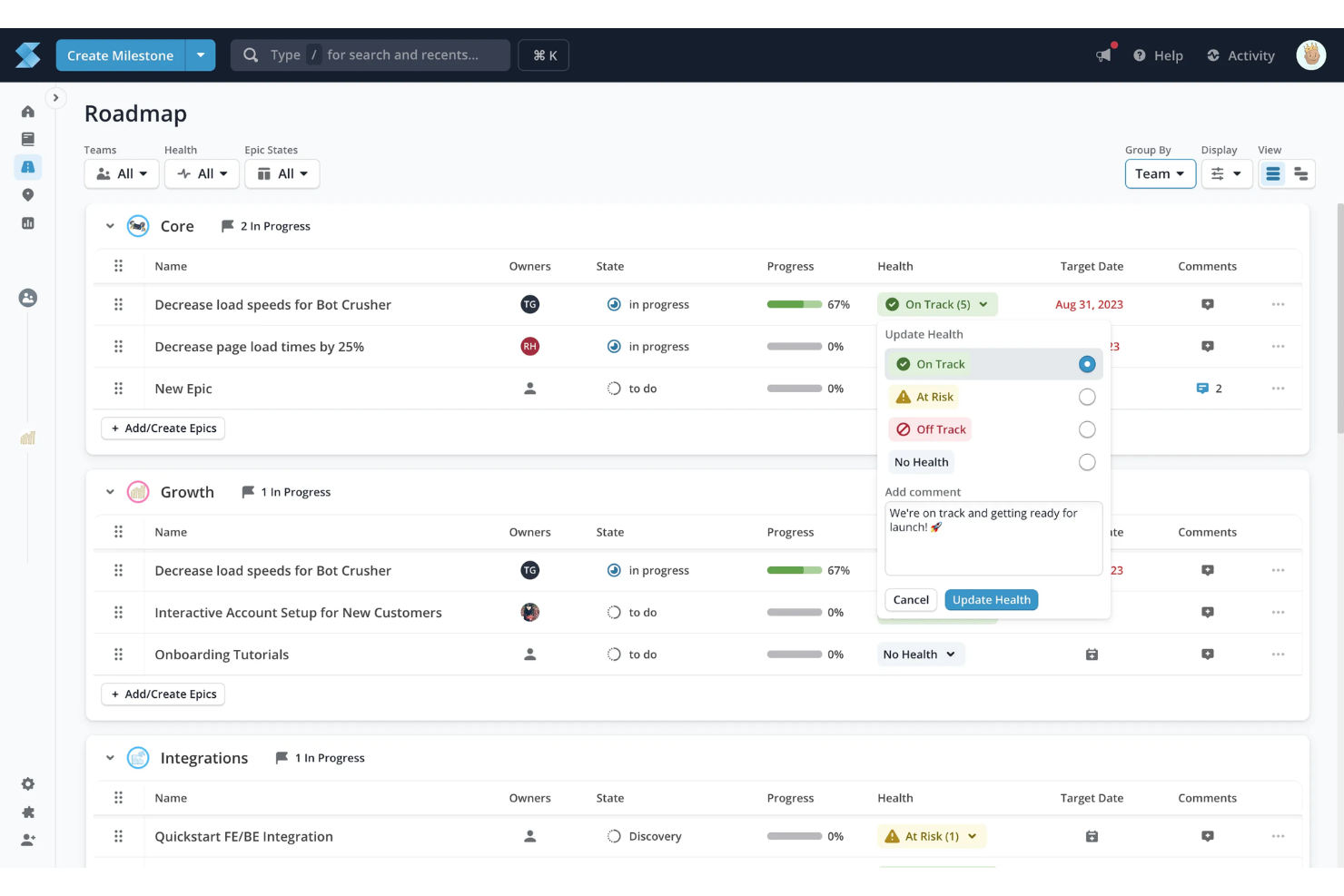
Shortcut is a project management tool designed to help you and your team organize and visualize your projects effectively. It offers a range of features like Kanban boards and roadmaps, which make it easier to align your team's work with your company's goals.
Who Is Shortcut Best For?
Engineering managers and product teams in startups and mid-sized software companies. It supports sprint-based roadmap planning tied closely to development backlogs.
Why I Picked Shortcut
I picked Shortcut because it offers tools for project roadmaps that let you plan, visualize, and organize your sprints. With this feature, you can align your team's work with the company's objectives to make sure everyone is on the same page. The ability to customize workflows and track progress makes it easier for you to manage multiple projects simultaneously.
Another reason I chose Shortcut is its focus on collaboration. By integrating with platforms like GitHub and Slack, it lets your team communicate effectively and stay updated with real-time information. This also helps maintain project visibility and keep stakeholders informed without the need for constant meetings.
Shortcut Key Features
Shortcut offers a suite of other features that make it a compelling choice for project roadmap software.
- Kanban Boards: You and your team can visualize and track the progress of work in a clear, organized manner.
- Backlogs: This lets you organize and prioritize upcoming tasks, so your team is always aware of what’s next on the agenda.
- Reporting: You can get insights into team performance and progress, which helps you measure success and identify areas for improvement.
- Objectives: This lets you facilitate the alignment of tasks with overarching company goals, so every piece of work contributes to the bigger picture.
Shortcut Integrations
Integrations include GitHub, Slack, GitLab, Figma, Dropbox, Google Drive, Google Sheets, Zendesk, Everhour, and Miro.
Pros and Cons
Pros:
- Easy to use once familiarized
- Built-in product development tracking
- Comprehensive reporting functions
Cons:
- Difficult to manage multiple stories in a column
- Manual prioritization in Kanban view cumbersome

Best for quick project visuals
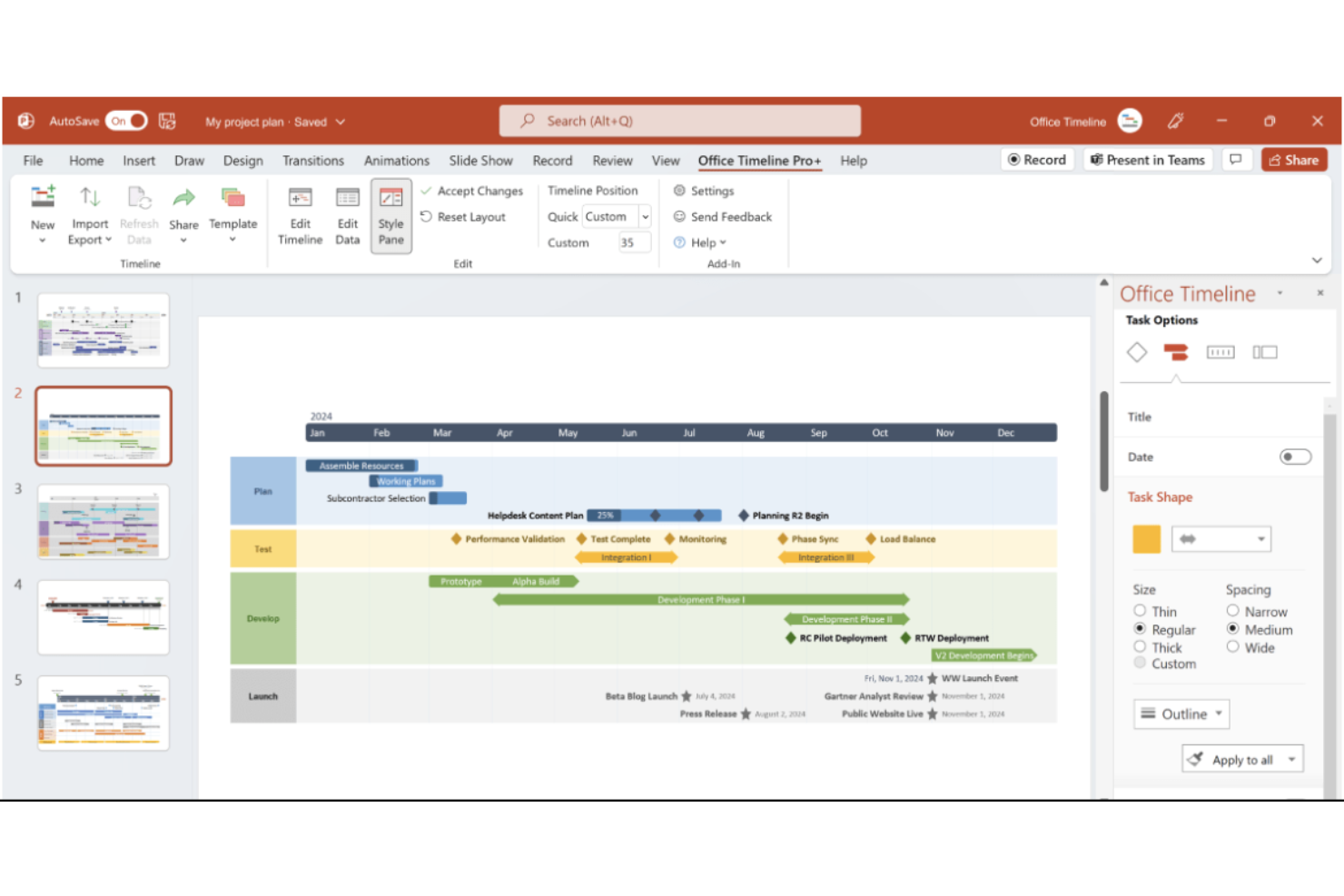
Office Timeline is a project management tool designed to create timelines and Gantt charts. It offers an efficient way to transform project data into clear, visual formats that enhance communication with stakeholders.
Who Is Office Timeline Best For?
Project sponsors and PMO analysts in small to enterprise environments across corporate settings. It supports professionals who need clear, presentation-ready roadmap visuals for executive communication.
Why I Picked Office Timeline
One of the standout features of Office Timeline is its ability to create quick, detailed timelines directly within PowerPoint. The software also provides extensive customization options, so you can tailor your project visuals to match your team's specific needs. Additionally, Office Timeline offers a web-based tool that lets you design timelines from anywhere, which provides flexibility and remote collaboration.
Another reason I chose Office Timeline is its emphasis on visual storytelling, which is crucial for effective project management. The software helps you convert complex project details into concise visuals, so your plans can be communicated clearly to executives and clients. This focus on visual communication not only improves understanding but also keeps your team engaged and informed.
Office Timeline Key Features
Office Timeline offers several other features that make it useful for creating project roadmaps.
- Swimlanes: You can organize tasks, teams, and phases into visual sections to manage workflows more effectively.
- Sub-Swimlanes: This feature provides a hierarchical structure that allows for detailed project organization and clarity.
- Planned vs. Actual Progress: You can visualize and compare actual project progress against original plans, which facilitates better alignment and stakeholder approvals.
- Data Import: This lets you seamlessly integrate project data from Excel, Microsoft Project, and other tools for polished and professional visuals.
Office Timeline Integrations
Integrations include Microsoft Project, Excel, Smartsheet, Jira, Wrike, PowerPoint, Google Docs, Google Slides, and Google Sheets.
Pros and Cons
Pros:
- Offers customizable templates that save time
- Well-suited for timelines for small to medium-sized projects
- Provides a drag-and-drop interface for intuitive timeline creation
Cons:
- Limited flexibility for unique project workflows
- Lacks real-time collaboration features
Best for agencies and consultancies

Bonsai is a business management platform that's designed to help agencies, consultancies, and other professional service providers streamline their workflows and improve their operations. It's a comprehensive tool that aligns project management with the unique needs of agency workflows.
Who Is Bonsai Agency Software Best For?
Agency owners and project leads in small consultancies and creative firms. It works well for teams that manage client-facing roadmaps alongside contracts and billing workflows.
Why I Picked Bonsai
I chose Bonsai for its project management capabilities that simplify workflows, which is useful for agencies and consultancies. This feature keeps your team aligned and organized from the initial lead to project completion. The real-time scheduling features let you make immediate adjustments based on workload and task status, which is crucial for keeping projects on track.
Additionally, Bonsai's budget tracking provides real-time updates on project budgets, tasks, and team performance, so you have a clear view of your project's financial health at any time. Time tracking facilitates efficient time management and timesheet organization for your team.
Bonsai Key Features
Bonsai offers a suite of other features for managing projects and roadmaps at agencies and consultancies.
- Gantt Charts: This lets you visualize your project timelines and dependencies and makes it easier to plan and adjust schedules as needed.
- Milestone Tracking: You can set and monitor key project milestones to make sure your team stays on track and meets critical deadlines.
- Real-Time Collaboration: This facilitates seamless communication and coordination among team members, which helps keep everyone aligned and informed.
- Kanban Boards: You can organize tasks visually to improve workflow management and better prioritize tasks.
Bonsai Integrations
Integrations include QuickBooks, Zapier, Calendly, Xero, and HiBob.
Pros and Cons
Pros:
- Get invoicing, time tracking, and contract management in one tool
- Easy to navigate
- Well-suited for small businesses and agencies
Cons:
- Limited customization for documents and client portal
- Contract management feature requires a learning curve

Best for visual project timelines
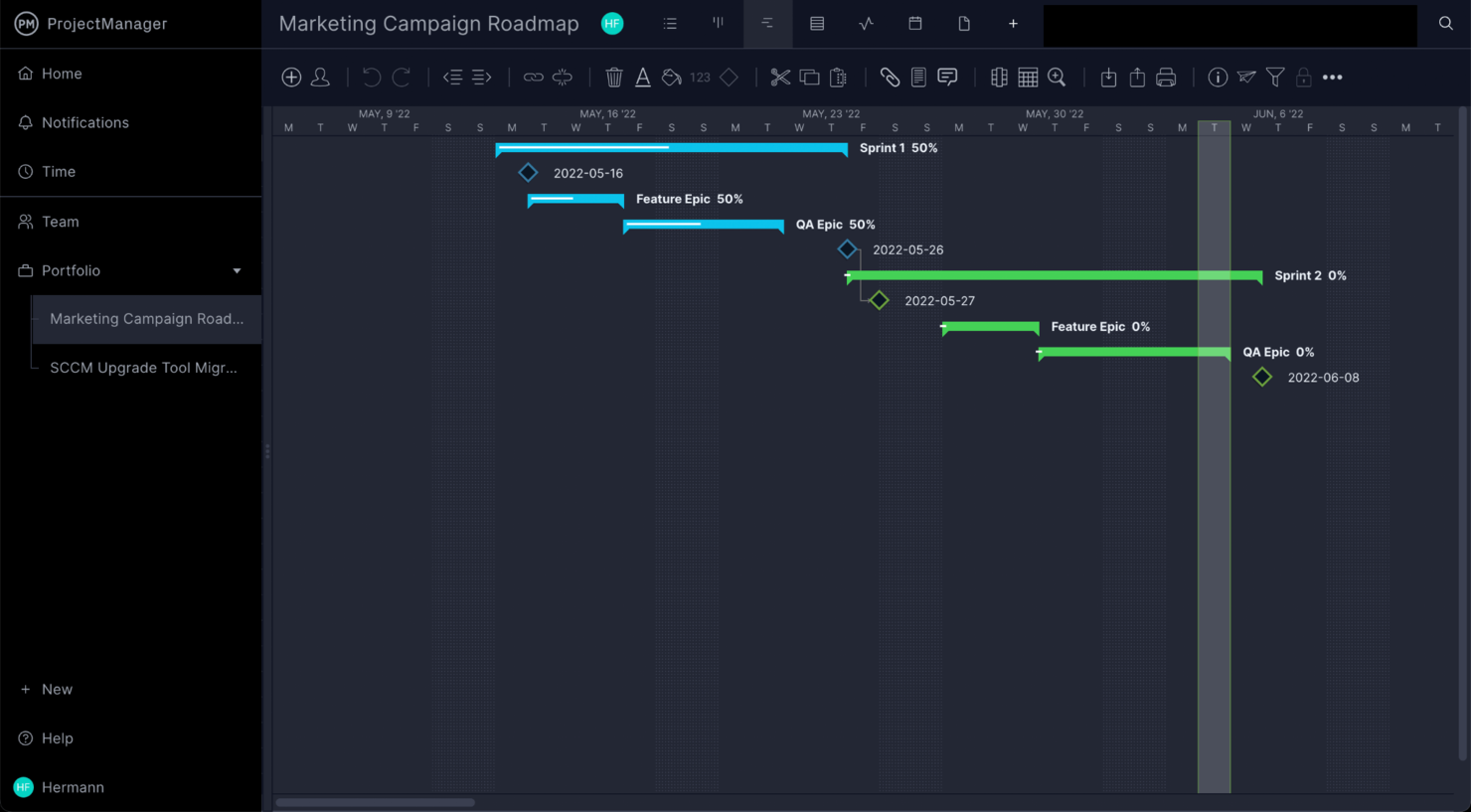
ProjectManager is a project management software tool designed to help improve your team's productivity and efficiency. It offers a range of tools that cater to various aspects of project management, from planning and scheduling to execution and monitoring.
Who Is ProjectManager Best For?
Project directors and operations managers in mid-sized organizations across construction, IT, and engineering. It fits teams that require visual timelines to connect roadmap plans with execution tracking.
Why I Picked ProjectManager
I picked ProjectManager because of its powerful Gantt charts and dashboards. These tools provide a visual representation of your project timelines and deliver real-time data insights, so you and your team stay on track with your goals.
Additionally, the project portfolios feature lets you manage multiple projects at a high level and maintain alignment with your organization's strategic objectives. ProjectManager's AI project insights offer instant summaries of project data, which can help with decision-making.
ProjectManager Key Features
ProjectManager offers a variety of other features that can help you manage your project roadmaps.
- Time Tracking: This lets you and your team log hours directly within the software and gives you a clear overview of time allocation for each project.
- Workflow Automation: You can automate repetitive tasks to streamline processes and help your team focus on critical project activities.
- Kanban Boards: This lets you facilitate task prioritization and execution through a visual drag-and-drop interface, which boosts transparency and collaboration.
- Resource Management: You can track and allocate resources effectively to maintain balanced workloads and optimize team productivity.
ProjectManager Integrations
Integrations include Microsoft Teams, Slack, Jira, Microsoft Project, Power BI, Acumatica, Excel, Office 365, and Trello.
Pros and Cons
Pros:
- Built-in time tracking helps monitor productivity
- Gantt charts help track dependencies and critical paths
- Collaboration tools facilitate effective communication
Cons:
- Extensive features can be overwhelming at first
- Fewer customization options than other tools
Diğer Proje Yol Haritası Yazılımları
İşte en iyi listeme giremeyen ancak değerlendirmenize değer birkaç araç daha.
- Kantree
For customizable project views
- Tempo Roadmapping Software
For task prioritization
- Ravetree
For Gantt chart roadmaps
- Visor
For AI-driven project templates
- GanttPRO
For interactive Gantt chart visualization
- ClickUp
For AI-driven task assignment
- Celoxis
For real-time project tracking
- Scoro
For real-time roadmap planning
- Hive
For goal setting and milestone tracking
- airfocus
For centralizing project management
- GoodDay
For roadmap templates
- TaskRay
For Salesforce-native project delivery
- PathPro
For public and private roadmap sharing
- Productboard
For prioritizing ideas from customer feedback
- Airtable
For its robust database features
- Toggl Plan
For small teams managing simple roadmaps
- TeamGantt
For tracking timelines with clear dependencies


How I Evaluate Project Roadmap Software
Project roadmap software is what teams reach for when they need to communicate not just what's getting built, but when and why—whether that's a PMO presenting a quarterly plan to leadership or a project manager aligning engineering, design, and product around a shared delivery timeline. When I evaluate tools in this space, I think in two layers: what every option needs to do well enough just to earn a spot on the list, and what actually sets one pick apart from another for specific teams and contexts.
Core Functionality (Table Stakes for This List)
For project roadmap software, the core functionality I test and evaluate is:
- Timeline visualization: I check whether the tool supports drag-and-drop Gantt or swimlane views with adjustable time scales from weeks to quarters to years.
- Multiple views: Board, list, calendar, and timeline views should all be available so different stakeholders can consume the same data their way.
- Milestones & dependencies: I look for clear milestone markers and dependency mapping—like flagging that QA can't start until dev completes a sprint.
- Collaboration & sharing: Shareable links, role-based permissions, and real-time commenting matter when a PMO needs to send a read-only roadmap to leadership.
- Custom fields & filtering: Teams label work differently, so I evaluate whether you can add custom statuses, tags, and swimlanes to match your workflow.
- Stakeholder views: I consider whether the tool lets you create filtered, audience-specific versions of one roadmap—an exec summary vs. a team-level plan.
- Export & presentation: Clean PDF, PNG, or PowerPoint exports are non-negotiable when your roadmap needs to land in a board deck or client proposal.
A tool has to deliver most of these capabilities to earn a spot on the list. From there, I consider what sets each tool apart.
Standout Features (What Separates the Picks)
When choosing which project roadmap software to include, I look for strategic alignment features like goal linkages, OKR frameworks, or built-in prioritization scoring that connect roadmap items to business objectives. I also consider the depth of integrations—tools offering live, two-way sync with Jira or Asana make it easier to keep the roadmap in sync with actual project progress. Portfolio-level reporting and cross-roadmap dependencies are especially valuable for organizations managing several parallel initiatives.
What I Weigh Beyond Features
I evaluate how well each tool fits different team sizes and buyer profiles—a five-person team needs fast setup and a free or low-cost tier, while a PMO running dozens of projects needs SSO, granular permissions, and audit trails. Pricing transparency matters too, especially whether viewer seats are free or paid, since roadmaps often have far more consumers than editors. I also consider onboarding quality, like template libraries and guided walkthroughs, because a roadmap tool that takes weeks to configure defeats the purpose.
Proje Yol Haritası Yazılımı Nasıl Seçilir?
Uzun özellik listeleri ve karmaşık fiyatlandırma yapılarına kendinizi kaptırmanız kolaydır. Kendinize özgü yazılım seçim sürecinizde ilerlerken odaklanmayı sürdürmenize yardımcı olmak için aklınızda bulundurmanız gereken faktörlerin bir kontrol listesini burada bulabilirsiniz:
| Faktör | Dikkate Alınması Gerekenler |
|---|---|
| Ölçeklenebilirlik | Bu araç ekibinizin ihtiyaçlarıyla birlikte büyüyebilir mi? |
| Entegrasyonlar | Araç, zaten kullandığınız uygulamalarla sorunsuz bir şekilde entegre oluyor mu? |
| Özelleştirilebilirlik | Yazılımı ekibinizin özel iş akışına uyacak şekilde uyarlayabilir misiniz? |
| Kullanım Kolaylığı | Ekibiniz yazılımı öğrenmeyi ve yazılımda gezinmeyi kolay bulacak mı? |
| Bütçe | Fiyatlandırma hem şu anda hem de ekibiniz büyüdükçe bütçenize uyuyor mu? |
| Güvenlik Önlemleri | Yazılım, verilerinizi korumak için güçlü güvenlik önlemlerine sahip mi? |
| İş Birliği | Araç, ekip üyeleriniz arasında etkili iş birliğini destekliyor mu? |
| Raporlama Araçları | Karar vermeye yardımcı olacak faydalı içgörüler ve raporlar oluşturabilir misiniz? |
Proje Yol Haritası Yazılımındaki Trendler
Araştırmam sırasında farklı proje yol haritası yazılımı sağlayıcılarından sayısız ürün güncellemesi, basın bülteni ve sürüm günlüğü derledim. Takip ettiğim yeni trendlerden bazıları şunlar:
- Yapay Zekâ Destekli İçgörüler: Yapay zekâ, proje verilerini analiz etmek ve zaman çizelgelerini optimize etmenin yollarını önermek ya da olası engelleri öne çıkarmak için kullanılıyor. Bu da kullanıcıların değişime daha kolay uyum sağlayan bir yol haritası oluşturmasına yardımcı oluyor. Bazı araçlar, ekiplerin gelecekte ortaya çıkabilecek sorunları önceden önlemesine yardımcı olmak için tahmine dayalı analizler de sunuyor. Örneğin yapay zekâ, gerçek zamanlı olarak görev düzenlemeleri önererek yol haritası oluşturmayı geliştirmek için geçmiş proje verilerini analiz edebilir.
- Senaryo Planlama: Araçlar artık ekiplerin alternatif yolları ve sonuçları görselleştirmesine olanak tanıyan senaryo planlama özellikleri ekliyor. Böylece değişen önceliklere uyum sağlayan bir proje yol haritası oluşturmak kolaylaşıyor. Bu özellik, bir program yol haritası şablonu oluştururken veya proje ortasında bir uygulama yol haritası şablonunu düzenlerken kullanışlıdır.
- Oyunlaştırma Unsurları: Proje yazılımlarında oyunlaştırma, ekip katılımını artırmak için giderek daha popüler hale geliyor. Görevlerin tamamlanması karşılığında rozetler ve başarılar ekleyen bu araçlar, ekiplerin motivasyonunu korumasına ve proje hedeflerine odaklanmasına yardımcı oluyor. Hatta bazı araçlar, oyunlaştırılmış unsurlar içeren ücretsiz yol haritası oluşturucular sunarak ilerlemeyi ödüllendirmeye ve ekiplerin proje aşamalarında ilerlerken odaklarını korumaya yardımcı oluyor.
- Etkileşimli Yol Haritası Görselleri: Sağlayıcılar, yol haritası zaman çizelgelerini daha sezgisel ve tıklanabilir hale getirmek için görselleri geliştiriyor. Böylece kullanıcılar ekran değiştirmeden ayrıntılı görev görünümlerine erişebiliyor. Ekipler, üst düzey hedefler ile belirli görevler arasında geçiş yapabilen ürün yol haritası görselleştirme araçlarından da yararlanıyor. Bu özellik, tüm ayrıntıları kolay erişim için tek bir yerde bulunan bir proje yol haritasının nasıl oluşturulacağını öğrenmeye çalışanlar için özellikle kullanışlıdır.
- Sürdürülebilirlik Takibi: Daha fazla yazılım aracı, proje faaliyetlerinin ve kaynaklarının çevresel etkisini takip etmeye yönelik özellikler ekliyor. Bu da stratejik haritalama yazılımlarını yeşil girişimlere odaklanan şirketler için kullanışlı bir seçenek haline getiriyor. Sürdürülebilirlik takibi özellikleri, ekiplerin proje kilometre taşlarını çevre bilincine dayalı hedeflerle uyumlu hale getirmesine de olanak tanıyor.
Proje Yol Haritası Yazılımı Nedir?
Proje yol haritası yazılımı, bir proje veya program kapsamındaki temel çıktıları, zaman çizelgelerini ve öncelikleri haritalandıran görsel bir planlama aracıdır. Proje yöneticilerinin, ürün liderlerinin ve farklı işlevlerden oluşan ekiplerin strateji konusunda uzlaşmasına, bağımlılıkları takip etmesine ve öncelikler değiştikçe planları düzenlemesine yardımcı olur.
En iyi araçlar hem yukarıdan aşağıya görünürlüğü hem de ekip düzeyinde koordinasyonu destekleyerek karmaşık ve birden fazla aşamadan oluşan girişimleri yönetmek için vazgeçilmez hale gelir.
Özellikler
Her iyi proje yol haritası yazılımının sahip olması gereken temel özellikler şunlardır:
- Görsel zaman çizelgesi planlama: Görevleri, kilometre taşlarını ve teslim edilecekleri açık ve etkileşimli bir zaman çizelgesinde haritalandırabilirsiniz. Böylece siz ve ekibiniz neyin ne zaman teslim edilmesi gerektiğini bilirsiniz.
- İş birliği araçları: Ekip arkadaşlarınızla gerçek zamanlı çalışmanıza ve geri bildirimleri, güncellemeleri ve dosyaları doğrudan proje yol haritanız içinde paylaşmanıza olanak tanıyarak ekip çalışmasını daha sorunsuz ve ilgi çekici hale getirir.
- Kilometre taşı takibi: Önemli kilometre taşlarını belirleyebilir, takip edebilir ve kutlayabilirsiniz. Bu da herkesin hem büyük dönüm noktalarına hem de projeyi ilerleten küçük başarılara odaklanmasına yardımcı olur.
- Kaynak yönetimi: Ekip iş yüklerini takip etmenize, görevleri verimli bir şekilde atamanıza, tükenmişliği önlemenize ve hiç kimsenin yeterince değerlendirilemeden kalmamasını sağlamanıza yardımcı olur.
- Özelleştirilebilir şablonlar: Belirli proje hedeflerinize ve tarzınıza uyacak şekilde düzenleyebileceğiniz çeşitli yol haritası şablonları arasından seçim yaparak çalışmaya daha hızlı başlamanıza yardımcı olur.
- İlerleme izleme ve raporlama: Yerleşik panolar ve raporlarla projenizin nasıl ilerlediğini görebilir, riskleri ve başarıları fark etmenizi sağlayan güncel içgörüler elde edebilirsiniz.
- Bağımlılık yönetimi: İlgili görevleri birbirine bağlamanıza olanak tanır. Böylece değişiklikler veya gecikmeler genel zaman çizelgesine otomatik olarak yansıtılır ve sürprizler en aza indirilir.
- Entegrasyon olanakları: Slack, Jira veya Trello gibi popüler araçlara bağlanabilmeniz gerekir. Böylece iş akışları ve bilgiler bir yerden diğerine kolayca aktarılır.
- İzin kontrolleri: Yol haritanızı kimlerin görüntüleyebileceğine, düzenleyebileceğine veya yorum yapabileceğine karar vermenizi sağlar. Böylece şeffaflık ile kontrol arasında denge kurabilir ve gerektiğinde hassas planları gizli tutabilirsiniz.
- Mobil erişilebilirlik: Mobil uygulama aracılığıyla yol haritanızı her yerden kontrol edebilir ve güncelleyebilirsiniz. Böylece hareket halindeyken bile işlerin ilerlemesini sağlayabilirsiniz.
Yaygın Proje Yol Haritası Yazılımı Yapay Zekâ Özellikleri
Standart proje yol haritası yazılımı özelliklerinin yanı sıra bu çözümlerin birçoğu şu yapay zekâ özelliklerini sunuyor:
- Otomatik görev önceliklendirme: Bu yapay zekâ aracı, hangi görevlerin önce gelmesi gerektiğini önermek ve odaklanmanıza yardımcı olmak için proje ayrıntılarını ve bağımlılıkları analiz edebilir.
- Öngörücü risk belirleme: Yazılım, olası darboğazları veya gecikmeleri sorun hâline gelmeden önce tespit eder; böylece sorunları proaktif bir şekilde çözebilirsiniz.
- Akıllı son tarih tahmini: Bu yapay zekâ özelliği, gerçekçi bir zaman çizelgesi sunmak için ekip hızına ve geçmiş verilere dayanarak kilometre taşlarına ulaşıp ulaşamayacağınızı tahmin edebilir.
- Kaynak optimizasyonu önerileri: Yapay zekâ araçları, verimliliği en üst düzeye çıkarmak için ekip iş yüklerini değerlendirebilir ve işleri dağıtabilir; bu da herkesin tükenmeden üretken kalmasına yardımcı olur.
- Akıllı raporlama ve içgörüler: Sayıları kendiniz hesaplamak zorunda kalmadan ilerlemeyi, riskleri ve fırsatları öne çıkaran otomatik olarak oluşturulmuş raporlar alırsınız.
- Doğal dil güncellemeleri: Yazılım, hızlı notlarınızı veya sohbetlerinizi resmî yol haritası güncellemelerine dönüştürebilir; bu da zaman kazandırır ve durum raporlarını daha az zahmetli hâle getirir.
Faydalar
Proje yol haritası yazılımını uygulamak, ekibiniz ve işletmeniz için çeşitli faydalar sağlar. Yararlanmayı bekleyebileceğiniz birkaç fayda şunlardır:
- Geliştirilmiş planlama: Ekiplerin proje aşamalarını düzenlemesine yardımcı olarak herkese neyin ne zaman yapılması gerektiğine dair net bir görünüm sunar.
- Geliştirilmiş iş birliği: Ekip üyelerinin görevler üzerinde gerçek zamanlı olarak birlikte çalışmasına olanak tanıyarak güncellemeleri ve iletişimi kolaylaştırır.
- Daha iyi kaynak dağıtımı: İş yükünü ve görev bağımlılıklarını görselleştirerek yöneticilerin kaynakları daha etkili bir şekilde atamasına yardımcı olur.
- Artan sorumluluk bilinci: Görevlerdeki ve kilometre taşlarındaki ilerlemeyi izleyerek nelerden kimin sorumlu olduğunu netleştirir.
- Daha net hedef uyumu: Proje hedeflerini görünür tutarak her ekip üyesinin yaptığı işin genel hedeflere nasıl katkıda bulunduğunu anlamasını sağlar.
- Risk azaltma: Senaryo planlamasını mümkün kılarak ekiplerin olası engellere hazırlanmasına ve gecikmeleri en aza indirmesine yardımcı olur.
- Veriye dayalı kararlar: Proje verilerinden içgörüler sağlayan raporlama araçları sunarak proje boyunca daha isabetli kararları destekler.
Maliyetler ve Fiyatlandırma
Proje yol haritası yazılımını seçmek, mevcut çeşitli fiyatlandırma modellerinin ve planların anlaşılmasını gerektirir. Maliyetler özelliklere, ekip büyüklüğüne, eklentilere ve daha fazlasına göre değişir. Aşağıdaki tablo, proje yol haritası yazılımı çözümlerinde yaygın planları, ortalama fiyatlarını ve genellikle sunulan özellikleri özetlemektedir:
Proje Yol Haritası Yazılımı İçin Plan Karşılaştırma Tablosu
| Plan Türü | Ortalama Fiyat | Yaygın Özellikler |
|---|---|---|
| Ücretsiz Plan | $0/user/month | Temel yol haritası oluşturma, sınırlı görev takibi, basit zaman çizelgesi görünümü ve temel destek |
| Kişisel Plan | $5–$25/user/month | Tam zaman çizelgesi görünümü, kilometre taşı takibi, görev bağımlılıkları, entegrasyonlar ve destek erişimi |
| İşletme Planı | $25–$50/user/month | Gelişmiş raporlama, iş birliği araçları, özelleştirilebilir şablonlar ve senaryo planlaması |
| Kurumsal Plan | $50–$100/user/month | Tüm özelliklere sınırsız erişim, özel güvenlik ayarları, gelişmiş analizler ve özel destek |
SSS
Bu konu hakkında diğer kişilerin sorduğu yaygın soruların yanıtlarını bulun.
Proje yol haritası ile Gantt şeması arasındaki fark nedir?
Temel fark, proje yol haritasının proje hedefleri, önemli kilometre taşları ve stratejik yönlere üst düzey bir genel bakış sunması; Gantt şemasının ise ayrıntılı görev planlamasına ve bağımlılıklara odaklanmasıdır.
\u003cul\u003e
\u003cli\u003e\u003cstrong\u003eProje Yol Haritası\u003c/strong\u003e: Yol haritası, bir projenin ana aşamalarını ve hedeflerini gösteren, paydaşların önlerinde ne olduğunu anlamasına yardımcı olan stratejik bir araçtır. Paydaşlara yönü ve stratejiyi iletmek için yol haritası kullanın.\u003c/li\u003e
\u003cli\u003e\u003cstrong\u003eGantt Şeması\u003c/strong\u003e: Gantt şeması daha ayrıntılıdır; projeyi belirli görevlere, zaman çizelgelerine ve bağımlılıklara ayırır. Görev ilerlemesini ve kaynak tahsisini ayrıntılı düzeyde izlemek için Gantt şemalarından yararlanın.\u003c/li\u003e
\u003c/ul\u003e
Proje yol haritaları ve Gantt şemaları, hem üst düzey hem de ayrıntılı proje görünümleri sunarak birbirini tamamlar; bu görünümlerin her biri proje yönetiminin farklı aşamaları için değerlidir. Kıdemli proje yöneticileri genellikle her ikisini de kullanır: yol haritasını yönetici güncellemeleri için, Gantt şemalarını ise ekip planlaması için.
Proje yol haritası yazılımı bilgi paylaşımına ve iş birliğine nasıl yardımcı olabilir?
Proje yol haritası yazılımının iş birliğini ve bilgi paylaşımını destekleyebileceği yollar şunlardır:
\u003col\u003e
\u003cli\u003e\u003cstrong\u003eMerkezi Bilgi Merkezi:\u003c/strong\u003e İlgili tüm proje belgeleri, güncellemeler ve kararlar erişilebilir tek bir konumda bulunur; böylece her paydaş, e-posta zincirlerini veya sohbet akışlarını incelemek zorunda kalmadan en güncel bilgilere ulaşır.\u003c/li\u003e
\u003cli\u003e\u003cstrong\u003eNet Kilometre Taşı Görünürlüğü:\u003c/strong\u003e Kilometre taşı temelli yol haritaları hedefleri ve son teslim tarihlerini öne çıkararak ekiplerin hem “ne” hem de “ne zaman” konusunda uyumlu kalmasına yardımcı olur.\u003c/li\u003e
\u003cli\u003e\u003cstrong\u003eGerçek Zamanlı İletişim:\u003c/strong\u003e Canlı güncellemeler değişiklikleri, riskleri veya gecikmeleri anında bildirerek ekiplerin sorunları hızla ele almasına ve darboğazlar olmadan bilinçli kararlar vermesine olanak tanır.\u003c/li\u003e
\u003cli\u003e\u003cstrong\u003eŞablonlarla Yönlendirilmiş Yapı:\u003c/strong\u003e Yerleşik şablonlar yol haritası oluşturma sürecini kolaylaştırır; yeni kullanıcıların ekibi yavaşlatmadan etkili biçimde katkıda bulunmasını kolaylaştırır.\u003c/li\u003e
\u003cli\u003e\u003cstrong\u003eİş Birliğine Dayalı Düzenleme:\u003c/strong\u003e Birden fazla kullanıcı doğrudan katkıda bulunabilir, yorum yapabilir ve yol haritasını düzenleyebilir. Bu da geri bildirimlerin hemen uygulanabildiği kapsayıcı bir ortam oluşturur.\u003c/li\u003e
\u003c/ol\u003e
Proje yol haritası oluştururken hangi önceliklendirme tekniklerini kullanabilirim?
Bir proje yol haritası oluştururken kaynakların en fazla değer sağlayan görevlere odaklanmasını sağlamak için etkili önceliklendirme kritik öneme sahiptir. Yol haritanızda neyin önce gelmesi gerektiğine karar vermenize yardımcı olabilecek kanıtlanmış bazı teknikler şunlardır:
\u003col\u003e
\u003cli\u003e\u003cstrong\u003eMoSCoW Yöntemi:\u003c/strong\u003e Görevleri “Olmazsa Olmaz”, “Olmalı”, “Olabilir” ve “Olmayacak” şeklinde kategorilere ayırarak neyin temel, neyin isteğe bağlı olduğunu belirleyin. Bu yöntem, sınırlı kaynaklarla uyumlu bir kilometre taşı yol haritası oluşturmak için idealdir.\u003c/li\u003e
\u003cli\u003e\u003cstrong\u003eEisenhower Matrisi:\u003c/strong\u003e Görevleri aciliyet ve önem düzeylerine göre sıralamak için bu ikiye iki matrisi kullanın. Yol haritanızda hemen ilgilenilmesi gereken yüksek öncelikli görevleri belirlemek için doğrudan kullanılabilen bir araçtır.\u003c/li\u003e
\u003cli\u003e\u003cstrong\u003eRICE Puanlaması:\u003c/strong\u003e RICE; Erişim, Etki, Güven ve Efor anlamına gelir. Görevleri bu faktörlere göre puanlamak, en değerli görevleri belirlemeye yardımcı olur ve yol haritanızdaki her girdinin etkiyi en üst düzeye çıkarmasını sağlar.\u003c/li\u003e
\u003cli\u003e\u003cstrong\u003eDeğer ve Efor Matrisi:\u003c/strong\u003e Görevleri değer ve efor ölçeğinde konumlandırarak ekipler, orantısız bir çaba gerektirmeyen “hızlı kazanımları” ve yüksek etkili projeleri hızla belirleyebilir; böylece yol haritanız yalın ve ulaşılabilir kalır.\u003c/li\u003e
\u003cli\u003e\u003cstrong\u003eKullanıcı Hikâyesi Haritalama:\u003c/strong\u003e Çevik ortamlarda yaygın olarak kullanılan bu yaklaşım, görevleri kullanıcı yolculukları ve ihtiyaçları etrafında düzenler; yol haritasının gerçek dünyadaki öncelikleri yansıtmasını ve son kullanıcılara somut değer sunmasını sağlar.\u003c/li\u003e
\u003c/ol\u003e
Proje yol haritası araçları birden fazla projede kaynak tahsisini nasıl yönetir?
Proje yol haritası araçları, paralel projeler genelinde ekip kapasitesini görselleştirmeye ve yönetmeye yönelik özellikler sunarak birden fazla projede kaynak tahsisini yönetir. Genellikle kaynak takvimleri, tahsis ısı haritaları ve sürükleyip bırakma atamaları bulunur; böylece kimin ne üzerinde çalıştığını görebilir, aşırı tahsisi fark edebilir ve işleri saniyeler içinde yeniden atayabilirsiniz.
Bazı platformlar zaman izleme veya İK araçlarıyla doğrudan entegre olarak kullanılabilirlik ve becerilere ilişkin güncel görünümler sunar. Kıdemli bir proje yöneticisi olarak filtreleme ve raporlama özelliklerini kullanarak iş yükü tahminlerini ayrıntılı biçimde inceleyebilir, planlanan ve gerçekleşen tahsisleri karşılaştırabilir ve kaynak darboğazlarını teslimatı etkilemeden önce hızla çözebilirsiniz.
Yol haritamın değişen iş hedefleriyle uyumlu kalmasını nasıl sağlayabilirim?
Yol haritanızı değişen iş hedefleriyle uyumlu tutmak için önceliklerdeki değişimleri, iş stratejisi güncellemelerini ve devam eden çalışmalardan çıkarılan dersleri görüşmek üzere paydaşlarla düzenli incelemeler planlayın.
Birçok yol haritası aracı, yöneticiler ve ekipler için özel görünümler oluşturmanıza olanak tanır; böylece herkes kendisi için önemli olan ayrıntı düzeyini görür. İş hedeflerine bağlı bağımlılıkları ve temel sonuçları belirleyebilir, ardından şirket hedefleri geliştikçe projeleri veya girişimleri güncelleyebilirsiniz. İzlenebilirlik sağlamak, kararların gerekçelerini belgelemek ve uyumu yılda bir kez gerçekleştirilen bir etkinlik değil, sürekli bir uygulama hâline getirmek için sürüm geçmişini ve yorum dizilerini kullanın.
Son olarak esnekliğe odaklanın: en iyi yol haritaları statik planlar değil, yaşayan belgelerdir.
