

2026 İçin İncelenen En İyi 10 Gantt Grafiği Yazılımı

10 En İyi Gantt Şeması Yazılımları Listesi


En iyi Gantt şeması yazılımı, Gantt şemaları oluşturup yönetmenize yardımcı olur, projeleri planlamayı ve izlemeyi kolaylaştırır ve zahmet çekmeden teslim tarihlerini, kaynakları ve ilerlemeyi takip etmenizi sağlar. Doğru Gantt şeması aracı olmadan darboğazları belirlemekte, proje kilometre taşlarına ulaşmakta ve proje ilerlemesini müşterilere raporlamakta zorlanırsınız.
Proje yönetimi ve planlama alanındaki 15 yılı aşkın deneyimimi kullanarak 20'den fazla Gantt şeması yazılımı aracını inceledim. Kusursuz bir proje planı oluşturmak, ilerleme görünürlüğünü korumak, bağımlılıkları hesaba katmak ve teslim tarihlerini karşılamak için çalışmaları yolunda tutmak üzere doğru aracı bulmanıza yardımcı olabilirim. Her bir Gantt şeması yazılımına, temel özelliklerine ve kullanım alanlarına ilişkin analizimi aşağıda bulabilirsiniz.
Why Trust Our Software Recommendations
Our team has been testing and reviewing software since 2012. As project managers ourselves, we know how difficult—and important—it is to choose the right software.
For this guide, we evaluated tools using hands-on testing and independent research, scoring tools using our selection criteria. We also draw on insights from industry thought leaders and practicing project management experts.
Our reviews reflect our human editorial judgment, not a sales pitch.
Expert reviewers:
Gantt Şeması Yazılımları Karşılaştırma Tablosu
Aşağıdaki tabloda en iyi Gantt şeması yazılımı seçimlerimin fiyatlarını ve temel özelliklerini karşılaştırın.
| Tool | Starting Price | Website | |
|---|---|---|---|
| Best for task management & collaboration | 4.6 out of 5 | $9/user/month Free plan + 14-day trial available | Book Demo |
| Best for its easy and intuitive timeline with drag-and-drop functionality | 4.6 out of 5 | $12/user/month Free plan + free demo available | Book Demo |
| Best for dynamic timeline planning | 4.7 out of 5 | $7.65/user/month Free plan + 30-day free trial available | Website |
| Best for task dependencies and critical path | 4.3 out of 5 | Pricing upon request Free plan + 15-day trial + demo available | Website |
| Best Gantt chart software with built-in communication tools | 4.8 out of 5 | $8/user/month Free plan + 14-day trial available | Book Demo |
| Best for Microsoft users | 4.7 out of 5 | £679.99 one-time purchase Not available | Website |
| Best for small teams and businesses | 4.6 out of 5 | $144/user/year Free trial + free plan available | Website |
| Best for software development teams | 4.5 out of 5 | $35/month 30-day free trial and free plan available | Website |
| Best for creating Gantt charts and timelines directly in PowerPoint | 4.5 out of 5 | Pricing upon request Free plan available | Website |
| Best for agency project management | 4.4 out of 5 | $9/user/month 7-day free trial | Website |
En İyi Gantt Şeması Yazılımı İncelemeleri
Listemdeki her Gantt şeması aracının ne yaptığını, en iyi olduğu alanları ve bazı özellikleri ile entegrasyonlarını içeren kısa bir açıklamayı burada bulabilirsiniz.

Best for task management & collaboration
monday AI Workspace is an AI-powered work management platform that combines Gantt chart timelines, task dependencies, milestone tracking, and automated workflows within a customizable, multi-view project environment.
Who Is monday AI Workspace Best For?
It's a strong fit for cross-functional teams at mid-size to large organizations that need Gantt-based planning built into a broader collaboration and automation platform.
Why I Picked monday AI Workspace
monday AI Workspace earns its spot on my shortlist because it folds Gantt planning directly into a task management layer that most dedicated Gantt tools don't offer. I like that you can manage task-level detail, comments, file attachments, and status updates right on the board, without switching context. The collaboration angle is real: guest access, shareable dashboards, and real-time board updates mean stakeholders stay informed without needing a full seat.
monday AI Workspace Key Features
- Multiple view modes: Switch between Gantt, Kanban, calendar, and table views to match your team’s workflow needs.
- Portfolio roll-ups: Aggregate multiple project timelines into a single master Gantt view for cross-project visibility.
- Auto-scheduling engine: Automatically updates dependent tasks and timelines when upstream dates or dependencies change.
- In-app proofing: Attach files directly to tasks and add feedback with visual markup for streamlined asset review.
monday AI Workspace Integrations
monday AI Workspace offers hundreds of native integrations through its built-in integrations and marketplace, including Slack, Google Workspace, Microsoft 365, Jira, Dropbox, Zoom, HubSpot, Salesforce, GitHub, and Outlook. It also supports Zapier and provides an API for custom integrations.
Pros and Cons
Pros:
- Real-time collaboration lives inside the timeline
- Auto-scheduling adjusts tasks when dates shift
- Portfolio view spans multiple project timelines
Cons:
- Timeline view less detailed than dedicated tools
- Gantt features locked behind higher-tier plans
New Product Updates from monday AI Workspace
monday AI Workspace Adds Human Approval Routing
monday AI Workspace adds a human-in-the-loop approval block to AI Workflows, sending approval requests and routing workflow paths based on responses. For more information, visit monday AI Workspace's official site.
 .
ClickUp
Best for its easy and intuitive timeline with drag-and-drop functionality
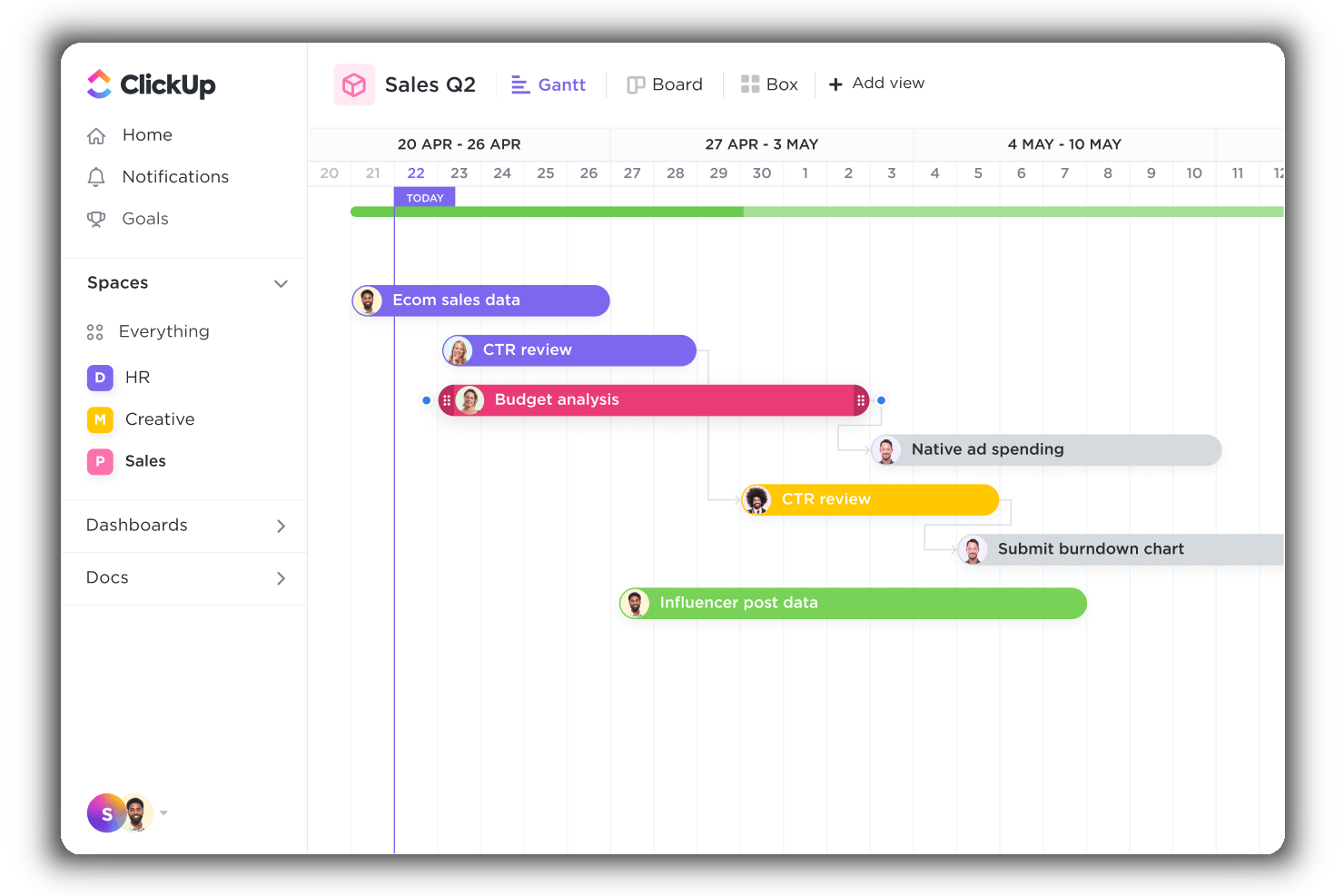
ClickUp is a cloud-based project management and collaboration app that is highly customizable and enables you and your teams to manage everything from within a central platform, including project-related tasks, team communications, documents, and goals.
Why I Picked ClickUp
ClickUp has an intuitive Gantt view that enables you to manage dependencies, schedule, and prioritize elements into a clear project timeline. This view offers a dynamic drag-and-drop timeline to easily schedule multiple tasks, keep track of project progress, manage deadlines, and handle potential bottlenecks.
Additionally, it provides users with a bird’s eye view of all active projects, spaces, lists, and tasks. It uses a color-coding system, so you and your stakeholders can instantly know what’s happening when and where. Finally, you can use timeline filters to arrange the information by assignee, due date, status, and more.
ClickUp Standout Features & Integrations
Features include task scheduling/tracking, project management, resource management, budgeting, contact management, data visualizations, employee database, expense tracking, file sharing, third-party plugins, collaboration support, timesheets, roadmapping, chat, customer management, email integration, feedback management, and process reporting.
Integrations include native integrations with Slack, Google Workspace, Dropbox, and many more tools, as well as over 1,000+ integrations through Zapier (may incur additional costs).
New Product Updates from ClickUp
ClickUp Adds List Automations, Time Off Scheduling, and Org Charts
ClickUp adds template-based List automations, personal time off scheduling, a unified picker, automatic task date syncing, and Org Charts. These updates help teams automate project setup, manage availability, and organize work. For more information, visit ClickUp’s official site.
 .

Quire
Best for dynamic timeline planning

Quire is a project management tool built around the idea of breaking down big goals into smaller, manageable tasks. It’s designed for teams that need a flexible way to visualize, track, and execute their work across different stages.
Why I Picked Quire: Quire's dynamic timeline feature provides a Gantt chart-like visualization that enables teams to schedule and monitor project milestones. This view allows users to map out tasks over time, adjust timelines, and identify potential bottlenecks, facilitating better planning and resource allocation.
Additionally, Quire supports task dependencies, allowing users to define relationships between tasks and understand how delays in one area can impact the overall project timeline. This feature is crucial for complex projects where tasks are interrelated, as it helps in identifying the critical path and ensuring timely completion.
Quire Standout Features & Integrations
Features include a calendar view that enables teams to schedule tasks and deadlines visually, enhancing time management and coordination. The collaborative document feature also provides a centralized space for storing project-related information, notes, and updates, ensuring that all team members have access to the latest data.
Integrations include Google Calendar, Gmail, Slack, Outlook, Zoho Flow, GitHub, Apple Calendar Sync, Box, Dropbox, Google Drive, and Microsoft Teams.
Pros and Cons
Pros:
- Ability to create nested tasks and subtasks, allowing for detailed project breakdowns
- Multiple project views, including lists, boards, and timelines
- Easy to collaborate with team members
Cons:
- Potential for notification overload, especially when working with large teams
- The mobile version lacks some features available on the desktop
New Product Updates from Quire
Quire Adds Custom Field Locking and Comment Reaction API Support
Quire adds custom field locking and API support for reading and setting emoji reactions on comments. These updates give teams more control over field data and expand comment interaction options for developers. For more information, visit Quire’s official site.
 .

Best for task dependencies and critical path

When you seek a solution that marries visual project management with robust functionality, Zoho Projects stands out. It caters to project managers, team leaders, and freelancers who need a dynamic tool to organize tasks, track progress, and manage timelines effectively. With its intuitive Gantt chart capabilities, Zoho Projects helps you address challenges like project scheduling and resource allocation, allowing you to focus on delivering successful outcomes.
Why I Picked Zoho Projects
I picked Zoho Projects for its strong emphasis on Gantt chart functionalities that cater to the needs of project managers seeking visual clarity. The platform features task dependencies that allow you to map out how tasks relate and influence each other, ensuring seamless project flow. Additionally, its critical path analysis helps you identify the most important tasks that could impact your project timeline. These features make Zoho Projects a compelling choice for those who prioritize meticulous planning and scheduling.
Zoho Projects Key Features
In addition to its Gantt chart functionalities, Zoho Projects offers other valuable features that enhance project management.
- Task Management: This feature allows you to create, assign, and manage tasks within your projects, ensuring everyone knows their responsibilities.
- Time Tracking: You can log hours spent on tasks, which helps in billing and understanding where your team’s time is allocated.
- Issue Tracking: This feature lets you identify and resolve issues quickly, maintaining the quality and progress of your projects.
- Team Collaboration: With tools for communication and document sharing, your team can collaborate effectively, regardless of location.
Zoho Projects Integrations
Integrations include Zoho CRM, Slack, GitHub, Microsoft Teams, Google Drive, Dropbox, Zapier, Zoho Books, Zoho Desk, and Zoho People.
Pros and Cons
Pros:
- Integrated time and issue tracking
- Strong task dependency management
- Advanced Gantt chart planning tools
Cons:
- Mobile Gantt features limited
- Learning curve for new users
New Product Updates from Zoho Projects
Zoho Projects Adds CodeX Scripts for Custom Modules
Zoho Projects now supports CodeX Scripts for custom modules, enabling conditional logic and rules for creating, updating, and deleting records. For more information, visit Zoho Projects' official site.
 .

Miro
Best Gantt chart software with built-in communication tools

Miro is a collaborative online whiteboard tailored for creating Gantt charts, among other visual planning tools. Its infinite canvas supports a broad expression of ideas, whether through text, images, or videos, facilitating detailed and accessible project visualizations.
Why I Picked Miro: Miro is designed for real-time collaboration and comes equipped with tools such as voting, sticky notes, and comments. This approach enables teams to adjust and discuss plans directly within the workspace and encourages active participation and immediate feedback among team members.
Moreover, Miro stands out by allowing users to upload and build upon existing charts from various platforms, ensuring no previous work is lost during the transition. This ensures seamless integration into Miro’s interactive space, allowing further development and fostering continuous workflow and collaboration without the need to start over.
Miro Standout Features & Integrations
Features include over 1,000 pre-made templates or various uses such as Gantt charts, Kanban boards, and mind maps, built-in communication tools, including video conferencing and TalkTrack to record process videos to be viewed asynchronously, as well as quick diagram tools, a planner tool, and a dependencies app.
Integrations include Zoom, Figma, Asana, Microsoft Teams, Monday.com, Confluence, Jira, Slack, Google Drive, Box, Airtable, Notion, Azure, and Webex. Some integrations are limited to paid plans only.
Miro is free to use for unlimited members with up to 3 editable boards. Paid plans start at $8/user/month (billed annually).
Pros and Cons
Pros:
- Built-in communication features for streamlined collaboration
- Intuitive and easy setup
- Free forever plan available
Cons:
- Free version does not allow high-quality export to pdf
- Zooming can be jumpy on larger projects
- Visitor/guest accounts locked to paid plans only
New Product Updates from Miro
Miro Adds Japan Data Residency for Enterprise Customers
Miro has introduced Japan data residency for enterprise customers, offering in-region storage for production data, backups, and metadata, plus in-region compute infrastructure. For more information, visit Miro's official site.
 .
Best for Microsoft users

Microsoft Project Online uses a familiar software UI to give you an intuitive way to visualize various project angles. MS Project Online is a great example of Gantt chart template software, offering loads of built-in templates and familiar scheduling tools that make it easy to launch and navigate each assignment. The Gantt chart builder lets you select items for phase indicators, start and end dates, and RAG risk status.
Why I Picked Microsoft Project Online: Unlike some of the other software on this list, MS Projects doesn't have the same number of features and functions despite the higher licensing cost for the full suite of tools. Therefore, they fall short in our value for money spend evaluation criteria, meaning they aren’t the best for small business or startups.
Collaboration is limited by the fact that a project file cannot be opened by multiple team members at the same time. Changing schedule dates is not as seamless as it should be and often ends up causing chaos across the timeline. MS Projects is definitely geared towards large-scale projects and might not work for smaller workflows.
Microsoft Project Online Standout Features & Integrations
Features include project management, resource management, task management, scheduling, portfolio management, dynamic scheduling, business intelligence, Gantt charts, kanban boards, collaboration, reporting, roadmaps, timesheets, and demand management.
Integrations include MS Office suite, OneDrive, Outlook, Skype, and OneNote.
Canva
Best for small teams and businesses

Canva is a Gantt chart maker and design program with over 1 million free shapes and photos in their asset library and hundreds of thousands of product templates. Canva does more than just Gantt charts: You’ll find templates for slideshows, presentations, infographics, graphs, emails, and more. They have a simple drag-and-drop interface that makes it easy for non-designers to create aesthetically pleasing designs with minimal effort.
Why I Picked Canva: They offer quite a bit for their price, per our evaluation criteria, but free users won’t have access to everything. While Canva is free to tinker with, it will cost you to use certain designs, shapes, patterns, and templates. It will also cost you to download your work in any functional format (besides a mere screenshot). Still, the price is ideal for smaller businesses that are looking for Gantt charts along with other marketing graphics but don’t have a budget for an in-house designer.
Furthermore, if the only thing you need is Gantt charts then Canva doesn’t offer the range of robust data detailing that other programs do. Rather, it’s strength comes from the clean simplicity of its designs. If your project requires an in-depth, multifaceted timetable, Canva probably won’t be for you.
Canva Standout Features & Integrations
Features include Gantt chart templates, whiteboards, presentations, social media integration, video, print products, marketing, drag-and-drop editor, photos & graphics library, collaboration, and third-party integrations/plugins.
Integrations include WordPress, eClincher, Rippling, Sendible, Post Planner, and Viraltag. As you can probably tell, their focus with integration is on social media and/or content creation – if you need to access PM or workflow apps, you’re out of luck.
Backlog
Best for software development teams

Backlog is a cloud-based project management tool perfect for developers and the teams they collaborate with. Backlog provides a mobile app on both iOS and Android for collaborating on-the-go.
Why I Picked Backlog: Backlog provides a range of useful team collaboration features including task management (including subtasks, checklists, and custom fields), milestones, burndown charts, file management, wikis, and most importantly, a Gantt chart maker. But Backlog is more than a collaboration and Gantt chart tool. It’s also a bug tracker and version control system in one.
For collaborating on code, Backlog provides SVN and Git repositories, a differences viewer and inline comments, plus pull requests, merge requests, and branches. Visually, the app provides burndown charts, Git graphs, and Gantt charts, so project managers and users alike can quickly assess projects at a glance.
Backlog allows you to assign, track, and release work, right in one app while ensuring transparency and accountability across teams. If you’re looking for a tool to help manage development projects or working closely with a team of developers, this is the app for you.
Backlog Standout Features & Integrations
Features include Gantt charts, boards, burndown charts, issue tracking, custom fields, milestones, versioning, notifications & alerts, code management, documentation management, file sharing, and third-party integrations/plugins.
Integrations include Typetalk, Cacoo, Nulab Pass, Slack, Redmine, Jira Importer, Jenkins, iCal Sync, email platforms, Google Sheets, and LambdaTest. You can also build your own integrations and add-ons with Backlog's API.

Best for creating Gantt charts and timelines directly in PowerPoint

Office timeline is a project planning tool that enables users to create visually appealing timelines and Gantt charts directly within Microsoft PowerPoint or through its web-based tool. It also allows you import data directly from Excel and access a wide variety of customizable templates.
Why I picked Office Timeline: Office Timeline integrates smoothly with essential tools like MS Project, Excel, and PowerPoint, making your data visualizations not just easy but efficient. It also stands out for its dual offering of a PowerPoint add-in and a web-based tool, catering to different user preferences and project needs.
You'll love the intuitive design and customizable templates that let you create professional-looking project visuals without needing to be a design whiz. This tool makes your project management tasks as straightforward as possible, allowing you to focus more on the project and less on the process of reporting it.
Office Timeline Standout Features & Integrations
Features include the desktop add-in which offers a variety of customizable templates for timelines, Gantt charts, and roadmaps, while the online version facilitates quick creation and sharing of project visuals from any web-enabled device. The software's vast array of design options and templates allows users to tailor their project timelines to the audience's needs, whether for high-level executive briefings or detailed team updates.
Integrations include tools like Jira, Project, Excel, and Smartsheet. These let you import data and manipulate it so you can get the PowerPoint visuals you need for your stakeholder presentations
Pros and Cons
Pros:
- Free, customizable templates
- Intuitive and easy to use
- Directly integrates Microsoft PowerPoint
Cons:
- Dependency on Microsoft ecosystem can be limiting
- Inflexible pricing options
Best for agency project management

Bonsai is a business management software designed to assist agencies and consulting firms with project and client management. It includes features for managing proposals, contracts, scheduling, and invoicing, helping ensure projects are delivered on time and within budget.
Why I Picked Bonsai: Bonsai helps you manage multiple projects across your portfolio with its Gantt charts, which visually display project timelines and progress. You can break down tasks into specific phases and set clear deadlines, making it easy to track your team’s progress at a glance. Plus, Bonsai’s task assignment tools simplify delegating work to your team, ensuring workloads stay balanced and manageable.
Bonsai also has advanced features like time tracking and invoicing, which can be especially useful for agency project management. You can track billable hours directly within each project and generate invoices, helping you stay on top of both progress and payments.
Bonsai Standout Features & Integrations
Features include client management tools, like a client portal, billing, contracts, and documentation management. It also offers budget tools to track project expenses and time tracking for logging the hours spent on different projects or tasks.
Integrations include QuickBooks Online, Zapier, Calendly, Xero, Google Sheets, Slack, and HubSpot.
Pros and Cons
Pros:
- Integrated project financial management
- Visibility across all your projects
- Good client management features
Cons:
- Scalability limitations
- Mobile app is limited compared to the desktop version
Diğer Gantt Şeması Yazılımları
İşte kısa listeme girmeyen ancak araştırmanızı genişletmek istiyorsanız değerlendirmenizde fayda bulunan birkaç ek uygulama.
- GoodDay
Gantt Chart tool for customizability
- Visor
For creating Gantt charts collaboratively
- Vault ERP
Gantt chart software for enterprise scalability
- GanttPRO
Gantt chart software for workload visualization
- Productive
For all-in-one agency management & planning
- Smartsheet
For Gantt chart templates
- Wrike
Collaborative Gantt chart software
- airfocus
For project prioritization
- Instagantt
Add-on for Asana users
- GoodDay
For customizable auto-scheduling
- Hub Planner by Milient
Gantt chart software with integrated time tracking & approval
- Paymo
Free Gantt chart software
- MindView
For built-in mind mapping capabilities
- TeamGantt
Online Gantt chart software


How I Evaluate Gantt Chart Software
I split my evaluation into baseline criteria—like interactive timelines, task dependencies, and critical path—and differentiators that separate good tools from great ones for PMOs and project teams.
Core Functionality (Table Stakes For This List)
When I'm selecting tools for my list, I rank each one on a scale from 0 (does not offer the functionality) to 5 (excels in this area) for each core functionality listed below. Then, I calculate the tool's total score into a percentage. Each tool needs to achieve a minimum total score of 75% to be considered for inclusion.
- Interactive Gantt Timeline: I check whether task bars support drag-and-drop rescheduling across multiple time scales, since a static, view-only timeline adds friction when plans change mid-sprint.
- Task Dependencies: Each tool should let you link tasks with all four relationship types and automatically reflow downstream dates when a predecessor slips.
- Milestones & Phases: I look for the ability to mark key delivery dates and nest tasks under summary groups, like separating a product launch into design, development, and QA phases.
- Critical Path & Baselines: Tools that calculate the critical path and let you save baselines make it easy to spot schedule drift before it impacts a deadline.
- Resource Assignment: I evaluate how each tool handles assigning people to tasks and surfacing workload, especially when team members are shared across multiple projects.
- Progress Tracking: Percent-complete indicators on task bars and planned-versus-actual overlays help me assess whether a tool gives real visibility into schedule health.
Once I have a list of tools that meet this criteria, I consider what sets each platform apart.
Differentiating Factors (What Sets Vendors Apart)
Here's how I compare and contrast different vendors:
Standout Features
Portfolio roll-ups matter when you're managing multiple projects. I look for tools that aggregate timelines into a single master view so PMO leads can spot conflicts across teams. Auto-scheduling is another differentiator; when a task slips, the best tools reflow every downstream date without manual edits. I also evaluate how each tool handles stakeholder sharing, since many project managers need to send clean, view-only timelines to clients or executives who don't need a full login.
Beyond Features
Integrations weigh heavily in my evaluation. A Gantt tool that syncs with Jira, Slack, or MS Project fits into existing workflows instead of replacing them. I also consider how each vendor handles onboarding—specifically whether they offer .mpp and CSV imports, since migrating active schedules into a new tool can stall adoption. Pricing structure matters too. I check whether vendors offer free viewer seats for stakeholders who only need to review timelines, which keeps costs reasonable as project visibility scales across the organization.
Gantt Şeması Yazılımı Nasıl Seçilir?
Uzun özellik listeleri ve karmaşık fiyatlandırma yapıları arasında kaybolmak kolaydır. Kendinize özgü yazılım seçimi sürecinizde ilerlerken odağınızı korumanıza yardımcı olmak için göz önünde bulundurmanız gereken faktörleri içeren bir kontrol listesi hazırladım:
| Faktör | Dikkat Edilmesi Gerekenler |
|---|---|
| Ölçeklenebilirlik | Projelerinizle birlikte büyüyebilen bir yazılım arayın. Aracın artan kullanıcı, görev ve proje karmaşıklıklarını zahmetsizce yönetebildiğinden emin olun. |
| Entegrasyonlar | İş akışlarını kolaylaştırmak için yazılımın ekibinizin Asana, Slack veya Microsoft Teams gibi hâlihazırda kullandığı araçlara bağlanıp bağlanmadığını kontrol edin. |
| Özelleştirilebilirlik | Ekibinizin ihtiyaçları kendine özgüdür. Gantt şemalarını belirli proje iş akışlarına veya marka kimliğine uyarlamanıza olanak tanıyan yazılımlara öncelik verin. |
| Kullanım Kolaylığı | Uzun öğrenme süreçlerinden kaçının. Yazılımın sezgisel bir arayüz ve sürükle-bırak düzenleme gibi özellikler sunduğundan emin olun. |
| Bütçe | Yazılımın yalnızca bugün değil, kullanıcı lisansları veya özellik eklentileri gibi gizli maliyetler de dâhil olmak üzere uzun vadede bütçenize uyduğunu doğrulayın. |
| Güvenlik Önlemleri | Verileriniz önemlidir. Şifreleme, role dayalı erişim ve GDPR veya SOC 2 gibi standartlara uyumluluk özelliklerini arayın. |
| İş Birliği Araçları | Yazılımın şemaları müşterilerle paylaşma veya görevleri doğrudan yazılım içinde atama gibi gerçek zamanlı iş birliğine olanak tanıdığından emin olun. |
| Mobil Erişilebilirlik | Ekibinizin ilerlemeyi takip edebilmesi ve hareket hâlindeyken güncellemeler yapabilmesi için mobil uyumluluğu olan bir yazılım seçin. |
Gantt Şeması Yazılımındaki Eğilimler
Araştırmam sırasında farklı Gantt şeması yazılımı sağlayıcılarından sayısız ürün güncellemesi, basın bülteni ve sürüm günlüğü inceledim. Takip ettiğim yeni eğilimlerden bazıları şunlar:
- Yapay Zekâ Destekli Zamanlama: Araçlar artık gecikmeleri tahmin etmek ve zaman çizelgelerinde değişiklikler önermek için yapay zekâ kullanıyor. Örneğin bazı platformlar, kaynakların uygunluğu ve son teslim tarihlerine göre görevleri otomatik olarak önceliklendiriyor.
- Dinamik İş Akışları: Gantt şemaları daha etkileşimli hâle geliyor ve ekiplerin zaman çizelgelerini doğrudan görev panolarına veya Kanban görünümlerine bağlamasına olanak tanıyor. Bu, üst düzey planlama ile ayrıntılı görev yönetimi arasında geçiş yapmayı kolaylaştırıyor.
- Görsel Özelleştirme: Daha fazla araç, kullanıcıların şema renkleri, etiketleri ve düzenleri gibi görsel özellikleri marka kimliğine veya proje gereksinimlerine daha iyi uyacak şekilde ayarlamasına olanak tanıyor. Hatta bazı sağlayıcılar belirli sektörler için tasarım şablonları da sunuyor.
- Gerçek Zamanlı İş Birliği İçgörüleri: Yeni özellikler, kimin ne üzerinde çalıştığına ilişkin canlı güncellemeleri göstermeye ve ekip iş yüklerini gerçek zamanlı olarak takip etmeye odaklanıyor. Bu, dağınık ekiplerin ek toplantılara gerek kalmadan uyum içinde çalışmasına yardımcı oluyor.
- Senaryo Planlama: Sağlayıcılar artık “ya şöyle olursa” senaryolarını test etmeye yönelik araçlar ekliyor. Böylece kullanıcılar bir programa kesin olarak bağlanmadan önce olası riskleri veya değişiklikleri modelleyebiliyor. Bu özellik özellikle karmaşık ve uzun vadeli projelerde oldukça faydalı.
Gantt Şeması Yazılımı Nedir?
Gantt şeması yazılımı, projeleri bir zaman çizelgesine yerleştirmenizi ve her görevin birbiriyle nasıl ilişkili olduğunu görmenizi sağlayan bir araçtır. Proje yöneticileri, ekip liderleri ve inşaat, pazarlama, yazılım geliştirme ve etkinlik planlama gibi alanlarda çalışan profesyoneller; son teslim tarihlerini belirlemek, görevler atamak ve işlerin nasıl ilerlediğini takip etmek için bu yazılımdan yararlanır.
Çok sayıda hareketli parçaya sahip karmaşık bir projeniz varsa Gantt şeması yazılımı, her şeyi tek bir yerde görünür ve düzenli tutmanıza yardımcı olur. Değişen zaman çizelgelerini yönetirken veya farklı ekipler arasında koordinasyon sağlarken özellikle kullanışlıdır. Ayrıca inşaat sektörü için Gantt şeması yazılımı gibi sektörünüze özel araçları da değerlendirebilirsiniz.
Gantt Şeması Yazılımının Özellikleri
Gantt şeması yazılımı seçerken aşağıdaki temel özelliklere dikkat edin:
- Etkileşimli zaman çizelgeleri: Programları hızlıca ayarlamak için görevleri sürükleyip bırakmanıza olanak tanır ve değişikliklere gerçek zamanlı olarak uyum sağlamayı kolaylaştırır.
- Bağımlılık yönetimi: Bağımlılıkları göstermek için görevleri birbirine bağlamanızı sağlar ve bir görevdeki gecikmelerin diğer görevleri nasıl etkilediğini görselleştirmenize yardımcı olur.
- Aşama takibi: Kritik teslim tarihleri ve hedeflerin görünür olmasını ve karşılanmasını sağlamak için önemli proje aşamalarını öne çıkarır.
- İlerleme takibi: Görevleri tamamlanma yüzdeleriyle güncelleyerek ekiplerin proje ilerlemesini bir bakışta net bir şekilde görmesini sağlar.
- Kaynak tahsisi: Aşırı görevlendirmeyi veya kaynakların yetersiz kullanılmasını önlemek için ekip üyelerini görevlere atamanıza ve iş yüklerini takip etmenize olanak tanır.
- Temel plan karşılaştırması: Ekiplerin gerçek ilerlemeyi ilk zaman çizelgesiyle karşılaştırabilmesi için başlangıç planlarını kaydeder.
- Birden fazla proje görünümü: Farklı planlama ihtiyaçları için Gantt şemasının yanında Kanban panoları veya görev listeleri gibi alternatif görünümler sunar.
- İş birliği araçları: İletişimi merkezi hâle getirmek için doğrudan görevlerin içinde yorum yapma ve dosya paylaşma gibi özellikler sunar.
- Dışa aktarma/içe aktarma seçenekleri: Kolay raporlama ve sunum için Gantt şemalarını PDF veya Excel dosyaları olarak kaydetmenize ya da paylaşmanıza, ayrıca Microsoft Project gibi diğer araçlardan dosya içe aktarmanıza olanak tanır (bunun için bir Microsoft Project görüntüleyici de kullanabilirsiniz).
- Senaryo modelleme: Ekiplerin planları kesinleştirmeden önce olası etkileri görmek için farklı zamanlama senaryolarını test etmesini sağlar.
Gantt Şeması Yazılımının Faydaları
Gantt şeması yazılımını kullanmaya başlamak ekibiniz ve işletmeniz için çeşitli faydalar sağlayabilir. Yararlanabileceğiniz bazı avantajlar şunlardır:
- Açık proje zaman çizelgeleri: Görevleri basit bir zaman çizelgesi biçiminde görselleştirerek ekibinizin teslim tarihlerini ve öncelikleri anlamasına yardımcı olur.
- Daha iyi ekip koordinasyonu: Görevleri atamak ve ilerlemeyi tek bir yerde takip etmek, herkesin aynı bilgilerden haberdar olmasını sağlar ve iletişim kopukluklarını azaltır.
- Geliştirilmiş kaynak yönetimi: Ekibiniz genelindeki iş yüklerini görmenizi ve tükenmişliği veya kapasitenin yetersiz kullanılmasını önlemek için görev dağılımlarını ayarlamanızı sağlar.
- Daha kolay ilerleme takibi: Projenizin mevcut durumu hakkında net bir görünüm sunar ve gecikmeleri erkenden fark etmenize yardımcı olur.
- Bilgiye dayalı karar alma: Senaryo modelleme gibi özellikler, zaman çizelgelerinde veya kaynaklarda yapılacak değişiklikleri uygulamaya koymadan önce test etmenizi sağlar.
- Artan hesap verebilirlik: Görev atamaları ve durum güncellemeleri, projenin her bir bölümünden kimin sorumlu olduğunu netleştirir.
- Geliştirilmiş müşteri iletişimi: Dışa aktarılabilir grafikler, proje planlarını ve güncellemeleri paydaşlar veya müşterilerle kolayca paylaşmanızı sağlar.
Gantt Grafik Yazılımı Maliyetleri ve Fiyatlandırması
Gantt grafikleri içeren proje yönetimi yazılımını seçmek, mevcut çeşitli fiyatlandırma modellerinin ve planların anlaşılmasını gerektirir. Maliyetler özelliklere, ekip büyüklüğüne, eklentilere ve daha fazlasına göre değişir. Aşağıdaki tabloda yaygın planlar, ortalama fiyatları ve Gantt grafik yazılımı çözümlerinde bulunan tipik özellikler özetlenmektedir:
| Plan Türü | Ortalama Fiyat | Yaygın Özellikler |
|---|---|---|
| Ücretsiz Plan | $0 | Temel Gantt grafiği oluşturma, sınırlı proje sayısı, sınırlı kullanıcı koltuğu ve gelişmiş raporlama veya entegrasyonların bulunmaması |
| Kişisel Plan | $5-$25/kullanıcı/ay | Sınırsız görev, renk kodlu zaman çizelgeleri, dışa aktarma seçenekleri ve Google Takvim gibi basit entegrasyonlar |
| İşletme Planı | $25-$50/kullanıcı/ay | Gelişmiş proje takibi, kaynak yönetimi araçları, gerçek zamanlı iş birliği ve özel raporlama |
| Kurumsal Plan | $50-$100/kullanıcı/ay | Özelleştirilebilir iş akışları, özel hesap desteği, gelişmiş güvenlik özellikleri ve gelişmiş analizler |
Gantt Şeması Yazılımı SSS
Gantt şeması yazılımı hakkında sıkça sorulan bazı soruların yanıtlarını burada bulabilirsiniz.
Bir Gantt şeması neleri içermelidir?
En iyi Gantt şeması yazılımları; bir projenin zaman çizelgesini gösteren yatay çubuk grafikler oluşturma, birbirine bağlı görevleri üst üste gösterme (ör. Görev A tamamlanmadan Görev B başlayamaz), zaman tahminleri, ilerleme durumu ve ekip atamaları özelliklerini içerir. Modern Gantt şeması programlarının çoğunda görev yönetimi ve iş birliği özellikleri de bulunur.
Gantt şeması ne için kullanılır?
Henry Gantt, 19. yüzyılın başlarında üretimi planlamak ve fabrika kaynak yüklemesini düzenlemek amacıyla ilk Gantt şemasını geliştirdi. Günümüzde de kaynak takibi, son tarihlerin planlanması ve proje iletişimi için Gantt şemalarını kullanıyoruz. İyi bir Gantt şeması, yapılacak iş ile belirli bir zaman aralığına yerleştirilen işler arasındaki ilişkiyi görselleştirmelidir. Görevlerin ve alt görevlerin planlanan başlangıç ve teslim tarihlerini, farklı iş parçaları arasındaki bağımlılıkları belirtmeli ve her bir öğeden kimin sorumlu olduğunu göstermelidir.
Excel'de Gantt şeması var mı?
Pek sayılmaz; ancak kendi Gantt şemanızı oluşturabilir veya çevrim içi olarak Microsoft Excel için bir Gantt şeması şablonu bulabilirsiniz. Yine de bu yaklaşımı önermem; çünkü çok az fayda karşılığında oldukça fazla manuel veri girişi gerektirir. Bir proje öğesi değişirse, bundan sonraki her adımı manuel olarak değiştirmeniz veya bunu sizin için yapacak bir formül oluşturmanız gerekir.
Microsoft ekosistemindeyseniz ve bundan memnunsanız, MS Projects sayfasına göz atın. Bir Gantt şeması oluşturucu, proje yönetimi araçları ve daha fazlasıyla birlikte Excel’in ve diğer Microsoft platformlarının tanıdık görünümünü ve kullanım deneyimini elde edersiniz.
Mac mi kullanıyorsunuz? macOS için özel olarak tasarlanmış Gantt şeması araçlarına göz atın—bunların çoğu sürükle ve bırak oluşturucular, gerçek zamanlı senkronizasyon ve Mac’e özgü üretkenlik araçlarıyla daha iyi entegrasyon sunar.
En iyi ücretsiz Gantt şeması yazılımı hangisidir?
En yaygın ücretsiz Gantt şeması yazılımı muhtemelen Excel veya Google E-Tablolar’dır. İnternette arama yaparsanız bu programlarda Gantt şemaları oluşturmak için şablonlar bulabilirsiniz; ancak şablonlar birkaç dolara mal olabilir. Zor durumda işe yarar, ancak harika değildir.
Bunun yerine, temel düzey planında 100 Gantt şemasını ücretsiz sunan ClickUp gibi ücretsiz bir aracı deneyebilirsiniz. Çevrim içi olarak RedBooth, GanttProject, Bitrix24, Agantty ve Asana için Instagantt’ın yanı sıra Wrike, Paymo ve diğerleri gibi ücretli araçların ücretsiz sürümleri de dâhil olmak üzere birçok ücretsiz ve açık kaynaklı Gantt şeması yazılımı seçeneği bulunmaktadır.
Gantt şemaları kaynak yönetimini nasıl destekleyebilir?
Gantt şemaları, görevleri atanmış kaynaklarla görsel olarak eşleştirerek kaynakların verimli şekilde tahsis edilmesini ve aşırı tahsisin önlenmesini sağlar. Kaynakların kullanılabilirliği, zaman çizelgeleri ve bağımlılıklar hakkında netlik sunarak ekiplerin iş yüklerini etkili şekilde yönetmesine yardımcı olur. Ayrıca Gantt şemalarındaki gerçek zamanlı güncellemeler, proje ihtiyaçları değiştikçe ekiplerin kaynaklarda proaktif düzenlemeler yapmasını sağlar.
Gantt şeması yazılımındaki birden fazla görünüm seçeneğinin faydaları nelerdir?
Gantt şeması yazılımındaki birden fazla görünüm seçeneği, kullanıcıların zaman çizelgeleri, takvimler veya görev listeleri gibi görünümler arasında geçiş yapmasına olanak tanıyarak farklı ekip ihtiyaçlarına ve tercihlerine uyum sağlar. Bu esneklik; paydaşlar, proje yöneticileri ve ekip üyeleri için özelleştirilmiş bilgiler sunarak iş birliğini geliştirir. Ayrıca karmaşık verileri basitleştirerek ve herkesin proje hedefleriyle uyumlu kalmasını sağlayarak üretkenliği artırır.