2026’da Takipte Kalmak İçin En İyi 10 Proje Zaman Çizelgesi Aracı

10 En İyi Proje Zaman Çizelgesi Yönetimi Yazılımları Listesi


Proje zaman çizelgelerini etkili bir şekilde yönetmek, projelerinizi planlandığı şekilde ilerletmek ve ekibinizin uyum içinde çalışmasını sağlamak için çok önemlidir. Ancak doğru araçlar olmadan teslim tarihlerini, bağımlılıkları ve önemli kilometre taşlarını gözden kaçırmak kolaydır. Bu nedenle güvenilir bir proje zaman çizelgesi yönetimi yazılımına sahip olmak önemlidir.
Proje zaman çizelgesi yönetimi araçları, zaman çizelgelerini görselleştirmenize, görevler atamanıza ve ilerlemeyi takip etmenize yardımcı olarak projeleri başarıyla teslim etmek için ihtiyaç duyduğunuz netliği ve kontrolü sağlar.
Bu makalede piyasadaki en iyi seçenekleri inceledim ve test ettim. Önemli özelliklerini, kimler için en uygun olduklarını ve ekibiniz için neden iyi bir seçenek olabileceklerini açıklayacağım. Burada seçeneklerinizi değerlendirebilir ve düzenli ve odaklanmış kalmanıza yardımcı olacak en iyi çözümü bulabilirsiniz.
Why Trust Our Software Recommendations
Our team has been testing and reviewing software since 2012. As project managers ourselves, we know how difficult—and important—it is to choose the right software.
For this guide, we evaluated tools using hands-on testing and independent research, scoring tools using our selection criteria. We also draw on insights from industry thought leaders and practicing project management experts.
Our reviews reflect our human editorial judgment, not a sales pitch.
Expert reviewers:
Proje Zaman Çizelgesi Yönetimi Yazılımları Karşılaştırma Tablosu
Az önce ele aldığımız tüm araçları karşılaştırmak için kullanabileceğiniz pratik bir tablo aşağıda yer alıyor.
| Tool | Starting Price | Website | |
|---|---|---|---|
| Best customizable workflow templates | 4.6 out of 5 | $9/user/month Free plan + 14-day trial available | Book Demo |
| Best for tracking projects across the teams | 4.3 out of 5 | $10/user/month Free plan + 14-day trial + demo available | Book Demo |
| Best for setting and tracking task dependencies | 4.3 out of 5 | Pricing upon request Free plan + 15-day trial + demo available | Website |
| Best for structured project timelines | 4.6 out of 5 | Pricing upon request Not available | Book Demo |
| Best for nested task hierarchies on a timeline | 4.7 out of 5 | $7.65/user/month Free plan + 30-day free trial available | Website |
| Best for full project lifecycle delivery | 4.2 out of 5 | Pricing upon request Not available | Website |
| Best for a highly flexible solution | 4.8 out of 5 | $8/user/month Free plan + 14-day trial available | Book Demo |
| Best for real-time, collaborative planning | 4.7 out of 5 | $3/user/month Free plan available | Website |
| Best for software development teams | 4.5 out of 5 | $35/month 30-day free trial and free plan available | Website |
| Best for pre-built request forms | 4.7 out of 5 | $8/user/month 14-day free trial + demo available | Website |
En İyi Proje Zaman Çizelgesi Yazılımları İncelemeleri
Her bir proje zaman çizelgesi yazılımının en iyi kullanım alanını ve öne çıkan özelliklerini göstermek için her araç hakkında kısa bir açıklama aşağıda yer alıyor.

Best customizable workflow templates
monday AI Workspace is a configurable work management platform that combines interactive Gantt and timeline views, AI-driven scheduling, task dependencies, milestone tracking, and portfolio dashboards in a single workspace.
Who Is monday AI Workspace Best For?
It's a strong fit for cross-functional teams and project managers who need flexible, visual project tracking without committing to rigid, purpose-built scheduling software.
Why I Picked monday AI Workspace
I picked monday AI Workspace as one of the best because its template library goes beyond generic project boards. Each timeline template ships with pre-built Gantt views, dependency columns, and automation rules already configured, so my team isn't rebuilding a scheduling structure from scratch for every new project. I particularly like that every template is fully editable: I can add milestone markers and deadline notifications without touching any code.
monday AI Workspace Key Features
- AI sidekick assistant: Embedded AI assistant provides timeline suggestions, data insights, and workflow recommendations right inside each project board.
- Portfolio dashboard views: Roll up multiple project timelines and milestones into one high-level dashboard for fast executive updates.
- Drag-and-drop Gantt editing: Reschedule tasks, update phases, and adjust dependencies live on interactive Gantt charts with instant board syncing.
- 200+ native integrations: Connects directly with tools like Slack, Google Drive, Jira, and Zoom to centralize communications and updates.
monday AI Workspace Integrations
monday AI Workspace offers hundreds of native integrations through its built-in integrations and marketplace, including Slack, Google Drive, Jira, Salesforce, GitHub, Zoom, Microsoft 365, Trello, HubSpot, and Asana. It also supports Zapier and provides an API for custom integrations.
Pros and Cons
Pros:
- Portfolio dashboards for multiple project timelines
- AI-assisted scheduling suggestions built in natively
- Highly customizable Gantt timeline templates available
Cons:
- Baseline comparison features lack depth
- Critical path calculation requires manual configuration
New Product Updates from monday AI Workspace
monday AI Workspace Adds Human Approval Routing
monday AI Workspace adds a human-in-the-loop approval block to AI Workflows, sending approval requests and routing workflow paths based on responses. For more information, visit monday AI Workspace's official site.
 .

Wrike
Best for tracking projects across the teams

Wrike is a project timeline management platform that brings together interactive Gantt charts, task dependencies, real-time collaboration, and customizable dashboards for teams managing complex projects.
Who Is Wrike Best For?
Wrike is a good fit for mid-size to enterprise teams in tech, marketing, and professional services that need cross-functional project visibility across multiple departments.
Why I Picked Wrike
I picked Wrike as one of the best because of how well it handles project tracking across multiple teams simultaneously. What I like most is the cross-project Gantt chart view—you can pull tasks from different teams into a single timeline, set dependencies between them, and see exactly where one team's delay creates a bottleneck for another. When engineering is waiting on design sign-off before a sprint can start, that relationship is visible at a glance. I also use the cross-functional dashboards to surface real-time status across workstreams without having to chase down updates from each team lead.
Wrike Key Features
- Resource bookings: Reserve time from a specific team member or job role and check whether they have the bandwidth to take on a project before assigning work.
- Effort management: Assign an effort estimate to each task so you can forecast project delivery dates and choose assignees based on actual capacity.
- Custom request forms: Build dynamic intake forms that automatically generate tasks, projects, and workflows when submitted.
- Scrum boards: Manage Agile sprints with shared Scrum boards, backlog prioritization, and real-time progress tracking.
Wrike Integrations
Wrike offers hundreds of integrations via its marketplace and built-in connectors, including Google Workspace, Microsoft 365, Salesforce, and Slack. It also supports Zapier and provides an API for custom integrations.
New Product Updates from Wrike

Wrike Redesigns Workspace Search With New Filters
Wrike introduces a redesigned Workspace Search interface with recent search shortcuts, item type and location filters, and parent-task context. These updates help users find relevant work items and navigate search results efficiently. For more information, visit Wrike’s official site.
 .

Best for setting and tracking task dependencies
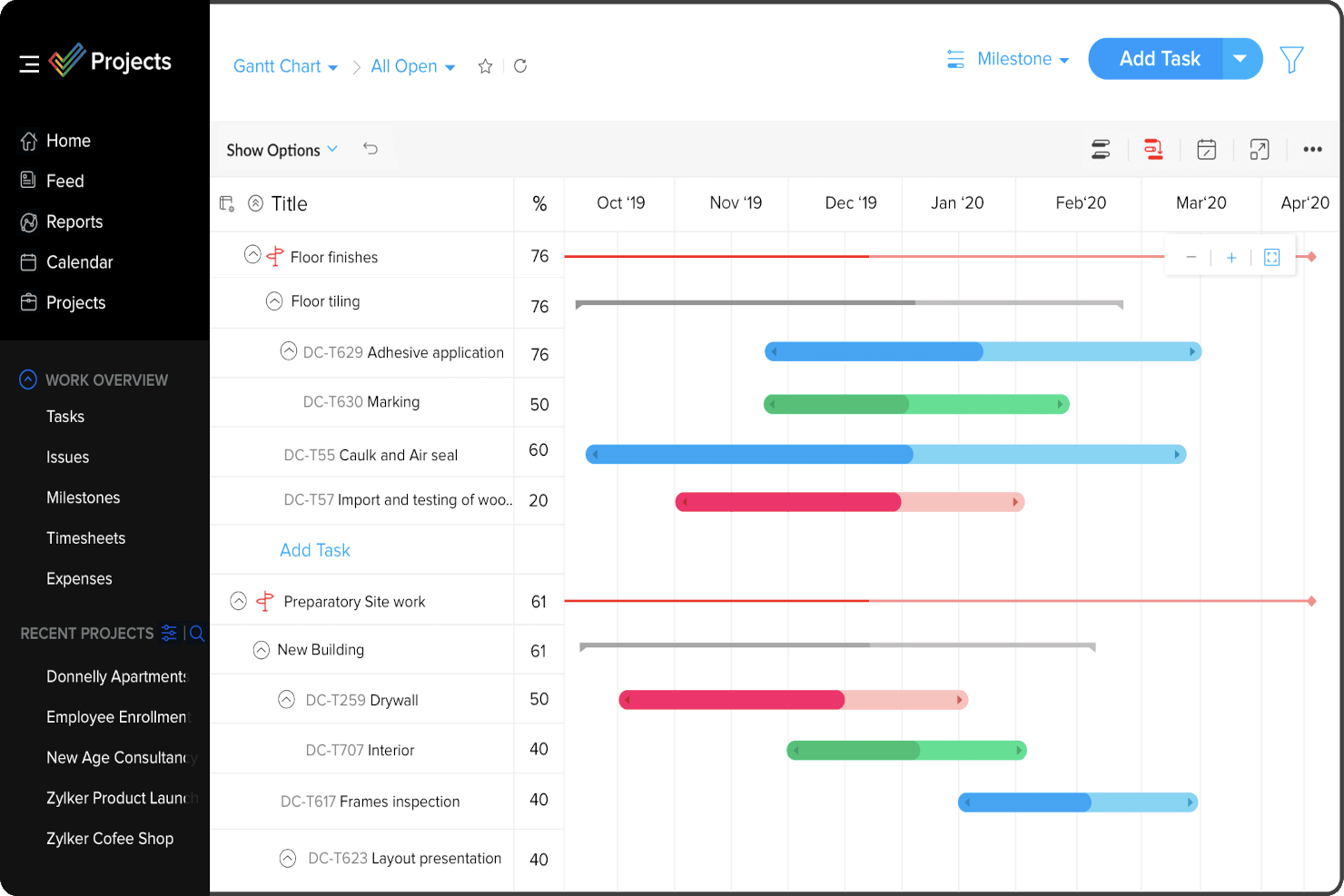
Zoho Projects is a project timeline management platform that offers Gantt charts, task dependencies, milestone tracking, and resource allocation tools for planning and monitoring project schedules.
Who Is Zoho Projects Best For?
Zoho Projects is a good fit for small to mid-sized teams that need structured project planning with detailed scheduling controls across product, engineering, or operations workflows.
Why I Picked Zoho Projects
I picked Zoho Projects as one of the best because of how thoroughly it handles task dependencies within the Gantt chart view. What I like most is that it supports all four dependency types—Finish to Start, Start to Start, Start to Finish, and Finish to Finish—which matters a lot when my team is managing multi-phase projects where sequencing isn't always linear. You can drag and drop between task bars directly in the Gantt to define those relationships, and hovering over any task shows you a full list of its predecessors and successors. I also like that you can introduce lag time between dependent tasks, which is something I've used when there's a mandatory waiting period between two sequential deliverables.
Zoho Projects Key Features
- Project baseline: Set a baseline at any point in your project to compare planned vs. actual progress over time, so you can spot schedule drift early.
- Critical path tracking: Identify the sequence of tasks that directly impact your project's end date, helping you prioritize what can't slip.
- Resource management: View each team member's workload and reassign tasks when someone is over- or under-allocated across your project.
- Blueprint workflow automation: Design task workflows that automatically update fields, assign users, and trigger notifications as task statuses change.
Zoho Projects Integrations
Zoho Projects offers native integrations with Slack, Google Drive, Microsoft 365, Dropbox, GitHub, Bitbucket, and Zoho’s own suite of apps, including Zoho CRM and Zoho Desk. It also connects with Zapier and provides an API for custom integrations.
New Product Updates from Zoho Projects
Zoho Projects Adds CodeX Scripts for Custom Modules
Zoho Projects now supports CodeX Scripts for custom modules, enabling conditional logic and rules for creating, updating, and deleting records. For more information, visit Zoho Projects' official site.
 .

Best for structured project timelines

Screendragon is a work management platform tailored for marketing, agency, and professional services teams. It combines project management, workflow automation, resource management, and budgeting in one solution.
It incorporates tools like Gantt charts and Kanban boards, which aid in task assignment and timeline adjustments, providing clarity and structure to project timelines. The software also enables real-time financial tracking and resource management, allowing you to keep budgets aligned with actual spending and anticipate future needs effectively.
I also like that it has customizable workflows and templates that assist in streamlining project delivery, and visual dashboards that deliver real-time updates on project status and key metrics. Overall, these features provide flexibility in managing workflows and contribute to a more organized project management experience.
Some integrations include MS Power BI, Slack, MS Teams, and Zapier.

Quire
Best for nested task hierarchies on a timeline
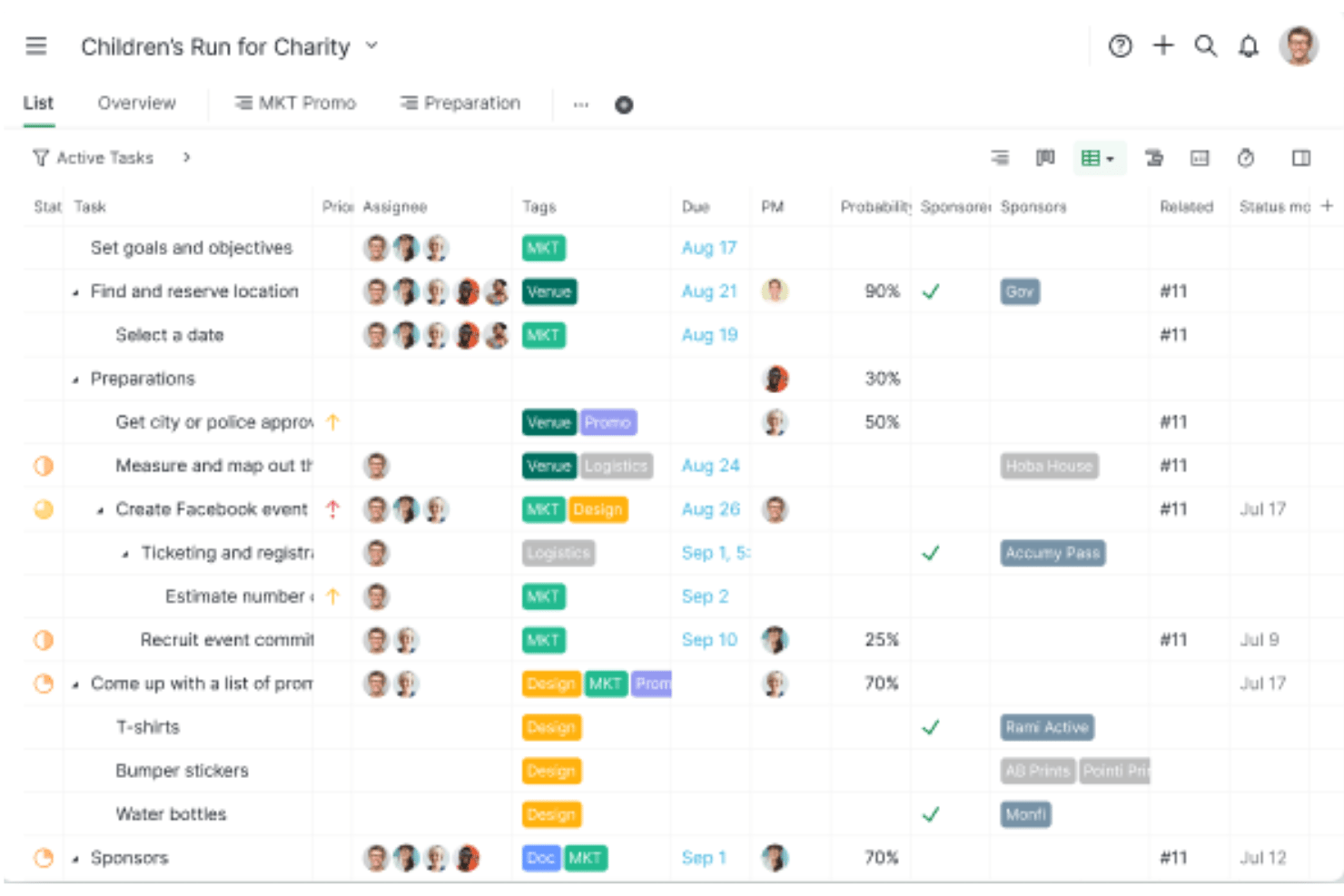
Quire is a project management tool with multi-view planning across nested task lists, Kanban boards, a dynamic Gantt-style timeline, and cross-project Smart Folder rollups.
Who Is Quire Best For?
Quire fits small-to-medium product and engineering teams that need deeply nested task breakdowns alongside a visual timeline without paying for an enterprise scheduler.
Why I Picked Quire
I picked Quire as one of the best because it's the only tool on my shortlist that lets you build deeply nested task hierarchies and visualize them directly on a Gantt-style timeline. I love that you can break a complex project into unlimited subtask levels in Tree view, then flip to Timeline view and see every layer as a horizontal bar with drag-and-drop rescheduling. When you shift a parent task, downstream dependencies auto-update across the entire chain.
Quire Key Features
- Smart Folder cross-project rollup: Aggregates tasks from multiple projects into a single Tree, Board, or Timeline view for lightweight portfolio-level scheduling.
- Assignee swim lanes: Groups timeline bars by team member so you can spot workload imbalances across overlapping tasks without leaving the Gantt view.
- Blocked tasks dashboard widget: Surfaces tasks that can't proceed because a predecessor is incomplete, giving you a real-time list of scheduling blockers.
- Public link sharing: Lets you share a live project view with clients or stakeholders via a link—no account required—on Professional and higher plans.
Quire Integrations
Quire offers native integrations with Google Drive, Microsoft OneDrive, Microsoft Teams, Slack, GitHub, Google Calendar, Dropbox, and Box. It also supports custom integrations through its open API and Zapier.
Pros and Cons
Pros:
- Public link sharing for live schedules
- Cross-project timelines with Smart Folder rollups
- Infinitely nested task hierarchy in timeline view
Cons:
- Only finish-to-start dependencies supported
- No baseline or critical path visualization
New Product Updates from Quire
Quire Adds Custom Field Locking and Comment Reaction API Support
Quire adds custom field locking and API support for reading and setting emoji reactions on comments. These updates give teams more control over field data and expand comment interaction options for developers. For more information, visit Quire’s official site.
 .

Kantata
Best for full project lifecycle delivery

Kantata is a project timeline management platform designed for professional services teams, offering project planning, resource management, Gantt chart timelines, and real-time project tracking in one system.
Who Is Kantata Best For?
Kantata is a strong fit for professional services firms—like consulting, marketing, and IT services companies—that need to manage complex, multi-phase projects from scoping through delivery.
Why I Picked Kantata
Kantata earns its spot as one of the best on my shortlist because it covers the full arc of project delivery in a single platform—from scoping and estimating new work all the way through invoicing and financial close. It connects sales and services: my team can build estimates, tie them to resource plans, and move directly into project execution without switching tools. I also like the AI-driven resource optimization, which evaluates staffing permutations across the portfolio to flag skill gaps and scheduling conflicts before they affect the timeline. For teams managing multi-phase, client-facing projects where budget, utilization, and delivery all need to stay in sync, Kantata keeps all of those signals in one place.
Kantata Key Features
- Gantt chart project scheduling: Build and manage project timelines with task dependencies, milestones, and drag-and-drop scheduling in a visual Gantt view.
- Time and expense tracking: Log billable hours and expenses directly against project tasks, with built-in automation to keep finance teams on track for period close.
- Kantata Pulse (client and employee sentiment): Collect real-time feedback from clients and team members alongside project health data to catch delivery risks early.
- Generative AI project assistant: Automatically draft status reports, executive updates, and project case studies by pulling data from active projects and pulse checks.
Kantata Integrations
Kantata offers native integrations with Salesforce, Jira, Slack, HubSpot, QuickBooks, Xero, Expensify, and Sage Intacct, and connects with Zapier. An API is available for custom integrations.
New Product Updates from Kantata

Kantata Adds Access Group Change History
Kantata adds Access Groups History, letting account administrators track changes to group details, membership, and permissions in Recent History. The update also makes these events available through the Subscribed Events API for broader monitoring. For more information, visit Kantata’s official site.
 .

Miro
Best for a highly flexible solution
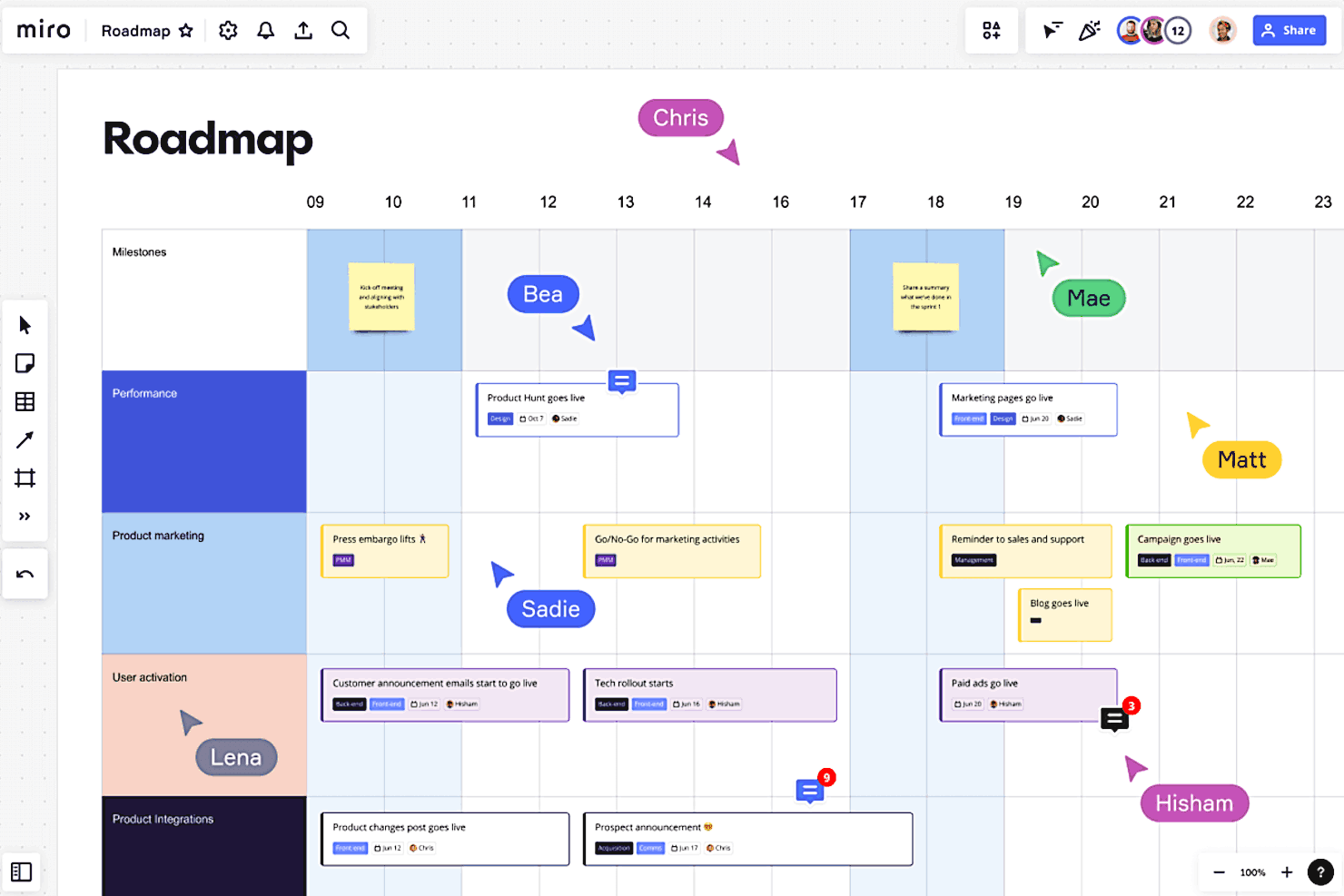
Miro is a visual collaboration platform for project timeline management that lets teams build interactive timelines, Gantt charts, and project boards using customizable templates and drag-and-drop tools.
Who Is Miro Best For?
Miro is a strong fit for cross-functional teams in product, design, and engineering who need a flexible visual workspace to plan and track projects collaboratively.
Why I Picked Miro
Miro earns its spot on my shortlist because no other timeline tool gives you this much freedom to shape the workspace around how your team actually thinks and works. What I love most is the ability to switch between table and timeline views with a single click—so when a sprint plan starts as a structured table, I can flip it into a visual timeline to spot deadline conflicts without rebuilding anything. The infinite canvas also means I can keep my timeline right next to the brainstorm, the stakeholder map, and the Jira-synced task cards that feed into it. That two-way sync with Jira and Azure DevOps is genuinely useful—updates flow back automatically, so the timeline stays current without anyone manually chasing it.
Miro Key Features
- Gantt chart templates: Pre-built Gantt chart templates let you map tasks, milestones, and dependencies without starting from scratch.
- Real-time collaboration: Multiple team members can edit, comment, and react on the same board simultaneously during planning sessions.
- Dependency mapping: Visually connect tasks and milestones with arrows to track relationships and sequencing across your timeline.
- Estimation tools: Built-in estimation features let teams assign effort and story points directly on the board during sprint planning.
Miro Integrations
Miro offers native integrations with Jira, Asana, monday.com, Trello, Microsoft Teams, Slack, Google Drive, Zoom, and Confluence, and connects with Zapier. An API is available for custom integrations.
New Product Updates from Miro
Miro Adds Japan Data Residency for Enterprise Customers
Miro has introduced Japan data residency for enterprise customers, offering in-region storage for production data, backups, and metadata, plus in-region compute infrastructure. For more information, visit Miro's official site.
 .

FigJam
Best for real-time, collaborative planning
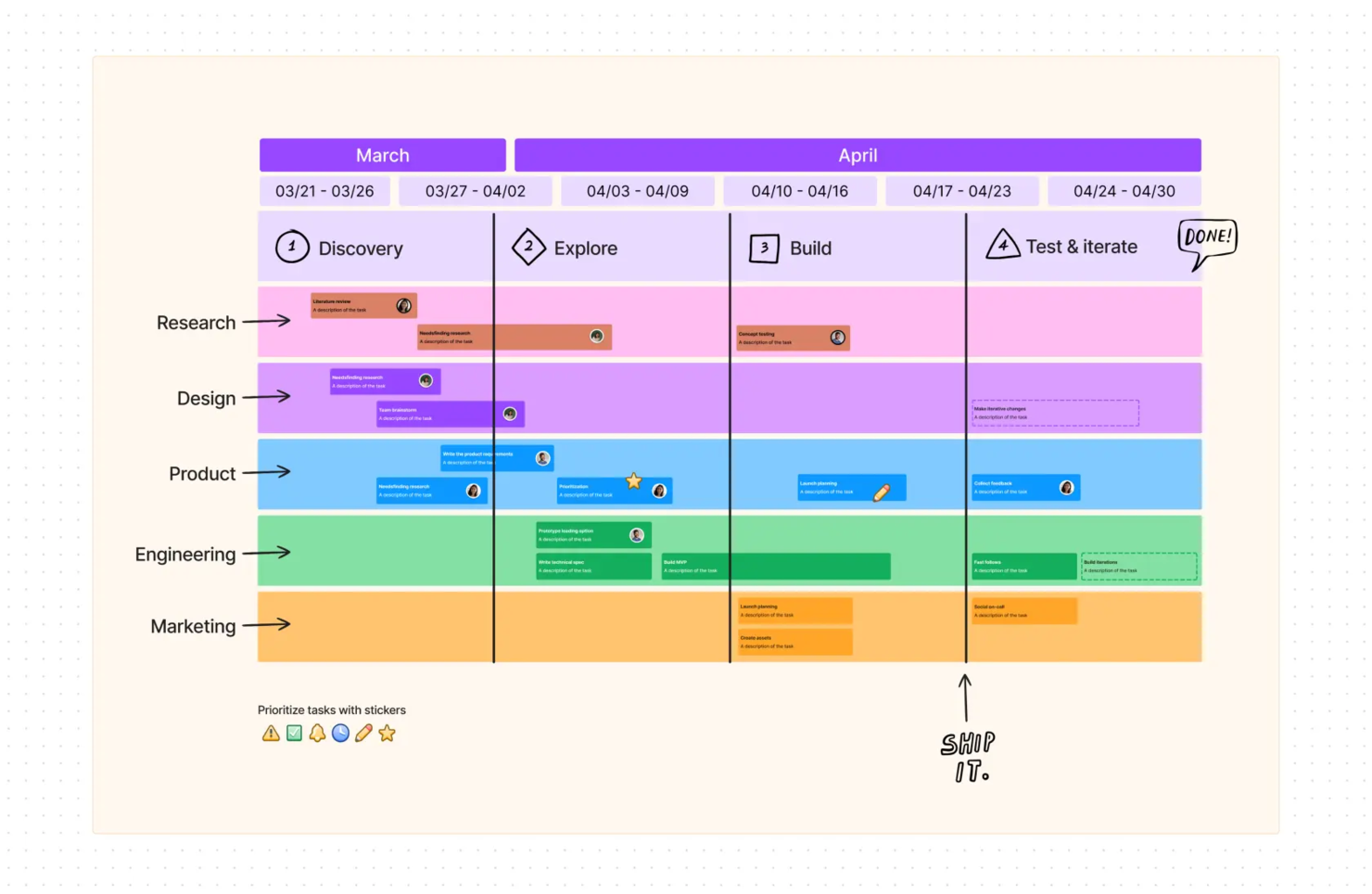
FigJam is an online whiteboarding and visual planning tool that lets teams map project timelines, organize milestones, and collaborate on schedules using interactive boards and templates.
Who Is FigJam Best For?
FigJam is a strong fit for cross-functional teams in product, design, and engineering who plan and map out project timelines together in real time.
Why I Picked FigJam
FigJam is one of my top picks because I love how it turns timeline planning into a genuinely collaborative activity rather than a solo task. My team uses FigJam's Gantt chart and project timeline templates to sketch out schedules together in real time, with multiple cursors visible on the board at once. I also rely on Spotlight mode to walk stakeholders through a timeline during planning sessions, keeping everyone focused on the same section of the board. The AI feature that generates and visualizes timelines from a simple prompt is a real time-saver when we're kicking off a new project.
FigJam Key Features
- Sticky notes and voting: Add sticky notes to a shared board and use built-in voting tools to prioritize tasks and decisions during planning sessions.
- Shapes and connectors: Build flowcharts and dependency maps using shapes that snap to a grid with auto-connecting lines.
- Audio and live chat: Talk through timeline decisions with teammates using in-board audio and live chat without leaving the board.
- Guest access: Invite external stakeholders to contribute to a board for 24 hours without requiring a login.
FigJam Integrations
FigJam natively integrates with Figma and includes built-in widgets for tools like Jira and Asana. It also benefits from Figma’s broader ecosystem integrations (e.g., Slack, Microsoft Teams, Google Workspace) and supports automation via Zapier and the Figma API.
Backlog
Best for software development teams

Backlog is designed to ensure that all the different segments of a project easily connect with each other. The tool's Wikis make projects available to all team members and allow for easy editing, making it a great tool for software development teams. The Kanban boards make it easy to visualize different phases. Interactive Gantt charts permit users to visualize the timeline of an entire project.
Other features that put Backlog in this top ten list include giving users the ability to create parent and child tasks to enhance order and create custom fields relevant to a specific project. Its file-sharing feature makes it possible to keep all files in one workplace. The tool's drag and drop functionality allows for easy editing of timelines and durations or changing a task's status.
Backlog integrates with Typetalk, Cacoo, Nulab Pass, Slack, Redmine, Jira Importer, iOS App, LombdaTest, and Android App.
Backlog costs from $35/30users/month and offers a forever free plan for up to 10 users and a 30-day free trial on paid plans.
Workzone
Best for pre-built request forms

Workzone is a project timeline management platform that combines Gantt chart views, task dependencies, project request forms, and workflow automation for teams managing complex projects.
Who Is Workzone Best For?
Workzone is a good fit for mid-sized marketing, agency, and operations teams that manage high volumes of incoming project requests alongside active project timelines.
Why I Picked Workzone
I picked Workzone as one of the best because of how it handles project intake alongside timeline management. Most tools treat request intake as an afterthought, but Workzone builds it directly into the project workflow. The pre-built request forms let my team capture consistent project details upfront—including minimum lead times, so requesters can't submit a deadline that's already impossible to meet. Once a request is approved from the central dashboard, it flows straight into project creation, where I can apply one of Workzone's hundreds of pre-built, industry-specific templates to get a timeline scaffolded immediately.
Workzone Key Features
- Gantt chart view: Visualize project timelines, task sequences, and dependencies in an interactive Gantt chart that updates in real time.
- Workload management: See team capacity across all active projects to identify overallocation and reassign tasks before deadlines slip.
- Portfolio-level dashboard: View the status of every project across departments or clients in a single summary dashboard, with the ability to drill down into individual projects.
- Creative proofing and markup: Review and annotate documents, images, and videos directly in Workzone, with feedback tied to specific assets rather than scattered across email threads.
Workzone Integrations
Workzone offers native integrations with Slack, Microsoft Teams, Dropbox, Box, Google Drive, and Salesforce. An API is available for custom integrations.
Pros and Cons
Pros:
- Structured request and workload management
- Built-in document proofing and approvals
- Strong project visibility and tracking
Cons:
- Mobile experience weaker than desktop
- Smaller integration ecosystem than competitors
New Product Updates from Workzone

Workzone Enterprise Adds Multi-Stage Approval Workflows
Workzone Enterprise now includes Approval Workflows, enabling multi-stage document approvals to standardize complex processes and reduce manual effort. For more information, visit Workzone's official site.
 .
Diğer Proje Zaman Çizelgesi Yönetimi Yazılımları
Bunlar en iyi listeye giremedi ancak araştırmanızı genişletmek için kesinlikle göz atmaya değer birkaç seçenek daha var.
- Lucen Timeline
For visual project planning
- Bonsai Agency Software
For agency timeline management with resourcing
- Polaris PSA By Replicon
For sophisticated what-if scenario analysis
- ProjectManager
For remote teams
- GoodDay
Timeline management for its customizability
- Ravetree
For integrated project timelines
- GanttPRO
For professionals and students
- ClickUp
For freelancers
- Smartsheet
For working with formulas
- Celoxis
For project portfolio management
- Scoro
For end-to-end work management
- Hive
For large and complex projects
- GoodDay
For Gantt chart features
- TaskRay
For Salesforce-native integration
- Hub Planner by Milient
For team analytics & dynamic reports
- PathPro
For public roadmaps
- Basecamp
Project timeline software for tracking progress for scattered teams
- Paymo
Project management software for tracking work time and client billing
- ProofHub
Time tracking, task management, file storage, and messaging software for project management teams
- Forecast
For specialized services firms


How I Evaluate Project Timeline Management Software
I evaluate these tools in two layers: the baseline scheduling capabilities every tool must have, and the differentiators that separate a simple Gantt viewer from a tool a PMO lead can rely on.
Core Functionality (Table Stakes For This List)
When I'm selecting tools for my list, I rank each one on a scale from 0 (does not offer the functionality) to 5 (excels in this area) for each core functionality listed below. Then, I calculate the tool's total score into a percentage. Each tool needs to achieve a minimum total score of 65% to be considered for inclusion.
- Gantt Chart Visualization: I look for interactive, zoomable Gantt views where you can group tasks by phase, team, or custom fields—not just a static bar chart you can't act on.
- Task Dependencies & Sequencing: Each tool should support all four dependency types (FS, SS, FF, SF) with auto-cascading, so shifting one task ripples the right dates forward.
- Milestone & Deadline Tracking: I check whether milestones are distinct markers with alerts—like flagging a go-live date at risk—rather than just regular tasks with a label.
- Critical Path Identification: The tool should auto-calculate the critical path and update it as the schedule changes, giving you a clear read on what's driving the end date.
- Baseline & Schedule Comparison: I evaluate whether you can save a baseline and overlay it against the live schedule to spot slippage, especially mid-project when scope shifts.
- Drag-and-Drop Timeline Editing: Rescheduling should happen directly on the timeline with real-time updates to linked tasks, not through a modal or a separate edit screen.
Once I have a list of tools that meet this criteria, I consider what sets each platform apart.
Differentiating Factors (What Sets Vendors Apart)
Here's how I compare and contrast different vendors:
Standout Features
Portfolio rollups matter when you're juggling multiple concurrent projects. I look for tools that let a PMO lead view cross-project dependencies on one screen without toggling between plans. What-if scenario planning is another differentiator—being able to model a two-week vendor delay before it happens saves real headaches downstream. I also evaluate whether a tool offers shareable, read-only timeline views for external stakeholders, so clients stay informed without needing a full license.
Beyond Features
Integration depth is one of the first things I evaluate. A timeline tool that syncs two-way with Jira or GitHub means your engineering team's updates flow directly into the project schedule. I also consider how fast a team can get started—import support for MS Project or Excel files and pre-built templates make a real difference during onboarding. Reporting rounds out the picture. I check whether the tool can generate exportable schedule health dashboards for steering committees without requiring manual assembly every status cycle.
Proje Zaman Çizelgesi Yönetimi Yazılımı Nasıl Seçilir?
Uzun özellik listeleri ve karmaşık fiyatlandırma yapılarına kapılmak kolaydır. Kendinize özgü yazılım seçimi sürecinizde ilerlerken odaklanmanıza yardımcı olmak için göz önünde bulundurmanız gereken faktörleri aşağıda bir kontrol listesi halinde bulabilirsiniz:
| Faktör | Dikkat Edilmesi Gerekenler |
| Ölçeklenebilirlik | Yazılımın ekibinizle birlikte büyüyebildiğinden emin olun. Giderek artan sayıda projeyi ve kullanıcıyı yönetebilen araçları tercih edin. |
| Entegrasyonlar | CRM'ler, iş birliği platformları veya muhasebe yazılımları gibi ekibinizin hâlihazırda kullandığı araçlarla entegrasyon olup olmadığını kontrol edin. |
| Özelleştirilebilirlik | Şablonları, iş akışlarını ve zaman çizelgelerini belirli proje ihtiyaçlarınıza göre uyarlamanıza olanak tanıyan yazılımları tercih edin. |
| Kullanım Kolaylığı | Ekibiniz için sezgisel bir platform, sade bir arayüz, sürükle ve bırak işlevi ve kısa bir öğrenme süresi sunan araçları seçin. |
| Bütçe | Bütçenize uygun olduklarından emin olmak için fiyatlandırma planlarını karşılaştırın. Esnek seçenekler sunan ve gizli ücretler içermeyen, kapsamlı çözümleri tercih edin. |
| Güvenlik Önlemleri | Bilgilerinizi güvende tutmak için güçlü veri korumasına, uyumluluk sertifikalarına ve kullanıcı erişim denetimlerine sahip araçlara öncelik verin. |
| Mobil Erişim | Ekibinizin proje zaman çizelgelerini hareket hâlindeyken görüntüleyip güncelleyebilmesi için yazılımın bir mobil uygulama içerdiğinden emin olun. |
| İş Birliği Araçları | Ekibinizin uyumlu ve üretken kalmasını sağlamak için gerçek zamanlı güncellemeler, görev yorumları ve dosya paylaşımı gibi özellikleri arayın. |
Proje Zaman Çizelgesi Yönetimi Yazılımlarındaki Trendler
Araştırmam sırasında farklı proje zaman çizelgesi yönetimi yazılımı sağlayıcılarından sayısız ürün güncellemesi, basın bülteni ve sürüm günlüğü derledim. Göz önünde bulundurduğum yeni trendler şunlar:
- Yapay Zekâ Odaklı İçgörüler: Sağlayıcılar gecikmeleri tahmin etmek, zaman çizelgesi düzenlemeleri önermek ve görev önceliklendirmesi tavsiyeleri sunmak için yapay zekâ ekliyor. Örneğin bazı araçlar, gelecekteki zaman çizelgelerini otomatik olarak optimize etmek için artık geçmiş verileri analiz ediyor.
- İşbirlikçi Beyaz Tahta Kullanımı: Birçok araç artık ekiplerin zaman çizelgelerini görsel olarak planlamasına yardımcı olmak için paylaşımlı dijital beyaz tahtalar içeriyor. Bu özellik, özellikle uzaktan çalışan ekipler için beyin fırtınası ve planlamayı daha etkileşimli hâle getiriyor.
- Senaryo Planlaması: Araçlar, proje zaman çizelgeleri için birden fazla "ya şöyle olursa" senaryosunu simüle etmeye yönelik özellikler sunuyor. Bu, ekiplerin olası risklere hazırlanmalarına ve değişikliklerin teslim tarihlerini ve kaynakları nasıl etkileyebileceğini görmelerine yardımcı oluyor.
- Kaynak Tahsisi Analitiği: Gelişmiş analizler artık kaynakların uygunluğunu ve kapasitesini gerçek zamanlı olarak izlemeye odaklanıyor. Sağlayıcılar, zaman çizelgesi görünümlerinde kapasitesi aşılmış veya yeterince kullanılmayan ekip üyelerini doğrudan vurgulayan panolar geliştiriyor.
- Sektöre Özel Şablonlar: Daha fazla sağlayıcı inşaat, pazarlama ve BT gibi sektörlere göre uyarlanmış, önceden hazırlanmış zaman çizelgesi şablonları sunuyor. Bu şablonlar, belirli alanlardaki yaygın iş akışlarıyla uyum sağlayarak kullanıcıların zamandan tasarruf etmesine yardımcı oluyor.
Proje Zaman Çizelgesi Yönetimi Yazılımı Nedir?
Proje zaman çizelgesi yönetimi yazılımı, ekiplerin proje takvimlerini görsel olarak oluşturmasına, yönetmesine ve izlemesine yardımcı olan bir araçtır. Bu araçlar; proje yöneticileri, ekip liderleri ve pazarlama, inşaat ve BT gibi sektörlerdeki profesyoneller tarafından teslim tarihlerini takip etmek ve ekipleri düzenli tutmak için yaygın olarak kullanılır. Zaman çizelgesi oluşturma, görev atama ve kilometre taşı takibi gibi özellikler ekiplerin ilerlemeyi görselleştirmesine, darboğazları belirlemesine ve gerektiğinde planları düzenlemesine yardımcı olur. Genel olarak bu araçlar proje planlamasını kolaylaştırır ve herkesin temel hedefler ve teslim tarihleri doğrultusunda hareket etmesini sağlar.
Proje Zaman Çizelgesi Yönetimi Yazılımının Özellikleri
Proje zaman çizelgesi yönetimi yazılımı seçerken aşağıdaki temel özelliklere dikkat edin:
- Zaman çizelgesi görselleştirme: Proje ilerlemesini takip etmek için Gantt şemaları veya proje yönetimi takvimleri gibi anlaşılır, görsel zaman çizelgeleri oluşturmanızı sağlar.
- Görev bağımlılıkları: Bir görevin diğeri tamamlanana kadar başlayamaması için görevleri birbirine bağlamanızı sağlar. Bu, ekibiniz için kritik bir özellikse daha fazla bağımlılıkları destekleyen proje yönetimi yazılımını burada inceleyin.
- Kilometre taşı takibi: Bir proje içindeki önemli teslim tarihlerini veya başarıları belirlemenize ve izlemenize yardımcı olur.
- Kaynak yönetimi: Aşırı görevlendirmeyi veya kaynak yetersizliklerini önlemek için ekip üyelerini, ekipmanları veya bütçeleri belirli görevlere tahsis etmenizi sağlar.
- İlerleme takibi: Ekibin bilgilendirilmesini sağlamak için görevlerin tamamlanması ve zaman çizelgesindeki değişikliklerle ilgili gerçek zamanlı güncellemeler sunar.
- Özel şablonlar: Yaygın proje türlerine göre uyarlanmış, önceden hazırlanmış zaman çizelgesi biçimleri sunarak kurulum sırasında zamandan tasarruf sağlar.
- İşbirliği araçları: Ekiplerin görevler hakkında yorum yapmasına, güncellemeleri paylaşmasına ve doğrudan yazılım içinde birlikte çalışmasına olanak tanır.
- Senaryo planlaması: Değişikliklerin genel projeyi nasıl etkileyebileceğini görmek için farklı zaman çizelgesi düzenlemelerini test etmenizi sağlar.
- Otomatik bildirimler: Herkesin plana uygun ilerlemesini sağlamak için yaklaşan teslim tarihleri, görev güncellemeleri veya geciken öğeler hakkında uyarılar gönderir.
- Entegrasyonlar: Daha verimli bir iş akışı için CRM'ler, iletişim platformları veya zaman takip araçları gibi araçlara bağlanır.
Proje Zaman Çizelgesi Yönetimi Yazılımının Faydaları
Proje zaman çizelgesi yönetimi yazılımını uygulamak ekibiniz ve işletmeniz için çeşitli faydalar sağlayabilir. Yararlanabileceğiniz bazı avantajlar şunlardır:
- Gelişmiş organizasyon: Görevleri ve teslim tarihlerini net bir şekilde yapılandırmanıza yardımcı olur; böylece herkes neyi, ne zaman yapacağını bilir.
- Daha iyi işbirliği: Paylaşılan zaman çizelgeleri, görev güncellemeleri ve yorum yapma özellikleriyle herkesin aynı bilgiler doğrultusunda hareket etmesini sağlar.
- Zaman tasarrufu: Güncellemeleri, bildirimleri ve zaman çizelgesi düzenlemelerini otomatikleştirerek manuel çalışmayı azaltır.
- Artırılmış görünürlük: Projenizin ilerleyişine genel olarak bakmanızı ve olası gecikmeleri erkenden fark etmenizi sağlar.
- Daha isabetli planlama: Gerçekçi proje takvimleri oluşturmak için bağımlılıkları, kaynakları ve teslim tarihlerini hesaba katmanıza yardımcı olur.
- Azaltılmış riskler: Sorunlara yol açmadan önce darboğazları veya aşırı yüklenmiş kaynakları belirler.
- Bilinçli karar alma: Planları düzenlemek ve görevleri gerçek zamanlı güncellemelere göre önceliklendirmek için veriler ve içgörüler sunar.
Proje Zaman Çizelgesi Yönetimi Yazılımının Maliyetleri ve Fiyatlandırması
Proje zaman çizelgesi yönetimi yazılımı seçerken mevcut çeşitli fiyatlandırma modelleri ve planların anlaşılması gerekir. Maliyetler özelliklere, ekip büyüklüğüne, eklentilere ve daha fazlasına göre değişir. Aşağıdaki tablo, proje zaman çizelgesi yönetimi yazılımı çözümlerinde yaygın olarak sunulan planları, ortalama fiyatlarını ve tipik olarak dahil edilen özellikleri özetlemektedir:
Proje Zaman Çizelgesi Yönetimi Yazılımı için Plan Karşılaştırma Tablosu
| Plan Türü | Ortalama Fiyat | Yaygın Özellikler |
| Ücretsiz Plan | $0 | Temel zaman çizelgesi oluşturma, sınırlı görev atamaları ve temel iş birliği araçları. |
| Bireysel Plan | $5-$25/kullanıcı/ay | Zaman çizelgesi oluşturma, görev bağımlılıkları, kilometre taşı takibi ve birkaç harici araçla entegrasyonlar. |
| İşletme Planı | $30-$60/kullanıcı/ay | Gelişmiş raporlama, kaynak yönetimi, ekip iş birliği özellikleri ve öncelikli destek. |
| Kurumsal Plan | $70+/kullanıcı/ay | Özel iş akışları, senaryo planlama, özel hesap yönetimi ve kurumsal düzeyde güvenlik. |
Proje Zaman Çizelgesi Yönetim Yazılımı SSS
Proje zaman çizelgesi nedir?
Proje zaman çizelgesi, bir projede yapmanız gereken işlerin görsel bir temsilidir. Bunu, özel bir görünüm olarak en iyi proje yönetimi yazılımında bulabilirsiniz; bu görünüm görev bilgilerini, kilometre taşları, bağımlılıklar ve görev ilerlemesiyle ilgili ayrıntıları içerir.
Zaman çizelgesi nasıl oluşturulur?
Zaman çizelgesi oluşturmak genellikle işin kolay kısmıdır. Yapılması gereken tüm görevleri listeledikten sonra zaman çizelgesi görünümüne gidebilirsiniz. Ardından grafiğinizi oluşturmaya başlamak için sürükleyip bırakma işlevini kullanırsınız. Son olarak, işiniz bittiğinde görevler arasındaki bağımlılıkları belirtmek için çubukları birbirine bağlayabilirsiniz.
Projeler neden gecikir?
Ekibiniz projeleri çoğu zaman zamanında ve bütçeyi aşmadan teslim edebiliyorsa tebrikler; proje planlamanız veya proje zaman çizelgesi yönetim yazılımınız oldukça iyi durumda. Sırtınızı sıvazlamayı hak ediyorsunuz çünkü yakın tarihli bir araştırma, kuruluşların yalnızca %29 oranının projeleri çoğunlukla veya her zaman zamanında tamamladığını ortaya koydu.
Projelerin kendilerine ayrılan süreleri aşmasına; ekip çalışmasının veya ekip iş birliğinin yetersiz olması, otomasyon eksikliği, karmaşık onay ve izin süreçleri, teslim tarihleriyle ilgili genel iletişim eksikliği, yetersiz kaynak yönetimi ve uzaktan çalışan ekiplerin etkili şekilde yönetilememesi gibi çeşitli nedenler yol açabilir.
Proje başarısına katkıda bulunan tüm unsurları dengelemek, özellikle Excel elektronik tabloları ve eski moda yazılı yapılacaklar listeleri gibi eski proje yönetimi çözümlerini kullanan küçük işletmeler için kuşkusuz zor olabilir. Ancak iyi haber şu ki piyasada, her tür ekip için proje zaman çizelgelerini yönetmeye özel olarak tasarlanmış çok sayıda yazılım bulunuyor.
Proje yönetimi çizelgelerinin bazı sınırlamaları nelerdir?
Gantt çizelgeleri gibi proje yönetimi çizelgeleri, proje zaman çizelgelerini, bağımlılıkları ve ilerlemeyi görsel olarak temsil etme konusunda başarılıdır. Ancak bu çizelgelerin sınırlamaları arasında, çok sayıda görev ve bağımlılık içeren karmaşık projeleri yönetmenin zor olması bulunur; çünkü çizelge kısa sürede karmaşık ve bunaltıcı bir hâle gelebilir. Ayrıca ölçeklenebilirlik konusunda da zorlanırlar; bu durum büyük veya dinamik projelerde değişikliklere uyum sağlamayı güçleştirir. Bunun yanı sıra, yazılım araçlarıyla entegre edilmedikleri sürece genellikle gerçek zamanlı güncellemeler sunmazlar ve bu da bilgilerin güncelliğini yitirmesine yol açabilir.
Gantt çizelgelerine alternatifler nelerdir?
Gantt çizelgeleri; görevlerin başlangıç ve bitiş tarihlerini, bağımlılıkları ve proje ilerlemesini gösteren, zaman çizelgesi tabanlı bir görsel temsil sunar. Doğrusal ve zamanlamaya odaklı projeler için ideal olsalar da karmaşıklık, ölçeklenebilirlik ve dinamik iş akışlarına uyum sağlama konularında zorlanırlar.
Gantt çizelgelerine alternatifler şunlardır:
- PERT Çizelgeleri: Görev bağımlılıklarına ve kritik yollara odaklanır; bu nedenle karmaşık projelerde görev sıralamasını analiz etmek ve süreleri tahmin etmek için idealdir.
- Kanban Panoları: İş akışlarını görselleştirmek için sütun tabanlı bir düzen kullanır; esnekliği, gerçek zamanlı güncellemeleri ve görev önceliklendirmesini destekler. Çevik ve yinelemeli projeler için idealdir.
- İş Kırılım Yapıları (WBS): Projeleri hiyerarşik olarak yönetilebilir görevlere böler; kapsamı tanımlamak için kullanışlıdır ancak zaman çizelgeleri sunmaz.
- Zaman Çizelgesi Grafikleri: Kilometre taşlarına ve son teslim tarihlerine ilişkin üst düzey genel bakışlar sunar; bağımlılıkları göstermeden sunumlar veya durum güncellemeleri için idealdir.
- Scrum Panoları: Görevleri “Yapılacak,” “Devam Ediyor” ve “Tamamlandı” kategorilerine ayırır; yinelemeli iş akışlarında iş birliğini ve sık teslimatları vurgular.
- Zihin Haritaları: Yaratıcı projelerde beyin fırtınası yapmak ve gelişen görev ilişkilerini göstermek için harika olan doğrusal olmayan görselleştirmelerdir.
- Akış Şemaları: Zaman çizelgeleri yerine iş akışlarına odaklanarak süreçleri ve karar yollarını vurgular.
- RACI Matrisi: Rolleri (Sorumlu, Hesap Verebilir, Danışılan, Bilgilendirilen) netleştirerek ekip iş birliğini ve görev sahipliğini geliştirir.
Her alternatif; esneklik, basitlik veya daha derin analiz gibi belirli ihtiyaçlara uygundur ve Gantt çizelgelerinin fazla katı veya karmaşık olabileceği senaryolara çözüm sunar.
Ücretsiz proje yönetimi araçlarının bazı özellikleri nelerdir?
Ücretsiz proje yönetimi araçları genellikle ekiplerin düzenli ve üretken kalmasına yardımcı olacak temel özellikleri içerir. Bu özellikler genellikle şunlardır:
- Görev Yönetimi: Birden fazla projedeki görevleri oluşturmak, atamak ve takip etmek için temel zaman çizelgeleri veya öncelik düzeyleri sunan araçlar.
- İş Birliği Seçenekleri: Ekip iletişimini kolaylaştırmak için paylaşılan panolar, yorumlar ve dosya paylaşımı özellikleri.
- Birden Fazla Proje Yönetimi: Tüm projelerdeki görevleri veya ilerlemeyi görüntüleme seçenekleriyle aynı anda birden fazla projeyi yönetme.
- Entegrasyonlar: İş akışlarını kolaylaştırmak için Google Workspace, Slack veya takvim uygulamaları gibi popüler araçlarla temel entegrasyonlar.
- Raporlama: Proje performansını izlemek için basit raporlar veya ilerleme takibi.
- Sınırlı Kullanıcı/Depolama: Genellikle küçük ekipler veya tek başına çalışan kullanıcılar için uygundur; depolama alanı veya kullanıcı sayısı sınırlıdır.
Bu araçlar, herhangi bir mali yükümlülük altına girmeden projelerini yönetmek isteyen küçük ekipler veya yeni girişimler için idealdir. Ancak bunların genellikle sınırlı depolama alanı, kullanıcı kotaları, daha az gelişmiş özellik ve daha az özelleştirme seçeneği gibi kısıtlamalarla birlikte geldiğini unutmamak önemlidir.