

2026’da İncelenen Mac İçin En İyi 10 Gantt Şeması Yazılımı

10 Mac İçin En İyi Gantt Şeması Yazılımları Kısa Listesi


Mac kullanıcılarından oluşan her şirket için Mac'e yönelik Gantt şeması yazılımı değerli bir araçtır. Doğru yazılımla ekipler proje zaman çizelgesi görselleştirmesini iyileştirebilir ve görev yönetimi verimliliğini artırabilir. Ancak özellikle bu kadar çok seçenek mevcutken Mac için doğru Gantt şeması yazılımını bulmak zor olabilir.
Proje yönetimi yazılımları konusundaki deneyimimi kullanarak Mac için mevcut en iyi Gantt şeması yazılımlarından birkaçını test edip karşılaştırdım. Ardından sonuçlarımı, benzersiz ihtiyaçlarınıza en uygun yazılımı bulmanıza yardımcı olmak için ayrıntılı incelemeler hâline getirdim. Aşağıdaki listede Mac uyumlu bir sonraki Gantt şeması yazılımınızı bulacağınızdan eminim.
Why Trust Our Software Recommendations
Our team has been testing and reviewing software since 2012. As project managers ourselves, we know how difficult—and important—it is to choose the right software.
For this guide, we evaluated tools using hands-on testing and independent research, scoring tools using our selection criteria. We also draw on insights from industry thought leaders and practicing project management experts.
Our reviews reflect our human editorial judgment, not a sales pitch.
Expert reviewers:
Karşılaştırma Tablosu: Mac İçin Gantt Şeması Yazılımları
| Tool | Starting Price | Website | |
|---|---|---|---|
| Best for custom dashboards | 4.6 out of 5 | $9/user/month Free plan + 14-day trial available | Book Demo |
| Best for visual timeline planning | 4.3 out of 5 | Pricing upon request Free plan + 15-day trial + demo available | Website |
| Best for real-time team collaboration | 4.7 out of 5 | $12/user/month Free plan + free trial + free demo available | Website |
| Best for visual project timelines | 4.4 out of 5 | $10.99/user/month Free plan + trial + demo available | Website |
| Best for client services businesses | 4.4 out of 5 | $9.99/user/month Free plan + 14-day free trial + free demo available | Website |
| Best for cloud-based task management | 4.2 out of 5 | $15/user/month 30-day free trial + demo available | Website |
| Best for managing task dependencies | 4.8 out of 5 | $8/user/month Free plan + 14-day trial available | Book Demo |
| Best for comprehensive project views | 4.3 out of 5 | $10/user/month Free plan + 14-day trial + demo available | Book Demo |
| Best for efficient Asana integration | 4.3 out of 5 | $120/year 7-day free trial available | Website |
| Best for integrated resource planning and scheduling | 4.6 out of 5 | $4/user/month Free plan available | Website |
Mac İçin En İyi Gantt Şeması Yazılımları İncelemeleri
Aşağıda, kısa listeme giren Mac iOS için en iyi Gantt şeması yazılımlarına ilişkin ayrıntılı özetlerimi bulabilirsiniz. İncelemelerim, sizin için en iyi aracı bulmanıza yardımcı olmak amacıyla her bir aracın temel özelliklerini, artılarını ve eksilerini, entegrasyonlarını ve ideal kullanım alanlarını ayrıntılı şekilde ele alıyor.

Best for custom dashboards
monday AI Workspace is a browser-based project management platform that brings together Gantt chart timelines, task dependencies, milestone tracking, workload management, and AI-powered workflow automation in a single, highly configurable workspace.
Who Is monday AI Workspace Best For?
It's a strong fit for cross-functional teams and project managers who need flexible, visual project tracking across multiple workstreams without rigid, traditional scheduling tools.
Why I Picked monday AI Workspace
I picked monday AI Workspace because its dashboard customization goes well beyond color schemes and layout. I can pull Gantt timelines, workload data, and task-level dependencies into a single live dashboard, then filter by team, project phase, or status without ever leaving the view. That kind of cross-board reporting, with AI-generated summaries layered in, is what I reach for when I need to keep stakeholders across a multi-phase release informed without building manual slide decks every week.
monday AI Workspace Key Features
- Interactive Gantt chart view: Drag and drop tasks along a timeline, adjust scales, and create dependencies within a web browser on Mac.
- Milestone and baseline tracking: Mark project milestones and compare planned versus actual progress to maintain schedule accuracy.
- Workload and capacity dashboard: Visualize team member assignments, workload, and capacity to identify bottlenecks or resource conflicts.
- Critical path calculation: Automatically identify and highlight the critical path so project managers can track progress and schedule health.
monday AI Workspace Integrations
monday AI Workspace offers hundreds of native integrations, including Slack, Google Workspace, Microsoft 365, Salesforce, Jira, GitHub, Zoom, Dropbox, HubSpot, and Zendesk. It also supports Zapier and provides an API for custom integrations.
Pros and Cons
Pros:
- Gantt timelines update automatically when dependencies shift
- AI-generated project summaries save reporting time
- Highly customizable dashboards across multiple projects
Cons:
- Gantt features locked behind higher-tier plans
- No native macOS desktop app available
New Product Updates from monday AI Workspace
monday AI Workspace Adds Human Approval Routing
monday AI Workspace adds a human-in-the-loop approval block to AI Workflows, sending approval requests and routing workflow paths based on responses. For more information, visit monday AI Workspace's official site.
 .

Best for visual timeline planning
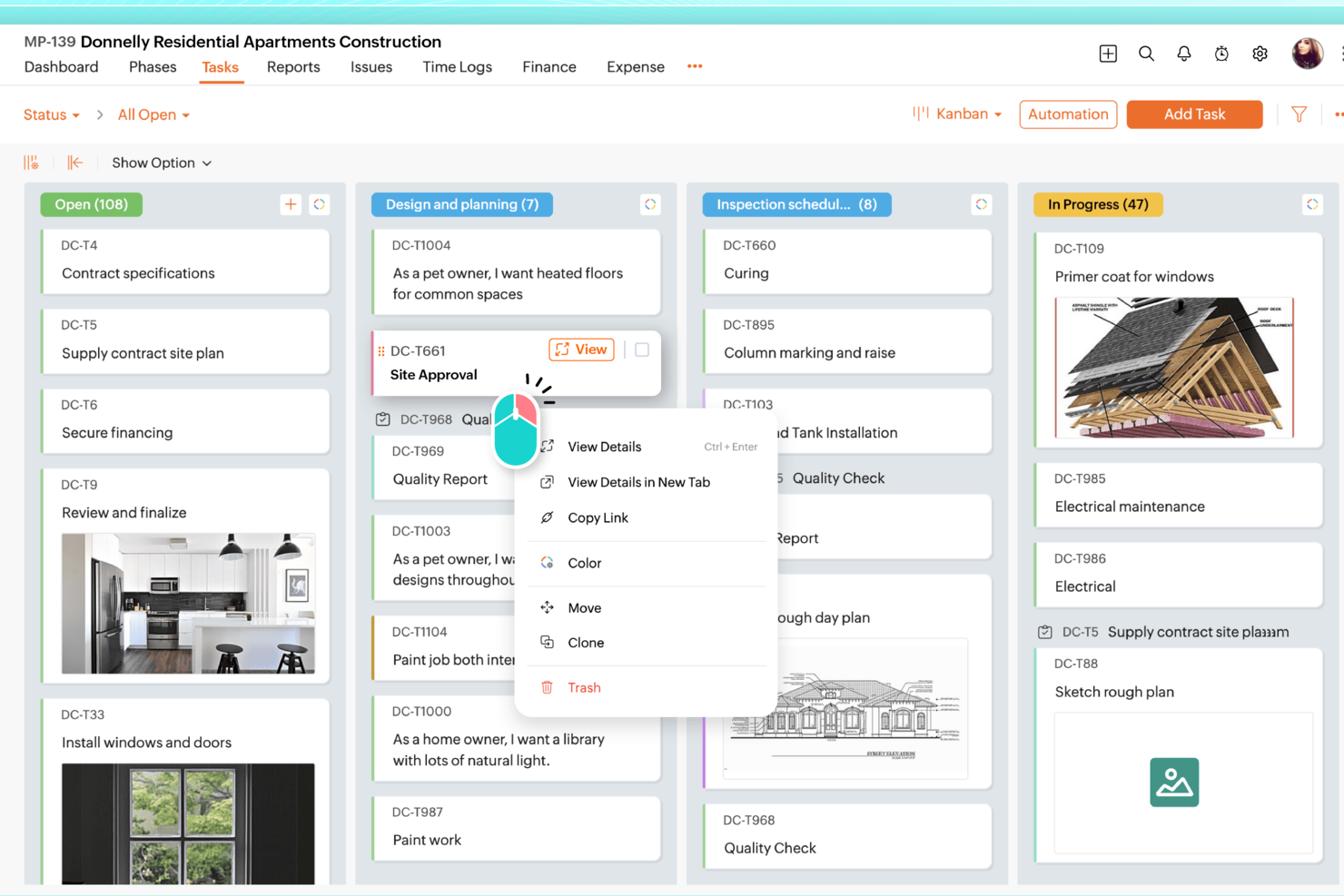
For professionals seeking a Gantt chart software tailored for Mac, Zoho Projects stands out by offering a comprehensive suite of project management tools. Whether you're a project manager in the IT sector or a freelancer juggling multiple deadlines, Zoho Projects helps you manage timelines and dependencies with precision. It addresses the need for clear visualizations of project progress, ensuring that your team stays aligned and on track.
Why I Picked Zoho Projects
I picked Zoho Projects because it excels in providing detailed Gantt chart capabilities, which are crucial for Mac users who need to visualize project timelines. The drag-and-drop interface simplifies the process of adjusting task dependencies, allowing you to manage changes seamlessly. Additionally, its real-time tracking feature ensures you stay updated on project progress, which is vital for maintaining accountability and meeting deadlines.
Zoho Projects Key Features
In addition to its excellent Gantt chart capabilities, Zoho Projects offers several other features that enhance project management:
- Task Management: Allows you to create, assign, and track tasks efficiently, ensuring everyone knows their responsibilities.
- Time Tracking: Helps you monitor how much time is spent on each task, aiding in productivity analysis and billing.
- Team Collaboration: Facilitates communication and collaboration within your team through forums, chats, and document sharing.
- Customizable Dashboards: Provides the ability to create personalized dashboards to track the most relevant project metrics for your team.
Zoho Projects Integrations
Integrations include Zoho CRM, Zoho Analytics, Zoho Books, Google Calendar, Google Drive, Microsoft Teams, Microsoft Outlook, Dropbox, Slack, and GitHub. These integrations expand the functionality of Zoho Projects, allowing seamless data flow and enhanced collaboration across various platforms.
Pros and Cons
Pros:
- Affordable pricing for growing teams
- Built-in time tracking and billing
- Strong automation and workflow customization
Cons:
- Mobile experience less fully featured
- Interface has steeper learning curve
New Product Updates from Zoho Projects
Zoho Projects Adds CodeX Scripts for Custom Modules
Zoho Projects now supports CodeX Scripts for custom modules, enabling conditional logic and rules for creating, updating, and deleting records. For more information, visit Zoho Projects' official site.
 .

ClickUp
Best for real-time team collaboration

ClickUp is a versatile project management platform designed to support a wide range of business functions including task management, resource allocation, and workflow automation. It caters primarily to project managers, teams, and organizations looking to enhance productivity and collaboration.
Why I picked ClickUp: ClickUp offers extensive customization options, allowing you to tailor every aspect of your workspace to fit your specific needs. Features like whiteboards, shared docs, and multiple task views provide flexibility in managing your projects and facilitating real-time team collaboration. The Gantt chart allows you to visually map out project timelines, dependencies, and milestones, with real-time updates that can be easily shared with clients or team members for better collaboration and tracking.
Standout features & integrations:
Features include task management with multiple viewing options, customizable ClickApps, and resource management tools that allow you to track time, set dependencies, and bulk edit tasks. Your team can also benefit from whiteboards for brainstorming sessions and shared docs for collaborative document creation.
Integrations include Slack, Google Drive, Dropbox, Zoom, Microsoft Teams, Outlook, GitHub, Evernote, Jira, and OneDrive.
Pros and Cons
Pros:
- Easy bulk editing
- Multiple task views
- Customizable ClickApps
Cons:
- Steep learning curve
- Complex interface
Asana
Best for visual project timelines

Asana is a project management tool that helps teams organize, track, and manage their work and projects efficiently. It is primarily used by teams aiming to improve collaboration, ensure accountability, and enhance project visibility.
Why I picked Asana: Asana offers task assignments and timeline views, project visualization through boards and calendars, and real-time updates. Your team can use its Gantt view to build projects, create subtasks, and set dependencies. The drag-and-drop interface also makes adjusting dates and task durations simple. Additionally, Asana facilitates communication with message boards and mentions.
Standout features & integrations:
Features include task assignments, project visualization through boards and calendars, and real-time updates. You can assign tasks to team members directly from the Gantt view, ensuring clarity on responsibilities. Additionally, task dependencies and critical paths make it easy to anticipate bottlenecks and adjust resources efficiently.
Integrations include Slack, Microsoft Teams, Google Drive, Dropbox, Salesforce, Okta, Evernote, Tableau, Power BI, and GitHub.
Pros and Cons
Pros:
- Real-time updates
- Drag-and-drop interface
- Subtasks in Gantt view
Cons:
- Complicated workflow automations
- Limited mid-tier plan

Best for client services businesses
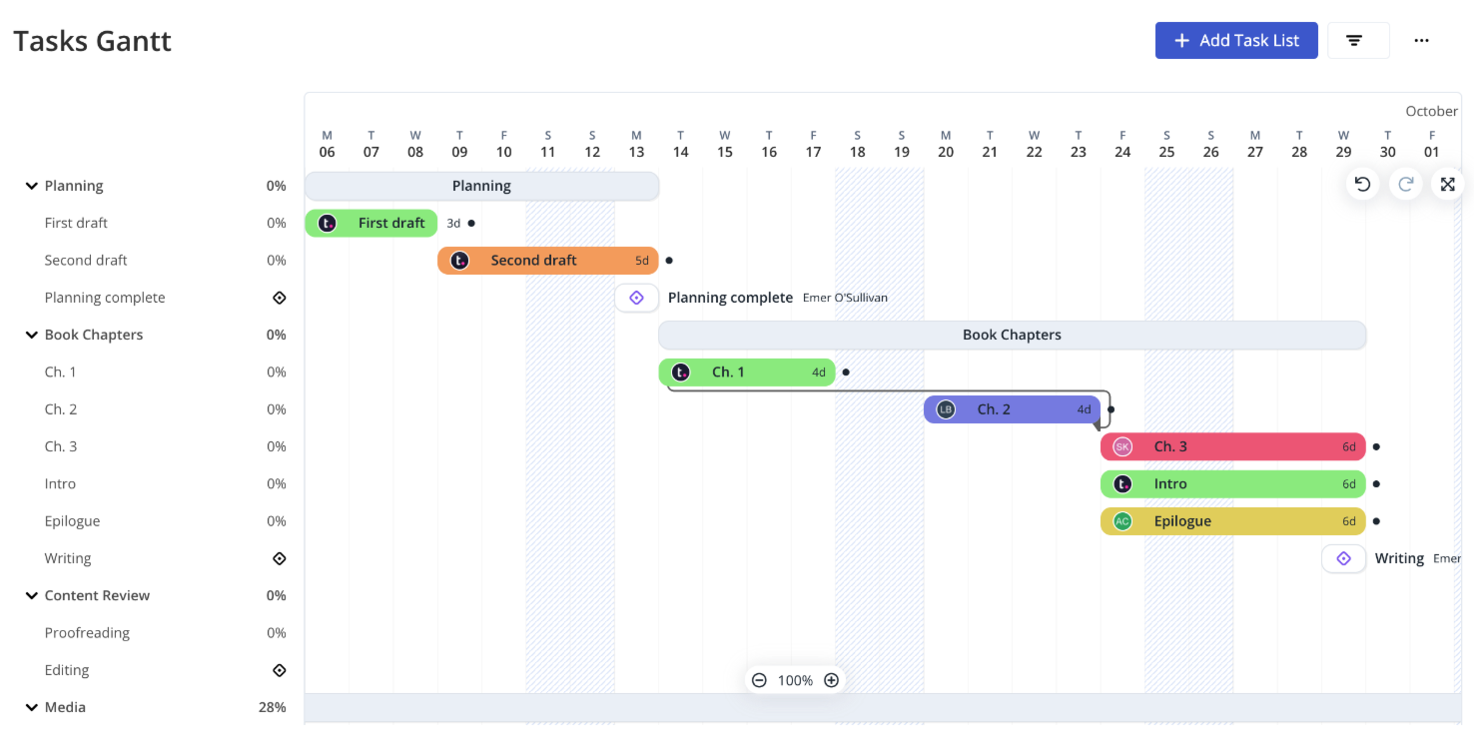
Teamwork.com is a project management software geared towards helping teams collaborate more effectively and manage projects from inception to completion. It provides features such as task assignments, milestone tracking, and Gantt chart views that aid in detailed project scheduling and progress monitoring.
Why I picked Teamwork.com: Teamwork.com’s Gantt chart feature allows you to shift project timelines easily by dragging and dropping phases, which automatically adjusts dependent tasks. Milestones can be configured from the top menu, although they can't be created directly within the Gantt view. Additionally, built-in time tracking and client-specific reporting make it easy to monitor project health and keep clients informed, making this a great option for businesses focused on client services.
Standout features & integrations:
Features include task creation in list, table, and Gantt views, drag-and-drop timeline adjustments, and bulk editing of tasks, progress updates, and user reassignments. Your team can also use built-in chat for communication and set up approvals for assets in the proofs section.
Integrations include Slack, HubSpot, Skyvia, Xero, Stripe, Microsoft Office, Atarim, TimeJam, Asinaria, and Harvest.
Pros and Cons
Pros:
- Free collaborator access
- Bulk task editing
- Easy task shifting
Cons:
- Limited date field editing
- Requires 3 user licenses for Pro

Best for cloud-based task management

ProjectManager provides an online Gantt chart maker designed for efficient project planning and scheduling. Its main users include project managers and teams across various industries who need to organize tasks, manage resources, and meet deadlines effectively.
Why I picked ProjectManager: ProjectManager offers cloud-based Gantt chart scheduling with an intuitive drag-and-drop interface, allowing you to easily adjust tasks and timelines. The software also includes real-time collaboration features, enabling team members to add comments and share files directly within tasks. Furthermore, ProjectManager supports importing and exporting a variety of file formats, ensuring seamless integration with other tools your team may be using.
Standout features & integrations:
Features include drag-and-drop scheduling, real-time project tracking, and resource management. Resource management tools are integrated, helping you allocate team members and resources efficiently. You can also set task dependencies with automatic updates to ensure the project flows smoothly.
Integrations include Slack, Microsoft Project, Trello, Jira, Microsoft Teams, Power BI, Acumatica, Microsoft Office 365, Microsoft Exchange, and Microsoft Excel.
Pros and Cons
Pros:
- Supports various file formats
- Real-time updates
- Drag-and-drop scheduling
Cons:
- Limited customization
- Learning curve

Miro
Best for managing task dependencies

Miro is an online collaboration platform that offers a range of tools to help teams work together effectively. Among its features is a Gantt chart tool, which allows you to plan and visualize project timelines.
Why I picked Miro: Miro's Gantt chart tool enables you to set timeframes for your projects by mapping out steps and deliverables, assigning start and end dates, and adding deadlines. This helps your team stay organized and ensures that everyone is aware of the project schedule. Additionally, Miro allows you to add dependencies between tasks, helping you identify and manage relationships between different project activities.
Standout features & integrations:
Features include collaborative editing, real-time updates, customizable templates, drag-and-drop functionality, task assignment, progress tracking, commenting, file attachments, version history, presentation mode, export options, and mobile accessibility.
Integrations include Microsoft 365, Google Workspace, Atlassian Jira, Atlassian Confluence, Microsoft Teams, Slack, AWS, GitHub, Azure DevOps, Asana, Trello, and Zoom.
Pros and Cons
Pros:
- Transforms complex ideas into visual formats
- Real-time updates
- Collaborative editing features
Cons:
- Not ideal for teams that prefer detailed, text-heavy documentation
- Customizing for specific projects can be time-consuming
New Product Updates from Miro
Miro Adds Japan Data Residency for Enterprise Customers
Miro has introduced Japan data residency for enterprise customers, offering in-region storage for production data, backups, and metadata, plus in-region compute infrastructure. For more information, visit Miro's official site.
 .

Wrike
Best for comprehensive project views

Wrike is a versatile project management software that supports team collaboration and project tracking. It caters primarily to project managers looking to optimize resource allocation and project timelines.
Why I picked Wrike: Wrike offers customizable dashboards, proofing, and detailed reports, all aimed at improving project transparency and decision-making. Its time-tracking capabilities and workload management features are designed to help your team stay on top of deadlines and tasks. Wrike's Gantt chart feature additionally provides a visual timeline of your project, making it easy to track progress, manage dependencies, and adjust schedules in real time.
Standout features & integrations:
Features include customizable dashboards, proofing, and detailed reports. The software also supports various methodologies like agile and waterfall and provides real-time visibility into project progress with automatic updates as tasks are completed.
Integrations include Slack, Google Drive, Microsoft Teams, Dropbox, Salesforce, Zendesk, Box, HubSpot, Okta, and GitHub.
Pros and Cons
Pros:
- Scalable structures
- Supports agile and waterfall
- Customizable dashboards
Cons:
- Steep learning curve
- Complex Gantt chart setup
New Product Updates from Wrike

Wrike Redesigns Workspace Search With New Filters
Wrike introduces a redesigned Workspace Search interface with recent search shortcuts, item type and location filters, and parent-task context. These updates help users find relevant work items and navigate search results efficiently. For more information, visit Wrike’s official site.
 .

Best for efficient Asana integration

Instagantt is an online Gantt chart software designed for project management. Its main user base includes project managers and teams across various industries, offering key business functions like task management, project organization, and collaboration tools.
Why I picked Instagantt: Instagantt allows you to create detailed Gantt charts with drag-and-drop scheduling and custom colors. Its project views include Gantt charts, as well as table views and Kanban boards, making it easy to visualize tasks and workloads in a way that works for you. Moreover, Instagantt's Asana integration allows seamless syncing of tasks and project data, enabling you to manage and update your Gantt charts directly within Asana for improved collaboration and real-time updates.
Standout features & integrations:
Features include multiple project views (Gantt charts, table views, Kanban boards), drag-and-drop scheduling, and custom fields and priority settings. You can manage tasks, set priorities, and utilize collaboration tools like task assignments and a team inbox. Time-saving options include Gantt chart templates and automated task scheduling.
Integrations include Asana.
Pros and Cons
Pros:
- Templates available
- Easy Asana integration
- Customizable task management
Cons:
- No desktop app
- Complex projects need setup in Asana

GoodDay
Best for integrated resource planning and scheduling

GoodDay is a versatile work management platform that can transform how your team handles project planning and collaboration, offering helpful support for integrated resource planning and scheduling. Designed for diverse industries, from marketing to human resources, it offers customizable workspaces and over 20 visualization options, including Gantt charts, to fit your unique workflows. By enhancing team collaboration and accountability, GoodDay aims to streamline your processes and boost productivity, making it an ideal Gantt chart solution on Mac.
Why I Picked GoodDay
I picked GoodDay for its strength in integrated resource planning and scheduling, which pairs seamlessly with its adaptable Gantt chart capabilities. This tool allows you to visualize tasks and dependencies with ease, offering customizable columns and advanced management options that align perfectly with your team’s workflows. Additionally, the platform supports various project management methodologies, such as Waterfall and Agile, providing flexibility in how you approach your projects.
GoodDay Key Features
In addition to integrated resource planning and scheduling, GoodDay offers:
- Customizable Workspaces: Tailor your workspace to align with your team’s specific needs, ensuring a personalized project management experience.
- Time Tracking: Monitor time spent on tasks and projects to provide insights into team efficiency and areas for improvement.
- Goal Management: Set and track goals to ensure your team stays focused and aligned with overall project objectives.
GoodDay Integrations
Integrations include Google Workspace, Slack, Microsoft Teams, Microsoft Outlook, GitHub, GitLab, Trello, Jira, Asana, and Zapier. An API is also available for custom integrations.
Pros and Cons
Pros:
- Facilitates team collaboration with built-in communication tools
- Visual task dependencies help clarify project flow
- Drag-and-drop scheduling makes timeline updates easy
Cons:
- Lacks some advanced enterprise scheduling features
- Occasional slow response times reported by users
Mac İçin Diğer Gantt Şeması Yazılımları
Kısa listeme giremeyen ancak yine de göz atmaya değer bazı ek Mac için Gantt şeması yazılımı seçenekleri şunlardır:
- Lucidchart
For real-time project visualization
- Paymo
For automatic task scheduling
- Freedcamp
For free project management features
- Celoxis
For advanced reporting and integration
- MeisterTask
For centralized task management
- TeamGantt
For quick setup and affordability
- GanttProject
For open-source project management


How I Evaluate Gantt Chart Software for Mac
I look at two things: whether a tool genuinely works on Mac with real Gantt controls, then the differentiators—like MS Project import or client sharing—that matter most for your workflow.
Core Functionality (Table Stakes For This List)
When I'm selecting tools for my list, I rank each one on a scale from 0 (does not offer the functionality) to 5 (excels in this area) for each core functionality listed below. Then, I calculate the tool's total score into a percentage. Each tool needs to achieve a minimum total score of 65% to be considered for inclusion.
- macOS Compatibility: I check whether the tool runs as a native Mac app or a fully functional web app—some platforms still have Safari rendering quirks that break Gantt views.
- Gantt Chart Visualization: The Gantt view should let you drag bars, zoom between day and quarter scales, and group tasks by phase or team without losing readability.
- Task Dependency Support: I evaluate whether the tool handles all four dependency types and auto-reschedules downstream tasks when a predecessor slips mid-sprint.
- Milestones & Baseline Tracking: Baseline snapshots matter when stakeholders ask why a launch date moved—I look for visual variance overlays directly on the Gantt.
- Resource & Workload Management: Teams juggling multiple projects need to spot overallocation fast, so I check for workload heatmaps or capacity views tied to task assignments.
- Critical Path & Progress Tracking: I look for automatic critical path highlighting paired with percent-complete indicators so you can see schedule risk at a glance.
Once I have a list of tools that meet the criteria, I consider what sets each platform apart.
Differentiating Factors (What Sets Vendors Apart)
Here's how I compare and contrast different vendors:
Standout Features
MS Project import/export is a big one—if your team or clients still rely on .mpp files, a tool that handles those natively saves hours of manual re-entry. I also look for client-facing sharing options like read-only links or PDF exports, since agency producers and consultants regularly need to send timeline updates without adding stakeholders as paid users. Portfolio views that consolidate multiple project Gantt charts into a single timeline help program managers spot cross-project conflicts before they cascade.
Beyond Features
Licensing model matters more than most buyers expect. A freelance consultant managing two client projects has very different needs than a 50-person agency, so I evaluate whether pricing is per-user, flat-rate, or a one-time purchase. Integration fit is equally important—I check for native connections to Jira, Slack, and Google Workspace since most Mac-based teams already live in those tools. I also consider whether the platform scales from solo use to team collaboration with role-based permissions, so you're not switching tools as your team grows.
Mac İçin Gantt Şeması Yazılımı Nasıl Seçilir?
Uzun özellik listeleri ve karmaşık fiyatlandırma yapıları arasında kaybolmak kolaydır. Benzersiz yazılım seçme sürecinizi yürütürken odaklanmanızı korumanıza yardımcı olmak için göz önünde bulundurmanız gereken faktörleri içeren bir kontrol listesi hazırladım:
| Faktör | Dikkat Edilmesi Gerekenler |
| Ölçeklenebilirlik | Bu yazılım ekibinizle birlikte büyüyebilir mi? |
| Entegrasyonlar | Mevcut sistemleriniz ve araçlarınızla iyi bir şekilde entegre oluyor mu? |
| Özelleştirilebilirlik | Yazılımı özel ihtiyaçlarınıza uyacak şekilde uyarlayabilir misiniz? |
| Kullanım Kolaylığı | Yazılım tüm ekip üyeleri için kullanıcı dostu mu? |
| Bütçe | Mali kısıtlarınıza uyuyor mu? |
| Güvenlik Önlemleri | Verileriniz ve projeleriniz güvende mi? |
| Destek | Güvenilir müşteri desteği mevcut mu? |
| Özellikler | İhtiyacınız olan temel özelliklere sahip mi? |
Mac İçin Gantt Şeması Yazılımlarındaki Trendler
Araştırmam sırasında farklı Mac uyumlu Gantt şeması yazılımı sağlayıcılarından sayısız ürün güncellemesi, basın bülteni ve sürüm günlüğü inceledim. Takip ettiğim gelişmekte olan trendlerden bazıları şunlar:
- Etkileşimli Görselleştirme: Modern Gantt şeması araçları, sürükleyip bırakma arayüzleri ve gerçek zamanlı güncellemeler gibi daha fazla etkileşimli öğeyi entegre ediyor. Bu özellikler, kullanıcıların zaman çizelgelerini ve bağımlılıkları doğrudan şema üzerinde kolayca değiştirmesine olanak tanır. Örneğin kullanıcılar, proje aşamalarını ve bağımlılıkları yeni tarihlere sürükleyerek ayarlayabilir ve proje düzenlemelerini kolaylaştırabilir.
- Özelleştirilebilir Panolar: Kullanıcılar giderek daha fazla kişiselleştirilmiş görünümler arıyor. Birçok platform artık kullanıcıların kendi özel ihtiyaçlarına göre uyarlanmış şemaları, ortak çalışma belgelerini ve görev izleme bileşenlerini entegre edebileceği özelleştirilebilir panolar sunuyor. Bu esneklik, daha odaklı ve ilgili bir çalışma alanı sağlar.
- Gelişmiş İş Birliği Özellikleri: İş birliği, proje yönetimi yazılımlarının temel unsurlarından biri haline geldi. Araçlar genellikle gerçek zamanlı yorum yapma, dosya paylaşımı ve entegre iletişim kanalları gibi özellikler içererek ekip çalışmasını daha akıcı ve verimli hale getirir. Bazı araçlar, proje ilerlemesini görsel olarak izlemek için benzersiz yöntemler bile sunarak ekip güncellemeleri için ortak çalışma alanları sağlar.
- Gelişmiş Görev Yönetimi: Çok düzeyli alt görevler, toplu düzenleme ve ayrıntılı görev kartları gibi özelliklerle görev yönetimi olanakları gelişiyor ve bunlar yaygın hale geliyor. Bu geliştirmeler, kullanıcıların görevleri güncellemesine, ilerlemeyi ayarlamasına ve sorumlulukları verimli bir şekilde yeniden atamasına olanak tanıyarak iş yüklerini yönetmek için harcanan zamandan tasarruf sağlar.
- İlerleme İzleme ve Raporlama: Gelişmiş ilerleme izleme ve raporlama özelliklerine giderek daha fazla odaklanılıyor. Birçok araç artık daha ayrıntılı ölçümler ve görselleştirme seçenekleri sunarak kullanıcıların kilometre taşlarını, tamamlanma yüzdelerini ve genel proje durumunu bir bakışta izlemesine yardımcı oluyor; böylece ekiplerin proje hedefleriyle uyumlu kalması sağlanıyor.
Mac için Gantt Şeması Yazılımı Nedir?
Mac için Gantt şeması yazılımı, kullanıcıların özellikle Apple tarafından üretilen Mac cihazlarda proje zaman çizelgeleri oluşturmasına ve yönetmesine yardımcı olmak üzere tasarlanmış bir proje yönetimi aracı türüdür. Proje yöneticileri, ekip liderleri ve inşaat, yazılım geliştirme ve etkinlik planlama gibi alanlardaki profesyoneller, projelerini planlandığı şekilde ilerletmek ve son teslim tarihlerine uymak için genellikle bu araçları kullanır.
Bu araçlar görevleri görsel olarak düzenleyerek, bağımlılıkları belirleyerek ve ilerlemeyi izleyerek değer sağlar. Sürükleyip bırakarak görev ayarlama, kaynak tahsisi ve kilometre taşı izleme gibi özellikler, karmaşık projelerin verimli bir şekilde yönetilmesine yardımcı olur. Genel olarak bu araçlar, ekipler arasındaki proje görünürlüğünü ve koordinasyonu geliştirir.
Mac için Gantt Şeması Yazılımının Özellikleri
Mac için Gantt şeması yazılımı seçerken aşağıdaki temel özelliklere dikkat edin:
- Görev yönetimi: Kullanıcıların görevleri ve alt görevleri doğrudan Gantt görünümünde oluşturmasına, atamasına ve yönetmesine olanak tanır.
- Kaynak yönetimi: Projeler arasındaki kaynakların izlenmesini ve tahsis edilmesini kolaylaştırarak iş yüklerinin dengeli olmasını sağlamaya yardımcı olur.
- Kilometre taşı izleme: Kritik son teslim tarihlerine uyulmasını sağlamak için proje kilometre taşlarının oluşturulmasını ve yönetilmesini mümkün kılar.
- Sürükleyip bırakma işlevi: Görevleri zaman çizelgesinde yeni konumlara sürükleyerek görev tarihlerini ve bağımlılıklarını ayarlamak için sezgisel bir yol sunar.
- Özel panolar: Kullanıcıların şemalar, ortak çalışma belgeleri ve projeyle ilgili diğer bilgiler içeren kişiselleştirilmiş panolar oluşturmasına olanak tanır.
- İlerleme izleme: Gantt şeması içindeki ilerleme yüzdeleri ve görsel göstergeler de dahil olmak üzere görevlerin durumunu izlemek için araçlar sunar.
- Toplu düzenleme: Birden fazla görevin aynı anda güncellenmesini sağlayarak zamandan tasarruf eder ve projeler genelinde tutarlılık sağlar.
- Portföy yönetimi: Birden fazla projeyi gruplandırmaya ve yönetmeye yönelik özellikler içerir; böylece bir portföyü denetlemeyi ve genel ilerlemeyi izlemeyi kolaylaştırır.
- Etkileşimli raporlar: Proje durumuna üst düzey bir genel bakış sunan ve ilgilenilmesi gereken alanları öne çıkaran görsel raporlar sağlar.
- İş birliği araçları: Paylaşılan belgeler ve iletişim kanalları gibi ekip iş birliğini destekleyen özellikleri entegre eder.
Mac için Gantt Şeması Yazılımının Faydaları
Mac için Gantt şeması yazılımını uygulamak, ekibiniz ve işletmeniz için çeşitli faydalar sağlar. Yararlanabileceğiniz bazı faydalar şunlardır:
- Geliştirilmiş görev yönetimi: Görevleri başlangıç ve bitiş tarihleriyle düzenler ve atar; böylece proje ilerlemesini ve son teslim tarihlerini takip etmeyi kolaylaştırır.
- Gelişmiş kaynak tahsisi: Dengeli atamalar sağlamak için kaynak dağılımını görselleştirir ve ekip iş yükünü izler.
- Net proje zaman çizelgeleri: Daha iyi planlama ve uygulama için proje aşamalarına, kilometre taşlarına ve bağımlılıklara ilişkin görsel bir genel bakış sunar.
- Verimli görev düzenlemeleri: Görevleri sürükleyip bırakarak proje zaman çizelgelerini kolayca değiştirir ve bağımlılıkları otomatik olarak günceller.
- Merkezi proje bilgileri: Dosyalar ve yorumlar da dâhil olmak üzere projeyle ilgili tüm verileri kolay erişim ve iş birliği için tek bir yerde saklar.
- Gerçek zamanlı ilerleme takibi: Proje gelişmelerini yakından takip etmek için görevlerin durumunu ve projenin tamamlanma yüzdelerini izler.
- Özelleştirilebilir görünümler: Tercih ettiğiniz proje yönetimi tarzına uyum sağlamak ve iş akışı görünürlüğünü artırmak için Gantt, liste veya takvim gibi farklı görünümleri kullanır.
Mac için Gantt Grafiği Yazılımının Maliyetleri ve Fiyatlandırması
Mac için Gantt grafiği yazılımı seçerken mevcut çeşitli fiyatlandırma modellerini ve planları anlamak gerekir. Maliyetler özelliklere, ekip büyüklüğüne, eklentilere ve daha fazlasına göre değişir. Aşağıdaki tabloda, Mac uyumlu Gantt grafiği yazılımı çözümlerindeki yaygın planlar, ortalama fiyatları ve genellikle sunulan özellikler özetlenmektedir:
Mac için Gantt Grafiği Yazılımı Planları Karşılaştırma Tablosu
| Plan Türü | Ortalama Fiyat | Yaygın Özellikler |
| Ücretsiz Plan | $0 | Temel görev yönetimi, sınırlı sayıda proje, sınırlı sayıda kullanıcı ve e-posta desteği. |
| Kişisel Plan | $5-$10/kullanıcı/ay | Sınırsız proje, temel Gantt grafiği özellikleri, görev bağımlılıkları ve sınırlı entegrasyonlar. |
| İşletme Planı | $15-$25/kullanıcı/ay | Gelişmiş Gantt grafiği özellikleri, ekip iş birliği, zaman takibi, kaynak yönetimi ve raporlar. |
| Kurumsal Plan | $30-$50/kullanıcı/ay | Özelleştirilebilir özellikler, özel destek, gelişmiş güvenlik, tam entegrasyonlar ve yönetici denetimleri. |
Mac için Gantt Grafiği Yazılımı Hakkında SSS
Mac için Gantt grafiği yazılımı hakkında sık sorulan bazı soruların yanıtları:
Gantt grafiğinin dezavantajları nelerdir?
Gantt grafikleri, özellikle büyük projelerde çok karmaşık hâle gelebilir. Doğru kalmaları için sürekli güncellenmeleri gerekir. Grafikteki bir çubuğun uzunluğu, iş miktarını mutlaka yansıtmaz. Ayrıca her şeyi tek bir kâğıda sığdırmak zor olabilir.
Excel Gantt grafiğinin avantajları ve dezavantajları nelerdir?
Excel Gantt grafikleri, projenin karmaşıklığına ilişkin gerçekçi bir genel bakış sunar ve ekipleri ve kaynakları verimli bir şekilde yönetmeye yardımcı olur. Ancak karmaşıklıkları arttıkça yorumlanmaları zorlaşabilir. İş yükünün anlaşılır bir görselleştirmesini her zaman sunmayabilirler.
Gantt grafiği tasarlarken yapılan en büyük hata nedir?
Gantt grafiği tasarlarken yapabileceğiniz en büyük hatalardan biri görevleri net bir şekilde tanımlamamaktır. Bu durum proje takviminin karışmasına ve yanlış yorumlanmasına yol açabilir. Başarılı bir tamamlanma sağlamak için her görevin net bir açıklaması ve ölçülebilir bir sonucu olmalıdır.
Proje yönetiminde Gantt grafiklerinin alternatifleri nelerdir?
Gantt grafiklerinin alternatifleri arasında Kanban panoları, PERT grafikleri ve görev listeleri bulunur. Bu araçlar, proje görevlerinizi ve zaman çizelgelerinizi görselleştirmek ve yönetmek için farklı yöntemler sunabilir ve projenizin ihtiyaçlarına bağlı olarak bazen daha uygun olabilir.
Gantt grafikleri kaynak tahsisini ve iş yükünü yönetebilir mi?
Evet, birçok Gantt grafiği yazılımı seçeneği kaynak tahsisi ve iş yükü yönetimi özelliklerini içerir. Kaynakları görevlere atayabilir ve zaman içinde nasıl dağıtıldıklarını görebilirsiniz; bu da iş yükünü dengelemeye ve kaynakların aşırı tahsis edilmesini önlemeye yardımcı olur.