

2026’nın En İyi 10 Notion Alternatifi Seçimi

10 En İyi Notion Alternatifleri Kısa Listesi


En iyi Notion alternatifleri, özellikle Notion ekibiniz için uygun olmadığında veya fazla karmaşık geldiğinde, planlama, iş birliği ve organizasyonu kolaylaştıran proje yönetimi araçları sunar. Notion'a doğru alternatifi bulduğunuzda, iş akışlarınıza göre uyarlanmış özelliklerle ve ihtiyaçlarınıza uygun bir arayüzle projeleri yürütebilirsiniz.
Bir ajans işletme deneyimimi ve 3 yılı aşkın yazılım test deneyimimi kullanarak onlarca aracı inceledim ve en iyi Notion alternatifleri listemi oluşturdum. Önerilerimin her biri projelerinizi daha iyi yönetmenize ve takip etmenize, temel hedeflerinize ulaşmanıza ve müşterileriniz için etkili işler sunmanıza yardımcı olacaktır.
Notion Alternatifleri Nelerdir?
Notion alternatifleri; tıpkı Notion gibi notları, görevleri, veritabanlarını ve projeleri tek bir yerde yönetmenizi sağlayan araçlardır. Notion gibi planlama yapmak, ilerlemeyi takip etmek ve birlikte çalışmak için merkezi bir alan sunarlar; ancak daha kullanıcı dostu bir arayüze, Basecamp'in sahip olmadığı ek özelliklere veya ihtiyaçlarınıza uyacak daha fazla özelleştirme seçeneğine sahip olabilirler.
Notion alternatifleri; işleri kendi yöntemleriyle düzenlemek ve her şeyi senkronize tutmak isteyen proje yöneticileri, işletme sahipleri ve uzaktan çalışan ekipler arasında popülerdir.
Why Trust Our Software Recommendations
Our team has been testing and reviewing software since 2012. As project managers ourselves, we know how difficult—and important—it is to choose the right software.
For this guide, we evaluated tools using hands-on testing and independent research, scoring tools using our selection criteria. We also draw on insights from industry thought leaders and practicing project management experts.
Our reviews reflect our human editorial judgment, not a sales pitch.
Expert reviewers:
Notion Alternatifleri Karşılaştırma Tablosu
En iyi Notion alternatiflerimin fiyatlarını ve temel özelliklerini karşılaştırmak için bu karşılaştırma tablosunu kullanın.
Score legend (out of 5)
- Excellent 4.5–5
- Good 4–4.4
- Average 3–3.9
- Below average 2–2.9
- Poor 1–1.9
| Tool | Starting Price | Website | |||||||
|---|---|---|---|---|---|---|---|---|---|
| Best for customizable task boards | 3.8 out of 5 | 4 | 5 | 4 | 2 | 4 | 4 | $9/user/month Free plan + 14-day trial available | Book Demo |
| Best for custom task statuses | 3.8 out of 5 | 4 | 4 | 4 | 4 | 4 | 3 | $12/user/month Free plan + free demo available | Book Demo |
| Best for tracking work time | 2.7 out of 5 | 3 | 2 | 2 | 3 | 3 | 3 | Pricing upon request Free plan + 15-day trial + demo available | Website |
| Best for breaking down complex projects | 2.2 out of 5 | 3 | 3 | 2 | 2 | 2 | 1 | $7.65/user/month Free plan + 30-day free trial available | Website |
| Best for automating repetitive tasks | 3.0 out of 5 | 2 | 4 | 3 | 3 | 2 | 4 | $10/user/month Free plan + 14-day trial + demo available | Book Demo |
| Best for creating a customized marketing system | — | 1 | 2 | — | — | — | 2 | $29/month 14-day free trial | Website |
| Best for doc-centric projects | 4.2 out of 5 | 4 | 4 | 5 | 4 | 5 | 3 | $12/user/month Free plan + free trial available | Website |
| Best for AI-driven remote team workflows | 3.5 out of 5 | 3 | 4 | 4 | 3 | 3 | 4 | $20/month Free plan available | Website |
| Best for content collaboration | 4.0 out of 5 | 4 | 5 | 4 | 4 | 4 | 3 | $5.78/user/month Free plan + 7-day trial available | Website |
| Best for issue tracking | 4.0 out of 5 | 4 | 5 | 4 | 4 | 4 | 3 | $21.50/user/month Free plan + 14-day trial available | Website |
En İyi Notion Alternatifleri İncelemeleri
Her Notion alternatifinin ayrıntılı analizini ve genel değerlendirmesini burada bulabilirsiniz. Artıları ve eksileri, temel özellikleri ve en uygun kullanım alanlarını inceliyorum.

Best for customizable task boards
monday.com offers a flexible, visual workspace that can make project tracking, task assignment, and workflow organization easier for teams that want more structure than a free-form note app. If you manage a marketing squad, a development team, or just juggle multiple projects at once, monday.com gives you a clear board, timeline or Kanban-style view to see who’s doing what and when — without wrestling with complex settings.
Why I Picked monday.com
I picked monday.com because it delivers strong workflow automation and task-tracking features that match what many users look for in a Notion alternative. With its customizable boards and built-in automations, you can reduce repetitive work. For example, automatically change task statuses or notify teammates when deadlines approach. The platform also offers multiple ways (Kanban, timeline, list) to visualize work, which helps teams with different work styles stay aligned.
monday.com Key Features
In addition to its visual project management tools, monday.com offers several other features that enhance its utility as a Notion alternative.
- Templates for different workflows: Pre-built templates for marketing campaigns, product roadmaps, CRM pipelines, content calendars and more — so you don’t need to build everything from scratch.
- Time-tracking and work logs: Allows you to track how much time is spent on tasks directly within boards — useful if you bill by hour or want to analyze workload.
- File and update management on items: You can attach files, add comments or updates on tasks, and keep all related info — documents, notes, status history — in one place.
- Collaboration Tools: Use in-app chat and comment features to facilitate real-time communication among team members.
monday.com Integrations
Integrations include Slack, Gmail, Microsoft Teams, Zoom, Salesforce, Google Calendar, Trello, Dropbox, Outlook, and HubSpot. An open API is also available for custom integrations.
Pros and Cons
Pros:
- Easy to set up boards and drag-and-drop tasks for quick organization
- Visual project views (Kanban, timeline, charts) help track progress clearly
- High flexibility in structuring workflows across teams
Cons:
- Mobile app offers fewer capabilities (e.g., limited document collaboration) compared to desktop
- Some advanced features (like time tracking, automations) require paid plans
New Product Updates from monday AI Workspace
monday AI Workspace Adds Human Approval Routing
monday AI Workspace adds a human-in-the-loop approval block to AI Workflows, sending approval requests and routing workflow paths based on responses. For more information, visit monday AI Workspace's official site.
 .

ClickUp
Best for custom task statuses

ClickUp is a project management software that allows teams of various sizes to customize their workflows and improve productivity across tasks and projects. It allows users to create and manage custom task statuses that fit their specific processes and team dynamics.
Why it's a good Notion Alternative:
I chose ClickUp because it offers specificity and adaptability that Notion doesn't. While Notion is excellent for organizing and sharing information, ClickUp provides customization options for project management. This makes it ideal for teams that must tailor project tracking to precise specifications. ClickUp also offers multiple project views, like lists, boards, calendars, and more advanced options like Gantt charts, mind maps, and timeline views.
Standout Features & Integrations:
Features include customizable task statuses, dashboards tracking project progress, document management, reporting and analytics, collaboration tools, time management tools, resource management, and automation features.
Integrations include Slack, GitHub, GitLab, Webhooks, HubSpot, Everhour, Toggl, Harvest, Google Drive, OneDrive, Dropbox, Outlook, Google Calendar, and Figma.
Pros and Cons
Pros:
- Highly customizable task statuses and workflows
- Comprehensive dashboards and reporting tools
- Effective automation and time management features
Cons:
- Most security features are limited to higher-tier plans
- Extensive features may take time to learn
New Product Updates from ClickUp
ClickUp Adds List Automations, Time Off Scheduling, and Org Charts
ClickUp adds template-based List automations, personal time off scheduling, a unified picker, automatic task date syncing, and Org Charts. These updates help teams automate project setup, manage availability, and organize work. For more information, visit ClickUp’s official site.
 .

Best for tracking work time
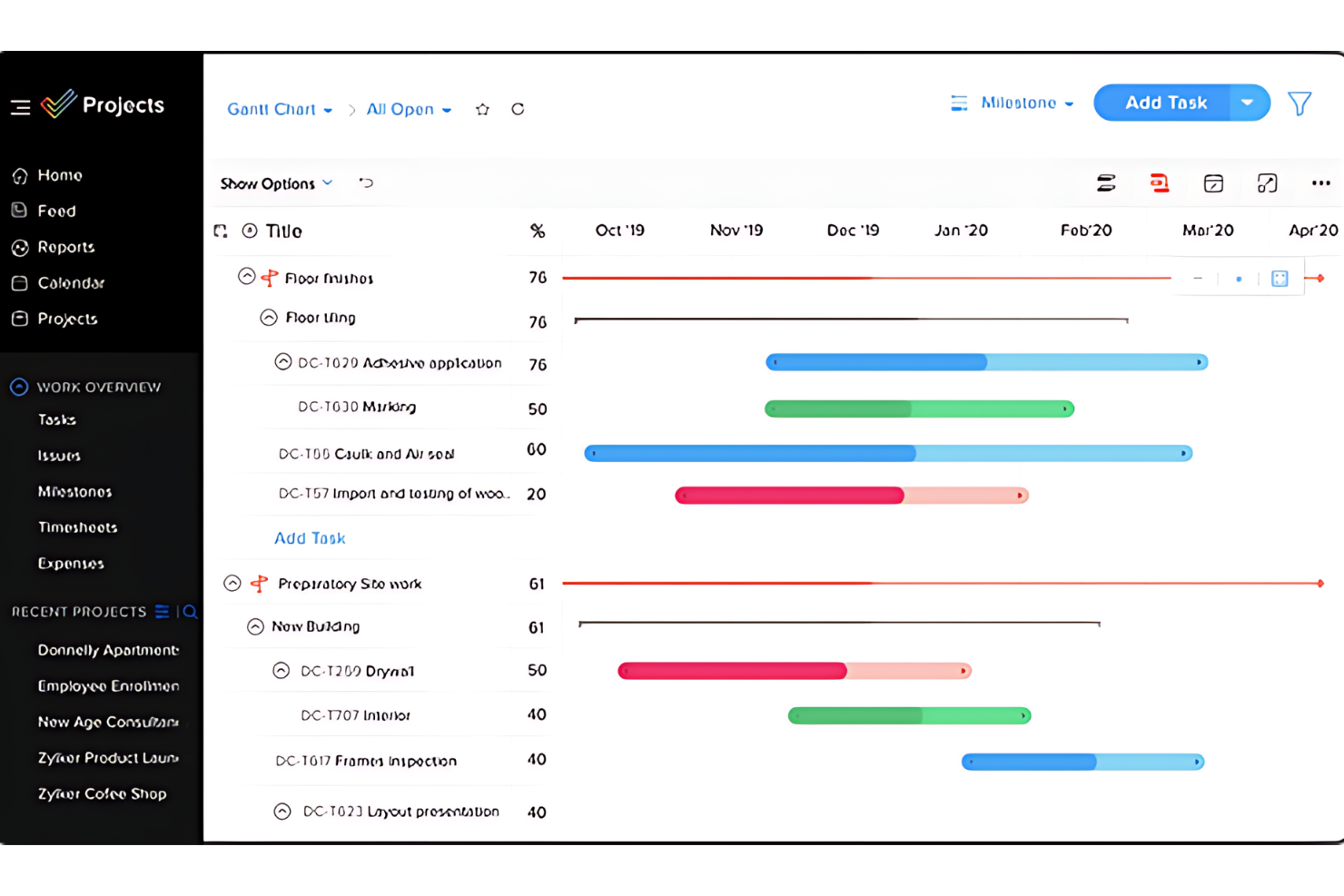
Zoho Projects is project management software that tracks and manages work time and tasks. It offers a suite of tools for planning, tracking, and collaborating on projects. This resource planning tool is ideal for teams that must carefully monitor work hours and progress.
Why it's a good Notion Alternative:
I chose Zoho Projects because it specializes in time tracking and project scheduling. Unlike general-purpose tools like Notion, Zoho Projects provides more detailed tracking capabilities and built-in time logging features, making it superior for precise work time management.
Standout Features & Integrations:
Features include time-tracking capabilities, which allow for detailed logging and reporting of work hours. The platform also includes interactive Gantt charts for visual project scheduling. Zoho Projects also include resource allocation, progress tracking, and task automation tools.
Integrations include various Zoho applications, such as Zoho CRM and Zoho Books. It also supports integrations with Google Workspace and Microsoft Office.
Pros and Cons
Pros:
- Integrations with Zoho suite and other popular tools
- User-friendly interface with project visualization tools
- Detailed time tracking and reporting features
Cons:
- The number of features can be overwhelming for some users
- Steeper learning curve for advanced features
New Product Updates from Zoho Projects
Zoho Projects Adds CodeX Scripts for Custom Modules
Zoho Projects now supports CodeX Scripts for custom modules, enabling conditional logic and rules for creating, updating, and deleting records. For more information, visit Zoho Projects' official site.
 .

Quire
Best for breaking down complex projects

Quire is a project management tool built around the idea of breaking down big goals into smaller, manageable tasks. It’s designed for teams that need a flexible way to visualize, track, and execute their work across different stages.
Why it's a good Notion alternative:
Quire stands out as an alternative to Notion because of its flexible task organization features. The nested list view lets you break down complex projects, providing a clear hierarchy that keeps your workflow organized. Additionally, the sublist feature allows you to create personalized views from your main task list, helping you focus on specific tasks or priorities without cluttering your workspace. You can also switch between Kanban boards, timelines, calendars, and table views to visualize your workflow in the way that suits you best. This flexibility makes it easier to plan ahead, track progress, and adjust schedules as needed.
Standout Features & Integrations:
Features include custom fields that let you add specific data points to tasks, such as budget estimates or priority levels, helping you tailor the tool to your project's needs. It also has collaborative documents that serve as a central space for all project-related information, notes, and updates. You can enrich these documents with task details, formulas, task references, and user mentions, keeping everything connected.
Integrations include Google Calendar, Gmail, Slack, Outlook, Zoho Flow, GitHub, Apple Calendar Sync, Box, Dropbox, Google Drive, and Microsoft Teams.
Pros and Cons
Pros:
- Easy to collaborate with team members
- Multiple project views, including lists, boards, and timelines
- Ability to create nested tasks and subtasks, allowing for detailed project breakdowns
Cons:
- The mobile version lacks some features available on the desktop
- Potential for notification overload, especially when working with large teams
New Product Updates from Quire
Quire Adds Custom Field Locking and Comment Reaction API Support
Quire adds custom field locking and API support for reading and setting emoji reactions on comments. These updates give teams more control over field data and expand comment interaction options for developers. For more information, visit Quire’s official site.
 .

Wrike
Best for automating repetitive tasks

Wrike is a project management tool designed to boost team collaboration and efficiency. It offers a wide range of features that help automate routine tasks, allowing teams more time to focus on critical projects.
Why it's a good Notion Alternative:
I picked Wrike as a good alternative to Notion because of its ability to automate repetitive tasks, which helps streamline high-priority projects. Its customizable request forms implify project initiation by generating tasks and workflows automatically. Wrike also stands out for its centralized data access, which integrates information from various sources into a single, actionable hub. This feature enhances decision-making and collaboration across teams, making it easier to manage complex projects. Additionally, Wrike's mobile accessibility means you and your team can stay updated and manage tasks from anywhere, whether you're in the office or on the go.
Standout Features & Integrations:
Features include customizable request forms that automatically generate tasks and workflows, saving you time at the start of a project. The centralized data access feature integrates data from various sources, providing a single source of actionable information for all users. Wrike also offers mobile apps for Android and Apple devices, allowing your team to manage tasks effectively, no matter where they are.
Integrations include Klaxoon, Intuit/QuickBooks, Skyvia, Power BI, Google Sheets, Miro, Salesforce, Tableau, Wrike for Microsoft Teams, MediaValet, Zoom, and Adobe Creative Cloud.
Pros and Cons
Pros:
- Features and scalability cater well to medium to large enterprises
- Google Drive and Slack integrations facilitate in-task discussions and file sharing
- Excellent task and project management features
Cons:
- Can feel overwhelming due to the number of features and options available
- Can be complex to navigate initially
New Product Updates from Wrike

Wrike Redesigns Workspace Search With New Filters
Wrike introduces a redesigned Workspace Search interface with recent search shortcuts, item type and location filters, and parent-task context. These updates help users find relevant work items and navigate search results efficiently. For more information, visit Wrike’s official site.
 .

Enji
Best for creating a customized marketing system

Enji is a marketing project management and planning platform that helps small business owners and solopreneurs manage marketing campaigns, content, scheduling, and performance tracking in one workspace.
Who Is Enji Best For?
Enji is a good fit for small business owners and solopreneurs who want structured marketing planning and execution without the complexity of a fully customizable workspace.
Why I Picked Enji
I've included Enji in my top picks because I love how it builds a marketing routine directly into its calendar. When you answer Enji's setup questionnaire, it asks which days you want to work on marketing, then populates your calendar with recurring marketing tasks on the right cadence. You're not deciding what to do daily; the plan is already there waiting for you. I also like that weekly tasks like scheduling social posts don't require leaving the platform, since the AI copywriter and social media scheduler are built directly into each task. The platform also centralizes marketing metrics and reporting, making it easier to track campaign performance in one place.
Enji Key Features
- Campaign templates: Pre-built campaign structures with tasks, timing, and targets already mapped out so you don't start from scratch.
- Brand management: A central space to store your brand voice, visuals, and key business details for consistent content across channels.
- Suggested KPIs: Enji recommends the metrics to track based on your goals, so you're not guessing what to measure.
- Analytics dashboard: Pulls social media and website analytics into one view so you can spot trends without switching between tabs.
Enji Integrations
Enji doesn't publicly list any integrations.
Pros and Cons
Pros:
- Goal tracking directly linked to planning routines
- Personalized insights based on campaign performance data
- Visual calendar tailored to marketing workflows
Cons:
- No native mobile app for on-the-go editing
- Collaboration features lack advanced permissions controls
Coda
Best for doc-centric projects

Coda blends the functionalities of documents, spreadsheets, and databases into a unified platform, making it ideal for managing doc-centric projects where detail and organization are important.
Why it's a good Notion Alternative:
I chose Coda because it offers a unique approach to integrating text, data, and workflow management in a single document. Unlike Notion, which is broader in its offerings but less focused on documents, Coda stands out with its ability to transform static documents into interactive tools, which is essential for document-based workflows.
Standout Features & Integrations:
Features include creating interactive docs that function like apps, automation capabilities, and customizable templates.
Integrations include Slack, Google Calendar, and Zapier.
Pros and Cons
Pros:
- Seamless integration with key productivity tools
- Strong automation and template options
- Highly customizable and interactive documents
Cons:
- May have some scalability issues
- May require a learning curve to leverage its features fully

Taskade
Best for AI-driven remote team workflows
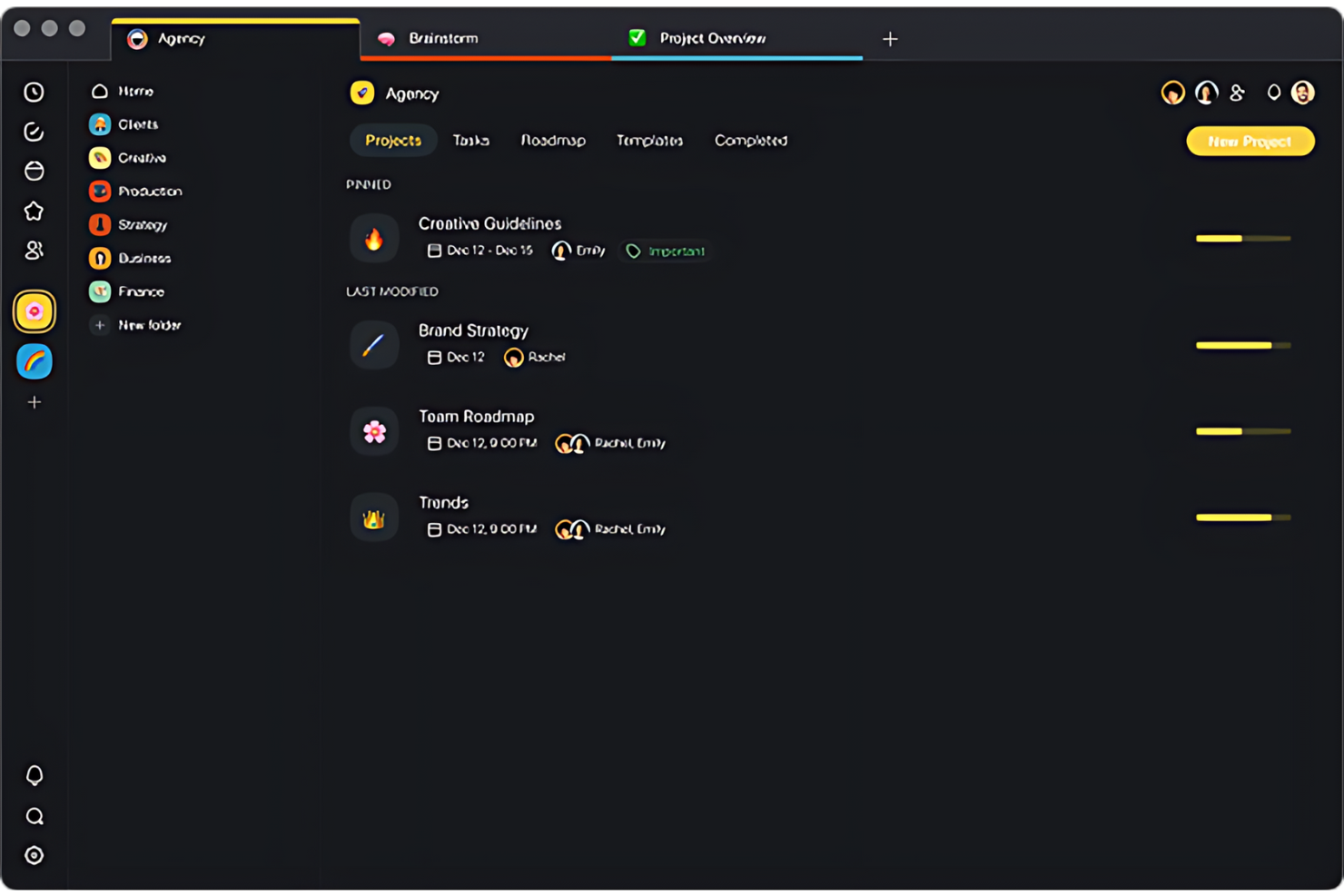
Taskade is a collaborative workspace that aims to improve the productivity and communication of remote teams. It combines task management, real-time collaboration, and video conferencing in one platform.
Why it's a good Notion alternative:
I chose Taskade because it focuses on the specific needs of remote teams, such as real-time synchronization and communication tools. While Notion is versatile for information storage and project planning, Taskade provides live collaboration and helps team members coordinate, regardless of location.
Standout Features & Integrations:
Features include built-in video conferencing, customizable workflow templates, and real-time editing and commenting.
Integrations include Google Calendar, Slack, and Dropbox.
Pros and Cons
Pros:
- Real-time editing and updates facilitate quick decision-making
- Customizable templates speed up workflow setup
- Integrated video conferencing enhances real-time collaboration
Cons:
- Advanced features locked behind higher pricing tiers
- May require a learning curve for new users

Best for content collaboration
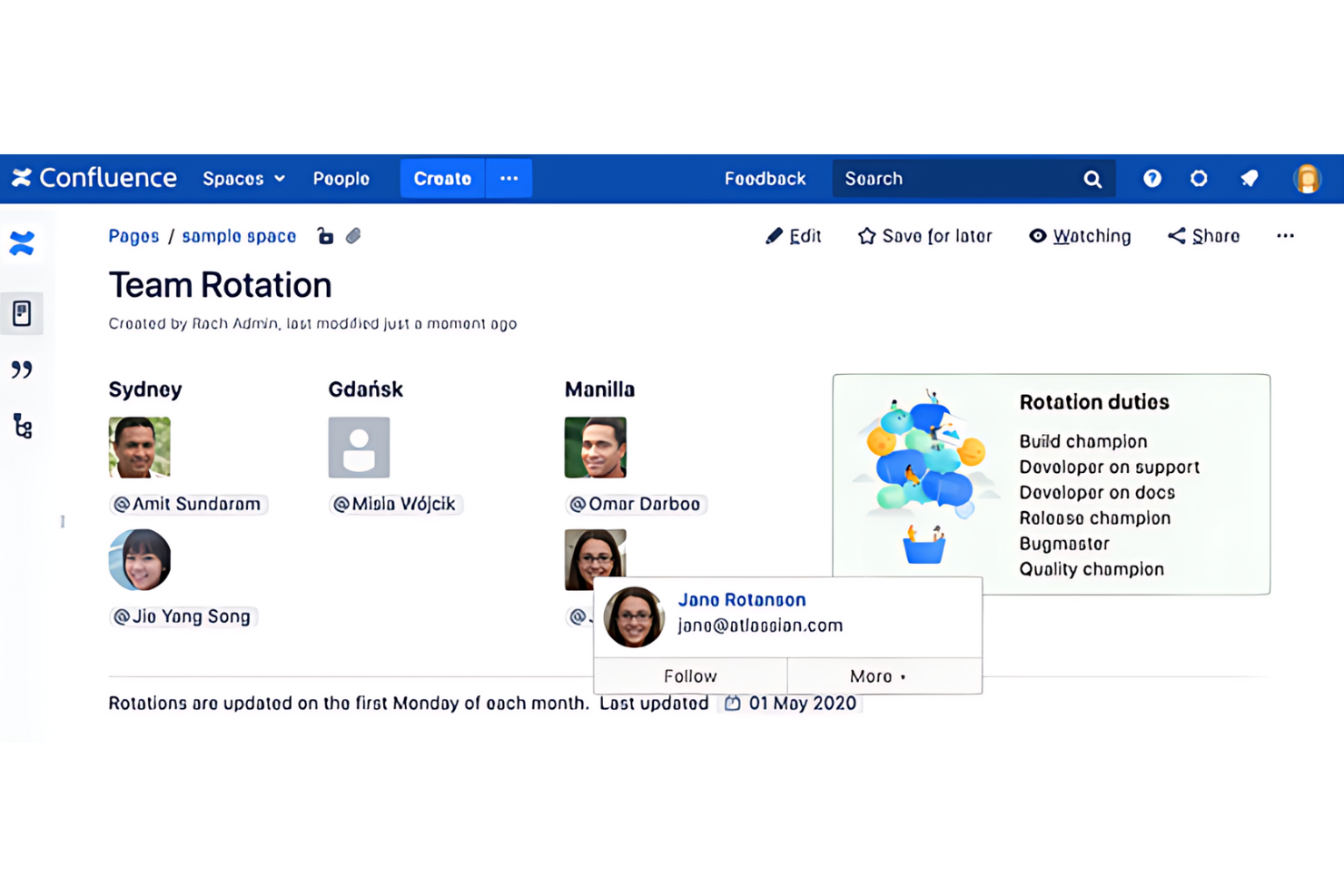
Confluence by Atlassian is a powerful tool designed to encourage content collaboration within teams and organizations. It enables users to create, share, and manage documents in a centralized space.
Why it's a good Notion Alternative:
I chose Confluence for its excellent content creation and collaboration features, which are essential for team organization. Its structured approach to creating spaces and pages offers a more formal way of managing information than other tools. This makes it particularly effective for larger teams or organizations that require more documentation and knowledge management capabilities.
Standout Features & Integrations:
Features include its page editor, collaboration tools, and an extensive template library.
Integrations include other Atlassian products, such as Jira and Bitbucket. This resource management software also integrates with Slack, Trello, and Microsoft Office.
Pros and Cons
Pros:
- Large selection of templates and macros to streamline content creation
- Strong integration with other Atlassian products and third-party tools
- Extensive support for various content types and rich text formatting
Cons:
- Limited integration with MS Office
- Weak search bar functionality
Best for issue tracking
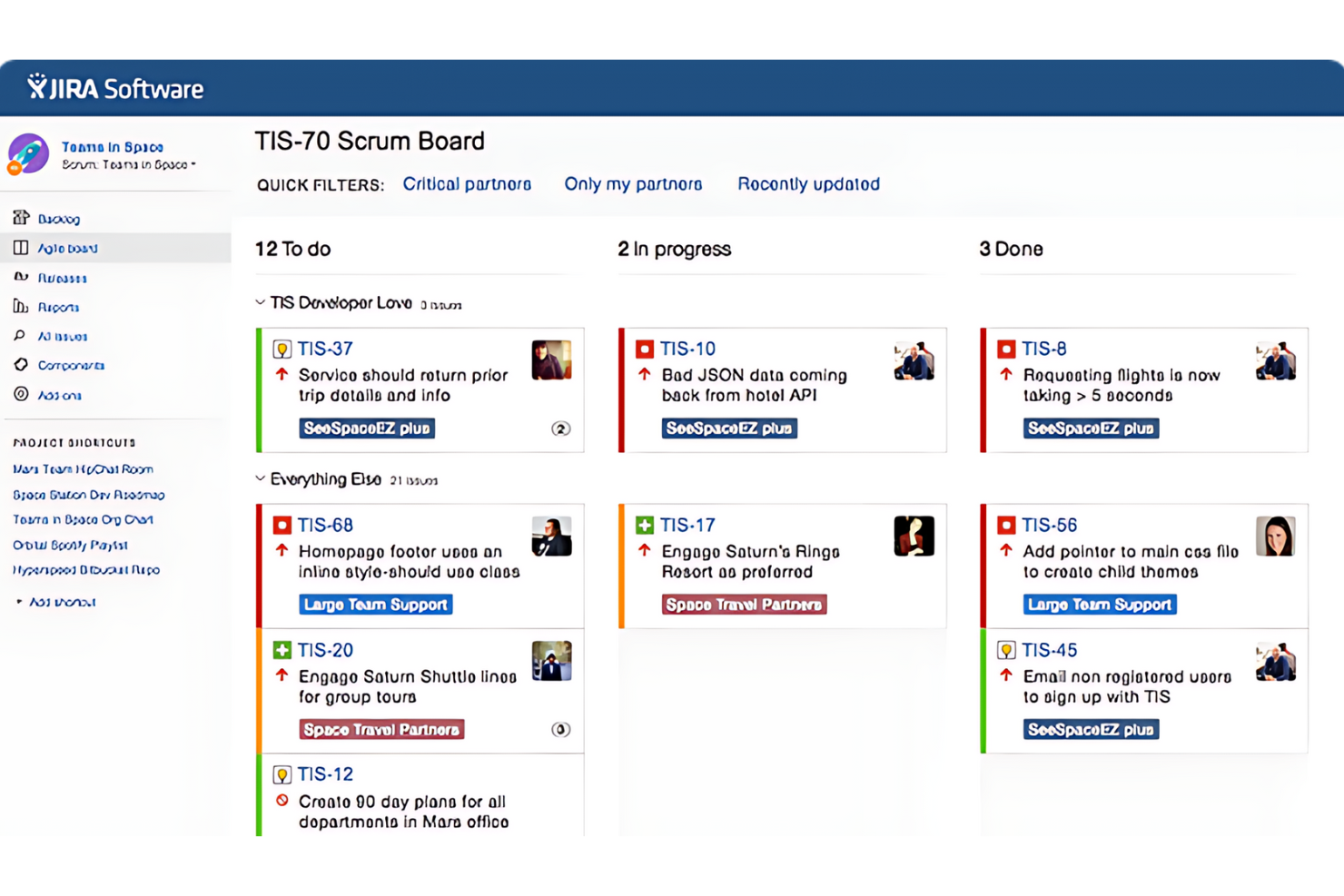
Jira is a project management tool developed by Atlassian. It's primarily designed for software development teams to track bugs, manage tasks, and oversee agile projects. Jira can adapt to various workflows, from simple task management to complex software development processes.
Why it's a good Notion Alternative:
I picked Jira because of its specialized focus on issues and bug tracking. While Notion provides a broad workspace, Jira provides detailed tracking, prioritization, and issues management. It is the go-to choice for teams that need precise control over the development cycle.
Standout Features & Integrations:
Features include customizable workflows that allow teams to tailor the tool to specific processes. It extends forecasting and reporting, providing insights into project progress and team performance. It also enables tracking user stories, bugs, and tasks.
Integrations include Confluence for documentation, Bitbucket and GitHub for source control, and Slack for team communication.
Pros and Cons
Pros:
- Strong integrations with other development and collaboration tools
- Highly customizable to fit different project needs
- Advanced issue tracking and management capabilities
Cons:
- Slow loading at times
- Can be complex and overwhelming for new users
Diğer Notion Alternatifleri
Aşağıda, en iyi listeme giremeyen ancak yukarıdaki seçenekler arasında size uygun bir çözüm bulamadıysanız göz atmaya değer ek Notion alternatiflerinin bir listesini bulabilirsiniz.
- Fibery
For connecting work across relational databases
- Anytype
For privacy-first knowledge management
- Slite
For AI-driven team knowledge bases
- Airtable
For database-driven team projects
- Nuclino
For wiki-first team knowledge bases
- Miro
For mapping and tracking work visually
- Guru
For governed AI search across company knowledge
- AppFlowy
For self-hosted, offline-first workspaces


İlgili Proje Yönetimi Yazılımı İncelemeleri
Aradığınızı hâlâ bulamadıysanız, test edip incelediğimiz şu ilgili proje yönetimi araçlarına göz atın.
- Proje Yönetimi Yazılımı
- Kaynak Yönetimi Yazılımı
- İş Akışı Otomasyonu Yazılımı
- Görev Yönetimi Yazılımı
- İş Birliği Araçları
- Gantt Şeması Oluşturucu
- Yapay Zekâ Görev Yöneticileri
How I Evaluate Notion Alternatives
I split my evaluation into three parts, with the most weight on core functionality: organize linked docs and project data, and show the same work in useful views. Next, I look for standout features such as native automation for recurring status changes. Finally, I consider beyond-feature factors like migration support, onboarding, and pricing as teams grow.
Core Functionality (Table Stakes For This List)
When I'm selecting tools for my list, I score each one on a scale from 0 (does not offer the functionality) to 5 (excels in this area) for each core functionality listed below. I then convert the total into a percentage to help assess each tool's overall fit, with extra weight on any functionalities I’ve deemed essential.
- Unified Docs & Notes (Essential): I look for rich-text pages that hold project briefs, meeting notes, and embedded files together, rather than scattering delivery context across separate tools.
- Flexible Database Views (Essential): I check whether one set of project data can appear as boards, tables, or calendars, with filters to track work by status or deadline.
- Nested Page Structure: For complex workspaces, I assess whether teams can nest and rearrange pages for portfolios, projects, and related reference material.
- Cross-Links & Relations: I look for links and database relations that connect a task to its project brief, decision log, or owner without duplicating details.
- Collaborative Editing: I consider whether teammates can edit, comment, and mention owners on shared plans, keeping decisions and handoffs visible around active work.
- Reusable Templates: I check for page or database templates for recurring kickoff plans, status updates, and retrospectives.
Once I have a list of tools that meet the criteria, I consider what sets each platform apart.
Differentiating Factors (What Sets Vendors Apart)
Here's how I compare and contrast different vendors:
Standout Features
I look for a native automation builder that handles recurring task creation and status changes without third-party tools—think auto-assigning a QA checklist every time a task moves to "In Review." I also evaluate guest and client permissions, since most delivery teams need external collaborators to view progress without accessing internal workspace data. Offline editing matters too, especially for distributed teams working across unreliable connections.
Beyond Features
I check whether a tool offers migration support that preserves nested pages and database relations—losing those links during a move from Notion can set a team back weeks. Pricing transparency matters too, especially how per-seat costs shift as you scale from a small squad to a full department. I also evaluate onboarding resources like guided templates and vendor-led training, since even the best workspace fails if half the team never adopts it.
Neden Notion Alternatifi Aramalısınız?
Aşağıdaki ihtiyaçlarınız varsa Notion'a alternatif bir çözüm düşünebilirsiniz.
- Genişletilmiş özellikler: Notion'ın şu anda sahip olmadığı daha gelişmiş işlevlere ihtiyaç duyabilirsiniz.
- Sezgisel kullanıcı arayüzü: Siz ve ekibiniz için daha kullanıcı dostu bir arayüzü tercih edebilirsiniz.
- Üstün iş birliği araçları: Ekip iletişimi ve iş birliği için daha fazla seçeneğe ihtiyacınız olabilir.
- Daha iyi güvenlik: Hassas verileri korumak için daha güçlü önlemlere ihtiyacınız olabilir.
- Maliyet etkinliği: Temel özellikleri sunmaya devam eden daha uygun fiyatlı bir çözüme ihtiyacınız olabilir.
Notion Alternatifi Temel Özellikleri
Alternatif yazılımınızın size uygun olması için Notion'ın bazı temel özelliklerini yinelemesi veya geliştirmesi gerekir.
- Görev panosu görünümü: İş akışlarını Kanban tarzı bir panoyla görselleştirin.
- Gantt ve zaman çizelgesi görünümü: Bir zaman çizelgesi görünümüyle plan yapın ve ilerlemeyi takip edin.
- Raporlama & istatistikler: Raporlama araçları ve istatistiklerle verileri analiz edin.
- Yapay zekâ asistanı: İçerik oluşturma ve üretkenlik için bir yapay zekâ asistanı kullanın.
- Entegrasyonlar: İş akışlarınızı kolaylaştırmak için Google Drive ve Google Takvim gibi diğer araçlara bağlanın.
- İş birliği: Diğer ekip üyeleriyle canlı ve gerçek zamanlı olarak çalışın.
- Kapsamlı özelleştirme: Çalışma alanını kişisel veya profesyonel kullanım için özel ihtiyaçlarınıza göre uyarlayın.
- Not alma: Notlarınızı yazın ve düzenleyin (etkili not alma için Notion'ın yapay zekâ özellik setini yinelemesi daha da iyi olur)
- Otomasyon: Görevleri insan müdahalesi olmadan gerçekleştirmek için teknolojinin kullanılması.
- Bilgi tabanı/viki: Kolayca erişilebilen ve aranabilen bilgi deposu.
- Şablonlar: Yeni belgeler veya projeler için başlangıç noktası olarak kullanılabilecek önceden tasarlanmış yapılar veya biçimler.
- Çalışma alanı: Ekip üyelerinin projeler ve görevler üzerinde çalışabileceği ortak dijital ortam.
- Kanban panoları: Kartları ve sütunları kullanarak iş süreçlerinin çeşitli aşamalarını yönetmeye yarayan görsel araçlar.
- Bilgi yönetimi: Bilgiyi düzenlemeye, yönetmeye ve paylaşmaya yardımcı olan özellikler. Belirli bilgi yönetimi yazılımlarının listesine buradan ulaşabilirsiniz.
- Görev yönetimi: Planlama, test etme, takip ve raporlama dahil olmak üzere bir görevin yaşam döngüsü boyunca yönetilmesi.
- Gösterge panoları: Temel performans göstergelerini ve ölçümleri birleştirilmiş bir görünümde sunan arayüzler.
- Eklentiler: Daha büyük bir yazılım uygulamasına belirli yetenekler ekleyen yardımcı yazılım bileşenleri.
- Yapılacaklar listeleri: Tamamlanması gereken görevlerin listeleri; genellikle kişisel veya proje yönetimi için kullanılır.
- Mobil uygulama: Akıllı telefonlar ve tabletler gibi mobil cihazlar için tasarlanmış yazılım.
- Zaman takibi: Görevler veya projeler için harcanan sürenin kaydedilmesi.
- Kontrol listeleri: Tamamlanması veya kontrol edilmesi gereken öğelerin listelerini oluşturmaya yarayan araçlar.
- Özelleştirilebilir veritabanları: Tablolar, listeler, takvimler ve Kanban panoları gibi özelleştirilebilir görünümlere sahip veritabanları oluşturun.