

2026’da İncelenen En İyi 10 Proje Bütçesi Yazılımı

10 En İyi Proje Bütçesi Yazılımları Kısa Listesi


Proje bütçesi yazılımı, projenizin finansal durumunu gerçek zamanlı olarak net bir şekilde görmenizi sağlamak için tasarlanmıştır. Finansal takibi ve tahminleri kolaylaştırarak bütçenizi aşmamanızı sağlar. Başlıca avantajları arasında finansal planlamada artan doğruluk ve iyileştirilmiş maliyet yönetimi yer alır; ancak doğru seçeneği bulmak zor olabilir.
Dijital proje yönetimi alanındaki kapsamlı deneyimim sayesinde çok sayıda bütçeleme aracını kullandım ve bu bilgimi sizinle paylaşmaya hazırım.
Why Trust Our Software Recommendations
Our team has been testing and reviewing software since 2012. As project managers ourselves, we know how difficult—and important—it is to choose the right software.
For this guide, we evaluated tools using hands-on testing and independent research, scoring tools using our selection criteria. We also draw on insights from industry thought leaders and practicing project management experts.
Our reviews reflect our human editorial judgment, not a sales pitch.
Expert reviewers:
Proje Bütçesi Yazılımları Karşılaştırma Tablosu
| Tool | Starting Price | Website | |
|---|---|---|---|
| Best for end-to-end budgeting and work management | 4.5 out of 5 | $17/user/month 14-day free trial | Book Demo |
| Best for agencies managing complex projects | 4.6 out of 5 | $10/user/month 14-day free trial | Book Demo |
| Best for managing project financials | 4.3 out of 5 | $10/user/month Free plan + 14-day trial + demo available | Book Demo |
| Best for earned value management | 4.3 out of 5 | Pricing upon request Free plan + 15-day trial + demo available | Website |
| Best for time-based cost tracking and burn alerts | 4.6 out of 5 | $9/user/month Free plan + 30-day trial available | Website |
| Best for robust project management | 4.7 out of 5 | £679.99 one-time purchase Not available | Website |
| Best for onboarding project visibility | 4.8 out of 5 | $49/user/month 14-day free trial | Website |
| Best for mid-sized agencies and consultancies | 4.6 out of 5 | Pricing upon request Free demo available | Website |
| Best for financial performance management | 4.5 out of 5 | Pricing upon request Free demo available | Website |
| Best for tracking budgets and profitability | 4.4 out of 5 | $9/user/month 7-day free trial | Website |
En İyi Proje Bütçesi Yazılımları
Finansal kaynaklarını etkili bir şekilde izlemek ve yönetmek isteyen işletmeler için doğru proje bütçesi yazılımını seçmek çok önemlidir. Gerçek zamanlı bütçe güncellemeleri ve kapsamlı maliyet analizi araçları gibi özelliklerden, işte en iyi proje bütçesi yazılımlarından bazıları:

Scoro
Best for end-to-end budgeting and work management

Scoro is a comprehensive work management software designed to cater to the unique needs of service businesses. It is best for end-to-end work management because it provides a unified platform that consolidates projects, simplifies quoting, automates billing, and optimizes utilization.
Why I picked Scoro:
Scoro stands out as a single, integrated solution for managing all aspects of work within service-oriented businesses. Its ability to consolidate multiple functions into one system makes it distinct from other project budget software. It covers the entire project lifecycle, from initial quoting to final billing, ensuring that all stages of work are efficiently managed within one platform.
Standout features & integrations:
Features include project management, quoting and budgeting, sales and CRM, resource planning, retainers, time tracking, and reporting and dashboard. These features are designed to deliver projects efficiently, manage customer accounts, plan work for optimal utilization, and provide detailed insights on progress and results.
Integrations include Google Calendar, MS Exchange, Xero, QuickBooks, Sage Intacct, Exact Online, Expensify, Stripe, Jira, and more.
Pros and Cons
Pros:
- Robust resource planning functionality
- Good financial tools
- Unified platform for end-to-end work management
Cons:
- Mobile app is less robust than web version
- Customization options may be overwhelming
New Product Updates from Scoro

Scoro Adds Time Mobile App and ELI Improvements
Scoro adds the Scoro Time mobile app for iOS/Android to track time anywhere and expands ELI with attachments, smarter filtering, and trigger-based actions. For more information, visit Scoro's official site.
 .

Best for agencies managing complex projects

Productive is an all-in-one agency management system designed to help agencies of various types and sizes manage their operations and profitability.
Why I picked Productive:
I like Productive's extensive financial management capabilities. The platform includes robust budgeting and profitability features, invoicing, forecasting, and revenue recognition. Users can create detailed budget templates and automate various financial processes, ensuring accurate and efficient financial planning. Productive’s ability to run each client like a separate P&L and centralize communication further enhances its suitability for agencies.
Standout features & integrations:
Features include time tracking, Gantt charts, Sales CRM, workload management, purchase orders, automation, AI integration, custom permission settings, detailed reporting, invoicing, revenue recognition, and resource planning.
Integrations include Jira, Slack, QuickBooks, Xero, Zapier, Google Drive, Sage, BambooHR, and HubSpot.
Pros and Cons
Pros:
- Ability to track project profitability
- Provides a comprehensive overview of resources
- User-friendly interface
Cons:
- Initial setup can take time
- Could benefit from more integrations
New Product Updates from Productive
Productive Adds Email and Calendar Integrations for Agents
Productive adds Gmail, Outlook, Google Calendar, and Outlook Calendar connectors for its AI agents. These integrations let agents manage emails and create calendar events directly within Productive. For more information, visit Productive’s official site.
 .

Wrike
Best for managing project financials

Wrike is a project management platform built for organizations that need better control over project budgets and financial tracking. It gives you the tools to monitor costs, manage resources, and keep projects financially on track—without relying on disconnected spreadsheets or manual processes.
Why I picked Wrike: Wrike earned its spot on this list for its budgeting capabilities that help you manage project costs from planning through execution. It offers customizable dashboards and reporting tools that give you insights into financial performance without combing through complicated spreadsheets. I also liked how Wrike’s Datahub connects financial data from other platforms, making budget tracking more reliable and less manual.
Wrike Standout Features & Integrations
Features include real-time reporting dashboards for tracking financials, customizable request forms to capture budget details upfront, and project views like Gantt charts and Kanban boards for resource management. The mobile app ensures you can manage budgets on-the-go, and enterprise security settings help safeguard sensitive financial data.
Integrations include 400+ pre-built native connections, including Microsoft, Google, Dropbox, Salesforce, and Marketo.
Pros and Cons
Pros:
- Easily visualize workflow performance
- Individuals and teams can track workloads
- In-app chat to reduce switch cost for collaboration
Cons:
- Limited to 10 workflows per space
- Not suitable for small organizations
New Product Updates from Wrike

Wrike Redesigns Workspace Search With New Filters
Wrike introduces a redesigned Workspace Search interface with recent search shortcuts, item type and location filters, and parent-task context. These updates help users find relevant work items and navigate search results efficiently. For more information, visit Wrike’s official site.
 .

Best for earned value management

Zoho Projects is a versatile tool designed for those who value structured financial oversight within their projects. Whether you're managing a startup or steering a large organization, Zoho Projects offers a robust platform for tracking and managing budgets, timelines, and resources. It addresses the complexities of budget management, providing clarity and control to help you stay on track and meet your financial goals.
Zoho Projects is a versatile tool designed for those who value structured financial oversight within their projects, including earned value management. Whether you're managing a startup or steering a large organization, Zoho Projects offers a practical platform for tracking budgets, timelines, and resources. It helps teams handle budget-related tasks with better visibility and control so projects stay on track financially.
Why I Picked Zoho Projects
I picked Zoho Projects for its earned value management feature, which helps you compare planned costs with actual progress to track project performance. This makes it easier to spot budget issues early and maintain financial control. It also includes budgeting and expense tracking tools that let you set limits and monitor spending as projects move forward.
Zoho Projects Key Features
In addition to earned value management, Zoho Projects offers:
- Gantt Charts: Visualize project timelines and dependencies to ensure smooth progress.
- Time Tracking: Log hours and track time spent on tasks to manage resources effectively.
- Task Automation: Streamline repetitive tasks with customizable workflows and triggers.
- Issue Tracking: Identify and resolve project issues promptly to maintain project quality.
Zoho Projects Integrations
Integrations include Zoho CRM, Zoho People, Zoho Desk, Zoho Invoice, Zoho Analytics, Google Calendar, Microsoft Teams, JIRA, Slack, and Salesforce.
Pros and Cons
Pros:
- Offers detailed reporting and analytics for project insights
- Centralized platform that improves visibility across projects
- Provides robust time tracking and billing functionalities
Cons:
- Performance slowdowns when handling large or complex projects
- Customization options are less flexible than competitors
New Product Updates from Zoho Projects
Zoho Projects Adds CodeX Scripts for Custom Modules
Zoho Projects now supports CodeX Scripts for custom modules, enabling conditional logic and rules for creating, updating, and deleting records. For more information, visit Zoho Projects' official site.
 .

Beebole
Best for time-based cost tracking and burn alerts
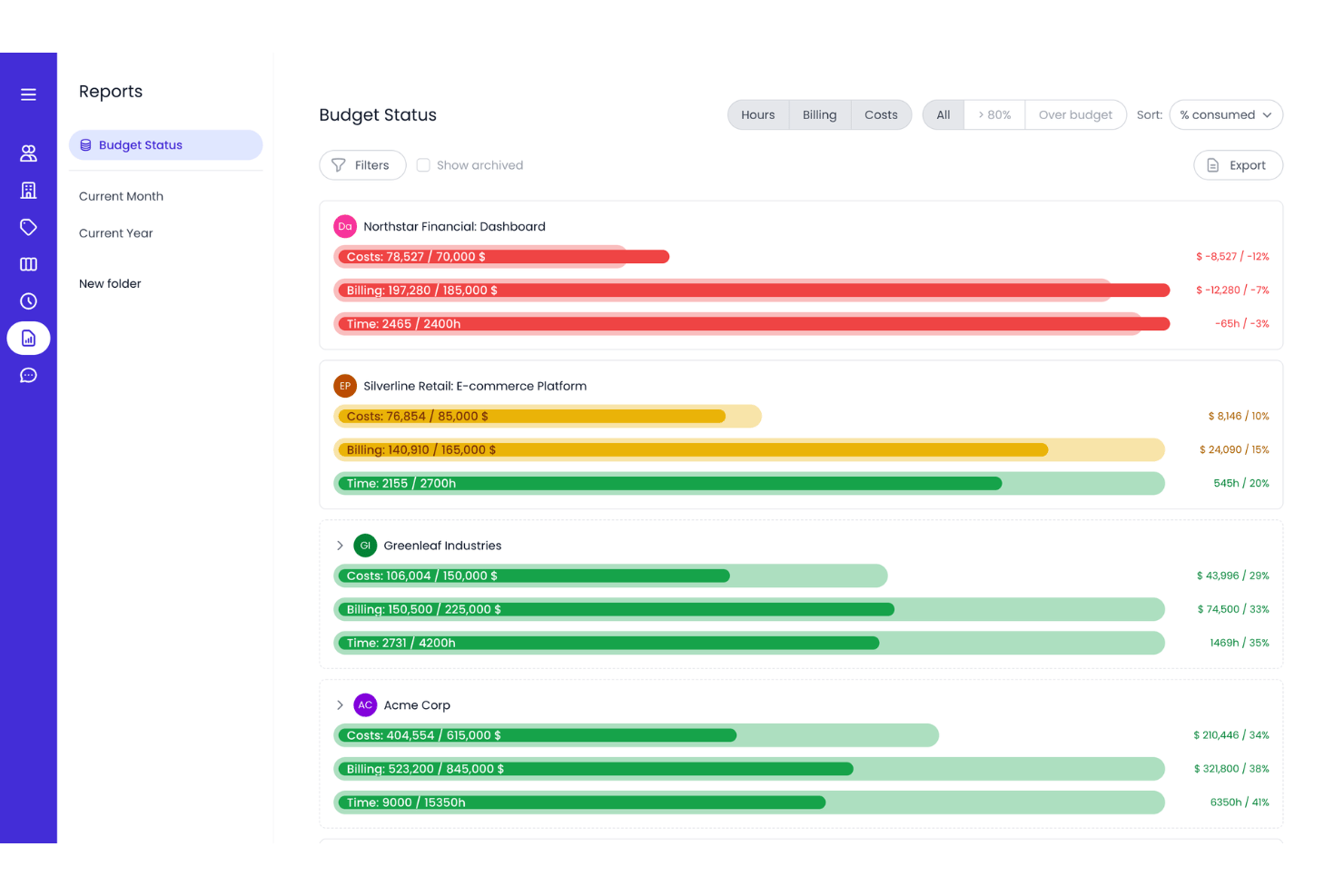
Beebole is a project time tracking software built for planning work, tracking time, and running powerful reports. It combines timesheet management, resource planning, budgeting, cost tracking, and profitability reporting to help teams understand how time and resources are being used across projects.
Who Is Beebole Best For?
Beebole is a strong fit for agencies and professional services teams that bill by the hour and need to track project costs against budgets in real time.
Why I Picked Beebole
I picked Beebole as one of the best because it converts logged hours into real costs automatically, which makes burn tracking feel effortless when you're juggling multiple projects. I especially like the 80% and 100% budget threshold alerts, which give you a real runway to course-correct before an overrun hits. Configurable billing and cost rates at the project, task, or person level mean I can track true margins, not just hours spent.
Beebole Key Features
- Multi-level timesheet approvals: Built-in approval workflows let managers review and sign off on submitted time entries before they're logged against project budgets, with automated reminders to keep the process moving.
- Resource planning: Staffing and Gantt views help teams plan capacity, while planned hours can pre-fill timesheets. The Planned vs. real report then compares planned hours against actual time worked.
- Profitability reporting: Reports combine billing and cost rates to show margins by project, person, task, or tag, giving teams visibility into project costs and profitability.
- AI report builder: Beebole’s AI report builder lets you generate custom reports by typing questions in plain language, without having to build filters manually.
Beebole Integrations
Beebole offers native integrations with QuickBooks Online, Xero, Google Calendar, Outlook Calendar, BambooHR, monday.com, Google Sheets, Microsoft Excel, Asana, and Linear for financial reporting, time syncing, and project data. It also provides an API and webhooks for custom integrations.
Pros and Cons
Pros:
- AI-powered reports simplify financial analysis
- Configurable rates deliver true margin visibility
- Real-time budget burn alerts prevent overruns
Cons:
- No scenario modeling or what-if budgeting
- Budgets and cost tracking require an add-on

Best for robust project management

Microsoft Project is a comprehensive project management solution designed to assist project managers in developing plans, assigning resources to tasks, tracking progress, managing budgets, and analyzing workloads. It's recognized as best for robust project management due to its extensive features that cater to a wide range of project management needs, from simple task management to complex portfolio management.
Why I picked Microsoft Project:
Microsoft Project offers a powerful set of tools that can handle the demands of large and complex projects. Its ability to scale from basic project tasks to advanced portfolio management makes it distinct from other project management software. I believe it's best for robust project management because it provides the necessary tools and capabilities to manage large-scale projects effectively, ensuring that all aspects of project management are covered comprehensively.
Standout features & integrations:
Features include project planning and scheduling with familiar scheduling tools, various views like Grid, Board, and Timeline (Gantt chart), and comprehensive reporting capabilities. It also offers collaboration and communication through Microsoft Teams, co-authoring functionalities, and resource management tools.
Integrations include Microsoft Teams, OneDrive for Business, SharePoint Online, Microsoft Power BI, Microsoft Dynamics 365, Microsoft Azure, Microsoft 365 Apps, Windows 365, Microsoft Exchange, and Microsoft Outlook.
Pros and Cons
Pros:
- Integration with other Microsoft products
- Scalable solutions for different project sizes
- Comprehensive project management features
Cons:
- Potential learning curve for new users
- Can be complex for small projects

Best for onboarding project visibility

Rocketlane is a professional services automation platform with built-in project budgeting, expense tracking, revenue recognition, and client-facing visibility tools designed for teams managing billable client projects.
Who Is Rocketlane Best For?
Rocketlane is a strong fit for professional services and implementation teams that manage recurring client onboarding projects with billable budgets and external stakeholders.
Why I Picked Rocketlane
I've included Rocketlane in my top picks because of how well it handles onboarding project visibility, both internally and on the client side. The shared client portal gives customers a live view of project progress, open tasks, and milestones without requiring them to ask for status updates. I also like that Rocketlane's real-time reporting surfaces project bottlenecks, financials, and delivery risks as they happen, so nothing gets buried until the end of a billing cycle.
Rocketlane Key Features
- Project budgeting: Set budgeted hours and costs per project, then track actuals against them as work progresses.
- Expense management: Log and categorize project expenses directly within a project to keep spending visible alongside task progress.
- Revenue recognition: Automate revenue recognition schedules based on project milestones or time periods for accurate financial reporting.
- Estimate vs. actuals reporting: Compare planned hours and costs against real-time actuals to identify budget variances before they escalate.
Rocketlane Integrations
Rocketlane offers native integrations with Slack, Salesforce, Jira, HubSpot, Google Calendar, Outlook Calendar, and Snowflake. It connects with Zapier and Workato for additional app connectivity. An API is available for custom integrations.
Pros and Cons
Pros:
- Cost rates embedded in resource allocation
- Client portal shows timelines and tasks
- Real-time budget vs. actual tracking
Cons:
- Cannot assign dynamic budgeted hours
- Reporting lacks advanced filtering options

Forecast
Best for mid-sized agencies and consultancies

Forecast is an AI-driven project and resource management tool designed to give you greater control over project financials. It combines budgeting, forecasting, and capacity planning in one system, making it easier to predict costs and allocate resources efficiently.
Why I picked Forecast: I chose Forecast because of its ability to connect project scope directly with budget forecasts. The AI assistance helps you anticipate risks, track costs in real-time, and keep projects financially aligned. I also liked its utilization reports, which give you visibility into workload and capacity across teams so you can prevent overspending before it happens.
Forecast standout features and integrations:
Features include automated time tracking and invoicing, real-time workload visibility, AI-assisted scoping, and risk prediction alerts to catch potential overruns early. Its reporting tools also provide insights into profitability and resource allocation.
Integrations include Sage Intacct, HubSpot, Jira, Google Calendar, Salesforce, QuickBooks, GitHub, GitLab, Pipedrive, Microsoft Teams, Slack, and Trello.
Pros and Cons
Pros:
- Automated invoicing simplifies billing
- Real-time visibility into resources
- AI assistance improves financial planning
Cons:
- Pricing not publicly transparent
- Initial setup can be complex

Prophix
Best for financial performance management
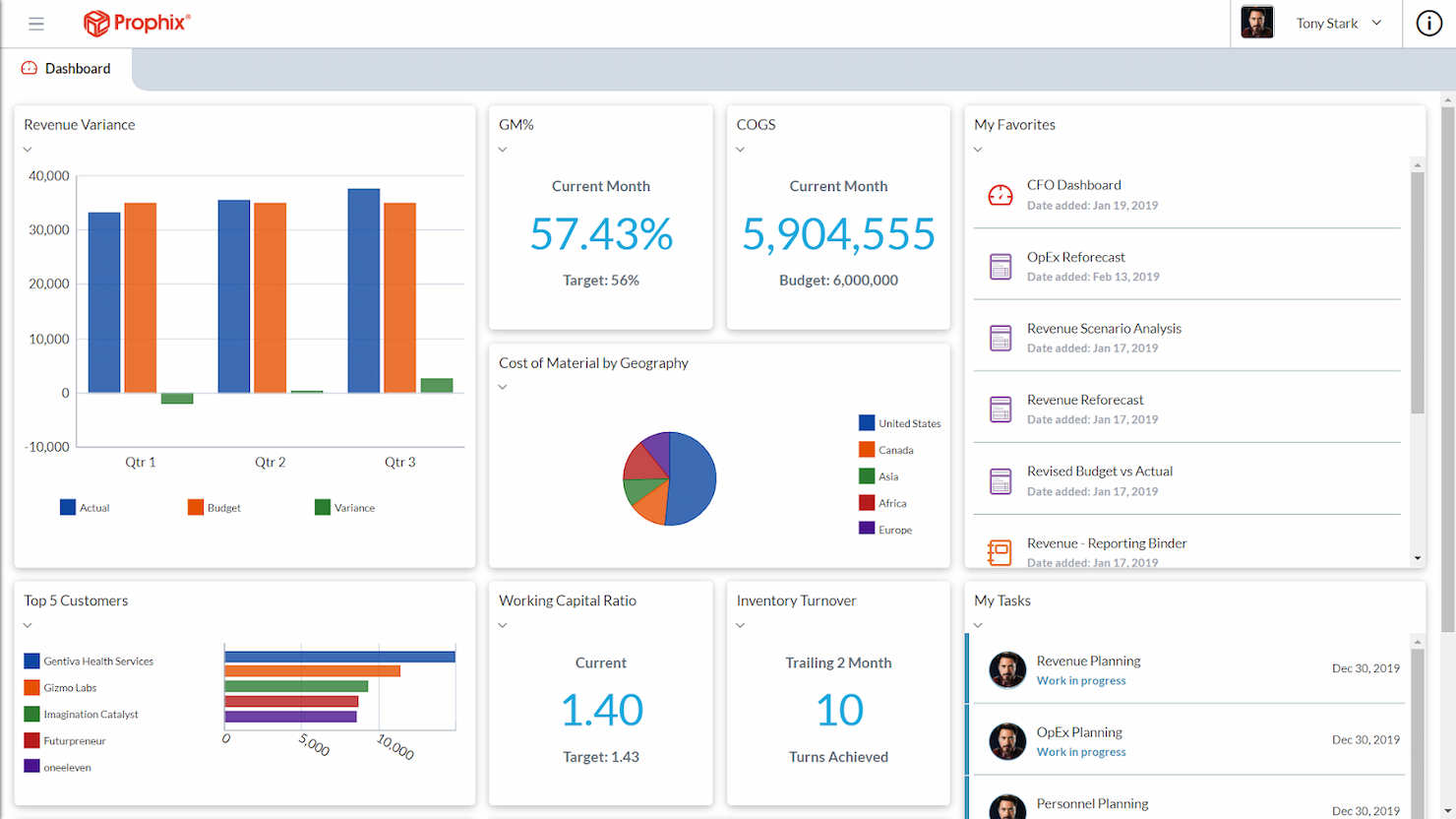
Prophix is a comprehensive tool for automating financial processes and providing insights. It stands out for its unified approach to managing financial performance, offering essential tools for budgeting, planning, forecasting, and reporting.
Why I picked Prophix:
Prophix automates financial tasks and provides actionable insights, distinguishing it from other financial tools. I consider Prophix to be best for financial performance management due to its comprehensive suite of features that cater to the complex needs of financial departments, aiding in the simplification of their operations.
Standout features & integrations:
Features include automated budgeting, financial consolidation, reporting, and scenario analysis, which are pivotal for organizations to make informed financial decisions.
Integrations include Sage, Microsoft Dynamics 365, Deltek, QAD, and more.
Pros and Cons
Pros:
- Financial consolidation and scenario analysis capabilities
- Comprehensive reporting and analysis tools
- Automated financial processes
Cons:
- Steep learning curve due to detailed features
- Complex implementation
Best for tracking budgets and profitability

Bonsai is a business management platform that's built for agencies, consultancies, and other professional services businesses. It helps teams manage tasks and projects, streamline workflows, maintain client relationships, and track project financials.
Why I picked Bonsai: This software solution earned its place on my list because of its integrated task, budgeting, and time management. These features help businesses track the overall profitability of their operations. In addition to comprehensive project management features, it also offers tools for drafting proposals, managing contracts, generating invoices, and processing client payments. With client portals available, it helps client-facing businesses maintain efficiency and reduce errors in budget management.
Bonsai Standout Features & Integrations
Features include multiple currency and tax settings, which support agencies working with international clients. The time tracking tool allows teams to monitor billable and non-billable hours and manage team member workloads. Reporting also supports financial tracking and forecasting, helping users maintain profitability.
Integrations include Gmail, Google Calendar, Zapier, Slack, QuickBooks Online, Calendly, ClickUp, Trello, Google Drive, Google Sheets, Xero, HubSpot, and more.
Pros and Cons
Pros:
- Designed specifically for agencies
- Automations to streamline repetitive tasks
- Client portals available
Cons:
- Some integrations are locked to higher pricing tiers
- Somewhat limited in scalability
Değerlendirilebilecek Diğer Proje Bütçesi Yazılımları
Yukarıdaki seçenekler mevcut tek proje bütçesi yazılımları değildir. Aşağıda kısa listeye alınan ek yazılımlar yer alıyor; ancak bunları daha ayrıntılı incelemeye değer.
- Workday Adaptive Planning
For enterprise planning
- Oracle NetSuite
For cloud-based business management
- PlanGuru
For budgeting and forecasting
- Ravetree
For time and expense tracking
- SAP Business ByDesign
For midsize business ERP
- Salesforce Marketing Intelligence
For marketing analytics
- Budget Maestro by Centage
For budget accuracy
- Smartsheet
For real-time budget visibility
- Accelo
For project profitability insights
- GoodDay
For visual project planning
- Basecamp
For remote teams
- Paymo
For freelancers and SMBs
- monday AI Workspace
For workflow customization
- ProjectManager
For real-time data lovers


İlgili Proje Bütçesi Yazılımı İncelemeleri
Aradığınızı hâlâ bulamadıysanız test edip değerlendirdiğimiz şu diğer ilgili araçlara göz atın:
- Proje Yönetimi Yazılımı
- Kaynak Yönetimi Yazılımı
- İş Akışı Otomasyonu Yazılımı
- Zaman Takibi Yazılımı
- Görev Yönetimi Yazılımı
- İş Birliği Araçları
- Gantt Şeması Oluşturucu
- Verimlilik Araçları
- Proje Takibi Yazılımı
- Proje Planlama Yazılımı
How I Evaluate Project Budget Software
I split my evaluation into two layers: the baseline a tool must hit—budget creation, cost tracking, and BvA reporting—and differentiators like EAC forecasting and client billing.
Core Functionality (Table Stakes For This List)
When I'm selecting tools for my list, I rank each one on a scale from 0 (does not offer the functionality) to 5 (excels in this area) for each core functionality listed below. Then, I calculate the tool's total score into a percentage. Each tool needs to achieve a minimum total score of 65% to be considered for inclusion.
- Budget Creation & Allocation: I look for line-item budgeting with cost categories, phase-level allocations, and reusable templates—not just a single budget field slapped onto a project.
- Cost Tracking & Actuals: Each tool should capture labor, expenses, and vendor costs tied to specific projects so you're comparing real spend against plan, not guessing from spreadsheets.
- Budget vs. Actual Reporting: I evaluate whether the platform offers real-time variance dashboards with drill-down capability, since stale weekly exports defeat the purpose of tracking actuals.
- Forecasting & EAC: Tools should calculate burn rate, estimate at completion, and projected overruns—helpful when a project is 40% done and you need to flag risk to leadership.
- Time & Resource Cost Integration: I check whether timesheets flow into budget consumption using billable rates and role-based costing, connecting who's working to what it actually costs.
- Financial Alerts & Approvals: Configurable threshold alerts and approval workflows matter here—especially for teams managing change orders or expense requests across multiple projects.
Once I have a list of tools that meet this criteria, I consider what sets each platform apart.
Differentiating Factors (What Sets Vendors Apart)
Here's how I compare and contrast different vendors:
Standout Features
Scenario planning is a big one for me—when a client requests a scope change mid-project, I want to model the budget impact before approving it. Profitability analytics go a step further by showing margins at the project or client level, not just whether you stayed under budget. I also evaluate client billing integration, since tools that connect budgets directly to invoicing cut out manual reconciliation between your PM platform and accounting system.
Beyond Features
Integrations matter a lot here. Budget data lives alongside your accounting system, so I check for native connections to platforms like QuickBooks, Xero, or NetSuite—manual CSV imports between your PM tool and general ledger get old fast. Industry fit is another factor I weigh. A construction PM needs cost codes and change order workflows, while an agency lead cares more about retainer tracking and utilization. Pricing structure also plays a role, since per-user models can balloon costs when you just need stakeholders to view budget reports.
Proje Bütçesi Yazılımı Nasıl Seçilir?
Kendinize özgü yazılım seçim sürecinizde ilerlerken aşağıdaki noktaları göz önünde bulundurun:
- İhtiyaçları Belirleyin: Proje bütçesi yazılımını seçmeden önce kuruluşunuzun özel ihtiyaçlarını belirlemek çok önemlidir. Projelerinizin boyutunu, bütçelerinizin karmaşıklığını ve izleme ile raporlama için gereken ayrıntı düzeyini göz önünde bulundurun.
- Kullanım Kolaylığı: Yazılım, tüm ekip üyelerinin kapsamlı bir eğitim almadan etkili bir şekilde kullanabilmesini sağlamak için kullanıcı dostu olmalıdır. Kullanıcı dostu bir arayüz, öğrenme eğrisini önemli ölçüde azaltabilir ve bütçe yönetiminin verimliliğini artırabilir.
- Entegrasyon Yetenekleri: Diğer araç ve sistemlerle entegre olabilme özelliği, uyumlu bir iş akışı için gereklidir. Mevcut muhasebe sistemleriniz, CRM veya ERP çözümlerinizle bağlantı kurabilen yazılımları tercih edin.
- Ölçeklenebilirlik: İşletmenizle birlikte büyüyebilecek bir yazılım seçin. Performans sorunları yaşamadan artan proje ve kullanıcı sayısını yönetebilmelidir.
- Destek ve Eğitim: Yazılım sağlayıcısının yeterli destek ve eğitim kaynakları sunduğundan emin olun. Bu, sorunların hızlı bir şekilde çözülmesi ve yatırımınızdan en iyi şekilde yararlanılması açısından önemlidir.
2026 Yılında Proje Bütçesi Yazılımı Trendleri
2026 yılında proje bütçesi yazılımında fark ettiğim başlıca trendlerden bazıları şunlardır:
- Gerçek Zamanlı Veri Analitiğiyle Entegrasyon: Proje bütçesi yazılımları artık gerçek zamanlı veri analitiğiyle entegre oluyor. Bu, harcamalar ve kaynak tahsisi hakkında anında içgörüler elde edilmesini sağlıyor. Hızlı ve bilinçli kararlar almak için önemlidir.
- Kullanıcı Dostu Arayüzlere Vurgu: Kullanıcı dostu arayüzler öncelik haline geliyor. Kullanıcı deneyimini basitleştiriyor ve öğrenme eğrisini azaltıyorlar. Bu trend, farklı beceri düzeyleri arasında daha geniş bir benimseme sağlamak açısından kritik önem taşıyor.
- Geliştirilmiş İş Birliği Özellikleri: Proje bütçesi yazılımlarındaki iş birliği özellikleri geliştiriliyor. Ekipler artık bütçeleme görevleri üzerinde daha etkili bir şekilde birlikte çalışabiliyor. Bu, şeffaflığı ve hesap verebilirliği korumak açısından önemlidir.
- Yapay Zekâ Kullanarak Öngörülü Bütçeleme: Yapay zekâ, öngörülü bütçeleme için giderek daha fazla kullanılıyor. Yapay zekâ destekli bütçeleme araçları gelecek harcama eğilimlerini tahmin etmek ve bütçe aşımlarını önlemeye yardımcı olmak için geçmiş verileri analiz ediyor.
- Mobil Erişilebilirlik: Mobil erişilebilirlik giderek yaygınlaşan bir trenddir. Proje bütçesi yazılımları artık akıllı telefonlarda ve tabletlerde kullanılabiliyor. Bu, hareket hâlindeyken erişim ve güncelleme yapmak için önemlidir.
Proje Bütçesi Yazılımı Nedir?
Proje bütçesi yazılımı, projelerin finansal unsurlarının planlanmasına, izlenmesine ve yönetilmesine yardımcı olmak üzere tasarlanmış dijital bir araçtır. Proje yöneticileri, finans ekipleri ve paydaşlar tarafından proje maliyetleri üzerindeki kontrolü korumak ve finansal hedeflere ulaşılmasını sağlamak için kullanılır. Bu yazılım; doğru bütçe tahminleri oluşturması, harcamaları izlemesi ve aşırı harcamaları önleyerek finansal kaynakları en üst düzeye çıkarması amacıyla proje finansmanını yönetmesi gereken kullanıcılar için gereklidir.
Proje Bütçesi Yazılımının Özellikleri
Proje bütçesi yazılımını seçerken, bir projenin yaşam döngüsü boyunca etkili finansal yönetimi destekleyecek özellikleri göz önünde bulundurmak çok önemlidir. Doğru araç seti, maliyetler üzerindeki kontrolün korunması, giderlerin tahmin edilmesi ve projenin finansal sağlığının güvence altına alınması konusunda önemli bir fark yaratabilir.
Aranması gereken en önemli özellikler şunlardır:
- Gerçek Zamanlı Bütçe Takibi: Bu özellik, finansal performansa anında görünürlük sağlar. Proje yöneticilerinin bilinçli kararları hızlı bir şekilde almasına olanak tanıyarak bütçe aşımlarını önlediği için önemlidir.
- Tahmin Araçları: Bu araçlar gelecekteki harcamaları ve gelirleri öngörür. Yaklaşan finansal ihtiyaçları planlamak ve bunlara hazırlanmak ya da olası açıkları belirlemek için gereklidir.
- Gider Yönetimi: Bu özellik, proje giderlerinin kaydedilmesi ve izlenmesi sürecini kolaylaştırır. Doğru finansal kayıtların tutulması ve tüm maliyetlerin hesaba katılmasının sağlanması açısından kritik öneme sahiptir.
- Tamamlanma Maliyeti Takibi: Bu işlev, projeyi tamamlamak için gereken toplam maliyetin tahminini sunar. Projenin sonuna kadar bütçe dahilinde kalıp kalmayacağını değerlendirmek için hayati önem taşır.
- Zaman Takibi Entegrasyonu: Bu özellik, proje görevleri için harcanan zamanı bütçe değerlendirmeleriyle ilişkilendirir. İş gücü maliyetlerini ve bunların genel bütçe üzerindeki etkisini anlamaya yardımcı olduğu için önemlidir.
- Özelleştirilebilir Raporlar: Özel olarak hazırlanmış raporlar oluşturma olanağı, proje bütçesinin farklı yönlerini analiz etmek için çok önemlidir. Finansal verilerin daha derinlemesine anlaşılmasını sağlar ve stratejik karar alma süreçlerini destekler.
- Çoklu Para Birimi Desteği: Küresel projeler için bu özellik, farklı para birimlerini ve döviz kurlarını yönettiği için gereklidir. Uluslararası sınırlar arasındaki doğru finansal yönetimi güvence altına alır.
- Role Dayalı Erişim Denetimi: Bu özellik, bütçeye erişimi kullanıcı rollerine göre kısıtlar. Veri bütünlüğünü korumak ve hassas finansal bilgilerin yalnızca yetkili personel tarafından erişilebilir olmasını sağlamak için önemlidir.
- Entegrasyon Olanakları: Diğer proje yönetimi araçlarıyla entegre olabilme özelliği, projenin genel durumuna ilişkin kapsamlı bir görünüm elde etmek için kritik öneme sahiptir. Finansal verilerin diğer proje ölçümleriyle senkronize edilmesini sağlar.
- Ölçeklenebilirlik: Bu özellik, yazılımın projeyle veya kuruluşla birlikte büyüyebilmesini sağlar. Yeni bir yazılıma ihtiyaç duymadan değişen proje kapsamlarına ve boyutlarına uyum sağlamak için önemlidir.
Bu özelliklere sahip bir proje bütçesi yazılımı seçmek, herhangi bir projenin finansal yönetimine önemli ölçüde katkı sağlayabilir. Bu araçlar yalnızca proje finansmanı üzerinde netlik ve kontrol sağlamakla kalmaz, aynı zamanda projelerin genel başarısına ve kârlılığına da katkıda bulunur.
Proje Bütçesi Yazılımının Faydaları
Proje bütçesi yazılımı, proje finansmanı üzerindeki kontrolü korumak isteyen işletmeler ve bireyler için paha biçilmez bir araçtır. Kullanıcılar bu tür bir yazılımı operasyonlarına entegre ederek proje maliyetlerinin ve kaynaklarının verimli yönetimine katkıda bulunan çeşitli avantajlardan yararlanabilir. Proje bütçesi yazılımının sunduğu başlıca faydalardan bazıları şunlardır:
- Gerçek Zamanlı Bütçe İzleme: Proje bütçesi yazılımı, kullanıcıların harcamaları gerçekleştikleri anda takip etmelerini sağlayarak tüm finansal faaliyetlerin gerçek zamanlı olarak kaydedilmesini ve analiz edilmesini güvence altına alır. Bu anlık görünürlük, aşırı harcamaların önlenmesine yardımcı olur ve bütçede zamanında ayarlamalar yapılmasını sağlar.
- Tahmin ve Analiz: Gelecekteki harcamaları öngörme ve geçmiş verileri analiz etme olanağı sayesinde proje bütçesi yazılımı, bilinçli finansal kararlar alınmasına yardımcı olur. Bu öngörü, kaynakların daha iyi tahsis edilmesini sağlayabilir ve olası finansal sorunların önlenmesine yardımcı olabilir.
- Geliştirilmiş İş Birliği: Ekipler, paylaşılan bütçe bilgilerine erişebildiklerinde daha etkili bir şekilde birlikte çalışabilir. Proje bütçesi yazılımı, bütçeyle ilgili iletişim ve karar alma süreçleri için merkezi bir platform sağlayarak bu iş birliğini kolaylaştırır.
- Kolaylaştırılmış Maliyet Yönetimi: Yazılım, bütçe takibiyle ilişkili görevlerin çoğunu otomatikleştirerek proje maliyetlerini yönetme sürecini basitleştirir. Bu otomasyon, insan hatası olasılığını azaltır ve diğer proje alanlarına aktarılabilecek zamandan tasarruf sağlar.
- Geliştirilmiş Finansal Raporlama: Kapsamlı finansal raporlar oluşturmak proje bütçesi yazılımıyla çok daha kolay hale gelir. Bu raporlar, paydaşların bir projenin finansal durumunu anlamaları ve buna göre stratejik kararlar almaları için kritik öneme sahiptir.
Proje bütçesi yazılımının benimsenmesi, daha iyi finansal kontrol, daha doğru planlama ve genel proje sonuçlarında iyileşme sağlayabilir. Kuruluşlar bu araçlardan yararlanarak projelerinin bütçe dahilinde tamamlanmasını ve finansal risklerin en aza indirilmesini güvence altına alabilir.
Proje Bütçesi Yazılımının Maliyetleri ve Fiyatlandırması
Proje bütçesi yazılımı, proje yöneticilerinin ve ekiplerinin proje finansmanını etkili bir şekilde planlamasına, izlemesine ve yönetmesine yardımcı olmak için tasarlanmıştır. Ancak bu yazılım çözümlerinin fiyatları; sunulan özelliklere, kullanıcı sayısına ve sağlanan destek düzeyine bağlı olarak büyük ölçüde değişebilir.
Aşağıda, gerçekleştirilen araştırmaya dayanarak proje bütçesi yazılımı için plan seçeneklerinin ve fiyatlarının bir özeti yer almaktadır:
Proje Bütçesi Yazılımı İçin Plan Karşılaştırma Tablosu
| Plan Türü | Ortalama Fiyat | Yaygın Özellikler |
| Ücretsiz | $0 (Ücretsiz) | Temel görev yönetimi, sınırlı kullanıcı, yerel takvim, kanban panosu ve sınırlı depolama alanı |
| Bireysel | Aylık $3.66 | Gelişmiş görev yönetimi, takvim görünümleri, öncelik belirleme, üçüncü taraf entegrasyonları ve sınırlı depolama |
| Küçük İşletme | Aylık/kullanıcı başına $8.90 | Gantt şeması görünümü, iş birliği araçları, belge paylaşımı, artırılmış destek ve daha fazla depolama alanı |
| Orta Ölçekli İşletme | Aylık/kullanıcı başına $16.88 | Gelişmiş güvenlik, sınırsız kullanıcı, kapsamlı proje görünümleri ve gerçek zamanlı raporlama |
| Kurumsal | Özel Fiyatlandırma | Pazarlıkla belirlenen fiyatlandırma, en iyi müşteri desteği ve tüm özellikleri içeren kapsamlı paket. Genellikle minimum kullanıcı sayısı gerektirir |
Bir proje bütçesi yazılımı planı seçerken alıcılar, ekiplerinin büyüklüğünü, projelerinin karmaşıklığını ve proje bütçelerini etkili bir şekilde yönetmek için ihtiyaç duydukları belirli özellikleri göz önünde bulundurmalıdır. Bilinçli bir karar verebilmek için her planın özelliklerini bütçelerine göre dikkatle değerlendirmelidirler.
Müşteriler için Proje Bütçesi Yazılımı Hakkında SSS
Müşteriler için proje bütçesi yazılımı hakkında sıkça sorulan bazı sorular burada yer almaktadır.
Proje bütçesi yazılımı küçük işletmeler için uygun mudur?
Elbette, proje bütçesi yazılımı küçük işletmelerin ihtiyaçlarını karşılayacak şekilde de tasarlanmıştır. İş yüklerini verimli bir şekilde yönetmeye yardımcı olan ölçeklenebilir çözümler sunarak projelerin bütçe dahilinde ve zamanında tamamlanmasını sağlar.
Proje bütçesi yazılımı kullanmamanın riskleri nelerdir?
Proje bütçesi yazılımı kullanmaktan vazgeçmek; hatalı bütçe tahminlerine, aşırı harcamaya, finansal kontrol eksikliğine, maliyet aşımlarına ve proje harcamalarını etkili bir şekilde takip etmede zorluklara yol açabilir. Bu riskler, bir projenin başarısı ve kuruluşun finansal istikrarı üzerinde önemli ölçüde olumsuz etki yaratabilir.
Bütçe oluşturmak için en iyi kullanılan yazılım hangisidir?
Bütçe oluşturmak için en iyi yazılım, kullanıcının veya kuruluşun özel ihtiyaçlarına bağlıdır. Timeular, etkili görev yönetimine elverişli güçlü bütçeleme özellikleri ve mükemmel proje yönetimi yetenekleriyle öne çıkar.
Bir yazılım projesinin bütçesini nasıl yönetirsiniz?
Bir yazılım projesinin bütçesini yönetmek için ayrıntılı bir proje taslağı oluşturmalı, gerekli her kaynağı listelemeli, her kaynağa bir maliyet atamalı, beklenmeyen durumlar için pay eklemeli, bütçeyi belgelemeli, onay almalı ve proje yaşam döngüsü boyunca bütçeyi gerektiği şekilde sürekli olarak izleyip ayarlamalısınız.