2026’da Denediğim En İyi 10 Proje Yönetimi Takvimi

10 En İyi Proje Yönetimi Takvimi Araçları Kısa Listesi


En iyi proje yönetimi takvimi araçları, görsel bir takvim arayüzü kullanarak projeleri ve kaynakları yönetmenize ve planlamanıza yardımcı olur. Projeleri bu şekilde planlamak, süreçlerinizdeki darboğazları belirleyip ortadan kaldırmanıza, ekibin iş yükünü yönetmenize ve yol haritanızı görselleştirerek planın gerisinde kalmamanıza ve proje başarısına ulaşmanıza yardımcı olur.
Proje yönetimindeki 15 yıllık deneyimimi kullanarak 20'den fazla proje takvimi aracını değerlendirdim—her bir aracın analizini, temel özelliklerini ve kullanım alanlarını aşağıda bulabilirsiniz. Projelerinizde planlamayı, öngörüyü ve görev koordinasyonunu geliştirecek doğru aracı bulmanıza yardımcı olacağım. Ayrıca hiçbir şeyin gözden kaçmaması için kilometre taşlarını, görevleri, bağımlılıkları ve son tarihleri merkezi bir görünümde görmenizi sağlayacağım.
Why Trust Our Software Recommendations
Our team has been testing and reviewing software since 2012. As project managers ourselves, we know how difficult—and important—it is to choose the right software.
For this guide, we evaluated tools using hands-on testing and independent research, scoring tools using our selection criteria. We also draw on insights from industry thought leaders and practicing project management experts.
Our reviews reflect our human editorial judgment, not a sales pitch.
Expert reviewers:
Proje Yönetimi Takvimi Karşılaştırma Tablosu
Bu karşılaştırma tablosu, en iyi proje yönetimi takvimi seçimlerim için fiyatlandırma ayrıntılarını özetlemektedir:
| Tool | Best For | Trial Info | Price | ||
|---|---|---|---|---|---|
| 1 | Best for workflow automation | Free plan + 14-day trial available | From $9/user/month (billed annually) | Website | |
| 2 | Best for agile project management | Free plan + 14-day trial + demo available | From $10/user/month (billed annually) | Website | |
| 3 | Best for preventing resource over-allocation | Free trial available | From $5/user/month | Website | |
| 4 | Best mobile app version | Free plan + free demo available | From $12/user/month (billed annually) | Website | |
| 5 | Best for resource planning | Free plan + 15-day trial + demo available | Pricing upon request | Website | |
| 6 | Best for docs, tasks, and calendar in one app | Free plan + 30-day trial available | From $10/user/month | Website | |
| 7 | Best for cross-team workflow tracking | Free plan available | From $10.99/user/month (billed annually) | Website | |
| 8 | Best for milestone-driven timeline scheduling | Free plan + 14-day free trial available | From $10/user/month (billed annually) | Website | |
| 9 | Best for visual task management | Free plan + free trial available | From $5/user/month (billed annually) | Website | |
| 10 | Best for all-in-one task and calendar scheduling | Free plan + 15-day free trial + free demo available | From €69/month | Website |


En İyi Proje Yönetimi Takvimi Aracı İncelemeleri
Her bir proje yönetimi takvimi uygulamasının kısa açıklamasını, en uygun kullanım alanını ve öne çıkan özelliklerini burada bulabilirsiniz.

Best for workflow automation
monday AI Workspace is an AI-powered work management platform that combines calendar, Gantt, timeline, and workload views with automated scheduling, dependency tracking, and cross-team visibility across projects.
Who Is monday AI Workspace Best For?
It's a strong fit for cross-functional teams and PMO leads at mid-size to enterprise organizations managing multiple concurrent projects across departments.
Why I Picked monday AI Workspace
monday AI Workspace earns its spot on my shortlist because its automation engine directly serves scheduling workflows. I love that you can set triggers like "when a date changes, push all dependent tasks forward automatically," which removes the manual rescheduling work that typically slows teams down. The AI Workflow Builder also surfaces date conflicts and suggests adjusted timelines before they become blockers.
monday AI Workspace Key Features
- Calendar widget with time range support: Displays projects and events across multi-day spans, making it easier to visualize overlapping tasks by duration.
- Workload view: Shows every team member’s assigned tasks and capacity by day, week, or month for quick balance checks.
- Permission-based sharing: Lets teams share project boards or calendars with internal users and external guests using custom access levels.
- Native integration with Google Calendar and Outlook: Keeps project deadlines and deliverables synced in both directions between monday and your external calendars.
monday AI Workspace Integrations
monday AI Workspace offers hundreds of native integrations, including Slack, Google Workspace, Microsoft 365, Salesforce, Jira, GitHub, Zoom, Dropbox, HubSpot, and Zendesk. It also supports Zapier and provides an API for custom integrations.
Pros and Cons
Pros:
- Multiple calendar views including Gantt and timeline
- Workload view flags team over-allocation visually
- Automation shifts dependent task dates automatically
Cons:
- Mobile app limits full calendar scheduling functionality
- Calendar view lacks standalone depth vs. dedicated tools
New Product Updates from monday AI Workspace
monday AI Workspace Adds Human Approval Routing
monday AI Workspace adds a human-in-the-loop approval block to AI Workflows, sending approval requests and routing workflow paths based on responses. For more information, visit monday AI Workspace's official site.

Wrike
Best for agile project management
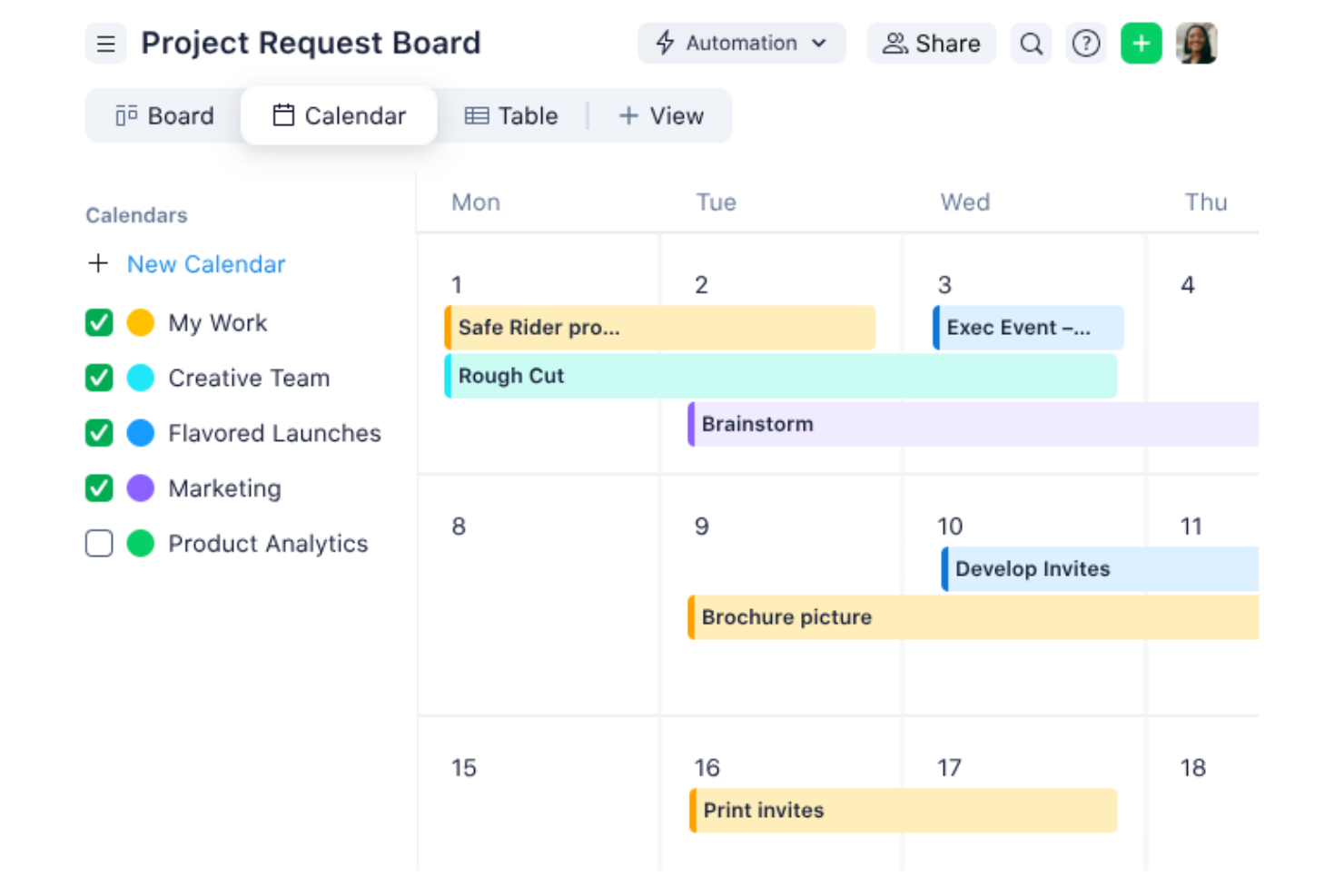
Wrike is a versatile project management tool designed to help teams collaborate better and manage tasks more efficiently. It offers a range of features that cater to diverse project needs, which makes it a valuable asset for any team.
I recently spoke with Caleb Johnstone, the SEO director at Paperstack, about his experience with Wrike and its ability to schedule projects and timelines. "The simplified interface and the simple timelines \[keep] everything straight so we stay organized and meet our deadlines without the stress," he says.
Why I Picked Wrike
I picked Wrike for its ability to support agile project management. Wrike's online team calendar offers visibility into timelines and deadlines, so you can help your team stay on track without constant manual updates. Its agile project management features, such as customizable workflows and AI-driven task suggestions, let your team adapt quickly to changing project requirements and help you maintain continuous collaboration and efficient task management.
Wrike's automation capabilities help you reduce manual tasks. This lets your team focus on the work that truly matters. The platform also offers multiple visualization options, including Gantt charts and Kanban boards, to give you the flexibility to choose what works best for your team.
Wrike Key Features
Wrike offers several other features that make it a standout choice for your project management calendar needs.
- Calendar View: This feature lets you visualize tasks and initiatives in a project calendar format and provides a clear overview of timelines and deadlines.
- Board View: The Kanban-style boards let you efficiently update task statuses and track overdue tasks, so your team stays on top of their responsibilities.
- Table View: A customizable spreadsheet format lets you manage work without the need for external tools, which means more flexibility in tracking and organizing tasks.
- Resource Bookings: This functionality lets you reserve team member time and estimate project hours, so you can make sure resources are allocated effectively.
Wrike Integrations
Integrations include Salesforce, QuickBooks, Jira, Tableau, Power BI, Microsoft Teams, Google Drive, Slack, and Microsoft Outlook.
Pros and Cons
Pros:
- Variety of views like Gantt charts and Kanban boards
- AI-driven tools for risk assessment
- Centralizes data from multiple sources
Cons:
- Customization is time-consuming to setup
- Limited offline capabilities
New Product Updates from Wrike

Wrike Redesigns Workspace Search With New Filters
Wrike introduces a redesigned Workspace Search interface with recent search shortcuts, item type and location filters, and parent-task context. These updates help users find relevant work items and navigate search results efficiently. For more information, visit Wrike’s official site.

Best for preventing resource over-allocation

Resource Guru is a resource management and scheduling tool designed to bring clarity and order to your project management efforts. It offers a suite of features that help you manage resources, plan capacity, and track time, and it's an essential tool for teams looking to optimize their workflows.
Why I Picked Resource Guru
I picked Resource Guru for its robust resource scheduling capabilities, which let you visualize team availability and manage workloads effectively. This feature helps you avoid scheduling conflicts and makes sure your team is always working at optimal capacity. Additionally, the capacity planning feature is invaluable for long-term project management, as it helps you foresee potential bottlenecks and address them before they become issues.
Another reason Resource Guru stands out is its time tracking functionality, which lets you compare scheduled hours with actual hours worked. This feature is crucial for making data-driven decisions and improving project outcomes. It also offers customizable reports, which provide insights into performance and help you identify areas for improvement.
Resource Guru Key Features
Resource Guru offers a range of other features for project management and schedule management.
- Calendar Integration: You can sync seamlessly with Google Calendar and Outlook to consolidate schedules and reduce the chance of scheduling conflicts.
- Leave Management: This integrates team leave schedules directly into your planning so you get clear visibility of team availability.
- Clash Management: This automatically identifies and resolves scheduling conflicts so you can maintain efficient resource allocation.
- Customizable Reports: You can generate reports tailored to your project's specific needs and get insights into your team's performance and project progress.
Resource Guru Integrations
Integrations include Google Calendar and Microsoft Outlook, as well as with Slack, Salesforce, and Microsoft Teams via Zapier.
Pros and Cons
Pros:
- Simple implementation process
- Intuitive drag-and-drop functionality
- Automatic timeline updates
Cons:
- No mobile app
- Lacks communication features found in other tools
New Product Updates from Resource Guru

Resource Guru Adds More Control Over Calendar Sync
Resource Guru adds more control over Google and Outlook Calendar sync, including source calendar selection and destination calendar options. These updates help users manage external events and Resource Guru bookings with less clutter. For more information, visit Resource Guru’s official site.
 .

ClickUp
Best mobile app version
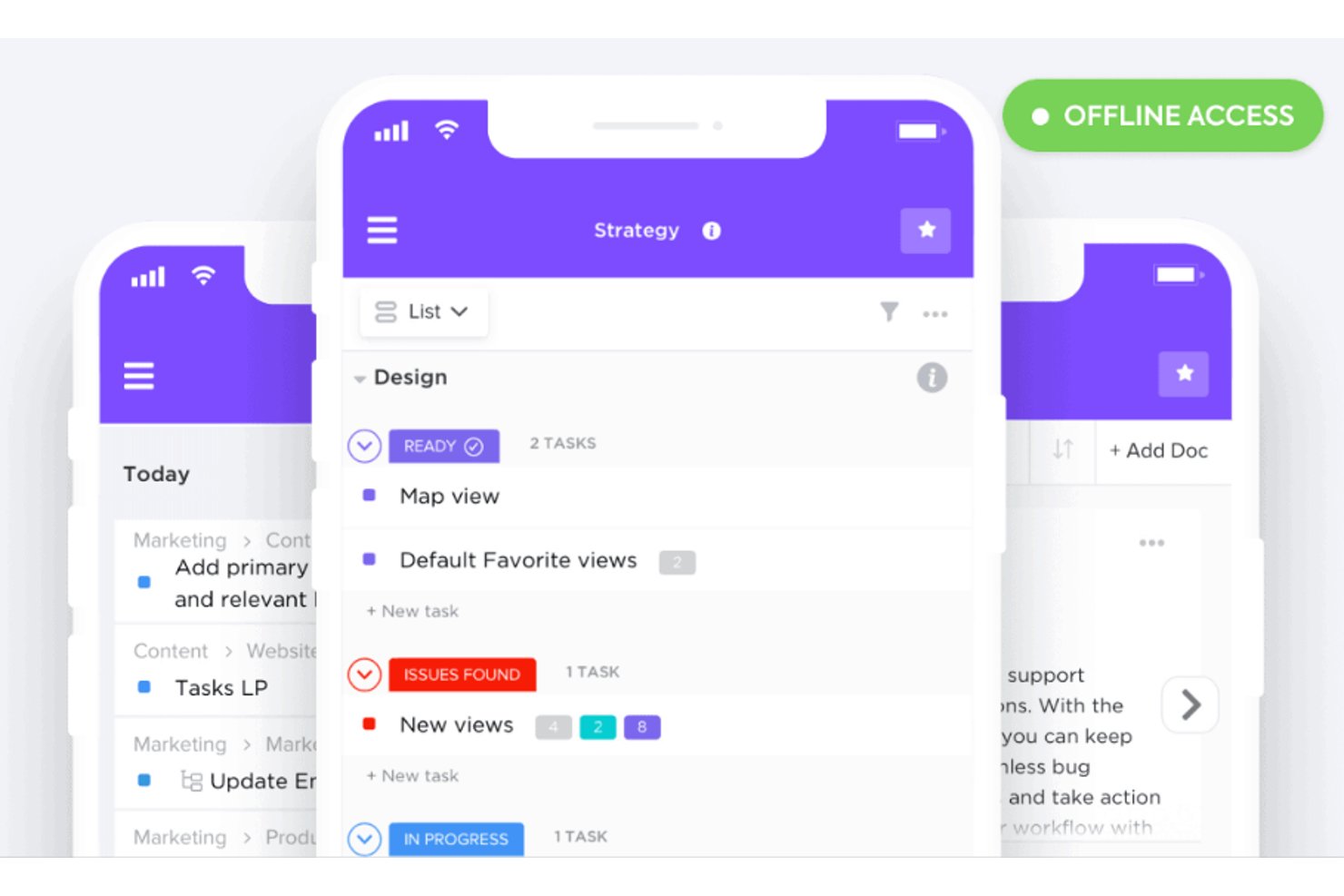
ClickUp is a versatile project management tool that consolidates various productivity features into a single platform. With its array of functionalities, ClickUp helps you manage tasks, track time, and organize projects effectively.
The tool also lets you easily reschedule deadlines when things change. I recently spoke with Jeff Cypher, who was a ClickUp expert and consultant before accepting a role at the company. Here's what he had to say about ClickUp's flexibility. "The ClickUp system allows you to remap deadlines in real-time, which is invaluable for project managers dealing with timeline changes," he says.
Why I Picked ClickUp
I picked ClickUp for its exceptional mobile app. The app offers customizable views, such as daily, weekly, and monthly options, so you can tailor your calendar to meet your specific needs. With drag-and-drop functionality, you can easily reschedule tasks on the go and keep your team remains agile and responsive.
Another reason ClickUp stands out is its AI capabilities, which let you automate tasks and provide real-time updates. This feature helps keep your team aligned and maintain timely project delivery. By automating routine tasks, ClickUp frees up your time to focus on more strategic elements of your project, which improves overall productivity.
ClickUp Key Features
ClickUp offers a range of other features that will help you and your team better manage your projects.
- Task Dependencies: You can keep your team on track by setting task dependencies that visually indicate which tasks need to be completed before others can start.
- Time Tracking: This lets you easily log the time spent on each task, so you can manage project timelines and resource allocation more effectively.
- Goal Tracking: You can align your team's efforts by setting and tracking goals and make sure everyone is working towards the same objectives.
- Custom Statuses: You can create custom task statuses that fit your workflow, which provides clarity and transparency into the progress of each project stage.
ClickUp Integrations
Integrations include Google Drive, Slack, Zoom, Microsoft Teams, Trello, Asana, GitHub, Outlook, Google Calendar, Salesforce, Zapier, and Dropbox.
Pros and Cons
Pros:
- Highly customizable interface lets you tailor workspace
- Built-in automations reduce manual work
- Real-time collaboration improves team communication
Cons:
- Learning curve steep due to rich feature set
- Occasional performance lags when managing large projects
New Product Updates from ClickUp
ClickUp Adds List Automations, Time Off Scheduling, and Org Charts
ClickUp adds template-based List automations, personal time off scheduling, a unified picker, automatic task date syncing, and Org Charts. These updates help teams automate project setup, manage availability, and organize work. For more information, visit ClickUp’s official site.

Best for resource planning
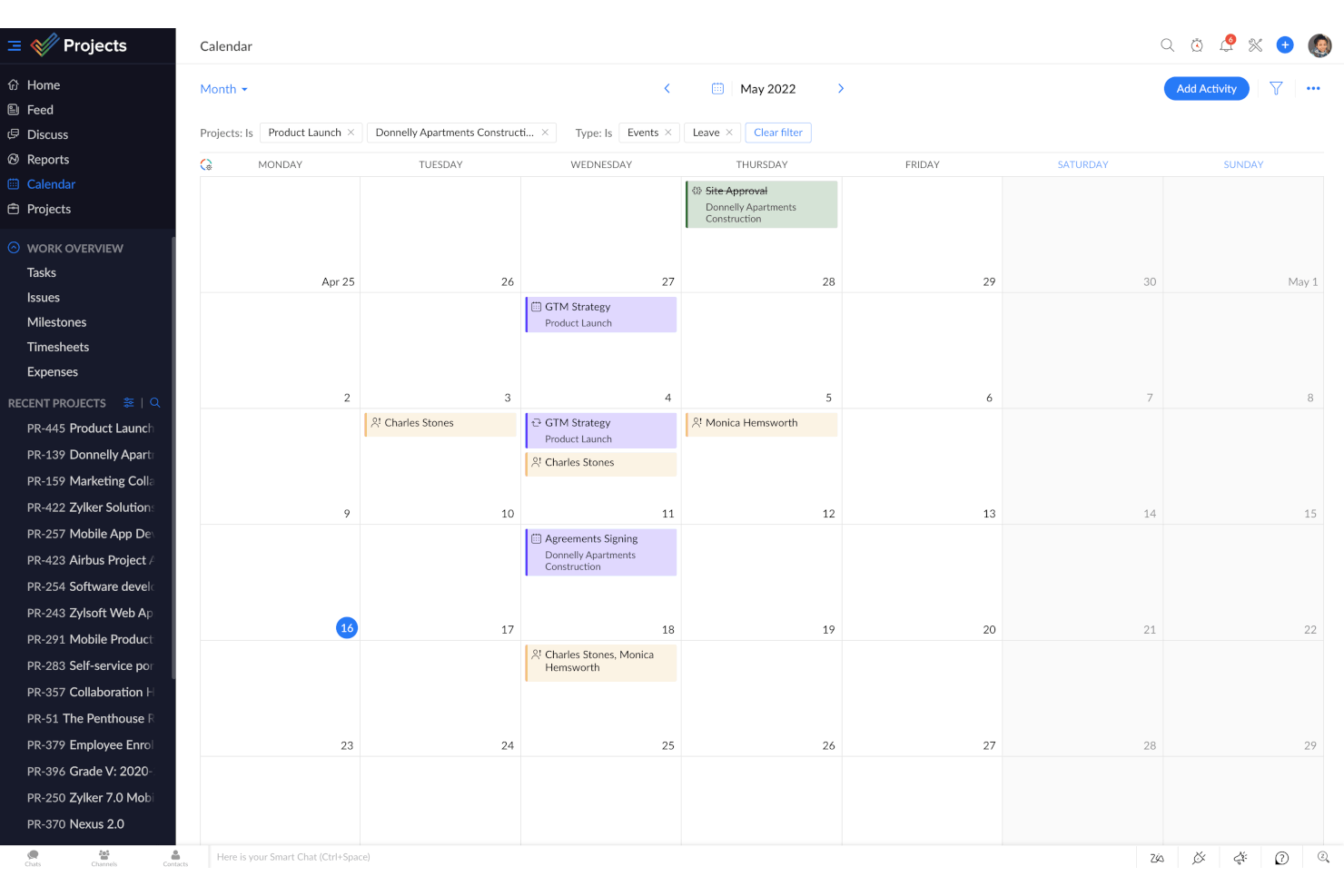
Zoho Projects is a project management software that can help you improve productivity and collaboration on your teams. It offers a suite of features such as task management, automation, and reporting that help you and your team manage projects more effectively.
Why I Picked Zoho Projects
I picked Zoho Projects because it provides a unified platform where you can plan resources, manage tasks, track time, and generate reports. The resource utilization chart is a key feature that lets you visualize your team's availability, so you can make sure tasks are allocated optimally without overloading anyone. You also get time tracking, which is essential for keeping projects on schedule and making sure resources are used wisely.
Zoho Projects also stands out for its automation capabilities, which can help reduce repetitive tasks and keep your team focused on more critical work. The reporting tools offer insights into project performance, so you can make informed decisions based on real-time data, stay on top of your projects, and make sure work is progressing as planned.
Zoho Projects Key Features
In addition to resource planning, Zoho Projects offers a variety of other features for project and calendar management.
- Task Management: You can break down projects into manageable tasks and sub-tasks and use different views like Gantt charts and Kanban boards for better organization.
- Collaboration Tools: You get features like feeds, chat, and document management, which facilitate seamless communication and collaboration within your team.
- Reporting and Analytics: This lets you generate detailed performance reports to assess project health and make data-driven decisions.
- Roll-Up: This summarizes planned work hours, actual hours logged, and task completion percentages to give you a clear view of your team's productivity and project timelines.
Zoho Projects Integrations
Integrations include Zoho Assist, Zoho Voice, Zoho SalesIQ, Zoho Bookings, Zoho FSM, Zoho Books, Zoho Expense, Zoho Payroll, Zoho Mail, Zoho WorkDrive, Zoho Cliq, and Zoho Recruit.
Pros and Cons
Pros:
- Detailed project breakdowns into tasks and subtasks
- Built-in time tracking
- Visually appealing and adjustable Gantt charts
Cons:
- Limited customization compared to other tools
- Fewer integration options than other tools
New Product Updates from Zoho Projects
Zoho Projects Adds CodeX Scripts for Custom Modules
Zoho Projects now supports CodeX Scripts for custom modules, enabling conditional logic and rules for creating, updating, and deleting records. For more information, visit Zoho Projects' official site.
 .

Notion
Best for docs, tasks, and calendar in one app
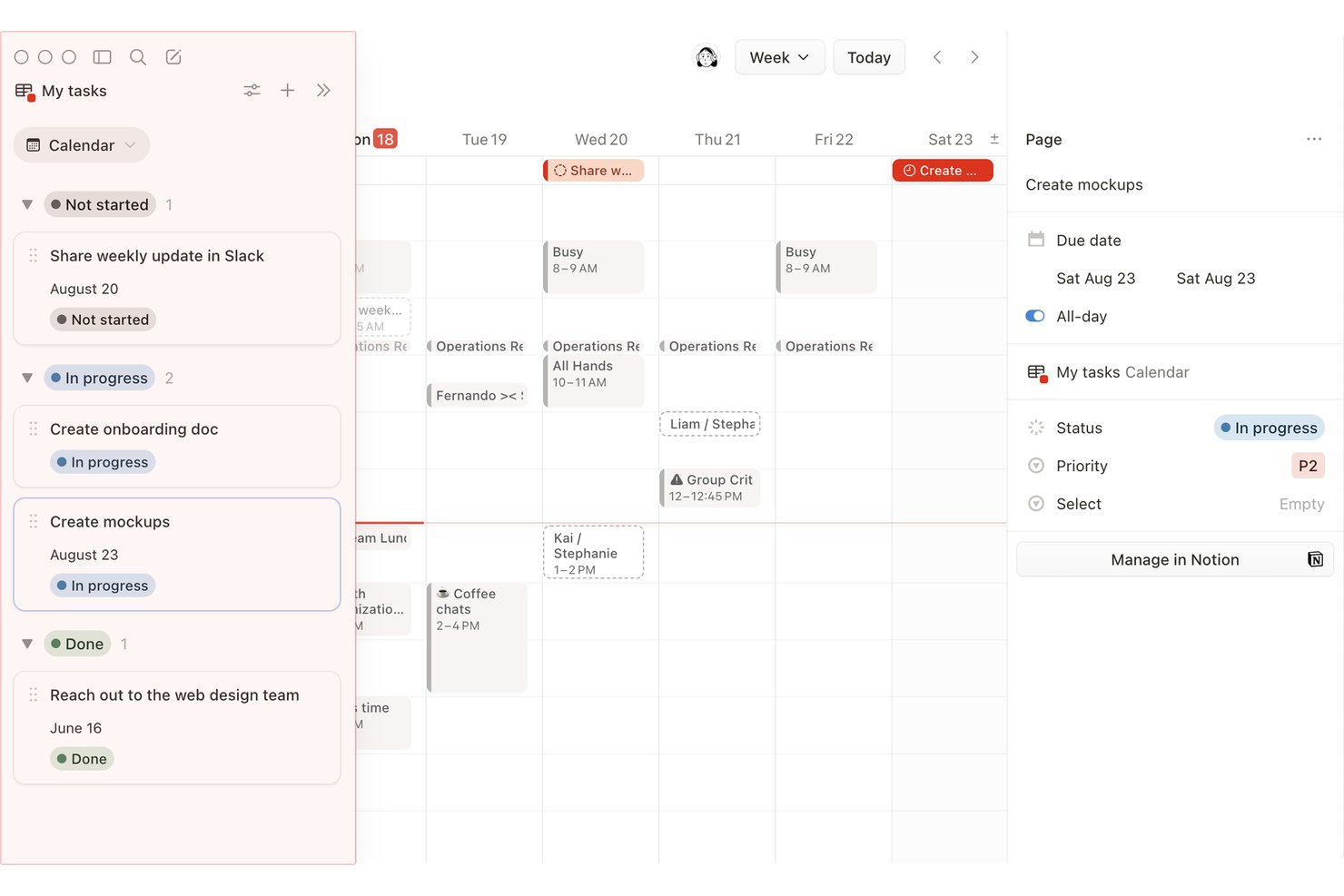
Notion is an all-in-one workspace that combines docs, databases, and project tracking with calendar, timeline, and board views for managing tasks and deadlines.
Who Is Notion Best For?
Notion is a strong fit for project managers and team leads who want docs, tasks, and project calendars to live in the same workspace rather than across separate tools.
Why I Picked Notion
Notion earns its spot on my shortlist because it keeps docs, tasks, and project calendars in one workspace rather than spreading them across separate tools. I love that I can add a calendar view to any database and choose which properties, like assignee or status, show on each card. Notion Calendar connects up to 20 databases with color-coding, so I can see multiple projects on one grid without duplicating any data.
Notion Key Features
- Dependency date shifting: Notion's timeline view automatically shifts dependent task dates when you adjust a predecessor, with modes to maintain gaps or shift only on overlap.
- Conditional color rules: Set property-based color rules on calendar cards to visually flag items by status, priority, or assignee across your database.
- Database automations: Trigger Slack messages, email alerts, or in-app notifications to up to 20 users based on property changes or recurring schedules.
- Drag-and-drop rescheduling: Drag cards to new dates or stretch their edges across multiple days directly in the calendar or timeline view.
Notion Integrations
Notion Calendar connects with Google Calendar, Microsoft Outlook, and Apple iCloud, while Notion lists connections for Jira, Asana, GitHub, Slack, Figma, and Google Drive. Notion also offers a public API and Zapier support.
Pros and Cons
Pros:
- Color rules flag overdue work visually
- Dependencies shift dates when predecessors move
- Calendar cards show assignees and status
Cons:
- No native workload or capacity views
- Separate projects need a shared database
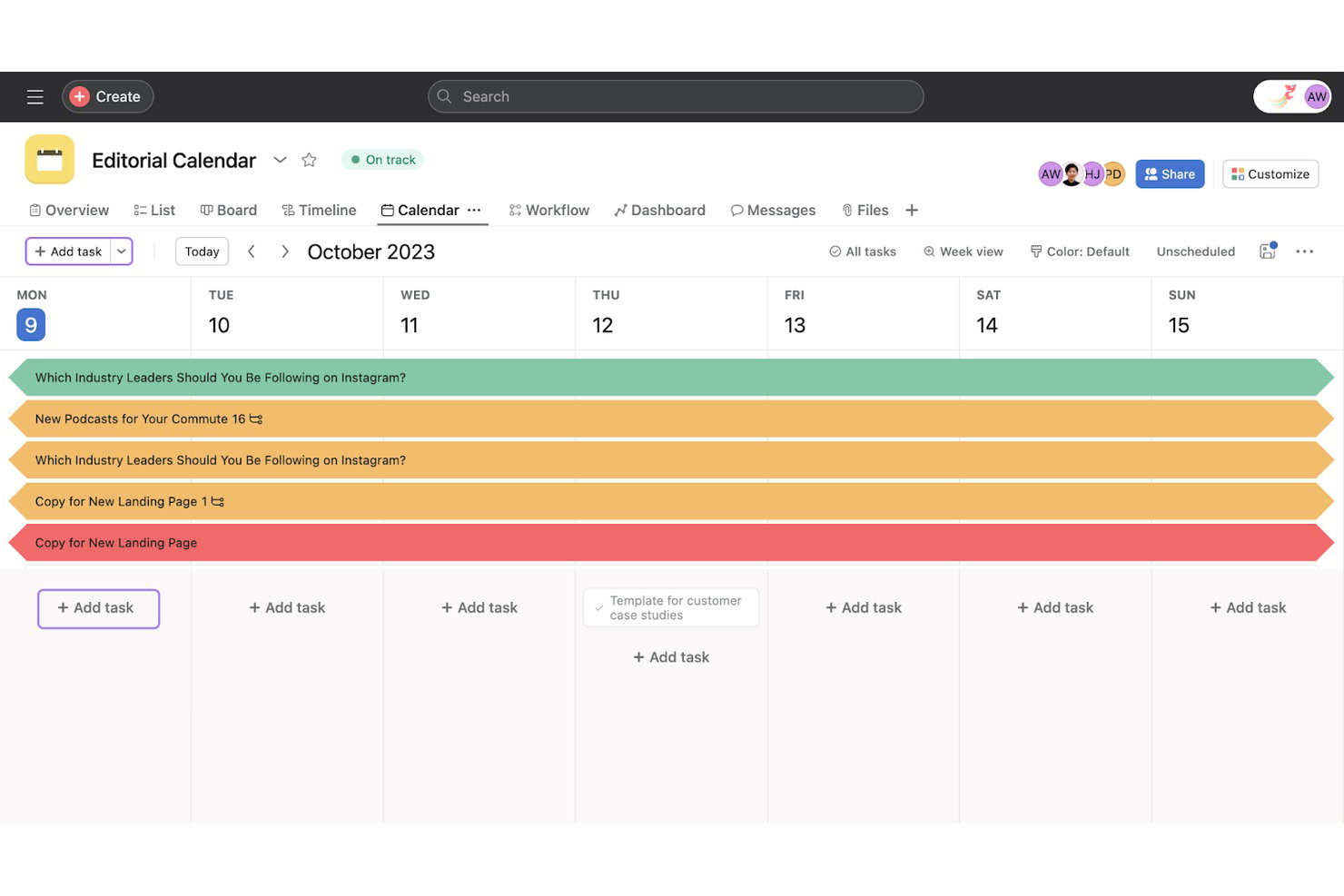
Asana is a project management platform with calendar, timeline, board, and list views that lets teams schedule tasks, set dependencies, track workload, and manage cross-team projects from a single workspace.
Who Is Asana Best For?
Asana works well for project managers and team leads overseeing cross-functional work across product, engineering, and design teams.
Why I Picked Asana
I've included Asana in my top picks because it's one of the few project management tools where cross-team scheduling visibility is genuinely built into the core workflow. When a task shifts, Asana's dependency auto-shifting opens a preview modal showing exactly how dependent tasks will move before you confirm, which keeps cross-team timelines from quietly falling apart. I also like the workload heatmap, which surfaces overloaded team members across projects so you can reschedule or reassign before a deadline becomes a problem.
Asana Key Features
- Color-coded calendar views: Color-code tasks by custom field values like priority or task type, and save that color view for the whole team.
- Critical path highlighting: In Timeline view, Asana flags critical tasks so you can see which ones will delay the project if they slip.
- One-way calendar sync: Push project tasks to Google Calendar, Outlook, or iCal via subscription URL so due dates appear in your external calendar.
- AI calendar scheduling: Asana's AI schedules time blocks based on deadlines, priorities, and capacity, then syncs them to Google or Outlook.
Asana Integrations
Asana offers 100+ free integrations, including Google Workspace, Microsoft 365, Slack, and Jira Cloud with two-way sync. It also provides a public API for custom integrations.
Pros and Cons
Pros:
- Workload heatmaps reveal cross-project overload
- Calendar colors reflect custom task fields
- Dependency shifts preview before confirmation
Cons:
- No built-in overdue task reminders
- No unified calendar across selected projects

Nifty
Best for milestone-driven timeline scheduling
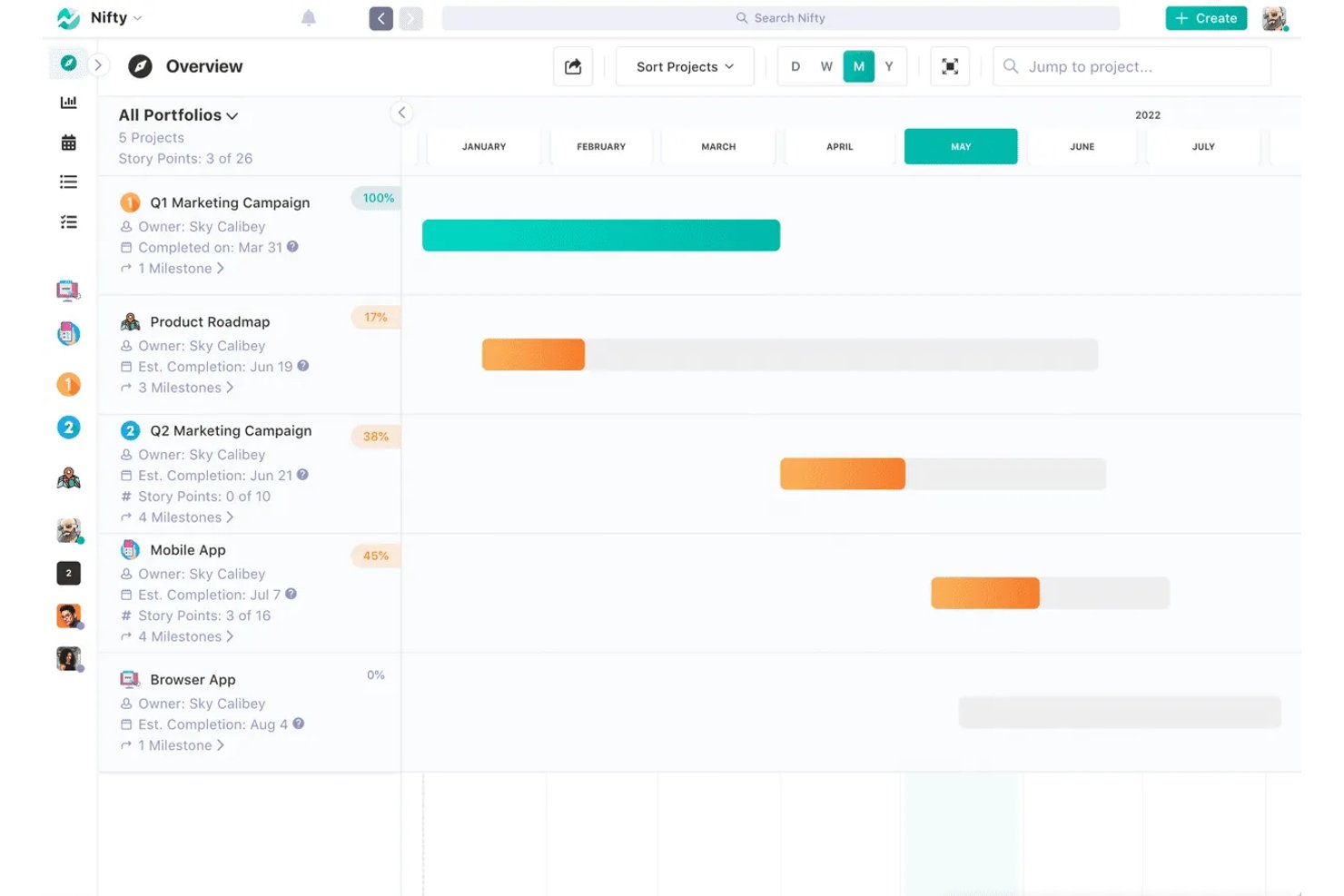
Nifty is a versatile project management tool that offers a range of features to improve your team's productivity. It provides a centralized platform where you can manage tasks, collaborate with your team, and track project timelines with tools like Gantt charts and calendar views.
Why I Picked Nifty
I picked Nifty because of its roadmaps feature, which uses Gantt charts to help you visualize timelines and align your team's goals. This feature is perfect for keeping everyone on the same page and meeting project milestones. Nifty's task management capabilities let you organize and track work through multiple views, including Kanban and Calendar, to provide the flexibility to manage tasks in the way that best suits your team.
Another reason Nifty stands out is its real-time collaboration tools, which facilitate discussions and feedback among team members. This means you can have meaningful conversations and make decisions quickly without leaving the platform. The documentation feature lets you create and connect project files so project information is centralized and accessible.
Nifty Key Features
Nifty offers a range of other features for project management and calendar management.
- In-App Chat: You can facilitate communication within your team directly through Nifty, which keeps all project discussions centralized and accessible.
- Docs & Files: You can create, share, and collaborate on documents and files within the platform, which lets your team maintain a single source of truth for all project-related information.
- Time Tracking: You can monitor the time spent on tasks to better understand resource allocation and productivity, which allows for more informed project planning and adjustments.
- Project Portfolios: This lets you organize and manage multiple projects in one view, so you can oversee and prioritize tasks across different teams and initiatives.
Nifty Integrations
Integrations include Harvest, Webex, Zoom, Slack, GitHub, Google Drive, Google Calendar, Miro, and Typeform.
Pros and Cons
Pros:
- Reuse project templates across multiple calendars
- Calendar view shows tasks and deadlines
- Assign tasks to phases that feed into the calendar
Cons:
- Occasional lag when switching calendar views
- Dependencies must be manually linked
Trello
Best for visual task management
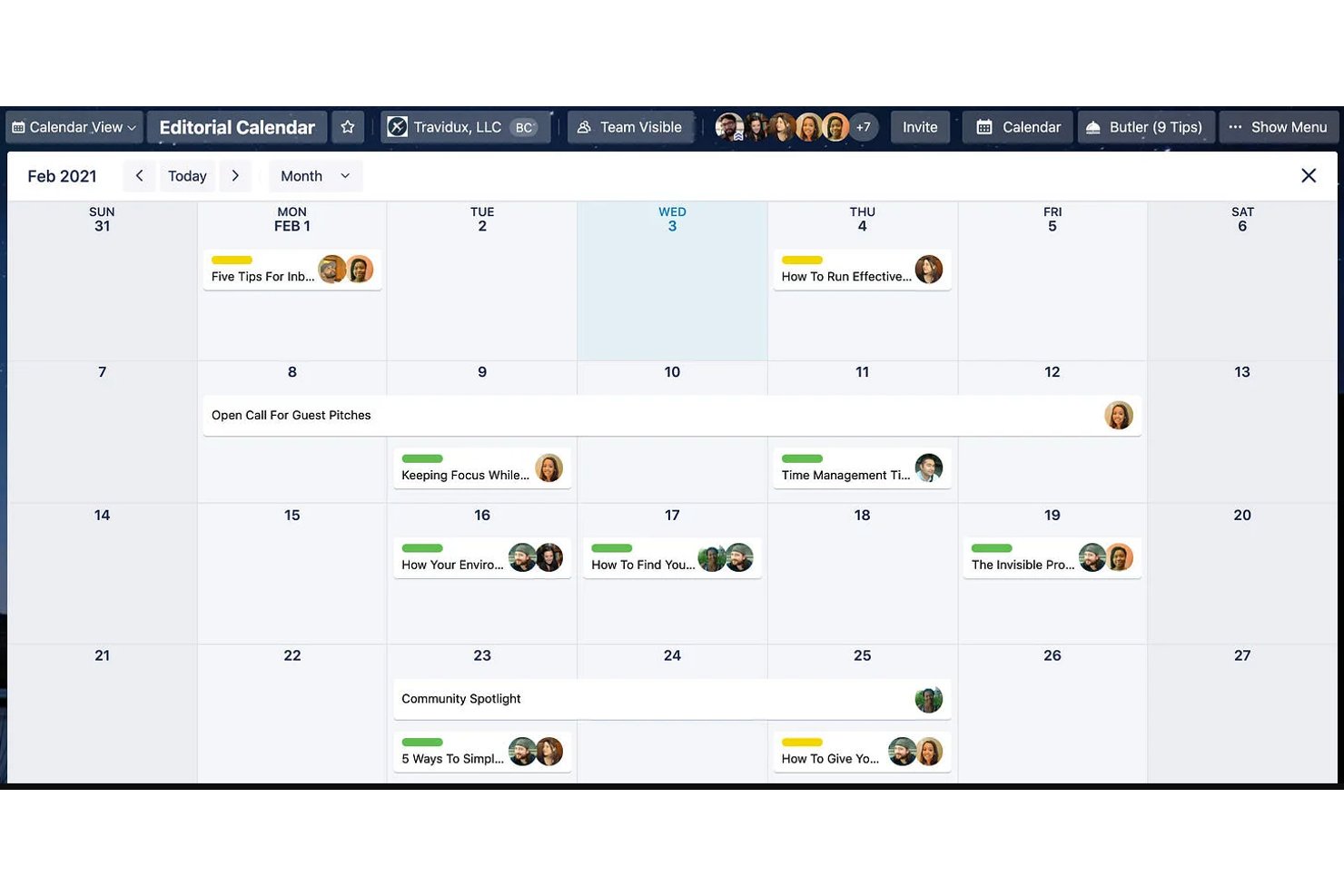
Trello is a visual project management tool that organizes work across Kanban boards, calendar views, timelines, and a multi-board Workspace Calendar for tracking card due dates and schedules across projects.
Who Is Trello Best For?
Trello is a great fit for small teams and operations managers who want a visual, low-friction way to track tasks and deadlines without a steep learning curve.
Why I Picked Trello
Trello earns its spot on my shortlist because its visual-first approach to task management translates directly into calendar scheduling. I love that the Workspace Calendar pulls due dates from up to 20 boards into a single filterable view, so I can see what's due across projects without toggling between boards. The drag-and-drop rescheduling in both the Calendar and Workspace Calendar views makes it easy to shift deadlines on the fly, and badge color escalation keeps overdue cards impossible to miss.
Trello Key Features
- Workspace Calendar view: Aggregates cards with due dates from up to 20 boards in a single Workspace into one filterable calendar.
- Timeline view: Displays card durations across a zoomable day-to-year timeline, with grouping by list, member, or label.
- Recurring due dates: Lets you set cards to repeat on a schedule automatically, directly from the card detail view.
- Automation rules: Triggers no-code actions when cards reach or pass their due dates, without any third-party tools.
Trello Integrations
Trello supports 200+ marketplace integrations through Power-Ups, including Slack, Microsoft Teams, Google Drive, Confluence, and Salesforce. Native calendar connectivity includes Google Calendar and Outlook through Planner, while iCal feeds support Google, Outlook, and Apple Calendar.
Pros and Cons
Pros:
- Workspace Calendar combines up to 20 boards
- Drag-and-drop rescheduling updates card dates
- Teams report quick onboarding
Cons:
- No built-in task dependencies or critical path
- Native calendar views require a paid plan

Bitrix24
Best for all-in-one task and calendar scheduling
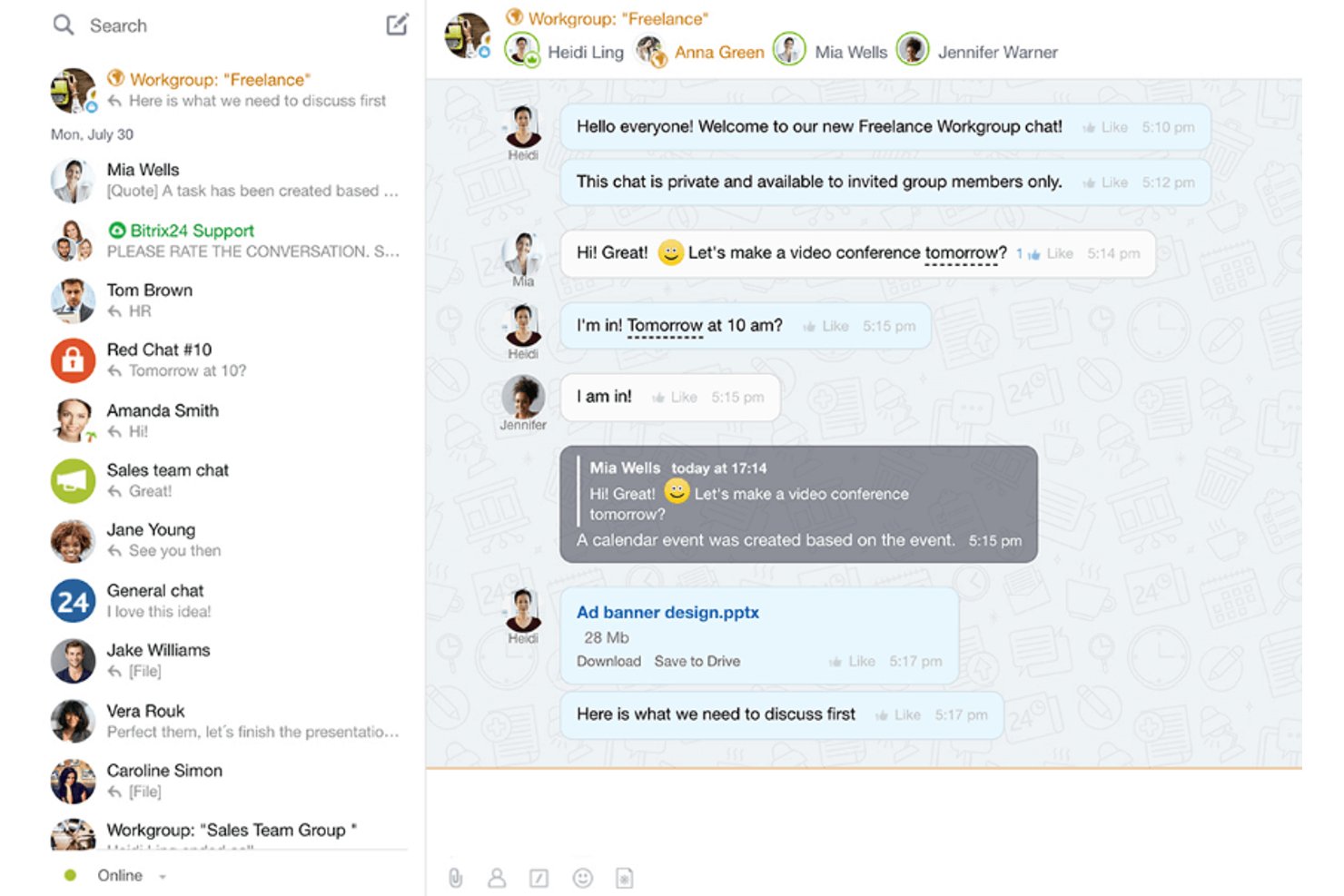
Bitrix24 is an all-in-one project management suite that combines task scheduling, calendar views, Gantt charts, CRM, and team communication in a single platform.
Who Is Bitrix24 Best For?
Bitrix24 suits small to mid-sized teams that want tasks, calendars, CRM, and team chat in one place without paying per user.
Why I Picked Bitrix24
Bitrix24 earns its spot on my shortlist because it bundles tasks, calendars, CRM, and team chat into one platform without splitting the bill per user. I love that you can layer personal, group, and project calendars into a single color-coded view, then drag task deadlines directly across days to reschedule. The Gantt chart takes it further: shift one task and its dependents move automatically, which keeps linked work aligned without manual updates.
Bitrix24 Key Features
- Deadline view: Organizes your tasks into columns sorted by urgency, giving you a quick read on what's due soonest across all your work.
- "Involvement in tasks" chart: Shows each team member's assigned tasks over time and flags scheduling overlaps, so you can spot conflicts before they become problems.
- Automation rules: Trigger status changes, notifications, or emails based on task conditions, reducing the manual follow-up that slows teams down.
- Open-slot booking links: Share a link via email or messenger so teammates or external contacts can pick an available meeting time directly from your calendar.
Bitrix24 Integrations
Bitrix24 has native calendar integrations with Google Calendar, Outlook, Office 365, iCloud, CalDAV, and Exchange. It also supports a REST API, marketplace apps, and Zapier for custom connectivity.
Pros and Cons
Pros:
- Reviewers praise calendar reminders and color-coding
- Gantt dependencies shift linked tasks
- Drag tasks across calendar dates
Cons:
- Large workspaces and mobile app can lag
- Setup can feel cluttered and demanding
Diğer Proje Yönetimi Takvimi Araçları
En iyi listeme girmeyen ancak yukarıda aradığınızı bulamadıysanız değerlendirmenizde fayda olan birkaç proje yönetimi takvimi yazılımı seçeneği daha şunlardır.
- Float.com
For scheduling around team availability
- GoodDay
For multi-project calendar workspaces
- Smartsheet
For creating BI reports
- Paymo
For freelancers and small teams
- ProjectManager
For dependency-enforced calendar scheduling
- Teamwork.com
For color-coded calendar entries
- Ravetree
For resource management
- Hive
For flexible project views
- Motion
For AI-driven schedule auto-balancing


How I Evaluate Project Management Calendar Tools
I split my evaluation into three parts, weighting core functionality most: viewing tasks and milestones across projects and shifting deadlines in a shared calendar. Next, I look for standout features such as workload heatmaps that flag overallocated teams. Finally, I consider beyond-feature factors, including onboarding, support, and pricing value.
Core Functionality (Table Stakes For This List)
When I'm selecting tools for my list, I score each one on a scale from 0 (does not offer the functionality) to 5 (excels in this area) for each core functionality listed below. I then convert the total into a percentage to help assess each tool's overall fit, with extra weight on any functionalities I’ve deemed essential.
- Calendar Task View (Essential): I look for day, week, and month views that show task dates, status, and assignees, so teams can spot deadline clashes.
- Multi-Project View (Essential): I check whether teams can filter and compare concurrent project schedules in one calendar when dependencies or deadlines shift.
- Calendar Sync: I evaluate whether updates sync with Google Calendar or Outlook, keeping project deadlines visible alongside meetings.
- Drag-and-Drop Rescheduling: I look for reliable date changes by dragging tasks across days or weeks when priorities change.
- Deadline Reminders: I assess whether configurable alerts flag upcoming and overdue work so owners can respond before milestones slip.
- Shared Team Calendar: I check whether teammates can view and edit shared schedules with permissions suited to their roles.
Once I have a list of tools that meet the criteria, I consider what sets each platform apart.
Differentiating Factors (What Sets Vendors Apart)
Here's how I compare and contrast different vendors:
Standout Features
Resource workload heatmaps are the first thing I check—when a calendar shows who's overloaded before you assign new work, you catch burnout and missed deadlines early. I also evaluate critical path highlighting, since knowing which task sequence controls your launch date changes how you prioritize trade-offs. Client-facing share links matter too: I look for branded, read-only views that keep stakeholders informed without exposing internal task details or requiring a paid seat.
Beyond Features
I check how well each tool connects to the rest of your stack—Slack, Google Drive, time-tracking apps—since native integrations cut duplicate data entry. Onboarding support matters too: guided setup wizards and scheduling-specific templates shorten the ramp-up, especially for teams migrating from spreadsheets. I also evaluate whether role-based permissions extend to external calendar shares so contractors see only what they need.
Proje Yönetimi Takvimi Araçları Nasıl Seçilir?
Uzun özellik listeleri ve karmaşık fiyatlandırma yapıları içinde kaybolmak kolaydır. Kendinize özgü yazılım seçim sürecinizi yürütürken odağınızı korumanıza yardımcı olmak için aklınızda bulundurmanız gereken faktörleri içeren bir kontrol listesi hazırladık:
| Faktör | Dikkat Edilmesi Gerekenler |
|---|---|
| Ölçeklenebilirlik | Aracın ekibinizle birlikte büyüyebildiğinden emin olun. Performans sorunları yaşamadan artan proje ve kullanıcı sayısını destekleyebilen seçenekleri tercih edin. |
| Entegrasyonlar | Yazılımın görev yöneticileri, CRM'ler veya Slack ya da Microsoft Teams gibi iletişim platformları da dâhil olmak üzere mevcut araçlarınızla sorunsuz şekilde entegre olup olmadığını kontrol edin. |
| Özelleştirilebilirlik | Takvim görünümlerini, etiketleri ve iş akışlarını ekibinizin özel süreçlerine ve tercihlerine uyacak şekilde düzenleyebildiğinizden emin olun. |
| Kullanım Kolaylığı | Arayüzün basitliğini ve erişilebilirliğini değerlendirin. Ekibinizin kullanmaya başlamak için kapsamlı bir eğitime ihtiyaç duymaması gerekir. |
| Bütçe | Fiyatlandırma planlarını karşılaştırın ve hem başlangıç maliyetlerini hem de uzun vadeli giderleri göz önünde bulundurarak bütçenizle uyumlu olduklarından emin olun. |
| Güvenlik Önlemleri | Hassas proje bilgilerinizi korumak için şifreleme, role dayalı erişim ve veri koruma standartlarına uyumluluk gibi özellikleri doğrulayın. |
| Mobil Erişim | Sizin ve ekibinizin takvimleri hareket hâlindeyken güncellemesine veya incelemesine olanak tanıyan mobil uyumlu araçları tercih edin. |
| İş Birliği Özellikleri | Herkesin aynı doğrultuda ilerlemesini sağlamak için paylaşılan takvim güncellemeleri, bildirimler ve yorum dizileri gibi gerçek zamanlı iş birliği özelliklerine sahip araçlara öncelik verin. |
Proje Yönetimi Takvim Araçlarındaki Eğilimler
Araştırmam sırasında farklı takvim uygulaması sağlayıcılarının sayısız ürün güncellemesini, basın bültenini ve sürüm kaydını inceledim. Takip ettiğim yeni ortaya çıkan eğilimlerden bazıları şunlar:
- Yapay Zekâ Destekli Planlama: Araçlar programları optimize etmek, gecikmeleri öngörmek ve kaynak tahsisleri önermek için yapay zekâ kullanıyor. Örneğin, en iyi dijital takvim görüntüleme araçlarından bazıları ekip iş yüklerini analiz edebilir ve tükenmişliği önlemek için teslim tarihlerini otomatik olarak ayarlayabilir.
- Görsel İş Akışları: Sağlayıcılar artık zaman çizelgesi animasyonları, sürükle ve bırak panoları ve dijital takvim görüntüleri gibi daha dinamik ve etkileşimli takvim görsellerine odaklanıyor. Bu özellikler, kullanıcıların dijital programlarındaki bağımlılıkları ve görev çakışmalarını bir bakışta görmesini kolaylaştırıyor.
- Hibrit Çalışma İhtiyaçlarına Odaklanma: ekip takvimi uygulamalarındaki paylaşılan uygunluk takvimleri ve toplantı zamanı önerileri gibi yeni özellikler, farklı saat dilimlerinde çalışan ekipleri desteklemek üzere tasarlandı. Bazı araçlar artık uzaktan ve ofiste çalışan ekip üyelerinin çalışma saatlerini de öne çıkararak onları en iyi paylaşılan takvimler hâline getiriyor.
- Gelişmiş İş Birliği Araçları: Gerçek zamanlı güncellemeler, doğrudan takvim öğeleri üzerindeki yorum dizileri ve video entegrasyonu, iş birliğine dayalı takvim uygulamalarında giderek standart hâle geliyor. Bu eklemeler, ekiplerin platform değiştirmeden değişiklikleri ve güncellemeleri görüşmesine yardımcı olabilir; bu da küçük işletme takvimi için idealdir.
- Veriye Dayalı İçgörüler: Gelişmiş raporlama özellikleri artık görevlerin tamamlanması, gecikmeler ve ekip verimliliğindeki eğilimleri izleyebiliyor. Örneğin bazı takvim planlama araçları, yöneticilerin planları düzenlemesine yardımcı olmak için analiz panoları oluşturabiliyor.
Proje Yönetimi Takvim Aracı Nedir?
Proje yönetimi takvim araçları, proje programlarını, görevleri ve teslim tarihlerini tek bir yerde planlamanıza, düzenlemenize ve izlemenize yardımcı olan yazılım çözümleridir. Görevleri kolayca atamak ve ayarlamak için takvim üzerinde sürükleyip bırakabilir, yinelenen görevler ve hatırlatıcılar oluşturabilir, çalışmaya öncelik vermenize ve planlamanıza yardımcı olmak için görevleri renklerle kodlayabilirsiniz.
Proje yönetimi takvim araçlarını ayrıca ekibin neyin ne zaman teslim edilmesi gerektiği konusunda aynı doğrultuda kalmasını sağlamak, ekip kapasitesini izlemek ve kaynak çakışmalarını ele almak, ayrıca güven oluşturmak için bilgileri müşteriler ve paydaşlarla şeffaf biçimde paylaşmak amacıyla kullanabilirsiniz.
Proje Yönetimi Takvim Araçlarının Özellikleri
Bir proje yönetimi takvim aracı seçerken aşağıdaki temel özelliklere dikkat edin:
- Görev planlama: Bu özellik görevleri atamanıza, son tarihler belirlemenize ve işleri takvimde taşımanıza olanak tanır. Herkesin kimin neyi ne zaman yaptığını net bir şekilde görmesini sağlar; böylece hiç kimse son dakikada tahminde bulunmak veya telaşla harekete geçmek zorunda kalmaz.
- Kaynak tahsisi: Kimlerin müsait olduğunu ve hangi kaynakların rezerve edildiğini görebilirsiniz. Bu, herhangi bir kişiyi yanlışlıkla iki kez görevlendirmenizi önler ve ekibinizin sorunsuz çalışmasını sağlar.
- İş birliği araçları: Yerleşik sohbet, yorumlar ve belge paylaşımı gibi özellikleri içerir. Ekibinizin doğrudan birlikte çalışmasını sağlar ve uzun e-posta yazışmalarını azaltır.
- Kilometre taşı takibi: Önemli hedefleri ve son tarihleri kolayca işaretleyebilir ve ilerlemeyi bir bakışta görebilirsiniz. Bu, durum güncellemelerini kolayca almanızı ve herkesin gelişmelerden haberdar olmasını sağlar.
- Yinelenen etkinlikler: Haftalık toplantıları veya düzenli durum kontrollerini yalnızca birkaç tıklamayla ayarlayabilirsiniz. Böylece zamandan ve enerjiden tasarruf ederek bunları gerçek proje çalışmalarına ayırabilirsiniz.
- Bildirimler ve hatırlatıcılar: Toplantılardan veya son tarihlerden önce yararlı hatırlatmalar alarak görevlerin gözden kaçmasını önlersiniz.
- Takvim entegrasyonları: Her şeyi tek bir yerde tutmak için proje takviminizi Google, Outlook veya mobil cihazlarla senkronize edebilirsiniz.
- Özelleştirilebilir görünümler: Günlük, haftalık veya aylık düzenlerin yanı sıra zaman çizelgesi ya da Gantt görünümleri arasında geçiş yapabilirsiniz. İş yüklerini ve son tarihleri en iyi şekilde görselleştirmenize yardımcı olan seçeneği tercih edebilirsiniz.
- Erişim denetimi: Doğru kişilerin belirli etkinlikleri veya ayrıntıları görmesini ya da düzenlemesini sağlamak için izinler belirleyebilirsiniz. Bu, hassas planların korunmasına yardımcı olur.
Yaygın Proje Yönetimi Takvimi Yapay Zekâ Özellikleri
Yukarıda listelenen standart proje yönetimi takvimi aracı özelliklerinin ötesinde, birçok çözüm aşağıdaki gibi yapay zekâ özelliklerini içerir:
- Otomatik planlama: Yapay zekâ, gidip gelen planlama e-postalarını azaltmak için müsaitlik durumuna ve iş yüküne göre ideal toplantı saatleri ve görev son tarihleri önerebilir.
- Akıllı görev önceliklendirme: Yapay zekâ, ekibinizin odağını korumak için görev, son tarih ve kaynak listenizi inceleyerek öncelikle hangilerinin tamamlanması gerektiğini sıralayabilir.
- Tahmine dayalı son tarih ayarlamaları: Yapay zekâ olası gecikmeleri tespit edebilir ve sorunları proaktif bir şekilde ele alabilmeniz, son tarihlerinizi takip edebilmeniz için değişiklikler önerebilir.
- Doğal dil ile etkinlik oluşturma: Yalnızca yazarak veya konuşarak etkinlik ekleyebilirsiniz; yapay zekâ toplantıyı otomatik olarak ayarlayabilir ve davetleri gönderebilir.
- Otomatik çakışma tespiti: Yapay zekâ, çakışan rezervasyonları veya aynı kaynakların birden fazla zamanlama için atanmasını kontrol edebilir ve son dakika sürprizlerini önlemek üzere sizi uyarabilir.
Proje Yönetimi Takvimi Araçlarının Faydaları
Proje yönetimi takvimi araçlarını uygulamak ekibiniz ve işletmeniz için çeşitli faydalar sağlayabilir. Yararlanmayı bekleyebileceğiniz birkaç fayda şunlardır:
- Daha iyi zaman yönetimi: Ekiplerin görevler ve son tarihler için zamanı etkili bir şekilde tahsis etmesine ve takip etmesine yardımcı olur.
- Geliştirilmiş ekip iş birliği: Herkesin programlarını tek bir yerde birlikte görmesini ve planlamasını sağlar.
- Daha kolay görev önceliklendirme: En önemli işe öncelik vermeyi ve odaklanmayı kolaylaştırır.
- Daha net proje görünürlüğü: Tüm görevleri, kilometre taşlarını ve son tarihleri görsel bir biçimde gösterir.
- Daha az kaçırılan son tarih: Görevlerin planlandığı şekilde ilerlemesini sağlamak için hatırlatıcılar ve uyarılar gönderir.
- Daha basit program ayarlamaları: Öncelikler değiştiğinde veya zaman çizelgeleri güncellendiğinde hızlı değişiklikler yapılmasına olanak tanır.
- Merkezi proje güncellemeleri: Projeyle ilgili tüm programları ve güncellemeleri tek bir araçta birleştirir.
Proje Yönetimi Takvimi Araçlarının Maliyetleri ve Fiyatlandırması
Proje yönetimi takvimi araçlarının maliyetleri genellikle özelliklere, ekip büyüklüğüne, eklentilere ve daha fazlasına göre değişir. Aşağıdaki tablo, proje yönetimi takvimi aracı çözümlerinde yaygın planları, bu planların ortalama fiyatlarını ve içerdiği tipik özellikleri özetlemektedir:
Proje Yönetimi Takvimi Araçları için Plan Karşılaştırma Tablosu
| Plan Türü | Ortalama Fiyat | Yaygın Özellikler |
|---|---|---|
| Ücretsiz Plan | $0 | Temel planlama, görev hatırlatıcıları, sınırlı entegrasyonlar ve paylaşılan takvim erişimi. |
| Kişisel Plan | $5-$15/kullanıcı/ay | Özelleştirilebilir görünümler, mobil uygulama erişimi, görev yönetimi ve e-posta bildirimleri. |
| İşletme Planı | $15-$30/kullanıcı/ay | Gelişmiş iş birliği araçları, birden fazla takvim paylaşımı, analizler ve entegrasyonlar. |
| Kurumsal Plan | $30-$50/kullanıcı/ay | Öncelikli destek, kurumsal düzeyde entegrasyonlar, kullanıcı izinleri ve ölçeklenebilirlik. |
Proje Yönetimi Takvimi SSS
Bu konu hakkında başkalarının sorduğu yaygın soruların yanıtlarını bulun.
Proje takvimi kullanmak için en iyi uygulamalardan bazıları nelerdir?
Takviminizin tüm ekibiniz tarafından görülebilir ve erişilebilir olduğundan emin olarak başlayın. Takvimi güncel tutun ve herkesin görevlerinin güncel ve gerçekten üzerinde çalışılanlarla uyumlu olduğunu doğrulamak için düzenli kontroller planlayın.
Hızlı başvuru için görevlere veya kilometre taşlarına renk kodları uygulayın ve anlaşılır adlandırma kuralları kullanın. Hiçbir şeyin gözden kaçmaması için bildirim hatırlatıcıları ayarlayın. Darboğazları erkenden fark etmek ve çalışmaları planlandığı şekilde sürdürmek için ekip toplantıları sırasında takviminizi düzenli olarak gözden geçirin.
Proje takvimlerini kullanırken karşılaşılan yaygın zorluklardan bazıları nelerdir?
Yaygın zorluklar arasında planlar ve proje bilgileri değiştikçe takvim verilerini doğru tutmak yer alır. Sorumlu kişi güncellemeyi unutursa veya görevler sık sık değişirse güncellemelerin gerisinde kalmak kolaydır. Her şey anlaşılır etiketler veya renk kodları olmadan tek bir yerde toplandığında ekip üyelerinin kafası karışabilir. Bu sorunları çözmek için takvim yönetimini ortak bir sorumluluk olarak belirleyin ve net güncelleme kuralları oluşturun.
Proje yönetimi takvimi araçları mevcut araçlarımla (Slack, Trello veya Outlook gibi) entegre olabilir mi?
Evet, önde gelen proje yönetimi takvimi araçlarının çoğu Slack, Trello, Outlook, Google Takvim ve Microsoft Teams gibi popüler uygulamalarla entegrasyonlar sunar. Bu entegrasyonlar etkinlikleri senkronize etmenize, bildirimler göndermenize ve farklı platformlardaki güncellemeleri yönetmenize olanak tanır. Ekibinizin kullandığı belirli uygulamaları desteklediğinden emin olmak için değerlendirdiğiniz her aracın entegrasyon bilgilerini kontrol edin.
Değişen teslim tarihlerini veya son dakika değişikliklerini yönetmek için proje yönetimi takvimini nasıl kullanabilirim?
Yeni tarihleri yansıtmak için proje yönetimi takviminizdeki görevleri veya kilometre taşlarını hızlıca güncelleyebilirsiniz. Çoğu araçta görevleri yeniden planlamanıza ve ekibinizin değişikliklerden haberdar olması için anında uyarılar ayarlamanıza olanak tanıyan sürükle ve bırak özellikleri bulunur. Çoğu araç değişiklik geçmişini izlemenize izin verir; böylece planların nasıl geliştiğini görebilirsiniz. Öncelikler değiştiğinde herkesin senkronize kalmasını sağlamak için takvimi ekibinizle düzenli olarak gözden geçirin.
Proje yönetimi takviminde yinelenen görevleri veya hatırlatıcıları otomatikleştirmenin yolları var mı?
Evet, birçok proje yönetimi takvimi aracı yinelenen görevler ve otomatik hatırlatıcılar ayarlamanıza olanak tanır. Düzenli toplantılar, durum güncellemeleri ve haftalık veya aylık kontroller planlayabilirsiniz. Otomatik hatırlatıcılar, ekibinizin rutin çalışmaları manuel çaba harcamadan takip etmesine yardımcı olur. Bunları ayarlamak için aracınızın otomasyon veya iş akışı ayarlarını kontrol edin.