

2026 İçin En İyi 10 İnşaat Proje Yönetimi Yazılımı

10 En İyi İnşaat Proje Yönetimi Yazılımları Kısa Listesi


İnşaat proje yönetimi yazılımları, zaman çizelgelerini, bütçeleri, görevleri ve iletişimleri tek bir yerde merkezileştirerek ekiplerin inşaat projelerini daha verimli bir şekilde planlamasına, zamanlamasına ve yürütmesine yardımcı olur. Taşeronları ve RFI'ları takip etmekten saha ilerlemesini ve uyumluluğu yönetmeye kadar doğru yazılım, inşaat projelerinizi düzenli ve planlandığı şekilde ilerleyen durumda tutar.
İhtiyaçlarınıza en uygun seçeneği bulmanıza yardımcı olmak için en iyi inşaat proje yönetimi araçlarını saha raporlaması, bütçeleme, ekip iş birliği ve belge kontrolü gibi özelliklere göre test edip inceledim. İster konut inşaatlarını ister büyük ölçekli altyapı projelerini yönetiyor olun, bu rehber inşaat projelerini planlandığı şekilde ilerletmek için 2025 yılında kullanılabilecek en iyi araçları öne çıkarır.
İnşaat Proje Yönetimi Yazılımı Nedir?
İnşaat proje yönetimi yazılımı, ekiplerin inşaat projelerini başlangıçtan tamamlanmaya kadar planlamasına, koordine etmesine ve kontrol etmesine yardımcı olan bir araçtır.
Zamanlamayı, bütçelemeyi, belge yönetimini ve gerçek zamanlı iş birliğini destekleyerek projelerin zamanında ve bütçe dâhilinde tamamlanmasını sağlar. İnşaat ve imalat ekipleri için tasarlanan bu yazılım, iletişimi kolaylaştırır, görünürlüğü artırır ve karmaşık proje iş akışları genelinde maliyetli hataları azaltır.
Why Trust Our Software Recommendations
Our team has been testing and reviewing software since 2012. As project managers ourselves, we know how difficult—and important—it is to choose the right software.
For this guide, we evaluated tools using hands-on testing and independent research, scoring tools using our selection criteria. We also draw on insights from industry thought leaders and practicing project management experts.
Our reviews reflect our human editorial judgment, not a sales pitch.
Expert reviewers:
İnşaat Proje Yönetimi Yazılımları Karşılaştırma Tablosu
İhtiyaçlarınıza en uygun inşaat proje yönetimi aracını bulmak için aşağıdaki tabloyu kullanabilirsiniz:
| Tool | Best For | Trial Info | Price | ||
|---|---|---|---|---|---|
| 1 | Best for efficient stakeholder coordination | Free plan + 14-day trial available | From $9/user/month (billed annually) | Website | |
| 2 | Best for bridging field and office workflows | 30-day free trial + demo available | From $9/user/month (billed annually) | Website | |
| 3 | Best for large-scale capital project controls | Free demo available | From $37/user/month (billed annually) | Website | |
| 4 | Best with a single database platform | Free demo available | Pricing upon request | Website | |
| 5 | Best for real-time data and analytics | Free plan + 14-day trial + demo available | From $10/user/month (billed annually) | Website | |
| 6 | Best for deep ERP and accounting integrations | 14-day free trial for Procore Estimating + free demo available | Pricing upon request | Website | |
| 7 | Best for guided onboarding and training | Free demo available | Pricing upon request | Website | |
| 8 | Best for built-in model coordination tools | Free demo available | Pricing upon request | Website | |
| 9 | Best with built-in budgeting tools | Free plan + 15-day trial + demo available | Pricing upon request | Website | |
| 10 | Best resource and document management | 30-day free trial + free demo available | From $49/month (billed annually) | Website |


En İyi İnşaat Proje Yönetimi Yazılımları İncelemeleri
Bunlar şu anda piyasada bulunan en iyi inşaat proje yönetimi yazılımı araçlarıdır:

Best for efficient stakeholder coordination
monday AI Workspace is a general-purpose work management platform that combines configurable project boards, Gantt-based scheduling, automation, and AI-assisted task coordination to help construction office teams track multiple projects from a single hub.
Who Is monday AI Workspace Best For?
It's a strong fit for construction office teams and project coordinators who need a flexible way to manage schedules, communications, and compliance across multiple concurrent projects.
Why I Picked monday AI Workspace
I picked monday AI Workspace because its automation engine handles the repetitive coordination work that eats into a project manager's day. I use it to automatically notify subcontractors when insurance certificates are expiring and flag overdue tasks across multiple job boards without any manual follow-up. The AI Sidekick also summarizes meeting outcomes and surfaces items that are falling behind, so I'm not chasing status updates across a dozen stakeholders by hand.
monday AI Workspace Key Features
- Configurable Gantt chart view: Visualize project timelines, phases, dependencies, and milestones in a dedicated Gantt interface.
- Custom board templates: Set up project boards tailored for tracking schedules, budgets, and field progress with reusable structures.
- Document upload and storage: Attach and organize contracts, specs, and project files directly within task boards and items.
- Role-based permission controls: Set access rights for users or guests to ensure sensitive project data remains protected.
monday AI Workspace Integrations
monday AI Workspace offers hundreds of native integrations, including Slack, Google Workspace, Microsoft 365, Salesforce, Jira, GitHub, Zoom, Dropbox, HubSpot, and Zendesk. It also supports Zapier and provides an API for custom integrations.
Pros and Cons
Pros:
- Visual workload views across project teams
- AI automation reduces manual coordination tasks
- Highly customizable boards for multi-project tracking
Cons:
- Limited job costing and budget tracking tools
- No native RFI or submittal workflows
New Product Updates from monday AI Workspace
monday AI Workspace Adds Human Approval Routing
monday AI Workspace adds a human-in-the-loop approval block to AI Workflows, sending approval requests and routing workflow paths based on responses. For more information, visit monday AI Workspace's official site.
Best for bridging field and office workflows

Smartsheet offers a flexible, spreadsheet-based platform for construction teams who want to bring their office and field work together in a single view. If you’re managing building, infrastructure, or renovation projects and need both on-site tracking and longer-term scheduling visibility, Smartsheet can serve general contractors, project managers, site supervisors, and owners alike.
Who Is Smartsheet Best For?
Teams that need a spreadsheet-inclusive work and resource management platform to bridge office and field workflows with customizable views and automation.
Why I Picked Smartsheet
I picked Smartsheet because it enables you to connect field and office workflows through two key construction-relevant capabilities: its mobile-enabled data capture for site-based teams (so updates, inspections, and incident reports can be entered from job sites) and its automation and scheduling tools (so you can trigger alerts, update timelines, and manage dependencies automatically). These features matter when you need to keep multiple trade partners aligned and ensure that change orders, inspections, and close-out tasks don’t slip through the cracks.
Smartsheet Key Features
Aside from the mobile capture and automation I mentioned above, here are other features valuable for construction project management:
- RFI/RFP Management: Streamlines the process of managing requests for information and proposals to ensure timely responses and decision-making.
- Field Operations Tracking: Provides tools to monitor and manage field activities, ensuring that on-site operations align with project timelines and goals.
- Resource Allocation: Facilitates the efficient distribution and utilization of resources, helping you optimize project outcomes and reduce waste.
- Construction templates: Ready-built templates for schedules, budgets, punch-lists and inspection logs help you get started without building everything from scratch.
Smartsheet Integrations
Integrations include Procore, Microsoft 365, Google Workspace, Salesforce, Jira, Box, Slack, ServiceNow, Docusign, and Tableau.
Pros and Cons
Pros:
- Strong visibility for managers via dashboards and reports across projects.
- Good library of construction-specific templates shortens setup time.
- Automations help reduce repetitive follow-ups and ensure tasks trigger correctly.
Cons:
- For very simple task-list or sub-contractor management needs, it may feel heavier than necessary.
- While spreadsheet-based is familiar, the interface and setup can feel complex to non-technical users.
New Product Updates from Smartsheet

Smartsheet Adds Non-Plan User Management in Admin Center
Smartsheet adds a Non plan users tab to the Seat types and true-up page in Admin Center. This lets system admins review non-plan users and add them to the plan or remove them from the organization in one place. For more information, visit Smartsheet’s official site.

InEight
Best for large-scale capital project controls
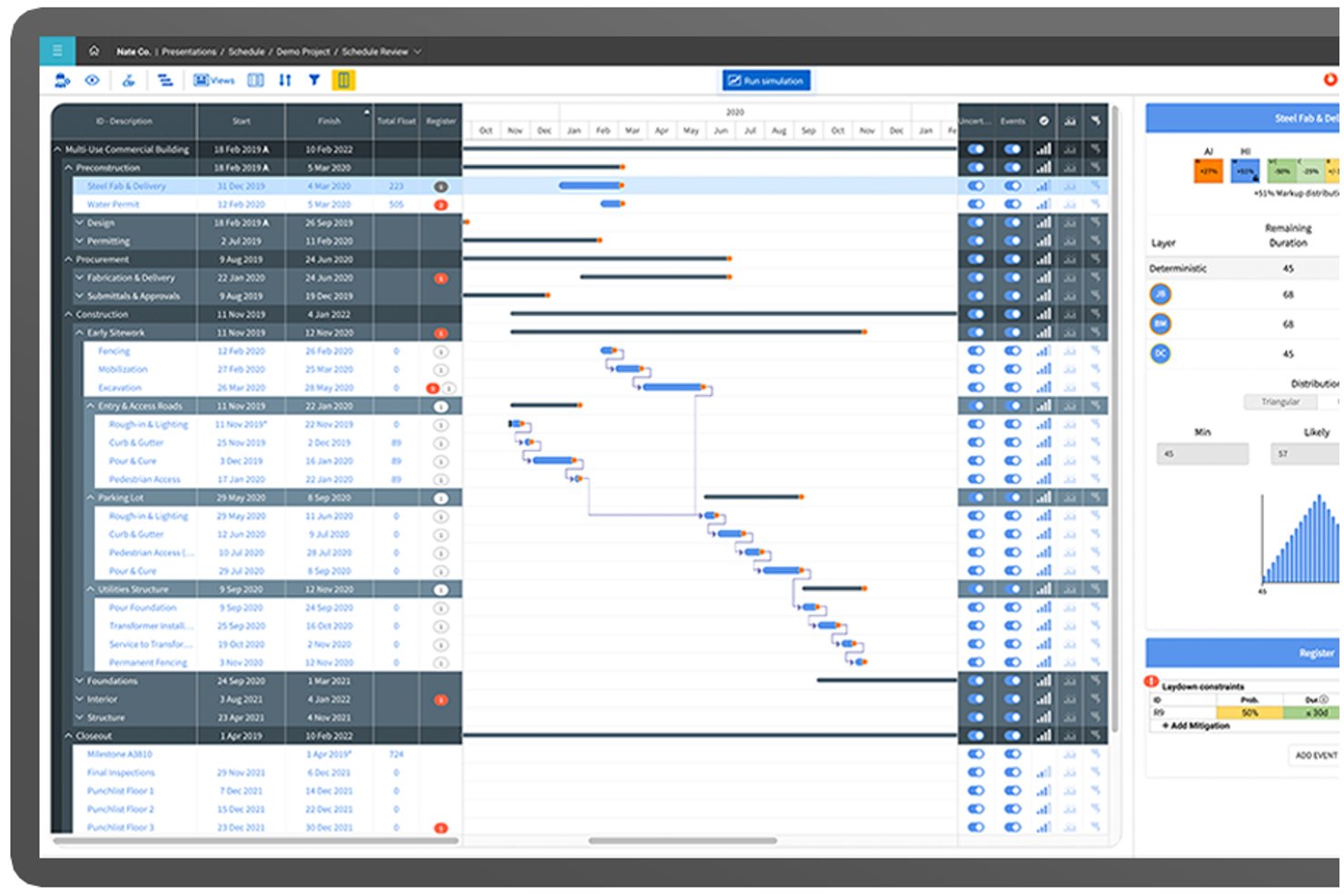
InEight is a modular construction project management platform built for capital projects, combining cost controls, CPM scheduling, contract management, document control, and field execution tools in one integrated suite.
Who Is InEight Best For?
InEight is a strong fit for enterprise contractors, owners, and EPC firms managing large-scale infrastructure, energy, mining, or government capital projects.
Why I Picked InEight
InEight earns its spot on my shortlist because no other platform matches its depth of cost control on mega-projects. InEight Control tracks budgets, committed costs, and real-time forecasts at a granularity that most construction tools simply don't support. The bidirectional P6 integration is what really sets it apart: schedule changes feed directly into cost projections, so when a phase slips on a project running 80,000+ schedule activities, my forecast updates automatically rather than requiring a manual reconciliation cycle.
InEight Key Features
- 3D BIM model integration: Connects live project data directly to 3D models to support field coordination and clash detection.
- Mobile field data capture: Lets teams submit daily logs, quantities, and photos from jobsites using in-field devices.
- Advanced document control: Centralizes contract documents, drawings, and revisions with comprehensive version tracking and secure sharing.
- ERP and scheduling integrations: Offers out-of-the-box connectivity with SAP, Oracle, Primavera P6, and other construction systems.
InEight Integrations
InEight offers native integrations with SAP, Oracle E-Business Suite, Oracle P6, QuickBooks Desktop, Sage 300, AdobeSign, Autodesk Civil 3D, and Ping Identity, and provides an open API for custom integrations.
Pros and Cons
Pros:
- Strong document and BIM model coordination
- Advanced CPM scheduling with P6 integration
- Handles cost control on massive capital projects
Cons:
- Mobile app has mixed field user feedback
- Limited subcontractor bidding and field tools
CMiC
Best with a single database platform
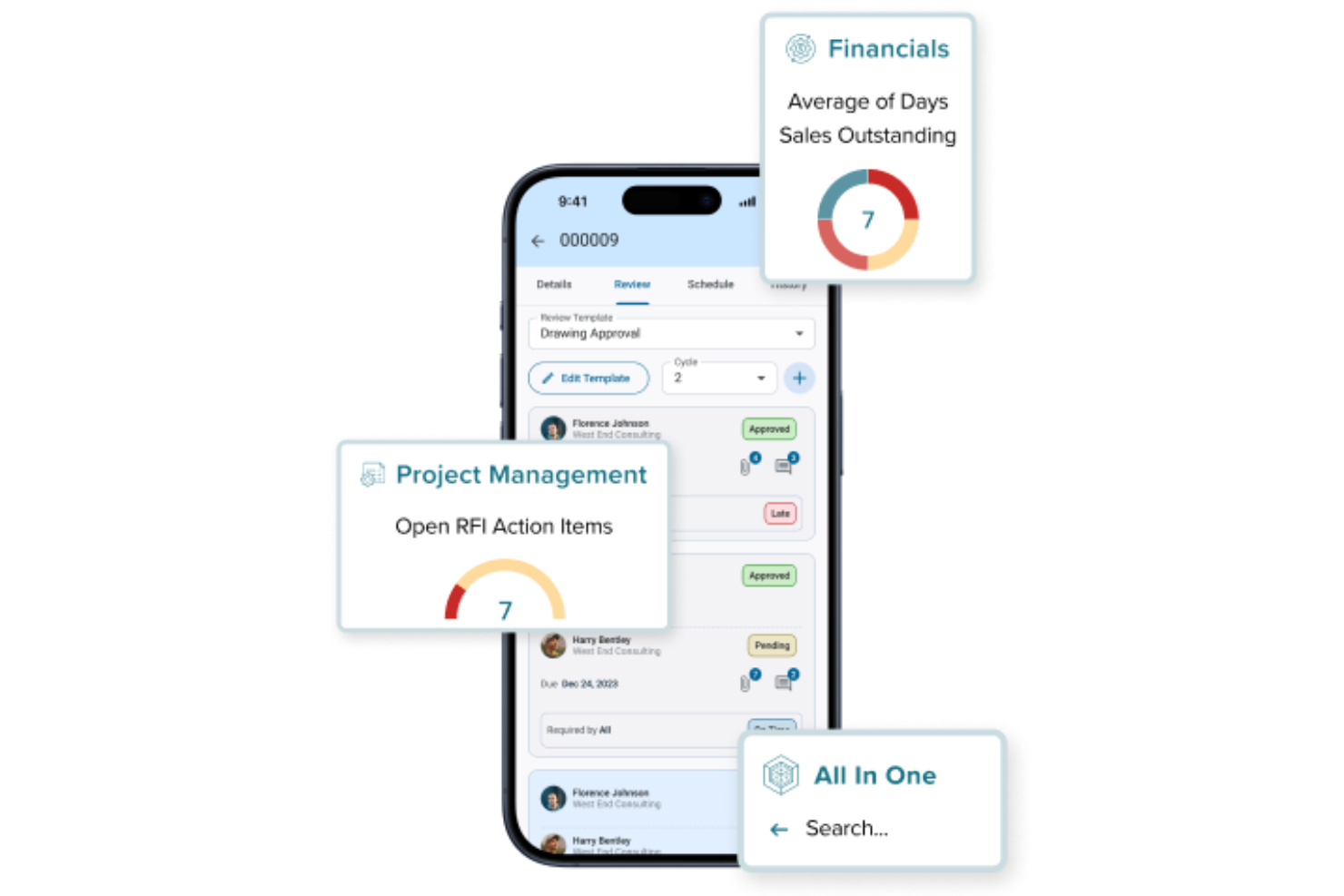
CMiC delivers a unified construction project management platform built specifically for the needs of contractors and construction firms. The software appeals to teams looking for deep integration between project controls, financials, and field operations. If your business needs a single source of truth for managing complex construction workflows, CMiC is designed to address those challenges.
Who Is CMiC Best For?
CMiC is a strong fit for mid-sized to large construction firms that need integrated project management and financial controls within a single platform.
Why I Picked CMiC
I picked CMiC because its single database platform stands out for construction teams that need consistent, real-time data across all project phases. With everything—from project management to financials—stored in one unified system, you avoid the data silos and version control issues that often slow down construction workflows. I appreciate how this architecture supports features like centralized document management and unified reporting, so teams always work from the same source of truth. This approach is especially valuable for firms managing multiple projects and stakeholders who rely on accurate, up-to-date information.
CMiC Key Features
Some other features in CMiC that construction teams might find useful include:
- Mobile field management: Access project data, submit daily logs, and manage punch lists directly from the field using mobile devices.
- Change order management: Track, review, and approve change orders within the platform to maintain control over project scope and costs.
- Resource scheduling: Allocate labor, equipment, and materials across multiple projects with a visual scheduling tool.
- Subcontractor management: Manage contracts, compliance documents, and communications with subcontractors in one place.
CMiC Integrations
Integrations include Arcoro, Prophix, Workday, Cosential, HammerTech, and SmartBarrel. An API is also available for custom integrations.
Pros and Cons
Pros:
- Built-in safety management and compliance tracking
- Daily journals and field reporting are included
- AI features support predictive project analytics
Cons:
- Limited out-of-the-box third-party integrations
- Initial setup and onboarding can be complex

Wrike
Best for real-time data and analytics
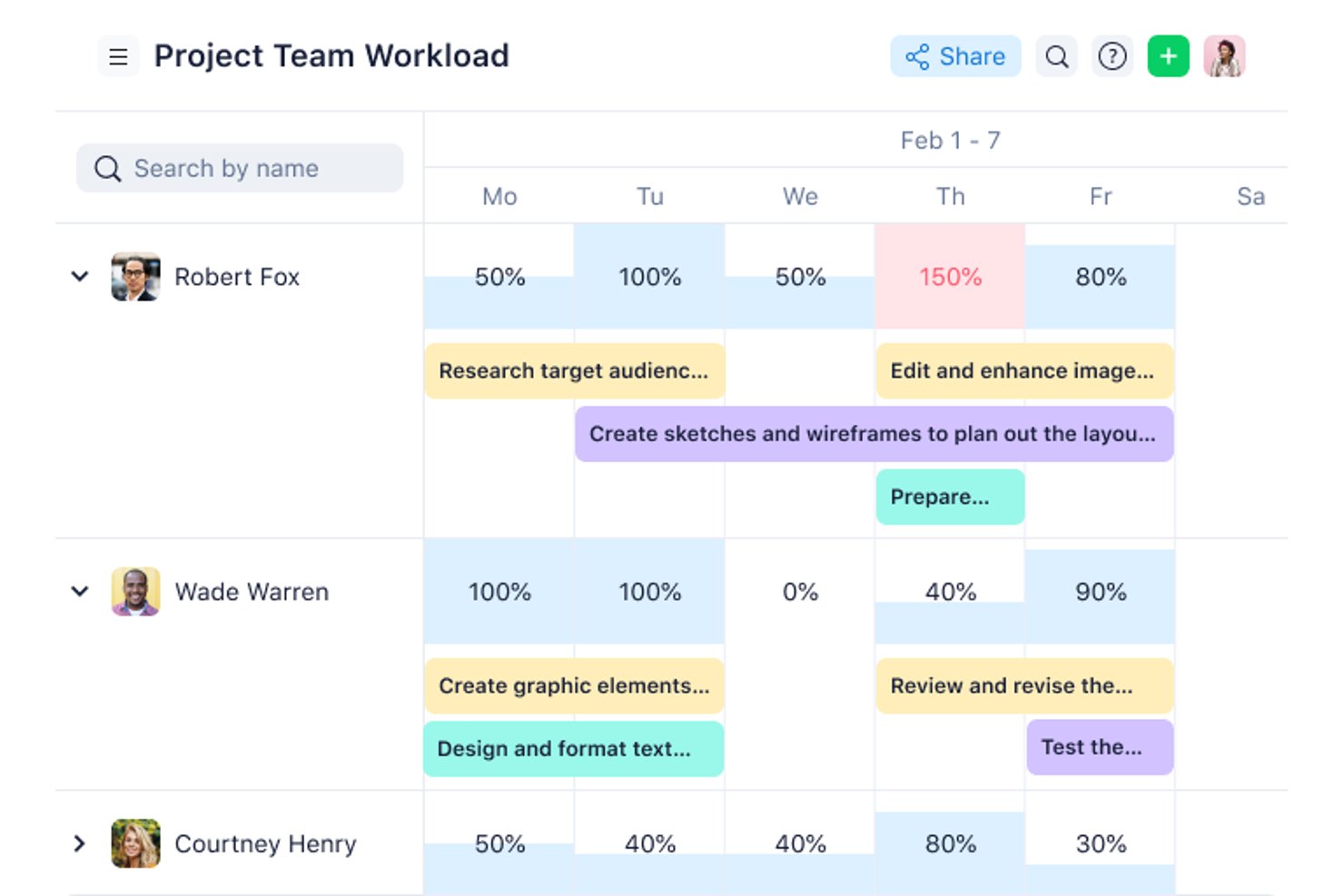
Wrike is a general work management platform that brings scheduling, real-time dashboards, analytics, and cross-team collaboration into one configurable workspace for construction and project-based teams.
Who Is Wrike Best For?
Wrike is a strong fit for mid-size to enterprise project teams that need real-time visibility across multiple workstreams and stakeholders.
Why I Picked Wrike
I picked Wrike as one of the best because its real-time dashboards and AI Insights widgets give construction teams live visibility into project health without waiting for status meetings. I especially like how Wrike Copilot surfaces risks and trends across workstreams, so you catch schedule slippage before it compounds. Baselines are stored as reportable fields, meaning planned-vs-actual variance shows up directly in shareable dashboards your stakeholders can track themselves.
Wrike Key Features
- Interactive Gantt charts: Build and adjust schedules with drag-and-drop editing, automatic dependency rescheduling, and critical path highlighting across all project phases.
- Guest access: Bring subcontractors, architects, engineers, and owners into specific projects with controlled permissions, without requiring full licenses for each participant.
- Change request template: Log and track change orders with a prebuilt template that captures scope, budget, and timeline impact in one place.
- 400+ pre-built integrations: Connect Wrike to tools like Salesforce, Microsoft Teams, Slack, and QuickBooks, with an open REST API available on every plan for custom integrations.
Wrike Integrations
Wrike offers 400+ pre-built native integrations, including QuickBooks, Microsoft Teams, Slack, Salesforce, NetSuite, Google Workspace, Dropbox, Jira, and GitHub. An open REST API is available on every plan, including Free, for custom integrations.
Pros and Cons
Pros:
- Guest access coordinates external project partners
- Gantt charts support complex dependencies
- Real-time dashboards expose schedule risks
Cons:
- Field teams lack daily reporting tools
- No native RFI or submittal workflows
New Product Updates from Wrike

Wrike Redesigns Workspace Search With New Filters
Wrike introduces a redesigned Workspace Search interface with recent search shortcuts, item type and location filters, and parent-task context. These updates help users find relevant work items and navigate search results efficiently. For more information, visit Wrike’s official site.

Procore
Best for deep ERP and accounting integrations
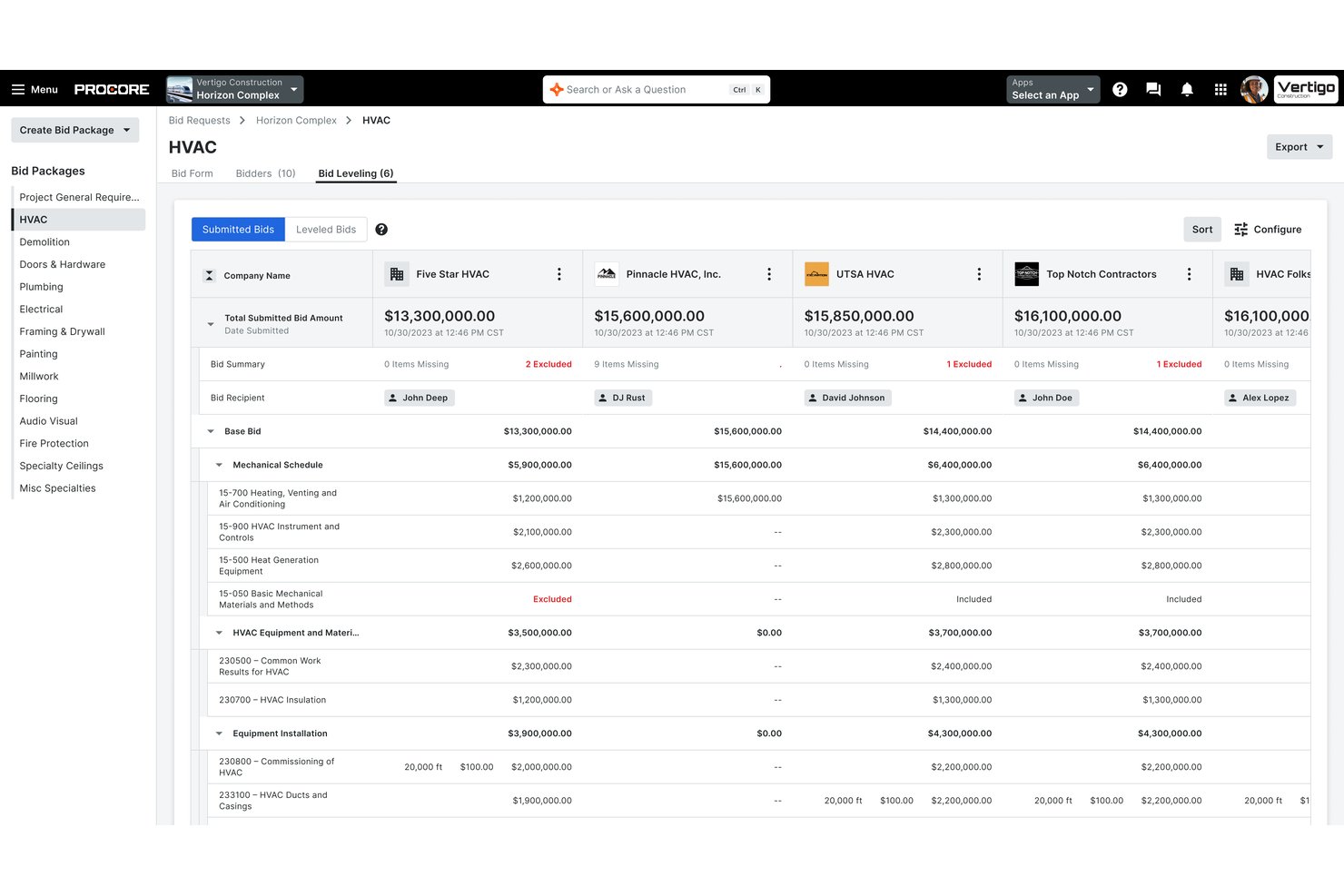
Procore is an end-to-end construction management platform covering project scheduling, document and drawing management, RFIs, submittals, job costing, field reporting, and bid management across the full project lifecycle.
Who Is Procore Best For?
Procore is a strong fit for mid-size to enterprise general contractors managing complex, multi-site projects with existing ERP or accounting systems they need to keep connected.
Why I Picked Procore
Procore earns its spot as one of the best on my shortlist because of how deeply it connects to construction-specific accounting systems like Sage 300 CRE, Viewpoint Vista, and Acumatica. I love that committed costs, change orders, and subcontractor invoices sync directly to the general ledger without manual re-entry. The two-way cost data flow means job cost updates in the field show up in the ERP the same day, keeping project financials and accounting records aligned in real time.
Procore Key Features
- BIM viewer and markup: Lets users view, navigate, and annotate 3D models from Revit and Navisworks directly in the web or mobile app.
- Configurable workflow automation: Supports custom approval flows for RFIs, submittals, contracts, and inspections.
- Mobile field app with offline mode: Enables field teams to capture daily logs, safety forms, and photos even in areas without connectivity.
- Prequalification and compliance management: Tracks subcontractor certifications, insurance, and prequalification status in one centralized system.
Procore Integrations
Procore offers more than 15 native integrations with construction accounting and ERP systems including Sage 100 Contractor, Sage 300 CRE, Viewpoint Vista, Viewpoint Spectrum, QuickBooks, Acumatica, MRI, Yardi, NetSuite, CMiC, Xero, and more. An API and app marketplace are available for custom integrations.
Pros and Cons
Pros:
- Built-in subcontractor prequalification and bid portal
- Automatic drawing versioning with markup history
- Real-time job cost updates visible across teams
Cons:
- Steep learning curve for new users
- Implementation timelines run long for enterprise deployments

Best for guided onboarding and training
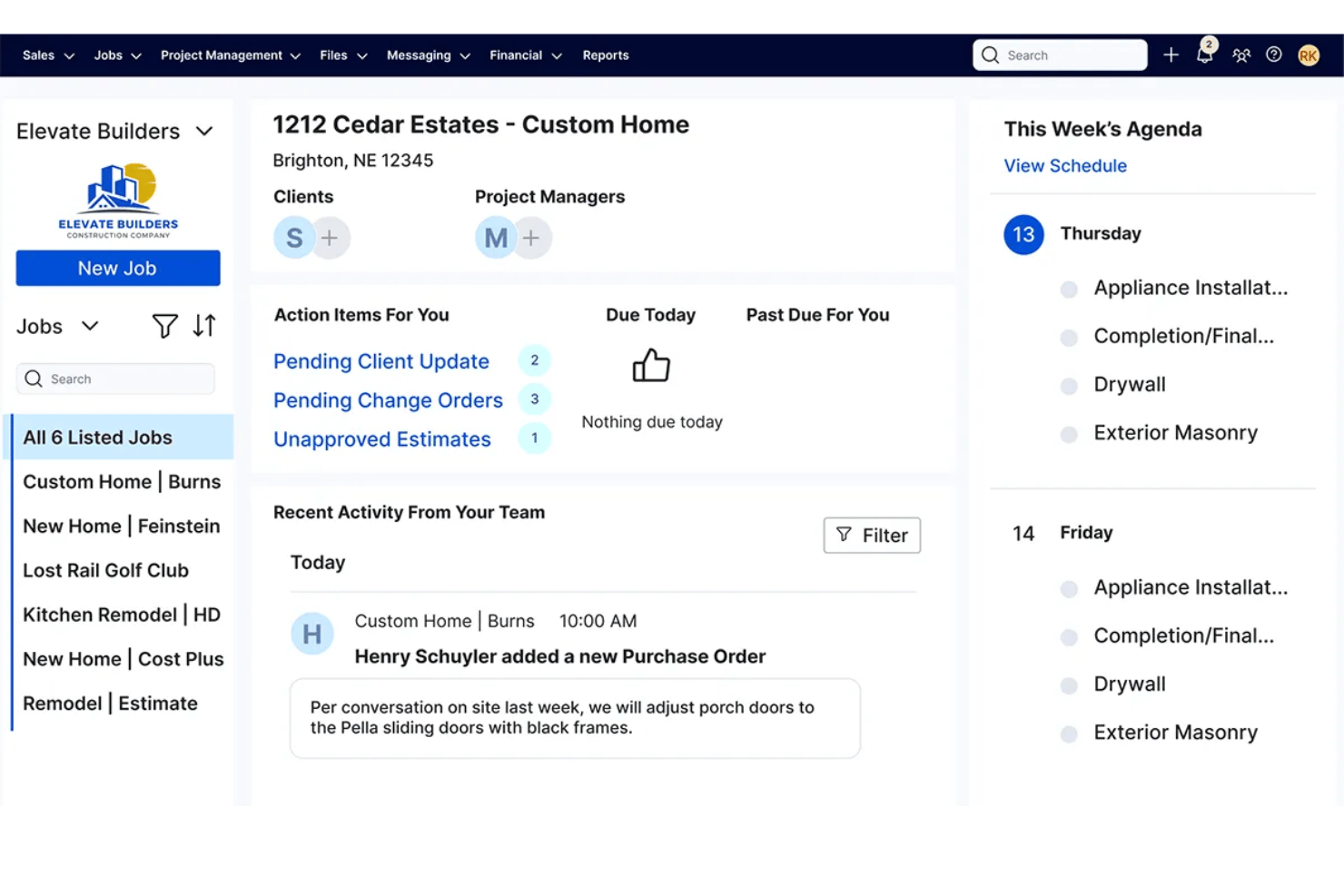
Buildertrend is a construction project management platform covering project scheduling, job costing, document management, subcontractor coordination, client communication, and field reporting across residential and commercial builds.
Who Is Buildertrend Best For?
Buildertrend is a strong fit for small to midsize residential builders and remodelers who manage multiple projects simultaneously and need one platform to run them end to end.
Why I Picked Buildertrend
Buildertrend earns its spot on my shortlist because of how seriously it takes getting construction teams up and running. I love the structured 12-week onboarding program, where a dedicated onboarding manager walks you through account setup and then runs a live job alongside you. Buildertrend University and the Learning Academy layer in role-based training that addresses the full team, from estimators reviewing job cost budgets to field crews logging daily site reports.
Buildertrend Key Features
- Change order management: Create, approve, and log project change orders with digital signatures and audit trails.
- Job costing budget: Track committed costs, forecasts, and actuals against budget by cost code and activity.
- Field time clock: Capture crew hours and location data from the jobsite using the mobile app.
- Bid invitations: Send bids to subcontractors, track responses, and manage contracts in one system.
Buildertrend Integrations
Buildertrend offers native integrations with QuickBooks, Xero, and Sage 100 Contractor. An API is available for custom integrations.
Pros and Cons
Pros:
- Mobile daily logs include photo documentation
- Client portal built for owner communication
- Structured 12-week onboarding with dedicated manager
Cons:
- Mobile app performance can feel slow
- Steep learning curve for field workers

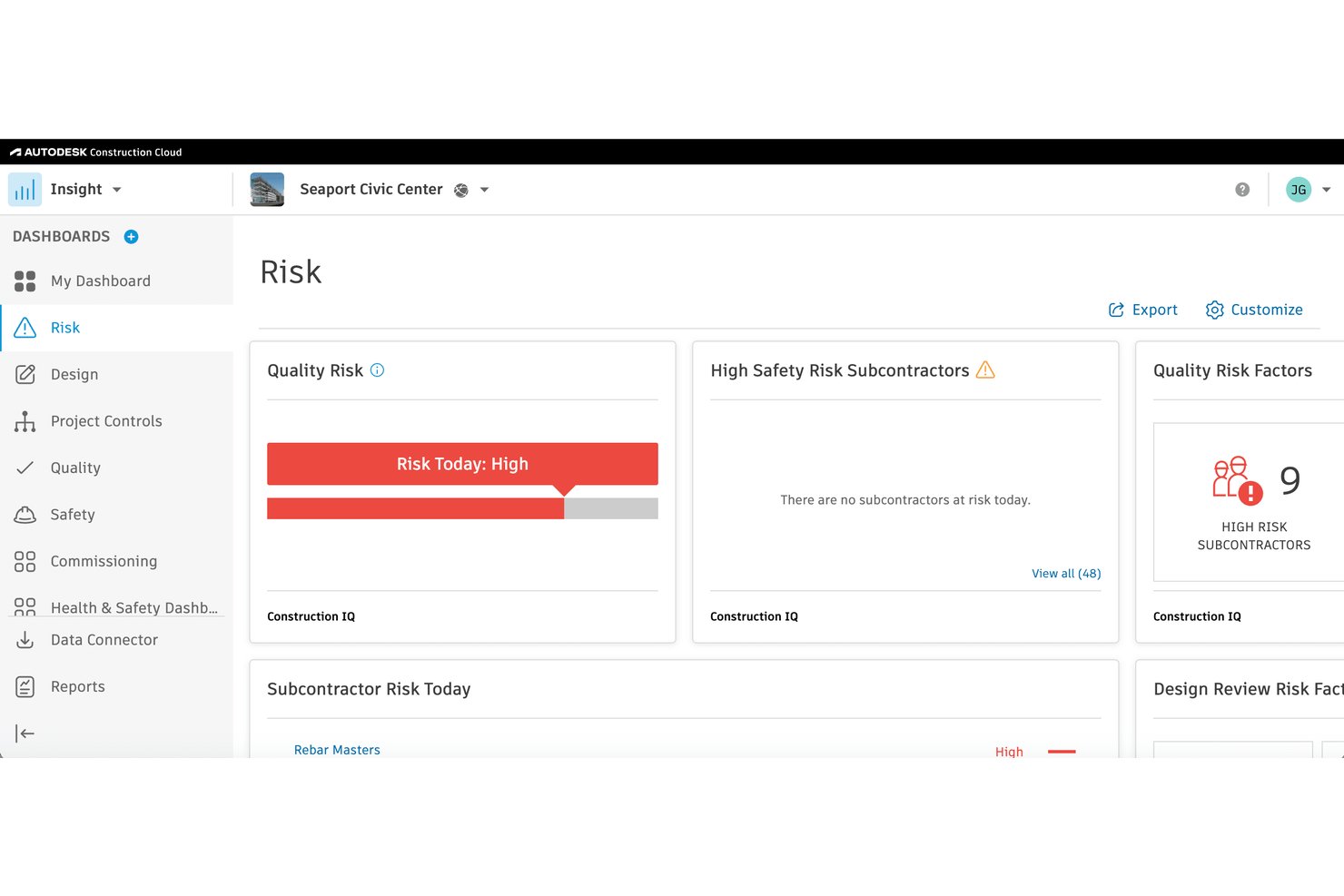
Autodesk Construction Cloud is a construction project management platform that unifies document management, BIM model coordination, RFIs, submittals, field reporting, cost tracking, and bid management across the full project lifecycle.
Who Is Autodesk Construction Cloud Best For?
It's a strong fit for large general contractors and construction firms managing complex, design-heavy projects that require tight coordination between office, field, and BIM workflows.
Why I Picked Autodesk Construction Cloud
Autodesk Construction Cloud earns its spot on my shortlist because of how deeply model coordination is woven into the platform itself. I love that automated clash detection runs directly against live Revit models without exporting files or switching tools. In practice, my team can catch and resolve design conflicts before breaking ground, right where they're cheapest to fix.
Autodesk Construction Cloud Key Features
- Document management: Centralizes all project files with version control, markup tools, and permission settings.
- RFIs and submittals workflow: Lets you create, track, and route RFIs, submittals, and change orders with custom approval paths.
- Bid management suite: Integrates BuildingConnected for managing bids, subcontractor invites, and prequalification.
- Field reporting tools: Enables mobile daily logs, punch lists, safety inspections, and photo capture from any jobsite.
Autodesk Construction Cloud Integrations
Autodesk Construction Cloud offers native integrations with Revit, Navisworks, Microsoft 365, Dropbox, Box, Procore, PlanGrid, and BIM 360. It also connects with Sage 300 CRE, Viewpoint Vista, QuickBooks, and provides an API for custom integrations.
Pros and Cons
Pros:
- Strong mobile field tools with offline sync
- End-to-end coverage from design through closeout
- Native BIM clash detection within the platform
Cons:
- Can feel overwhelming for smaller project teams
- Setup and onboarding takes significant time

Best with built-in budgeting tools
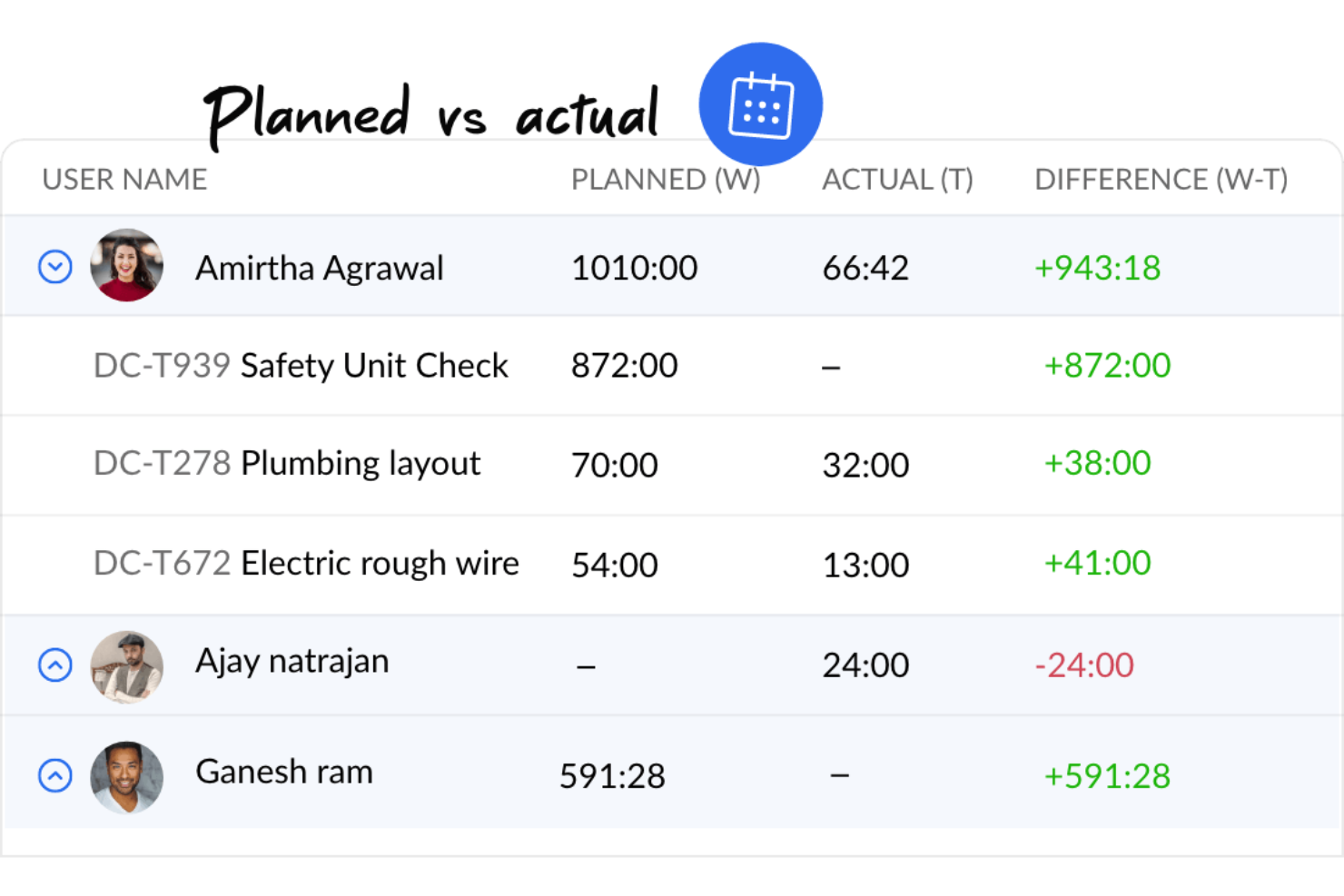
If you’re looking for construction project management software with built-in budgeting and cost control, Zoho Projects is worth a look. It’s a good fit for project managers and contractors who want to track expenses, allocate resources, and monitor budgets alongside schedules and tasks. The platform helps teams keep financials visible and connected to day-to-day project activity.
Who Is Zoho Projects Best For?
Small to mid-sized teams that want affordable project management with built-in budgeting and time tracking tools.
Why I Picked Zoho Projects
Budgeting and cost management are often top priorities for construction teams, which is why Zoho Projects stands out in this space. The platform includes built-in budgeting tools that let you set project budgets, track actual costs, and compare them against estimates in real time. I picked Zoho Projects because it also supports expense logging and resource allocation, so you can keep a close eye on where money is going throughout the project. These features help construction project managers maintain financial control without needing separate accounting tools.
Zoho Projects Key Features
Some other features construction teams may find useful include:
- Gantt Charts: Visualize project timelines, dependencies, and milestones in a single view.
- Task Automation: Set up rules to automate repetitive project tasks and notifications.
- Timesheet Management: Log work hours and generate timesheet reports for payroll or billing.
- Issue Tracking: Capture, assign, and monitor project issues or defects as they arise.
Zoho Projects Integrations
Integrations include Zoho CRM, Zoho Books, Zoho Invoice, Zoho Analytics, Zoho People, Google Drive, Microsoft Teams, Slack, Dropbox, and GitHub.
Pros and Cons
Pros:
- Includes task management, time tracking, and Gantt charts
- Allows customization of workflows and project templates
- Good integration with Zoho Suite
Cons:
- The platform lacks robust offline functionality
- Lacks advanced functionalities required for complex construction projects
New Product Updates from Zoho Projects
Zoho Projects Adds CodeX Scripts for Custom Modules
Zoho Projects now supports CodeX Scripts for custom modules, enabling conditional logic and rules for creating, updating, and deleting records. For more information, visit Zoho Projects' official site.
 .

Best resource and document management
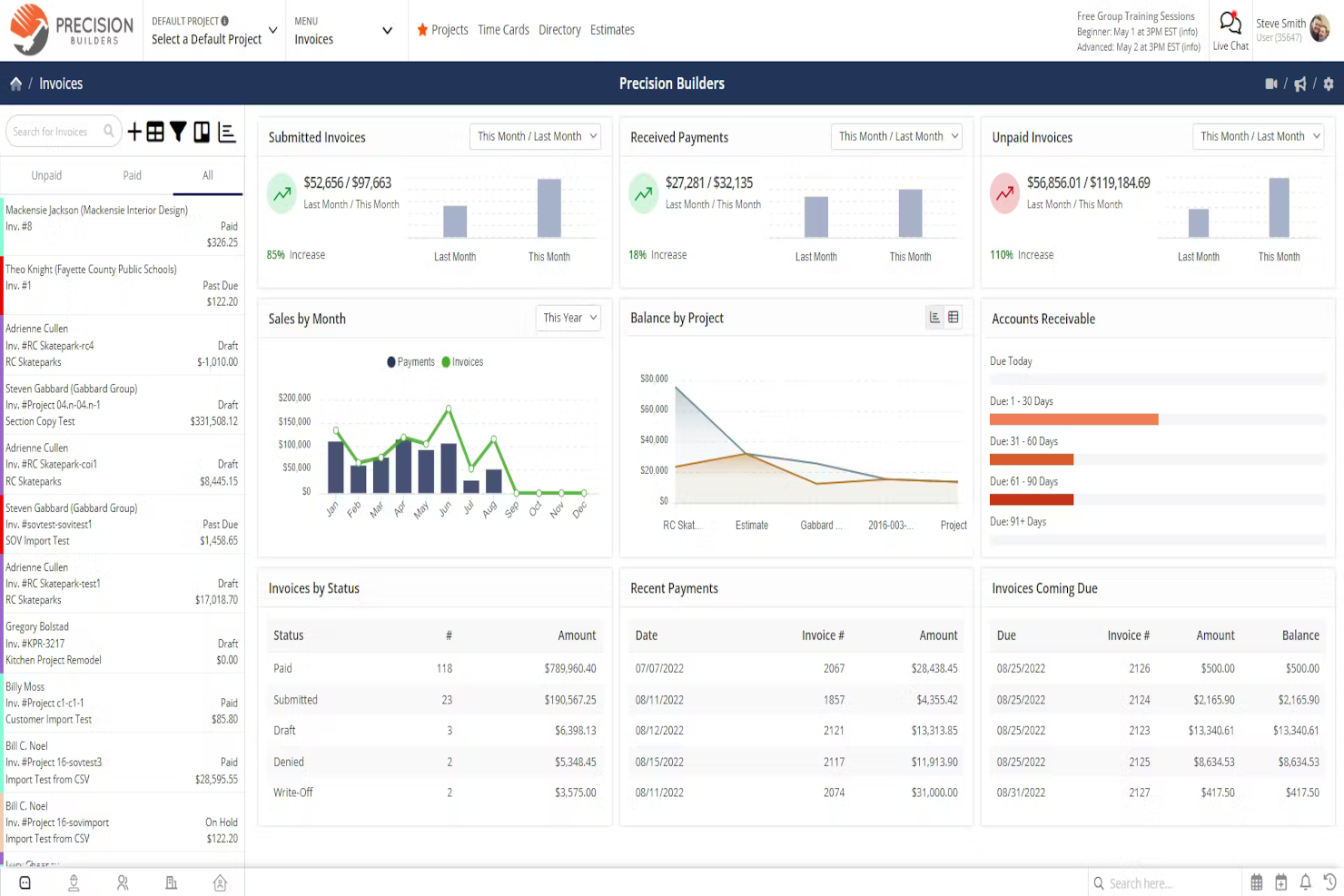
Contractor Foreman brings together resource tracking and document management for construction businesses that need to keep jobs organized and compliant. It’s a strong fit for small to mid-sized contractors who want to manage crews, equipment, and project files in one place. The platform’s focus on daily logs, safety forms, and centralized file storage helps teams stay on top of paperwork and resource allocation.
Who Is Contractor Foreman Best For?
Contractors and field service teams that want a project and resource management platform built specifically for construction workflows.
Why I Picked Contractor Foreman
What sets Contractor Foreman apart is its focus on resource and document management tailored for construction teams. The platform offers tools for tracking equipment, materials, and labor assignments, making it easier to allocate resources across multiple jobs. I picked Contractor Foreman because its document management features—like daily logs, safety forms, and centralized file storage—help keep project paperwork organized and accessible. These capabilities are especially useful for contractors who need to maintain compliance and manage documentation for inspections or audits.
Contractor Foreman Key Features
Some other features that construction teams may find useful include:
- Change Order Management: Create, track, and approve change orders directly within the platform.
- Scheduling Tools: Build project schedules and assign tasks to team members with drag-and-drop functionality.
- Client Portal: Share project updates, documents, and invoices with clients through a secure online portal.
- Invoice and Payment Tracking: Generate invoices and monitor payment status for each project.
Contractor Foreman Integrations
Integrations include QuickBooks, WePay, Outlook 365, Google Calendar, CompanyCam, Gusto, and Angi Leads. You can also use a paid Zapier account to unlock additional software integrations.
Pros and Cons
Pros:
- Integrates with QuickBooks for better financial management
- Offers a mobile app, enabling field teams to access and update information
- Designed specifically for contractors
Cons:
- Customization options may not be as extensive as other platforms
- Occasional slow loading times
Diğer İnşaat Proje Yönetimi Araçları
Bu inşaat yönetimi araçları en iyi 10 listeme giremedi, ancak yine de göz atmaya değer:
- ProjectManager
For project planning and scheduling
- Joist
Contractor app
- Geniebelt
For syncing stakeholders
- ConstructionOnline
For job costing
- Jonas Construction
For complex construction projects
- Onware
For document collection
- VPO
For multi-device accessibility
- BrickControl
Cloud-based solution
- Candy CSS
For estimates
- Builterra
For contract administration
- PASKR
For automation
- GanttPRO
For dynamic Gantt charts
- ClickUp
For customizable workflows
- Scoro
For informed resource allocation
- ProWorkflow
For quote-to-invoice project control
- GoodDay
For customizable workflows
- CrewCost
For linking financials with operations
- Projectworks
For its robust reporting features


İlgili Proje Yönetimi Yazılımı İncelemeleri
- Proje Yönetimi Yazılımı
- Kaynak Yönetimi Yazılımı
- İş Akışı Otomasyonu Yazılımı
- Zaman Takibi Yazılımı
- Görev Yönetimi Yazılımı
- İş Birliği Araçları
- Sermaye Projesi Yönetimi Yazılımı
How I Evaluate Construction Project Management Software
I split my evaluation into two layers: the baseline every tool must clear—RFIs, job costing, field logs—and the differentiators that set the best options apart for specific teams and project types.
Core Functionality (Table Stakes For This List)
When I'm selecting tools for my list, I rank each one on a scale from 0 (does not offer the functionality) to 5 (excels in this area) for each core functionality listed below. Then, I calculate the tool's total score into a percentage. Each tool needs to achieve a minimum total score of 65% to be considered for inclusion.
- Project Scheduling & Gantt Charts: I check for dependency tracking, critical path visibility, and milestone management that reflects real construction phases like sitework, framing, and closeout.
- Document & Drawing Management: Version control, markup tools, and sheet comparison matter here—especially when teams are working off revised architectural or structural drawings.
- RFI & Submittal Workflows: I evaluate how each tool handles RFI creation, routing, ball-in-court tracking, and change order integration across the project lifecycle.
- Budget & Cost Tracking: Job costing with cost code structures, committed cost tracking, and change order financial impacts are what I look for to support real-time budget decisions.
- Field & Daily Reporting: Mobile daily logs, punch lists, safety checklists, and photo documentation should all work on-site, ideally with offline access for remote jobsites.
- Subcontractor & Bid Management: Bid invitations, prequalification workflows, and contract tracking help GCs manage their sub relationships from bidding through project completion.
Once I have a list of tools that meet the criteria, I consider what sets each platform apart.
Differentiating Factors (What Sets Vendors Apart)
Here's how I compare and contrast different vendors:
Standout Features
BIM integration is a big differentiator. I look for tools that let teams view and coordinate 3D models within the platform, catching design clashes before they reach the field. Owner and client portals also matter when your GC needs to give architects or developers real-time visibility into schedules and budgets without granting full system access. Equipment and resource tracking across multiple jobsites helps larger teams avoid idle machinery and crew scheduling conflicts during overlapping project phases.
Beyond Features
Integrations matter a lot in this space. I evaluate whether a tool connects to the accounting and ERP systems construction firms actually use, like Sage 300 CRE, Viewpoint Vista, or QuickBooks. Mobile and offline capability is another priority—field crews on remote sites need to capture daily logs and photos without relying on cell service. I also consider implementation support, because rolling out a new platform across office staff and field teams takes structured onboarding and role-based training to drive real adoption.
İnşaat Proje Yönetimi Yazılımı Nasıl Seçilir?
Kısa listeye alırken, deneme sürümlerini değerlendirirken ve inşaat proje yönetimi yazılımını seçerken aşağıdakileri göz önünde bulundurun:
- Hangi sorunu çözmeye çalışıyorsunuz? İnşaat proje yönetimi yazılımının sağlaması gereken özellikleri ve işlevleri netleştirmek için öncelikle doldurmaya çalıştığınız inşaat proje yönetimi yazılımı özellik boşluğunu belirleyin.
- Kimlerin kullanması gerekecek? Maliyeti ve gereksinimleri değerlendirmek için yazılımı kimlerin kullanacağını ve kaç lisansa ihtiyacınız olacağını göz önünde bulundurun. Erişimin yalnızca proje ekibiniz için mi yoksa tüm kuruluş için mi gerekli olacağını değerlendirmeniz gerekir. Herkes için kullanım kolaylığına mı yoksa deneyimli kullanıcılarınız için hıza mı öncelik vermeniz gerektiğini düşünün.
- Hangi diğer araçlarla birlikte çalışması gerekiyor? Hangi araçların yerine geçeceğinizi, hangi araçları kullanmaya devam edeceğinizi ve muhasebe, CRM, İK veya maliyet tahmini yazılımı gibi hangi araçlarla entegre olmanız gerektiğini netleştirin. Birden fazla aracı tek bir konsolide inşaat proje yönetimi yazılımıyla değiştirip değiştiremeyeceğinizi kontrol edin.
- Hangi sonuçlar önemli? Yazılımın başarılı kabul edilmesi için sağlaması gereken sonucu, hangi yetkinliği kazanmak istediğinizi, neyi geliştirmek istediğinizi ve başarıyı nasıl ölçeceğinizi göz önünde bulundurun. Genel inşaat araçları ihtiyaçların çoğunu karşılarken, uzmanlaşmış mimari proje yönetimi araçları tasarım iş akışlarına yönelik sektöre özgü özellikler sağlar ve farklı sonuçları destekleyebilir.
- Kuruluşunuz içinde nasıl çalışır? Yazılım seçimini iş akışlarınız ve teslim metodolojinizle birlikte değerlendirin. Nelerin iyi çalıştığını ve ele alınması gereken alanları değerlendirin. Her işletmenin farklı olduğunu unutmayın—bir aracın popüler olması, kuruluşunuzda işe yarayacağını varsaymayın.
İnşaat Proje Yönetimi Yazılımındaki Trendler
İnşaat proje yönetimi yazılımının geleceğini şekillendiren çeşitli trendler şunlardır.
- GPS ve mobil özelliklerle entegrasyon: Contractor Foreman gibi araçlar, gelişmiş GPS izleme ve mobil uygulama işlevleri sunarak ekiplerin ve kaynakların gerçek zamanlı izlenmesini sağlar; sevk verimliliğini ve proje planlamasını geliştirir. Malzeme ve işçilik maliyetlerinin hızla değiştiği çatı kaplama projelerinde çatı kaplama proje yönetimi yazılımı, yüklenicilerin maliyetleri ve planlamayı optimize etmesine yardımcı olmak üzere yapay zekâ destekli tahminleri ve gerçek zamanlı tedarikçi entegrasyonlarını içerecek şekilde gelişmektedir.
- Kapsamlı belge yönetimi: Buna, her projenin benzersiz gereksinimlerine uyarlama yapmanıza olanak tanıyan özelleştirilebilir formlar, şablonlar ve denetim kontrol listeleri dahildir. Yüklenicilerle yapılan sözleşmelerden izin ve ruhsatlara kadar belgeler inşaat projelerinin merkezinde yer aldığından, belgelerin aranabilirliğiyle ilgili daha fazla gelişme bekliyorum.
- Gelişmiş bütçeleme ve gider yönetimi: Zoho Projects gibi platformlar, proje yönetimi arayüzüne güçlü bütçeleme araçları entegre ederek proje mali durumunun ve harcamalarının daha yakından izlenmesini sağlar.
İnşaat Proje Yönetimi Yazılımının Özellikleri
İnşaat proje yönetimi yazılımı seçerken şu temel özelliklere dikkat edin:
- Belge yönetimi: Planları, sözleşmeleri ve diğer önemli proje belgelerini tek bir güvenli konumda yükleyin, saklayın ve düzenleyin. Artık e-postalar arasında arama yapmanıza gerek yok—ihtiyacınız olan her şey parmaklarınızın ucunda.
- Zamanlama ve görev takibi: Proje takvimleri oluşturun, görevler atayın ve son tarihler belirleyin; böylece herkes sırada ne olduğunu bilir. Bu, projenizi planlanan şekilde ilerletmenize yardımcı olur ve gecikme riskini azaltır.
- Bütçe ve maliyet kontrolü: Bütçeler belirleyin, harcamaları izleyin ve gerçekleşen maliyetleri öngörülerinizle karşılaştırın. Bu özellik, harcamaları yönetmenize ve istenmeyen mali sürprizlerden kaçınmanıza yardımcı olur.
- Kaynak yönetimi: Eksiklikleri veya fazlalıkları önlemek için iş gücü, ekipman ve malzeme kullanımını takip edin. Verimli kaynak tahsisi, projenizin sorunsuz ilerlemesini sağlar.
- İş birliği araçları: Ekip üyeleri, alt yükleniciler ve müşterilerle gerçek zamanlı iletişim kurun. Yerleşik mesajlaşma ve yorum özellikleri, iş birliğini ve sorun çözmeyi kolaylaştırır.
- Değişiklik talimatı yönetimi: Değişiklikleri kolayca belgeleyin, onayları takip edin ve gerektiğinde bütçeleri veya takvimleri güncelleyin. Planlar değiştiğinde düzenli ve hızlı tepki verebilir durumda kalın.
- Raporlama ve analiz: Proje ilerlemesi, maliyetler, riskler ve daha fazlası hakkında ayrıntılı raporlara ve panolara erişin. Bilinçli kararlar almak ve sorunları erkenden ele almak için bu içgörüleri kullanın.
- Mobil erişim: İster ofiste ister şantiyede olun, bilgileri güncelleyin, planları inceleyin ve her yerden güncellemeler gönderin.
- Uyumluluk ve güvenlik takibi: Ekibinizi güvende ve projenizi mevzuata uygun tutmak için güvenlik sertifikalarını izleyin, olayları kaydedin ve uyumluluk görevlerini yönetin.
- Entegrasyon özellikleri: İş akışlarını kolaylaştırmak ve manuel veri girişini azaltmak için muhasebe yazılımlarıyla, BIM araçlarıyla ve tedarik sistemleriyle bağlantı kurun.
İnşaat Proje Yönetimi Yazılımlarındaki Yaygın Yapay Zekâ Özellikleri
Modern inşaat proje yönetimi yazılımları, ekiplerin daha çok değil, daha akıllıca çalışmasına yardımcı olmak için giderek daha fazla yapay zekâ ile destekleniyor. Aranması gereken yaygın yapay zekâ özelliklerinden bazıları şunlardır:
- Otomatik zamanlama: Yapay zekâ, en uygun takvimleri önermek ve olası darboğazları sorun hâline gelmeden önce işaretlemek için proje zaman çizelgelerini, kaynak uygunluğunu ve bağımlılıkları analiz edebilir.
- Risk tahmini: Yapay zekâ algoritmaları, maliyet aşımları, gecikmeler veya güvenlik olayları gibi olası riskleri belirlemek ve öngörmek için proje verilerini tarar; böylece erkenden harekete geçebilirsiniz.
- Belge otomasyonu: Yapay zekâ, sözleşmelerden, faturalardan ve RFI'lerden önemli bilgileri çıkararak manuel veri girişini azaltabilir ve düzenli kalmanıza yardımcı olabilir.
- Akıllı raporlama ve analiz: Yapay zekâ destekli panolar eğilimleri öne çıkarır, sonuçları tahmin eder ve uygulanabilir öneriler sunar; böylece projenizin durumunu takip etmek kolaylaşır.
- Doğal dil işleme: Yapay zekâ sohbet robotları ve asistanları soruları yanıtlayabilir, toplantılar planlayabilir veya belgeleri bulmanıza yardımcı olabilir; böylece zamandan tasarruf eder ve iletişimi kolaylaştırırsınız.
İnşaat Proje Yönetimi Yazılımının Faydaları
İnşaat proje yönetimi yazılımının başlıca beş faydası aşağıda verilmiştir.
- Gelişmiş proje görünürlüğü: Kullanıcıların ve işletmelerin projenin her yönü hakkında bilgi sahibi olmasını sağlar; bu da proaktif karar almayı ve projeleri planlanan şekilde ilerletmek için zamanında ayarlamalar yapmayı kolaylaştırır.
- İyileştirilmiş kaynak tahsisi: Kaynakların hassas biçimde izlenmesini ve planlanmasını sağlayan inşaat proje yönetimi yazılımı, israfı azaltmaya ve kaynakların verimli kullanılmasını sağlamaya yardımcı olur; bu da maliyet tasarrufu ve artan kârlılık getirir.
- Kolaylaştırılmış iletişim: Yanlış iletişim ve hataların olasılığını azaltır, tüm tarafların en güncel güncellemelere, belgelere ve takvimlere erişmesini sağlar; sonuç olarak iş birliğini ve proje sonuçlarını iyileştirir.
- Otomatik belgeleme ve uyumluluk: Kritik belgelerin yönetimini ve düzenlemelere uyumu kolaylaştırır. İnşaat proje yönetimi yazılımı; proje belgelerinin, izinlerin ve uyumluluk raporlarının saklanmasını, alınmasını ve yönetilmesini otomatikleştirerek belge kaybı veya uyumsuzluk cezaları riskini azaltır.
- Veriye dayalı içgörüler ve raporlama: Proje performansı hakkında analizler ve özelleştirilebilir raporlar sunar. Bu içgörüler, proje yöneticilerinin ve kuruluşların proje dinamiklerini derinlemesine anlamasına, eğilimleri belirlemesine ve gerçek zamanlı verilere dayanarak bilinçli kararlar almasına olanak tanır; böylece stratejik planlama ve gelecekteki proje başarısı geliştirilir.
İnşaat Proje Yönetimi Yazılımı Maliyetleri ve Fiyatlandırması
Aşağıda, inşaat proje yönetimi yazılımlarında sunulan yaygın plan seçeneklerine ilişkin basitleştirilmiş bir genel bakış yer almaktadır.
İnşaat Proje Yönetimi Yazılımı İçin Plan Karşılaştırma Tablosu
| Plan Türü | Ortalama Fiyat | Dahil Olan Yaygın Özellikler |
|---|---|---|
| Temel | $20 - $50 / ay | Görev ve proje takibi, belge paylaşımı, sınırlı kullanıcı |
| Standart | $50 - $150 / ay | Gelişmiş proje yönetimi özellikleri, bütçeleme araçları, sınırsız proje, geliştirilmiş güvenlik |
| Premium | $150 - $300 / ay | Tüm Standart özellikleri, özel raporlama, API erişimi, öncelikli destek |
| Kurumsal | Özel fiyatlandırma | Tüm Premium özellikleri, özel entegrasyonlar, özel destek, eğitim ve işe alıştırma hizmetleri |
| Ücretsiz | $0 | Temel görev yönetimi, sınırlı belge depolama, küçük bir ekip için erişim |
İnşaat Proje Yönetimi Yazılımı SSS'leri
Bu tür bir araç hakkında daha fazla bilgi edinmenize ve bir araca kaydolurken nelere dikkat etmeniz gerektiğini anlamanıza yardımcı olmak için inşaat proje yönetimi yazılımı hakkındaki yaygın soruların bazı yanıtlarını burada bulabilirsiniz.
İnşaat proje yönetimi yazılımında hangi özellikleri aramalıyım?
Zamanlamayı, belge yönetimini, iş birliğini ve şantiye iletişimini destekleyen özellikleri arayın. Ayrıca bütçeleme, değişiklik emri yönetimi ve görevleri gerçek zamanlı olarak takip etmeye yönelik araçlara da ihtiyacınız olacaktır. Muhasebe veya tasarım araçlarıyla entegrasyon, iş akışlarınızı kolaylaştırabilir. Doğru platform, bilgileri merkezileştirmenize, manuel veri girişini azaltmanıza ve tüm ekibinizin aynı bilgiler doğrultusunda çalışmasını sağlamanıza yardımcı olmalıdır.
İnşaat proje yönetimi yazılımı şantiyemdeki iletişimi nasıl iyileştirebilir?
Proje yönetimi araçları, güncellemeleri, uyarıları ve belge paylaşımını tek bir merkezde toplayarak şantiye iletişimini iyileştirir. Alt yüklenicilerinize mesaj gönderebilir, dosya paylaşabilir, görev atayabilir ve daha az gecikme ya da yanlış anlaşılmayla ilerlemeyi takip edebilirsiniz. Gerçek zamanlı güncellemeler, saha çalışanlarının, ofis personelinin ve paydaşların bağlantıda kalmasını ve değişikliklere hızla tepki vermesini kolaylaştırır.
İnşaat proje yönetimi yazılımı mevzuata uygunluk ve güvenlik takibine yardımcı olabilir mi?
Evet, birçok platformda güvenlik olayı raporlama ve mevzuata uygunluk belgeleri için özel modüller bulunur. Denetimler için otomatik hatırlatıcılar ayarlayabilir, imzalı güvenlik formlarını saklayabilir ve uygunluk raporları oluşturabilirsiniz. Bu, kayıtların erişilebilir olmasını sağlar ve denetimler gerçekleştiğinde evrakların arasında arama yapmadan ekibinizin gereklilikleri karşılamasına yardımcı olur.
İnşaat proje yönetimi yazılımında muhasebe veya BIM araçlarıyla entegrasyonlar nasıl çalışır?
Önde gelen çözümlerin çoğu QuickBooks veya Sage gibi muhasebe yazılımlarıyla ve Revit gibi BIM platformlarıyla entegrasyon sunar. Entegrasyonlar genellikle proje bütçelerini, faturaları ve çizimleri sistemler arasında otomatik olarak senkronize eder. Bu, çift veri girişini azaltır ve herkesin en güncel verilerle çalışmasını sağlayarak hem mali süreçlerinizi hem de planlamanızı kolaylaştırır.
Bulut tabanlı mı yoksa şirket içi inşaat proje yönetimi yazılımı mı ekibim için daha iyi?
Bulut tabanlı araçlar, verilere her yerden erişmenizi sağladıkları için çoğu ekip için en iyi seçenektir; bu, saha çalışmaları için idealdir. Güncellenmeleri ve birden fazla şantiyede ölçeklendirilmeleri daha kolaydır. Şirket içi platformlar, katı güvenlik gereksinimleri olan veya şantiyelerde bağlantı sorunları yaşayan şirketler için uygun olabilir. Seçiminizi genellikle bulunduğunuz yerlere, ekip büyüklüğünüze ve güvenlik gereksinimlerinize göre yapın.
En çok kullanılan inşaat proje yönetimi yazılımı hangisidir?
Procore, Buildertrend ve Autodesk Construction Cloud, inşaat proje yöneticileri tarafından en yaygın kullanılan platformlar arasındadır. Bu araçlar güçlü zamanlama, belge denetimi ve iş birliği özellikleriyle popülerdir. En iyi seçim proje büyüklüğünüze ve özel ihtiyaçlarınıza bağlıdır; ancak bu markalar sektörde sıklıkla öne çıkan seçeneklerdir.
İnşaat proje yönetimi yazılımı ile mühendislik proje yönetimi yazılımı arasındaki fark nedir?
İnşaat proje yönetimi araçları saha koordinasyonuna, zamanlamaya, teslim başvurularına, RFI’lara ve şantiye ekibi iletişimine odaklanır. Mühendislik proje yönetimi yazılımı ise tasarım ve inşaat öncesi aşamalar boyunca tasarım çıktıları, teknik iş akışları ve belge denetimiyle daha çok ilgilidir. Önceliğiniz saha uygulaması ve alt yüklenici yönetimiyse inşaata özel araçları seçin.
İnşaat proje yönetimi yazılımı ile gayrimenkul proje yönetimi yazılımı arasındaki fark nedir?
İnşaat araçları, devam eden yapı projelerinin yönetilmesine, şantiye görevlerinin takip edilmesine ve inşaat sırasında ekiplerle bütçelerin koordine edilmesine yardımcı olur. Gayrimenkul proje yönetimi yazılımı ise mülk edinme, kiralama, varlık yönetimi ve uzun vadeli bakıma yöneliktir. Günlük odağınız devam eden varlık yönetimi yerine inşaatın teslimiyse inşaata özel bir platform daha uygun olacaktır.