2026’da Ekipler İçin En İyi 10 Proje Planlama Yazılımı

10 En İyi Proje Planlama Yazılımları Kısa Listesi


En iyi proje planlama yazılımı, proje zaman çizelgelerini düzenlemenize, kaynakları etkili bir şekilde tahsis etmenize ve teslim tarihlerini karşılamak için planınızı takip etmenize yardımcı olur; böylece sonuçları sunmaya odaklanabilirsiniz.
Önde gelen dijital ajanslarda proje yöneticisi olarak 20 yılı aşkın deneyimim boyunca, düzensiz planlamanın teslim tarihlerinin kaçırılmasına, iletişim sorunlarına ve kaynak israfına nasıl yol açtığına ilk elden tanık oldum. Yazılım incelemecisi olarak geçirdiğim ek on yıllık deneyimle birleşen uygulamalı deneyimim, başarıya ulaşmak için doğru araçları kullanmanın kritik önemini benim için açıkça ortaya koydu.
Bu kılavuzda, zamandan tasarruf etmenizi, sorunları azaltmanızı ve proje hedeflerinize ulaşmanıza yardımcı olacak en etkili proje planlama çözümlerini ele alacağım. Her araç için, ihtiyaçlarınıza en uygun seçeneği bulmanıza yardımcı olmak amacıyla temel özelliklerini, artılarını ve eksilerini ve kendine özgü niteliklerini dikkatle araştırdım.
Why Trust Our Software Recommendations
Our team has been testing and reviewing software since 2012. As project managers ourselves, we know how difficult—and important—it is to choose the right software.
For this guide, we evaluated tools using hands-on testing and independent research, scoring tools using our selection criteria. We also draw on insights from industry thought leaders and practicing project management experts.
Our reviews reflect our human editorial judgment, not a sales pitch.
Expert reviewers:
Proje Planlama Yazılımları Karşılaştırma Tablosu
Bu karşılaştırma tablosu, en iyi proje planlama yazılımı seçimlerimin fiyatlandırma ayrıntılarını özetlemektedir:
| Tool | Starting Price | Website | |
|---|---|---|---|
| Best for comprehensive agency project management | 4.6 out of 5 | $10/user/month 14-day free trial | Book Demo |
| Best project planning software for agencies | 4.3 out of 5 | $10/user/month Free plan + 14-day trial + demo available | Book Demo |
| Best software for planning project workflows | 4.6 out of 5 | $9/user/month Free plan + 14-day trial available | Book Demo |
| Best for automated creative operations workflows | 4.6 out of 5 | Pricing upon request Not available | Book Demo |
| Best for planning multiple projects of varying complexity | 4.3 out of 5 | Pricing upon request Free plan + 15-day trial + demo available | Website |
| Best for project planning with AI | 4.5 out of 5 | $10/user/month 14-day free trial | Website |
| Best for dynamic project management through custom workflows | 4.4 out of 5 | $35/user/month 30-day free trial | Website |
| Best for breaking down complex tasks | 4.7 out of 5 | $7.65/user/month Free plan + 30-day free trial available | Website |
| Best for visual project planning and collaboration | 4.8 out of 5 | $8/user/month Free plan + 14-day trial available | Book Demo |
| Best for aligning tasks to goals | 4.5 out of 5 | $8.50/user/month Free plan available | Website |
En İyi Proje Planlama Yazılımları İncelemeleri
Listemde yer alan proje planlama yazılımlarının en iyi yaptığı şeyleri gösteren kısa açıklamaları ve bazı özellikleri sergileyen ekran görüntülerini burada bulabilirsiniz.

Best for comprehensive agency project management

Productive is a comprehensive project management software designed to streamline operations for agencies. It offers a robust platform for planning, managing, and executing projects, making it an essential tool for businesses aiming to enhance efficiency and productivity.
The platform offers Gantt charts for visualizing project timelines and dependencies, which is crucial for keeping projects on track. Additionally, its workload feature allows managers to monitor team utilization, ensuring that resources are allocated efficiently and preventing burnout. The automation tools in Productive also help with repetitive tasks. For example, automations can be set to trigger notifications when an invoice is overdue or when a task status changes.
Another standout feature of Productive is its budgeting and financial management capabilities. With the simple budget editor, users can create and manage budgets with ease, making it ideal for both small and large projects. The platform also supports various billing types such as time and materials, fixed price, and non-billable projects. It also offers project profitability tracking and forecasting.
Key integrations include Jira, Slack, QuickBooks, Xero, Zapier, Google Drive, Sage, BambooHR, and HubSpot.
Pros and Cons
Pros:
- User-friendly interface
- Robust workload and resource management capabilities
- Good profitability tracking feature
Cons:
- Could have more integrations
- Initial setup can take time
New Product Updates from Productive
Productive Adds Email and Calendar Integrations for Agents
Productive adds Gmail, Outlook, Google Calendar, and Outlook Calendar connectors for its AI agents. These integrations let agents manage emails and create calendar events directly within Productive. For more information, visit Productive’s official site.
 .

Wrike
Best project planning software for agencies

Wrike is a project planning tool and is ideal for teams of five members to an unlimited number of members. It offers tools for predicting and preventing delays, visualizing deadlines, and monitoring project progress. The tool is highly configurable, allowing users to customize workflows, dashboards, reports, and request forms. For Danilo Coviello, Founder of Espresso Translations, Wrike proved to be a major time-saver: “Wrike saved me 8 hours per week that used to go into scheduling. I now spend that time I have saved on building new relationships with clients.”
Wrike’s interface is highly visual, and allows users to switch between Kanban boards, interactive drag-and-drop Gantt charts, and traditional workload views to understand priorities. Project planning capabilities include task lists, subtasks, schedules, file sharing, and real-time communication and collaboration.
Wrike includes a robust mobile application that allows users to update team members or upload files and photos. Users can switch between calendars, dashboards, and task lists, and keep an eye on notifications and messages. Wrike also has a dedicated help center with interactive training, videos, a ‘Getting Started’ guide, and a thriving community.
Wrike offers a host of pre-built templates, including a phased project template, which can help break a complex project into manageable chunks, as well as a simple project scheduling template. Real-time reporting helps project managers allocate resources and adjust workloads, and requests keep repetitive admin to a minimum.
Wrike includes over 400 pre-built native integrations, including integrations with the most popular file management software from Microsoft, Google, and Dropbox.
Pros and Cons
Pros:
- Variety of project views met different user needs
- Holistic, comprehensive task modeling
- Ease of use and setup
Cons:
- Drag and drop feature not flexible
- Commenting system needs to be more prominent
- Best features limited to Business plan
New Product Updates from Wrike

Wrike Redesigns Workspace Search With New Filters
Wrike introduces a redesigned Workspace Search interface with recent search shortcuts, item type and location filters, and parent-task context. These updates help users find relevant work items and navigate search results efficiently. For more information, visit Wrike’s official site.
 .

Best software for planning project workflows
monday AI Workspace is a colorful, user-friendly, jack-of-all-trades project planning tool for modern teams. You’ll be able to plan, track, and deliver projects using hundreds of visual and customizable templates that make data more digestible. View data as a map, calendar, timeline, or kanban. I also love the ability to automate repetitive administrative tasks, like creating new lead entries according to incoming emails.
monday AI Workspace costs from $9/user/month and comes with a free 14-day trial. They offer a free plan for up to 2 users.
Pros and Cons
Pros:
- Excellent collaborative features
- Simple organization by dragging and dropping tasks
- Very easy to invite others, share timelines, and assign tasks
Cons:
- Best features locked to Standard or Pro versions
- Automations are not fully customizable
- No bottleneck identification or assistance
New Product Updates from monday AI Workspace
monday AI Workspace Adds Human Approval Routing
monday AI Workspace adds a human-in-the-loop approval block to AI Workflows, sending approval requests and routing workflow paths based on responses. For more information, visit monday AI Workspace's official site.
 .

Best for automated creative operations workflows
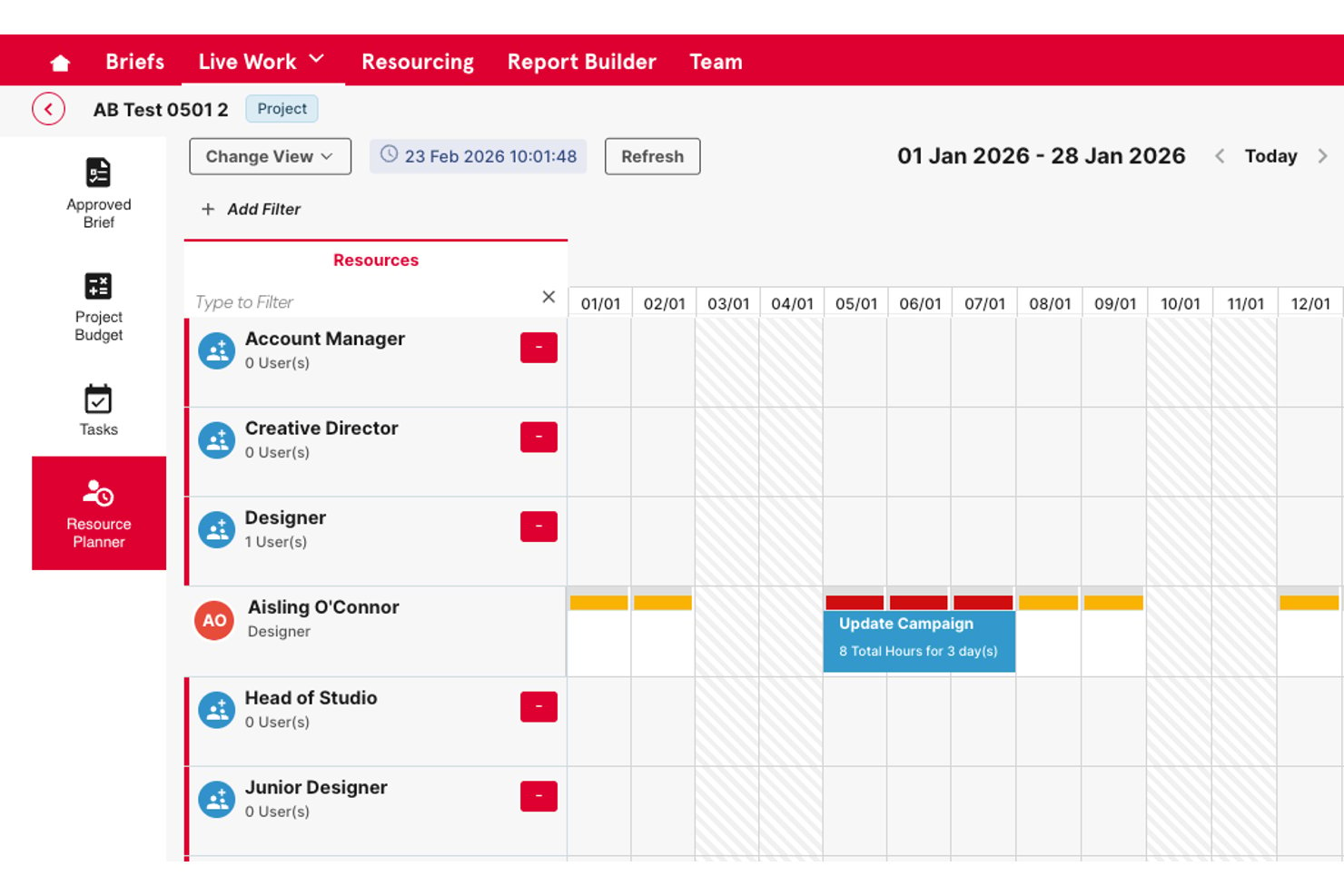
Screendragon is a work management platform built for marketing and creative teams, combining project portfolio management, no-code workflow automation, resource planning, and approval workflows in one system.
Who Is Screendragon Best For?
It's a strong fit for enterprise-scale agencies and in-house marketing teams managing high volumes of creative projects across multiple brands or clients.
Why I Picked Screendragon
I've included Screendragon in my top picks because its no-code workflow builder genuinely sets it apart for creative operations planning. I can design end-to-end workflows with custom routing, automated step sequences, and dynamic intake forms, which replaces scattered email briefing threads with structured, repeatable processes. The built-in review and markup tools handle structured feedback on documents, graphics, and video, with version comparison and full audit trails included.
Screendragon Key Features
- Resource management module: Lets you monitor team capacity, forecast availability, and analyze workloads across multiple projects.
- Project portfolio manager: Allows you to organize, track, and prioritize several projects in unified dashboards with executive-level views.
- Custom reporting and dashboards: Generates real-time reports from any dataset, supporting tailored analytics and visualizations.
- Granular role-based permissions: Enables you to manage access, approvals, and workflows by role, team, region, or client.
Screendragon Integrations
Native integrations are not clearly documented. The tool supports integrations via API for custom setups.
Pros and Cons
Pros:
- Handles large portfolio management across multiple brands
- Built-in review routing for creative approvals
- Highly configurable no-code workflow builder
Cons:
- Steep initial configuration required for complex workflows
- Gantt scheduling features are relatively limited

Best for planning multiple projects of varying complexity

Zoho Projects is a project planning and management solution that can support multiple projects of any scale or complexity. The platform has tools like Gantt charts, Kanban boards, portfolio dashboards, a built-in issue tracker, and a task automation system with blueprint functionality. The task automation with blueprint feature enables project managers and admins to map out their entire workflow, creating a visual flowchart representation.
Tasks and notifications can be automated, and approval criteria can be set for projects and tasks. The software also has collaboration tools like discussion boards, community forums, and real-time activity feeds. In addition to project planning , users can also benefit from in-depth reporting. The cloud-based software’s reporting tools allow project managers to generate detailed reports to keep track of various aspects of project performance and progress.
Pricing for Zoho Projects starts at $5 per user/month with a 10-day free trial included. A free plan is available for teams of no more than three users.
Pros and Cons
Pros:
- Robust feature suite for team members and project managers alike
- Migration from other software providers is available
- Free plan is available for up to 2 projects and up to 3 users
Cons:
- Large feature set can make for a steep learning curve
- Employee scheduling functionality is limited
New Product Updates from Zoho Projects
Zoho Projects Adds CodeX Scripts for Custom Modules
Zoho Projects now supports CodeX Scripts for custom modules, enabling conditional logic and rules for creating, updating, and deleting records. For more information, visit Zoho Projects' official site.
 .

Celoxis
Best for project planning with AI
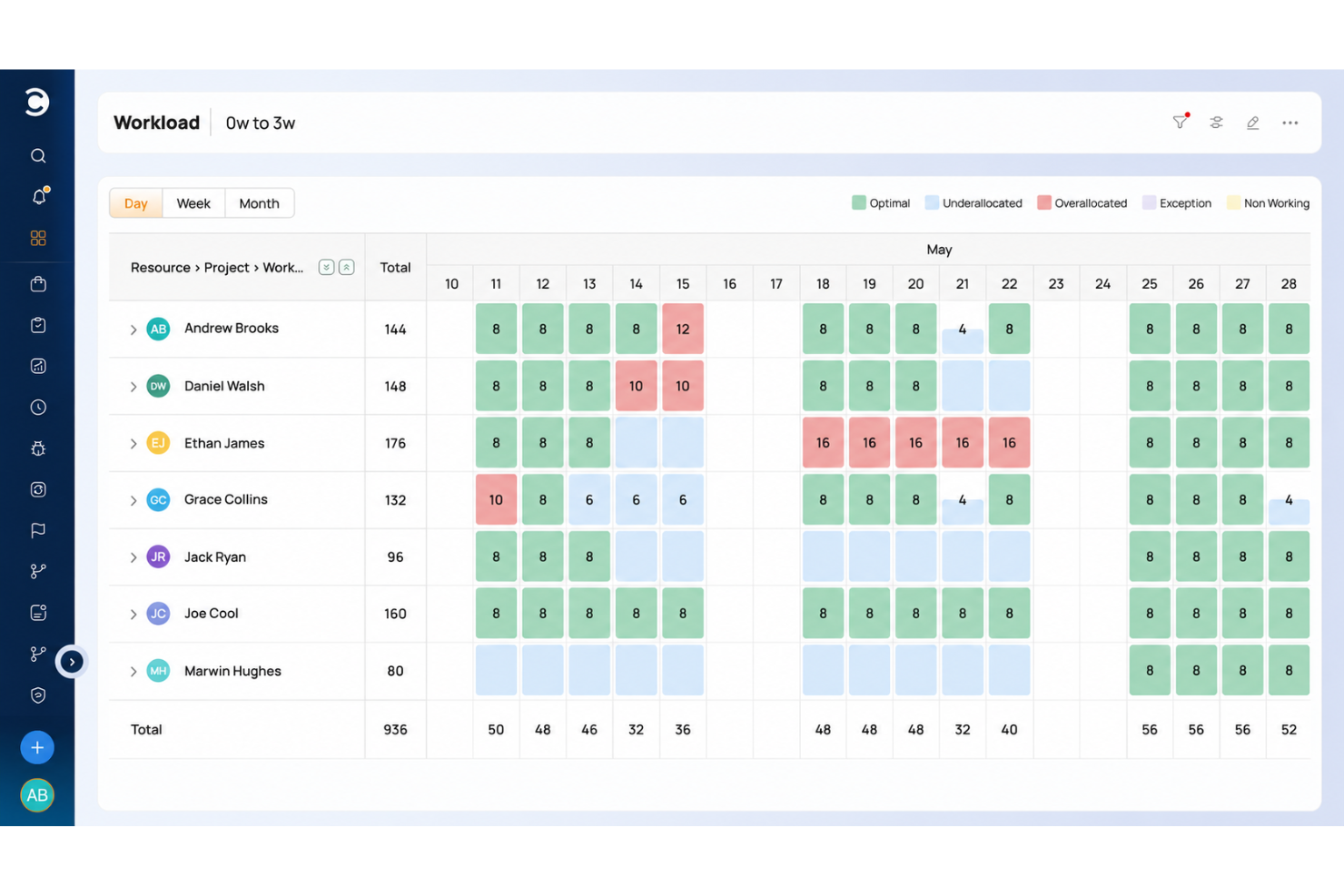
Celoxis has powerful planning and scheduling tools that help you build project plans that adapt to real-world conditions.
Celoxis has one of the most flexible and responsive interactive Gantt charts and can effortlessly handle large project plans involving multiple levels of sub-tasks, inter-project dependencies and even multiple resources per task.
Among the many features available, there is automatic scheduling that helps build a reliable project schedule and resource workload, utilization, capacity, and efficiency. These features, in turn, enable data-driven planning and decision-making across the project lifecycle. Ultimately helping you with better resource planning and management.
Celoxis integrates with over 400 business apps, including Google Drive, email and calendar platforms, Jira, Salesforce, Slack, and many more through Zapier. In addition, their API lets you build custom integrations with any other tools you use.
Celoxis is one of the few project management software programs available both in SaaS and on-premise flavors. SaaS costs $22.50/user/month (annually), and on-premise pricing is available upon request. Both require a minimum 5-user sign-up and come with 30-day free trial.

Best for dynamic project management through custom workflows

QuickBase is a user-friendly platform that helps you plan and manage dynamic workflows and projects. You can use its no-code builder to craft customized applications tailored to your unique business needs. It's a flexible solution that provides various tools to support your project and resource management and workflow automation.
Even for complex workflows and projects, this tool is capable of helping your map them out and execute them effectively. Because of its code-free builder, it's easy to set up your workflows and get them up and running quickly. The builder can be used for designing workflows, applications, integrations, and automations, making it a versatile tool to contribute to your various work processes.
Paid plans start from $35 per user, per month, and a 30-day free trial is available.
Pros and Cons
Pros:
- User-friendly and quick to learn
- Helpful and responsive customer support team
- Highly customizable to suit various industries
Cons:
- Limited offline access
- Limited analytics capabilities

Quire
Best for breaking down complex tasks

Quire is a cloud-based project planning software designed to help teams organize, track, and complete their work more efficiently. It offers a flexible structure that allows you to break down complex projects into manageable tasks and subtasks.
One feature that helps you break down larger projects is its nested lists. This hierarchical structure helps your team focus on specific tasks without losing sight of the overall project goals. Additionally, Quire's Kanban board view allows you to visualize tasks as they move through different stages, making it easier to manage workflows and identify bottlenecks.
The platform even includes a dynamic timeline feature, which provides a Gantt chart-style view of your project's schedule. This helps you plan ahead, track progress, and ensure that deadlines are met. The calendar view complements this by allowing you to drag and drop tasks to set deadlines, keeping your team on track and aligned with project timelines.
Some integrations include Google Calendar, Gmail, Slack, Outlook, Zoho Flow, GitHub, Apple Calendar Sync, Box, Dropbox, Google Drive, and Microsoft Teams.
Pros and Cons
Pros:
- Easy to collaborate with team members
- Multiple project views, including lists, boards, and timelines
- Ability to create nested tasks and subtasks, allowing for detailed project breakdowns
Cons:
- The mobile version lacks some features available on the desktop
- Potential for notification overload, especially when working with large teams
New Product Updates from Quire
Quire Adds Custom Field Locking and Comment Reaction API Support
Quire adds custom field locking and API support for reading and setting emoji reactions on comments. These updates give teams more control over field data and expand comment interaction options for developers. For more information, visit Quire’s official site.
 .

Miro
Best for visual project planning and collaboration

Miro is an online collaborative whiteboarding platform designed to facilitate visual project planning and enhance teamwork. It offers an infinite canvas where users can brainstorm, plan, and execute projects in a highly interactive and visually engaging environment. For Wynter Johnson, Founder and CEO of Caily, Miro stands out as a particularly intuitive and dynamic tool for bringing people together: “I love using Miro for project mapping specifically because it's so intuitive and engaging. It's easy to bring freelancers, consultants, and potential customers into the workspace to show them exactly how things are going. It's an experience that's dynamic without being overwhelming.”
The platform's whiteboard allows users to map out entire projects, breaking down complex tasks into manageable visual components. Miro's rich set of tools, including sticky notes, mind maps, flowcharts, and Kanban boards, helps teams brainstorm ideas, outline workflows, and monitor progress visually. Real-time collaboration is also at the core of Miro's functionality, enabling team members to work together simultaneously, leave comments, and share feedback.
Integrations include Slack, Microsoft Teams, Jira, Trello, Asana, Google Drive, Dropbox, OneDrive, Zoom, Microsoft Office, Notion, Confluence, Salesforce, Airtable, Zapier, and many more.
Pros and Cons
Pros:
- Users can collaborate on plans in real-time
- Variety of templates for project planning
- Infinite whiteboard for various iterations
Cons:
- Mobile app is limited compared to desktop version
- No offline capabilities
New Product Updates from Miro
Miro Adds Japan Data Residency for Enterprise Customers
Miro has introduced Japan data residency for enterprise customers, offering in-region storage for production data, backups, and metadata, plus in-region compute infrastructure. For more information, visit Miro's official site.
 .

Shortcut
Best for aligning tasks to goals

Shortcut is a project management platform built for software teams that need planning tools integrated with agile workflows. It supports iterative planning through timelines, roadmaps, and team-level assignments, helping you organize tasks and keep projects aligned with company objectives.
The platform combines planning structure with visibility features. You can set objectives, connect them to projects, and track progress using iteration views and timelines. Shortcut supports both Scrum and Kanban workflows, so you can choose the planning style that fits your team. Velocity charts and project health indicators give stakeholders insight into how work is progressing, without needing separate tools.
Shortcut also supports customization through custom fields and adjustable workflows, which makes it easier to adapt to how your team works. Docs provide a space to capture context, while WIP (Work in Progress) limits help avoid overload during active sprints. With quick load times and keyboard shortcuts, navigating the platform remains efficient even during heavy project cycles.
Integrations include GitHub, GitLab, Bitbucket, Slack, and Sentry. Shortcut also offers data imports from Linear, ClickUp, Asana, Pivotal Tracker, Jira, Trello, and its API for custom integrations.
Pros and Cons
Pros:
- Provides clear visualization of project progress
- Supports real-time collaboration
- Scalable for different project sizes
Cons:
- May be too feature-rich for less complex projects
- Fewer options for teams not using agile methodologies
Diğer Proje Planlama Yazılımları
Deneyebileceğiniz birkaç diğer aracın açıklamalarını burada bulabilirsiniz:
- Lucen Timeline
For PowerPoint timeline visuals
- Bonsai Agency Software
For project planning with time-tracking
- Birdview
For planning projects, resources, and finances in one system
- FunctionFox
Project planning software for creative teams
- ProjectManager
For multiple project views (lists, kanban boards, Gantt charts, etc)
- Tempo Portfolio Manager
For its planning intelligence features
- Easy Projects
For enterprise teams from medium to large companies
- Ravetree
For integrated project planning and management
- Height
For cross-functional project planning
- ClickUp
Project planning software for small teams or small businesses
- Smartsheet
Project template gallery
- ClickTime
For time tracking & project management
- Hubstaff
For agile team planning
- Hive
Online project planning tool for 3rd party integrations
- Kantata
For contextual collaboration
- Runn
Software for analyzing project profitability
- TaskRay
For Salesforce-native data security
- Hub Planner by Milient
Project planning software with built-in budget and resource allocation features
- PathPro
For product development teams
- Basecamp
For software development planning
- Planview AdaptiveWork
Project planning for marketers
- Forecast
For AI work automation
- Teamwork.com
For project templates
- Scoro
For building and construction management
- Trello
For task collaboration
- Planview Vantage
For Waterfall and Critical Chain methodologies
- OpenProject
Open source project planning software
- ProWorkflow
Planning tool mobile app for most touchscreen-based devices
- Workzone
For personal to-do lists and automatic reminder emails
- TeamGantt
Free Gantt chart software


Ücretsiz Proje Planlama Yazılımları
- Nutcache – Oldukça cömert bir ücretsiz plan: en fazla 20 kullanıcı için sonsuza kadar ücretsizdir (sınırsız proje, zaman takibi, bazı entegrasyonlar ve daha fazlasını içerir)
- Runn – Sınırsız projeyle 5 kullanıcıya kadar ücretsiz
- TeamGantt – En fazla 3 kullanıcı ve 1 proje için sonsuza kadar ücretsiz
- Wrike – 5 kullanıcıya kadar ücretsiz
- Monday.com – 5 kullanıcıya kadar ücretsiz
- ClickUp – Bazı depolama alanı ve özellik kısıtlamalarıyla sınırsız kullanıcı için ücretsiz
- Asana – 15 kullanıcıya kadar ücretsiz
How I Evaluate Project Planning Software
When a PMO needs to manage dozens of projects or an agency needs to hit client deadlines, I split my evaluation into two layers: core must-haves and the differentiators that separate the right tool.
Core Functionality (Table Stakes For This List)
When I'm selecting tools for my list, I rank each one on a scale from 0 (does not offer the functionality) to 5 (excels in this area) for each core functionality listed below. Then, I calculate the tool's total score into a percentage. Each tool needs to achieve a minimum total score of 75% to be considered for inclusion.
- Task & Dependency Management: I check whether you can define finish-to-start, start-to-start, and other dependency types with lag and lead times—like sequencing a design review before dev begins.
- Gantt Chart / Timeline View: A drag-and-drop Gantt that lets you reschedule tasks and see dependency lines in real time is what I look for, not just a static timeline graphic.
- Milestone & Baseline Tracking: I evaluate whether the tool lets you save baseline snapshots and compare them against your current schedule to spot scope creep or slippage mid-sprint.
- Resource Planning & Allocation: Workload views that surface overallocated team members across concurrent projects matter here—tools like monday.com and Smartsheet handle this differently.
- Critical Path & Scheduling Logic: I look for auto-calculated critical paths that update when durations shift, so you can immediately see which delays will push your launch date.
- Collaboration & Plan Sharing: Stakeholder views, role-based permissions, and comment threads tied to specific tasks are what I evaluate—especially for distributed teams coordinating across time zones.
Once I have a list of tools that meet the criteria, I consider what sets each platform apart.
Differentiating Factors (What Sets Vendors Apart)
Here's how I compare and contrast different vendors:
Standout Features
Portfolio-level views matter when your PMO juggles dozens of active projects and needs to spot resource conflicts across them. I also look for scenario planning—the ability to model a shifted deadline or reassigned team member without touching the live plan. AI-assisted scheduling is increasingly a differentiator too; tools that flag at-risk tasks or suggest adjustments based on historical data give PMs a real edge during replanning cycles.
Beyond Features
Integrations shape how well a planning tool fits your stack. I check for native connections to Jira, Slack, and file storage platforms, plus API and iPaaS support for custom workflows. Scalability is another key factor—a tool that works for a five-person team should also hold up when your PMO scales to hundreds of projects. I also evaluate onboarding resources like templates, training libraries, and migration support, since time-to-value matters when you're rolling out a new planning tool mid-quarter.
Proje Planlama Yazılımı Nasıl Seçilir?
Uzun özellik listeleri ve karmaşık fiyatlandırmalar karşısında bunalmak kolaydır. Yazılım seçim süreciniz boyunca odaklanmanıza yardımcı olmak için aklınızda bulundurmanız gereken temel faktörlerin kontrol listesi aşağıda yer alıyor:
| Etken | Dikkat Edilmesi Gerekenler |
| Ölçeklenebilirlik | Yazılımın ekibinizin ihtiyaçları doğrultusunda büyüyebildiğinden emin olun. Performanstan ödün vermeden büyüyen projeleri, kullanıcı sayılarını ve verileri destekleyen seçenekleri değerlendirin. |
| Entegrasyonlar | Aracın Slack, Google Workspace veya CRM'niz gibi platformlarla entegre olup olmadığını kontrol edin. Sorunsuz entegrasyonlar veri silolarını azaltmaya ve verimliliği artırmaya yardımcı olur. |
| Özelleştirilebilirlik | İş akışlarını, görev türlerini ve raporları ihtiyaçlarınıza göre uyarlamanıza olanak tanıyan yazılımları seçin. Özelleştirilebilir şablonlar zaman kazandırabilir ve ekibinizin tercihlerine daha iyi uyum sağlayabilir. |
| Kullanım Kolaylığı | Kullanıcı dostu bir arayüz, ekibinizin daha hızlı işe başlamasını sağlar. Öğrenme süresini kısaltmak için sürükle ve bırak işlevine ve basit gezinme özelliklerine sahip araçları değerlendirin. |
| Bütçe | Bütçenizi yazılımın sunduğu değerle dengeleyin. Yalnızca ihtiyacınız olan özellikler için ödeme yapmanıza olanak tanıyan şeffaf fiyatlandırma, ücretsiz denemeler veya ölçeklenebilir planları değerlendirin. |
| Güvenlik Önlemleri | Verilerinizi güvende tutmak için aracın şifreleme, rol tabanlı erişim ve uyumluluk sertifikaları dâhil olmak üzere güvenlik standartlarını karşıladığını doğrulayın. |
Proje Planlama Yazılımındaki Trendler
Araştırmam sırasında çeşitli proje planlama yazılımı sağlayıcılarının ürün güncellemelerini, basın bültenlerini ve sürüm günlüklerini inceledim. İzlediğim bazı yeni trendler şunlar:
- Yapay Zekâ Destekli Planlama: Yapay zekâ araçları artık ekiplerin riskleri öngörmesine, programları düzenlemesine ve görevleri daha etkili bir şekilde atamasına yardımcı oluyor. Örneğin yapay zekâ, gecikme riski taşıyan görevleri işaretleyebilir ve kaynakların yeniden dağıtılmasını önerebilir.
- Gerçek Zamanlı İş Birliği Geliştirmeleri: Gelişmiş canlı düzenleme ve anlık güncellemeler standart hâle geliyor. Bu özellikler, ekiplerin zaman çizelgeleri ve belgeler üzerinde gecikme olmadan birlikte çalışmasını sağlayarak e-posta yoğunluğunu azaltıyor ve ekip uyumunu artırıyor.
- Senaryo Planlama Araçları: Artık birçok platform, olası gecikmeleri, kaynak yetersizliklerini veya bütçe değişikliklerini simüle etmeye yönelik özellikler sunuyor ve ekiplerin planlarını buna göre düzenlemesine yardımcı oluyor.
- Sürdürülebilirlik Metrikleri: Proje sürdürülebilirliğini ölçmeye yönelik özellikler giderek daha fazla ilgi görüyor. Ekipler, sürdürülebilirlik hedefleriyle uyum sağlamak için enerji kullanımını, malzeme verimliliğini ve çevresel etkiyi takip edebiliyor.
- Yerleşik Video İletişimi: Yerleşik video konferans ve ekran paylaşımı araçları proje panolarına ekleniyor. Böylece ayrı platformlara ihtiyaç duyulmadan toplantılar yapılabiliyor ve güncellemeler paylaşılabiliyor. Uzaktan ve hibrit ekipler büyüdükçe planlama, iletişim, otomasyon ve kaynak gözetimini tek bir platformda birleştiren kurumsal görev yönetimi yazılımına yönelik talep de artıyor.
Proje Planlama Yazılımı Nedir?
Proje planlama yazılımı, ekiplerin projeleri başlangıçtan tamamlanmaya kadar oluşturmasına, planlamasına ve takip etmesine yardımcı olan; son teslim tarihlerine uyulmasını ve kaynakların etkili bir şekilde kullanılmasını sağlayan bir araçtır.
Bu yazılım, çeşitli sektörlerdeki proje yöneticileri ve ekipler tarafından görevleri düzenlemek, kaynakları tahsis etmek ve zaman çizelgelerini yönetmek için kullanılır. Tüm proje ayrıntılarını merkezileştirerek iş birliğini geliştirir, kaynakları takip eder ve ilerlemeyi izler; böylece projelerin sorunsuz ilerlemesini ve zamanında tamamlanmasını sağlar.
Proje Planlama Yazılımının Özellikleri
Proje planlama yazılımı seçerken aşağıdaki temel özelliklere dikkat edin:
- Görev yönetimi: Ekibinizdeki herkes için kolayca görev oluşturun, atayın ve takip edin. Bu, büyük projeleri küçük ve yönetilebilir eylemlere bölmenize yardımcı olur ve hiçbir şeyin gözden kaçmamasını sağlar.
- Proje planlaması: Sürükleyip bırakmalı takvimler veya Gantt çizelgeleriyle proje zaman çizelgelerini oluşturun. Bu özellik, net son tarihler belirlemenize, kaynakları tahsis etmenize ve planlama çakışmalarını erkenden fark etmenize olanak tanır.
- İş birliği araçları: Dosyaları paylaşın, durumları güncelleyin ve tüm bunları yazılımın içinden ekip arkadaşlarınızla sohbet ederek gerçekleştirin. Yerleşik iletişim özellikleri, ekibiniz ister yan odada ister dünyanın diğer ucunda olsun, herkesin eşgüdüm içinde kalmasını kolaylaştırır.
- Kaynak tahsisi: Her göreve kişileri, ekipmanları veya bütçeleri atayın ve kimlerin uygun olduğunu bir bakışta görün. Akıllı kaynak yönetimi, ekibinizi aşırı yüklemekten veya kritik ekipman ihtiyaçlarını gözden kaçırmaktan kaçınmanıza yardımcı olur.
- Belge yönetimi: Önemli belgeleri doğrudan proje merkezinizde saklayın, düzenleyin ve güncelleyin. En güncel dosyayı bulmak için artık bitmek bilmeyen e-posta yazışmalarını taramanıza gerek yok; ihtiyacınız olan her şey tam olarak olması gereken yerde.
- İlerleme takibi: Görevlerin ve projelerin durumunu panolar veya raporlar aracılığıyla gerçek zamanlı olarak izleyin. Nelerin yolunda gittiğini, nelerin geciktiğini ve bundan sonra dikkatinizi nereye vermeniz gerektiğini anında bilirsiniz.
- Zaman takibi: Ekip üyelerinin görevlere ne kadar zaman harcadığını kaydedin. Bu, projeleri bütçe dahilinde tutmak veya ekibinizin çabasının nereye gittiğini anlamak için özellikle yararlıdır.
- Bütçe yönetimi: Her aşama için maliyetleri belirleyip takip edin ve öngörülen harcamalarla gerçek harcamaları karşılaştırın. Bütçeleme özellikleri, maliyet aşımlarını kontrolden çıkmadan önce fark etmenize yardımcı olur.
- Raporlama ve analiz: Ekip verimliliğinden proje tamamlanma oranlarına kadar her konuda raporlar oluşturun. Açık ve anlaşılır analizler, başarılarınızı kutlamanıza ve darboğazları fark etmenize yardımcı olur; böylece bir dahaki sefere daha akıllı çalışabilirsiniz.
Proje Planlama Yazılımındaki AI Özellikleri
Modern proje planlama yazılımı çözümlerinin çoğu, iş akışınızı daha da kolaylaştırmak için artık yapay zekâ ile destekleniyor:
- Otomatik görev önerileri: AI, proje verilerinizi analiz ederek sonraki adımları önerebilir; böylece daha verimli planlama yapmanıza ve kritik görevleri atlamaktan kaçınmanıza yardımcı olur.
- Akıllı planlama: Gelişmiş algoritmalar, ekip uygunluğuna, iş yüküne ve proje önceliklerine göre zaman çizelgelerini otomatik olarak ayarlar; böylece manuel uğraşlara gerek kalmadan kaynakları optimize edebilirsiniz.
- Öngörücü analiz: AI destekli içgörüler, proje risklerini, bütçe aşımlarını ve olası gecikmeleri gerçekleşmeden önce tahmin etmenize yardımcı olarak proaktif bir avantaj sağlar.
- Doğal dil işleme: Bazı platformlar, yalnızca anlaşılır İngilizce yazarak veya konuşarak görev oluşturmanıza ya da güncellemenize olanak tanır; bu da proje yönetimini herkes için daha sezgisel hale getirir.
- Otomatik durum güncellemeleri: AI, ilerlemeyi takip edebilir ve ekibinizi sürekli kontrol etmenize gerek kalmadan hedefe bağlı tutmak için gerçek zamanlı güncellemeler veya hatırlatıcılar gönderebilir.
Proje Planlama Yazılımının Faydaları
Proje planlama yazılımını uygulamak, ekibiniz ve işletmeniz için çeşitli faydalar sağlayabilir:
- Daha iyi organizasyon: Görevleri, programları ve kaynakları tek bir yerde tutarak karmaşık proje yönetimini basitleştirir.
- Geliştirilmiş zaman yönetimi: Ekiplerin programa bağlı kalmasına ve son teslim tarihlerine uymasına yardımcı olmak için Gantt çizelgeleri ve zaman takibi araçları sağlar.
- Gelişmiş iş birliği: Paylaşılan çalışma alanları, yorumlar ve dosya paylaşımı özellikleriyle ekip çalışmasını mümkün kılar.
- Daha net hesap verebilirlik: Görevleri son teslim tarihleriyle birlikte atayarak sorumluluğu ve ilerlemeyi takip etmeyi kolaylaştırır.
- Maliyet kontrolü: Bütçeleri ve harcamaları takip ederek fazla harcamayı önlemeye ve finansal kaynakları yönetmeye yardımcı olur.
- Risk azaltma: Olası sorunlara önceden hazırlanmak için senaryoları modellemenize ve planları ayarlamanıza olanak tanır.
- Veriye dayalı kararlar: Özel raporlar ve analizler, daha iyi planlama kararları almak için performans hakkında içgörüler sağlar.
Proje Planlama Yazılımının Maliyetleri ve Fiyatlandırması
Proje planlama yazılımı seçerken mevcut çeşitli fiyatlandırma modellerini ve planları anlamak gerekir. Maliyetler özelliklere, ekip büyüklüğüne, eklentilere ve daha fazlasına bağlıdır. Aşağıdaki tablo, proje planlama yazılımı çözümlerinde yaygın planları, ortalama fiyatları ve genellikle sunulan özellikleri özetlemektedir:
| Plan Türü | Ortalama Fiyat | Yaygın Özellikler |
| Ücretsiz Plan | $0 | Temel görev yönetimi, sınırlı kullanıcı sayısı, minimum depolama alanı ve temel iş birliği araçları. |
| Kişisel Plan | $5-$15/kullanıcı/ay | Görev yönetimi, zaman çizelgesi görünümleri, temel raporlama ve sınırlı entegrasyonlar. |
| İşletme Planı | $20-$50/kullanıcı/ay | Gelişmiş raporlama, Gantt çizelgeleri, ekip iş birliği araçları, kaynak tahsisi ve zaman takibi. |
| Kurumsal Plan | $60-$120/kullanıcı/ay | Özel iş akışları, sınırsız kullanıcı, gelişmiş güvenlik, özel destek ve API entegrasyonları. |
Proje Planlama Yazılımı Hakkında Sıkça Sorulan Sorular
Proje planlama yazılımı hakkında sık sorulan bazı soruların yanıtları aşağıda yer alıyor:
Proje planlama yazılımında hangi entegrasyonları aramalıyım?
E-posta, takvim, dosya depolama ve mesajlaşma araçlarınızla (ör. Slack, Google Drive, Outlook) entegrasyonlar arayın. Yazılımınızın zaman takibi, faturalandırma ve raporlama platformlarına bağlanması da yararlı olur. Bu entegrasyonlar manuel çalışmayı azaltır, tüm bilgilerinizin senkronize kalmasını sağlar ve uygulamalar arasında geçiş yapmadan projeleri yönetmenize yardımcı olur.
Mevcut proje verilerini yeni proje planlama yazılımına nasıl aktarırım?
Çoğu araç, CSV aracılığıyla içe aktarma seçenekleri veya diğer platformlarla doğrudan entegrasyonlar sunar. Başlamadan önce doğruluk için eski verilerinizi temizleyin. Birçok sağlayıcı, süreç boyunca size yol göstermek için kurulum kılavuzları veya başlangıç desteği sağlar. Emin değilseniz, karmaşık aktarımları yönetmek üzere yazılımın bir veri taşıma uzmanı ya da destek hizmeti sunup sunmadığını kontrol edin.
Proje planlama yazılımı kaynak yönetimine nasıl yardımcı olabilir?
Proje planlama yazılımı, projeleriniz genelinde görevleri dağıtmanıza, iş yüklerini belirlemenize ve kaynakların uygunluğunu takip etmenize yardımcı olur. Kimin aşırı yüklendiğini görebilir, görevleri yeniden atayabilir ve darboğazları önleyebilirsiniz. Birçok araç, ekip kapasitesini gösteren panolar veya Gantt çizelgeleri sunar. Bu görünürlük, iş yükünü dengelemenize ve önceden plan yapmanıza olanak tanıyarak tükenmişliği azaltır ve proje sonuçlarını iyileştirir.
Proje planlama yazılımını iş akışlarına uyacak şekilde özelleştirmek mümkün mü?
Evet, çoğu proje planlama platformu iş akışlarını ekibinizin ihtiyaçlarına uyacak şekilde düzenlemenize olanak tanır. Görev aşamalarını düzenleyebilir, özel alanlar oluşturabilir, otomasyon kuralları belirleyebilir ve izinleri değiştirebilirsiniz. Benzersiz proje türlerini yönetiyorsanız, katı bir sürece zorlanmamak için sürükle ve bırak oluşturucular, şablon seçenekleri veya API erişimi sunan çözümleri tercih edin.
Proje planlama yazılımı proje gecikmelerini önlemeye nasıl yardımcı olabilir?
Proje planlama yazılımı otomatik hatırlatıcılar göndererek, gerçek zamanlı güncellemelere olanak tanıyarak ve zaman çizelgesi bağımlılıklarını göstererek gecikmeleri önlemeye yardımcı olur. Riskleri erkenden fark edebilir ve biri geride kaldığında iş yüklerini yeniden dengeleyebilirsiniz. Kritik yol takibi ve görsel zaman çizelgeleri gibi özellikler, küçük gecikmeler daha büyük sorunlara dönüşmeden önce planları ayarlamanıza olanak tanır.
Proje yöneticileri için en yararlı raporlama özellikleri nelerdir?
Proje yöneticileri özelleştirilebilir panoları, zaman çizelgesi takibini ve iş yükü raporlarını aramalıdır. Projeye, ekip üyesine veya tarihe göre filtreleme özelliği sorunları fark etmeyi kolaylaştırır. İyi bir yazılım, paydaşlarla ilerleme durumunu, son tarihleri ve bütçe durumunu hızlıca paylaşabilmeniz için dışa aktarılabilir raporlar da oluşturur.
Proje verilerini korumak için hangi güvenlik önlemleri uygulanıyor?
Önde gelen proje planlama yazılımları genellikle veri şifreleme, role dayalı erişim denetimi ve düzenli yedeklemeler sunar. SOC 2 veya ISO 27001 gibi standartlara uyumluluk hakkında bilgi alın. Hassas projeler için bilgilerinizi güvende tutmak üzere denetim günlükleri, iki faktörlü kimlik doğrulama ve özelleştirilebilir kullanıcı izinleri sunan bir platform seçin.
Karmaşık ve basit projeler için araçlar arasında nasıl seçim yaparım?
Karmaşık projeler için bağımlılık takibi, iş yükü tahmini ve otomasyon gibi gelişmiş özelliklere sahip yazılımları seçin. Daha basit ihtiyaçlar için anlaşılır görev listeleri ve takvimler sunan daha sade araçlar, ek karmaşıklık yaratmadan ekibinizin ilerlemesini sağlar. Tipik proje kapsamınıza uygun bir araç bulmak için deneme süreleriyle birkaç seçeneği test edin.