

2026 İçin En İyi 10 Kapasite Planlama Yazılımı Seçeneği

10 En İyi Kapasite Planlama Yazılımları Kısa Listesi


En iyi kapasite planlama yazılımı, ekip uygunluğu hakkında net bilgiler sunar, aşırı görevlendirmeyi önler ve son teslim tarihlerine uymanıza ve ekip tükenmişliğini önlemenize yardımcı olmak için gelecekteki kaynak ihtiyaçlarını tahmin eder.
Proje yönetiminde 20 yılı aşkın deneyimim sayesinde, bağlantısız elektronik tabloların ve net olmayan görev atamalarının nasıl program çakışmalarına, gizli darboğazlara ve dengesiz iş yüklerine yol açabileceğini biliyorum. Doğru yazılım, kaynak uygunluğunu izlemenize, projeler arasındaki iş yüklerini dengelemenize ve kapasite sınırlarına ulaşmadan önce talebi öngörmenize yardımcı olur.
Bir yazılım incelemecisi olarak 2012'den bu yana 20'den fazla kapasite planlama aracını inceledikten ve test ettikten sonra, güvenle plan yapmanıza, işleri doğru şekilde dağıtmanıza ve projeleri yolunda tutmanıza yardımcı olan en etkili çözümleri belirledim.
Why Trust Our Software Recommendations
Our team has been testing and reviewing software since 2012. As project managers ourselves, we know how difficult—and important—it is to choose the right software.
For this guide, we evaluated tools using hands-on testing and independent research, scoring tools using our selection criteria. We also draw on insights from industry thought leaders and practicing project management experts.
Our reviews reflect our human editorial judgment, not a sales pitch.
Expert reviewers:
Kapasite Planlama Yazılımları Karşılaştırma Tablosu
Genel bakışlarda ele aldığımız tüm araçları karşılaştırabileceğiniz tablo burada.
| Tool | Best For | Trial Info | Price | ||
|---|---|---|---|---|---|
| 1 | Best for agile capacity planning | 14-day free trial | From $17/user/month | Website | |
| 2 | Best for resource planning with financial insights | 14-day free trial | From $10/user/month (billed annually) | Website | |
| 3 | Best for forecasting & planning | 30-day free trial available | From $7/resource/month | Website | |
| 4 | Best real-time capacity planning and forecasting | 60-day free trial + free demo available | Pricing upon request | Website | |
| 5 | Best for intuitive scheduling and live forecasting | Free trial available | From $7/scheduled user/month | Website | |
| 6 | Best with adaptive project scheduling | Free demo available | Pricing upon request | Website | |
| 7 | Best for AI-powered resource allocation | Not available | Pricing upon request | Website | |
| 8 | Best for financial planning | Free plan available; 30-day free trial; Free demo available | From $9/user/month | Website | |
| 9 | Best for customization | Free plan + 14-day trial available | From $9/user/month (billed annually) | Website | |
| 10 | Best for cost and performance analysis | 14-day free trial | From $10/user/month (billed annually) | Website |


En İyi Kapasite Planlama Yazılımları İncelemeleri
Her bir kapasite planlama uygulamasının en uygun kullanım alanını, dikkat çekici bazı özelliklerini ve kullanıcı arayüzüne genel bir bakış sunan ekran görüntülerini göstermek için her araç hakkında kısa bir açıklama.

Scoro
Best for agile capacity planning

Scoro is an all-in-one work management platform that offers capacity planning solutions designed to help businesses manage their resources and workload effectively.
The tool includes an agile Gantt chart feature that provides real-time updates for capacity planning. You can view live overviews of your team's workload and schedule tasks accordingly. When dependencies are created between tasks, Scoro automatically updates timelines and workloads, helping you avoid manual entry and overbooking scenarios.
One standout feature is that Scoro goes beyond capacity planning and integrates multiple business functions within a single platform. These include project management, sales and pipeline management, CRM, quoting and billing, reporting, and customizable dashboards.
Scoro integrates with Dropbox, PayPal, Expensify, Stripe, Google Calendar, Jira, Slack, Xero, QuickBooks, Sage Intacct, Microsoft Exchange, Asana, and more.
Pricing starts from $19.9/user/month with a free trial available.
New Product Updates from Scoro

Scoro Adds Time Mobile App and ELI Improvements
Scoro adds the Scoro Time mobile app for iOS/Android to track time anywhere and expands ELI with attachments, smarter filtering, and trigger-based actions. For more information, visit Scoro's official site.

Best for resource planning with financial insights

Productive is a complete workforce management software designed primarily for agencies and other service-based industries. The software's resource planning module helps make the most of every team member's time and keep workload capacities in check. Users can access visual representations of team members’ workload and availability, and use this information to assign tasks and distribute work. Employees can also be grouped by skill sets and departments to enable better resource allocation.
The software's time tracking tool is directly connected to its capacity planning functionality, because employees can log the time they're spending on various tasks and projects. This information feeds into the resource planning tools, supporting smarter scheduling through forecasting and predictive insights. Project managers can use previous project data to forecast future work requirements accurately, including estimated time ranges to complete a tasks and what-if scenarios.
Budgeting and financial planning are also included in the feature set. This can be tied to the capacity and workload planning tools, ensuring teams don't go over budget on projects. Other functionalities included in the software are project management, document management, billing, and reporting tools.
Teams can connect the software with their other SaaS tools like Dropbox, Jira, Outlook, Microsoft Calendar, Slack, QuickBooks, and Xero. A Zapier integration is also available for configuring additional integrations.
New Product Updates from Productive
Productive Adds Email and Calendar Integrations for Agents
Productive adds Gmail, Outlook, Google Calendar, and Outlook Calendar connectors for its AI agents. These integrations let agents manage emails and create calendar events directly within Productive. For more information, visit Productive’s official site.

Runn
Best for forecasting & planning
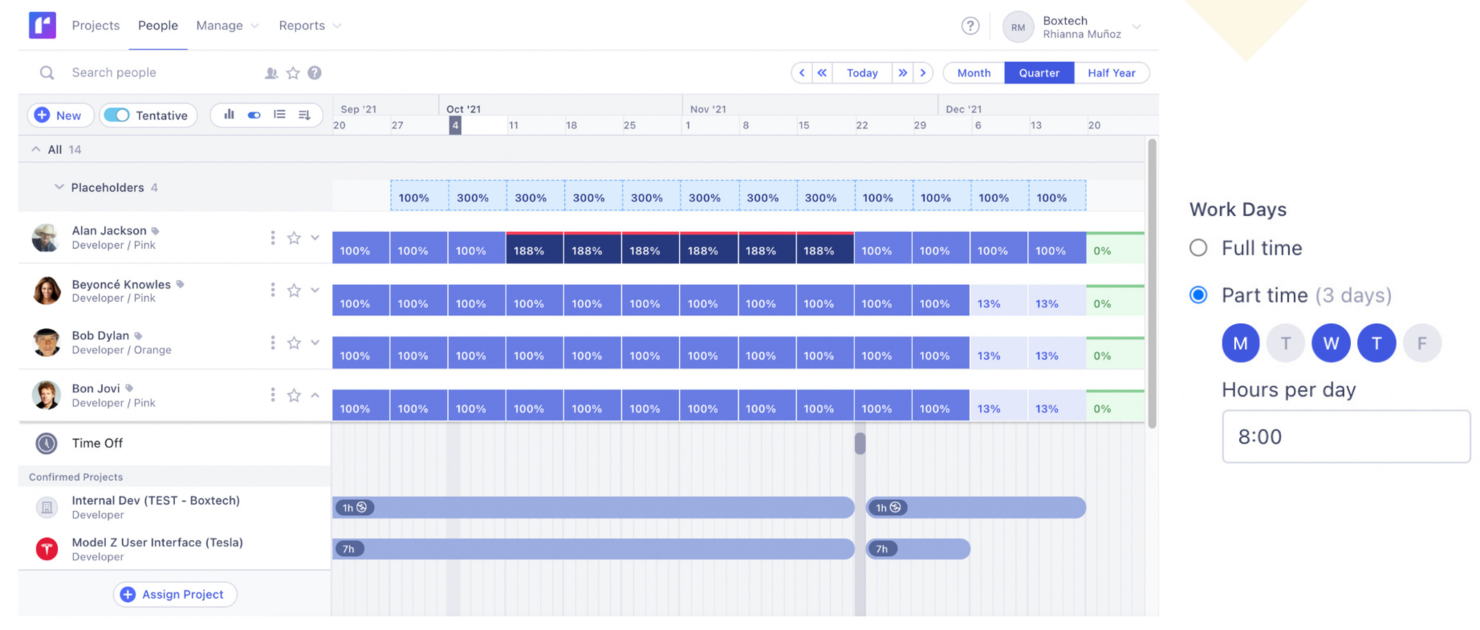
Runn is a resource and capacity management platform that helps project managers optimize their team’s workload according to their business needs.
With Runn, you can plan and forecast capacity so you can schedule your projects accordingly. The tool’s calendar enables you to access your resources in real-time and see the involvement of every team member. The software also helps you differentiate between billable and non-billable work, making it easier to price your services and raise invoices.
Runn’s highlight is its capacity forecasting feature. This feature helps you determine whether your team has the skills and resources to take on certain projects, and how new work would impact your team’s workload.
Runn integrates with multiple tools, including WorkflowMax, Harvest, Clockify, and more.
Runn costs from $10/user/month. You can access a free trial for 14 days. The solution also offers a free-forever plan for up to five users.
Saviom
Best real-time capacity planning and forecasting

Saviom is a highly configurable and scalable resource capacity planning software built to address resourcing challenges across all industries. It helps align resource capacity to changing demands for current and future projects in the pipeline. You can allocate the right resources to every project at the right time and cost to boost operational efficiency and improve project delivery.
Some of the advanced features of Saviom include demand management, real-time optimization, pipeline management, bench management, real-time project financial forecasting, and BI-powered reports/dashboards.
What really stands out is the tool's new and improved all-in-one resource planner, which offers a comprehensive suite of advanced functionalities such as multi-dimensional analysis, embedded capacity planning, heat mapping, intelligent matchmaking, early warning, and KPI forecaster. All these features collectively help boost billable utilization of every resource, bridge skills gaps proactively, eliminate burnout, and minimize hiring/firing costs.
Saviom integrates with your everyday business applications such as Salesforce, MS Excel, SAP, and more.

Best for intuitive scheduling and live forecasting

Float.com caters to professional services firms and creative teams looking to optimize how they plan and allocate resources. By focusing on effective people management and offering features like finance and estimation for revenue forecasting, Float helps you improve project management and operational efficiency. Whether you're in a large global agency or a small consultancy, Float's capabilities in resource scheduling, time tracking, and reporting can support your growth and improve project delivery rates.
Why I Picked Float.com
I picked Float because it excels in intuitive scheduling and live forecasting, making it an excellent choice for capacity planning. With features like real-time capacity tracking and over-capacity alerts, you can ensure balanced workloads and avoid burnout. The platform also allows for customized availability settings and efficient leave management, which are crucial for maintaining team productivity. Additionally, Float's integration capabilities with other tools enhance workflow efficiency, making it a valuable asset for professional services firms and creative teams.
Float.com Key Features
In addition to its intuitive scheduling and live forecasting, Float offers several other features that enhance capacity planning for your team:
- Customizable Team Setups: You can standardize roles and filter employees based on skills and location, allowing for more precise resource allocation and management.
- Time Off Management: Float allows you to manage time off with customizable policies, ensuring that team availability is accurately reflected in your planning.
- Integrations with Popular Tools: By integrating with tools like Google Calendar, Slack, and Jira, Float enhances workflow efficiency and keeps your data accurate and up-to-date.
- Real-time Collaboration: This feature enables team members to work together seamlessly, ensuring everyone stays informed about project changes and updates.
Float.com Integrations
Integrations include Asana, Basecamp, ClickUp, Jira, Google Calendar, Aprimo, Hubspot, Karbon, Slack, and Trello.
Pros and Cons
Pros:
- Integration with popular tools enhances workflow efficiency.
- Real-time updates keep all team members informed.
- Visual timelines improve scheduling clarity for teams.
Cons:
- Integration challenges with certain niche tools exist.
- Limited customization options may not suit all needs.
New Product Updates from Float.com

Float Adds Rate Cards and Multi-Currency Billing
Float introduced centralized rate cards to standardize bill rates across projects and added multi-currency support to bill clients consistently across regions. For more information, visit Float's official site.

Accelo
Best with adaptive project scheduling

Accelo is a project and resource management platform designed for service-based teams that need structured capacity planning. It brings together project scheduling, workload tracking, time management, and workflow automation in one system.
Who Is Accelo Best For?
Accelo is best suited for project managers and professional services teams that need visibility into team capacity, timelines, and client work across multiple projects.
Why I Picked Accelo
I picked Accelo for its adaptive scheduling tools and real-time workload visibility. The drag-and-drop Gantt chart allows teams to adjust timelines and reassign tasks quickly. When project scope or availability changes, the scheduling engine updates timelines to reflect new resource allocations, helping maintain accurate capacity plans.
Accelo Key Features
- Resource utilization dashboard: View team capacity and identify over- or under-allocation at a glance.
- Project scheduling tools: Adjust timelines using drag-and-drop Gantt charts.
- Time tracking: Log billable and non-billable hours directly within projects.
- Retainer management: Track recurring client work and allocate ongoing resources.
- Workflow automation: Automate approvals and task assignments using configurable rules.
Accelo Integrations
Accelo integrates with Google Workspace, Microsoft 365, Xero, QuickBooks Online, HubSpot, Salesforce, Mailchimp, Slack, and Zapier. An API is available for custom integrations.
Pros and Cons
Pros:
- Centralizes client, project, and resource data
- Automated project scheduling adapts to changes
- Real-time visibility into team workloads
Cons:
- Steep setup for advanced workflow features
- Minimum three-user subscription required
New Product Updates from Accelo

Accelo Rebuilds Mobile App for Project and Time Management
Accelo rebuilds its mobile app with task management, new work creation, and mobile timesheets for Forecast customers. This helps teams keep project and time data current while working away from a desktop. For more information, visit Accelo’s official site.

Best for AI-powered resource allocation

Screendragon is a work management platform designed to help marketing, agency, and professional services teams manage projects, resources, and budgets in one place. It centralizes project activities, reducing the need to switch between multiple tools.
One reason I chose Screendragon is its ability to provide a comprehensive view of resource allocation. You can see who is working on what and when, allowing for better workload distribution. This visibility helps in identifying potential bottlenecks and ensures that resources are utilized effectively. Additionally, the platform's capacity planning dashboards integrate new business pipeline data with confirmed project commitments, offering a forward-looking perspective on resourcing needs. This predictive capability allows your team to anticipate future demands and adjust resources accordingly, ensuring that upcoming projects are adequately staffed.
I also like that Screendragon has budget and estimate management, which allows you to create accurate project estimates based on resource staff plans and deliverables, automatically tracking scheduled versus actual project costs.
Integrations include MS Power BI, Slack, MS Teams, Zapier, Google Drive, Trello, Microsoft 365, Box, Jira, Microsoft OneDrive, and PeopleSoft.

Toggl
Best for financial planning

Toggl is a time tracking, project planning, and hiring software with features that let you track your teams capacity and quickly make decisions.
Why I picked Toggl: It’s a very complete tool that has features that let you track work and turn that information into budgets, billing, and invoicing. Toggl’s simple drag-and-drop timelines let you create effective work schedules, get visibility into your team's availability and workload, and easily follow up on tasks.
Additionally, you can use the tool on any platform you want, as they have a mobile app, desktop app, browser plugins, and online tool.
Toggl Standout Features & Integrations
Features include time tracking, reporting, project tracking, revenue tracking, and team scheduling.
Integrations are already at 100+ and include Asana, Jira, Notion, Salesforce, Slack, Trello, Airtable, Adobe Creative Suite, and Zapier.
Toggl Plans & Pricing
The free version is available for up to 5 users. There are three plans and pricing starts at $10/user/month.

Best for customization
monday AI Workspace is a work management platform that combines project planning, workload visualization, and AI-powered resource tracking to help teams manage capacity across projects and portfolios.
Who Is monday AI Workspace Best For?
It's a strong fit for mid-sized to enterprise teams managing multiple projects simultaneously and needing flexible, visual tools to track team workloads.
Why I Picked monday AI Workspace
monday AI Workspace earns its spot on my shortlist because no other tool in this space lets me shape capacity planning as precisely as my team's actual workflow demands. I love that I can combine custom columns, time estimate fields, and color-coded Workload views into a board layout that reflects exactly how my team tracks availability. The monday Vibe builder takes this further, letting me create purpose-built capacity planning apps without writing any code.
monday AI Workspace Key Features
- Workload view: Visualizes task allocations by team member, highlighting over and under-capacity with color coding.
- Portfolio management: Offers a centralized dashboard to oversee multiple projects and monitor progress in one place.
- AI capacity insights: Uses AI to surface capacity risks and draft workload summaries based on actual usage data.
- Automation builder: Automates routine tasks like notifications, status updates, and resource assignments across boards.
monday AI Workspace Integrations
monday AI Workspace offers hundreds of integrations through its built-in integrations and marketplace, including Slack, Salesforce, HubSpot, Google Workspace, Microsoft Teams, Jira, Dropbox, GitHub, Zendesk, and Asana. It also supports Zapier and provides an API for custom integrations.
Pros and Cons
Pros:
- Scales across multiple teams and portfolios
- AI-generated capacity summaries save planning time
- Highly customizable workload boards and views
Cons:
- Scenario planning requires manual workarounds
- Native capacity forecasting is less specialized
New Product Updates from monday AI Workspace
monday AI Workspace Adds Human Approval Routing
monday AI Workspace adds a human-in-the-loop approval block to AI Workflows, sending approval requests and routing workflow paths based on responses. For more information, visit monday AI Workspace's official site.

Celoxis
Best for cost and performance analysis
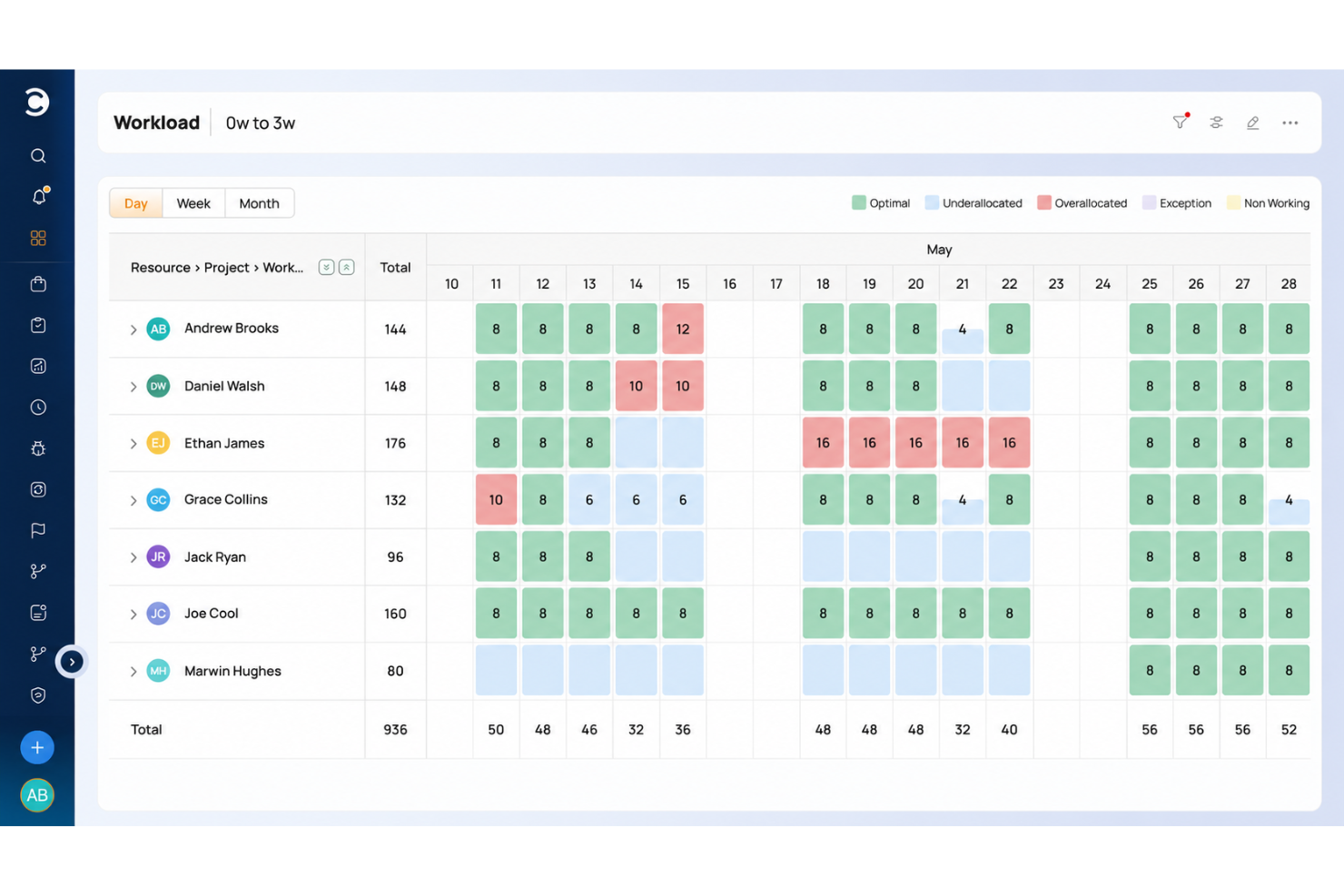
Celoxis serves as an exceptional capacity planning tool, offering organizations a comprehensive solution to effectively manage and optimize their resources. With its intuitive interface and powerful resource tracking features, Celoxis allows users to allocate personnel and other resources efficiently, preventing overallocation or underutilization.
Celoxis provides real-time visibility into resource availability, workloads, and project timelines, enabling teams to make informed decisions and ensure that the right resources are allocated to the right tasks. Additionally, Celoxis's customizable reports and dashboards provide valuable insights into resource allocation trends, helping organizations enhance productivity and achieve better project outcomes through data-driven capacity planning.
Celoxis stands out with its comprehensive and user-friendly Earned Value Management (EVM) module, surpassing the capabilities of many competitors. EVM is a potent method for analyzing project cost and performance, and Celoxis equips project managers with the tools to effortlessly implement and track essential EVM metrics like the Cost Performance Index (CPI) and Schedule Performance Index (SPI).
Celoxis seamlessly integrates EVM into other project management functions, empowering project managers to make informed, data-driven decisions based on real-time insights into project progress, cost-effectiveness, and scheduling precision. This invaluable feature is especially advantageous for organizations necessitating thorough financial analysis and performance monitoring within their projects.
Integrations include pre-built connections with Google Drive, Outlook, Microsoft Project, Excel, Salesforce and hundreds of other tools like JIRA, Slack & Trello.
Celoxis costs from $25/user/month and comes with a 30-day free trial.
Kapasite Planlama Yazılımı Ne Zaman Kullanılmalı?
Kapasite planlama yazılımı, kimin uygun olduğunu, kimin ne üzerinde çalıştığını ve ekibinizin yaklaşan işleri gerçekten üstlenip üstlenemeyeceğini gerçek zamanlı olarak görmenizi sağlar. Aşağıdaki senaryolardan herhangi biri size tanıdık geliyorsa, muhtemelen iş araçları listenize bir tane eklemenin zamanı gelmiştir:
- Yeterli sayıda "insan" olmasına rağmen ekibiniz son teslim tarihlerini sürekli kaçırıyor: Projede 10 kişi var, ancak üçü başka işlere gömülmüş durumda ve kimse bunu bildirmedi. Kapasite planlama yazılımı, aşırı görevlendirmeyi teslimatı sekteye uğratmadan önce ortaya çıkarır; böylece düzeltme yapmak için hâlâ zaman varken işleri yeniden atayabilirsiniz.
- Kaynak planını elektronik tablolarda oluşturuyorsunuz: 15 kişilik bir ekibin uygunluğunu perşembe gününe kadar güncelliğini yitiren ortak bir Excel dosyasında takip ediyorsunuz. Özel bir araç; uygunluk, izinler ve proje atamalarını tek bir canlı görünümde tutarak planlama süresini kısaltır ve sürüm karmaşasını ortadan kaldırır.
- İşe alım kararlarını içgüdülerinize dayanarak yönetiyorsunuz: Gelecek ayın ötesindeki talebi göremediğiniz için bir yüklenici getirip getirmemek veya 3. çeyreğe kadar beklemek konusunda emin değilsiniz. Kapasite planlama yazılımı iş hattınızı modeller; böylece kaynak planlaması kararlarını arkasında gerçek veriler olacak şekilde alabilirsiniz.
- Yeni projelere personel yerleştirmek çok uzun sürüyor: Bir proje her başladığında, kimin ne kadar müsait olduğunu ve yüzde kaç oranında görevlendirilebileceğini belirlemek için bir hafta harcıyorsunuz. Kapasite planlama yazılımıyla uygunluğu bir bakışta görebilir ve doğru kişileri günler içinde değil, saatler içinde atayabilirsiniz.
- Ortak kaynaklarla birden fazla proje yürütüyorsunuz: Tasarımcılarınız ve geliştiricileriniz aktif dört projeye bölünmüş durumda ve hiç kimsenin toplam iş yükü hakkında net bir görünümü yok. Kapasite planlama araçları, herkese ortak ekip kapasitesini görünür kılar; böylece çatışmalar tükenmişliğe yol açmadan önce fark edilir.
Diğer Kapasite Planlama Yazılımları
En iyi listeye giremeyen ancak değerlendirmenize değer birkaç seçenek daha burada.
- Beebole
For combined time tracking and utilization data
- Acuity PPM
For enterprise governance
- Kantata
For people-centric resourcing
- Zoho Projects
For balancing team bandwidth
- VOGSY
For work-in-progress management
- Wrike
Keep track of your project’s progress in real-time
- Resource Guru
For visual capacity planning & forecasting
- Miro
For visual collaboration & innovation
- Rocketlane
For resource forecasting in client projects
- Meisterplan
For its role-based resource allocation prior to staffing
- awork
For AI-powered task allocation
- Bonsai Agency Software
For agency resourcing and forecasting
- Birdview
For professional services companies
- ProjectManager
Assess project progression with ease
- Parallax
For digital agencies and software development firms
- eResource Scheduler
For time tracking, scheduling, financials, and reports
- Mosaic
The only capacity planning software purpose-built to increase utilization rates
- ClickUp
Plan for the future with adaptable templates
- Smartsheet
Save time when planning a new project
- ClickTime
For balancing workloads and allocating staff in real time
- Epicflow
For AI resource capacity planning
- GoodDay
For flexibility in data display
- Hub Planner by Milient
For visual resource management
- Revcast
For AI-driven revenue forecasting
- Skedulo
Productivity software designed to help companies that collaborate with international freelancers to keep their projects on track.
- Planful
Financial planning and analysis platform that helps with capacity planning and delivers actionable insights based on your company’s data.
- Connecteam
Workforce management tool that enables project managers to automate recurring tasks and create shifts for their employees.


İlgili Proje Yönetimi Yazılımı İncelemeleri
Aradığınızı burada hâlâ bulamadıysanız, test edip değerlendirdiğimiz şu diğer ilgili araçlara göz atın:
- Proje Yönetimi Yazılımı
- Kaynak Yönetimi Yazılımı
- İş Akışı Otomasyonu Yazılımı
- Zaman Takibi Yazılımı
- Görev Yönetimi Yazılımı
- Proje Planlama Yazılımı
How I Evaluate Capacity Planning Software
I split every evaluation into two layers: the baseline a tool must clear—think real-time availability tracking and what-if modeling—and the differentiators that separate the best options.
Core Functionality (Table Stakes For This List)
When I'm selecting tools for my list, I rank each one on a scale from 0 (does not offer the functionality) to 5 (excels in this area) for each core functionality listed below. Then, I calculate the tool's total score into a percentage. Each tool needs to achieve a minimum total score of 65% to be considered for inclusion.
- Resource Availability Tracking: I check whether a tool surfaces real-time availability that accounts for PTO, holidays, and existing project commitments—not just a static headcount list.
- Capacity vs. Demand Forecasting: A good tool lets planners compare available hours against upcoming project demand, so I evaluate how far out the forecast extends and how granular the breakdowns are.
- Workload Allocation & Assignment: I look for flexible allocation methods—hours, percentages, or FTE—plus the ability to quickly reassign people when a sprint scope changes or a project timeline shifts.
- Skills & Role-Based Planning: Teams staffing cross-functional projects need to filter by skill set or role, so I evaluate how each tool tags, searches, and matches resources to project requirements.
- Scenario Planning & What-If Modeling: I look at whether planners can model hiring decisions or pipeline changes in a sandbox without touching live data, then compare scenarios side by side.
- Utilization Reporting & Analytics: Strong reporting breaks utilization down by billable vs. non-billable hours, team, and time period—I evaluate whether dashboards are customizable or limited to preset views.
Once I have a list of tools that meet the criteria, I consider what sets each platform apart.
Differentiating Factors (What Sets Vendors Apart)
Here's how I compare and contrast different vendors:
Standout Features
Financial forecasting is a major differentiator—I look for tools that connect rate cards and cost data to allocations so you can see margin impact before committing a senior developer to a low-budget project. Pipeline and CRM sync matters just as much, especially for services firms staffing against deals that haven't closed yet. Probability-weighted demand gives planners a realistic view of what's coming next quarter. I also evaluate automated over-allocation alerts and resource request approvals, which save resource managers from manually auditing schedules every week.
Beyond Features
Integrations matter a lot here—capacity planning tools need to pull task and project data from wherever your teams actually work, whether that's Jira, Asana, or Monday. Without that sync, planners end up manually reconciling two sources of truth. I also evaluate how pricing scales with headcount. Some vendors charge per resource managed, others per planner seat, and the difference adds up fast when you're running a 200-person resource pool. Licensing for view-only stakeholders is worth checking too, since leadership often just needs dashboard access.
Kapasite Planlama Yazılımı Nasıl Seçilir?
Uzun özellik listeleri ve karmaşık fiyatlandırma yapılarına kendinizi kaptırmanız kolaydır. Kendinize özgü yazılım seçimi süreciniz üzerinde çalışırken odaklanmanıza yardımcı olmak için göz önünde bulundurmanız gereken faktörleri içeren bir kontrol listesi hazırladık:
| Faktör | Dikkat Edilmesi Gerekenler |
| Ölçeklenebilirlik | Ekibiniz büyüdükçe yazılım daha fazla projeyi ve kaynağı yönetebilir mi? Büyük bir yükseltme gerektirmeden daha fazla kullanıcıyı veya veri hacmini destekleyen araçları tercih edin. |
| Entegrasyonlar | Araç, proje yönetimi, insan kaynakları veya finans araçlarınızla sorunsuz şekilde bağlantı kurabiliyor mu? Çok sayıda manuel geçici çözüm veya yinelenen veri girişi gerektiren araçlardan kaçının. |
| Özelleştirilebilirlik | Alanları, iş akışlarını ve raporları ekibinizin çalışma biçimine uyacak şekilde ayarlayabiliyor musunuz? Aşırı katı araçlar genellikle yazılıma uyum sağlamak için sürecinizi değiştirmenize neden olur. |
| Kullanım kolaylığı | Ekibiniz yazılımı hızlıca öğrenebilir mi? Saatlerce eğitim gerektirmeyen basit arayüzler, sürükle ve bırak yöntemiyle planlama ve anlaşılır gösterge panelleri arayın. |
| Uygulama ve işe alıştırma | Yazılımın çalışır duruma gelmesi ne kadar sürer? Her şeyi tek başınıza çözmek zorunda kalmamanız için şablonlar, eğitim oturumları veya geçiş desteği sunup sunmadıklarını kontrol edin. |
| Maliyet | Fiyatlandırma zaman içinde bütçenize uyuyor mu? Büyüdükçe hızla artabilecek premium destek, ek özellikler veya kullanıcı başına fiyatlandırma gibi gizli maliyetleri hesaba katın. |
| Güvenlik önlemleri | Araçta rol tabanlı erişim, şifreleme ve denetim günlükleri gibi güvenlik önlemleri var mı? Özellikle yüklenicileri veya dış ortakları yönetiyorsanız hassas kaynak verilerini güvende tutmanız gerekir. |
| Destek erişilebilirliği | Bir şey bozulduğunda ne zaman yardım alabilirsiniz? Hızlı yanıt süreleri, canlı sohbet veya özel hesap yöneticileri arayın. |
2025'te Kapasite Planlama Yazılımındaki Trendler
Araştırmam sırasında farklı kapasite planlama yazılımı sağlayıcılarının sayısız ürün güncellemesini, basın bültenini ve sürüm günlüğünü inceledim. Takip ettiğim yükselen trendlerden bazıları şunlar:
- Talep Tahmini için Öngörücü Analiz: Araçlar, gelecekteki kaynak gereksinimlerini tahmin etmek ve kapasite planlamasının doğruluğunu artırmak için makine öğrenimi algoritmalarını kullanıyor.
- Yapay Zekâ Destekli Kaynak Tahsisi: Bazı platformlar artık kaynak tahsisini otomatikleştirmek için yapay zekâ kaynak yönetiminden yararlanıyor ve manuel çabayı önemli ölçüde azaltıyor.
- Sorunsuz ERP ve Proje Yönetimi Entegrasyonu: ERP sistemleri ve proje yönetimi araçlarıyla entegre olabilme özelliği yaygınlaşıyor; bu da gerçek zamanlı veri alışverişini ve tüm kaynaklar genelinde daha iyi görünürlüğü mümkün kılıyor.
- Gerçek Zamanlı İş Birliği Araçları: Bazı kapasite planlama yazılımları, ekiplerin kaynak tahsislerini dinamik olarak planlamasını ve ayarlamasını sağlayan gerçek zamanlı iş birliği özelliklerini kullanıma sunuyor.
- Çevresel Etki Analizi: Artık birçok platform, kullanıcıların proje kaynaklarının kullanımının çevresel etkisini değerlendirmesine olanak tanıyor.
Kapasite Planlama Yazılımı Nedir?
Kapasite planlama yazılımı, ekiplerin kaynakları öngörmesine, iş yüklerini tahsis etmesine ve uygunluğu takip etmesine yardımcı olan bir araçtır.
Projeler genelindeki kapasiteye ilişkin görünürlük sağlayarak daha iyi planlama, dengeli iş yükleri ve zamanında teslimat sunar. Proje yöneticileri, kaynak yöneticileri ve ekip liderleri bu yazılımı kaynak kullanımını optimize etmek, aşırı rezervasyonu önlemek ve personel planlamasını proje talebiyle uyumlu hâle getirmek için kullanır.
Kapasite Planlama Yazılımının Özellikleri
Kapasite planlama yazılımı seçerken aşağıdaki temel özelliklere dikkat edin:
- Kaynak tahmini: Geçmiş eğilimleri ve gelecekteki proje gereksinimlerini analiz ederek personel, ekipman veya alan için yaklaşan ihtiyaçları öngörün. Bu, planlama konusunda avantaj elde etmenizi ve son dakika telaşlarından kaçınmanızı sağlar.
- Talep yönetimi: Gelen projeleri veya iş yüklerini takip edip yönetin; böylece arzı taleple daha doğru şekilde eşleştirebilir ve ekiplerinizin veya sistemlerinizin aşırı yüklenmesini önleyebilirsiniz.
- Senaryo modelleme: Gerçek değişiklikler yapmadan önce farklı kapasite stratejilerini test etmek için “ya olursa” simülasyonları çalıştırın. Bu, olası sonuçları güvenli bir şekilde değerlendirmenize olanak tanır; bunu gerçek uygulama için risksiz bir prova gibi düşünebilirsiniz.
- Gerçek zamanlı veri entegrasyonu: Kapasite durumunuzla ilgili canlı güncellemeler almak için satış, üretim veya envanter gibi güncel işletme verilerinden yararlanın. Gerçek zamanlı görünürlük, anında uygulanabilir içgörüler elde etmenizi ve beklenmedik darboğazları azaltmanızı sağlar.
- Otomatik uyarılar ve bildirimler: Kaynaklarınız azaldığında veya kapasite sınırlarına yaklaştığınızda otomatik hatırlatıcılar ya da uyarılar ayarlayın. Bu bildirimler, sürekli manuel kontrol yapmadan yolunda kalmanıza yardımcı olur.
- Gösterge panelleri ve raporlama: Kaynak kullanımınız, talep ve kapasiteniz hakkında görsel, kolay okunabilir özetlere ve ayrıntılı analizlere erişin. Gösterge panelleri, eğilimleri fark etmenize, performansı takip etmenize ve ekibinizin geri kalanıyla net güncellemeler paylaşmanıza olanak tanır.
- İş birliği araçları: Ekibinizden veya başka bir departmandan olmalarına bakılmaksızın birden fazla kullanıcının kaynak planlaması üzerinde birlikte çalışmasını sağlayın. Yerleşik iletişim ve paylaşım özellikleri, ekip çalışmasını ve karar alma süreçlerini kolaylaştırır.
- Kapasite optimizasyonu: Verimliliği en üst düzeye çıkarmak, atıl süreyi en aza indirmek ve işlerin sorunsuz ilerlemesini sağlamak için kaynakları yeniden tahsis etmeye veya iş yüklerini ayarlamaya yönelik uygulanabilir öneriler alın.
Kapasite Planlama Yazılımının Yaygın Yapay Zekâ Özellikleri
Yukarıda listelenen standart kapasite planlama yazılımı özelliklerinin yanı sıra birçok çözüm artık yapay zekâyı da bünyesine katıyor. Yapay zekâ destekli kapasite planlama yazılımı şu özellikleri öne çıkarıyor:
- Öngörücü analiz: Verilerinizdeki kalıplara dayanarak gelecekteki talebi, kaynak ihtiyaçlarını veya riskleri tahmin etmek için yapay zekâ destekli modeller kullanın. Bu, akıllı ve proaktif kararlar alma yeteneğinizi büyük ölçüde güçlendirir.
- Otomatik planlama: Öncelikleri dengelerken kaynakları atama ve programları oluşturma gibi karmaşık görevleri yapay zekânın üstlenmesine izin verin; böylece son dakika değişiklikleri sizin için en az zahmetle karşılanabilir.
- Anomali tespiti: Yapay zekânın kapasite ve kullanım verilerinizi olağandışı kalıplar açısından taramasını sağlayın; bunu, sorunları büyük baş ağrılarına dönüşmeden önce fark eden, her zaman görev başında bir yardımcı gibi düşünebilirsiniz.
- Akıllı öneriler: Kaynak tahsisleri, envanter seviyeleri veya zaman çizelgesi düzenlemeleri için yapay zekâ destekli öneriler alarak planlama sürecinizi sürekli olarak geliştirip iyileştirin.
- Doğal dil işleme (NLP) arayüzleri: Yazılımınızla basit ve konuşma diline dayalı ifadeler kullanarak etkileşime geçin; kapasite hakkında sorular sorun, hızlı içgörüler elde edin ve gösterge panellerini incelemek zorunda kalmadan ayarlamalar yapın.
Kapasite Planlama Yazılımının Faydaları
Kapasite planlama yazılımını uygulamak, ekibiniz ve işletmeniz için aşağıdakiler de dâhil olmak üzere çeşitli faydalar sağlayabilir:
- Daha iyi kaynak tahsisi: Ekibinizin aşırı yüklenmesini önlemek için kimlerin uygun olduğunu görün ve gerçek zamanlı kapasite verilerine göre iş atayın.
- Geliştirilmiş proje tahmini: Gelecekteki ihtiyaçları öngörmek ve yaklaşan projeleri güvenle planlamak için kaynak tahmini araçlarını kullanın.
- Azaltılmış darboğazlar: Aşırı rezerve edilmiş kaynakları otomatik uyarılarla erkenden fark edin ve ilerlemeyi yavaşlatmadan önce iş yüklerini ayarlayın.
- Artırılmış görünürlük: Kullanım ve uygunluk durumunu tek bakışta gösteren gösterge panelleriyle tüm projelerdeki kapasiteyi net bir şekilde görüntüleyin.
- Daha hızlı karar alma: Manuel güncellemeleri beklemeden personel veya programlarda hızlıca ayarlama yapmak için gerçek zamanlı raporları kullanın.
- Maliyet tasarrufu: Tahmin ve takip özellikleriyle kapasiteyi doğru şekilde planlayarak son dakika işe alımlarından veya fazla mesai maliyetlerinden kaçının.
- Daha yüksek ekip memnuniyeti: Tükenmişliği önleyen ve genel morali yükselten iş yükü yönetimi araçlarıyla iş yüklerini adil bir şekilde dengeleyin.
Kapasite Planlama Yazılımı Maliyetleri ve Fiyatlandırması
Kapasite planlama yazılımı seçmek, mevcut çeşitli fiyatlandırma modellerinin ve planların anlaşılmasını gerektirir. Maliyetler özelliklere, ekip büyüklüğüne, eklentilere ve diğer unsurlara göre değişir. Aşağıdaki tablo, {keyword} çözümlerinde yaygın planları, bunların ortalama fiyatlarını ve genellikle dâhil edilen özellikleri özetlemektedir:
Kapasite Planlama Yazılımı için Plan Karşılaştırma Tablosu
| Plan Türü | Ortalama Fiyat | Yaygın Özellikler |
|---|---|---|
| Ücretsiz | $0 | Temel kaynak planlama, sınırlı sayıda proje, standart raporlama, topluluk desteği |
| Temel | $10-20/kullanıcı/ay | Geliştirilmiş kaynak planlama, sınırsız proje, gelişmiş raporlama, e-posta desteği |
| Profesyonel | $20-40/kullanıcı/ay | Tüm Temel özellikleri ve kaynak tahmini, entegrasyon olanakları, öncelikli destek |
| Kurumsal | Özel | Tüm Profesyonel özellikleri ve özel entegrasyonlar, özel hesap yöneticisi, 7/24 destek, gelişmiş güvenlik |
Kapasite Planlama Yazılımı Sıkça Sorulan Sorular
Kapasite planlama yazılımı hakkında sıkça sorulan soruların bazı yanıtlarını burada bulabilirsiniz.
Kapasite planlaması için en iyi uygulamalardan bazıları nelerdir?
Kapasite planlama yazılımını mevcut proje iş akışlarıma nasıl uygulayabilirim?
Kapasite planlama yazılımını kullanırken hangi yaygın hatalardan kaçınmalıyım?
Jira kapasite planlaması yapabilir mi?
Kapasite planlama yazılımı Slack, Jira veya MS Project gibi araçlarla entegre olur mu?
Kapasite planlama yazılımındaki tahminler ne kadar doğrudur?
Kapasite planlama araçları tükenmişliği önlemeye nasıl yardımcı olabilir?
Kapasite planlama yazılımını uzaktan veya dağınık ekipler için kullanabilir miyim?
Kapasite planlamasının üç türü nelerdir?
Kapasite planlaması için üç temel strateji nelerdir?
