

10 Best Open Source Project Management Software Reviewed in 2026

Best Open Source Project Management Software Shortlist


Managing projects can feel like juggling too many balls at once. Deadlines, team coordination, and resource allocation are just a few of the challenges you face daily. Open source project management software can help you keep everything in check without breaking the bank.
I've spent time testing and reviewing these tools, focusing on what really matters to you and your team. I know the industry well, and my goal is to give you an honest look at the best options out there.
In this article, you'll find unbiased reviews of top open source project management software. I'll highlight their strengths and how they can address your specific needs. Let's dive in and find the right fit for your team.
Why Trust Our Software Recommendations
Our team has been testing and reviewing software since 2012. As project managers ourselves, we know how difficult—and important—it is to choose the right software.
For this guide, we evaluated tools using hands-on testing and independent research, scoring tools using our selection criteria. We also draw on insights from industry thought leaders and practicing project management experts.
Our reviews reflect our human editorial judgment, not a sales pitch.
Expert reviewers:
Open Source Project Management Software Comparison Table
This comparison table summarizes pricing details for my top open source project management software selections.
| Tool | Best For | Trial Info | Price | ||
|---|---|---|---|---|---|
| 1 | Best for Agile teams | 14-day free trial + free plan available | From $7.25/user/month (billed annually) | Website | |
| 2 | Best for real-time collaboration | Free plan available | From $19/user/month | Website | |
| 3 | Best for small startups | Free plan available | From €5/month | Website | |
| 4 | Best for plugin flexibility | Free plan available | Free forever plan | Website | |
| 5 | Best for business management | Free plan + free trial available | Pricing upon request | Website | |
| 6 | Best for self-hosted no-paywall task ownership | Free plan available | From €4/month | Website | |
| 7 | Best for lean project management | 14-day free trial + free plan available | From $8/user/month (billed annually) | Website | |
| 8 | Best for remote collaboration features | Free plan available | From $19.99/month | Website | |
| 9 | Best for project time tracking | Free plan available | From $3.33/month (billed annually) | Website | |
| 10 | Best for remote work integration | Free plan + 15-day free trial + free demo available | From $49/month (billed annually) | Website |
Best Open Source Project Management Software Reviews
Below are my detailed summaries of the best open source project management software that made it onto my shortlist. My reviews offer a detailed look at the key features, pros & cons, integrations, and ideal use cases of each tool to help you find the best one for you.

Best for Agile teams

My Evaluation Score
- Open Source Licensing
- 5/5
- Multiple Project Views
- 5/5
- Self-Hosting Capability
- 4/5
- Task & Project Management
- 5/5
- Team Collaboration Features
- 4/5
- Extensibility & Integrations
- 5/5
OpenProject makes my list because it covers Agile workflows in a way that’s rare among open source project management platforms. When I see teams working in sprints and needing product backlogs, story points, and burndown charts without paying for a proprietary tool, this is where I send them.
I appreciate how OpenProject enables real project planning, roadmap visualization, and collaborative backlog grooming—all while letting you self-host and control your data.
OpenProject’s Best For
- Agile product and engineering teams that want backlog and sprint planning
- Organizations needing open source, on-premise project management
OpenProject’s Not Great For
- Teams who want simple task lists or kanban boards only
- Project managers needing advanced time tracking or portfolio management
What sets OpenProject apart
OpenProject approaches project management with a clear emphasis on Agile methodology, inviting teams to break work into sprints and track progress across product backlogs. Compared to Jira, it stands out by giving you full control over how you host and customize the environment. I see this working best for organizations that prioritize data privacy and want access to every layer, right down to the code.
Tradeoffs with OpenProject
OpenProject optimizes for flexibility in Agile processes, but you lose out on native advanced time tracking and portfolio features, which can hold back larger teams seeking those built-in controls.
Pros and Cons
Pros:
- Strong community support
- On-premises hosting option
- Supports Agile methodologies
Cons:
- Limited advanced features in the free self-hosted version
- All paid plans require a minimum user count

Plane
Best for real-time collaboration

My Evaluation Score
- Open Source Licensing
- 3/5
- Multiple Project Views
- 5/5
- Self-Hosting Capability
- 5/5
- Task & Project Management
- 4/5
- Team Collaboration Features
- 4/5
- Extensibility & Integrations
- 5/5
Plane makes the cut for its unique combination of open source flexibility and real-time collaboration. When your team wants to replicate the fast feedback cycles of co-located work, Plane’s live whiteboards and multiplayer task updates shine. What I appreciate here is how everyone can contribute to project boards at once, which helps distributed teams keep energy levels up and communication clear.
Plane’s Best For
- Distributed teams needing real-time co-editing and feedback
- Projects focused on collaborative planning and live task updates
Plane’s Not Great For
- Teams needing deep portfolio management features
- Organizations with strict, formal project governance needs
What sets Plane apart
Plane is all about capturing fast-moving teamwork in one space, like a multiplayer game. Instead of structured ticket systems like Jira, Plane emphasizes live editing and collaborative whiteboards, inviting everyone to interact with tasks at the same time. I find this really changes the dynamic when teams want spontaneity, overlap, and shared visibility, rather than rigid, step-by-step workflows.
Tradeoffs with Plane
Plane optimizes for active, ongoing collaboration, but that approach means you lose formal controls and process rigor, making it less suited to teams with strict compliance or reporting needs.
Pros and Cons
Pros:
- Independently certified for security
- Usage dashboard with low and real-time balance
- AI-driven agents for task assistance and automation
Cons:
- Lacks customizable fields for user-specific needs
- No native integrations with code repositories

Taiga
Best for small startups

My Evaluation Score
- Open Source Licensing
- 4/5
- Multiple Project Views
- 2/5
- Self-Hosting Capability
- 4/5
- Task & Project Management
- 4/5
- Team Collaboration Features
- 4/5
- Extensibility & Integrations
- 3/5
Taiga earns a place on my list because it’s one of the most approachable open source tools for startups that need real project tracking without heavy process overhead. I like how Kanban and Scrum are both well-supported, making it easy for small teams to adapt quickly as priorities shift.
Where Taiga stands out for me is its focus on usability for small teams who need core agile features like backlog management and sprint boards, without getting lost in configuration or complexity.
Taiga’s Best For
- Small teams using agile methods like Scrum or Kanban
- Startups needing lightweight open source project tracking
Taiga’s Not Great For
- Enterprises with strict compliance or reporting needs
- Teams needing sophisticated portfolio management features
What sets Taiga apart
Taiga is built for teams that want agile project management with as little friction as possible. It takes a different approach than Jira by reducing process complexity and focusing on getting simple Kanban and Scrum boards running fast. I see smaller startups thrive in Taiga because it expects you to get started quickly, refine your workflow over time, and not worry about fitting into a rigid system or dealing with advanced configuration.
Tradeoffs with Taiga
Taiga optimizes for speed and simplicity, so you lose advanced reporting and portfolio management features larger organizations rely on for oversight and compliance.
Pros and Cons
Pros:
- Unlimited number of users on all plans
- Customizable workflows
- Supports Agile methodologies
Cons:
- 3GB cap remains on the highest plan
- May lack scalability for large teams
Redmine
Best for plugin flexibility

My Evaluation Score
- Open Source Licensing
- 5/5
- Multiple Project Views
- 2/5
- Self-Hosting Capability
- 3/5
- Task & Project Management
- 4/5
- Team Collaboration Features
- 4/5
- Extensibility & Integrations
- 4/5
Redmine makes the list because it’s the most extensible open source project management platform I’ve used. The sheer amount of plugins lets you adapt it to fit almost any project process, from agile boards to help desk workflows or test case tracking. I especially appreciate how you can build out custom automations or integrations that go way beyond what most competitors offer.
When teams outgrow limits set by other tools, Redmine is the one I see project managers use to shape processes precisely how they need.
Redmine’s Best For
- Teams needing custom workflows or specialized project processes
- Organizations that value extensive plugin options and custom features
Redmine’s Not Great For
- Teams wanting a modern, intuitive user interface
- Groups that prefer out-of-the-box project templates without setup
What sets Redmine apart
Redmine is built around the idea that you’ll shape the tool around your process, not the other way around. Unlike Jira, which pushes teams toward a particular workflow, Redmine hands you a blank slate and a deep library of plugins to fill any gaps. In practice, this makes it the go-to for project managers who want to solve specific problems with tailor-made setups instead of changing how their teams work.
Tradeoffs with Redmine
Redmine optimizes for customization but sacrifices a modern user experience, so teams often spend more time configuring and maintaining the system than actually running projects.
Pros and Cons
Pros:
- Built-in Gantt charts and calendar tools
- Role-based permissions for flexible user access
- Extensive plugin options
Cons:
- Advanced features require external plugins
- Extensive post-installation customization required


My Evaluation Score
- Open Source Licensing
- 3/5
- Multiple Project Views
- 4/5
- Self-Hosting Capability
- 4/5
- Task & Project Management
- 4/5
- Team Collaboration Features
- 4/5
- Extensibility & Integrations
- 3/5
Odoo makes my shortlist because it's one of the few open source solutions that actually covers business management end to end, not just project work. I recommend it when teams need project tracking tied directly into accounting, CRM, and inventory in one system.
What I like is how you can run everything—from resource scheduling to invoicing—without juggling multiple tools. It’s best when you want project management baked into your business’s daily workflows.
Odoo’s Best For
- Businesses needing project management integrated with ERP features
- Organizations that want open source control across all operations
Odoo’s Not Great For
- Small teams wanting a quick, lightweight project tool
- Anyone looking for built-in agile or kanban-specific functionality
What sets Odoo apart
Odoo approaches project management as one component inside a larger business platform. You run projects alongside CRM, invoicing, and inventory, with each element sharing data and status. Unlike something like Jira, which centers on technical delivery and agile boards, Odoo expects you to treat project work as just one part of running your business. In practice, this suits companies that want management, sales, and operations in a single place.
Tradeoffs with Odoo
Odoo optimizes for breadth across business functions, which makes project management feel less specialized and flexible. If you need advanced methodologies or niche features, you’ll notice those limits quickly.
Pros and Cons
Pros:
- Over 40,000 community apps
- Multiple tools for sales, transaction management
- Offers modular scalability
Cons:
- Limited support for smaller teams
- Core modules lack advanced industry-specific features

My Evaluation Score
- Open Source Licensing
- 5/5
- Multiple Project Views
- 4/5
- Self-Hosting Capability
- 4/5
- Task & Project Management
- 4/5
- Team Collaboration Features
- 3/5
- Extensibility & Integrations
- 4/5
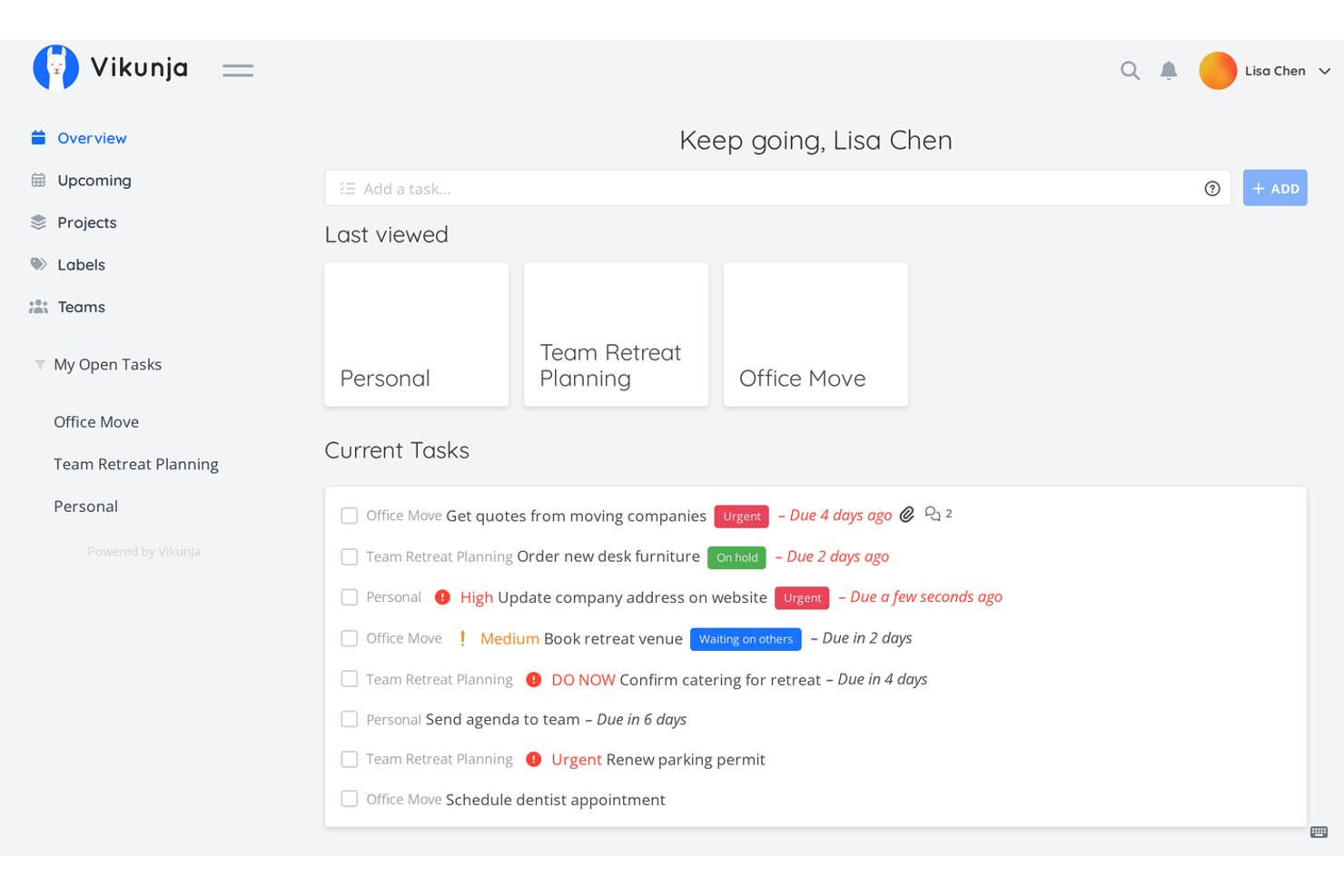
Vikunja is a self-hostable, AGPLv3-licensed open-source project management tool that offers task tracking, multiple project views (List, Kanban, Gantt, and Table), team collaboration, and flexible deployment via Docker or Kubernetes.
Who Is Vikunja Best For?
Vikunja is a strong fit for technical teams and self-hosting enthusiasts who want full control over their project data without paying for it.
Why I Picked Vikunja
Vikunja earns its spot on my shortlist because it's one of the only tools that gives you a fully AGPLv3-licensed core with zero feature paywalling, meaning your whole team gets List, Kanban, Gantt, and Table views without ever hitting an upgrade prompt. I love that you can run it on a single Docker container or scale it across Kubernetes, and your task data never leaves your own infrastructure. The "Quick Add Magic" feature lets you type due dates, assignees, and priorities inline, so capturing work is fast even in a fully self-managed setup.
Vikunja Key Features
- Task relations: Link tasks across projects as subtasks, dependencies, or blockers to map how work connects.
- CalDAV sync: Connect Vikunja tasks to your preferred calendar or task app via two-way CalDAV integration.
- OpenID Connect and LDAP support: Authenticate users through your existing identity provider using OpenID, OAuth2, or LDAP.
- Webhook support: Configure per-project webhooks to push task and project events to external tools or automation pipelines.
Vikunja Integrations
Vikunja supports CalDAV, LDAP, OpenID Connect, OAuth2, n8n, REST API, and project webhooks. It offers a smaller integration set than mainstream PM tools, but the API and webhooks support custom Git and CI/CD connections.
Pros and Cons
Pros:
- Task relations map blockers across projects
- Four views support varied delivery workflows
- AGPLv3 core avoids feature paywalls
Cons:
- Self-hosting requires technical setup
- No dedicated sprint or backlog tooling


My Evaluation Score
- Open Source Licensing
- 3/5
- Multiple Project Views
- 4/5
- Self-Hosting Capability
- 4/5
- Task & Project Management
- 4/5
- Team Collaboration Features
- 4/5
- Extensibility & Integrations
- 3/5
Leantime earns a spot on my list for putting lean methodology at the center of every feature. I think it’s a solid fit when you want kanban, goal-setting, and retrospectives in a single interface. Teams use it to move from ideas through experiments to delivery without losing sight of why each task matters.
What I appreciate most is how Leantime integrates research boards and hypothesis-driven planning, making it easier for teams to continuously learn and adapt.
Leantime’s Best For
- Teams practicing lean or agile project management
- Organizations running experiments and hypothesis-driven work
Leantime’s Not Great For
- Projects requiring advanced resource management
- Organizations needing strict compliance or audit trails
What sets Leantime apart
Leantime structures every part of project work around lean thinking. Where Jira assumes you want granular control over every workflow, Leantime strips away extra process so you can focus on moving ideas to experiments. In practice, this works best for groups who track research, validation, and delivery together without jumping between separate tools.
Tradeoffs with Leantime
Leantime optimizes for lean project cycles, but you lose advanced portfolio and resource management tools, which can matter if you need to coordinate large, multi-team programs.
Pros and Cons
Pros:
- AI-powered task management with personalized guidance
- Designed for neurodivergent users with tailored UI
- Open source with core features included
Cons:
- Limited integrations with third-party tools
- Not scalable, only one paid plan


My Evaluation Score
- Open Source Licensing
- 4/5
- Multiple Project Views
- 3/5
- Self-Hosting Capability
- 4/5
- Task & Project Management
- 4/5
- Team Collaboration Features
- 5/5
- Extensibility & Integrations
- 2/5
Huly makes my list for its focus on remote collaboration that noticeably goes beyond what most open source options provide. I think teams who struggle to keep everyone aligned across time zones will really value features like real-time multi-user editing, built-in video meetings, and collaborative whiteboards.
What I like most is how workspaces pull tasks, chat, and collaborative docs together, which means your team stops flipping between tools when working on the same project.
Huly’s Best For
- Distributed teams prioritizing live collaboration and remote project work
- Use cases needing shared docs, video calls, and real-time editing
Huly’s Not Great For
- Teams needing detailed, hierarchical project structuring
- Organizations requiring advanced portfolio or resource management
What Sets Huly Apart
Huly assumes remote-first teams want everything project-related in one workspace rather than split between many apps. Instead of juggling a stack like Slack, Google Docs, and Miro, you work natively inside Huly for chat, planning, docs, and video calls. The design feels intentionally built around live, group interaction—something I rarely see to this degree in open source platforms.
Tradeoffs with Huly
By optimizing for live, collaborative workspaces, Huly sacrifices features for complex project portfolios and granular reporting. If you need traditional PM controls or layered project tracking, you’ll likely outgrow it.
Pros and Cons
Pros:
- Real-time collaboration
- Customizable virtual offices
- User-friendly interface
Cons:
- Not ideal for large enterprises
- Limited advanced features

My Evaluation Score
- Open Source Licensing
- 4/5
- Multiple Project Views
- 4/5
- Self-Hosting Capability
- 4/5
- Task & Project Management
- 4/5
- Team Collaboration Features
- 4/5
- Extensibility & Integrations
- 4/5
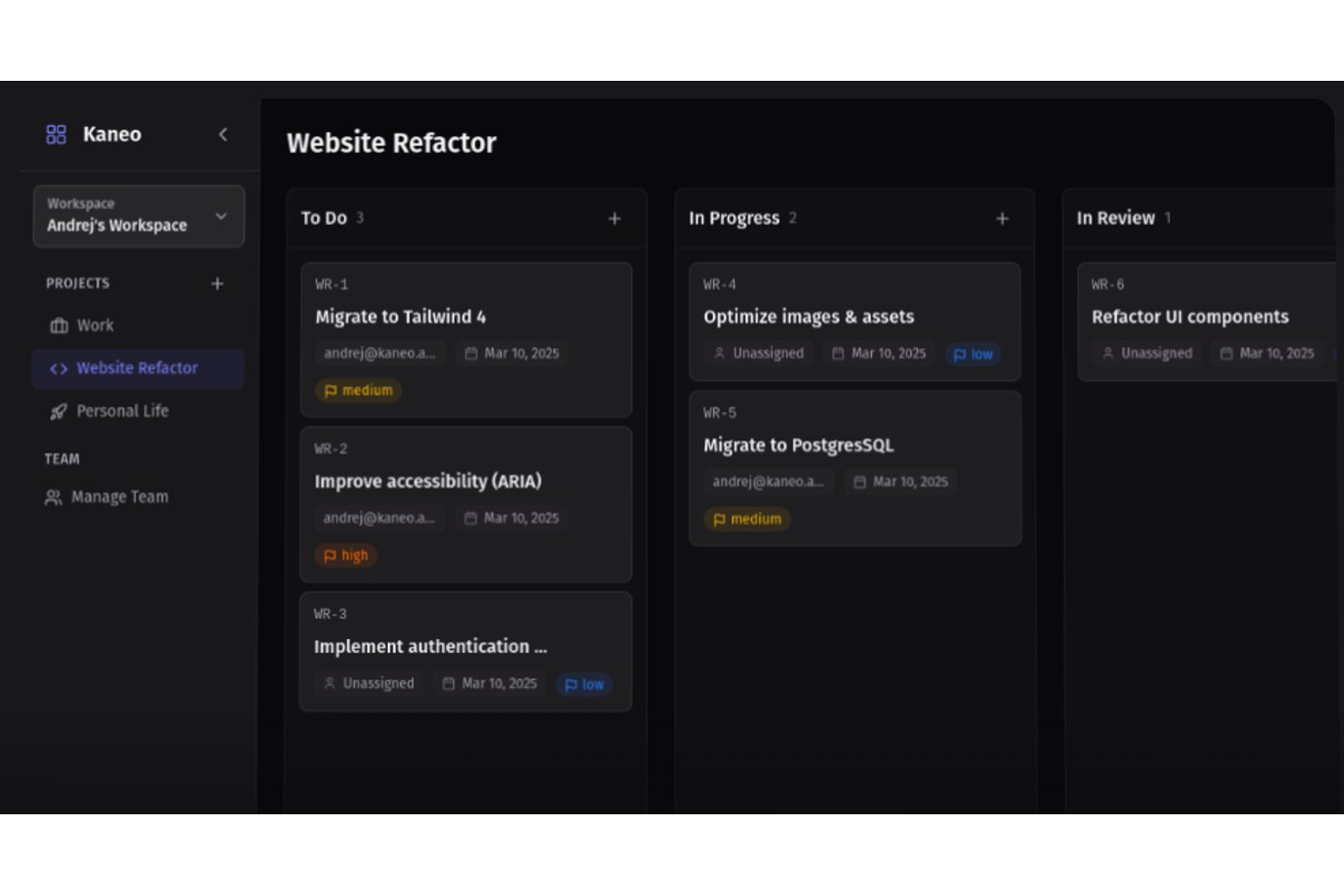
Kaneo is an MIT-licensed, self-hosted open source project management tool with kanban boards, Gantt views, built-in time tracking, and native GitHub/Gitea integration for dev-centric teams.
Who Is Kaneo Best For?
Kaneo is a strong fit for dev-centric teams and self-hosting administrators who need a lightweight, MIT-licensed project management tool with native Git integration and built-in time tracking.
Why I Picked Kaneo
I picked Kaneo as one of the best because its built-in time tracking logs start and end times directly against tasks, calculating durations without a third-party add-on. What I find genuinely useful is how this pairs with Kaneo's automated GitHub status transitions: when a branch push moves a task to "in progress," the time log captures that effort in context. It's a lightweight but practical setup for dev teams who need effort visibility without managing a separate timesheet tool.
Kaneo Key Features
- Native GitHub and Gitea sync: Two-way integration with GitHub and Gitea automatically mirrors issues, labels, assignees, and PR status across both platforms.
- Multiple project views: Backlog, board, list, and Gantt views let you visualize work in the format that fits your team's workflow.
- SSO and OIDC support: Google, GitHub, Discord, and generic OIDC sign-in are included free on every build, including self-hosted deployments.
- MCP/AI integration: A built-in Model Context Protocol server lets AI assistants like Claude and Cursor read and create tasks directly via a dedicated API endpoint.
Kaneo Integrations
Kaneo has native integrations with GitHub and Gitea, plus notification integrations for Slack, Discord, Telegram, and custom webhooks. It also provides a documented REST API and MCP endpoint for custom workflows and AI assistants.
Pros and Cons
Pros:
- Gantt and Kanban views support varied planning
- Built-in time logs connect effort to tasks
- Self-hosted deployment stays fully unrestricted
Cons:
- Self-hosters manage backups, scaling, and availability
- Formal Scrum metrics and ceremonies remain absent


My Evaluation Score
- Open Source Licensing
- 1/5
- Multiple Project Views
- 4/5
- Self-Hosting Capability
- 3/5
- Task & Project Management
- 4/5
- Team Collaboration Features
- 5/5
- Extensibility & Integrations
- 4/5
Bitrix24 makes sense for this list because it’s the open source platform I see teams reaching for when remote collaboration and integrated communication tools are non-negotiable. With built-in chat, video calls, document sharing, and a task board that’s easy to link with those features, it keeps distributed teams moving together.
What sets it apart for me is how you can spin up a shared online workspace that puts chat threads, video meetings, and files directly next to project tasks—nothing gets lost. I really appreciate how it removes friction for teams spread across time zones.
Bitrix24’s Best For
- Distributed teams needing chat, video, and project tools together
- Organizations prioritizing real-time collaboration in remote setups
Bitrix24’s Not Great For
- Teams needing highly specialized project management features
- Engineering groups with complex, code-centric workflows
What sets Bitrix24 apart
Bitrix24 is built around putting communication and project tools side by side, so you get chat, video, file sharing, and tasks all in the same space. This works especially well when you need a central online hub rather than bouncing between apps. Compared to something like Jira, Bitrix24 expects more real-time teamwork and conversation embedded directly into the project workspace.
Tradeoffs with Bitrix24
Bitrix24 optimizes for unified team communication, but that comes at the expense of deep, specialized project management features. If your work depends on advanced scheduling or custom workflows, you’ll find those options limited.
Pros and Cons
Pros:
- High security with 2FA, AES-256, SSO
- Integrated tools for sites, CRM, and calling
- Supports diverse communication channels
Cons:
- Hidden costs for integrations and add-ons
- Non-intuitive interface with scattered key features
Other Open Source Project Management Software
Here are some additional open source project management software options that didn’t make it onto my shortlist, but are still worth checking out:
- monday.com
For visual project dashboards
- Worklenz
For enterprise resource planning
- Project Libre AI
For AI-driven insights
- Tillywork
For task automation
- Freeter
For freelance project organization
- Ever Teams
For document collaboration
- Kanri
For simple task tracking
- Focalboard
For kanban boards


How I Evaluate Open Source Project Management Software
When a self-hosting team needs full data control without SaaS fees, I evaluate tools across two layers: baseline criteria every tool must hit and differentiators that separate the best options.
Core Functionality (Table Stakes For This List)
When I'm selecting tools for my list, I rank each one on a scale from 0 (does not offer the functionality) to 5 (excels in this area) for each core functionality listed below. Then, I calculate the tool's total score into a percentage. Each tool needs to achieve a minimum total score of 65% to be considered for inclusion.
- Open Source Licensing: I check that the project uses an OSI-approved license and that the source code is publicly accessible, since tools like OpenProject (GPL) and Taiga (MPL) take different approaches that affect how your team can modify and redistribute.
- Self-Hosting Capability: Deployment flexibility matters, so I look for official Docker images, documented install guides, and support for standard databases like PostgreSQL—everything a sysadmin needs to get the platform running on internal infrastructure.
- Task & Project Management: Each tool should handle task creation, assignments, due dates, subtasks, and dependencies at a minimum. I evaluate whether you can map out a real delivery plan with milestones rather than just manage a flat to-do list.
- Multiple Project Views: Teams work differently, so I look for at least Kanban boards, list views, and Gantt or timeline charts. Tools like Leantime and Focalboard approach this in distinct ways worth comparing.
- Team Collaboration Features: I evaluate how each platform handles comments, @mentions, file attachments, and notifications—the everyday interactions that keep distributed teams aligned without switching to a separate chat tool.
- Extensibility & Integrations: A well-documented REST API, webhook support, and native connections to developer tools like GitLab or Jenkins tell me the platform can fit into an existing tech stack rather than sit in isolation.
Once I have a list of tools that meet this criteria, I consider what sets each platform apart.
Differentiating Factors (What Sets Vendors Apart)
Here's how I compare and contrast different vendors:
Standout Features
Native Git integration is a major differentiator for dev-heavy teams. I look for tools that link commits and pull requests directly to tasks, so sprint progress updates itself as code moves through review. Agile sprint management goes hand-in-hand—backlog grooming, burndown charts, and velocity tracking help team leads plan iterations with real data instead of guesswork. I also evaluate whether a platform includes a built-in wiki, since storing specs and decisions alongside project work cuts down on context-switching between separate documentation tools.
Beyond Features
Community health tells you a lot about long-term viability. I check commit frequency, release cadence, and forum activity—a stale repo is a risk no matter how strong the feature set looks. Licensing transparency matters just as much. Some tools market themselves as open source but gate key features behind paid tiers, so I evaluate exactly what's available under the free license. Migration tooling is another factor I weigh, since most teams are moving off Jira or Trello and need clean import paths to avoid losing project history.
How to Choose Open Source Project Management Software
It’s easy to get bogged down in long feature lists and complex pricing structures. To help you stay focused as you work through your unique software selection process, here’s a checklist of factors to keep in mind:
| Factor | What to Consider |
|---|---|
| Scalability | Consider how the tool grows with your team. Can it handle more projects and users as your needs expand? Check if there's a limit on project size or user count that could become a constraint down the line. |
| Integrations | Evaluate integration needs with your existing tools. Does it connect easily with software like Slack, GitHub, or Trello? Ensure the tool supports smooth data flow without requiring manual workarounds. |
| Customizability | Assess how much you can tailor the tool to fit your workflows. Can you adjust dashboards, fields, or reports to match your processes? A lack of flexibility might mean extra work for your team. |
| Ease of use | Determine if the interface is intuitive for your team. Will they need extensive training to get started? A steep learning curve can slow adoption and reduce productivity. |
| Implementation and onboarding | Look into the setup process and support materials. Are there tutorials, templates, or user guides to help your team get started quickly? Poor onboarding can delay the benefits you expect from the tool. |
| Cost | Compare the pricing against your budget. Are there hidden fees or additional costs for certain features? Consider the total cost of ownership, including any support or maintenance fees. |
| Security safeguards | Ensure the tool meets your security standards. Does it offer data encryption, regular backups, and access controls? Security lapses can lead to data breaches and loss of sensitive information. |
What Is Open Source Project Management Software?
Open source project management software is a type of tool that allows users to manage tasks, projects, and resources with the flexibility to modify and customize the code. These tools are typically used by project managers, team leads, and IT professionals who require adaptable solutions to fit their unique workflows. Task management, scheduling, and collaboration features help with organizing projects, improving communication, and tracking progress. Overall, these tools offer value by providing customizable solutions that can grow with your team's needs.
Features
When selecting open source project management software, keep an eye out for the following key features:
- Task management: Allows you to create, assign, and track tasks, providing clarity on who is responsible for what and when it's due.
- Customizable workflows: Let you tailor processes to fit your team's specific needs, enhancing efficiency and adaptability.
- Collaboration tools: Facilitate communication and information sharing among team members, keeping everyone on the same page.
- Time tracking: Enables monitoring of time spent on tasks and projects, helping with budgeting and productivity analysis.
- Reporting and analytics: Provides insights into project performance, aiding in decision-making and identifying areas for improvement.
- Integration capabilities: Connects with other software tools your team already uses, ensuring smooth data flow and reducing manual work.
- Security safeguards: Protects your data with features like encryption and access controls, ensuring that sensitive information remains secure.
- Scalability: Supports growth by accommodating more projects and users as your team expands.
- User-friendly interface: Offers an intuitive design that’s easy to navigate, reducing the learning curve for new users.
- Documentation and support: Provides resources like guides and tutorials to assist with onboarding and troubleshooting.
Benefits
Implementing open source project management software provides several benefits for your team and your business. Here are a few you can look forward to:
- Cost-effectiveness: Often available at a lower cost or for free, reducing expenses while still providing essential project management features.
- Flexibility: Customizable workflows allow you to tailor the software to fit your specific processes, enhancing team efficiency.
- Data control: With security safeguards, you maintain control over sensitive information, ensuring data protection and privacy.
- Community support: Access to a community of users and developers can provide valuable insights and troubleshooting assistance.
- Scalability: Can grow with your team, accommodating more users and projects as your business expands.
- Innovation: Open source nature encourages continuous improvement and updates, keeping the software aligned with current needs.
- Integration potential: Easily connects with existing tools in your tech stack, minimizing disruptions and maximizing productivity.
Costs and Pricing
Selecting open source project management software requires an understanding of the various pricing models and plans available. Costs vary based on features, team size, add-ons, and more. The table below summarizes common plans, their average prices, and typical features included in open source project management software solutions:
Plan Comparison Table for Open Source Project Management Software
| Plan Type | Average Price | Common Features |
|---|---|---|
| Free Plan | $0 | Basic task management, collaboration tools, and limited integrations. |
| Personal Plan | $5-$87 /month | Task management, custom workflows, and basic reporting and analytics. |
| Business Plan | $13-$175 /month | Advanced reporting, time tracking, and improved security features. |
| Enterprise Plan | $19-$325 /month | Custom integrations, dedicated support, and advanced customization options. |
Open Source Project Management Software FAQs
Here are some answers to common questions about open source project management software:
How can open source project management software save costs?
Open source project management software can save costs by eliminating licensing fees associated with proprietary software. You can customize it to fit your needs without paying extra for features you don’t use. Additionally, community support often replaces costly customer service packages.
What should I consider when choosing open source project management software?
Consider your team’s specific needs and workflows. Evaluate the software’s scalability, integration capabilities, and ease of use. Make sure it offers the features your team requires, such as task management and collaboration tools, and assess the community support available.
Is open source project management software secure?
Security varies by software, so check for features like data encryption, regular updates, and community trust. You can review the source code for vulnerabilities, and some tools offer additional security plugins or settings to enhance protection.
How does open source software handle updates and maintenance?
Updates and maintenance are often community-driven, with developers and users contributing improvements and bug fixes. You can usually implement updates yourself, but it requires some technical knowledge. Regular updates ensure the software remains secure and functional.
Can open source project management software integrate with other tools?
Many open source solutions offer integration capabilities with popular tools like Slack, GitHub, and Google Workspace. Check the software’s documentation or community forums for available integrations and consider how they fit into your existing workflows.
What are the common challenges of using open source project management software?
Challenges include a potential learning curve, a lack of dedicated support, and varying levels of documentation. You might need technical expertise for setup and customization. Balancing benefits like flexibility against these challenges is key when deciding on open source solutions.