

10 Best Enterprise Integration Platforms in 2026

Best Enterprise Integration Platforms Shortlist


Enterprise integration platforms let you connect all your business apps, data, and processes across different systems—without endless custom coding or patchwork fixes. If you’re searching for the best enterprise integration platforms, you probably need a solution that bridges gaps between your teams’ critical tools, reduces manual work, and stands up to modern security and scale demands. Here, I’ll break down my top picks for 2026, helping you quickly weigh which options actually fit your environment and what makes each one worth your attention.
Why Trust Our Software Recommendations
Our team has been testing and reviewing software since 2012. As project managers ourselves, we know how difficult—and important—it is to choose the right software.
For this guide, we evaluated tools using hands-on testing and independent research, scoring tools using our selection criteria. We also draw on insights from industry thought leaders and practicing project management experts.
Our reviews reflect our human editorial judgment, not a sales pitch.
Expert reviewers:
Best Enterprise Integration Platforms Summary
This comparison chart summarizes pricing details for my top enterprise integration platform selections to help you find the best one for your budget and business needs.
| Tool | Best For | Trial Info | Price | ||
|---|---|---|---|---|---|
| 1 | Best for NetSuite users | 30-day free trial | Pricing upon request | Website | |
| 2 | Best for distributed architecture | 30-day free trial | From $99/month | Website | |
| 3 | Best for legacy system modernization | 30-day free trial + free demo available | From $200/month (billed annually) | Website | |
| 4 | Best for Microsoft 365 environments | 30-day free trial + free plan | From $15/user/month (billed annually) | Website | |
| 5 | Best for API-led connectivity | Free trial + free demo available | Pricing upon request | Website | |
| 6 | Best for low-code automation | Free demo available | Pricing upon request | Website | |
| 7 | Best for generative AI integration | Free demo available | From $9,995/year (billed annually) | Website | |
| 8 | Best for rapid API creation | Free demo available | Pricing upon request | Website | |
| 9 | Best for SAP ecosystem connectivity | Free demo available | From $1,771/month | Website | |
| 10 | Best for data integrity and governance | Free trial available | Pricing upon request | Website |
Enterprise Integration Platform Reviews
Below are my detailed summaries of the enterprise integration platforms that made it onto my shortlist. My reviews offer a detailed look at the features, integrations, and best use cases of each platform to help you find the best one for you.

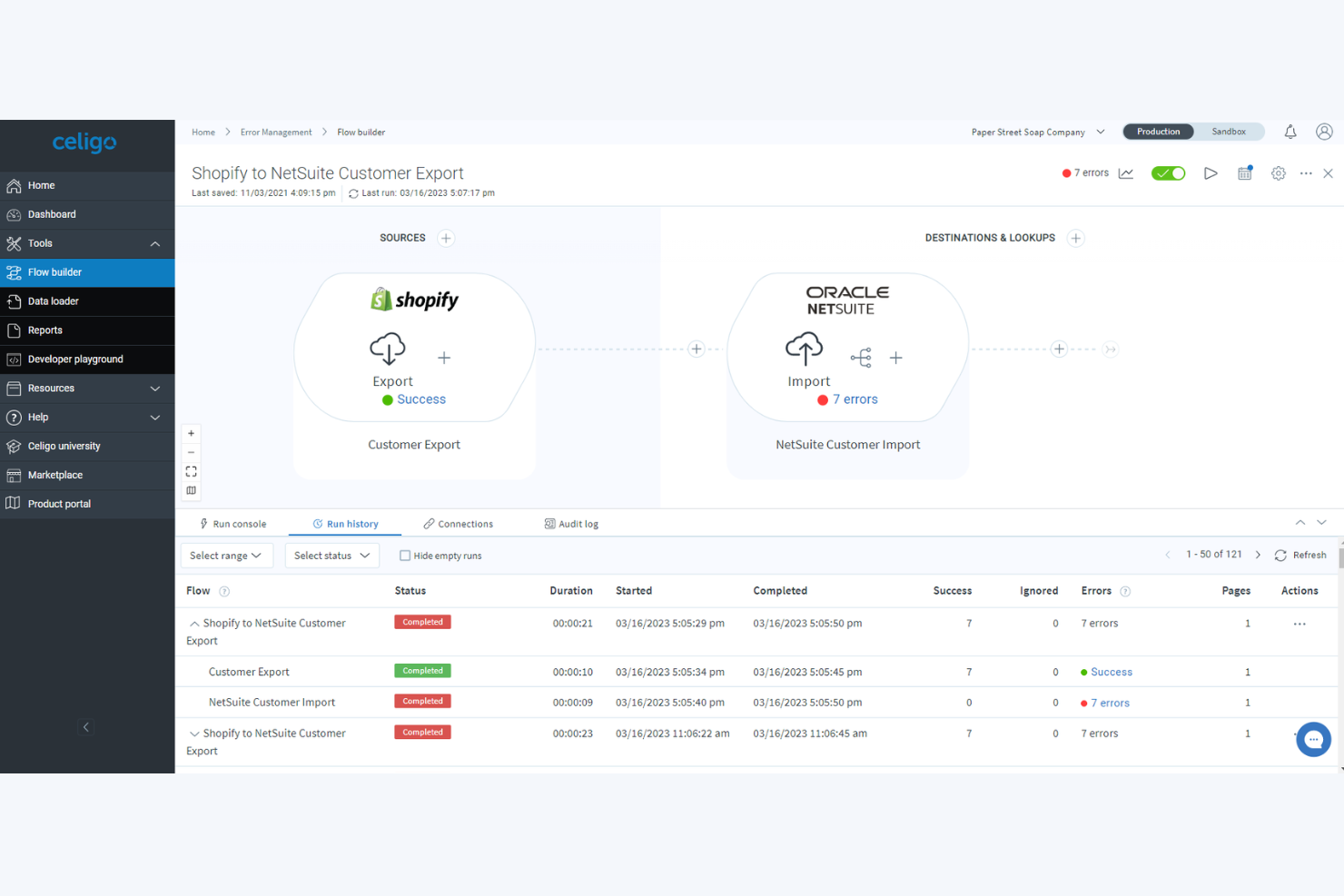
Celigo is an integration platform as a service (iPaaS) designed for automating workflows, syncing data, and managing APIs across business applications and cloud services.
Who Is Celigo Best For?
Finance and IT teams at mid-sized and large organizations that rely on NetSuite to manage core business processes.
Why I Picked Celigo
I picked Celigo as one of the best because it’s the only iPaaS I’ve used that delivers prebuilt integration apps specifically for NetSuite, such as Finance, Ecommerce, and HR connectors tailored to Suite users. My team configures real-time order, invoice, and inventory syncs through Celigo’s Integration Marketplace, and I like being able to use the Flow Builder to automate cross-system business processes without custom coding. Celigo’s focus on NetSuite-native integration lets us orchestrate complex workflows without leaving the NetSuite environment.
Celigo Key Features
- Advanced error management: Monitor, identify, and resolve integration issues with step-by-step error tracing and notifications.
- Role-based access controls: Assign user permissions to manage workflows and integrations securely across teams.
- Prebuilt EDI integrations: Use built-in connectors for electronic data interchange with trading partners.
- Integration template library: Access a selection of ready-made templates to speed up automation across frequently used business processes.
Celigo Integrations
Celigo offers native integrations with NetSuite, Salesforce, Shopify, Amazon, Zendesk, ADP, ServiceNow, Slack, Google Workspace, and Microsoft 365.
Pros and Cons
Pros:
- Supports both cloud and on-premise applications
- Built-in field mapping and transformation tools
- Deep integration with NetSuite ecosystem
Cons:
- UI performance slows with complex flows
- Limited support for less common ERP systems
New Product Updates from Celigo
Celigo Adds API Group Assignment During API Setup
Celigo adds API group assignment during create, clone, and move actions. This reduces extra setup steps by letting teams organize APIs before the relative URI is defined. For more information, visit Celigo’s official site.
 .
.
Boomi
Best for distributed architecture

Boomi is an enterprise integration platform that enables you to connect applications, automate workflows, and manage data across hybrid and multi-cloud environments with scalable, low-code tools.
Who Is Boomi Best For?
IT teams at midsize to large enterprises who need to orchestrate integrations across distributed cloud and on-premise systems.
Why I Picked Boomi
I picked Boomi as one of the best because I need an integration platform that’s designed for distributed, hybrid architectures—my team can deploy Boomi Atoms anywhere, from edge devices to public cloud. I use its runtime flexibility to orchestrate integrations in environments where applications span multiple networks and geographies. I also appreciate the platform’s low-code interface for building, managing, and monitoring distributed data flows.
Boomi Key Features
- Prebuilt connector library: Lets you connect to SaaS, on-premise, and cloud apps.
- Process library: Provides reusable, templatized integration processes for common use cases.
- API management tools: Enables you to publish, monitor, and govern APIs from a single console.
- Data mapping interface: Uses a visual tool to transform and route data between different systems.
Boomi Integrations
Boomi offers native integrations with Salesforce, NetSuite, SAP, Workday, ServiceNow, Shopify, Microsoft Dynamics 365, and QuickBooks. An API is available for custom integrations.
Pros and Cons
Pros:
- Scalable for enterprise-level data integration
- Strong visual interface for data mapping
- Supports hybrid, cloud, and on-premise deployments
Cons:
- Complex error handling for large integrations
- Limited advanced monitoring and analytics tools


IBM App Connect is an enterprise integration platform that centralizes API management, data mapping, workflow automation, and real-time connectivity with a focus on bridging cloud and on-premises systems.
Who Is IBM App Connect Best For?
IBM App Connect suits IT leaders in large enterprises who need to modernize legacy infrastructures and orchestrate data across hybrid environments.
Why I Picked IBM App Connect
I picked IBM App Connect as one of the best because it handles modernizing legacy systems with connectors to mainframes, IBM i, and cloud apps in a single flow. My team uses its drag-and-drop interface to quickly map data transformations and automate event-driven workflows without heavy custom development. I can orchestrate end-to-end integration from on-premises systems to cloud SaaS with built-in, templated solutions.
IBM App Connect Key Features
- Integrated API management: Create, expose, and manage APIs directly within the platform.
- Enterprise message flow monitoring: Get visibility into message queues and integration health.
- Prebuilt template catalog: Use and customize prebuilt integration templates for common enterprise connections.
- Lifecycle governance tools: Control versioning, deployment, and rollback of integration assets.
IBM App Connect Integrations
IBM App Connect offers native integrations with Salesforce, SAP, Microsoft Dynamics 365, Oracle, Workday, ServiceNow, Box, Amazon S3, Google Cloud Platform, and has an API for custom integrations.
Pros and Cons
Pros:
- Enforces enterprise-grade security standards
- Supports complex data transformations
- Handles high-volume integrations
Cons:
- Documentation can be inconsistent or outdated
- UI response may lag with large projects


Microsoft Power Automate is an enterprise integration platform that connects cloud and on-premises systems, automates workflows, orchestrates data movement, and supports process automation across the Microsoft ecosystem.
Who Is Microsoft Power Automate Best For?
IT teams and business users in organizations running Microsoft 365 looking to automate workflows between Microsoft and third-party apps.
Why I Picked Microsoft Power Automate
I included Microsoft Power Automate because my team relies on its deep, built-in connectivity across SharePoint, Teams, and OneDrive to automate approvals, notifications, and document workflows in Microsoft 365 environments. I use AI Builder to add document processing or sentiment analysis to flows without extra tools. I like how we can trigger automations directly from email or Teams chat and monitor flow runs all in one place.
Microsoft Power Automate Key Features
- Prebuilt connectors: Access over 1,000 ready-to-use connectors for third-party and Microsoft services.
- Process mining: Analyze and visualize business processes with built-in process mining tools.
- On-premises data gateway: Connect cloud flows to on-premises data sources securely.
- Custom API integration: Build custom connectors to integrate proprietary apps or legacy systems.
Microsoft Power Automate Integrations
Microsoft Power Automate has native integrations across the Microsoft ecosystem, including Microsoft 365 and Azure.
Pros and Cons
Pros:
- Provides AI features for document and data flows
- Automates workflows with built-in process mining
- Integrates natively with the full Microsoft ecosystem
Cons:
- Flow limits can impact high-volume automations
- Premium connectors require separate licensing

MuleSoft is an enterprise integration solution that provides API management, integration tooling, and prebuilt connectors to connect systems, apps, data, and devices across cloud and on-premise environments.
Who Is MuleSoft Best For?
Large enterprises and IT teams managing complex integrations and API gateways across multi-cloud and hybrid environments.
Why I Picked MuleSoft
I picked MuleSoft as one of the best because I’m looking for purpose-built support for API-led integration strategies. My team uses its Anypoint Platform to design, secure, and manage APIs as the foundation of every integration. With reusable assets and flexible deployment options, we can accelerate project delivery while enforcing consistency across integrations.
MuleSoft Key Features
- Prebuilt connectors library: Access hundreds of out-of-the-box connectors for leading enterprise applications, databases, and SaaS applications.
- Data transformation mapping: Use a visual, drag-and-drop interface to map and transform data between sources.
- Centralized monitoring: Track integration performance and issues with an integrated management dashboard.
- Role-based access controls: Set granular permissions for users and teams within the platform.
MuleSoft Integrations
MuleSoft offers native integrations across the Salesforce ecosystem, SAP, ServiceNow, Workday, and NetSuite. MuleSoft Anypoint Platform provides an API for custom integrations.
Pros and Cons
Pros:
- Mashup and orchestration tools for complex flows
- Strong version control for APIs
- Full lifecycle API management included
Cons:
- Requires specialized MuleSoft developer expertise
- Limited real-time monitoring customization
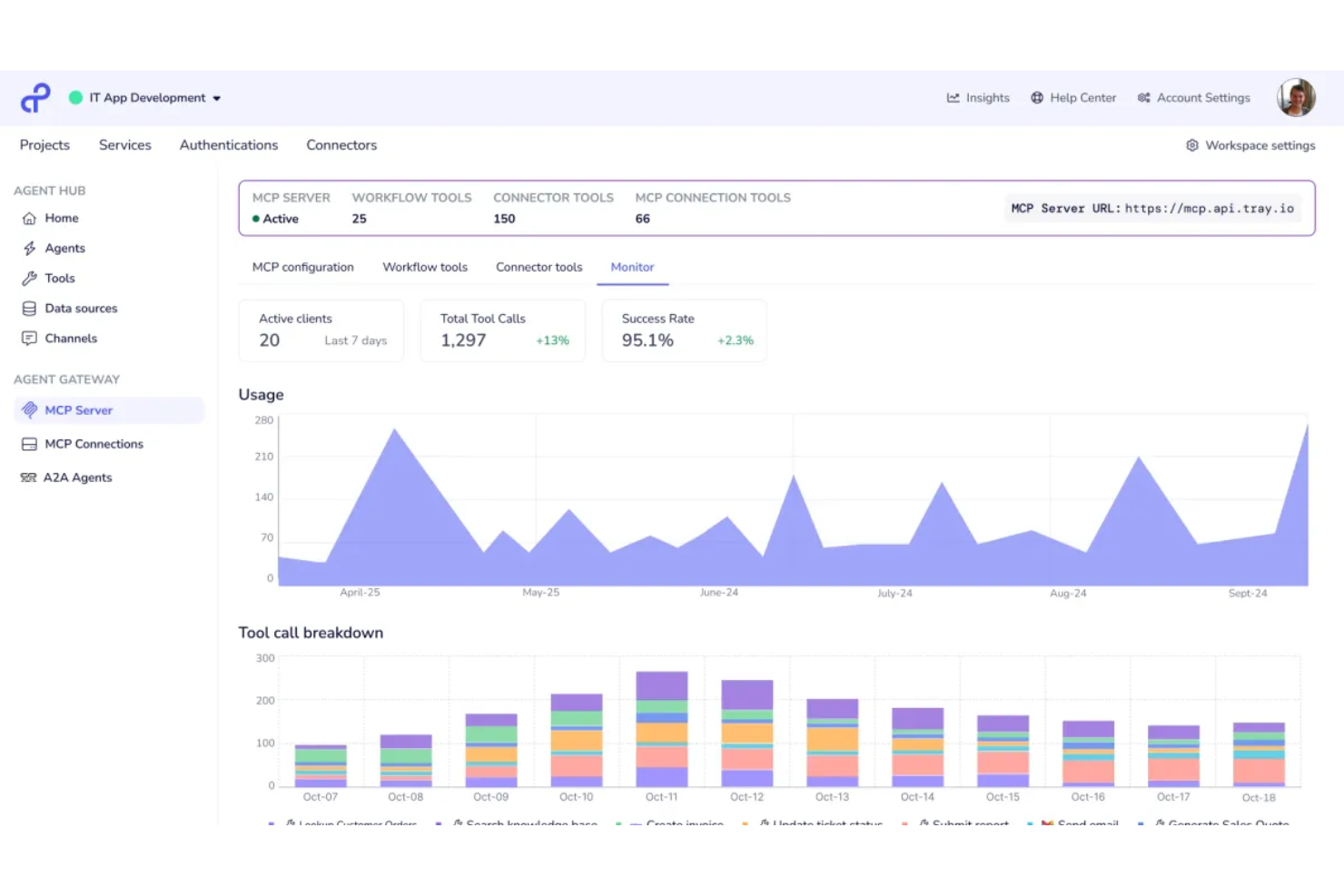
Tray.ai is a low-code integration and automation platform that lets you build multi-step workflows, orchestrate complex processes, and connect business applications through APIs and prebuilt connectors.
Who Is Tray.ai Best For?
Tray.ai is a strong fit for operations and IT teams at mid-sized to large enterprises building and managing custom integrations.
Why I Picked Tray.ai
I picked Tray.ai because I value how it lets me drag and drop logic to build custom integrations without deep coding skills—perfect for cross-app automation at scale. I like using its visual workflow builder for orchestrating complex multi-step processes. My team relies on reusable workflow templates and automated error handling to ensure reliability across integration scenarios.
Tray.ai Key Features
- Prebuilt connectors: Choose from hundreds of ready-made connectors for direct integration with popular business systems.
- Flexible API integration: Connect to any service with an open API for custom automation requirements.
- Digital transformation tools: Manipulate, format, and enrich data as it moves between apps.
- Version control and rollback: Track workflow changes and revert to previous versions as needed.
Tray.ai Integrations
Tray.ai offers native integrations, including Salesforce, HubSpot, Slack, NetSuite, Google Sheets, Zendesk, Snowflake, and Microsoft 365. An API is available for custom integrations.
Pros and Cons
Pros:
- Flexible API integration for custom systems
- Supports real-time data synchronization
- Visual workflow builder for complex logic
Cons:
- Lacks granular user permission settings
- Debugging workflows can be slow


SnapLogic is an enterprise integration platform that lets you connect cloud services, legacy systems, data sources, and applications using visual pipelines and AI-powered integration tools.
Who Is SnapLogic Best For?
IT and data teams in large enterprises who need AI-powered integration across diverse applications and data environments.
Why I Picked SnapLogic
I picked SnapLogic as one of the best because its AI-powered integration assistant accelerates building pipelines and discovering connections across applications and data sources. I’ve used its no-code GenAI builder to automate data flow design, and my team relies on SnapGPT for context-aware, natural language integration tasks. SnapLogic’s focus on generative AI integration helps us simplify complex automation projects without extensive manual scripting.
SnapLogic Key Features
- Prebuilt Snap connector library: Offers hundreds of ready integrations for enterprise apps, databases, and cloud platforms.
- Pipeline versioning: Lets you manage, compare, and roll back integration pipelines with version control.
- Real-time data processing: Supports streaming data for immediate synchronization between systems.
- API management portal: Provides tools to design, publish, and monitor enterprise APIs.
SnapLogic Integrations
SnapLogic offers native integrations with Salesforce, Workday, NetSuite, Snowflake, ServiceNow, SAP, Google BigQuery, Databricks, and Slack. An API is available for custom integrations.
Pros and Cons
Pros:
- Automated error recovery and monitoring features
- Visual pipeline builder accelerates integration setup
- Native connectors for AI and analytics tools
Cons:
- Some connectors require frequent manual updates
- API versioning can be cumbersome

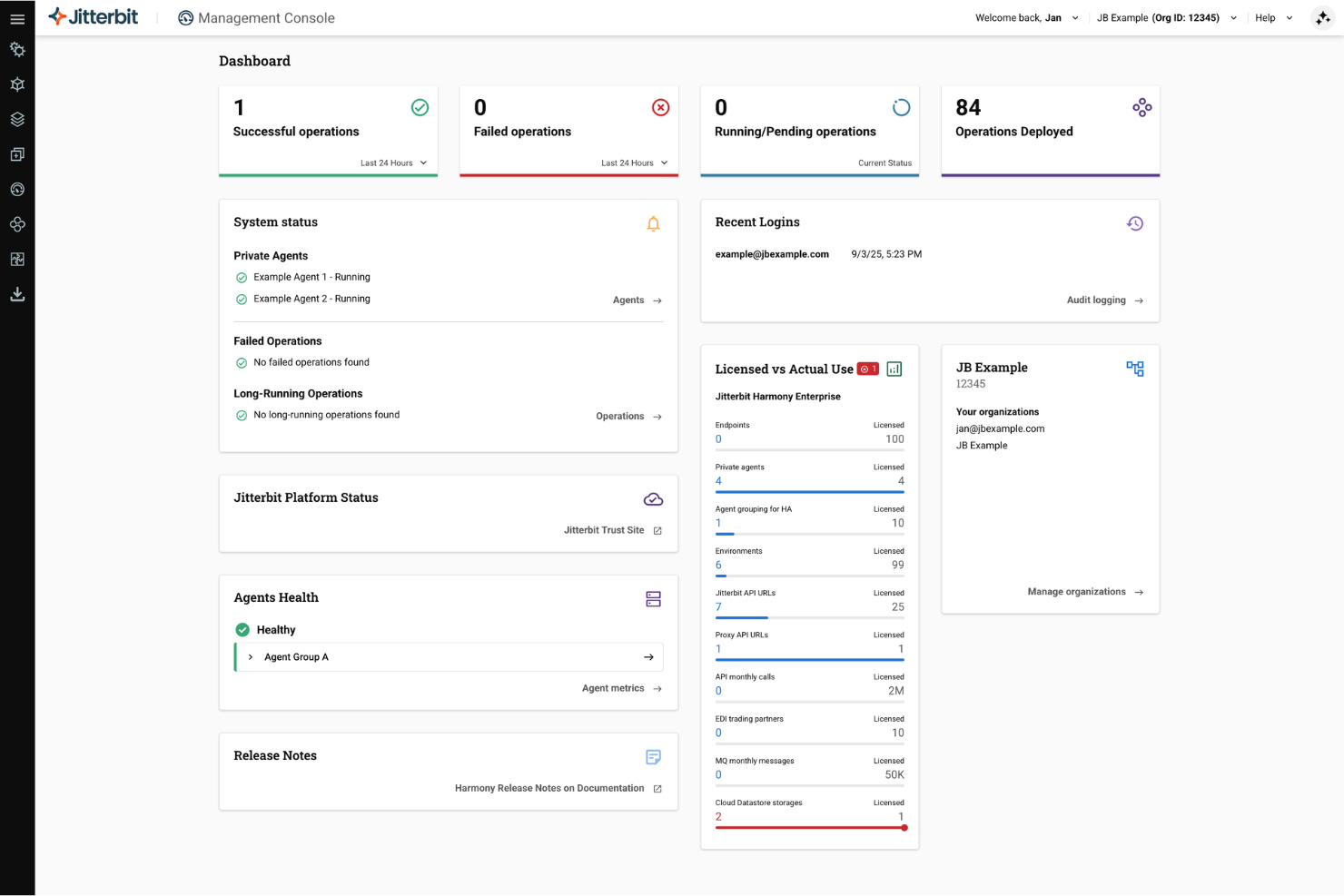
Jitterbit is an integration platform that enables teams to design, connect, and manage APIs, automate workflows, and integrate cloud and on-premises systems through a unified development environment.
Who Is Jitterbit Best For?
Jitterbit is a strong fit for IT teams at mid-size to large enterprises who need to quickly build, deploy, and manage APIs across multiple systems.
Why I Picked Jitterbit
I picked Jitterbit as one of the best because its API integration tools let me roll out new REST APIs rapidly and securely. I like using the graphical designer, which helps my team model API logic and data transformations without manual coding. In practice, we can turn legacy systems into modern endpoints and orchestrate workflows across on-premises and cloud.
Jitterbit Key Features
- Prebuilt connectors: Integrate quickly with popular systems like Salesforce, SAP, and Oracle.
- Automated event triggers: Launch integrations in response to specific data or system events.
- Role-based access control: Manage user permissions at a granular level for projects and environments.
- Logging and monitoring dashboard: Track integration performance and diagnose errors from a central interface.
Jitterbit Integrations
Jitterbit offers native integrations with Salesforce, Slack, Square, Microsoft Dynamics 365, Shopify, ServiceNow, Jira, Snowflake, and HubSpot.
Pros and Cons
Pros:
- API lifecycle management and monitoring tools
- Real-time and batch data synchronization options
- Visual workflow builder for complex integrations
Cons:
- Limited built-in dashboard customization options
- Lengthy onboarding process for large teams


SAP Integration Suite is an enterprise integration platform designed for connecting applications, data, APIs, and on-premise systems across hybrid and cloud environments within the SAP landscape.
Who Is SAP Integration Suite Best For?
Enterprises with complex SAP landscapes that need to unify cloud and on-premise systems across global operations.
Why I Picked SAP Integration Suite
I picked SAP Integration Suite because it handles SAP-to-SAP and third-party app integration with prebuilt connectors and event-driven architecture. My team can automate data flows across SAP S/4HANA, SuccessFactors, and non-SAP cloud services. The API management and process integration tools also let us standardize governance across different business units.
SAP Integration Suite Key Features
- Graphical integration flow designer: Drag and drop to visually design integration workflows without code.
- B2B integration support: Handles EDI formats and trading partner management for external business exchanges.
- Cloud connector: Securely links on-premise systems to cloud applications.
- Monitoring and analytics dashboard: Tracks message flows and system status in real time.
SAP Integration Suite Integrations
SAP Integration Suite offers native integrations across the SAP ecosystem, including SAP S/4HANA, SAP SuccessFactors, SAP Ariba, SAP Concur, and more.
Pros and Cons
Pros:
- Advanced monitoring and error management tools
- Built-in support for B2B and EDI integrations
- Deep connectivity to SAP cloud and on-premise apps
Cons:
- Complex setup for non-SAP system integrations
- High starting price for enterprise usage


Qlik Talend Cloud is a cloud-based enterprise integration platform that unifies data integration, quality, transformation, and pipeline orchestration for managing complex and distributed data environments.
Who Is Qlik Talend Cloud Best For?
Data teams in large organizations who need trusted, governed data across multiple cloud or on-premises sources.
Why I Picked Qlik Talend Cloud
I picked Qlik Talend Cloud as one of the best because data integrity and governance come built in for every integration flow my team runs. I rely on its unified environment for real-time data quality, end-to-end data lineage, and automated data health checks. I like being able to enforce data stewardship with granular controls, regardless of whether our sources live in the cloud or on-premises.
Qlik Talend Cloud Key Features
- Graphical transformation designer: Build and manage complex data pipelines visually.
- Multi-cloud connectivity: Integrate data from AWS, Azure, GCP, and private clouds.
- Reusable integration templates: Leverage prebuilt templates for common data scenarios.
- Automated pipeline scheduling: Set up, run, and monitor data flows on flexible schedules.
Qlik Talend Cloud Integrations
Qlik Talend Cloud offers native integrations with AWS, Snowflake, Databricks, Microsoft Fabric, and Apache Iceberg, along with agentless CDC from databases, SAP, mainframe, and SaaS sources. An API is available for custom integrations.
Pros and Cons
Pros:
- Visual job design with reusable templates
- Strong data governance and stewardship features
- Built-in data profiling and quality tools
Cons:
- Transformation performance can lag with big data
- Limited on-premises deployment options
Other Enterprise Integration Platforms
Here are some additional enterprise integration platforms options that didn’t make it onto my shortlist, but are still worth checking out:
- Informatica IDMC
For data-heavy environments
- Oracle Integration Cloud
For Oracle application suites
- Workato
For business-led automation
- n8n
For open-source deployments
- TIBCO
For real-time event processing
- Zapier
For governing AI agents
- Frends
For lean, hybrid deployments
- Alumio
For mid-market digital commerce
- APPSeCONNECT
For B2B e-commerce syncing
- Azure Integration Services
For cloud-native developers


How I Evaluate Enterprise Integration Platforms
When Jira data needs to flow into SAP or Asana handoffs need to trigger Workday updates, I split my evaluation into core acceptance criteria first, then the differentiators that separate one platform from another.
Core Functionality (Table Stakes For This List)
When I'm selecting tools for my list, I rank each one on a scale from 0 (does not offer the functionality) to 5 (excels in this area) for each core functionality listed below. Then, I calculate the tool's total score into a percentage. Each tool needs to achieve a minimum total score of 65% to be considered for inclusion.
- Pre-Built Connector Library: I check how many native connectors ship out of the box, and whether they cover the PM tools and enterprise apps your team actually uses—like syncing Jira issues into ServiceNow or pushing Smartsheet data to SAP.
- Workflow Automation Engine: I evaluate whether the platform offers a visual, low-code builder for orchestrating multi-step integrations with branching logic, error handling, and retries rather than requiring custom scripts for every flow.
- Data Mapping & Transformation: Mapping a "priority" field in Asana to a numbered severity scale in an ERP system is a common scenario, so I look for visual mappers that handle nested objects, custom formulas, and schema mismatches across tools.
- API Management: Beyond consuming APIs, I check whether the platform lets you publish, version, and secure your own APIs—especially useful when your PMO needs to expose portfolio data to finance or executive dashboards.
- Real-Time & Batch Sync: Some project data needs instant updates (status changes, blockers), while resource and financial data syncs better on a schedule. I evaluate whether both event-driven and batch modes are supported with flexible triggers.
- Enterprise Security & Governance: I look for SSO, role-based access, encryption at rest and in transit, audit logging, and relevant compliance certifications like SOC 2 or ISO 27001 that enterprise procurement teams typically require.
Once I have a list of tools that meet the criteria, I consider what sets each platform apart.
Differentiating Factors (What Sets Vendors Apart)
Here's how I compare and contrast different vendors:
Standout Features
Pre-built process templates can save weeks of setup. I look for platforms that ship ready-made recipes for common PM scenarios like syncing Jira tickets to ServiceNow or pushing timesheets into payroll systems. A unified observability dashboard is another differentiator I evaluate, especially when your PMO needs to monitor integration health across dozens of connected tools. AI-powered mapping suggestions also matter; platforms that auto-detect field relationships between, say, monday.com and Salesforce cut configuration time significantly.
Beyond Features
Total cost of ownership is a big one. I evaluate whether pricing scales by connector, transaction volume, or flat licensing, because a platform that looks affordable at five integrations can get expensive fast when you're connecting an entire PMO stack. Implementation support matters just as much—I check for certified partners, reference architectures, and structured onboarding programs that shorten time-to-value. Deployment flexibility rounds out my evaluation, since some enterprises require on-premises or hybrid hosting to meet internal data residency policies.
How to Choose Enterprise Integration Platforms
It’s easy to get bogged down in long feature lists and complex pricing structures. To help you stay focused as you work through your unique software selection process, here’s a checklist of factors to keep in mind:
| Factor | What to Consider |
|---|---|
| Scalability | Can the platform handle your current and projected data volumes and number of integrations? |
| Integrations | Are native connectors available for your key systems and cloud providers, or will you need custom development? |
| Customizability | Can you tailor workflows, rules, and data mappings to fit your unique business requirements? |
| Ease of use | Will your team—both technical and nontechnical users—be able to design and maintain integrations without heavy training? |
| Implementation and onboarding | How long will setup take, and does the vendor provide migration tools, onboarding resources, and support during rollout? |
| Cost | Are there extra fees for higher data throughput, additional connectors, or premium support? |
| Security safeguards | Does the platform provide necessary encryption, authentication, and auditing to meet your compliance standards? |
| Support availability | What channels and SLAs does the vendor offer for issue resolution, and is support available during your working hours? |
What Are Enterprise Integration Platforms?
Enterprise integration platforms are software systems that connect applications, data, and processes across an organization’s technology stack. They let you automate workflows, synchronize information between systems, and maintain data consistency as your environment grows or changes. These platforms support integration across cloud, on-premises, and hybrid infrastructures, making them a foundational tool for data-driven teams.
Features
When selecting enterprise integration platforms, keep an eye out for the following key features:
- Prebuilt connectors: Ready-made links to popular business applications and databases, letting you quickly connect and sync systems without custom code.
- Visual workflow designer: Drag-and-drop interfaces to build, modify, and manage integration flows, making complex logic accessible to both technical and nontechnical users.
- Data transformation tools: Functions to map, clean, and restructure data as it moves between systems, so you can ensure consistency and compatibility.
- Real-time and batch processing: Support for immediate event-driven integrations as well as scheduled, large-scale data transfers depending on business needs.
- Centralized monitoring dashboard: A single place to view integration status, logs, performance metrics, and alerts, helping you spot and resolve issues fast.
- Role-based access control: Granular permissions that restrict or grant access to integration components, supporting secure collaboration and compliance.
- Error handling and retry: Automated detection of integration failures with built-in logic to retry or escalate errors, reducing manual intervention.
- API management: Tools to build, publish, and manage APIs, enabling third-party and internal developers to connect securely to your integrated systems.
- Data lineage tracking: Ability to trace the origin, flow, and transformation history of data across your integrated environment, supporting audits and troubleshooting.
- Developer SDK or extension framework: Options for custom scripting or extension, so teams with specialized needs can expand beyond out-of-the-box capabilities.
Benefits
Implementing enterprise integration platforms provides several benefits for your team and your business. Here are a few you can look forward to:
- Improved data consistency: Automated integrations and transformation tools help you eliminate manual data entry errors and maintain reliable, synchronized information across your systems.
- Faster workflow automation: Visual designers and prebuilt connectors let you quickly automate repetitive processes and orchestrate complex business logic without extensive coding.
- Enhanced visibility and monitoring: Centralized dashboards and real-time monitoring make it easy for your team to track data flows, troubleshoot problems, and optimize system performance.
- Strengthened data security: Role-based access controls, audit logs, and API management protect your data as it moves between applications and help support compliance requirements.
- Flexible hybrid connectivity: Support for cloud, on-premises, and legacy systems lets you adapt integrations as your environment or business needs evolve.
- Easier onboarding and migration: Prebuilt templates, migration tools, and guided onboarding resources speed up adoption and help your team realize value sooner.
- Reduced IT maintenance burden: Automated error handling and self-service tools empower business users and free up your technical team to focus on higher-priority projects.
Costs and Pricing
Selecting enterprise integration platforms requires an understanding of the various pricing models and plans available. Costs vary based on features, team size, add-ons, and more. The table below summarizes common plans, their average prices, and typical features included in enterprise integration platform solutions:
Plan Comparison Table for Enterprise Integration Platforms
| Plan Type | Average Price | Common Features |
|---|---|---|
| Free Plan | $0 | Access to basic connectors, limited workflows, restricted data volumes, community support, and single-user access. |
| Personal Plan | $20–$50/user/month | More connector options, higher task limits, basic data transformation tools, and email support. |
| Business Plan | $50–$150/user/month | Advanced automation, team collaboration, centralized monitoring, role-based access, and API management. |
| Enterprise Plan | $150–$500+/user/month | Unlimited integrations, advanced security, compliance features, dedicated support, and customizable onboarding. |
Enterprise Integration Platforms FAQs
Here are some answers to common questions about enterprise integration platforms:
How do enterprise integration platforms support both cloud and on-premises systems?
They usually provide connectors or agents that let you link cloud-based and on-premises software. This flexibility means you can move data and automate workflows across different environments without custom coding or manual intervention.
Can nontechnical users build integrations on these platforms?
Yes, most modern enterprise integration platforms feature drag-and-drop builders and guided workflows that make it possible for nontechnical users to create and manage integrations. This lowers dependence on IT teams and speeds up project timelines.
What security features should I look for in an integration platform?
You should look for end-to-end encryption, role-based access control, audit logs, and compliance certifications. These features help you protect sensitive data as it moves between systems and demonstrate controls to auditors or regulatory bodies.
How long does it take to implement an enterprise integration platform?
Implementation timelines can range from a few days to several months. Factors include the complexity of your integrations, the number of systems involved, and the level of in-house expertise. Prebuilt connectors and onboarding resources can shorten rollout times.
What’s the difference between API management and integration?
API management refers to building, publishing, and securing APIs for use by internal or external developers, while integration platforms focus on linking multiple systems and automating the exchange of data between them. Many enterprise integration platforms offer both capabilities.