

10 Best Document Redaction Tools Reviewed in 2026

Best Document Redaction Tool Shortlist


Managing sensitive information can be a real headache for project managers like you. With data breaches and compliance issues lurking, it's crucial to protect your documents. That's where a reliable document redaction tool comes in.
In my experience testing and reviewing software, I've seen how these tools can ease the burden. They help ensure your team's data remains confidential and compliant with regulations.
In this article, I'll share my unbiased picks for the best document redaction tools available. You'll find insights into features, usability, and what makes each tool stand out. Let's dive in and find the right solution for your team.
Why Trust Our Software Recommendations
Our team has been testing and reviewing software since 2012. As project managers ourselves, we know how difficult—and important—it is to choose the right software.
For this guide, we evaluated tools using hands-on testing and independent research, scoring tools using our selection criteria. We also draw on insights from industry thought leaders and practicing project management experts.
Our reviews reflect our human editorial judgment, not a sales pitch.
Expert reviewers:
Document Redaction Tools Comparison Table
This comparison table summarizes pricing details for my top document redaction tool selections:
| Tool | Best For | Trial Info | Price | ||
|---|---|---|---|---|---|
| 1 | Best for high-volume redactions | Free demo available | Pricing upon request | Website | |
| 2 | Best for quick PDF redaction | Free 7-day trial + free plan available | From $10/month (billed annually) | Website | |
| 3 | Best for creative professionals | 7-day free trial | From $19.99/user/month (billed annually) | Website | |
| 4 | Best for enterprise scalability | Free trial available | From $129.99 (billed annually) | Website | |
| 5 | Best for team collaboration | Free 14-day trial + free demo available | From $15/user/month (billed annually) | Website | |
| 6 | Best for cross-platform access | Free plan available | From $9.99/month (billed annually) | Website | |
| 7 | Best for legal industry use | Free trial available | From $19/month | Website | |
| 8 | Best for AI-powered redaction | 7-day free trial | From $29/month | Website | |
| 9 | Best for data compliance needs | Free demo available | Pricing upon request | Website | |
| 10 | Best for identifying sensitive data before redaction | Free plan available | From $79.20/month (billed annually) | Website |
Best Document Redaction Tool Reviews
Below are my detailed summaries of the best document redaction tool that made it onto my shortlist. My reviews offer a detailed look at the key features, pros & cons, integrations, and ideal use cases of each tool to help you find the best one for you.
Best for high-volume redactions

Klippa DocHorizon is an intelligent document processing platform designed to handle document-based workflows from start to finish. It allows your team to upload or scan documents, automate the processing of them, and convert or afterwards use the data in the format you need.
Why I picked Klippa DocHorizon: I picked Klippa DocHorizon because it gives you automated, configurable redaction of PII/signatures/faces at scale, supports batch workflows for high document volumes, and couples AI-driven redaction with human review for quality and compliance.
Standout features & integrations:
Features include automatic data anonymization that supports multiple techniques (such as data masking, pseudonymization, and swapping) and helps fulfill compliance requirements around data privacy. It also supports human-in-the-loop workflows: after AI redaction, a human reviewer can correct false positives/negatives.
Integrations include Gmail, Google Drive, OneDrive, Outlook, NetSuite, Xero, Dropbox, QuickBooks, and Zoho.
Pros and Cons
Pros:
- Supports large-scale batch redaction workflows
- High-accuracy redaction of PII and signatures
- Handles a large variety of document types and languages
Cons:
- Potential for false positives
- Custom fields or deeply bespoke redaction rules may need work-arounds
New Product Updates from Doxis AI.dp.
Doxis AI.dp Improves Dataset Validation and API Controls
Doxis AI.dp improves dataset editing with real-time type validation, better field controls, and save prevention on invalid values, plus new API capabilities. These updates help teams maintain cleaner dataset values and manage rows more reliably. For more information, visit Doxis AI.dp’s official site.
 .
.
Smallpdf
Best for quick PDF redaction

Smallpdf is an online PDF redaction tool designed for individuals and teams who need to remove sensitive information from documents efficiently. It allows users to redact names, addresses, and financial data, ensuring compliance with GDPR and HIPAA standards.
Why I picked Smallpdf: Smallpdf’s quick PDF redaction process is a standout feature, allowing you to drag and drop files for immediate editing. It offers automatic file deletion after one hour, enhancing privacy. The interface is user-friendly, requiring no downloads or signups, which saves time. With TLS encryption and ISO/IEC 27001 certification, you can trust that your documents are secure.
Standout Features & Integrations
Features include a drag-and-drop interface that simplifies the redaction process, irreversible redaction to ensure data cannot be recovered, and compliance with GDPR and HIPAA for legal peace of mind.
Integrations include Dropbox, Google Drive, OneDrive, and Box.
Pros and Cons
Pros:
- Secure encryption standards
- No signup required
- Quick file processing
Cons:
- No offline access
- Limited free version

Best for creative professionals

Adobe Acrobat is a PDF management tool widely used by creative professionals for editing, converting, and redacting PDFs. It offers comprehensive features for document handling, making it a favorite among designers and content creators.
Why I picked Adobe Acrobat: It's tailored for creative professionals who need more than basic redaction. The tool provides advanced editing capabilities, allowing you to manipulate text and images within PDFs. Its OCR technology helps convert scanned documents into editable files. With trusted security features, it ensures your sensitive data stays protected.
Standout Features & Integrations
Features include OCR technology that transforms scanned documents into editable text, comprehensive editing tools for text and images, and secure encryption for added data protection.
Integrations include Microsoft OneDrive, Dropbox, Google Drive, Box, Microsoft SharePoint, Salesforce, Microsoft Teams, and Workday.
Pros and Cons
Pros:
- OCR for scanned documents
- Trusted security features
- Advanced editing capabilities
Cons:
- Resource-intensive software
- Steeper learning curve


Foxit is a PDF editor designed for large enterprises needing comprehensive document management solutions. It provides editing, redaction, and collaboration tools to help businesses handle extensive document workflows efficiently.
Why I picked Foxit: Its enterprise scalability makes it perfect for large teams that handle high volumes of documents. The tool offers advanced security features to protect sensitive information. With its collaboration capabilities, your team can work together on documents in real-time. Additionally, it supports batch processing, allowing you to edit multiple documents simultaneously.
Standout Features & Integrations
Features include advanced security measures to safeguard documents, real-time collaboration tools to enhance teamwork, and batch processing to manage multiple files efficiently.
Integrations include Microsoft Office, SharePoint, Google Drive, Box, Dropbox, Evernote, OneDrive, and Alfresco.
Pros and Cons
Pros:
- Supports batch processing
- Advanced security features
- Scalable for large enterprises
Cons:
- Resource-intensive software
- Steep learning curve


Nitro PDF is a document management tool aimed at businesses seeking efficient PDF editing and collaboration. It provides tools for creating, editing, and sharing PDF files, making it ideal for teams working on shared documents.
Why I picked Nitro PDF: It excels in team collaboration, offering features that facilitate document sharing and joint editing. The tool includes electronic signatures, which streamline approval processes. Version control ensures that your team always works on the latest document iteration. With its cloud-based access, you can collaborate from anywhere, enhancing productivity.
Standout Features & Integrations
Features include electronic signatures for easy approvals, version control to keep documents up-to-date, and cloud-based access for remote collaboration.
Integrations include Microsoft Office 365, Google Drive, Dropbox, SharePoint, OneDrive, Box, and Evernote.
Pros and Cons
Pros:
- Supports electronic signatures
- Includes version control
- Cloud-based document access
Cons:
- Occasional software updates are needed Limited mobile functionality
- Learning curve for new users


Xodo by Apryse is a versatile PDF tool designed for individuals and teams who need to access and edit documents across different devices. It facilitates document editing, annotation, and redaction, making it suitable for professionals on the go.
Why I picked Xodo by Apryse: It excels in providing cross-platform access, allowing you to work on your documents from any device. The tool offers real-time collaboration features, enabling your team to work together efficiently. Its annotation capabilities make it easy to highlight and comment on PDFs. With cloud storage integration, you can securely save and access your documents anytime.
Standout Features & Integrations
Features include a real-time collaboration feature that supports teamwork, annotation tools for easy document commenting, and cloud storage integration for secure file access.
Integrations include Google Drive, Dropbox, OneDrive, Box, and SharePoint.
Pros and Cons
Pros:
- Suitable for mobile use
- Cloud storage integration
- Comprehensive annotation tools
Cons:
- Occasional sync issues
- Limited offline features

Best for legal industry use

Redactable is a document redaction tool tailored for legal professionals who need to ensure the confidentiality of sensitive information. It focuses on secure redaction processes, making it a valuable asset for law firms and legal departments.
Why I picked Redactable: It's designed specifically with the legal industry in mind, providing tools that cater to the unique needs of legal professionals. The tool offers secure encryption to protect your documents. It also includes a detailed audit trail feature, which is crucial for legal compliance. Additionally, it supports bulk redaction, saving you time when dealing with large volumes of documents.
Standout Features & Integrations
Features include advanced encryption to protect sensitive data, a comprehensive audit trail for tracking changes, and a bulk redaction option to handle multiple documents efficiently.
Integrations include Microsoft Word, Microsoft Excel, Google Drive, Dropbox, Box, and OneDrive.
Pros and Cons
Pros:
- Bulk redaction capability
- Secure encryption standards
- Designed for legal professionals
Cons:
- Requires training for new users
- Cons Limited customization options


iDox.ai is a document redaction tool designed for professionals in data-sensitive fields like legal and healthcare. It automates the redaction process, focusing on accuracy and efficiency to protect sensitive information.
Why I picked iDox.ai: iDox.ai excels with its AI-powered redaction capabilities, which significantly reduce manual editing time. You can benefit from its intelligent profile suggestions that enhance accuracy. It offers a one-click mark feature for batch processing, making it user-friendly. The tool's compliance with SOC2 and ISO 27001 standards ensures your data's security.
Standout Features & Integrations
Features include advanced AI that identifies sensitive information quickly, batch processing that allows for efficient handling of large documents, and compliance reporting to ensure adherence to data protection standards.
Integrations include Microsoft Word, Microsoft Excel, Google Drive, Dropbox, Box, OneDrive, SharePoint, and DocuSign.
Pros and Cons
Pros:
- Batch processing capability
- SOC2 compliant for security
- Supports multiple file formats
Cons:
- Limited customization options
- Learning curve for beginners


Rectify is a document redaction tool designed for businesses that need to automate privacy and secure redaction processes. It serves industries requiring strict data compliance, offering tools to efficiently redact sensitive information.
Why I picked Rectify: It's tailored for organizations focused on data compliance, automating redaction to save time and reduce errors. The tool offers secure AI-driven processes that enhance privacy protection. Its batch processing feature allows you to handle multiple documents efficiently. With compliance monitoring, you can ensure adherence to regulatory standards.
Standout Features & Integrations
Features include AI-driven redaction for enhanced privacy, batch processing to handle large document volumes, and compliance monitoring to meet regulatory standards.
Integrations include Microsoft Word, Microsoft Excel, Google Drive, Dropbox, Box, and SharePoint.
Pros and Cons
Pros:
- Secure data handling
- Batch processing capability
- AI-driven redaction
Cons:
- Internet dependency for processing
- Requires training for optimal use
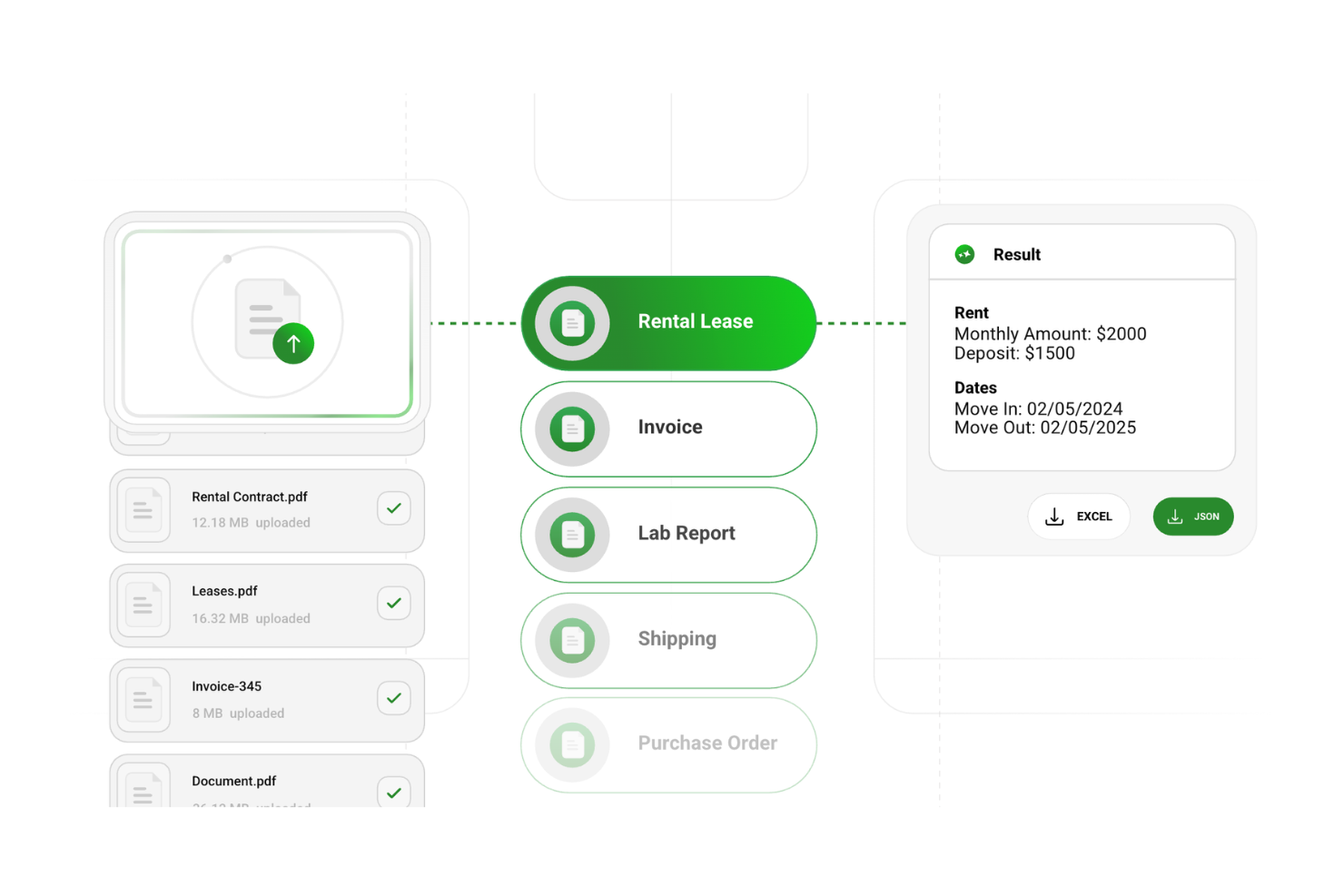
DocuPipe is an AI-powered document extraction platform that helps teams identify and structure sensitive data within complex documents. While it is not a dedicated redaction tool, it supports redaction workflows by locating personally identifiable information (PII) and preparing documents for review, making it useful for organizations handling sensitive data at scale.
Who Is DocuPipe Best For?
DocuPipe suits compliance-driven teams in legal, finance, and healthcare that need to identify and validate sensitive data before redaction or downstream processing.
Why I Picked DocuPipe
I picked DocuPipe because it handles one of the most time-consuming parts of redaction workflows—locating sensitive data across inconsistent document formats. Instead of relying on manual review or fixed templates, users can define what data to detect and apply that logic across a wide range of documents. This makes it easier to prepare documents for redaction, especially when dealing with contracts, invoices, or scanned records that don’t follow a standard structure.
DocuPipe Key Features
- Sensitive data detection: Identify fields such as names, addresses, and financial data using customizable schemas.
- Visual review interface: Highlight and review detected data directly on the document before taking action.
- Document type classification: Automatically categorize documents to apply consistent processing rules.
- Support for complex formats: Extract and analyze data from PDFs, scans, images, and handwritten inputs.
DocuPipe Integrations
DocuPipe offers a well-documented API for custom integrations and supports no-code connectivity through Make (Integromat).
Pros and Cons
Pros:
- Supports human-in-the-loop validation
- Handles unstructured and low-quality documents (scans, images, and various layouts)
- Users can define customizable detection rule
Cons:
- Does not clearly provide irreversible redaction or compliant redacted document outputs.
- Lacks features like permanent masking, redaction logs, or certified output formats
New Product Updates from DocuPipe
DocuPipe Adds Source View and Auto-Refresh Jobs Page
DocuPipe adds Source view comparisons, auto-refreshing jobs, and real-time progress bars to improve document review and processing visibility. The updates help teams monitor extraction and standardization workflows more efficiently. For more information, visit DocuPipe’s official site.
 .
.Other Document Redaction Tools
Here are some additional document redaction tool options that didn’t make it onto my shortlist, but are still worth checking out:
- VIDIZMO Redactor
For multimedia redaction
- Docusign
For integrated e-signature features
- iLovePDF
For multilingual support
- Nutrient
For API integration
- PDF24
For offline PDF redaction


How I Evaluate Document Redaction Tools
I split my evaluation into two layers: baseline criteria every tool must meet and differentiators that matter when PMO teams are redacting RFPs, contracts, or compliance documents at scale.
Core Functionality (Table Stakes For This List)
When I'm selecting tools for my list, I rank each one on a scale from 0 (does not offer the functionality) to 5 (excels in this area) for each core functionality listed below. Then, I calculate the tool's total score into a percentage. Each tool needs to achieve a minimum total score of 65% to be considered for inclusion.
- Automated PII Detection: I evaluate how well each tool identifies sensitive data like names, financial details, and ID numbers across project documents—especially in dense RFPs or SOWs.
- Permanent Redaction: The redacted data should be truly gone, not just covered with a black bar. I check whether content remains extractable through copy-paste or metadata.
- Multi-Format Support: Project teams work across PDFs, Word docs, Excel sheets, and images. I look for broad format coverage that matches real project documentation workflows.
- Bulk Redaction Processing: When a PMO needs to sanitize hundreds of contract files for an audit, one-at-a-time redaction falls apart. I evaluate batch processing and shared rule application.
- Manual Redaction Controls: Automated detection misses context-specific terms like internal project codenames. I look for flexible manual tools that let you select text, draw areas, or target image regions.
- Audit Trail & Logging: Compliance audits require proof of what was redacted, by whom, and when. I check whether logs are detailed enough to hold up during regulatory reviews.
Once I have a list of tools that meet this criteria, I consider what sets each platform apart.
Differentiating Factors (What Sets Vendors Apart)
Here's how I compare and contrast different vendors:
Standout Features
I look for reusable redaction templates that let teams apply saved rule sets to recurring documents like SOWs or NDAs without starting from scratch each time. OCR capability is another separator—construction and government project teams often deal with scanned blueprints or signed contracts where text-layer redaction alone won't cut it. I also evaluate collaborative review workflows, where multiple stakeholders can approve proposed redactions before they're finalized.
Beyond Features
Compliance alignment matters a lot here. I check whether a tool supports standards like GDPR, HIPAA, or ITAR, since project teams handling government contracts or healthcare data need defensible redaction. Deployment flexibility is another key factor—some PMOs require on-premise or air-gapped options that cloud-only tools can't offer. I also evaluate how well a tool connects to platforms like SharePoint, Google Drive, or Jira, because redaction that lives outside your project ecosystem creates friction and version control headaches.
How to Choose a Document Redaction Tool
It’s easy to get bogged down in long feature lists and complex pricing structures. To help you stay focused as you work through your unique software selection process, here’s a checklist of factors to keep in mind:
| Factor | What to Consider |
|---|---|
| Scalability | Will the tool grow with your needs? Consider if it supports the number of documents and users you anticipate in the future without sacrificing performance. |
| Integrations | Does it work with your existing systems? Check for compatibility with your current software like cloud storage and document management systems. |
| Customizability | Can you tailor it to your workflows? Look for options to adjust settings and templates to match your specific redaction processes. |
| Ease of use | Is it intuitive for your team? A simple interface reduces training time and user errors. Evaluate the learning curve and user feedback. |
| Implementation and onboarding | How quickly can you get started? Assess the time and resources needed for setup. Look for tools with strong support and onboarding resources. |
| Cost | Does it fit your budget? Compare pricing plans, including hidden fees or costs for additional features. Consider long-term value over initial price. |
| Security safeguards | Are your documents protected? Ensure the tool complies with security standards like encryption and access controls to prevent unauthorized access. |
| Compliance requirements | Does it meet industry regulations? Verify that the tool supports compliance with relevant laws like GDPR or HIPAA, especially if you handle sensitive data. |
What Is A Document Redaction Tool?
Document redaction tool is software designed to remove or obscure sensitive information from documents. Legal professionals, healthcare workers, and compliance officers generally use these tools to protect privacy and ensure compliance with data regulations.
Features like text redaction, image redaction, and compliance tracking help with maintaining confidentiality and meeting legal standards. These tools provide vital support for organizations that need to manage sensitive data securely.
Features of Document Redaction Tools
When selecting a document redaction tool, keep an eye out for the following key features:
- Text redaction: Removes or obscures sensitive text, ensuring confidential information stays private.
- Image redaction: Allows users to hide sensitive images within documents, protecting visual data.
- Batch processing: Handles multiple documents at once, saving time and increasing efficiency.
- Compliance tracking: Ensures adherence to data protection regulations like GDPR and HIPAA.
- Integration capabilities: Connects with existing systems like cloud storage and document management tools for seamless workflow.
- Customizable templates: Lets users create redaction templates tailored to specific needs, improving consistency.
- Security safeguards: Provides encryption and access controls to protect documents from unauthorized access.
- Real-time collaboration: Enables team members to work together on documents, enhancing productivity.
- Audio and video redaction: Supports multimedia redaction, useful for industries handling diverse data types.
- Electronic signatures: Streamlines document approval processes with integrated signing capabilities.
Benefits of Document Redaction Tools
Implementing a document redaction tool provides several benefits for your team and your business. Here are a few you can look forward to:
- Improved privacy: By removing sensitive information, these tools help keep private data secure and confidential.
- Regulatory compliance: Ensures your documents meet industry standards like GDPR and HIPAA, reducing legal risks.
- Time efficiency: Batch processing and customizable templates speed up the redaction process, saving valuable time.
- Enhanced collaboration: Real-time collaboration features allow your team to work together effectively on documents.
- Data security: Security safeguards like encryption and access controls protect your documents from unauthorized access.
- Versatility: Supports various data types, including text, images, and multimedia, catering to diverse business needs.
- Streamlined approvals: Integrated electronic signatures simplify the process of getting documents signed and approved.
Costs and Pricing of a Document Redaction Tool
Selecting document redaction tools requires an understanding of the various pricing models and plans available. Costs vary based on features, team size, add-ons, and more. The table below summarizes common plans, their average prices, and typical features included in document redaction tool solutions:
Plan Comparison Table for Document Redaction Tool
| Plan Type | Average Price | Common Features |
|---|---|---|
| Free Plan | $0 | Limited text redaction, basic image redaction, and minimal storage. |
| Personal Plan | $5-$25/user/month | Text redaction, image redaction, batch processing, and basic security features. |
| Business Plan | $30-$60/user/month | Advanced redaction tools, compliance tracking, integration capabilities, and enhanced security features. |
| Enterprise Plan | $70-$100/user/month | Full customization, real-time collaboration, dedicated support, and comprehensive compliance solutions. |
Document Redaction Tool FAQs
Here are some answers to common questions about document redaction tool:
How does document redaction handle metadata?
Document redaction tools not only obscure visible text but also remove hidden metadata that might contain sensitive information. This ensures that no data is inadvertently exposed when sharing documents. It’s crucial for your team to use tools that automatically strip out this metadata to maintain confidentiality.
What are the common mistakes in document redaction?
Common mistakes include using basic tools like permanent markers, which can be reversed, and failing to review documents thoroughly. Your team should rely on specialized software that guarantees complete redaction and conduct multiple reviews to catch any missed information.
How frequently should legal teams train on redaction tools?
Regular training is essential for keeping up with best practices and legal requirements. Your team should undergo training sessions at least annually to stay informed about new features, compliance updates, and effective redaction techniques.
Why is multiple review important in redaction processes?
Multiple reviews ensure that no sensitive information is overlooked. Having more than one team member review redacted documents helps catch errors and omissions, reducing the risk of data breaches and ensuring compliance with legal standards.
What legal protocols should be considered in redaction?
Legal protocols like the Civil Procedure Rules require clear justification for each redaction. Your team should be aware of these requirements and document their redaction actions to maintain transparency and accountability.
How do redaction tools support compliance with GDPR and HIPAA?
Redaction tools help comply with GDPR and HIPAA by securely removing personal identifiers like Social Security numbers and financial details. They ensure that your documents meet the stringent data protection requirements these regulations demand.