

10 Best AI Client Delivery Tools Reviewed in 2026

10 Best AI Client Delivery Tools Shortlist


Managing client delivery is rarely just about timelines. It also involves onboarding clients smoothly, coordinating work across teams, keeping communication clear, and ensuring nothing slips through the cracks once delivery is underway.
AI client delivery tools help teams manage these workflows more effectively. They support client-facing delivery through features like automation, centralized communication, shared visibility, and AI-assisted insights that reduce manual effort and improve consistency.
In this article, I'll share my top picks for AI client delivery tools. I've reviewed each option independently, focusing on how well it supports delivery workflows, client collaboration, and day-to-day execution. Whether you're improving efficiency or tightening client communication, you'll find options suited to different delivery models and team sizes.
Why Trust Our Software Recommendations
Our team has been testing and reviewing software since 2012. As project managers ourselves, we know how difficult—and important—it is to choose the right software.
For this guide, we evaluated tools using hands-on testing and independent research, scoring tools using our selection criteria. We also draw on insights from industry thought leaders and practicing project management experts.
Our reviews reflect our human editorial judgment, not a sales pitch.
Expert reviewers:
AI Client Delivery Tools Comparison Table
This comparison table summarizes pricing details for my top AI client delivery tool selections.
| Tool | Best For | Trial Info | Price | ||
|---|---|---|---|---|---|
| 1 | Best for AI-first customer onboarding teams | 14-day free trial | From €59/user/month | Website | |
| 2 | Best for AI-driven customer service | Free plan available | From $25/user/month (billed annually) | Website | |
| 3 | Best for AI-driven task automation | Free plan available; 14-day free trial | From $10/user/month (billed annually) | Website | |
| 4 | Best for client onboarding | Free plan + free demo available | From $350/month (billed annually) | Website | |
| 5 | Best for project management | 14-day free trial + free demo available | From $45/month (billed annually) | Website | |
| 6 | Best for data compliance | Free demo available | From $59/seat/month (billed annually) | Website | |
| 7 | Best for remote teams | Free plan available | From $9.99/user/month (billed annually) | Website | |
| 8 | Best for project planning | 14-day free trial | From $26/user/month (billed annually) | Website | |
| 9 | Best for creative agencies | Free plan + free demo + free 14-day trial available | From $29/user/month (billed annually) | Website | |
| 10 | Best for team collaboration | Free demo available | From $3/user/month (billed annually) | Website |

Best AI Client Delivery Tool Reviews
Below are my detailed summaries of the best AI client delivery tools on my shortlist. My reviews offer a thorough look at the key features, pros & cons, integrations, and ideal use cases for each tool, helping you find the best one for you.

Best for AI-first customer onboarding teams
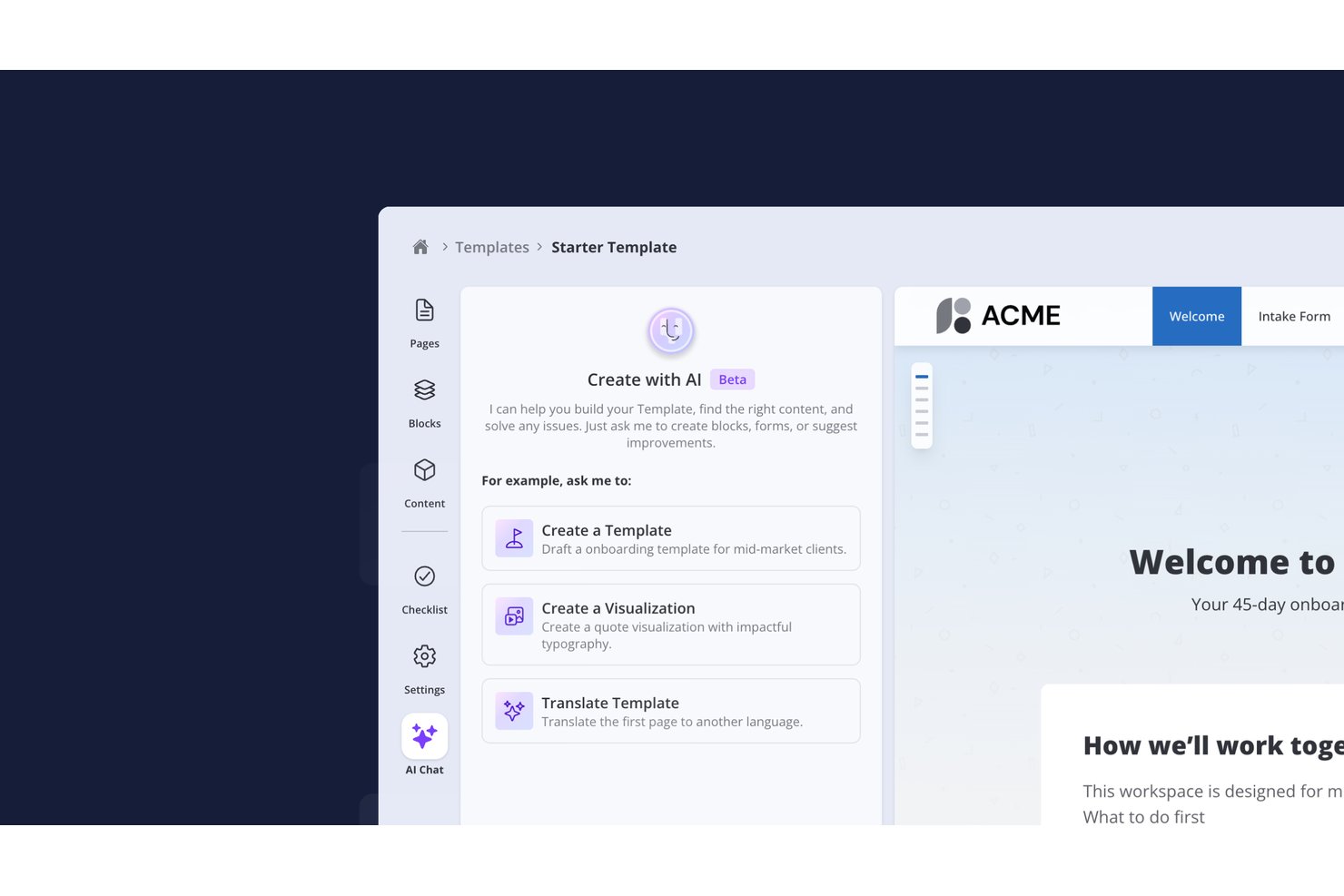
- Valuecase is a customer onboarding platform that combines no-login customer-facing Spaces with plans, tasks, forms and progress tracking across every account, and uses AI to build templates, run automations and keep clients moving. An MCP server lets Claude, ChatGPT or custom agents work directly with onboarding data.
Who Is Valuecase Best For?
Valuecase is a strong fit for customer success and onboarding teams that need to deliver a polished, low-friction client experience without asking clients to create yet another account.
Why I Picked Valuecase
Valuecase stands out by pairing zero-friction client access with intelligent AI execution. Clients join onboarding spaces instantly via a shared link—no login required. Meanwhile, AI automations eliminate manual chasing: Valuecase AI auto-adjusts timelines from meeting transcripts, sends smart reminders, and leverages an MCP server so Claude or ChatGPT can read and act on live account data.
Valuecase Key Features
- Mutual action plans: Shared task lists where both your team and the client have assigned ownership, due dates, and dependencies tracked in one place.
- Onboarding risk scoring: A dashboard that flags stalled or at-risk client projects by combining task completion rates, CRM data, and engagement signals.
- MCP server integration: Connects Valuecase directly to AI tools like Claude and ChatGPT so you can build templates, manage workflows, and send follow-ups via natural language prompts.
- Meeting briefing generation: Pulls context from Google Calendar, HubSpot, and Google Drive to prepare a pre-meeting summary before each client call.
- Customer-facing AI agent: Configurable AI agent answers customer questions about tasks, timeline, and other key delivery questions.
Valuecase Integrations
Valuecase offers native integrations with HubSpot, Salesforce, Slack, Microsoft Teams, Gmail, Loom, and Zoom, plus MCP-based connections to Claude, ChatGPT, Cursor, Jira, Linear, and ClickUp. It connects with Zapier, Make, and Albato, and provides an API for custom integrations.
Pros and Cons
Pros:
- MCP connects with AI tools for automation
- AI generates branded status reports automatically
- No-login client portal increases client adoption
Cons:
- No built-in time tracking or billing
- No native meeting transcription included

Best for AI-driven customer service
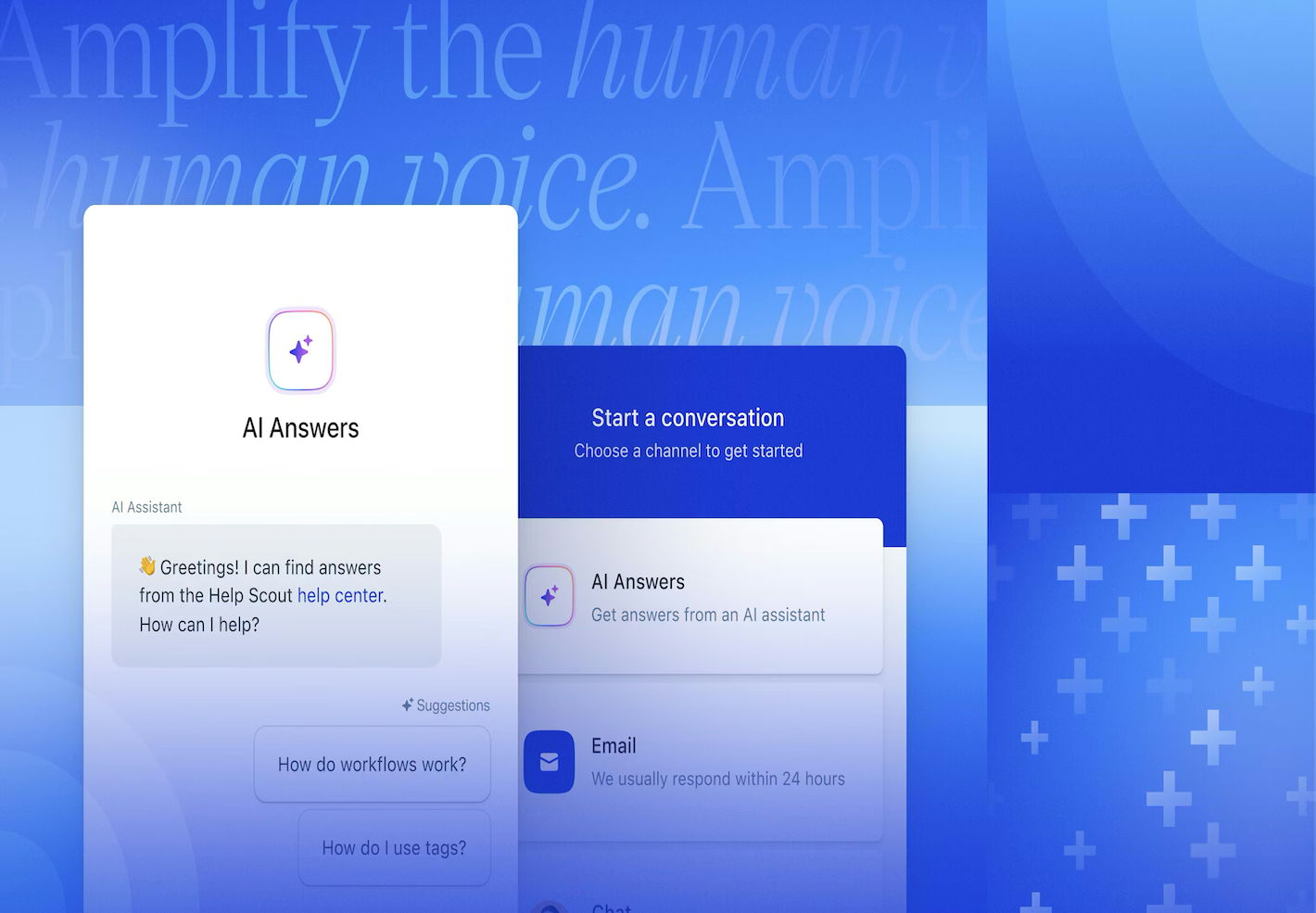
Help Scout is an AI-enhanced help desk platform for teams that support clients at scale. It centralizes support requests so agents can deliver consistent, personalized replies without juggling tools.This makes it a good choice for organizations that want to enhance their client communication without sacrificing quality or efficiency.
Why I Picked Help Scout
I picked Help Scout for its ability to blend AI-driven automation with personalized customer service. Help Scout's AI Answers feature stands out, automating responses to common queries and allowing your team to concentrate on more nuanced customer needs. Additionally, the Inbox Assistant provides contextual support and drafts replies, enhancing your team's efficiency without compromising the personal touch that clients appreciate.The result is faster throughput with fewer template-style replies.
Help Scout Key Features
In addition to its AI tools, I also found these features beneficial:
- Beacon: An embeddable support widget that offers immediate assistance to customers via live chat, contact forms, and knowledge base articles.
- Workflows: Automate repetitive tasks like assigning conversations and sending follow-up emails, ensuring your team can focus on more critical tasks.
- Docs: Create a public help center to provide customers with easy access to self-service support, integrating seamlessly with Beacon.
- Customer Profiles: View comprehensive profiles and interaction history to give agents context, enhancing the quality of customer interactions.
Help Scout Integrations
Integrations include Salesforce, HubSpot, Jira, Slack, Shopify, Mailchimp, WooCommerce, Stripe, Trello, and Google Apps. Users can also create custom apps and integrations using the Help Scout API.
Pros and Cons
Pros:
- Quick to implement and onboard new agents
- Collision detection prevents duplicate replies
- Shared inbox supports cross-team collaboration
Cons:
- Limited native tooling for complex ticket hierarchies
- Knowledge base customization varies by plan
New Product Updates from Help Scout

Help Scout Adds Automatic Conversation Reassignment
Help Scout can now automatically unassign conversations when the assigned teammate has been away long enough, keeping replies moving so others can pick them up. For more information, visit Help Scout's official site.
 .
.
Wrike
Best for AI-driven task automation

For teams seeking an AI client delivery tool that reduces busywork and enhances productivity, Wrike offers a compelling solution. With its robust automation and AI capabilities, Wrike allows your team to focus on essential tasks by minimizing routine actions and streamlining workflows. This tool is particularly appealing to businesses across industries like creative production, marketing, and agile planning, where efficient project management and collaboration are crucial.
Why I Picked Wrike
I picked Wrike for its unique AI-driven automation and task management capabilities that resonate with those seeking AI client delivery tools. Wrike AI offers generative AI for project planning, text editing, and translation, which can significantly enhance your team's efficiency. The no-code automations feature further simplifies task management by reducing manual input, making it an excellent choice for teams looking to optimize their project workflows.
Wrike Key Features
In addition to its AI and automation capabilities, Wrike provides several features that enhance its utility as a client delivery tool:
- Mindmapping: Facilitates ideation and visual collaboration among your team, helping to organize thoughts and strategies effectively.
- Work Views: Offers multiple visualization options, including Gantt charts and Kanban boards, to track project progress and status.
- Dashboards and Analytics: Provides real-time insights into project metrics, allowing you to make informed decisions quickly.
- Request Forms: Customizable forms streamline the process of gathering project requirements, ensuring that your team has all the necessary information upfront.
Wrike Integrations
Wrike integrates with a plethora of applications, including Salesforce, HubSpot, NetSuite, QuickBooks, Jira, GitHub, and Microsoft Teams. These integrations enable seamless connectivity across your existing tools, enhancing Wrike's functionality as an AI client delivery tool.
Pros and Cons
Pros:
- Enterprise-grade security and global support
- Highly customizable workflows and request forms
- Generative AI supports planning and content
Cons:
- Automation setup not always intuitive
- Interface can feel complex at scale
New Product Updates from Wrike
Wrike Adds Klaxoon MCP Integration
Wrike’s Klaxoon MCP integration is now generally available, enabling AI agents to navigate between Wrike tasks and attached whiteboards, read task context, and manage whiteboard attachments via API. For more information, visit Wrike's official site.

Dock
Best for client onboarding

Dock is a client onboarding and collaboration platform designed to help teams structure how new client work begins. It provides a centralized space for sharing documents, tracking onboarding tasks, and maintaining communication as projects move from kickoff into delivery.
Why I picked Dock: I picked Dock for client onboarding because it helps teams create a clear, organized starting point for client work. Customizable client portals give clients visibility into onboarding tasks and materials, while shared workspaces reduce confusion around what's needed and when.
Dock's task tracking and document feedback features help teams manage early delivery steps without relying on scattered emails or disconnected tools. This structure supports smoother transitions from onboarding into active delivery.
Standout features & integrations:
Features include customizable client portals for onboarding workflows, document feedback tools that allow clients to comment directly on shared files, and task-tracking that provides visibility into onboarding progress.
Integrations include Salesforce, HubSpot, Zoom, Gong, Chorus, Fathom, Loom, Slack, Google Drive, Microsoft SharePoint, Notion, Confluence, Asana, ClickUp, Jira, and Linear.
Pros and Cons
Pros:
- Visibility into onboarding progress and handoffs
- Clear task organization during early delivery stages
- Customizable portals for client onboarding
Cons:
- Limited functionality without an internet connection
- Initial setup may take time for complex onboarding workflows

ProofHub
Best for project management

ProofHub is an all-in-one project management and team collaboration software designed for teams across various industries. It helps with task management, collaboration, and project tracking, providing a centralized platform for efficient project management.
Why I picked ProofHub: I picked ProofHub for project management because it provides a centralized workspace for coordinating delivery tasks and team communication. Its task management and collaboration tools help teams stay aligned on priorities and timelines, especially when managing multiple client projects.
ProofHub's dashboards and time-tracking features give managers visibility into progress and effort, enabling more predictable delivery without relying on multiple disconnected tools.
Standout features & integrations:
Features include an online proofing tool that streamlines feedback and approvals, project templates for setting up repeatable workflows, and notes that allow teams to capture and organize ideas in one place.
Integrations include Google Drive, Dropbox, Box, OneDrive, FreshBooks, QuickBooks, Zapier, Slack, Microsoft Outlook, and iCal.
Pros and Cons
Pros:
- Online proofing simplifies feedback and approvals
- Time tracking supports workload and billing visibility
- Centralized dashboards for tracking delivery progress
Cons:
- Interface design may feel basic for some teams
- Advanced reporting options are limited

Pylon
Best for data compliance

Pylon is an AI-assisted B2B support platform designed for teams that manage client communication and support through shared channels such as Slack and Microsoft Teams. It centralizes conversations, support requests, and account context, which helps teams maintain control over sensitive client data during delivery and support.
Why I picked Pylon: I chose Pylon for data compliance because it helps teams manage client communication in environments where data access and visibility must be tightly controlled. Centralizing support conversations and account context reduces the risk of information being scattered across unmanaged channels.
Pylon's AI-assisted knowledge management helps teams respond consistently, while its account intelligence provides context that supports more accurate and compliant handling of client requests. For organizations delivering services through shared collaboration tools, this structure supports both efficiency and governance.
Standout features & integrations:
Features include AI-assisted knowledge management that surfaces relevant information during support interactions, account intelligence that provides visibility into client activity, and workflow automation that reduces manual handling of routine requests.
Integrations include Salesforce, Jira, Slack, Microsoft Teams, Zendesk, HubSpot, Google Workspace, Twilio, Discord, and Asana.
Pros and Cons
Pros:
- Reduces fragmentation across shared collaboration channels
- Supports consistent handling of support requests
- Centralizes client communication in controlled environments
Cons:
- Requires ongoing configuration and maintenance
- Limited functionality without an internet connection

Best for remote teams

Teamwork.com is a project management platform designed for remote teams. It supports internal coordination through task management, time tracking, and project planning, which can be essential for keeping client delivery on schedule for distributed teams.
Why I picked Teamwork.com: I picked Teamwork.com for remote teams because it helps distributed teams coordinate work that underpins client delivery. Time tracking and task management provide structure for day-to-day execution, while project templates make it easier to standardize delivery across similar client engagements.
Teamwork's workload management tools provide visibility into team capacity, helping managers balance resources and avoid delivery bottlenecks. For organizations with remote or hybrid teams, this internal clarity supports more predictable client outcomes.
Standout features & integrations:
Features include detailed time tracking for accurate work logging, Gantt charts for visual project timelines, and file-sharing tools to keep delivery-related documents accessible to the team.
Integrations include Slack, Trello, HubSpot, QuickBooks, Zapier, Google Drive, Dropbox, Xero, Microsoft Teams, and Salesforce.
Pros and Cons
Pros:
- Project templates support repeatable delivery workflows
- Workload management helps balance delivery capacity
- Supports coordination across remote and hybrid teams
Cons:
- Customization options are more limited than those of some competitors
- The interface can feel overwhelming for new users


Motion.io is a client onboarding platform used by agencies, consultants, and B2B service teams to structure how delivery begins. It focuses on setting up projects, collecting information, and aligning expectations early through client portals, task management, and automated file requests.
Why I picked Motion.io: I picked Motion.io for project planning because it helps teams standardize how client work is set up before delivery starts. White-labeled client portals give clients visibility into tasks and requirements, while automated file collection and reminders reduce delays during onboarding.
Motion.io also supports consistency through AI-assisted SOP generation, which helps teams document and reuse delivery processes. Centralizing early-stage coordination reduces friction and sets clearer expectations for both teams and clients.
Standout features & integrations:
Features include automated document collection to gather required files upfront, centralized task management to track onboarding progress, and AI-assisted SOP creation to support repeatable delivery processes.
Integrations include Salesforce, Slack, Microsoft Teams, Google Workspace, Dropbox, Trello, HubSpot, QuickBooks, Zendesk, and Asana.
Pros and Cons
Pros:
- Centralizes early-stage delivery visibility
- Automates task reminders and file requests
- Streamlines client onboarding and delivery setup
Cons:
- Some teams may need technical support during rollout
- Requires initial setup and ongoing configuration


Kitchen.co is a client portal platform designed for creative agencies and service-based teams that deliver client work. It brings together project tracking, client requests, task management, and communication, helping teams manage creative delivery without relying on fragmented tools.
Why I picked Kitchen.co: I picked Kitchen.co for creative agencies because it supports the way creative work is delivered to clients. Organized folders and Kanban boards help teams manage changing priorities, while built-in client requests keep new work from getting lost in email or chat threads.
Kitchen.co's visual feedback and approval tools enable clients to comment directly on assets, speeding up revisions and reducing miscommunication. Branding and white-labeling options also make it easier for agencies to present a polished client experience.
Standout features & integrations:
Features include flexible task and request management that adapts as project needs change, visual feedback and approval tools for creative assets, and invoicing features that support customizable billing workflows.
Integrations include Google Drive, Dropbox, OneDrive, Stripe, PayPal, QuickBooks, and Xero.
Pros and Cons
Pros:
- Enables direct visual feedback and approvals
- Makes it easier to reprioritize creative work
- Supports flexible billing and invoicing workflows
Cons:
- Some teams may need technical support during configuration
- Requires ongoing setup and updates

Assembly
Best for team collaboration

Assembly is a platform designed for tech-enabled professional service firms such as consulting, accounting, and marketing teams. It provides a centralized client portal that brings together communication, document sharing, and billing, helping teams coordinate delivery work with clients more effectively.
Why I picked Assembly: I picked Assembly for team collaboration because it provides a shared space where internal teams and clients can work together during delivery. Its branded client portal consolidates communication, files, and billing information in one place, helping reduce back-and-forth and missed handoffs.
Assembly's automation features support client onboarding and contract workflows, while secure file sharing and invoicing tools help teams manage delivery tasks without relying on scattered email threads or disconnected systems.
Standout features & integrations:
Features include automated client onboarding workflows, invoicing tools for tracking and managing payments, and secure file sharing to support collaboration on delivery-related documents.
Integrations include Salesforce, Slack, Microsoft Teams, Google Workspace, Dropbox, QuickBooks, Trello, HubSpot, Xero, and Mailchimp.
Pros and Cons
Pros:
- Secure file sharing for client-facing documents
- Automates onboarding and administrative workflows
- Centralized client portal for delivery collaboration
Cons:
- Pricing may be a consideration for smaller teams
- Requires ongoing setup and maintenance
Other AI Client Delivery Tools
Here are some additional AI client delivery tools options that didn’t make it onto my shortlist, but are still worth checking out:
- Bynder
For digital asset management
- Accelo
For service businesses
- Freshdesk
For customer support teams
- monday AI Workspace
With AI-powered resource optimization
- Clinked
For secure client portals


How I Evaluate AI Client Delivery Tools
Every tool on this list needs to deliver AI that actually moves the needle—think auto-generated client reports from live project data, not just a chatbot bolted onto a task board. I split my evaluation into core functionality every tool must have to qualify and differentiating factors that separate good options from great ones.
Core Functionality (Table Stakes For This List)
When I'm selecting tools for my list, I rank each one on a scale from 0 (does not offer the functionality) to 5 (excels in this area) for each core functionality listed below. Then, I calculate the tool's total score into a percentage. Each tool needs to achieve a minimum total score of 65% to be considered for inclusion.
- AI-Generated Status Reporting: I look for tools that pull live project data and turn it into client-ready updates, not ones that just templatize a manual summary.
- Predictive Risk & Delivery Insights: The AI should flag timeline slippage, budget risk, or scope creep early enough for PMs to act before a client ever notices.
- Client-Facing Collaboration Portal: I check whether clients get a dedicated space for approvals, milestone visibility, and deliverable review rather than just a shared link.
- AI Meeting & Comms Automation: Tools that transcribe calls, extract action items, and draft follow-up emails save hours of admin across weekly client syncs.
- Deliverable & Workflow Management: I evaluate how well the tool structures multi-phase delivery workflows with dependencies, approvals, and repeatable templates.
- Integrations & Data Sync: The platform should connect to the PM, communication, and file-sharing tools teams already use so AI has real data to work with.
Once I have a list of tools that meet this criteria, I consider what sets each platform apart.
Differentiating Factors (What Sets Vendors Apart)
Here's how I compare and contrast different vendors:
Standout Features
Sentiment analysis is a big one for me—tools that scan client emails and call transcripts to flag satisfaction dips give delivery leads a real head start on retention. I also look for profitability intelligence that ties time, scope, and budget data together to forecast margins per engagement. Resource forecasting AI rounds things out by predicting capacity gaps across accounts, which is invaluable when you're staffing multiple concurrent client projects.
Beyond Features
Data security and client confidentiality matter a lot in this space—I check whether a vendor's AI data policies clearly state that client project data won't train shared models. For delivery teams juggling multiple accounts, that's table stakes. Time-to-value is another factor I weigh heavily. Tools that offer pre-built delivery templates and fast portal setup let PMs onboard new clients in days, not weeks. Pricing structure also matters; I look at whether AI features are bundled or metered, since usage-based costs can spike fast across active engagements.
How to Choose AI Client Delivery Tools
It's easy to get distracted by long feature lists and complex pricing tiers. To stay focused, it helps to evaluate tools based on how they support your actual delivery workflows, rather than how many features they advertise. Use the factors below as a practical checklist as you compare options.
| Factor | What to Consider |
|---|---|
| Scalability | Will the tool grow with your business? Look for support for additional users, higher delivery volumes, and more complex workflows without major pricing or performance trade-offs. |
| Integrations | Does it connect with the tools you already use? Prioritize integrations with your CRM, communication platforms, file storage, and billing systems to avoid manual work. |
| Customizability | Can you adapt it to your delivery process? Check whether dashboards, workflows, fields, and client-facing portals can be configured to match how your team works. |
| Ease of use | Is the interface intuitive for your team and your clients? A shorter learning curve can directly impact adoption and delivery consistency. |
| Implementation and onboarding | How quickly can you get started? Look for clear setup guidance, templates, and accessible support, especially if your team has limited time for rollout. |
| Cost | Does the pricing align with the value provided? Consider the total cost of ownership, including add-ons, user limits, and whether key delivery features are gated behind higher tiers. |
| Security safeguards | Are client data and delivery artifacts protected? Check for encryption, access controls, and alignment with relevant data protection standards such as GDPR. |
What Are AI Client Delivery Tools?
AI client delivery tools are software platforms that help teams manage how work is delivered to clients, from onboarding and coordination through communication, collaboration, and ongoing support. Unlike tools that focus only on internal task tracking, these platforms support client-facing workflows that keep delivery organized and transparent.
AI capabilities are typically used to assist with routine delivery tasks or improve visibility into delivery activity. For example, automating repetitive steps, routing requests more efficiently, or surfacing contextual information that helps teams respond consistently.
Because client delivery spans multiple stages, AI client delivery tools often sit across several software categories. Some focus on onboarding and setup, others on execution or support, and others on enabling delivery through assets, approvals, or collaboration. What connects them is their role in reducing friction as work moves from teams to clients.
Features
When selecting AI client delivery tools, keep an eye out for the following key features:
- Automated task management: Helps organize and assign tasks automatically, reducing manual work and keeping delivery on track.
- Real-time analytics: Provides visibility into delivery progress and team activity, helping teams identify issues early and stay aligned.
- Client communication capabilities: Centralize client communication via portals, tickets, or shared threads to improve clarity and reduce context loss.
- Customizable dashboards: Allow teams to configure views, fields, and workflows to match how work is delivered and tracked.
- Document sharing and feedback: Supports sharing files and collecting feedback or approvals directly within delivery workflows.
- Integration with other tools: Connects with existing systems such as CRMs, communication platforms, file storage, and billing tools to maintain continuity across delivery processes.
- Security safeguards: Protects client data through access controls, permissions, encryption, and alignment with relevant data protection standards.
- Project tracking tools: Offers visual timelines or progress indicators that help teams monitor delivery status and deadlines.
- Time tracking: Tracks time spent on tasks or projects to support capacity planning, billing accuracy, or internal reporting.
- Customizable client portals: Provides a shared, branded space where clients can view progress, submit requests, and access delivery-related materials.
Benefits
Implementing AI client delivery tools can help teams manage delivery workflows more consistently and with less manual effort. Common benefits include:
- Improved efficiency: Automating routine tasks and workflows reduces manual coordination, helping teams spend less time on administration and more time delivering work.
- More transparent client communication: Centralized communication and client-facing spaces improve transparency and reduce miscommunication throughout the delivery process.
- Better delivery visibility: Dashboards, tracking tools, and real-time updates help teams monitor progress, identify bottlenecks, and keep work moving on schedule.
- More consistent delivery processes: Templates, workflows, and automation support repeatable delivery approaches, reducing variability across projects or clients.
- Improved collaboration: Shared workspaces and feedback tools make it easier for internal teams and clients to collaborate without relying on fragmented tools or email threads.
- Data-driven decision-making: Analytics and reporting provide insight into delivery performance, workloads, and response patterns, helping teams make informed adjustments.
- Stronger data handling practices: Built-in permissions, access controls, and security features help protect client information and support compliance requirements.
- More predictable billing and resourcing: Time tracking and progress indicators support more accurate billing, capacity planning, and delivery forecasting.
Costs & Pricing
Costs for AI client delivery tools vary based on factors such as team size, feature set, delivery complexity, and whether client-facing portals or advanced workflows are included. Pricing is typically structured around subscription plans, with higher tiers offering more customization, integrations, or support.
The table below outlines common pricing tiers and what they generally include.
Plan Comparison Table for AI Client Delivery Tools
| Plan Type | Average Price | Common Features |
|---|---|---|
| Free Plan | $0 | Basic task or request management, limited storage, and basic support. |
| Personal Plan | $5–$25/user/month | Core task management, basic reporting, limited integrations, and small-team support. |
| Business Plan | $30–$60/user/month | Advanced workflows, client communication tools, customizable dashboards, and enhanced security features. |
| Enterprise Plan | $70–$150/user/month | Full customization, advanced analytics, dedicated support, and extensive integrations across delivery systems. |
AI Client Delivery Tools FAQs
Here are some answers to common questions about AI client delivery tools:
What industries benefit most from using AI client delivery tools?
AI client delivery tools are most useful for organizations that manage ongoing client work or projects. This includes marketing and creative agencies, consulting firms, professional services, IT services, and B2B software companies.
These tools help teams coordinate delivery, manage client communication, and maintain visibility across engagements where timelines, handoffs, and expectations matter.
Can AI client delivery tools integrate with existing software?
Yes. Most AI client delivery tools integrate with commonly used business systems such as CRMs, communication platforms, file storage tools, and billing software.
Before choosing a platform, confirm it supports the integrations your team relies on to reduce manual work and keep delivery workflows connected.
Do AI client delivery tools require extensive training?
In most cases, no. Many platforms are designed to be adopted quickly and provide onboarding resources such as setup guides, templates, and in-app help.
However, tools that support complex delivery workflows or client portals may require additional configuration during setup. Using demos or vendor support can help teams get value sooner.
How do AI client delivery tools handle data security?
Data security varies by platform, but most tools include safeguards such as access controls, permissions, encryption, and regular updates. Some also support compliance with data protection standards, such as GDPR.
Because client delivery often involves sensitive information, teams should review each vendor’s security documentation to ensure it aligns with their requirements.