

10 Best Document Management Software for Education in 2026

Best Document Management Software for Education Shortlist


Managing documents in education can feel overwhelming. You’re handling student records, compliance tasks, and team collaboration—all while trying to stay organized. It’s easy to get buried under paperwork and digital files.
Document management software for education makes this easier. They organize, store, and give quick access to files so you save time, cut down on errors, and work better with your team.
In my experience, the right tool makes all the difference. I’ve tested and reviewed several options, looking closely at how they solve common challenges.
In this article, I’ll share my top picks with unbiased insights into features, pricing, and usability. This way, you can find the best fit and manage documents more efficiently.
Why You Can Trust Us
We’ve been testing and reviewing project management software since 2012. As project managers ourselves, we know how critical and difficult it is to make the right decision when selecting software.
We invest in deep research to help our audience make better software purchasing decisions. We’ve tested more than 2,000 tools for different project management use cases and written over 1,000 comprehensive software reviews. Learn how we stay transparent & our software review methodology.
Best Document Management Software for Education Summary
This comparison chart summarizes pricing details for my top document management software for education selections to help you find the best one for your budget and business needs.
| Service | Best For | Trial Info | Price | ||
|---|---|---|---|---|---|
| 1 | Best for secure file sharing | Free demo + free trial available | From $55/user/month (billed annually) | Website | |
| 2 | Best for customizable workflows | Free demo available | From $50/user/month | Website | |
| 3 | Best for Microsoft 365 native compliance | Free trial + free demo available | Pricing upon request | Website | |
| 4 | Best with metadata-driven document organization | Free demo available | From $65/user/month | Website | |
| 5 | Best for AI-powered document organization | 14-day free trial + free demo available | From $25/user/month | Website | |
| 6 | Best for prebuilt workflow templates for schools | Free demo available | From $73/user/month (billed annually) | Website | |
| 7 | Best for automated compliance workflows | Free demo available | Pricing upon request | Website | |
| 8 | Best for automating policy & procedure management | Free demo available | Pricing upon request | Website | |
| 9 | Best with education-focused system integrations | Free demo available | Pricing upon request | Website | |
| 10 | Best for document retention & lifecycle management | Free demo available | Pricing upon request | Website |
-

Celoxis
Visit WebsiteThis rating combines scores from multiple user review sites to reflect overall customer sentiment about the product.4.5 -
Accelo
Visit WebsiteThis rating combines scores from multiple user review sites to reflect overall customer sentiment about the product.4.4 -
Wrike
Visit WebsiteThis rating combines scores from multiple user review sites to reflect overall customer sentiment about the product.4.3





Best Document Management Software for Education Reviews
Below are my detailed summaries of the best document management software for education that made it onto my shortlist.
My reviews offer a detailed look at the key features, pros & cons, integrations, and ideal use cases of each tool to help you find the best one for you.

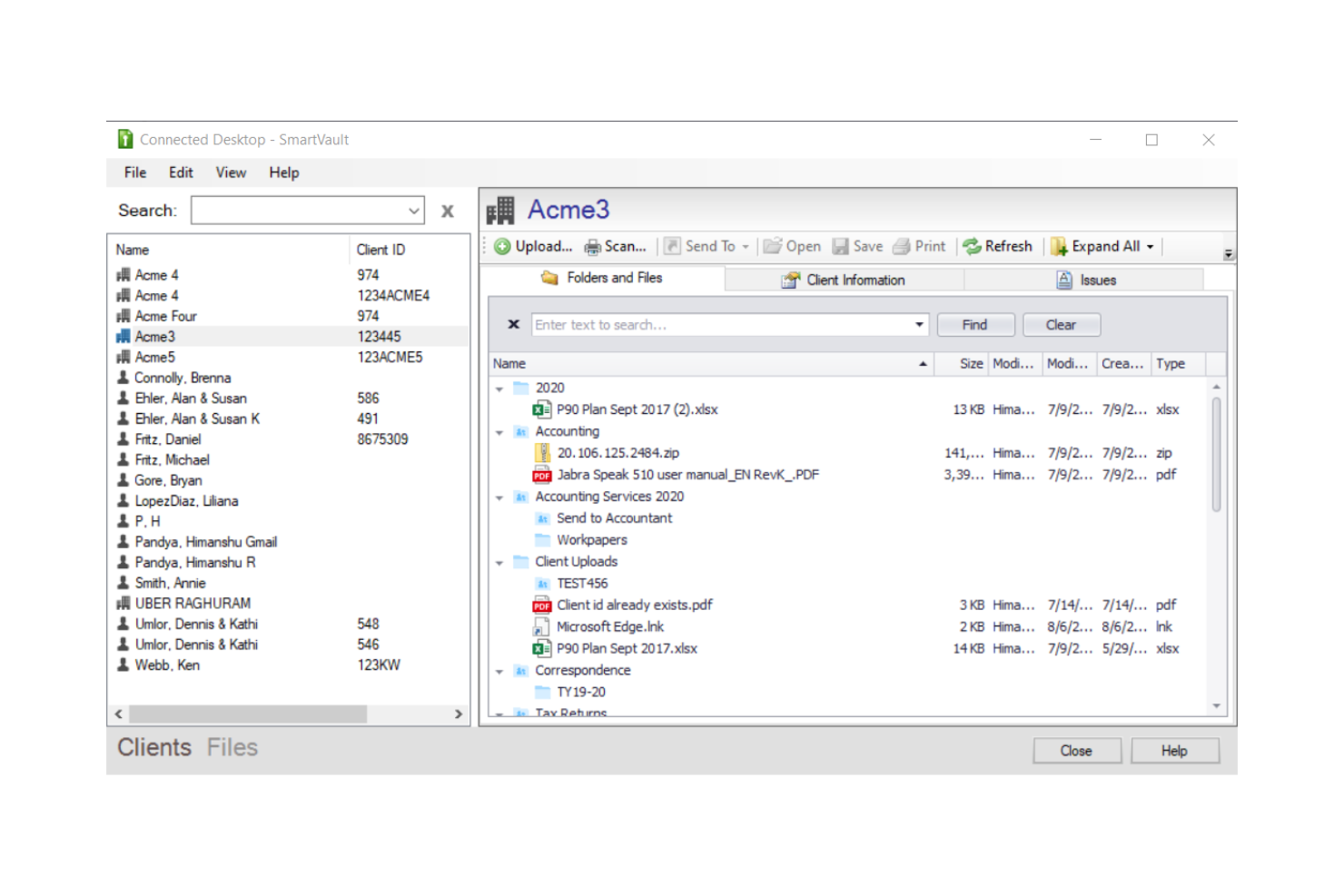
SmartVault is a cloud-based document management platform that combines secure file storage, branded client portals, document collection, eSignature workflows, and role-based access controls with built-in compliance support for FERPA and other regulatory standards.
Who Is SmartVault Best For?
SmartVault is a strong fit for school administrators and compliance-focused institutions that prioritize FERPA-aligned document security and controlled access over real-time collaboration.
Why I Picked SmartVault
SmartVault earns its spot on my shortlist because of how seriously it takes secure file sharing in environments where data sensitivity is non-negotiable. I love that you can set granular, role-based permissions so a parent only sees their child's documents, while teachers access shared class materials and administrators retain full control. Every file transfer is encrypted, and the audit log tracks exactly who accessed or downloaded what, which I find invaluable for FERPA compliance reviews.
SmartVault Key Features
- Unlimited cloud storage: Store and organize all educational files and records without worrying about hitting storage caps.
- Custom-branded student portals: Deploy secure, school-branded portals for students, parents, or staff to access documents.
- Audit trails and activity logs: Track every access and change made to documents for compliance and accountability.
- eSignature support: Send documents for electronic signature with built-in DocuSign integration for rapid approvals.
SmartVault Integrations
SmartVault offers native integrations with DocuSign, QuickBooks, Intuit Lacerte, Intuit ProSeries, Xero, and FreshBooks, and provides an API for custom integrations.
Pros and Cons
Pros:
- Encrypted file transfers meet FERPA requirements
- Audit logs track every file interaction
- Granular role-based access per user
Cons:
- Built primarily for accounting firms, not education
- No real-time collaborative document editing

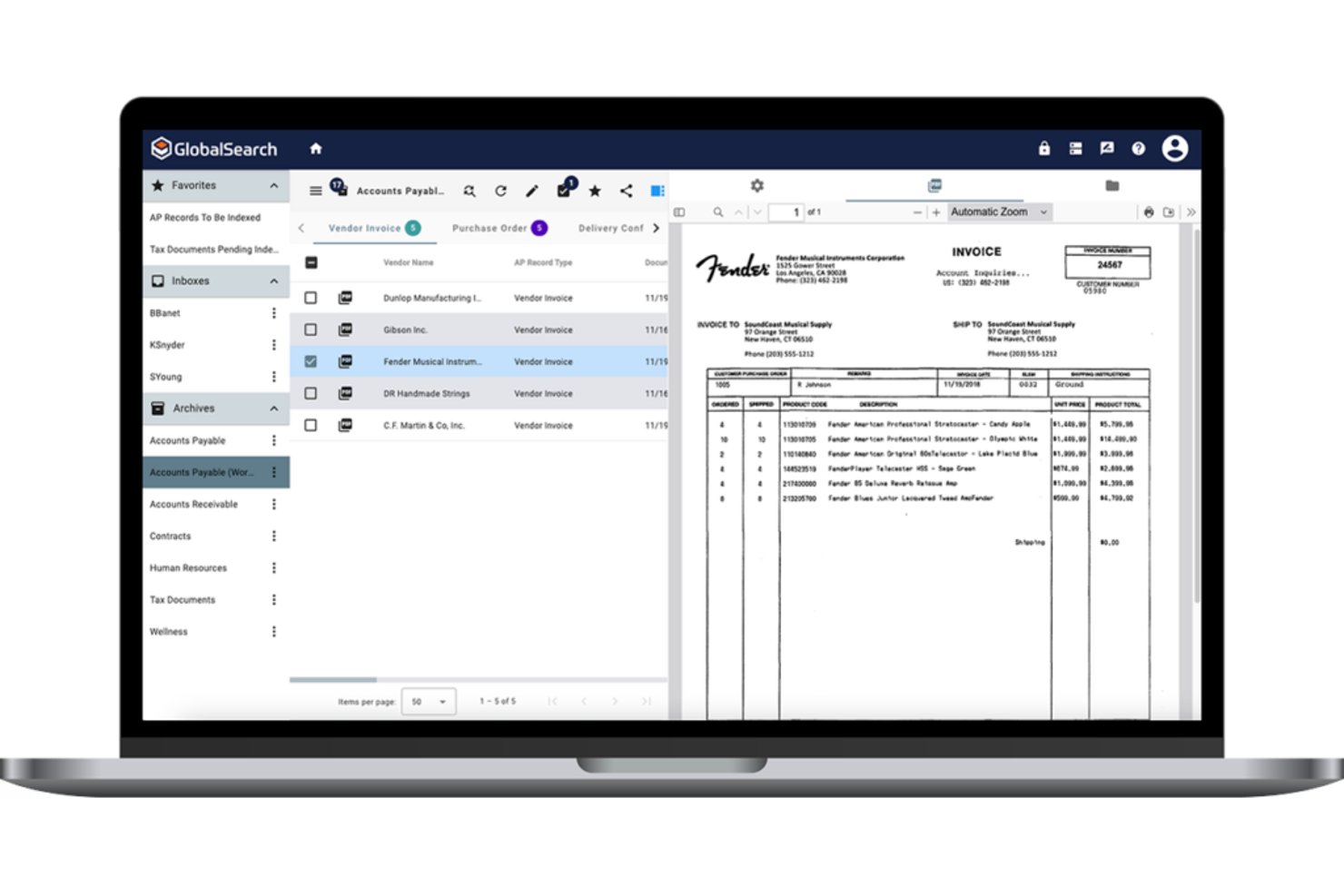
Square 9 is an enterprise content management platform that combines document capture, OCR-based indexing, workflow automation, and records management with education-specific tools for handling student records and compliance documentation.
Who Is Square 9 Best For?
Square 9 suits K-12 districts and higher education institutions that need structured records management and automated approval workflows across administrative departments.
Why I Picked Square 9
Square 9 earns its spot on my shortlist because of how far its workflow customization goes. I use GlobalAction to build multi-step approval chains for curriculum submissions or grant documentation, routing each step to the right department automatically. GlobalCapture's AI-driven OCR then captures incoming paper forms and indexes them into the correct workflow, which means student records and compliance documents land exactly where they need to be without any manual sorting.
Square 9 Key Features
- Full-text search with OCR: Find digitized student records and scanned documents using keyword and metadata searches powered by optical character recognition.
- Education-oriented records management: Apply retention policies and automate archival or deletion of student documents to meet compliance requirements.
- Granular permission controls: Set access levels at the user, group, and folder levels for sensitive academic and administrative files.
- FERPA and HIPAA compliance: Protect student and staff data with encryption, audit trails, and compliance-aligned data governance features.
Square 9 Integrations
Native integrations include Microsoft 365, Active Directory, Okta, SharePoint, and SQL Server. An API is available for custom integrations.
Pros and Cons
Pros:
- FERPA-aligned compliance and audit trail support
- OCR converts scanned student records instantly
- Highly configurable multi-step approval workflows
Cons:
- Interface feels dated compared to cloud-native competitors
- Implementation requires significant IT involvement

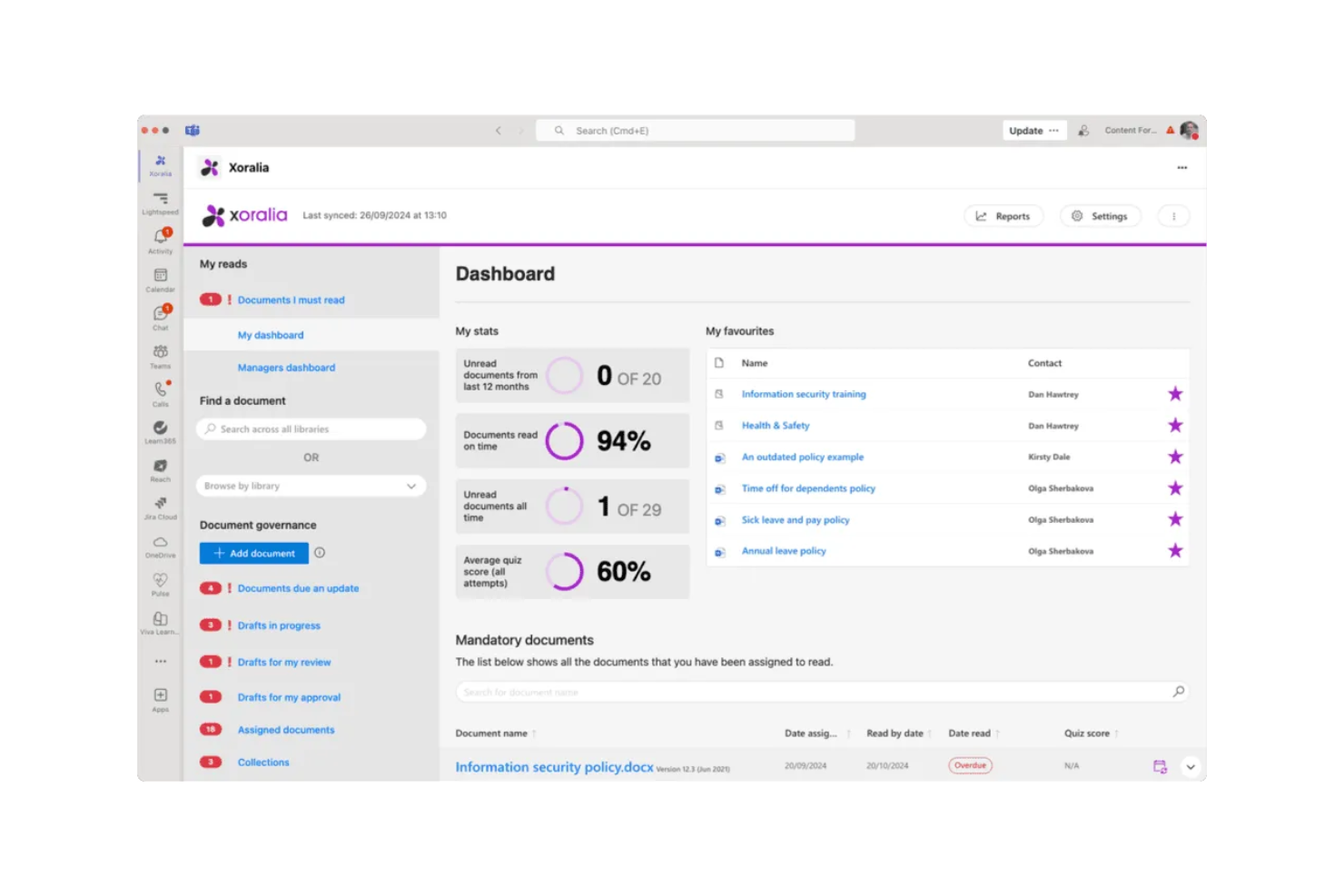
Xoralia is a policy and compliance document management platform built natively on Microsoft 365 and SharePoint, covering document lifecycle workflows, mandatory-read attestation, version control, and audit-ready compliance tracking.
Who Is Xoralia Best For?
Xoralia suits compliance officers and policy managers at universities and colleges already running Microsoft 365 who need a governed, audit-ready document workflow.
Why I Picked Xoralia
I picked Xoralia as one of the best because it runs entirely inside your institution's existing Microsoft 365 tenant. That matters in practice: when a university pushes a FERPA policy update to 500 staff, Xoralia handles distribution, mandatory-read attestation, and timestamped audit logging without moving data outside your environment. Its AI knowledge assistant runs via Azure OpenAI inside your tenant, so staff can query policy content directly without a third-party model ever touching your documents.
Xoralia Key Features
- Metadata tagging and advanced search: Quickly find documents using custom tags and full-text search filters built for policy and compliance needs.
- External policy publishing: Publish select policies to a public website for access by students, parents, or external regulators.
- Automated review and approval workflows: Route documents for periodic review and approval to assigned users with audit-ready logs.
- Role-based access controls: Limit access to specific documents by user, group, or department using your existing Entra ID (Azure AD) structure.
Xoralia Integrations
Xoralia has native integrations across the Microsoft ecosystem, including Microsoft 365 and Azure. An API is available for custom integrations.
Pros and Cons
Pros:
- Automated policy review cycles with assigned ownership
- Audit logs stored inside your own tenant
- Mandatory-read attestation built into document workflows
Cons:
- Requires existing Microsoft 365 infrastructure to function
- No free plan for educational institutions

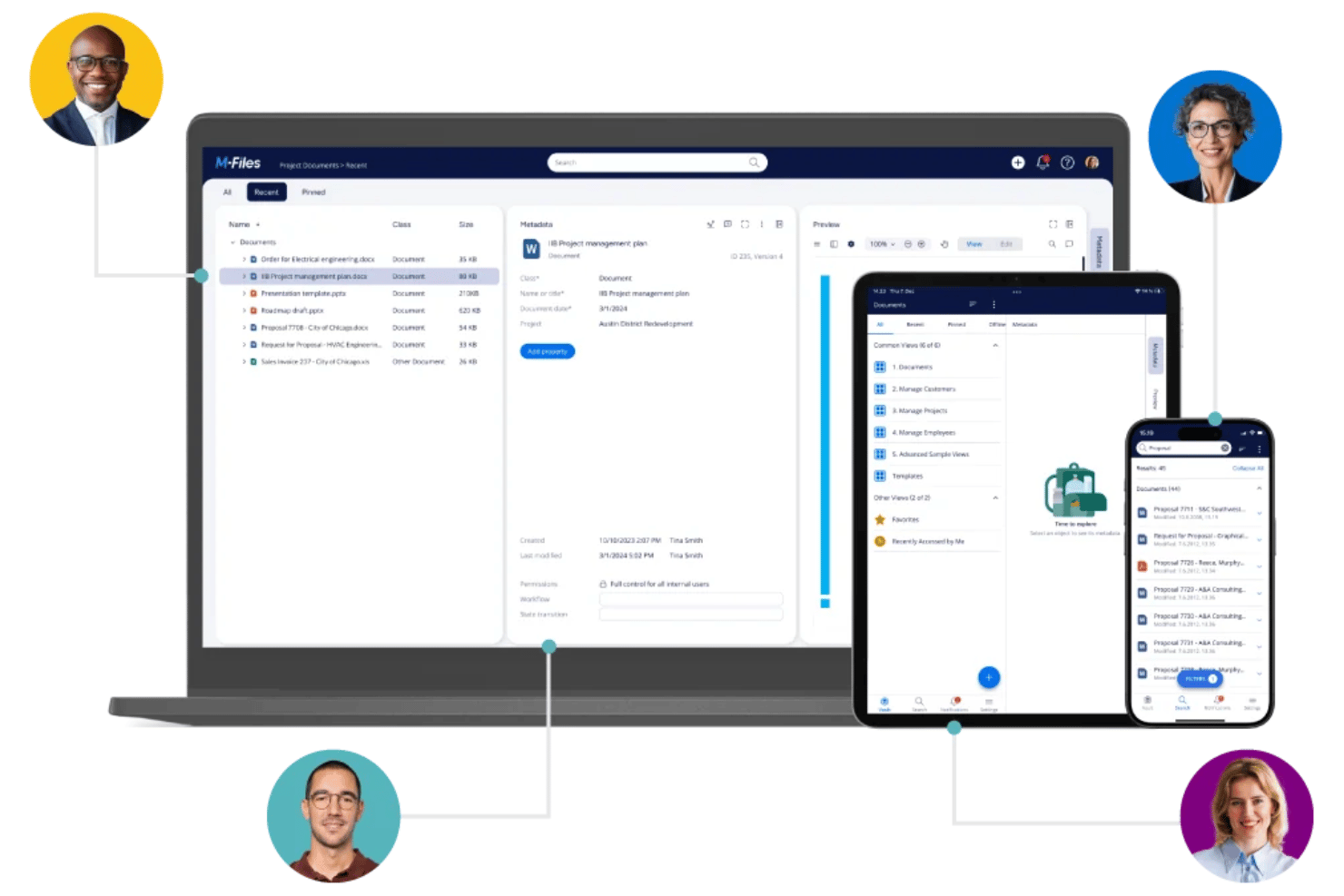
M-Files is a document management platform that organizes files through metadata rather than folder structures, offering version control, workflow automation, and compliance governance across institutional content.
Who Is M-Files Best For?
M-Files suits research program administrators and institutional teams managing large volumes of compliance-sensitive documents across multiple departments.
Why I Picked M-Files
M-Files earns its spot as one of the best on my shortlist because its metadata-driven approach changes how institutions handle documents. Rather than burying accreditation records inside nested folders, M-Files tags every document with contextual metadata, so the same file surfaces whether you search by course, department, or compliance category. I also like M-Files Aino, the built-in AI that automatically extracts and classifies metadata on upload, cutting manual tagging for teams managing high document volumes.
M-Files Key Features
- Microsoft 365 native integration: Users can manage, edit, and share documents directly within Teams, SharePoint, and Outlook.
- Workflow automation tools: Drag-and-drop visual designer lets you build and manage document review and approval processes.
- Granular access permissions: Admins can control document access for students, faculty, and external collaborators at folder and file levels.
- Comprehensive audit trails: Every access, edit, and share action is logged for compliance and reporting needs.
M-Files Integrations
M-Files has native integrations across the Microsoft ecosystem, including Microsoft 365 and Azure, plus native integrations with Salesforce, DocuSign, and SharePoint. An API is available for custom integrations.
Pros and Cons
Pros:
- Version history logs every document revision automatically
- AI auto-classifies scanned transcripts and student records
- Metadata tags replace confusing nested folder structures
Cons:
- No native real-time co-editing for documents
- Initial metadata schema setup is time-intensive
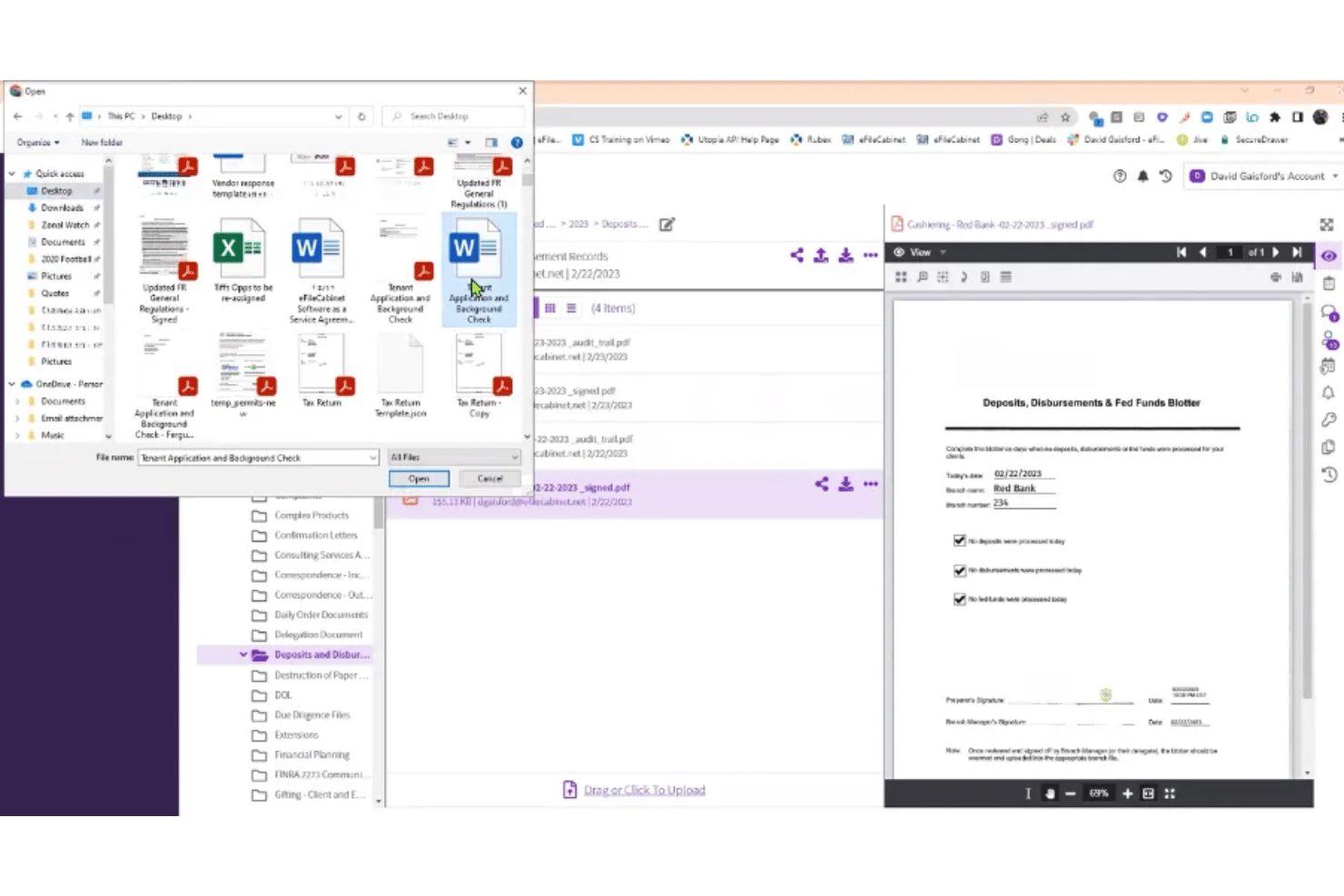
Revver is a cloud-based document management platform that combines AI-powered file organization, no-code workflow automation, version control, and secure file sharing in one system.
Who Is Revver Best For?
Revver is a strong fit for small to mid-sized institutions and administrative teams that manage high document volumes and need automated organization without technical complexity.
Why I Picked Revver
Revver earns its spot on my shortlist because its AI Smart Suite handles the organizational work that education teams typically do by hand. Smart Classification and Smart Filing automatically sort incoming documents into the correct folders, so a new syllabus or grant report lands where it belongs without anyone touching it. Smart Extract AI then pulls metadata from those files, making them instantly searchable across a large academic document archive.
Revver Key Features
- Granular access controls: Set folder-level or file-level permissions for users, groups, and guests.
- Document version history: Keep a complete log of all previous document versions and restore when needed.
- Integrated eSignature: Request legally binding signatures directly within the platform for academic documents.
- No-code workflow automation: Build custom approval workflows using a visual interface without any coding required.
Revver Integrations
Revver offers native integrations with Microsoft 365, DocuSign, and more, and provides an API for custom integrations.
Pros and Cons
Pros:
- No-code workflows simplify academic approval processes
- OCR makes scanned student records searchable
- AI automatically sorts and files incoming documents
Cons:
- Real-time co-editing not natively supported
- No free plan for budget-limited institutions

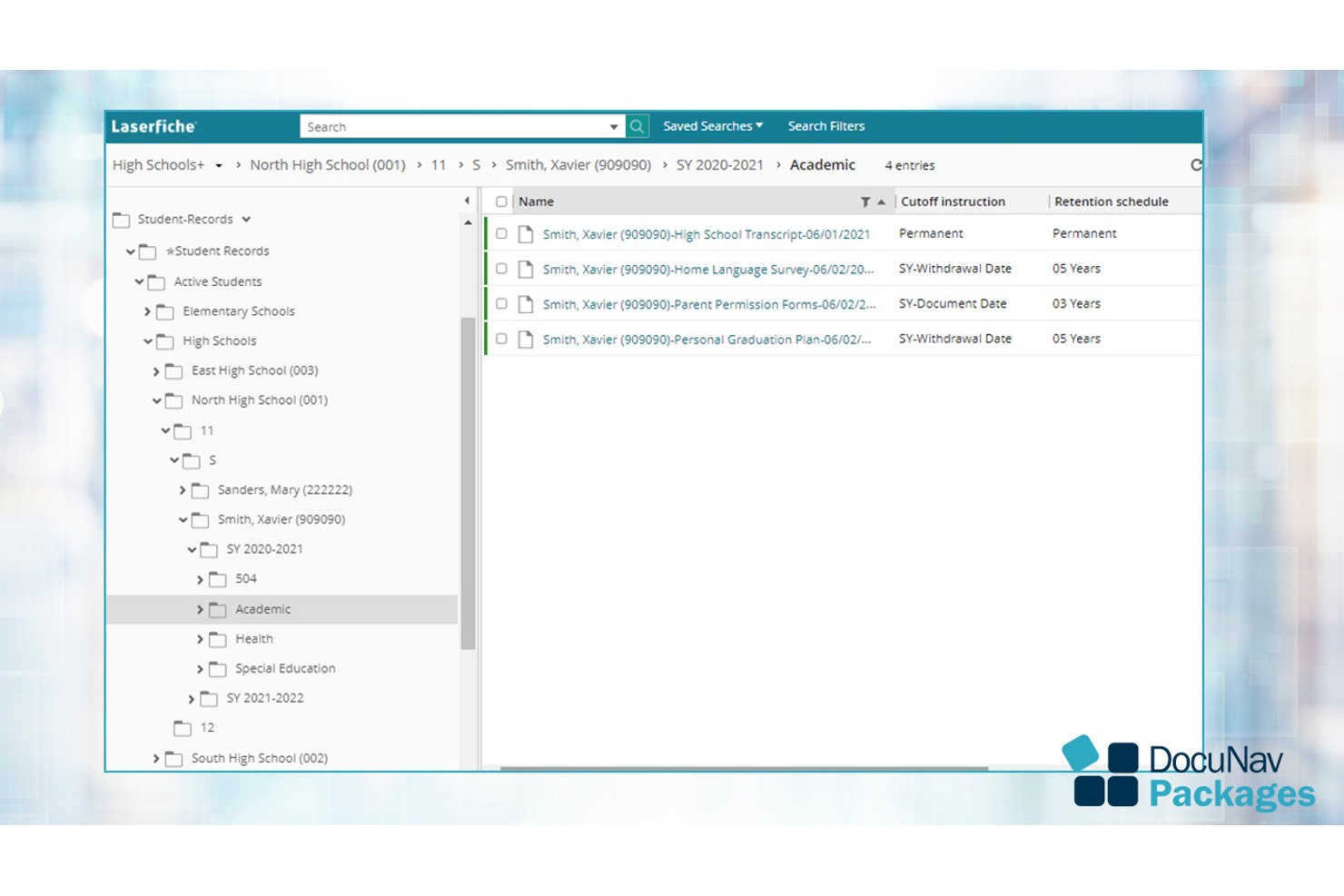
Laserfiche is an AI-powered document management and process automation platform built for institutions that need centralized content storage, workflow automation, electronic forms, and compliance-ready records management.
Who Is Laserfiche Best For?
Laserfiche is a strong fit for K-12 districts and higher education institutions managing student records, enrollment workflows, and compliance requirements at scale.
Why I Picked Laserfiche
I picked Laserfiche as one of the best because its Solution Marketplace ships ready-made workflows built specifically for schools, including Student Registration and Enrollment, Field Trip Request Forms, and Student Absence Notifications. A district can automate a paper-based routing process in days rather than months. I also like how Smart Fields automatically extract and classify data across student records, cutting down on manual entry across enrollment and HR processes.
Laserfiche Key Features
- AI-assisted smart fields: Automatically extract and classify metadata from documents using built-in artificial intelligence.
- Granular permissions: Configure access controls at the user, group, and folder levels for sensitive academic and student files.
- Audit trail and compliance tracking: Log all document actions and maintain digital records to support FERPA and institutional policies.
- Microsoft 365 integration: Edit, store, and collaborate on Word, Excel, and PowerPoint files directly within Laserfiche.
Laserfiche Integrations
Laserfiche has native integrations across the Microsoft ecosystem, including Microsoft 365 and Azure, and offers an API for custom integrations.
Pros and Cons
Pros:
- OCR converts scanned student files automatically
- FERPA-compliant records management built in
- Prebuilt school workflow templates ship ready-made
Cons:
- Complex initial configuration for smaller IT teams
- No free plan for budget-limited institutions

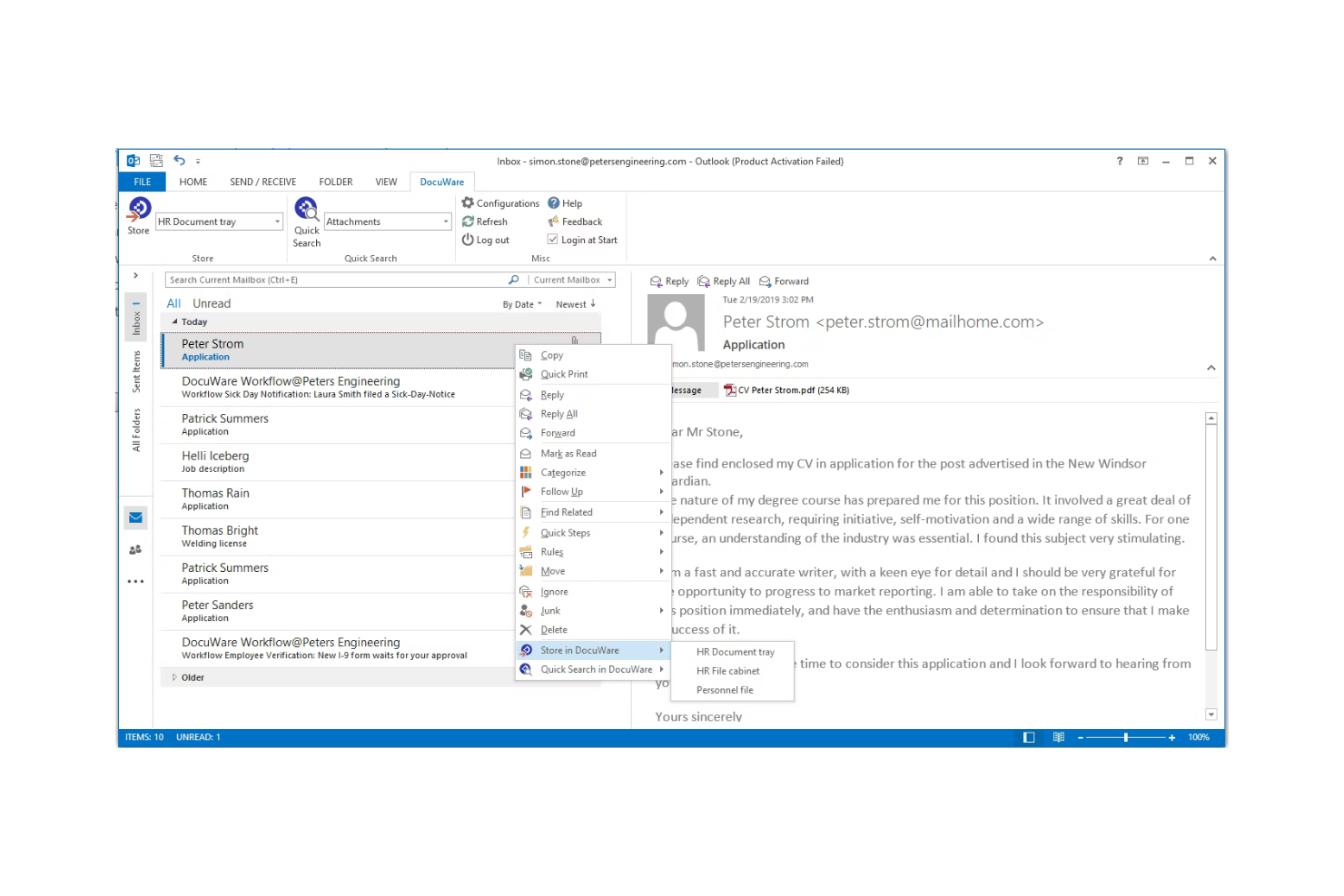
DocuWare is a cloud-based document management and workflow automation platform that centralizes institutional records, automates approval processes, and handles compliance archiving across departments like admissions, financial aid, and student services.
Who Is DocuWare Best For?
It's a strong fit for colleges and universities that manage compliance-heavy document workflows across multiple departments like admissions, HR, and financial aid.
Why I Picked DocuWare
I've included DocuWare in my top picks because its automated compliance workflows are purpose-built for higher education's regulatory demands. I particularly like its automated retention scheduling, which enforces FERPA and HIPAA rules without requiring manual intervention from staff. Its drag-and-drop workflow builder lets institutions route enrollment forms, financial aid approvals, and transcript requests through defined review steps automatically.
DocuWare Key Features
- Intelligent document processing: Uses OCR and AI to extract and index text and handwritten data from scanned documents.
- Granular permission controls: Allows administrators to set user, role, or group-based access to sensitive educational files.
- Integration with student information systems: Connects seamlessly to platforms like Microsoft, Oracle, and SIS tools for unified data management.
- Mobile scanning and access: Enables users to scan, store, and retrieve documents directly from smartphones or tablets.
DocuWare Integrations
DocuWare offers native integrations with Microsoft 365, SharePoint, Oracle, SAP, Outlook, and DocuSign. An API is available for custom integrations.
Pros and Cons
Pros:
- Automated retention scheduling for institutional recordkeeping
- OCR makes scanned student records searchable
- Strong audit trails for compliance documentation
Cons:
- Less suited for real-time collaborative editing
- Initial configuration requires significant IT involvement

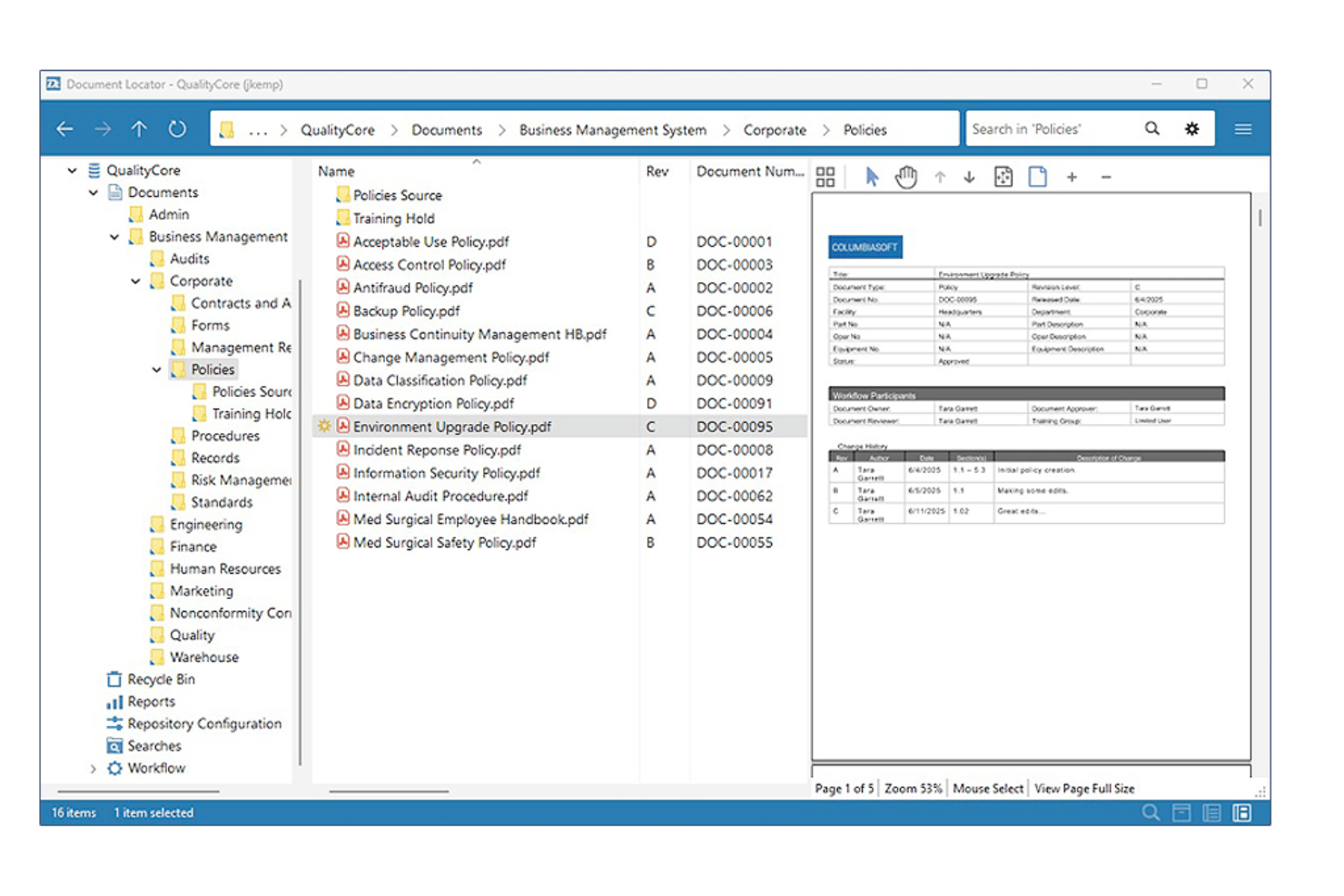
Document Locator is a Windows-integrated document management system that combines version control, automated workflow, records management, and policy administration for organizations handling large volumes of regulated documents.
Who Is Document Locator Best For?
It's a strong fit for administrative teams in educational institutions that manage high volumes of regulated records and need structured policy compliance workflows.
Why I Picked Document Locator
I picked Document Locator as one of the best because its Required Reading module is purpose-built for policy distribution and acknowledgement tracking. When an institution updates its code of conduct or financial aid procedures, I can route the document to specific staff, capture sign-off records, and maintain a full audit trail automatically. Version control keeps every revision timestamped, so nothing gets lost across policy update cycles.
Document Locator Key Features
- Automated workflow engine: Define multi-step approval processes with notifications and routing for educational documents.
- Role-based security: Set detailed permissions for users, groups, or departments managing or accessing sensitive files.
- Full-text and metadata search: Locate documents using keywords, tags, or field-based filters across all stored content.
- Digital signature integration: Collect electronic signatures with native support for DocuSign and Adobe Acrobat.
Document Locator Integrations
Document Locator offers native integrations with Microsoft 365, DocuSign, Adobe Acrobat, and SharePoint. An API is available for custom integrations.
Pros and Cons
Pros:
- Granular permission controls for staff and faculty
- Automated policy acknowledgement tracking built in
- Strong audit trails for compliance-heavy institutions
Cons:
- Windows-centric setup limits cross-platform flexibility
- No real-time collaborative editing for documents
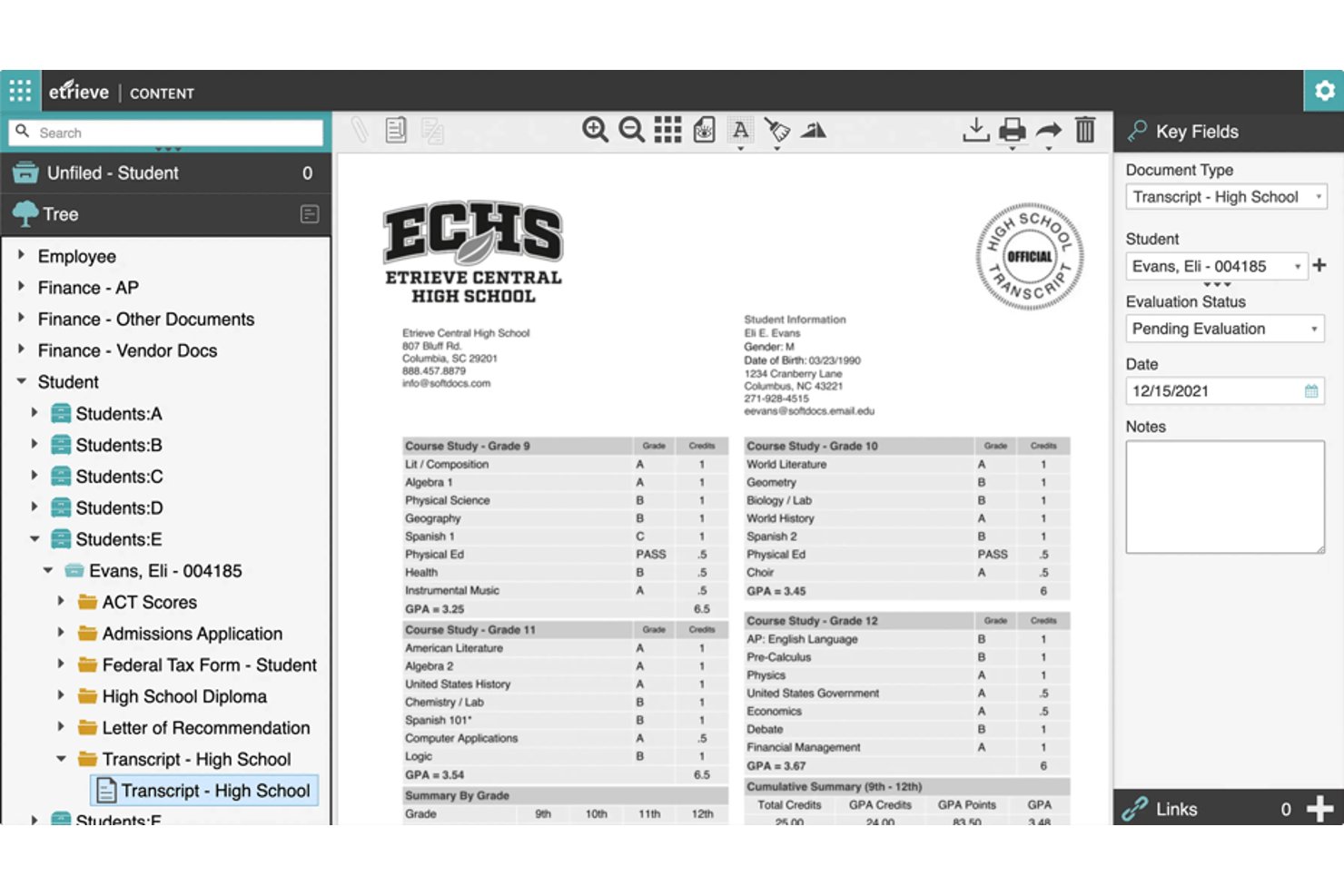
Softdocs is an education-focused document management platform built around electronic forms, workflow automation, e-signatures, and records storage for higher ed and K-12 institutions.
Who Is Softdocs Best For?
Softdocs is a strong fit for IT and operations teams at colleges, universities, and K-12 districts managing records, approvals, and compliance workflows.
Why I Picked Softdocs
Softdocs earns its spot on my shortlist because no other document management platform matches its depth of education SIS integrations. I've found its bi-directional connections to Ellucian, Jenzabar, and PowerSchool genuinely useful, pulling student data directly into forms and approval workflows without manual rekeying. Its Intelligent Transcript Processing converts incoming transcripts into structured data that routes automatically through admissions workflows.
Softdocs Key Features
- User-friendly e-form builder: Design custom digital forms for campus processes without coding skills.
- Workflow automation designer: Create multi-step, automated approval and routing workflows using a visual drag-and-drop interface.
- Role-based permissions: Set granular access controls at the folder, document, or workflow level for staff, faculty, and students.
- Audit trails and compliance tracking: Monitor all document actions and approvals, supporting FERPA and institutional data governance needs.
Softdocs Integrations
Softdocs offers native integrations with Ellucian Banner, Ellucian Colleague, Jenzabar, PowerSchool, Infinite Campus, and Anthology, with an API available for custom integrations.
Pros and Cons
Pros:
- Handles high-volume transcript processing automatically
- Strong FERPA compliance and audit trail support
- Built specifically for education institution workflows
Cons:
- Implementation requires dedicated IT involvement
- Not suited for non-education organizations
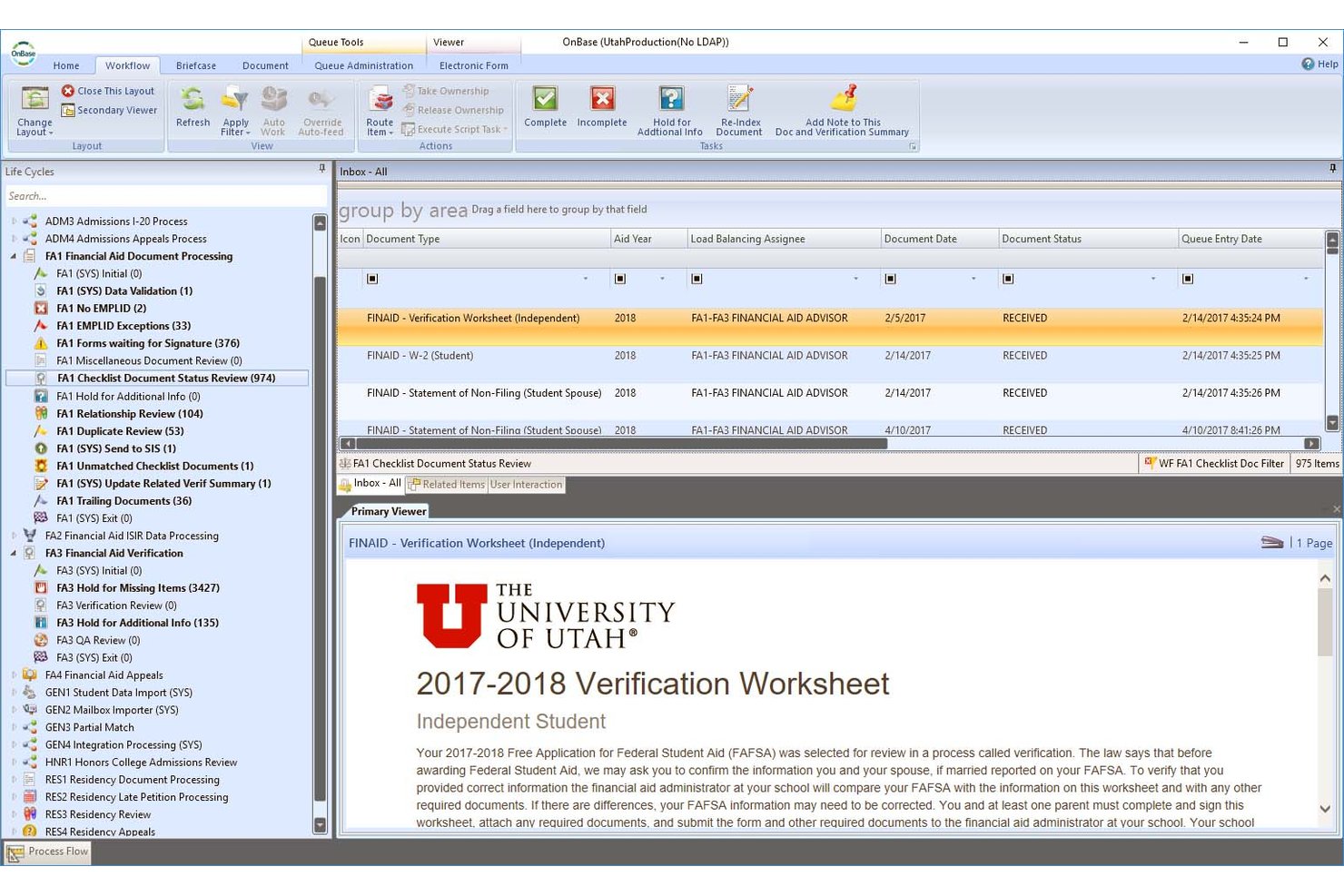
Hyland OnBase is an enterprise content management platform that combines document capture, records retention, workflow automation, and compliance governance for managing institutional content across education environments.
Who Is Hyland OnBase Best For?
OnBase suits large colleges and universities that need enterprise-grade records governance, compliance controls, and automated document retention across multiple departments.
Why I Picked Hyland OnBase
I picked OnBase as one of the best because its records management engine handles the full document lifecycle, not just storage. It automates policy-driven retention schedules and secure destruction across student records, transcripts, and financial aid files under FERPA. I also like how its curriculum review workflow routes course approvals through faculty, deans, and trustees automatically, with a complete audit trail at every step.
Hyland OnBase Key Features
- Document capture automation: Automatically imports, classifies, and indexes files from email, scanners, and digital forms.
- Granular user permissions: Lets admins set view, edit, and delete rights at document, folder, or group level.
- Full-text OCR search: Enables users to search scanned and uploaded documents by extracted or tagged keywords.
- Records audit trails: Tracks and logs every file action such as access, changes, and approvals for compliance monitoring.
Hyland OnBase Integrations
Hyland OnBase offers native integrations with Ellucian, Anthology, Oracle, Workday, Salesforce, and Microsoft 365. An API is available for custom integrations.
Pros and Cons
Pros:
- OCR converts scanned transcripts into searchable text
- Automates retention schedules for student records
- FERPA-aligned records governance built in
Cons:
- Too complex for smaller educational institutions
- Implementation demands significant dedicated IT resources
Other Document Management Software for Education
Here are some additional document management software for education options that didn’t make it onto my shortlist, but are still worth checking out:


What Is Document Management Software for Education?
Document management software for education helps educational institutions handle and organize their documents efficiently. It might offer features like:
- Digital document storage
- Secure file sharing
- Automated workflow management
- Compliance tracking
- Transcript management
Educational professionals, administrators, and IT departments typically use document management software for education. This software addresses needs like improving document accessibility, ensuring data security, and reducing manual paperwork.
Document Management Software for Education Selection Criteria
When selecting the best document management software for education to include in this list, I considered common business needs and pain points that these tools address. This included things like improving document accessibility and ensuring data security. I also used the following framework to keep my evaluation structured and fair:
Core Features (25% of total score)
To be considered for inclusion in this list, each tool had to offer these basic features:
- Digital document storage
- Secure file sharing
- Automated workflow management
- Compliance tracking
- Transcript features
Additional Standout Features (25% of total score)
To help further narrow down the competition, I also looked for unique or especially valuable features, such as:
- AI-driven data extraction
- Customizable dashboards
- Integration with existing systems
- Mobile access and management
- Advanced analytics and reporting
Industry Expertise (10% of total score)
To get a sense of the industry expertise of each tool, I considered the following:
- Years in the education sector
- Number of educational clients
- Case studies or success stories
- Industry-specific certifications
- Involvement in educational conferences
Onboarding (10% of total score)
To evaluate the onboarding experience for each tool, I considered the following:
- Availability of training materials
- Ease of initial setup
- Access to onboarding specialists
- Customization options during setup
- Time required to become fully operational
Customer Support (10% of total score)
To assess the level of customer support each tool offers, I considered the following:
- Availability of live support
- Response time to inquiries
- Quality of self-help resources
- Availability of dedicated account managers
- User feedback on support experiences
Value For Price (10% of total score)
To evaluate the pricing and potential ROI of each tool, I considered the following:
- Transparency of pricing structure
- Comparison with competitors’ pricing
- Flexibility of pricing plans
- Inclusion of essential features in base price
- Customer feedback on perceived value
Customer Reviews (10% of total score)
To get a sense of the overall satisfaction of existing customers, I considered the following when reading customer reviews:
- Overall satisfaction ratings
- Comments on service reliability
- Feedback on ease of use
- Experiences with customer support
- Reports of any recurring issues
How to Choose a Document Management Software for Education
It’s easy to get bogged down in long lists of features and complex pricing structures. To help you prioritize the things that matter most for your business, keep the following factors in mind:
| Factor | What to Consider |
|---|---|
| Business Objectives | Align the provider's capabilities with your goals. For example, if you need to improve compliance, choose a provider with strong compliance management features. |
| Features Scope and SLAs | Check what features are included and the service level agreements. Ensure they meet your expectations for uptime and response times. |
| Support Availability | Look for 24/7 support if your team needs constant access. Consider the quality of self-help resources and live support options. |
| Costs and Pricing Structure | Review the pricing plans and ensure they fit your budget. Look for transparency and avoid hidden fees. |
| Communication and Reporting | Ensure the provider offers regular updates and detailed reporting. This helps you track performance and make informed decisions. |
| Integration Capabilities | Check if the tool integrates with your existing systems like CRM or ERP solutions to avoid disruptions. |
| User Experience | Consider the ease of use for your team. A complex interface could slow down adoption and productivity. |
| Scalability | Ensure the provider can grow with you. If your institution expands, the tool should accommodate increased document volumes and users. |
Features
When selecting a document management software for education, keep an eye out for the following features:
- Digital document storage: Securely stores documents in the cloud, making them easily accessible from anywhere.
- Secure file sharing: Allows your team to share documents safely, ensuring that sensitive information is protected.
- Automated workflow management: Streamlines repetitive tasks, saving time and reducing errors in document processing.
- Compliance tracking: Helps your institution stay compliant with regulations like FERPA and HIPAA, reducing legal risks.
- Transcript services: Facilitates the secure exchange of academic records between institutions, simplifying the admissions process.
- E-signature integration: Enables digital signing of documents, speeding up approval processes and reducing paperwork.
- AI-driven data extraction: Automatically extracts data from documents, improving accuracy and reducing manual input.
- Mobile access and management: Provides access to documents on mobile devices, enhancing flexibility for remote work.
- Customizable dashboards: Offers personalized views of document workflows, helping your team track progress and performance.
- Integration with existing systems: Ensures seamless operation with your current software, minimizing disruption during implementation.
Benefits
Partnering with a document management software for education offers several benefits for your team and your business. Here are a few you can look forward to:
- Improved accessibility: Digital document storage allows your team to access files from anywhere, enhancing flexibility.
- Enhanced security: Secure file sharing protects sensitive information, reducing the risk of data breaches.
- Increased efficiency: Automated workflow management saves time and reduces errors by handling repetitive tasks.
- Regulatory compliance: Compliance tracking helps your institution meet legal requirements, minimizing potential fines.
- Simplified processes: Transcript services make it easier to manage academic records, streamlining admissions and transfers.
- Faster approvals: E-signature integration speeds up signing processes, reducing delays in document approvals.
- Better data management: AI-driven data extraction improves data accuracy, cutting down on manual entry tasks.
Costs and Pricing
Document management software for education typically come at a custom price to accommodate various business needs, sizes, and circumstances. Software providers generally work within one of the following pricing structures:
- Subscription-based: Charges a recurring fee, often monthly or annually, providing ongoing access to services.
- Project-based: Costs are determined based on the completion of a specific project or task.
- Per user: Pricing varies according to the number of users, making it scalable for different team sizes.
- Tiered pricing: Offers different levels of service packages at varying price points, allowing flexibility based on needs.
- Pay-as-you-go: Charges based on actual usage, which can be ideal for fluctuating needs.
Key Factors That Influence Pricing
Beyond the specific pricing model, here are some additional factors that can influence the cost of document management software for education:
- Customization level: More customization may require additional resources, increasing costs.
- Compliance requirements: Meeting industry regulations can add complexity and cost to the feature.
- Number of users: More users typically mean higher costs due to increased demand on resources.
- Integration needs: Connecting with existing systems may require additional development, affecting pricing.
- Data volume: Higher volumes of data storage and processing can lead to increased costs.
Being aware of these factors before you start seeking out custom quotes from software providers helps you get a sense of what to expect and compare and contrast quotes more effectively.
Document Management Software for Education: FAQs
Here are some answers to common questions about document management software for education:
How does document management software for education improve compliance?
Document management software helps your institution stay on top of regulations like FERPA and HIPAA by providing tools for tracking compliance. It offers secure storage and access controls to protect sensitive information. This reduces the risk of data breaches and helps ensure that your institution meets legal standards.
What should I consider when choosing document management software?
Look for software that aligns with your institution’s objectives and offers the features you need. Consider its suitability for the education sector and the vendor’s support availability. Also, check the pricing structure to make sure it fits your budget and offers good value.
Can document management software integrate with existing systems?
Yes, many document management software solutions can integrate with systems you already use, like CRM or ERP solutions. This helps ensure a smooth transition and minimizes disruption to your operations. It’s important to check integration capabilities before choosing software to ensure compatibility.
How does document management software handle data security?
Document management software can provide security measures like encryption, access controls, and audit trails to protect your data. It can also offer compliance tracking to help you meet industry regulations. It’s crucial to understand the security features available to ensure your data is protected.
What kind of customer support should I expect from a software provider?
Good customer support can include 24/7 availability, quick response times, and access to knowledgeable support staff. Software providers may also offer self-help resources like guides and tutorials. Check customer reviews to get an idea of the support experience you can expect.
How can document management software enhance collaboration?
Document management software can offer tools like secure file sharing and collaborative editing, which make it easier for your team to work together. Many platforms provide cloud access, allowing team members to access documents from anywhere. This flexibility can lead to more efficient teamwork and productivity.