

10 Best Risk Management Software Reviewed For 2026

10 Best Risk Management Tools


The best risk management software helps you analyze and identify risks, track them over time, and plan strategies to mitigate and minimize them. Without the right risk management tool, you'll run into a variety of issues on your project that will derail your timeline, upset your budget, and balloon your project scope.
I've used my 15 years of experience in project management to evaluate 20+ project risk management tools so you can find the right option to tackle risks on your project, no matter their likelihood or level of impact. Below, find my top picks for risk management software along with key features and use cases to help you make your choice.
Why Trust Our Software Recommendations
Our team has been testing and reviewing software since 2012. As project managers ourselves, we know how difficult—and important—it is to choose the right software.
For this guide, we evaluated tools using hands-on testing and independent research, scoring tools using our selection criteria. We also draw on insights from industry thought leaders and practicing project management experts.
Our reviews reflect our human editorial judgment, not a sales pitch.
Expert reviewers:
Risk Management Software Comparison Table
This comparison table summarizes pricing details for my top risk management software selections:
| Tool | Best For | Trial Info | Price | ||
|---|---|---|---|---|---|
| 1 | Best for team collaboration | 14-day free trial | From $10/user/month (billed annually) | Website | |
| 2 | Best for real-time risk monitoring | Free demo available | Pricing upon request | Website | |
| 3 | Best for real-time risk assessments and mitigation | Free demo available | Pricing upon request | Website | |
| 4 | Best integrated risk management software for enterprises | Free demo available | Pricing upon request | Website | |
| 5 | Best for security and compliance management | Free demo available | Pricing upon request | Website | |
| 6 | Best for task dependencies in projects | Free plan + free demo available | From $7/user/month (billed annually) | Website | |
| 7 | Best for planning & performing risk audits | Free demo available | Pricing upon request | Website | |
| 8 | Best for intelligent transaction observability | Free plan + free demo available | Pricing upon request | Website | |
| 9 | Best for dependency visualization | Free demo available | Pricing upon request | Website | |
| 10 | Best for automated incident management | Free demo available | Pricing upon request | Website |


Best Risk Management Software Reviews
Here’s a brief description of each of the best risk management systems that are featured on my list.

Wrike
Best for team collaboration

Wrike is a versatile project management tool that helps teams manage risks, streamline workflows, and reduce unnecessary tasks through automation. It offers a range of features that let you focus on critical tasks while managing potential risks effectively.
I recently spoke with Kateryna Boiko, a digital marketing lead at Mobilunity, about how her team uses Wrike to manage risk on marketing projects. "The biggest risks for any campaign usually come from missed deadlines or dependencies on other teams...Wrike helps me minimize those risks because everything is visible in one place," she says. "For example, if design is delayed, I immediately know how it affects the launch date and can reassign tasks," she explains.
Why I Picked Wrike
I picked Wrike for project risk management because it helps foster team collaboration, a critical aspect for managing risks effectively. Wrike offers features like automation and customizable templates that let your team quickly adapt to changes, which helps make sure projects remain on track.
Its ability to integrate with over 400 applications facilitates seamless communication and resource management, which is crucial for timely risk mitigation. Additionally, Wrike's tools for visualizing workloads and generating reports help keep your stakeholders informed, which makes it an invaluable asset for any collaborative project environment.
Wrike Key Features
Wrike also offers several other key features that can help you and your team with project management and risk management.
- Machine Learning For Risk Predictions: This feature uses AI to predict project delays, so your team can respond promptly and avoid disruptions.
- Automated Reporting: You can generate regular reports to keep stakeholders informed and make sure everyone is updated on project status and risks.
- Visual Workload Management: Wrike lets you visualize team workloads through Kanban boards and Gantt charts, which help your team prioritize tasks and manage resources effectively.
- Dynamic Request Forms: You can automate the work intake process and make sure your team collects all necessary information from requesters efficiently.
Wrike Integrations
Integrations include Klaxoon, QuickBooks, Google Sheets, Salesforce, Microsoft Teams, Google Drive, Microsoft SharePoint, OneDrive, and Jira.
Pros and Cons
Pros:
- AI capabilities are included in all plans
- Detailed reporting on project performance
- Tailor workflows to fit your specific needs
Cons:
- Extensive features may be overkill for small teams
- Form responses can be difficult to find
New Product Updates from Wrike

Wrike Adds Quick Search to Table View
Wrike adds Quick Search to Table View with full-table search across titles, descriptions, and fields, plus highlighted matches. This helps users find tasks faster in large tables. For more information, visit Wrike’s official site.

SAI360
Best for real-time risk monitoring
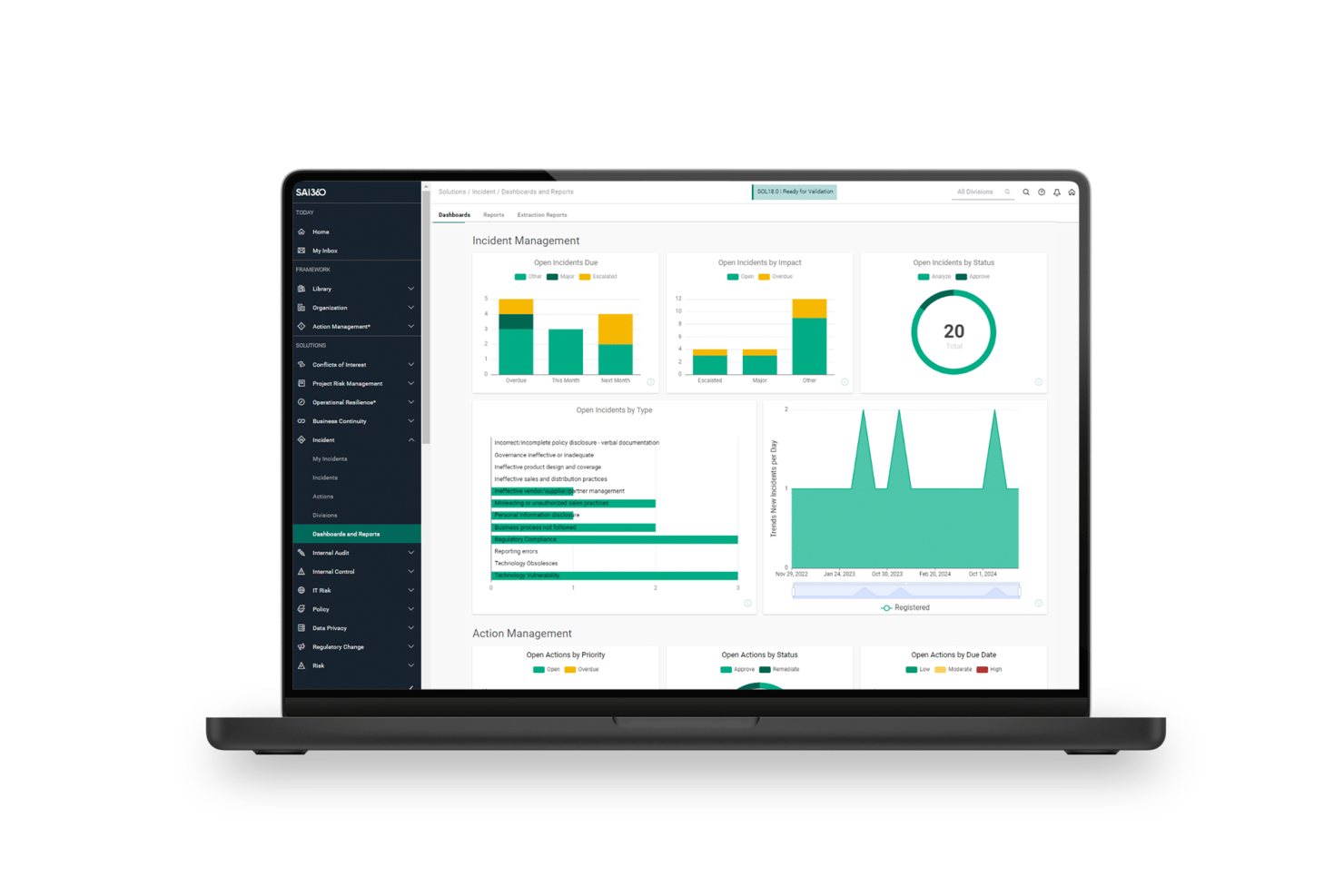
SAI360 is a GRC platform that covers enterprise risk, operational risk, third-party risk, IT/cyber risk, and compliance management through an AI-connected risk register, real-time KRI monitoring, and automated mitigation workflows.
Who Is SAI360 Best For?
SAI360 is a strong fit for risk and compliance teams in regulated industries like banking, healthcare, and manufacturing that need enterprise-wide risk visibility.
Why I Picked SAI360
I've included SAI360 in my top picks because its real-time KRI monitoring is genuinely impressive, tracking risk thresholds across the business and firing automated alerts the moment something breaches. I also love Horizon Scanning, which pulls from 5M+ global sources, scores signals for relevance, and feeds emerging risks directly into the internal register. For regulated industries like banking or healthcare, that kind of continuous external intelligence is hard to replicate with a static register alone.
SAI360 Key Features
- AI-connected risk register: Links related risks, incidents, controls, and indicators across enterprise and operational domains in a single view.
- Monte Carlo simulation: Models Value-at-Risk and financial exposure using probabilistic simulation to support enterprise financial risk decisions.
- Risk and control self-assessments (RCSAs): Structured assessments that capture likelihood, impact, and control effectiveness across business units.
- Automated mitigation workflows: Routes risk responses through configurable approval chains, owner assignments, and corrective action tracking through to closure.
SAI360 Integrations
SAI360 lists 100+ integrations, including ServiceNow, Jira, SAP, Oracle, Power BI, Microsoft 365, SharePoint, and Slack. Professional and Enterprise editions support third-party API integrations, and SAI360 is also available through Zapier.
Pros and Cons
Pros:
- Responsive support assists complex implementations
- AI links risks, controls, and incidents
- Real-time KRI alerts surface emerging exposure
Cons:
- Implementation demands substantial administrative effort
- Advanced dashboards require technical configuration
Best for real-time risk assessments and mitigation

Mitratech's Alyne platform is a cloud-based governance, risk, and compliance (GRC) solution that can help improve your org's risk management. With a focus on integrating key risk management areas, Alyne provides tools and features that help businesses assess and mitigate risks effectively.
Why I Picked Mitratech
I picked Mitratech for its robust risk assessment tools that let you conduct real-time evaluation of potential risks. This feature is essential for identifying vulnerabilities within your organization and letting you take proactive measures.
Another reason I chose Mitratech is its policy management capabilities, which help you maintain compliance with various regulations and standards. This feature is crucial for businesses that operate in highly regulated industries and can help you meet necessary requirements. Furthermore, the platform's AI-driven insights provide valuable analytics for informed decision-making, so you can prioritize risks and allocate resources effectively.
Mitratech Key Features
Mitratech also offers a range of other features that can help your organization with project risk management.
- Automated Workflows: You can streamline your risk identification and mitigation processes, reduce manual effort, and boost efficiency.
- Business Continuity Planning: With tools designed to develop and maintain business continuity plans, you can prepare for and respond to disruptions effectively and minimize downtime and financial loss.
- Compliance Training: Mitratech provides resources and modules to educate your team on compliance requirements, which helps makes sure all processes adhere to relevant regulations and standards.
- Third-Party Vendor Risk Management: This facilitates the assessment and monitoring of risks associated with third-party vendors, so your partnerships do not introduce vulnerabilities into your operations.
Mitratech Integrations
Integrations are not listed publicly on the Mitratech website.
Pros and Cons
Pros:
- Create custom assessments tailored to specific needs
- Built-in compliance management features
- Advanced analytics powered by AI
Cons:
- Integration with existing systems can be challenging
- Lengthy setup and implementation

Best integrated risk management software for enterprises

Corporater is a risk management software that integrates governance, performance, risk, and compliance into a single platform. It offers tailored solutions for various business needs and provides a comprehensive approach to managing risks effectively.
Why I Picked Corporater
Corporater offers tailored solutions for governance monitoring, risk management, and compliance management. These solutions are designed to meet your specific business needs, so your organization can manage risks in a way that aligns with your unique goals and requirements.
Another reason I choose Corporater is its enterprise-grade capabilities, which include flexible configurations and rapid implementation. This means that you can quickly adapt the software to fit your organization's processes and start managing risks without significant delays. The platform's adaptability means it can evolve with your organization's changing needs, so it's a sustainable choice for long-term risk management.
Corporater Key Features
Corporater offers several other key features to support your project risk management processes.
- Customizable Dashboards: You can tailor your risk management interface to display the most relevant data and insights for your team. This allows for more informed decision-making.
- Centralized Risk Register: This lets you maintain a comprehensive record of all identified risks within a centralized repository to maintain easy access and management across projects.
- Automated Incident Management: You can streamline your risk responses with automated workflows that guide your team through your incident resolution processes.
- Risk Planning and Monitoring Tools: This helps with effective risk planning, identification, and ongoing monitoring to keep your projects aligned with strategic objectives.
Corporater Integrations
Integrations are not listed on the Corporater website.
Pros and Cons
Pros:
- Extensive customization for dashboards and reports
- Aligns strategy, operations, and finance effectively
- Advanced capabilities for transforming data into insights
Cons:
- Features are overkill for small businesses
- Requires significant resources for implementation and training
Best for security and compliance management

ManageEngine Log360 is a security information and event management (SIEM) solution designed to help you combat threats and manage security incidents. It offers a range of tools for monitoring, analyzing, and responding to security events, and it's a valuable asset for any organization's risk management strategy.
I recently spoke with Mircea Dima, the founder, CEO, and CTO of AlgoCademy, about how his team uses ManageEngine Log360. "The capability of the tool to centralize the event data and doing automated reactions has been a revolution that has enhanced risk visibility," he says. This has helped with "handling extensive data and different types of security measures," he explains.
Why I Picked ManageEngine Log360
I chose ManageEngine Log360 because of its real-time monitoring capabilities. This feature lets you track and analyze security events as they happen and provides customizable alerts that help you respond quickly to potential threats. Additionally, the incident management system makes sure you receive immediate alerts for security incidents, so your team can take swift action to mitigate risks.
Another reason for my selection is the tool's user and entity behavior analytics (UEBA). This feature uses machine learning to identify unusual user behavior, assess potential risks, and detect insider threats. The compliance reporting functionality is also a standout, as it supports various regulations like PCI DSS and GDPR, which helps your organization maintain compliance and manage regulatory risks.
ManageEngine Log360 Key Features
In addition to strong security and compliance management capabilities, here are several other risk management features offered by ManageEngine Log360.
- Shadow IT Monitoring: You can identify and track unauthorized applications within your network, which helps you manage potential risks associated with unsanctioned software use.
- Cloud Security Monitoring: This protects your cloud accounts from unauthorized access, so sensitive project data remains secure in cloud environments.
- Web Content Filtering: You can block access to malicious websites, safeguard your network from potential threats, and provide a secure browsing environment for your team.
- Real-Time Active Directory Auditing: This lets you monitor security events in active directory environments and get insights into unauthorized changes or suspicious activities that could impact security.
ManageEngine Log360 Integrations
Integrations include ADManager Plus, ADAudit Plus, and Endpoint Central.
Pros and Cons
Pros:
- Comprehensive logging and monitoring capabilities
- Helps detect and respond to security threats
- Helps maintain compliance with industry standards
Cons:
- Limited customization for reports and alerts
- High-volume log processing can cause performance dip
New Product Updates from ManageEngine Log360
ManageEngine Log360 Adds New Log Source Integrations
ManageEngine Log360 adds new log source integrations for Bitdefender GravityZone, CrowdStrike Falcon Event Streams, Okta, and MikroTik to broaden security and network visibility. For more information, visit ManageEngine Log360's official site.
 .
.
ClickUp
Best for task dependencies in projects

ClickUp is an all-in-one productivity and project management platform designed to consolidate various tools into a single interface. It helps you manage risk on your projects, as well as eliminate work sprawl and maximize efficiency, which makes it a valuable asset for teams across different sectors.
Why I Picked ClickUp
I picked ClickUp because of its task dependencies feature. This lets you set up relationships between tasks and identify potential bottlenecks and risks in your projects. It’s a straightforward way to make sure your team is aware of the cascading effects of any delays or changes.
Another reason ClickUp stands out in risk management is its reporting dashboards. These dashboards provide a comprehensive view of your projects, so you can track progress and identify issues early. With these insights, you can make informed decisions and mitigate risks before they escalate.
ClickUp Key Features
ClickUp also offers several other features for project risk management.
- Risk Register: This feature lets you create a centralized document to track identified risks throughout the project lifecycle, so you can make sure nothing is overlooked.
- Risk Assessment Matrix: You can use this visual tool to prioritize risks based on their impact and likelihood, which helps your team focus on the most critical issues.
- ClickUp Whiteboards: This feature provides a digital canvas for brainstorming and collaboration and lets your team capture ideas and connect them to workflows seamlessly.
- AI Capabilities: You can automate tasks like data entry and report generation, optimize your project workflows, and free up your team to focus on strategic work.
ClickUp Integrations
Integrations include Microsoft OneDrive, Outlook, Google Calendar, Zoom, Slack, Trello, Asana, Jira, monday.com, Basecamp, GitHub, and Discord.
Pros and Cons
Pros:
- Highly customizable interface
- Multiple task view options
- Automation capabilities streamline repetitive tasks
Cons:
- High customization means more setup time
- Extensive features can overwhelm small teams
New Product Updates from ClickUp
ClickUp Adds Meetings Hub, Super Agent Templates, and ZoomInfo Integration
ClickUp adds a searchable Meetings Hub, new ways to clone and template Super Agents, and a ZoomInfo integration through the App Center. These updates improve meeting retrieval, agent reuse, and access to sales intelligence. For more information, visit ClickUp’s official site.

Best for planning & performing risk audits

Hyperproof is a GRC platform that can help improve your compliance operations and risk management. By leveraging an AI-driven centralized system, it supports a wide range of compliance frameworks and is versatile for various industries.
I recently spoke with Ben Waterman, the co-founder and CEO of the wealth management platform Strabo, about how his team uses Hyperproof. "What stood out was how seamlessly it connected compliance tasks with risk management, giving us a clear, centralized view that reduced blind spots in our most recent audit," he says, "it is a critical part of our risk management framework."
Why I Picked Hyperproof
I picked Hyperproof for its exceptional ability to streamline planning and performing risk audits, thanks to its structured frameworks and automation capabilities. With features like automated task assignments and real-time compliance tracking, your team can focus on strategic risk management rather than manual tasks.
Hyperproof's platform supports a variety of compliance standards such as NIST and ISO, so you can easily align your risk management processes with industry requirements. This makes it an ideal choice if your organization wants to improve audit processes and maintain compliance effortlessly.
Hyperproof Key Features
Hyperproof offers several other features that you and your team will find useful for project risk management.
- Custom Fields: You can create custom fields that apply to elements like controls and tasks, which makes the software adaptable to your specific risk management requirements.
- Automated Risk Assessments: You can use predefined templates to streamline the process, which allows for quick risk identification and prioritization.
- Customizable Frameworks: This lets you tailor risk and compliance controls to meet the specific needs of your organization, so you can maintain alignment with unique business requirements.
- Real-Time Reporting: You can access dashboards that provide immediate insights into risk and compliance status, which helps you make informed decisions.
Hyperproof Integrations
Integrations include Azure, AWS, Asana, ADP, Jira, Google Drive, Confluence, Dropbox, and GitHub.
Pros and Cons
Pros:
- Effective vendor risk management tools
- Real-time visibility into compliance status
- Cross-framework control mapping
Cons:
- Limited native analytics
- Complex control lists can cause difficult navigation

Best for intelligent transaction observability

New Relic offers monitoring solutions to help businesses manage risks and maintain optimal performance. It provides tools to observe and analyze your entire stack, from front-end applications to back-end infrastructure.
Why I Picked New Relic
New Relic focuses on intelligent transaction observability, which lets you quickly identify and resolve issues. This is crucial in risk management as it helps maintain uptime and performance across your systems. New Relic also offers anomaly detection and can alert your team to unexpected changes in your system and help mitigate potential risks before they escalate.
Another reason I chose New Relic is tools like cloud cost intelligence and security RX. These tools provide insights into your cloud spending and security vulnerabilities. You can use this to make informed decisions, optimize your resources, and secure your applications.
New Relic Key Features
New Relic also offers several other features that are invaluable for risk management.
- Kubernetes Monitoring: This feature facilitates troubleshooting across Kubernetes environments and offers a multi-dimensional view of performance metrics, events, logs, and traces.
- Dynamic Alerting: You can automatically adjust alerts based on host changes, which reduces the need for manual reconfiguration and ensures timely responses to potential issues.
- Custom Dashboards: You can create customizable dashboards for full-stack visibility and actionable insights.
- Real-Time Inventory and Change Tracking: This offers a searchable inventory of infrastructure components and tracks live changes, so you can quickly diagnose and resolve issues.
New Relic Integrations
Integrations include Jira Service Management, ServiceNow, GitHub, AWS, Google Cloud, Microsoft Azure, and Slack.
Pros and Cons
Pros:
- Extensive monitoring for applications, infrastructure, and cloud services
- Alert system provides timely notifications
- AI features help troubleshoot and predict future issues
Cons:
- Building custom dashboards can be challenging
- Non-critical alerts complicate issue identification

Best for dependency visualization

The Fusion Framework System is a platform designed to bolster risk management and operational resilience. It provides a suite of tools to help organizations maintain continuity, manage crises, and recover from disruptions.
Why I Picked Fusion Framework System
I picked the Fusion Framework System for its exceptional ability to visualize dependencies, a crucial aspect for anyone involved in project risk management. The system lets you to map out upstream and downstream dependencies, which helps you identify potential risks and understand their cascading impacts. This feature makes sure your team can pinpoint single points of failure and address them proactively, which also minimizes the risk of disruptions.
The platform can provide a unified view of these dependencies, which helps you make informed, strategic decisions that bolster your organization's resilience.
Fusion Framework System Key Features
The Fusion Framework System also offers several other features that can help you with project risk management.
- Dynamic Risk Visualization: This lets you view and interact with risk data in a visual format, which makes it easier to identify and assess potential issues.
- Business Continuity Management: The tool provides a comprehensive understanding of business processes so you can maintain ongoing operations.
- IT Disaster Recovery: This helps you address technology-related disruptions and maintain consistent service delivery.
- Crisis and Incident Management: You can effectively respond to crises with detailed planning and quick decision-making.
Fusion Framework System Integrations
Integrations include ServiceNow, xMatters, Everbridge Mass Notification, Argos Risk, MuleSoft, Onsolve, AlertMedia, and Salesforce.
Pros and Cons
Pros:
- Link dependencies across business functions
- High customizability
- Long‑term stability in enterprise deployments
Cons:
- Limits on reporting and analytics
- Requires intensive setup effort

ProcessMAP
Best for automated incident management

ProcessMAP is a risk management software that offers environmental, health, and safety (EHS) solutions to improve workplace safety and compliance. With its focus on proactive risk management and regulatory compliance, it helps organizations transition from reactive to performance-driven safety measures.
Why I Picked ProcessMAP
ProcessMAP provides automated incident management, which uses AI-driven workflows to streamline incident investigations and reduce response times. This feature lets your team quickly address and resolve safety issues and minimize potential risks. Additionally, the software's compliance monitoring continuously tracks regulatory requirements, so your organization remains in line with standards like ISO 45001.
Another reason I selected ProcessMAP is its document management capabilities, which allow for rapid policy creation and review. This feature not only improves efficiency but also helps maintain consistency across your organization's safety protocols. With predictive risk management, the software identifies potential risks before they escalate, so your team can implement proactive safety measures and maintain a safer work environment.
ProcessMAP Key Features
ProcessMAP offers a range of other features for effective risk and incident management.
- Supplier Quality Management: You can make sure suppliers meet established quality standards, which is crucial for maintaining consistency and compliance in your projects.
- Quality Control: This lets you monitor and maintain quality standards throughout your project processes and prevent deviations that could lead to risks.
- Inspection Management: This lets you manage inspections, maintain compliance, and identify and address potential issues promptly.
- Predictive Analytics: You can forecast potential risks and mitigate them before they escalate and use data-driven insights to inform decision-making.
ProcessMAP Integrations
Integrations are not listed on the ProcessMAP website.
Pros and Cons
Pros:
- Built-in features for managing health and safety
- Real‑time KPI visibility
- Audit logs include cross‑site incident correlations
Cons:
- Configuration is resource-intensive for small teams
- Non-EHS users face steep learning curve
Other Risk Assessment Software
Here are a few more tools that did not make the top list but are worth your consideration.
- TrackMyRisks
For automation capabilities
- Acumen Risk
For user experience and usability
- @RISK
For Microsoft Office users
- 6clicks
For AI-driven risk management
- IsoMetrix
For integrated risk management
- SoftComply Risk Manager Plus
For risk management in Jira
- RAIDLOG.com
For custom risk categories & strategies
- Opture
For risk reporting features
- Project Risk Manager
For customizable system parameters
- Pims Risk
For planning risk responses
- Captain Compliance
For global data privacy risk management
- Prevalent
For risk scoring with AI insights
- StandardFusion
Risk management software for mid-market
- Jama Software
With dynamic risk assessment
- Resolver
For linking risks to real-time incidents
- LogicGate
For building no-code risk workflows
- Onspring
For managing audits and risks together


How I Evaluate Risk Management Software
I split my evaluation into two layers: baseline criteria every tool must clear, and the differentiators that reveal which platform actually fits your PMO or project delivery context.
Core Functionality (Table Stakes For This List)
When I'm selecting tools for my list, I rank each one on a scale from 0 (does not offer the functionality) to 5 (excels in this area) for each core functionality listed below. Then, I calculate the tool's total score into a percentage. Each tool needs to achieve a minimum total score of 65% to be considered for inclusion.
- Risk Register: I evaluate whether risks can be logged with custom fields like category, owner, and status—not just dumped into a generic task list or spreadsheet view.
- Risk Assessment & Scoring: Each tool should offer probability-impact scoring with a visual matrix or heat map, not just free-text severity notes buried in a comment thread.
- Mitigation & Response Planning: I check for structured action tracking with assignable owners and due dates, so mitigation plans don't stall between sprint reviews.
- Project & Portfolio Integration: Risks need to link directly to projects, tasks, or milestones—tools like Primavera Risk Analysis and Resolver handle this differently, and I evaluate both approaches.
- Risk Monitoring & Alerts: Real-time dashboards and threshold-based notifications matter here, especially for teams managing concurrent projects with shifting dependencies.
- Reporting & Audit Trail: I look for configurable risk reports and a full change history, since stakeholder updates and compliance reviews demand more than a static PDF export.
Once I have a list of tools that meet the criteria, I consider what sets each platform apart.
Differentiating Factors (What Sets Vendors Apart)
Here's how I compare and contrast different vendors:
Standout Features
Monte Carlo simulation is a big differentiator. I look for tools that model schedule and cost uncertainty, giving you confidence levels instead of single-point estimates. Pre-built risk libraries also save real time during project setup, especially when your PMO runs similar project types repeatedly. Risk interdependency mapping matters just as much. A single supplier delay can cascade across workstreams in ways a flat register won't reveal.
Beyond Features
Integrations matter a lot here. I check whether a tool connects natively to your PM stack—Jira, MS Project, Primavera P6—so risk data flows alongside schedules and deliverables. Framework alignment is another factor I evaluate. Teams following ISO 31000 or PMBOK need a tool whose workflows and terminology match their existing process. I also consider deployment and security, especially role-based access controls that limit sensitive risk data to the right stakeholders.
How to Choose Risk Management Software
It’s easy to get bogged down in long feature lists and complex pricing structures. To help you stay focused as you work through your unique software selection process, here’s a checklist of factors to keep in mind:
| Factor | What to Consider |
|---|---|
| Scalability | Will the software grow with your team as your risk needs evolve? |
| Integrations | Does the software integrate with the tools your team already relies on? |
| Customizability | Can you tailor the software to fit your team’s specific risk management processes? |
| Ease of Use | Will your team find the software intuitive and easy to navigate? |
| Budget | Does the software fit within your budget while meeting your key needs? |
| Security Safeguards | Are the software's security measures strong enough to protect sensitive data? |
| Support | Will you have access to adequate customer support when needed? |
| Compliance | Does the software help ensure you’re meeting industry compliance standards? |
Trends in Risk Management Software
In my research, I sourced countless product updates, press releases, and release logs from different risk management software vendors. Here are some of the emerging trends I’m keeping an eye on:
- AI-Powered Risk Assessments: More vendors are using AI to enhance their risk analysis systems, offering faster and more accurate insights into potential risks. This allows companies to identify patterns in large datasets, improving decision-making for enterprise risk management.
- Cyber Security Risk Management Solutions: As digital threats grow, cyber risk management software is becoming a priority. Vendors are integrating specialized features for monitoring, detecting, and mitigating cybersecurity risks, making these tools essential for managing IT risk.
- Predictive Analytics for Investment Risk: Investment risk software is now incorporating predictive analytics to help businesses forecast potential financial risks. This feature is particularly valuable for banks and investment firms using banking risk management software to mitigate future losses.
- Enhanced Compliance Risk Management: Compliance risk assessment software is also becoming more advanced, with features that help companies stay on top of regulatory requirements. Vendors are focusing on creating tools that automatically track changes in regulations, ensuring businesses always remain compliant.
- Real-Time Risk Monitoring: Integrated risk management software is now offering tools for real-time tracking and monitoring risks across various departments. This allows businesses to respond instantly to emerging threats, making it a key feature for a robust risk management program.
What is Risk Management Software?
Risk management software is a tool that helps you identify, assess, and manage potential project risks. It's designed to track and analyze various risk factors that could impact your project timeline, scope, or budget.
Risk management software is also used in investing and finance, but project risk management software is used in planning and decision-making in the early stages of your project. You can use it to create and execute mitigation plans for any risks that you have flagged, which helps protect your project and keep it on track for success.
Features of Risk Management Software
When selecting project risk management software, keep an eye out for the following key features:
- Risk identification: This includes templates, checklists, and workflows that let you spot potential risks early, document what could go wrong, and see patterns before they disrupt your project.
- Risk assessment matrices: This helps you measure the impact and likelihood of each risk so you can prioritize which risks need your attention first.
- Real-time reporting dashboards: You get a clear, up-to-date visual overview of your risk landscape. Dashboards make it easy to spot trends, monitor risk status, and share insights with your team.
- Automated notifications: You can stay updated with alerts about new risks, changes in risk status, or critical deadlines. This keeps everyone in the loop and lets you respond quickly.
- Collaboration capabilities: Team members can log risks, update information, and assign actions collaboratively, which creates accountability and keeps everyone on the same page.
- Customizable risk categories: You can tailor the software to the needs of your project or industry and define risk categories that fit your way of working for better tracking and analysis.
- Document attachment: You can attach relevant documents (e.g. contracts, drawings, or correspondence) to specific risks and centralize information for better decision-making and record-keeping.
- Mitigation action tracking: This lets you track risk response actions and make sure nothing slips through the cracks. You can assign responsibilities, set deadlines, and monitor the effectiveness of mitigation.
- Audit and history logs: This provides a record of changes made to risks and actions over time. You get transparency and can show clear evidence of risk management processes when needed.
Common Project Risk Management Software AI Features
Beyond the standard project risk management software features listed above, many solutions offer AI features like:
- Automated risk detection: You can use AI to scan project data, documents, and communications, and uncover new or hidden risks you might have missed.
- Predictive analytics: You can use AI to analyze historical and current data to forecast which risks are most likely to occur and prepare proactively.
- Natural language processing: This lets you pull risk information from emails, chat logs, and reports by understanding and extracting relevant content automatically.
- AI-powered risk prioritization: This AI tool can evaluate risks, weigh their potential impact and likelihood, and provide a prioritized list of issues.
- Smart mitigation recommendations: This AI tool can suggest mitigation actions based on specific risks and project context to save you time and offer new ways to manage risks effectively.
Benefits of Risk Management Software
Implementing risk management software can provide several benefits for your team and your business. Here are a few you can look forward to:
- Improved decision-making: By using a risk management program, you can collect better data to assess risks and make informed choices.
- Simplified compliance: A compliance and risk management solution can help your team stay on top of regulations, reducing the risk of fines and legal issues.
- Enhanced IT security: Risk management for IT can specifically help you identify and mitigate cybersecurity threats, protecting your systems from potential breaches.
- Automated processes: You can automate risk management tasks like data collection and reporting, freeing up time for your team to focus on higher-level strategies.
- Better risk visibility: An enterprise risk management solution gives you a clearer picture of risks across all departments, helping you catch issues early.
- Cost reduction: By partnering with risk mitigation companies, you can lower the costs associated with managing and responding to risks.
- Flexibility and scalability: With open source risk management tools, you can tailor the solution to fit your business needs as they grow or change.
Costs & Pricing for Risk Management Software
Pricing is always a factor to consider when selecting a tool, especially when looking at enterprise options. Costs typically vary based on features, team size, add-ons, and more. The table below summarizes common plans, their average prices, and typical features included in risk management software solutions:
Plan Comparison Table for Risk Management Software
| Plan Type | Average Price | Common Features |
|---|---|---|
| Free Plan | $0 | Basic risk reporting, limited users, limited data storage, and basic compliance tools. |
| Personal Plan | $5-$25/user/month | Risk identification, risk tracking, basic compliance management, and email support. |
| Business Plan | $30-$75/user/month | Advanced compliance management, risk analytics, multiple user access, and team collaboration. |
| Enterprise Plan | $100-$250/user/month | Full compliance and risk management suite, integration with third-party tools, custom reporting, and dedicated support. |
Risk Assessment Software FAQ
Find answers to common questions other people ask about this topic.
Is Jira a risk management tool?
No, Jira isn’t a dedicated risk management tool, but you can use it to track risks by customizing issue types, workflows, and dashboards. You can add risk plugins or integrate Jira with specialized risk software to get advanced features like automated risk scoring and compliance reporting. But if risk management is a major need, you’re better off finding a tool built specifically for that purpose.
What is the difference between risk management and GRC software?
Risk management software focuses on identifying, assessing, and tracking project risks, and GRC (governance, risk, and compliance) software includes risk management but adds policy compliance and auditing. If your main need is handling project risks, risk management tools are more focused. If you also need to manage regulatory compliance and reporting, GRC platforms will fit your use case better.
How can I use risk management software to improve collaborative decision making?
You can use risk management software to centralize risk data and make it visible to your whole team. Many tools offer real-time dashboards, notifications, and comment threads so team members can quickly flag issues, suggest solutions, and agree on next steps. This fosters transparency and helps everyone act faster to reduce the risk of an issue derailing the project.
What are the benefits of automation in risk management software?
Automation helps you identify and flag risks faster than you could using manual tracking. You can automate alerts and risk scoring to cut down on repetitive tasks and focus on problem-solving. This speeds up response times and reduces errors on your projects.
How can I customize risk management software to match my project workflow?
Most risk management tools let you customize risk categories, scoring systems, and reporting formats. You can usually build custom workflows for risk approvals, notifications, and escalations based on your team’s structure. Look for software with flexible templates and the ability to make drag-and-drop changes so the tool fits how you actually work.
Can risk management software help with regulatory compliance reporting?
Yes, many risk management platforms have reporting features built for compliance. They can help you track risk events, mitigation steps, and outcomes, as well as generate audit-ready reports fast. This simplifies the tasks you need to complete to meet ISO, GDPR, or other industry-specific standards as part of your project work.
How does real-time risk monitoring work in risk management platforms?
Real-time risk monitoring means the tool continuously scans your project data and flags new or changing risks instantly. Many platforms use dashboards that update live and push alerts to your team right away. This helps you catch issues early and respond before they worsen.
What onboarding or support should I expect from a risk management software provider?
You should get guided onboarding, training sessions for your team, and resources like tutorials and help docs. Good providers also offer ongoing support via chat, email, or phone. Ask about dedicated success managers and whether the vendor can provide customization help to get your workflows set up smoothly.
Additional Software Reviews
Whether you need supplier risk management, information risk management, legal risk management, or any number of risk navigation tools out there – there’s something on the market for you.
Related tool lists: