

10 Melhores Soluções Gratuitas de Software de Agendamento de Projetos em 2026

10 Melhor seleção de software gratuito de planeamento de projetos


Existem inúmeras ferramentas de planeamento que oferecem versões gratuitas e períodos de avaliação gratuitos do seu software. No entanto, pode ser difícil perceber qual é a mais adequada para si. Sabe que quer criar, gerir e otimizar cronogramas de projetos, garantindo que as tarefas são concluídas de forma atempada e eficiente, mas precisa de descobrir qual a ferramenta que lhe permitirá fazê-lo gratuitamente. Eu ajudo! Nesta publicação, vou facilitar a sua escolha, partilhando as minhas experiências pessoais com dezenas de ferramentas diferentes utilizadas com empresas em fase de arranque e pequenas equipas, juntamente com as minhas escolhas do melhor software gratuito de planeamento de projetos.
Why Trust Our Software Recommendations
Our team has been testing and reviewing software since 2012. As project managers ourselves, we know how difficult—and important—it is to choose the right software.
For this guide, we evaluated tools using hands-on testing and independent research, scoring tools using our selection criteria. We also draw on insights from industry thought leaders and practicing project management experts.
Our reviews reflect our human editorial judgment, not a sales pitch.
Expert reviewers:
Tabela comparativa de soluções gratuitas de software de planeamento de projetos
Esta tabela comparativa resume os detalhes de preços das minhas principais escolhas de soluções gratuitas de software de planeamento de projetos:
| Tool | Best For | Trial Info | Price | ||
|---|---|---|---|---|---|
| 1 | Best free scheduling for startups and freelancers | Free plan + 14-day free trial + free demo available | From $9/user/month (billed annually) | Website | |
| 2 | Best for customized solutions | Free plan + 14-day trial + demo available | From $10/user/month (billed annually) | Website | |
| 3 | Best for scalability & flexibility | Free plan + 15-day trial + demo available | From $4/user/month (billed annually) | Website | |
| 4 | Best for its wide selection of pre-made templates | Free plan + 14-day free trial + free demo available | From $8/user/month (billed annually) | Website | |
| 5 | Best no-code document builder | Free plan available | From $15/user/month | Website | |
| 6 | Best for simple Kanban boards | Free plan + free trial available | From $5/user/month (billed annually) | Website | |
| 7 | Best for creating beautiful PowerPoint Gantt charts | Free plan available | Pricing upon request | Website | |
| 8 | Best for time tracking | Free plan + 14-day free trial + free demo available | From $9.99/user/month (billed annually) | Website | |
| 9 | Best productivity platform | Free plan + demo available | From $7/user/month (billed annually) | Website | |
| 10 | Best work management software for agencies | 14-day free trial | From $10/user/month (billed annually) | Website |


Avaliações do melhor software gratuito de planeamento de projetos
Eis uma descrição de cada ferramenta gratuita de gestão de projetos que o ajudará a acompanhar o progresso dos projetos com base nos cronogramas.
Best free scheduling for startups and freelancers

monday AI Workspace is a visual project management platform with timeline, Gantt, calendar, and Kanban views, built-in AI tools, task dependencies, and automation to help teams plan and track work across projects.
Who Is monday AI Workspace Best For?
It's a natural fit for startup founders and freelance project managers who need a structured but flexible way to manage multiple workstreams without a complex setup.
Why I Picked monday AI Workspace
monday AI Workspace earns its spot on my shortlist because the free plan gives solo founders and freelancers a genuine starting point, with 200+ project templates and flexible board structures that fit around how you already work. I particularly like the AI Sidekick assistant, which surfaces task context across boards so you're not chasing down updates manually. I also find the Vibe app builder useful because it lets you build lightweight custom scheduling tools around your workflow without any development work.
monday AI Workspace Key Features
- Multiple schedule views: Switch between Kanban, calendar, list, and Gantt views to match your project planning style.
- Task dependencies and milestones: Link tasks together and define key milestones to organize project execution.
- Resource assignment: Assign tasks to team members, set due dates, and manage workload across your board.
- Progress tracking columns: Add status and percentage complete columns to monitor how work moves through every stage.
monday AI Workspace Integrations
monday AI Workspace offers hundreds of native integrations through its built-in integrations and marketplace, including Slack, Google Workspace, Microsoft 365, Jira, Dropbox, Zoom, HubSpot, Salesforce, GitHub, and Outlook. It also supports Zapier and provides an API for custom integrations.
What's Free?
monday AI Workspace offers a free-forever plan for up to 2 users, with up to 3 boards and 200 items per board. The free plan doesn't include automations or integrations, so those features only become available when you upgrade to a paid tier.
Pros and Cons
Pros:
- Flexible board structure fits varied project types
- AI Sidekick surfaces task context across boards
- 200+ templates accelerate project scheduling setup
Cons:
- Gantt timeline view locked behind paid plans
- Free plan restricted to only two users
New Product Updates from monday AI Workspace
monday AI Workspace Adds Human Approval Routing
monday AI Workspace adds a human-in-the-loop approval block to AI Workflows, sending approval requests and routing workflow paths based on responses. For more information, visit monday AI Workspace's official site.
Wrike
Best for customized solutions
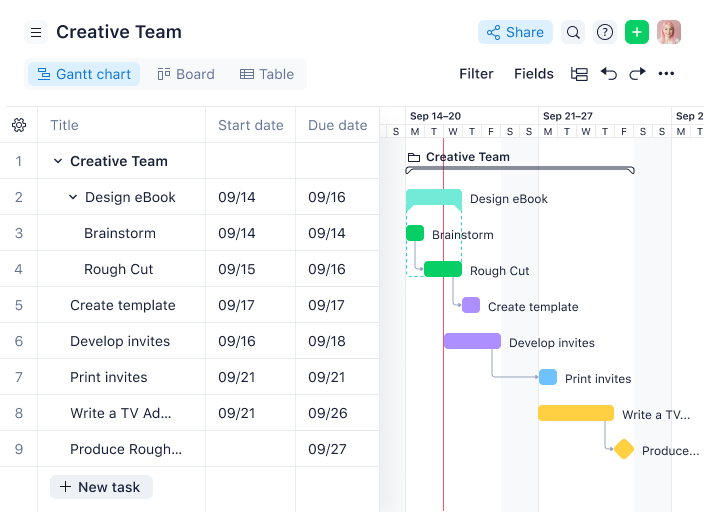
Wrike is a project scheduling and work management platform that lets teams organize tasks, build interactive Gantt charts, manage dependencies, and customize workflows for different project needs.
Who Is Wrike Best For?
Wrike is a good fit for mid-size to enterprise teams in tech, marketing, and professional services that need highly configurable project workflows.
Why I Picked Wrike
Wrike earns its spot on my shortlist because of how far it lets you push customization without touching a single line of code. I particularly like the custom item types feature, which lets my team rename and reshape work items to match how we actually talk about our projects—so instead of generic "tasks," we're working with terminology that maps directly to our process. Pair that with team-specific workflows where you can define custom statuses for every phase of a project, and you get a scheduling setup that reflects your actual delivery model. I've also found the dynamic request forms genuinely useful—they auto-generate tasks and workflows from incoming requests, which cuts down on the manual setup that usually eats up time at the start of a project.
Wrike Key Features
- Interactive Gantt charts: Visualize project timelines, adjust task durations by dragging and dropping, and map dependencies directly on the chart.
- Resource management: View team workloads across projects and reassign tasks based on capacity from a single dashboard.
- Real-time collaboration: Leave comments, tag teammates, and attach files directly on tasks to keep project communication in context.
- Cross-tagging: Add tasks to multiple project folders simultaneously so work stays visible across different team views without duplication.
Wrike Integrations
Wrike offers hundreds of integrations through its built-in integrations and marketplace, including tools like Google Workspace, Microsoft 365, Salesforce, and Slack. It also provides an API for custom integrations.
What's Free?
Wrike offers a free-forever plan for small teams with up to 5 users. The free plan includes basic task and project management features but limits access to advanced integrations and customization options.
New Product Updates from Wrike
Wrike Expands Gantt Planning, Approvals, and AI Work Intake
Wrike adds cross-project Gantt dependencies, flexible approval routing, and AI work intake through Wrike MCP. These updates give teams more control over planning, decision-making, and incoming work. For more information, visit Wrike’s official site.

Best for scalability & flexibility
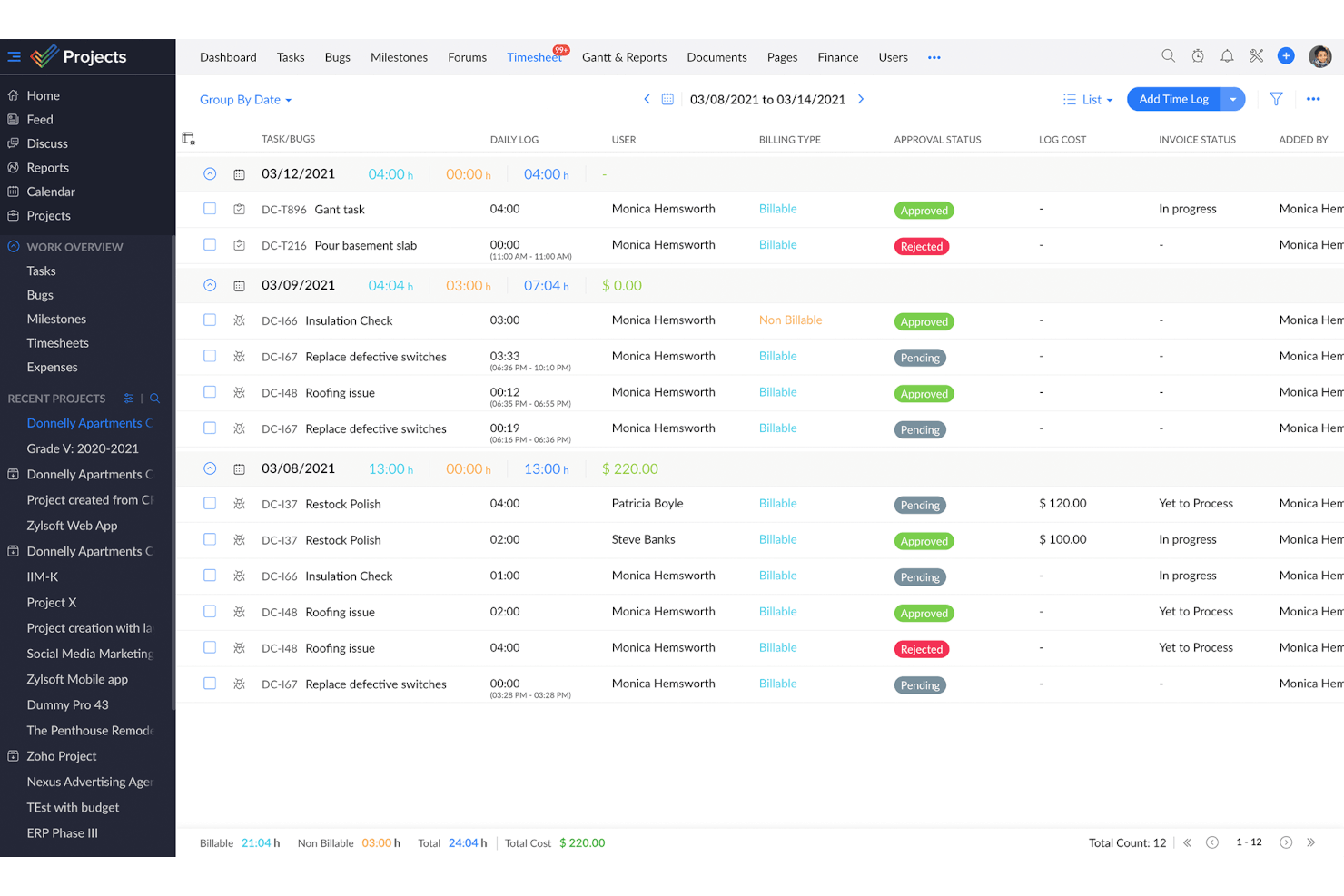
Zoho Projects is a project scheduling and management platform that gives teams tools for task planning, Gantt charts, time tracking, and team collaboration.
Who Is Zoho Projects Best For?
Zoho Projects is a good fit for growing teams that need a free project scheduling tool they won't outgrow as their headcount and project complexity increase.
Why I Picked Zoho Projects
Zoho Projects earns its spot on my shortlist because it's one of the few free project scheduling tools that genuinely scales with your team. I like that the free plan includes Gantt charts with finish-to-start task dependencies, which gives small teams real scheduling structure from day one. When your team grows and needs more, upgrading to Premium unlocks cross-project dependencies with all four dependency types, custom views, and task blueprints for repeatable workflows. The ability to add custom fields, modules, and statuses at higher tiers means you're not locked into a rigid structure as your projects get more complex.
Zoho Projects Key Features
- Milestone tracking: Set milestones within projects to mark key delivery points and monitor progress against your schedule.
- Resource management: View each team member's workload and reassign tasks when someone is over- or under-allocated.
- Project baseline: Capture a snapshot of your planned schedule at any point so you can compare actual progress against your original plan.
- Timesheet logging: Track time spent on tasks manually or with built-in timers, with admin controls to approve or reject entries.
Zoho Projects Integrations
Zoho Projects offers native integrations with Slack, Google Drive, Microsoft 365, Dropbox, GitHub, Bitbucket, Zoho CRM, Zoho Desk, and Zapier. An API is available for custom integrations.
What's Free?
Zoho Projects offers a free-forever plan for up to 3 users and 2 projects. The free plan has limited storage and does not include features like task automation, resource management, or advanced integrations.
New Product Updates from Zoho Projects
Zoho Projects Adds CodeX Scripts for Custom Modules
Zoho Projects now supports CodeX Scripts for custom modules, enabling conditional logic and rules for creating, updating, and deleting records. For more information, visit Zoho Projects' official site.
 .

Miro
Best for its wide selection of pre-made templates

Miro is a visual collaboration platform for project managers that offers interactive boards, project scheduling templates, and real-time team planning tools.
Who Is Miro Best For?
Miro is a good fit for cross-functional teams in tech and digital industries who need a flexible, visual space for collaborative project planning.
Why I Picked Miro
I've included Miro in my top picks because of the breadth of its template library—with over 7,000 templates, it's one of the most extensive collections I've seen in any visual collaboration tool. For project scheduling, you can pull up a ready-made Gantt chart, a project timeline, or an AI-powered roadmap planning template without building your structure from scratch. The Roadmap Planning AI template is particularly useful—it lets my team assign tasks, set deadlines, and track milestones directly on the board in real time. I also use the sprint planning and work breakdown structure templates regularly when kicking off new delivery cycles with cross-functional teams.
Miro Key Features
- Kanban boards: Build and manage Kanban boards directly on the canvas to track task status and visualize workflow stages across your project.
- Timeline maker: Create visual project timelines that map out deadlines, priorities, and task sequences for your team.
- Talktrack: Record async video walkthroughs of your Miro board so stakeholders can review project plans and leave comments on their own schedule.
- Infinite canvas: Expand your workspace without limits to map out complex project structures, dependencies, and workstreams in a single view.
Miro Integrations
Miro offers 100+ native integrations, including Asana, Jira, Trello, Microsoft Teams, Slack, Google Drive, Zoom, Notion, Airtable, and Dropbox. An API is available for custom integrations.
What's Free?
Miro offers a free-forever plan with unlimited team members and access to 3 editable boards per workspace. The free plan includes 5,000+ templates and core integrations, but advanced features and unlimited boards require a paid plan.
New Product Updates from Miro
Miro Adds Japan Data Residency for Enterprise Customers
Miro has introduced Japan data residency for enterprise customers, offering in-region storage for production data, backups, and metadata, plus in-region compute infrastructure. For more information, visit Miro's official site.
Coda
Best no-code document builder

Coda is a no-code project scheduling platform that lets teams build custom schedules, interactive timelines, and collaborative documents using flexible tables, templates, and automation tools.
Who Is Coda Best For?
Coda is a good fit for project managers at small to mid-sized tech companies who need a flexible, no-code workspace to build custom project schedules without relying on engineering support.
Why I Picked Coda
I picked Coda as one of the best because I love how it lets you build a fully custom project scheduling doc without writing a single line of code. When my team needs a new project tracker, I can pull together a timeline view, a task table, and a status rollup all in one doc using Coda's building blocks—formulas, buttons, and linked tables. I especially like the cross-table referencing, where edits in one table sync automatically across the whole doc, so my schedule stays accurate without manual updates. The template gallery also gives me a solid starting point for things like sprint planning or roadmap tracking, which I can then reshape to fit exactly how my team works.
Coda Key Features
- Multiple table views: Switch between grid, calendar, kanban, and Gantt-style timeline views to visualize your project schedule in different formats.
- Workflow automation: Set up button-triggered or time-based automations to move tasks, send notifications, or update statuses without manual input.
- Coda AI: Use AI to generate tables, summarize project updates, or draft content directly inside your scheduling doc.
- Publishing: Share a polished, interactive version of your project schedule as a standalone webpage with stakeholders outside your workspace.
Coda Integrations
Coda offers native integrations with Google Calendar, Slack, Jira, GitHub, and Zoom. An API is available for custom integrations.
What's Free?
Coda offers a free-forever plan with unlimited users and docs, but limits doc size, version history, and some advanced features. Integrations and automation are available with usage caps on the free plan.
Trello
Best for simple Kanban boards

Trello is a project scheduling and task management platform that uses visual boards, lists, and cards to help teams organize projects and track progress.
Who Is Trello Best For?
Trello is a good fit for small teams and individual project managers who need a lightweight, visual way to manage tasks without a steep learning curve.
Why I Picked Trello
Trello is on my shortlist because its Kanban board is among the cleanest I've used. Cards move across lists with a simple drag-and-drop, and I can set up a full project board in minutes—no configuration overhead. I also like how checklists inside cards let me break down tasks into subtasks, with a visual progress bar that fills as items get checked off. Trello's built-in no-code automation (Butler) lets me set rules, such as moving a card to "Done" when all checklist items are complete, keeping boards accurate without manual updates.
Trello Key Features
- Calendar view: See all cards with due dates plotted on a monthly calendar to get a clear picture of your project timeline.
- Board templates: Start projects faster using pre-built templates for sprint planning, product roadmaps, and more.
- Power-Ups: Connect third-party tools and add extra functionality to your boards, like voting, time tracking, or custom fields.
- Card mirroring: Mirror cards across multiple boards so the same task stays visible in different team workspaces simultaneously.
Trello Integrations
Trello offers native integrations called Power-Ups, including Slack, Jira Cloud, and Miro. Additional integrations are available through its Power-Ups directory, and an API is available for custom integrations.
What's Free?
Trello offers a free-forever plan for up to 10 boards per workspace with unlimited cards and members. The free plan limits you to one Power-Up (integration) per board and 250 workspace command runs per month.

Best for creating beautiful PowerPoint Gantt charts

Office Timeline is a project scheduling add-in for PowerPoint that lets you create, customize, and present Gantt charts and timelines directly within your slides.
Who Is Office Timeline Best For?
Office Timeline is a good fit for project managers and business professionals who regularly present project schedules to stakeholders using PowerPoint.
Why I Picked Office Timeline
Office Timeline earns its spot on my shortlist because it's the only scheduling tool I've found that lives entirely inside PowerPoint. When I need to walk executives through a project schedule, I'm not exporting to a separate file or rebuilding a slide from scratch—I'm generating a polished Gantt chart directly on the slide using the built-in timeline wizard. I also like the drag-and-drop visual editor, which lets me shift tasks and milestones when dates change without manually redrawing anything. The designer-grade themes mean the output looks intentional and presentation-ready, not like something cobbled together in a spreadsheet.
Office Timeline Key Features
- Swimlane grouping: Organize tasks into swimlanes to separate workstreams or project phases on a single slide.
- Planned vs. actual tracking: Display baseline schedules alongside current progress to visualize schedule variance directly in your timeline.
- Data import from Excel and MS Project: Pull existing project data directly into Office Timeline to generate a visual without re-entering dates manually.
- Timeline scale options: Switch between multiple time scales to adjust the level of detail shown in your Gantt chart.
Office Timeline Integrations
Office Timeline offers native integrations with Microsoft PowerPoint, Microsoft Project, and Excel.
What's Free?
Office Timeline offers a free-forever plan with basic timeline and Gantt chart creation directly in PowerPoint. The free version limits the number of items per timeline and restricts access to premium templates and advanced features.
Best for time tracking

Teamwork.com is a project management platform for PMs that combines project scheduling, task management, Gantt charts, and built-in time tracking.
Who Is Teamwork.com Best For?
Teamwork.com is a good fit for client-facing teams and agencies that need to manage multiple projects, track billable hours, and report on delivery.
Why I Picked Teamwork.com
Teamwork.com earns its spot on my shortlist because its time tracking is built directly into every plan—including the free one—rather than locked behind a paywall like it is with most competitors. I use the native timers to log time against specific tasks in real time, and my team can bulk-log hours through timesheets when they need to catch up at the end of the day. The timesheet approval workflow provides a layer of financial control before hours are marked as billable. Coupled with Gantt chart views for scheduling, it creates a solid setup for managing project timelines alongside recorded time.
Teamwork.com Key Features
- Gantt chart view: Visualize your full project timeline, see task dependencies, and track what's due and when across multiple projects.
- Milestone tracking: Set checkpoints within a project so your team and clients always know what's expected and by when.
- Workload and capacity management: View your team's day-to-day capacity, spot scheduling conflicts in real-time, and reassign tasks to avoid bottlenecks.
- Project health reporting: Get a snapshot view across all active projects and monitor progress based on individual health status.
Teamwork.com Integrations
Teamwork.com offers native integrations with Slack, Google Drive, Dropbox, Microsoft Teams, HubSpot, Xero, QuickBooks, and Zapier. An API is available for custom integrations.
What's Free?
Teamwork.com offers a free-forever plan for up to 5 users and 2 projects. Some advanced features and integrations are only available on paid plans.
ClickUp
Best productivity platform

ClickUp is a project management platform for PMs that brings together project scheduling, task management, Gantt charts, and collaboration tools in one workspace.
Who Is ClickUp Best For?
ClickUp is a good fit for project managers and cross-functional teams at small to mid-sized companies who need a free, all-in-one workspace for scheduling and task management.
Why I Picked ClickUp
ClickUp earns its spot as one of the best on my shortlist because it genuinely functions as a full productivity platform, not just a task list. I like how my team can switch between Gantt chart views, sprint boards, and calendar views without leaving the workspace. ClickUp's task dependency mapping is something I use constantly—it lets me chain tasks across workstreams so nothing moves forward until its predecessor is done. The free plan includes all of this, which is rare at this level of scheduling depth.
ClickUp Key Features
- Workload view: See each team member's assigned tasks and capacity across a date range to spot over-allocation before it becomes a problem.
- Milestones: Mark specific tasks as milestones within a project timeline to track progress against key delivery dates.
- Custom fields: Add fields like priority, estimated effort, or status to tasks so your project data stays structured and reportable.
- Time tracking: Log time directly on tasks without a third-party tool, keeping effort data tied to the work itself.
ClickUp Integrations
ClickUp offers 50+ native integrations, including Slack, GitHub, GitLab, HubSpot, Everhour, Toggl, Harvest, Google Drive, OneDrive, Dropbox, Outlook, Google Calendar, Figma, Zoom, Bitbucket, Microsoft Teams, Intercom, Box, Zendesk, and Front. It also provides an API for custom integrations.
What's Free?
ClickUp offers a free-forever plan with unlimited tasks and members. The free plan has some feature limitations, such as restricted use of Gantt charts, limited automation, and fewer integrations compared to paid plans.
New Product Updates from ClickUp
ClickUp Adds Meetings Hub, Super Agent Templates, and ZoomInfo Integration
ClickUp adds a searchable Meetings Hub, new ways to clone and template Super Agents, and a ZoomInfo integration through the App Center. These updates improve meeting retrieval, agent reuse, and access to sales intelligence. For more information, visit ClickUp’s official site.

Productive
Best work management software for agencies
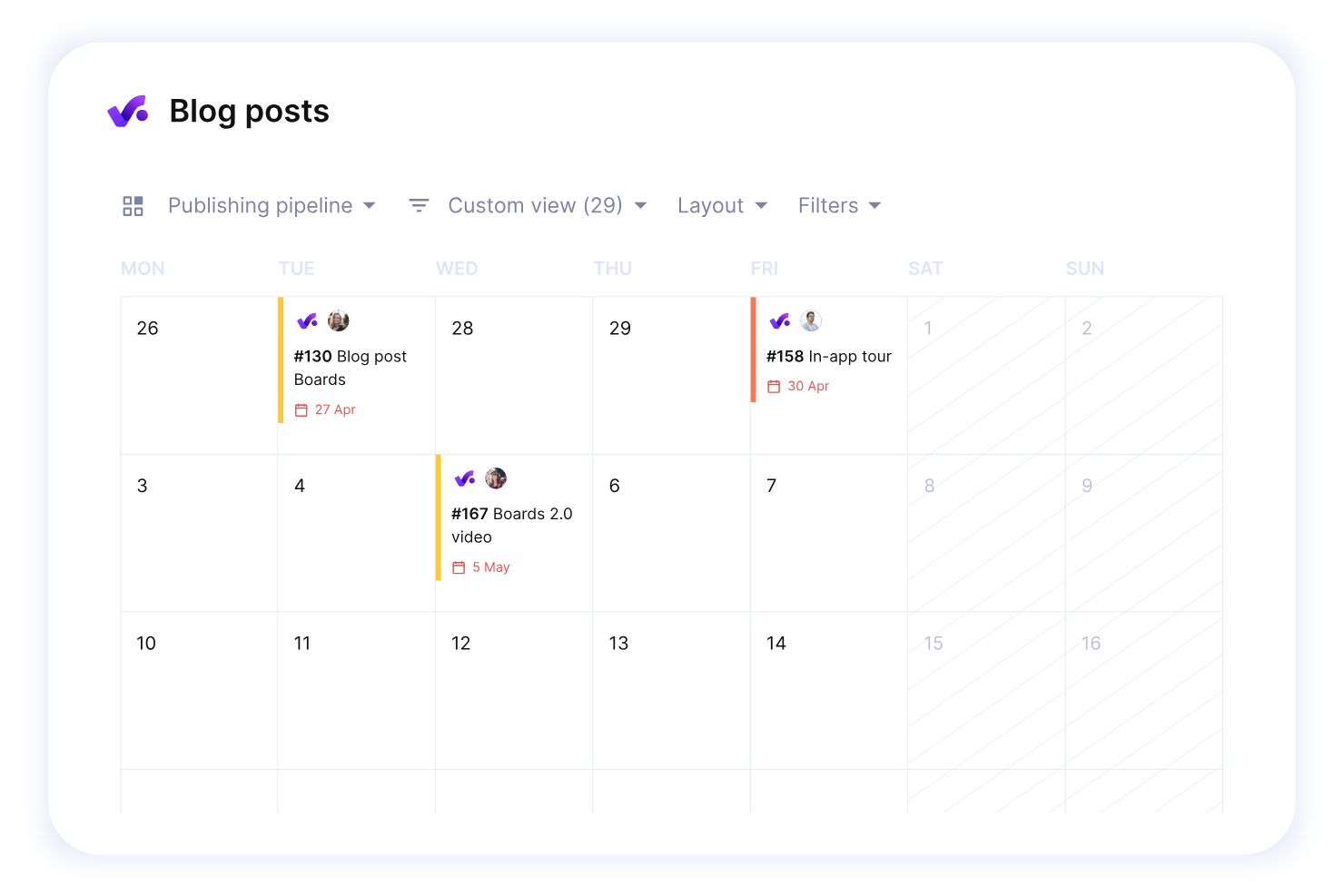
Productive is a project scheduling and work management platform designed for agencies, offering tools for task planning, resource allocation, budgeting, and time tracking.
Who Is Productive Best For?
Productive is a strong fit for agency project managers who need to connect scheduling, resourcing, and financial tracking in one place.
Why I Picked Productive
Productive earns its spot on my shortlist because it's one of the few project scheduling tools built specifically for agencies—not adapted for them. I love that the Gantt view, timeline view, and workload view all connect directly to live budget and resource data, so when I shift a task's start date, I can immediately see how that change affects project profitability. That lets my team catch a budget overrun before it happens rather than after the invoice goes out. The resource planning feature also lets me see team capacity months ahead, including approved time off, so I'm never scheduling work against someone who's already fully booked.
Productive Key Features
- Project templates: Duplicate full project setups—including tasks, subtasks, descriptions, and assignees—to spin up new client projects quickly.
- Automations: Trigger actions automatically, such as creating invoices or sending Slack messages, based on project activity.
- Time approval workflow: Review submitted time entries, mark hours as billable or non-billable, and request changes before they're finalized.
- AI-powered docs and forms: Create project specs or meeting notes with AI assistance, and turn form responses directly into tasks.
Productive Integrations
Productive offers native integrations with Slack, Google Calendar, Xero, QuickBooks, HubSpot, and Zapier. An API is available for custom integrations.
What's Free?
Productive offers a 14-day free trial with access to all features. After the trial, a paid plan is required to continue using the platform.
New Product Updates from Productive
Productive Adds Voice Dictation, Slack Connector, Proposals, and Overtime
Productive adds voice dictation, a Slack Connector, proposal controls, and overtime tracking. These updates support faster AI interactions, client proposals, and time management. For more information, visit Productive’s official site.
Avaliações de outro software gratuito de planeamento de projetos
Eis mais algumas ferramentas gratuitas de planeamento de projetos que pode experimentar.
- Zoho Sprints
For agile development teams
- Float.com
For prroject scoping
- GoodDay
For extensive visualization options
- Runn
Project scheduling for small teams
- Hub Planner by Milient
For businesses or teams that need to manage complex schedules and resources
- Asana
For integrations
- Basecamp
For businesses that also need communication features
- Freedcamp
Free plan with unlimited users, storage, projects, and task management.
- Airtable
For project scheduling via spreadsheets.
- Google Workspace
For those in the Google app ecosystem.
- TeamGantt
For Gantt charts
- Microsoft Online
Free project scheduling on the web using Excel, PowerPoint and the MS Office 365 suite.


How I Evaluate Free Project Scheduling Software
First, I define what counts as free. For project scheduling software, I look for a free-forever plan that keeps Gantt charts and task dependencies unlocked—not a trial that expires mid-sprint. From there, I split evaluation into core functionality a tool must have to qualify and differentiating factors that separate one vendor from another.
Core Functionality (Table Stakes For This List)
In addition to my free offer requirements, I also use a scoring system to select tools for my list. Here's how it works:
I rank each one on a scale from 0 (does not offer the functionality) to 5 (excels in this area) for each core functionality listed below. Then, I calculate the tool's total score into a percentage. Each tool needs to achieve a minimum total score of 65% to be considered for inclusion.
- Gantt Chart Scheduling: I look for interactive Gantt charts where you can drag tasks to reschedule them, not just static timeline images you can't edit.
- Task Dependencies & Milestones: A tool should let you link tasks so moving a design review deadline automatically shifts the dev sprint that follows it.
- Free Plan Availability: I check that the free tier includes real scheduling features for ongoing use, not a 14-day trial or a locked-down demo.
- Resource & Workload Assignment: Assigning tasks is table stakes, but I evaluate whether you can also see who's overloaded across the schedule at a glance.
- Calendar & Deadline Management: Due dates paired with calendar views and reminders matter, especially for coordinators juggling deliverables across client accounts.
- Schedule Collaboration & Sharing: I look at how many collaborators can edit the schedule on the free plan and whether you can share live timelines externally.
Once I have a list of tools that meet this criteria, I consider what sets each platform apart.
Differentiating Factors (What Sets Vendors Apart)
Here's how I compare and contrast different vendors:
Standout Features
I evaluate how many views a tool offers beyond the Gantt chart. Kanban and workload views, for instance, help agency coordinators spot over-allocated team members without switching tools. Built-in time tracking is another differentiator—freelancers can compare estimated vs. actual hours on scheduled tasks without a separate app. A templates library also carries weight, because a construction planner shouldn't have to build a phased timeline from scratch for every new project.
Beyond Features
Free plan generosity matters a lot here. I check whether core scheduling features like Gantt views and dependencies are available on the free tier or gated behind paid plans. Integrations are equally important—a consultant who can't sync their schedule with Google Calendar or Slack ends up duplicating work. I also look at scalability, specifically whether a tool handles 50+ tasks and multiple projects without slowing down, and whether it offers guest access so clients can view timelines without eating into your user cap.
Como escolher software gratuito de planeamento de projetos
As listas complexas de funcionalidades e as estruturas de preços podem dificultar a compreensão do que está realmente a obter com um software gratuito de planeamento de projetos. Para o ajudar a manter-se concentrado enquanto analisa o processo de seleção do software, eis alguns fatores a ter em conta:
| Fator | O que considerar |
| Âmbito da oferta gratuita | Analise as funcionalidades incluídas no plano gratuito — os limites de dependências de tarefas, calendário ou acesso de utilizadores são suficientes para as suas necessidades? |
| Escalabilidade | Certifique-se de que a ferramenta pode acompanhar o crescimento dos seus projetos ou da sua equipa, disponibilizando opções pagas ou funcionalidades avançadas à medida que expande. |
| Integrações | Verifique a compatibilidade com aplicações como o Google Calendar, o Trello ou o Slack para simplificar os fluxos de trabalho da sua equipa. |
| Facilidade de utilização | Certifique-se de que a interface é simples e requer pouca ou nenhuma formação, para que a sua equipa possa começar rapidamente. |
| Ferramentas de colaboração | Procure funcionalidades como comentários em tarefas, partilha de ficheiros e notificações para manter a sua equipa informada. |
| Personalização | Procure opções para ajustar vistas, modelos ou fluxos de trabalho de modo a corresponder às necessidades específicas da sua equipa. |
| Acesso móvel | Certifique-se de que existe uma aplicação otimizada para dispositivos móveis para gerir tarefas e cronogramas em qualquer lugar. |
| Funcionalidades de relatórios | Avalie se o software inclui relatórios básicos ou acompanhamento do progresso para monitorizar prazos e desempenho. |
O que é um software gratuito de planeamento de projetos?
O software gratuito de agendamento de projetos é uma ferramenta que ajuda os utilizadores a planear, organizar e gerir cronogramas, tarefas e recursos de projetos sem custos ou com versões gratuitas limitadas. Profissionais como gestores de projetos, freelancers e proprietários de pequenas empresas utilizam estas ferramentas para manter os projetos no caminho certo e cumprir os prazos sem gastar em excesso. Funcionalidades como aplicações de agendamento com arrastar e largar, dependências entre tarefas e integrações de calendários são comuns em muitas ferramentas gratuitas de agendamento, tornando-as ideais para criar cronogramas e gerir cargas de trabalho de forma eficiente.
Funcionalidades do software gratuito de agendamento de projetos
Vamos analisar as funcionalidades normalmente encontradas no software de agendamento de projetos e quais são geralmente incluídas no software gratuito de agendamento de projetos, em comparação com os planos pagos.
Funcionalidades normalmente gratuitas do software de agendamento de projetos
- Atribuição de tarefas: Permite atribuir tarefas aos membros da equipa e definir prazos, garantindo a responsabilização e o acompanhamento do progresso.
- Ferramentas básicas de agendamento: Disponibiliza uma interface simples para criar cronogramas de projetos ou gráficos de Gantt para organizar as fases do projeto.
- Ferramentas de colaboração: Inclui opções para comunicação entre a equipa e partilha de ficheiros.
- Acompanhamento do progresso: Oferece funcionalidades como listas de verificação ou atualizações de estado para monitorizar a conclusão das tarefas em tempo real.
- Modelos de projetos: Disponibiliza modelos pré-concebidos para ajudar a configurar rapidamente projetos sem começar do zero.
- Relatórios limitados: Inclui opções básicas de relatórios para analisar o progresso do projeto ou as métricas de conclusão das tarefas.
Funcionalidades normalmente pagas do software de agendamento de projetos
- Integrações avançadas: Permite uma ligação contínua a aplicações de terceiros, como CRMs, ferramentas de controlo do tempo ou software financeiro, para ampliar a funcionalidade, sendo ideal para empresas que estão a fazer a transição de um programa gratuito de agendamento.
- Fluxos de trabalho personalizáveis: Oferece a possibilidade de adaptar as fases do projeto e as dependências entre tarefas às necessidades específicas de cada equipa.
- Gestão de recursos: Disponibiliza ferramentas para atribuir e equilibrar cargas de trabalho entre membros da equipa ou projetos, uma funcionalidade indispensável para uma aplicação de agendamento de obras ou para organizações em crescimento em geral.
- Análise avançada: Inclui relatórios detalhados e opções de visualização de dados para obter informações mais aprofundadas sobre o desempenho do projeto.
- Funcionalidades de automatização: Permite automatizar tarefas repetitivas, como notificações ou lembretes, acrescentando um valor significativo em comparação com as aplicações gratuitas de agendamento.
- Utilizadores ou projetos ilimitados: Remove os limites relativos ao número de utilizadores ou projetos ativos, tornando ferramentas como as melhores aplicações gratuitas de agendamento mais escaláveis para equipas maiores.
- Suporte prioritário ao cliente: Oferece tempos de resposta mais rápidos ou equipas de suporte dedicadas para resolver os problemas dos utilizadores de forma eficiente.
- Melhorias na aplicação móvel: Inclui acesso offline ou funcionalidades móveis avançadas para a gestão de projetos em qualquer lugar.
Benefícios do software gratuito de agendamento de projetos
A implementação de software gratuito de agendamento de projetos pode proporcionar vários benefícios à sua equipa e à sua empresa. Eis alguns dos benefícios que pode esperar:
- Poupança de custos: Permite aceder a funcionalidades básicas de gestão de projetos sem gastar dinheiro, o que é perfeito para pequenas empresas ou empresas em fase de arranque.
- Organização de tarefas: Ajuda a atribuir e acompanhar tarefas facilmente, para que nada seja esquecido.
- Melhoria da colaboração da equipa: Permite à sua equipa partilhar ficheiros e atualizações num único local, reduzindo a necessidade de trocar emails constantemente.
- Ferramentas básicas de agendamento: Dá-lhe acesso a ferramentas simples, como gráficos de Gantt ou calendários, para planear eficazmente os cronogramas dos projetos.
- Acessibilidade: Muitas ferramentas gratuitas disponibilizam aplicações móveis ou acesso baseado na nuvem, para que possa gerir os seus projetos a partir de qualquer lugar.
- Modelos para uma configuração rápida: Os modelos pré-concebidos permitem iniciar projetos rapidamente, sem ter de criar tudo do zero.
- Relatórios limitados: Mesmo os planos gratuitos incluem frequentemente relatórios básicos para ajudar a acompanhar o progresso e identificar atrasos.
Custos & preços do software gratuito de agendamento de projetos
Compreendo que veio a este artigo à procura das melhores opções de software de agendamento de projetos disponíveis gratuitamente. No entanto, uma vez que os planos gratuitos oferecem apenas funcionalidades limitadas, é bastante provável que precise de atualizar o seu plano no futuro.
A tabela abaixo resume os planos comuns, os respetivos preços médios e as funcionalidades normalmente incluídas nas soluções de software de agendamento de projetos:
| Tipo de plano | Preço médio | Funcionalidades comuns |
| Plano gratuito | $0 | Gestão básica de tarefas, modelos de projetos, partilha de ficheiros e relatórios limitados. |
| Plano pessoal | $5-$15/utilizador/mês | Projetos ilimitados, integrações básicas, suporte prioritário e relatórios melhorados. |
| Plano empresarial | $20-$50/utilizador/mês | Fluxos de trabalho personalizados, ferramentas de colaboração em equipa, relatórios avançados e integrações. |
| Plano para empresas | $50-$100/utilizador/mês | Integração inicial personalizada, suporte dedicado, análise avançada e segurança melhorada. |
Perguntas frequentes sobre o agendamento gratuito de projetos
Encontre respostas a perguntas comuns que outras pessoas fazem sobre este tema.
O que é um software de agendamento de projetos?
O software de agendamento de projetos é uma ferramenta que ajuda a manter os seus projetos no caminho certo. Oferece uma visão geral de tudo o que precisa de fazer para concluir o trabalho e permite-lhe delegar essas tarefas aos membros da equipa.
O software de agendamento de projetos tem muito em comum tanto com o software de planeamento de projetos como com o software de agendamento de recursos.
Que funcionalidades principais devo procurar ao escolher um software gratuito de agendamento de projetos?
As ferramentas desta lista ajudam a agendar projetos à sua maneira. No entanto, incluem frequentemente alguma combinação das seguintes funcionalidades:
- Projetos: Crie espaços para cada um dos seus projetos, de modo a manter as tarefas separadas. Isto proporciona uma visão essencial sobre o progresso de cada projeto. As ferramentas gratuitas normalmente limitam o número de projetos que pode criar, por isso, confirme se a ferramenta que pretende utilizar satisfaz as suas necessidades antes de se registar.
- Tarefas: As tarefas são as ações individuais que precisa de realizar para concluir um projeto. As melhores ferramentas gratuitas de agendamento de projetos permitem-lhe criar tarefas, definir datas de conclusão e atribuir membros da equipa a cada uma delas.
- Subtarefas e dependências: As subtarefas permitem dividir cada tarefa em várias etapas. Também pode criar dependências, para que o trabalho seja sempre concluído pela ordem correta.
- Várias vistas: As vistas oferecem diferentes perspetivas sobre os seus projetos. As ferramentas desta lista disponibilizam alguma combinação de vistas Gantt, Kanban, de calendário e de tarefas.
- Automatização: Algumas ferramentas incluem automatizações para ajudar a simplificar o seu fluxo de trabalho. Por exemplo, o Trello permite-lhe configurar uma automatização que move automaticamente uma tarefa para o seu quadro “Concluído” quando assinala todas as caixas da lista de verificação da tarefa.
Qual é a melhor forma de agendar um projeto?
Agendar um projeto de forma eficaz é essencial para o seu sucesso. Eis algumas práticas importantes a considerar:
- Defina os objetivos e o âmbito: Especifique claramente os objetivos, os resultados esperados e o calendário. Identifique as principais fases ou tarefas.
- Divida as tarefas: Divida o projeto em tarefas mais pequenas, com pontos de início e fim claros, incluindo as dependências.
- Estime as durações: Colabore com a equipa para estimar a duração das tarefas, tendo em conta a complexidade, os recursos e os riscos.
- Atribua recursos: Atribua pessoal, equipamento e materiais às tarefas, garantindo que a disponibilidade está alinhada com o calendário.
- Crie um calendário: Utilize ferramentas como os gráficos de Gantt para visualizar tarefas, dependências e marcos.
- Acompanhe o progresso: Reveja e atualize regularmente o calendário para refletir alterações e comunique o progresso às partes interessadas.
- Gira as alterações: Antecipe atrasos ou riscos, avalie o seu impacto e dê prioridade às alterações necessárias.
As ferramentas gratuitas de agendamento de projetos podem ajudar as equipas a colaborar, mantendo todos alinhados relativamente às tarefas, aos calendários, às funções e às responsabilidades.
Como pode o software gratuito de agendamento de projetos ajudar a implementar as metodologias Agile e Scrum?
As ferramentas gratuitas de agendamento de projetos podem apoiar as metodologias Agile e Scrum através de funcionalidades como o planeamento de sprints, a atribuição de tarefas e o acompanhamento do progresso, sem custos. Com software gratuito de gestão de projetos, as equipas podem criar calendários flexíveis, gerir listas de pendências e adaptar-se a prioridades em mudança. Estas aplicações gratuitas de agendamento (como o plano gratuito do Coda) também incluem frequentemente integrações com ferramentas gratuitas de agendamento de calendários e quadros Kanban, permitindo a colaboração e fluxos de trabalho simplificados.
As ferramentas gratuitas de agendamento de projetos oferecem funcionalidades de IA ou automatização?
Algumas aplicações gratuitas de agendamento oferecem funcionalidades básicas de IA ou automatização, como a definição de prioridades das tarefas, ajustes ao calendário e lembretes. Embora as ferramentas gratuitas de agendamento online possam não dispor de capacidades avançadas de IA, incluem frequentemente notificações automáticas e integrações que permitem poupar tempo. Para as equipas que necessitam de funcionalidades avançadas, uma aplicação de agendamento fácil de utilizar pode também incluir automatização limitada para a gestão de tarefas e a sincronização de calendários.
As ferramentas gratuitas de agendamento de projetos oferecem funcionalidades de controlo de tempo ou faturação?
Muitos softwares gratuitos de gestão e agendamento de projetos oferecem funcionalidades básicas de controlo de tempo para ajudar a monitorizar a duração das tarefas e o progresso dos projetos. Algumas aplicações gratuitas de agendamento também incluem opções de faturação, mas estas funcionalidades podem ser limitadas em comparação com as versões pagas. Para equipas pequenas, uma aplicação gratuita de agendamento para pequenas empresas pode fornecer registos de tempo simples e funcionalidades de faturação.
Existem ferramentas gratuitas e de código aberto para o agendamento de projetos?
Sim, estão disponíveis várias ferramentas gratuitas e de código aberto para o agendamento de projetos, que oferecem soluções personalizáveis para a gestão de tarefas e calendários. Estas ferramentas, frequentemente categorizadas como software de projetos gratuito, disponibilizam funcionalidades como gráficos de Gantt, alocação de recursos e acompanhamento do calendário. Para as equipas que procuram flexibilidade, as opções de código aberto podem funcionar como software gratuito de agendamento, adaptado às necessidades específicas de cada projeto.
Que funcionalidades de segurança e privacidade de dados oferecem as ferramentas gratuitas de agendamento de projetos?
As ferramentas gratuitas de agendamento de projetos, como as melhores aplicações gratuitas de agendamento de calendários, oferecem frequentemente funcionalidades básicas de segurança de dados, como armazenamento encriptado e contas protegidas por palavra-passe. Alguns sites gratuitos de agendamento também podem incluir controlos de acesso limitados para proteger dados sensíveis dos projetos. No entanto, embora estas ferramentas gratuitas de agendamento ofereçam proteções fundamentais de privacidade, a conformidade avançada ou a segurança de nível empresarial estão normalmente reservadas às versões pagas.