

Os 10 melhores softwares de roteiro de projetos para definir estratégias em 2026

10 Lista restrita de software de roteiros de projetos


O melhor software de roteiros de projetos ajuda a comunicar prioridades de alto nível, acompanhar o progresso em direção aos objetivos estratégicos e adaptar-se a calendários em mudança entre várias equipas. Estas ferramentas permitem visualizar dependências, alocar recursos de forma eficaz e evitar o desalinhamento entre as partes interessadas.
Com mais de 10 anos de experiência em gestão de projetos digitais, testei mais de 40 ferramentas de roteiros e planeamento para ajudar as equipas a melhorar a visibilidade entre funções e a manter o foco nos resultados. Trabalhei com clientes nos setores governamental, da saúde, dos transportes e do retalho, onde um planeamento claro dos roteiros foi essencial para o sucesso.
Segue-se a minha análise do melhor software de roteiros de projetos que recomendaria com base na utilização prática. Destaquei a forma como cada ferramenta apoia o planeamento estratégico, a comunicação com as partes interessadas e a execução de projetos em grande escala.
Why Trust Our Software Recommendations
Our team has been testing and reviewing software since 2012. As project managers ourselves, we know how difficult—and important—it is to choose the right software.
For this guide, we evaluated tools using hands-on testing and independent research, scoring tools using our selection criteria. We also draw on insights from industry thought leaders and practicing project management experts.
Our reviews reflect our human editorial judgment, not a sales pitch.
Expert reviewers:
Tabela de comparação: software de roteiros de projetos ou estratégia
Esta tabela de comparação resume os detalhes dos preços das minhas principais seleções de software de roteiros de projetos para estratégia:
| Tool | Best For | Trial Info | Price | ||
|---|---|---|---|---|---|
| 1 | Best with AI-assisted project risk detection | Free plan + 14-day free trial + free demo available | From $9/user/month (billed annually) | Website | |
| 2 | Best for project collaboration | Free plan + 14-day trial + demo available | From $10/user/month (billed annually) | Website | |
| 3 | Best for timeline planning with Gantt charts | Free plan + 15-day trial + demo available | From $4/user/month (billed annually) | Website | |
| 4 | Best for dynamic agile project management | Free plan available | From $1/user/month (billed annually) | Website | |
| 5 | Best for configurable scoring model | 14-day free trial | Pricing upon request | Website | |
| 6 | Best for flexible virtual whiteboard with a template library | Free plan + 14-day free trial + free demo available | From $8/user/month (billed annually) | Website | |
| 7 | Best for sprint planning | Free plan available | From $8.50/user/month (billed annually) | Website | |
| 8 | Best for quick project visuals | Free plan available | Pricing upon request | Website | |
| 9 | Best for agencies and consultancies | 7-day free trial | From $9/user/month (billed annually) | Website | |
| 10 | Best for visual project timelines | 30-day free trial + demo available | From $15/user/month (billed annually) | Website |


Avaliações do melhor software de roteiros de projetos
Eis uma breve descrição de cada software de roteiros. Abordo o melhor caso de utilização de cada ferramenta e as funcionalidades dignas de nota.

Best with AI-assisted project risk detection
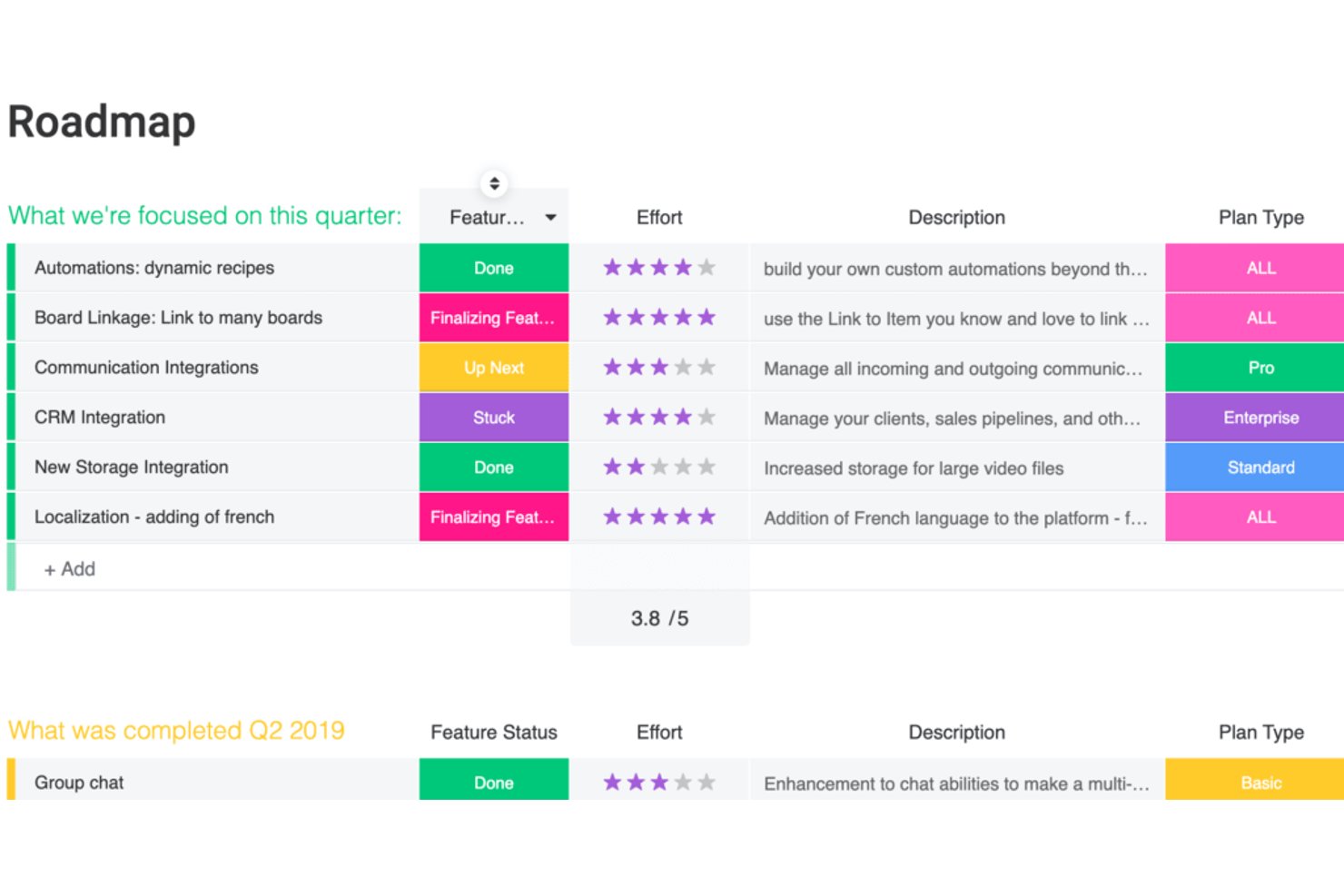
monday AI Workspace is an AI-powered work management platform that combines visual roadmap planning, portfolio management, dependency mapping, and cross-team timeline views into a single, connected workspace.
Who Is monday AI Workspace Best For?
It's a strong fit for PMO leads and portfolio managers at mid-to-large organizations running multiple concurrent projects across cross-functional teams.
Why I Picked monday AI Workspace
monday AI Workspace earns its spot on my shortlist because of how its Portfolio Risk Insights feature works in practice. Every day, the AI scans across every project board in a portfolio and generates a prioritized list of risks, so my team isn't waiting for a status meeting to learn a deadline is slipping. The Risk Analyzer agent goes further, flagging cascading dependency failures before they spread across connected projects.
monday AI Workspace Key Features
- Visual roadmap builder: Drag-and-drop Gantt, timeline, and swimlane views make it easy to visualize projects and milestones.
- Multi-project portfolio management: Roll up work from multiple boards into consolidated, filterable portfolio roadmaps with resource and status views.
- Two-way Jira and GitHub integrations: Sync project updates and issues with development tools for unified execution tracking.
- Executive reporting dashboards: Share live dashboards with custom widgets to surface roadmap progress, KPIs, and status at a glance.
monday AI Workspace Integrations
monday AI Workspace offers hundreds of native integrations, including Jira, GitHub, GitLab, Slack, Microsoft Teams, Salesforce, HubSpot, Google Workspace, Zendesk, and Trello. It also supports Zapier and provides an API for custom integrations.
Pros and Cons
Pros:
- Portfolio rollups span hundreds of concurrent projects
- Gantt and timeline views are highly flexible
- AI flags portfolio risks before they escalate
Cons:
- Gantt dependency logic less mature than dedicated tools
- Advanced AI features locked behind higher tiers
New Product Updates from monday AI Workspace
monday AI Workspace Adds Human Approval Routing
monday AI Workspace adds a human-in-the-loop approval block to AI Workflows, sending approval requests and routing workflow paths based on responses. For more information, visit monday AI Workspace's official site.

Wrike
Best for project collaboration
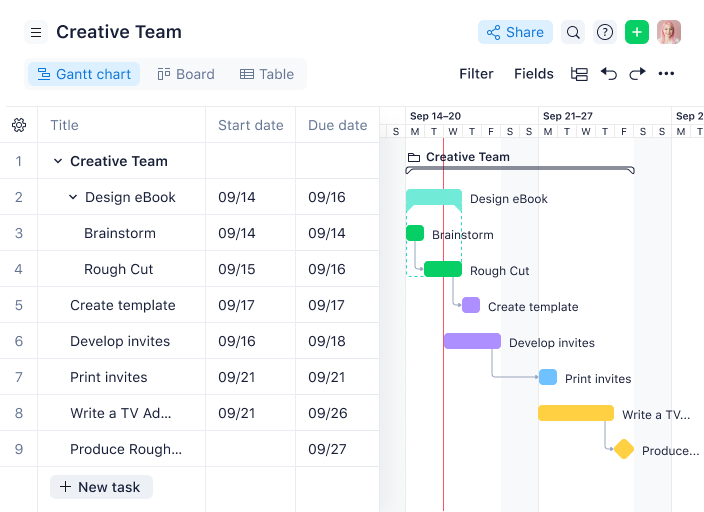
Wrike is a project management platform that caters to teams looking for comprehensive solutions to organize their work and manage projects. It offers a range of features designed to improve collaboration and workflows, which makes it a valuable tool for creating and managing project roadmaps.
Who Is Wrike Best For?
Program managers and cross-functional teams in mid-sized to enterprise organizations across marketing and technology. It suits groups that require structured collaboration around shared roadmaps and project deliverables.
Why I Picked Wrike
I picked Wrike because it excels in project collaboration, a key aspect for any team working on projects. Its customizable visual roadmaps and adjustable Gantt charts offer clear progress tracking, so every team member stays aligned.
The automatic calendar synchronization feature is particularly useful for coordinating across multiple teams, while advanced project portfolio management tools provide a comprehensive view of project health. With streamlined approval processes, Wrike helps speed up decision-making, which makes it an ideal choice for teams looking to boost collaboration and improve their product development processes.
Wrike Key Features
Wrike also offers several other features that make it a compelling choice for project roadmap software.
- AI Automation: You can use this feature to automate routine tasks and free up your team to focus on strategic initiatives.
- Visual Collaboration Tools: The whiteboard allows for interactive brainstorming sessions with visual aids, which helps with team collaboration.
- Dynamic Request Forms: These forms automate work intake processes, so you can make sure all necessary information is gathered from the start.
- Resource Planning: With tools like Gantt charts and workload charts, you can effectively manage project timelines and allocate resources efficiently.
Wrike Integrations
Integrations include Klaxoon, QuickBooks, Power BI, Google Sheets, Salesforce, Tableau, Microsoft Teams, Adobe Creative Cloud, Google Drive, Microsoft SharePoint, Slack, and Dropbox.
Pros and Cons
Pros:
- Web, desktop, and mobile apps for flexibility
- Enterprise-grade security features protect your data
- Custom workflows and automation help improve project processes
Cons:
- Time tracking and scheduling lacking compared to other tools
- Storage limits can be restrictive
New Product Updates from Wrike
Wrike Expands Gantt Planning, Approvals, and AI Work Intake
Wrike adds cross-project Gantt dependencies, flexible approval routing, and AI work intake through Wrike MCP. These updates give teams more control over planning, decision-making, and incoming work. For more information, visit Wrike’s official site.

Best for timeline planning with Gantt charts
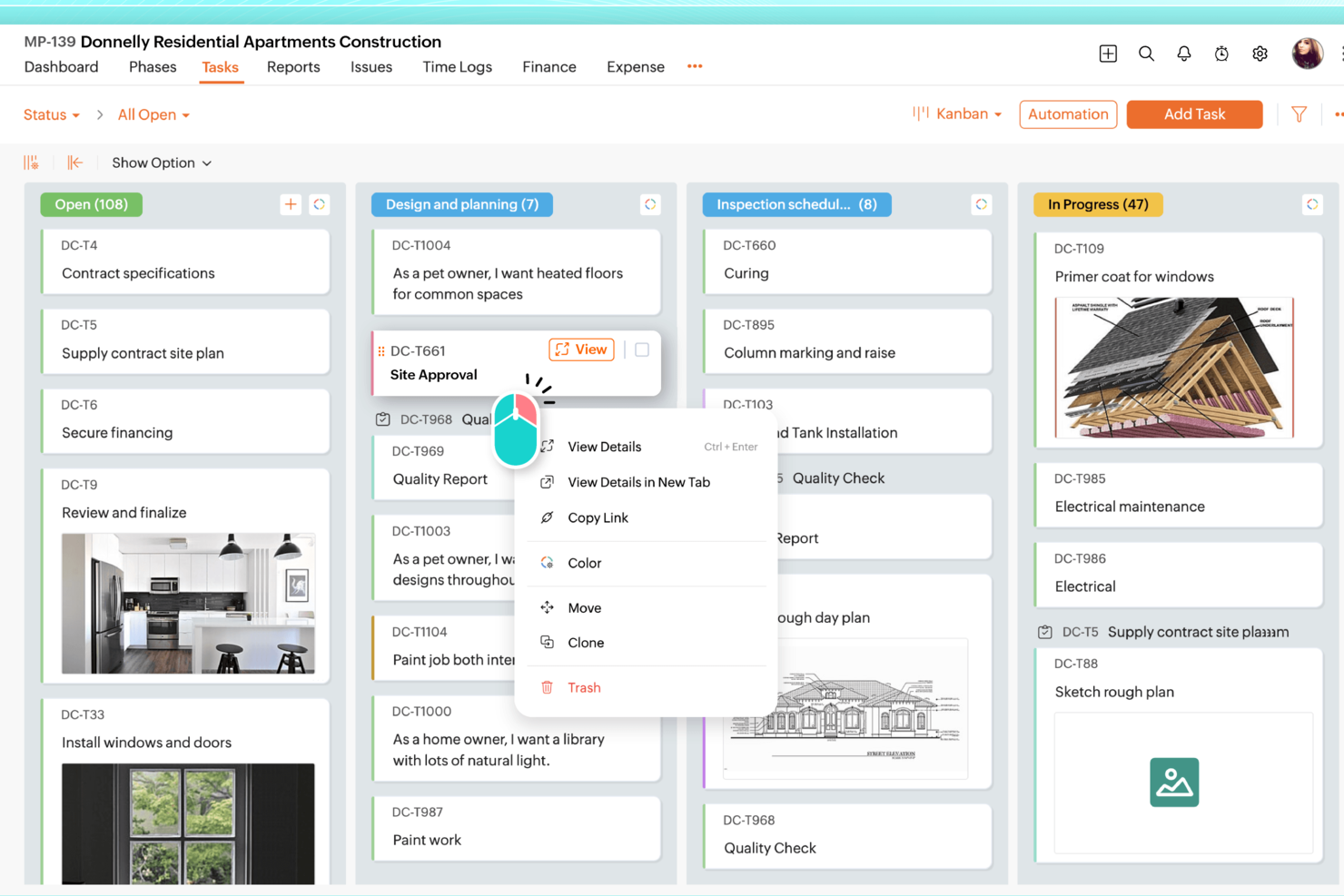
Zoho Projects is a practical option for teams that need project roadmap software with solid planning and tracking tools. It works well across industries like IT and marketing, especially for teams that rely on task automation and time tracking to stay organized. Its Gantt charts make it easy to map timelines and dependencies, giving project managers a clearer view of what’s moving forward, what’s blocked, and what needs attention to keep work on schedule.
Who Is Zoho Projects Best For?
Project coordinators and PMO teams in small to mid-sized organizations across IT and professional services. It supports groups that rely on Gantt-based timeline planning to map initiatives over time.
Why I Picked Zoho Projects
I picked Zoho Projects for its strong Gantt chart tools, which make it easier to build and manage a roadmap with clear timelines and task dependencies. This is especially helpful when priorities shift and teams need to adjust schedules without losing visibility into what impacts delivery. Zoho Projects also includes task automation to reduce manual follow-ups and keep work moving through each stage. Its time tracking feature adds another layer of clarity by showing how time is being spent across tasks, which can help with planning, workload decisions, and resource allocation.
Zoho Projects Key Features
Beyond Gantt charts and automation, Zoho Projects includes features that support day-to-day roadmap management:
- Issue Tracking: This feature helps your team identify, track, and resolve project issues efficiently, ensuring minimal disruption to your project roadmap.
- Document Management: You can store, share, and manage project-related documents, making collaboration seamless and organized.
- Zia Intelligence: Utilize AI-powered insights for smarter project management, assisting in predicting project outcomes and optimizing workflows.
- Customizable Dashboards: Tailor your project dashboards to display the most relevant metrics, providing your team with a clear view of project progress.
Zoho Projects Integrations
Integrations include Zoho CRM, Zoho People, Zoho Desk, Zoho Invoice, Zoho Analytics, JIRA, Microsoft Teams, Google Calendar, Slack, and Dropbox.
Pros and Cons
Pros:
- Affordable pricing for growing teams
- Built-in time tracking and billing
- Strong automation and workflow customization
Cons:
- Mobile experience less fully featured
- Interface has steeper learning curve
New Product Updates from Zoho Projects
Zoho Projects Adds CodeX Scripts for Custom Modules
Zoho Projects now supports CodeX Scripts for custom modules, enabling conditional logic and rules for creating, updating, and deleting records. For more information, visit Zoho Projects' official site.
 .

Best for dynamic agile project management

Zoho Sprints is an online agile project management tool designed to help teams plan, track, and execute projects efficiently. With features like backlog management and Scrum boards, it caters to the dynamic needs of agile teams that want to maintain a clear project roadmap.
Who Is Zoho Sprints Best For?
Agile coaches and product owners in startups and mid-sized software companies. It works well for teams that manage evolving roadmaps within sprint-based delivery cycles.
Why I Picked Zoho Sprints
Zoho Sprints offers comprehensive backlog management so you can prioritize tasks and keep your team focused on what truly matters. The Scrum and Kanban boards provide visual clarity and make it easy for your team to track progress and adapt to changes quickly. These dynamic features for managing agile projects help you maintain a clear project roadmap and make sure everyone is aligned with project goals.
Another reason I chose Zoho Sprints is the inclusion of epics and release management. These features help you break down complex projects into manageable segments for better planning and execution. With detailed reporting, you can track progress and performance and keep the team on course.
Zoho Sprints Key Features
Zoho Sprints offers a range of other features that make it useful as project roadmap software.
- Time Tracking: You can use timesheets and a global timer to manage team hours and get insights that will help you produce better estimations and resource allocations in future projects.
- Customization: This lets you tailor projects with templates, custom fields, and layout rules to meet your team's specific needs and get a personalized project management experience.
- Interactive Gantt Charts: These charts let your team visualize project timelines and dependencies and make it easier to manage project schedules and maintain timely delivery.
- Collaboration Hub: This feature includes activity streams and document co-authoring and facilitates teamwork and communication, especially for distributed teams working across different locations.
Zoho Sprints Integrations
Integrations include Zoho Cliq, Zoho Projects, Zoho Desk, Microsoft Teams, Google Workspace, GitHub, Jenkins, Zapier, Zoho Flow, Zoho Meeting, Zoho Mail, and Zoho Analytics.
Pros and Cons
Pros:
- Strong collaboration features for communication
- Effective sprint planning and tracking tools
- Customizable workflows to fit project needs
Cons:
- Limited mobile app functionality
- Customization options can be overwhelming
New Product Updates from Zoho Sprints
Zoho Sprints Expands Forms With Location Tracking and Custom Modules
Zoho Sprints adds location tracking to creation forms and extends public forms to custom modules. These updates give teams more ways to capture context and create records through forms. For more information, visit Zoho Sprints’ official site.
 .
Best for configurable scoring model

Acuity PPM is a project portfolio management tool designed to simplify project tracking and resource management. It's built to help you visualize and manage project timelines and dependencies and make strategic planning more straightforward.
Who Is Acuity PPM Best For?
PMO leaders and portfolio managers in mid-sized to enterprise organizations across technology and financial services. It suits teams that require configurable scoring models to evaluate and prioritize initiatives across complex project portfolios.
Why I Picked Acuity PPM
Acuity PPM offers a centralized portfolio tracking feature that gives you real-time reporting and improved visibility into your projects. This feature helps you manage project timelines by providing a clear view of project timing and sequencing. With the ability to assess project value and risk through project scoring and prioritization, your team can make informed decisions about which projects to pursue. The software's risk-value bubble chart is handy for visualizing these factors.
Additionally, Acuity PPM helps you improve work intake management by making sure only quality project requests enter your portfolio. This helps maintain a streamlined project portfolio and avoids unnecessary clutter. Resource capacity planning is another strength of Acuity PPM. It provides visibility into resource utilization so you can allocate resources more effectively and make sure strategic execution aligns with organizational goals.
Acuity PPM Key Features
Acuity PPM offers several other features that help you manage your project roadmaps and portfolios.
- Portfolio Tracking: You can centralize status reports for real-time visibility, which lets you and your team make informed decisions quickly.
- Dynamic Resource Management: This lets you manage resources effectively across multiple projects and maintain optimal utilization and allocation.
- Strategic Alignment Scorecards: You can align projects with strategic objectives and prioritize initiatives that deliver the most value.
- Advanced Scenario Planning: This facilitates scenario analysis so you can evaluate potential project outcomes, which helps with strategic decision-making.
Acuity PPM Integrations
Integrations include monday.com, Asana, Smartsheet, Jira, Trello, and Wrike.
Pros and Cons
Pros:
- Dashboards for tracking progress and resource allocation
- High visibility into overall project status
- Reduces reliance on spreadsheets for prioritization and planning
Cons:
- Lack of task reminders and notifications
- Limited customization compared to other tools

Miro
Best for flexible virtual whiteboard with a template library

Miro is an online collaboration platform that offers digital whiteboards for teams to brainstorm, plan, and manage projects. It offers a range of tools designed to improve productivity and teamwork when your team is in different locations.
Who Is Miro Best For?
Product strategists and innovation teams in distributed organizations across technology and consulting. It suits groups that use flexible whiteboards and templates to visualize roadmap concepts collaboratively.
Why I Picked Miro
I picked Miro for its flexible virtual whiteboard, which is complemented by an extensive template library. This includes templates for agile product roadmaps and epic & feature roadmaps so you can boost collaboration and refine planning processes.
Miro's integrations with tools like Jira and Azure DevOps support smooth workflow management and keep your team aligned on goals and timelines. The real-time collaboration feature is particularly beneficial for teams in different locations and helps to facilitate effective communication and project alignment.
Miro Key Features
Miro also offers several other features that make it useful for managing projects and roadmaps.
- AI Tools: Features like flows and sidekicks provide insights into your projects and let you automate repetitive tasks.
- Customization Options: You can tailor templates and boards to meet specific project needs, and set up custom tasks, milestones, and deadlines.
- Progress Tracking: You and your team can update your roadmaps as projects advance, which helps maintain alignment with objectives.
- Presentation Mode: This lets you clearly share and present roadmaps to stakeholders and helps improve communication and transparency.
Miro Integrations
Integrations include Microsoft Teams, Jira, Slack, Confluence, Azure, Asana, Google Drive, and Dropbox.
Pros and Cons
Pros:
- Effective for team discussions and Scrum meetings
- Well-suited for remote project teams
- Built-in collaboration tools like whiteboards and templates
Cons:
- Limited offline access
- Occasional performance lags on large whiteboards
New Product Updates from Miro
Miro Adds Japan Data Residency for Enterprise Customers
Miro has introduced Japan data residency for enterprise customers, offering in-region storage for production data, backups, and metadata, plus in-region compute infrastructure. For more information, visit Miro's official site.

Shortcut
Best for sprint planning
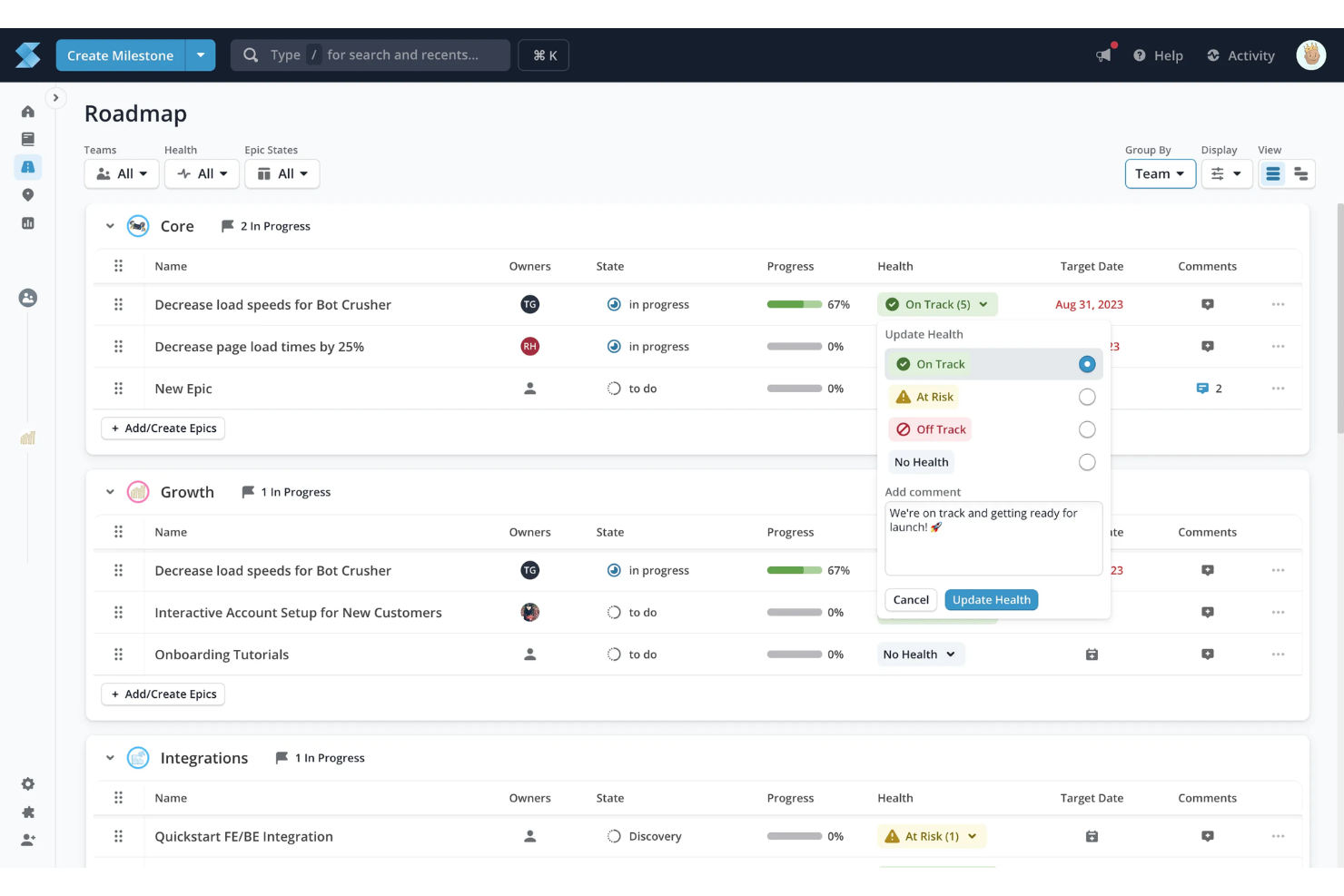
Shortcut is a project management tool designed to help you and your team organize and visualize your projects effectively. It offers a range of features like Kanban boards and roadmaps, which make it easier to align your team's work with your company's goals.
Who Is Shortcut Best For?
Engineering managers and product teams in startups and mid-sized software companies. It supports sprint-based roadmap planning tied closely to development backlogs.
Why I Picked Shortcut
I picked Shortcut because it offers tools for project roadmaps that let you plan, visualize, and organize your sprints. With this feature, you can align your team's work with the company's objectives to make sure everyone is on the same page. The ability to customize workflows and track progress makes it easier for you to manage multiple projects simultaneously.
Another reason I chose Shortcut is its focus on collaboration. By integrating with platforms like GitHub and Slack, it lets your team communicate effectively and stay updated with real-time information. This also helps maintain project visibility and keep stakeholders informed without the need for constant meetings.
Shortcut Key Features
Shortcut offers a suite of other features that make it a compelling choice for project roadmap software.
- Kanban Boards: You and your team can visualize and track the progress of work in a clear, organized manner.
- Backlogs: This lets you organize and prioritize upcoming tasks, so your team is always aware of what’s next on the agenda.
- Reporting: You can get insights into team performance and progress, which helps you measure success and identify areas for improvement.
- Objectives: This lets you facilitate the alignment of tasks with overarching company goals, so every piece of work contributes to the bigger picture.
Shortcut Integrations
Integrations include GitHub, Slack, GitLab, Figma, Dropbox, Google Drive, Google Sheets, Zendesk, Everhour, and Miro.
Pros and Cons
Pros:
- Easy to use once familiarized
- Built-in product development tracking
- Comprehensive reporting functions
Cons:
- Difficult to manage multiple stories in a column
- Manual prioritization in Kanban view cumbersome

Best for quick project visuals
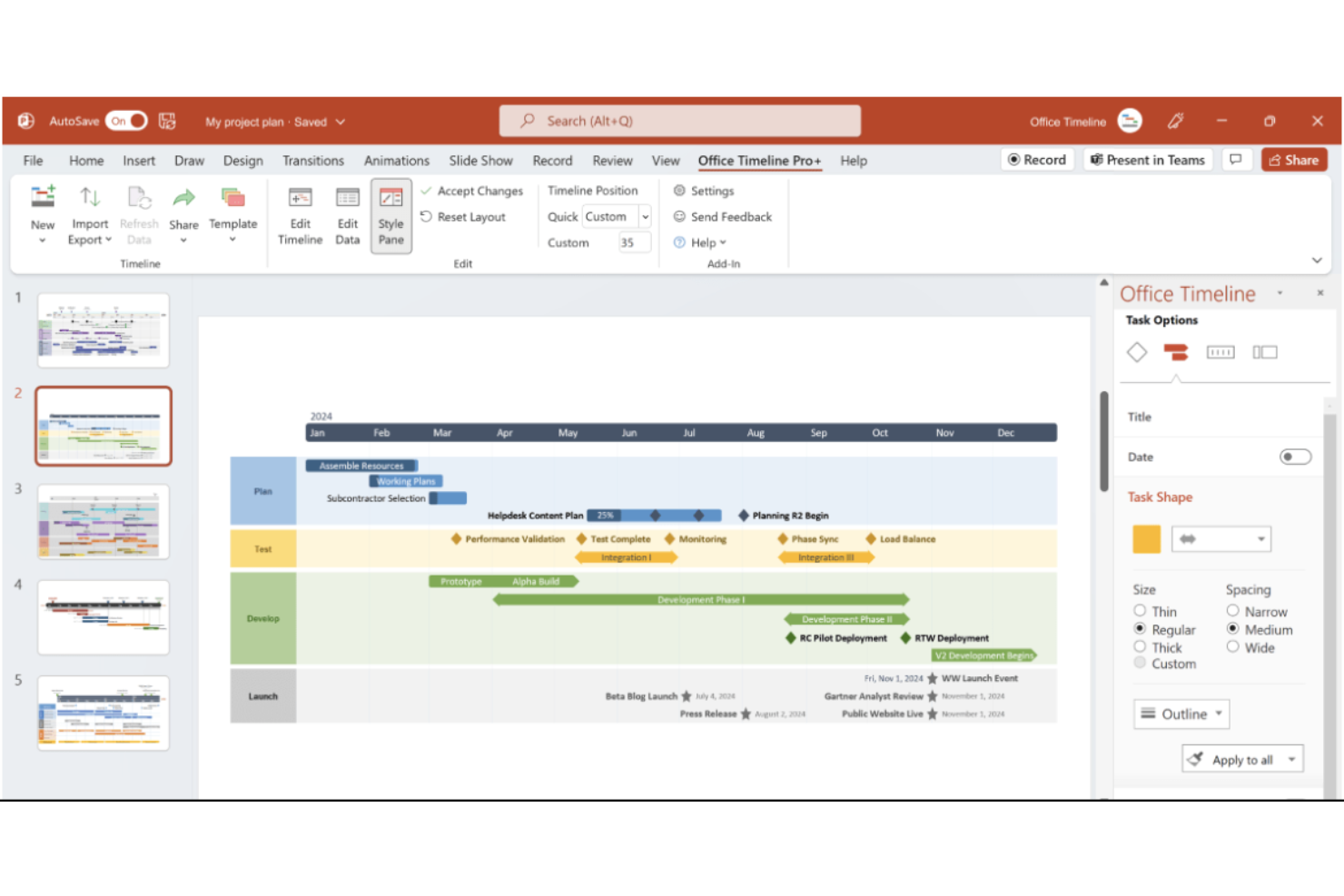
Office Timeline is a project management tool designed to create timelines and Gantt charts. It offers an efficient way to transform project data into clear, visual formats that enhance communication with stakeholders.
Who Is Office Timeline Best For?
Project sponsors and PMO analysts in small to enterprise environments across corporate settings. It supports professionals who need clear, presentation-ready roadmap visuals for executive communication.
Why I Picked Office Timeline
One of the standout features of Office Timeline is its ability to create quick, detailed timelines directly within PowerPoint. The software also provides extensive customization options, so you can tailor your project visuals to match your team's specific needs. Additionally, Office Timeline offers a web-based tool that lets you design timelines from anywhere, which provides flexibility and remote collaboration.
Another reason I chose Office Timeline is its emphasis on visual storytelling, which is crucial for effective project management. The software helps you convert complex project details into concise visuals, so your plans can be communicated clearly to executives and clients. This focus on visual communication not only improves understanding but also keeps your team engaged and informed.
Office Timeline Key Features
Office Timeline offers several other features that make it useful for creating project roadmaps.
- Swimlanes: You can organize tasks, teams, and phases into visual sections to manage workflows more effectively.
- Sub-Swimlanes: This feature provides a hierarchical structure that allows for detailed project organization and clarity.
- Planned vs. Actual Progress: You can visualize and compare actual project progress against original plans, which facilitates better alignment and stakeholder approvals.
- Data Import: This lets you seamlessly integrate project data from Excel, Microsoft Project, and other tools for polished and professional visuals.
Office Timeline Integrations
Integrations include Microsoft Project, Excel, Smartsheet, Jira, Wrike, PowerPoint, Google Docs, Google Slides, and Google Sheets.
Pros and Cons
Pros:
- Offers customizable templates that save time
- Well-suited for timelines for small to medium-sized projects
- Provides a drag-and-drop interface for intuitive timeline creation
Cons:
- Limited flexibility for unique project workflows
- Lacks real-time collaboration features
Best for agencies and consultancies

Bonsai is a business management platform that's designed to help agencies, consultancies, and other professional service providers streamline their workflows and improve their operations. It's a comprehensive tool that aligns project management with the unique needs of agency workflows.
Who Is Bonsai Agency Software Best For?
Agency owners and project leads in small consultancies and creative firms. It works well for teams that manage client-facing roadmaps alongside contracts and billing workflows.
Why I Picked Bonsai
I chose Bonsai for its project management capabilities that simplify workflows, which is useful for agencies and consultancies. This feature keeps your team aligned and organized from the initial lead to project completion. The real-time scheduling features let you make immediate adjustments based on workload and task status, which is crucial for keeping projects on track.
Additionally, Bonsai's budget tracking provides real-time updates on project budgets, tasks, and team performance, so you have a clear view of your project's financial health at any time. Time tracking facilitates efficient time management and timesheet organization for your team.
Bonsai Key Features
Bonsai offers a suite of other features for managing projects and roadmaps at agencies and consultancies.
- Gantt Charts: This lets you visualize your project timelines and dependencies and makes it easier to plan and adjust schedules as needed.
- Milestone Tracking: You can set and monitor key project milestones to make sure your team stays on track and meets critical deadlines.
- Real-Time Collaboration: This facilitates seamless communication and coordination among team members, which helps keep everyone aligned and informed.
- Kanban Boards: You can organize tasks visually to improve workflow management and better prioritize tasks.
Bonsai Integrations
Integrations include QuickBooks, Zapier, Calendly, Xero, and HiBob.
Pros and Cons
Pros:
- Get invoicing, time tracking, and contract management in one tool
- Easy to navigate
- Well-suited for small businesses and agencies
Cons:
- Limited customization for documents and client portal
- Contract management feature requires a learning curve
Best for visual project timelines
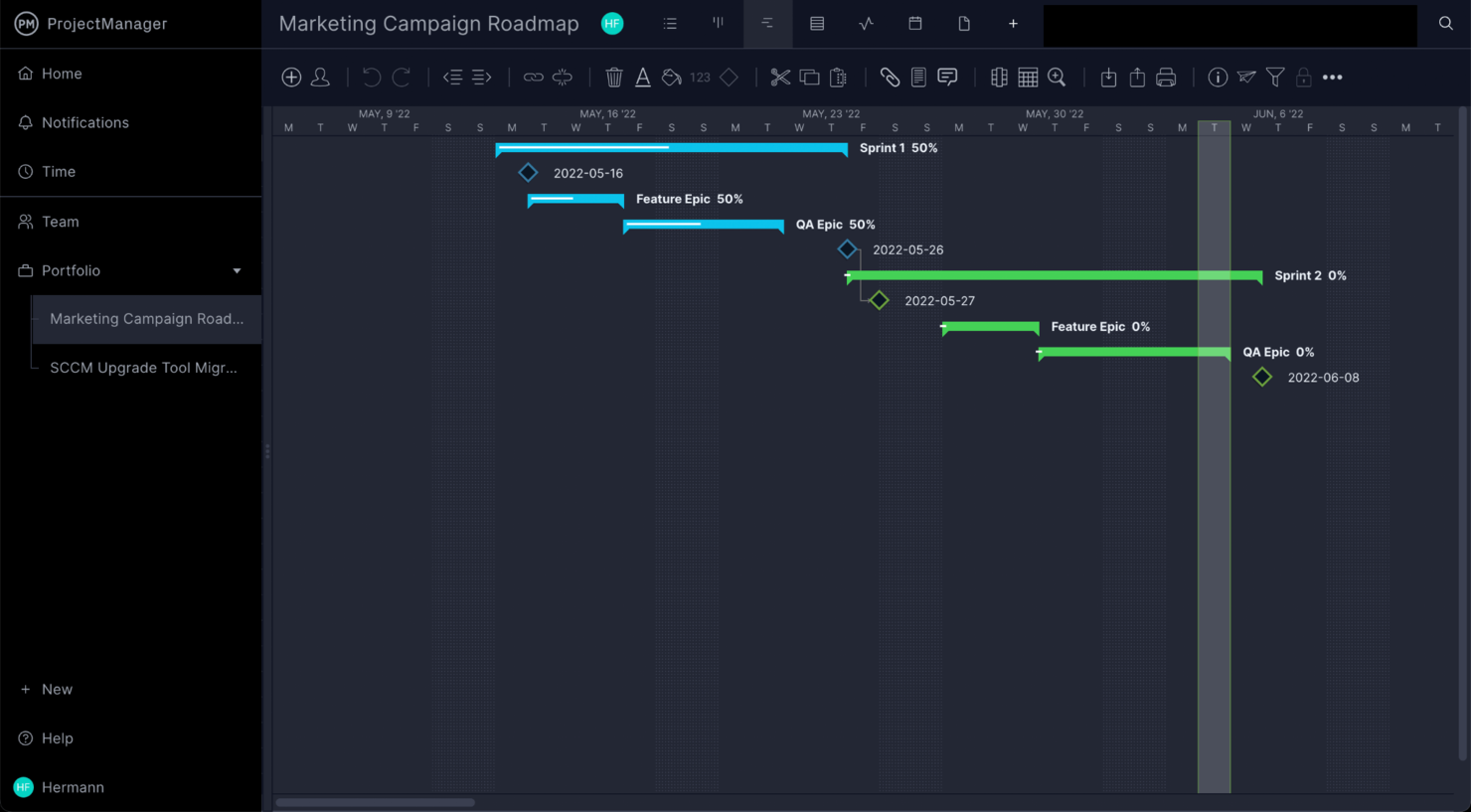
ProjectManager is a project management software tool designed to help improve your team's productivity and efficiency. It offers a range of tools that cater to various aspects of project management, from planning and scheduling to execution and monitoring.
Who Is ProjectManager Best For?
Project directors and operations managers in mid-sized organizations across construction, IT, and engineering. It fits teams that require visual timelines to connect roadmap plans with execution tracking.
Why I Picked ProjectManager
I picked ProjectManager because of its powerful Gantt charts and dashboards. These tools provide a visual representation of your project timelines and deliver real-time data insights, so you and your team stay on track with your goals.
Additionally, the project portfolios feature lets you manage multiple projects at a high level and maintain alignment with your organization's strategic objectives. ProjectManager's AI project insights offer instant summaries of project data, which can help with decision-making.
ProjectManager Key Features
ProjectManager offers a variety of other features that can help you manage your project roadmaps.
- Time Tracking: This lets you and your team log hours directly within the software and gives you a clear overview of time allocation for each project.
- Workflow Automation: You can automate repetitive tasks to streamline processes and help your team focus on critical project activities.
- Kanban Boards: This lets you facilitate task prioritization and execution through a visual drag-and-drop interface, which boosts transparency and collaboration.
- Resource Management: You can track and allocate resources effectively to maintain balanced workloads and optimize team productivity.
ProjectManager Integrations
Integrations include Microsoft Teams, Slack, Jira, Microsoft Project, Power BI, Acumatica, Excel, Office 365, and Trello.
Pros and Cons
Pros:
- Built-in time tracking helps monitor productivity
- Gantt charts help track dependencies and critical paths
- Collaboration tools facilitate effective communication
Cons:
- Extensive features can be overwhelming at first
- Fewer customization options than other tools
Outro software de roteiros de projetos
Eis mais algumas ferramentas que não entraram na minha lista principal, mas que vale a pena considerar.
- Kantree
For customizable project views
- Tempo Roadmapping Software
For task prioritization
- Ravetree
For Gantt chart roadmaps
- Visor
For AI-driven project templates
- GanttPRO
For interactive Gantt chart visualization
- ClickUp
For AI-driven task assignment
- Celoxis
For real-time project tracking
- Scoro
For real-time roadmap planning
- Hive
For goal setting and milestone tracking
- airfocus
For centralizing project management
- GoodDay
For roadmap templates
- TaskRay
For Salesforce-native project delivery
- PathPro
For public and private roadmap sharing
- Productboard
For prioritizing ideas from customer feedback
- Airtable
For its robust database features
- Toggl Plan
For small teams managing simple roadmaps
- TeamGantt
For tracking timelines with clear dependencies


How I Evaluate Project Roadmap Software
Project roadmap software is what teams reach for when they need to communicate not just what's getting built, but when and why—whether that's a PMO presenting a quarterly plan to leadership or a project manager aligning engineering, design, and product around a shared delivery timeline. When I evaluate tools in this space, I think in two layers: what every option needs to do well enough just to earn a spot on the list, and what actually sets one pick apart from another for specific teams and contexts.
Core Functionality (Table Stakes for This List)
For project roadmap software, the core functionality I test and evaluate is:
- Timeline visualization: I check whether the tool supports drag-and-drop Gantt or swimlane views with adjustable time scales from weeks to quarters to years.
- Multiple views: Board, list, calendar, and timeline views should all be available so different stakeholders can consume the same data their way.
- Milestones & dependencies: I look for clear milestone markers and dependency mapping—like flagging that QA can't start until dev completes a sprint.
- Collaboration & sharing: Shareable links, role-based permissions, and real-time commenting matter when a PMO needs to send a read-only roadmap to leadership.
- Custom fields & filtering: Teams label work differently, so I evaluate whether you can add custom statuses, tags, and swimlanes to match your workflow.
- Stakeholder views: I consider whether the tool lets you create filtered, audience-specific versions of one roadmap—an exec summary vs. a team-level plan.
- Export & presentation: Clean PDF, PNG, or PowerPoint exports are non-negotiable when your roadmap needs to land in a board deck or client proposal.
A tool has to deliver most of these capabilities to earn a spot on the list. From there, I consider what sets each tool apart.
Standout Features (What Separates the Picks)
When choosing which project roadmap software to include, I look for strategic alignment features like goal linkages, OKR frameworks, or built-in prioritization scoring that connect roadmap items to business objectives. I also consider the depth of integrations—tools offering live, two-way sync with Jira or Asana make it easier to keep the roadmap in sync with actual project progress. Portfolio-level reporting and cross-roadmap dependencies are especially valuable for organizations managing several parallel initiatives.
What I Weigh Beyond Features
I evaluate how well each tool fits different team sizes and buyer profiles—a five-person team needs fast setup and a free or low-cost tier, while a PMO running dozens of projects needs SSO, granular permissions, and audit trails. Pricing transparency matters too, especially whether viewer seats are free or paid, since roadmaps often have far more consumers than editors. I also consider onboarding quality, like template libraries and guided walkthroughs, because a roadmap tool that takes weeks to configure defeats the purpose.
Como escolher software de roteiros de projetos
É fácil ficar atolado em longas listas de funcionalidades e estruturas de preços complexas. Para o ajudar a manter o foco enquanto percorre o seu processo único de seleção de software, eis uma lista de verificação dos fatores a ter em conta:
| Fator | O que considerar |
|---|---|
| Escalabilidade | Esta ferramenta acompanhará as necessidades da sua equipa à medida que esta cresce? |
| Integrações | A ferramenta integra-se de forma fluida com as aplicações que já utiliza? |
| Personalização | Pode adaptar o software ao fluxo de trabalho específico da sua equipa? |
| Facilidade de utilização | A sua equipa considerará o software fácil de aprender e utilizar? |
| Orçamento | O preço enquadra-se no seu orçamento, tanto agora como à medida que a sua equipa cresce? |
| Medidas de segurança | O software dispõe de medidas de segurança robustas para proteger os seus dados? |
| Colaboração | A ferramenta permite uma colaboração eficaz entre os membros da sua equipa? |
| Ferramentas de relatórios | Pode gerar informações úteis e relatórios que apoiem a tomada de decisões? |
Tendências no software de roteiros de projetos
Na minha pesquisa, recolhi inúmeras atualizações de produtos, comunicados de imprensa e registos de lançamentos de diferentes fornecedores de software de roteiros de projetos. Eis algumas das tendências emergentes que estou a acompanhar:
- Informações baseadas em IA: A IA está a ser utilizada para analisar dados de projetos e sugerir formas de otimizar prazos ou destacar possíveis obstáculos, ajudando os utilizadores a criar um roteiro mais adaptável à mudança. Algumas ferramentas também oferecem análise preditiva para ajudar as equipas a prevenir problemas futuros antes de estes surgirem. Por exemplo, a IA pode analisar dados de projetos anteriores para melhorar a criação de roteiros, sugerindo ajustes às tarefas em tempo real.
- Planeamento de cenários: As ferramentas estão agora a adicionar funcionalidades de planeamento de cenários que permitem às equipas visualizar caminhos e resultados alternativos, facilitando a criação de um roteiro de projeto que se adapta às prioridades em constante mudança. Isto é útil ao criar um modelo de roteiro de programa ou ao ajustar um modelo de roteiro de aplicação a meio do projeto.
- Elementos de gamificação: A gamificação no software de projetos é cada vez mais popular para aumentar o envolvimento das equipas. Ao adicionar distintivos e conquistas pela conclusão de tarefas, estas ferramentas mantêm as equipas motivadas e concentradas nos objetivos do projeto. Algumas ferramentas oferecem inclusivamente um criador de roteiros gratuito com elementos de gamificação, ajudando a recompensar o progresso e a manter as equipas concentradas à medida que avançam pelas diferentes fases do projeto.
- Elementos visuais interativos dos roteiros: Os fornecedores estão a melhorar os elementos visuais dos roteiros para tornar os cronogramas mais intuitivos e interativos, dando aos utilizadores acesso a vistas detalhadas das tarefas sem terem de mudar de ecrã. As equipas também beneficiam de ferramentas de visualização de roteiros de produtos que alternam entre objetivos de alto nível e tarefas específicas, o que é especialmente útil para quem procura saber como criar um roteiro de projeto com todos os detalhes num único local, para facilitar o acesso.
- Acompanhamento da sustentabilidade: Cada vez mais ferramentas de software estão a adicionar funcionalidades para acompanhar o impacto ambiental das atividades e dos recursos dos projetos, tornando o software de mapeamento estratégico uma opção útil para empresas centradas em iniciativas ecológicas. As funcionalidades de acompanhamento da sustentabilidade também permitem às equipas alinhar os marcos dos seus projetos com objetivos ambientalmente responsáveis.
O que é o software de roteiros de projetos?
O software de roteiros de projetos é uma ferramenta de planeamento visual que apresenta os principais resultados, cronogramas e prioridades de um projeto ou programa. Ajuda os gestores de projetos, os responsáveis pelos produtos e as equipas multifuncionais a alinhar a estratégia, acompanhar dependências e ajustar os planos à medida que as prioridades mudam.
As melhores ferramentas suportam tanto uma visão geral descendente como a coordenação ao nível das equipas, tornando-se essenciais para gerir iniciativas complexas e com várias fases.
Funcionalidades
Eis as principais funcionalidades que qualquer bom software de roteiros de projetos deve ter :
- Planeamento visual do cronograma: Pode apresentar tarefas, marcos e resultados num cronograma claro e interativo, para que saiba, juntamente com a sua equipa, o que deve ser entregue e quando.
- Ferramentas de colaboração: Permitem trabalhar com os membros da equipa em tempo real e partilhar comentários, atualizações e ficheiros diretamente no roteiro do projeto, tornando o trabalho em equipa mais simples e envolvente.
- Acompanhamento de marcos: Pode definir, acompanhar e celebrar marcos importantes, ajudando todos a concentrarem-se tanto nos momentos decisivos como nas pequenas conquistas que fazem o projeto avançar.
- Gestão de recursos: Ajuda a acompanhar a carga de trabalho das equipas, atribuir tarefas de forma eficiente, evitar o esgotamento e garantir que ninguém fica subutilizado.
- Modelos personalizáveis: Ajuda a começar a trabalhar mais rapidamente, permitindo escolher entre vários modelos de roteiros que podem ser adaptados aos objetivos e ao estilo específicos do projeto.
- Acompanhamento e relatórios do progresso: Pode verificar o andamento do projeto através de painéis e relatórios integrados e obter informações atualizadas que permitem identificar riscos e sucessos.
- Gestão de dependências: Permite associar tarefas relacionadas, para que as alterações ou os atrasos sejam automaticamente refletidos no cronograma geral e as surpresas sejam reduzidas ao mínimo.
- Capacidades de integração: Deve ser possível estabelecer ligação a ferramentas populares como o Slack, o Jira ou o Trello, para que os fluxos de trabalho e as informações passem facilmente de um local para outro.
- Controlos de permissões: Permitem decidir quem pode ver, editar ou comentar o roteiro, equilibrando a transparência com o controlo e mantendo os planos confidenciais quando necessário.
- Acessibilidade em dispositivos móveis: Pode consultar e atualizar o roteiro a partir de qualquer lugar através da aplicação móvel, mantendo o trabalho em andamento mesmo quando está em movimento.
Funcionalidades comuns de IA do software de roteiros de projetos
Para além das funcionalidades padrão do software de roteiros de projetos, muitas destas soluções oferecem funcionalidades de IA como:
- Priorização automatizada de tarefas: Esta ferramenta de IA pode analisar os detalhes e as dependências do projeto para sugerir quais tarefas devem ser realizadas primeiro e ajudar a manter o foco.
- Identificação preditiva de riscos: O software deteta possíveis estrangulamentos ou atrasos antes de estes se tornarem problemas, para que possa resolver as questões de forma proativa.
- Previsão inteligente de prazos: Esta funcionalidade de IA pode prever se irá cumprir os marcos com base no ritmo da equipa e em dados históricos, proporcionando-lhe um calendário realista.
- Sugestões de otimização de recursos: As ferramentas de IA podem avaliar as cargas de trabalho da equipa e atribuir tarefas para maximizar a eficiência, ajudando todos a manter a produtividade sem se esgotarem.
- Relatórios e informações inteligentes: Terá relatórios gerados automaticamente que destacam o progresso, os riscos e as oportunidades, sem ter de analisar os números por si próprio.
- Atualizações em linguagem natural: O software pode transformar as suas notas rápidas ou conversas em atualizações formais do roteiro, poupando tempo e tornando os relatórios de estado menos trabalhosos.
Benefícios
A implementação de software de roteiro de projeto proporciona vários benefícios à sua equipa e à sua empresa. Eis alguns dos benefícios que pode esperar:
- Planeamento melhorado: Ajuda as equipas a definir as fases do projeto, proporcionando a todos uma visão clara do que tem de ser feito e quando.
- Colaboração reforçada: Permite que os membros da equipa trabalhem em conjunto nas tarefas em tempo real, facilitando as atualizações e a comunicação.
- Melhor distribuição de recursos: Ajuda os gestores a atribuir recursos de forma mais eficaz, visualizando a carga de trabalho e as dependências entre tarefas.
- Maior responsabilização: Acompanha o progresso das tarefas e dos marcos, deixando claro quem é responsável por cada tarefa.
- Alinhamento mais claro dos objetivos: Mantém os objetivos do projeto visíveis, garantindo que cada membro da equipa compreende de que forma o seu trabalho contribui para os objetivos gerais.
- Mitigação de riscos: Permite o planeamento de cenários, ajudando as equipas a prepararem-se para possíveis obstáculos e a minimizar atrasos.
- Decisões baseadas em dados: Disponibiliza ferramentas de elaboração de relatórios que fornecem informações obtidas a partir dos dados do projeto, apoiando decisões mais acertadas ao longo do projeto.
Custos e preços
A escolha de software de roteiro de projeto exige uma compreensão dos vários modelos de preços e planos disponíveis. Os custos variam consoante as funcionalidades, o tamanho da equipa, os complementos, entre outros fatores. A tabela abaixo resume os planos comuns, os respetivos preços médios e as funcionalidades habitualmente incluídas nas soluções de software de roteiro de projeto:
Tabela de comparação de planos de software de roteiro de projeto
| Tipo de plano | Preço médio | Funcionalidades comuns |
|---|---|---|
| Plano gratuito | $0/utilizador/mês | Criação básica de roteiros, acompanhamento limitado de tarefas, vista simples da linha temporal e suporte básico |
| Plano pessoal | $5–$25/utilizador/mês | Vista completa da linha temporal, acompanhamento de marcos, dependências entre tarefas, integrações e acesso ao suporte |
| Plano empresarial | $25–$50/utilizador/mês | Relatórios avançados, ferramentas de colaboração, modelos personalizáveis e planeamento de cenários |
| Plano empresarial avançado | $50–$100/utilizador/mês | Acesso ilimitado a todas as funcionalidades, definições de segurança personalizadas, análise avançada e suporte dedicado |