

10 Melhores Ferramentas Alternativas ao Nifty para Equipas de Projeto em 2026

Seleção das melhores alternativas ao Nifty


O software de gestão de projetos adequado deve facilitar o trabalho em equipa, simplificar os fluxos de trabalho e manter os projetos no caminho certo. Embora o Nifty seja uma excelente opção, pode não ser a escolha perfeita para todas as equipas — talvez precise de mais flexibilidade, de melhores integrações ou de um modelo de preços diferente. No entanto, com tantas alternativas disponíveis, encontrar a opção certa pode parecer uma tarefa avassaladora.
Para simplificar a sua pesquisa, recorri à minha vasta experiência em gestão de projetos para testar e analisar várias alternativas ao Nifty, avaliando os seus pontos fortes na colaboração, na gestão de tarefas e na facilidade de utilização geral.
O que é o Nifty?
O Nifty é um software de gestão de projetos concebido para ajudar as equipas a planear, acompanhar e gerir os seus projetos e tarefas. É normalmente utilizado por gestores de projetos, líderes de equipa e organizações para melhorar a colaboração nos projetos, simplificar os fluxos de trabalho e garantir a entrega atempada dos projetos.
Why Trust Our Software Recommendations
Our team has been testing and reviewing software since 2012. As project managers ourselves, we know how difficult—and important—it is to choose the right software.
For this guide, we evaluated tools using hands-on testing and independent research, scoring tools using our selection criteria. We also draw on insights from industry thought leaders and practicing project management experts.
Our reviews reflect our human editorial judgment, not a sales pitch.
Expert reviewers:
Tabela de comparação das alternativas ao Nifty
Esta tabela de comparação resume os detalhes de preços das minhas principais alternativas ao Nifty:
| Tool | Best For | Trial Info | Price | ||
|---|---|---|---|---|---|
| 1 | Best for managing multiple projects | Free plan + 14-day trial + demo available | From $10/user/month (billed annually) | Website | |
| 2 | Best for all-in-one project management solutions | Free plan available | From $12/user/month | Website | |
| 3 | Best for task management and team productivity | Free plan + trial + demo available | From $10.99/user/month (billed annually) | Website | |
| 4 | Best for client-focused project management | Free plan + 14-day free trial + free demo available | From $9.99/user/month (billed annually) | Website | |
| 5 | Best for enterprise project management | Not available | Pricing upon request | Website | |
| 6 | Best for Microsoft 365 teams managing tasks | 30-day free trial available | From $10.00 | Website | |
| 7 | Best for flat-rate team and client collaboration | Free plan + 30-day free trial (45-day Unlimited trial) + free demo available | From $25/month | Website | |
| 8 | Best for an all-in-one workspace | Free plan + trial available | From $10/user/month | Website | |
| 9 | Best for boards, Gantt, and automation at scale | Free plan + 14-day free trial available | From $9/user/month (billed annually) | Website | |
| 10 | Best for complex project tracking and reporting | 30-day free trial + demo available | From $9/user/month (billed annually) | Website |


Análises das melhores alternativas ao Nifty
Nesta análise, apresentarei as vantagens e desvantagens de cada alternativa ao Nifty. Abordarei as suas funcionalidades e os melhores casos de utilização para o ajudar a tomar uma decisão informada.

Wrike
Best for managing multiple projects
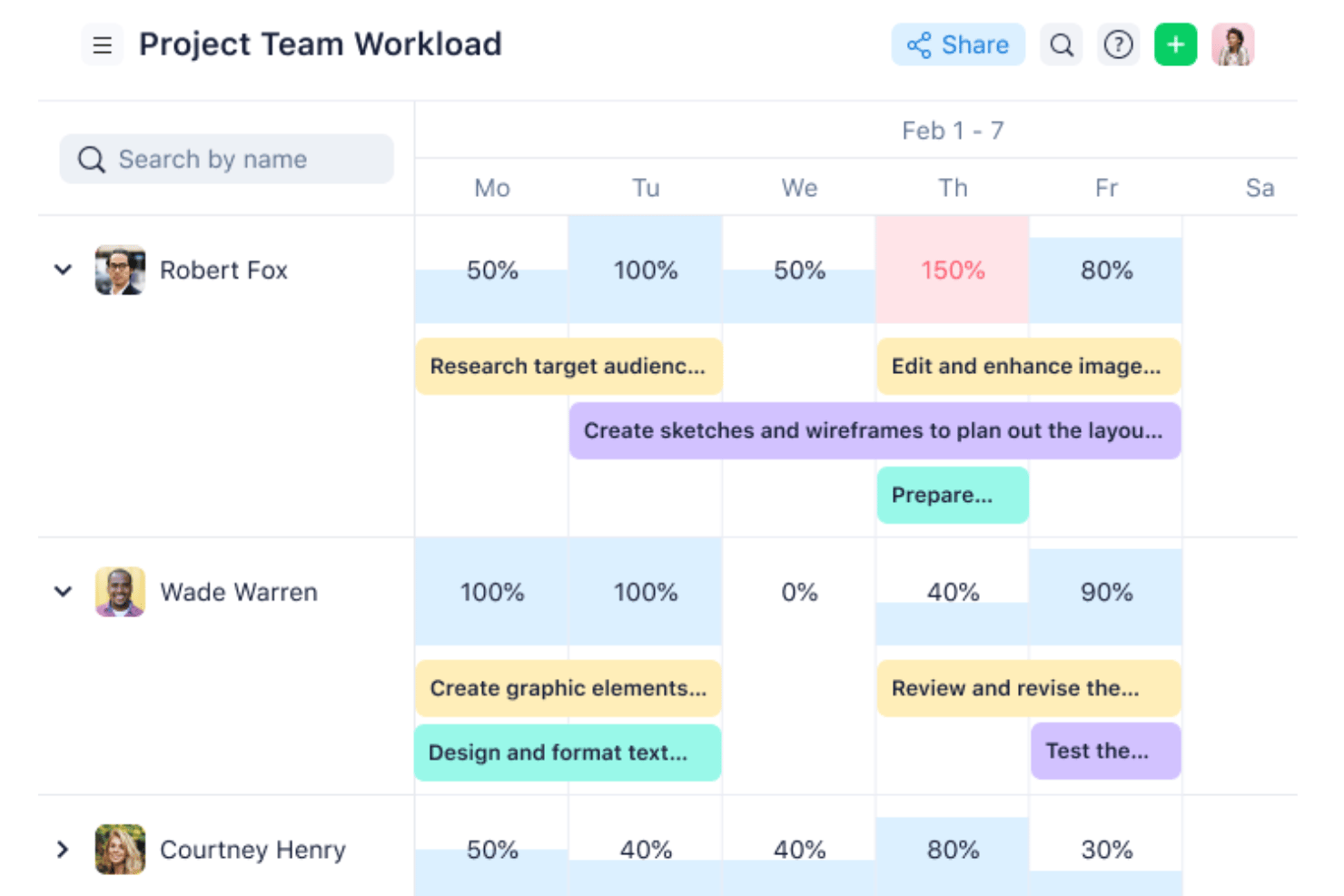
Wrike is a work management platform with multi-project tracking, Gantt charts, customizable dashboards, workload charts, and automation that scales from small teams to enterprise-level portfolio oversight.
Who Is Wrike Best For?
Wrike fits project managers and operations teams running multiple concurrent projects who need cross-project visibility, workload balancing, and scalable automation in one place.
Why I Picked Wrike
Wrike earns its spot on my shortlist because it's purpose-built for running multiple projects at once without losing visibility across any of them. I particularly like how workload charts let you see exactly where each person is allocated across every active project, so you can redistribute tasks before someone becomes a bottleneck. Cross-project dashboards pull live data from multiple spaces simultaneously, giving you a single view of progress without manually chasing status updates.
Wrike Key Features
- Dynamic request forms: Collect and route incoming work requests from internal or external stakeholders directly into your projects.
- Automated progress calculation: Track project completion as a percentage based on task count or duration, updated automatically as work moves forward.
- Time tracking: Log hours worked by team members and contractors from the Business plan, with data that can inform budget and finance workflows.
- 400+ pre-built native integrations: Connect Wrike to tools like Slack, Jira, Salesforce, and GitHub, with an open REST API and Wrike Integrate for custom connections.
Wrike Integrations
Wrike offers 400+ pre-built native integrations, including Jira, GitHub, Slack, Microsoft Teams, Google Drive, Salesforce, and QuickBooks Online. It also provides an open REST API and Wrike Integrate for custom connections and workflow automation.
Pros and Cons
Pros:
- Dependencies reschedule linked task dates
- Workload charts reveal capacity bottlenecks
- Dashboards reduce cross-project status chasing
Cons:
- Comments don’t replace direct messaging
- Workspace setup can complicate navigation
New Product Updates from Wrike
Wrike Expands Gantt Planning, Approvals, and AI Work Intake
Wrike adds cross-project Gantt dependencies, flexible approval routing, and AI work intake through Wrike MCP. These updates give teams more control over planning, decision-making, and incoming work. For more information, visit Wrike’s official site.

ClickUp
Best for all-in-one project management solutions
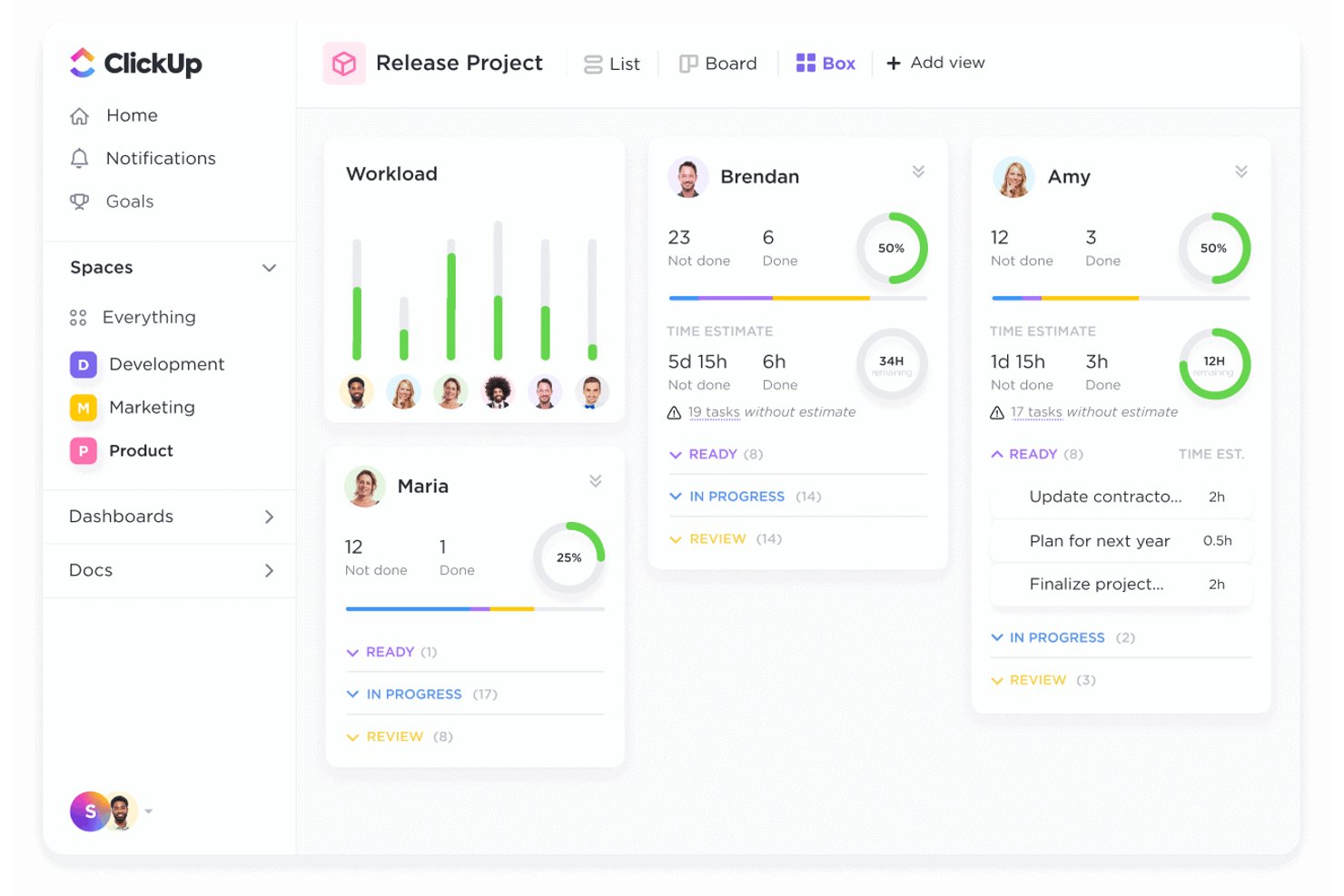
ClickUp is an all-in-one work platform that brings together task management, multiple project views, collaborative Docs, team chat, goal tracking, and portfolio-level reporting in a single workspace.
Who Is ClickUp Best For?
ClickUp is a strong fit for cross-functional teams that want to manage tasks, docs, and communication without juggling multiple tools.
Why I Picked ClickUp
ClickUp earns its spot on my shortlist because it genuinely replaces the need for multiple tools, bringing tasks, Docs, Chat, and portfolio reporting into one workspace. I particularly like the Portfolio cards, which automatically calculate progress across multiple projects by counting completed tasks, showing milestones, and surfacing time tracked. Sprint management, task dependencies, and custom statuses let my team model almost any delivery workflow without reaching for another app.
ClickUp Key Features
- Collaborative Docs: Create and edit rich documents with nested pages, task links, version history, and real-time team editing.
- Built-in automations: Set rule-based triggers to automatically update task statuses, assignments, and notifications across your workspace.
- Multiple project views: Switch between List, Board, Gantt, Timeline, Workload, Calendar, and more to visualize work your way.
- Guest permissions: Share specific Folders, Lists, or tasks with external collaborators and control access at the view, comment, or edit level.
ClickUp Integrations
ClickUp offers 1,000+ integrations, including native Slack, GitHub, GitLab, HubSpot, Google Drive, Dropbox, Google Calendar, Figma, Zoom, and Microsoft Teams integrations. It also provides an API, webhooks, MCP Server, OAuth, and Zapier for custom connectivity.
Pros and Cons
Pros:
- Sprint tracking pairs with task dependencies
- Docs and chat keep project context together
- Portfolio cards roll up cross-project progress
Cons:
- Client guest access can add seat costs
- Workspace setup takes time to configure
Asana
Best for task management and team productivity
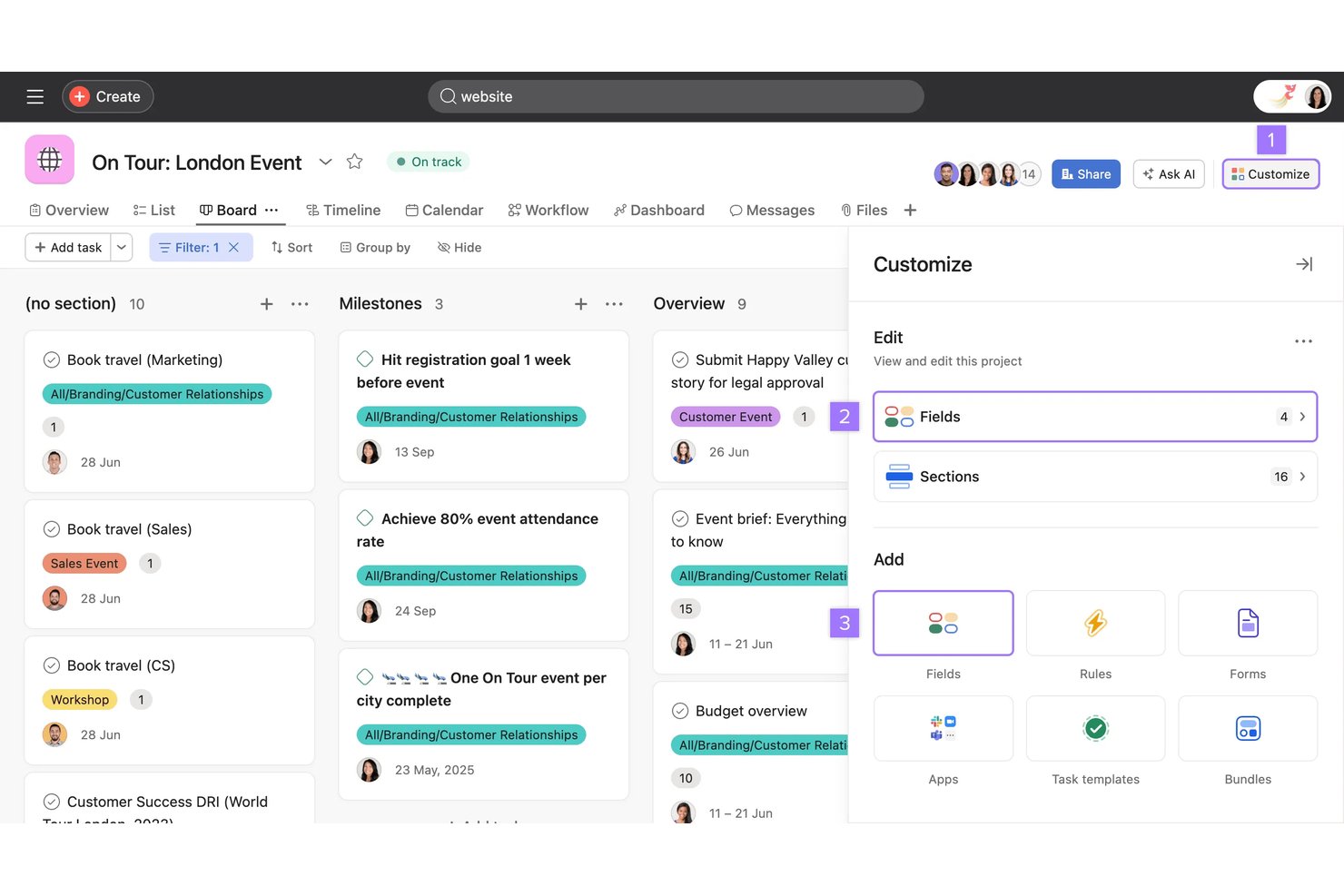
Asana is a work management platform that combines task tracking, project planning, goal setting, and workflow automation across list, board, timeline, and Gantt views.
Who Is Asana Best For?
Asana is a strong fit for cross-functional teams that need to coordinate work across product, engineering, and operations without losing visibility into who owns what.
Why I Picked Asana
Asana earns its spot on my shortlist because it sets the bar for task management, making it easy to see exactly who owns what across every workstream. I particularly like how tasks can live in multiple projects simultaneously, so when my team is running a cross-functional campaign across product, design, and legal, each group sees only their slice without losing the full picture. Dependency tracking surfaces blockers before they become delays, which is where Asana genuinely pulls ahead.
Asana Key Features
- Goal tracking: Connect tasks and projects directly to company, team, and individual goals, with progress that updates automatically as work is completed.
- Workflow automation rules: Set up trigger-based rules to auto-assign tasks, update fields, and route work without manual intervention.
- Multi-project task assignment: Add a single task to up to 20 projects simultaneously, keeping updates synced across all of them.
- Reporting dashboards: Visualize project data through customizable charts and insights available from the Starter plan onward.
Asana Integrations
Asana offers hundreds of marketplace integrations, including Jira Cloud, Slack, Google Workspace, Microsoft Teams, Salesforce, GitHub, and Google Drive. Its REST API, webhooks, SDKs, and MCP server support custom connections.
Pros and Cons
Pros:
- Portfolio views clarify cross-project workload
- Tasks stay synced across multiple projects
- Dependencies expose blockers across workstreams
Cons:
- Notifications can bury important project updates
- Comment threads stop at one reply level

Best for client-focused project management
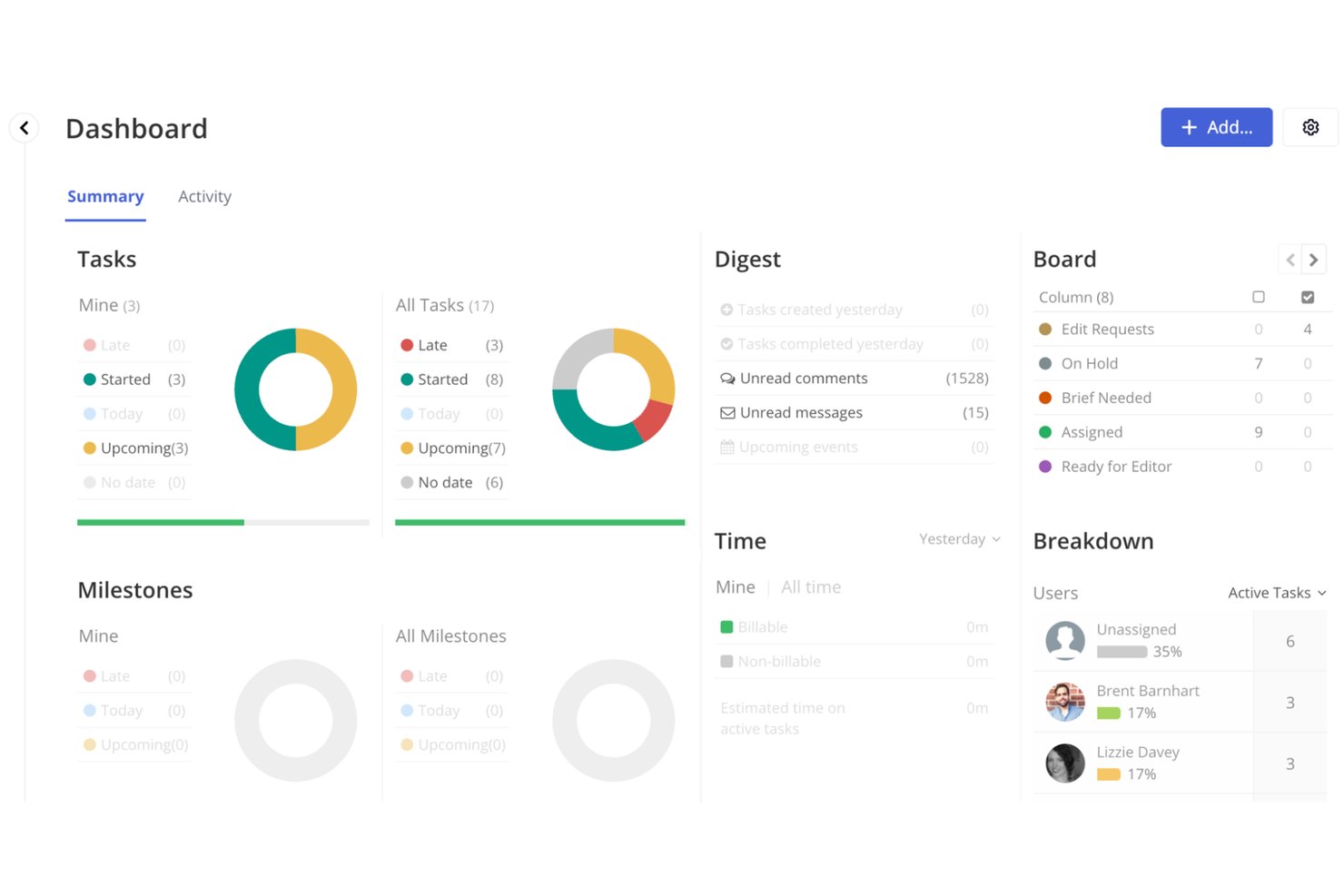
Teamwork.com is a project and resource management platform built around client work, combining task tracking, Gantt and board views, time logging, invoicing, and client collaboration tools in one place.
Who Is Teamwork.com Best For?
Teamwork.com is a strong fit for agencies and service teams that need to manage client deliverables, track billable time, and invoice directly from project work.
Why I Picked Teamwork.com
I've included Teamwork.com in my top picks because it's built specifically around client work in a way most project tools aren't. I love that you can log billable time against tasks, then generate client invoices directly from those logged hours without ever leaving the platform. The client portal lets external stakeholders view files, complete tasks, and reply to messages inside the actual project, keeping feedback loops tight and client communication on the record.
Teamwork.com Key Features
- Project portfolios: View and manage multiple projects in one place, with health and progress data rolled up across your entire portfolio.
- Workflow automation: Set trigger-based automations to move tasks, update statuses, or notify team members automatically.
- Workload and capacity planning: See each team member's assigned work and available capacity to spot bottlenecks and reassign tasks.
- Intake forms: Collect project or task requests from clients or internal teams and convert form submissions directly into tasks.
Teamwork.com Integrations
Teamwork.com advertises 150+ integrations, including Slack, Microsoft Teams, Google Drive, Salesforce, NetSuite, QuickBooks, and HubSpot. It supports API and webhook access, an MCP server, and Zapier.
Pros and Cons
Pros:
- Cross-project workload and financial visibility
- Clients comment within project workflows
- Billable hours feed client invoicing
Cons:
- Agile sprint and backlog workflows feel limited
- Dense projects can make navigation cluttered

Best for enterprise project management
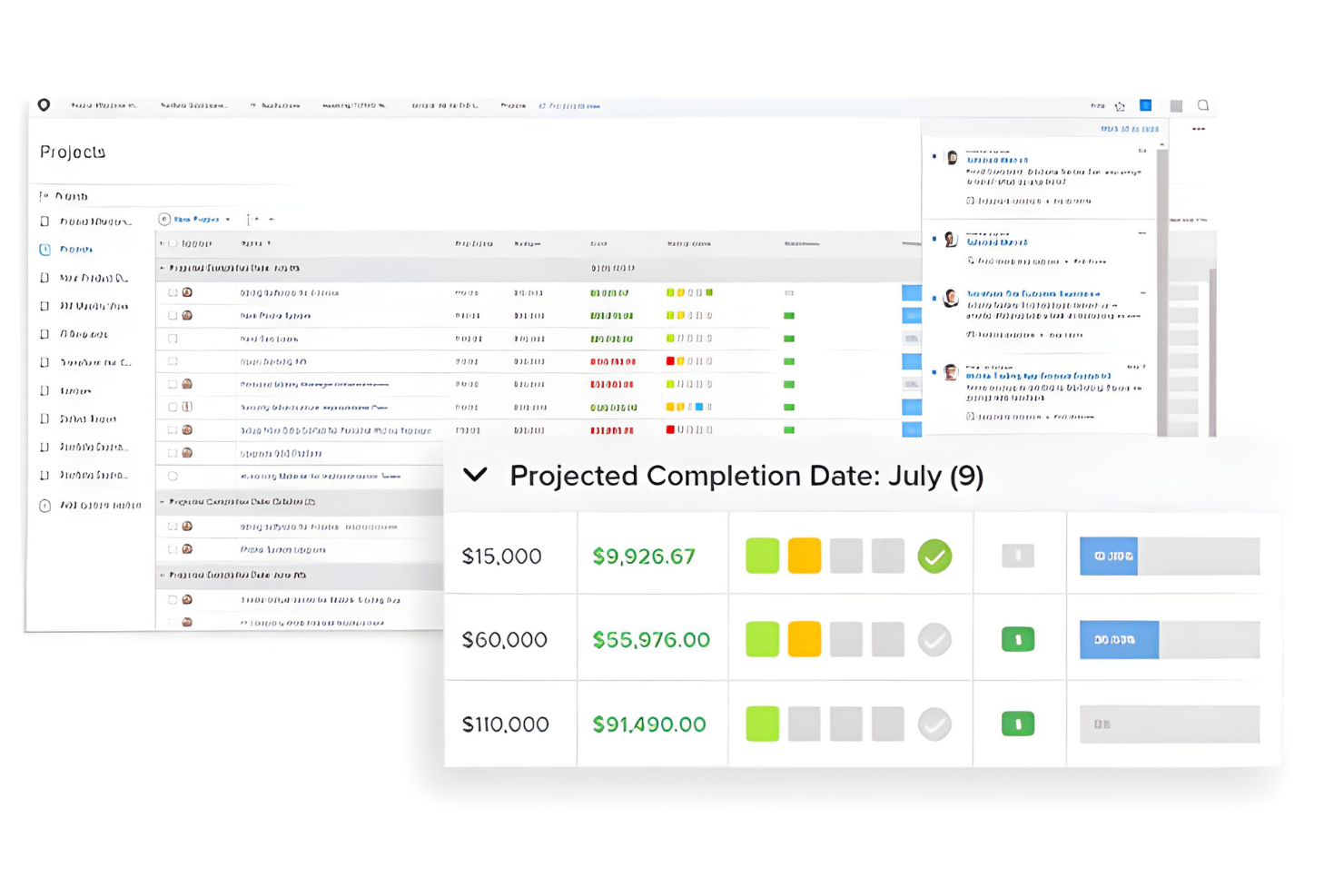
Adobe Workfront is an enterprise work management platform that combines project and task tracking, resource planning, portfolio management, and review and approval workflows across cross-functional teams.
Who Is Adobe Workfront Best For?
Adobe Workfront is built for large organizations and enterprise teams managing complex, cross-functional work across product, marketing, and operations.
Why I Picked Adobe Workfront
Adobe Workfront earns its spot on my shortlist because it's genuinely built for enterprise-scale project management in a way most tools aren't. I particularly like how the Workload Balancer gives resource managers daily, weekly, or monthly visibility into team allocations across projects, flagging overallocations in red so nothing slips through. Portfolio management tools let you prioritize competing projects against shared budgets and resources, which is exactly what large cross-functional teams need when Nifty starts showing its limits at scale.
Adobe Workfront Key Features
- Online proofing: Centralize feedback on digital content using markup tools, versioning, and secure digital sign-off across single-stage, multistage, sequential, or parallel approval workflows.
- Work intake and request routing: Capture incoming work through custom forms and request queues, with auto-routing and approval workflows to process requests.
- Gantt chart views: Visualize task and project timelines with options to display assignments, percent complete, critical path, milestones, predecessors, and progress status.
- AI Collaborators: Create, register, and manage AI agents in a governed registry and assign them work alongside people using shared project and task context.
Adobe Workfront Integrations
Adobe Workfront has documented integrations with Slack and Microsoft Teams, plus document links to Google Drive, Box, Dropbox, OneDrive, and SharePoint. It also offers REST APIs and webhooks for custom connections.
Pros and Cons
Pros:
- Proofing keeps creative approvals within project workflows
- Resource views expose workload imbalances across projects
- Portfolio prioritization connects competing projects and resources
Cons:
- External clients cannot access ordinary work items
- Workflow setup can demand substantial configuration
Best for Microsoft 365 teams managing tasks
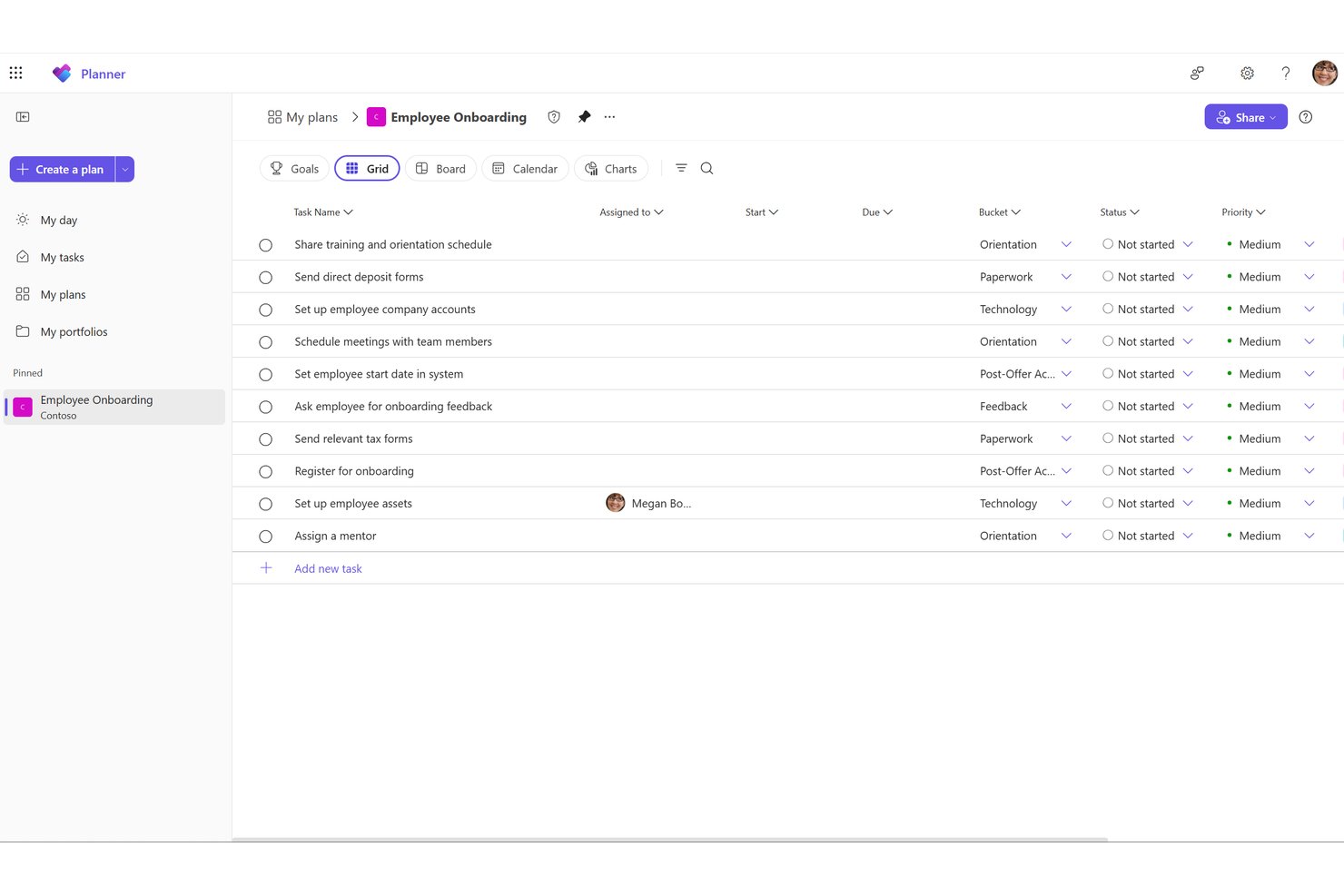
Microsoft Planner is a task and project management tool built into the Microsoft 365 ecosystem that brings together task boards, timelines, portfolio views, and team collaboration across Teams, Outlook, and the web.
Who Is Microsoft Planner Best For?
Microsoft Planner is a strong fit for teams already embedded in the Microsoft 365 ecosystem who want task tracking without adopting a separate tool.
Why I Picked Microsoft Planner
Microsoft Planner earns its spot on my shortlist because it's the only tool here that's already inside your Microsoft 365 tenant, meaning your team doesn't adopt anything new. I particularly like how tasks, timelines, and team chat connect directly through Teams and Outlook, so conversations stay attached to the actual work. The board and schedule views cover daily task tracking well, and the portfolio view lets you monitor multiple plans' progress from one place.
Microsoft Planner Key Features
- Task buckets: Organize tasks into customizable buckets within a plan to group work by category, stage, or team.
- Guest access: External users can create, edit, and comment on tasks directly within a shared plan.
- Excel export: Export a plan's full task details to a spreadsheet for cross-plan analysis and reporting outside Planner.
- Power Automate connector: Trigger and automate task workflows using built-in task-created and task-completed triggers on basic plans.
Microsoft Planner Integrations
Microsoft Planner offers native integrations across the Microsoft ecosystem, including Microsoft Teams, Outlook, SharePoint, Copilot, and Power Automate. Its Microsoft Graph Planner API supports custom integrations.
Pros and Cons
Pros:
- Buckets keep everyday team work organized
- Charts surface progress at a glance
- Clear task ownership reduces follow-up
Cons:
- No dedicated client portal or branded view
- Cross-project workload visibility remains limited

Basecamp
Best for flat-rate team and client collaboration
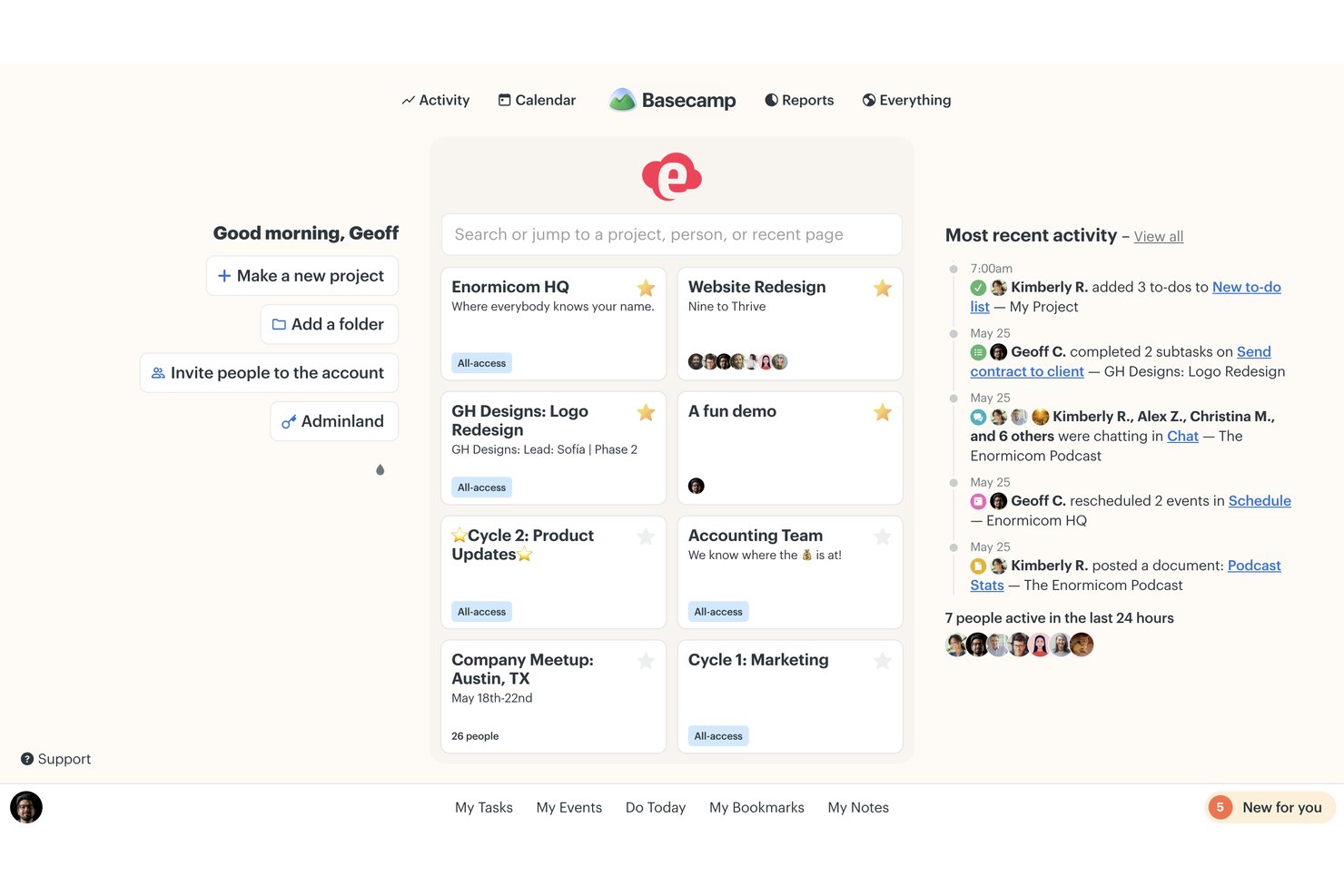
Basecamp is a project management platform built around flat-rate pricing that combines to-do lists, kanban-style Card Tables, message boards, group chat, calendars, and file sharing in a single project workspace.
Who Is Basecamp Best For?
Basecamp suits small teams and agencies that need a single place to manage client projects without paying per seat.
Why I Picked Basecamp
Basecamp earns its spot on my shortlist because flat-rate, per-account pricing means you can add clients directly to projects without watching your seat count climb. I especially like how client visibility controls let you hide work-in-progress from clients on a project-by-project basis, so you're only sharing what's ready. Paired with Message Boards that keep decisions threaded and searchable, it keeps client collaboration contained in one place rather than scattered across email chains.
Basecamp Key Features
- Campfire group chat: A real-time chat space built into each project for quick conversations, file sharing, and informal team communication.
- Hill Charts: A visual progress tracker that shows where each piece of work sits on a curve, helping you spot what's moving and what's stuck.
- Automatic Check-ins: Scheduled recurring questions sent to your team that collect and store responses directly inside Basecamp.
- The Lineup: A cross-project timeline that maps projects by start and end dates, showing overlaps and key milestones at a glance.
Basecamp Integrations
Basecamp offers marketplace integrations including Unito for Jira and GitHub, Zoho Flow for Jira Cloud and Slack, Git Helpers for GitHub pull requests, and Zapier. It also provides a REST API, SDK, OpenAPI specification, CLI, and webhooks for custom integrations.
Pros and Cons
Pros:
- Card Tables show work moving through stages
- Project conversations stay attached to deliverables
- Clients see only approved project work
Cons:
- Basic reports offer little workload insight
- No task dependencies for complex delivery
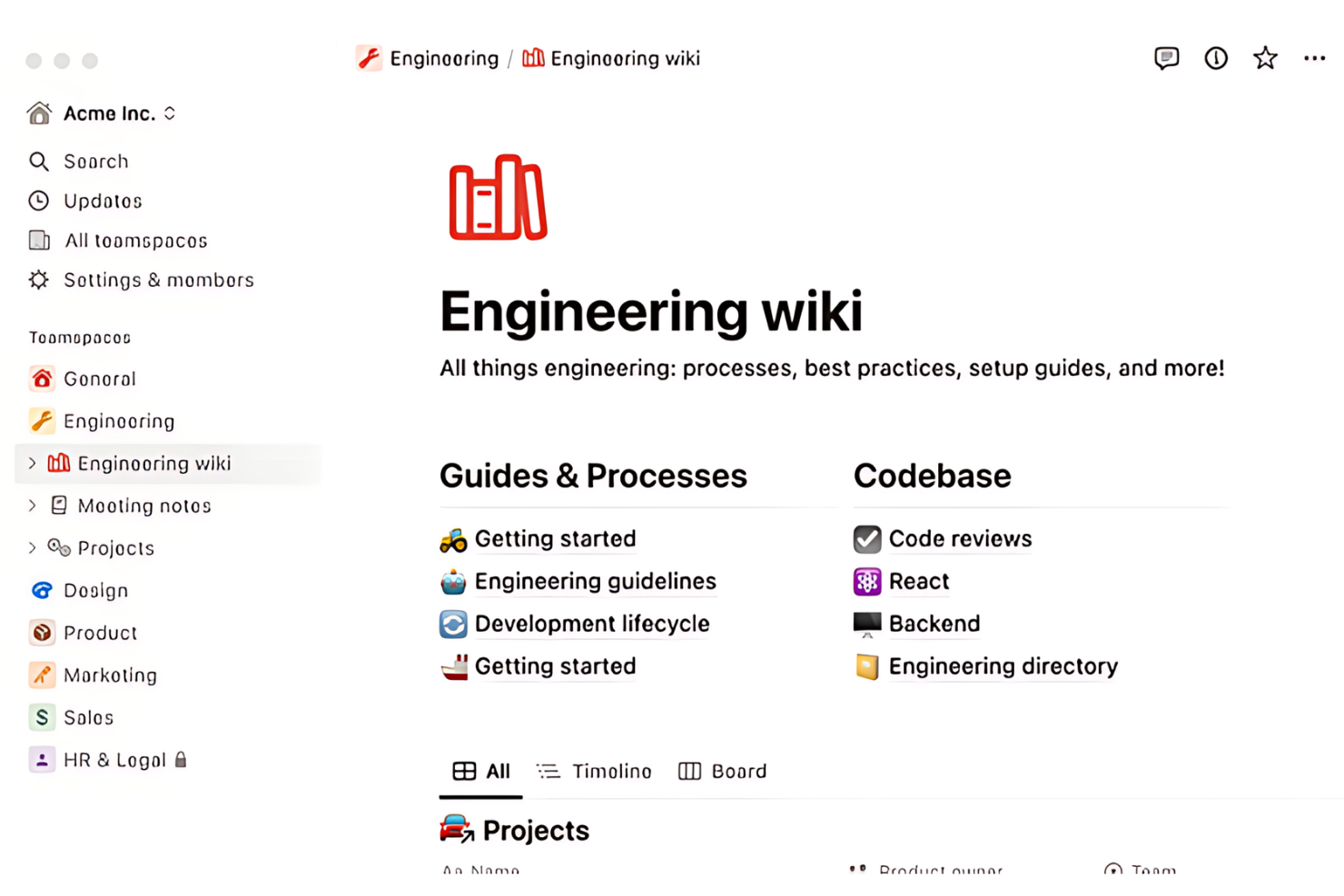
Notion is a flexible workspace platform that combines project databases, task tracking, docs, wikis, and multi-view project management into a single connected environment.
Who Is Notion Best For?
Notion works well for teams that want to manage projects, documentation, and knowledge in a single workspace rather than juggling multiple tools.
Why I Picked Notion
I picked Notion as one of the best because it genuinely replaces a stack of tools rather than just adding to one. I love how project databases, task tracking with subtasks and dependencies, and full documentation all live in the same connected workspace, so my team isn't bouncing between a PM tool and a wiki. Switching the same database between timeline, board, and calendar views means I can run a sprint and a roadmap side by side without duplicating any data.
Notion Key Features
- Subtasks and dependencies: Break tasks into subtasks, assign them to team members, and link tasks by dependencies in timeline view to surface blocked work.
- Database automations: Set up automated actions on paid plans to handle task flows, bug reports, and document outlines based on database triggers.
- Repeating database templates: Schedule recurring tasks, meeting notes, or documents daily, weekly, monthly, or yearly using automated template creation.
- Granular database permissions: Control row-level access in project databases based on assignment or ownership, available on Business and Enterprise plans.
Notion Integrations
Notion offers marketplace integrations with Slack, Google Drive, GitHub, Microsoft Teams, Figma, Jira, and Linear, plus native connections with Google Calendar, Outlook Calendar, and Apple Calendar. It also provides a public API, webhooks, MCP, SDK, and Workers for custom integrations.
Pros and Cons
Pros:
- Dependencies and subtasks clarify blocked work
- One database supports board and timeline views
- Project notes and tasks stay connected
Cons:
- Client access controls feel awkward to manage
- Complex databases take time to configure
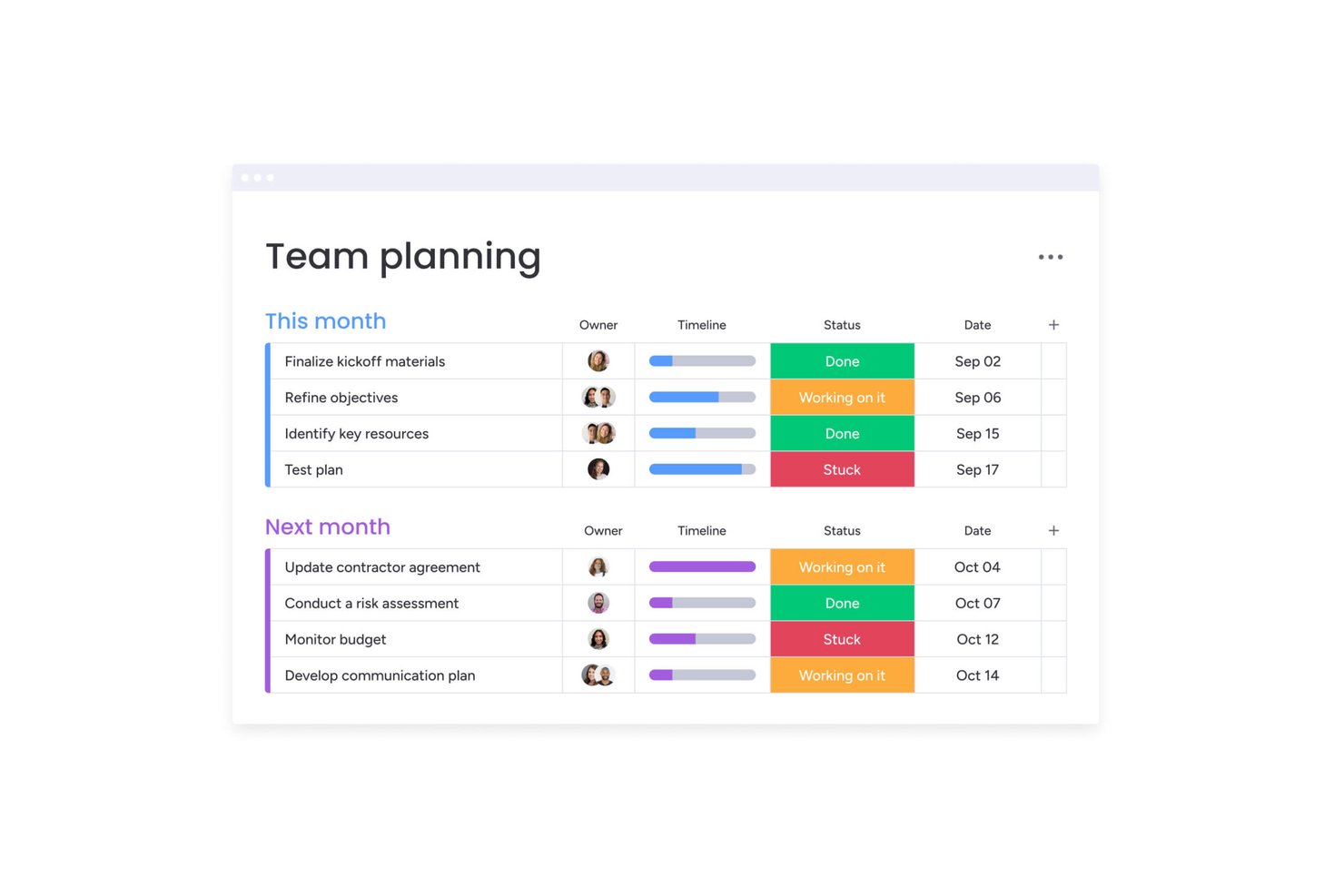
monday work management is a project and work management platform that brings together customizable boards, multiple project views, Workdocs, automations, and integrations to help teams plan, assign, and track work across projects.
Who Is monday work management Best For?
monday work management fits teams that need to manage multiple projects at once and want a single place for boards, timelines, and automated workflows without stitching together separate tools.
Why I Picked monday work management
monday work management earns its spot on my shortlist because of how well its boards, Gantt views, and automations work together at scale. I love that you can set up project boards with dependency columns and milestone markers that automatically reflect across both Timeline and Gantt views, so your whole project schedule stays in sync without manual updates. Automations handle recurring tasks and status-triggered actions, which means less time chasing progress and more time actually running the project.
monday work management Key Features
- Workdocs: Co-edit documents with your team in real time, with comments, @mentions, and live board data embedded directly in the doc.
- Updates section: Leave comments, attach files, and @mention teammates directly on a task or project item to keep conversations tied to the work.
- Progress tracking column: Automatically calculate task completion percentages based on the status columns you select, so project health updates as work moves forward.
- 850+ integrations: Connect monday work management to tools like Slack, GitHub, GitLab, HubSpot, and QuickBooks to centralize work across your existing stack.
monday work management Integrations
monday work management supports 850+ integrations and apps, including Slack, Microsoft Teams, Google Calendar, Google Drive, GitHub, GitLab, Jira, Salesforce, HubSpot, and QuickBooks. Its GraphQL API and SDKs support custom integrations.
Pros and Cons
Pros:
- Automations reduce recurring status and assignment follow-up
- Gantt and timeline views reflect shared project data
- Boards keep dependencies, owners, and deadlines visible
Cons:
- Reporting needs setup and lacks specialist depth
- Complex board setups take time to organize
Smartsheet
Best for complex project tracking and reporting
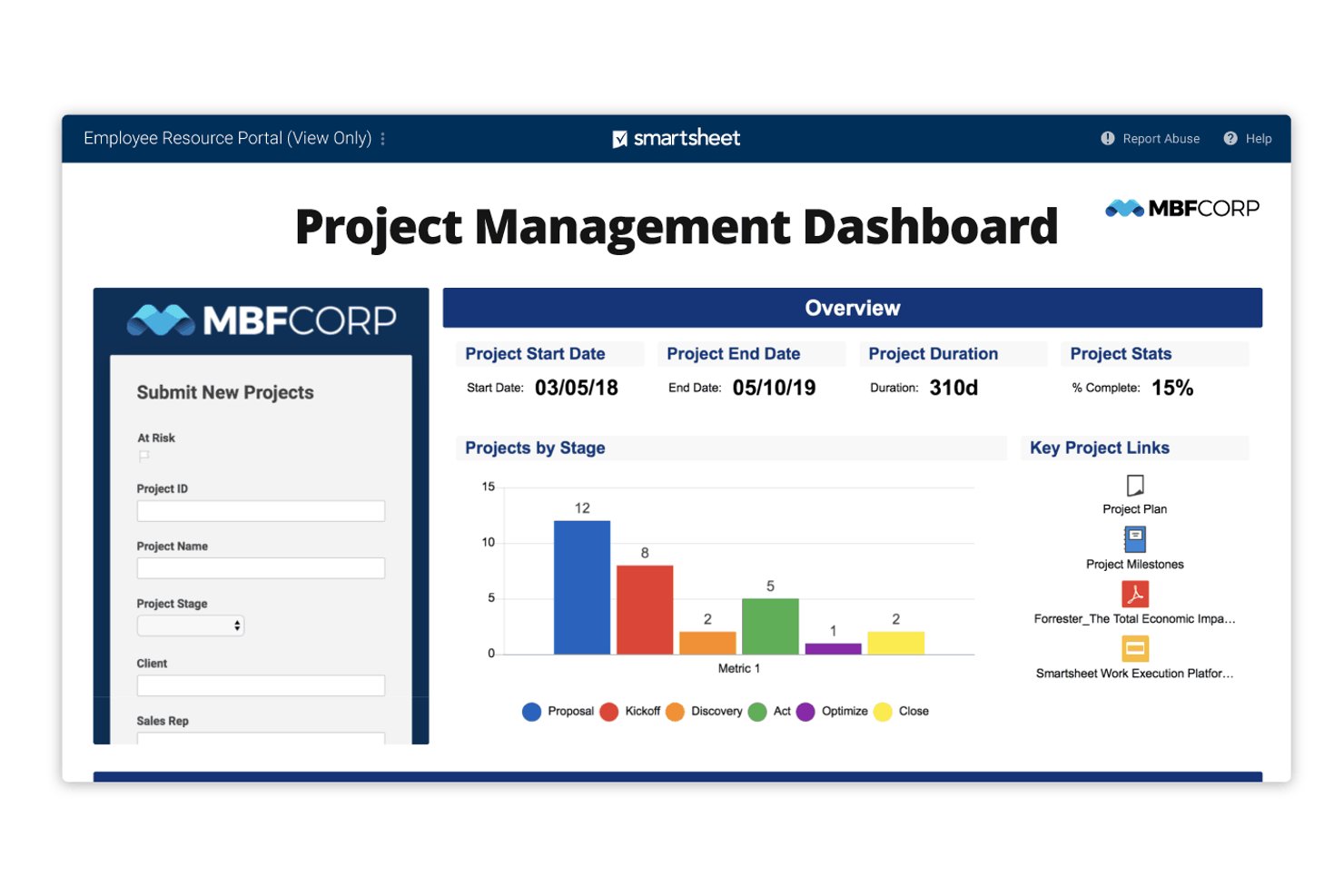
Smartsheet is a spreadsheet-style work management platform that combines project tracking, Gantt charts, Kanban boards, automated workflows, cross-sheet reporting, and portfolio-level dashboards.
Who Is Smartsheet Best For?
Smartsheet is a strong fit for project managers and operations teams running multiple complex projects who need deep reporting and cross-project visibility.
Why I Picked Smartsheet
I've included Smartsheet in my top picks because it handles complex, multi-project tracking better than almost anything else I've used. Live cross-sheet reports pull task status, milestones, and budget data from across projects into a single view, and Control Center can automatically roll new projects into portfolio summary sheets the moment they're created. That level of reporting depth is genuinely hard to replicate in a simpler tool.
Smartsheet Key Features
- No-code workflow automation: Build trigger-based workflows that assign tasks, send reminders, lock rows, and request approvals without writing any code.
- Multiple project views: Switch between Grid, Gantt, Card, Calendar, Board, and Timeline views, with changes synced across all views in real time.
- External collaborator access: Share specific sheets or reports with free Guest or Contributor seats, controlling whether they can view, comment, or edit.
- AI-assisted data analysis: Use Smart Assist to ask questions about your sheets, summarize project status, and surface risks or dependencies through conversation.
Smartsheet Integrations
Smartsheet offers over 175 integrations, including Jira Software, Slack, Microsoft Teams, Google Drive, Salesforce, Power BI, Tableau, and DocuSign. It also provides a REST API, MCP server, client SDKs, and Zapier.
Pros and Cons
Pros:
- Automations assign tasks and send reminders
- Gantt and board views share project data
- Live reports roll up cross-project status
Cons:
- Advanced dashboards take time to configure
- Cross-sheet formulas can require workarounds
New Product Updates from Smartsheet

Smartsheet Adds Non-Plan User Management in Admin Center
Smartsheet adds a Non plan users tab to the Seat types and true-up page in Admin Center. This lets system admins review non-plan users and add them to the plan or remove them from the organization in one place. For more information, visit Smartsheet’s official site.
Outras alternativas ao Nifty
\u003cspan style=\u0022font-weight: 400\u0022\u003eSegue-se uma lista de alternativas adicionais ao Nifty que selecionei. Embora não tenham chegado às 10 melhores, continuam a ser opções valiosas que merecem uma análise mais aprofundada.\u003c/span\u003e
- Hive
For team collaboration and productivity
- Zoho Projects
For Zoho ecosystem project tracking
- Paymo
For billing clients from tracked time
- Jira
For agile tracking across dev and ops teams
- Kantata
For services firms tracking project financials
- ProofHub
For flat-rate unlimited-user pricing
- Airtable
For database-driven project tracking
- Productive
For agency billing tied to project delivery
- Bonsai Agency Software
For agencies billing from tracked time
- TeamGantt
For Gantt-first timeline scheduling


Análises relacionadas de software de gestão de projetos
Se ainda não encontrou aqui o que procura, consulte estas outras ferramentas relacionadas que testámos e avaliámos:
- Software de gestão de recursos
- Software de automatização de fluxos de trabalho
- Software de controlo de tempo
- Criador de gráficos de Gantt
- Ferramentas de produtividade
- Software de acompanhamento de projetos
- Software de planeamento de projetos
- Alternativas ao Notion
How I Evaluate Nifty Alternatives
I split my evaluation into three parts, in order: core functionality carries the most weight, including assigning tasks, tracking deadlines, and seeing project progress. Then I look for differentiators such as client portals or portfolio rollups. Finally, I consider factors beyond features, like pricing, onboarding, and migration support.
Core Functionality (Table Stakes For This List)
When I'm selecting tools for my list, I score each one on a scale from 0 (does not offer the functionality) to 5 (excels in this area) for each core functionality listed below. I then convert the total into a percentage to help assess each tool's overall fit, with extra weight on any functionalities I’ve deemed essential.
- Task & Project Tracking (Essential): I check whether teams can assign owners, set due dates, track statuses, and manage dependencies across projects.
- Multiple Views (Essential): I look for consistent list, board, calendar, and timeline views so teams can plan work and spot schedule changes.
- Team Collaboration: I assess whether comments, mentions, notifications, or chat keep decisions tied to the work they affect.
- Milestones & Progress: I check whether teams can set milestones and track project progress against task completion.
- Files & Docs: I look for organized project files and collaborative documents connected to the tasks and decisions they support.
- Reporting & Workload: I evaluate dashboards for project progress, team capacity, and bottlenecks across concurrent work.
Once I have a list of tools that meet the criteria, I consider what sets each platform apart.
Differentiating Factors (What Sets Vendors Apart)
Here's how I compare and contrast different vendors:
Standout Features
I look for client portal access that lets agencies share deliverables without exposing internal notes or draft work. Portfolio-level rollups matter just as much—I check whether a tool can surface progress, budgets, and resourcing across ten or more active projects in a single dashboard. I also evaluate built-in automations, like auto-assigning tasks when a status changes, since those cut down on repetitive project upkeep that eats into planning time.
Beyond Features
I check whether guest and client seats come at reduced cost or require full licenses—agencies adding a dozen client reviewers can see bills climb fast on per-user plans. Migration support matters just as much, especially task and document import tools that preserve project history instead of forcing a manual rebuild. I also evaluate role-based permissions and audit logs, since teams juggling multiple external stakeholders need tight control over who sees what.
Por que motivo procurar uma alternativa ao Nifty
Embora o Nifty seja um software valioso, pode estar à procura de uma alternativa se:
- Precisa de software a um custo mais baixo: O Nifty é um software relativamente barato. No entanto, se gerir uma pequena empresa ou precisar de mais lugares, poderá necessitar de uma opção mais económica.
- Procura funcionalidades mais avançadas: Embora o Nifty disponibilize funcionalidades como automação e controlo do tempo, a sua equipa poderá precisar de funcionalidades mais avançadas, como segurança e visualização de dados.
- Procura uma interface de utilizador melhor: O Nifty disponibiliza uma interface de utilizador simples, mas os utilizadores poderão precisar de uma interface mais intuitiva e organizada para ajudar a simplificar os processos.
- Precisa de integrações mais compatíveis: O Nifty disponibiliza várias integrações às equipas, mas, se não se adequar bem à sua atual pilha tecnológica, poderá precisar de uma solução alternativa.
- Procura uma solução escalável: À medida que a sua empresa cresce, precisa de um software que cresça consigo. O Nifty poderá ter sido útil no passado, mas, se já o ultrapassou, poderá ser altura de procurar uma solução diferente.
As alternativas podem proporcionar benefícios únicos que o Nifty poderá não oferecer, como preços mais acessíveis, funcionalidades especializadas ou melhores capacidades de integração. Com a solução certa, pode maximizar a colaboração da equipa, a produtividade e a rentabilidade.
Principais funcionalidades do Nifty
Eis algumas das principais funcionalidades do Nifty para o ajudar a comparar e encontrar a alternativa certa para as necessidades da sua equipa:
- Roteiros (gráfico de Gantt): Acompanhe os prazos dos seus projetos com gráficos de Gantt que proporcionam um roteiro claro e visual. Acompanhe facilmente os marcos, defina dependências e garanta que todos estão alinhados com os objetivos do projeto.
- Gestão de tarefas: Mantenha o seu trabalho organizado com vistas de tarefas flexíveis, como Kanban e Lista. Personalize os fluxos de trabalho, atribua responsabilidades e acompanhe o progresso de uma forma adequada ao fluxo de trabalho da sua equipa.
- Discussões: Melhore a colaboração com conversas em tempo real e videochamadas integradas. Mantenha todas as conversas relacionadas com o projeto num só lugar para simplificar a comunicação e reduzir as discussões dispersas por várias ferramentas.
- Criação de documentos: Crie, edite e partilhe documentos de projeto diretamente no Nifty. Com a integração com o Google Docs, pode colaborar no conteúdo de forma simples, sem alternar entre plataformas.
- Formulários: Recolha dados sem esforço utilizando formulários personalizados. Automatize a criação de tarefas com base nas respostas aos formulários, ajudando a simplificar a receção de pedidos, a recolha de feedback e outros processos de fluxo de trabalho.
- Relatórios: Obtenha informações imediatas sobre o progresso do seu projeto com relatórios automatizados. Acompanhe o desempenho da equipa, identifique estrangulamentos e tome decisões informadas com dados em tempo real ao seu alcance.
- Integração de IA: Aumente a produtividade com o Orbit AI, que ajuda a automatizar fluxos de trabalho, sugerir atribuições de tarefas e otimizar os seus processos para poupar tempo e esforço.
- Página inicial e portefólios de projetos: Mantenha todos os seus projetos organizados num centro centralizado. Quer esteja a gerir vários projetos ou a supervisionar um portefólio completo, obtenha uma visão geral do progresso, dos orçamentos e da carga de trabalho da equipa num só lugar.