

What Is Kanban Capacity Planning: 8 Steps For Balanced Workloads


What Is Kanban Capacity Planning?
Kanban capacity planning is the process of using a Kanban board to understand how much work your team can realistically take on, based on current workload, work-in-progress limits, and where tasks are sitting in the workflow.
Instead of estimating capacity separately from day-to-day work, Kanban capacity planning uses the board itself to show when the team is overloaded, where bottlenecks are forming, and which tasks need to be paused, moved, reassigned, or reprioritized.
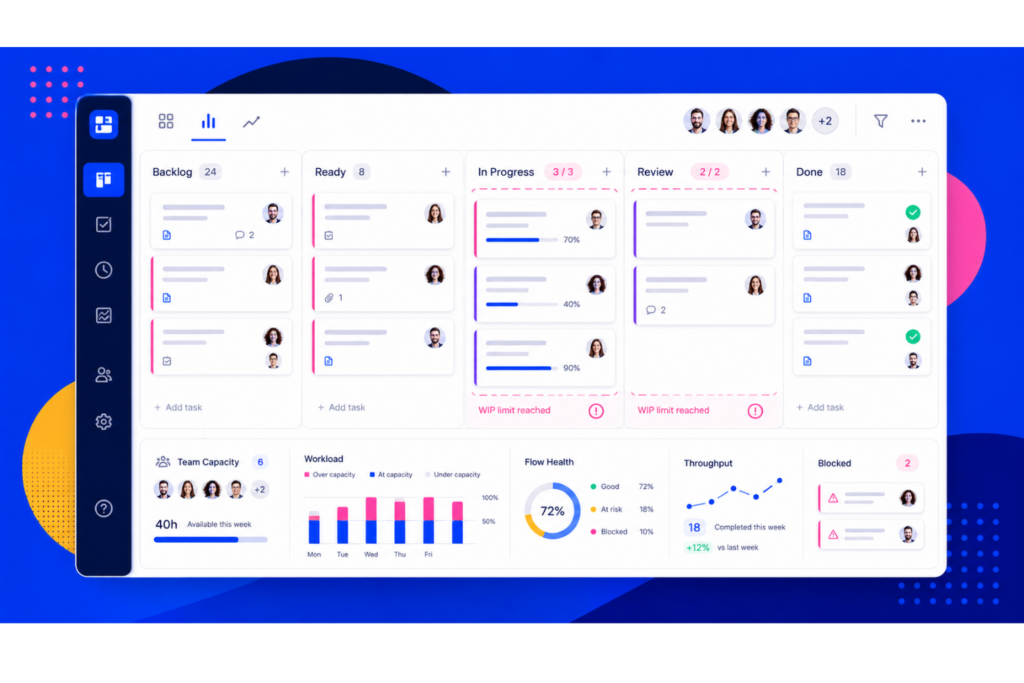
For example, if too many cards are stuck in “Review,” that may signal that reviewers are over capacity, approvals are slowing delivery, or the team is starting more work than it can finish. By tracking these patterns, you can adjust workloads before deadlines slip and keep output steady without overwhelming the team.

What Is Kanban?
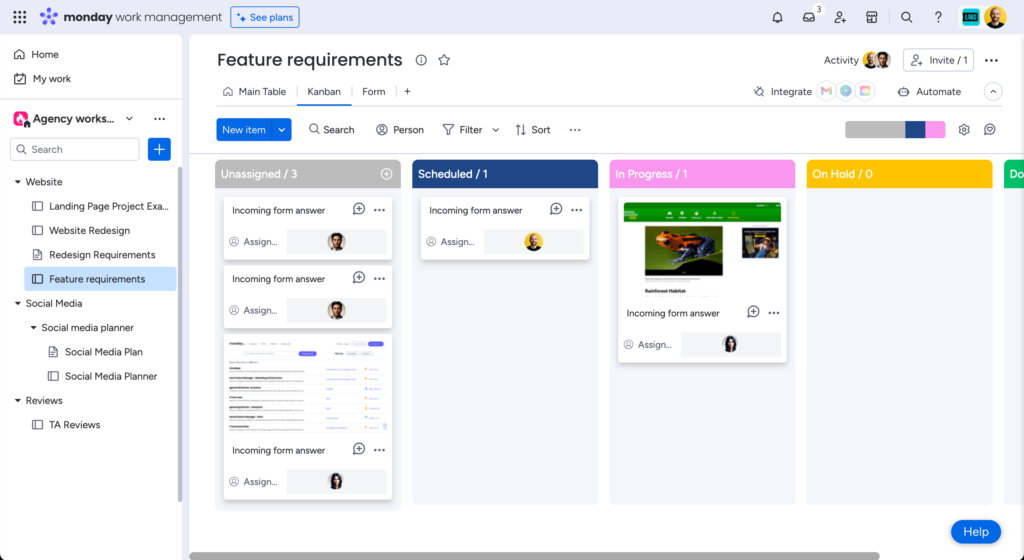
Kanban is a visual workflow management method. It’s based around a visual board that represents the flow of work and the status of tasks at any given moment. Each card on the board represents a task, and the column it’s in represents the stage of work or status.
For example, if you're leading a software development team tasked with creating a new application, you would set up a Kanban board divided into columns for "To Do," "In Progress," "Review," and "Done." This lets you see the project flow and identify potential bottlenecks.
What Is Capacity Planning?
Capacity planning focuses on balancing project workloads with your team's capacity. You’ll assess how much work the team can handle without getting overwhelmed or compromising quality.
This process will help you make informed decisions about task prioritization, resource allocation, and project timelines, as well as keep the team productive and able to meet their goals.
You can assess the team’s capacity by looking at the number of tasks in each column on your Kanban board and the WIP limits you’ve set. Suppose they've reached their WIP limit in a specific column. You’ll need to allocate additional resources or reprioritize tasks to avoid delays.

Why Use Kanban For Capacity Planning?
There are many worthwhile benefits to using Kanban for capacity planning:
- Limits to work in progress, which helps keep the team focused and productive
- You can prioritize and reprioritize tasks by simply dragging around the cards and columns on the board
- It’s easy to see and prevent bottlenecks by monitoring the amount of work in each column at any given time
- It’s flexible for dynamic environments where project requirements frequently shift, and the team can respond swiftly to new information or challenges
- It allows for adaptive planning and can easily accommodate changes in priorities
How To Manage Capacity Planning With Kanban
Here are some strategies for managing capacity with Kanban in project management:
1. Establish Clear Work in Progress Limits
Set work in progress (WIP) limits that reflect your team's capacity. Consider factors such as team size, skill sets, and task complexity. Realistic WIP limits help you make sure the team isn’t overworked and can maintain a sustainable work pace.
Let’s say you're leading a product development team of four. You might limit the number of tasks in the "In Progress" column to four. This will allow each team member to focus on quality while avoiding burnout.
2. Analyze and Calculate Your Team's Capacity
When you calculate resource capacity, take into account team size, available work hours, and historical performance data.
If your team consists of five members working 40 hours a week, with an average completion rate of ten weekly tasks, your total capacity would be 50 weekly tasks. This figure provides a benchmark to help you effectively plan, prioritize, and forecast resources for future work so you can keep the team’s work manageable.
A capacity planning template can make this process a lot easier.
3. Manage Task Dependencies
Dependencies (where one task relies on another being completed or started first) can significantly impact your capacity planning. Clearly define the relationships between tasks and identify potential issues. Then, allocate and balance your resources accordingly.
Consider using color-coding or visual indicators on your Kanban board, which can help highlight dependencies and make it easier for the team to see the impact of one task on another.
This also helps you keep an eye on tasks that are actually in progress, as opposed to those that haven’t been started.
4. Prioritize Tasks Before Assigning Work
Prioritization helps you decide which tasks deserve capacity first. Use a simple framework like MoSCoW, must have, should have, could have, and won’t have, to separate critical work from lower-priority tasks.
Once priorities are clear, assign work based on both importance and resource capacity. This helps your team finish must-have items before taking on less urgent workwork.
5. Closely Monitor Progress
Review the Kanban board and team capacity regularly to keep an eye on progress and make necessary adjustments. This will help you assess whether the current WIP limits and capacity estimates remain effective.
If the team is consistently reaching the WIP limits or struggling to complete tasks, reevaluate your capacity calculations and adjust your team's workloads to improve performance.
6. Communicate About Workload and Blockers
Use stand-ups, check-ins, or team meetings to discuss current workload, completed tasks, blockers, and upcoming priorities. These conversations help you catch capacity issues before they turn into missed deadlines.
For example, if one team member is falling behind, you can redistribute work, provide support, or delay lower-priority tasks based on the rest of the team’s available capacity.
7. Use Metrics and Data Analysis
Use data to make better workforce capacity planning decisions. Track metrics like cycle time, lead time, throughput, and how often tasks exceed WIP limits.
If tasks consistently slow down in one column, that stage may need more support, fewer incoming tasks, or a process change. Metrics help you move from guessing about capacity to managing it with evidence.
8. Stay Flexible and Adjust as You Learn
Kanban capacity planning should evolve with your team. If a WIP limit, workflow, or task assignment process is not working, adjust it based on what you see on the board and hear from the team.
Run regular retrospectives to review what worked, what slowed delivery, and where capacity was misjudged. Then update your WIP limits, workflows, or resource plans to improve future performance.
Best Kanban Capacity Planning Tools
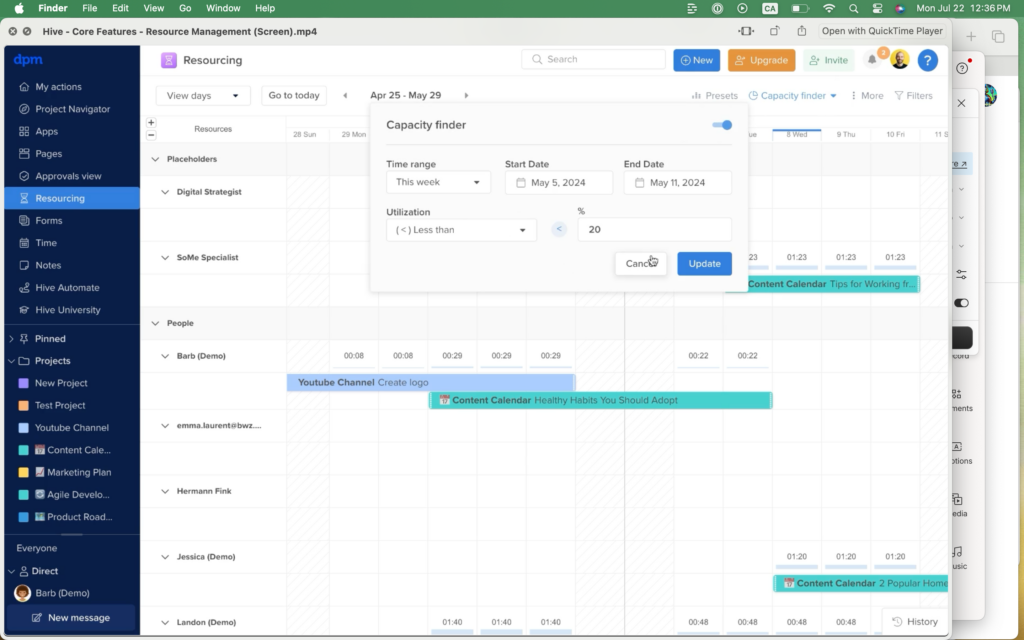
Software tools like resource management tools and capacity planning software can automate many of the key processes in capacity planning like calculating capacity and utilization, adjusting schedules and due dates, and assigning team members to specific tasks. This saves you time and effort for strategic decision-making.
Make sure that the capacity planning or resource management tool you use integrates with your Kanban software so that both tools are using the same, up-to-date data and to avoid having to copy and paste information from one tool into another.
Kanban vs. Agile Capacity Planning
Kanban capacity planning focuses on managing continuous work as it moves through a visual workflow. Instead of planning around fixed sprints, you monitor active tasks, WIP limits, bottlenecks, and throughput to decide how much work the team can take on at any given time.
Agile capacity planning is often sprint-based. Teams estimate how much work they can complete in a set period, usually based on team availability, velocity, story points, and upcoming priorities.
The main difference is timing: Kanban capacity planning is continuous and adjusts as work flows, while Agile capacity planning is usually done before each sprint or iteration. Kanban works well when priorities change often or work arrives unpredictably, while sprint-based Agile planning is useful when teams need a more structured planning cycle.
Join For More Resource Management Insights
Want to connect with other digital project managers to share resources and best practices? Join our membership community, get access to 100+ templates, samples, and examples, and connect with 100s of other digital project managers in Slack.



