

What Is Kanban: A Simple Definition For Project Managers


Kanban helps teams manage work more visually and continuously by making workflow, task status, and delivery constraints easier to track in real time. Below, we’ll break down how Kanban works, how Kanban boards are structured, and when this project management approach works best.
What Is Kanban
Kanban is a visual workflow management method that helps teams see work in progress, limit how much work they take on at once, and move tasks through a process more smoothly.
In practice, Kanban usually works through a board with columns such as To Do, In Progress, Review, and Done. Each task is represented by a card, and the team moves cards across the board as work progresses. An example of a Kanban board showing how teams visualize tasks:

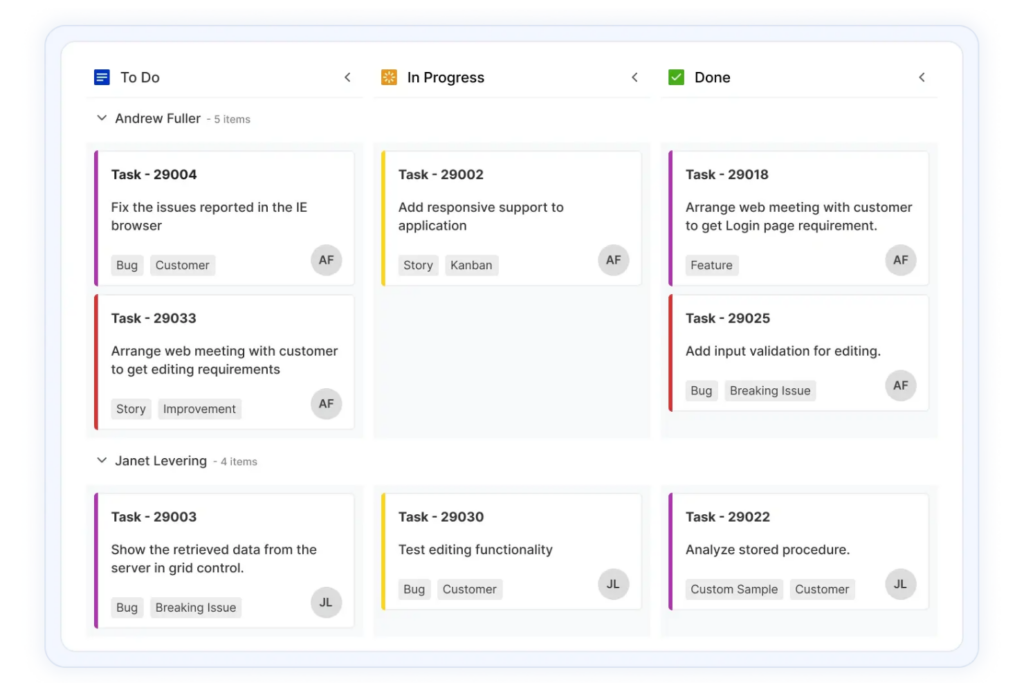
The value of Kanban is not just that it makes work visible. It helps teams spot bottlenecks, reduce multitasking, and make better decisions about what to start, pause, or finish next.
Kanban project management originated from Toyota’s manufacturing system, where visual signals helped teams manage production based on real demand. Today, project teams use the same idea to manage software work, marketing campaigns, content production, operations workflows, and other types of ongoing work, but these are just a few examples of Kanban in use.
What Is A Kanban Board?
A Kanban board is a visual system for tracking work as it moves through different stages of a workflow. Teams use Kanban boards to see what work is waiting, what is actively being worked on, where bottlenecks exist, and what has already been completed.
A typical Kanban board includes columns such as:
| Column | Purpose |
|---|---|
| Backlog | Work that has been identified but not started |
| Ready | Tasks prepared for execution |
| In Progress | Work currently being completed |
| Review | Tasks waiting for approval, testing, or feedback |
| Done | Completed work |
Project managers use Kanban boards to visualize work in progress, track task status, and identify bottlenecks on your project before they delay delivery. By showing how work moves through each stage of a workflow, Kanban boards help teams manage priorities and maintain a steady flow of work.
Kanban boards also improve visibility and collaboration by making task ownership, blockers, and project status visible across the team. For example, if tasks begin piling up in a “Review” column, teams can quickly identify the constraint and rebalance workloads before timelines slip.
While Kanban boards originally existed as physical whiteboards with sticky notes, many teams now use virtual Kanban boards to manage workflows across remote and cross-functional teams in real time.

Kanban vs Scrum
Kanban and Scrum are both widely used agile project management methodologies, but they structure work differently.
| Kanban | Scrum |
| Uses continuous workflow management | Uses fixed-length sprints |
| Work is pulled based on team capacity | Work is committed to at the start of a sprint |
| Priorities can change continuously | Scope changes are usually avoided during active sprints |
| Focuses on flow efficiency and reducing bottlenecks | Focuses on sprint predictability and delivery cadence |
| Tracks workflow metrics like throughput | Tracks sprint metrics like velocity |
| Works well for operational and continuously evolving work | Works well for structured product delivery work |
The main differences between Kanban and Scrum come down to how teams manage workflow, planning, work in progress, and delivery cadence. Teams often use Kanban for ongoing operational work and Scrum for more structured product development environments.
Key Kanban Principles Explained
Understanding the key principles of Kanban becomes crucial for achieving successful implementation. Let's now explore some of these fundamental principles.
1. Visualize the Workflow
Visualizing work through a visual workflow allows teams to see task status, ownership, blockers, and workload distribution in real time through a Kanban board. For example, if too many tasks accumulate in “Review,” the team can quickly identify an approval bottleneck before it delays delivery. Effective boards make blocked work visible immediately instead of hiding delays inside status meetings.
2. Limit Work in Progress (WIP)
Work In Progress (WIP) limits, which restrict how many tasks can be actively worked on at the same time to reduce multitasking and improve workflow stability. A team might limit its “In Progress” column to five tasks so work gets completed before new tasks are started. Without WIP limits, Kanban boards often become overloaded task lists instead of true flow management systems.
3. Manage Flow & Cycle Time
Managing flow means monitoring how efficiently work moves through the system rather than focusing only on how much work is started. Teams often track metrics like cycle time and throughput to identify delays, rebalance workloads, and improve delivery predictability over time.
4. Make Process Policies Explicit
Explicit policies define how work moves through the workflow, including requirements for task ownership, approvals, task prioritization, or completion criteria. For example, a team may require all tasks entering “Review” to include documented QA checks before approval can begin.
5. Continuously Improve
Kanban encourages teams to improve workflows incrementally by reviewing bottlenecks, delivery patterns, blocked work, and team capacity regularly. Instead of redesigning processes all at once, teams make smaller operational improvements over time based on real workflow data.
Project Types Best Suited For Kanban
Kanban works best for managing continuous team workflows where priorities, incoming requests, or delivery timelines change frequently. Because work moves through the system continuously instead of through fixed sprints, Kanban is especially effective for operational, service-based, and fast-moving environments.
| Project Type | Why Kanban Works Well |
|---|---|
| Software maintenance and DevOps | Teams manage ongoing bug fixes, deployments, updates, and support requests with changing priorities |
| Marketing and content production | Creative work moves through stages like drafting, review, approval, and publishing continuously |
| IT and customer support | Teams handle incoming tickets, incidents, and service requests based on real-time demand |
| Operations and process improvement | Workflows often involve ongoing optimization, approvals, and cross-functional coordination |
| Product and design teams | Teams can manage iterative work, feedback cycles, and evolving priorities visually |
Kanban is often less effective for projects that require strict phase-based delivery, fixed-scope planning, or highly synchronized sprint execution. In those environments, teams may prefer Scrum, Waterfall, or another project management methodology that provides more structured planning and milestone control.
One important tradeoff is that Kanban offers flexibility, but teams still need strong workflow discipline. Without clear ownership, WIP limits, and prioritization rules, boards can quickly become overloaded and lose their value as workflow management systems.
Benefits of Kanban
Kanban offers numerous benefits for project managers. Let's look at some of the advantages it provides:
- Improved workflow visibility: Kanban helps teams see task status, ownership, blockers, and workload distribution in real time through a shared visual workflow instead of relying on status meetings for updates.
- More streamlined project workflows: By visualizing how work moves through each stage of delivery, teams can identify bottlenecks earlier, reduce delays, and improve the overall flow of work across projects.
- Reduced multitasking: Work In Progress (WIP) limits help teams focus on finishing work before starting new tasks, which improves delivery consistency and reduces workflow overload.
- Greater flexibility: As a project management methodology, Kanban allows teams to adjust priorities continuously as new requests, feedback, or operational needs emerge without waiting for a new sprint cycle.
- Easier adoption: Teams can layer Kanban onto existing processes without completely restructuring how they already work, making it especially effective for ongoing operational work and evolving team workflows.
What's Next?
Want to connect with other digital project managers to share resources and best practices? Join our membership community and get access to 100+ templates, samples, and examples, and connect with 100s of other digital project managers in Slack.




