

What is Kanban Project Management?


Kanban project management is a straightforward way to visualize your workflow, prioritize tasks, and keep projects moving smoothly. By using a Kanban system (typically found within project management software), you can easily organize workloads, boost team efficiency, and reduce stress whether you’re managing a small business or working at a large company.
In this article, I’ll walk you through the basics of Kanban project management and introduce helpful tools to make implementation easier.
What Is Kanban?
Kanban is an agile project management method that helps teams organize, track, and coordinate work as tasks move toward completion. It's widely used in software development, project management, and business operations.

Kanban uses a board with columns representing different stages of work. Each task appears on a card that moves across the board as its status changes. Cards can also include details such as task owners, deadlines, and priorities.
Unlike Scrum, Kanban doesn't require fixed-length sprints or prescribed team roles. This makes it particularly useful for teams that handle ongoing work or frequently changing priorities, such as IT support, marketing, and operations.
How Does Kanban Work?
Kanban works by organizing tasks on a visual board, tracking their progress through different stages, and limiting how much work your team takes on at once. Its three main components are Kanban boards, cards, and work-in-progress (WIP) limits.

Kanban Boards
A Kanban board is a visual representation of your team's workflow. It divides work into columns that represent different stages of completion, typically "To Do," "In Progress," and "Done."
As tasks progress, team members move them from one column to the next. This gives everyone a shared view of what's happening, what's coming up, and where work might be getting stuck.
You can customize your board to reflect your team's actual process. For a content team, an example Kanban board might use columns for "Backlog," "Drafting," "Editing," "Approval," and "Published." The backlog holds upcoming tasks, which your team prioritizes before moving them into active work.

Kanban Cards
Kanban cards represent individual work items on a Kanban board. Each card contains information about a task and moves between columns as the work progresses.
Cards typically include a task description, assignee, priority, and due date. Kanban tools also let you attach files, add checklists, and leave comments to keep relevant information in one place.
I'd recommend keeping cards focused on specific deliverables rather than broad projects. For example, "Write homepage copy" is easier to assign and track than "Website redesign."
You can also flag blocked cards to highlight tasks that can't move forward. This helps your team identify dependencies and resolve issues before they cause further delays.
Work-in-Progress Limits
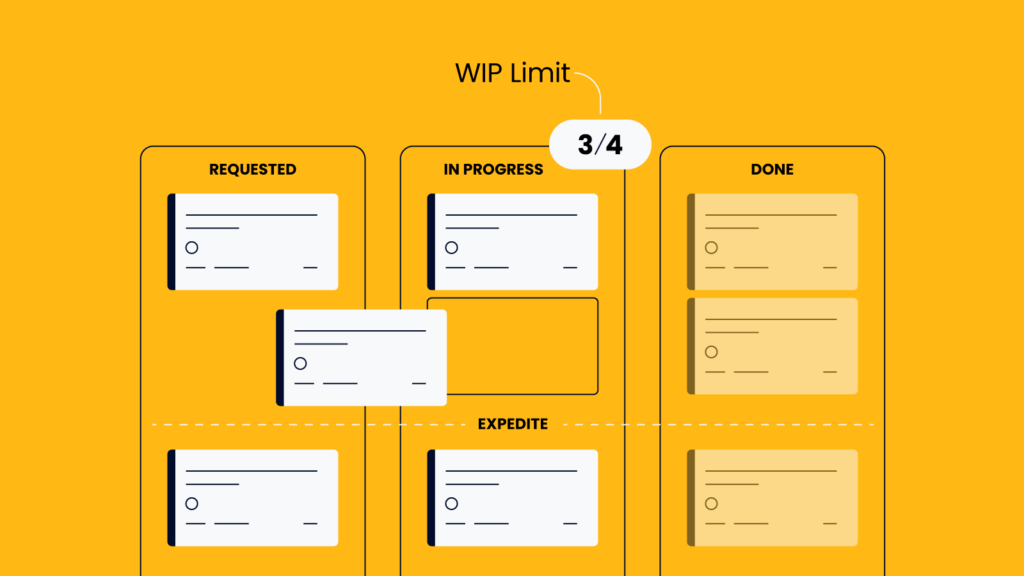
Work-in-progress (WIP) limits restrict how many tasks your team can have underway at any given time. They help prevent team members from taking on too much work and encourage everyone to finish existing tasks before starting new ones.
You set WIP limits for specific workflow stages or across the entire team. For example, if your "In Progress" column has a WIP limit of three, only three tasks can occupy that column at once.
Kanban uses a pull system, meaning team members take on new tasks when they have capacity rather than having work assigned regardless of their workload. When a column reaches its WIP limit, your team focuses on completing or unblocking existing tasks before pulling in new work.
This helps prevent unfinished tasks from piling up and makes it easier to spot bottlenecks that need attention.
Kanban Principles and Practices
Kanban is based on several core principles and practices that help teams manage work and improve their processes:
- Establish feedback loops: Hold regular reviews and discussions to identify problems, gather feedback, and adjust how your team works.
- Visualize the workflow: By visualizing workflows, teams can track task progress, identify bottlenecks, and keep everyone aligned on priorities and responsibilities.
- Limit work in progress (WIP): Restrict the number of tasks underway at once so team members can focus on finishing existing work before starting something new.
- Make incremental improvements: Regularly assess team performance and make small, gradual adjustments to improve processes based on measurable results.
Benefits of Kanban Project Management
Kanban helps teams stay organized, collaborate easily, and complete work without taking on too many tasks at once. Its main benefits include:
- Improved productivity and quality: By limiting WIP and focusing on completing tasks, teams can reduce context switching and give each deliverable more attention. This can lead to fewer errors and less rework.
- Improved visibility: Kanban boards give your entire team a shared view of tasks, priorities, and progress. Everyone can see what's underway, what's completed, and what needs attention.
- Better communication and collaboration: Shared visibility helps team members coordinate work, identify dependencies, and support colleagues when tasks get stuck. This is especially useful when work passes between departments.
- Increased team morale: Seeing tasks move into the "Done" column gives team members a sense of accomplishment. Regular progress also helps maintain motivation during longer projects.
- Shorter cycle times: Work-in-progress (WIP) limits encourage teams to finish existing tasks before starting new ones. This reduces multitasking and can shorten the time it takes to complete individual tasks.
- Faster identification and resolution of bottlenecks: Kanban boards make stalled tasks and overloaded workflow stages easier to spot. Team members can then work together to resolve blockers rather than letting unfinished work pile up.
- Greater flexibility: Kanban doesn't require fixed-length sprints, so teams can adjust priorities as new information emerges. Changes can be reflected on the board without disrupting the entire project plan.
Tools for Kanban Project Management
When choosing Kanban software, look for the ability to customize cards and change the complexity of the project, a good user interface with a shallow learning curve, and integrations with other software that you're already using. Keep in mind that you can also usually find Kanban boards within broader project management tools.
Here are my picks for the best Kanban software:
Clicks on the links below may earn a commission, which supports our independent testing and review of software and services. Learn more about how we stay transparent.


FAQs about Kanban
Here are the answers to some commonly asked questions about Kanban:
Can I Still Use Sprints Like in Scrum?
For development teams already accustomed to working in agile environments, the Kanban system is very intuitive as a Kanban board can be organized into sprints or iterations. When it comes to agile project management, Kanban is emerging as a true leader due to its simplicity and ease of use.
What Is the Difference Between Kanban and Scrum?
Kanban focuses on continuous workflow management, while Scrum organizes work into fixed-length iterations called sprints. Scrum also defines specific roles, events, and accountabilities, whereas Kanban offers more flexibility in how teams organize their work. Kanban is generally better suited to ongoing work with changing priorities, while Scrum works well for teams that benefit from regular planning and delivery cycles.
Sometimes Kanban board usage in Scrum is referred to as Scrumban.
Is Kanban Agile or Lean?
Kanban has roots in lean manufacturing and is widely used in agile project management. It shares lean’s emphasis on reducing waste and improving processes, alongside agile’s focus on adaptability and delivering value. Kanban isn’t exclusive to either approach. You can use it independently or alongside other project methodologies.
What Are the Disadvantages of Kanban Project Management?
Kanban provides less built-in structure for scheduling, forecasting deadlines, and managing complex dependencies than some other methodologies. Without clear priorities and realistic WIP limits, teams can also accumulate unfinished tasks. Kanban requires team discipline to keep boards updated and address bottlenecks. For projects with fixed deadlines and complex dependencies, you may need additional planning tools.
How Do You Implement Kanban in an Existing Workflow?
Start by mapping your team’s current workflow onto a Kanban board, with columns representing each stage of work. Add your existing tasks as cards and establish WIP limits based on your team’s capacity. Agree on clear rules for moving tasks between stages, then review progress regularly. I’d recommend starting with your current process rather than redesigning everything at once.
Take the Next Step With Kanban Project Management
Ready to put Kanban into practice? Sign up for our free newsletter and membership to access exclusive project management resources, tools, and templates that help you organize work, improve team collaboration, and deliver better results.




