

De 10 beste programvarene for prosessautomatisering – vurdert i 2026

Kortliste over den beste programvaren for prosessautomatisering


Den beste programvaren for prosessautomatisering lar deg automatisere oppgaver, forbedre arbeidsflytene dine og øke effektiviteten i prosjektene dine. Uten et verktøy for å automatisere arbeidsflytene dine vil du oppleve at du kaster bort tid på repetitive, manuelle oppgaver, retter de samme feilene om og om igjen og manuelt opprettholder konsistens.
Jeg har brukt erfaringen min innen prosjektledelse og mer enn 3 års testing av programvare til å gjennomgå over 25 verktøy for prosessautomatisering – les analysen min av hvert verktøy, de viktigste funksjonene og bruksområdene nedenfor. Jeg hjelper deg med å finne det riktige verktøyet for å fremskynde godkjenninger, redusere flaskehalser og forbedre synlighet og ansvarlighet, slik at du kan bruke mindre tid på manuelt arbeid og mer tid på strategisk prosjektgjennomføring.
Why Trust Our Software Recommendations
Our team has been testing and reviewing software since 2012. As project managers ourselves, we know how difficult—and important—it is to choose the right software.
For this guide, we evaluated tools using hands-on testing and independent research, scoring tools using our selection criteria. We also draw on insights from industry thought leaders and practicing project management experts.
Our reviews reflect our human editorial judgment, not a sales pitch.
Expert reviewers:
Sammenligningstabell for programvare for prosessautomatisering
Sammenlign priser og viktige spesifikasjoner for mine beste utvalgte programmer for prosessautomatisering i tabellen nedenfor.
| Tool | Best For | Trial Info | Price | ||
|---|---|---|---|---|---|
| 1 | Best for secure client interaction workflows | Free demo available | From $5,000/year (billed annually) | Website | |
| 2 | Best for SAP technology integration | Free demo available | Pricing upon request | Website | |
| 3 | Best for customizable reporting | Free trial available | From $10,000 (one-time license) | Website | |
| 4 | Best for AI workflow guidance | Free demo available | Pricing upon request | Website | |
| 5 | Best for rule-based workflows | 14-day free trial | From $10/user/month (billed annually) | Website | |
| 6 | Best for Salesforce document automation | Free demo available | From $399/month (billed annually) | Website | |
| 7 | Best with prebuilt connectors for major apps | 30-day free trial | Pricing upon request | Website | |
| 8 | Best for AI-driven process automation | Free trial available + free demo | Pricing upon request | Website | |
| 9 | Best for agentic workflows | Free plan available | From $25/month | Website | |
| 10 | Best for process standardization | Free plan | Pricing upon request | Website |


Anmeldelser av den beste programvaren for prosessautomatisering
Finn detaljene om hvert av mine anbefalte verktøy for prosessautomatisering nedenfor. Jeg går gjennom funksjoner, bruksområder samt fordeler og ulemper for å hjelpe deg med å avgjøre hvilket verktøy som passer best til behovene dine.

Moxo
Best for secure client interaction workflows

Moxo is a process automation platform that lets you design and run multi-step workflows across internal teams, external stakeholders, and AI agents—covering actions like approvals, document requests, eSignatures, and automated routing.
Who Is Moxo Best For?
Moxo is a strong fit for service-based businesses—like financial services, legal, and consulting firms—that run structured, repeatable processes involving external clients.
Why I Picked Moxo
I picked Moxo as one of the best because of how seriously it handles security across every layer of a client interaction workflow. When my team runs processes that involve external clients—think KYC verification or loan applications—sensitive data is encrypted in transit and at rest, and granular role-based access controls keep each participant seeing only what they should. On top of that, Moxo's 7+ year audit trail and SOC 2 Type II certification mean I can demonstrate compliance to regulators without digging through scattered email threads or shared drives.
Moxo Key Features
- Conditional branching and parallel paths: Build workflow logic that routes work dynamically based on form inputs, decisions, or outcomes, with parallel tracks that don't block each other.
- SLA timers and escalation triggers: Set deadline-based timers that automatically escalate overdue tasks to the right person without manual follow-up.
- AI agent actions: Deploy AI agents to pre-fill data, validate submissions, and attach relevant documents before a human action step is reached.
- Flexible deployment options: Run Moxo on-premises, in a private cloud, or in a hybrid model to meet your organization's infrastructure and data residency requirements.
Moxo Integrations
Moxo offers direct data sync connectors with Salesforce, HubSpot, Microsoft Dynamics, Zoho, Wealthbox, Redtail, Filevine, Global Relay, Smarsh, and Xero, along with integrations for tools like DocuSign, Jira, Stripe, Slack, Google Drive, Dropbox, Box, OneDrive, QuickBooks, and Zendesk. It connects with Zapier and provides a REST API and webhooks for custom integrations.
Pros and Cons
Pros:
- Messaging, file sharing, and eSignatures in one place
- Workflow branching supports non-linear process paths
- SOC 2 Type II and GDPR compliant security
Cons:
- Workflows feel rigid for non-repeatable projects
- No built-in time tracking for tasks

Best for SAP technology integration
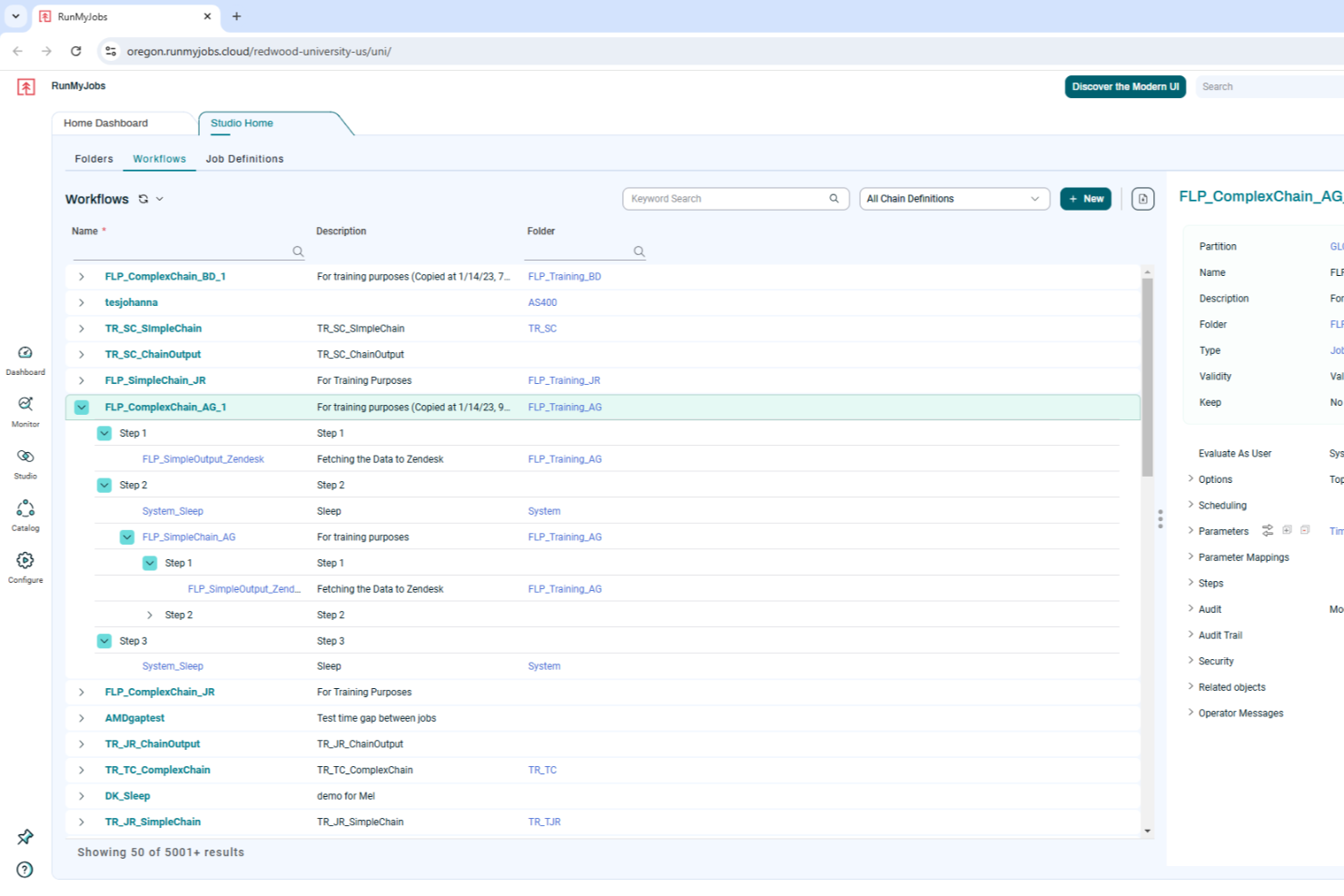
RunMyJobs by Redwood is an intelligent workload automation software that caters to businesses seeking to enhance their operational efficiency through automation. By offering seamless integration with SAP technologies and other critical business solutions, it addresses the needs of organizations looking to reduce manual tasks and improve production efficiency. RunMyJobs empowers your team to automate mission-critical processes, ensuring reliability and adaptability in an ever-evolving business landscape.
Why I Picked RunMyJobs by Redwood
I picked RunMyJobs by Redwood because of its exceptional capability to automate complex, mission-critical business processes with ease. The platform's deep integration with SAP technologies, including S/4HANA, makes it an excellent choice for businesses heavily reliant on SAP systems. Additionally, its predictive analytics feature allows for real-time monitoring of service-level agreements, ensuring your operations run smoothly and efficiently. This focus on enhancing operational efficiency through automation sets RunMyJobs apart in the process automation software space.
RunMyJobs by Redwood Key Features
In addition to its robust SAP integration and predictive analytics, RunMyJobs offers several other valuable features for process automation:
- Hybrid Architecture: Supports seamless automation across various environments, including cloud and on-premises systems.
- Self-Service Automation: Empowers users to initiate and customize workflows independently, reducing dependency on IT departments.
- Full Stack Connectivity: Orchestrates workflows across applications and infrastructure, ensuring comprehensive process automation.
- AI and Analytics Integration: Provides predictive analysis and process optimization to enhance decision-making and operational efficiency.
RunMyJobs by Redwood Integrations
Integrations include SAP S/4HANA, Oracle Data Integrator, ServiceNow, Databricks, AWS DataSync, Kubernetes, Boomi Atom, Box.com, Informatica Cloud, and Power BI.
Pros and Cons
Pros:
- Supports hybrid infrastructure automation
- Reliable enterprise grade scheduling
- Deep native SAP integration
Cons:
- Pricing not publicly listed
- Setup can be complex

Best for customizable reporting
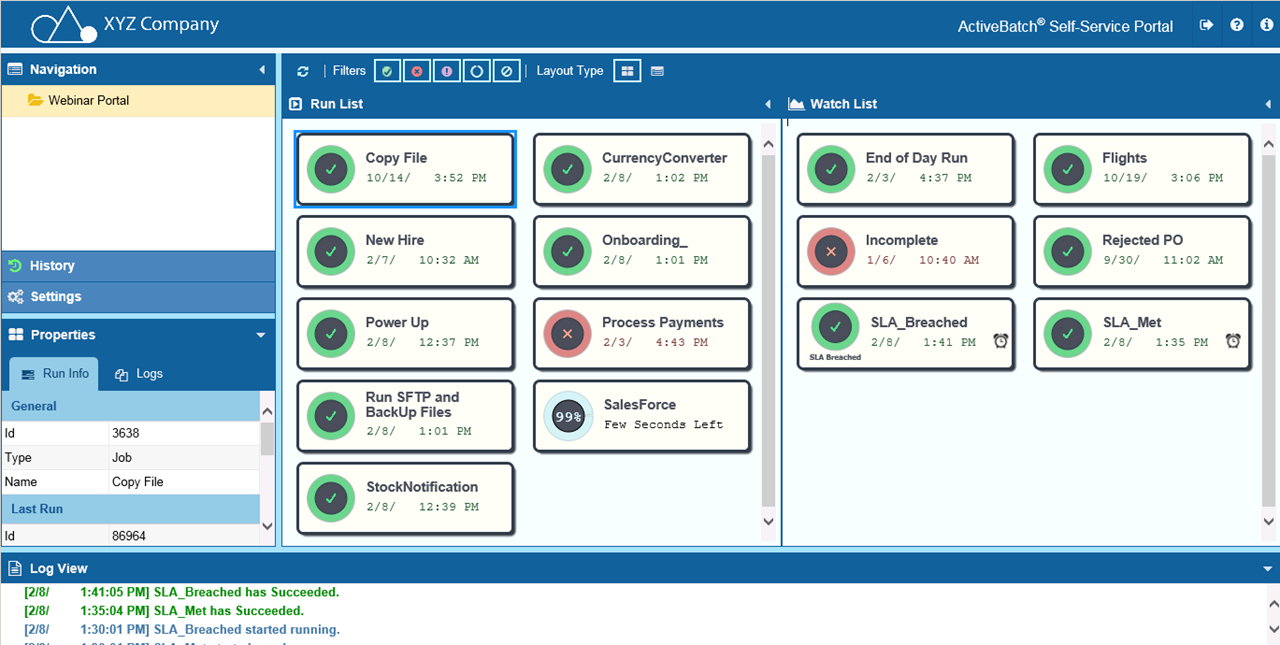
ActiveBatch is a process automation platform that helps you optimize various operational workflows. It offers a suite of features that make it an essential tool if you want to improve your automation capabilities.
Why I Picked ActiveBatch
ActiveBatch offers customizable reporting and monitoring, which means you can tailor alerts and reports to suit your specific needs and make sure you always have the right information at your fingertips.
Another reason for choosing ActiveBatch is its event-driven job scheduling, which allows automations to be triggered by specific events. This feature keeps processes dynamic and responsive to changes and leads to greater efficiency across your operations. ActiveBatch's strong security and governance features mean you can control access and protect your data across various environments.
ActiveBatch Key Features
In addition to customizable reporting, ActiveBatch offers a range of other features that cater to diverse automation needs.
- Job Step Library: You can access a comprehensive library of pre-built job templates that eliminate the need for scripting, which helps simplify automation tasks.
- Low-Code Workflow Designer: This lets you easily create workflows without the need for extensive coding knowledge and makes it accessible for users of various technical backgrounds.
- SLA Management: You can automatically monitor and manage service level agreements to maintain compliance and operational efficiency.
- Cloud Provisioning: This lets you optimize cloud infrastructure resources and efficiently manage cloud-based workflows.
ActiveBatch Integrations
Integrations include Microsoft PowerShell, SQL Server, ServiceNow, Azure Data Factory, Oracle EBS, VMware, SAP NetWeaver, Informatica PowerCenter, and AWS.
Pros and Cons
Pros:
- Simplifies job scheduling & reduces time and resources for monitoring tasks
- Lets you automate and manage complex IT processes
- Offers visibility into workflows so tasks are completed in the correct order
Cons:
- User interface could be simplified for better usability
- Modifying workflows and custom integrations can be challenging

Best for AI workflow guidance

Screendragon is a workflow management and process automation platform aimed especially at marketing, agency, and operations teams. It allows you to design, route, and monitor workflows to reduce friction in processes.
Why I Picked Screendragon
I chose Screendragon for its exceptional AI workflow guidance. The platform's AI-driven automation and governance rules let you manage complex workflows with ease and reduce time spent on repetitive tasks. With features like a visual workflow builder and digital approval management, you get real-time insights that empower informed decision-making. Screendragon's no-code platform means even non-technical teams can customize workflows, which makes it a versatile choice for businesses that want to improve productivity and operational efficiency.
Screendragon Key Features
Screendragon also offers several other features for process automation and project management.
- Resource Management: This provides a clear overview of team capacity and lets you optimally deploy your team to make sure critical projects are staffed adequately.
- Automated Project Kickoffs: You can convert signed deals into structured project environments to maintain consistency and have a strong start for every new project.
- Pipeline Management: This offers customizable workflows that align seamlessly with your operations and facilitate a smooth transition from initial pitch to project execution.
- Project Cost Estimation: You can streamline the estimation process and accurately predict costs, timelines, and resource needs for better financial planning.
Screendragon Integrations
Integrations include Microsoft Power BI, Slack, Microsoft Teams, HubSpot, Okta, Aprimo, Adobe, Ziflow, Brandfolder, Jira, Google Drive, Egnyte, Box, Salesforce, Microsoft Dynamics 365, SAP, and Trello.
Pros and Cons
Pros:
- Built-in AI agents offer predictive insights
- Robust proofing and approval loops built in
- Highly customizable workflows with conditional logic
Cons:
- Resource management can feel tedious
- Complexity may overwhelm small teams
New Product Updates from Screendragon
Screendragon Unveils New AI Hub
Screendragon introduced AI Hub, a new capability that lets teams build and manage AI agents directly within workflows. The update helps marketing teams automate tasks, maintain governance controls, and scale AI-driven operations more efficiently. For more information, visit Screendragon's official site.

Wrike
Best for rule-based workflows

Wrike is a project management and collaboration software designed for businesses of all sizes, offering tools to manage both one-time projects and ongoing tasks.
Why I Picked Wrike
One of its core strengths is its customizable automation capabilities, allowing users to create rule-based workflows that automate repetitive tasks without any coding. Wrike's customizable templates, reporting tools, and interactive Gantt views also enable businesses to analyze and optimize their processes. The software even includes advanced features like AI risk prediction to alert teams when projects are at risk of falling behind.
Wrike Key Features
Wrike also offers a range of other features for process automation.
- Dynamic Request Forms: These forms come with conditional logic so your team can collect and manage data more effectively.
- AI Integration: Wrike's AI tools provide advanced automation suggestions that can help you improve task management and efficiency.
- Real-Time Dashboards: This offers centralized data visualization for informed decision-making and process monitoring.
- Automated Reporting Tools: You can generate real-time insights on process performance to foster continuous improvement and strategic planning.
Wrike Integrations
Integrations include Microsoft Teams, Slack, Salesforce, Google Drive, Dropbox, Box, Microsoft Office 365, Adobe Creative Cloud, Jira, QuickBooks, and Tableau.
Pros and Cons
Pros:
- Good collaboration features
- Approval workflow features
- Dynamic Gantt charts with dependency mapping
Cons:
- Advanced security and automation only available in higher-tier plans
- Configuring the platform to your needs can be complex
New Product Updates from Wrike
Wrike Adds Klaxoon MCP Integration
Wrike’s Klaxoon MCP integration is now generally available, enabling AI agents to navigate between Wrike tasks and attached whiteboards, read task context, and manage whiteboard attachments via API. For more information, visit Wrike's official site.
altaFlow
Best for Salesforce document automation
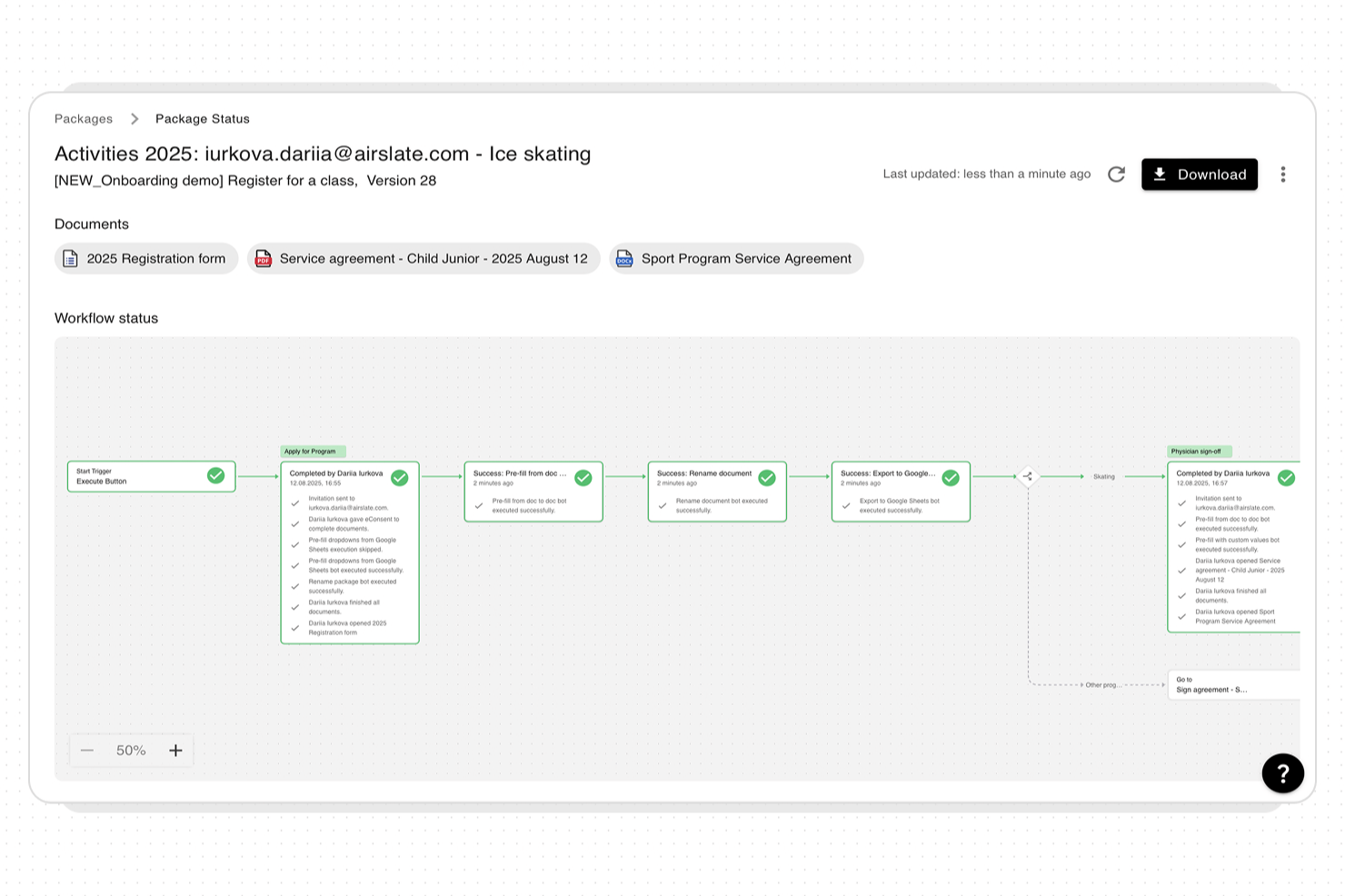
altaFlow offers process automation software designed for organizations that need to manage complex document workflows and data across multiple systems. It’s a strong choice for teams in regulated industries or those using Salesforce who require secure, auditable automation.
Who Is altaFlow Best For?
Teams in finance, healthcare, or legal industries that need secure, automated workflows and deep Salesforce integration will find altaFlow especially useful.
Why I Picked altaFlow
I picked altaFlow because my team needs advanced document automation directly within Salesforce. With altaFlow, we can generate, route, and archive documents without leaving our CRM environment. I appreciate how it handles complex approval chains and automates compliance steps for regulated industries. This lets us keep all document workflows tightly integrated with our Salesforce data.
altaFlow Key Features
- No-code workflow builder: Create and modify automated workflows using a drag-and-drop interface without any coding.
- Dynamic field validation: Ensure data accuracy with customizable fields and built-in validation at every workflow step.
- Role-based access controls: Assign permissions and manage workflow participation based on user roles for added security.
- Audit trails and compliance tracking: Maintain a detailed record of all workflow actions for regulatory and internal audits.
altaFlow Integrations
Integrations include Salesforce, NetSuite, SharePoint, and more.
Pros and Cons
Pros:
- No-code workflow builder for rapid deployment
- Granular permission controls for sensitive workflows
- Real-time synchronization across multiple business systems
Cons:
- Custom API setup can require technical expertise
- Limited prebuilt templates for industry-specific workflows

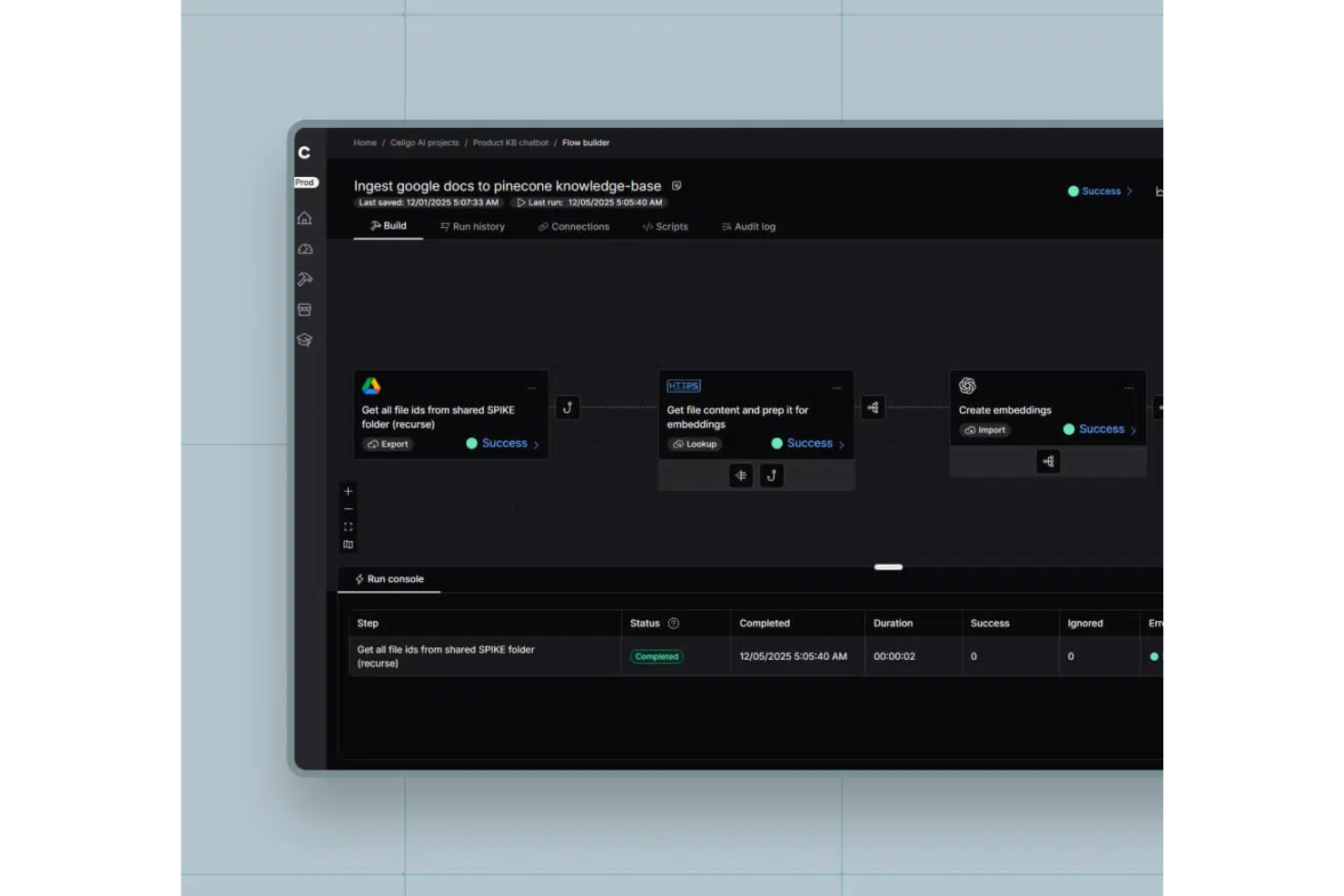
Celigo is a process automation platform that connects cloud and on-premises applications, automates workflows, and manages data integrations across business systems.
Who Is Celigo Best For?
Celigo is a good fit for IT teams and operations leaders at mid-sized to large businesses that need to automate and connect multiple business applications.
Why I Picked Celigo
I picked Celigo as one of the best because I can automate processes across my tech stack using its wide range of prebuilt connectors for apps like Salesforce, NetSuite, and Shopify. My team is able to deploy integrations quickly without building custom code for every connection. I like that we can orchestrate multi-step workflows between cloud and on-premises systems using these ready-made connectors.
Celigo Key Features
- Flow builder: Design and manage automated workflows with a drag-and-drop interface.
- Error management dashboard: Monitor, troubleshoot, and resolve integration errors from a centralized dashboard.
- Data transformation tools: Map, filter, and transform data between different systems during automation.
- Scheduling and triggers: Set up time-based or event-driven triggers to automate processes across connected applications.
Celigo Integrations
Celigo offers 200+ native integrations, including Salesforce, NetSuite, Shopify, Amazon, Zendesk, ServiceNow, Microsoft 365, Google Workspace, Jira, and Slack. An API is available for custom integrations.
Pros and Cons
Pros:
- Flexible scheduling and event-based triggers
- Real-time monitoring with detailed dashboards
- Custom scripting for advanced automation logic
Cons:
- User interface can feel cluttered at scale
- Some connectors require additional licensing fees
New Product Updates from Celigo
Celigo Adds SuiteTax and Variant Publishing for Shopify–NetSuite
Celigo adds NetSuite SuiteTax support and variant-level sales channel publishing to its Shopify–NetSuite integration. These updates improve tax handling and give merchants more control over how product variants are published. For more information, visit Celigo’s official site.
 .
.
TrailHQ
Best for AI-driven process automation

Nanonets is an AI-powered platform designed to automate document processing and workflows in industries like finance, healthcare, and logistics.
Why I Picked Nanonets
Nanonets stood out to me for its robust AI capabilities, particularly in automating intricate workflows using natural language processing. It integrates with various apps and data sources, enabling dynamic workflow management. The platform's support for custom language learning models (LLMs) allows for personalized responses and actions, making it easy to adapt workflows to specific business requirements.
Nanonets Key Features
In addition to AI-driven capabilities, Nanonets offers several other features that make it a strong contender for process automation software.
- Data Security and Compliance: The platform adheres to industry standards like GDPR and HIPAA, so you can make sure your data is handled securely and in compliance with regulatory requirements.
- Human-in-the-Loop Workflows: This incorporates human approval and automated validation stages to improve workflow accuracy and efficiency.
- Optical Character Recognition: You can extract and process data from unstructured documents like invoices and contracts.
- Workflow Automations: This lets you automate manual, repetitive steps in your processes to speed up work and reduce manual errors.
Nanonets Integrations
Integrations include QuickBooks, Salesforce, Google Drive, SharePoint, Notion, Dropbox, and Zapier.
Pros and Cons
Pros:
- Provides APIs that allow for custom object localization
- Data extraction features
- Compatible with various programming languages
Cons:
- May not be suitable for extensive machine learning projects with large datasets
- Fewer customization options than more advanced tools
UiPath
Best for agentic workflows
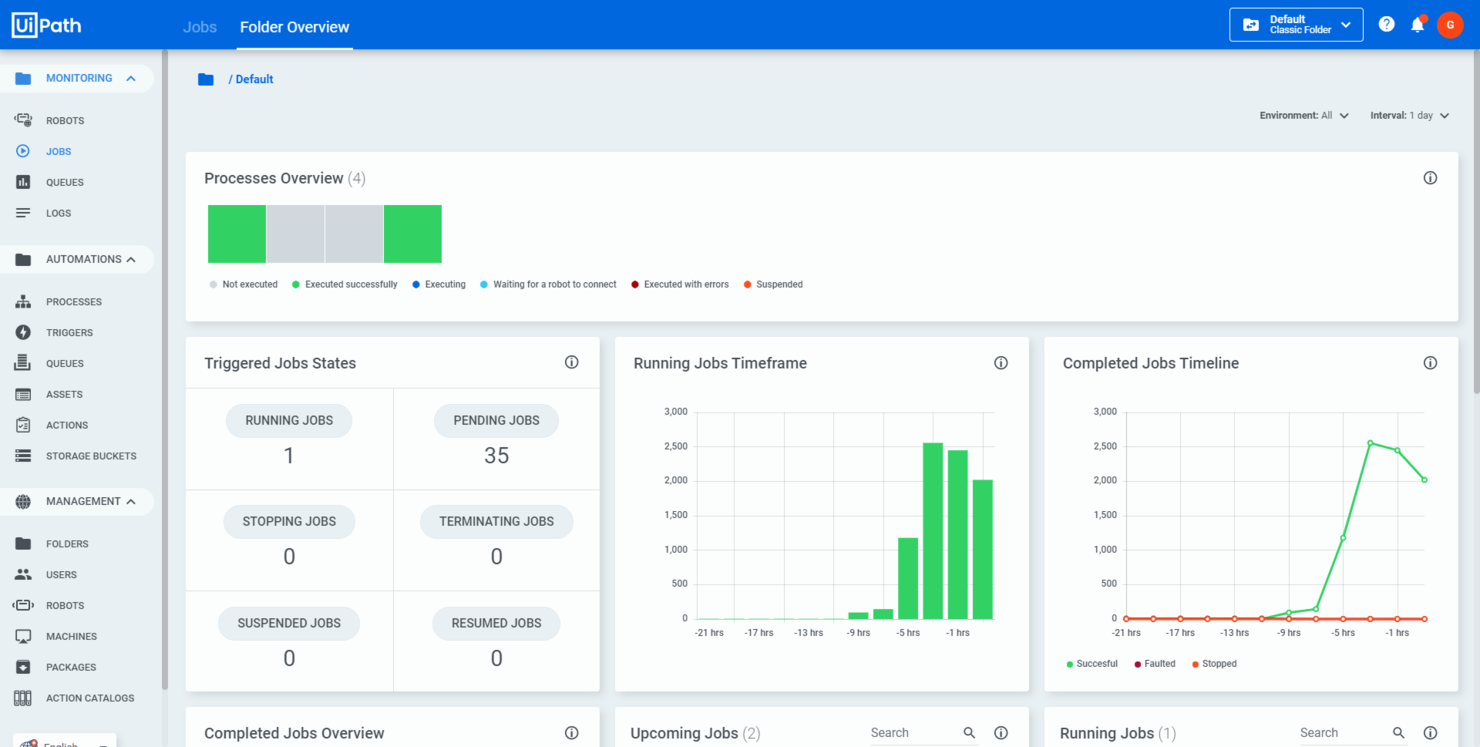
UiPath is an automation platform that integrates AI agents, robots, and human teams to boost operational efficiency. It's tailored for various industries and can help you improve business processes and manage workflows effectively.
Why I Picked UiPath
I picked UiPath because it provides agentic workflows that combine AI agents, robots, and human efforts to automate complex processes. This feature lets you manage workflows in a way that suits your business needs and improves overall efficiency. UiPath's business process management tools also help you model, orchestrate, and manage processes end-to-end, which makes achieving automation goals easier.
Another reason for choosing UiPath is its focus on intelligent document processing. This feature uses AI and machine learning to extract and process information from documents and reduce manual effort and errors. By automating these tasks, your team can focus on more strategic activities, which helps productivity and decision-making.
UiPath Key Features
In addition to agentic workflows, UiPath offers a range of other features for process automation.
- Drag and Drop Workflow: You can easily design automation processes using a visual interface that simplifies task arrangement without requiring extensive programming skills.
- Record and Playback: This feature lets you capture user actions through various recording options and automate processes by mimicking user interactions.
- Advanced Scraping Options: This includes tools for extracting data from a variety of applications and web pages, as well as integrating data into your automated workflows.
- Inbuilt Activities: UiPath supports diverse automation tasks such as data entry, manipulation, and extraction for maximum workflow flexibility.
UiPath Integrations
Integrations include Google Cloud, Microsoft, Salesforce, AWS, Adobe, and Docusign.
Pros and Cons
Pros:
- User-friendly interface makes automation accessible
- AI agents and low-code development options
- Supports various data types and offers a wide range of reusable activities
Cons:
- Reliance on virtual machines can limit effectiveness for big data uses
- Occasional challenges with bulk updates and editing after updates
Pipefy
Best for process standardization
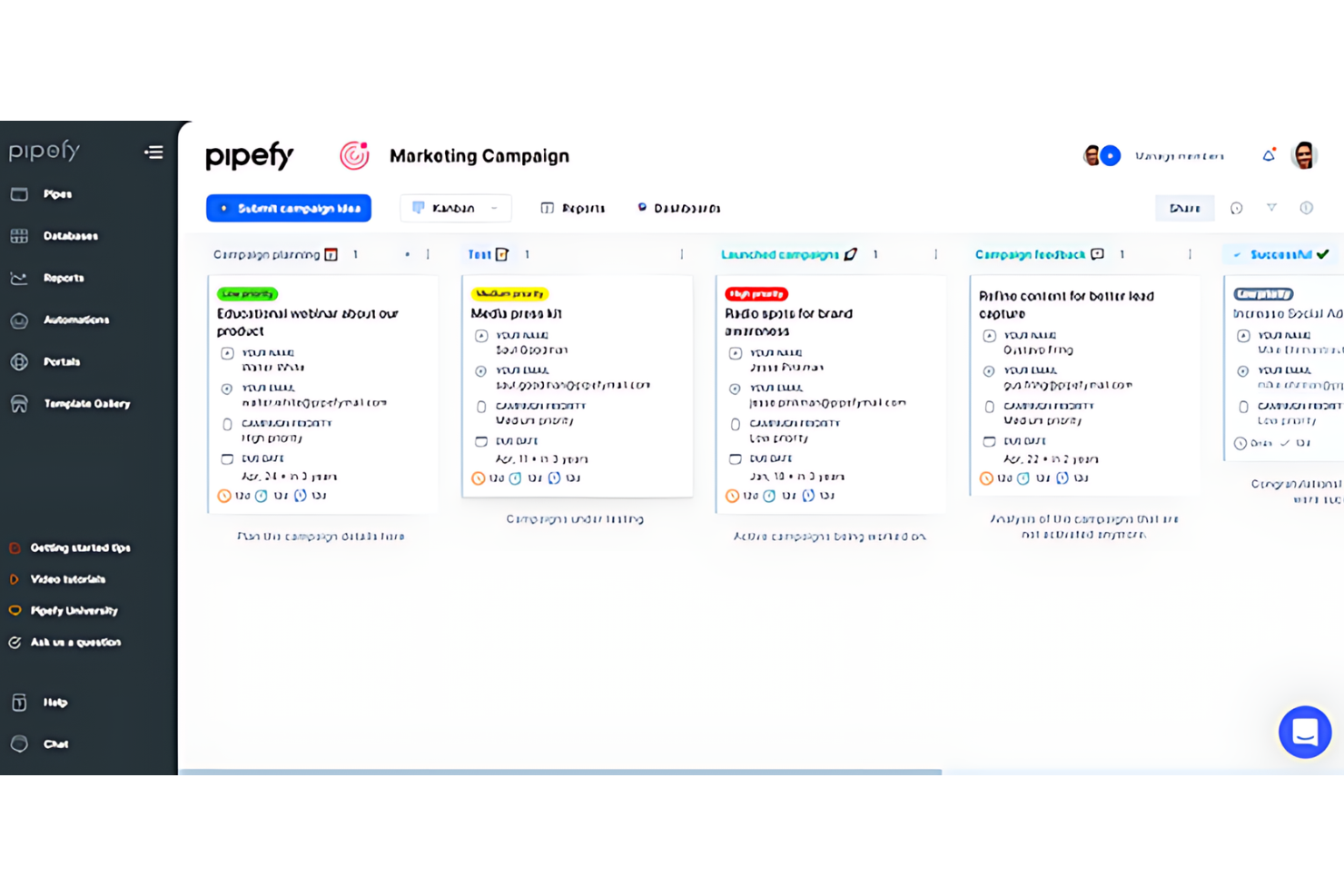
Pipefy is a platform designed to help businesses standardize their processes. It is best for creating consistent and efficient workflows.
Why I Picked Pipefy
Pipefy excels in establishing uniform processes across an organization. Its intuitive design and powerful automation tools make it a standout choice for ensuring consistent operations. I believe Pipefy is best for process standardization due to its ability to provide a structured approach to managing workflows, which is essential for maintaining quality and efficiency as a business grows.
Pipefy Key Features
In addition to process standardization, Pipefy offers a range of features that make it useful as a process automation solution.
- Custom Forms: You can create custom forms to streamline and standardize data collection and maintain accuracy across processes.
- SLA Tracking: This lets you monitor service level agreements to maintain timely task delivery and goal alignment.
- Automated Email Notifications: You can keep your team informed with automatic email updates triggered by specific workflow events.
- Visual Workflow Builder: This lets you use a drag-and-drop interface to design and modify workflows easily, so even non-technical users can manage processes independently.
Pipefy Integrations
Integrations include Slack, Salesforce, Dropbox, Docusign, Airtable, Asana, Basecamp, and Google Drive.
Pros and Cons
Pros:
- Robust automation rules
- User-friendly interface
- Customizable workflow templates
Cons:
- Security features locked to higher-tier plans
- Steep learning curve for new users
Annen programvare for prosessautomatisering
Her er en liste over ytterligere programvare for prosessautomatisering som er verdt å se nærmere på hvis du ikke fant noe som passer i listen ovenfor.
- Process Street
For no-code workflow automation
- Blue Prism
For intelligent automation solutions
- Nintex
For increasing overall efficiency
- ProcessMaker
For enterprise-wide automation
- Pneumatic Workflow
For unlimited workflow creation
- Fortra
For business growth and productivity
- Automation Anywhere
For complex process orchestration
- Appian
For enterprise agility
- SweetProcess
For knowledge management
- Bizagi
For end-to-end automation
- Creatio AI Studio
For highly customizable business process automation
- Smartsheet
For intelligent workflows
- Scoro
For unified business management
- Kissflow
For no-code app creation
- cloudsquid
For structuring financial data files
- Zapier
For simple cross-app automation
- TrackVia
For mobile workflow management
- ClickUp
For team collaboration
- Workato
For connecting apps
- Decisions
For complex rule-based automation
- Asana
For project collaboration
- monday.com
For workflow customization and management
- Conga
For document generation automation
- Pega
For customer engagement and CRM
- IBM Robotic Process Automation
For integrating AI capabilities
- InRule
For business rules management
- AgilePoint
For building enterprise apps quickly


Relatert programvare for prosjektledelse
Hvis du fortsatt ikke har funnet det du leter etter her, kan du se nærmere på disse andre relaterte verktøyene som vi har testet og evaluert:
- Programvare for prosjektledelse
- Programvare for ressursstyring
- Programvare for arbeidsflytautomatisering
- Programvare for tidsregistrering
- Programvare for oppgavehåndtering
- Samarbeidsverktøy
- Verktøy for å lage Gantt-diagrammer
- Produktivitetsverktøy
- Programvare for prosjektsporing
- Programvare for prosjektplanlegging
How I Evaluate Process Automation Software
I look at every tool through two lenses: the core capabilities—like conditional triggers and approval routing—a tool must have, and the differentiators that determine fit for PMO teams.
Core Functionality (Table Stakes For This List)
When I'm selecting tools for my list, I rank each one on a scale from 0 (does not offer the functionality) to 5 (excels in this area) for each core functionality listed below. Then, I calculate the tool's total score into a percentage. Each tool needs to achieve a minimum total score of 65% to be considered for inclusion.
- Visual Workflow Builder: I check whether you can map out a multi-step process—like a project intake-to-kickoff sequence—using a drag-and-drop canvas rather than writing code.
- Conditional Logic & Triggers: Each tool needs to support event-based triggers and branching rules, such as auto-escalating a task when a due date passes without completion.
- Task & Process Automation: I evaluate how well the tool handles automated task creation, assignment, and routing—for example, spinning up a standard task set when a new project enters a specific stage.
- Approval & Review Workflows: Tools should let you build structured approval chains, like routing a change request through a project lead, then a PMO director, with notifications at each step.
- Third-Party Integrations: I look at the breadth of native connectors to PM tools like Jira, Asana, or monday.com, plus API and webhook support for custom orchestration needs.
- Process Monitoring & Analytics: Dashboards and logs that track automation performance matter here—I want to see whether you can spot workflow bottlenecks and measure SLA adherence.
Once I have a list of tools that meet this criteria, I consider what sets each platform apart.
Differentiating Factors (What Sets Vendors Apart)
Here's how I compare and contrast different vendors:
Standout Features
A strong process templates library saves PMO teams from rebuilding intake, change request, and stage-gate workflows from scratch for every new project type. I also evaluate whether a tool offers AI-powered suggestions, like flagging stalled workflows or recommending next steps based on historical project data. Resource and capacity automation is another differentiator, especially when a tool can auto-reassign tasks or trigger staffing alerts when a team member's workload crosses a set threshold.
Beyond Features
Integration depth matters a lot here. I check whether a tool syncs bi-directionally with PM platforms like Jira or Asana, not just pushes data one way. Scalability is another factor I weigh, particularly for PMO teams running dozens of concurrent projects across programs. A tool that performs well for a single team but struggles at portfolio scale creates problems fast. I also look at pricing transparency, especially around automation-run limits and per-user costs, so teams can forecast what they'll actually pay as adoption grows.
Slik velger du programvare for prosessautomatisering
Slik velger du et verktøy for prosessautomatisering som passer til behovene dine:
- Identifiser behov og mål: Definer tydelig hva du trenger at programvaren skal oppnå. Ønsker du å automatisere repetitive oppgaver, forbedre effektiviteten i arbeidsflyten eller redusere manuelle feil? Hvis teamet ditt for eksempel bruker uforholdsmessig mye tid på dataregistrering, vil en løsning som kan automatisere denne prosessen, løse denne utfordringen direkte.
- Integrasjonsmuligheter: Vurder hvor godt programvaren vil integreres med de eksisterende systemene dine. Du bør for eksempel kunne integrere prosessautomatiseringsprogramvaren med CRM-systemet ditt, slik at du kan automatisere oppfølgingssekvenser for kunder.
- Skalerbarhet: Hvis du forventer en økning i prosesskompleksitet eller -volum, bør programvaren kunne håndtere dette uten behov for en fullstendig omlegging. En liten e-handelsbedrift vil for eksempel ha nytte av automatiseringsprogramvare som kan skaleres opp i høysesonger som Black Friday.
- Brukeropplevelse: Vurder hvor enkel programvaren er å bruke, og hvor lang tid det tar å lære den. Den bør være tilgjengelig for alle brukere, uavhengig av deres tekniske kompetanse. Et markedsføringsteam med begrenset IT-kunnskap vil for eksempel trenge et brukervennlig grensesnitt for å sette opp automatiserte e-postkampanjer.
- Kostnadsvurderinger: Analyser de totale eierkostnadene, inkludert førstegangsoppsett, opplæring og løpende vedlikehold. Sørg for at kostnaden samsvarer med budsjettet ditt og gir god avkastning på investeringen. Et oppstartsselskap kan for eksempel se etter en løsning som tilbyr grunnleggende automatiseringsfunksjoner uten unødvendige funksjoner som øker prisen.
Trender innen prosessautomatiseringsprogramvare
Prosessautomatiseringsprogramvare utvikler seg raskt, og nye trender oppstår som omdefinerer hvordan virksomheter drives. Disse trendene vil få stor betydning:
- Strategisk automatisering: Strategisk automatisering er nå en sentral del av virksomhetstransformasjoner, ikke bare et moteord blant CIO-er. Det er avgjørende for operasjonell effektivitet, dataintegritet og vedvarende vekst, og er en kritisk faktor for virksomheter som ønsker å lykkes i det digitale landskapet.
- Fremveksten av kodefrie plattformer og plattformer med lite kode: Kodefrie plattformer og plattformer med lite kode muliggjør rask utrulling av applikasjoner, bidrar til å håndtere kompetansemangel og imøtekommer behovet for høy hastighet i digitalt orienterte operasjoner. De gjør utviklingsprosessen tilgjengelig for flere og muliggjør rask oppretting av applikasjoner.
- Omfattende prosessautomatisering: Selv om robotisert prosessautomatisering (RPA) fortsatt er populært for automatisering på oppgavenivå, går trenden i retning av systematisk automatisering. Intelligent prosessautomatisering (IPA), som kombinerer RPA med kunstig intelligens og maskinlæring for smartere automatisering og større skalerbarhet, omfatter ofte programvare for dokumentgenerering som en sentral komponent for å opprette og administrere dokumenter automatisk som en del av ende-til-ende-prosessen.
- Bruk av strategier med flere skyer: Virksomheter tar i økende grad i bruk strategier med flere skyer for å oppfylle komplekse prosesskrav. Denne trenden innebærer bruk av ulike skytjenester fra flere leverandører, noe som kan hjelpe deg med å legge til rette for sømløs digitalisering og administrasjon av dokumenter på tvers av ulike skymiljøer.
- Hyperautomatisering: Hyperautomatisering innebærer å identifisere kritiske prosesser som vil ha nytte av automatisering, og bruke en kombinasjon av teknologier som kunstig intelligens, maskinlæring og plattformer med lite kode for å optimalisere disse prosessene helhetlig.
Hva er prosessautomatiseringsprogramvare?
Prosessautomatiseringsprogramvare er en type verktøy som kan utføre repetitive oppgaver og rutinemessige arbeidsflyter for deg uten behov for manuell inngripen. Den brukes hovedsakelig av prosjektledere, driftsteam, HR-medarbeidere, IT-ledere og økonomimedarbeidere for å spare tid, redusere feil og holde arbeidet i gang.
Funksjoner som oppgaveutløsere, regelbaserte handlinger og systemintegrasjoner bidrar til å redusere manuelt arbeid, opprettholde nøyaktigheten og gjøre prosesser enklere å administrere, slik at det daglige arbeidet går raskere og blir mer forutsigbart.
Funksjoner i prosessautomatiseringsprogramvare
Når du velger prosessautomatiseringsprogramvare, bør du se etter følgende viktige funksjoner:
- Utforming og tilpasning av arbeidsflyter: Du kan opprette, redigere og tilpasse automatiserte arbeidsflyter slik at de passer til forretningsprosessene dine. Dette lar deg kartlegge hvert trinn, koble dem logisk sammen og tilpasse prosessen til dine unike behov.
- Integrasjonsmuligheter: Du bør kunne koble programvaren til andre verktøy du allerede bruker, for eksempel CRM-, ERP- eller e-postplattformer. Dette gjør det enkelt å utveksle data på tvers av systemer.
- Oppgavehåndtering: Du kan tildele, spore og overvåke oppgaver i automatiserte prosesser for å sikre at alle vet hva de skal gjøre, forhindre overskredne tidsfrister og unngå flaskehalser.
- Varsler og meldinger: Dette lar deg automatisk varsle de rette personene når oppgaver forfaller, er fullført eller krever oppmerksomhet, hjelper teamet med å holde oversikt over ansvarsområder og reduserer menneskelige feil og overskredne tidsfrister.
- Rapportering og analyse: Du kan få tilgang til dashbord og generere rapporter for å analysere hvordan prosessene fungerer. Dette lar deg oppdage ineffektivitet, ta bedre beslutninger og forbedre driften.
- Brukertillatelser og tilgangskontroll: Dette lar deg angi hvem som kan se, redigere eller godkjenne ulike arbeidsflyter og data i programvaren, samt holde sensitiv informasjon sikker og sørge for at personer bare ser det som er relevant for rollene deres.
- Revisjonsspor: Du kan spore alle endringer og handlinger som utføres i prosessene dine, slik at du får en fullstendig oversikt som hjelper deg med å overholde krav, feilsøke problemer og forstå nøyaktig hvem som gjorde hva og når.
Vanlige AI-funksjoner i programvare for prosessautomatisering
I tillegg til standardfunksjonene i programvare for prosessautomatisering som er nevnt ovenfor, tilbyr mange verktøy AI-funksjoner som:
- Intelligent dokumentbehandling: Dette lar deg automatisk hente ut, tolke og organisere informasjon fra dokumenter ved hjelp av AI, slik at du kan behandle skjemaer, fakturaer eller kontrakter uten manuell dataregistrering.
- Prediktiv analyse: Du kan bruke AI til å identifisere mønstre og forutsi fremtidige trender i arbeidsflytene dine, forutse problemer, fordele ressurser bedre og gjennomføre proaktive forbedringer.
- Naturlig språkbehandling: Du kan samhandle med verktøyet ved hjelp av skriftlige eller muntlige kommandoer, noe som gjør det enklere å automatisere oppgaver bare ved å skrive eller si hva du trenger å få gjort.
- Automatiserte beslutninger: AI kan vurdere kriterier og velge den mest hensiktsmessige handlingen uten din medvirkning. Dette fremskynder godkjenninger eller videresender oppgaver i henhold til angitt logikk og dataanalyse.
- Avviksdeteksjon: Denne funksjonen kan identifisere og varsle deg om uvanlig aktivitet, feil eller avvik fra prosessen i sanntid. Dette hjelper deg med å oppdage problemer tidlig.
Fordeler med programvare for prosessautomatisering
Her er noen av de viktigste fordelene programvare for prosessautomatisering kan gi:
- Økt effektivitet: Ved å automatisere gjentakende og tidkrevende oppgaver kan teamet ditt fokusere på mer komplekst og givende arbeid, noe som øker den samlede produktiviteten.
- Færre feil: Programvaren minimerer menneskelige feil ved å sørge for at oppgaver utføres konsekvent og korrekt, noe som fører til resultater av høyere kvalitet og mindre behov for omarbeiding.
- Kostnadsbesparelser: Ved å effektivisere prosesser og redusere behovet for manuell inngripen kan du senke lønnskostnadene og minimere utgifter knyttet til feil og ineffektivitet.
- Bedre samsvar med regelverk: Programvare for prosessautomatisering kan programmeres til å følge regulatoriske krav nøyaktig, slik at det blir enklere for deg å overholde bransjestandarder og unngå kostbare sanksjoner.
- Bedre datahåndtering: Programvaren kan samle inn og organisere data systematisk, slik at du får verdifull innsikt som bidrar til informerte beslutninger.
Kostnader og priser for programvare for prosessautomatisering
Her er en tabell som viser typiske priser og abonnementer for programvare for prosessautomatisering:
Sammenligningstabell for abonnementer på programvare for prosessautomatisering
| Plantype | Gjennomsnittspris | Vanlige funksjoner |
|---|---|---|
| Gratis | $0 | Tilgang til grunnleggende automatiseringsfunksjoner, begrenset antall prosesser, brukerstøtte fra fellesskapet |
| Grunnleggende | $10 - $20 per bruker per måned | Grunnleggende automatiseringsfunksjoner, tilgang til forhåndsbygde maler, brukerstøtte via e-post |
| Standard | $30 - $50 per bruker per måned | Avanserte automatiseringsfunksjoner, tilgang for flere brukere, prioritert brukerstøtte |
| Premium | $70 - $100 per bruker per måned | Fullt spekter av automatiseringsfunksjoner, integrasjonsalternativer, dedikert brukerstøtte, verktøy for analyse og rapportering |
| Bedrift | Tilpasset pris | Tilpassede løsninger, sikkerhet på bedriftsnivå, personlig kontoadministrasjon, brukerstøtte døgnet rundt, opplæring og innføring |
Vanlige spørsmål om programvare for prosessautomatisering
Her er noen vanlige spørsmål om programvare for prosessautomatisering:
Kan programvare for prosessautomatisering integreres med andre systemer?
Ja, det meste av programvare for prosessautomatisering er utviklet for å integreres med en rekke andre forretningssystemer og applikasjoner. Dette omfatter CRM-systemer, ERP-systemer, databaser og andre programvareverktøy. Integrasjonsfunksjoner lar deg overføre data smidig mellom systemer og automatisere arbeidsflyter på tvers av funksjoner.
Er programvare for prosessautomatisering egnet for små bedrifter?
Ja, programvare for prosessautomatisering er absolutt egnet for små bedrifter. Den kan hjelpe deg med å håndtere oppgaver mer effektivt og skalere driften uten å øke bemanningen betydelig. Mange løsninger er skalerbare og tilbyr fleksibel prising for å imøtekomme behovene og budsjettene til mindre bedrifter.
Hvilke typer prosesser kan automatiseres?
Med programvare for prosessautomatisering kan du automatisere prosjektgodkjenninger, oppgavetildelinger, rapportering, innføring av nye medarbeidere, dokumentdistribusjon og statusoppdateringer. Prosjektledere bruker ofte også automatisering til regelmessige oppfølginger, budsjettsporing og godkjenningskjeder. Begynn med de mest repetitive oppgavene dine for å maksimere den umiddelbare effekten.
Hvor sikker er programvare for prosessautomatisering?
Sikkerheten varierer fra produkt til produkt, men anerkjent programvare for prosessautomatisering omfatter vanligvis sikkerhetsfunksjoner som datakryptering, brukerautentisering og tilgangskontroller. Se etter samsvarssertifiseringer som SOC 2 eller GDPR, og gå gjennom sikkerhetstiltakene til all programvare du vurderer, for å sikre at de er i samsvar med bransjens regelverk.
Hvilke vanlige feil bør unngås ved implementering av prosessautomatisering?
Ikke automatiser prosesser som er ødelagte eller uklare – fiks dem først. Unngå å hoppe over involvering av interessenter, og ikke undervurder behovet for opplæring av brukerne. Test arbeidsflytene grundig og opprett tydelig dokumentasjon. Hvis du forhaster deg eller ignorerer tilbakemeldinger, kan det føre til problemer med innføringen, og du kan gå glipp av fordelene ved prosessautomatisering.
Kan programvare for prosessautomatisering håndtere godkjenninger og arbeidsflyter for samsvar?
Ja, mange verktøy støtter godkjenninger i flere trinn, revisjonsspor og samsvarskrav. Du kan konfigurere tilpassede regler for distribusjon av dokumenter, innhenting av digitale signaturer og sporing av godkjenningshistorikk. Dette holder prosjektprosessene transparente og klare for revisjon hvis (eller når) det blir nødvendig.
Hvor lang tid tar det å sette opp programvare for prosessautomatisering?
Hvor lang tid oppsettet av programvare for prosessautomatisering tar, avhenger av hvor komplekst verktøyet er og hvilke behov du har for prosessene. For enkle automatiseringer kan du være i drift i løpet av noen timer. Større prosjekter med integrasjoner eller tilpassede arbeidsflyter kan ta noen uker. Sett av tid til testing og innføring av teamet – dette hjelper deg med å unngå forsinkelser.
Hvilken type brukerstøtte eller opplæring følger vanligvis med verktøy for prosessautomatisering?
De fleste leverandører tilbyr veiledninger for innføring, direktechat, opplæringsprogrammer og brukerfellesskap. Noen tilbyr dedikerte kundeansvarlige, opplæringsøkter eller sertifiseringsprogrammer. Undersøk hvilke ressurser for brukerstøtte som er tilgjengelige før du velger et verktøy, slik at du er trygg på at teamet ditt kan komme i gang så raskt som mulig.