

De 10 beste programvarene for AI-oppgavebehandling, vurdert i 2026

Kort liste over de beste AI-verktøyene for oppgavehåndtering


Det kan være kaotisk å holde styr på oppgaver for flere prosjekter med flere tidsfrister. Du kan oppleve at du bruker mer tid på å organisere oppgaver enn på faktisk å fullføre dem. AI-oppgavebehandlere tilbyr en smartere måte å håndtere arbeidsmengden på, prioritere oppgaver, automatisere repetitive handlinger og holde teamet samkjørt.
I denne artikkelen deler jeg mine anbefalinger av de beste AI-oppgavebehandlerne. Hver anbefaling er basert på grundig research og testing. Du får innsikt i funksjonene, fordelene og ulempene, samt hvordan de kan løse de mest presserende utfordringene dine.
Why Trust Our Software Recommendations
Our team has been testing and reviewing software since 2012. As project managers ourselves, we know how difficult—and important—it is to choose the right software.
For this guide, we evaluated tools using hands-on testing and independent research, scoring tools using our selection criteria. We also draw on insights from industry thought leaders and practicing project management experts.
Our reviews reflect our human editorial judgment, not a sales pitch.
Expert reviewers:
Sammenligningstabell for programvare for AI-oppgavehåndtering
Denne sammenligningstabellen oppsummerer prisopplysningene for mine beste utvalgte programmer for AI-oppgavehåndtering:
| Tool | Best For | Trial Info | Price | ||
|---|---|---|---|---|---|
| 1 | Best for visual project management | Free plan available | From $9/user/month (billed annually) | Website | |
| 2 | Best for project tracking | Free plan + 14-day free trial + free demo available | From $5/user/month (billed annually) | Website | |
| 3 | Best for automating routine tasks | 14-day free trial | Pricing upon request | Website | |
| 4 | Best for AI-powered project insights | Free plan + 15-day free trial + free demo available | From $4/user/month (billed annually) | Website | |
| 5 | Best for AI access via Claude or ChatGPT | Free plan + 30-day free trial available | From $7.65/user/month (billed annually) | Website | |
| 6 | Best for customizable tasks | Free plan available | From $9/user/month (billed annually) | Website | |
| 7 | Best for task prioritization | Free plan available | From $10.99/user/month (billed annually) | Website | |
| 8 | Best for automated scheduling | Free trial available | From $19/user/month (billed annually) | Website | |
| 9 | Best for app integration | Free plan available | From $19.99/month (billed annually) | Website | |
| 10 | Best for individual task scheduling | Free plan available and 7-day free trial | From $5/month (billed annually) | Website |


Anmeldelser av de beste AI-oppgavebehandlerne
Nedenfor finner du detaljerte sammendrag av de beste programmene for AI-oppgavehåndtering som kom med på kortlisten min. Få en detaljert oversikt over viktige funksjoner, fordeler & ulemper, integrasjoner og ideelle bruksområder for hvert verktøy, slik at du kan finne det som passer best.

Best for visual project management
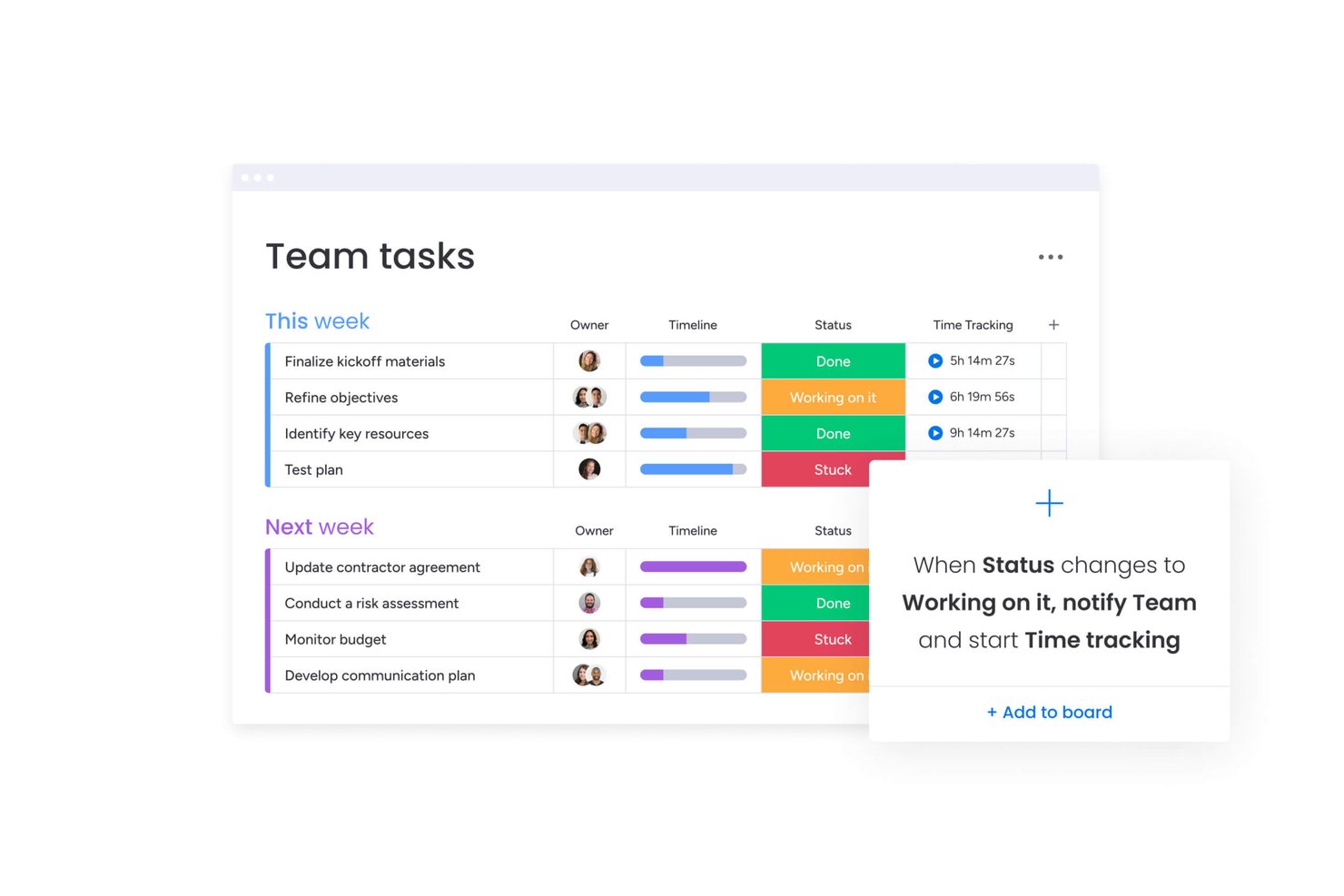
monday AI Workspace is a visual work management platform that combines AI agents, smart task generation, and workflow automation to help teams plan, assign, and track work across boards, timelines, and portfolios.
Who Is monday AI Workspace Best For?
It's a strong fit for mid-size to enterprise teams managing complex, cross-functional projects across product, engineering, and operations.
Why I Picked monday AI Workspace
monday AI Workspace earns its spot on my shortlist because of how well it layers AI directly into a visual board interface. I particularly like AI Blocks, which auto-populate boards with status updates, deadlines, and assignees based on project context, cutting out the manual data entry that slows teams down. I also use the AI Sidekick within board views to generate task updates and surface next steps without switching context or tools.
monday AI Workspace Key Features
- AI meeting notetaker: Transcribes meetings in real time, identifies speakers, and creates structured summaries.
- Custom AI agents: Allows you to configure agents that autonomously execute recurring project management tasks.
- Integration with 200+ tools: Natively connects with platforms like Slack, GitHub, Google Drive, Salesforce, and HubSpot.
- Portfolio dashboards: Lets you visualize, track, and report on multiple projects using customizable live dashboards.
monday AI Workspace Integrations
monday AI Workspace offers hundreds of native integrations, including Slack, Google Workspace, Microsoft 365, Salesforce, Jira, GitHub, Zoom, Dropbox, HubSpot, and Zendesk. It also supports Zapier and provides an API for custom integrations.
Pros and Cons
Pros:
- Strong portfolio-level tracking across multiple projects
- AI agents automate repetitive task management work
- Visual boards make project status instantly clear
Cons:
- Board setup can get cluttered at scale
- AI features locked behind higher-tier plans
New Product Updates from monday AI Workspace
monday AI Workspace Adds Human Approval Routing
monday AI Workspace adds a human-in-the-loop approval block to AI Workflows, sending approval requests and routing workflow paths based on responses. For more information, visit monday AI Workspace's official site.
Hive
Best for project tracking
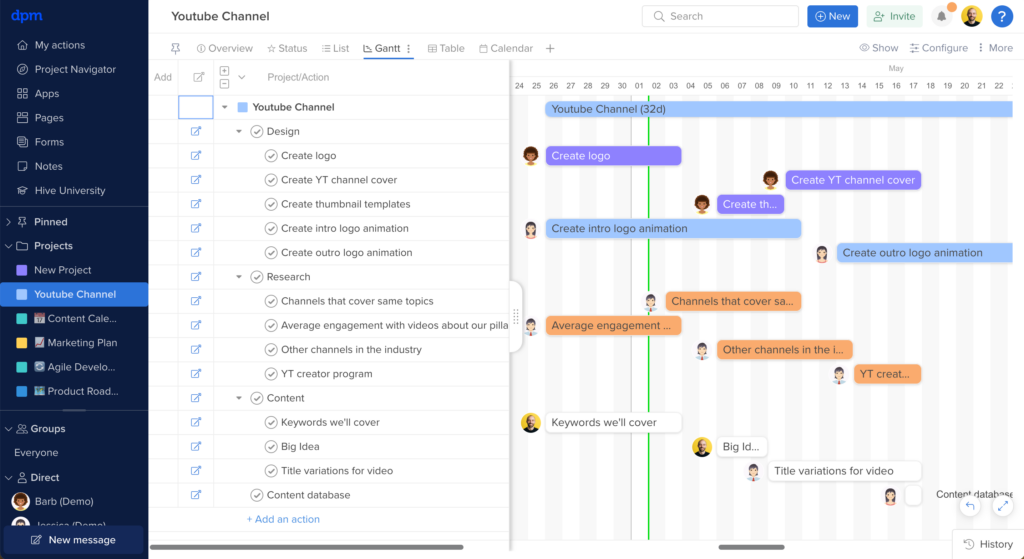
Hive is an AI-powered project and task management platform that brings together automated task creation, workflow optimization, project tracking, and team collaboration in one workspace.
Who Is Hive Best For?
Hive is a good fit for mid-sized teams in tech, marketing, and creative industries that need a centralized workspace for managing tasks, projects, and cross-functional collaboration.
Why I Picked Hive
I picked Hive as one of the best for project tracking because it gives you a flexible way to monitor work across every stage of a project. I like that you can switch between Gantt, Kanban, timeline, portfolio, and summary views without rebuilding anything—my team can track the same project from whatever angle makes sense for the work at hand. The portfolio view is especially useful when I'm juggling multiple projects at once, since it surfaces status across all of them in a single glance. Hive's customizable dashboards pull real-time data from across your workspace, so I can build a project-level view for my team and a high-level summary for leadership without duplicating any effort.
Hive Key Features
- Hive AI: Automatically generate tasks, write action items, and summarize project updates.
- Time tracking: Log hours directly on tasks and actions, with timesheets that roll up across projects for reporting.
- Proofing and approvals: Review and annotate files directly inside Hive, with approval workflows to move assets through sign-off stages.
- Resourcing: View team workload across projects to see who has capacity and reassign tasks based on availability.
Hive Integrations
Hive offers native integrations with Slack, Zoom, Google Drive, Dropbox, Box, Jira, Salesforce, GitHub, OneDrive, and Microsoft Teams. It also connects with Zapier and provides an API for custom integrations.
Pros and Cons
Pros:
- Suitable for large teams
- Comprehensive time tracking
- Customizable project views
Cons:
- Limited offline capabilities
- Can be complex for new users

Wrike
Best for automating routine tasks

Wrike is an AI-powered work management platform for teams that want to automate task workflows, manage projects, and centralize collaboration in one place.
Who Is Wrike Best For?
Wrike is a good fit for mid-size to enterprise teams in marketing, product, and professional services who need structured project workflows and cross-functional task visibility.
Why I Picked Wrike
Wrike earns its spot on my shortlist because its automation goes beyond simple rule-based triggers. I use Wrike's natural language automation builder to describe a workflow in plain English and watch it generate the full rule set—no manual configuration required. The AI agent layer is especially useful: agents parse intake form submissions, auto-populate custom fields, and score incoming tasks based on criteria like effort and impact, without manual intervention. Wrike Copilot lets me query an entire project folder and surface risks or status updates within seconds.
Wrike Key Features
- Custom project views: Toggle between Gantt, Board, Table, Calendar, and Chart views to match how your team tracks and visualizes task progress.
- Effort management: Assign effort estimates directly to tasks so you can forecast workload and choose the right assignee before work begins.
- AI insights: Wrike surfaces patterns and priorities from your project data, turning raw task activity into clear signals about what needs attention.
- Scrum boards: Run Agile sprints with backlog prioritization, real-time collaboration, and dashboards built directly into the platform.
Wrike Integrations
Wrike offers hundreds of integrations via its marketplace, including tools like Google Workspace, Microsoft 365, Salesforce, and Slack. It also supports Zapier and provides an API for custom integrations.
Pros and Cons
Pros:
- Predicts project risks proactively
- Generative AI drafts and edits
- Conversational Copilot answers instantly
Cons:
- Privacy concerns with AI data
- Advanced AI requires paid plan
New Product Updates from Wrike
Wrike Adds Klaxoon MCP Integration
Wrike’s Klaxoon MCP integration is now generally available, enabling AI agents to navigate between Wrike tasks and attached whiteboards, read task context, and manage whiteboard attachments via API. For more information, visit Wrike's official site.

Best for AI-powered project insights
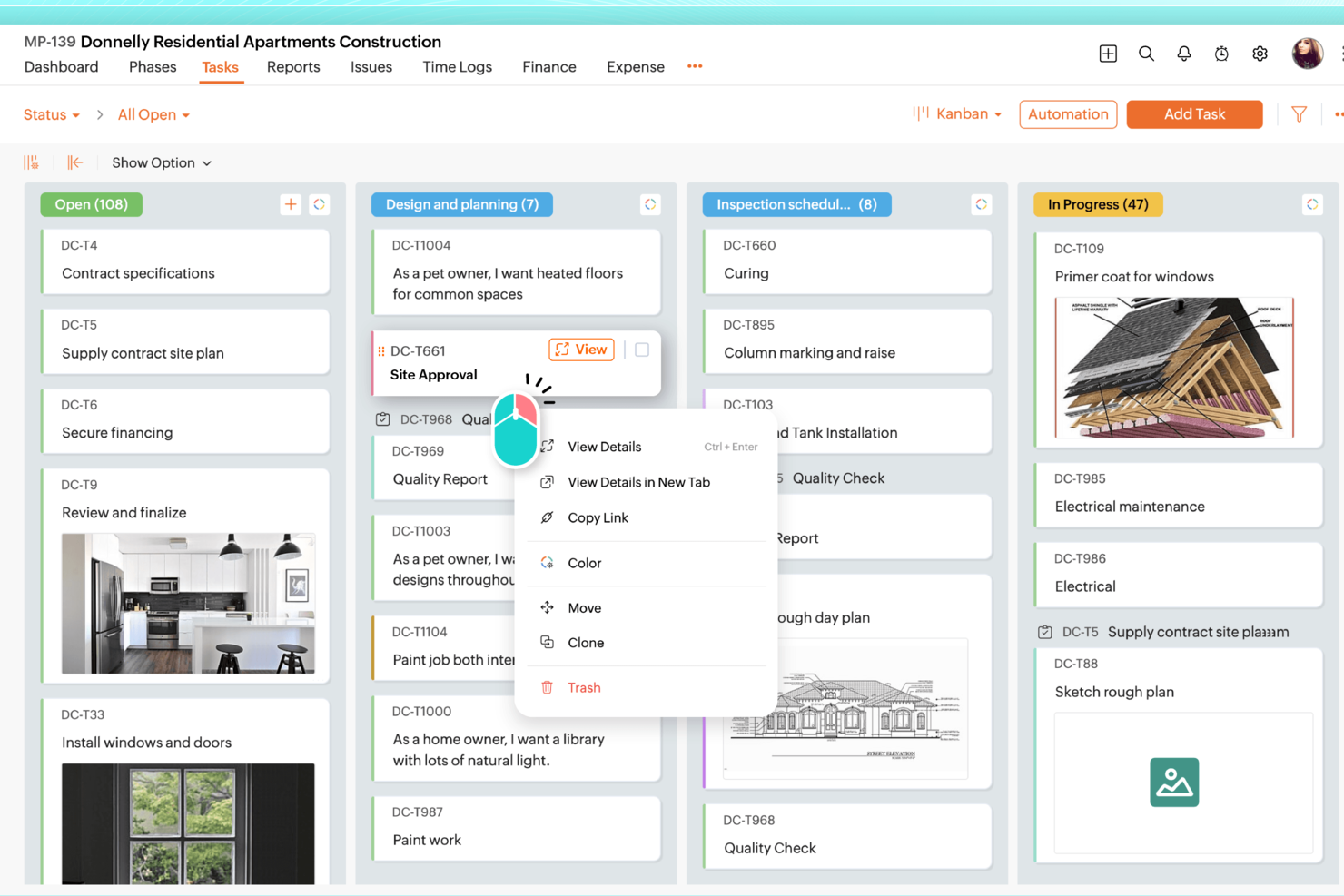
Zoho Projects is a project management platform for teams that want AI-driven task tracking, workflow automation, resource planning, and project analytics in one place.
Who Is Zoho Projects Best For?
Zoho Projects is a good fit for small to mid-sized teams already working within the Zoho ecosystem who need structured project management with built-in AI capabilities.
Why I Picked Zoho Projects
Zoho Projects earns its spot on my shortlist because of how Zia, its built-in AI assistant, surfaces project insights without requiring you to dig through reports manually. I particularly like Zia's data analytics feature, which breaks down task and project metrics into plain-language takeaways—so when a sprint is running behind, I can see exactly where the bottleneck is rather than piecing it together from raw charts. I also use Zia's AI-powered task creation, which generates task lists from a project description or milestone details, cutting down the time I'd otherwise spend on initial project setup.
Zoho Projects Key Features
- Blueprint workflow automation: Design step-by-step workflows that automatically update task fields, assign the right team members, and trigger alerts as task statuses change.
- Gantt chart with dependency tracking: Visualize task sequences, set finish-to-start or start-to-start dependencies, and reschedule tasks directly from the chart view.
- Resource management: View each team member's workload in real time and reassign tasks when someone is over- or under-allocated.
- Earned Value Management: Compare planned vs. actual schedule, cost, and time metrics to measure project performance and forecast outcomes.
Zoho Projects Integrations
Zoho Projects offers native integrations with Zoho CRM, Zoho Desk, Zoho Analytics, Google Drive, Microsoft Teams, Slack, GitHub, Bitbucket, Dropbox, and Zapier. An API is available for custom integrations.
Pros and Cons
Pros:
- Affordable pricing for growing teams
- Built-in time tracking and billing
- Strong automation and workflow customization
Cons:
- Mobile experience less fully featured
- Interface has steeper learning curve
New Product Updates from Zoho Projects
Zoho Projects Adds CodeX Scripts for Custom Modules
Zoho Projects now supports CodeX Scripts for custom modules, enabling conditional logic and rules for creating, updating, and deleting records. For more information, visit Zoho Projects' official site.
 .
.
Quire
Best for AI access via Claude or ChatGPT

Quire is a project management tool built around infinite nested task hierarchies, with multiple view types—Kanban, Timeline, Calendar, Table, and Dashboard—and an AI integration layer powered by a first-party Model Context Protocol (MCP) server that connects directly to Claude or ChatGPT.
Who Is Quire Best For?
Quire is a strong fit for tech-savvy project managers and Scrum teams who already use Claude or ChatGPT and want their AI to read and write directly to their project data.
Why I Picked Quire
I picked Quire as one of the best because it's the only major project management tool with a first-party MCP server, meaning Claude or ChatGPT can read and write directly to your live project data. I've used the MCP prompts to turn raw meeting notes into structured task hierarchies, with assignees and due dates, before approving a single write. The AI can also draft weekly status reports by pulling live task states grouped by assignee, no manual compilation needed.
Quire Key Features
- Infinite nested task list: Break projects into unlimited levels of subtasks, preserving the full parent-child hierarchy across all views and AI interactions.
- Kanban board with WIP controls: Manage workflow stages visually with swim lanes and work-in-progress limits to keep sprint capacity in check.
- Dynamic timeline view: Schedule tasks and milestones across dates with dependency tracking to keep sequencing visible across the full project.
- Workload flagging via MCP prompts: Ask your connected AI to list each team member's open tasks for the week and surface anyone exceeding a defined task threshold.
Quire Integrations
Quire has native integrations with Slack, Microsoft Teams, Google Calendar, Google Drive, GitHub, Microsoft OneDrive, Dropbox, and Box. Its first-party MCP server connects Claude and ChatGPT, while n8n, a REST API, and Zapier support custom workflows.
Pros and Cons
Pros:
- Human-in-the-loop approval for all AI actions
- Infinite task hierarchies with full parent-child structure
- AI reads and writes live project data
Cons:
- No built-in AI assistant for quick actions
- Requires connecting external AI like ChatGPT
New Product Updates from Quire
Quire Adds Custom Field Locking and Comment Reaction API Support
Quire adds custom field locking and API support for reading and setting emoji reactions on comments. These updates give teams more control over field data and expand comment interaction options for developers. For more information, visit Quire’s official site.
 .
.
ClickUp
Best for customizable tasks

ClickUp is an AI-powered task management platform that lets teams organize, automate, and track work using customizable workflows, natural language processing, and integrated collaboration tools.
Who Is ClickUp Best For?
ClickUp is well suited to tech and product teams that need a highly adaptable task management setup for complex, multi-layered workflows.
Why I Picked ClickUp
ClickUp is one of my top picks because I love how far you can push task customization without ever leaving the platform. I use custom fields to attach dropdowns, budget figures, regional tags, and deal sizes directly to tasks, so every item carries the exact context my team needs. ClickUp Brain's Self-Prioritizing Tasks automatically reorders work as priorities shift, preventing me from reshuffling backlogs whenever scope changes. The AI Task Builder pulls from chats and docs to generate fully structured tasks, ensuring nothing is lost in conversation threads.
ClickUp Key Features
- AI-generated subtasks: ClickUp Brain breaks down complex tasks into structured subtasks automatically based on the task description.
- Goals and milestones: Set measurable targets tied directly to tasks and track progress against them in real time.
- Sprint management: Plan and manage sprints with built-in velocity tracking, sprint points, and burndown charts.
- Whiteboards: Visually map out workflows, ideas, and project plans on a collaborative canvas linked directly to tasks.
ClickUp Integrations
ClickUp offers 50+ native integrations, including Slack, GitHub, GitLab, HubSpot, Everhour, Toggl, Harvest, Google Drive, OneDrive, Dropbox, Outlook, Google Calendar, Figma, Zoom, Bitbucket, Microsoft Teams, Intercom, Box, Zendesk, and Front. It also connects with Zapier and provides an API for custom integrations.
Pros and Cons
Pros:
- Suitable for various industries
- Strong automation features
- Extensive template library
Cons:
- Limited offline functionality
- Requires setup and configuration time
New Product Updates from ClickUp
ClickUp Adds Meetings Hub, Super Agent Templates, and ZoomInfo Integration
ClickUp adds a searchable Meetings Hub, new ways to clone and template Super Agents, and a ZoomInfo integration through the App Center. These updates improve meeting retrieval, agent reuse, and access to sales intelligence. For more information, visit ClickUp’s official site.

Asana
Best for task prioritization

Asana is a work management platform for teams that combines AI-powered task management, workflow automation, project tracking, and customizable views for organizing and managing tasks.
Who Is Asana Best For?
Asana is a good fit for mid-size to enterprise teams in tech and digital industries that need a structured way to manage cross-functional projects and workloads.
Why I Picked Asana
Asana earns its spot as one of the best on my shortlist because of how well it handles task prioritization at scale. The My Tasks view consolidates every assignment in one place, and I like that you can sort by due date, priority, or custom fields, then lock that order in with automation rules so tasks move to the right section without any manual sorting. When my team is juggling a sprint alongside a product launch, that kind of automatic organization keeps everyone focused on what actually needs to happen next. On top of that, Asana's AI auto-generates custom priority fields for a project the moment you name it, which cuts down the setup time when a new workstream kicks off.
Asana Key Features
- AI Teammates: Add AI agents directly into your workflows to take action on tasks, follow up on assignments, and move work forward autonomously.
- Reporting dashboards: Visualize project status and workload data with real-time charts built from live task and field data across projects.
- Portfolios: Monitor multiple connected projects from a single view, tracking status, progress, and dependencies across teams.
- Workflow rules: Set trigger-based automation rules that move tasks, update fields, or notify teammates when specific conditions are met.
Asana Integrations
Asana offers hundreds of native integrations, including Slack, Google Drive, Microsoft Teams, Jira, GitHub, Salesforce, Zoom, Dropbox, Figma, Zendesk, and ServiceNow. It also connects with Zapier and provides an API for custom integrations.
Pros and Cons
Pros:
- Team workload management
- Task dependencies management
- Visual project timeline
Cons:
- Limited offline capabilities
- Requires setup and configuration

Motion
Best for automated scheduling

Motion is an AI-powered task manager that combines intelligent scheduling, automated prioritization, and calendar management for teams and individuals.
Who Is Motion Best For?
Motion is a good fit for individual professionals and small teams who manage heavy workloads and need AI to handle scheduling decisions automatically.
Why I Picked Motion
Motion earns its spot on my shortlist because of how it handles automated scheduling—it's genuinely unlike anything else I've used. When I add a task with a deadline and estimated duration, Motion's AI automatically time-blocks it on my calendar and re-optimizes the entire schedule if something changes. I especially like the "Do Date vs. Due Date" distinction, where Motion proactively flags at-risk tasks days in advance rather than waiting for a deadline to slip. The AI Calendar Assistant also schedules meetings at times that protect focus blocks, so my deep work time doesn't get fragmented by back-to-back calls.
Motion Key Features
- AI Workflows: Build reusable templates for repeatable projects and SOPs so Motion can auto-assign and sequence tasks each time a new project kicks off.
- AI Gantt chart: Visualize project timelines with auto-scheduling built in, so the chart updates automatically as tasks shift or deadlines change.
- AI capacity planning: See each team member's workload in real time and let Motion balance task assignments based on available capacity across the team.
- AI Meeting Notetaker: Auto-captures meeting notes and summaries so action items get logged without anyone manually writing them up after a call.
Motion Integrations
Motion offers native integrations with Google Calendar, Outlook, Gmail, Zoom, Google Meet, Siri, HubSpot, Salesforce, Microsoft Teams, and Slack. It also connects with Zapier and provides an API for custom integrations.
Pros and Cons
Pros:
- Improves focus with time-blocking
- Provides detailed time analytics
- Adapts to changing schedules
Cons:
- Limited customization options
- Can be complex to set up


Zapier is an AI-powered task automation platform that connects and manages workflows across thousands of apps, letting you automate repetitive tasks and coordinate actions between different tools.
Who Is Zapier Best For?
Zapier is a strong fit for project managers and operations teams who need to automate task workflows across multiple apps without writing code.
Why I Picked Zapier
I've included Zapier in my top picks because no other tool comes close to its app integration depth for task automation. With connections to 8,000+ apps, my team uses Zapier to wire together tools like Jira, Asana, Slack, and Google Workspace into a single automated workflow—without writing a line of code. I particularly like the Paths feature, which lets you route tasks to different teams based on if/then logic, so a high-priority bug report in Jira can automatically trigger a Slack alert and create a follow-up task in Asana. The Zapier Agents feature takes this further, letting you build AI-powered agents that monitor activity and take action across your connected apps on command.
Zapier Key Features
- Zap templates: Pre-built automation workflows you can activate instantly to connect common app combinations without building from scratch.
- Multi-step Zaps: Chain multiple actions across different apps in a single automated workflow triggered by one event.
- Tables: A built-in database feature that stores, tracks, and triggers task data directly within your Zapier workflows.
- Task history: A log of every automated action Zapier has run, so you can audit, troubleshoot, and replay failed tasks.
Zapier Integrations
Zapier offers native integrations with over 8,000 apps, including Google Workspace, Slack, Asana, Trello, Jira, Salesforce, HubSpot, Microsoft 365, Airtable, and Dropbox. An API is available for custom integrations.
Pros and Cons
Pros:
- Multi-step automation
- No coding skills needed
- Extensive app library
Cons:
- Advanced features need higher plans
- Can be complex for beginners


Trevor AI is an AI-powered task management platform that helps you organize, schedule, and prioritize tasks using automated daily planning and smart time blocking.
Who Is Trevor AI Best For?
Trevor AI is a strong fit for individual contributors and freelancers who need to manage personal task loads and daily schedules without team collaboration features.
Why I Picked Trevor AI
Trevor AI earns its spot on my shortlist because of how well it handles individual task scheduling through AI-driven time blocking. I like that it lets you drag tasks from a connected to-do list directly onto your calendar, and the AI suggests the best available time slots based on your existing schedule. The one-day-at-a-time planning view keeps daily priorities clear without the noise of a full project board. For solo task management, that focused approach is genuinely hard to replicate in more team-oriented tools.
Trevor AI Key Features
- Focus mode: Lets you work on one task at a time using a built-in timer, note field, and AI-generated five-step task breakdown.
- Recurring tasks: Set both scheduled and unscheduled tasks to repeat, so you can track ongoing work and build consistent habits.
- Smart scheduling queue: Add tasks or entire lists to a prioritized queue that Trevor proactively helps you schedule, including in bulk.
- Personal AI model: Adapts to your scheduling patterns over time to improve the accuracy of task duration predictions and time-slot suggestions.
Trevor AI Integrations
Trevor AI offers native integrations with Google Calendar, Outlook Calendar, Todoist, and Google Tasks. An API is available for custom integrations.
Pros and Cons
Pros:
- Personalized AI suggestions
- Strong focus on user privacy
- Intuitive interface
Cons:
- No team collaboration features
- Pro plan required for advanced features
Andre programmer for AI-oppgavehåndtering
Her er noen flere alternativer for AI-oppgavehåndtering som ikke kom med på kortlisten min, men som likevel er verdt å se nærmere på:
- Taskaid
For simple task management
- EchoPal
For voice-activated tasks
- Slack
For team collaboration
- GoodDay
For automating time estimates
- TaskRay
For Salesforce-native project workflows
- Any.do
For task reminders
- Easy8
For project templates
- AutoGPT
For autonomous task execution
- Twos
For note-taking tasks
- DeskSense
For desktop task management


How I Evaluate AI Task Managers
Every tool here needs to deliver real AI value—like auto-generating tasks from meeting notes or flagging schedule risks before they stall a sprint. I split my evaluation into two layers: the core functionality a tool must have to qualify and the differentiators that separate one option from another.
Core Functionality (Table Stakes For This List)
When I'm selecting tools for my list, I rank each one on a scale from 0 (does not offer the functionality) to 5 (excels in this area) for each core functionality listed below. Then, I calculate the tool's total score into a percentage. Each tool needs to achieve a minimum total score of 65% to be considered for inclusion.
- AI Task Generation: I check whether the tool can turn unstructured inputs—like a Slack thread, meeting transcript, or project brief—into organized tasks, subtasks, and checklists with minimal manual cleanup.
- Smart Prioritization & Scheduling: I look for AI that factors in deadlines, dependencies, and workload to sequence and schedule tasks, not just sort them by due date.
- Intelligent Assignment & Routing: I evaluate how the tool recommends or auto-assigns task owners—whether it accounts for team capacity, relevant skills, or past work patterns.
- AI Summaries & Status Reporting: I look for tools that generate project summaries and status updates from live task data, the kind you'd send to a stakeholder or share in a standup.
- Predictive Insights & Risk Detection: The tool should flag at-risk tasks and forecast potential delays based on historical and real-time data, giving you time to adjust before a sprint goes sideways.
- Workflow Automation & Integrations: I evaluate whether the tool connects to the platforms teams already use—like Slack, Jira, GitHub, or Confluence—and supports AI-driven automations across those systems.
Once I have a list of tools that meet the criteria, I consider what sets each platform apart.
Differentiating Factors (What Sets Vendors Apart)
Here's how I compare and contrast different vendors:
Standout Features
Meeting-to-task capture is a big differentiator—I look for tools that pull action items, owners, and due dates straight from a call transcript without someone manually writing them up after the fact. Cross-project dependency mapping matters too, especially for program managers juggling multiple workstreams where a delay in one project can cascade across others. I also evaluate whether a tool supports custom AI agents that teams can configure to handle recurring workflows like sprint triage or follow-up reminders.
Beyond Features
I pay close attention to AI transparency—whether the tool explains why it flagged a task as at-risk or recommended a specific assignee. That visibility matters when you're accountable for delivery decisions in front of stakeholders. Data security and AI governance are equally important, especially around whether customer data is used to train models. I also evaluate the integration ecosystem, checking for two-way sync with tools like Jira, Slack, and Confluence so the AI has enough context to generate accurate outputs.
Slik velger du et verktøy for AI-oppgavehåndtering
Det er lett å gå seg vill i lange funksjonslister og kompliserte prismodeller. For å hjelpe deg med å holde fokus mens du går gjennom den unike prosessen din for valg av programvare, får du her en sjekkliste over faktorer du bør ha i mente:
| Faktor | Hva du bør vurdere |
|---|---|
| Skalerbarhet | Kontroller at verktøyet kan vokse med teamet ditt. Se etter funksjoner som støtter større team og mer komplekse arbeidsflyter etter hvert som behovene dine utvikler seg. |
| Integrasjoner | Kontroller om verktøyet integreres med apper du allerede bruker, som Slack, Google Workspace eller Salesforce, slik at arbeidsflytene dine blir mer effektive uten at du må bytte plattform. |
| Tilpasningsmuligheter | Se etter alternativer for å tilpasse arbeidsflyter og grensesnitt til teamets unike behov, slik at effektiviteten og produktiviteten forbedres. |
| Brukervennlighet | Evaluer brukergrensesnittet og navigasjonen. Et verktøy som er enkelt å bruke, hjelper teamet med å ta det i bruk raskt uten omfattende opplæring. |
| Budsjett | Vurder kostnaden i forhold til funksjonene som tilbys. Kontroller at prisen passer innenfor budsjettet ditt, og vurder om årlig fakturering gir besparelser. |
| Sikkerhetstiltak | Kontroller om verktøyet tilbyr sikkerhetsfunksjoner, som datakryptering og samsvar med bransjestandarder, for å beskytte sensitiv informasjon. |
| Støttealternativer | Se etter omfattende brukerstøtte, som chat døgnet rundt, e-post og brukerfora, for å dekke teamets behov. |
| Funksjonssett | Identifiser funksjoner som samsvarer med behovene dine innen prosjektstyring, og kontroller at verktøyet dekker de grunnleggende kravene dine. |
Trender innen programvare for AI-oppgavebehandling
I undersøkelsen min hentet jeg inn utallige produktoppdateringer, pressemeldinger og utgivelseslogger fra ulike leverandører av AI-oppgavebehandlere. Her er noen av de fremvoksende trendene jeg følger med på:
- Integrering av talekommandoer: Flere verktøy legger til funksjoner for talekommandoer, slik at brukere kan håndtere oppgaver uten å bruke hendene. Dette er nyttig for travle fagfolk som trenger å oppdatere oppgaver raskt uten manuell inndata.
- Personlige brukeropplevelser: AI brukes til å tilpasse grensesnitt og funksjoner basert på brukeratferd og gjøre verktøyene mer intuitive. Personlige dashbord og tilpassede oppgaveforslag blir stadig vanligere.
- Forbedringer for fjernsamarbeid: Etter hvert som fjernarbeid blir mer utbredt, legger AI-oppgavebehandlere til funksjoner som støtter samarbeid i virtuelle team, for eksempel virtuelle tavler og forbedrede verktøy for videokonferanser.
Hva er en AI-oppgavebehandler?
En AI-oppgavebehandler er et programvareverktøy som bruker kunstig intelligens til å hjelpe med å håndtere, prioritere og automatisere oppgaver. Det brukes ofte av prosjektledere, teamledere og frilansere for å øke produktiviteten og holde orden.
Funksjoner som oppgaveautomatisering, AI-generert innsikt og personlige anbefalinger hjelper deg med å optimalisere arbeidsflytene, støtte samarbeid og tilpasse deg individuelle arbeidsstiler. Disse verktøyene sparer tid og gjør oppgavebehandlingen mer effektiv.
Funksjoner i programvare for AI-oppgavebehandling
Når du velger en AI-oppgavebehandler, bør du se etter følgende viktige funksjoner:
- Oppgaveautomatisering: Automatiserer gjentakende oppgaver for å spare tid og redusere manuelt arbeid. Disse funksjonene deles ofte med programvare for oppgaveautomatisering, noe som gjør AI-oppgavebehandlere verdifulle både for oppgaveutførelse og effektivisering av arbeidsflyter.
- AI-drevet innsikt: Analyserer data for å gi innsikt i produktiviteten og identifisere ineffektivitet.
- Integrering av talekommandoer: Gjør det mulig å håndtere oppgaver uten å bruke hendene ved hjelp av taleinndata.
- Tilpassbare arbeidsflyter: Lar deg tilpasse prosessene for oppgavebehandling etter teamets behov.
- Personlige brukeropplevelser: Tilbyr grensesnitt og funksjoner basert på brukeratferd for en mer intuitiv opplevelse.
- Funksjoner for tidsblokking: Hjelper med å sette av bestemte tidsperioder til oppgaver for å forbedre fokus og produktivitet.
- Visuelle tidslinjer: Gir en tydelig oversikt over prosjektfremdrift og tidsfrister.
- Prioritering av oppgaver: Sørger for at viktige oppgaver fremheves og fullføres først.
- Samarbeidsverktøy: Legger til rette for kommunikasjon og samarbeid mellom teammedlemmer.
- Sikkerhetstiltak: Beskytter sensitiv informasjon med datakryptering og standarder for samsvar.
Fordeler med verktøy for AI-oppgavebehandling
Implementering av et verktøy for AI-oppgavebehandling gir flere fordeler for teamet og virksomheten din. Her er noen av fordelene du kan se frem til:
- Økt produktivitet: Oppgaveautomatisering og prioritering hjelper teamet med å fokusere på aktiviteter med stor effekt.
- Bedre samarbeid: Samarbeidsverktøy legger til rette for kommunikasjon og sørger for at alle er samkjørte og informerte.
- Bedre tidsstyring: Funksjoner for tidsblokking hjelper med å fordele tiden effektivt og redusere distraksjoner.
- Datadrevne beslutninger: AI-drevet innsikt gir verdifulle data og hjelper deg med å ta informerte beslutninger.
- Tilpasningsdyktige arbeidsflyter: Tilpassbare arbeidsflyter lar deg skreddersy prosessene etter teamets spesifikke behov.
- Forbedret brukeropplevelse: Personlige grensesnitt og funksjoner gjør det enklere for teammedlemmer å navigere i og bruke verktøyet effektivt.
- Sikker datahåndtering: Sikkerhetstiltak beskytter sensitiv informasjon og gir trygghet.
Kostnader og priser for programvare for AI-oppgavebehandling
Tabellen nedenfor oppsummerer vanlige abonnementer, gjennomsnittsprisene deres og typiske funksjoner som er inkludert i løsninger for AI-oppgavebehandling:
| Plantype | Gjennomsnittspris | Vanlige funksjoner |
|---|---|---|
| Gratisplan | $0 | Grunnleggende oppgavehåndtering, begrensede integrasjoner og grunnleggende samarbeidsverktøy. |
| Personlig plan | $5 - $15/bruker/måned | Prioritering av oppgaver, tilpassbare arbeidsflyter og grunnleggende analyser. |
| Forretningsplan | $20 - 40/bruker/måned | Avansert automatisering, bedre samarbeidsfunksjoner og personaliserte brukeropplevelser |
| Bedriftsplan | $50 - $100/bruker/måned | Omfattende sikkerhetstiltak, dedikert kundestøtte og omfattende tilpasningsmuligheter. |
Vanlige spørsmål om AI-oppgavebehandlere
Her er svarene på noen vanlige spørsmål om AI-verktøy for oppgavehåndtering:
Kan AI hjelpe meg med å prioritere oppgaver?
Ja, AI-baserte oppgavebehandlere kan hjelpe deg med å organisere og prioritere oppgaver ved å analysere tidsfrister, viktighet og arbeidsvanene dine. De går gjennom oppgavelisten din og anbefaler hvilke oppgaver du bør ta først, slik at du kan administrere tiden mer effektivt og fullføre høyt prioriterte oppgaver i tide.
Hvor sikre er AI-oppgavebehandlere?
AI-oppgavebehandlere tilbyr vanligvis sterke sikkerhetsfunksjoner, som datakryptering og samsvar med bransjestandarder, for å beskytte informasjonen din. Velg et verktøy som prioriterer sikkerhet, spesielt hvis du håndterer sensitive data. Gå alltid gjennom sikkerhetspolicyene til et verktøy før du bestemmer deg.
Hvordan integreres AI-oppgavebehandlere med andre verktøy?
De fleste AI-oppgavebehandlere integreres sømløst med andre produktivitetsverktøy som Slack, Google Workspace og Trello. Dette lar deg administrere alle oppgavene og all kommunikasjonen din på ett sted, noe som øker effektiviteten og reduserer behovet for å bytte mellom apper.
Hvor lang tid tar det å lære seg å bruke AI-oppgavebehandlere?
Læringskurven varierer avhengig av hvor komplekst verktøyet er, og hvor kjent teamet ditt er med lignende programvare. Mange AI-oppgavebehandlere tilbyr intuitive grensesnitt og veiledninger som hjelper deg raskt i gang. Se etter verktøy med omfattende ressurser for introduksjon og opplæring for å gjøre overgangen enklere.
Kan AI-oppgavebehandlere tilpasse seg endringer i timeplanen?
Ja, mange AI-oppgavebehandlere, inkludert AI-planleggingsassistenter, bruker algoritmer til å justere timeplanen dynamisk. Disse verktøyene kan automatisk flytte oppgaver basert på nye prioriteringer eller uventede endringer for å holde arbeidsflyten effektiv. Denne tilpasningsevnen er en viktig fordel ved å bruke AI-drevne verktøy.
Hvilke kostnader er forbundet med AI-oppgavebehandlere?
Kostnadene kan variere betydelig avhengig av funksjoner, teamstørrelse og abonnementsplaner. Mange verktøy tilbyr gratisplaner med grunnleggende funksjoner, mens mer avanserte muligheter er tilgjengelige i betalte planer. Det er viktig å vurdere teamets behov og budsjett for å finne den rette balansen.