

De 10 beste programmene for håndtering av prosjektoppgaver – anmeldt for 2026

10 Beste programvare for prosjektoppgavehåndtering – liste


Du ønsker å organisere, prioritere og følge opp oppgaver i prosjektene dine mer effektivt, men må finne ut hvilket verktøy som passer best for deg. Med så mange ulike løsninger for håndtering av prosjektoppgaver tilgjengelig, kan det tross alt være vanskelig å finne ut hvilken som er riktig for deg. Jeg hjelper deg!
I dette innlegget gjør jeg valget enklere ved å dele mine personlige erfaringer med å bruke dusinvis av ulike verktøy for oppgavehåndtering i en rekke prosjekter, inkludert mine valg av den beste programvaren for håndtering av prosjektoppgaver på markedet.
Why Trust Our Software Recommendations
Our team has been testing and reviewing software since 2012. As project managers ourselves, we know how difficult—and important—it is to choose the right software.
For this guide, we evaluated tools using hands-on testing and independent research, scoring tools using our selection criteria. We also draw on insights from industry thought leaders and practicing project management experts.
Our reviews reflect our human editorial judgment, not a sales pitch.
Expert reviewers:
Sammenligningstabell for programvare til prosjektoppgavehåndtering
Her er en tabell du kan bruke til å sammenligne verktøyene vi nettopp gikk gjennom i oversiktene:
| Tool | Best For | Trial Info | Price | ||
|---|---|---|---|---|---|
| 1 | Best all-in-one work management solution for agencies | 14-day free trial | From $10/user/month (billed annually) | Website | |
| 2 | Project task management software with built-in project management templates | 14-day free trial | Pricing upon request | Website | |
| 3 | Best for visual tracking with Kanban and Gantt | Free plan available | From $9/user/month (billed annually) | Website | |
| 4 | Best with deep Google Workspace integration | 14-day free trial | From $3/user/month (billed annually) | Website | |
| 5 | Best for no-code workflows at enterprise scale | Free demo available | Pricing upon request | Website | |
| 6 | Best for breaking down complex tasks | Free plan + 30-day free trial available | From $7.65/user/month (billed annually) | Website | |
| 7 | Best for managing connected projects within a portfolio | 14-day free trial + free demo available | From $10/user/month (billed annually) | Website | |
| 8 | Best for seamless collaboration and visualization for effective project management | Free plan + 14-day free trial available | From $8/user/month (billed annually) | Website | |
| 9 | Project task management software for prioritizing tasks | Free demo available | Pricing upon request | Website | |
| 10 | Best for brainstorming, ideation, and task management in one | Free trial + free plan + free demo available | From $13/user/month (billed annually) | Website |


Anmeldelser av den beste programvaren for prosjektoppgavehåndtering
Her er alle detaljene om hvert verktøy og hva de tilbyr.

Best all-in-one work management solution for agencies

Productive is an all-in-one work management tool that caters to the needs of agencies. It provides tools to plan and manage projects, break down and assign tasks, track employee time, manage invoicing and billing, and more. When you plan your team's projects, you can assign tasks to specific team members, set deadlines, and then track the task's progress as your team moves forward.
Because it has built-in resource management, you can also assign tasks based on employee capacity and skills. Team members track their time right in the system, giving you clear gauges of how long certain tasks take, thereby assigning work more effectively. The time tracking tool also connects with the billing capabilities, and lets employees track both their billable and non-billable working hours.
This software integrates with several other popular work tools, including Dropbox, Exact, Jira, Outlook, Microsoft Calendar, Slack, QuickBooks, and Xero. A Zapier integration is also available, which can unlock more integrations with a paid account.
New Product Updates from Productive
Productive Adds Voice Dictation, Slack Connector, Proposals, and Overtime
Productive adds voice dictation, a Slack Connector, proposal controls, and overtime tracking. These updates support faster AI interactions, client proposals, and time management. For more information, visit Productive’s official site.

Wrike
Project task management software with built-in project management templates

Wrike is a work management platform with dashboards, workflows, and request forms you can use to complete tasks and projects. It has Gantt charts and Kanban boards you can use to visually assess your team’s progress and help you determine if you can meet a deadline or if you need more time from your client. Wrike has a file-sharing functionality that allows project members to collaborate to beat project due dates.
Large projects take time, and they are easier to manage if you break them down into phases. If you need project task management software with built-in and customizable templates, then Wrike should be on top of your list. Wrike lets you create multiple phases for a project and further break down phases into tasks to make them easier to complete. You can also assign milestones or due dates for each phase, so assignees know exactly how much time they have to complete a task.
Wrike integrates with other time management and work management tools like Microsoft OneDrive, MS Excel, MS Project, Microsoft Office 365, Dropbox, etc.
Wrike has a free version and a free trial for paid plans.
New Product Updates from Wrike
Wrike Adds Klaxoon MCP Integration
Wrike’s Klaxoon MCP integration is now generally available, enabling AI agents to navigate between Wrike tasks and attached whiteboards, read task context, and manage whiteboard attachments via API. For more information, visit Wrike's official site.

Best for visual tracking with Kanban and Gantt
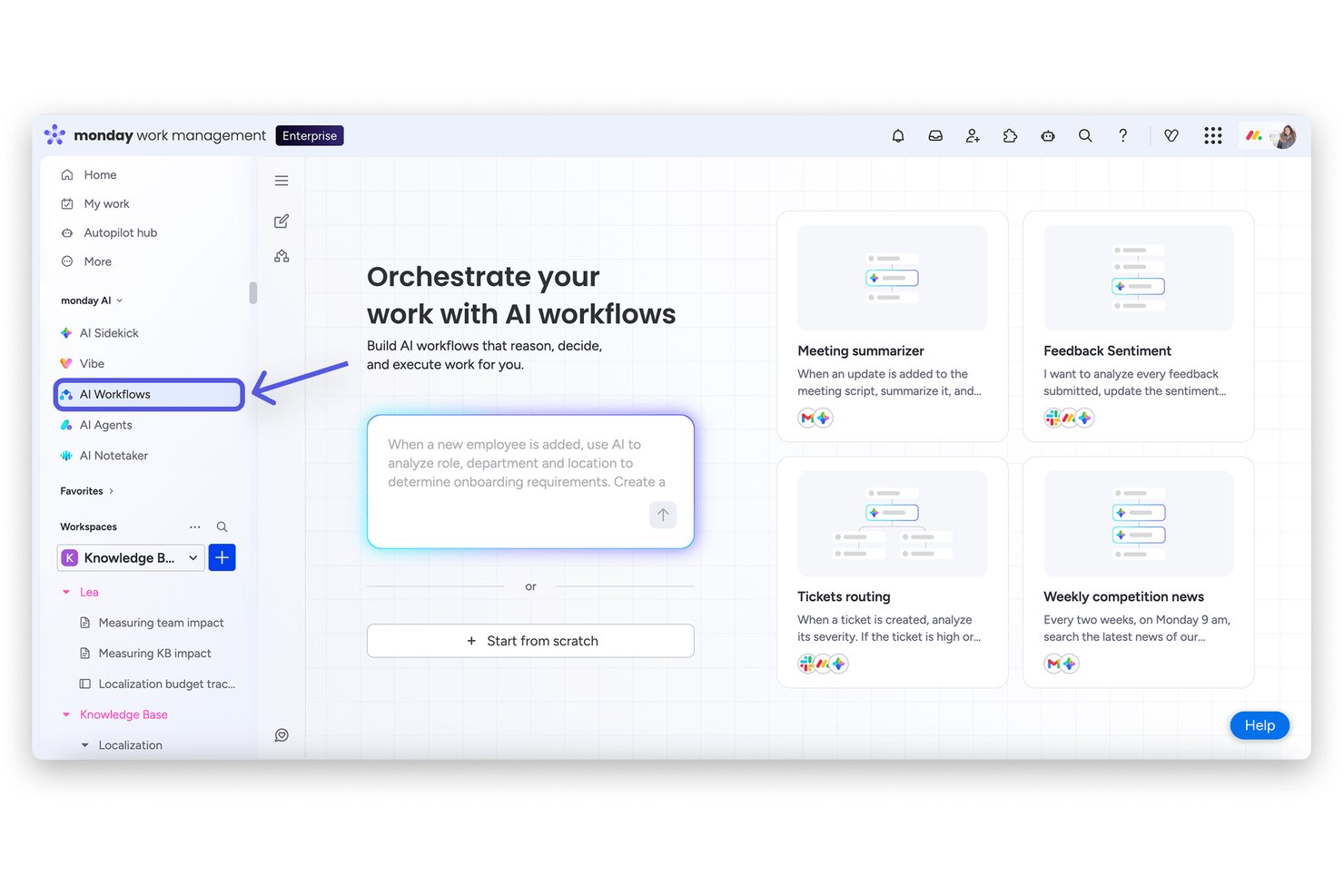
monday AI Workspace is a work management platform that combines AI-powered task tracking, multiple project views, workflow automation, and cross-team collaboration tools in a single configurable workspace.
Who Is monday AI Workspace Best For?
It's a strong fit for mid-sized to enterprise teams that manage multiple concurrent projects across departments and need one shared workspace to keep everyone aligned.
Why I Picked monday AI Workspace
monday AI Workspace earns its spot as one of the best on my shortlist because of how its visual project tracking actually works in practice. I can switch a board from Kanban to Gantt view in seconds, which means my team can shift between sprint-style task flow and timeline planning without rebuilding anything. The dependency tracking in Gantt view also flags scheduling conflicts before they become a problem, which I find valuable when managing overlapping workstreams.
monday AI Workspace Key Features
- AI-powered dashboards: Users can build and customize real-time dashboards that pull data from any board for detailed project tracking.
- Automated workflow builder: Teams can create rule-based automations to reduce manual updates and repetitive admin work across projects.
- Portfolio management: Roll up multiple projects into portfolios with cross-project reporting and strategic goal tracking for leadership.
- Native time tracking: Log hours directly on tasks, track billable and non-billable work, and generate detailed timesheet reports.
monday AI Workspace Integrations
monday AI Workspace offers hundreds of native integrations through its built-in integrations and marketplace, including Slack, Google Workspace, Microsoft 365, Jira, Dropbox, Zoom, HubSpot, Salesforce, GitHub, and Outlook. It also supports Zapier and provides an API for custom integrations.
Pros and Cons
Pros:
- Portfolio-level dashboards across multiple projects
- AI-generated task summaries and status updates
- Switchable Kanban and Gantt project views
Cons:
- Reporting depth requires higher-tier subscriptions
- Automations are capped on lower-tier plans
New Product Updates from monday AI Workspace
monday AI Workspace Adds Human Approval Routing
monday AI Workspace adds a human-in-the-loop approval block to AI Workflows, sending approval requests and routing workflow paths based on responses. For more information, visit monday AI Workspace's official site.

GQueues
Best with deep Google Workspace integration
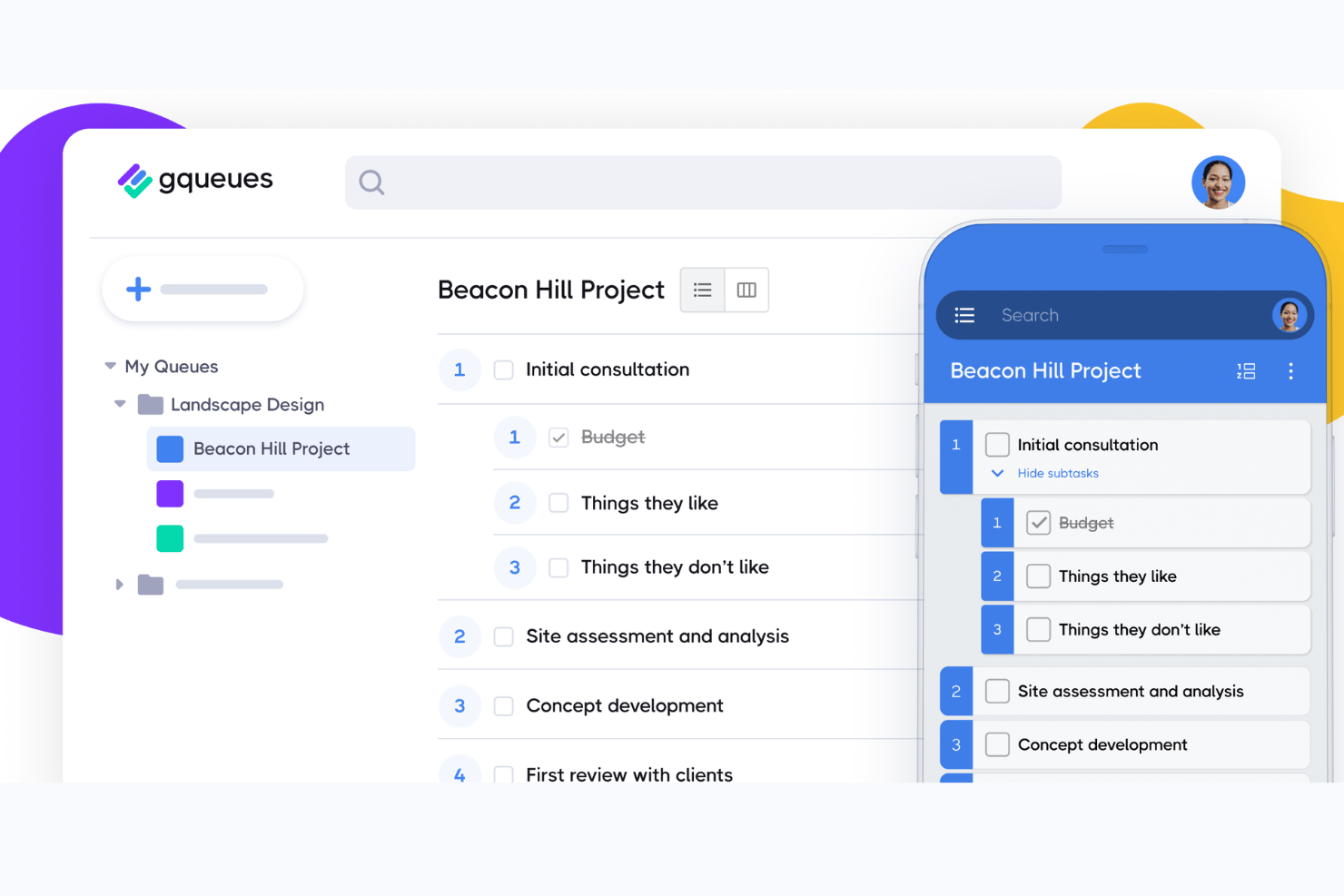
GQueues is a task management tool built natively for Google Workspace, combining task creation, assignments, subtasks, Kanban boards, and two-way syncing across Google Calendar, Gmail, and Drive.
Who Is GQueues Best For?
GQueues fits small-to-mid-sized teams that run their work entirely inside Google Workspace and want task management without leaving that ecosystem.
Why I Picked GQueues
I've included GQueues in my top picks because its Google Workspace integration goes deeper than any other task manager I've used. Creating a task directly from a Gmail thread, having it appear instantly in Google Calendar, and attaching a Drive file without leaving the task view is something I rely on daily. The 2-way Calendar sync is particularly useful: tasks with due dates become real calendar events, not just app-side reminders.
GQueues Key Features
- Smart Queues: Save custom task filters for instant access to prioritized, tagged, or scheduled work.
- Unlimited subtasks: Create detailed task breakdowns with unlimited nested subtasks for complex workflows.
- Shared queues: Collaborate with your team on shared task lists, each with its own set of permissions.
- Mobile apps: Access and manage all your tasks on both Android and iOS devices with full feature support.
GQueues Integrations
GQueues offers native integrations with Google Calendar, Gmail, Google Drive, Google Contacts, Google Chrome, and Google Workspace Marketplace.
Pros and Cons
Pros:
- Reliable recurring task scheduling built in
- Tasks created directly from Gmail threads
- Deep two-way Google Calendar sync
Cons:
- Reporting features are minimal and basic
- No Gantt or timeline view available

Best for no-code workflows at enterprise scale
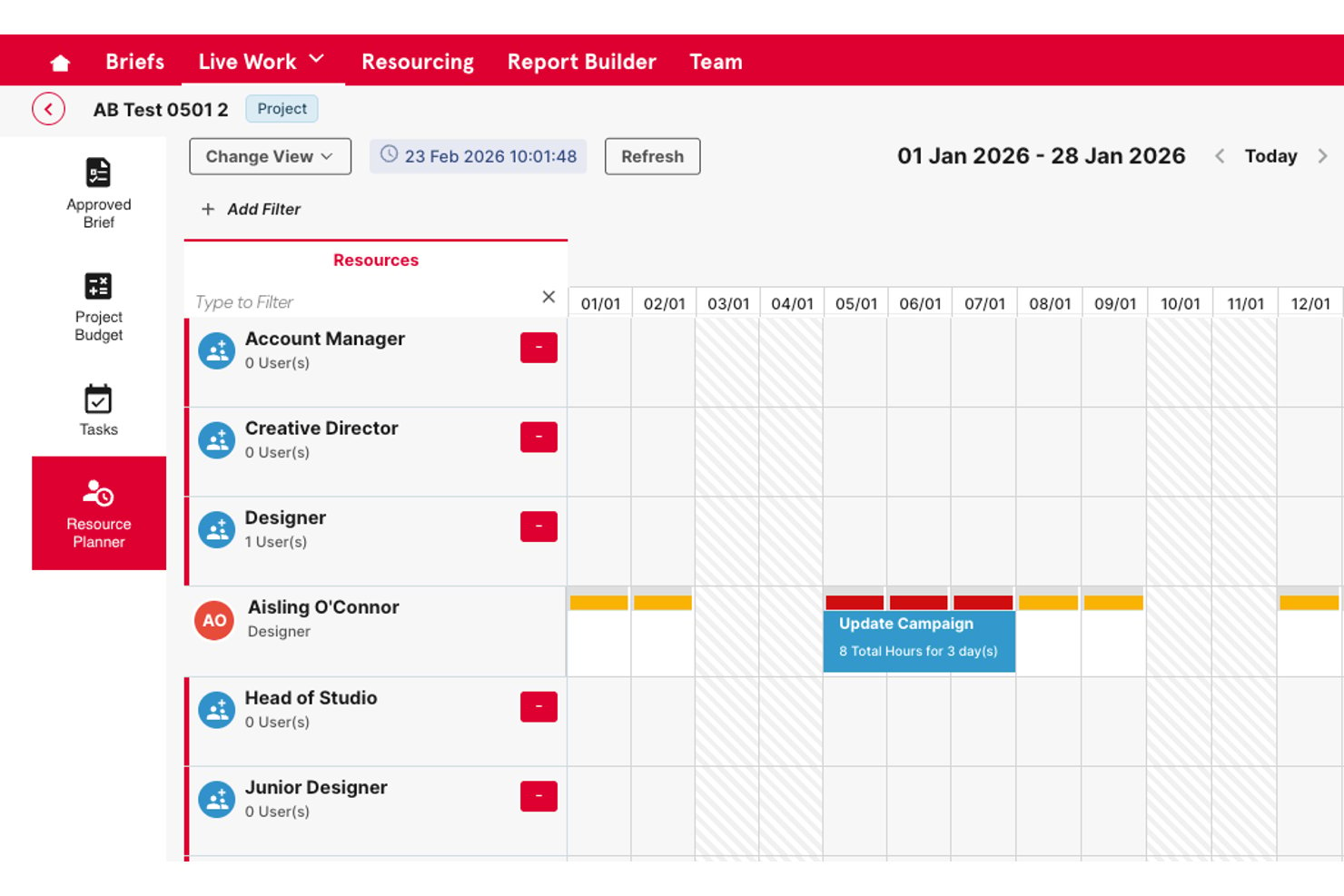
Screendragon is an enterprise work management platform that combines no-code workflow building, task and project tracking, resource planning, approval automation, and operational reporting in a single configurable system.
Who Is Screendragon Best For?
Screendragon is a strong fit for enterprise marketing and creative operations teams that manage high-volume, multi-stakeholder workflows at scale.
Why I Picked Screendragon
I picked Screendragon as one of the best because its no-code workflow builder lets enterprise teams design complex, multi-step approval and review processes without writing a single line of code. I particularly like how dynamic forms connect directly to automated workflow sequences, replacing the scattered email chains that typically slow creative and marketing operations down. The AI Hub takes it further, letting my team deploy AI agents directly inside live workflows to handle routing, compliance checks, and approvals at scale.
Screendragon Key Features
- Resource and workload planning: Lets you allocate resources, track capacity, and balance team workloads across projects.
- Portfolio management dashboards: Provides executive-level visibility with cross-project rollups and KPI tracking.
- Custom intake forms: Converts work requests into structured tasks using configurable forms tailored to each workflow.
- Advanced permissions and audit trails: Supports granular, role-based access controls and maintains detailed records of every change.
Screendragon Integrations
Screendragon offers native integrations with Google Drive, Box, OneDrive, Egnyte, Adobe Creative Cloud, Jira, Trello, Salesforce, Microsoft Dynamics 365, and Microsoft 365. An API is available for custom integrations.
Pros and Cons
Pros:
- Built-in approval routing with automated review stages
- Role-based permissions across large teams
- No-code workflow builder handles complex processes
Cons:
- Steeper setup process than lighter task tools
- Reporting customization requires initial configuration
New Product Updates from Screendragon
Screendragon Unveils New AI Hub
Screendragon introduced AI Hub, a new capability that lets teams build and manage AI agents directly within workflows. The update helps marketing teams automate tasks, maintain governance controls, and scale AI-driven operations more efficiently. For more information, visit Screendragon's official site.

Quire
Best for breaking down complex tasks

Quire is a project task management software that helps teams plan, organize, and track work in a structured way. It supports nested task lists, kanban boards, and timeline views to manage projects from start to finish.
One reason I picked Quire is its nested task structure, which lets you break down complex projects into smaller, manageable pieces. You can create tasks and subtasks in a tree format, making it easy to see the hierarchy and relationships between different parts of your project.
Another feature that stands out is the dynamic timeline view, which provides a visual representation of your project's schedule. You can see how tasks overlap, identify potential bottlenecks, and adjust deadlines as needed. This is especially useful for teams that need to coordinate multiple tasks and ensure everything stays on track.
Some of Quire's integrations include Google Calendar, Gmail, Slack, Outlook, Zoho Flow, GitHub, Apple Calendar Sync, Box, Dropbox, Google Drive, and Microsoft Teams.
New Product Updates from Quire
Quire Adds Custom Field Locking and Comment Reaction API Support
Quire adds custom field locking and API support for reading and setting emoji reactions on comments. These updates give teams more control over field data and expand comment interaction options for developers. For more information, visit Quire’s official site.
 .
.
Celoxis
Best for managing connected projects within a portfolio
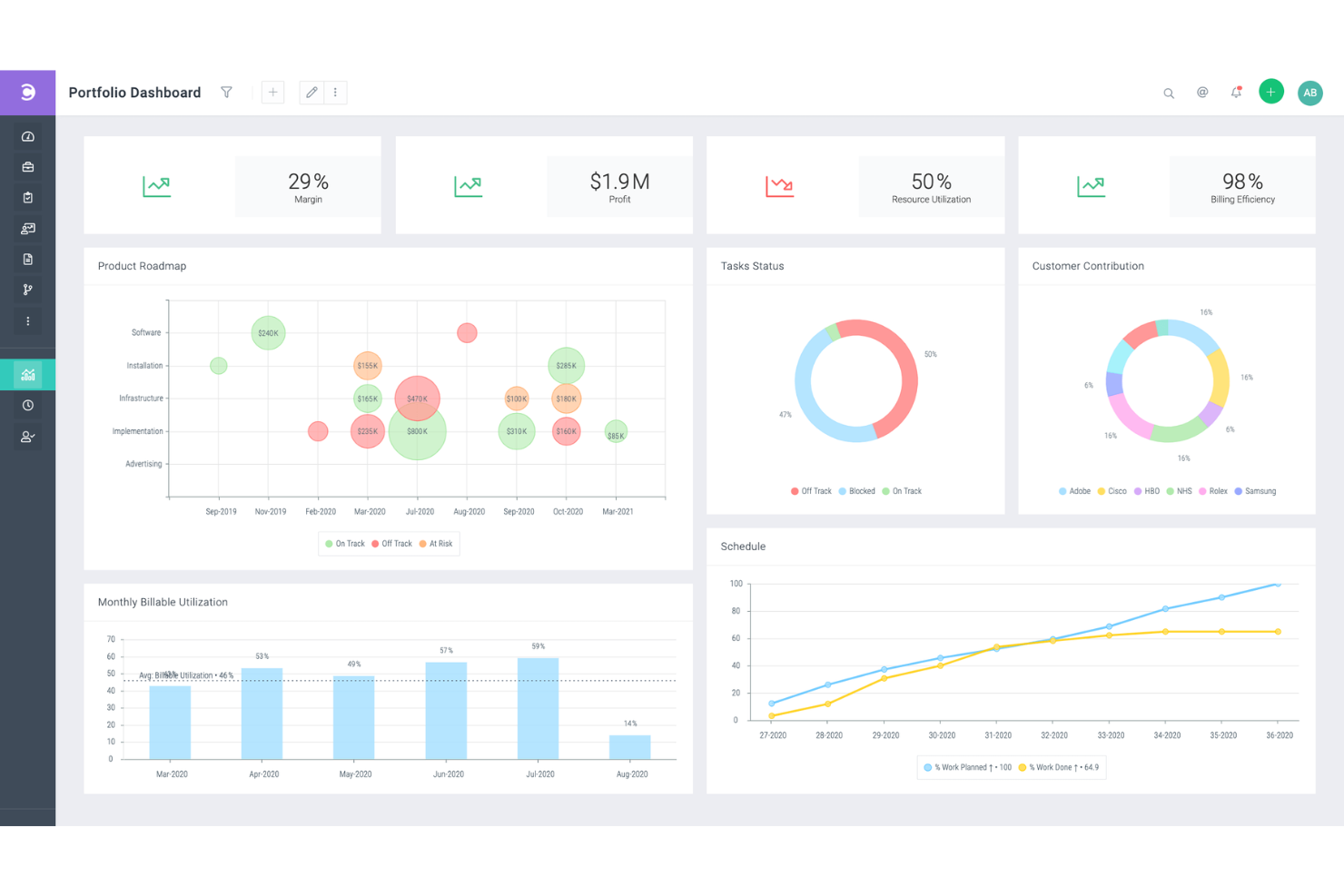
Celoxis is a project portfolio management (PPM) software with project, resource, time, expense, and workflow management features. It's capable of handling complex, inter-connected projects, and is well-suited to the needs of enterprise and professional services businesses.
The Gantt chart tool helps you plan a high-level overview of each of your projects. It includes features like color coding, recurring tasks, and inter-project task dependencies. Not only can you connect tasks across different projects, you can also assign multiple resources to the same task. All of these tools allow you to clarify your multi-project or multi-product strategy and keep your plans well-documented.
In addition to project management, the software offers resource management tools. Work can be assigned to specific team members based on capacity and other factors. You can also manage project expenses in the platform, and track the time spent on various tasks and projects. This helps you keep your budget up-to-date and accurate, and avoid overspending before it happens.
Several pre-built integrations are included, for tools like Google Drive, Microsoft Excel, Microsoft Project, Jira, Slack, Salesforce, Google Calendar, Outlook, Evernote, and QuickBooks Online. You can also access additional integrations with a paid Zapier account.
Paid plans for Celoxis start from $25 per user, per month. A 30-day free trial is also available.

Miro
Best for seamless collaboration and visualization for effective project management

Miro is an online whiteboard platform tailored for collaborative and visual work in project management. It's a tool where teams, whether co-located or remote, can bring their ideas to life in a shared, interactive space. This project task management software caters to a variety of team types and sizes, from tech developers to marketers and small businesses.
The platform's flexibility allows everyone to express ideas, allowing users to incorporate various data forms, including images, videos, and text, into their project boards. This adaptability aids in creating detailed and informative visual elements for projects. Additionally, Miro's planner feature offers a visual representation of tasks by different categories, such as sprints or status, while the dependencies app provides insights into task interdependencies, assisting teams in navigating and managing project complexities.
Integrations include Asana, monday.com, Notion, Webex, Figma, Jira, Azure DevOps, Confluence, Trello, Slack, Microsoft Teams, Google Workspace, Zoom, and 100+ others. You can access thousands of additional tools using a Zapier integration. This may require an additional expense.
New Product Updates from Miro
Miro Adds Japan Data Residency for Enterprise Customers
Miro has introduced Japan data residency for enterprise customers, offering in-region storage for production data, backups, and metadata, plus in-region compute infrastructure. For more information, visit Miro's official site.

Project task management software for prioritizing tasks

Profit.co is an OKR (Objectives and Key Results) software to help you measure and achieve company goals. Profit.co helps you plan your to-do-list to focus on urgent task assignments throughout the day. You can use Profit.co to track tasks easily by sorting tasks and projects according to their progress or level of importance, ensuring that you prioritize projects with approaching due dates. Profit.co also lets you create workspaces where you communicate and collaborate with team members in private to protect confidential or sensitive projects.
As much as we want to treat all tasks equally, some tasks are critical and require immediate attention, making Profit.co an ideal project task management for prioritizing tasks. When you create a task using Profit.co, it lets you set a priority level, so assignees know that you need a specific task completed quickly. The software also lets you assign a date and time when a project task is due, so team members know when to complete their task and estimate if they require extensions.
Profit.co works well with other project task management tools like Microsoft Planner, Asana, G Suite, BambooHR, and others.
Profit.co has a free plan for up to 5 users, while the pricing for plaid plans starts at $7/user/month. They also offer a free 30-day trial.
MeisterTask
Best for brainstorming, ideation, and task management in one
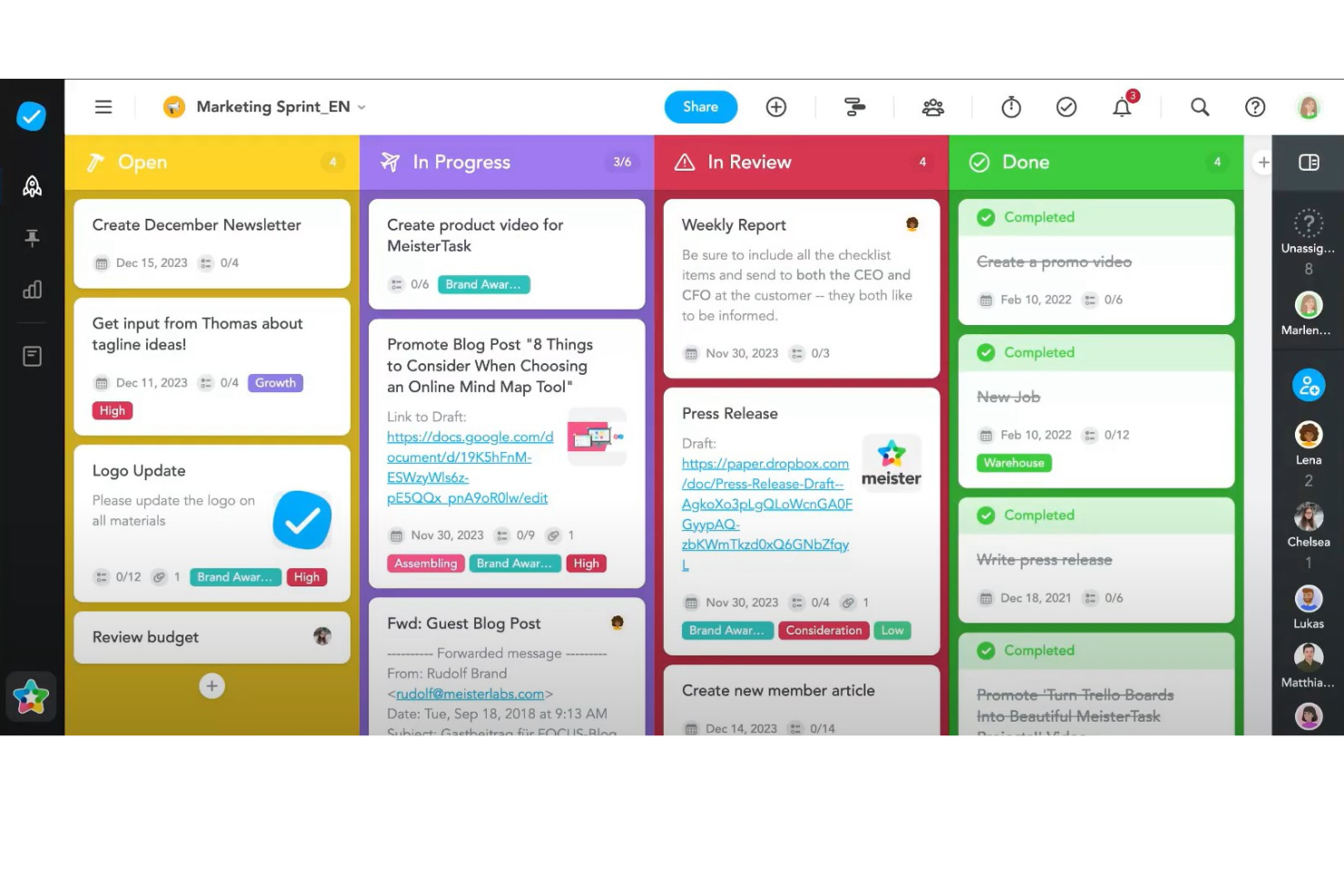
MeisterTask is a project task management software that excels in providing a streamlined, intuitive platform for teams to manage their tasks and projects efficiently. It adopts a visual approach to task management through the use of Kanban boards, making it easy for users to organize tasks, monitor progress, and adapt workflows in real-time. The software is designed to cater to a variety of project types and sizes, offering customizable boards that can be tailored to match specific project needs. Features such as task automation, due date reminders, and time tracking are integrated into the platform, simplifying the management process and enabling teams to focus on the work that matters most.
Beyond its core task management capabilities, MeisterTask stands out for its emphasis on collaboration and integration. The software facilitates seamless team communication with features like file sharing, commenting, and task assignments, ensuring that all team members are on the same page. Additionally, MeisterTask offers robust integration options with popular tools such as Slack, Google Drive, and MindMeister, the latter providing a unique bridge between mind mapping and task management. This integration enables a fluid transition from brainstorming and planning stages to actionable tasks, enhancing the overall productivity and creativity of teams.
Integrations include Slack, Dropbox, Github, Google Drive, Microsoft Teams, Outlook, Trello, Asana, MindMeister, and hundreds more through a paid plan with Zapier.
MeisterTask costs from $14.50/month (billed annually) and offers a fre trial.
Annen programvare for prosjektoppgavehåndtering
Her er noen flere som ikke kom med på topplisten.
- ClickUp
Project task management software that lets you break down big projects into subtasks
- Backlog
For Agile workflows and bug tracking
- Workzone
For managing multiple projects and clients
- ActiveCollab
For its focus on simplicity
- Teamwork.com
Project task management software with a portfolio of projects and their status
- Bonsai Agency Software
For integrated project, client, and financial management
- Birdview
For resource allocation and portfolio management
- FunctionFox
Project task management software with time tracking feature
- Ravetree
For managing projects, resources, and requests in one place
- Stackfield
For GDPR-compliant teams
- Height
Efficient task and project management for remote teams.
- Mosaic
Project task management software that lets you outline project tasks
- Smartsheet
Project task management software that lets you automate tasks
- Hive
For teams looking for a user-friendly interface
- Accelo
For project, task, and resource management
- ProWorkflow
For resource management tools
- Kantata
Project task management software with team collaboration tools
- PathPro
For product development teams
- Adobe Workfront
Web-based work and project management software for enterprises
- Forecast
Project task management software with resource management features


How I Evaluate Project Task Management Software
I split my evaluation into two layers: baseline capabilities a tool must have to qualify—like task dependencies and Gantt views—and differentiators like workload management and portfolio reporting.
Core Functionality (Table Stakes For This List)
When I'm selecting tools for my list, I rank each one on a scale from 0 (does not offer the functionality) to 5 (excels in this area) for each core functionality listed below. Then, I calculate the tool's total score into a percentage. Each tool needs to achieve a minimum total score of 75% to be considered for inclusion.
- Task Creation & Assignment: I check whether you can create tasks with assignees, due dates, priorities, and custom fields—the basics for running a sprint or managing a product launch.
- Multiple Project Views: Switching between Kanban boards, Gantt charts, calendars, and lists matters because different stakeholders digest progress differently.
- Task Dependencies & Subtasks: I evaluate how well a tool handles finish-to-start dependencies and nested subtasks, like mapping a phased release where QA can't start until dev signs off.
- Collaboration & Comments: Threaded comments, @mentions, and file attachments on tasks are what I look for—teams shouldn't need to chase updates across Slack and email.
- Progress Tracking & Reporting: Dashboards and status reports should show task completion, milestone health, and workload distribution without requiring manual spreadsheet exports.
- Workflow Automation & Integrations: I look at whether a tool connects to your existing stack (Slack, Google Workspace, GitHub) and lets you automate recurring steps like status changes or assignee routing.
Once I have a list of tools that meet the criteria, I consider what sets each platform apart.
Differentiating Factors (What Sets Vendors Apart)
Here's how I compare and contrast different vendors:
Standout Features
Resource and workload management is a big differentiator—I look for tools that show each team member's capacity across projects so you can rebalance assignments before deadlines slip. Portfolio management matters when you're overseeing multiple projects at once, because rolling up status and progress into one dashboard beats compiling manual updates for leadership. I also evaluate whether a tool offers AI features that can draft task summaries or generate status reports, saving time on administrative overhead.
Beyond Features
Integration depth matters a lot—I check whether a tool connects natively to dev platforms like GitHub or Jira, since project managers in tech often need task updates to sync with engineering workflows. Pricing transparency is another factor I weigh carefully, particularly whether core task management features are available on lower tiers or locked behind enterprise plans. I also consider how well a tool scales, from a five-person team to a 200-person department, without requiring a full migration later.
Slik velger du programvare for prosjektoppgavehåndtering
Det er lett å gå seg vill i lange funksjonslister og komplekse prismodeller. For å hjelpe deg med å holde fokus mens du arbeider deg gjennom den unike prosessen med å velge programvare, får du her en sjekkliste over faktorer du bør ha i mente:
| Faktor | Hva du bør vurdere |
| Skalerbarhet | Se etter programvare som kan vokse sammen med teamet ditt. Velg et verktøy som kan håndtere flere brukere og prosjekter etter hvert som behovet oppstår. |
| Integrasjoner | Kontroller at programvaren kan integreres med verktøy teamet ditt allerede bruker, for eksempel Slack, Google Workspace eller CRM-plattformer. |
| Tilpasningsmuligheter | Velg et verktøy som lar deg tilpasse arbeidsflyter, dashbord og oppgavefelt slik at de passer til teamets prosesser. |
| Brukervennlighet | Velg et verktøy med et enkelt og intuitivt grensesnitt, slik at teamet raskt kan ta det i bruk uten omfattende opplæring. |
| Budsjett | Ta både innledende kostnader og eventuelle tillegg du kan trenge, med i vurderingen. Se etter gratis prøveperioder, slik at du kan evaluere verktøyet uten å forplikte deg fullt ut. |
| Sikkerhetstiltak | Velg programvare med solid databeskyttelse, for eksempel kryptering og regelmessige sikkerhetskopier, for å holde informasjonen din trygg. |
| Samarbeidsverktøy | Kontroller at programvaren tilbyr funksjoner som oppgavekommentarer, fildeling og varsler for sømløs kommunikasjon i teamet. |
| Mobil tilgjengelighet | Hvis teamet ditt arbeider eksternt eller er mye på farten, bør du se etter en løsning med en mobilapp som hjelper dere med å håndtere oppgaver underveis. |
Trender innen programvare for prosjektoppgavehåndtering i 2025
I researcharbeidet mitt fant jeg utallige produktoppdateringer, pressemeldinger og lanseringslogger fra ulike leverandører av programvare for håndtering av prosjektoppgaver. Ett hovedtema gikk igjen hos alle? Økt automatisering. Mange plattformer utvikler seg til robuste løsninger for automatisering av oppgaver, med nye funksjoner som er utviklet for å redusere manuelt arbeid og forbedre den samlede produktiviteten. Her er noen av trendene som er i ferd med å vokse frem, og som jeg følger med på:
- AI-støttet prioritering av oppgaver: AI kan nå hjelpe brukere med å prioritere oppgaver basert på tidsfrister, arbeidsmengde og avhengigheter. Denne trenden har som mål å redusere beslutningstretthet og forbedre produktiviteten ved å veilede team til å fokusere på det som er viktigst hver dag.
- Prediktiv analyse av prosjektresultater: Prediktive funksjoner analyserer data fra tidligere prosjekter for å forutsi tidslinjer, identifisere mulige forsinkelser og vurdere risikoer. Denne innsikten kan hjelpe team med å styre forventninger og forbedre nøyaktigheten i planleggingen uten å være utelukkende avhengig av manuell planlegging.
- Følelsesgjenkjenning for teamets trivsel: Enkelte verktøy eksperimenterer med sentimentanalyse for å måle teamets moral gjennom chat eller oppgavekommentarer. Denne trenden hjelper ledere med å identifisere risiko for utbrenthet og gir innsikt som kan forbedre teamets trivsel, noe som er spesielt relevant i fjernarbeid og hybride arbeidsmiljøer.
- Spillifisering av ferdigstilling av oppgaver: Spillifiseringsfunksjoner som merker, poeng og ledertavler blir stadig mer utbredt for å motivere team. Ved å legge til disse elementene blir oppgavehåndtering mer engasjerende, og det kan øke produktiviteten, særlig i svært samarbeidsorienterte arbeidsmiljøer.
- Visualisering av ressursstyring i sanntid: Leverandørene forbedrer visualiseringsverktøy som viser tilgjengelige ressurser, arbeidsbelastning og mulige konflikter i sanntid. Denne trenden hjelper ledere med å gjøre raske justeringer og forbedre effektiviteten ved å balansere oppgaver på tvers av team og prosjekter. Etter hvert som flere team tar i bruk hybride eller fullstendig fjernbaserte arbeidsoppsett, blir skybaserte samarbeidsverktøy stadig viktigere for å håndtere distribuerte arbeidsflyter, legge til rette for oppdateringer i sanntid og holde alle samkjørte på tvers av lokasjoner.
Hva er programvare for håndtering av prosjektoppgaver?
Programvare for håndtering av prosjektoppgaver er et verktøy som hjelper deg med å organisere og holde oversikt over ulike oppgaver i et prosjekt. Det lar deg opprette en liste over oppgaver, tildele dem til personer, sette tidsfrister og følge fremdriften for hver oppgave. Denne typen programvare kan være svært nyttig for å holde alt samlet på ett sted, slik at du slipper å håndtere informasjon på tvers av ulike plattformer eller miste oversikten over hva som må gjøres.
Den største fordelen ved å bruke programvare for håndtering av prosjektoppgaver er at det gjør prosjektstyringen mye enklere og tydeligere. Det hjelper deg med å se med et øyekast hva som må gjøres, hvem som jobber med hva, og når oppgaver må være ferdige. Dette kan være svært nyttig for team, siden alle vet hva de skal gjøre og kan samarbeide mer effektivt. Det er også et godt verktøy for å sikre at ingenting blir glemt eller utelatt, og det kan bidra til å holde prosjekter på tidsplanen.
Funksjoner i programvare for håndtering av prosjektoppgaver
Når du velger programvare for håndtering av prosjektoppgaver, bør du se etter følgende viktige funksjoner:
- Oppgavetildeling: Tildeler oppgaver til bestemte teammedlemmer, slik at eierskap og ansvar for hver oppgave er tydelig.
- Oppfølging av tidsfrister: Følger opp forfallsdatoer for å holde prosjekter på tidsplanen og unngå overskredne tidsfrister.
- Håndtering av avhengigheter: Angir avhengigheter mellom oppgaver for å identifisere flaskehalser og håndtere arbeidsflyter mer effektivt.
- Fremdriftsoppfølging: Overvåker fremdriften for oppgaver i sanntid, slik at teamet kan holde seg oppdatert og justere prioriteringer etter behov.
- Tidsregistrering: Registrerer tiden som brukes på oppgaver, slik at du kan analysere produktivitet og fordele ressurser mer effektivt.
- Samarbeidsverktøy: Muliggjør kommunikasjon i teamet gjennom kommentarer, omtaler og fildeling direkte i oppgavene.
- Tilpassbare dashbord: Tilpasser dashbord for ulike roller, slik at alle enkelt får tilgang til relevant informasjon.
- Rapportering og analyse: Genererer rapporter om ferdigstilte oppgaver, teamets produktivitet og prosjektets fremdrift, slik at beslutninger kan tas basert på data.
- Kalenderintegrasjon: Synkroniserer oppgaver og tidsfrister med eksterne kalendere for å effektivisere planlegging og påminnelser.
- Varsler og meldinger: Leverer rettidige varsler om oppdateringer av oppgaver og kommende tidsfrister, slik at alle holder seg samkjørte.
Fordeler med programvare for håndtering av prosjektoppgaver
Implementering av programvare for håndtering av prosjektoppgaver kan gi flere fordeler for både teamet ditt og virksomheten som helhet. Her er noen av fordelene du kan se frem til:
- Bedre organisering: Når alle oppgaver, filer og diskusjoner holdes på ett sted, blir det betydelig enklere for teamet å holde orden og finne det de trenger.
- Større ansvarlighet: Tydelige oppgavetildelinger og fremdriftssporing gjør at alle vet hvem som har ansvar for hva, noe som reduserer forvirring.
- Bedre tidsstyring: Funksjoner som sporing av tidsfrister og tidsregistrering hjelper deg med å administrere tidsplaner mer effektivt og unngå overskredne tidsfrister.
- Økt produktivitet: Ved å holde oppgaver prioritert og synlige kan teamet fokusere på viktig arbeid uten å bli distrahert.
- Bedre informerte beslutninger: Rapportering og analyse gir innsikt i produktivitet og prosjektfremdrift, slik at du kan ta datadrevne beslutninger.
- Større fleksibilitet: Tilpassbare dashbord og visninger gjør at hvert teammedlem kan se oppgavene sine på en måte som fungerer best for dem.
- Bedre samarbeid: Innebygde samarbeidsverktøy gjør det enkelt for teammedlemmer å kommunisere direkte i oppgaver, slik at alle diskusjoner forblir relevante og tilgjengelige.
Kostnader og priser for programvare for prosjektoppgavestyring
Når du velger programvare for prosjektoppgavestyring, må du ha en forståelse av de ulike prismodellene og tilgjengelige abonnementene. Kostnadene varierer basert på funksjoner, teamstørrelse, tillegg og mer. Tabellen nedenfor oppsummerer vanlige abonnementer, gjennomsnittsprisene deres og typiske funksjoner som inngår i løsninger for programvare for prosjektoppgavestyring:
Sammenligningstabell for programvare for prosjektoppgavestyring
| Plantype | Gjennomsnittspris | Vanlige funksjoner |
| Gratisplan | $0 | Grunnleggende oppgavehåndtering, begrenset antall prosjekter, grunnleggende rapportering og grunnleggende samarbeidsverktøy. |
| Personlig plan | $5-$15/bruker/måned | Oppgavetildelinger, sporing av tidsfrister, grunnleggende integrasjoner, tilpassbare dashbord og prioritert brukerstøtte. |
| Forretningsplan | $15-$25/bruker/måned | Avansert rapportering, automatiseringsalternativer, tidsregistrering, verktøy for teamsamarbeid og tilpassede arbeidsflyter. |
| Virksomhetsplan | $25-$50/bruker/måned | Avansert sikkerhet, tilpassede integrasjoner, dedikert brukerstøtte, avansert analyse og et ubegrenset antall prosjekter. |
Vanlige spørsmål om programvare for prosjektoppgavehåndtering
Her er noen svar på vanlige spørsmål om programvare for prosjektoppgavehåndtering: