

De 10 beste appene for gjøremålslister vurdert i 2026

Beste apper for gjøremålslister


Prosjektarbeid går raskt – og det samme gjør kravene til tiden din. Når du håndterer flere oppgaver, tidsfrister og oppdateringer, er det lett å miste oversikten over detaljene.
Apper for gjøremålslister kan gi deg en tydelig oversikt over hva som må gjøres, hvem som er ansvarlig, og hva som kommer etterpå. Men det er ikke alltid enkelt å finne en som passer arbeidsflyten din.
I denne artikkelen fremhever jeg appene for gjøremålslister som jeg selv har testet, og som fungerer godt for prosjektledere. Jeg fokuserer på verktøy som støtter reelt samarbeid, tydelige oppgaver og oppfølging i det daglige.
Hvorfor du kan stole på våre programvareanbefalinger
Teamet vårt har testet og anmeldt programvare siden 2012. Vi er selv prosjektledere, så vi vet hvor vanskelig og hvor viktig det er å velge riktig programvare.
I denne guiden har vi vurdert verktøyene gjennom praktisk testing og uavhengig research og gitt dem poeng ut fra våre utvelgelseskriterier. Vi bygger også på innsikt fra ledende eksperter i bransjen og erfarne prosjektledere.
Anmeldelsene våre bygger på vår egen redaksjonelle vurdering. De er ikke et salgsargument.
Ekspertanmeldere:
Sammenligningstabell for apper for gjøremålslister
Tabellen nedenfor sammenligner prisdetaljene for mine beste utvalgte apper for gjøremålslister.
| Tool | Best For | Trial Info | Price | ||
|---|---|---|---|---|---|
| 1 | Best for customizable task organization | Free plan available | From $9/user/month (billed annually) | Website | |
| 2 | Best for team project collaboration | Free plan + 14-day free trial + free demo available | From $79/user/month (billed annually) | Website | |
| 3 | Best for free project planning | Free plan available | From $1.49/user/month (billed annually) | Website | |
| 4 | Best for Microsoft integrations | Free-forever plan available | Free to use | Website | |
| 5 | Best for comprehensive note-taking | Free plan + 7-day free trial available | From $8.25/month (billed annually) | Website | |
| 6 | Best for personal productivity | Free plan available | From $49.99/year (billed annually) | Website | |
| 7 | Best for visual project tracking | 14-day free trial | From $15/user/month | Website | |
| 8 | Best for simple task management | Free plan + free demo available | From $4.99/user/month (billed annually) | Website | |
| 9 | Best for AI scheduling assistance | Free trial available | From $19/user/month (billed annually) | Website | |
| 10 | Best for stylish task organization | 15-day free trial (Mac only) | From $9.99 | Website |

Anmeldelser av de beste appene for gjøremålslister
Nedenfor finner du mine detaljerte sammendrag av de beste appene for gjøremålslister som kom med på kortlisten. Anmeldelsene mine gir en detaljert gjennomgang av de viktigste funksjonene, fordelene og ulempene, integrasjonene og de ideelle bruksområdene for hvert verktøy, slik at du kan finne det beste alternativet for deg.

Best for customizable task organization

monday.com is a project management platform with robust task management capabilities. It offers a flexible, visual interface that helps you organize tasks, track progress, and manage priorities, making it suitable for both personal and team to-do list management.
Why I Picked monday.com: I picked monday.com for its ability to combine task organization and collaboration in one platform. You can create personalized workflows, assign tasks, and manage deadlines while keeping everything visible through its visual boards. Its automation options also reduce repetitive work, helping you focus on what matters most. Additionally, monday.com supports team collaboration, making it a great fit for individuals and groups alike.
Standout Features and Integrations
Features include customizable dashboards for a visual overview, Gantt and Kanban views for tracking tasks, automation tools to reduce manual work, and integrated document management.
Integrations include Slack, Gmail, Microsoft Teams, GitLab, Mailchimp, Excel, Outlook, DocuSign, Google Drive, and Trello.
Pros and Cons
Pros:
- Wide range of integrations
- Strong team collaboration tools
- Flexible task organization options
Cons:
- Limited offline accessibility
- Advanced features require learning
New Product Updates from monday AI Workspace
monday AI Workspace Adds Human Approval Routing
monday AI Workspace adds a human-in-the-loop approval block to AI Workflows, sending approval requests and routing workflow paths based on responses. For more information, visit monday AI Workspace's official site.
Nifty
Best for team project collaboration

Nifty streamlines project management and enhances team collaboration. It excels in team project collaboration with its robust tools designed to unify project communication, management, and workflow in one platform.
Why I Picked Nifty:
I selected Nifty for its comprehensive approach to project management, which integrates multiple facets of teamwork into a cohesive environment. It fosters a collaborative atmosphere by providing teams with the tools they need to stay in sync and move projects forward collectively.
Standout features and integrations:
Features include project milestones, task assignment and tracking, document collaboration, and built-in direct messaging.
Integrations include Google Docs, Google Sheets, Google Calendar, Slack, Zoom, Dropbox, GitHub, Trello, Asana, and ClickUp.
Pros and Cons
Pros:
- Integration with popular third-party tools
- Direct messaging for team communication
- All-in-one project management solution
Cons:
- Annual billing may not be flexible for all organizations
- Minimum seat requirement may be prohibitive for smaller teams

Best for free project planning

Freedcamp is a project management application that facilitates team collaboration and organization. It is recognized as the best for free project planning, offering a robust set of tools without cost.
Why I Picked Freedcamp:
I selected Freedcamp for the list as it uniquely combines cost-effectiveness with a comprehensive feature set, making project management accessible to everyone. It provides users with the ability to manage an unlimited number of projects and tasks, crucial for detailed planning, all at no expense.
Standout features and integrations:
Features include task lists, subtasks, Gantt charts, calendar views, and issue tracking, which are essential for managing projects efficiently. The tool also supports file storage and sharing, time tracking, and invoicing.
Integrations include Google Drive, Dropbox, OneDrive, Zapier.
Pros and Cons
Pros:
- Good integration with popular cloud storage services
- Affordable premium plans
- Free version available with essential features
Cons:
- Basic user interface compared to more modern tools
- Limited features on the free plan

Best for Microsoft integrations

Microsoft To Do is a task management application that simplifies task organization. It is best for Microsoft integrations due to its seamless connectivity with Microsoft's suite of products.
Why I Picked Microsoft To Do:
I selected Microsoft To Do for its exceptional integration within the Microsoft ecosystem, which is a standout feature for users who rely on Microsoft applications for personal and professional use. It leverages the existing Microsoft infrastructure to enhance task management and productivity.
Standout features and integrations:
Features include a smart daily planner called My Day, list sharing, subtasks, due dates, and reminders.
Integrations include Microsoft Outlook, Microsoft 365, OneNote, OneDrive, Microsoft Planner, Microsoft Teams, Cortana, Microsoft Power Automate, SharePoint, and Microsoft Launcher.
Pros and Cons
Pros:
- Cross-platform availability
- Direct integration with Outlook and other Microsoft services
- No cost for use with a Microsoft account
Cons:
- Basic task prioritization features
- More limited in features than comprehensive project management tools

Evernote
Best for comprehensive note-taking

Evernote serves as an all-encompassing platform for note-taking and organizing information. It allows users to capture, organize, and share notes from anywhere, enhancing productivity and information retention.
Why I Picked Evernote:
I selected Evernote for the list as it is widely recognized for its comprehensive note-taking capabilities that surpass many other apps in this category. Its distinction lies in the depth and breadth of features that facilitate not just note-taking but also complex information management. It excels at creating a structured and searchable repository for all kinds of notes and documents, which is invaluable for users who require an extensive and detailed archive of their work.
Standout features and integrations:
Features include the ability to capture a variety of content types (text, images, and PDFs), a powerful search engine that can even recognize handwritten notes, document scanning and web clipping for consolidating information from multiple sources.
Integrations include Google Drive, Outlook, Slack, Salesforce, and Microsoft Teams.
Pros and Cons
Pros:
- Offline access to notes on mobile devices
- Integration with popular productivity apps
- Robust note-taking and organizational tools
Cons:
- May be more complex than simpler note-taking apps
- Premium plans can be costly for some users

TickTick
Best for personal productivity

TickTick is a versatile task management app. It's best for personal productivity due to its array of features tailored to individual needs.
Why I Picked TickTick:
I selected TickTick for its intuitive design and functionality that supports personal task management, distinguishing it from other productivity tools. It offers a tailored experience that can be customized to fit the unique habits and preferences of any user, enhancing their efficiency and organization.
Standout features and integrations:
Features include task organization, built-in Pomodoro Timer, habit tracking, and calendar views.
Integrations include Google Calendar, Outlook, and third-party apps through Zapier.
Pros and Cons
Pros:
- Cross-platform synchronization
- Built-in focus timer and habit tracker
- Customizable task management features
Cons:
- No monthly billing option
- Limited customization compared to other tools
Best for visual project tracking

Taskworld is a tool that facilitates team collaboration and project management. It is best for visual project tracking due to its comprehensive visualization capabilities.
Why I Picked Taskworld:
I selected Taskworld for its exceptional visual project tracking features, which set it apart from other to-do list apps. The clarity and detail in its visual representation of tasks enable teams to quickly grasp project status and workflow. It provides valuable visual aids like Kanban boards, timeline views, and shared calendars, which are crucial for managing complex projects and deadlines.
Standout features and integrations:
Features include task management with checklists, project timelines, file management, and direct messaging. These tools are crucial for maintaining project organization and ensuring effective team communication.
Integrations include Google Calendar, Google Drive, Dropbox, Box, Outlook, Slack, and Zapier.
Pros and Cons
Pros:
- Effective task feedback system
- Integrated analytics and reporting tools
- Visual project tracking with interactive timelines
Cons:
- May have a steeper learning curve for new users due to its extensive features
- Higher price point compared to basic task management tools

Any.do
Best for simple task management
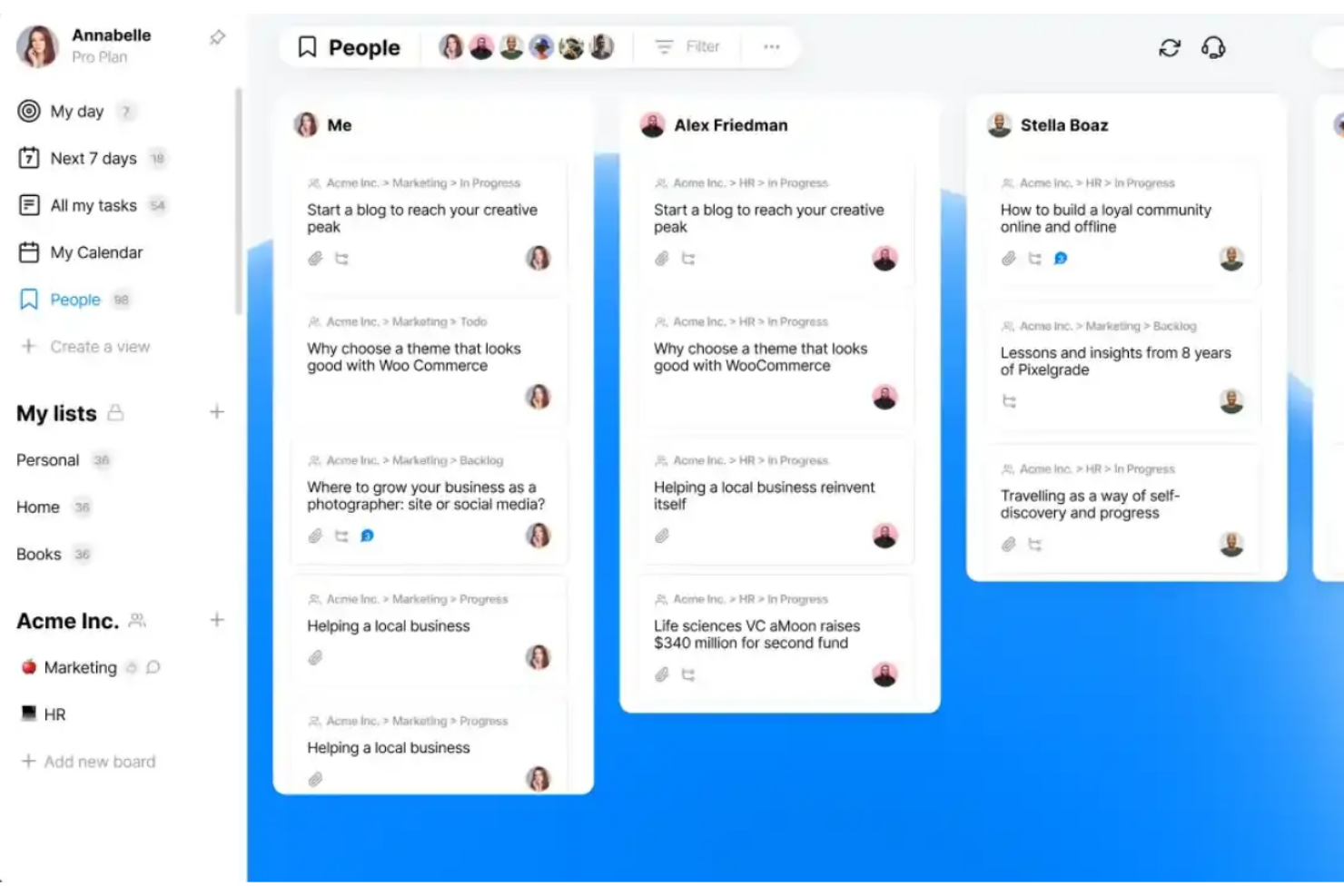
Any.do is a task management app designed to help you organize daily tasks. It stands out as the best for simple task management due to its intuitive interface and straightforward functionality.
Why I Picked Any.do:
I chose Any.do for this list because of its simplicity and effectiveness in managing daily tasks. What makes it different from other task management apps is its focus on ease of use and minimalistic design, which allows for quick task entry and management without a steep learning curve. It provides all the essential features without overwhelming the user, making it ideal for those who want to stay organized with minimal effort.
Standout features and integrations:
Features include to-do lists, daily planners, calendars, reminders, and the ability to share lists and assign tasks.
Integrations include Slack, Microsoft Teams, Zoom, Google Meet, WhatsApp, Gmail, Google Calendar, Zapier, Jira, Trello, monday.com, ClickUp, Asana, and Todoist.
Pros and Cons
Pros:
- Variety of integrations with other apps
- Cross-platform synchronization
- Intuitive and user-friendly interface
Cons:
- May not be suitable for complex project management needs
- Premium features require an annual subscription

Motion
Best for AI scheduling assistance
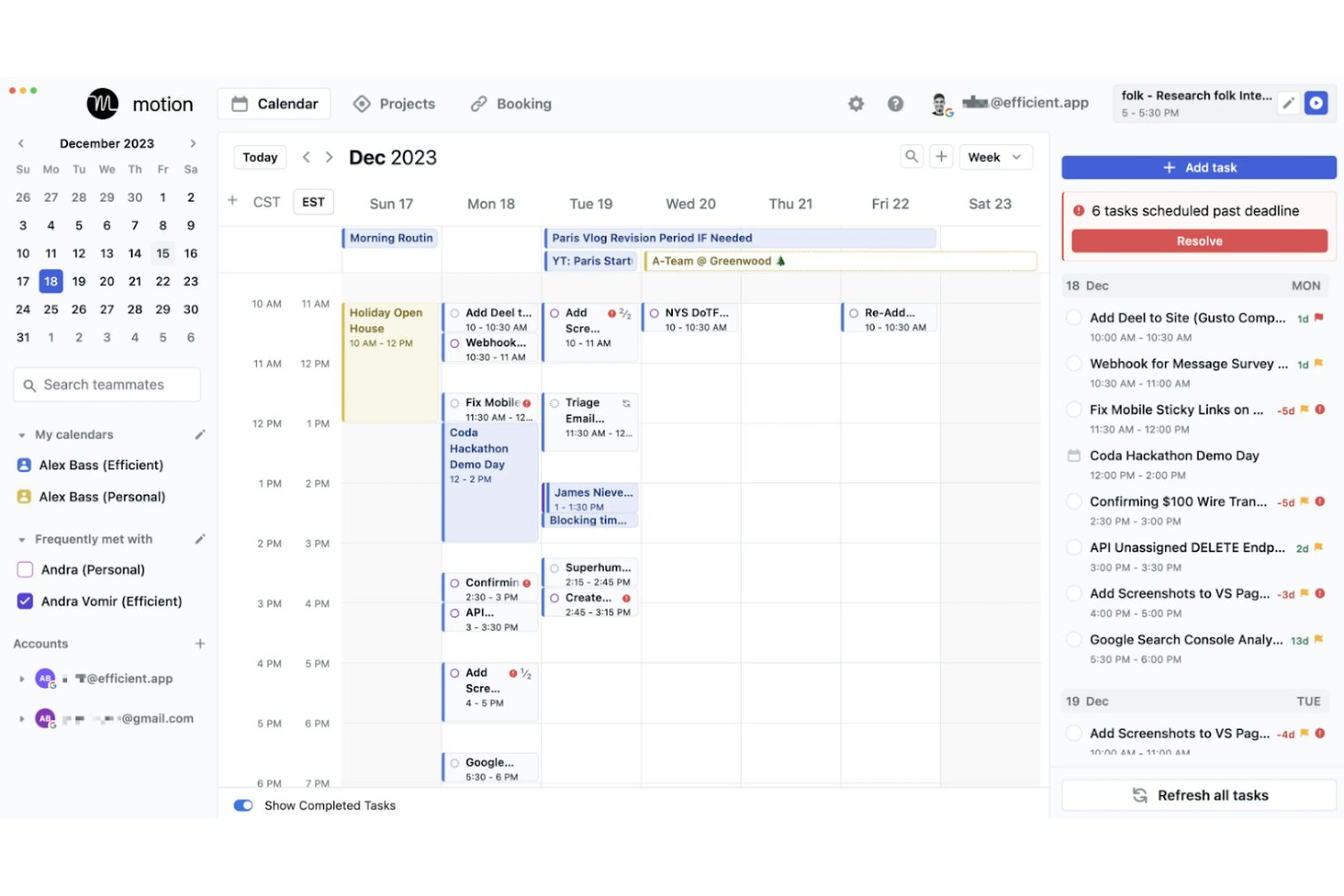
Motion is a tool that combines task management with intelligent scheduling. It is best for AI scheduling assistance because it employs artificial intelligence to optimize users' schedules, aiming to significantly enhance productivity.
Why I Picked Motion:
I selected Motion for its innovative integration of AI into scheduling and task management, which differentiates it from other to-do list apps. Its standout feature is the AI's ability to automate scheduling decisions, which can be a game-changer for users overwhelmed by managing their time. It has a capability to prioritize and allocate time for tasks intelligently, which can be particularly beneficial for users with complex schedules.
Standout features & integrations:
Features include AI-powered scheduling that automatically prioritizes and allocates time for tasks, a unified platform for managing tasks and projects, and a smart meeting scheduler designed to cluster meetings and reduce interruptions.
Motion integrations include Google Calendar, Microsoft Outlook, Zoom, Slack, Trello, Asana, Jira, Salesforce, Dropbox, and Evernote.
Pros and Cons
Pros:
- Analytics to monitor and improve time management
- Integration with major calendars and productivity tools
- AI-driven automatic scheduling and rescheduling
Cons:
- May have a learning curve to fully utilize AI features
- Requires an annual commitment
- High price point compared to basic scheduling tools


Things is a task manager that elegantly combines functionality with style. It's recognized as the best for stylish task organization due to its visually appealing interface that enhances the user's experience.
Why I Picked Things:
I selected Things for its exceptional balance of design and functionality, distinguishing it from other to-do list apps. Its aesthetic appeal is matched by its comprehensive features, making task management not just practical but also enjoyable. I determined Things to be 'Best for stylish task organization' because it excels at providing an engaging user experience without compromising on the powerful task management capabilities users need.
Standout features and integrations:
Features include task creation with natural language input, project organization with headings and checklists, and calendar integration for a comprehensive overview of your schedule. The app also supports Siri for voice commands, allowing for quick task additions and reminders.
Integrations include Calendar and Reminders on macOS and iOS.
Pros and Cons
Pros:
- Effective integration with Apple’s ecosystem
- Efficient organization of tasks into projects
- Elegant user interface
Cons:
- No native integrations with non-Apple platforms
- Limited to Apple devices
Andre apper for gjøremålslister
Her er noen flere alternativer for apper for gjøremålslister som ikke kom med på kortlisten, men som likevel er verdt å ta en titt på:
- Remember The Milk
For intuitive task reminders
- Basecamp
For remote team collaboration
- Wrike
For scalable project management
- Zoho Projects
For comprehensive project planning
- ProofHub
For streamlined team communication
- MeisterTask
For intuitive task boards
- Zenkit
Good for flexible data viewing
- ClickUp
For scalable project management
- Airtable
For database-driven organizing
- Quire
Good for nested task lists


How I Evaluate To Do List Apps
I evaluate every tool on two levels: the baseline features—like task assignment and cross-device sync—every solid option must have, and the differentiators that set the best apart.
Core Functionality (Table Stakes For This List)
When I'm selecting tools for my list, I rank each one on a scale from 0 (does not offer the functionality) to 5 (excels in this area) for each core functionality listed below. Then, I calculate the tool's total score into a percentage. Each tool needs to achieve a minimum total score of 65% to be considered for inclusion.
- Task Creation & Management: I look at how quickly you can go from idea to organized task—whether the tool supports subtasks, attachments, notes, and recurring items for things like weekly sprint prep checklists.
- Due Dates & Reminders: Each tool should let you set deadlines and trigger timely alerts, so a deliverable like a client review deck doesn't silently slip past its due date.
- Prioritization & Organization: I evaluate how you can sort and group tasks—priority flags, tags, folders, or project-based grouping—to separate urgent blockers from backlog items.
- Task Status Tracking: Clear progress visibility matters, so I check whether the tool goes beyond a simple checkbox to offer statuses like "in progress" or "blocked" across a shared task list.
- Collaboration & Assignment: For project teams, I look at how easily you can assign a task to a teammate, leave a comment with context, and keep everyone working from a single shared list.
- Multi-Platform Sync: Real-time sync across web, mobile, and desktop is key—I check that a task added from your phone during a commute shows up instantly when you open your laptop.
Once I have a list of tools that meet the criteria, I consider what sets each platform apart.
Differentiating Factors (What Sets Vendors Apart)
Here's how I compare and contrast different vendors:
Standout Features
Multiple view options—list, board, calendar, timeline—make a real difference when you're managing tasks across project phases. I look for tools that let you switch views without losing context. Templates and automations are worth evaluating closely. A tool that lets you clone a recurring sprint checklist or auto-assign onboarding tasks removes repetitive setup from every cycle. Natural language input is another feature I consider, where typing "finalize report by Friday" creates a task with the correct due date automatically.
Beyond Features
Integration depth matters—I check whether a tool connects natively with platforms like Jira, Slack, and Google Calendar so tasks stay in sync with your broader project workflow. Pricing and scalability are also worth evaluating, especially how a free tier compares to paid team plans as your project group grows. I also consider onboarding ease, since a tool your team won't adopt is a tool that won't work. Low-friction setup with guided walkthroughs helps distributed teams get productive fast without a dedicated training cycle.
Slik velger du apper for gjøremålslister
Det er lett å sette seg fast i lange funksjonslister og kompliserte prismodeller. For å hjelpe deg med å holde fokus mens du går gjennom den unike prosessen din for valg av programvare, får du her en sjekkliste over faktorer du bør ha i tankene:
| Faktor | Hva du bør vurdere |
| Brukervennlighet | Se etter et ryddig grensesnitt som hjelper teamet med å begynne å tildele og fullføre oppgaver raskt, uten opplæring. |
| Skalerbarhet | Pass på at appen kan håndtere flere brukere, prosjekter og oppgaver etter hvert som teamet eller arbeidsmengden vokser. |
| Integrasjoner | Velg et verktøy som kobles til eksisterende systemer som Slack, Google Workspace eller prosjektstyringsverktøy. |
| Tilpasningsmuligheter | Se om du kan justere visningene, feltene eller oppgaveetikettene i verktøyet slik at de passer teamets arbeidsflyt og preferanser. |
| Budsjett | Undersøk om appen gir tilstrekkelig verdi for prisen, særlig hvis du trenger flere lisenser eller funksjoner. |
| Sikkerhetstiltak | Bekreft at verktøyet bruker kryptering, tilgangskontroller og regelmessige sikkerhetskopier for å beskytte dataene dine. |
| Samarbeidsverktøy | Se etter funksjoner som oppgavekommentarer, omtaler og filvedlegg for å holde kommunikasjonen knyttet til arbeidet. |
| Mobiltilgang | Hvis du eller teamet jobber på farten, bør du sørge for at mobilappen er pålitelig og enkel å bruke. |
Trender innen apper for gjøremålslister
I researcharbeidet mitt har jeg hentet inn utallige produktoppdateringer, pressemeldinger og lanseringslogger fra ulike leverandører av apper for gjøremålslister. Her er noen av trendene som er på vei frem, og som jeg følger med på:
- AI-forslag til oppgaver: Noen verktøy bruker nå AI til å foreslå tidsfrister, prioriteringer eller tildelinger basert på tidligere brukeradferd. Dette bidrar til å redusere manuell planlegging og støtter bedre beslutninger i hverdagen.
- Moduser for fokus og tidsblokker: Innebygde fokustidsur, dagsplanleggere og funksjoner for tidsblokker blir stadig vanligere. Disse hjelper brukerne med å arbeide gjennom oppgaver med mer struktur og færre distraksjoner.
- Kartlegging av oppgaverelasjoner: Nyere apper introduserer måter å vise hvordan oppgaver henger sammen, ved hjelp av visuelle disposisjoner eller nestede formater. Dette gjør det enklere å håndtere avhengigheter og forstå hvordan arbeidet henger sammen.
- Fleksibilitet for gjentakende oppgaver: Innstillingene for gjentakende oppgaver blir smartere. I stedet for rigide alternativer for gjentakelse kan brukerne nå sette opp mer spesifikke og nyttige regler for gjentakelse som samsvarer med faktiske arbeidsflyter.
- Inndata på naturlig språk: Mange verktøy lar deg nå skrive inn oppgaver med vanlig språk – for eksempel «Send rapporten neste fredag kl. 14» – og konverterer det automatisk til en planlagt oppgave. Det gjør registreringen raskere og hjelper brukerne med å holde fokus.
Hva er oppgavelisteapper?
Oppgavelisteapper er digitale verktøy utviklet for oppgavehåndtering, og brukes av enkeltpersoner og team til å organisere og prioritere daglige oppgaver og prosjekter. Disse applikasjonene er viktige for alle som trenger å holde oversikt over ulike oppgaver, fra fagpersoner som håndterer arbeidsmengder, til studenter som planlegger studieøkter.
Komponentene i oppgavelisteapper omfatter oppføringer for oppgaver, forfallsdatoer, varsler og ofte funksjoner for kategorisering som hjelper brukerne med å holde orden. De kan også integreres med andre produktivitetsverktøy for å effektivisere oppgavehåndteringen på tvers av plattformer.
Funksjoner i oppgavelisteapper
Når du velger oppgavelisteapper, bør du se etter følgende viktige funksjoner:
- Oppretting og redigering av oppgaver: Lar deg raskt legge til, oppdatere eller slette oppgaver etter hvert som prioriteringene dine endres i løpet av dagen.
- Forfallsdatoer og påminnelser: Hjelper deg med å holde tidsplanen ved å sende varsler før oppgaver forfaller.
- Tildeling av oppgaver: Gjør det mulig å delegere oppgaver til bestemte teammedlemmer og holde oversikt over hvem som har ansvaret.
- Organisering av prosjekter eller lister: Gjør det mulig å gruppere oppgaver etter prosjekt, kategori eller liste for bedre oversikt.
- Gjentakende oppgaver: Automatiserer opprettingen av oppgaver som gjentas daglig, ukentlig eller etter en egendefinert tidsplan.
- Prioritetsnivåer: Lar deg merke oppgaver etter viktighet, slik at du kan fokusere på det som betyr mest.
- Notater eller beskrivelser: Gir plass til å legge til kontekst eller detaljer som støtter gjennomføringen av oppgaven.
- Vedlegg og filstøtte: Gjør det mulig å laste opp relevante filer direkte til oppgaven for enkel tilgang.
- Fremdriftssporing: Gir deg en visuell eller numerisk måte å følge med på hvor nær oppgavene er å bli fullført.
- Søke- og filtreringsalternativer: Hjelper deg med å finne oppgaver raskt basert på nøkkelord, tagger eller andre kriterier.
Fordeler med oppgavelisteapper
Implementering av oppgavelisteapper kan gi flere fordeler for teamet og virksomheten din. Her er noen av fordelene du kan se frem til:
- Bedre oversikt over oppgaver: Alle kan se hva som må gjøres, når det må gjøres og hvem som skal gjøre det.
- Færre overskredne tidsfrister: Forfallsdatoer og påminnelser bidrar til at oppgaver ikke blir glemt.
- Bedre ansvarlighet: Tildeling av oppgaver gjør det tydelig hvem som er ansvarlig for hva.
- Raskere planlegging: Rask registrering og redigering av oppgaver gjør det mulig å justere planer uten å begynne på nytt.
- Enklere fremdriftssporing: Du kan se hvordan arbeidet utvikler seg ved hjelp av avkrysningsmerker, statuser eller fremdriftslinjer.
- Mindre kontekstbytte: Notater og vedlegg holder alt som gjelder oppgaven, samlet på ett sted.
- Smartere prioritering: Prioriteringsinnstillinger hjelper teamet med å fokusere på oppgaver med størst innvirkning først.
Kostnader og priser for oppgavelisteapper
Valg av oppgavelisteapper krever en forståelse av de ulike prismodellene og abonnementene som er tilgjengelige. Kostnadene varierer basert på funksjoner, teamstørrelse, tillegg og mer. Tabellen nedenfor oppsummerer vanlige abonnementer, gjennomsnittsprisene deres og typiske funksjoner som inngår i løsninger for oppgavelisteapper:
Sammenligningstabell for abonnementer for oppgavelisteapper
| Plantype | Gjennomsnittspris | Vanlige funksjoner |
| Gratisapp | $0 | Grunnleggende oppgavehåndtering, enkle integrasjoner, begrensede funksjoner for samarbeid |
| Grunnleggende | $1-3 per måned | Forbedret oppgavehåndtering, flere integrasjoner, enkelte samarbeidsverktøy, grunnleggende brukerstøtte |
| Premium | $4-6 per måned | Avansert oppgavehåndtering, fullstendige integrasjoner, omfattende samarbeidsverktøy, prioritert brukerstøtte |
| Bedrift | $7+ per måned | Tilpassede løsninger for oppgavehåndtering, integrasjoner på bedriftsnivå, dedikert brukerstøtte og opplæring |
Vanlige spørsmål om apper for gjøremålslister
Her er noen av de vanligste spørsmålene jeg får om apper for gjøremålslister.