

De 10 beste KI-baserte programvarene for prosjektstyring i virksomheter, vurdert i 2026

Beste AI-baserte prosjektstyringsprogramvare for virksomheter – kortliste


AI-basert prosjektstyringsprogramvare bidrar til å eliminere misforståelser og redusere overlappende samtaler ved å peke ut risikoer tidlig, håndtere rutinearbeid og tilby sanntidsdashbord og statusoppdateringer, slik at du kan følge fremdrift og flaskehalser på tvers av prosjektene dine.
Da jeg testet disse plattformene, så jeg hvordan AI-funksjoner kan gi målbare resultater, som kortere møtetid, færre manuelle feil og raskere gjennomføring av oppgaver, samtidig som komplekse prosjekter holdes på rett spor.
I denne listen går jeg gjennom verktøyene som skiller seg ut, beskriver deres viktigste AI-funksjoner og integrasjoner, og forklarer hvordan de støtter arbeidsflyten din. Jeg viser også hvordan de kan hjelpe teamet ditt med å planlegge ved hjelp av intelligent tidsplanlegging, gjennomføre arbeidet med automatisert oppgavehåndtering og tilpasse seg ved å varsle om risiko og foreslå justeringer.
Hvorfor du kan stole på våre programvareanbefalinger
Teamet vårt har testet og anmeldt programvare siden 2012. Vi er selv prosjektledere, så vi vet hvor vanskelig og hvor viktig det er å velge riktig programvare.
I denne guiden har vi vurdert verktøyene gjennom praktisk testing og uavhengig research og gitt dem poeng ut fra våre utvelgelseskriterier. Vi bygger også på innsikt fra ledende eksperter i bransjen og erfarne prosjektledere.
Anmeldelsene våre bygger på vår egen redaksjonelle vurdering. De er ikke et salgsargument.
Ekspertanmeldere:
Sammenligningstabell for AI-basert prosjektstyringsprogramvare for virksomheter
Denne sammenligningstabellen oppsummerer prisdetaljene for mine beste utvalg av AI-basert prosjektstyringsprogramvare for virksomheter.
| Tool | Best For | Trial Info | Price | ||
|---|---|---|---|---|---|
| 1 | Best for AI-driven project prioritization | 14-day free trial | Pricing upon request | Website | |
| 2 | Best for customizable project dashboards | 14-day free trial | From $10/user/month (billed annually) | Website | |
| 3 | Best for AI project automation | Free plan available | From $9/user/month (billed annually) | Website | |
| 4 | Best for AI-driven professional services delivery | Free demo available | Pricing upon request | Website | |
| 5 | Best for AI meeting summaries | Free plan available | From $10.99/user/month (billed annually) | Website | |
| 6 | Best for AI task prioritization | Free plan available | From $7/user/month (billed annually) | Website | |
| 7 | Best for AI-driven resource capacity planning | Free demo available | From €5/license/month (billed annually) | Website | |
| 8 | Best for AI portfolio insights across live plan data | Free trial available | From $10/user/month (billed annually) | Website | |
| 9 | Best for aligning portfolios to strategic goals | Not available | Pricing upon request | Website | |
| 10 | Best for extensive enterprise app integrations | 30-day free trial | From $12/user/month | Website |


Gjennomgang av den beste AI-baserte prosjektstyringsprogramvaren for virksomheter
Nedenfor finner du mine detaljerte sammendrag av den beste AI-baserte prosjektstyringsprogramvaren for virksomheter som kom med på kortlisten min. I gjennomgangene får du et detaljert innblikk i de viktigste funksjonene, fordeler & ulemper, integrasjoner og ideelle bruksområder for hvert verktøy, slik at du kan finne det beste alternativet for deg.

Wrike
Best for AI-driven project prioritization
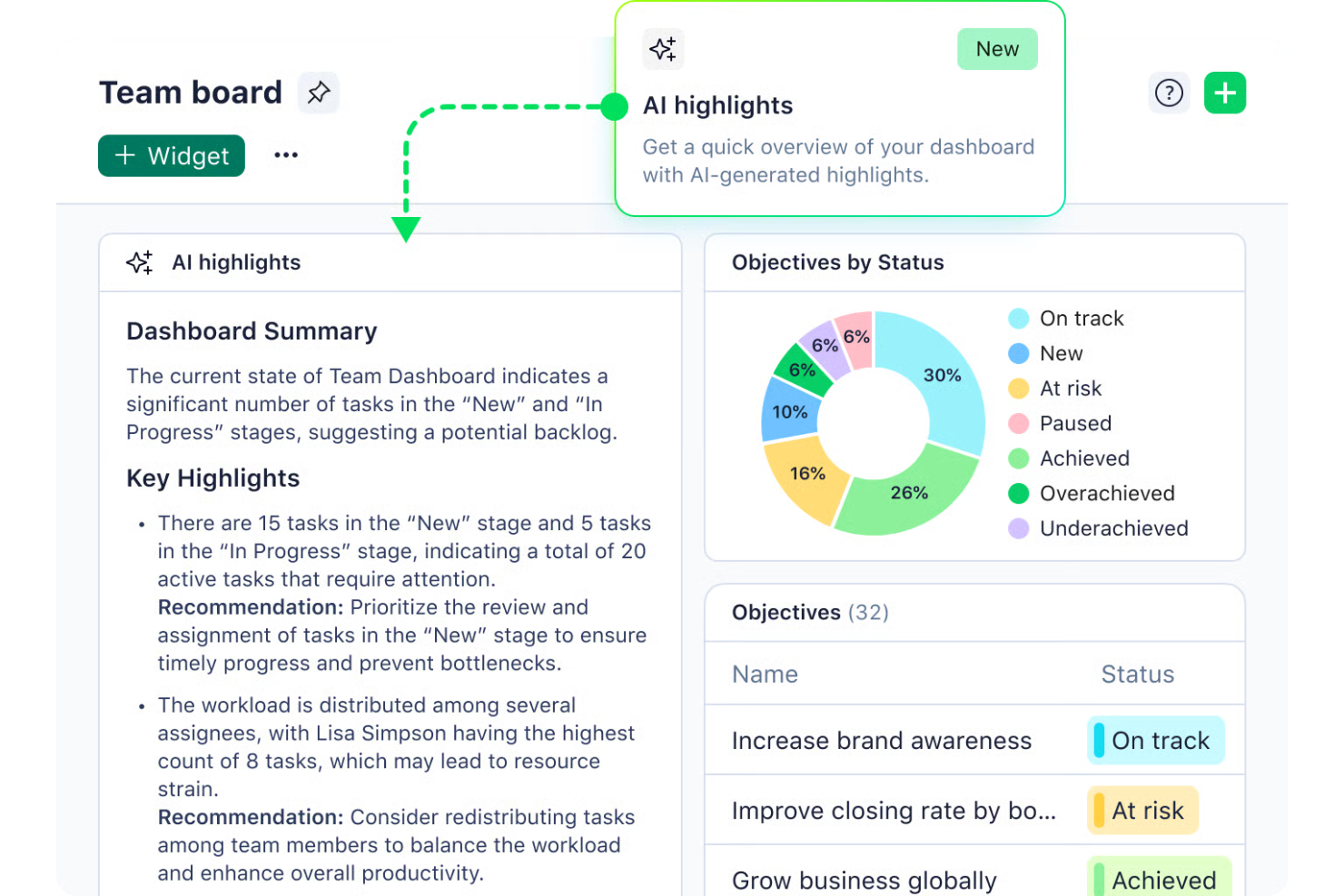
Wrike is an AI-driven project management software designed for businesses seeking to enhance productivity and streamline workflows. This tool is particularly appealing to industries such as marketing, IT, and finance, where managing complex projects and coordinating large teams can be challenging. By leveraging Wrike’s AI capabilities, teams can automate repetitive tasks, prioritize projects, and gain valuable insights, helping them overcome the challenge of juggling numerous responsibilities and deadlines.
Why I Picked Wrike
I picked Wrike for its standout AI capabilities that cater to enterprise project management needs. The Wrike Copilot serves as an AI assistant, aiding your team in prioritizing projects and identifying risks efficiently. Additionally, Wrike’s integration with AI tools like Microsoft Copilot further enhances collaboration and decision-making. These features are particularly beneficial for teams looking to optimize resource allocation and streamline workflows in a fast-paced environment.
Wrike Key Features
In addition to its AI capabilities, Wrike offers a variety of features to support your project management needs.
- Customizable Workflows: Tailor workflows to fit your team’s specific processes and requirements, allowing for seamless task management.
- Project Blueprints: Create reusable templates for recurring projects, ensuring consistency and saving time on project setup.
- In-Platform Communication: Facilitate collaboration directly within the platform to keep all team interactions and updates in one place.
- Time Tracking: Accurately track time spent on tasks for better invoicing and resource management.
Wrike Integrations
Integrations include Microsoft Teams, Slack, Salesforce, Dropbox, Google Drive, Box, GitHub, Adobe Creative Cloud, Microsoft OneDrive, and Jira.
Pros and Cons
Pros:
- Extensive integrations for large organizations
- Highly customizable workflows for teams
- AI supports enterprise project prioritization
Cons:
- Advanced AI features cost more
- Steep learning curve initially
New Product Updates from Wrike

Wrike Redesigns AI Agent Builder
Wrike redesigns its AI Agent Builder with a side-by-side setup, Scopes, sentence-style triggers and actions, and clearer filters. These changes make it easier to configure, test, and manage agent behavior. For more information, visit Wrike’s official site.

Celoxis
Best for customizable project dashboards
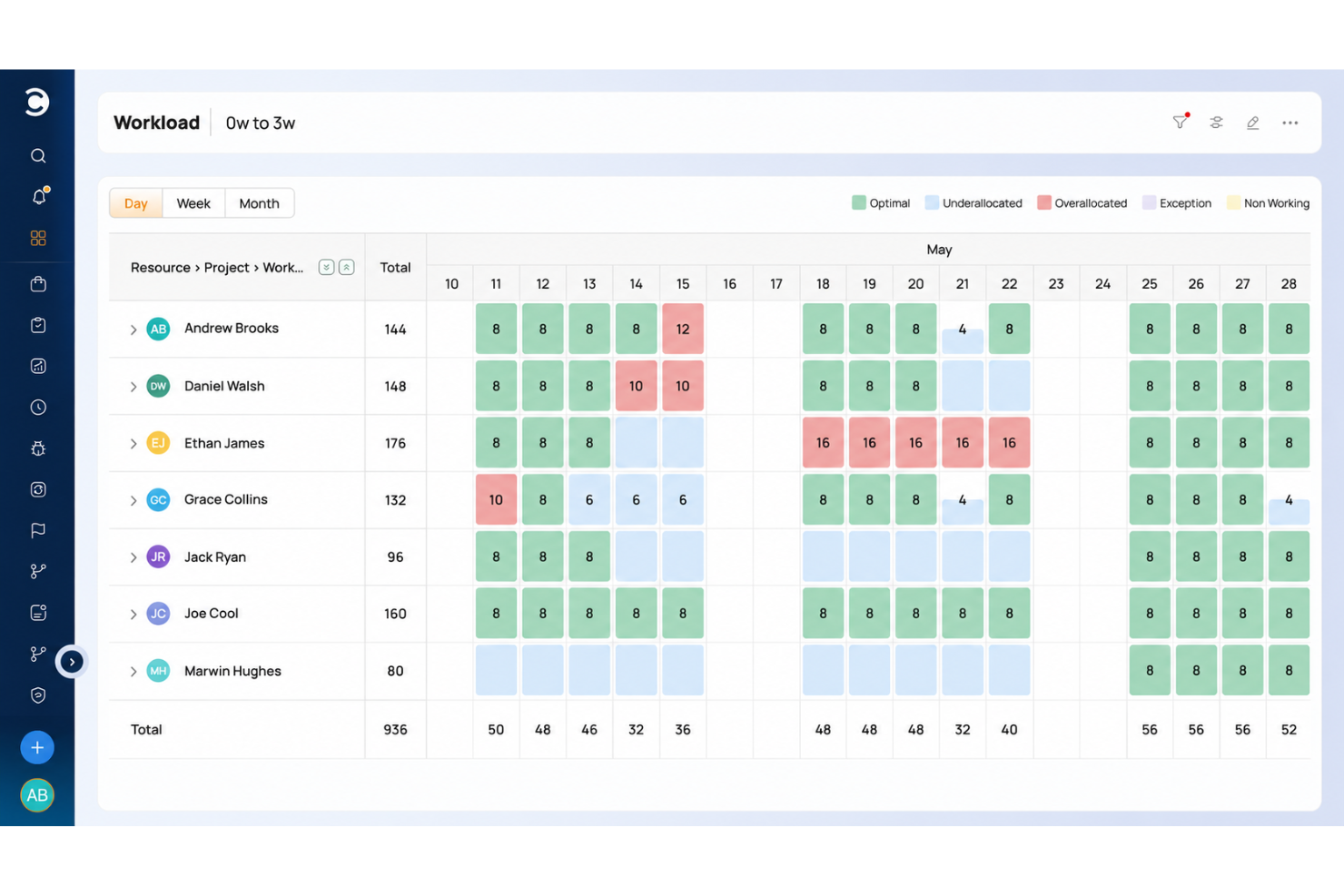
Celoxis is an AI-powered enterprise project management platform that combines portfolio tracking, resource planning, project accounting, risk management, and client collaboration tools in a single system.
Who Is Celoxis Best For?
Celoxis is a strong fit for mid-to-large enterprises managing complex, multi-project environments across teams in IT, professional services, or operations.
Why I Picked Celoxis
I picked Celoxis as one of the best because its dashboard capabilities replace what most teams would turn to a dedicated BI tool for. I love that you can build multiple shared dashboards with customizable widgets, and almost any report can be pinned directly to a dashboard and resized to fit. The custom drill-down charts are especially useful: you can click into a chart and take bulk actions on records without leaving the view.
Celoxis Key Features
- AI assistant (Lex): A built-in AI assistant that analyzes project data in real time, flags risks, and responds to natural language commands.
- Dynamic resource planning: Assign and manage resources across projects with load charts that show availability, allocation, and conflicts by role or person.
- Project accounting: Track budgets, costs, and revenue at the task or project level, with margin and profitability reporting built in.
- Portfolio management: View and manage multiple projects in a single portfolio workspace, with aggregated health indicators and milestone tracking.
Celoxis Integrations
Celoxis offers native integrations with Google Drive, Microsoft Excel, Microsoft Project, Jira, QuickBooks Online, and Salesforce, along with SSO support through Okta, OneLogin, and SAML 2.0. Many additional connections are available through Zapier, and an API is available for custom integrations.
Pros and Cons
Pros:
- Portfolio bubble charts with strategy alignment
- Supports both hourly and fixed-price models
- Built-in BI-grade reporting and analytics
Cons:
- Complex template setup slows onboarding
- Mobile app feels glitchy and limited

Best for AI project automation
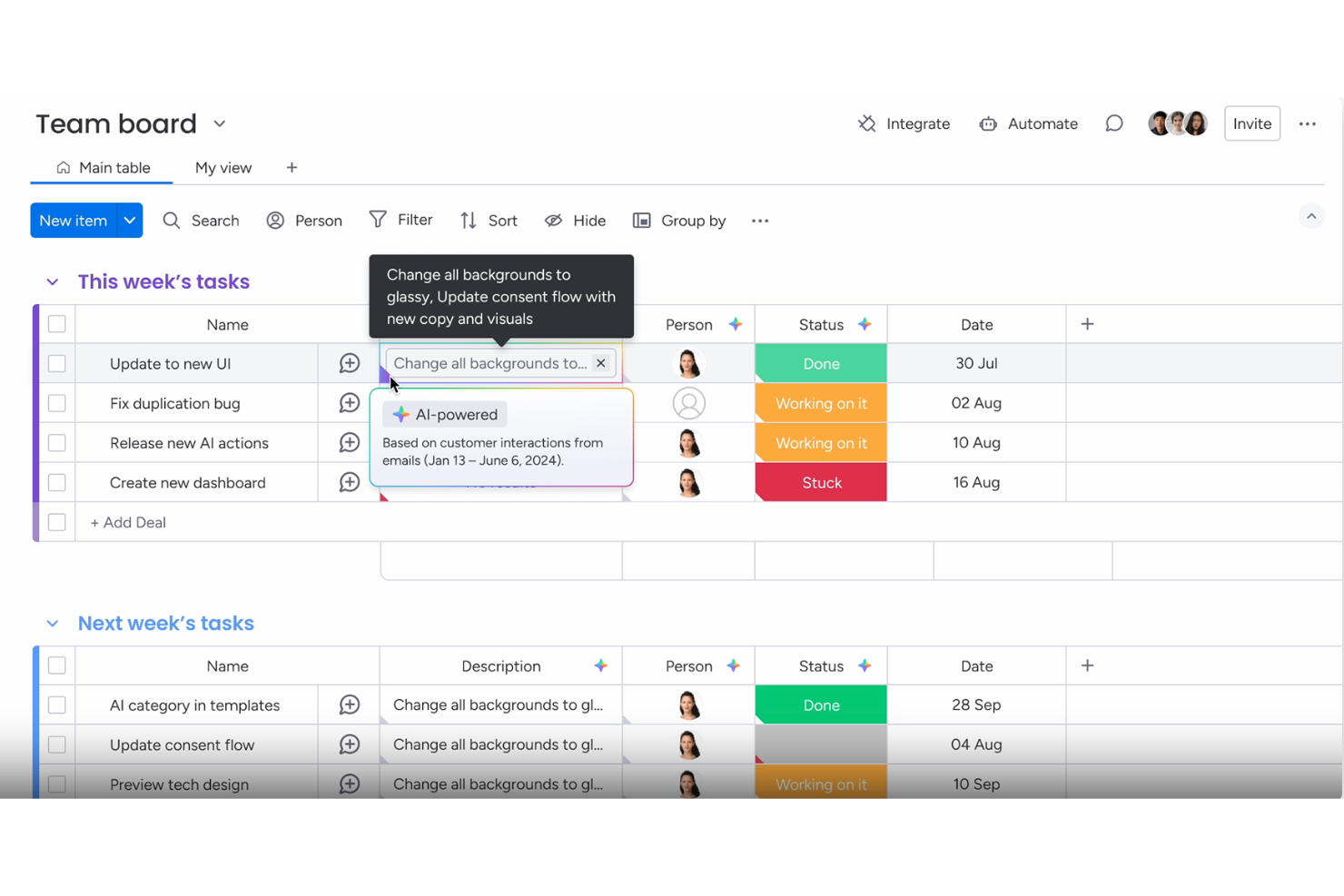
For enterprises seeking an AI project automation solution, monday.com provides a platform that helps teams manage projects, tasks, and resources in a single workspace. The system supports teams across departments such as marketing, IT, and operations, helping them organize work and keep projects moving. With AI-assisted automation, workflow tools, and customizable boards, monday.com helps enterprises coordinate tasks, track progress, and improve collaboration across large teams.
Why I Picked monday.com
I picked monday.com because it supports teams for AI project automation in enterprise project management. The platform helps automate tasks, organize workflows, and manage large projects across teams. Its AI features assist with planning timelines, tracking dependencies, and keeping project work organized, helping teams coordinate tasks and monitor progress. These capabilities help enterprises manage complex projects while maintaining visibility across tasks, resources, and project stages.
monday.com Key Features
In addition to AI project automation, monday.com offers:
- Dashboards: Customize dashboards to gain a real-time overview of project progress and team performance.
- Gantt Charts: Visualize project timelines and dependencies to optimize resource allocation.
- Integrations: Connect seamlessly with over 850 apps to enhance workflow and collaboration.
monday.com Integrations
Integrations include Slack, Google Drive, Trello, Salesforce, Microsoft Teams, Zoom, HubSpot, QuickBooks, Shopify, and Dropbox.
Pros and Cons
Pros:
- Integration options with popular tools improve workflow connectivity
- Automation capabilities help streamline repetitive workflows
- AI features assist with task summaries, automation, and content generation
Cons:
- Pricing may be expensive for small businesses or startups
- Some advanced features are only available on higher-tier plans
New Product Updates from monday AI Workspace
monday AI Workspace Adds Human Approval Routing
monday AI Workspace adds a human-in-the-loop approval block to AI Workflows, sending approval requests and routing workflow paths based on responses. For more information, visit monday AI Workspace's official site.

Forecast
Best for AI-driven professional services delivery
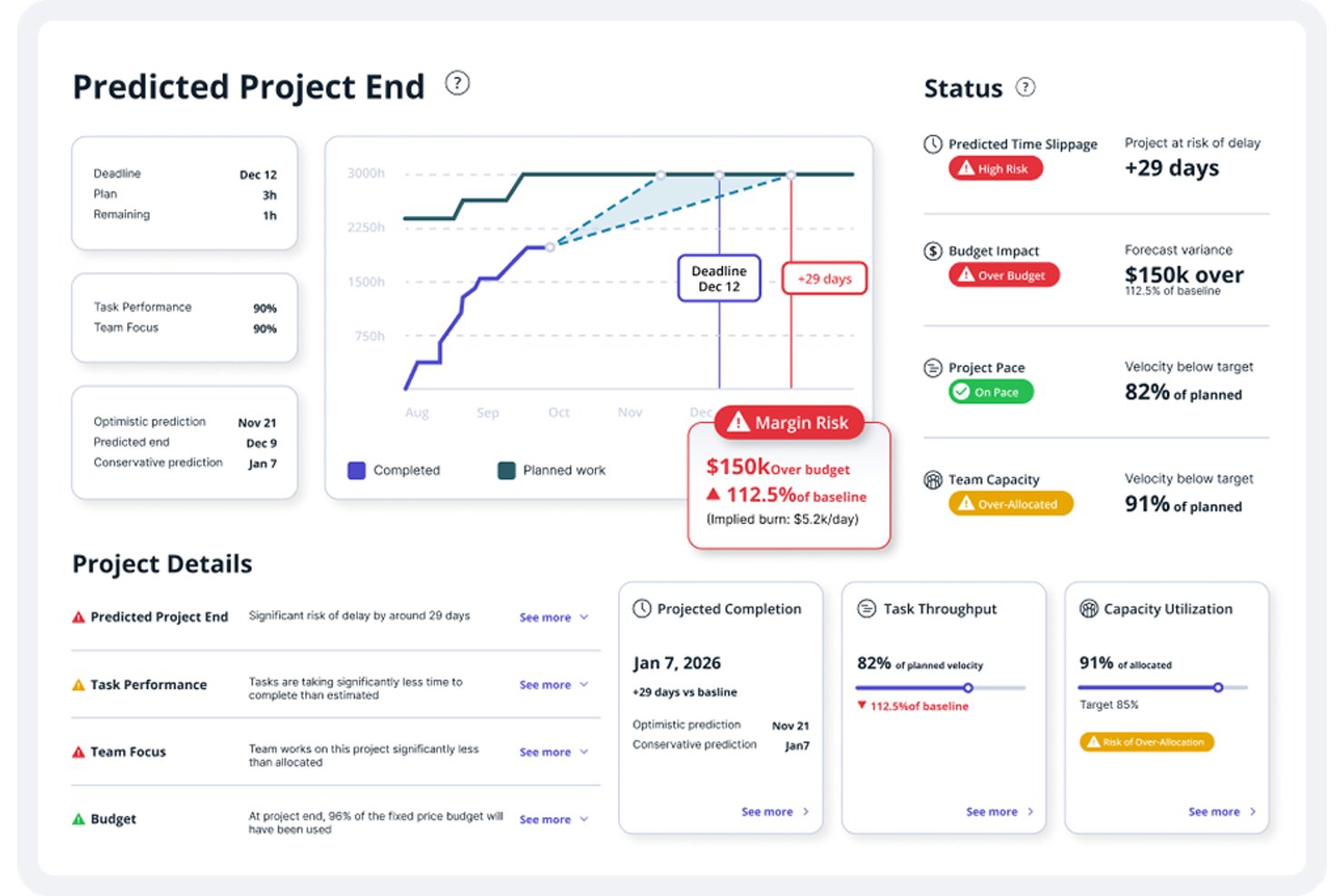
Accelo is an AI-powered professional services automation platform that connects project management, resource planning, capacity forecasting, time tracking, and financial management in a single system.
Who Is Forecast Best For?
Forecast is a strong fit for professional services firms—agencies, consultancies, and managed services teams—that need AI-driven resource planning and project financials in one connected platform.
Why I Picked Forecast
Forecast earns its spot on my shortlist because it's purpose-built for AI-driven professional services delivery in a way most enterprise project management tools aren't. I'm particularly impressed by how its AI connects resource recommendations directly to pipeline demand, letting you model capacity against tentative work before a quote ever becomes an active project. Its task-overrun alerts also stand out: the model evaluates assignee history, logged time, and project context to flag at-risk tasks before deadlines slip.
Forecast Key Features
- Pipeline-based demand planning: Model committed and tentative work against available capacity before opportunities become active projects.
- MCP connector: Connect Accelo data to Claude, ChatGPT, Gemini, or Copilot Studio for natural-language queries and analysis.
- Project budget and margin tracking: Compare planned versus actual performance across time, services, expenses, and materials as work progresses.
- Trigger-based workflow automation: Automatically create tasks, update statuses, send emails, or escalate work when configured conditions are met.
Forecast Integrations
Forecast offers integrations with Jira, GitHub, GitLab, Azure DevOps, Microsoft 365, Slack, HubSpot, Salesforce, QuickBooks, and Xero. It also supports RESTful and Forms APIs, plus MCP connections for Claude, ChatGPT, Gemini, and Copilot Studio.
Pros and Cons
Pros:
- AI-informed capacity planning against tentative pipeline
- Unified client, project, and billing workflows
- Clear visibility into workload and team availability
Cons:
- Dense modules complicate setup and navigation
- Reports can be difficult to tailor

Asana
Best for AI meeting summaries
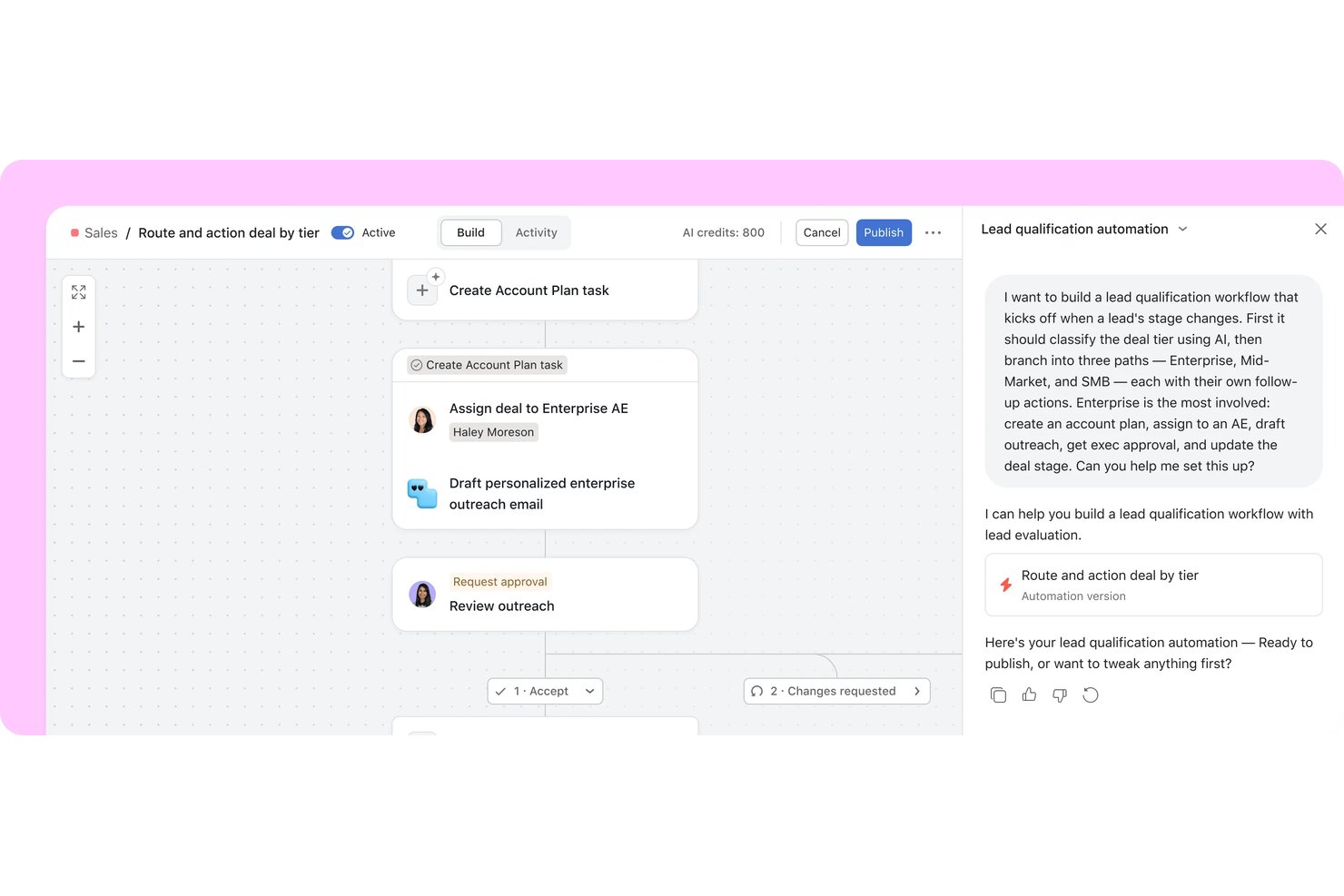
Asana is an enterprise work management platform that brings AI agents and human teams together on a shared plan, combining portfolio management, automated workflows, goal tracking, and AI-assisted task routing across cross-functional projects.
Who Is Asana Best For?
Asana is a strong fit for enterprise PMO teams and portfolio managers who need to coordinate cross-functional work, connect project delivery to company goals, and keep distributed teams aligned across multiple initiatives.
Why I Picked Asana
I picked Asana as one of the best because of how well Asana Dash handles meeting follow-through. After a Slack thread or a Zoom call, Dash maps decisions back to live projects and routes action items to the right AI Teammate automatically. I also like that AI Studio lets you build intake workflows that classify requests, apply SLA rules, and flag blockers without writing a single line of code.
Asana Key Features
- Goal tracking: Connect company, team, and individual goals to live projects and portfolios so progress updates automatically as work gets done.
- Portfolio dashboards: Build custom charts across tasks, projects, and portfolios using bar, burnup, burndown, donut, and other chart types.
- AI Studio: Build no-code AI workflows that classify intake requests, apply SLA rules, flag blockers, and route work without writing code.
- Capacity planning: View and manage individual staffing allocations across projects and portfolios using percent allocation, estimated hours, or headcount.
Asana Integrations
Asana lists 270+ app integrations, including Slack, Jira Cloud, ServiceNow, Salesforce, Microsoft 365 Copilot, ChatGPT, Claude, Gemini, Power BI, and Zapier. It also offers REST API, webhooks, SCIM API, Audit Log API, and an MCP Server for custom integrations.
Pros and Cons
Pros:
- Goal links connect delivery to objectives
- Workflow rules standardize recurring request routing
- Portfolio views clarify cross-project status
Cons:
- Capacity plans need manual staffing decisions
- AI summarizes work but doesn’t forecast delays

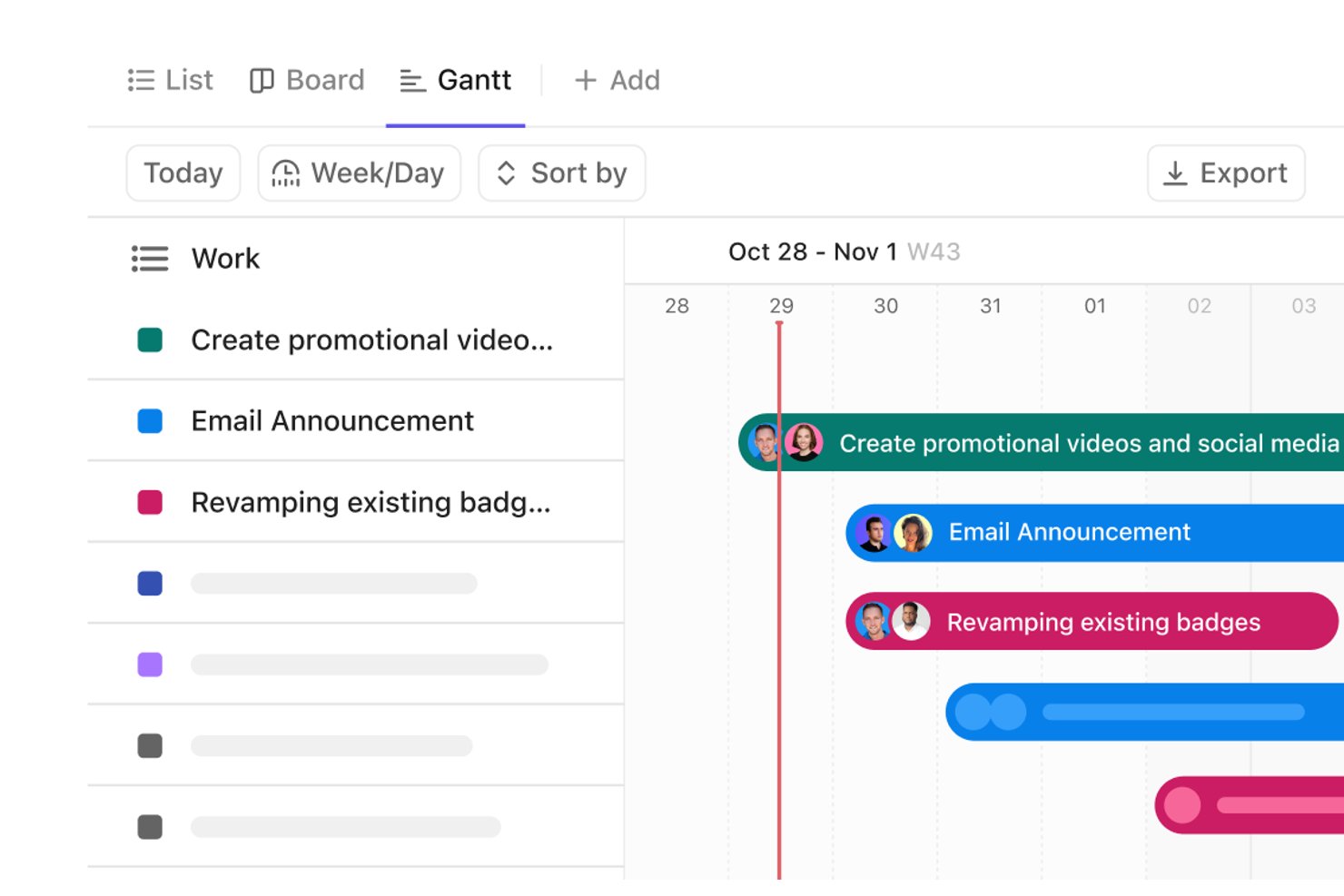
ClickUp is an AI-powered work management platform that unifies project tasks, portfolio tracking, workflow automation, and team collaboration—with AI agents, customizable dashboards, and cross-project dependency mapping built into a single workspace.
Who Is ClickUp Best For?
ClickUp is a strong fit for PMO directors and portfolio managers who need to track work across multiple teams in a single workspace.
Why I Picked ClickUp
I've included ClickUp in my top picks because its AI task prioritization goes beyond simple sorting—ClickUp Brain and Super Agents analyze your Workspace data to surface which tasks need attention, assign owners, and set due dates directly from conversations. I also like that AI Dashboard Cards like AI Executive Summary and AI Project Update auto-generate status reports without manual input. Portfolio cards roll up progress across multiple teams in real time, so you're never hunting for a status update.
ClickUp Key Features
- Gantt chart dependency mapping: Visualize task relationships and critical paths across teams, with automatic downstream rescheduling when dependencies shift.
- Workload view: See team capacity and assignments in one place, using task counts or time estimates, with drag-and-drop reassignment.
- Workflow automations: Set trigger-and-action rules to assign tasks, update statuses, and trigger handoffs across projects automatically.
- Enterprise governance controls: Manage access with custom roles, SSO, SCIM, SAML, audit logs, and data residency options on Enterprise plans.
ClickUp Integrations
ClickUp offers 1,000+ integrations, including native integrations with Slack, Microsoft Teams, GitHub, GitLab, HubSpot, Google Drive, Dropbox, Zoom, and Tableau. It also provides a public API, MCP Server, webhooks, OAuth, and Zapier.
Pros and Cons
Pros:
- Flexible views adapt to distinct workflows
- Automations reduce recurring handoff administration
- Cross-team portfolio dashboards expose project status
Cons:
- Capacity views leave overlapping assignments unclear
- Workspace setup demands deliberate workflow design

Can Do
Best for AI-driven resource capacity planning

Can Do is an AI-powered project and resource management platform that combines portfolio planning, capacity and skills-based resource management, risk analysis, and scenario simulation across departments, companies, and locations.
Who Is Can Do Best For?
Can Do is a strong fit for PMO directors and portfolio managers at mid-to-large enterprises who need AI-assisted resource capacity planning across multiple projects, departments, and locations.
Why I Picked Can Do
I've included Can Do in my top picks because its AI-driven resource capacity planning goes well beyond simple workload charts. I particularly like the Watermodel, a patented simulation that models whether parallel tasks can realistically run concurrently by accounting for buffers and delays before a single operational plan changes. The AI also analyzes skills, availability, and workload across departments and locations to flag overloads and recommend alternative resources, so capacity conflicts get caught at the portfolio level rather than mid-sprint.
Can Do Key Features
- Skills-based resource matching: Define required skills and roles for tasks, then identify team members whose skills and availability align with those needs.
- Hybrid project planning: Combine classic milestone-based scheduling and agile execution within a single project, including Jira-connected sprint planning.
- Demand management: Incorporate project requests into planning by scoring them against budgets, resource availability, and probability of approval before committing resources.
- Risk tracking: Track manually entered risks alongside AI-generated risk assessments at the portfolio, project, and work package level.
Can Do Integrations
Can Do has a documented native Jira integration, plus integrations with SAP, Personio, Salesforce, SharePoint, and Microsoft Power BI. Its REST API supports custom integrations, which are individually scoped and may cost extra.
Pros and Cons
Pros:
- Watermodel simulates buffers and schedule delays
- AI recommends alternatives when workloads conflict
- Fewer resource bottlenecks across projects
Cons:
- Automated status reports require separate BI module
- No native ticketing or trigger-based workflows

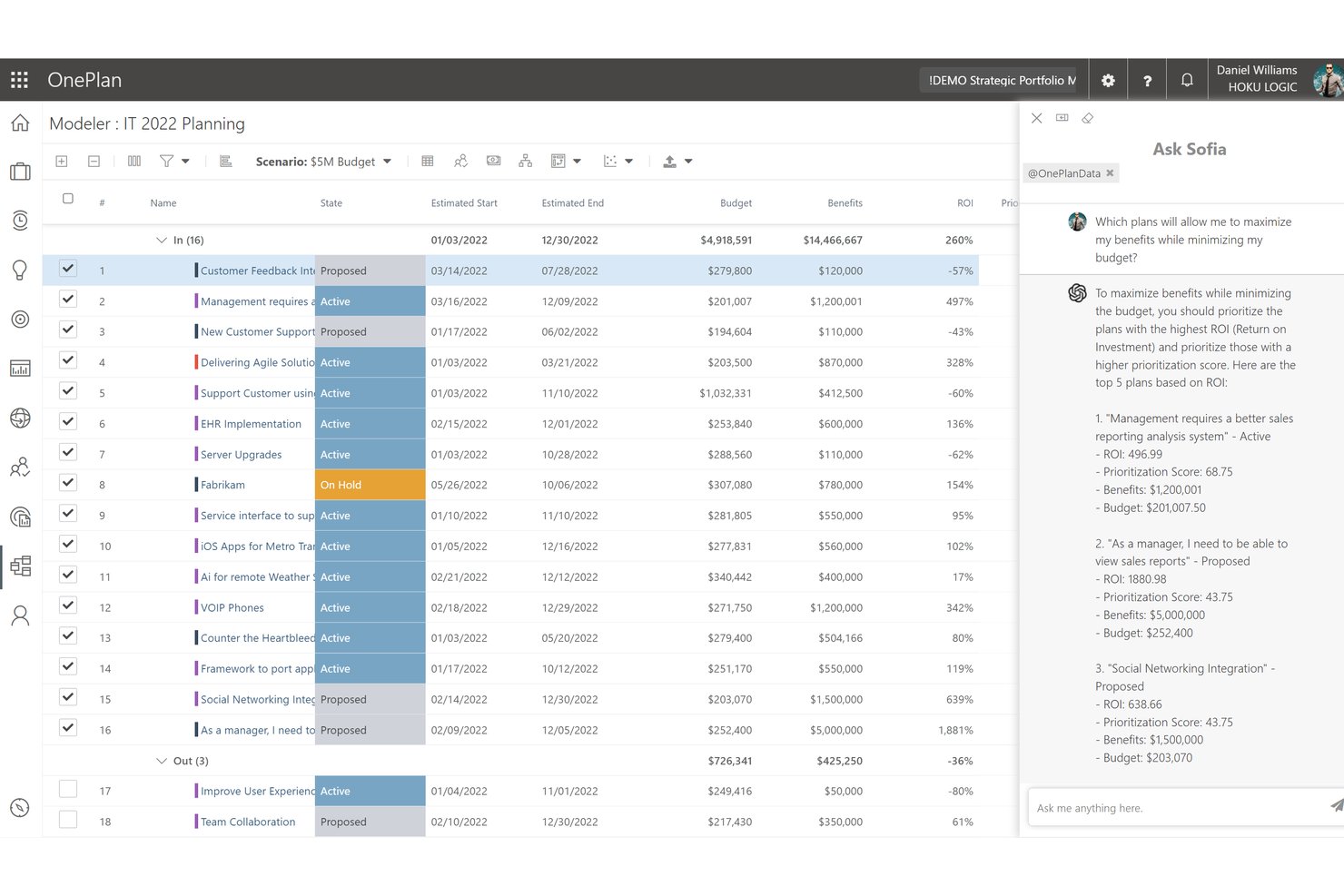
OnePlan is an AI-powered enterprise project portfolio management platform that combines strategic planning, portfolio modeling, resource management, financial tracking, and a natural-language AI assistant called Sofia GPT.
Who Is Sofia GPT (OnePlan) Best For?
OnePlan is a strong fit for PMO directors and portfolio managers in Microsoft-heavy organizations who need a single platform to connect strategy, resource capacity, and project execution.
Why I Picked Sofia GPT (OnePlan)
I picked Sofia GPT as one of the best because it connects a natural-language AI assistant directly to live portfolio data, so you can ask a question like "which projects are at risk this quarter?" and get an answer drawn from your actual OnePlan resource, budget, and OKR data. I particularly like how Sofia can generate a prioritized risk register with mitigation strategies, or surface budget variances across your portfolio, without you having to build a report first. Pair that with Portfolio Modeler's side-by-side scenario comparisons, and you have a genuinely useful AI layer on top of enterprise-grade portfolio governance.
Sofia GPT (OnePlan) Key Features
- Portfolio scenario modeling: Compare side-by-side investment scenarios using constraints like budget, committed effort, and expected benefits to evaluate trade-offs.
- Power BI analysis dashboards: Access pre-built, interactive dashboards with drill-through from portfolio summaries down to programs, projects, and epics.
- Three-layer permission model: Control access at the enterprise security group, plan type, and individual plan levels with contributor, owner, and reader roles.
- Azure DevOps and Jira integrations: Sync work items from Azure DevOps and Jira into OnePlan portfolios to maintain execution-level visibility alongside strategic planning.
Sofia GPT (OnePlan) Integrations
OnePlan lists integrations with Azure DevOps, Jira, ServiceNow, Power BI, and Microsoft tools including Microsoft Project and Microsoft Teams. Its Enterprise tier includes an API for custom integrations, and Zapier is also supported.
Pros and Cons
Pros:
- Adapts governance and prioritization to team processes
- Connects resource demand with project plans
- Consolidates portfolio status for leadership
Cons:
- Large, complex portfolios can strain performance
- Dashboard hierarchy and report exports frustrate reviewers

Best for aligning portfolios to strategic goals
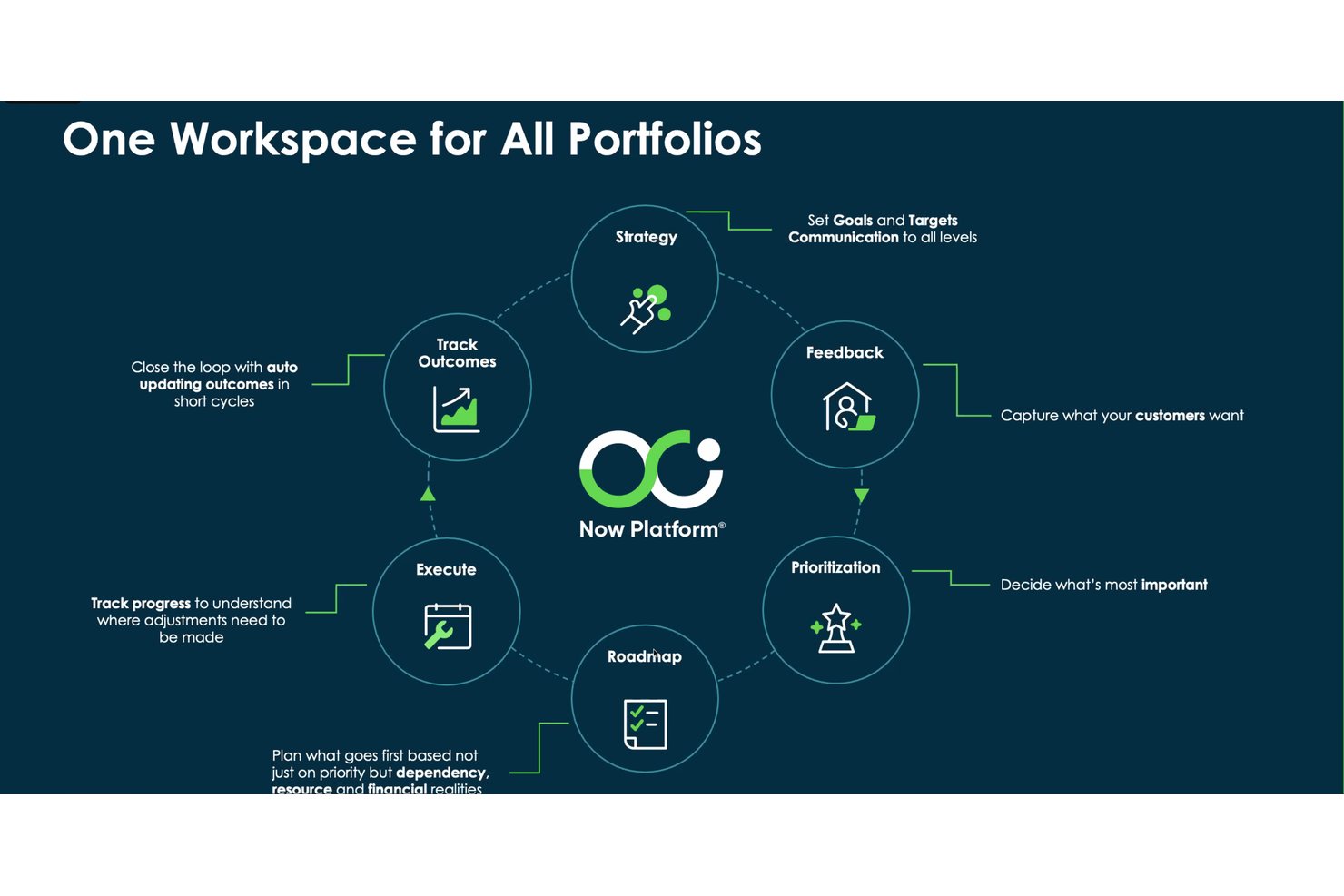
ServiceNow Strategic Portfolio Management is an AI-powered enterprise portfolio management platform that connects strategy to delivery through scenario planning, investment prioritization, resource capacity planning, and AI-generated project health forecasting and status reporting.
Who Is ServiceNow Strategic Portfolio Management Best For?
ServiceNow Strategic Portfolio Management fits large enterprises that need to connect strategy to execution across multiple portfolios, business units, and delivery teams.
Why I Picked ServiceNow Strategic Portfolio Management
I picked ServiceNow Strategic Portfolio Management because it's one of the few platforms that genuinely connects strategy to delivery at an enterprise scale. I'm particularly drawn to its scenario planning capability, which lets portfolio managers compare alternative project and demand combinations against real resource capacity before committing to a plan. Layered on top of that, AI-generated RAG health predictions flag schedule, cost, resource, and scope risks before they escalate, giving leadership the signal they need to act early.
ServiceNow Strategic Portfolio Management Key Features
- Investment funding: Plans and manages budget allocations to business units, products, and teams, with prioritization against strategic objectives.
- Enterprise Agile Planning: Supports SAFe and PI planning workflows for large-scale agile delivery teams.
- Portfolio Planning roadmaps: Visualizes milestones, progress indicators, and dependencies across planning items in hybrid roadmap views.
- AI-generated project insights: Sends scheduled email digests covering tasks, milestones, resource assignments, financials, and RIDACs.
ServiceNow Strategic Portfolio Management Integrations
ServiceNow Strategic Portfolio Management connects with Slack, Salesforce, Workday, Microsoft Teams, and GitHub through ServiceNow’s integration ecosystem. It also supports REST, SOAP, and webhook APIs for custom integrations.
Pros and Cons
Pros:
- AI flags schedule, cost, resource, scope risks
- Scenario planning exposes capacity tradeoffs before approval
- Connects portfolios to strategic goals and outcomes
Cons:
- Setup and configuration often require specialist support
- Interface can make portfolio tracking confusing

Smartsheet
Best for extensive enterprise app integrations
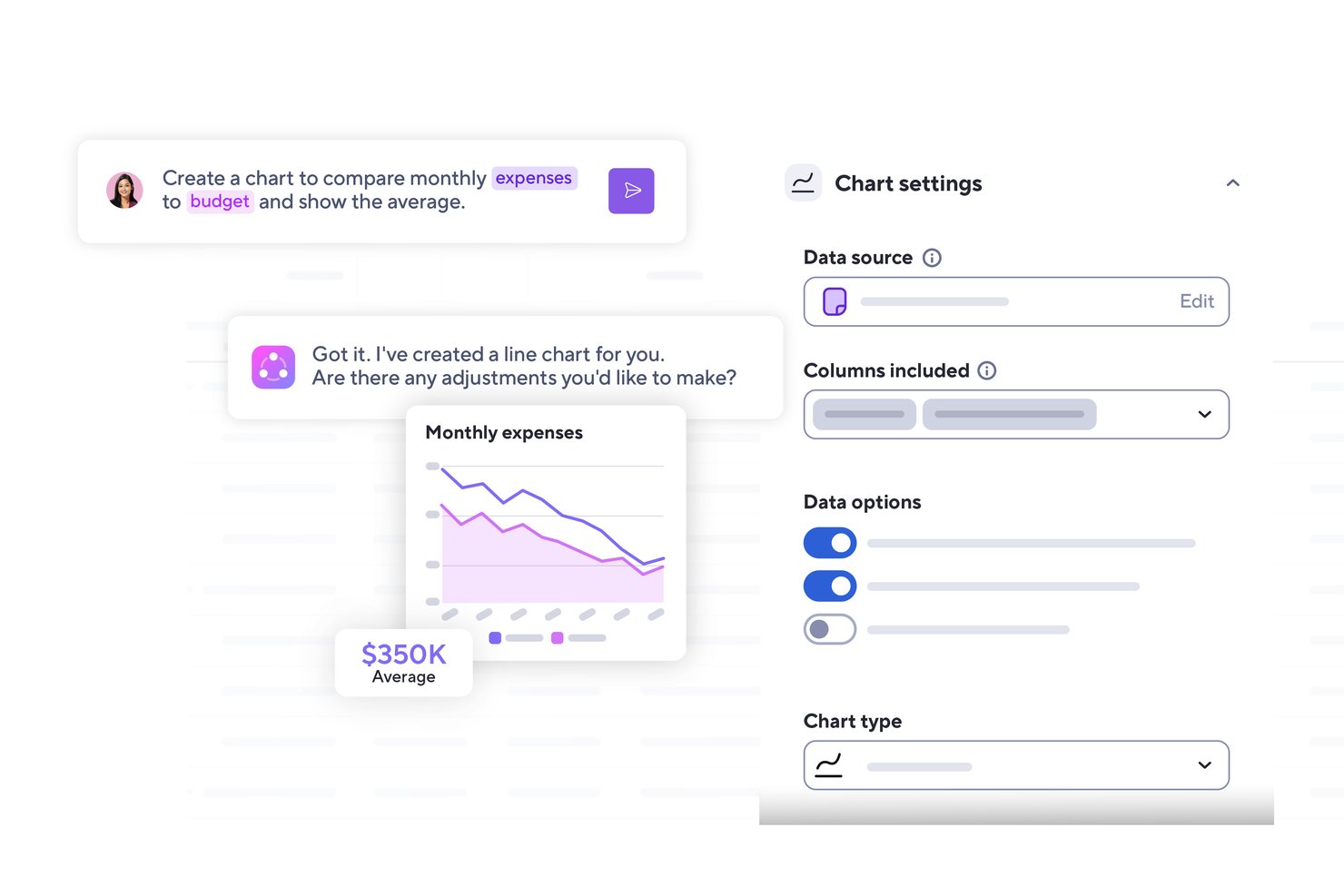
Smartsheet is an AI-powered work management platform that combines project tracking, portfolio oversight, workflow automation, reporting dashboards, and resource planning for enterprise teams.
Who Is Smartsheet Best For?
Smartsheet is a strong fit for enterprise PMO teams and portfolio managers who need to connect projects across a wide range of existing tools like Jira, Salesforce, and ServiceNow.
Why I Picked Smartsheet
I picked Smartsheet as one of the best because no other tool on this list connects to as wide a range of enterprise systems out of the box. With over 175 integrations spanning Jira, Salesforce, ServiceNow, and Workday, plus bidirectional syncing through dedicated Connectors, your project data stays current across the tools your teams already use. I also like that the MCP Server lets you query Smartsheet data directly from Claude, Gemini, or Microsoft Copilot, turning your existing AI workspace into a live project intelligence layer.
Smartsheet Key Features
- Smart Columns: Automatically categorize, summarize, translate, or analyze sentiment across rows of sheet data using AI.
- Control Center: Automate project creation, aggregate reporting, and manage portfolio-level changes across standardized project structures.
- AI dashboard builder: Generate a customizable stakeholder dashboard from a plain-language description of your desired metrics and data sources.
- Scenario Planning: Compare up to three what-if scenarios side by side, adjusting dates, assignments, and allocations before committing changes to live sheets.
Smartsheet Integrations
Smartsheet offers over 175 integrations, including Jira Software, Salesforce, ServiceNow, Workday, Power BI, Tableau, Microsoft Teams, and Slack. Its REST/JSON API supports custom integrations, and Zapier connects it to more than 3,000 apps.
Pros and Cons
Pros:
- Flexible sheets adapt to varied workflows
- Automation reduces repetitive follow-up
- Portfolio dashboards consolidate cross-project status
Cons:
- Mobile app feels weaker than desktop
- Advanced reports take time to configure
New Product Updates from Smartsheet

Smartsheet Adds Non-Plan User Management in Admin Center
Smartsheet adds a Non plan users tab to the Seat types and true-up page in Admin Center. This lets system admins review non-plan users and add them to the plan or remove them from the organization in one place. For more information, visit Smartsheet’s official site.
Annen AI-basert prosjektstyringsprogramvare for virksomheter
Her er noen flere alternativer for AI-basert prosjektstyringsprogramvare for virksomheter som ikke kom med på kortlisten min, men som likevel er verdt å undersøke:
- Kantata
For AI-driven resource staffing in services firms
- Planview
For AI-driven portfolio scenario planning
- Jira
For IT teams tracking dev work at scale
- Adobe Workfront
For AI-governed work across creative portfolios
- Notion
For AI-enhanced team documentation


How I Evaluate AI Enterprise Project Management Software
To make this list, a tool’s AI needs to handle project work, like forecasting delays and recommending resource needs. From there, I evaluate three things. Core functionality carries the most weight, like managing portfolios and planning team capacity. Then I look at standout features, like scenario modeling, and what a tool offers beyond its feature set, like rollout and training support.
Core Functionality (Table Stakes For This List)
When I'm selecting tools for my list, I score each one on a scale from 0 (does not offer the functionality) to 5 (excels in this area) for each core functionality listed below. I then convert the total into a percentage to help assess each tool's overall fit, with extra weight on any functionalities I’ve deemed essential.
- AI-Driven Insights (Essential): I look for forecasts that flag schedule slippage, emerging risks, or resource conflicts early enough to adjust plans.
- Portfolio Management (Essential): I assess whether teams can compare initiatives, map dependencies, and prioritize work across departments as strategy shifts.
- Resource Management: Check whether capacity views expose overloaded teams and support reallocating people when priorities or timelines change.
- Task & Workflow Automation: I examine whether triggers can assign work, update dependencies, and move approvals forward across repeatable project workflows.
- Governance & Permissions: I look for role-based permissions and portfolio controls that let PMOs set standards while teams manage local delivery.
- Reporting & Dashboards: Assess whether configurable, role-specific views turn project data into clear status, trend, and decision reports for leaders.
Once I have a list of tools that meet the criteria, I consider what sets each platform apart.
Differentiating Factors (What Sets Vendors Apart)
Here's how I compare and contrast different vendors:
Standout Features
Scenario simulation modeling is where I start. I check whether a tool lets PMO leaders test "what-if" changes to budgets, timelines, or staffing before committing resources. Cross-project dependency mapping matters just as much; I look for visual maps that flag how a delay in one initiative ripples into downstream work. I also evaluate each tool's strategic portfolio alignment, confirming it can tie individual projects back to OKRs so executives see which investments deliver the most business value.
Beyond Features
I check whether vendors offer structured onboarding and change management support, because enterprise rollouts fail when AI features go unconfigured. Tech stack interoperability matters just as much; I look for native connectors to tools like Jira, SAP, and Slack so teams aren't forced into middleware workarounds. I also evaluate compliance certifications and data residency options, especially for organizations operating across multiple jurisdictions.
Slik velger du AI-basert prosjektstyringsprogramvare for virksomheter
Det er lett å gå seg vill i lange funksjonslister og komplekse prisstrukturer. For å hjelpe deg med å holde fokus mens du arbeider deg gjennom den unike prosessen din for valg av programvare, får du her en sjekkliste over faktorer du bør ha i tankene:
| Faktor | Hva du bør vurdere |
|---|---|
| Skalerbarhet | Kan programvaren vokse sammen med teamet ditt? Vurder brukerbegrensninger og priser for høyere nivåer. Sørg for at den kan håndtere økt prosjektkompleksitet etter hvert som organisasjonen din vokser. |
| Integrasjoner | Kan den integreres med verktøyene du bruker i dag? Sjekk kompatibiliteten med den eksisterende programvarestakken din for å sikre sømløs dataflyt og unngå manuell dataoverføring. |
| Tilpasningsmuligheter | Kan du tilpasse programvaren til arbeidsflytene dine? Se etter alternativer for å tilpasse dashbord, rapporter og prosesser slik at de samsvarer med teamets spesifikke behov. |
| Brukervennlighet | Er grensesnittet intuitivt for teamet ditt? Vurder læringskurven, og tenk på om det vil være nødvendig med opplæring for at teamet raskt skal komme i gang. |
| Implementering og introduksjon | Hvor lang tid vil oppsettet ta? Vurder ressursene som trengs til distribusjon og opplæring. Se etter verktøy med enkle introduksjonsprosesser og tilgjengelig støtte under overgangen. |
| Kostnad | Er det innenfor budsjettet ditt? Sammenlign prismodeller, inkludert kostnader per bruker og tilleggsgebyrer. Vurder langsiktige kostnader og mulige rabatter ved årlige avtaler. |
| Sikkerhetstiltak | Oppfyller det sikkerhetsstandardene dine? Sørg for at verktøyet overholder bransjestandarder som GDPR eller ISO-sertifiseringer, særlig hvis du håndterer sensitive data. |
| Tilgjengelig brukerstøtte | Er det hjelp tilgjengelig når du trenger det? Sjekk åpningstidene for brukerstøtte, tilgjengelige kanaler som chat eller telefon, og brukeranmeldelser av hvor raskt brukerstøtten svarer, slik at du har hjelp tilgjengelig når problemer oppstår. |
Hva er AI-programvare for prosjektstyring i virksomheter?
AI-programvare for prosjektstyring i virksomheter er en spesialisert type prosjektstyringsprogramvare som hjelper organisasjoner med å administrere prosjekter ved å bruke kunstig intelligens til å automatisere og forbedre ulike prosesser. Disse verktøyene brukes vanligvis av prosjektledere, teamledere og andre fagpersoner som ønsker å forbedre effektiviteten og beslutningstakingen.
Automatisert planlegging, prediktiv analyse og intelligente oppgavetildelinger bidrar til å optimalisere ressurser, forutsi prosjektresultater og opprettholde samkjøring i teamene. Samlet sett gir disse verktøyene betydelig verdi ved å redusere manuelt arbeid og støtte strategisk planlegging.
Funksjoner
Når du velger AI-programvare for prosjektstyring i virksomheter, bør du se etter følgende nøkkelfunksjoner:
- Automatisert planlegging: Bruker AI til automatisk å planlegge oppgaver og møter, automatiserer kalenderstyringen for å blokkere optimale møtetidspunkter og perioder med fokusert arbeid, og reduserer behovet for frem-og-tilbake-kommunikasjon om planlegging.
- Prediktiv analyse: Analyserer data for å forutsi prosjekttidslinjer og potensielle risikoer, bruker prediktiv analyse til å forutsi prosjekttidslinjer og justerer planene basert på arbeidsbelastning eller risikoindikatorer.
- Intelligente oppgavetildelinger: Tildeler automatisk oppgaver basert på teammedlemmenes ferdigheter og tilgjengelighet, tildeler oppgaver basert på tilgjengelighet og ferdigheter i sanntid, og maksimerer utnyttelsen av teamets kapasitet.
- AI-drevet innsikt: Gir handlingsrettet innsikt og anbefalinger ved å levere datadrevet innsikt (f.eks. flaggede risikoer og trendprognoser), slik at ledere kan gjøre proaktive justeringer.
- Automatisering av arbeidsflyt: Automatiserer repetitive oppgaver og prosesser, overlater rutinemessig planlegging og rapportering til AI, slik at teamet kan bruke mer tid på strategisk arbeid med høy prioritet.
- Samarbeid i sanntid: Gjør det mulig for teammedlemmer å jobbe sammen i sanntid, samler møtesammendrag og statusoppdateringer i delte dashbord eller chatter, og sørger for at alle holder seg samkjørte.
- Tilpassbare dashbord: Gjør det mulig for brukere å opprette personlige visninger av prosjektdata, gir ledere oversikt gjennom AI-genererte dashbord og risikovarsler, slik at de kan identifisere problemer tidlig.
- Tidsregistrering: Overvåker hvordan tiden brukes på oppgaver og prosjekter, og gir data som kan effektivisere arbeidsflyter ved å automatisere repetitive oppgaver og redusere bytte mellom ulike verktøy.
Fordeler
Implementering av AI-programvare for prosjektstyring i virksomheter gir flere fordeler for teamet og virksomheten din. Her er noen av fordelene du kan se frem til:
- Økt effektivitet: Automatisert planlegging og oppgavefordeling reduserer den manuelle arbeidsmengden og frigjør tid til mer strategiske aktiviteter.
- Bedre beslutningstaking: AI-drevet innsikt og prediktiv analyse gir datadrevne anbefalinger, samt handlingsrettet intelligens som kan brukes til å informere om omfordeling av oppgaver eller justering av tidsfrister.
- Forbedret samarbeid: Funksjoner for samarbeid i sanntid sørger for at alle holder seg oppdatert, ved å registrere møtenotater og oppfølgingspunkter automatisk og deretter distribuere dem til relevante teammedlemmer via delte arbeidsområder.
- Bedre ressursutnyttelse: Smart oppgavefordeling optimaliserer bruken av teammedlemmenes ferdigheter og tilgjengelighet ved å bruke AI til å foreslå omfordeling av ressurser og varsle når teammedlemmer er under- eller overutnyttet.
- Færre feil: Automatisering av arbeidsflyter minimerer menneskelige feil ved å automatisere repetitive oppgaver og standardisere arbeidsflyter med AI-drevne sjablonger for sjekklister og betinget logikk for å redusere menneskelige feil.
- Tidsbesparelser: Tidsregistrering og automatiserte prosesser genererer produktivitetsrapporter som fremhever flaskehalser, inaktiv tid og muligheter for automatisering.
- Tilpassbare visninger: Personlige dashbord lar brukerne fokusere på de mest relevante dataene og gir dem bedre mulighet til å følge med på fremdrift og ytelse.
Kostnader og priser
Ved valg av AI-drevet prosjektstyringsprogramvare for virksomheter er det nødvendig å forstå de ulike prismodellene og abonnementene som er tilgjengelige. Kostnadene varierer basert på funksjoner, teamstørrelse, tillegg og mer. Tabellen nedenfor oppsummerer vanlige abonnementer, gjennomsnittsprisene deres og typiske funksjoner som er inkludert i AI-drevne prosjektstyringsløsninger for virksomheter:
Sammenligningstabell for AI-drevet prosjektstyringsprogramvare for virksomheter
| Abonnementstype | Gjennomsnittspris | Vanlige funksjoner |
| Gratisabonnement | $0 | Grunnleggende oppgavestyring, begrenset lagringsplass og brukerstøtte fra fellesskapet. |
| Personlig abonnement | $5-$15/bruker/måned | Oppgavestyring, grunnleggende integrasjoner og begrensede funksjoner for automatisering. |
| Bedriftsabonnement | $16-$30/bruker/måned | Avansert prosjektoppfølging, forbedrede integrasjoner og prioritert brukerstøtte. |
| Virksomhetsabonnement | $31-$60/bruker/måned | Tilpassbare arbeidsflyter, AI-drevet innsikt, dedikert brukerstøtte og sikkerhetsfunksjoner. |
Vanlige spørsmål om AI-programvare for prosjektstyring i virksomheter
Her er noen svar på vanlige spørsmål om AI-programvare for prosjektstyring i virksomheter:
Hvordan forbedrer AI-programvare for prosjektstyring i virksomheter effektiviteten i prosjektstyringen?
AI forbedrer effektiviteten i prosjektstyringen ved å automatisere repetitive oppgaver, forutsi prosjektrisiko og gi datadrevet innsikt. AI kan for eksempel automatisere planlegging og oppgavefordeling, og overlate repetitivt planleggings- og dataregistreringsarbeid til AI, slik at teamet ditt kan prioritere oppgaver med stor effekt. Prediktiv analyse hjelper deg med å forutse potensielle flaskehalser og justere planene deretter.
Ved å analysere prosjektdata kan AI-verktøy gi innsikt som støtter beslutningstaking, ved hjelp av prediktiv analyse og tidlig risikodeteksjon for å justere tidsplaner proaktivt før forsinkelser oppstår.
Kan AI-programvare for prosjektstyring i virksomheter integreres med eksisterende programvare?
Ja, de fleste AI-verktøy for prosjektstyring i virksomheter er utviklet for å integreres med eksisterende programvare, for eksempel CRM-systemer, kommunikasjonsplattformer og løsninger for datalagring. Kontroller kompatibiliteten med din nåværende teknologistakk for å sikre sømløs dataflyt. Vanlige integrasjoner omfatter Slack for kommunikasjon, Salesforce for CRM og Google Drive for fillagring.
Integrasjoner kobler ikke bare sømløst sammen verktøyene du allerede bruker, som Slack, Google Drive eller CRM-systemer, slik at arbeidsflytene dine forblir sammenhengende og automatiserte, men gjør det også enklere for teamet ditt å ta i bruk den nye programvaren.
Er AI-programvare for prosjektstyring i virksomheter sikker?
Ja, AI-verktøy for prosjektstyring prioriterer sikkerhet ved å tilby funksjoner som datakryptering, brukerautentisering og samsvar med bransjestandarder som GDPR. Når du vurderer verktøy, bør du se på sikkerhetstiltakene de har innført for å beskytte dataene dine. Se etter alternativer som tilbyr detaljerte tilgangskontroller og regelmessige sikkerhetsrevisjoner.
Det er avgjørende å sikre at programvaren oppfyller organisasjonens sikkerhetskrav, særlig hvis du håndterer sensitiv informasjon.
Hvordan måler jeg avkastningen på investeringen i AI-programvare for prosjektstyring?
For å måle avkastningen på investeringen i AI-programvare for prosjektstyring bør du følge med på måltall som spart tid, økt produktivitet og gjennomføringsgrad for prosjekter. Beregn kostnadsbesparelsene som følge av mindre manuelt arbeid og bedre effektivitet. Hvis AI for eksempel automatiserer planleggingen, kan du beregne hvor mange timer som spares, og omgjøre dette til en pengeverdi.
I tillegg bør du vurdere forbedringer i teamsamarbeid og beslutningstaking for å måle avkastningen på investeringen ved å følge med på måltall som spart tid, færre møter og antall automatiserte oppgaver i prosjektene dine.
På hvilke måter kan AI-programvare for prosjektstyring i virksomheter hjelpe team med å ligge i forkant av risiko?
Den overvåker pågående aktivitet og markerer oppgaver som har stoppet opp, uventede forsinkelser eller plutselige økninger i arbeidsmengden. Tidlige varsler hjelper deg med å handle før små problemer utvikler seg til store tilbakeslag. Ved å utnytte AI gir denne programvaren prediktiv analyse som kan forutsi potensielle risikoer, som budsjettoverskridelser eller forsinkelser i tidsplanen, ved å analysere historiske og aktuelle prosjektdata.
I tillegg kan den proaktivt oppdage tidlige varselsignaler på risiko, som ukontrollert utvidelse av prosjektomfanget eller nye flaskehalser, ved automatisk å analysere kommunikasjon mellom utviklere og prosjektoppdateringer etter nøkkelord som signaliserer problemer