

10 beste AI-samarbeidsverktøy vurdert i 2026

10 Kortliste over de beste AI-samarbeidsverktøyene


De beste AI-samarbeidsverktøyene forbedrer prosjektstyringen og lar deg sentralisere kommunikasjonen, automatisere koordineringen av oppgaver og overholde tidsfrister uten endeløse statusoppdateringer eller spredt informasjon. Når filer er spredt på tvers av plattformer, oppdateringer blir begravd i chattråder eller det er uklart hvem som eier oppgavene, stopper prosjektene opp, og teamene dine mister fokus.
Den rette plattformen kan hjelpe deg med å effektivisere arbeidsflytene, redusere dobbeltarbeid og holde prioriteringene synlige i sanntid. Jeg har testet og vurdert over 20 AI-samarbeidsverktøy og satt sammen de beste alternativene. Finn det som passer best, slik at du kan holde teamet organisert, redusere friksjon og levere prosjekter.
Hvorfor du kan stole på våre programvareanbefalinger
Teamet vårt har testet og anmeldt programvare siden 2012. Vi er selv prosjektledere, så vi vet hvor vanskelig og hvor viktig det er å velge riktig programvare.
I denne guiden har vi vurdert verktøyene gjennom praktisk testing og uavhengig research og gitt dem poeng ut fra våre utvelgelseskriterier. Vi bygger også på innsikt fra ledende eksperter i bransjen og erfarne prosjektledere.
Anmeldelsene våre bygger på vår egen redaksjonelle vurdering. De er ikke et salgsargument.
Ekspertanmeldere:
Sammenligningstabell for AI-samarbeidsverktøy
Denne sammenligningstabellen oppsummerer prisdetaljene for mine beste utvalgte AI-samarbeidsverktøy:
| Tool | Best For | Trial Info | Price | ||
|---|---|---|---|---|---|
| 1 | Best for cross-departmental collaboration | Free plan available | From $9/user/month (billed annually) | Website | |
| 2 | Best with multi-channel messaging integration | 30-day free trial | From $24/user/month (billed annually) | Website | |
| 3 | Best for complex projects | 14-day free trial | From $10/user/month | Website | |
| 4 | Best for design teams | Free plan available | From $16/user/month | Website | |
| 5 | Best for database projects | Free plan available; 14-day free trial | From $20/user/month (billed annually) | Website | |
| 6 | Best for project timelines | Free plan + 14-day free trial + free demo available | From $79/user/month (billed annually) | Website | |
| 7 | Best for video messaging | Free demo available | $18/month | Website | |
| 8 | Best for team inboxes | 14-day free trial | From $25/user/month (billed annually) | Website | |
| 9 | Best for freelancers | Free 7-day trial available | From $9/user/month (billed annually) | Website | |
| 10 | Best for knowledge management | Free plan available | From $5.78/user/month | Website |


Vurderinger av de beste AI-samarbeidsverktøyene
Les min detaljerte oppsummering av hvert av mine utvalgte beste AI-samarbeidsverktøy. Jeg går gjennom viktige funksjoner, fordeler & ulemper, integrasjoner og ideelle bruksområder, slik at du kan finne det som passer best for deg.

Best for cross-departmental collaboration
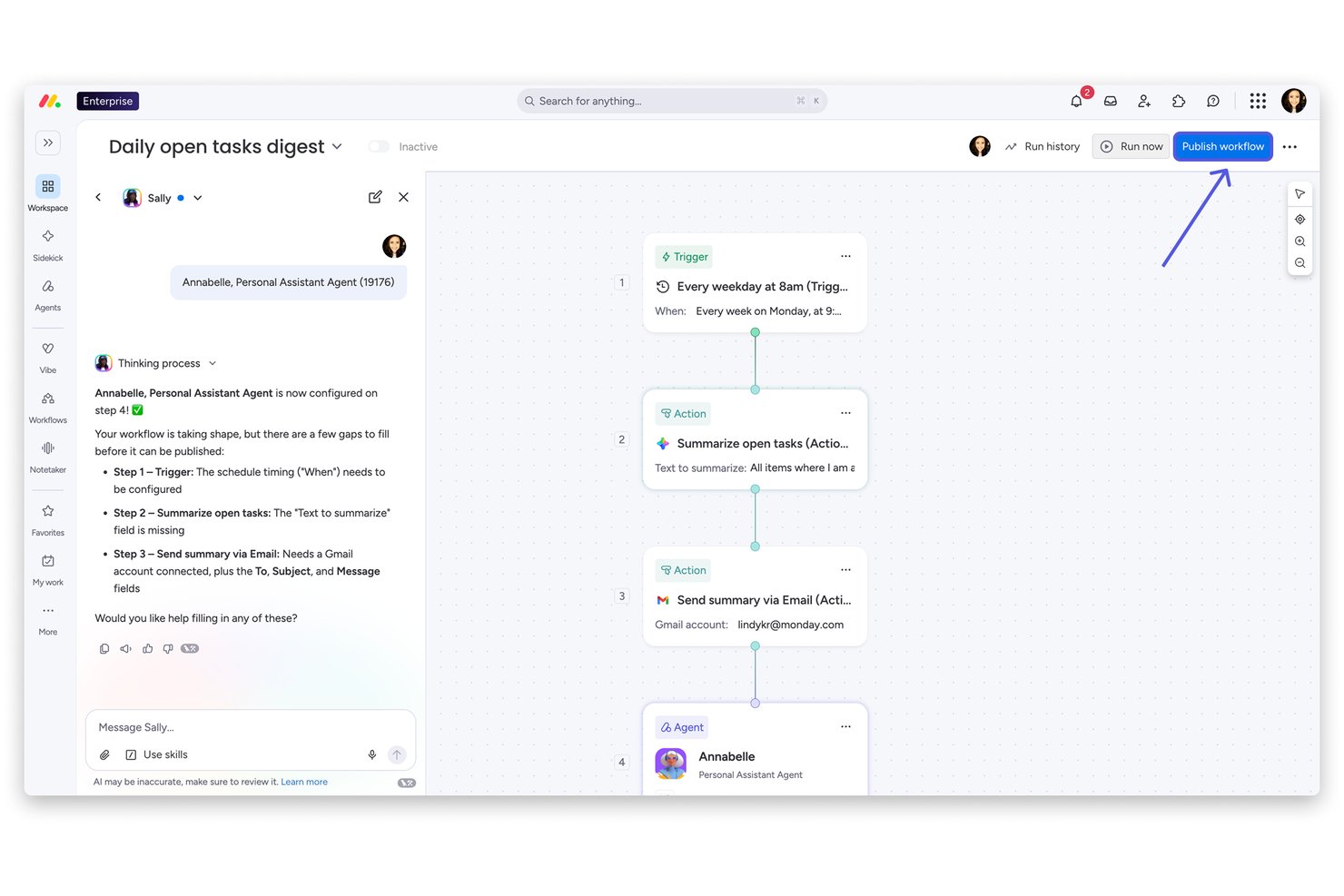
monday AI Workspace is an AI-powered work platform that brings together project management, document collaboration, workflow automation, and an AI agent workforce to connect teams across departments through a shared workspace.
Who Is monday AI Workspace Best For?
It's a strong fit for mid-to-large organizations running work across multiple departments who need a single platform to align teams without constant tool-switching.
Why I Picked monday AI Workspace
monday AI Workspace earns its spot on my shortlist because of how well it handles collaboration across departments that rarely share the same tools or workflows. I like that the AI agents lets marketing, engineering, and ops teams each deploy specialized agents that still feed into a shared board, so decisions don't get lost in handoffs. The AI Meeting Notetaker is one of my favorite features because it pulls action items directly from calls and routes them to the right board without any manual cleanup after the meeting.
monday AI Workspace Key Features
- AI Sidekick assistant: Generates task descriptions, summaries, and project briefs directly within your boards and docs.
- AI Columns: Automates repetitive data entry by generating field values and updates using workspace context.
- Portfolio and resource management: Lets you manage multiple projects, allocate resources, and track progress for the entire organization.
- MCP (Model Context Protocol) integrations: Connects external AI tools like Claude, Copilot, or ChatGPT for direct data and workflow sync.
monday AI Workspace Integrations
monday AI Workspace offers hundreds of native integrations through its built-in integrations and marketplace, including Slack, Jira, Salesforce, HubSpot, GitHub, Microsoft Teams, and Google Workspace. It also supports Zapier and provides an API for custom integrations.
Pros and Cons
Pros:
- Single workspace spans projects, docs, and dashboards
- AI meeting notes sync directly to project boards
- AI agents automate cross-departmental task routing
Cons:
- Board setup complexity grows with team size
- AI features gated behind higher-tier plans
New Product Updates from monday AI Workspace
monday AI Workspace Adds Human Approval Routing
monday AI Workspace adds a human-in-the-loop approval block to AI Workflows, sending approval requests and routing workflow paths based on responses. For more information, visit monday AI Workspace's official site.
Missive
Best with multi-channel messaging integration
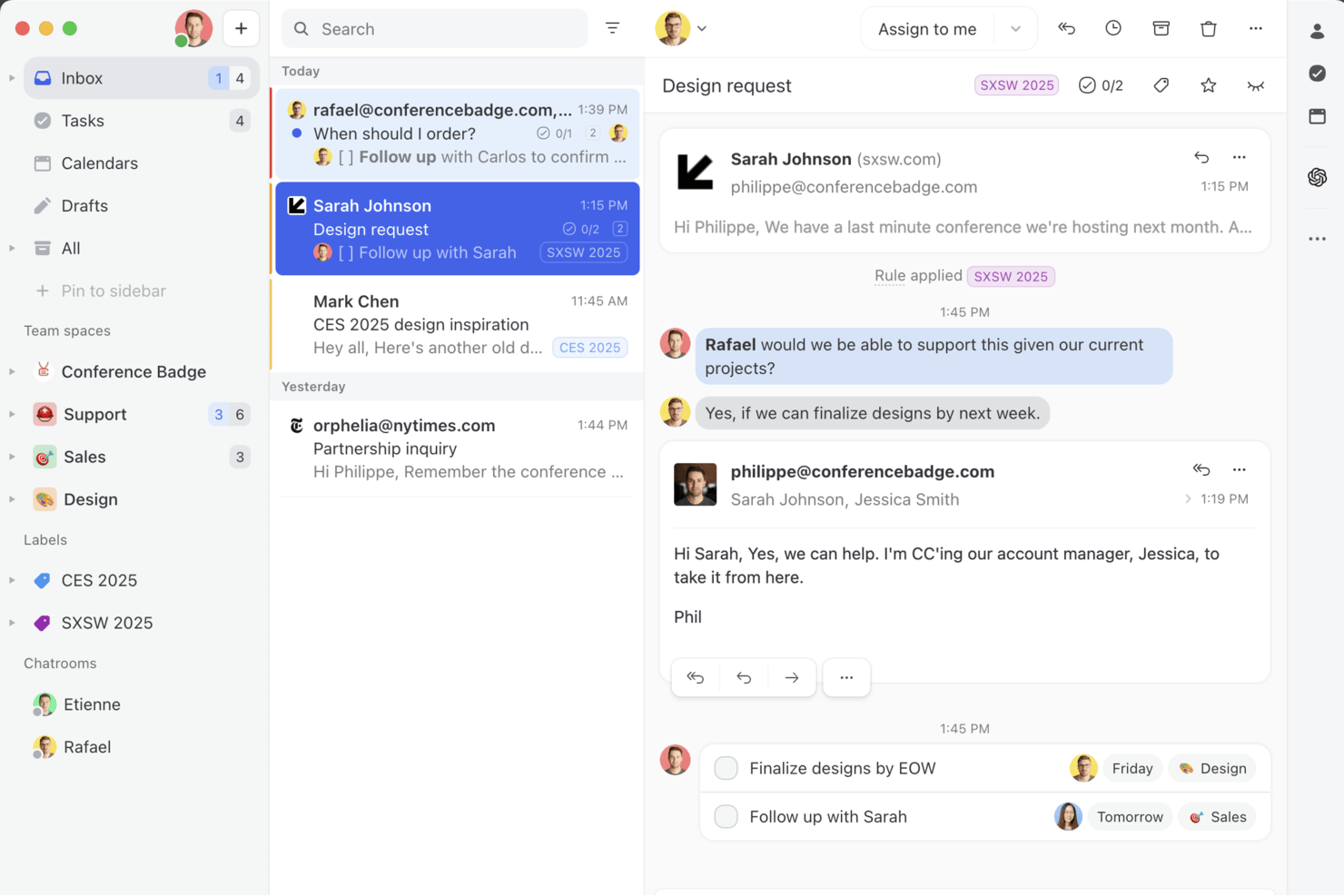
Missive is a collaborative shared inbox platform that unifies email, SMS, WhatsApp, and social messaging channels with AI-assisted drafting, thread summarization, automated task extraction, and team workflow tools in one workspace.
Who Is Missive Best For?
Missive is a strong fit for cross-functional team leads and communication-heavy teams who coordinate work across email, SMS, WhatsApp, and social channels in a single shared workspace.
Why I Picked Missive
Missive earns its spot on my shortlist because no other tool I've tested pulls email, SMS, WhatsApp, Facebook Messenger, and Instagram into a single shared workspace where your whole team can draft, assign, and summarize conversations together. I'm particularly impressed by how AI Summarization posts shared thread summaries as team-visible notes, so when a conversation is reassigned mid-thread, the next person picks up full context instantly. AI Rules take this further by auto-extracting action items directly from incoming emails and routing them to tools like Asana or ClickUp without manual triage.
Missive Key Features
- AI Rules engine: Automatically analyzes incoming emails using plain-language prompts to trigger routing, assignments, or escalations without manual triage.
- Collaborative drafting: Multiple team members can co-author a reply in real time within a shared thread before it's sent.
- BYOK AI provider support: Connect your own OpenAI, Anthropic, or Google Gemini API key to power AI features while controlling cost and model choice.
- Workload balancing: Distributes incoming conversations across team members using Round-Robin, Least Busy, All-at-Once, or Random assignment methods.
- MissiveMCP Server: Connect external AI tools (like Claude or ChatGPT) to query collaboration threads, check calendars, and draft replies—while keeping team review required before sending.
Missive Integrations
Missive offers native integrations with Asana, ClickUp, Trello, and Todoist, plus MCP connections to Linear and Notion. It supports OpenAI, Anthropic, and Google Gemini, has an API for custom integrations, and is available on Zapier.
Pros and Cons
Pros:
- Automates action item extraction from messages
- AI summarizes threads as shared team notes
- Unifies email, SMS, and social messaging
Cons:
- Lacks predictive project risk detection
- No AI meeting notes or voice support
New Product Updates from Missive

Missive Adds Multi-Step Automations With Timed Rules
Missive adds time-based rule steps that let automations run through multiple stages on the same conversation. This helps teams build follow-ups and SLA escalations without creating separate rules. For more information, visit Missive’s official site.
 .
.
Wrike
Best for complex projects

Wrike is a project management software designed to help your team manage projects through its automation and AI capabilities. It appeals to businesses and professionals who need efficient workflow solutions, offering features for creative production, marketing workflows, and agile planning.
Why I Picked Wrike
I picked Wrike for its AI-driven features that enhance collaboration for complex projects. Wrike's generative AI capabilities help your team draft project plans and summarize meeting notes, saving time and reducing manual workload. The platform also provides real-time dashboards offering analytics for informed decision-making, essential for teams needing to stay agile and responsive. These features make Wrike an ideal choice for businesses looking for a tool that facilitates collaboration and empowers teams with AI-enhanced insights.
Wrike Key Features
In addition to its AI-driven capabilities, I also found several other features that make Wrike a solid collaboration tool:
- Custom Request Forms: Streamline the intake process by allowing teams to create tailored forms for specific project needs.
- Online Proofing: Enhance collaboration by providing a space for teams to review and approve creative work directly within the platform.
- In-Platform Email Communication: Keep all project-related communications centralized by integrating email functionality within Wrike.
- Unlimited Workflows: Adapt to various project requirements by setting up as many workflows as your team needs.
Wrike Integrations
Integrations include Microsoft Teams, Google Workspace, Slack, Salesforce, Adobe Creative Cloud, NetSuite, QuickBooks, Jira, GitHub, and Box.
Pros and Cons
Pros:
- Comprehensive task management features improve team coordination.
- Customizable dashboards and workflows suit diverse needs.
- Dynamic file version comparison streamlines proofing processes.
Cons:
- Intricate workflows can take time to set up.
- Mobile app lacks features available in desktop version.
New Product Updates from Wrike

Wrike Redesigns AI Agent Builder
Wrike redesigns its AI Agent Builder with a side-by-side setup, Scopes, sentence-style triggers and actions, and clearer filters. These changes make it easier to configure, test, and manage agent behavior. For more information, visit Wrike’s official site.

FigJam
Best for design teams

FigJam is a collaborative whiteboard tool that lets design teams and creatives brainstorm, plan, and work together visually. Designers and teams use it to sketch ideas, map out projects, and collaborate.
Why I picked FigJam: FigJam’s intuitive interface supports sketching and brainstorming sessions. Use FigJam’s AI to generate ideas, create diagrams, and summarize content on the board. Your team can combine sticky notes, shapes, and drawings with AI-generated inputs to move faster through workshops. The tool's ability to facilitate real-time collaboration lets your team work together seamlessly.
Standout features & integrations:
Features include templates that help you get started quickly, a voting feature so you can make decisions collaboratively, and a built-in timer to stay on track in meetings and sessions.
Integrations include Figma, Slack, Microsoft Teams, Zoom, Dropbox, Google Drive, Asana, Trello, Notion, and Jira.
Pros and Cons
Pros:
- Timer for meeting management
- Built-in voting feature
- Easy to sketch ideas
Cons:
- Complex for non-designers
- Requires stable internet connection

Airtable
Best for database projects

Airtable is a flexible database management tool that lets teams organize and collaborate on projects. It's used by marketers, project managers, and creatives who need a customizable solution for tracking and managing data.
Why I picked Airtable: Airtable can handle projects and databases with ease. It offers a user-friendly interface that lets you create customized tables and views. You can use Airtable’s AI features to generate content and suggest automations. The drag-and-drop functionality makes organizing data straightforward. In my experience, Airtable's ability to link records and automate workflows makes it useful for complex projects.
Standout features & integrations:
Features include color-coded records that make it easy to categorize and identify information quickly. You can also design custom interfaces to make complex data usable and accessible.
Integrations include Slack, Google Drive, Dropbox, Salesforce, and Zendesk.
Pros and Cons
Pros:
- Supports complex data relationships
- Visual project tracking
- Highly customizable fields
Cons:
- Advanced features require paid plans
- Limited offline functionality
Nifty
Best for project timelines

Nifty is a project management tool that helps teams manage timelines and tasks. Project managers and teams use it to keep track of project milestones and collaborate efficiently.
Why I picked Nifty: Nifty’s intuitive interface helps you manage project timelines and visualize project progress. The tool also offers milestone tracking to keep your team aligned on deadlines. Nifty’s AI features help you plan, prioritize, and execute tasks more effectively. Collaboration features like task discussions and file sharing helps improve communication and teamwork.
Standout features & integrations:
Features include time tracking to monitor the hours spent on tasks, which helps you manage resources better, and task dependencies help you organize and prioritize tasks effectively.
Integrations include Slack, Google Drive, Zoom, GitHub, Asana, Trello, and Notion.
Pros and Cons
Pros:
- Calendar sync feature
- Effective milestone tracking
- Intuitive timeline visualization
Cons:
- Occasional sync delays
- Limited advanced reporting

Loom
Best for video messaging

Loom is a video communication tool that lets your team create video messages. It's popular among remote teams, educators, and customer support for its ability to convey complex information visually.
Why I picked Loom: Loom excels in video messaging and lets you record your screen, voice, and face simultaneously. You can use AI to instantly clean up videos, generate transcripts, and repurpose recordings into text formats like messages or reports. The tool lets you share videos with a simple link and receive instant feedback through comments. Loom's speed and simplicity make it a favorite for teams that want to speed up communication and reduce lengthy emails.
Standout features & integrations:
Features include video trimming to edit out unnecessary parts, drawing tools to highlight key information, and a call-to-action button to direct viewers to a specific webpage.
Integrations include Slack, Gmail, Jira, Zoom, Notion, and Confluence.
Pros and Cons
Pros:
- High-quality video recording
- Easy sharing options
- Fast video processing
Cons:
- Basic analytics features
- Limited video customization

Front
Best for team inboxes

Front is a shared inbox platform that helps teams manage communications. It caters to customer support, sales, and operations teams who need to collaborate on email responses and manage team inboxes.
Why I picked Front: Front lets you manage team inboxes and centralize communications in one place. The AI features can help you draft replies, automate routing, and measure customer satisfaction without extra manual work. You can assign emails to specific team members, which maintains accountability and clear responsibility. The platform's internal comments feature lets your team discuss emails directly within the inbox. In my experience, Front's automated workflows help reduce repetitive tasks and improve productivity.
Standout features & integrations:
Features include email templates that save time, analytics for performance and email response times, and collision detection that prevents multiple people from responding to the same email.
Integrations include Salesforce, Slack, Asana, Trello, Zapier, HubSpot, Intercom, Aircall, and Dropbox.
Pros and Cons
Pros:
- Prevents duplicate email responses
- Assigns emails to team members
- Centralized communication hub
Cons:
- Requires stable internet connection
- Limited customization of templates
Best for freelancers

Bonsai Agency Software is a comprehensive platform that lets freelancers manage contracts, invoices, and projects. Independent professionals can use it to handle their business operations.
Why I picked Bonsai Agency Software: Bonsai’s AI features let you create proposals, contracts, and invoices faster with templates and automation, and you can customize the templates to fit your specific needs. The invoicing feature improves billing and lets you create and send professional invoices. Bonsai's project tracking helps you stay on top of deadlines, manage your workload, and collaborate with clients.
Standout features & integrations:
Features include task management and prioritization, time tracking so you can monitor hours spent on projects, and a client portal where clients can approve contracts and invoices.
Integrations include QuickBooks, Zapier, Xero, and Calendly.
Pros and Cons
Pros:
- Client portal for approvals
- Efficient invoicing process
- Customizable contract templates
Cons:
- Can be complex for new users
- Limited customization for reports

Confluence
Best for knowledge management

Confluence is a collaboration tool that helps teams create, share, and manage content. It's used by project managers, developers, and IT teams for knowledge sharing and documentation.
Why I picked Confluence: Confluence provides a centralized space for team documentation and collaboration. You can use Confluence’s AI features to generate content, summarize pages, and automate repetitive writing tasks.The page versioning feature lets you to track changes and revert to previous versions. The templates help you set up pages for use cases like meeting notes and project plans.
Standout features & integrations:
Features include a rich text editor for easy content formatting, a powerful search function to quickly find information, and permissions settings to control who can view or edit content.
Integrations include Jira, Trello, Slack, Google Drive, and Microsoft Teams.
Pros and Cons
Pros:
- Page versioning capability
- Customizable permissions
- Extensive template library
Cons:
- Complexity in setting permissions
- Can be slow with large data
Andre AI-samarbeidsverktøy
Her er noen flere AI-samarbeidsverktøy som ikke kom med på kortlisten min, men som likevel er verdt å se nærmere på:
- Bit.ai
For document collaboration
- Roam
For collaborative idea sharing
- Zoho Projects
For task tracking
- Quickbase
For app building
- TaskRay
For Salesforce AI-powered collaboration
- Asana
For project planning
- Slack
For team communication
- ClickUp
For task management
- Miro
For online whiteboards
- Trello
For visual task boards


How I Evaluate AI Collaboration Tools
Every tool here has to go beyond a chatbot add-on—I look for AI that saves real time, like auto-extracting action items or surfacing blockers. I split my evaluation into core functionality a tool must have to qualify and differentiating factors that separate good options from great ones.
Core Functionality (Table Stakes For This List)
When I'm selecting tools for my list, I rank each one on a scale from 0 (does not offer the functionality) to 5 (excels in this area) for each core functionality listed below. Then, I calculate the tool's total score into a percentage. Each tool needs to achieve a minimum total score of 65% to be considered for inclusion.
- AI-Powered Content Generation: I look for tools that use generative AI to help teams draft meeting agendas, project briefs, or task descriptions directly inside the workspace.
- AI Summarization Capabilities: Long Slack threads and hour-long standups drain time, so I evaluate how well each tool condenses conversations and docs into clear takeaways.
- Real-Time Collaboration Features: Teams need shared surfaces to work together, so I check for co-editing, commenting, and async collaboration across docs, tasks, or whiteboards.
- AI Task & Action Extraction: I evaluate whether the tool can pull action items, owners, and due dates from meetings or chat threads without someone manually logging them.
- Project Management Integrations: Tools like Jira, Asana, and Monday are where project work lives, so strong two-way sync with these platforms is something I always check for.
- AI-Driven Insights & Search: Beyond basic keyword search, I look for semantic retrieval and surfaced insights—like flagging stale tasks or unanswered blockers across a workspace.
Once I have a list of tools that meet the criteria, I consider what sets each platform apart.
Differentiating Factors (What Sets Vendors Apart)
Here's how I compare and contrast different vendors:
Standout Features
An AI meeting copilot that joins calls and auto-generates follow-ups is a huge time-saver for PMs running back-to-back syncs across multiple workstreams. I also evaluate cross-tool context awareness, where the AI pulls relevant info from connected apps like Slack or Jira without manual input. Custom AI agents are worth looking at too—teams can configure them to handle recurring tasks like sprint reminders or weekly status rollups tailored to specific project workflows.
Beyond Features
AI governance matters a lot here—I check whether vendors are transparent about how they handle project data and whether customer content trains their models. Scalability is another big factor, especially for PMO directors managing multiple portfolios with dozens of guest collaborators. I also evaluate implementation support, since rolling out an AI tool across distributed teams requires solid onboarding resources and change management guidance to drive real adoption beyond a pilot group.
Slik velger du AI-samarbeidsverktøy
Det er lett å gå seg vill i lange funksjonslister og komplekse prismodeller. For å hjelpe deg med å holde fokus når du velger riktig verktøy, får du her en sjekkliste over faktorer du bør ha i bakhodet:
| Faktor | Hva du bør vurdere |
|---|---|
| Skalerbarhet | Vil verktøyet vokse med teamet ditt? Vurder fremtidige behov og om verktøyet kan håndtere flere brukere og større datamengder uten ytelsesproblemer. |
| Integrasjoner | Fungerer det med de eksisterende verktøyene dine? Sjekk kompatibiliteten med programvaren teamet ditt allerede bruker, for eksempel CRM-systemer eller fillagringssystemer. |
| Tilpasningsmuligheter | Kan du tilpasse det til arbeidsflytene dine? Se etter muligheter for å justere dashbord, rapporter og brukerinnstillinger slik at de samsvarer med teamets prosesser. |
| Brukervennlighet | Er det intuitivt for alle? Vurder læringskurven og brukergrensesnittet. Et verktøy som er vanskelig å navigere i, kan gjøre teamet mindre effektivt. |
| Implementering og opplæring | Hvor raskt kan teamet ditt komme i gang? Vurder tilgjengelige ressurser, for eksempel veiledninger og kundestøtte, for å sikre en smidig overgang. |
| Kostnad | Passer det budsjettet ditt? Sammenlign prisplaner og vurder langsiktige kostnader, inkludert eventuelle skjulte gebyrer eller tilleggskostnader for premiumfunksjoner. |
| Sikkerhetstiltak | Hvor sikre er dataene dine? Kontroller verktøyets tiltak for databeskyttelse, krypteringsstandarder og samsvar med bransjereguleringer som GDPR. |
| Tilgjengelig kundestøtte | Hvilke kundestøttealternativer er tilgjengelige? Sjekk om det finnes kundestøtte døgnet rundt, responstider og tilgang til en dedikert kundeansvarlig ved behov. |
Hva er AI-samarbeidsverktøy?
AI-samarbeidsverktøy er digitale plattformer som styrker teamarbeid og kommunikasjon ved hjelp av funksjoner basert på kunstig intelligens. Disse verktøyene brukes vanligvis av prosjektledere, teamledere og fjernarbeidere for å forbedre produktivitet og koordinering.
Funksjoner som chat i sanntid, prosjektoppfølging og dokumentdeling hjelper deg med å organisere oppgaver, håndtere tidsfrister og legge til rette for effektiv kommunikasjon. Dette forenkler samarbeidet og bidrar til å gjøre teamet mer effektivt.
Funksjoner i AI-samarbeidsverktøy
Når du velger AI-samarbeidsverktøy, bør du se etter følgende nøkkelfunksjoner:
- Kommunikasjon i sanntid: Tilbyr direktemeldinger og videosamtaler for å holde teammedlemmene tilkoblet og engasjert.
- Oppgavehåndtering: Lar deg tildele, følge opp og prioritere oppgaver for å holde prosjektene i rute.
- Dokumentdeling: Gjør det enkelt å få tilgang til og samarbeide om filer, og reduserer behovet for e-poster frem og tilbake.
- Integrasjonsmuligheter: Kobler seg til eksisterende verktøy og programvare for å skape en helhetlig arbeidsflyt på tvers av plattformer.
- Tilpassbare dashbord: Lar deg tilpasse visninger og rapporter etter teamets spesifikke behov og preferanser.
- Automatiserte arbeidsflyter: Forenkler repetitive oppgaver og frigjør tid til strategisk arbeid.
- Sikkerhetstiltak: Beskytter sensitive data med kryptering og overholder bransjereguleringer.
- Analyse og rapportering: Gir innsikt i teamets prestasjoner og prosjektets fremdrift, slik at beslutninger kan tas på et informert grunnlag.
- Mobiltilgang: Lar teammedlemmene samarbeide og få tilgang til informasjon hvor som helst og når som helst.
- Brukervennlig grensesnitt: Tilbyr et intuitivt design som reduserer læringskurven og øker bruken.
Fordeler med AI-samarbeidsverktøy
Implementering av AI-samarbeidsverktøy gir flere fordeler for teamet og virksomheten din. Her er noen av fordelene du kan se frem til:
- Bedre kommunikasjon: Meldinger i sanntid og videosamtaler holder teamet tilkoblet og reduserer misforståelser.
- Bedre organisering: Funksjoner for oppgavehåndtering hjelper deg med å holde oversikt over oppgaver og tidsfrister, slik at ingenting blir glemt.
- Økt produktivitet: Automatiserte arbeidsflyter håndterer repetitive oppgaver, slik at teamet kan konsentrere seg om mer verdifullt arbeid.
- Bedre beslutningstaking: Analyse og rapportering gir innsikt i prosjektets fremdrift og teamets prestasjoner, slik at du kan ta velinformerte beslutninger.
- Større fleksibilitet: Mobiltilgang lar teamet samarbeide hvor som helst, og gjør det mulig å arbeide eksternt og på reise.
- Bedre datasikkerhet: Sikkerhetstiltak beskytter sensitiv informasjon, slik at du kan føle deg trygg på datasikkerheten.
- Tilpasset brukeropplevelse: Tilpassbare dashbord lar deg skreddersy verktøyet etter teamets unike arbeidsflyter og preferanser.
Kostnader og priser for AI-samarbeidsverktøy
Kostnadene for AI-samarbeidsverktøy varierer avhengig av funksjoner, teamets størrelse, tilleggstjenester og mer. Tabellen nedenfor oppsummerer vanlige abonnementer, gjennomsnittsprisene deres og typiske funksjoner som inngår i løsninger for AI-samarbeidsverktøy:
Sammenligningstabell for AI-samarbeidsverktøy
| Plantype | Gjennomsnittspris | Vanlige funksjoner |
|---|---|---|
| Gratisplan | $0/user/month | Grunnleggende oppgavehåndtering, begrenset lagringsplass og viktige kommunikasjonsverktøy. |
| Personlig plan | $5-$15/user/month | Oppgavehåndtering, dokumentdeling og grunnleggende integrasjoner. |
| Bedriftsplan | $15-$30/user/month | Avanserte integrasjoner, analyse og rapportering samt bedre sikkerhetsfunksjoner. |
| Storbedriftsplan | $30-$50/user/month | Tilpassbare arbeidsflyter, prioritert brukerstøtte og avanserte sikkerhetstiltak. |
Vanlige spørsmål om AI-samarbeidsverktøy
Her er noen svar på vanlige spørsmål om AI-samarbeidsverktøy:
Hvordan påvirker AI-verktøy effektiviteten i teamkommunikasjonen?
AI-samarbeidsverktøy kan analysere meldingene dine, fremheve viktige tråder og foreslå sammendrag eller neste trinn. De hjelper teamet med å unngå gjentatte samtaler og kontekstbytte. Du kan bruke dem til å finne frem viktig informasjon og deretter svare raskere og tydeligere.
Støtter AI-samarbeidsverktøy samsvar med regelverk og personvern?
AI-samarbeidsverktøy støtter personvern med rollebasert tilgang, revisjonslogger og kryptering for å beskytte sensitive data. Undersøk om et verktøy oppfyller kravene i regelverket i regionen din, for eksempel GDPR eller SOC-2. Du bør også fastsette tydelige regler for hvordan AI-funksjoner kan bruke konfidensielt innhold.
Hvor skalerbare er AI-samarbeidsverktøy for team i vekst?
AI-samarbeidsverktøy skalerer ofte ved at du kan justere abonnementer eller ytelsesnivåer (f.eks. for flere brukere eller mer lagringsplass). Arkitekturen bør gjøre det mulig å legge til brukere og funksjoner uten omfattende omarbeiding. Du bør imidlertid teste ytelsen etter hvert som teamet vokser.
Hva er vanlige fallgruver ved implementering av AI i samarbeidsverktøy?
Vanlige fallgruver ved AI-samarbeidsverktøy er blant annet overdreven avhengighet av AI, noe som kan svekke teamets dømmekraft, og at AI kan feiltolke uklare inndata. Integrasjonskompleksitet med den eksisterende teknologistakken din (f.eks. eldre systemer) kan bremse innføringen, og opplæring tar tid, så forvent en innkjøringsperiode.
Hvordan evaluerer jeg avkastningen på investeringen i AI-samarbeidsverktøy?
For å evaluere avkastningen på investeringen i AI-samarbeidsverktøy kan du følge med på spart tid til statusoppdateringer, redusert e-postmengde, raskere beslutningsprosesser og færre overskredne tidsfrister. Sammenlign målinger før og etter for tilsvarende prosjekter. Spør teamet om de opplever mindre friksjon i koordineringen etter innføringen.