

10 beste AI-programmer for kapasitetsplanlegging gjennomgått i 2026

10 Beste AI-programvare for kapasitetsplanlegging


Å administrere ressurser og forutse behov kan være en hodepine for enhver prosjektleder. Du må håndtere tidsfrister, budsjetter og teamets arbeidsbelastning, og det er lett å føle seg overveldet. Det er her AI-programvare for kapasitetsplanlegging kommer inn, og tilbyr en måte å lette disse byrdene på ved å optimalisere ressursallokeringen og forutse fremtidige behov.
Etter min erfaring hjelper disse verktøyene deg med å ta informerte beslutninger, slik at teamet ditt kan fokusere på det de gjør best. Jeg har testet og vurdert ulike alternativer uavhengig, med mål om å gi deg et upartisk innblikk i de beste tilgjengelige løsningene.
I denne artikkelen finner du en detaljert vurdering av den beste AI-programvaren for kapasitetsplanlegging. Jeg går gjennom funksjoner, fordeler, ulemper og mer, slik at du kan velge det riktige alternativet for teamet ditt.
Why Trust Our Software Recommendations
Our team has been testing and reviewing software since 2012. As project managers ourselves, we know how difficult—and important—it is to choose the right software.
For this guide, we evaluated tools using hands-on testing and independent research, scoring tools using our selection criteria. We also draw on insights from industry thought leaders and practicing project management experts.
Our reviews reflect our human editorial judgment, not a sales pitch.
Expert reviewers:
Sammenligningstabell for AI-programvare for kapasitetsplanlegging
Denne sammenligningstabellen oppsummerer prisopplysningene for mine beste utvalg av AI-programvare for kapasitetsplanlegging:
| Tool | Best For | Trial Info | Price | ||
|---|---|---|---|---|---|
| 1 | Best for AI-powered workload balancing | Free plan available | From $9/user/month (billed annually) | Website | |
| 2 | Best with real-time team utilization analysis | Free demo available | Pricing upon request | Website | |
| 3 | Best for enterprise agency workloads | Free demo available | Pricing upon request | Website | |
| 4 | Best for AI-driven capacity planning | 30-day free trial + free demo available | From €22.5/month (billed annually) | Website | |
| 5 | Best for auto-assigning resources | 14-day free trial + free demo available | From $19/user/month (billed annually) | Website | |
| 6 | Best for AI-driven insights | Free demo available | Pricing upon request | Website | |
| 7 | AI-supported client collaboration | Free plan + 14-day free trial available | From $9.99/user/month (billed annually) | Website | |
| 8 | Best for creative teams | 14-day free trial + 30-day money back guarantee | From $8.50/user/month (billed annually) | Website | |
| 9 | Best for project visibility | 14-day free trial available | From $9/user/month (billed annually) | Website | |
| 10 | Best for small teams | Free trial available | From $19/seat/month (billed annually) | Website |


Vurdering av den beste AI-programvaren for kapasitetsplanlegging
Nedenfor finner du mine detaljerte sammendrag av den beste AI-programvaren for kapasitetsplanlegging som kom med på listen min. Vurderingene mine gir et detaljert innblikk i de viktigste funksjonene, fordelene, ulempene, integrasjonene og ideelle bruksområdene for hvert verktøy, slik at du kan finne det beste alternativet for deg.

Best for AI-powered workload balancing
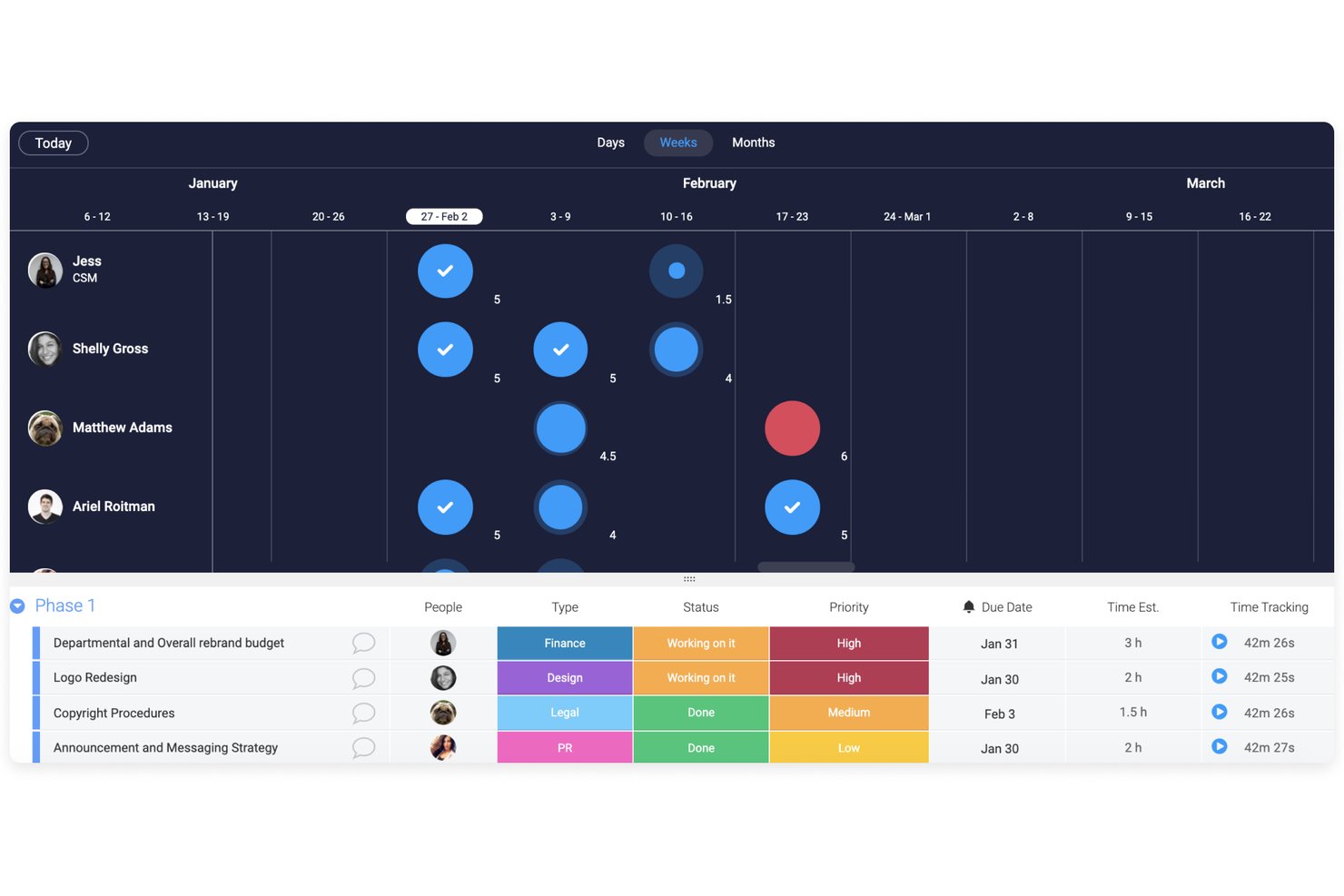
monday AI Workspace is a work management platform with AI-driven capacity planning features, including a Workload View, Workload Balancer AI agent, and pipeline-based demand forecasting across teams and projects.
Who Is monday AI Workspace Best For?
It's a strong fit for resource managers and team leads at mid-size to enterprise organizations that want workload balancing built into their existing work management setup.
Why I Picked monday AI Workspace
monday AI Workspace earns its spot on my shortlist because the AI agent can monitor team capacity continuously and redistribute assignments automatically when someone tips into overload. I also like the Workload View, which color-codes each member's allocation in real time so I can drag-and-drop tasks to rebalance without leaving the board. The AI forecasting layer surfaces resource gaps from pipeline data weeks before they affect delivery.
monday AI Workspace Key Features
- AI-powered capacity forecasting: Machine learning algorithms analyze historical work data and project pipeline inputs to project future resource needs.
- Real-time workload dashboards: Dynamic dashboards compare team capacity against project demand by skill, role, or time period.
- Time tracking integration: Tracks work hours alongside assignments, allowing granular utilization and availability analysis.
- 200+ project management integrations: Connects with Jira, Microsoft Teams, Salesforce, Slack, and other leading project or PMO platforms.
monday AI Workspace Integrations
monday AI Workspace offers hundreds of native integrations, including Jira, Salesforce, HubSpot, Slack, Google Workspace, Microsoft Teams, GitHub, Zendesk, Zoom, and Excel. An API is available for custom integrations.
Pros and Cons
Pros:
- Handles both project management and capacity planning
- Real-time color-coded workload view across teams
- AI Workload Balancer redistributes tasks automatically
Cons:
- Forecasting depth limited vs. dedicated capacity tools
- AI capacity features require higher-tier plans
New Product Updates from monday AI Workspace
monday AI Workspace Adds Human Approval Routing
monday AI Workspace adds a human-in-the-loop approval block to AI Workflows, sending approval requests and routing workflow paths based on responses. For more information, visit monday AI Workspace's official site.

Accelo
Best with real-time team utilization analysis

Accelo is a professional services automation platform that supports capacity planning through real-time utilization tracking, project scheduling, and unified operational reporting. It helps service-based teams manage resources, projects, and client work within a single system.
Who Is Accelo Best For?
Accelo is best suited for professional services teams and agencies that need visibility into team workloads, project timelines, and resource availability across multiple client engagements.
Why I Picked Accelo
I picked Accelo for its real-time team utilization tracking. The dashboard shows current workloads and availability, making it easier to spot overbooked or underused team members. Built-in forecasting tools highlight potential scheduling conflicts so teams can adjust assignments before deadlines are affected.
Accelo Key Features
- Automated project scheduling: Build timelines based on task dependencies and resource availability.
- Time tracking tools: Log hours directly against projects and tasks for accurate utilization reporting.
- Real-time utilization dashboards: Monitor team capacity and workload distribution.
- Client portal: Provide clients with visibility into project progress and communication.
- Integrated billing: Generate invoices from tracked time and project milestones.
Accelo Integrations
Accelo integrates with Google Workspace, Microsoft 365, Xero, QuickBooks Online, HubSpot, Salesforce, Mailchimp, Slack, Jira, and Zapier. An API is available for custom integrations.
Pros and Cons
Pros:
- Custom workflow automation for complex processes
- Unified view combines sales, projects, and billing
- Real-time dashboards show team utilization instantly
Cons:
- Gantt chart lacks deep scenario planning tools
- Minimum three-user subscription required
New Product Updates from Accelo

Accelo Rebuilds Mobile App for Project and Time Management
Accelo rebuilds its mobile app with task management, new work creation, and mobile timesheets for Forecast customers. This helps teams keep project and time data current while working away from a desktop. For more information, visit Accelo’s official site.

Best for enterprise agency workloads
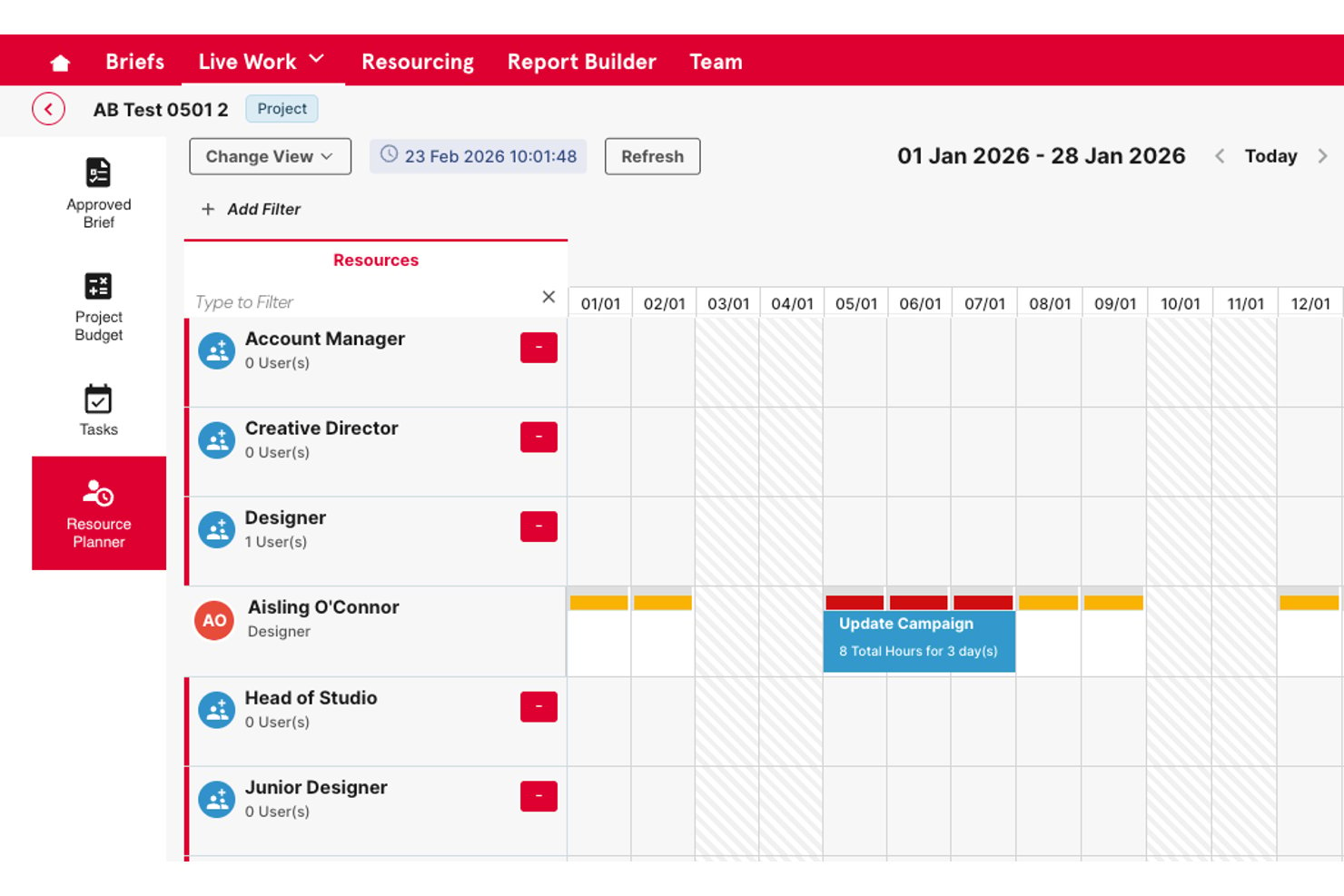
Screendragon is an enterprise work management platform that combines AI-powered resource scheduling, skills-based capacity planning, demand forecasting, and workflow orchestration for marketing and agency teams.
Who Is Screendragon Best For?
Screendragon is a strong fit for enterprise marketing teams and in-house agencies managing high volumes of work across large, distributed teams (50+ users).
Why I Picked Screendragon
I picked Screendragon as one of the best because its AI-powered resource scheduling goes beyond availability to match people by skill set, which matters when you're running parallel campaign workloads across multiple client accounts. I also like its predictive demand forecasting, which uses historical project data to flag capacity gaps 3-6 months out. In practice, that means I can see a resourcing crunch coming before it derails delivery.
Screendragon Key Features
- No-code workflow builder: Design, automate, and update complex project workflows without coding knowledge.
- Advanced approval routing: Tailor multi-step reviews and approvals with role-based controls and audit trails.
- AI-powered forecasting dashboard: Visualize upcoming resource needs and project demand using real-time and predictive analytics.
- Multi-system integrations: Connect with tools like Jira, Adobe, Salesforce, and Office 365 for live project and asset data sync.
Screendragon Integrations
Screendragon offers native integrations with HubSpot, Microsoft Power BI, Ziflow, Brandfolder, Workato, and Smartsheet. An API is available for custom integrations.
Pros and Cons
Pros:
- Handles high-volume enterprise workloads well
- Real-time capacity dashboards across teams
- Strong skills-based resource scheduling for agencies
Cons:
- AI features less mature than dedicated platforms
- Setup requires significant configuration time
New Product Updates from Screendragon
Screendragon Unveils New AI Hub
Screendragon introduced AI Hub, a new capability that lets teams build and manage AI agents directly within workflows. The update helps marketing teams automate tasks, maintain governance controls, and scale AI-driven operations more efficiently. For more information, visit Screendragon's official site.

Epicflow
Best for AI-driven capacity planning
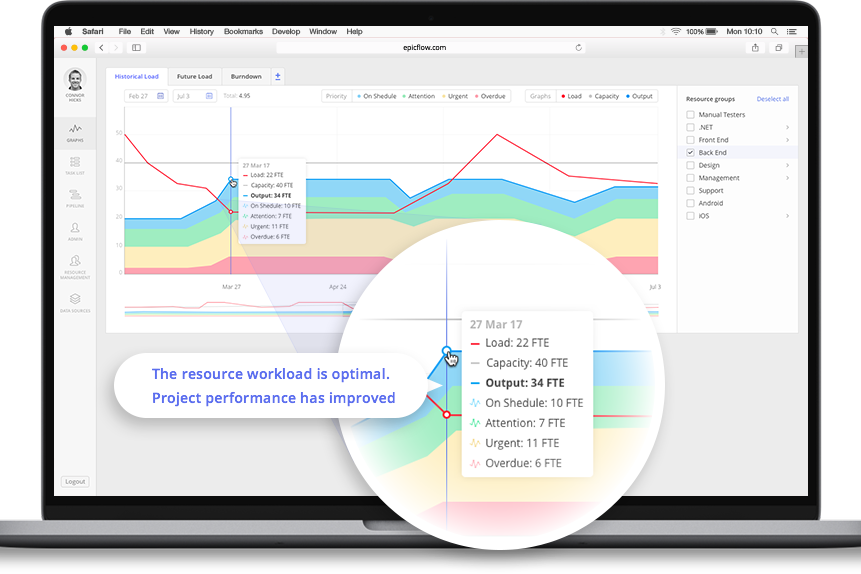
For businesses in need of an AI-powered solution to streamline capacity planning, Epicflow offers a sophisticated tool tailored for project managers and executives across industries like aerospace, telecommunications, and healthcare. This software addresses the challenge of optimizing resource allocation and ensures projects are delivered on time and within budget. By leveraging real-time data-driven decision-making, organizations can enhance project efficiency and profitability.
Why I Picked Epicflow
I picked Epicflow because of its unique AI-driven capabilities that directly cater to the needs of capacity planning. Its predictive analytics feature allows you to foresee potential project bottlenecks, ensuring that resources are allocated optimally. The real-time task prioritization ensures your team focuses on tasks that drive project success, while the semi-automated resource allocation feature balances workloads across your team. These functionalities collectively address the common challenge of bridging the gap between resource demand and supply.
Epicflow Key Features
In addition to its standout features, some other capabilities of Epicflow include:
- Virtual Assistant (Epica): This feature provides real-time project updates, assisting you in staying informed about project progress.
- What-if Analysis: Enables you to simulate different scenarios to predict project outcomes and make informed decisions.
- Historical Load Graphs: Offers insights into past project performance to help you understand trends and improve future planning.
- Competence and Attribute Management: Ensures that the right resources are matched to tasks according to their skills and attributes.
Epicflow Integrations
Integrations include Jira, MS Project, Oracle Primavera, and an API for custom integrations.
Pros and Cons
Pros:
- Portfolio-level resource visibility
- Advanced workload balancing tools
- AI-powered predictive analytics
Cons:
- Advanced features may require training
- Minimum 20-seat requirement
Best for auto-assigning resources

Rocketlane is a customer onboarding and project management tool designed for teams that require efficient onboarding processes. It serves SaaS companies and professional services firms, providing AI-driven tools to streamline customer onboarding and project execution.
Why I picked Rocketlane: Rocketlane excels in AI-powered capacity planning and resource management, automatically matching team members to tasks based on skills, workload, and availability. Its AI capabilities include automated task assignment, real-time project tracking, and predictive insights that help managers plan capacity more accurately. These features ensure your team can focus on delivering exceptional customer experiences while maintaining efficiency and balance. With Rocketlane, you can improve productivity and keep projects on schedule without manual oversight.
Standout features & integrations:
Features include a collaborative workspace that enhances team communication, standardized project templates that save time and ensure consistency, and milestone tracking that gives a clear view of progress and deadlines.
Integrations include Salesforce, Slack, HubSpot, Microsoft Teams, Trello, Jira, Google Workspace, Asana, monday.com, and Zoom.
Pros and Cons
Pros:
- Collaborative workspace
- Real-time project tracking
- Automated task assignment
Cons:
- Learning curve for new users
- May require initial setup time
New Product Updates from Rocketlane

Rocketlane Introduces Governance and Workforce Agents
Rocketlane introduces Governance Agents and Workforce Agents to automate delivery processes and recurring tasks. These updates help teams enforce rules and streamline project execution. For more information, visit Rocketlane’s official site.
 .
.
Forecast
Best for AI-driven insights

Forecast is a project management and resource planning tool designed for businesses looking to optimize their operations with AI-driven insights. It caters to teams across various industries, providing tools for project scheduling, resource allocation, and financial management.
Why I picked Forecast.app: Forecast leverages AI to deliver insights that help your team make data-driven decisions. Its resource allocation features ensure optimal use of team members' time and skills. The tool's project scheduling capabilities allow you to plan effectively, reducing the risk of delays. Additionally, its financial management tools provide visibility into project costs and profitability, essential for strategic planning.
Standout features & integrations:
Features include automatic timesheets, project timeline visualization, and capacity management. These features help your team track progress and manage workloads efficiently. You can also benefit from its scenario planning tools, which allow you to anticipate project outcomes.
Integrations include Jira, QuickBooks, Xero, Slack, Microsoft Teams, Google Calendar, HubSpot, Trello, Asana, and Salesforce.
Pros and Cons
Pros:
- Provides financial visibility
- Offers automatic timesheets
- Supports scenario planning
Cons:
- Advanced configuration can require data modeling knowledge
- AI forecasts may fluctuate in accuracy with limited historical data

AI-supported client collaboration

Teamwork.com is a project management and light capacity planning platform built for client-focused teams and agencies. It helps you balance workloads, track progress, and maintain clear communication with clients using built-in automation and AI-assisted task management.
Why I picked Teamwork.com: Teamwork.com bridges project management and basic capacity planning by giving teams real-time visibility into workloads and availability. Its AI capabilities assist with task prioritization, deadline reminders, and progress tracking — helping managers prevent burnout and optimize resource use. The platform’s client collaboration tools stand out, allowing you to share timelines, deliverables, and reports directly with clients for greater transparency and trust.
Standout features & integrations:
Features include AI-assisted workload management, automated reporting, and predictive task scheduling that help identify potential resource bottlenecks early. You can also benefit from its customizable task boards, which allow for tailored project views.
Integrations include Slack, HubSpot, Google Drive, Dropbox, Microsoft Teams, QuickBooks, Xero, Zapier, Trello, and Asana.
Pros and Cons
Pros:
- Predictive reporting identifies potential timeline or budget risks early
- Client-facing dashboards enhance transparency and communication
- AI-assisted task prioritization improves project pacing and workload balance
Cons:
- Limited capacity forecasting for complex, multi-team operations
- AI insights are still developing compared to larger competitors

awork
Best for creative teams

awork is an AI-enhanced project management platform built for creative teams and agencies. It combines intelligent task planning, collaboration, and time tracking to help teams organize projects, manage workloads, and boost productivity without sacrificing creativity.
Why I picked awork: awork stands out for how it brings AI-assisted organization to creative workflows. It automatically prioritizes tasks, balances workloads, and identifies scheduling conflicts, allowing teams to focus more on execution than admin. The platform also makes it easy to include clients and freelancers in shared workspaces, improving communication and transparency. With its intuitive design and smart automation, awork helps creative professionals stay on top of projects while keeping collaboration fluid and flexible.
Standout features & integrations:
Features include AI-powered task prioritization, predictive workload planning, and intelligent time tracking that learns from user habits. You’ll also find project templates, task dependencies, and a workload overview. These features help your team plan and execute projects efficiently.
Integrations include Slack, Google Calendar, Microsoft Teams, Trello, Asana, Jira, Outlook, Zoom, Dropbox, and Zapier.
Pros and Cons
Pros:
- Smart workload planning helps balance team capacity
- Simplifies task and time management with automation
- Easy client and freelancer collaboration
Cons:
- AI recommendations may require tuning for complex projects
- Limited advanced AI analytics compared to larger platforms

Birdview
Best for project visibility

Birdview is a Project Management and Professional Services Automation platform aimed at industries like engineering, IT services, and healthcare. It focuses on resource planning, project portfolio management, and collaboration, providing clear visibility into projects.
Why I picked Birdview: Birdview excels in offering project visibility through its intuitive dashboards and reporting features. Its project portfolio management allows you to group projects for better oversight and prioritization. The platform's resource planning tools help optimize utilization, ensuring your team is efficiently allocated. Additionally, Birdview's AI capabilities provide insights into project forecasting and financial tracking.
Standout features & integrations:
Features include time tracking, billing and invoicing, and collaboration tools. These features help facilitate project management by centralizing communication and financial processes. You can also benefit from its customizable workflows, enhancing project efficiency.
Integrations include QuickBooks, Salesforce, Jira, Microsoft Office 365, Slack, Trello, Asana, HubSpot, Google Workspace, and Zapier.
Pros and Cons
Pros:
- AI-driven insights
- Customizable reporting
- Great project visibility
Cons:
- Requires training for new users
- Can be complex to set up

Motion
Best for small teams

Motion is a productivity platform aimed at small teams, helping them manage tasks and projects efficiently. It offers tools for scheduling, project planning, and team collaboration to enhance productivity.
Why I picked Motion: Motion provides AI-driven tools that cater specifically to the needs of small teams. Features like AI project management and automated scheduling help you manage tasks without overwhelming resources. Motion's intuitive interface makes it easy for smaller teams to adopt and benefit from its functionalities. It allows you to focus on essential tasks while the AI handles routine management.
Standout features & integrations:
Features include task automation, an AI meeting assistant, and project scope creation. These features help your team stay organized and on track with minimal manual input.
Integrations include Google Calendar, Microsoft Outlook, Slack, Zoom, Salesforce, Trello, Asana, monday.com, Jira, and HubSpot.
Pros and Cons
Pros:
- Automated scheduling
- AI-driven task management
- Easy to use for small teams
Cons:
- Limited customization options
- AI features require learning
Annen AI-programvare for kapasitetsplanlegging
Her er noen flere alternativer for AI-programvare for kapasitetsplanlegging som ikke kom med på listen min, men som likevel er verdt å undersøke:
- Certinia
For financial services
- Productive
For agency management
- Celoxis
For integrated portfolio management
- Scoro
For all-in-one business management and resource visibility
- BigTime
For professional services
- VOGSY
For Google Workspace users
- Kantata
For industry-specific solutions
- Asana
For task prioritization
- Wrike
For enterprise project management
- ClickUp
For task customization
- Hive
For team collaboration


How I Evaluate AI Capacity Planning Software
I look for tools where AI does more than label a dashboard—it should surface staffing gaps, predict demand shifts, or recommend reassignments that a spreadsheet never could. From there, I split my evaluation into core functionality every tool must have to qualify and differentiating factors that separate one option from the next.
Core Functionality (Table Stakes For This List)
When I'm selecting tools for my list, I rank each one on a scale from 0 (does not offer the functionality) to 5 (excels in this area) for each core functionality listed below. Then, I calculate the tool's total score into a percentage. Each tool needs to achieve a minimum total score of 65% to be considered for inclusion.
- AI-Driven Demand Forecasting: I look for tools that predict future resource needs using historical project data and pipeline inputs, not just static trendlines or manual estimates.
- Intelligent Resource Matching: The tool should recommend people for projects based on skills, availability, and workload rather than forcing managers to search and filter manually.
- Capacity vs. Demand Visualization: Real-time dashboards that compare available headcount against incoming demand by role, team, or skill help me gauge how useful the tool is day-to-day.
- AI-Assisted Scenario Planning: I evaluate whether the tool lets you model staffing changes, new project wins, or hiring plans side-by-side before committing to a decision.
- Utilization & Workload Analytics: Good tools flag overallocation and bench time proactively. I check whether the AI surfaces burnout risks or underutilized team members automatically.
- Project Management Integration: Native connectors to tools like Jira, Asana, or Smartsheet matter because capacity plans break down fast when they're disconnected from live project data.
Once I have a list of tools that meet the criteria, I consider what sets each platform apart.
Differentiating Factors (What Sets Vendors Apart)
Here's how I compare and contrast different vendors:
Standout Features
I pay close attention to auto-rebalancing recommendations—tools that suggest specific reassignments to resolve overallocation save hours of manual reshuffling. Financial impact modeling is another big differentiator because it ties staffing decisions directly to revenue and margin forecasts. I also look for a skills intelligence engine that builds and updates skill profiles from project history automatically, since stale or incomplete skills data undermines every capacity plan downstream.
Beyond Features
AI transparency matters a lot to me—I check whether a tool explains why it recommends a specific person or flags a risk, since teams won't trust black-box suggestions. Integration depth is equally important because a capacity plan built on stale data from disconnected systems falls apart fast. I also evaluate time-to-value: how quickly the AI produces reliable forecasts after ingesting your historical data. Some tools need months of input before predictions become useful, and that delay can stall adoption across a PMO.
Slik velger du AI-programvare for kapasitetsplanlegging
Det er lett å gå seg vill i lange funksjonslister og komplekse prismodeller. For å hjelpe deg med å holde fokus mens du går gjennom den unike prosessen med å velge programvare, får du her en sjekkliste over faktorer du bør ha i tankene:
| Faktor | Hva bør du vurdere? |
|---|---|
| Skalerbarhet | Vil programvaren vokse i takt med teamets behov? Vurder om den kan håndtere økt datamengde og flere brukere uten ytelsesproblemer. |
| Integrasjoner | Kan verktøyet kobles til de eksisterende systemene dine? Se etter kompatibilitet med CRM-, ERP- eller andre kritiske verktøy for å sikre sømløs dataflyt. |
| Tilpasningsmuligheter | Kan du tilpasse programvaren til arbeidsflytene dine? Sjekk om du kan gjøre endringer i instrumentpaneler, rapporter og brukertillatelser slik at de passer til teamets spesifikke prosesser. |
| Brukervennlighet | Er grensesnittet intuitivt for teamet ditt? Unngå verktøy med bratte læringskurver som kan forsinke innføringen og påvirke produktiviteten. |
| Implementering og oppstart | Hvor lang tid tar det å komme i gang? Vurder tiden og ressursene som kreves for oppsettet, inkludert opplæringsmateriell og brukerstøtte, slik at teamet ditt kommer i gang. |
| Kostnad | Passer prisene inn i budsjettet ditt? Vurder både innledende og løpende kostnader, inkludert skjulte gebyrer eller kostnader for ekstra funksjoner, for å unngå overraskelser. |
| Sikkerhetstiltak | Blir behovene dine for databeskyttelse ivaretatt? Sørg for at programvaren følger bransjestandarder som GDPR eller HIPAA, og tilbyr kryptering og tilgangskontroller. |
| Tilgjengelig brukerstøtte | Får du hjelp når du trenger det? Se etter brukerstøtte døgnet rundt, responstider og tilgjengelige kanaler som chat, e-post eller telefon for å sikre pålitelig hjelp. |
Hva er AI-programvare for kapasitetsplanlegging?
AI-kapasitetsplanleggingsprogramvare er et verktøy som bruker kunstig intelligens til å optimalisere ressursallokering og prosjektstyring. Det brukes vanligvis av prosjektledere, IT-fagfolk og driftsteam for å forbedre beslutningstaking og effektivitet. Prediktiv analyse, automatiserte ressursforslag og sanntidsdataanalyse bidrar til å forutse prosjektbehov og justere planer deretter.
Disse verktøyene gir betydelig verdi ved å sikre at ressursene brukes effektivt, redusere kostnader og forbedre prosjektresultater.
Funksjoner i AI-kapasitetsplanleggingsprogramvare
Når du velger AI-kapasitetsplanleggingsprogramvare, bør du se etter følgende viktige funksjoner:
- Prediktiv analyse: Bruker historiske data til å forutsi fremtidig kapasitet og ressursbehov, kjent som etterspørselsprognoser, og hjelper team med å fordele ressurser effektivt.
- Automatiserte ressursforslag: Anbefaler optimal ressursfordeling basert på prosjektkrav og teamets kapasitet.
- Sanntidsdataanalyse: Gir oppdatert innsikt i prosjektets resultater, slik at man raskt kan gjøre justeringer og ta informerte beslutninger.
- Scenarioplanlegging: Lar brukere simulere ulike «hva hvis»-scenarier for prosjekter for å forstå mulige resultater og risikoer.
- AI-drevet oppgaveplanlegging: Justerer automatisk prosjektets tidslinjer basert på endringer i ressurstilgjengelighet og oppgaveprioriteringer.
- Tilpassbare dashbord: Lar brukere tilpasse datavisninger for å fremheve viktige måltall og innsikter som er relevante for deres spesifikke behov.
- Integrasjon med tredjepartsverktøy: Sikrer konsekvent dataflyt og kommunikasjon på tvers av flere plattformer, noe som forbedrer den samlede effektiviteten.
- AI-drevet rapportering: Genererer detaljerte rapporter som gir innsikt i ressursutnyttelse og prosjektfremdrift.
- Overvåking av samsvar: Sikrer at bransjereguleringer følges ved å automatisere samsvarskontroller og rapportering.
- Maskinlæringsfunksjoner: Forbedrer kontinuerlig nøyaktigheten i ressursplanleggingen ved å lære av tidligere prosjektdata og resultater.
Fordeler med AI-kapasitetsplanleggingsprogramvare
Implementering av AI-kapasitetsplanleggingsprogramvare gir flere fordeler for teamet og virksomheten din. Her er noen av fordelene du kan se frem til:
- Forbedret ressursfordeling: AI-drevne ressursforslag sikrer at teammedlemmer tildeles oppgaver som samsvarer med ferdighetene og tilgjengeligheten deres, noe som optimaliserer produktiviteten og ressurskapasiteten.
- Bedre beslutningstaking: Prediktiv analyse gir innsikt i fremtidige ressursbehov, slik at man kan ta informerte, datadrevne beslutninger.
- Økt effektivitet: Automatisert oppgaveplanlegging og sanntidsdataanalyse hjelper team med å tilpasse seg raskt til endringer i siste liten, holde prosjekter på rett spor og opprettholde driftseffektiviteten.
- Kostnadsbesparelser: Nøyaktige prognoser og ressursutnyttelse reduserer sløsing og forhindrer over-allokering der ressurser kan bli underutnyttet, slik at virksomheten sparer penger.
- Bedre prosjektresultater: Scenarioplanleggingsverktøy gjør det mulig for team å forutse potensielle utfordringer og justere strategier deretter, noe som fører til vellykket prosjektgjennomføring.
- Sikret samsvar: Automatisert samsvarsovervåking holder prosjekter i tråd med bransjereguleringer og minimerer risikoen for sanksjoner.
- Kontinuerlig forbedring: Maskinlæringsfunksjoner forbedrer planleggingsprosessene over tid og øker nøyaktigheten og effektiviteten basert på tidligere erfaringer.
Kostnader og priser for AI-kapasitetsplanleggingsprogramvare
Valg av AI-kapasitetsplanleggingsprogramvare krever en forståelse av de ulike prismodellene og tilgjengelige abonnementene. Kostnadene varierer basert på funksjoner, teamstørrelse, tillegg og mer. Tabellen nedenfor oppsummerer vanlige abonnementer, gjennomsnittsprisene deres og typiske funksjoner som er inkludert i løsninger for AI-kapasitetsplanleggingsprogramvare:
Sammenligningstabell for abonnementer for AI-kapasitetsplanleggingsprogramvare
| Abonnementstype | Gjennomsnittspris | Vanlige funksjoner |
|---|---|---|
| Gratisabonnement | $0 | Grunnleggende ressursfordeling, begrenset prosjektstyring og grunnleggende rapportering. |
| Personlig abonnement | $10-$30/bruker/måned | Forbedret oppgavehåndtering, AI-drevet innsikt og grunnleggende integrasjoner. |
| Bedriftsabonnement | $30-$75/bruker/måned | Avansert analyse, scenarioplanlegging og tilpassbare dashbord. |
| Abonnement for virksomheter | $80-$150/bruker/måned | Full integrasjonspakke, samsvarsovervåking og dedikert brukerstøtte. |
Vanlige spørsmål om programvare for AI-kapasitetsplanlegging
Her er noen svar på vanlige spørsmål om verktøy for AI-kapasitetsplanlegging:
Hvordan integrerer jeg programvare for AI-kapasitetsplanlegging med de eksisterende verktøyene mine?
For å integrere programvare for AI-kapasitetsplanlegging med de eksisterende verktøyene dine bør du først kontrollere programvarens kompatibilitet med de nåværende systemene dine, for eksempel CRM- eller ERP-plattformer. Bruk det medfølgende API-et eller integrerte koblinger for å koble dem sammen. Kontakt om nødvendig programvarens brukerstøtte eller se i dokumentasjonen for veiledning. Etter min erfaring kan det å sørge for at dataene flyter mellom systemene, forbedre effektiviteten betydelig. Test integrasjonen grundig for å sikre at dataene er korrekte, og håndter eventuelle problemer raskt.
Kan programvare for AI-kapasitetsplanlegging håndtere eksterne team?
Ja, programvare for AI-kapasitetsplanlegging kan håndtere eksterne team effektivt. Disse verktøyene tilbyr sanntidstilgang til data og funksjoner for samarbeid, slik at teammedlemmer kan samarbeide fra ulike steder. Bruk prosjektoversikter og kommunikasjonsverktøyene i programvaren for å holde alle samkjørte. AI-drevet innsikt bidrar til å fordele arbeidsmengden effektivt, slik at eksterne team forblir produktive. Gå jevnlig gjennom resultatmålingene og juster planene etter behov for å ta høyde for de unike utfordringene ved fjernarbeid.
Hvor sikker er programvare for AI-kapasitetsplanlegging?
Programvare for AI-kapasitetsplanlegging er vanligvis sikker, men det er viktig å kontrollere at den oppfyller sikkerhetskravene dine. Se etter funksjoner som kryptering, tilgangskontroller og samsvar med bransjestandarder som GDPR eller HIPAA. Vurder leverandørens sikkerhetssertifiseringer og retningslinjer. Etter min erfaring kan en gjennomgang av sikkerhetstiltakene med leverandøren gi ytterligere trygghet. Som god praksis bør du oppdatere og overvåke systemet regelmessig for å beskytte sensitive data mot potensielle trusler.