

I 10 migliori software gratuiti per i flussi di lavoro dei piccoli team nel 2026

10 Elenco dei migliori software gratuiti per i flussi di lavoro


Il miglior software gratuito per i flussi di lavoro consente di visualizzare le attività, assegnare i membri del team e monitorare i progressi, tutto in un unico posto e senza costi. Sebbene affidarsi a fogli di calcolo, catene di email o elenchi di attività isolati possa sembrare conveniente, questi metodi spesso ostacolano la visibilità e rendono difficile mantenere il team allineato.
Molti strumenti offrono piani gratuiti limitati, il che può rendere difficile trovarne uno che bilanci facilità d'uso e funzionalità fondamentali come dipendenze tra attività, automazione e collaborazione in tempo reale. Con oltre 20 anni di esperienza nella gestione digitale dei progetti e un decennio come recensore di software, so cosa cercare per selezionare le opzioni gratuite più affidabili.
Ho testato più di 40 strumenti gratuiti per i flussi di lavoro per creare questo elenco completo. In questo articolo ti guiderò attraverso i migliori strumenti gratuiti per i flussi di lavoro disponibili oggi, mettendo in evidenza le loro caratteristiche principali, i punti deboli e i suggerimenti per scegliere quello più adatto al tuo team.
Perché fidarsi dei nostri consigli sui software
Il nostro team testa e recensisce software dal 2012. In quanto project manager noi stessi, sappiamo quanto sia difficile — e importante — scegliere il software giusto.
Per questa guida, abbiamo valutato gli strumenti attraverso test pratici e ricerche indipendenti, assegnando un punteggio agli strumenti in base ai nostri criteri di selezione. Ci basiamo inoltre sulle competenze di leader di pensiero del settore e di professionisti attivi nella gestione dei progetti.
Le nostre recensioni riflettono il nostro giudizio editoriale umano, non un discorso di vendita.
Revisori esperti:
Confronto dei 10 migliori software gratuiti per i flussi di lavoro
Ecco una comoda tabella con tutti gli strumenti appena discussi, così puoi confrontarli. Se vuoi ampliare la ricerca, sotto questa tabella trovi ulteriori opzioni.
| Tool | Best For | Trial Info | Price | ||
|---|---|---|---|---|---|
| 1 | Ideale per processi chiari di raccolta dati | Piano gratuito disponibile | Da $19,50/mese (fatturazione annuale) | Website | |
| 2 | Ideale per la personalizzazione | Prova gratuita di 14 giorni | La versione gratuita è solo per freelance e aziende molto piccole | Website | |
| 3 | Ideale per chat integrata e automazione in un piano gratuito | Piano gratuito + demo gratuita + prova di 14 giorni disponibili | A partire da $5/utente/mese (con fatturazione annuale) | Website | |
| 4 | Ideale per flussi di lavoro sicuri rivolti ai clienti | Piano gratuito + prova gratuita + demo gratuita disponibili | Da $99/mese | Website | |
| 5 | Ideale per l'automazione scalabile dei flussi di lavoro | Prova gratuita di 15 giorni | Da $19/utente/mese (fatturazione annuale) | Website | |
| 6 | Ideale per l'elaborazione intelligente dei documenti | Versione di prova gratuita disponibile + demo gratuita | Prezzo su richiesta | Website | |
| 7 | Ideale per flessibilità e facilità d'uso | Piano gratuito disponibile | Da $16/mese (fatturato annualmente) | Website | |
| 8 | Ideale per la collaborazione | Piano gratuito + demo gratuita disponibile | Da $9/utente/mese | Website | |
| 9 | Ideale per l'automazione di flussi di lavoro senza codice | Prova gratuita di 14 giorni + demo gratuita disponibile | Prezzo su richiesta | Website | |
| 10 | Miglior strumento open-source | Piano gratuito disponibile | Da €6,95/utente/mese per un minimo di cinque utenti | Website |


Recensioni dei migliori software gratuiti per i flussi di lavoro
Ecco una breve descrizione di ciascuna piattaforma gratuita per i flussi di lavoro, con il suo principale caso d’uso e le funzionalità più degne di nota.

Ideale per processi chiari di raccolta dati

Jotform Workflows offre alle piccole squadre di qualsiasi settore un modo semplice per automatizzare attività ripetitive e gestire approvazioni utilizzando moduli personalizzabili e strumenti di workflow con trascinamento della selezione.
Per chi è ideale Jotform Workflows?
Jotform Workflows è particolarmente adatto per piccoli team che fanno affidamento sulla raccolta di dati tramite moduli per attivare approvazioni, indirizzare richieste o gestire processi ricorrenti.
Perché ho scelto Jotform Workflows
Jotform Workflows si guadagna un posto nella mia selezione per come collega in modo efficace la raccolta dati tramite modulo ai flussi di processo automatizzati. Mi piace che ogni workflow venga attivato da una compilazione del modulo, il che significa che raccolta dati e workflow avvengono nello stesso passaggio. Il mio team utilizza la logica condizionale per suddividere i workflow in base alle risposte fornite—così le richieste di acquisto superiori a una certa soglia vengono indirizzate automaticamente a un approvatore diverso rispetto a quelle di importo minore. La funzione di elaborazione parallela è molto utile quando più membri del team devono revisionare la stessa richiesta contemporaneamente, senza dover aspettare che altri abbiano terminato.
Funzionalità principali di Jotform Workflows
- Modelli di workflow: Scegli tra oltre 200 modelli predefiniti che coprono casi d'uso come onboarding di dipendenti, rimborso spese e gestione degli ordini.
- Raccolta di firme elettroniche: Richiedi firme elettroniche legalmente vincolanti direttamente all'interno del workflow, senza necessità di uno strumento separato per la firma.
- Assegnazione task con commenti: Assegna attività stile checklist ai membri del team, che possono commentare e caricare documenti direttamente nella pagina del task.
- Promemoria automatici e scadenze: Imposta date di scadenza e promemoria automatici via email per approvazioni o compiti in sospeso così da non dimenticare nulla.
Integrazioni Jotform Workflows
Le integrazioni includono Google Drive, Slack, Airtable, Dropbox, Microsoft Teams, Square, PayPal, Stripe, Authorize.Net e Box.
Cosa è gratis?
Jotform Workflows offre un piano gratuito per sempre che include fino a 5 moduli, 100 invii mensili e 1.000 visualizzazioni mensili dei moduli. Il piano gratuito limita anche lo spazio di archiviazione e l'accesso ad alcune funzionalità avanzate.
New Product Updates from Jotform Workflows
Jotform Workflows Adds Wait Element for Timed Automation
Jotform Workflows introduces a Wait element for pausing and resuming workflows based on dates and times. This helps teams automate time-sensitive actions without manual follow-ups. For more information, visit Jotform’s official site.
 .
.
Ideale per la personalizzazione
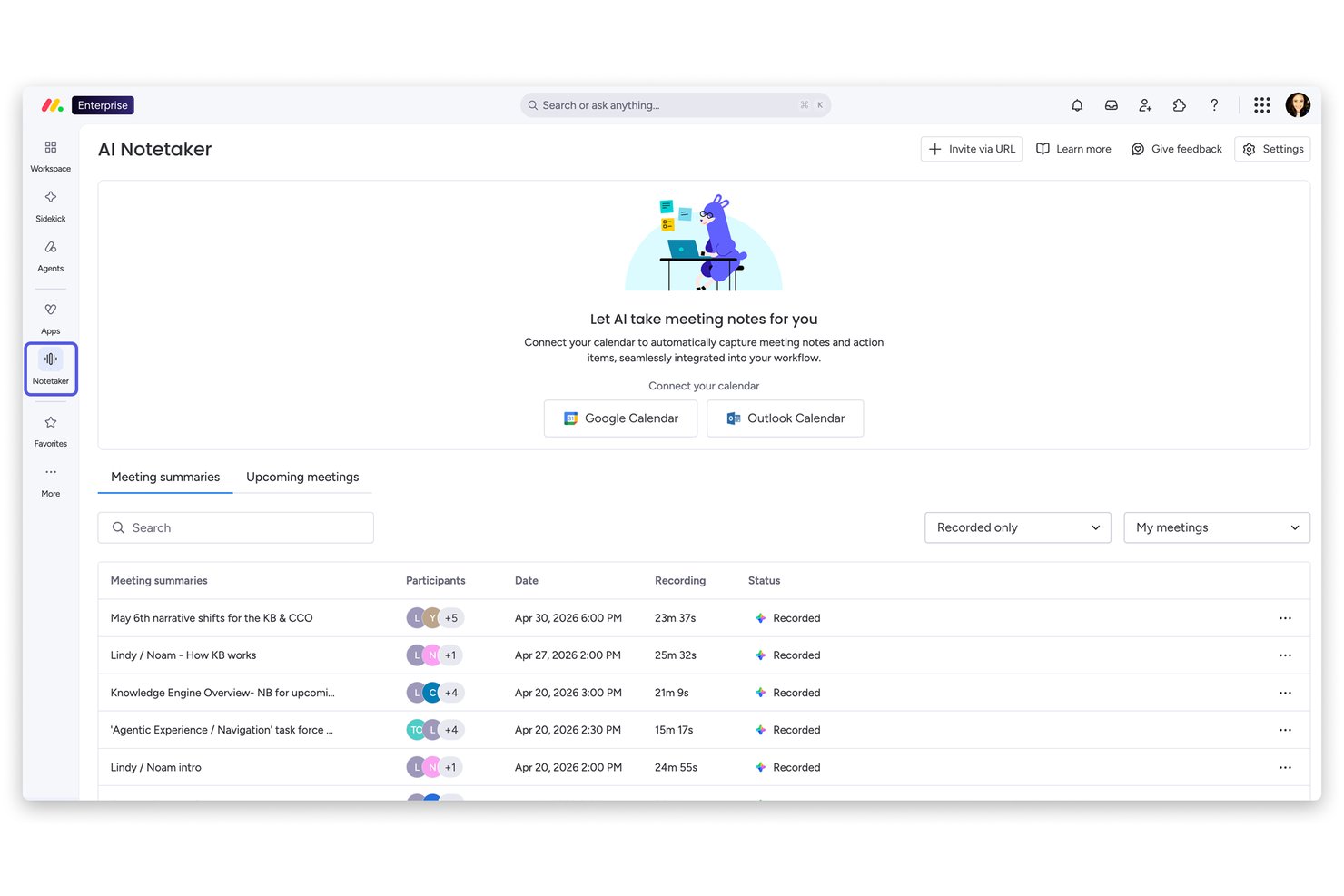
monday AI Workspace è una piattaforma di gestione del lavoro altamente configurabile che combina il monitoraggio delle attività, l'automazione dei flussi di lavoro, la visualizzazione dei progetti in diverse modalità e strumenti di collaborazione tra team all'interno di uno spazio di lavoro personalizzabile basato su modelli.
Per chi è più adatto monday AI Workspace?
monday AI Workspace è particolarmente indicato per piccoli team di marketing, operations o prodotto che devono gestire più flussi di lavoro trasversali senza strumenti rigidi e standardizzati.
Perché ho scelto monday AI Workspace
monday AI Workspace si guadagna un posto nella mia lista proprio perché nessun altro strumento gratuito che abbia provato offre un simile livello di controllo strutturale sulla creazione dei flussi di lavoro. Posso configurare architetture di board separate per un calendario editoriale, un backlog di sprint e un tracker di onboarding, ciascuno con i propri stati personalizzati e tipi di colonna. I più di 200 modelli rendono pratico iniziare rapidamente e personalizzare da lì, invece che costruire tutto da zero ogni volta che serve un nuovo tipo di flusso di lavoro.
Caratteristiche principali di monday AI Workspace
- Viste Kanban e tabellare: Scegli tra due modalità di visualizzazione principali per gestire e organizzare i tuoi flussi di lavoro.
- Commenti e menzioni: Collabora su attività specifiche con discussioni a thread e notifiche al team.
- Allegato documenti: Aggiungi file o documenti chiave direttamente alle attività per centralizzare le informazioni del progetto.
- Permessi a livello di board: Controlla l'accesso e i diritti di modifica a livello di board per mantenere il controllo e la coerenza dei dati.
Integrazioni di monday AI Workspace
monday AI Workspace offre integrazioni native con Slack, Microsoft Teams, Google Drive, Dropbox, Jira, GitHub, Trello, Zoom, HubSpot e Salesforce. Supporta inoltre Zapier e fornisce una API per integrazioni personalizzate.
Cosa è gratuito?
monday AI Workspace offre un piano gratuito per sempre fino a 2 posti, che include documenti illimitati, oltre 200 modelli e fino a 3 board. Automazioni e integrazioni non sono disponibili nel piano gratuito e lo spazio di archiviazione è limitato a 500 MB.
Pros and Cons
Pros:
- Struttura di board e colonne altamente personalizzabile
- Oltre 200 modelli per avviare velocemente i flussi di lavoro
- Più viste disponibili nel piano gratuito
Cons:
- Il piano gratuito è limitato a due posti
- Automazioni disponibili solo nei piani a pagamento
New Product Updates from monday AI Workspace
monday AI Workspace Adds Human Approval Routing
monday AI Workspace adds a human-in-the-loop approval block to AI Workflows, sending approval requests and routing workflow paths based on responses. For more information, visit monday AI Workspace's official site.

Hive
Ideale per chat integrata e automazione in un piano gratuito
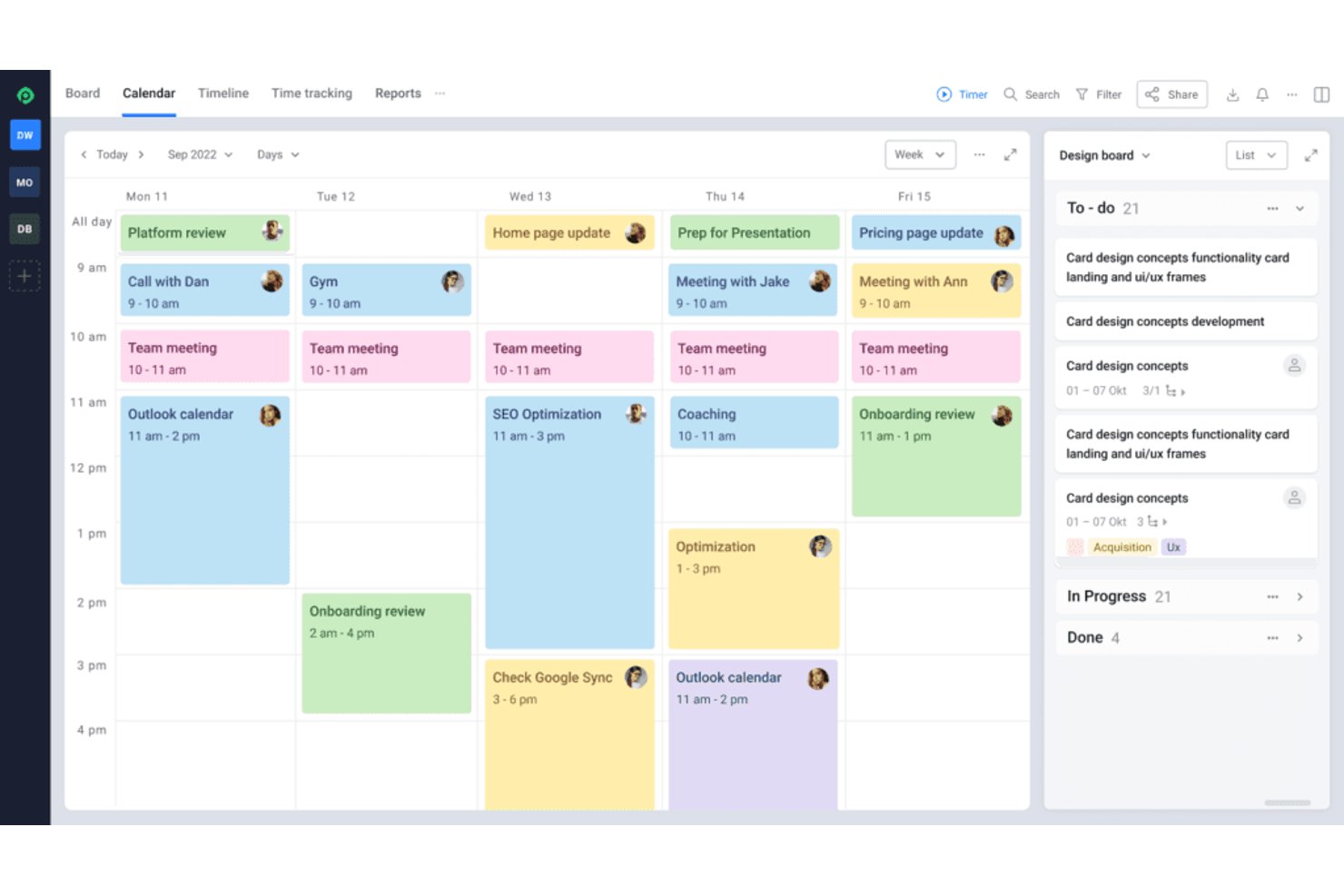
Hive è una piattaforma di gestione dei flussi di lavoro per piccoli team che combina pianificazione di attività e progetti, dipendenze, diverse visualizzazioni del lavoro, note condivise, chat integrata, e-mail e automazione dei flussi di lavoro senza codice.
Per chi è più adatto Hive?
Hive è adatto ai piccoli team interfunzionali che necessitano di chat integrata, gestione delle attività e automazione senza codice in un piano gratuito.
Perché ho scelto Hive
Ho scelto Hive perché la chat integrata e l'automazione disponibili in un piano gratuito aiutano i piccoli team a rimanere allineati senza suddividere il lavoro tra diversi strumenti. Utilizzo i flussi di lavoro per instradare le attività dopo le modifiche di stato, applicare modelli e aggiornare automaticamente gli assegnatari. Le note condivise e l'e-mail mantengono visibili i passaggi di consegne insieme alle dipendenze delle attività.
Funzionalità principali di Hive
- Modelli di attività: Precompila sottoattività, assegnatari, date e dipendenze per i progetti ripetibili.
- Visualizzazioni multiple dei progetti: Passa dalle visualizzazioni Stato, Calendario, Tabella, Gantt ed Elenco.
- Stati personalizzati: Definisci fasi e etichette del flusso di lavoro per processi specifici del progetto.
- Azioni ricorrenti: Pianifica la ripetizione automatica delle attività a intervalli prestabiliti.
Integrazioni di Hive
Hive offre 14 integrazioni native documentate, tra cui Google Drive, Google Calendar, Slack, Microsoft Teams, Jira, GitHub, Zoom e Outlook Calendar. Fornisce inoltre un'API pubblica e supporta Zapier.
Cosa è gratuito?
Hive offre un piano gratuito senza scadenza per un massimo di 10 membri dello spazio di lavoro, con attività e note collaborative illimitate, chat nativa, integrazione e-mail e 200MB di spazio di archiviazione. Offre anche una prova di 14 giorni delle funzionalità a pagamento, mentre il piano gratuito esclude funzionalità come le visualizzazioni Gantt, le integrazioni con l'archiviazione cloud e i calendari integrati nell'app.
Pros and Cons
Pros:
- La chat integrata mantiene le conversazioni sui progetti associate alle attività
- L'automazione instrada le modifiche di stato nelle attività
- Il supporto per le dipendenze include quattro relazioni di pianificazione
Cons:
- I limiti delle visualizzazioni riducono la flessibilità di pianificazione del piano gratuito
- L'automazione avanzata richiede una configurazione iniziale considerevole

Moxo
Ideale per flussi di lavoro sicuri rivolti ai clienti
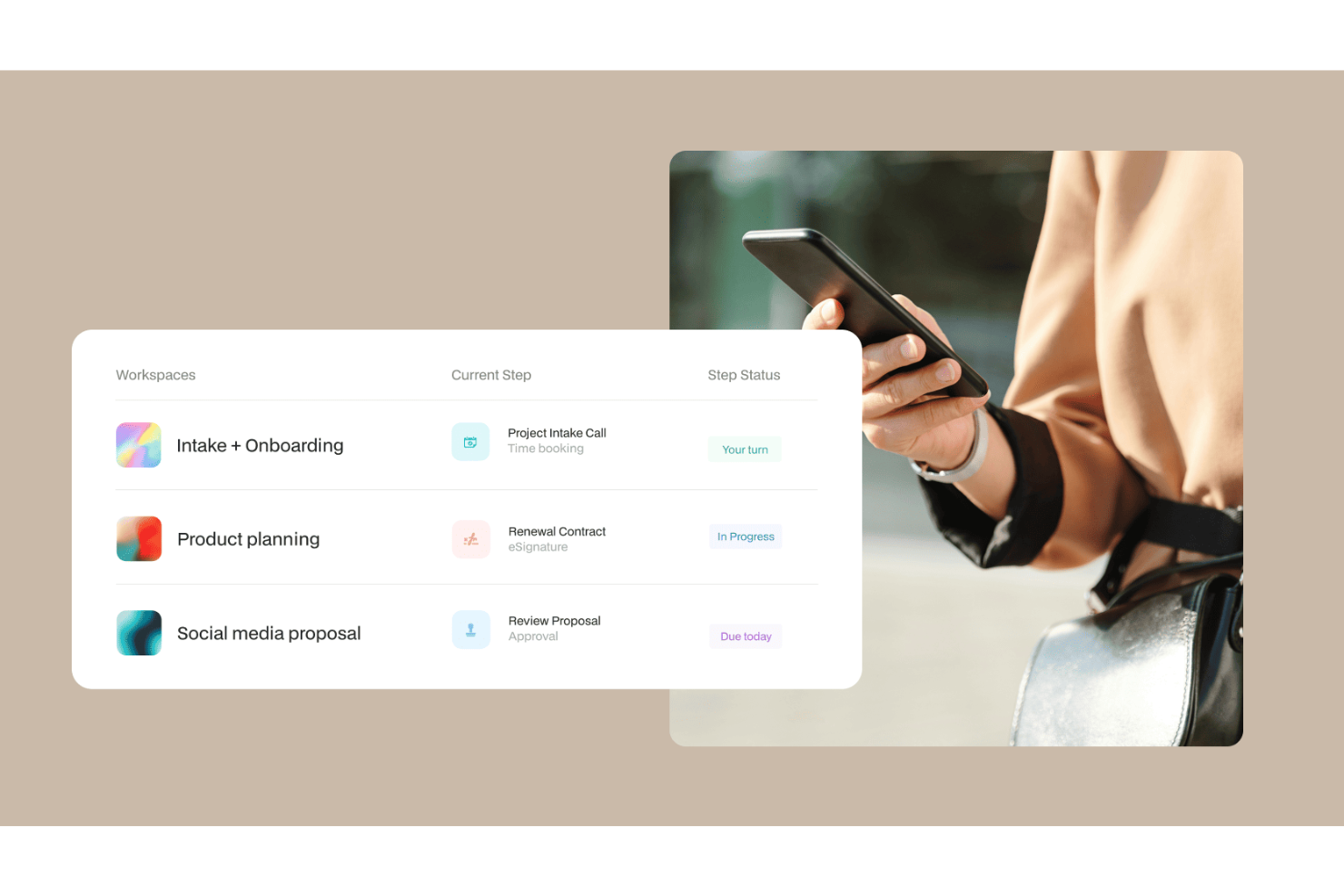
Moxo è una piattaforma di gestione dei flussi di lavoro progettata per l'orchestrazione dei processi esterni, combinando un costruttore di flussi, approvazioni, firme elettroniche, moduli e richieste di file in un unico ambiente dedicato al cliente.
Per chi è più adatto Moxo?
Moxo è particolarmente indicato per le aziende di servizi—come servizi finanziari, studi legali o società di consulenza—che devono gestire flussi di lavoro strutturati con clienti e partner esterni.
Perché ho scelto Moxo
Ho incluso Moxo tra le mie scelte principali perché gestisce i flussi di lavoro rivolti ai clienti con un livello di sicurezza che raramente ho visto in strumenti gratuiti. Ogni flusso funziona su infrastruttura certificata SOC 2 Type II, con dati crittografati sia in transito che a riposo, oltre a un audit trail superiore a 7 anni progettato specificamente per settori regolamentati. Apprezzo anche il fatto che Moxo supporti i controlli di accesso basati sui ruoli e la conformità GDPR nativamente, così quando il mio team esegue un flusso di onboarding o approvazione con un cliente esterno, esiste una traccia chiara e verificabile di ogni azione compiuta.
Funzionalità principali di Moxo
- AI Copilot: Utilizza l'intelligenza artificiale integrata di Moxo per generare e configurare le fasi dei flussi di lavoro partendo da un prompt in linguaggio naturale.
- Raccolta delle firme elettroniche: Richiedi firme legalmente vincolanti ai clienti direttamente all'interno di una fase del flusso, senza strumenti di terze parti.
- Galleria di modelli di flusso: Avvia nuovi flussi da una libreria di modelli predefiniti invece di crearli da zero.
- Diramazioni condizionali: Imposta logiche che indirizzano un flusso su percorsi diversi in base alle risposte dei clienti o ai dati inseriti nei moduli.
Integrazioni di Moxo
Moxo offre connettori di sincronizzazione dati con Salesforce, HubSpot, Microsoft Dynamics, Zoho, Wealthbox, Redtail, Filevine, Global Relay, Smarsh, Xero e Follow Up Boss. Supporta anche l’upload di file da Google Drive, Dropbox, Box e OneDrive, e include integrazioni native ai calendari Google Calendar e Outlook. Moxo fornisce una REST API e webhooks per integrazioni personalizzate, e si connette con Zapier.
Cosa è gratuito?
Moxo propone un piano gratuito per sempre che include 2 flussi al mese e 500 crediti AI mensili. Il livello gratuito comprende il costruttore di flussi, AI Copilot, diramazioni, moduli, firme elettroniche, richieste di file e integrazioni di terze parti, ma non include portali, domini personalizzati, dashboard di reportistica o accesso API.
Pros and Cons
Pros:
- Sicurezza integrata conforme a SOC 2 e GDPR
- Modelli di flusso riutilizzabili con logica condizionale
- Stakeholder esterni possono agire nei flussi tramite magic link
Cons:
- Nessun monitoraggio del tempo integrato per le attività
- La creazione dei flussi può risultare troppo complicata

Qntrl
Ideale per l'automazione scalabile dei flussi di lavoro
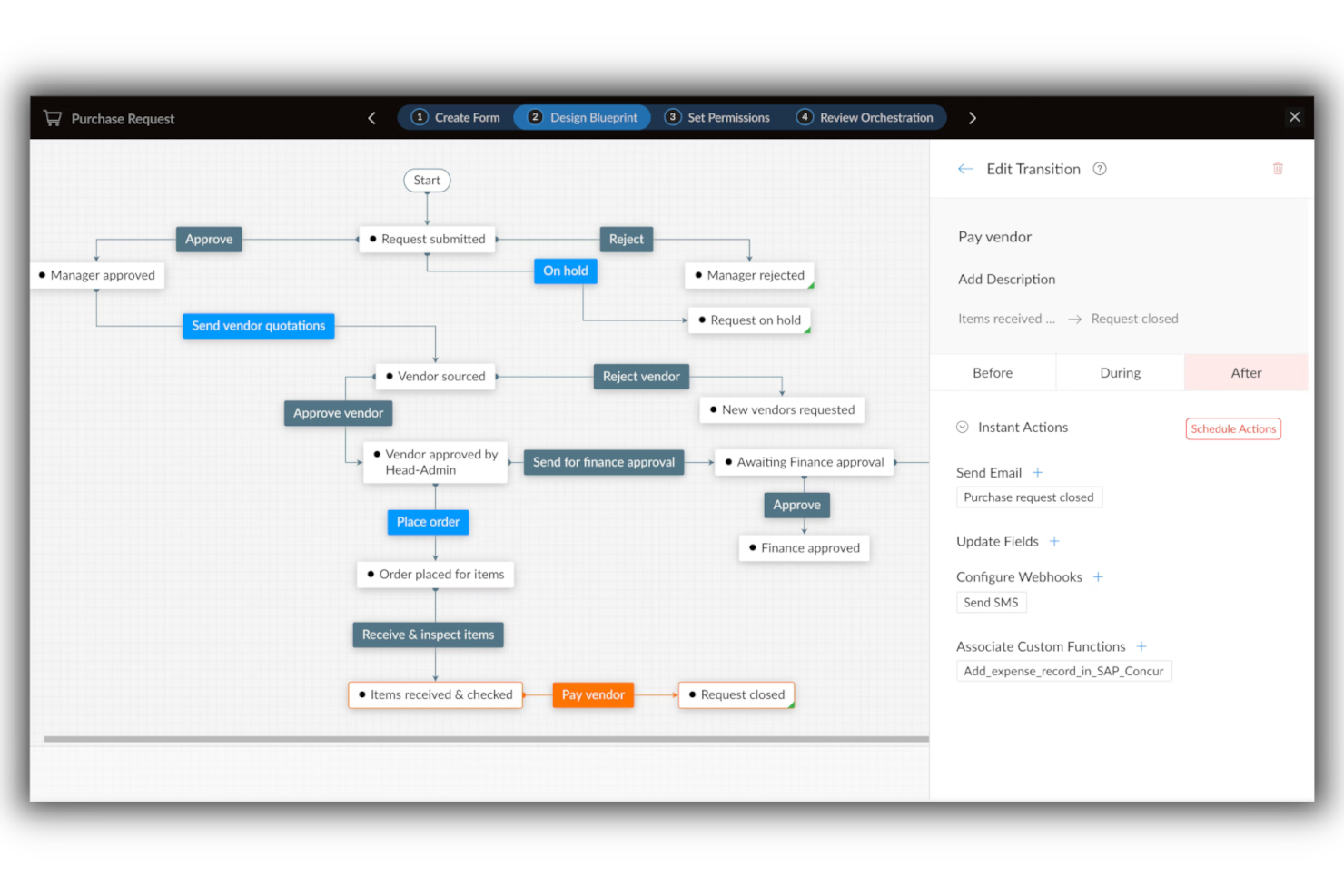
Qntrl consente ai piccoli team nei settori tecnologici, operativi e di gestione dei progetti di automatizzare e monitorare i flussi di lavoro grazie a moduli personalizzabili, mappatura dei processi e controlli basati sui ruoli, aiutando i team a organizzare richieste e approvazioni senza una configurazione complessa.
Per Chi è Ideale Qntrl?
Qntrl è particolarmente indicato per piccoli team operativi e di gestione dei progetti che necessitano di un'automazione strutturata dei processi e prevedono una crescita della complessità dei flussi di lavoro nel tempo.
Perché Ho Scelto Qntrl
Qntrl si è guadagnato un posto nella mia lista perché è stato sviluppato specificamente per l'orchestrazione dei processi, non solo come semplice strumento di tracciamento delle attività. Apprezzo la possibilità di progettare flussi di lavoro multi-fase con diramazioni condizionali, così un unico modulo di inserimento può inoltrare automaticamente le richieste ai vari membri del team in base alla risposta fornita. Il mio team ha potuto iniziare con un semplice flusso di approvazione e poi aggiungere altre fasi, ruoli e regole di automazione man mano che i processi diventavano più complessi. Questa scalabilità incrementale è rara negli strumenti gratuiti.
Funzionalità Principali di Qntrl
- Centrali di presentazione delle richieste: Un unico portale dove i membri del team possono inoltrare tutte le richieste di lavoro, mantenendo organizzata la gestione tra le varie funzioni.
- Aggiornamenti di stato in tempo reale: Visibilità immediata sulla posizione di ogni richiesta all'interno del flusso di lavoro, così nessuno deve inseguire manualmente gli aggiornamenti.
- Monitoraggio SLA: Il sistema integrato per il monitoraggio degli accordi sui livelli di servizio segnala i compiti in ritardo e aiuta i team a rispettare le scadenze.
- Report personalizzati: Genera report sulla durata dei flussi di lavoro e sull'utilizzo per identificare i colli di bottiglia e misurare le prestazioni dei processi nel tempo.
Integrazioni Qntrl
Le integrazioni includono Zoho CRM, Zoho Books, Zoho People, Zoho Desk, Google Drive, Dropbox, SAP, Oracle, Active Directory e Slack.
Cosa è Gratuito?
Qntrl offre una demo gratuita, ma sul sito non sono indicati piani free-forever, versioni di prova gratuite, né dettagli sulle restrizioni per utenti o funzionalità.

TrailHQ
Ideale per l'elaborazione intelligente dei documenti
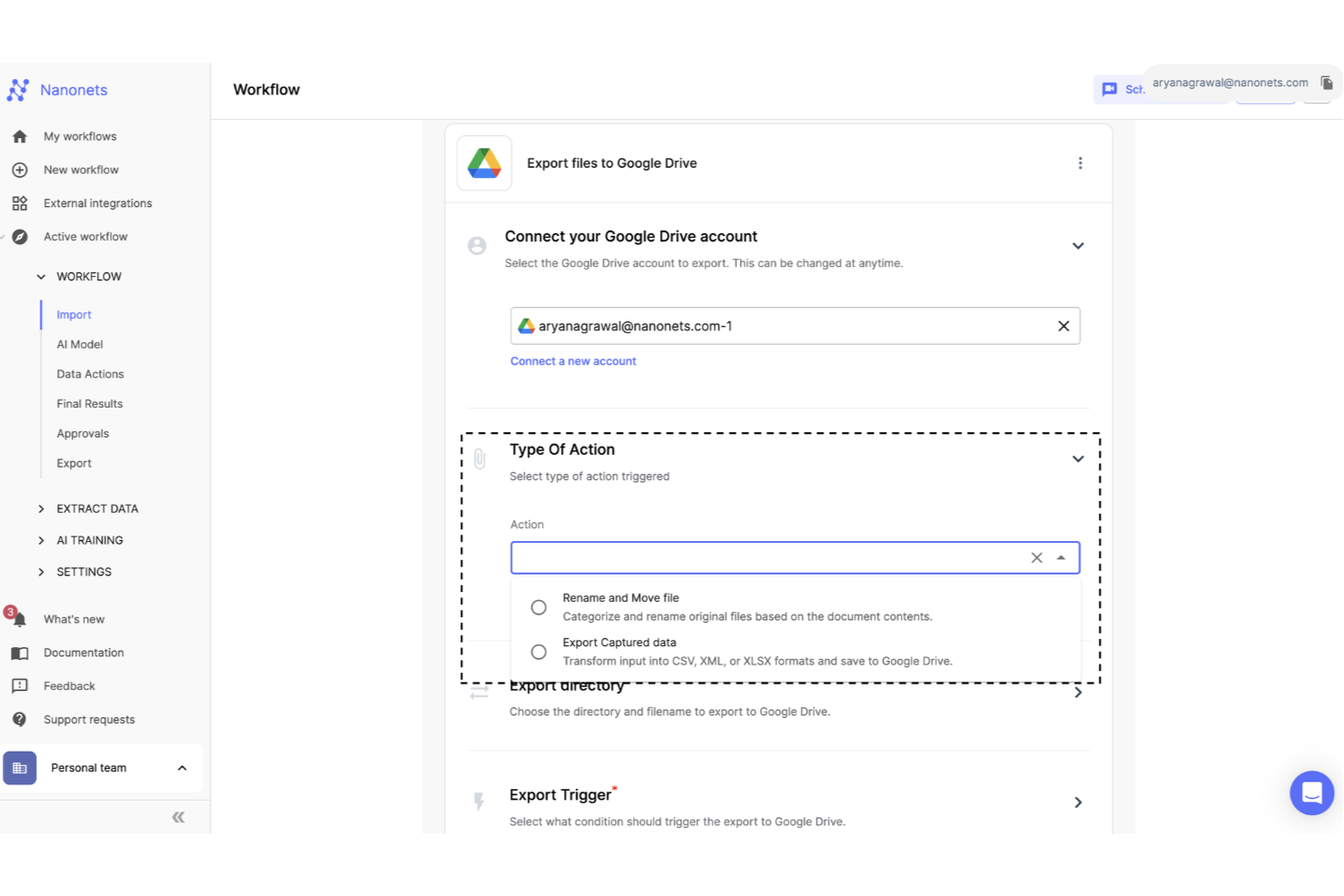
Nanonets è una piattaforma di automazione basata sull'intelligenza artificiale progettata per piccoli team e aziende che hanno la necessità di ottimizzare flussi di lavoro caratterizzati da molti documenti e ridurre l'inserimento manuale dei dati.
Per chi è migliore Nanonets?
Nanonets è particolarmente adatto a piccoli team in ambito finanziario, operativo o logistico che gestiscono grandi volumi di documenti come fatture, ricevute o moduli.
Perché ho scelto Nanonets
Ho scelto Nanonets perché gestisce bene l'elaborazione intelligente dei documenti per piccoli team sopraffatti dall'inserimento manuale dei dati. Utilizza un OCR potenziato dall'IA per estrarre automaticamente dati strutturati da fatture, ordini di acquisto e ricevute e non richiede l'intervento di uno sviluppatore per la configurazione. Il mio team riesce a costruire flussi di lavoro documentali personalizzati che validano i dati estratti secondo regole predefinite prima di inoltrarli per l'approvazione. I modelli di documenti pre-addestrati funzionano accuratamente fin da subito sui principali tipi di documento.
Funzionalità principali di Nanonets
- Flussi di approvazione con revisione umana: Aggiungi fasi di revisione e approvazione manuale in qualsiasi punto del flusso di documenti per intercettare errori prima che proseguano a valle.
- Builder di workflow senza codice: Utilizza il linguaggio naturale per creare e configurare flussi di lavoro automatizzati senza scrivere codice.
- Acquisizione dati da più fonti: Importa documenti da email, database e caricamenti di file in un unico flusso di lavoro unificato.
- Supporto per oltre 300 tipi di documento: Gestisci una vasta gamma di formati documentali fin da subito, dagli estratti conto bancari agli ordini di acquisto.
Integrazioni Nanonets
Le integrazioni includono SAP, QuickBooks, Salesforce, Microsoft Dynamics 365, NetSuite, Zoho, FreshBooks, Xero, HubSpot e Oracle.
Cosa è gratuito?
Nanonets offre un piano gratuito per sempre che include $200 di crediti al momento della registrazione, consentendo l'accesso a tutte le funzionalità principali finché i crediti non vengono esauriti. Alcune funzionalità premium e integrazioni richiedono un piano a pagamento o crediti aggiuntivi.
Pros and Cons
Pros:
- Automazione senza codice
- Estrazione dati senza template
- Conformità a livello enterprise
Cons:
- Funzionalità offline limitata
- Integrazioni personalizzate disponibili sui piani di livello superiore

FigJam
Ideale per flessibilità e facilità d'uso

FigJam offre a piccoli team nei settori tech, design e digitali una lavagna online collaborativa per mappare flussi di lavoro, fare brainstorming di idee e organizzare progetti visivamente in tempo reale.
Per chi è ideale FigJam?
FigJam è perfetto per piccoli team di prodotto, design ed engineering che necessitano di uno spazio leggero e visuale per pianificazione e collaborazione.
Perché ho scelto FigJam
FigJam è nella mia shortlist grazie a quanto permette di fare senza imporre una struttura rigida. Mi piace che la canvas si adatti a ciò di cui il mio team ha bisogno—che si tratti di mappare un flusso sprint con connettori a scatto e forme, oppure condurre un retro con sticky note e votazioni. Le oltre 300 template pronte all'uso mi permettono di avviare un kickoff di progetto, un diagramma di flusso o una revisione roadmap in pochi secondi, senza partire da zero. Le funzionalità di intelligenza artificiale di FigJam mi consentono di ordinare le sticky note in temi o generare un template personalizzato con un solo comando, mantenendo le sessioni fluide.
Funzionalità principali di FigJam
- Sezioni cornici: Organizza la canvas in zone distinte per separare flussi di lavoro, team o fasi di progetto all'interno di una singola board.
- Chat tramite cursore: I membri del team scrivono messaggi direttamente sulla canvas durante le sessioni live senza dover cambiare strumento di chat.
- Supporto per embed: Inserisci link, file e media live da strumenti esterni direttamente sulla lavagna per mantenere i materiali di riferimento nel contesto.
- Widget timer: Gestisci attività a tempo come standup o brainstorming con un timer visibile a tutti i partecipanti.
Integrazioni di FigJam
Le integrazioni includono Asana, Jira, Slack, GitHub, Microsoft Teams, Zoom, Dropbox, Google Drive, Trello e Miro.
Cosa è gratuito?
FigJam offre un piano Starter gratuito per sempre con bozze illimitate e fino a 3 file FigJam per utente. Le funzionalità avanzate e i file illimitati richiedono un piano a pagamento.

ClickUp
Ideale per la collaborazione

ClickUp offre ai piccoli team nei settori tecnologico, marketing e creativo uno spazio di lavoro flessibile per organizzare le attività, gestire i progetti e mantenere tutti allineati senza incontrare limiti di pagamento per le funzionalità essenziali del flusso di lavoro.
Per chi è ideale ClickUp?
ClickUp è adatto a piccoli team interfunzionali che hanno bisogno di un unico luogo per gestire attività, documenti e comunicazione tra lavoro di prodotto, design e ingegneria.
Perché ho scelto ClickUp
ClickUp si è guadagnato un posto nella mia lista dei preferiti grazie a come facilita la collaborazione del team senza richiedere un piano a pagamento per sbloccare le funzionalità davvero importanti. Mi piace che il mio team possa lasciare commenti in thread direttamente sulle attività, taggare i colleghi e risolvere le discussioni per mantenere i feedback chiusi e tracciabili. ClickUp Docs ci permette anche di scrivere briefing, specifiche o note riunione e collegarli direttamente alle attività correlate, così il contesto non si perde mai in uno strumento separato. Per piccoli team alle prese con diversi flussi di lavoro, questo tipo di collaborazione integrata è difficile da replicare senza costi.
Funzionalità chiave di ClickUp
- Status del flusso di lavoro personalizzati: Definisci gli stati delle attività in base a come il tuo team gestisce il lavoro in un processo.
- Più visualizzazioni di progetto: Passa tra vista elenco, board, Gantt e calendario per vedere il lavoro nel formato più adatto al compito.
- Monitoraggio del tempo integrato: Registra il tempo direttamente sulle attività senza dover usare uno strumento esterno.
- Attività ricorrenti: Imposta la ripetizione delle attività secondo una programmazione, così il lavoro di routine viene creato automaticamente.
Integrazioni ClickUp
Le integrazioni includono Slack, GitHub, HubSpot, Google Drive, OneDrive, Dropbox, Outlook, Google Calendar, Figma e Zoom.
Cosa è gratuito?
ClickUp offre un piano gratuito per sempre con attività e membri illimitati. Alcune funzionalità avanzate, come autorizzazioni personalizzate e reportistica avanzata, sono disponibili solo nei piani a pagamento.
New Product Updates from ClickUp
ClickUp Adds Meetings Hub, Super Agent Templates, and ZoomInfo Integration
ClickUp adds a searchable Meetings Hub, new ways to clone and template Super Agents, and a ZoomInfo integration through the App Center. These updates improve meeting retrieval, agent reuse, and access to sales intelligence. For more information, visit ClickUp’s official site.

Ideale per l'automazione di flussi di lavoro senza codice

Process Street offre ai piccoli team nei settori tecnologici, operativi e nelle aziende di servizi un modo per organizzare, automatizzare e monitorare i flussi di lavoro ricorrenti utilizzando semplici checklist e modelli di processo collaborativi.
Per Chi È Ideale Process Street?
Process Street è adatto a piccole operazioni e team di customer success che hanno bisogno di standardizzare e gestire processi ripetibili senza dover dipendere da uno sviluppatore.
Perché Ho Scelto Process Street
Process Street si guadagna un posto tra i migliori della mia shortlist grazie alla capacità del suo generatore di flussi di lavoro no-code di gestire processi ricorrenti senza richiedere alcuna configurazione tecnica. Mi piace il fatto che sia possibile costruire un flusso di lavoro completamente automatizzato—con logica condizionale, assegnazione dei compiti e fasi di approvazione—semplicemente compilando un editor in stile modulo. Ad esempio, il mio team può automatizzare il processo di onboarding dei clienti, facendo in modo che i compiti vengano indirizzati alla persona giusta in base alle risposte fornite precedentemente nel flusso di lavoro. Il generatore di workflow basato su AI è anche un vero salvatempo: descrivi il processo di cui hai bisogno e lui costruisce l'intera struttura del flusso di lavoro, comprese le scadenze e le attività di blocco, in pochi secondi.
Caratteristiche Chiave di Process Street
- Modelli di flussi di lavoro predefiniti: Accedi a una libreria di modelli di processo già pronti per flussi di lavoro comuni come onboarding dei dipendenti, onboarding dei clienti e SOP che puoi implementare immediatamente.
- Dashboard dei processi: Monitora in tempo reale lo stato di avanzamento dei flussi di lavoro, i tassi di completamento delle attività e le prestazioni del team per tutti i processi attivi da un'unica visuale personalizzabile.
- Set di dati: Raccogli e gestisci dati strutturati attraverso i flussi di lavoro utilizzando moduli con menu a discesa collegati, viste salvate e sincronizzazione con il sistema di registrazione per mantenere coerenza negli input.
- Progetti: Tieni traccia dell'esecuzione su più runs di flussi di lavoro, gestisci le dipendenze tra i compiti e individua i colli di bottiglia prima che blocchino le consegne.
Integrazioni di Process Street
Le integrazioni includono Salesforce, Slack, Microsoft Teams, Google Sheets, Jira, DocuSign, HubSpot, Mailchimp, Stripe e Greenhouse.
Cosa È Gratuito?
Process Street offre un piano gratuito per sempre per un massimo di 5 flussi di lavoro attivi e utenti illimitati. Alcune funzionalità avanzate e la maggior parte delle integrazioni sono disponibili solo con i piani a pagamento.

OpenProject
Miglior strumento open-source
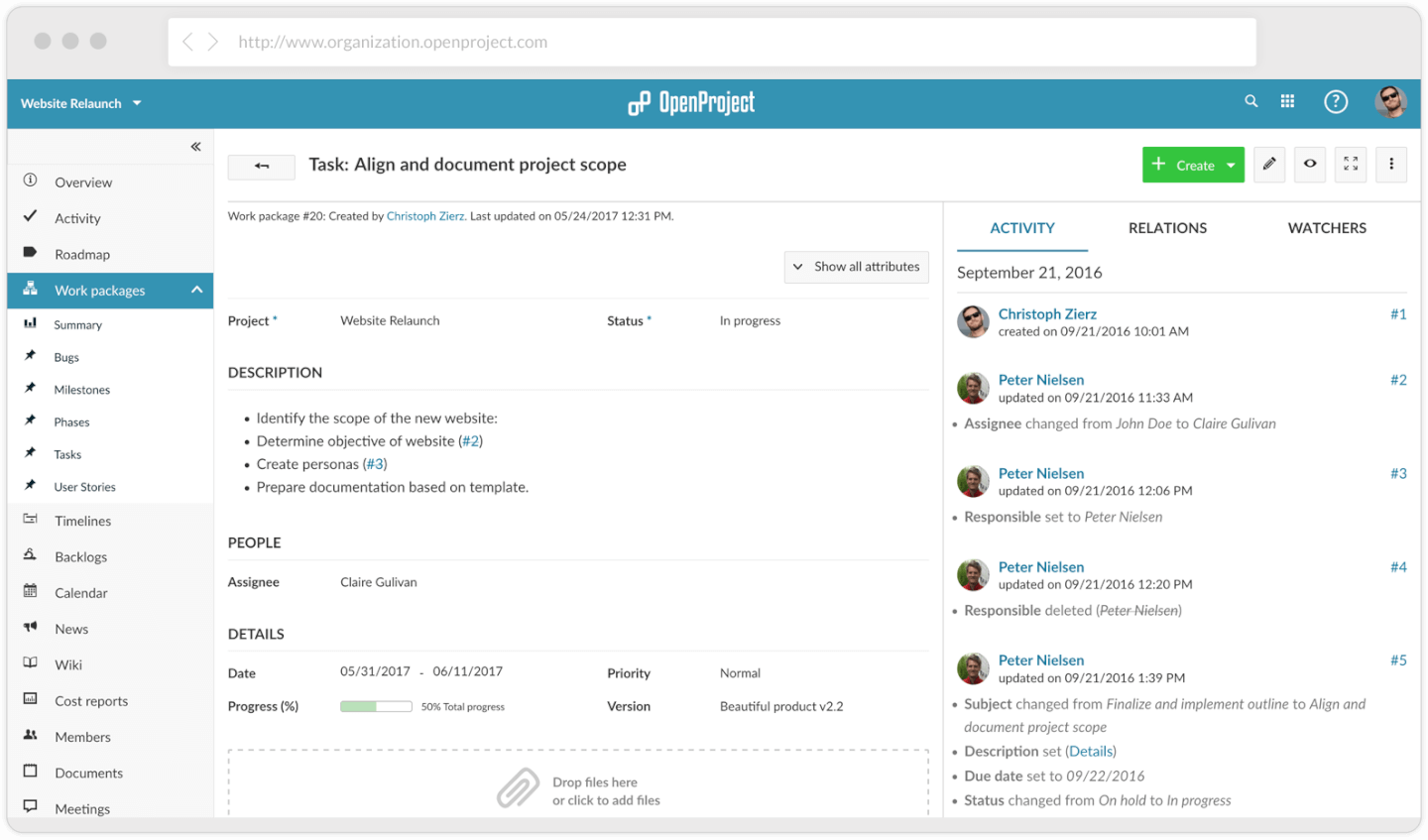
OpenProject è un software open-source per la gestione dei progetti. Scarica il software e installalo su distribuzioni Linux o container Docker per offrire l’accesso a tutto il tuo team o alla tua organizzazione.
Perché ho scelto OpenProject: Puoi creare progetti per ciascuno dei tuoi team o reparti. Puoi creare gerarchie per strutturare i progetti in modo sensato. Puoi quindi suddividere un progetto in attività più piccole e iniziare a creare piani e flussi di lavoro che ti aiutano a portarle a termine.
Inoltre, puoi visualizzare questi progetti in un diagramma di Gantt per vedere come procede il lavoro e identificare ed eliminare i colli di bottiglia. Puoi anche creare dipendenze, traguardi, attività e fasi per organizzare ulteriormente ogni progetto. Tutte queste informazioni vengono visualizzate nel diagramma di Gantt. Puoi anche visualizzarle come calendario o liste di attività.
Lo svantaggio di OpenProject è che sei tu a dover gestire e mantenere la tua installazione software. E anche se è gratuito, dovrai pagare per i server o utilizzare quelli già esistenti. OpenProject offre comunque l’opzione di installare e ospitare il software per te.
Caratteristiche e integrazioni principali di OpenProject
Caratteristiche includono un pianificatore di team con informazioni sul carico di lavoro, campi personalizzati, testi di aiuto per informazioni aggiuntive sulle funzionalità, utenti segnaposto e bacheche agile avanzate.
Integrazioni che possono essere sviluppate utilizzando la sua API. Questo può aiutarti a collegare qualsiasi altro strumento della tua infrastruttura tecnologica.
Quando utilizzare un software gratuito per i flussi di lavoro
Il software gratuito per i flussi di lavoro aiuta i team a organizzare, automatizzare e monitorare le attività ricorrenti senza i costi di gestione degli strumenti aziendali o spese iniziali. Se una delle situazioni seguenti ti è familiare, potrebbe essere esattamente ciò di cui il tuo team ha bisogno:
- Il tuo team monitora il lavoro utilizzando troppi strumenti: Ti destreggi tra conversazioni su Slack, catene di email e un foglio di calcolo condiviso per gestire chi fa cosa. Il software gratuito per i flussi di lavoro riunisce attività e passaggi di consegne in un unico posto, così nulla sfugge al controllo.
- I cicli di approvazione stanno ritardando i progetti: Una semplice revisione di un contenuto, ad esempio un articolo del blog o un file di progettazione, è bloccata in attesa di tre persone coinvolte, senza un processo chiaro. L'automazione dei flussi di lavoro indirizza automaticamente le approvazioni e riduce i tempi di completamento da giorni a ore.
- Inserisci ripetutamente nuovi membri nel team: Ogni volta che entra qualcuno, ricrei da zero la stessa lista di controllo e assegni manualmente le attività. Un modello di flusso di lavoro ripetibile standardizza il processo, così i nuovi assunti diventano operativi più rapidamente.
- La gestione dei materiali da consegnare ai clienti sta diventando caotica: Hai cinque progetti attivi, diversi fornitori e nessuna visione unica di cosa deve essere consegnato, quando e da chi. Il software gratuito per i flussi di lavoro ti offre visibilità su tutti i progetti senza dover pagare una suite completa di gestione dei progetti.
- Ci vuole troppo tempo per individuare i punti in cui il lavoro si blocca: I colli di bottiglia rimangono invisibili finché una scadenza non è già stata mancata. Gli strumenti per i flussi di lavoro mostrano gli impedimenti in tempo reale, così puoi riassegnare il lavoro o modificare le tempistiche prima che la situazione peggiori.
Altri software gratuiti per la gestione dei flussi di lavoro
Ecco alcune altre soluzioni gratuite per la gestione dei flussi di lavoro che non sono rientrate nell’elenco principale, ma che vale la pena prendere in considerazione se desideri ampliare la tua ricerca.
- DocuWare
Ideale per i flussi di lavoro documentali
- Jira
Ideale per team aziendali e team software
- Camunda Platform
Le migliori integrazioni di workflow tra sistemi diversi
- Nutcache
Ideale per freelance
- Next Matter
Ideale per la gestione di workflow complessi
- Bitrix24
Ideale per viste multiple dei progetti
- ProjectLibre
Ideale per Gantt illimitati
- nTask Manager
Ideale per spazi di lavoro illimitati
- Pneumatic Workflow
Miglior piano gratuito con flussi di lavoro illimitati
- PivotalTracker
Ideale per progetti agili
- Tom’s Planner
Ideale per diagrammi di Gantt semplici
- Miro
Ideale per mappe mentali e diagrammi di flusso
- Lucidchart
Ideale per la collaborazione sui flussi di lavoro in tempo reale
- Wrike
Ideale per utenti illimitati
- altaFlow
Ideale per l'instradamento intelligente dei documenti


Come Valuto i Software di Workflow Gratuiti
Per prima cosa, definisco cosa considero gratuito. Per il software di workflow, un piano gratuito permanente è imprescindibile—uno che permetta di gestire il lavoro reale come il monitoraggio degli sprint, l'instradamento per le approvazioni o il passaggio di consegne tra team, non solo una prova di 14 giorni. Da qui, valuto su due livelli: funzionalità di base per qualificarsi e differenziatori che separano le migliori opzioni.
Funzionalità di Base (Requisiti Indispensabili per Questa Lista)
Oltre ai requisiti dell'offerta gratuita, utilizzo anche un sistema di punteggio per selezionare gli strumenti per la mia lista. Ecco come funziona:
Assegno a ciascuno un punteggio da 0 (la funzionalità non è offerta) a 5 (eccelle in quest'area) per ogni funzionalità di base elencata di seguito. Poi calcolo il punteggio totale in percentuale. Ogni strumento deve raggiungere un punteggio minimo totale del 65% per essere preso in considerazione.
- Disponibilità del Piano Gratuito: Verifico se lo strumento offre davvero un livello gratuito che supporta il lavoro di progetto reale nel tempo, non solo una prova di 14 giorni che si interrompe a metà sprint.
- Automazione del Workflow: Cerco automazioni basate su regole che gestiscono attività di routine, come spostare automaticamente un'attività in "In Revisione" al completamento di una sotto-attività o notificare una persona interessata al cambio di stato.
- Gestione di Attività e Progetti: Ogni strumento dovrebbe supportare la creazione strutturata di attività con assegnatari, scadenze e sotto-attività raggruppate in progetti che rispecchiano il modo in cui i team svolgono effettivamente il lavoro.
- Fasi di Workflow Personalizzabili: Valuto se puoi definire i tuoi Stati e le fasi della pipeline per ogni progetto, come personalizzare una bacheca di produzione contenuti rispetto a un workflow di triage dei bug.
- Viste Multiple del Workflow: Avere almeno due viste è importante. Cerco opzioni come Kanban per i daily standup, vista elenco per il refinement del backlog, e calendario o timeline per la pianificazione delle scadenze.
- Funzionalità di Collaborazione di Team: Spazi di lavoro condivisi, commenti sulle attività e menzioni @ devono funzionare tutti nel piano gratuito in modo che i team distribuiti possano coordinarsi senza dover fare l'upgrade solo per coinvolgere un collega.
Una volta raccolta la lista di strumenti che soddisfano questi criteri, considero cosa distingue ogni piattaforma.
Fattori Differenzianti (Cosa Distingue i Fornitori)
Ecco come confronto e metto a confronto diversi fornitori:
Funzionalità Distintive
I modelli di workflow predefiniti sono importanti quando sei su un piano gratuito. Una solida libreria di template ti permette di lanciare una bacheca sprint o una pipeline di onboarding clienti in pochi minuti anziché costruirli da zero. Cerco anche moduli di raccolta che creino automaticamente attività quando qualcuno invia una richiesta di design o una scheda progetto, così il lavoro non si perde nei thread di email. Le dashboard completano il quadro offrendo dati sui colli di bottiglia e metriche di avanzamento, così che i PMO possano riportare lo stato dei progetti senza esportare tutto in un foglio Excel.
Oltre le Funzionalità
La generosità del piano gratuito è un fattore distintivo importante. Valuto quanti utenti e progetti uno strumento permette prima di obbligare l'upgrade, perché un'agenzia di cinque persone non dovrebbe incontrare un paywall solo per aggiungere un collaboratore. Anche le integrazioni hanno un peso: il tuo strumento di workflow deve connettersi dove il tuo team lavora già, che sia Slack per gli standup, Google Drive per le consegne o GitHub per i passaggi di sviluppo. Controllo anche se permessi basati sui ruoli ed esportazione dati sono disponibili nel piano gratuito, perché anche i piccoli team gestiscono dati sensibili dei clienti e hanno bisogno dell'opzione per migrare senza perdere la cronologia dei progetti.
Come scegliere un software gratuito per la gestione dei flussi di lavoro
È facile perdersi in lunghi elenchi di funzionalità e strutture tariffarie complesse. Per aiutarti a rimanere concentrato mentre affronti il tuo esclusivo processo di selezione del software, ecco una lista di controllo dei fattori da tenere presenti:
| Fattore | Cosa considerare |
|---|---|
| Scalabilità | Questo software crescerà insieme alle esigenze del tuo team? |
| Integrazioni | Si collega agli strumenti che il tuo team utilizza già? |
| Personalizzazione | Puoi adattare i flussi di lavoro ai processi del tuo team? |
| Facilità d'uso | Il tuo team sarà in grado di adottare rapidamente il software? |
| Budget | Il software rispetta i tuoi vincoli di costo a lungo termine? |
| Misure di sicurezza | Il software offre la protezione necessaria per i tuoi dati? |
| Funzionalità di collaborazione | Il software supporta un lavoro di squadra e una comunicazione fluidi? |
| Accesso da dispositivi mobili | Puoi gestire i flussi di lavoro ovunque ti trovi? |
| Valore | La versione gratuita del software offre tutte le funzionalità di cui hai bisogno? |
Usa questa lista di controllo per mantenere organizzato e focalizzato il processo di selezione del software.
Tendenze nei software gratuiti per la gestione dei flussi di lavoro
Nella mia ricerca ho raccolto innumerevoli aggiornamenti di prodotto, comunicati stampa e registri delle versioni di diversi fornitori di software gratuiti per la gestione dei flussi di lavoro. Ecco alcune delle tendenze emergenti che sto tenendo d'occhio:
- Raccomandazioni delle attività basate sull'intelligenza artificiale: I software per la gestione dei flussi di lavoro incorporano sempre più spesso l'intelligenza artificiale per suggerire la definizione delle priorità delle attività, le scadenze e l'assegnazione ai membri del team sulla base di dati e modelli storici. Questo può aiutare i team a ottimizzare i flussi di lavoro e a prendere decisioni più intelligenti in meno tempo.
- Strumenti per la creazione di flussi di lavoro con poco codice: Gli strumenti gratuiti per la gestione dei flussi di lavoro offrono spesso strumenti di progettazione dei flussi di lavoro con poco codice o senza codice, che consentono agli utenti di creare flussi di lavoro personalizzati senza bisogno di competenze tecniche approfondite. Questa tendenza permette a un maggior numero di team di creare flussi di lavoro aziendali su misura, adatti ai propri processi specifici.
- Informazioni basate sui dati: I software per l'automazione dei processi digitali si integrano sempre più con l'analisi dei dati per fornire informazioni sui colli di bottiglia della produttività, sull'allocazione delle risorse e sui tassi di completamento delle attività. Questo aiuta i team a ottimizzare la gestione dei flussi di lavoro aziendali utilizzando dati in tempo reale.
- Collaborazione tra reparti: Un numero crescente di soluzioni gratuite per la gestione dei flussi di lavoro si concentra sull'abbattimento dei silos tra i reparti, offrendo funzionalità che permettono ai software per la gestione dei flussi di lavoro di marketing, ai software per i flussi di lavoro dei contenuti e agli strumenti di gestione dei progetti di coesistere su un'unica piattaforma.
- Elementi di gamification: Alcune piattaforme software per l'automazione dei flussi di lavoro stanno ora integrando funzionalità di gamification, come ricompense per il completamento delle attività e metriche sulle prestazioni del team, per incoraggiare il coinvolgimento e promuovere un ambiente di lavoro più dinamico tra i team che utilizzano strumenti di monitoraggio dei flussi di lavoro.
Che cos'è un software gratuito per la gestione dei flussi di lavoro?
Un software gratuito per la gestione dei flussi di lavoro è uno strumento che consente ai team di creare, gestire e monitorare processi composti da più fasi senza alcun costo. Questo tipo di strumento è disponibile come prodotto open source o come livello più economico di uno strumento a pagamento.
Viene comunemente utilizzato da project manager, responsabili delle operazioni e amministratori dei team per semplificare le attività ripetitive, assegnare le responsabilità, automatizzare i passaggi di consegne e assicurarsi che nulla venga trascurato. Questi strumenti aiutano a standardizzare il modo in cui viene svolto il lavoro, consentendo ai team di ampliare i processi, ridurre i ritardi e migliorare la responsabilità complessiva.
Funzionalità dei software gratuiti per la gestione dei flussi di lavoro
Quando scegli un software gratuito per la gestione dei flussi di lavoro, presta attenzione alle seguenti funzionalità chiave:
- Automazione delle attività: questa funzionalità consente di configurare processi ripetibili in cui il software fa avanzare automaticamente le attività, assegna le responsabilità o attiva promemoria per te, così non devi inseguire le persone o ricordare ogni singolo passaggio.
- Progettazione visiva dei flussi di lavoro: grazie a un'interfaccia intuitiva con funzionalità di trascinamento, puoi rappresentare visivamente i tuoi processi, trasformando quello che potrebbe essere un elenco confuso in un flusso chiaro e facile da seguire, che chiunque nel tuo team può comprendere in pochi secondi.
- Strumenti di collaborazione: le funzionalità di collaborazione consentono a te e ai tuoi colleghi di commentare direttamente le attività, taggarvi a vicenda e condividere aggiornamenti, riducendo le interminabili conversazioni via email e mantenendo tutti aggiornati.
- Gestione delle scadenze e delle notifiche: puoi impostare scadenze e ricevere notifiche automatiche, così rimani al passo con le attività e nulla passa inosservato: consideralo il tuo assistente personale che ti ricorda continuamente cosa fare, ma senza atteggiamenti sgradevoli.
- Allegati e condivisione dei documenti: allega i file direttamente alle attività del flusso di lavoro, così tu e il tuo team avete sempre a disposizione i documenti giusti nel contesto corretto, senza doverli cercare nelle conversazioni email o nelle unità cloud.
- Autorizzazioni basate sui ruoli: questa funzionalità consente di scegliere chi può visualizzare o modificare ogni flusso di lavoro o attività, proteggendo i progetti sensibili e mantenendo le persone giuste concentrate sul lavoro giusto.
- Report e analisi: ottieni informazioni utili sul funzionamento dei tuoi processi grazie a report e dashboard integrati: scopri cosa funziona, dove si creano colli di bottiglia e dove puoi ottenere una maggiore efficienza.
- Opzioni di integrazione: collega il software per i flussi di lavoro agli altri strumenti su cui fai affidamento, come email, calendari o applicazioni per la gestione dei progetti, così non devi passare continuamente da una scheda o piattaforma all'altra.
Funzionalità di AI
Molte soluzioni software gratuite per i flussi di lavoro includono ora funzionalità basate sull'AI per aiutarti a lavorare in modo ancora più intelligente:
- Suggerimenti intelligenti per le attività: l'AI può analizzare la cronologia del tuo flusso di lavoro e suggerire i passaggi successivi o automatizzare le attività di routine, facendoti risparmiare tempo sul lavoro ripetitivo.
- Elaborazione del linguaggio naturale: crea o aggiorna le attività semplicemente digitando o pronunciando le tue istruzioni: l'AI traduce il tuo linguaggio naturale in elementi operativi.
- Analisi predittiva: ottieni previsioni sulle tempistiche dei progetti o individua potenziali colli di bottiglia prima che diventino problemi, grazie alle informazioni basate sull'AI.
- Assegnazione automatica delle priorità: l'AI può aiutarti a individuare quali attività sono più urgenti o importanti, rendendo più semplice concentrarti su ciò che conta davvero.
- Notifiche intelligenti: invece di promemoria generici, l'AI adatta le notifiche in base alle tue abitudini e al tuo carico di lavoro, così ricevi un promemoria solo quando è davvero importante.
Vantaggi del software gratuito per i flussi di lavoro
L'implementazione di un software gratuito per i flussi di lavoro può offrire diversi vantaggi al tuo team e alla tua azienda. Ecco alcuni dei benefici che puoi aspettarti:
- Maggiore organizzazione delle attività: gli strumenti per i flussi di lavoro possono aiutarti a mantenere attività e progetti organizzati in un unico posto, semplificando il monitoraggio dei progressi e delle scadenze.
- Maggiore collaborazione del team: con un software per la gestione dei flussi di lavoro, i team possono collaborare facilmente condividendo aggiornamenti, file e commenti in tempo reale.
- Automazione che fa risparmiare tempo: molti programmi per la gestione dei flussi di lavoro includono funzionalità di automazione di base che gestiscono le attività ripetitive, facendo risparmiare tempo e riducendo il lavoro manuale.
- Monitoraggio più semplice dei progetti: i sistemi online per la gestione dei flussi di lavoro offrono una visione chiara delle tempistiche dei progetti, consentendoti di monitorare i progressi e individuare tempestivamente i potenziali problemi.
- Accesso da qualsiasi luogo: il software online per i flussi di lavoro consente al tuo team di lavorare e gestire i progetti da remoto, migliorando la flessibilità dei team distribuiti.
- Soluzione conveniente: le versioni gratuite delle applicazioni per la gestione dei flussi di lavoro offrono strumenti essenziali senza richiedere un piano a pagamento, aiutando i piccoli team o le startup a ridurre i costi.
- Scalabilità per i team in crescita: il software per la gestione dei flussi di lavoro, anche nella versione gratuita, può crescere insieme al tuo team, supportando un numero maggiore di utenti e attività senza dover cambiare piattaforma.
Le versioni a pagamento dei software per i flussi di lavoro offrono solitamente funzionalità avanzate non presenti nelle versioni gratuite. Tra queste rientrano utenti illimitati, maggiore spazio di archiviazione e integrazioni premium con applicazioni di terze parti come i CRM e gli strumenti di contabilità. I piani a pagamento offrono inoltre automazioni avanzate, analisi dettagliate e assistenza clienti prioritaria. Una sicurezza avanzata, il branding personalizzato e autorizzazioni più granulari possono inoltre renderli più adatti ai team più grandi che desiderano espandersi in modo efficiente.
Costi e prezzi dei software per i flussi di lavoro
Sebbene i piani gratuiti siano un ottimo punto di partenza, ecco quanto puoi aspettarti di spendere per le versioni a pagamento in base alle tue esigenze. La tabella seguente riassume i piani più comuni, i relativi prezzi medi e le funzionalità tipicamente incluse nelle soluzioni software per i flussi di lavoro:
Tabella di confronto dei piani per il software di gestione dei flussi di lavoro
| Tipo di piano | Prezzo medio | Funzionalità comuni |
|---|---|---|
| Piano gratuito | $0 | Gestione di base delle attività, utenti limitati, integrazioni limitate e supporto della community. |
| Piano personale | $5-$15/utente/mese | Gestione delle attività, automazione limitata, flussi di lavoro personalizzati e integrazioni di base. |
| Piano aziendale | $20-$40/utente/mese | Automazione avanzata, collaborazione del team, strumenti di reportistica e supporto premium. |
| Piano per grandi aziende | $50-$100/utente/mese | Automazione completa, sicurezza di livello aziendale, reportistica avanzata e supporto dedicato. |
Domande frequenti sul software gratuito per la gestione dei flussi di lavoro
Trova le risposte alle domande più comuni che altre persone pongono su questo argomento.
Quali funzionalità non includono gli strumenti gratuiti per la gestione dei flussi di lavoro?
Il software gratuito per la gestione dei flussi di lavoro limita solitamente il numero di utenti, lo spazio di archiviazione, le automazioni avanzate e le integrazioni. Potresti non avere accesso ad analisi dettagliate, branding personalizzato o supporto prioritario. Per molti piccoli progetti o flussi di lavoro semplici, queste opzioni gratuite funzionano bene, ma quando il team cresce o i processi diventano più complessi, potresti aver bisogno di funzionalità disponibili solo nei piani a pagamento.
Come scelgo il software gratuito per la gestione dei flussi di lavoro più adatto al mio team?
\u003cp data-sourcepos=\u00221:1-1:179\u0022\u003eInizia elencando gli elementi indispensabili per il tuo team, come ruoli utente, notifiche e integrazioni. Prova l’interfaccia di ogni strumento con un flusso di lavoro reale e verifica se si adatta ai processi esistenti. Leggi le recensioni di altri project manager in settori simili. Dai priorità al software che offre possibilità di upgrade nel caso in cui le tue esigenze aumentino.\u003c/p\u003e
Il software gratuito per la gestione dei flussi di lavoro può crescere insieme alla mia azienda?
Il software gratuito per la gestione dei flussi di lavoro può supportare le piccole aziende e i team in crescita fino a un certo punto. Quando i processi diventano più complessi o il team si espande, è probabile che tu raggiunga i limiti relativi alle funzionalità o agli utenti. La maggior parte delle piattaforme offre upgrade a pagamento, così puoi crescere senza cambiare strumento, ma assicurati di verificare i costi degli upgrade e le opzioni di migrazione prima di impegnarti.
Quali strumenti gratuiti per la gestione dei flussi di lavoro si integrano meglio con le app di gestione dei progetti più diffuse?
Molti strumenti gratuiti per la gestione dei flussi di lavoro offrono integrazioni di base con le app più diffuse, ma il livello di integrazione varia. Controlla gli elenchi delle integrazioni di ogni strumento selezionato e prova le funzionalità che utilizzerai più spesso. In alcuni casi, le integrazioni più avanzate richiedono un piano a pagamento.
Gli strumenti gratuiti per la gestione dei flussi di lavoro sono accessibili da dispositivi mobili?
Sì, la maggior parte degli strumenti gratuiti per la gestione dei flussi di lavoro dispone di app mobili o siti web ottimizzati per dispositivi mobili. Tuttavia, alcune funzionalità potrebbero essere limitate o meno intuitive rispetto alla versione desktop. Se il team fa affidamento sull’accesso da dispositivi mobili, assicurati di testare la versione mobile per le attività essenziali prima di adottare qualsiasi strumento.
Gli strumenti gratuiti per la gestione dei flussi di lavoro possono gestire approvazioni complesse o processi in più fasi?
Alcuni software gratuiti per la gestione dei flussi di lavoro possono gestire semplici approvazioni in più fasi, ma le funzionalità avanzate, come la logica condizionale o le approvazioni multilivello, sono spesso limitate. Se hai bisogno di instradamenti complessi, prova prima il piano gratuito dello strumento per verificare se soddisfa i tuoi requisiti oppure valuta una versione di prova della versione a pagamento.
I miei dati sono al sicuro quando utilizzo un software gratuito per la gestione dei flussi di lavoro?
La maggior parte degli strumenti gratuiti affidabili per la gestione dei flussi di lavoro utilizza pratiche standard di crittografia e sicurezza per proteggere i dati. Tuttavia, i piani gratuiti potrebbero non includere protezioni avanzate come l’accesso singolo o i registri di audit. Consulta sempre la documentazione sulla sicurezza del fornitore e non archiviare dati aziendali sensibili a meno che tu non sia a tuo agio con le sue politiche.
Qual è il prossimo passo?
Vuoi entrare in contatto con altri project manager digitali per condividere risorse e buone pratiche? Unisciti alla nostra community e ottieni l'accesso a oltre 100 modelli, campioni ed esempi, e entra in contatto su Slack con centinaia di altri project manager digitali.