

I 10 migliori strumenti per la gestione delle agenzie recensiti per il 2026

10 Elenco dei migliori sistemi di gestione delle agenzie


I migliori sistemi di gestione delle agenzie centralizzano la gestione dei progetti, delle risorse e delle finanze per migliorare l'efficienza del team e garantire risultati puntuali. Utilizzare più strumenti per queste funzioni può rendere frammentata la gestione dei progetti dei clienti, delle risorse e dei budget, causando scadenze mancate, ampliamento dell'ambito dei progetti e discrepanze finanziarie.
Con 20 anni di esperienza nelle operazioni delle agenzie e oltre un decennio come recensore di software, ho valutato e implementato diversi sistemi di gestione delle agenzie. Questo mi ha mostrato come il software giusto possa aumentare l'efficienza, ridurre gli errori e migliorare i rapporti con i clienti.
Dopo aver testato oltre 20 strumenti diversi, ho compilato un elenco delle opzioni più affidabili disponibili, evidenziandone le funzionalità principali, i prezzi e altro ancora per aiutarti a scegliere quella più adatta al tuo team.
Perché fidarsi dei nostri consigli sui software
Il nostro team testa e recensisce software dal 2012. In quanto project manager noi stessi, sappiamo quanto sia difficile — e importante — scegliere il software giusto.
Per questa guida, abbiamo valutato gli strumenti attraverso test pratici e ricerche indipendenti, assegnando un punteggio agli strumenti in base ai nostri criteri di selezione. Ci basiamo inoltre sulle competenze di leader di pensiero del settore e di professionisti attivi nella gestione dei progetti.
Le nostre recensioni riflettono il nostro giudizio editoriale umano, non un discorso di vendita.
Revisori esperti:
Tabella comparativa degli strumenti per la gestione delle agenzie
Questa tabella comparativa riassume i dettagli sui prezzi degli strumenti per la gestione delle agenzie che ho selezionato come migliori:
| Tool | Best For | Trial Info | Price | ||
|---|---|---|---|---|---|
| 1 | Miglior sistema di gestione tutto-in-uno per agenzie con strumenti di vendita e fatturazione | Prova gratuita di 14 giorni | Da $12,50/utente/mese | Website | |
| 2 | Massima profondità di funzionalità e reportistica | Demo personalizzata gratuita | Da $17/mese | Website | |
| 3 | Ideale per la gestione end-to-end del lavoro | Prova gratuita di 14 giorni + demo gratuita disponibile | Da $19,90/utente/mese (fatturato annualmente) | Website | |
| 4 | Ideale per flussi di lavoro e risorse basati sull’Intelligenza Artificiale | Demo gratuita | A partire da $20 / utente / mese | Website | |
| 5 | Il miglior software di gestione per agenzie grazie alle viste personalizzabili | 14 giorni di prova gratuita | Da $9.80/utente/mese | Website | |
| 6 | Il miglior software personalizzabile per agenzie pubblicitarie | 14 giorni di prova gratuita | Da $6/utente/mese | Website | |
| 7 | Ideale per la gestione completa dell’erogazione dei servizi | Non disponibile | Prezzo su richiesta | Website | |
| 8 | Il miglior sistema di gestione per agenzie con visualizzazione multipla dei progetti | Prova gratuita di 14 giorni. Nessuna carta di credito richiesta. | A partire da $12/utente/mese | Website | |
| 9 | Miglior piano gratuito con attività e utenti illimitati | Piano gratuito + demo gratuita disponibile | Da $7/utente/mese (fatturato annualmente) | Website | |
| 10 | ideale per abilitare la collaborazione con i clienti | Prova gratuita di 30 giorni | Da $10/utente/mese | Website |


Recensioni dei migliori sistemi di gestione delle agenzie
Ecco una breve descrizione di ciascuno dei sistemi di gestione delle agenzie presenti in questo elenco dei 10 migliori.

Miglior sistema di gestione tutto-in-uno per agenzie con strumenti di vendita e fatturazione

Productive è un software di gestione per agenzie completo con una gamma di funzionalità potenti che ti forniscono gli strumenti e i dati necessari per mantenere un'agenzia operativa senza intoppi. Lo strumento è stato creato da un team con un decennio di esperienza nella fondazione, gestione e crescita di una software house, quindi è particolarmente adatto alle agenzie digitali. Fran Vižintin, Senior Account Executive presso Productive, spiega perché la piattaforma funziona così bene per le agenzie: “Productive è progettato per le agenzie e supporta una pianificazione delle risorse ad alto livello. Permette alle agenzie di assegnare servizi, tariffe fatturabili e monitorare il budget all'interno di ogni fase del progetto.”
Le funzionalità dello strumento soddisfano pienamente i miei criteri per gli strumenti di gestione delle agenzie. Troverai la gestione di clienti e prospect nel Sales Pipeline (gestisci il flusso delle trattative, organizza le vendite). La funzione di Pianificazione delle Risorse, il time tracker e gli strumenti di collaborazione sulle attività rispondono ai criteri di gestione delle risorse e dei progetti che cerco in uno strumento o piattaforma per agenzie.
Fatturazione ed emissione delle fatture possono essere gestite direttamente dalla piattaforma, insieme a report utili su redditività e costi per aiutare nella gestione finanziaria. In realtà, la funzione reportistica va ben oltre, offrendo report in tempo reale su margini, utilizzo delle risorse e molto altro ancora, inclusi report sulla storia individuale degli impiegati o collaboratori con l'azienda, report salariali, ecc.
Le integrazioni di Productive includono Zapier, oltre a Jira, Open API, QuickBooks Online, Xero ed Exact.
Productive costa $9/utente/mese (fatturato annualmente). Viene inoltre offerta una prova gratuita di 14 giorni con tutte le funzionalità.
New Product Updates from Productive
Productive Adds Voice Dictation, Slack Connector, Proposals, and Overtime
Productive adds voice dictation, a Slack Connector, proposal controls, and overtime tracking. These updates support faster AI interactions, client proposals, and time management. For more information, visit Productive’s official site.

Massima profondità di funzionalità e reportistica
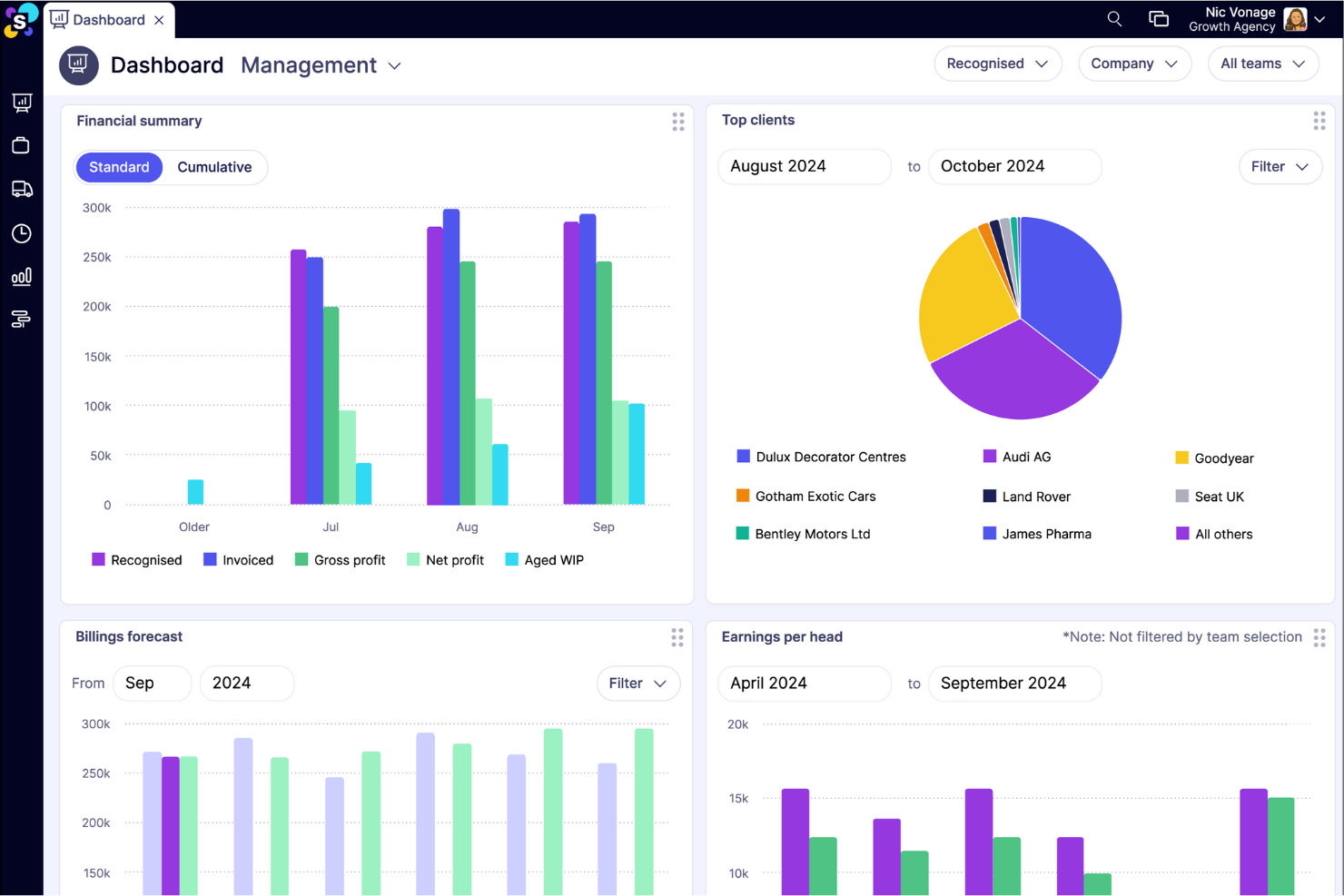
Synergist è un software completo di gestione per agenzie, progettato per supportare le agenzie in crescita offrendo strumenti per monitorare la redditività dei progetti, gestire i progetti stessi e supervisionare l'utilizzo del team. Per le agenzie che mirano a migliorare le proprie performance finanziarie, Synergist può essere utilizzato per monitorare i parametri di redditività e prevedere pipeline, profitti e pagamenti.
Ho scelto specificamente questo software perché offre una soluzione tutto-in-uno con un'ampia gamma di funzionalità, come reportistica, strumento di pianificazione, capacità di monitoraggio progetti e un sistema centralizzato per la gestione delle interazioni con i clienti e delle finanze. Garantisce inoltre che le risorse e i team siano allocati in modo ottimale per migliorare l'efficienza in tutta l'organizzazione.
Nel complesso, Synergist si distingue come uno strumento indispensabile per le agenzie focalizzate sulla massimizzazione della redditività grazie all'accesso a informazioni in tempo reale e al controllo finanziario sui progetti.
Synergist si integra con diversi sistemi software, inclusi Microsoft 365, Google, Xero, Sage, HubSpot, Salesforce CRM, Outlook Calendar e iCal, oltre alla gestione dei file tramite Microsoft OneDrive, Google Drive e Dropbox.

Scoro
Ideale per la gestione end-to-end del lavoro

Scoro è un sistema di gestione per agenzie progettato per aiutare le aziende a gestire le operazioni in modo più efficace. Combina strumenti per la gestione dei progetti, vendite e gestione delle relazioni con i clienti (CRM), preventivazione, pianificazione delle risorse, monitoraggio del tempo, fatturazione e reportistica, riunendo ogni aspetto del lavoro di un'agenzia in un'unica piattaforma centralizzata.
Il sistema facilita la gestione end-to-end dei progetti durante l'intero ciclo di vita, dai preventivi iniziali fino alla fatturazione finale. Dashboard in tempo reale e report dettagliati offrono visibilità su progressi, risultati e prestazioni complessive, aiutando i team a prendere decisioni informate e a ridurre i malintesi.
Scoro include anche funzionalità di pianificazione delle risorse che aiutano ad assegnare i carichi di lavoro in modo efficiente e a prevenire il burnout del team. La sua funzionalità di gestione dei contratti ricorrenti garantisce che il lavoro continuativo per i clienti venga monitorato e realizzato in modo costante su tutti i progetti.
La piattaforma si integra con Google Calendar, Microsoft Exchange, HubSpot, Jira, Xero, QuickBooks, Sage Intacct, Exact Online, Expensify, Stripe, BambooHR, Slack, Asana, Dropbox, PayPal e molti altri. Puoi anche collegare strumenti aggiuntivi tramite Zapier per un'automazione estesa.
I prezzi partono da $19,9/utente/mese, con una prova gratuita disponibile.
New Product Updates from Scoro

Scoro Adds Time Mobile App and ELI Improvements
Scoro adds the Scoro Time mobile app for iOS/Android to track time anywhere and expands ELI with attachments, smarter filtering, and trigger-based actions. For more information, visit Scoro's official site.

Ideale per flussi di lavoro e risorse basati sull’Intelligenza Artificiale
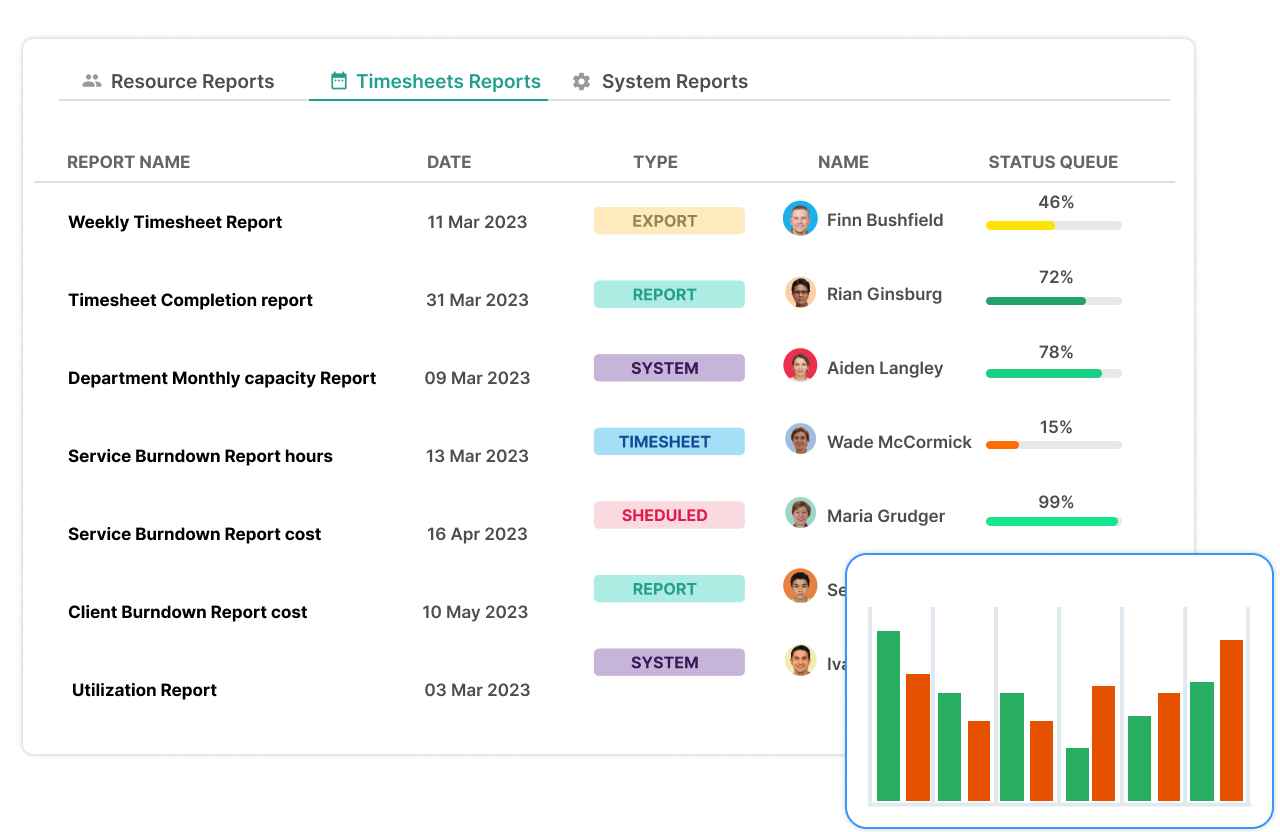
Screendragon è un software di gestione per agenzie progettato per gestire progetti, persone, processi e redditività in un unico posto. È facile da usare e offre una potente personalizzazione. I principali gruppi di agenzie mondiali come Omnicom, WPP e IPG si affidano a Screendragon per gestire le loro operazioni.
Screendragon è integrato perfettamente offrendo gestione dei progetti, gestione dei flussi di lavoro, gestione delle risorse e previsioni, monitoraggio del tempo, gestione del budget e gestione degli asset. Lo strumento è altamente configurabile e consente agli utenti di personalizzare moduli, dashboard, modelli, regole dei flussi di lavoro, permessi, notifiche, report e persino la terminologia utilizzata sulla piattaforma.
Il modulo integrato di gestione dei budget di Screendragon permette agli utenti di creare SOW e preventivi, oltre a prevedere ricavi futuri e necessità di risorse. Revisioni e approvazioni sono semplificate grazie a funzionalità per il proofing visivo, collaborazione in tempo reale, controllo delle versioni e permessi granulari. Le avanzate capacità di automazione di Screendragon facilitano l'approvazione sicura ed efficiente degli asset e possono adattarsi facilmente alle esigenze di agenzie in crescita. La gestione intuitiva delle attività consente agli utenti di passare da bacheche Kanban, diagrammi di Gantt interattivi e viste elenco.
Screendragon offre integrazioni native con sistemi ERP come SAP e PeopleSoft e può integrarsi con migliaia di app tramite Zapier come Slack, Trello, Google Drive, Office 365 e Microsoft Dynamics. Dispone inoltre di un'API aperta, che consente integrazioni personalizzate con qualsiasi soluzione.
Screendragon parte da $20/utente/mese con una tariffa una tantum di implementazione ed è disponibile una demo gratuita.
New Product Updates from Screendragon
Screendragon Unveils New AI Hub
Screendragon introduced AI Hub, a new capability that lets teams build and manage AI agents directly within workflows. The update helps marketing teams automate tasks, maintain governance controls, and scale AI-driven operations more efficiently. For more information, visit Screendragon's official site.

Wrike
Il miglior software di gestione per agenzie grazie alle viste personalizzabili

Wrike è un software per agenzie pubblicitarie facile da usare, adatto per team composti da cinque o più membri. È altamente configurabile, consentendo agli utenti di personalizzare processi, flussi di lavoro, dashboard, report e moduli di richiesta in base alle proprie esigenze specifiche. Può aiutare a eliminare costosi silos tra i team, centralizzare la comunicazione e automatizzare attività amministrative che richiedono molto tempo. Per le agenzie impegnate in progetti complessi o ad alta pressione, Wrike può rivelarsi prezioso anche nei momenti di incertezza. Danilo Coviello, fondatore di Espresso Translations, ha spiegato: “Il vero valore di Wrike si vede nella gestione delle crisi. Un cliente del settore fintech ha segnalato modifiche di conformità richieste in tre paesi. La mappatura delle dipendenze mi ha indicato esattamente quali attività sarebbero state coinvolte prima che si verificasse qualsiasi danno.”
Wrike permette agli utenti di passare da board Kanban personalizzabili, a diagrammi di Gantt a un clic e alle classiche visualizzazioni del carico di lavoro, così i team possono scegliere come visualizzare i deliverable delle campagne. Wrike offre anche elenchi di attività, sotto-attività, calendari condivisi, flussi di lavoro personalizzati, condivisione file e collaborazione in tempo reale. Gli utenti possono ottenere analisi avanzate sulle prestazioni su oltre 50 piattaforme di marketing, valutare la gestione e l’allocazione delle risorse e monitorare il tempo.
Wrike presenta un’interfaccia facile e intuitiva, con spazi, cartelle e compiti ben distinti. Puoi passare dalla schermata principale a fogli ore, dashboard, calendari, report e flusso attività. Wrike dispone di un centro assistenza dedicato con formazione interattiva, video, una guida ‘Per iniziare’ e una community molto attiva. Lo strumento offre inoltre una soluzione dedicata ai team di marketing, oltre a una varietà di modelli per i processi organizzativi più comuni.
Wrike offre oltre 400 integrazioni native preconfigurate, tra cui integrazioni con Adobe Creative Cloud; software di gestione file di Microsoft, Google e Dropbox; e più di 50 strumenti specifici per il marketing.
New Product Updates from Wrike
Wrike Adds Klaxoon MCP Integration
Wrike’s Klaxoon MCP integration is now generally available, enabling AI agents to navigate between Wrike tasks and attached whiteboards, read task context, and manage whiteboard attachments via API. For more information, visit Wrike's official site.

Il miglior software personalizzabile per agenzie pubblicitarie
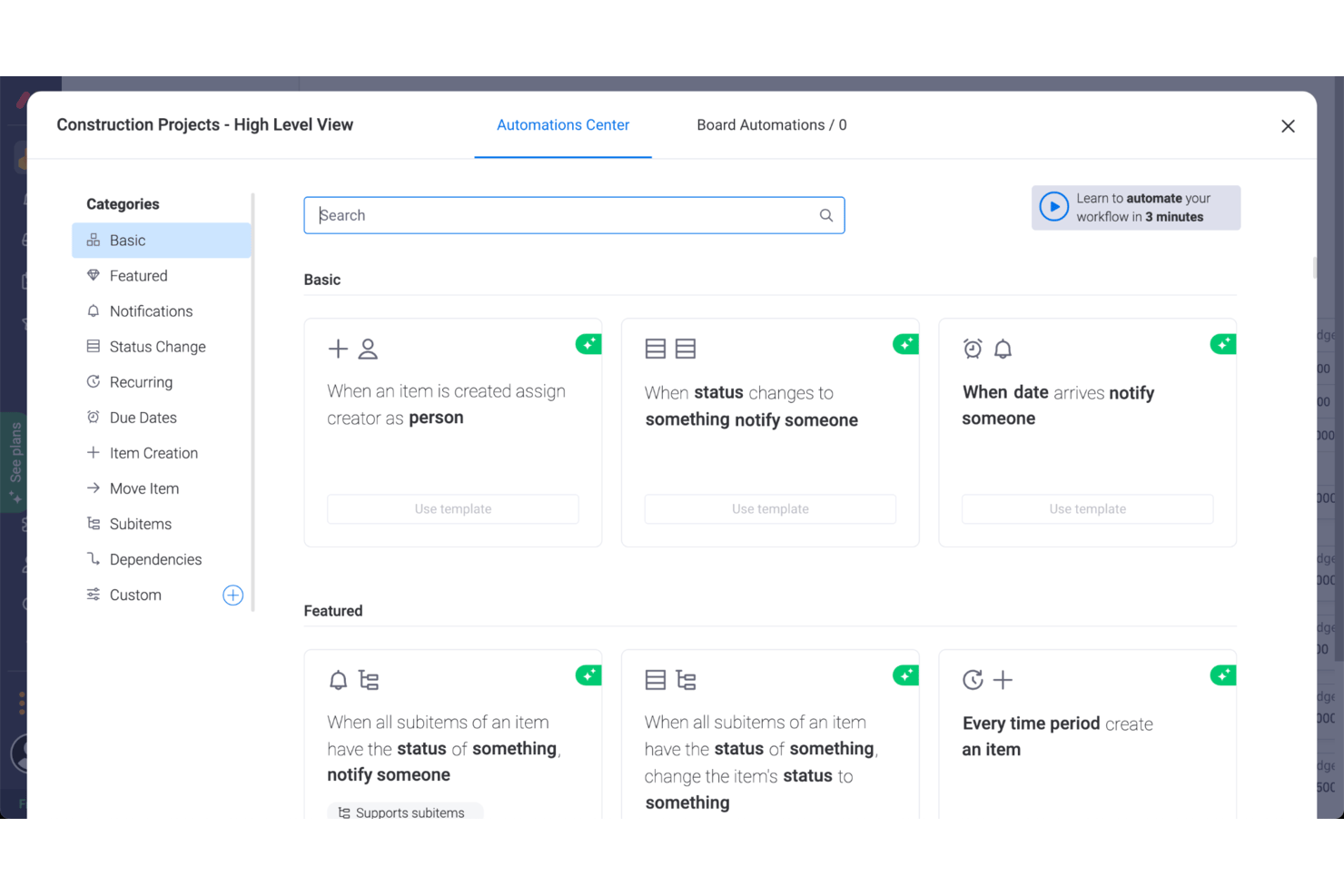
monday AI Workspace è un ottimo software per agenzie pubblicitarie grazie al modo in cui lo strumento ha eliminato molte delle complessità tipiche dei tool di gestione, concentrandosi su layout semplici e visivamente intuitivi che aiutano a chiarire la sequenza delle attività.
Le funzionalità di monday AI Workspace per la gestione di progetti pubblicitari includono moduli per la gestione delle risorse e dei progetti, oltre ad ottimi strumenti di collaborazione. Ad esempio, gli utenti possono caricare e allegare file alle schede, lasciare commenti, menzionare i membri del team e altro ancora. Offre anche un eccellente cruscotto di reportistica progettuale che può raccogliere dati da più board, consentendo un monitoraggio migliore dei progressi. E sebbene monday AI Workspace non offra una gamma completa di strumenti per la contabilità di progetto e la fatturazione, è possibile utilizzare monday AI Workspace per tenere traccia di ore lavorate, scadenze e fatture. monday AI Workspace aggiunge inoltre capacità basate sull’intelligenza artificiale che possono aiutare le agenzie ad automatizzare attività di routine e accelerare l’avanzamento dei progetti. I team possono usare l’IA per riassumere informazioni, generare e perfezionare contenuti, estrarre insight dai dati di lavoro e automatizzare parti dei flussi operativi.
Nel complesso è uno strumento altamente personalizzabile che consente di lavorare con qualsiasi metodologia—kanban o altra—che meglio si adatta a progetto e team. Troverai anche utili strumenti di workflow per automatizzare parte dei tuoi processi.
Le integrazioni di monday AI Workspace includono app di project management come Slack, Google Drive, Gmail, Google Calendar, Jira, GitHub, Trello, Dropbox, Typeform e molte altre, accessibili tramite Zapier.
monday AI Workspace parte da $9/utente/mese e include una prova gratuita di 14 giorni. È previsto un piano gratuito fino a 2 utenti.
New Product Updates from monday AI Workspace
monday AI Workspace Adds Human Approval Routing
monday AI Workspace adds a human-in-the-loop approval block to AI Workflows, sending approval requests and routing workflow paths based on responses. For more information, visit monday AI Workspace's official site.

Kantata
Ideale per la gestione completa dell’erogazione dei servizi

Kantata è una piattaforma di gestione per agenzie progettata per unificare ogni fase del ciclo di vita della consegna al cliente. Dalla pianificazione dei progetti e la programmazione delle risorse al monitoraggio finanziario e alla reportistica per i clienti, offre alle agenzie un sistema centralizzato per gestire le operazioni, migliorare la redditività e crescere in modo efficiente.
La piattaforma include funzionalità pensate appositamente per le agenzie, come strumenti di onboarding per i clienti, pianificazione dei progetti, monitoraggio di tempi e risorse, fatturazione, gestione dei contratti e spazi collaborativi. Queste funzionalità rendono semplice tracciare i progressi del team rispetto a scadenze e budget, monitorare la soddisfazione del cliente e prevedere impiego delle risorse o ricavi—tutto dalla stessa piattaforma. Unificando i flussi di lavoro, Kantata elimina i compartimenti stagni e fornisce una visione completa dello stato di salute dell’agenzia.
Oltre alla gestione quotidiana dei progetti, Kantata supporta le decisioni basate sui dati lungo tutto il ciclo di vita del servizio. Dashboard dinamiche, reportistica di business intelligence e pianificazione di scenari consentono ai leader delle agenzie di individuare rischi, modificare i piani e dimostrare il valore ai clienti. Questa combinazione di visibilità e flessibilità aiuta le agenzie a mantenere le promesse e rafforzare la fiducia dei clienti.
Altre caratteristiche degne di nota includono database delle competenze personalizzabili per tracciare le expertise del team, report specifici per scenario (come tracciatori di redditività e scorecard per i dirigenti), viste Kanban per il lavoro agile sulle campagne e avvisi automatici che segnalano potenziali disallineamenti di tempistiche o attività.
Kantata si integra con diversi strumenti, come Salesforce, SAP, Jira, Xero, BambooHR, Slack, Worday, QuickBooks, HubSpot e NetSuite.
New Product Updates from Kantata

Kantata Adds Access Group Change History
Kantata adds Access Groups History, letting account administrators track changes to group details, membership, and permissions in Recent History. The update also makes these events available through the Subscribed Events API for broader monitoring. For more information, visit Kantata’s official site.
 .
.
Hive
Il miglior sistema di gestione per agenzie con visualizzazione multipla dei progetti
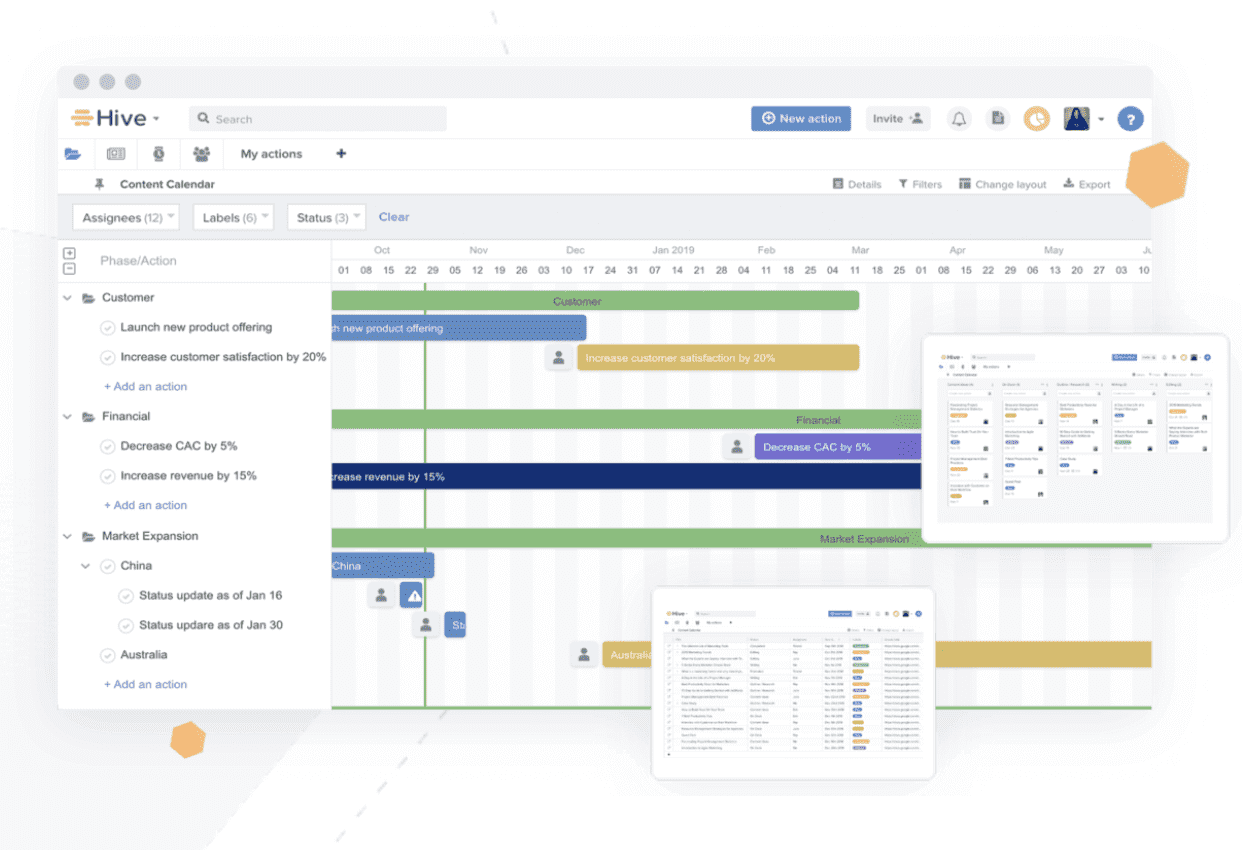
Hive è uno strumento robusto per la gestione delle agenzie, l'organizzazione dei progetti e il coordinamento flessibile delle attività. Permette alle agenzie di organizzare i progetti in un diagramma di Gantt, una bacheca Kanban, una tabella o un calendario, e di passare facilmente da un layout all'altro. Inoltre, ogni utente può scegliere di visualizzare un progetto secondo viste diverse, così ogni membro del team può utilizzare la visualizzazione che preferisce. Gli aggiornamenti sono riflessi su tutte le viste del progetto, quindi l'agenzia resta informata indipendentemente dall'opzione utilizzata.
Hive consente agli utenti di collaborare facilmente inviando messaggi direttamente a singoli o gruppi dell'agenzia. Devi condividere un documento? Caricalo direttamente in un'attività, un progetto o un messaggio. La funzionalità Moduli di Hive elimina le continue email e raccoglie tutte le informazioni necessarie tramite semplici campi da compilare.
Vale la pena notare che, se stai passando a Hive da un altro strumento, puoi importare i compiti da strumenti come Asana, Trello, Basecamp, Smartsheet e alcuni altri.
Hive si integra con Google Drive, Salesforce, Jira, Dropbox, Slack, Zoom, One Drive, Box e più di mille altri strumenti tramite Zapier.
Hive ha un costo a partire da $12/utente/mese.

ClickUp
Miglior piano gratuito con attività e utenti illimitati
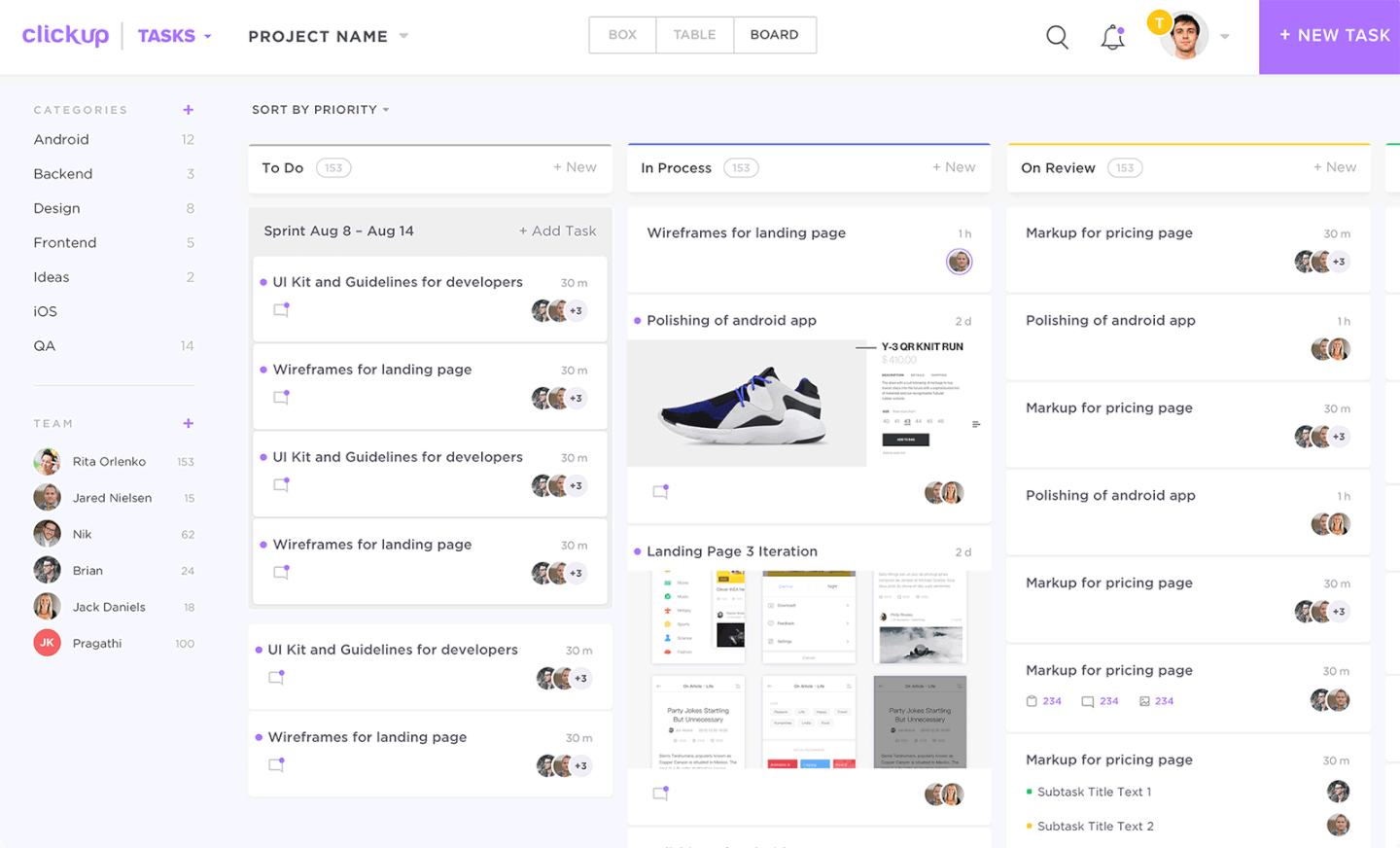
ClickUp è uno strumento software per la gestione del lavoro che offre funzionalità di gestione dei progetti, collaborazione di squadra, definizione degli obiettivi e gestione dei documenti. Gli utenti possono pianificare progetti e assegnare compiti per gestire il carico di lavoro e il tempo dei membri del team. Le funzionalità di gestione delle attività includono sottoattività, checklist, attribuzione di priorità, promemoria e modelli. Gli utenti possono filtrare e ordinare le attività e riordinarle secondo le proprie preferenze.
I grafici di Gantt, le board Kanban, i calendari e le timeline sono tutti disponibili per visualizzare il carico di lavoro del team. Il monitoraggio del tempo può essere effettuato direttamente nella piattaforma o tramite integrazioni di terze parti. I file possono essere condivisi tramite la piattaforma e gli utenti possono collaborare sul lavoro attraverso chat in tempo reale, lavagne virtuali, commenti e funzionalità di revisione del lavoro. Gli utenti possono impostare obiettivi misurabili direttamente in piattaforma e associarli ad attività specifiche, contribuendo a mantenere i membri del team allineati sugli obiettivi condivisi.
Le dashboard di reportistica sono disponibili nel software per monitorare la produttività del team, lo stato di avanzamento dei progetti, gli indicatori chiave di prestazione (KPI) e altre metriche di squadra. Questo include il monitoraggio degli obiettivi, del carico di lavoro, delle milestone e persino controlli automatici dello stato grazie alle capacità di apprendimento automatico del software.
ClickUp dispone di integrazioni native per altre app SaaS come Dropbox, Figma, GitHub, Google Drive, Harvest, HubSpot, Intercom, Loom, Microsoft Teams, OneDrive, Outlook, Slack, Toggl Track, Webhooks, Zoom e molte altre. Zapier può anche sbloccare integrazioni aggiuntive.
È disponibile un piano gratuito con attività e utenti illimitati, mentre i piani a pagamento partono da $9/utente/mese.
New Product Updates from ClickUp
ClickUp Adds Meetings Hub, Super Agent Templates, and ZoomInfo Integration
ClickUp adds a searchable Meetings Hub, new ways to clone and template Super Agents, and a ZoomInfo integration through the App Center. These updates improve meeting retrieval, agent reuse, and access to sales intelligence. For more information, visit ClickUp’s official site.

Teamwork.com
ideale per abilitare la collaborazione con i clienti

Teamwork è un sistema di gestione per agenzie flessibile che aiuta le agenzie a diventare più produttive e redditizie. Permette di gestire grandi volumi di progetti per i clienti dall'inizio alla fine. Teamwork consente di creare flussi di lavoro personalizzati e flessibili e offre un unico punto centrale per visualizzare i progetti del team e dei clienti.
Teamwork offre numerosi strumenti e funzionalità per aiutare le agenzie nella gestione del lavoro. Con la funzione Workload, puoi avere una panoramica completa della capacità del tuo team, gestire le risorse e mantenere il gruppo sulla giusta rotta. Un altro strumento molto apprezzato è la vista Gantt. Come racconta Melody MacKeand, project manager ed ex Principal Consultant di Teamwork: “In Teamwork, la vista Gantt è molto intuitiva; puoi spostare le attività e la linea temporale si aggiorna automaticamente.” Teamwork include anche il monitoraggio integrato del tempo per registrare le ore impiegate sulle attività e tenere traccia delle ore fatturabili. I report sulla redditività ti permettono di monitorare le prestazioni finanziarie per progetto o membro del team e confrontarle con il budget di quel cliente.
Una funzione particolarmente utile di questo software per agenzie è che puoi aggiungere i clienti come collaboratori gratuitamente, così potranno comunicare con il tuo team, lasciare commenti contestuali, revisionare i materiali e avere visibilità sull’avanzamento del progetto.
Teamwork si integra facilmente con altri strumenti come Gmail, Harvest, Hubspot, QuickBooks, Slack, Dropbox e molti altri.
Teamwork parte da $10/utente/mese. È disponibile anche una prova gratuita di 30 giorni
Altri sistemi di gestione delle agenzie
Le agenzie di pubblicità digitale possono avere difficoltà a trovare una soluzione software completa e adatta, quindi ecco alcuni strumenti aggiuntivi che non sono entrati nell’elenco principale. Se hai bisogno di ulteriori suggerimenti per sistemi utili alla gestione delle agenzie, dai un’occhiata a questi.
- Bonsai Agency Software
Ideale per gestire l'intero processo dell'agenzia
- Nutcache
Miglior sistema di gestione per agenzie per la fatturazione e la gestione delle spese
- FunctionFox
Il miglior software per team creativi e agenzie
- Parallax
Miglior software di gestione per agenzie per il monitoraggio e la previsione delle risorse
- Yanado
Miglior strumento di gestione per agenzie che usano Gmail
- Ravetree
Migliore sistema di gestione agenzia con acconti e fatturazione
- Workamajig Platinum
Ideale per team di marketing e creativi
- Service Provider Pro
Il miglior software per portali clienti e fatturazione
- Height
Ideale per collaborare con i clienti sui progetti
- Punchlist
Il miglior strumento gratuito per la gestione dei feedback dei clienti
- Gain
Il miglior sistema di gestione per agenzie social media
- Synergist
Migliore software per la gestione operativa di agenzie
- Insightful
Ideale per l'intelligence della forza lavoro nelle agenzie
- Monitask
Ideale per monitorare la produttività delle agenzie
- Project.co
Ideale per collaborare con i clienti
- ClickTime
Ideale per approfondimenti in tempo reale sul personale
- Accelo
Ideale per agenzie e società di consulenza di medie dimensioni
- Float.com
Ideale per la gestione delle risorse con visibilità finanziaria
- VOGSY
Ideale per agenzie internazionali che gestiscono risorse globali
- GoodDay
Ideale per il monitoraggio integrato del tempo
- Hub Planner by Milient
Ideale per pianificare le risorse delle agenzie


Puoi anche dare un'occhiata a questi strumenti spesso utilizzati nelle agenzie:
- Strumenti per tenere traccia del database dei clienti
- Software per pianificare e gestire il flusso di lavoro
Come Valuto i Sistemi di Gestione Agenzia
Valuto i sistemi di gestione agenzia su due livelli: le funzionalità di base che una piattaforma deve avere—come la rilevazione dei tempi, la fatturazione dei clienti e la pianificazione delle risorse—e i fattori differenzianti che separano una soluzione efficace da una generica.
Funzionalità di Base (Requisiti Fondamentali per Questa Lista)
Quando seleziono gli strumenti per la mia lista, valuto ciascuno su una scala da 0 (non offre la funzionalità) a 5 (eccelle in questo ambito) per ogni funzionalità chiave elencata qui sotto. Poi calcolo il punteggio totale dello strumento trasformandolo in percentuale. Ogni strumento deve raggiungere un punteggio totale minimo del 65% per essere considerato ai fini dell’inclusione.
- Gestione Progetti & Attività: Verifico se è possibile pianificare le consegne su più account clienti con dipendenze, scadenze e modelli adatti a campagne o rapporti a canone.
- Rilevazione Tempi & Timesheet: È importante poter distinguere le ore fatturabili da quelle non fatturabili a livello di attività, insieme con l’approvazione dei timesheet e opzioni di registrazione come timer o inserimento da mobile.
- Pianificazione Risorse & Capacità: Mi assicuro che vi siano viste sul carico di lavoro che mostrano la disponibilità del team rispetto alle attività in corso, così da poter assegnare nuovi progetti senza sovraccaricare designer o sviluppatori senior.
- Budgeting & Redditività del Progetto: La piattaforma dovrebbe tracciare costi e tariffe fatturabili per progetto o cliente, offrendo così una visione del margine in tempo reale invece di un’analisi su foglio di calcolo a fine mese.
- Gestione Clienti & CRM: Valuto se le anagrafiche clienti si connettono in modo significativo a progetti, contatti e storici delle interazioni, anziché restare scollegate in semplici liste di contatto.
- Fatturazione & Emissione Fatture: La fatturazione in agenzia è raramente semplice, quindi considero il supporto a modelli di fatturazione come time-and-materials, fee fissa e canone con ore tracciate che confluiscono direttamente nelle fatture.
Quando ho una lista di strumenti che soddisfano i criteri, considero cosa distingue ogni piattaforma dalle altre.
Fattori Differenzianti (Cosa Distingue i Fornitori)
Ecco come confronto e metto a confronto diversi fornitori:
Funzionalità Distintive
La gestione dei canoni ricorrenti è un grande fattore differenziante. Le agenzie che lavorano su base mensile hanno bisogno di tracciare le ore residue e i burn-down rate per ciascun cliente, e non tutte le piattaforme lo gestiscono adeguatamente. Guardo anche a dashboard di utilizzo e previsioni—conoscere l’efficienza fatturabile e le entrate previste del team ti aiuta a prendere decisioni sul personale prima che le lacune diventino problemi. Vale la pena segnalare anche la presenza di un generatore di proposte integrato, soprattutto quando i preventivi si convertono direttamente in progetti attivi senza dover reinserire dati.
Oltre le Caratteristiche
Le integrazioni contabili sono molto rilevanti. Se la tua agenzia utilizza QuickBooks o Xero, verifico se fatture e spese si sincronizzano in entrambe le direzioni per eliminare la doppia registrazione tra delivery e finanza. L’adeguatezza rispetto alla dimensione dell’agenzia è un altro elemento: una piattaforma progettata per agenzie da 200 persone può risultare eccessiva per uno studio creativo di 10 persone, e viceversa. Esamino inoltre la trasparenza dei prezzi, in particolare se moduli aggiuntivi per CRM o gestione risorse fanno lievitare i costi con la crescita del team oltre il numero iniziale di utenti.
Come scegliere un sistema di gestione delle agenzie
È facile sentirsi sopraffatti da lunghi elenchi di funzionalità e da prezzi complessi. Per aiutarti a rimanere concentrato durante il processo di scelta del software, ecco una lista di fattori chiave da tenere a mente:
| Fattore | Elementi da considerare |
| Scalabilità | Assicurati che il sistema possa crescere insieme alle esigenze della tua agenzia. Cerca funzionalità come l'espansione degli utenti, il supporto per un numero maggiore di clienti e flussi di lavoro adattabili man mano che la tua attività cresce. |
| Integrazioni | Verifica che il sistema possa integrarsi con gli strumenti utilizzati dal tuo team, come software di contabilità, CRM o piattaforme di posta elettronica, per ottimizzare le operazioni ed evitare silos. |
| Personalizzazione | Cerca opzioni per adattare i pannelli di controllo, i flussi di lavoro e i report del software ai processi del tuo team. |
| Facilità d'uso | Il tuo team ha bisogno di un sistema che possa adottare rapidamente. Scegli piattaforme con interfacce intuitive, navigazione semplice e risorse per la formazione iniziale. |
| Budget | Comprendi i costi totali, comprese le tariffe iniziali, gli abbonamenti ricorrenti, i componenti aggiuntivi e l'implementazione. Seleziona una soluzione che bilanci la convenienza economica con le funzionalità necessarie. |
| Misure di sicurezza | Assicurati che i dati dei clienti e dell'agenzia siano protetti. Cerca funzionalità come la crittografia dei dati, i controlli degli accessi basati sui ruoli e la conformità agli standard di sicurezza come il GDPR. |
| Strumenti di reportistica | Scegli un sistema con funzionalità avanzate di reportistica. Funzionalità come i pannelli di controllo in tempo reale e l'analisi personalizzata possono aiutare a monitorare le prestazioni e migliorare il processo decisionale. |
| Opzioni di assistenza | Un'assistenza clienti affidabile è importante. Cerca assistenza 24 ore su 24, 7 giorni su 7, responsabili dedicati o risorse per la risoluzione autonoma dei problemi. |
Tendenze nei sistemi di gestione delle agenzie
Nella mia ricerca ho raccolto numerosi aggiornamenti di prodotto, comunicati stampa e registri delle versioni di diversi fornitori di sistemi di gestione delle agenzie. Ecco alcune tendenze emergenti che sto monitorando:
- Analisi basata sull'intelligenza artificiale: I fornitori stanno integrando l'intelligenza artificiale per analizzare i dati dei clienti e le prestazioni delle agenzie, aiutando i team a prevedere le tendenze e ottimizzare le operazioni. Strumenti come le previsioni basate sull'intelligenza artificiale e l'analisi del sentiment consentono inoltre una pianificazione più efficace.
- Portali self-service per i clienti: Sempre più sistemi includono portali avanzati che consentono ai clienti di accedere agli aggiornamenti, condividere feedback e visualizzare l'avanzamento dei progetti. Ciò riduce le comunicazioni ripetute e migliora la trasparenza.
- Pannelli di controllo personalizzabili: Le agenzie desiderano pannelli di controllo adattabili in cui i team possano trascinare e rilasciare i widget, filtrare le metriche e concentrarsi sulle informazioni principali. Ad esempio, un'agenzia di marketing potrebbe visualizzare affiancati il ROI delle campagne, i budget dei clienti e le tempistiche per avere una panoramica immediata.
- Ottimizzazione integrata delle risorse: Gli strumenti ora aiutano ad assegnare le risorse umane e il tempo monitorando i carichi di lavoro e suggerendo modifiche. Funzionalità come il bilanciamento del carico di lavoro impediscono ai team di essere sovraccaricati.
- Controlli avanzati della privacy dei dati: Con la crescente importanza della sicurezza dei dati, i sistemi stanno aggiungendo strumenti come gli accessi basati sui ruoli e i registri di controllo per proteggere le informazioni sensibili, allineandosi al contempo a rigorosi standard di conformità come il GDPR.
Che cos'è un sistema di gestione delle agenzie?
Un sistema di gestione delle agenzie (AMS) è un tipo di software per i servizi professionali che aiuta le agenzie a gestire operazioni come progetti dei clienti, finanze, comunicazioni e risorse.
L'AMS consente alle agenzie di marketing, pubblicità e ricerca di personale di gestire efficacemente le proprie operazioni. Centralizzando i flussi di lavoro, automatizzando le attività e migliorando la collaborazione, semplifica i processi e riunisce variabili chiave — come dati dei clienti, budget, avanzamento dei progetti e prestazioni del team — su un'unica piattaforma. Questa integrazione favorisce una migliore organizzazione, trasparenza e un processo decisionale più consapevole.
Funzionalità
Quando selezioni i sistemi di gestione delle agenzie, presta attenzione alle seguenti funzionalità principali:
- Gestione dei clienti: Gestisci tutte le informazioni sui tuoi clienti in un unico posto, dai dati di contatto alla cronologia delle transazioni. Puoi personalizzare il servizio, monitorare le comunicazioni e non dovrai più cercare tra fogli di calcolo disordinati.
- Amministrazione delle polizze: Gestisci le polizze assicurative durante tutto il loro ciclo di vita, inclusi preventivi, appendici, rinnovi e cancellazioni. Questa funzionalità ti aiuta a risparmiare tempo ed evitare costosi errori quando gestisci modifiche complesse alle polizze.
- Gestione dei documenti: Archivia, organizza e recupera facilmente i documenti. Dì addio alle ricerche frenetiche: questa funzionalità ti consente di caricare e accedere ai file importanti proprio quando ne hai bisogno.
- Monitoraggio delle commissioni: Calcola, monitora e comunica automaticamente le commissioni. In questo modo avrai sempre sotto controllo i pagamenti senza dover fare calcoli manuali (a meno che tu non ami davvero i fogli di calcolo).
- Automazione dei flussi di lavoro: Semplifica le attività quotidiane come rinnovi, richieste di documenti e follow-up. È come impostare piccoli robot che si occupano del lavoro ripetitivo, così puoi concentrarti sui tuoi clienti.
- Report e analisi: Genera report dettagliati su vendite, ricavi, produttività e fidelizzazione dei clienti. Con questa funzionalità puoi prendere decisioni informate basate su dati reali invece di andare semplicemente a intuito.
- Funzionalità di integrazione: Collegati ad altri software diffusi, come piattaforme di posta elettronica, strumenti di contabilità o database del settore. Le integrazioni fluide ti fanno risparmiare tempo e riducono l'inserimento manuale dei dati.
- Gestione delle attività e del calendario: Assegna attività, imposta promemoria e mantieni la tua agenzia organizzata con un calendario condiviso. Questo aiuta tutti a rimanere in carreggiata, anche nelle giornate più impegnative.
- Accesso sicuro ai dati: Proteggi le informazioni sensibili dei clienti con solide autorizzazioni utente e la crittografia dei dati. Avrai la tranquillità di sapere che i dati della tua agenzia e dei tuoi clienti sono al sicuro.
- Accesso da dispositivi mobili: Gestisci la tua agenzia ovunque ti trovi con un accesso ottimizzato per dispositivi mobili o app dedicate. Puoi tenere il passo con le richieste dei clienti e le attività dell'agenzia sia dalla tua scrivania sia durante gli incontri con i clienti.
Funzionalità dell'AI
I sistemi di gestione delle agenzie integrano sempre più spesso l'AI, con i sistemi di gestione delle agenzie basati sull'AI che sbloccano nuovi livelli di efficienza e conoscenza.
- Inserimento automatico dei dati: L'AI può analizzare email e documenti per aggiornare automaticamente i record dei clienti, risparmiandoti il noioso lavoro manuale.
- Analisi predittiva: Ottieni previsioni sulla fidelizzazione dei clienti, sulle tendenze delle vendite e sui rinnovi delle polizze, così puoi affrontare proattivamente i potenziali problemi e cogliere nuove opportunità.
- Raccomandazioni intelligenti: L'AI suggerisce opportunità di vendita incrociata o aggiuntiva in base ai profili e al comportamento dei clienti, aiutandoti a far crescere la tua attività con meno tentativi.
- Chatbot e assistenti virtuali: Fornisci risposte immediate alle richieste dei clienti, pianifica appuntamenti e gestisci le richieste di routine, 24 ore su 24, 7 giorni su 7.
- Rilevamento delle frodi: Gli algoritmi avanzati di AI segnalano attività sospette o incongruenze nelle richieste di risarcimento e nelle domande, aiutandoti a proteggere la tua agenzia e i tuoi clienti.
- Analisi del sentiment: L'AI può analizzare le comunicazioni con i clienti per valutare il livello di soddisfazione, così puoi intervenire tempestivamente se qualcuno sembra insoddisfatto.
Vantaggi
L'implementazione di un sistema di gestione delle agenzie può offrire diversi vantaggi al tuo team e alla tua attività. Ecco alcuni dei principali:
- Organizzazione migliorata: Centralizza i dati relativi a clienti, progetti e risorse, così tutto è facile da trovare e gestire in un unico posto.
- Migliore gestione del tempo: Tiene traccia delle ore dedicate alle attività e ai progetti, aiutando i team a rimanere produttivi e concentrati.
- Maggiore redditività: Monitora budget, spese e fatturazione per mantenere i progetti in linea dal punto di vista finanziario e ridurre le spese eccessive.
- Collaborazione potenziata: Mantiene i team allineati con strumenti per elenchi di attività condivisi, aggiornamenti sui progetti e comunicazione in tempo reale.
- Report accurati: Fornisce informazioni chiare sulle prestazioni dei progetti, sull'utilizzo delle risorse e sulla redditività per prendere decisioni migliori.
- Flussi di lavoro semplificati: Automatizza attività ripetitive come la fatturazione, la creazione di report e l'assegnazione delle attività per risparmiare tempo e ridurre il lavoro manuale.
- Maggiore sicurezza dei dati: Protegge le informazioni sensibili con autorizzazioni basate sui ruoli e funzionalità di sicurezza incentrate sulla conformità.
Costi e prezzi
La scelta di un sistema di gestione delle agenzie richiede la comprensione dei vari modelli di prezzo e dei piani disponibili. I costi variano in base alle funzionalità, alle dimensioni del team e agli extra. La tabella seguente mostra i piani più comuni, i prezzi medi e le funzionalità tipiche presenti nelle soluzioni per la gestione delle agenzie:
Tabella comparativa dei piani per il sistema di gestione delle agenzie
| Tipo di piano | Prezzo medio | Funzionalità comuni |
| Piano gratuito | $0-$10/utente/mese | Gestione di base dei clienti, monitoraggio delle attività, spazio di archiviazione limitato e reportistica di base. |
| Piano personale | $10-$30/utente/mese | Gestione dei clienti, monitoraggio dei progetti, monitoraggio del tempo, reportistica di base e integrazioni limitate. |
| Piano aziendale | $30-$80/utente/mese | Reportistica avanzata, allocazione delle risorse, gestione finanziaria, archiviazione dei documenti e strumenti di collaborazione. |
| Piano per grandi aziende | $80+/utente/mese | Flussi di lavoro personalizzati, analisi avanzate, sicurezza potenziata, autorizzazioni basate sui ruoli e assistenza dedicata. |
Domande frequenti
Trova le risposte alle domande comuni che altre persone pongono su questo argomento.
Come scelgo il miglior sistema di gestione delle agenzie per il flusso di lavoro del mio team?
\u003cp class=\u0022p1\u0022\u003eInizia mappando il flusso di lavoro del tuo team ed elencando le funzionalità indispensabili. Cerca sistemi adatti alle dimensioni della tua agenzia, al tipo di progetto e allo stile di collaborazione. Richiedi dimostrazioni per verificare se l’interfaccia è chiara e corrisponde al modo in cui lavora il tuo team. Controlla le recensioni degli utenti e valuta i fornitori che offrono un avvio e un’assistenza solidi. Dai priorità agli strumenti con integrazioni e reportistica efficaci.\u003c/p\u003e
Il software di gestione delle agenzie può integrarsi con gli strumenti che il mio team utilizza già?
Sì, la maggior parte dei sistemi di gestione delle agenzie offre integrazioni dirette con strumenti comuni come Slack, Google Workspace o piattaforme di contabilità. Prima di prendere una decisione, chiedi ai fornitori l’elenco completo delle integrazioni supportate ed esplora le opzioni API per le connessioni personalizzate. Testare le integrazioni con gli strumenti utilizzati quotidianamente può aiutare a evitare interruzioni del flusso di lavoro.
Che tipo di avvio e assistenza dovrei aspettarmi dal fornitore di un sistema di gestione delle agenzie?
La maggior parte dei fornitori affidabili offre un avvio che va dalle risorse autonome alla formazione personalizzata del team. Di solito avrai a disposizione una base di conoscenza, assistenza via e-mail o chat e sessioni dal vivo per aiutare il team a iniziare. Verifica se l’assistenza continuativa è inclusa o se prevede costi aggiuntivi. Un’assistenza reattiva è fondamentale per risolvere rapidamente i problemi.
In che modo un sistema di gestione delle agenzie può contribuire a migliorare la visibilità e la reportistica dei progetti?
Il software di gestione delle agenzie offre una visione chiara dello stato dei progetti grazie a cruscotti, tempistiche delle attività e monitoraggio dei progressi. Otterrai report in tempo reale sull’utilizzo delle risorse, sui budget e sulle scadenze. Questo ti consente di individuare tempestivamente i problemi e prendere decisioni basate sui dati. I report personalizzabili possono aiutarti a dimostrare il valore ai clienti o alla dirigenza.
In che modo i sistemi di gestione delle agenzie gestiscono la sicurezza dei dati e la riservatezza dei clienti?
I sistemi leader utilizzano la crittografia, protocolli di accesso sicuri e autorizzazioni utente rigorose per proteggere i tuoi dati. Molti sono conformi a standard di settore come il GDPR o SOC 2. Chiedi ai fornitori informazioni sull’archiviazione dei dati, sulle procedure di backup e sulle politiche per mantenere riservati i file dei clienti. Scegli una piattaforma con pratiche di sicurezza trasparenti e aggiornate.
