

I 10 migliori software per servizi professionali recensiti per il 2026

10 Selezione dei migliori software per servizi professionali


Gestire i progetti può essere difficile. Ogni giorno devi destreggiarti tra scadenze, risorse e aspettative dei clienti. I software per servizi professionali possono alleggerire il carico organizzando le attività, monitorando il tempo e migliorando la collaborazione del team.
Ho trascorso innumerevoli ore a testare e recensire questi strumenti. So cosa funziona e cosa no. Il mio obiettivo è offrirti una panoramica imparziale delle migliori opzioni disponibili.
In questo articolo troverai informazioni chiare sulle migliori soluzioni software, sulle loro funzionalità e sui vantaggi che possono offrire al tuo team. Che si tratti di un piccolo team o di una grande azienda, qui troverai qualcosa che fa al caso tuo. Iniziamo e troviamo la soluzione più adatta alle tue esigenze.
Perché fidarsi dei nostri consigli sui software
Il nostro team testa e recensisce software dal 2012. In quanto project manager noi stessi, sappiamo quanto sia difficile — e importante — scegliere il software giusto.
Per questa guida, abbiamo valutato gli strumenti attraverso test pratici e ricerche indipendenti, assegnando un punteggio agli strumenti in base ai nostri criteri di selezione. Ci basiamo inoltre sulle competenze di leader di pensiero del settore e di professionisti attivi nella gestione dei progetti.
Le nostre recensioni riflettono il nostro giudizio editoriale umano, non un discorso di vendita.
Riepilogo dei migliori software per servizi professionali
Questa tabella comparativa riassume i dettagli sui prezzi delle mie migliori selezioni di software per servizi professionali, per aiutarti a trovare quello più adatto al tuo budget e alle esigenze della tua azienda.
| Tool | Best For | Trial Info | Price | ||
|---|---|---|---|---|---|
| 1 | Ideale per la reportistica in tempo reale su diverse operazioni aziendali | Prova gratuita di 14 giorni + demo gratuita disponibile | Da $19.90/utente/mese (fatturazione annuale) | Website | |
| 2 | Ideale per la gestione PSA end-to-end | Prova gratuita di 14 giorni + demo gratuita disponibile | Da $10/mese (fatturazione annuale) | Website | |
| 3 | Ideale per l'automazione dei servizi professionali | Demo gratuita disponibile | Prezzo su richiesta | Website | |
| 4 | Ideale per generare report accurati e ottenere approfondimenti utili | Prova gratuita di 14 giorni + piano gratuito disponibile | Da $10/utente/mese (fatturazione annuale) | Website | |
| 5 | La migliore per organizzazioni di servizi globali | Prova gratuita disponibile | A partire da $14/utente/mese (fatturazione annuale) | Website | |
| 6 | Ideale per la pianificazione del personale abilitata dall'IA | Demo gratuita disponibile | Prezzo su richiesta | Website | |
| 7 | Ideale per l'intero ciclo di vita dell'erogazione dei servizi | 10 giorni di prova gratuita e demo gratuita | Prezzi su richiesta | Website | |
| 8 | Il migliore per lo strumento di revisione dei documenti | Prova gratuita di 14 giorni + demo gratuita disponibile | A partire da $8/utente/mese (fatturato annualmente) | Website | |
| 9 | Ideale per la gestione delle finanze di progetto | Piano gratuito disponibile (massimo un utente) | Da $10/mese (fatturazione annuale, 3 utenti) | Website | |
| 10 | I migliori portali clienti per condividere approfondimenti sui progetti | Prova gratuita di 14 giorni | Da $19/mese/utente | Website |


Recensioni dei migliori software per servizi professionali
Di seguito trovi i miei riepiloghi dettagliati dei migliori software per servizi professionali inclusi nella mia selezione. Le mie recensioni offrono un’analisi dettagliata delle funzionalità principali, dei pro & contro, delle integrazioni e dei casi d’uso ideali di ogni strumento, per aiutarti a trovare quello più adatto a te.

Scoro
Ideale per la reportistica in tempo reale su diverse operazioni aziendali

Scoro è un software completo per la gestione del lavoro progettato per i servizi professionali, che offre una vasta gamma di funzionalità per aiutare ad aumentare la redditività dei servizi. Si rivolge a diversi settori e ruoli all'interno dell'azienda, fornendo strumenti per la gestione dei progetti, la preventivazione e la pianificazione del budget, la fatturazione, le vendite e il CRM, la pianificazione delle risorse, il monitoraggio del tempo e la reportistica.
Una delle caratteristiche principali di Scoro è il suo strumento di project management, che consente di gestire più progetti contemporaneamente, con funzionalità per assegnare compiti, impostare scadenze, monitorare i progressi in tempo reale e gestire efficacemente le risorse. Inoltre, gli strumenti di pianificazione dinamica della piattaforma permettono di apportare modifiche in tempo reale, gestendo eventuali cambiamenti all'ultimo minuto senza interrompere il flusso di lavoro dell'intero progetto.
Inoltre, le funzionalità avanzate di reportistica e analisi di Scoro offrono preziose informazioni su ogni aspetto delle operazioni aziendali. Questi report sono completamente personalizzabili e coprono tutto, dai report finanziari dettagliati che analizzano profitti e perdite alle analisi delle prestazioni che valutano il successo dei progetti e la produttività del team.
Le integrazioni includono Google Calendar, Microsoft Exchange, Xero, QuickBooks, Sage Intacct, Expensify, Stripe, Jira, Slack, Asana, Dropbox, PayPal e altro ancora.
New Product Updates from Scoro

Scoro Adds Quote Timelines, ELI Automation, and Partial Invoicing
Scoro now supports quote line start/end dates to build project timelines that carry into tasks and PDFs, expands ELI automation and conversation navigation, and adds partial invoicing by amount plus new accounting and HR integrations. For more information, visit Scoro's official site.

Ideale per la gestione PSA end-to-end

Productive è una soluzione software completa progettata per gestire processi end-to-end per servizi professionali e agenzie. Integra una vasta gamma di strumenti necessari per la gestione dei progetti, il monitoraggio del tempo, l'allocazione delle risorse e il controllo degli aspetti finanziari, tutto in un'unica piattaforma.
La piattaforma offre funzionalità avanzate di project management, come i diagrammi di Gantt per visualizzare le tempistiche dei progetti, la gestione delle attività per mantenere i team organizzati e la gestione del carico di lavoro per garantire un uso efficace delle risorse. Inoltre, Productive include strumenti per la rilevazione delle ore e la fatturazione, permettendo alle agenzie di registrare con precisione le ore lavorate, generare fatture e gestire i pagamenti.
Inoltre, gli strumenti CRM e di vendita della piattaforma aiutano a gestire le relazioni con i clienti e a semplificare il processo di vendita. Le agenzie possono facilmente pianificare orari, creare pipeline e monitorare lo stato dei progetti e delle trattative. Le funzionalità di gestione documentale e automazione di Productive riducono anche il carico amministrativo automatizzando le attività ripetitive e garantendo che tutti i membri del team abbiano accesso alle informazioni e alla documentazione più aggiornate sui progetti.
Le principali integrazioni includono Jira, Slack, QuickBooks, Xero, Zapier, Google Drive, Sage, BambooHR e HubSpot.
New Product Updates from Productive

Productive Adds Agent Triggers, Teams Integration, and Time Controls
Productive adds automated agent triggers, broader AI file support, Microsoft Teams integration, Resource Planner improvements, and new time entry controls. These updates expand automation while improving scheduling, collaboration, and time tracking. For more information, visit Productive’s official site.

Accelo
Ideale per l'automazione dei servizi professionali
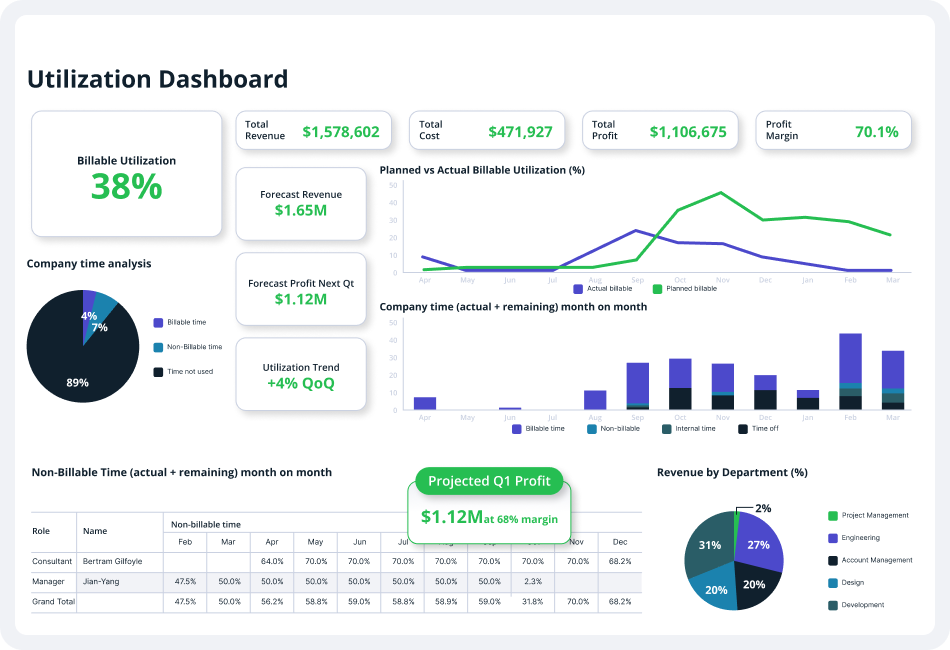
Accelo è una piattaforma completa di automazione dei servizi professionali (PSA) progettata per migliorare le operazioni delle aziende basate sui servizi. Offre una suite di strumenti per la gestione delle relazioni con i clienti (CRM), gestione dei progetti, monitoraggio del tempo, fatturazione, emissione di fatture e comunicazione con i clienti.
Le capacità di automazione della piattaforma offrono numerose opportunità per ridurre le attività ripetitive e manuali, liberando più tempo per il lavoro fatturabile con i clienti. Ad esempio, la funzione di conversione da preventivo a progetto consente agli utenti di creare nuovi progetti a partire da preventivi approvati con pochi clic. Inoltre, la fatturazione clienti in blocco automatizza la generazione di fatture clienti accurate in modelli preimpostati.
Inoltre, le funzionalità di gestione dei progetti di Accelo permettono ai team di collaborare, pianificare, gestire e consegnare progetti ai clienti in modo efficiente grazie a modelli di progetto, monitoraggio del tempo automatico, flussi di lavoro personalizzati e trigger di progetto. Altre funzionalità includono modelli di fattura con marchio, termini di pagamento personalizzati e integrazioni con software di contabilità che fanno risparmiare tempo e migliorano i processi.
Le integrazioni comprendono Google Workspace, Microsoft 365, Microsoft Exchange & Microsoft Outlook, Xero, QuickBooks Online, HubSpot, Mailchimp, Salesforce, Zapier, Stripe, PayPal, Jira, Continuum, Zendesk, Microsoft Power BI, Expensify, Gusto, HubSpot Partner Portal, Practice Ignition, Google Analytics e altri.

Wrike
Ideale per generare report accurati e ottenere approfondimenti utili

Wrike è un software di gestione progetti pensato per agenzie di marketing, team di progetto e fornitori di servizi professionali. Wrike offre una soluzione di collaborazione tutto-in-uno, che semplifica sia il processo di gestione dei progetti che l'allocazione delle risorse e la gestione delle persone.
La piattaforma permette agli utenti di collaborare sui progetti senza la necessità di dover costantemente chiamare, inviare messaggi o email per comunicare. Gli utenti hanno accesso a funzionalità collaborative come notifiche automatizzate, report dinamici, modifica in tempo reale e commenti in tempo reale per assicurare che ogni membro del team, stakeholder e collaboratore sia sempre sulla stessa pagina durante tutto il processo di sviluppo del progetto. Oltre alla possibilità di condividere informazioni e risorse digitali all'interno del team, la piattaforma è anche studiata per rendere più semplice a project manager e fornitori di servizi professionali la condivisione di aggiornamenti con i clienti secondo necessità.
I project manager possono migliorare notevolmente la collaborazione con i clienti semplicemente invitandoli su Wrike e rendendoli parte integrante del processo di lavoro. Questo permette ai clienti di fornire feedback e approvazioni dirette sulle decisioni critiche del progetto. I project manager possono inoltre ridurre il noioso processo di andata e ritorno per ottenere i requisiti dei clienti riguardo richieste di progetto o modifiche di ambito utilizzando moduli di richiesta personalizzati. Ciò consente ad agenzie e team di raccogliere rapidamente tutte le informazioni necessarie dai clienti in un unico posto e avviare progetti completamente pianificati con azioni predefinite, assegnatari di attività e scadenze.
New Product Updates from Wrike

Wrike Activity Reports Add Actor Type Details
Wrike’s Activity Report now displays actor type details, helping admins identify whether changes came from the UI, Automation, Wrike Agents, API, or AI via MCP. For more information, visit Wrike's official site.

VOGSY
La migliore per organizzazioni di servizi globali

VOGSY è una piattaforma unificata per la gestione di progetti e risorse che aiuta le organizzazioni a espandersi in nuovi paesi, a monitorare progetti internazionali e a collegare soluzioni finanziarie locali. Il software di automazione per i servizi professionali (PSA) offre soluzioni end-to-end pensate per le aziende di servizi, consentendo loro di concentrarsi su ciò che sanno fare meglio—offrire servizi—senza doversi preoccupare delle complessità legate all'espansione internazionale.
La piattaforma PSA basata sul cloud mette inoltre a disposizione strumenti per la gestione dei progetti, delle attività, delle risorse, il monitoraggio delle performance, oltre a funzioni di fatturazione e fatturazione automatica. Permette alle aziende di servizi professionali di gestire ogni cliente e ogni accordo, di adottare un approccio dalla preventivazione all'incasso più efficiente e sostenibile, e di compilare dichiarazioni di lavoro (SOW) più concise e affidabili su servizi e progetti prenotati in via preliminare.
Grazie al software di servizi professionali di VOGSY, startup e PMI possono pianificare i loro progetti in modo dettagliato. Possono sfruttare la struttura solida di suddivisione del lavoro della piattaforma per progettare e implementare una roadmap di progetto coesa, fondata su obiettivi chiave e risultati desiderati. Il software consente di pianificare il lavoro necessario, le risorse, i ricavi potenziali e i margini richiesti, spesso anche prima che l'accordo venga finalizzato.
Con la funzione di gestione delle attività, gli utenti possono assegnare compiti e affidarli alle persone con le giuste competenze per completarli nei tempi e nel budget previsti. Gli utenti possono creare attività per sé stessi o per l’intero team, gestendo tutto il ciclo dalla preventivazione all'incasso che include clienti, tipo di accordo, progetti proposti e ciclo di fatturazione e incasso.
Questo significa che le aziende di servizi possono concentrarsi su ciò che sanno fare meglio—offrire servizi—senza preoccuparsi delle complessità dell'espansione internazionale.
Le funzionalità includono gestione di risorse e progetti, visualizzazione di progetti internazionali e allocazione delle risorse, collaborazione, dashboard di reportistica, budgeting, automazione dei servizi professionali, diagrammi di Gantt, notifiche e avvisi.
Le integrazioni includono Google Workspace, Jira, Microsoft Excel, Xero, Intuit Quickbooks Online, Copper, Hubspot, Salesforce e Zoho.
VOGSY offre una versione gratuita accessibile tramite un account Gmail personale. Comprende tutte le funzionalità ma è limitata a un solo utente. I piani a pagamento partono da $13/utente/mese. Tutti i piani a pagamento richiedono un minimo di 10 utenti e includono una prova gratuita.
New Product Updates from VOGSY
VOGSY Adds Practices and Financial Totals in Planning Views
VOGSY adds a new Practices layer for consolidated reporting and displays revenue and cost totals directly in planning views so you get high-level insights and instant financial context without extra steps. For more information, visit VOGSY’s official site.
 .
.

Dayshape è una piattaforma di gestione delle risorse e pianificazione dedicata alle organizzazioni di servizi professionali, con strumenti basati sull'IA per la pianificazione della capacità, gestione finanziaria dei progetti e governance.
Per chi è ideale Dayshape?
Dayshape è particolarmente adatto a studi professionali di medie e grandi dimensioni—soprattutto nei settori della contabilità, della consulenza e legale—che necessitano di una visibilità completa sulle risorse dello studio e della pianificazione su larga scala.
Perché ho scelto Dayshape
Dayshape è una delle mie scelte migliori perché apprezzo il fatto che il suo motore di pianificazione basato sull'IA non si limita a mostrare le persone disponibili, ma elabora migliaia di opzioni di pianificazione al secondo e le classifica in base all'idoneità. In pratica, questo significa che il mio team può considerare simultaneamente competenze, preferenze, certificazioni e impegni già esistenti. Faccio inoltre affidamento sulla funzione di avanzamento automatico per gli incarichi ricorrenti, che consente di portare avanti le strutture di progetto senza dover ricostruire da zero i programmi ad ogni ciclo.
Funzionalità principali di Dayshape
- Gestione finanziaria dei progetti in tempo reale: Monitora budget, margini e previsioni di compensi a livello di progetto mentre i programmi cambiano.
- Pianificazione della capacità e della domanda: Visualizza l'offerta e la domanda a livello di studio attraverso team, livelli e orizzonti temporali in un'unica dashboard.
- Preferenze delle persone: Permetti al personale di impostare le preferenze di pianificazione e disponibilità, che il sistema tiene in considerazione nell'assegnazione delle risorse.
- Workflow di approvazione configurabili: Crea catene di approvazione a più fasi per le modifiche ai programmi in base alla struttura di governance dello studio.
Integrazioni Dayshape
Dayshape si integra con i principali sistemi ERP, PSA e per la gestione degli studi, tra cui integrazioni nominali con Workday, SAP, OpenHR e Dynamics 365. Dayshape offre anche una soluzione pacchettizzata co-sviluppata con Workday, chiamata Dayshape Intelligent Staffing, con integrazioni predefinite per gli studi che già utilizzano Workday. Il supporto Zapier non è chiaramente documentato e la disponibilità di API per integrazioni personalizzate non è confermata dal sito del fornitore.
Pros and Cons
Pros:
- L'IA suggerisce corrispondenze di risorse classificate a livello aziendale
- Gestione finanziaria dei progetti in tempo reale integrata nella pianificazione
- Affidato dalle Big Four della contabilità
Cons:
- Difficoltà nella gestione di grandi volumi di progetti di piccole dimensioni
- Personalizzazione limitata di dashboard e report

Kantata
Ideale per l'intero ciclo di vita dell'erogazione dei servizi
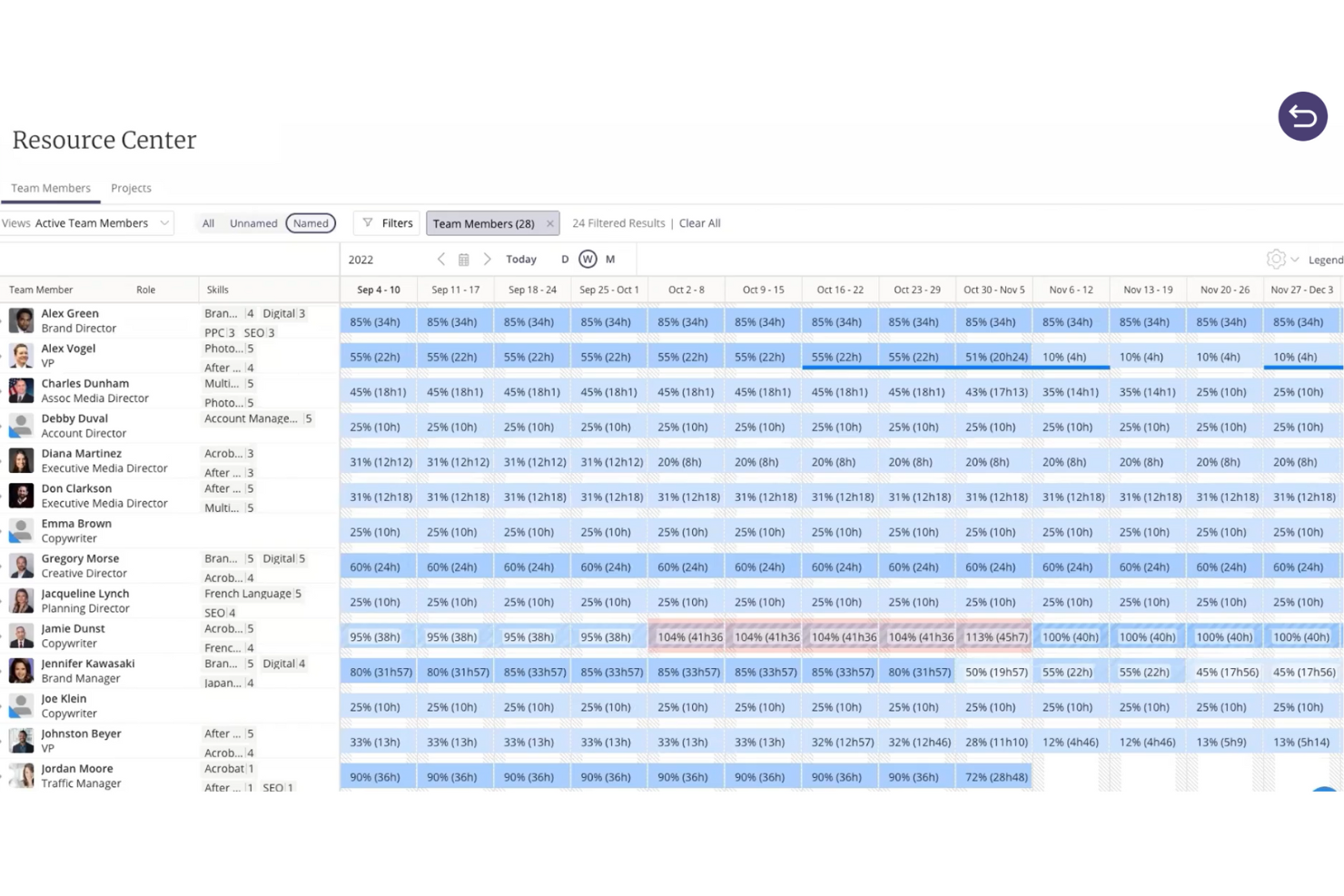
Kantata è una piattaforma per i servizi professionali progettata appositamente per aiutare le aziende a gestire con facilità incarichi complessi per i clienti. Invece di affidarsi a strumenti scollegati per progetti, risorse e reportistica, riunisce tutto in un unico sistema semplificato, così il tuo team può pianificare, realizzare e analizzare il lavoro.
Ciò che distingue Kantata è il supporto all'intero ciclo di vita dell'erogazione dei servizi: dalla stima alla pianificazione, dall'esecuzione all'analisi e all'ottimizzazione. Puoi prevedere la domanda, allineare le risorse alle esigenze dei progetti e monitorare in tempo reale budget e redditività. Collegando progetti, dati finanziari e personale in un'unica visualizzazione, Kantata offre la chiarezza necessaria per prendere decisioni sicure e mantenere gli incarichi in piena efficienza dall'inizio alla fine.
Kantata pone inoltre l'accento sulla collaborazione e sulla business intelligence. I feed delle attività, le bacheche delle attività e i sondaggi integrati mantengono coinvolti team e clienti durante l'intera erogazione, mentre i dashboard personalizzabili e oltre 70 report predefiniti fanno emergere informazioni sull'utilizzo, sullo stato del portafoglio e sulla redditività. Questa combinazione di pianificazione incentrata sulle persone e visibilità basata sui dati facilita la realizzazione costante di risultati positivi per i clienti.
New Product Updates from Kantata

Kantata Adds Access Group Change History
Kantata adds Access Groups History, letting account administrators track changes to group details, membership, and permissions in Recent History. The update also makes these events available through the Subscribed Events API for broader monitoring. For more information, visit Kantata’s official site.
 .
.
Workzone
Il migliore per lo strumento di revisione dei documenti

Workzone è un software adattabile per la gestione dei progetti, pensato per soddisfare le esigenze specifiche dei servizi professionali, del marketing, delle operation e dei team IT. Il suo design pone l'accento sulla semplicità e sulla collaborazione, rendendolo una scelta interessante per i professionisti che desiderano migliorare la visibilità dei progetti e ottimizzare i flussi di lavoro. Grazie a funzionalità come la revisione dei documenti e l'organizzazione delle richieste, Workzone affronta le difficoltà della gestione di progetti complessi senza aggiungere livelli di complessità non necessari.
Perché ho scelto Workzone
Ho scelto Workzone per la sua forte attenzione alla collaborazione e alla gestione del ciclo di vita dei progetti, aspetti fondamentali per i servizi professionali. La funzionalità di visibilità dei progetti consente di monitorare facilmente i progressi, assicurando che nulla venga trascurato. Inoltre, lo strumento di revisione dei documenti è prezioso per i team che necessitano di frequenti approvazioni e revisioni, poiché offre uno spazio centralizzato per queste attività. Nel complesso, queste funzionalità rendono Workzone un'ottima soluzione per chi opera nei servizi professionali e desidera ottimizzare i propri processi di gestione dei progetti.
Funzionalità principali di Workzone
Oltre all'attenzione alla collaborazione e alla gestione del ciclo di vita, ho individuato diverse altre funzionalità che ne aumentano il valore per i servizi professionali:
- Report predefiniti: questi report aiutano il team a gestire i carichi di lavoro, monitorare i budget e allocare le risorse in modo efficiente.
- Moduli per le richieste di progetto: semplificano il processo di raccolta centralizzando le richieste e assicurando che tutte le informazioni necessarie vengano raccolte fin dall'inizio.
- Modelli: con oltre 1.000 modelli disponibili, puoi avviare rapidamente nuovi progetti personalizzati in base alle esigenze specifiche del tuo settore.
- Formazione e assistenza illimitate: ciò garantisce che il team possa sfruttare appieno le funzionalità di Workzone senza doversi preoccupare di costi aggiuntivi.
Integrazioni di Workzone
Le integrazioni includono Slack, Microsoft Teams, Google Drive, Salesforce, Dropbox, Box e SharePoint. È disponibile un'API per integrazioni personalizzate.
Pros and Cons
Pros:
- Elevata visibilità e monitoraggio dei progetti
- Revisione e approvazioni dei documenti integrate
- Gestione strutturata delle richieste e dei carichi di lavoro
Cons:
- Ecosistema di integrazioni più ridotto rispetto ai concorrenti
- Esperienza mobile più limitata rispetto a quella desktop
New Product Updates from Workzone

Workzone Enterprise Adds Multi-Stage Approval Workflows
Workzone Enterprise now includes Approval Workflows, enabling multi-stage document approvals to standardize complex processes and reduce manual effort. For more information, visit Workzone's official site.
 .
.
OnePlan
Ideale per la gestione delle finanze di progetto
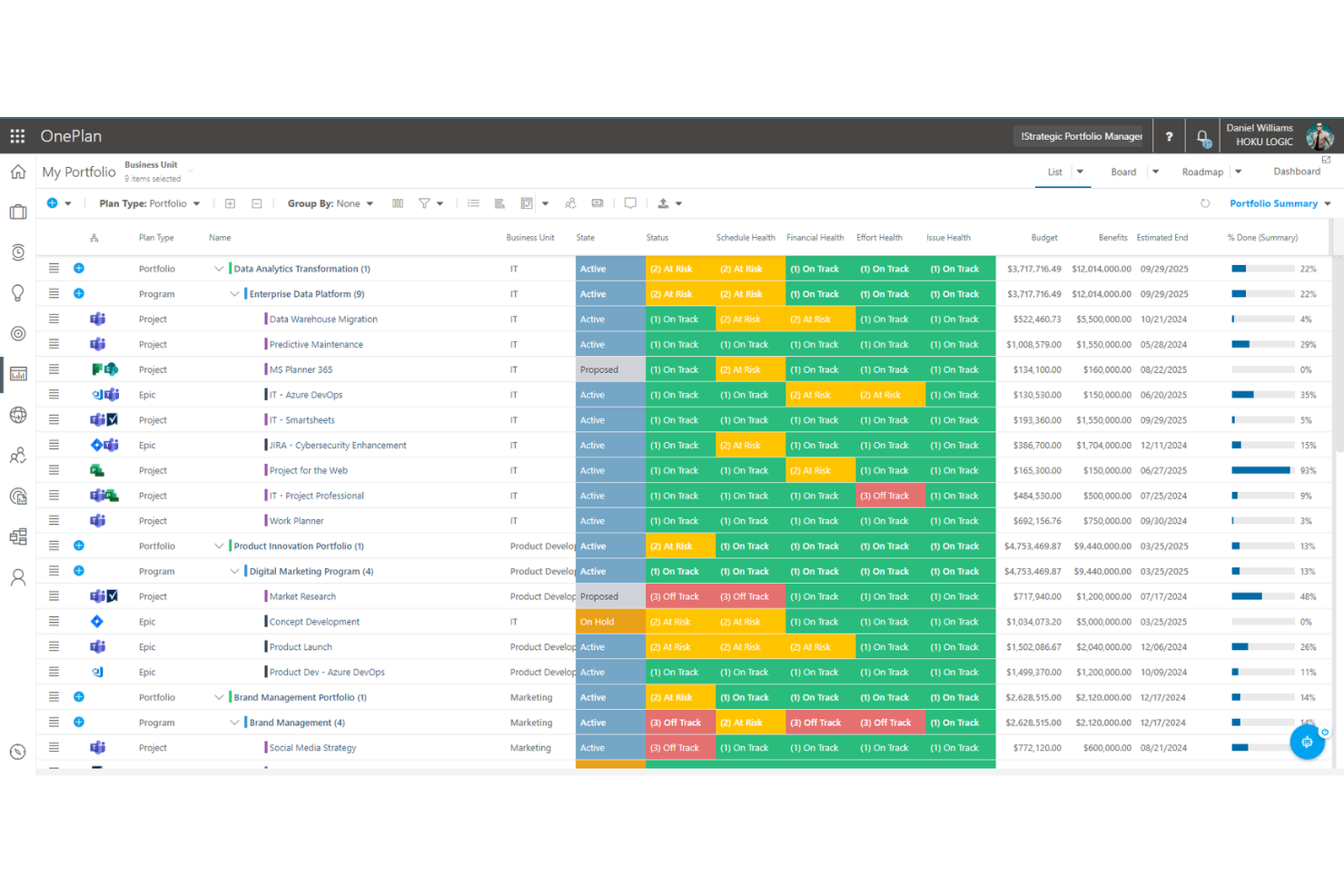
OnePlan è uno strumento completo di gestione strategica del portafoglio abilitato dall'AI che aiuta le organizzazioni ad allineare le strategie aziendali con le attività operative.
Apprezzo particolarmente le sue potenti funzionalità di pianificazione delle risorse e di automazione dei servizi professionali (PSA). OnePlan consente alle aziende di servizi professionali di allocare le risorse in modo efficiente, tenere traccia delle ore fatturabili e gestire le finanze di progetto su tutto il portafoglio. Le sue avanzate capacità di rilevazione del tempo e di fatturazione garantiscono l'emissione di fatture accurate e un migliore controllo finanziario. Inoltre, l'integrazione di OnePlan con i più diffusi strumenti di collaborazione favorisce il lavoro di squadra e migliora la visibilità dei progetti.
Altre funzionalità chiave includono roadmap visuali, lavagne kanban, collaborazione tra team, pianificazione della capacità, gestione dei rischi, monitoraggio del tempo, gestione delle dipendenze, ottimizzazione del portafoglio, flussi di lavoro personalizzati, dashboard in tempo reale e reportistica completa.
OnePlan si integra con una vasta gamma di strumenti di terze parti, come Microsoft Teams, Project For The Web, monday.com, Workday, Azure DevOps, Smartsheet e Jira.

Rocketlane
I migliori portali clienti per condividere approfondimenti sui progetti

Rocketlane è un software per servizi professionali progettato appositamente per gestire progetti rivolti ai clienti. Combina in modo unico la gestione dei progetti, la collaborazione su documenti e la comunicazione per aiutare i team a raggiungere gli obiettivi di progetto, accelerare il time-to-value e offrire un'esperienza cliente a 5 stelle.
Rocketlane offre viste private e condivise per i piani di progetto e i documenti, oltre a un portale clienti per stakeholder e clienti. Puoi anche codificare le tue best practice con modelli di progetto e di documento, creando template una volta e riutilizzandoli per sempre nei diversi progetti.
Con Rocketlane, potrai mantenere i clienti coinvolti e renderli responsabili attraverso promemoria, notifiche ed email operative. Potrai lavorare insieme, creare nuovi documenti o incorporare quelli esistenti, collaborare in modo sincrono su di essi e sfruttare una chat interna simile a Slack direttamente su Rocketlane.
Rocketlane parte da $19/utente/mese e offre una prova gratuita di 14 giorni.
New Product Updates from Rocketlane

Rocketlane Introduces Governance and Workforce Agents
Rocketlane introduces Governance Agents and Workforce Agents to automate delivery processes and recurring tasks. These updates help teams enforce rules and streamline project execution. For more information, visit Rocketlane’s official site.
 .
.Altri software per servizi professionali
Ecco alcune altre opzioni di software per servizi professionali che non sono entrate nella mia selezione, ma che vale comunque la pena prendere in considerazione:
- HaloPSA
Miglior software PSA per MSP
- Forecast
Ideale per agenzie e società di consulenza di medie dimensioni
- Bonsai Agency Software
Ideale per la gestione integrata di progetti, clienti e finanze
- Birdview
Ideale per reportistica BI
- Projector
Miglior software PSA per l'accessibilità
- Polaris PSA By Replicon
Il miglior PSA con allocazione delle risorse, monitoraggio del tempo, fatturazione e reportistica
- Adobe Workfront
Miglior software PSA multipiattaforma
- Kimble
Ideale per utenti Salesforce e società di consulenza gestionale
- Parallax
Ideale per una gestione efficiente dei progetti e operazioni aziendali semplificate
- Ravetree
Ideale per contratti a canone ricorrente
- Workamajig Platinum
Ideale per team creativi
- Netsuite OpenAir
Ideale per piccole imprese
- Upland
Ideale per gestire team numerosi
- Deltek Workbook
Ideale per trasparenza e comunicazione con il cliente
- Unit4PSA
Ideale per la gestione amministrativa end-to-end
- Height
Ideale per la pianificazione di progetti e risorse cross-funzionale
- Changepoint
Migliore PSA integrato con CRM
- Celoxis
Miglior PSS per imprese
- ClickTime
Ideale per aziende di medie dimensioni che desiderano centralizzare i processi di gestione delle risorse
- Hubstaff
I migliori report e analisi sulla gestione del tempo per servizi professionali (PSS)


Come valuto il software per i servizi professionali
Divido la mia valutazione in due livelli: la base che ogni strumento deve soddisfare—tracciamento del tempo fatturabile, capacità delle risorse e fatturazione ai clienti—e i fattori differenzianti che distinguono i migliori PSA.
Funzionalità principali (requisiti fondamentali per questa lista)
Quando seleziono gli strumenti per la mia lista, valuto ciascuno su una scala da 0 (non offre la funzionalità) a 5 (eccelle in quest'area) per ogni funzionalità principale elencata di seguito. Poi, calcolo il punteggio totale dello strumento in una percentuale. Ogni strumento deve raggiungere un punteggio totale minimo del 65% per essere preso in considerazione per l’inclusione.
- Pianificazione e consegna dei progetti: Cerco strumenti di pianificazione che gestiscono dipendenze, milestone e baseline—ad esempio la mappatura di un rollout ERP in più fasi attraverso diversi flussi di lavoro con percorsi critici chiari.
- Gestione delle risorse: Abbinare il consulente giusto a un progetto in base a competenze, disponibilità e target di utilizzo è fondamentale, quindi valuto come ogni strumento gestisce la pianificazione della capacità.
- Tracciamento di tempo e spese: Ogni strumento dovrebbe consentire la distinzione tra ore fatturabili e non fatturabili e gestire listini prezzi, poiché una rilevazione accurata è alla base di tutto, dalla fatturazione alla successiva analisi dei margini.
- Finanza di progetto e fatturazione: Verifico se una piattaforma supporta più modelli di fatturazione—costo fisso, a tempo e materiali, basata su milestone—e monitora il budget rispetto al consuntivo a livello di commessa.
- Analisi di utilizzo e redditività: Dashboard che visualizzano KPI in tempo reale come tasso di utilizzo fatturabile, percentuali di realizzo e margini per progetto aiutano i leader a prendere decisioni su staffing e prezzi.
- Integrazioni PSA-CRM/ERP: Collegare i dati di delivery con CRM e contabilità è importante, quindi valuto i connettori nativi e la profondità delle API per strumenti come Salesforce, QuickBooks e NetSuite.
Dopo aver individuato gli strumenti che soddisfano tali criteri, considero ciò che distingue ciascuna piattaforma.
Fattori differenzianti (ciò che distingue i fornitori)
Ecco come confronto i diversi fornitori:
Caratteristiche distintive
L'automazione dalla proposta al pagamento è un importante fattore di differenziazione: cerco piattaforme che collegano la creazione dell’opportunità allo SOW, allocazione delle risorse, delivery e fatturazione senza passaggi manuali. Anche la pianificazione degli scenari è importante quando si gestisce un portafoglio in crescita e occorre modellare l'impatto di nuove acquisizioni su organico e margini. I portali per i clienti dove i responsabili possono approvare deliverable e visualizzare lo stato del progetto riducono le riunioni di aggiornamento e aumentano la trasparenza degli incarichi.
Oltre le funzionalità
Dimensione e settore aziendale influenzano molto la mia valutazione. Uno studio di design con cinque persone e una società IT con 500 consulenti hanno esigenze molto diverse per quanto riguarda il supporto multi-entità, la gestione delle valute e i modelli di progetto. Valuto anche le strutture di prezzo—se il fornitore addebita per postazione fatturabile, per utente, o offre pacchetti modulari—poiché il costo totale di proprietà cambia drammaticamente in caso di crescita. Anche i tempi di implementazione sono rilevanti, soprattutto per le aziende che necessitano di una formazione specifica per il settore anziché una configurazione SaaS generica.
Come scegliere un software per servizi professionali
È facile perdersi in lunghi elenchi di funzionalità e strutture di prezzo complesse. Per aiutarti a rimanere concentrato mentre affronti il tuo processo di selezione del software, unico per le tue esigenze, ecco un elenco di fattori da tenere a mente:
| Fattore | Cosa considerare |
|---|---|
| Scalabilità | Il software può crescere insieme alla tua attività? Verifica se supporta un numero maggiore di utenti o progetti man mano che espandi l’attività. Cerca piani tariffari flessibili in grado di adattarsi alla crescita. |
| Integrazioni | Si integra con gli strumenti che già utilizzi? Assicurati che si colleghi al tuo CRM, al software di contabilità o ad altre app essenziali per evitare interruzioni del flusso di lavoro. |
| Personalizzazione | Puoi adattare il software alle tue esigenze? Assicurati di poter modificare flussi di lavoro, campi e dashboard in base ai tuoi processi e alle tue preferenze. |
| Semplicità d’uso | L’interfaccia è intuitiva per il tuo team? Prova la versione di prova per verificare se è facile da usare e riduce la curva di apprendimento, favorendo un’adozione rapida. |
| Implementazione e onboarding | Quanto tempo ci vorrà per iniziare? Informati sul processo di onboarding, sulle risorse di formazione e sull’assistenza per garantire una transizione fluida senza tempi di inattività. |
| Costo | Rientra nel tuo budget? Confronta il costo con le tue esigenze e considera eventuali costi nascosti o addebiti aggiuntivi per funzionalità o utenti extra. |
| Misure di sicurezza | Protegge i tuoi dati? Verifica la crittografia dei dati, i controlli degli accessi e la conformità del software agli standard di sicurezza per mantenere al sicuro le tue informazioni. |
| Disponibilità dell’assistenza | L’aiuto è disponibile quando ne hai bisogno? Verifica la disponibilità dell’assistenza clienti, incluse la chat dal vivo, l’assistenza telefonica e i tempi di risposta per i problemi urgenti. |
Che cos’è il software per i servizi professionali?
Il software per i servizi professionali è uno strumento progettato per aiutare le aziende a gestire i progetti dei clienti, tenere traccia del tempo e gestire la fatturazione e l’emissione delle fatture. Professionisti come consulenti, commercialisti e team legali utilizzano solitamente questi strumenti per organizzare il proprio lavoro e migliorare l’efficienza. Le funzionalità di gestione dei progetti, monitoraggio del tempo e fatturazione aiutano a organizzare le attività, rispettare le scadenze e garantire una fatturazione accurata ai clienti. Nel complesso, questi strumenti semplificano i processi complessi, rendendo più facile per i team offrire servizi di qualità.
Funzionalità
Quando scegli un software per i servizi professionali, presta attenzione alle seguenti funzionalità principali:
- Gestione dei progetti: Aiuta a pianificare, eseguire e monitorare i progetti in modo efficace, garantendo il rispetto delle scadenze.
- Monitoraggio del tempo: Registra con precisione le ore fatturabili, facilitando la fatturazione ai clienti e la gestione della produttività del team.
- Fatturazione ed emissione delle fatture: Automatizza la creazione delle fatture e tiene traccia dei pagamenti, riducendo il carico di lavoro amministrativo.
- Pianificazione delle risorse: Assegna e gestisce le risorse in modo efficiente, garantendo un uso ottimale del team e degli strumenti.
- Strumenti di collaborazione: Facilita la comunicazione e la collaborazione tra i membri del team, migliorando i risultati dei progetti.
- Funzionalità di integrazione: Si collega ai software esistenti, come gli strumenti CRM e di contabilità, garantendo flussi di lavoro fluidi.
- Dashboard personalizzabili: Consentono di adattare l’interfaccia per visualizzare dati e metriche rilevanti e ottenere rapidamente informazioni utili.
- Misure di sicurezza: Proteggono i dati sensibili con crittografia e controlli degli accessi, garantendo la conformità agli standard.
- Disponibilità dell’app mobile: Fornisce l’accesso alle funzionalità essenziali in mobilità, mantenendoti connesso a progetti e attività.
- Analisi basate sull’intelligenza artificiale: Offre informazioni utili attraverso l’analisi dei dati, aiutandoti a prendere decisioni aziendali consapevoli.
Vantaggi
L’implementazione di un software per i servizi professionali offre diversi vantaggi al tuo team e alla tua attività. Ecco alcuni dei benefici che puoi aspettarti:
- Maggiore efficienza: Automatizza attività dispendiose in termini di tempo, come la fatturazione e la pianificazione delle risorse, liberando tempo da dedicare a lavori più importanti.
- Collaborazione migliore: Offre strumenti per la comunicazione e la condivisione dei file, mantenendo i membri del team connessi e informati.
- Fatturazione accurata: Tiene traccia delle ore fatturabili e delle spese, garantendo fatture precise e riducendo le controversie con i clienti.
- Processo decisionale più efficace: Fornisce analisi basate sull’intelligenza artificiale e dashboard personalizzabili che offrono informazioni sulle prestazioni dei progetti.
- Scalabilità: Cresce insieme alla tua attività, supportando un numero maggiore di utenti e progetti senza dover rinnovare completamente il sistema.
- Maggiore sicurezza: Protegge i dati dei clienti e dell’azienda con crittografia e controlli degli accessi, mantenendo la fiducia e la conformità.
- Accessibilità da dispositivi mobili: Consente ai membri del team di accedere alle informazioni fondamentali e gestire le attività da qualsiasi luogo, aumentando la flessibilità.
Costi e prezzi
La selezione di un software per i servizi professionali richiede la comprensione dei vari modelli di prezzo e dei piani disponibili. I costi variano in base alle funzionalità, alle dimensioni del team, ai componenti aggiuntivi e ad altro ancora. La tabella seguente riassume i piani più comuni, i relativi prezzi medi e le funzionalità tipicamente incluse nelle soluzioni software per i servizi professionali:
Tabella comparativa dei piani per i software per servizi professionali
| Tipo di piano | Prezzo medio | Funzionalità comuni |
|---|---|---|
| Piano gratuito | $0 | Gestione di base dei progetti, monitoraggio limitato del tempo e strumenti di collaborazione di base. |
| Piano personale | $5-$25/utente/mese | Gestione dei progetti, monitoraggio del tempo, fatturazione ed emissione di fatture e reportistica di base. |
| Piano aziendale | $30-$75/utente/mese | Gestione avanzata dei progetti, pianificazione delle risorse, integrazioni e sicurezza avanzata. |
| Piano per aziende | $80-$150/utente/mese | Dashboard personalizzabili, analisi basate sull'IA, supporto prioritario e funzionalità complete di conformità. |
Domande frequenti sui software per servizi professionali
Ecco alcune risposte alle domande comuni sui software per servizi professionali:
I software per servizi professionali possono integrarsi con altri strumenti?
Sì, la maggior parte dei software per servizi professionali può integrarsi con strumenti come i sistemi CRM, i software di contabilità e le piattaforme di comunicazione. Questa integrazione contribuisce a creare un flusso di lavoro unificato, consentendo al team di accedere a tutte le informazioni necessarie in un unico luogo. Controlla le opzioni di integrazione del software per assicurarti che si colleghi agli strumenti che già utilizzi.
La sicurezza dei dati è una preoccupazione per i software per servizi professionali?
Sì, la sicurezza dei dati è una preoccupazione fondamentale. Cerca un software che offra crittografia, controlli degli accessi e conformità agli standard del settore. È importante assicurarsi che i dati dei clienti e le informazioni sensibili siano protetti dagli accessi non autorizzati. Durante il processo di valutazione, chiedi sempre informazioni sulle misure di sicurezza del software.
Quanto tempo richiede l'implementazione di un software per servizi professionali?
Il tempo di implementazione varia in base alla complessità del software e al livello di preparazione del team. Alcuni strumenti offrono una configurazione rapida con modelli e guide, mentre altri possono richiedere una personalizzazione dettagliata. Prevedi un periodo di transizione durante il quale il team possa imparare a utilizzare il sistema e adattare i flussi di lavoro. Prendi in considerazione risorse come formazione e assistenza per semplificare il processo.
Cosa succede ora:
Se stai cercando un software per servizi professionali, contatta gratuitamente un consulente SoftwareSelect per ricevere consigli.
Compili un modulo e partecipi a una breve conversazione durante la quale verranno analizzate nel dettaglio le tue esigenze. In seguito riceverai una selezione ristretta di software da valutare. Ti assisteranno anche durante l'intero processo di acquisto, comprese le negoziazioni sul prezzo.