

I 10 migliori software di automazione dei servizi professionali 2026

10 Miglior software di automazione dei servizi professionali


Il miglior software di automazione dei servizi professionali ti aiuta a gestire la consegna dei progetti, monitorare i tassi di utilizzo e le tariffe fatturabili e migliorare le operazioni e i processi aziendali per offrire un'esperienza migliore ai clienti. Puoi utilizzarlo per mantenere solide relazioni con i tuoi clienti, sviluppare una buona reputazione e far crescere la tua attività per fornire più servizi a un numero maggiore di clienti.
Ho utilizzato i miei 15 anni di esperienza nei servizi professionali e nella gestione dei progetti per valutare oltre 20 strumenti di automazione dei servizi professionali. Leggi di seguito la mia analisi di ciascuno strumento, delle funzionalità principali e dei casi d'uso. Ti aiuterò a trovare lo strumento giusto per migliorare la visibilità, l'allocazione delle risorse e la fatturazione, oltre a ottenere informazioni più dettagliate sulle tue finanze, sulle operazioni e sulla soddisfazione complessiva dei clienti.
Tabella comparativa delle soluzioni software di automazione dei servizi professionali
Confronta prezzi e specifiche di ogni strumento nella mia lista dei migliori software di automazione dei servizi professionali qui sotto.
| Tool | Best For | Trial Info | Price | ||
|---|---|---|---|---|---|
| 1 | Ideale per l'automazione della gestione lavorativa tutto-in-uno | Prova gratuita di 14 giorni + demo gratuita disponibile | Da $19.90/utente/mese (fatturazione annuale) | Website | |
| 2 | Ideale per monitorare insieme ore e spese | Demo gratuita disponibile | Da $20/utente/mese | Website | |
| 3 | Ideale per la gestione PSA end-to-end | Prova gratuita di 14 giorni + demo gratuita disponibile | A partire da $10/mese (fatturazione annuale) | Website | |
| 4 | Ideale per massimizzare la redditività dei progetti dal preventivo all'incasso | Demo gratuita disponibile | Prezzi su richiesta | Website | |
| 5 | Ideale per l'automazione IT | Prova gratuita di 30 giorni + demo gratuita disponibile | Da $129/tecnico/mese (fatturazione annuale) | Website | |
| 6 | Ideale per la gestione dell'intero ciclo di vita del servizio | Non disponibile | Prezzo su richiesta | Website | |
| 7 | Ideale per automazioni di collaborazione con i clienti integrate | Prova gratuita di 14 giorni + piano gratuito disponibile | Da $10/utente/mese (fatturazione annuale) | Website | |
| 8 | Ideale per organizzazioni di servizi con risorse e progetti a livello globale | Prova gratuita disponibile | Da $14/utente/mese (fatturazione annuale) | Website | |
| 9 | Ideale per la crescita operativa degli MSP | Prova gratuita di 21 giorni + demo gratuita disponibile | Da $149/tecnico/mese (fatturazione annuale) | Website | |
| 10 | Ideale con oltre 1.000 connettori di app preconfigurati | Demo gratuita disponibile | Prezzo su richiesta | Website |


Perché fidarsi dei nostri consigli sui software
Il nostro team testa e recensisce software dal 2012. In quanto project manager noi stessi, sappiamo quanto sia difficile — e importante — scegliere il software giusto.
Per questa guida, abbiamo valutato gli strumenti attraverso test pratici e ricerche indipendenti, assegnando un punteggio agli strumenti in base ai nostri criteri di selezione. Ci basiamo inoltre sulle competenze di leader di pensiero del settore e di professionisti attivi nella gestione dei progetti.
Le nostre recensioni riflettono il nostro giudizio editoriale umano, non un discorso di vendita.

Panoramica delle migliori soluzioni software di automazione dei servizi professionali
Ecco una breve descrizione di ogni soluzione di automazione dei servizi professionali presente nella mia lista, del suo caso d’uso migliore, di alcune funzionalità degne di nota e di schermate che offrono una panoramica dell’interfaccia utente.

Scoro
Ideale per l'automazione della gestione lavorativa tutto-in-uno
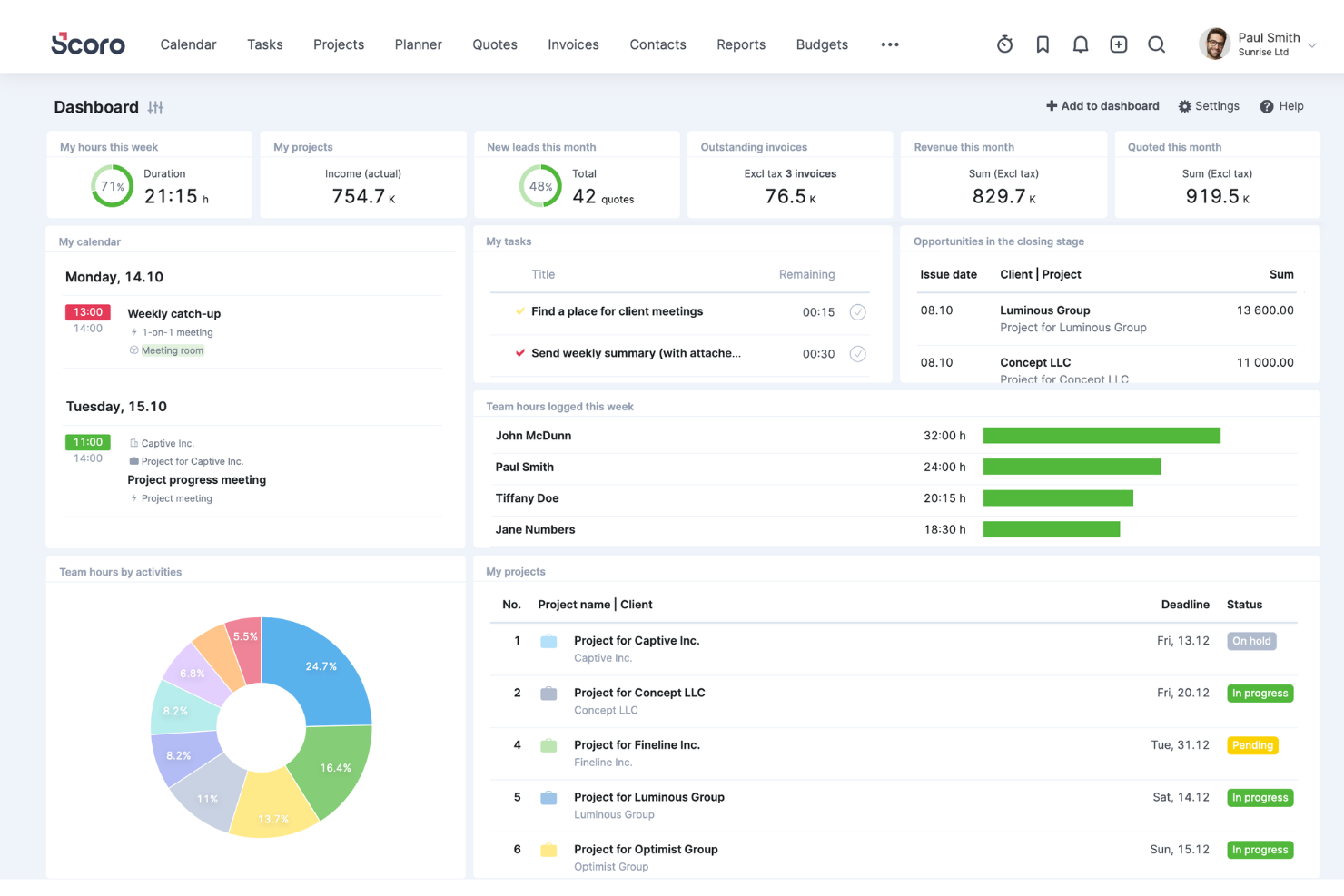
Scoro è un software di automazione per i servizi professionali che può aiutarti a gestire le tue operazioni in modo più efficace. Offre una suite di strumenti per vari ruoli all'interno di un'organizzazione e copre ogni aspetto dell'erogazione dei servizi, dalla pianificazione ed esecuzione dei progetti alla gestione delle relazioni con i clienti e alla fatturazione. Questo livello di integrazione è fondamentale per le aziende di servizi che hanno bisogno di mantenere l'allineamento tra i diversi reparti e progetti.
Perché ho scelto Scoro
Scoro eccelle nell'automatizzare gli aspetti fondamentali ma dispendiosi in termini di tempo dei servizi professionali, come il monitoraggio del tempo, la fatturazione e la reportistica. Le funzionalità di fatturazione automatica ti consentono di creare rapidamente fatture dettagliate in base al tempo e alle spese tracciate, riducendo gli errori e facendo risparmiare tempo amministrativo prezioso. La capacità del software di generare report approfonditi e personalizzabili offre inoltre a te e agli stakeholder informazioni sulle prestazioni aziendali, la redditività dei clienti e l'efficienza operativa.
Un altro aspetto chiave che distingue Scoro è la sua funzionalità CRM, che permette un flusso continuo di informazioni dal primo contatto con il cliente fino alla consegna del progetto e al follow-up. Puoi gestire le interazioni con i clienti, archiviare dati critici e tracciare la cronologia delle comunicazioni. Inoltre, la possibilità di collegare i dati CRM ai processi di gestione dei progetti e di fatturazione ti aiuta a tenere informati i clienti e contribuisce a migliorare la soddisfazione e la fidelizzazione.
Funzionalità chiave di Scoro
Scoro offre anche una gamma di altre funzionalità progettate per aiutarti a migliorare le operazioni dei tuoi servizi professionali.
- Gestione delle attività: Aiuta a semplificare l'assegnazione e il monitoraggio delle attività, in modo che il tuo team rimanga organizzato e puntuale.
- Monitoraggio del tempo: Scoro offre diverse opzioni per registrare le ore, inclusi un timer integrato per la registrazione in tempo reale.
- Strumenti di collaborazione: Centralizza le comunicazioni relative ai progetti per favorire una collaborazione migliore e consente ai membri del team di commentare e taggarsi a vicenda.
- Dashboard personalizzabili: Puoi adattare il tuo ambiente di lavoro alle tue esigenze e ottenere una panoramica personalizzata di KPI e stato dei progetti.
Integrazioni di Scoro
Le integrazioni includono Google Calendar, Microsoft Exchange, Xero, QuickBooks, Sage Intacct, Expensify, Stripe, Jira, Slack, Asana, Dropbox e PayPal.
Pros and Cons
Pros:
- Matrice di stima dei preventivi con analisi del margine
- Monitoraggio interconnesso dei costi interni ed esterni
- Assistente AI che mette in risalto spunti azionabili
Cons:
- La reportistica personalizzata può richiedere configurazioni tecniche
- Funzionalità mobile inferiori rispetto a desktop
New Product Updates from Scoro

Scoro Adds Quote Timelines, ELI Automation, and Partial Invoicing
Scoro now supports quote line start/end dates to build project timelines that carry into tasks and PDFs, expands ELI automation and conversation navigation, and adds partial invoicing by amount plus new accounting and HR integrations. For more information, visit Scoro's official site.

BigTime
Ideale per monitorare insieme ore e spese

BigTime è una piattaforma di automazione per i servizi professionali (PSA) progettata per aziende IT, ingegneristiche e di consulenza. Collega il monitoraggio delle ore, la fatturazione e la reportistica finanziaria in un unico sistema, aiutando i team a gestire i progetti dalla registrazione iniziale del tempo fino alla fatturazione e al monitoraggio dei ricavi. Il software supporta le aziende che si affidano a strumenti come QuickBooks e Sage sincronizzando i dati finanziari tra diversi sistemi. Regole di fatturazione, listini tariffari e impostazioni di riconoscimento dei ricavi possono essere configurati all'interno di BigTime per allinearsi alle strutture contabili esistenti. Questo consente ai team finanziari di monitorare il lavoro in corso (WIP), i margini e l'attività di fatturazione senza dover dipendere esclusivamente dai report di fine periodo.
Recentemente ho parlato con Moti Gamburd, CEO di CARE Homecare, su come il suo team utilizzi BigTime per la gestione del monitoraggio delle ore e della fatturazione. Ha notato che le registrazioni del tempo confluiscono direttamente nelle ore fatturabili con minimi aggiustamenti manuali. Secondo Gamburd, questo ha contribuito a ridurre gli errori amministrativi e migliorare la visibilità sulla redditività a livello di progetto man mano che il lavoro procedeva.
Perché ho scelto BigTime
Ho scelto BigTime perché combina la rilevazione delle ore, la fatturazione e la reportistica finanziaria in un sistema che si integra strettamente con piattaforme di contabilità generale come QuickBooks e Sage. I team possono iniziare con funzionalità di base come rilevamento di ore e spese, fatturazione e reportistica sulla redditività. Moduli aggiuntivi, tra cui gestione delle risorse, preventivazione ed elaborazione pagamenti, possono essere aggiunti con l'espansione delle esigenze operative. Ogni modulo utilizza la stessa configurazione finanziaria sottostante, quindi le strutture di fatturazione e la logica di reportistica rimangono coerenti con la crescita dell'utilizzo. Per i responsabili finanziari che necessitano di visibilità sull'accuratezza della fatturazione, sui saldi WIP e sui margini di progetto, BigTime offre report e controlli senza la necessità di implementare un sistema aziendale completo.
Funzionalità principali di BigTime
BigTime offre una suite di altre funzionalità che possono aiutare a migliorare la gestione dei servizi professionali.
- Gestione portafoglio progetti: Visibilità centralizzata sui progetti attivi, inclusi monitoraggio budget e delle performance.
- Monitoraggio spese: Acquisizione e allocazione delle spese di progetto per mantenere il controllo del budget.
- Fatturazione e pagamenti: Generazione di fatture basate su ore e spese tracciate, con strumenti per il monitoraggio dello stato dei pagamenti.
- Reportistica e analisi: Accesso a dashboard e report focalizzati su utilizzo, redditività, WIP e performance finanziaria.
Integrazioni di BigTime
Le integrazioni includono QuickBooks, Salesforce, HubSpot, Jira, Xero e Sage.
Pros and Cons
Pros:
- Promemoria automatici per migliorare la compliance del team
- Struttura modulare che permette l'espansione delle funzionalità nel tempo
- Monitoraggio unificato di ore, fatturazione e finanza
Cons:
- Meno focalizzato su funzionalità di collaborazione con il cliente rispetto a strumenti orientati alla delivery
- La configurazione finanziaria può richiedere una configurazione iniziale

Ideale per la gestione PSA end-to-end

Productive è un software per l'automazione dei servizi professionali progettato per aiutare le aziende a ottimizzare le proprie operazioni. Si tratta di uno strumento end-to-end che copre tutto, dalla gestione dei progetti e il monitoraggio del tempo, alla pipeline di vendita e all'analisi della redditività.
Recentemente ho parlato con Miguel Angel Gongora Meza, fondatore e direttore di Evolution Treks Peru, riguardo all'utilizzo di Productive nella sua organizzazione. 'Mi è piaciuto il fatto che venissero presentate le ore lavorate confrontate con le spese pianificate,' afferma. Questo ha permesso loro anche di risparmiare denaro. 'In uno dei nostri progetti siamo riusciti a risparmiare quasi 500 dollari, poiché siamo stati in grado di individuare le inefficienze precocemente. Mi ha fornito un'idea più chiara di come venissero spesi tempo e denaro, ed è particolarmente importante quando le risorse sono limitate,' spiega.
Perché ho scelto Productive
La funzionalità di gestione dei progetti è particolarmente impressionante. Permette di pianificare progetti, assegnare compiti, monitorare i progressi e prevedere il lavoro futuro. La funzione di pipeline di vendita offre una panoramica chiara del processo di vendita, mentre l'analisi di redditività aiuta a comprendere le prestazioni finanziarie.
Le informazioni sulla gestione delle risorse e sull'impiego offerte da Productive forniscono una comprensione approfondita del carico di lavoro e della disponibilità del team, consentendo una migliore allocazione delle risorse e prevenendo il burnout. La piattaforma fornisce report dettagliati e visualizzazioni che mostrano carichi di lavoro, capacità e livelli di efficienza, così puoi prendere decisioni informate sull'assegnazione delle attività e redistribuire il carico di lavoro secondo necessità per ottimizzare le prestazioni del team e l'efficienza dei progetti.
Funzionalità principali di Productive
Ecco altre funzionalità offerte da Productive che possono aiutarti nell'automazione dei servizi professionali.
- Monitoraggio del tempo: Questa funzione consente al tuo team di registrare facilmente le ore lavorate, così puoi avere informazioni in tempo reale sulle tempistiche dei progetti e sull'allocazione delle risorse.
- Previsione delle entrate: Puoi prevedere le future fonti di entrata in base ai progetti in corso e alla disponibilità di risorse, il che aiuta nella pianificazione strategica.
- Analisi di redditività: Questa funzionalità offre report dettagliati sulla redditività di progetti e clienti per aiutarti a prendere decisioni finanziarie informate.
- Integrazione con strumenti di contabilità: Puoi collegare Productive ai più diffusi software di contabilità per una gestione e una reportistica finanziaria efficiente.
Integrazioni di Productive
Le integrazioni includono Quickbooks, Jira, Xero, Exact, Slack, Fortnox e Personio.
Pros and Cons
Pros:
- Collegamento completo dei progetti alle finanze
- Le automazioni riducono il carico di attività ripetitive
- Approfondimenti sulla redditività disponibili in tempo reale
Cons:
- Limiti di personalizzazione nei workflow di nicchia
- Potresti aver bisogno di supporto per usare efficacemente le funzionalità avanzate
New Product Updates from Productive

Productive Adds Agent Triggers, Teams Integration, and Time Controls
Productive adds automated agent triggers, broader AI file support, Microsoft Teams integration, Resource Planner improvements, and new time entry controls. These updates expand automation while improving scheduling, collaboration, and time tracking. For more information, visit Productive’s official site.

Accelo
Ideale per massimizzare la redditività dei progetti dal preventivo all'incasso
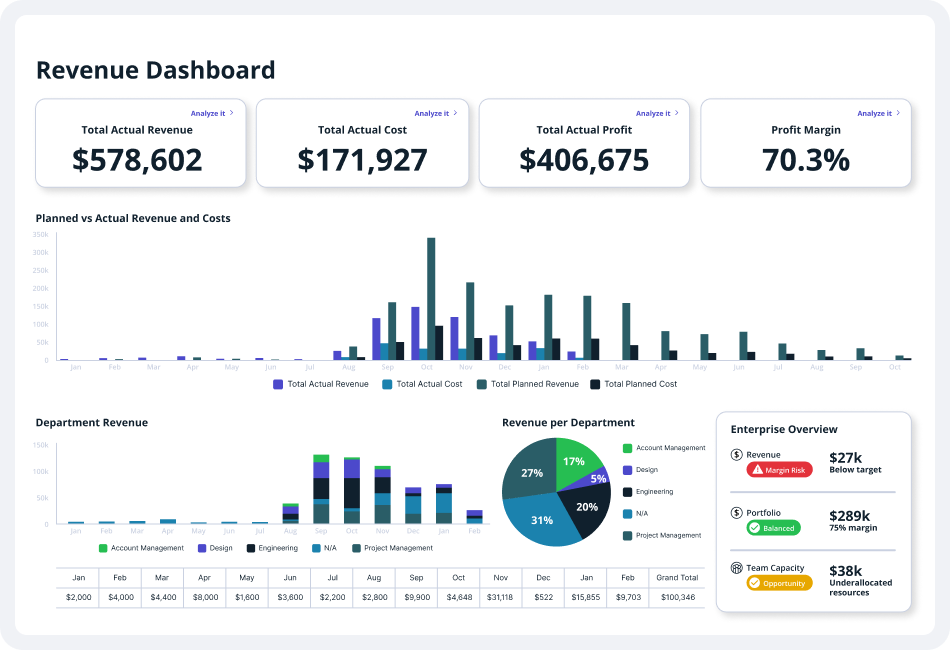
Accelo è una piattaforma per l'automazione dei servizi professionali che aiuta le aziende a gestire le proprie operazioni in modo più efficace. Offre funzionalità che automatizzano vari aspetti della gestione clienti, gestione progetti, gestione delle risorse e gestione finanziaria.
Recentemente ho parlato con Mircea Dima, fondatore, CEO e CTO di AlgoCademy. Ha utilizzato Accelo in passato e afferma che 'ha semplificato il processo di gestione dei progetti... è stato facile coordinarsi con gli altri membri del mio team e mantenere tutto sotto controllo.' Ha trovato particolarmente utile la funzione di automazione. 'L'automazione dei flussi di lavoro ha assicurato che le attività venissero svolte nei tempi previsti e che tutti rimanessero allo stesso livello,' afferma.
Perché ho scelto Accelo
Accelo collega il tuo processo di vendita direttamente alla consegna dei progetti e alla fatturazione, riducendo al minimo le difficoltà durante il passaggio di consegne. Offre anche modelli di preventivo che ti permettono di trasformare facilmente le stime in piani di progetto con budget di tempo, una gestione intelligente delle risorse per mantenere un'elevata utilizzazione e monitoraggio in tempo reale dei costi rispetto al tempo, così puoi vedere immediatamente quando un lavoro non è redditizio. Le dashboard integrate ti consentono di monitorare i margini su tutti i progetti aperti affinché le piccole perdite non si trasformino in grandi problemi.
Caratteristiche principali di Accelo
Oltre ad aiutarti a ottimizzare la redditività, Accelo offre ulteriori funzionalità che possono migliorare la produttività del tuo team e la qualità del servizio erogato.
- Dashboard di gestione delle attività: questa funzione fornisce una visione centralizzata di tutte le attività per aiutare il tuo team a stabilire le priorità e gestire i carichi di lavoro in modo efficace.
- Portale clienti: consente ai clienti di accedere in tempo reale agli aggiornamenti dei progetti e alle informazioni di fatturazione, favorendo trasparenza e relazioni migliori con i clienti.
- Report personalizzati: puoi creare report dettagliati su misura per le esigenze della tua azienda, ottenere approfondimenti sulle prestazioni dei progetti e prendere decisioni basate sui dati.
- Rilevamento automatico del tempo: questa funzione può registrare automaticamente il tempo impiegato sulle diverse attività per mantenere una fatturazione e un'allocazione delle risorse precise senza inserimenti manuali.
Integrazioni di Accelo
Le integrazioni includono Google Workspace, Microsoft 365, Xero, QuickBooks Online, HubSpot, Mailchimp, Salesforce, Zapier, Stripe, PayPal, Jira, Continuum, Microsoft Power BI, Expensify e Gusto.
Pros and Cons
Pros:
- Maggiore visibilità sui margini di profitto dei progetti
- I programmi si adattano ai cambiamenti
- Gli avvisi aiutano a individuare tempestivamente gli sforamenti dei costi
Cons:
- Alcuni report non hanno grande possibilità di personalizzazione
- L'app mobile è più limitata rispetto alla versione web

Atera
Ideale per l'automazione IT

Atera offre una piattaforma integrata che semplifica la gestione IT per i fornitori di servizi gestiti (MSP) e i professionisti IT combinando monitoraggio remoto, gestione e automazione dei servizi professionali. La sua natura all-in-one la rende particolarmente interessante per le aziende che desiderano snellire le proprie operazioni IT e migliorare l'erogazione dei servizi.
Perché ho scelto Atera
Ho scelto Atera per la sua integrazione unica di funzionalità di monitoraggio remoto e PSA, fondamentale per la gestione dei servizi IT. Il suo sistema di ticketing completo, combinato con approfondimenti basati su intelligenza artificiale, assicura che il tuo team possa gestire efficacemente le richieste e i problemi dei clienti. Inoltre, la funzionalità di reportistica automatizzata di Atera permette di tenere traccia delle metriche di prestazione e prendere decisioni informate, cruciale per mantenere la qualità del servizio e la soddisfazione del cliente.
Caratteristiche principali di Atera
Oltre alle capacità di ticketing e reportistica, ho trovato anche altre funzionalità degne di nota:
- Portale Clienti: Offre ai clienti una piattaforma dedicata per inviare richieste e monitorarne lo stato, aumentando trasparenza e comunicazione.
- Contratti e fatturazione flessibili: Permette la personalizzazione di contratti e processi di fatturazione per adattarsi alle diverse esigenze e accordi dei clienti.
- Monitoraggio del tempo: Facilita il monitoraggio accurato del tempo speso su vari compiti e progetti, essenziale per la fatturazione e la valutazione delle prestazioni.
- Tagging dei ticket tramite IA: Automatizza la classificazione dei ticket usando l'IA, migliorando i tempi di risposta e l'efficienza nella gestione dei ticket.
Integrazioni di Atera
Le integrazioni includono QuickBooks, Xero, FreshBooks, Dropbox, Google Workspace, Microsoft 365, TeamViewer, Splashtop, AnyDesk e Zapier. È inoltre disponibile un'API per integrazioni personalizzate.
Pros and Cons
Pros:
- La dashboard centralizzata aumenta l'efficienza nella gestione IT.
- Le funzionalità integrate di RMM e PSA riducono le ridondanze degli strumenti.
- L'automazione guidata dall'IA migliora la qualità del servizio e riduce il carico di lavoro.
Cons:
- Controllo meno granulare per workflow o integrazioni personalizzati altamente complessi.
- Costi aggiuntivi per funzionalità avanzate di reportistica.
New Product Updates from Atera

Atera Adds Webhook Triggers for Technician Assignment Changes
Atera ticket automation rules now support a webhook trigger when a ticket’s technician assignment changes, expanding automation beyond creation, status updates, and closure/resolution events. For more information, visit Atera's official site.

Kantata
Ideale per la gestione dell'intero ciclo di vita del servizio
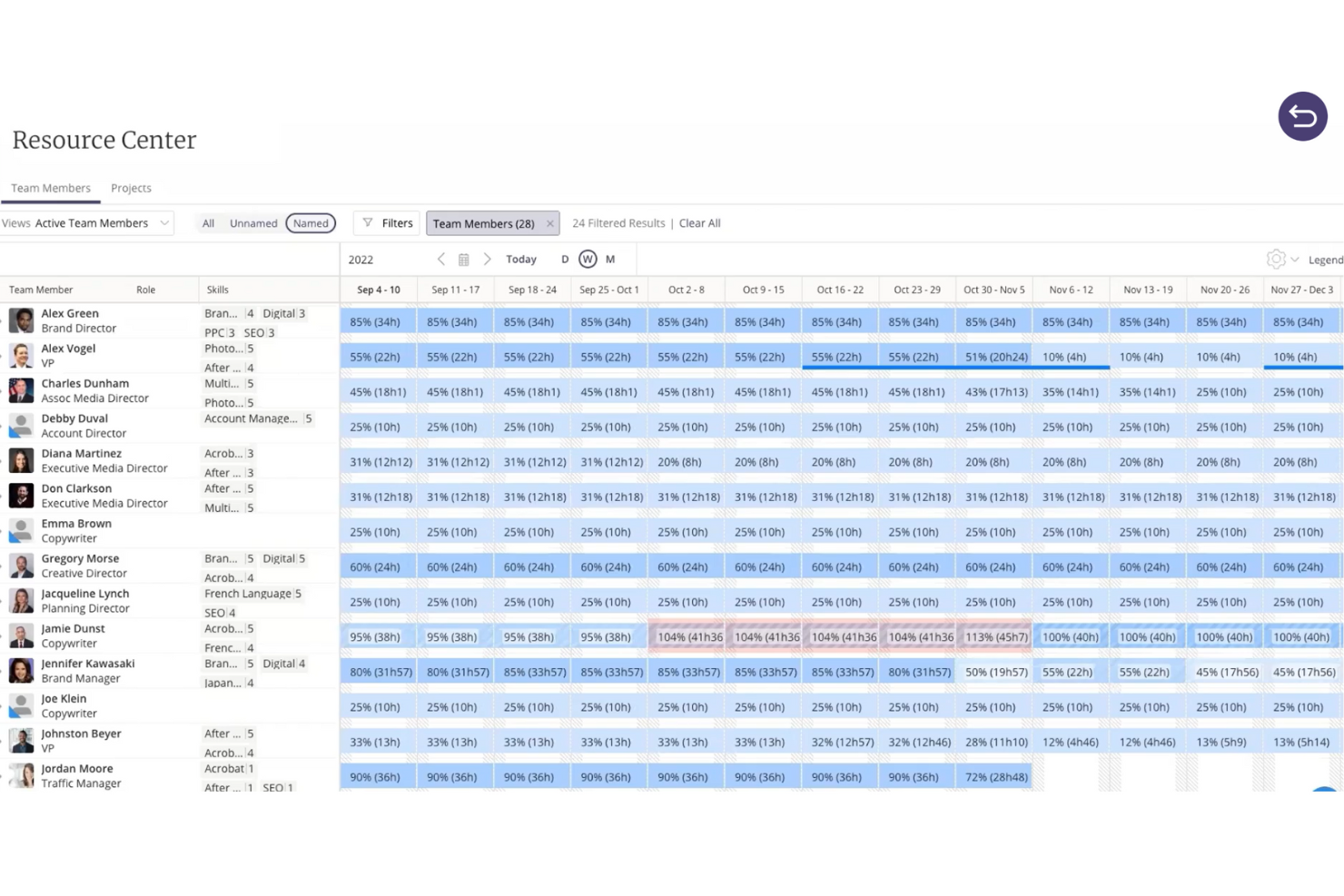
Kantata è una piattaforma di automazione per servizi professionali (PSA) pensata per le aziende che necessitano di gestire progetti, risorse e aspetti finanziari in un unico luogo. Invece di dover utilizzare sistemi diversi, Kantata riunisce l'intero ciclo di vita della fornitura di servizi in una singola soluzione cloud. Questo semplifica la pianificazione, il reclutamento, il monitoraggio e la rendicontazione del lavoro per i clienti, garantendo piena visibilità dall'inizio alla fine.
Perché ho scelto Kantata
Il software offre potenti strumenti di gestione e programmazione delle risorse, funzionalità di gestione di progetti e portafogli, e supervisione finanziaria integrata. I dashboard di business intelligence e le analisi in tempo reale forniscono informazioni utili, così i responsabili possono prendere decisioni informate su tempistiche, budget e risultati per i clienti. Il risultato è una maggiore visibilità, una redditività più forte e una fornitura di servizi più fluida.
Kantata supporta anche la collaborazione continua e il coinvolgimento del cliente. Funzionalità come feed di attività, bacheche delle attività, rilevamento del tempo e sondaggi sul clima mantengono allineati i team di servizi professionali e forniscono ai manager feedback sul morale della squadra e sulla soddisfazione del cliente durante tutto il ciclo di vita del progetto. Questo approccio volto prima di tutto alle persone aggiunge una dimensione ulteriore rispetto ai tradizionali software PSA e rende la consegna dei servizi più prevedibile e orientata al cliente.
Funzionalità principali di Kantata
Kantata offre anche numerose altre funzionalità che lo rendono un valido software di automazione per servizi professionali.
- Strumenti basati su intelligenza artificiale: Questa funzione utilizza l'intelligenza artificiale per aiutarti a ottimizzare l'allocazione delle risorse e la consegna dei progetti, così puoi assicurarti che il tuo team lavori sempre al massimo della capacità.
- Strumenti di collaborazione: Puoi facilitare una comunicazione e collaborazione senza interruzioni tra i membri del team e i clienti per mantenere tutti allineati e informati.
- Business intelligence avanzata: Fornisce informazioni e analisi in tempo reale che offrono al tuo team la possibilità di prendere decisioni basate sui dati per migliorare i risultati dei progetti.
- Flussi di lavoro personalizzabili: Puoi adattare i processi alle tue specifiche esigenze operative per aumentare l'efficienza e assicurarti che il software si adatti ai bisogni dell'azienda invece del contrario.
Integrazioni di Kantata
Le integrazioni includono Salesforce, SAP, Jira, Xero, BambooHR, Slack, Workday, QuickBooks, HubSpot e NetSuite.
Pros and Cons
Pros:
- Supporto multivaluta e multi-tariffa
- Previsioni AI integrate
- Meccanismi di feedback integrati
Cons:
- Implementazione può essere complessa
- Personalizzazione richiede tempo di configurazione
New Product Updates from Kantata

Kantata Adds Access Group Change History
Kantata adds Access Groups History, letting account administrators track changes to group details, membership, and permissions in Recent History. The update also makes these events available through the Subscribed Events API for broader monitoring. For more information, visit Kantata’s official site.
 .
.
Wrike
Ideale per automazioni di collaborazione con i clienti integrate

Wrike è una piattaforma completa di gestione progetti pensata per agenzie, team di marketing e fornitori di servizi professionali. Offre una soluzione versatile per la gestione e l'automazione dei servizi professionali, che può aiutarti a ottimizzare il processo di erogazione dei tuoi servizi.
Recentemente ho parlato con Danilo Coviello, fondatore di Espresso Translations, che ha sottolineato come Wrike abbia contribuito a migliorare il loro risultato economico. 'I report di tracciamento hanno mostrato...che le nostre traduzioni in portoghese richiedevano sempre il 15% di tempo in più rispetto alle stime iniziali,' spiega. 'Ho subito corretto il nostro modello di prezzo e il risultato è stato una clientela più soddisfatta e un margine di profitto migliore,' racconta.
Perché ho scelto Wrike
Wrike ti offre una visione a 360 gradi di tutti i progetti attivi, permettendoti di gestire efficacemente le risorse, monitorare le ore fatturabili e prendere decisioni basate sui dati con relativa facilità. Consente inoltre di migliorare la collaborazione con i clienti, invitandoli direttamente su Wrike e coinvolgendoli nel processo di lavoro. I clienti possono fornire feedback e approvazioni dirette sulle decisioni chiave di progetto, mentre tu puoi ridurre il fastidioso processo di raccolta requisiti o gestione delle variazioni di ambito grazie ad automazioni e moduli di richiesta personalizzabili. In questo modo raccogli rapidamente tutte le informazioni necessarie in un unico luogo e puoi configurare progetti completi con azioni predefinite, assegnazioni di compiti e scadenze già pianificate.
Il motore di automazione aiuta inoltre a ottimizzare il carico di lavoro del team. Permette di eliminare dalla lista attività del gruppo quelle ripetitive. Gli amministratori possono anche allocare il lavoro dei clienti al membro più qualificato del team, in base a ruolo e competenze. In questo modo, ti assicuri che i membri abbiano il giusto carico di lavoro e puoi prevenire il burnout.
Funzionalità principali di Wrike
Wrike offre molte altre funzionalità utili per migliorare la gestione dei progetti e dei servizi del tuo team.
- Gestione di risorse e budget: Questo strumento permette una pianificazione dettagliata delle risorse, la gestione del budget e il monitoraggio delle tempistiche per aiutarti a mantenere la redditività del progetto.
- Diagrammi di Gantt: Le timeline visive di progetto aiutano a pianificare meglio e a seguire i progressi, rendendo più facile per il team rispettare le scadenze.
- Dashboard personalizzabili: Puoi monitorare l'andamento dei progetti e le performance del team in tempo reale con dashboard personalizzabili e visualizzazioni come le board Kanban.
- Comunicazione con i clienti: Puoi coinvolgere attivamente i clienti nel processo di progetto, favorendo fiducia e trasparenza.
Integrazioni Wrike
Le integrazioni includono Salesforce, Jira, Google Drive, Microsoft Office 365, Slack, Zoom e Adobe Creative Cloud.
Pros and Cons
Pros:
- I clienti esterni possono usare direttamente i moduli di richiesta
- Le lavagne visuali facilitano l’ideazione di gruppo
- I modelli blueprint riducono i tempi di configurazione
Cons:
- Le autorizzazioni esterne richiedono una configurazione attenta
- Funzionalità rivolte ai clienti limitate nei piani base
New Product Updates from Wrike

Wrike Activity Reports Add Actor Type Details
Wrike’s Activity Report now displays actor type details, helping admins identify whether changes came from the UI, Automation, Wrike Agents, API, or AI via MCP. For more information, visit Wrike's official site.

VOGSY
Ideale per organizzazioni di servizi con risorse e progetti a livello globale
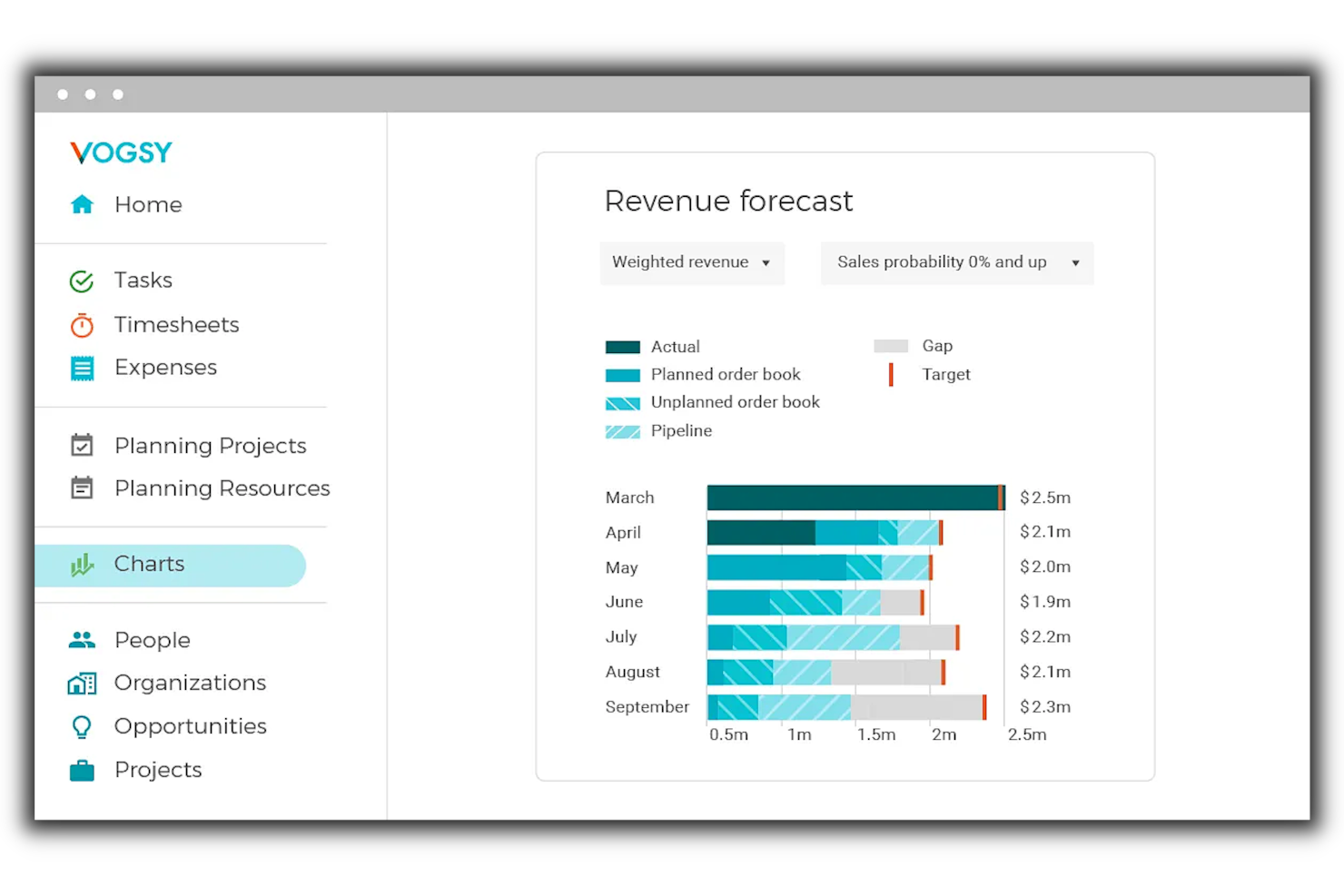
VOGSY è una soluzione cloud che unisce la gestione dei progetti, la pianificazione delle risorse e la finanza in più aree geografiche. È pensata per aziende che operano in vari paesi e che necessitano di gestire progetti internazionali, staff e aspetti finanziari, supportando la gestione delle opportunità, l’assegnazione, la rilevazione dei tempi lavorati, la fatturazione e la consolidazione dei dati finanziari.
Perché ho scelto VOGSY
Questo strumento permette a te e al tuo team di lavorare oltre i confini, senza perdere il controllo su normative fiscali locali o conversioni valutarie. VOGSY consente di configurare più entità legali, strumenti contabili locali e regimi fiscali diversi, mantenendo un pool di risorse condiviso e dashboard unificate. Fornisce fatturazione intercompany e distribuzione dei ricavi, così che i costi interni vengano gestiti automaticamente. Inoltre, offre pipeline di opportunità collegate alle previsioni delle risorse, budget di progetto integrati nei dati finanziari locali e consolidati, e report che aggregano informazioni tra tutte le tue entità. È pensato per connettere le operazioni globali della tua azienda invece di costringerti a un sistema unico standardizzato.
Caratteristiche principali di VOGSY
Oltre alle capacità di gestione globale delle risorse, VOGSY offre molte altre funzionalità che migliorano l’efficienza operativa.
- Rilevazione di tempi e spese: Questa funzionalità ti consente di automatizzare la raccolta dei tempi tramite timesheet precompilati e semplifica la gestione delle spese grazie al caricamento facile delle ricevute.
- Gestione delle attività: Offre una visualizzazione delle attività per i membri del team attraverso i progetti, migliorando collaborazione e responsabilità.
- Fatturazione e invio delle fatture: Puoi automatizzare i processi di fatturazione e programmare l’emissione delle fatture per varie tipologie di progetto. Questo aiuta a mantenere precisione e puntualità.
- Reportistica in tempo reale: Puoi creare report personalizzati per stakeholder e team, utilizzandoli per decisioni informate e pianificazione strategica.
Integrazioni di VOGSY
Le integrazioni includono Google Workspace, Jira, Microsoft 365, Xero, QuickBooks, Copper, HubSpot, Salesforce e Zoho.
Pros and Cons
Pros:
- Gestisce operazioni multi-paese in un unico sistema
- Pool di risorse condiviso tra entità
- Automazione dei ricavi e dei costi intercompany
Cons:
- Complessità nella configurazione in contesti multinazionali
- Richiede una configurazione accurata dei regimi fiscali
New Product Updates from VOGSY
VOGSY Adds Practices and Financial Totals in Planning Views
VOGSY adds a new Practices layer for consolidated reporting and displays revenue and cost totals directly in planning views so you get high-level insights and instant financial context without extra steps. For more information, visit VOGSY’s official site.
 .
.
SuperOps
Ideale per la crescita operativa degli MSP
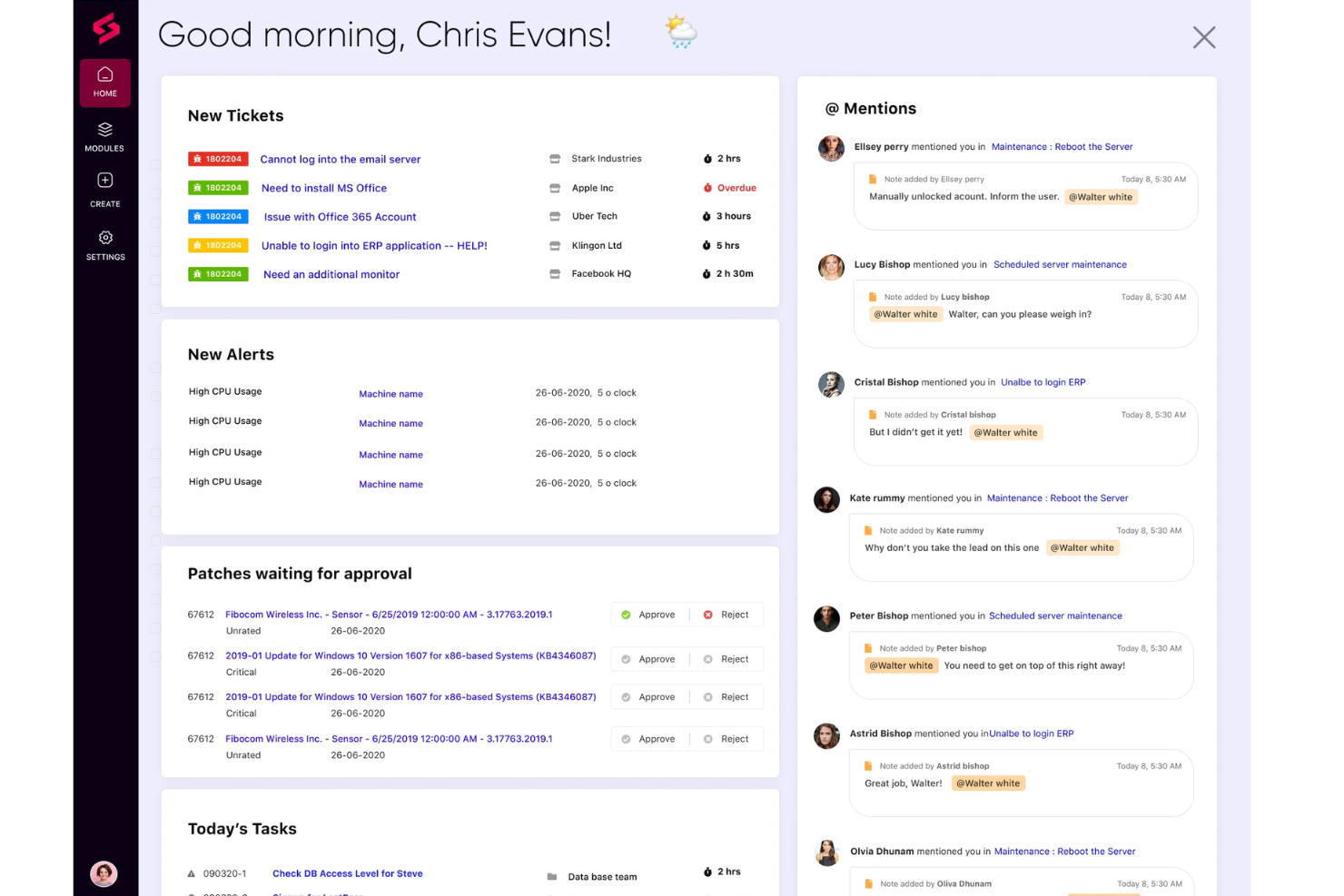
Per i team IT e i fornitori di servizi gestiti che desiderano migliorare la loro efficienza operativa, SuperOps offre una soluzione di automazione dei servizi professionali basata sull'intelligenza artificiale, che mette a disposizione funzionalità essenziali come la gestione del service desk e la supervisione dei contratti. Semplifica la gestione dei ticket e il monitoraggio delle risorse, può aiutarti a migliorare i tuoi flussi di lavoro e offre funzioni come la gestione dei dispositivi mobili e integrazioni con altri strumenti di monitoraggio remoto.
Perché ho scelto SuperOps
Ho scelto SuperOps perché è una piattaforma unificata di PSA e monitoraggio e gestione remota che include la gestione del service desk, la gestione dei contratti e l'automazione dei servizi, e può favorire la crescita operativa degli MSP. Gli strumenti di redditività basati sull'IA e la gestione avanzata delle policy per la rilevazione degli endpoint sono caratteristiche di spicco che possono aiutare a migliorare l'efficienza e ad automatizzare le attività di routine.
La capacità della piattaforma di ottimizzare i processi e migliorare l'erogazione dei servizi la rende una scelta ideale per gli MSP che desiderano espandere le proprie operazioni. Queste funzionalità fanno risparmiare tempo e aumentano la redditività, rendendo SuperOps una risorsa strategica per qualsiasi MSP che voglia migliorare la qualità del servizio e la soddisfazione del cliente.
Funzionalità principali di SuperOps
SuperOps offre una serie di altre funzionalità utili alle squadre di servizi professionali.
- Template per attività e risposte: Consentono al tuo team di risparmiare tempo e mantenere la coerenza utilizzando modelli predefiniti per attività e risposte comuni.
- Vista Kanban: Fornisce una rappresentazione visiva dei flussi di lavoro per aiutare te e il tuo team a monitorare i progressi e gestire le attività in modo più efficace.
- Sondaggi sulla soddisfazione del cliente: Puoi raccogliere feedback preziosi dai tuoi clienti tramite sondaggi integrati per migliorare continuamente la qualità dei servizi e la soddisfazione dei clienti.
- Runbook: Puoi automatizzare le attività di routine e ottimizzare le approvazioni attraverso i runbook, che aiutano a mantenere la coerenza e ridurre gli errori manuali nelle operazioni.
Integrazioni di SuperOps
Le integrazioni includono ESET, Splashtop, Acronis, QuickBooks, Xero, Microsoft Azure, Stripe e TeamViewer.
Pros and Cons
Pros:
- Notevoli capacità di automazione migliorano l'efficienza operativa
- Ottimi strumenti di gestione service desk e progetti
- Funzionalità basate su IA per una migliore gestione IT
Cons:
- Opzioni di personalizzazione limitate rispetto ai concorrenti
- Poche integrazioni disponibili
New Product Updates from SuperOps

SuperOps Improves Ticket Visibility, Dynamic Forms, and Dashboard Views
SuperOps introduces improvements to ticket visibility, dynamic forms, and dashboard visualizations. These updates help technicians manage customer conversations, simplify ticket creation, and keep dashboard views consistent across teams. For more information, visit SuperOps' official site.
 .
.

Celigo è una piattaforma di integrazione e automazione per i team di servizi professionali che collega applicazioni aziendali, automatizza i flussi di lavoro e gestisce i dati tra più sistemi.
Per chi è migliore Celigo?
Celigo è adatto ai team IT e operativi di organizzazioni di medie e grandi dimensioni che hanno bisogno di automatizzare e collegare diverse applicazioni aziendali.
Perché ho scelto Celigo
Ho scelto Celigo tra i migliori perché posso accedere a oltre 1.000 connettori di app preconfigurati, il che rende veloce e affidabile la connessione dei nostri principali strumenti aziendali. Il mio team utilizza questi connettori per automatizzare il passaggio dei progetti tra CRM, ERP e piattaforme di rilevazione delle ore. Mi piace il fatto che possiamo implementare rapidamente integrazioni per nuovi clienti senza dover creare connessioni personalizzate da zero.
Funzionalità chiave di Celigo
- Designer di automazione dei flussi di lavoro: Crea e personalizza flussi di lavoro multi-step tra applicazioni aziendali.
- Dashboard di gestione degli errori: Monitora, risolvi e affronta gli errori di integrazione da un'unica interfaccia.
- Controlli di accesso basati sui ruoli: Imposta permessi e gestisci l'accesso degli utenti a dati e flussi di lavoro sensibili.
- Sincronizzazione dati in tempo reale: Mantieni le informazioni sempre aggiornate tra i sistemi collegati.
Integrazioni Celigo
Celigo offre oltre 1.000 connettori nativi preconfigurati, tra cui Salesforce, NetSuite, Microsoft Dynamics 365, SAP, QuickBooks, Shopify, HubSpot, Jira, Slack, Google Sheets e Snowflake. È disponibile una API per integrazioni personalizzate.
Pros and Cons
Pros:
- Offre oltre 1.000 connettori di app preconfigurati
- Il costruttore di integrazioni guidato dall’IA velocizza la configurazione
- Supporta la conformità SOC 2 Tipo II e GDPR
Cons:
- Le funzionalità avanzate richiedono piani di livello superiore
- Opzioni limitate per il deployment offline o on-premises
New Product Updates from Celigo
Celigo Adds API Group Assignment During API Setup
Celigo adds API group assignment during create, clone, and move actions. This reduces extra setup steps by letting teams organize APIs before the relative URI is defined. For more information, visit Celigo’s official site.
 .
.Altre opzioni di software di automazione dei servizi professionali
Ecco alcuni strumenti che non sono entrati nella mia lista principale, ma che meritano comunque di essere presi in considerazione se non hai trovato quello che cercavi sopra.
- Dayshape
Ideale con cruscotti di reportistica in tempo reale
- Rocketlane
Ideale per la consegna progetti potenziata dall’intelligenza artificiale
- Forecast
Ideale per agenzie e società di consulenza di medie dimensioni
- Projectworks
Ideale per collegare risorse e dati finanziari
- Workday
Ideale per aziende in rapida crescita
- Birdview
Ideale per automatizzare e ottimizzare il ciclo di consegna dei servizi
- Polaris PSA By Replicon
Ideale per l'ottimizzazione delle risorse basata su AI
- PSOhub
Ideale per automatizzare il lavoro ricorrente sui progetti
- ProjectManager
Ideale per l'automazione dei flussi di lavoro senza codice
- Hello Bonsai
Ideale per gestire progetti, clienti e finanze
- Parallax
Ideale per una gestione efficiente delle risorse
- ConnectWise
Ideale per l'automazione intelligente nelle piccole imprese
- Ravetree
Ideale per contratti a forfait
- Dynamics 365 Project Operations
Ideale per connettere vendite e delivery di progetto
- NinjaOne
Ideale per l'allineamento tra PSA e fatturazione
- Smartsheet
Ideale per l'onboarding dei clienti e la visibilità sui progetti
- Celoxis
Ideale per gestire il portafoglio progetti, le risorse e i budget
- ClickTime
Ideale per aziende di medie dimensioni con dipendenti distribuiti su più progetti
- Screendragon
Miglior automazione e flussi di lavoro basati su AI per PSA
- Planview
Ideale per ingaggi con i clienti più prevedibili e redditizi


Recensioni correlate di software per la gestione dei progetti
- Miglior software per i servizi professionali
- Software di gestione delle risorse per i servizi professionali
Come Valuto i Software di Automazione dei Servizi Professionali
Divido la mia valutazione in due livelli: le capacità di base che uno strumento deve avere—come il rilevamento del tempo, la fatturazione e la pianificazione delle risorse—e i fattori che differenziano le migliori soluzioni.
Funzionalità di Base (Requisiti Minimi per Questo Elenco)
Quando seleziono gli strumenti per la mia lista, valuto ciascuno su una scala da 0 (non offre la funzionalità) a 5 (eccelle in quest'area) per ciascuna delle funzionalità principali elencate di seguito. Poi, calcolo il punteggio totale dello strumento in percentuale. Ogni strumento deve raggiungere un punteggio minimo totale del 65% per essere considerato nell'elenco.
- Gestione di Progetti e Incarichi: Cerco una pianificazione strutturata dei progetti con visuali Gantt, dipendenze e modelli costruiti attorno agli incarichi del cliente, piuttosto che semplici bacheche di task generiche.
- Pianificazione e Utilizzo delle Risorse: Ogni strumento dovrebbe permettere l'assegnazione dei consulenti ai progetti in base a competenze, disponibilità e capacità, così da individuare i gap di personale prima che impattino la consegna.
- Rilevamento dei Tempi e delle Spese: Qui è importante la distinzione tra ore fatturabili e non fatturabili legate a clienti e progetti specifici, oltre alla registrazione delle spese e ai flussi di approvazione.
- Fatturazione e Emissione di Fatture: Valuto se uno strumento supporta diversi modelli di fatturazione come tariffa fissa, a tempo e materiali, e per traguardi, dato che la maggior parte delle società di servizi ne gestisce diversi contemporaneamente.
- Gestione Finanziaria dei Progetti e Redditività: Verifico la presenza di un monitoraggio in tempo reale dei budget rispetto all'effettivo e la visibilità dei margini a livello di progetto, in particolare la capacità di segnalare tempestivamente gli incarichi a rischio.
- Analytics e Reportistica dei Servizi: Dashboard che coprono tassi di utilizzo, realizzazione, backlog e performance progettuale aiutano i responsabili dei servizi a prendere decisioni su personale e prezzi basandosi su dati reali.
Quando ho una lista di strumenti che soddisfano i criteri, considero ciò che distingue ogni piattaforma.
Fattori di Differenziazione (Cosa Distingue i Fornitori)
Ecco come confronto e metto a confronto i diversi fornitori:
Funzionalità Distintive
L'automazione dalla preventivo all'incasso è un grande elemento distintivo—gli strumenti che collegano la creazione di SOW alla fatturazione e al riconoscimento dei ricavi permettono ai team finanziari di non dover inseguire approvazioni su diversi fogli di calcolo. Valuto anche le previsioni basate su intelligenza artificiale, che aiutano i responsabili delle risorse a prevedere la domanda e segnalare rischi sui margini prima che un progetto vada fuori controllo. È importante anche la gestione dei subappaltatori, soprattutto per le aziende che combinano talenti interni ed esterni nei progetti e desiderano una fatturazione unificata per entrambi.
Oltre le Funzionalità
Le integrazioni sono un aspetto fondamentale—verifico se uno strumento si collega nativamente a sistemi contabili come QuickBooks o Sage Intacct e a CRM come Salesforce, poiché flussi di dati interrotti tra PSA e amministrazione possono causare problemi di fatturazione. Anche il settore di destinazione è importante. Una piattaforma pensata per società di consulenza IT non sempre va bene per un'agenzia creativa. Analizzo se i modelli e i flussi di lavoro specifici del fornitore si adattano al modello operativo del compratore. Infine, valuto il supporto all'implementazione, perché il rollout di PSA coinvolge ogni reparto e una cattiva esperienza di onboarding rallenta l'adozione.
Come scegliere il software di automazione dei servizi professionali
È facile perdersi in lunghi elenchi di funzionalità e strutture tariffarie complesse. Per aiutarti a mantenere la concentrazione mentre affronti il tuo processo di selezione del software, unico per le tue esigenze, ecco una lista di controllo dei fattori da tenere a mente:
| Fattore | Cosa considerare |
|---|---|
| Scalabilità | Assicurati che il software possa crescere insieme alla tua attività. Cerca funzionalità come limiti flessibili per gli utenti e la capacità di gestire una complessità crescente dei progetti. |
| Integrazioni | Verifica che si connetta agli strumenti che già utilizzi, come piattaforme CRM, di contabilità o di gestione dei progetti. |
| Personalizzazione | Verifica se puoi adattare dashboard, flussi di lavoro e report alle esigenze e ai processi specifici del tuo team. |
| Facilità d’uso | Scegli un software intuitivo e facile da utilizzare per il tuo team senza una formazione approfondita. Questo contribuisce ad accelerare l’inserimento dei nuovi utenti e a migliorare la produttività. |
| Budget | Valuta i costi iniziali, le tariffe di abbonamento e gli eventuali costi nascosti. Confronta i modelli tariffari per assicurarti che la soluzione sia in linea con i tuoi obiettivi finanziari. |
| Misure di sicurezza | Assicurati che il software disponga di solide funzionalità di protezione dei dati, come crittografia, accesso basato sui ruoli e conformità agli standard di settore come il GDPR. |
| Reportistica | Cerca strumenti avanzati di reportistica che forniscano al tuo gruppo informazioni utili per agire sulle prestazioni, sull’allocazione delle risorse e sulla redditività. |
| Opzioni di supporto | Verifica che sia disponibile un’assistenza clienti affidabile, tramite chat dal vivo, e-mail o un responsabile dell’account dedicato, per risolvere rapidamente i problemi. |
Tendenze nei software di automazione dei servizi professionali
Ecco alcune delle tendenze emergenti che sto tenendo d’occhio:
- Informazioni basate sull’intelligenza artificiale: I fornitori stanno aggiungendo funzionalità di intelligenza artificiale in grado di analizzare i dati dei progetti e prevedere rischi, ritardi o colli di bottiglia nelle risorse, dando ai gruppi la possibilità di correggere la rotta prima che si verifichino problemi. Ad esempio, alcuni strumenti ora suggeriscono di riassegnare le risorse sulla base delle prestazioni storiche.
- Modelli di prezzo dinamici: Alcuni fornitori offrono strumenti che puoi utilizzare per calcolare in tempo reale i prezzi dei servizi sulla base delle tendenze di mercato, della disponibilità delle risorse e dell’ambito del progetto. Questo significa maggiore flessibilità sia per i clienti sia per i fornitori.
- Attenzione all’esperienza dei dipendenti: Le piattaforme stanno introducendo funzionalità come il monitoraggio delle competenze, pannelli di controllo per lo sviluppo professionale e informazioni sul benessere dei gruppi per sostenere la crescita e il coinvolgimento dei dipendenti.
- Monitoraggio decentralizzato dei progetti: Poiché il lavoro ibrido è destinato a rimanere, gli strumenti si stanno evolvendo per supportare i gruppi decentralizzati con il supporto di più fusi orari, opzioni di comunicazione asincrona e pannelli di controllo globali in tempo reale.
Che cos’è un software di automazione dei servizi professionali?
Il software di automazione dei servizi professionali è uno strumento utilizzato da organizzazioni che offrono servizi, come società di consulenza, studi contabili e studi legali, per gestire e automatizzare attività operative come la gestione finanziaria, la gestione delle risorse, il monitoraggio del tempo e la fatturazione.
Integra la gestione dei progetti, la gestione delle relazioni con i clienti, la gestione finanziaria e il monitoraggio del tempo e delle spese in un unico sistema per migliorare l’efficienza nella gestione di progetti e risorse, aumentare la precisione della fatturazione, migliorare la collaborazione del gruppo e ridurre il carico amministrativo.
Funzionalità del software di automazione dei servizi professionali
Quando selezioni un software di automazione dei servizi professionali, presta attenzione alle seguenti funzionalità chiave:
- Gestione dei progetti: Semplifica la pianificazione dei progetti, l’assegnazione delle attività e il monitoraggio dei progressi, così puoi mantenere tutto organizzato, individuare tempestivamente i colli di bottiglia e rispettare le scadenze.
- Monitoraggio del tempo: Registra con precisione le ore fatturabili tramite cronometri facili da usare o inserimento manuale, assicurati di non perdere ricavi e fattura facilmente i clienti.
- Allocazione delle risorse: Verifica chi è disponibile e assegna le persone giuste ai progetti giusti per evitare il sovraccarico e assicurarti che le competenze del tuo gruppo siano utilizzate al meglio.
- Fatturazione e gestione delle fatture: Genera rapidamente le fatture, monitora i pagamenti e gestisci i crediti verso i clienti per tenere sotto controllo il flusso di cassa.
- Gestione delle spese: Archivia le ricevute, classifica le spese e collega direttamente i costi ai progetti, oltre a monitorare quanto spendi e per cosa.
- Gestione dei clienti (CRM): Conserva in un unico luogo le informazioni sui clienti, le comunicazioni e i contratti. Questo semplifica la gestione delle relazioni e l’offerta di un servizio eccellente.
- Reportistica e analisi: Ottieni informazioni chiare sulle prestazioni del gruppo, sui margini dei progetti e sulla redditività grazie a report personalizzabili.
- Gestione dei documenti: Archivia, condividi e organizza in modo sicuro i file dei progetti, così tutti i membri del gruppo avranno sempre a portata di mano la versione più aggiornata.
Funzionalità comuni dell'intelligenza artificiale nei software di automazione dei servizi professionali
Oltre alle funzionalità standard dei software di automazione dei servizi professionali, molti strumenti PSA basati sull'intelligenza artificiale offrono funzionalità come:
- Definizione automatica delle priorità delle attività: utilizza l'intelligenza artificiale per analizzare i carichi di lavoro e le scadenze e consigliare su quali attività concentrarsi per prime, così da massimizzare l'efficienza.
- Previsione predittiva delle risorse: utilizza le tendenze dei progetti e l'impiego del team per aiutarti ad anticipare le esigenze di personale ed evitare affannose ricerche dell'ultimo minuto.
- Rilevazione intelligente del tempo: monitora automaticamente l'attività lavorativa e suggerisce le registrazioni del tempo, così tu e il tuo team non dimenticherete mai di registrare le ore fatturabili.
- Avvisi sui rischi di progetto basati sull'intelligenza artificiale: monitora lo stato del progetto e identifica i potenziali rischi prima che diventino problemi, permettendoti di correggere la rotta tempestivamente.
- Chatbot per l'interazione con i clienti: gestisce semplici richieste dei clienti o le fasi di inserimento, lasciando al tuo team la possibilità di concentrarsi sulle esigenze più complesse dei clienti.
Domande frequenti sui software di automazione dei servizi professionali
Ecco le risposte ad alcune domande frequenti sui software di automazione dei servizi professionali.
Quali integrazioni dovrei cercare in un software PSA?
Assicurati che il software PSA che stai valutando possa integrarsi con le piattaforme di gestione dei progetti, i sistemi CRM, gli strumenti di contabilità e le app per il monitoraggio del tempo che utilizzi già. Le integrazioni con strumenti come Salesforce, QuickBooks, Slack e Microsoft Teams possono aiutare a collegare il flusso di lavoro del tuo team, ridurre l’inserimento manuale dei dati e automatizzare la reportistica. Rifletti sui sistemi che il tuo team utilizza già quotidianamente e dai priorità alle soluzioni PSA che si sincronizzano con essi.
Come posso misurare il ROI del software PSA?
Per misurare il ROI del software PSA, puoi monitorare il tempo risparmiato, i miglioramenti nell’utilizzo delle risorse fatturabili, la riduzione degli sforamenti dei progetti e il minor numero di errori nella fatturazione o nella gestione finanziaria. Confronta i tempi di consegna dei progetti, i margini di profitto e la soddisfazione dei clienti prima e dopo l’implementazione. La maggior parte delle piattaforme PSA dovrebbe offrire pannelli di controllo che mostrano i tassi di utilizzo, i costi dei progetti e i margini, così puoi quantificare il valore che ottieni dal sistema.
Quali difficoltà potrei incontrare implementando un software PSA?
Tra le difficoltà più comuni figurano ottenere il consenso del team, migrare i dati esistenti e formare gli utenti sui nuovi sistemi. I progetti possono bloccarsi se la configurazione delle integrazioni con gli strumenti esistenti è complessa o se la piattaforma PSA non è personalizzabile in base ai tuoi flussi di lavoro. Per facilitare il processo, fornisci al team guide chiare, designa un referente interno e dai priorità alle piattaforme che offrono un solido supporto per l’inserimento.
Il software PSA aiuta nella gestione e nella previsione delle risorse?
Sì, il software PSA può aiutarti a gestire le risorse e a prevedere i carichi di lavoro. Ti consente di vedere chi è assegnato a cosa, identificare i colli di bottiglia e analizzare la capacità per i progetti futuri. Molti strumenti includono pianificazione visiva, previsione della domanda e monitoraggio della disponibilità, così puoi ottimizzare l’utilizzo ed evitare di assegnare al team un numero insufficiente o eccessivo di attività.
Qual è il prossimo passo?
Vuoi entrare in contatto con altri responsabili di progetto digitali per condividere risorse e buone pratiche? Iscriviti alla nostra comunità e ottieni l'accesso a oltre 100 modelli, esempi e campioni, oltre alla possibilità di entrare in contatto su Slack con centinaia di altri responsabili di progetto digitali.