

I 10 migliori software per agenzie pubblicitarie per la gestione nel 2026

10 Elenco dei migliori software per agenzie pubblicitarie


Affrontare le sfide legate alla gestione di un’agenzia pubblicitaria può essere difficile. Devi gestire contemporaneamente diversi progetti, scadenze ravvicinate e le aspettative dei clienti. È facile sentirsi sopraffatti quando le cose non vanno secondo i piani.
Il software per agenzie pubblicitarie può essere d’aiuto. È progettato per semplificare la gestione dei progetti, aiutando il tuo team a rimanere organizzato e concentrato. Nella mia esperienza, il software giusto può fare una grande differenza nel modo in cui il tuo team lavora in modo efficiente.
Ho testato e recensito in modo indipendente diverse soluzioni software. Il mio obiettivo è offrirti una panoramica imparziale dei migliori strumenti disponibili. In questo articolo troverai le mie scelte migliori, ciascuna selezionata per la sua capacità di risolvere i problemi più comuni del settore. Troviamo la soluzione giusta per il tuo team.
Perché fidarsi dei nostri consigli sui software
Il nostro team testa e recensisce software dal 2012. In quanto project manager noi stessi, sappiamo quanto sia difficile — e importante — scegliere il software giusto.
Per questa guida, abbiamo valutato gli strumenti attraverso test pratici e ricerche indipendenti, assegnando un punteggio agli strumenti in base ai nostri criteri di selezione. Ci basiamo inoltre sulle competenze di leader di pensiero del settore e di professionisti attivi nella gestione dei progetti.
Le nostre recensioni riflettono il nostro giudizio editoriale umano, non un discorso di vendita.
Revisori esperti:
Tabella comparativa dei migliori software per agenzie pubblicitarie
Ecco una tabella che puoi utilizzare per confrontare gli strumenti che abbiamo appena illustrato nelle panoramiche.
| Tool | Best For | Trial Info | Price | ||
|---|---|---|---|---|---|
| 1 | Ideale per la gestione dei processi aziendali delle agenzie | Prova gratuita di 14 giorni | Da $15/utente/mese | Website | |
| 2 | Ideale per la gestione progetti tutto-in-uno | Prova gratuita di 14 giorni + demo gratuita disponibile | Da $19.90/utente/mese (fatturato annualmente) | Website | |
| 3 | Il miglior software per agenzie pubblicitarie orientato alla collaborazione di team | 14 giorni di prova gratuita | Da $9.80/utente/mese | Website | |
| 4 | Ideale per facilità d'uso e interfaccia intuitiva | Prova gratuita di 14 giorni | Da $6/utente/mese | Website | |
| 5 | Ideale per la gestione di agenzie pubblicitarie potenziata dall’IA | Demo gratuita | Da $20/utente/mese | Website | |
| 6 | Ideale per la gestione completa del ciclo di vita dei servizi | Non disponibile | A partire da $19 /mese per un massimo di 5 utenti | Website | |
| 7 | Ideale per una gamma di template per diversi flussi di lavoro | Piano gratuito + demo gratuita disponibile | Da $5/utente/mese | Website | |
| 8 | Ideale per la gestione di problemi e cambiamenti | Prova gratuita di 7 giorni | A partire da $89/mese | Website | |
| 9 | Ideale per creativi e team di design | 30 giorni di prova gratuita | Da $40/utente/mese | Website | |
| 10 | ideale per abilitare la collaborazione con i clienti | Prova gratuita di 30 giorni. Nessuna carta di credito richiesta | A partire da $10/utente/mese (minimo 5 utenti) | Website |


Panoramiche dei 15 migliori software per agenzie pubblicitarie
Di seguito trovi descrizioni dettagliate degli strumenti, con schermate e funzionalità di spicco. Puoi consultare in qualsiasi momento i criteri con cui ho scelto i software presenti in questo elenco.

Ideale per la gestione dei processi aziendali delle agenzie
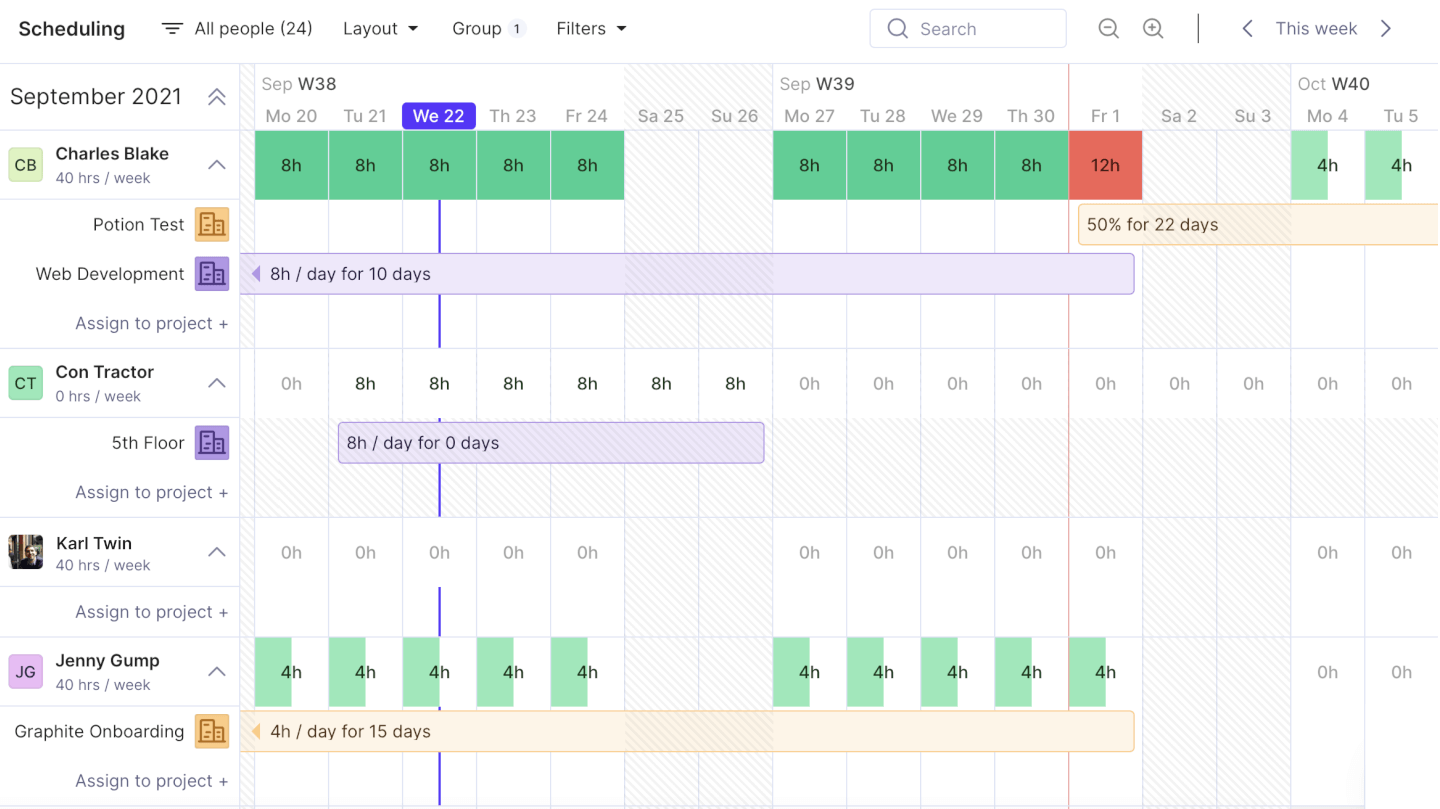
Productive è un software di gestione per agenzie che consente di gestire tutti i processi aziendali, inclusi vendite, fatturazione e contabilità, pianificazione delle risorse e gestione dei progetti.
Perché ho scelto Productive: La funzionalità Sales Pipeline permette di tenere traccia delle vendite e del flusso degli accordi con report sulle vendite e monitoraggio dei contratti persi. Questo è utile anche per mantenere organizzato il processo di vendita.
Productive offre anche un sistema di rilevazione delle ore incorporato, che facilita al team il monitoraggio del tempo, e funzionalità di comunicazione e gestione delle attività che semplificano la collaborazione. Sono inclusi anche strumenti di pianificazione delle risorse, insieme a funzionalità per monitorare la redditività dei progetti, i costi, i principali indicatori, i budget e la fatturazione.
Funzionalità e integrazioni principali di Productive
Le funzionalità includono gestione dei progetti, pianificazione delle risorse, budgeting, reportistica, monitoraggio del tempo, fatturazione, supporto alle vendite e integrazioni con terze parti.
Le integrazioni includono Jira, QuickBooks, Xero, Google Calendar, Exact, Slack, Outlook, Visma e-conomic, Harvest Import, Fortnox, Personio e altre ancora tramite la loro API aperta.
New Product Updates from Productive
Productive Adds Voice Dictation, Slack Connector, Proposals, and Overtime
Productive adds voice dictation, a Slack Connector, proposal controls, and overtime tracking. These updates support faster AI interactions, client proposals, and time management. For more information, visit Productive’s official site.

Scoro
Ideale per la gestione progetti tutto-in-uno
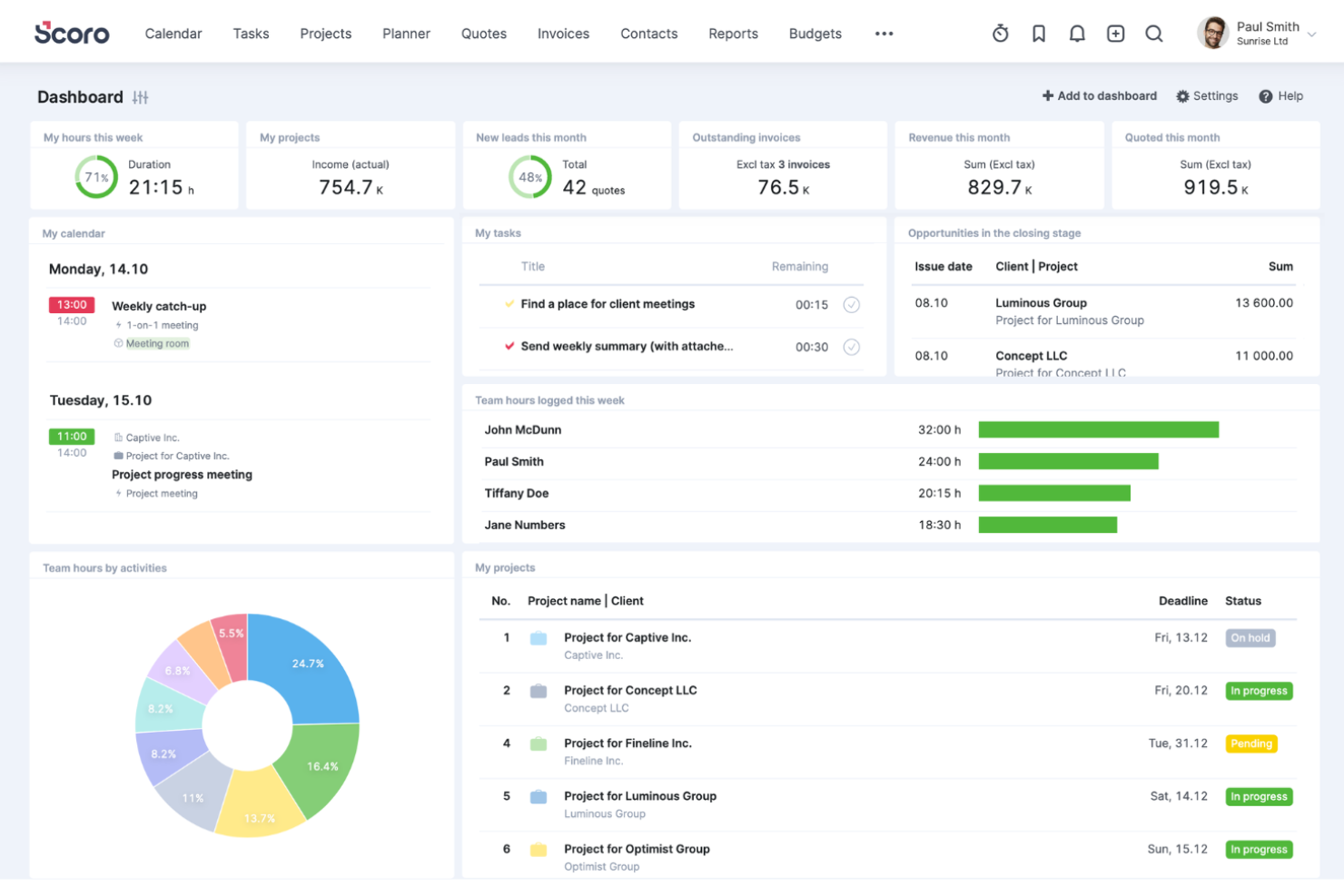
Scoro è un software di automazione per servizi professionali all-in-one progettato per standardizzare le operazioni e ottimizzare i flussi di lavoro delle agenzie. Combina CRM, preventivazione, gestione dei progetti, fatturazione e strumenti di reportistica in un'unica piattaforma, consentendo ai team di gestire il proprio lavoro in modo più efficiente.
Perché ho scelto Scoro: Con Scoro puoi gestire i progetti dall'inizio alla fine, inclusi preventivazione, budgeting, programmazione delle attività e monitoraggio del tempo. Questo approccio end-to-end garantisce che tutti gli aspetti di un progetto siano collegati tra loro, riducendo al minimo le possibilità di incomprensioni ed errori. Inoltre, la funzionalità di pianificazione delle risorse di Scoro consente di assegnare i compiti in modo efficace tra i membri del team, assicurando un utilizzo ottimale e prevenendo il burnout. La piattaforma facilita anche la gestione dei conti clienti, delle pipeline di vendita e degli aspetti finanziari, offrendo strumenti per pianificare e prevedere il lavoro, per una maggiore visibilità su tutte le operazioni.
Funzionalità e integrazioni di Scoro:
Le funzionalità includono la possibilità di automatizzare i processi di fatturazione, riducendo il lavoro manuale e il rischio di errori. Inoltre, report dettagliati e dashboard forniscono informazioni in tempo reale sulle prestazioni aziendali, permettendoti di monitorare i principali indicatori e prendere decisioni guidate dai dati. La piattaforma include anche una gestione degli accordi di mantenimento per tracciare e gestire i lavori ricorrenti dei clienti, oltre a diagrammi di Gantt, un pianificatore drag-and-drop o una Kanban board, e un CRM completo per tenere tutte le comunicazioni e le fatture dei clienti collegate tra loro.
Le integrazioni includono HubSpot, Google Calendar, Microsoft Exchange, Jira, Xero, QuickBooks, Sage Intacct, Exact Online, Expensify, Stripe, Google Drive, BambooHR, Slack, Asana, Dropbox, PayPal e altro ancora. Puoi anche collegarti ad altre app tramite Zapier.
New Product Updates from Scoro

Scoro Adds Time Mobile App and ELI Improvements
Scoro adds the Scoro Time mobile app for iOS/Android to track time anywhere and expands ELI with attachments, smarter filtering, and trigger-based actions. For more information, visit Scoro's official site.

Wrike
Il miglior software per agenzie pubblicitarie orientato alla collaborazione di team
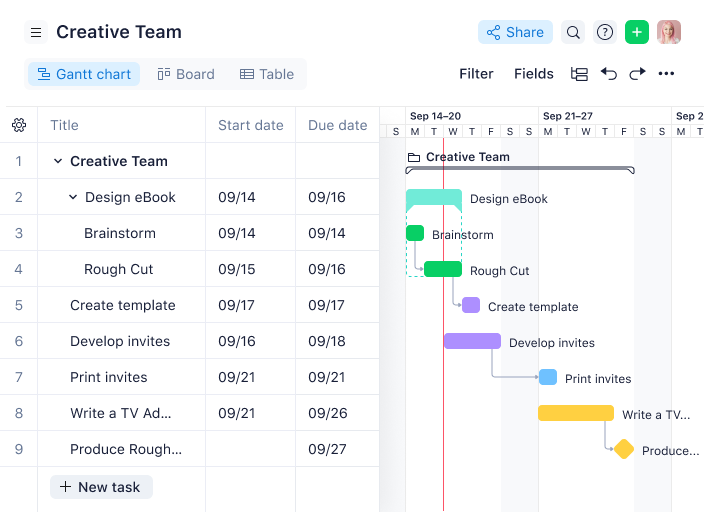
Wrike è un software per agenzie pubblicitarie ideale per team da cinque persone fino a un numero illimitato di membri. Wrike consente a manager e team di visualizzare i progetti su bacheche Kanban e diagrammi di Gantt con funzionalità drag-and-drop, oltre a personalizzare flussi di lavoro, dashboard, report e moduli di richiesta.
Perché ho scelto Wrike: Wrike permette a team e singoli di organizzare la propria dashboard e lista attività secondo la modalità di visualizzazione più adatta al proprio stile di lavoro, offrendo anche automazioni per le attività amministrative. Wrike offre inoltre monitoraggio della capacità dei dipendenti, gestione delle risorse e modelli per l'onboarding.
Wrike mette anche a disposizione un help center dedicato con formazione interattiva, video, una guida “Per iniziare” e una community attiva. Lo strumento include una varietà di soluzioni specifiche per ogni tipo di team o organizzazione, come team marketing e team di servizi professionali. Gli utenti possono anche accedere a diversi modelli per i processi organizzativi più comuni.
Funzionalità e integrazioni di Wrike
Funzionalità includono gestione dei progetti, pianificazione/monitoraggio delle attività, gestione delle risorse, monitoraggio delle spese, API, budgeting, diagrammi di Gantt, automazioni di marketing, supporto alla collaborazione e reportistica.
Integrazioni comprendono oltre 400 integrazioni preconfigurate con i più diffusi software di gestione file di Microsoft, Slack, Google e Dropbox, oltre a software di vendita e marketing come Salesforce e Marketo.
New Product Updates from Wrike
Wrike Adds Klaxoon MCP Integration
Wrike’s Klaxoon MCP integration is now generally available, enabling AI agents to navigate between Wrike tasks and attached whiteboards, read task context, and manage whiteboard attachments via API. For more information, visit Wrike's official site.

Ideale per facilità d'uso e interfaccia intuitiva
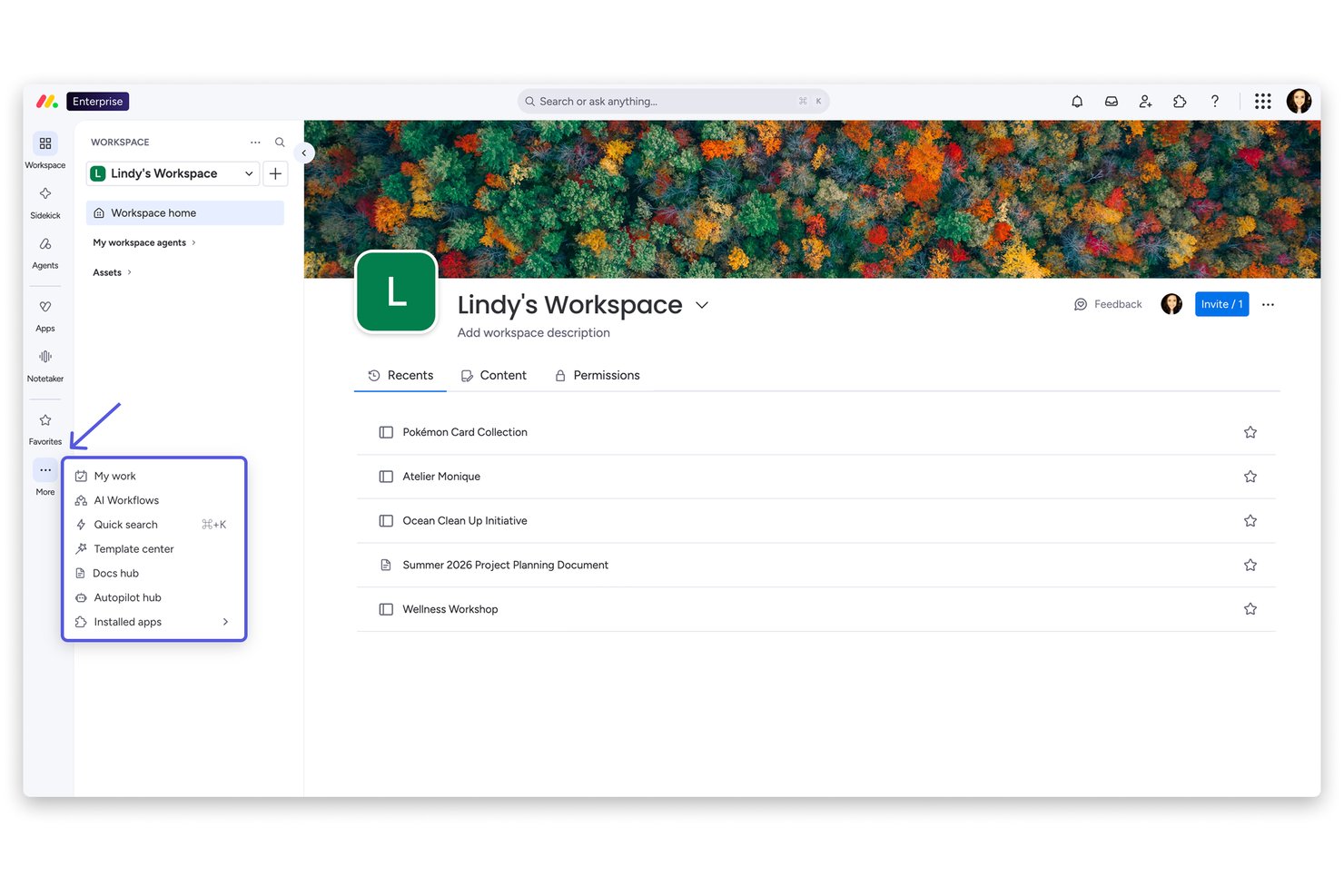
monday AI Workspace è una piattaforma di gestione del lavoro a uso generale che combina la pianificazione delle campagne, la gestione delle attività e delle tempistiche, l'automazione dei flussi di lavoro e il coordinamento dei progetti assistito dall'IA per team e account clienti.
Per Chi È Ideale monday AI Workspace?
È particolarmente adatto a team marketing e agenzie di aziende medio-grandi che necessitano di uno spazio di lavoro flessibile e visivamente intuitivo per gestire più progetti simultanei.
Perché Ho Scelto monday AI Workspace
Ho incluso monday AI Workspace tra le mie scelte principali perché la configurazione drag-and-drop delle board elimina davvero le difficoltà d'onboarding che rallentano i team di agenzia particolarmente impegnati. Mi piace che sia possibile passare facilmente dalle visualizzazioni Kanban, Gantt e timeline senza dover ricostruire nulla, soluzione pratica quando si gestiscono più campagne per diversi clienti contemporaneamente. Oltre 200 modelli predefiniti permettono di avviare una nuova board per una campagna in pochi minuti, non in ore.
Funzionalità Principali di monday AI Workspace
- Dashboard per la gestione delle risorse: Visualizza e bilancia i carichi di lavoro del team tra vari progetti con una vista della capacità in tempo reale.
- Automazioni potenziate dall'IA: Imposta trigger e flussi di lavoro per automatizzare attività ripetitive e aggiornamenti di stato delle campagne.
- Gerarchie degli account clienti: Organizza board e cartelle per cliente, consentendo una chiara separazione tra incarichi e deliverable.
- Colonne di rilevazione del tempo: Registra ore fatturabili e non fatturabili a livello di task per supportare la contabilità dei progetti di agenzia.
Integrazioni di monday AI Workspace
monday AI Workspace offre centinaia di integrazioni tramite integrazioni native e marketplace, tra cui Slack, Salesforce, HubSpot, Google Workspace, Microsoft 365, Adobe Creative Cloud, Jira, QuickBooks, Dropbox e Zapier. Fornisce inoltre un'API per integrazioni personalizzate.
Pros and Cons
Pros:
- Board di campagna altamente visive per più clienti
- La configurazione drag-and-drop non richiede alcuna formazione tecnica
- Moduli di raccolta personalizzati semplificano la raccolta dei brief creativi
Cons:
- Nessuno strumento nativo per revisioni creative o annotazioni
- La reportistica non copre in profondità redditività e margini delle agenzie
New Product Updates from monday AI Workspace
monday AI Workspace Adds Human Approval Routing
monday AI Workspace adds a human-in-the-loop approval block to AI Workflows, sending approval requests and routing workflow paths based on responses. For more information, visit monday AI Workspace's official site.

Ideale per la gestione di agenzie pubblicitarie potenziata dall’IA
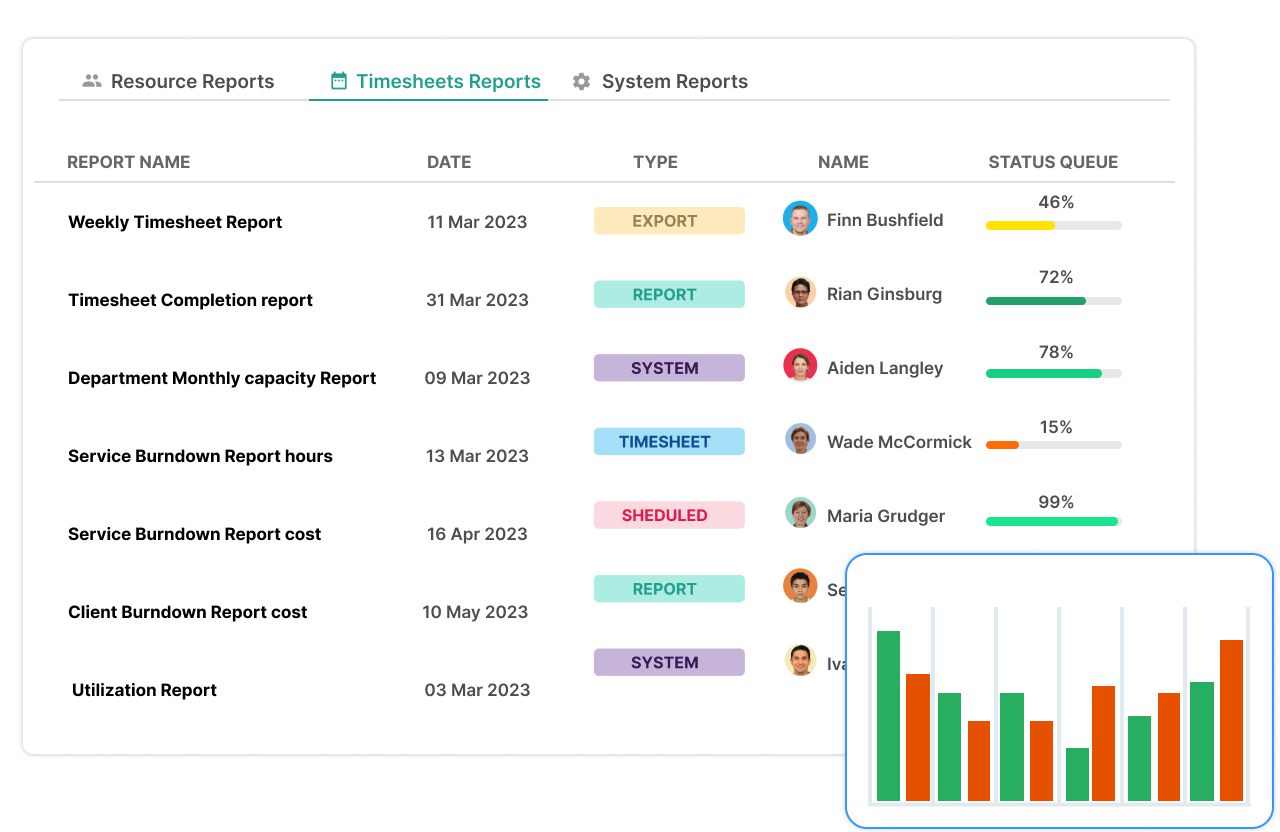
Screendragon è un software di gestione per agenzie pubblicitarie progettato per gestire progetti, processi, persone e redditività in un unico posto. I principali gruppi di agenzie mondiali come Omnicom, WPP e IPG si affidano a Screendragon per gestire le loro attività operative.
Perché ho scelto Screendragon: Chiunque può sfruttare il modulo di budget integrato di Screendragon per creare scope of work (SOW) e stime, oltre a prevedere i ricavi futuri e le esigenze di risorse. Screendragon è anche altamente configurabile, consentendo agli utenti di personalizzare moduli, cruscotti, modelli, regole di workflow, permessi, notifiche, report e persino la terminologia usata sulla piattaforma.
Screendragon include anche funzioni intuitive di gestione attività che permettono agli utenti di passare tra diverse interfacce come le bacheche Kanban visive, diagrammi di Gantt interattivi e viste elenco. Revisioni e approvazioni sono semplificate da funzionalità specifiche per il proofing visivo, la collaborazione in tempo reale, il controllo delle versioni e permessi granulari. Le approvazioni automatizzate facilitano l'approvazione sicura ed efficiente degli asset. L'ampia offerta di Screendragon nell'ambito dei software per agenzie pubblicitarie lo rende particolarmente adatto per agenzie di medie e grandi dimensioni.
L'interfaccia utente di Screendragon è intuitiva e consente agli utilizzatori di personalizzare il marchio dell'interfaccia. Lo strumento offre funzionalità di gestione progetti, gestione workflow, gestione e previsione delle risorse, monitoraggio del tempo, gestione dei budget e gestione degli asset.
Caratteristiche e integrazioni di Screendragon
Funzionalità includono gestione progetti, collaborazione, gestione delle risorse, monitoraggio del tempo, gestione dei budget, reportistica, app mobile e integrazioni di terze parti.
Integrazioni comprendono SAP e PeopleSoft e possono integrarsi con migliaia di app tramite Zapier come Slack, Trello, Google Drive, Office 365 e Microsoft Dynamics. Dispone inoltre di un'API aperta, che consente integrazioni personalizzate con qualsiasi soluzione.
New Product Updates from Screendragon
Screendragon Unveils New AI Hub
Screendragon introduced AI Hub, a new capability that lets teams build and manage AI agents directly within workflows. The update helps marketing teams automate tasks, maintain governance controls, and scale AI-driven operations more efficiently. For more information, visit Screendragon's official site.

Kantata
Ideale per la gestione completa del ciclo di vita dei servizi
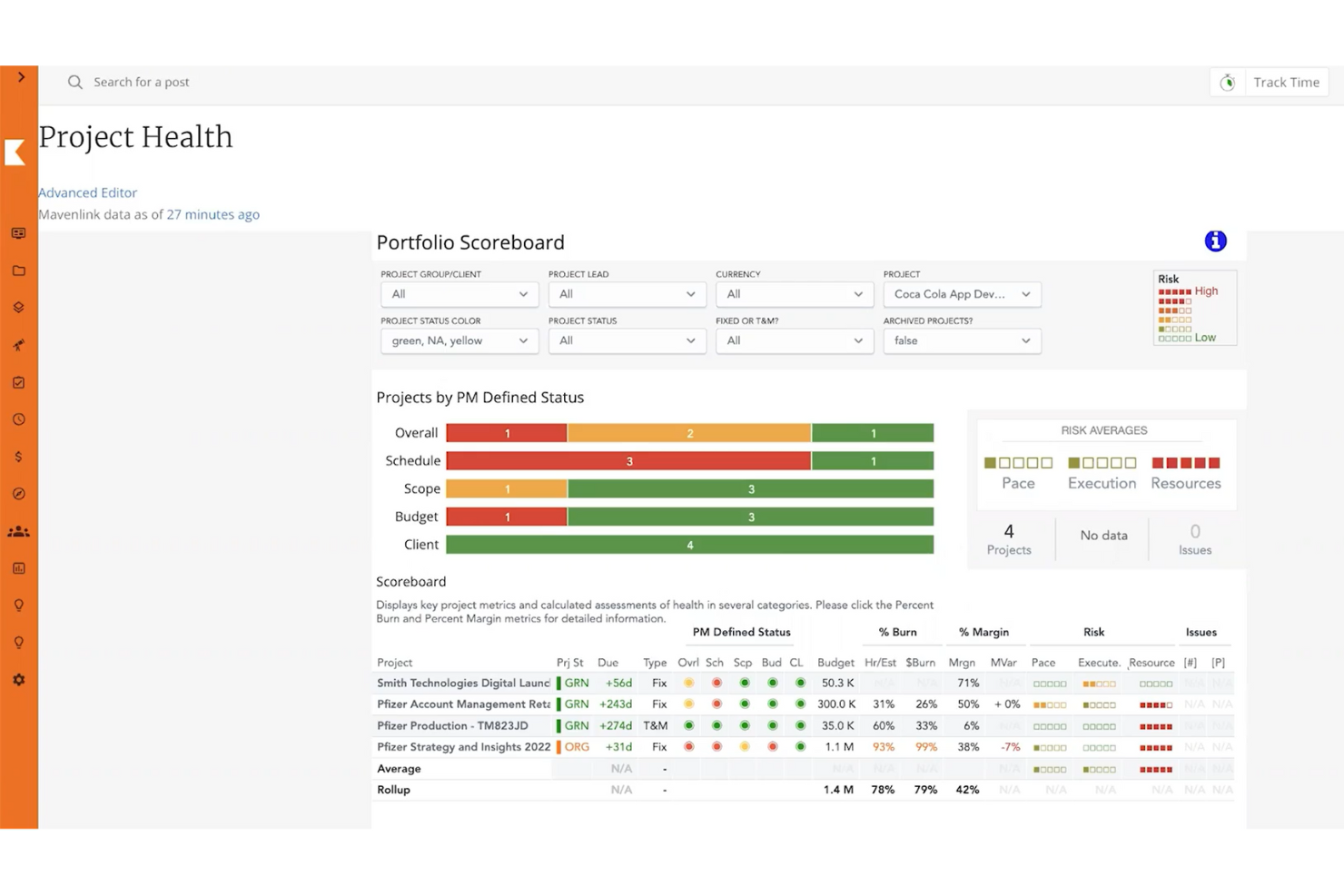
Kantata è una piattaforma di gestione del lavoro per servizi professionali progettata per supportare l'intero ciclo di vita delle campagne dei clienti. Dalla definizione e pianificazione fino all'assegnazione delle risorse, all'erogazione e alla reportistica, offre alle agenzie un hub centralizzato per gestire i progetti, allineare le risorse e mantenere i budget sotto controllo, assicurando al contempo che il lavoro venga consegnato puntualmente.
Perché ho scelto Kantata: Kantata va oltre il semplice monitoraggio di attività e progetti collegando ogni parte del ciclo di vita della campagna. Le agenzie possono pianificare i progetti, prevedere la domanda e assegnare il giusto mix di talenti, gestendo anche la parte finanziaria e monitorando le performance in tempo reale. I suoi strumenti di collaborazione e comunicazione aiutano i team creativi, account e strategia a restare allineati con i clienti per tutta la durata della campagna. Grazie all’intelligence aziendale integrata e al monitoraggio della redditività, Kantata aiuta le agenzie a gestire non solo il lavoro, ma la salute dell’azienda stessa.
Funzionalità e integrazioni di spicco di Kantata
Funzionalità includono dashboard dinamiche per le performance delle campagne, viste a livello di portafoglio per monitorare più account clienti, pianificazione della capacità delle risorse per bilanciare i carichi di lavoro e monitoraggio di tempi e spese per una fatturazione accurata.
Integrazioni includono NetSuite, QuickBooks, Salesforce, Google Workspace, Jira, Expensify, Xero, Concur, Sage Intacct, Slack, HubSpot, piattaforme Microsoft e molte altre.
New Product Updates from Kantata

Kantata Adds Access Group Change History
Kantata adds Access Groups History, letting account administrators track changes to group details, membership, and permissions in Recent History. The update also makes these events available through the Subscribed Events API for broader monitoring. For more information, visit Kantata’s official site.
 .
.
ClickUp
Ideale per una gamma di template per diversi flussi di lavoro
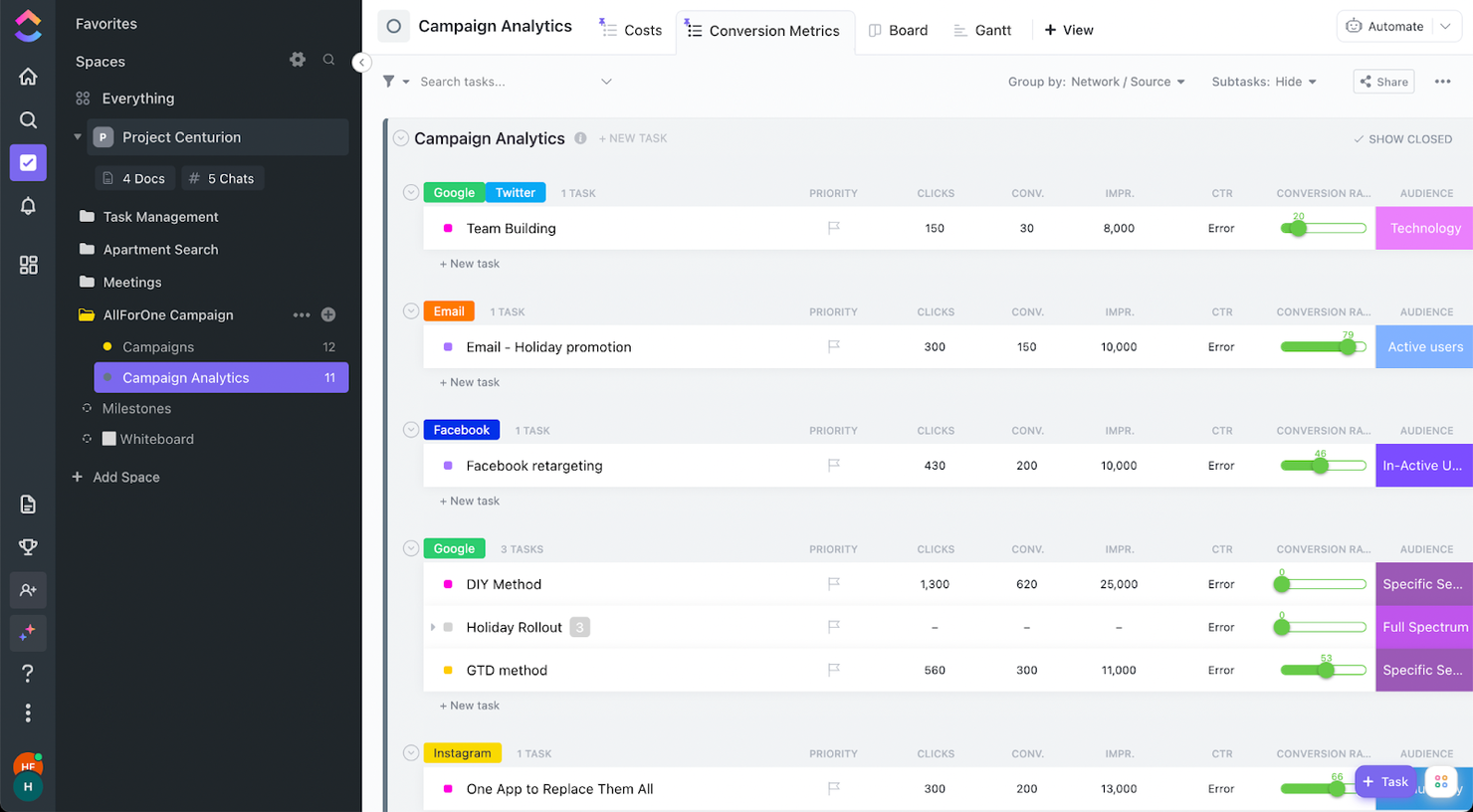
ClickUp è uno strumento potente che manterrà i progetti della tua agenzia sempre in ordine. È personalizzabile in quasi ogni aspetto e può aiutare sia con la gestione dei progetti che delle risorse. Voglio mettere in evidenza le sue funzionalità di revisione e monitoraggio.
Perché ho scelto ClickUp: La revisione è uno spazio dove il tuo team può collaborare su una risorsa digitale, aggiungere commenti, taggare i membri e allegare video di condivisione schermo per mostrare esattamente ciò che intendi comunicare. Ora, parliamo del monitoraggio. Il monitoraggio può avvenire direttamente nella tua lista, come mostrato nello screenshot sopra. Tutte queste attività hanno una tabella creata al loro interno che alimenta le informazioni che visualizzi. In questo modo, puoi vedere in un colpo d’occhio il tuo tasso di conversione, i clic, eccetera.
Funzionalità e integrazioni eccezionali di ClickUp
Le funzionalità includono pianificazione/monitoraggio delle attività, gestione dei progetti, gestione delle risorse, budgeting, gestione contatti, visualizzazione dati, database dipendenti, tracciamento spese, condivisione file, plugin di terze parti, supporto alla collaborazione, timesheet, roadmapping, chat, gestione clienti, integrazione email, gestione feedback e reportistica di processo.
Le integrazioni comprendono integrazioni native con Slack, Google Workspace, Dropbox e molti altri strumenti, oltre a più di 1.000 integrazioni tramite Zapier (possono essere previsti costi aggiuntivi).
New Product Updates from ClickUp
ClickUp Adds Meetings Hub, Super Agent Templates, and ZoomInfo Integration
ClickUp adds a searchable Meetings Hub, new ways to clone and template Super Agents, and a ZoomInfo integration through the App Center. These updates improve meeting retrieval, agent reuse, and access to sales intelligence. For more information, visit ClickUp’s official site.

Nifty
Ideale per la gestione di problemi e cambiamenti
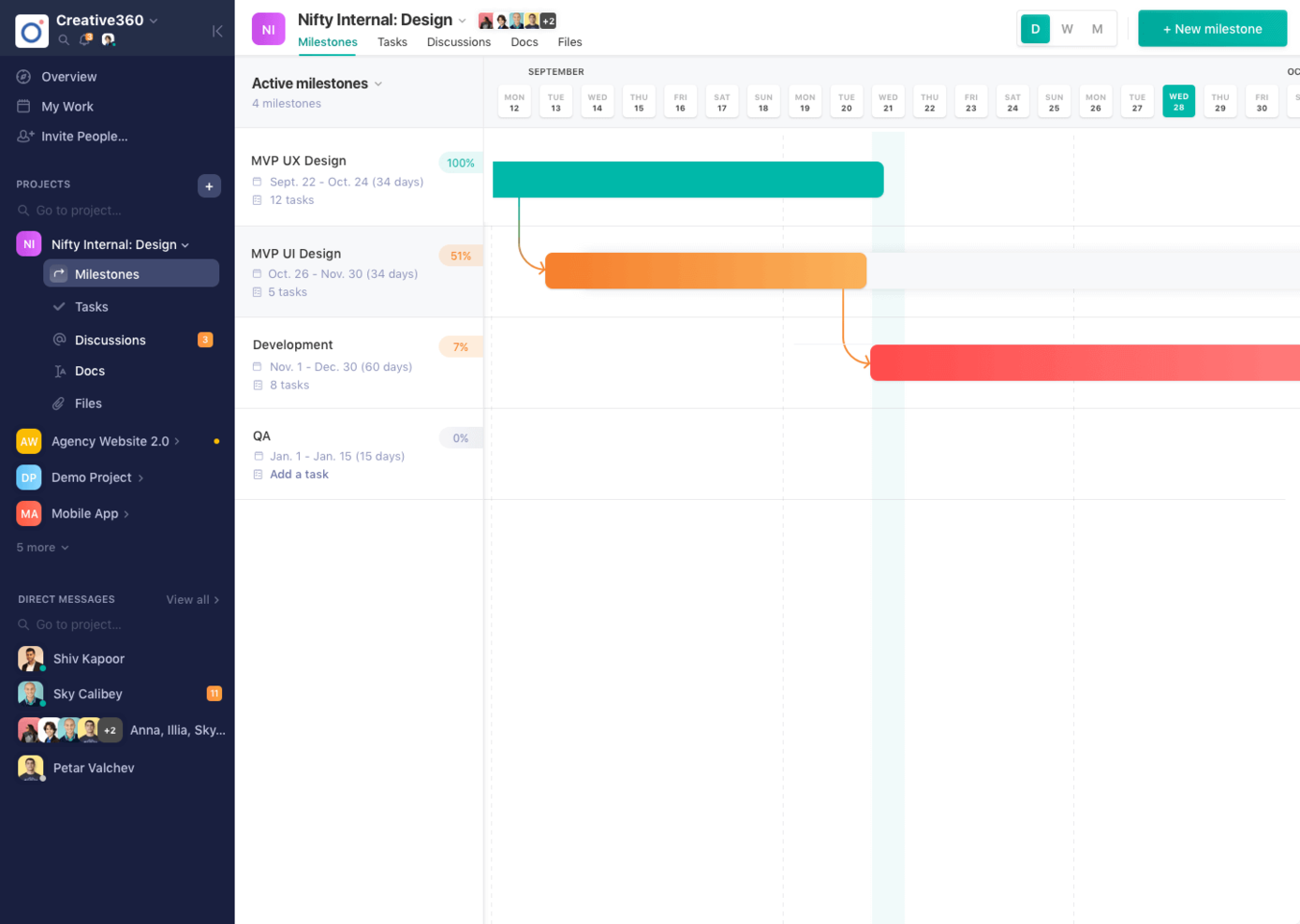
Nifty mette in mostra il meglio della tua agenzia creando chiarezza nelle tempistiche mentre gestisce file, testi, comunicazioni e feedback. Combina la collaborazione quotidiana del team con la consegna al cliente selezionando quali Attività e Traguardi sono visibili al tuo Ospite. Le panoramiche tra progetti offrono chiarezza sul portfolio poiché le tempistiche dei traguardi vengono aggiornate automaticamente al completamento delle attività corrispondenti.
Perché ho scelto Nifty: Nifty vanta reportistica automatica sullo stato dei progetti basata sul completamento delle attività, Google Docs, Sheets e Presentations integrati per inserirli nel tuo flusso di lavoro, oltre a un sistema di tracciamento del tempo che consente di monitorare le ore tra membri, compiti e progetti. Nifty offre anche una lista attività e una vista Kanban per una maggiore flessibilità nella gestione dei compiti.
Nifty mantiene allineati il tuo team e i principali stakeholder di progetto poiché i flussi di lavoro quotidiani aggiornano l'avanzamento dei Traguardi. Gli Ospiti vivono una coinvolgente esperienza su Nifty, potendo creare e completare attività per rafforzare la collaborazione con il cliente. Questo riduce il tempo perso a cercare comunicazioni o feedback attraverso numerosi canali di comunicazione.
Funzionalità e integrazioni principali di Nifty
Funzionalità gestione attività, gestione risorse, collaborazione, dashboard, report, app mobile, personalizzazioni e integrazione con terze parti.
Integrazioni includono Github, Google Drive e Calendar, Microsoft Suite, Slack e Zoom con integrazioni native e oltre 1000 integrazioni disponibili tramite Zapier.

Ideale per creativi e team di design
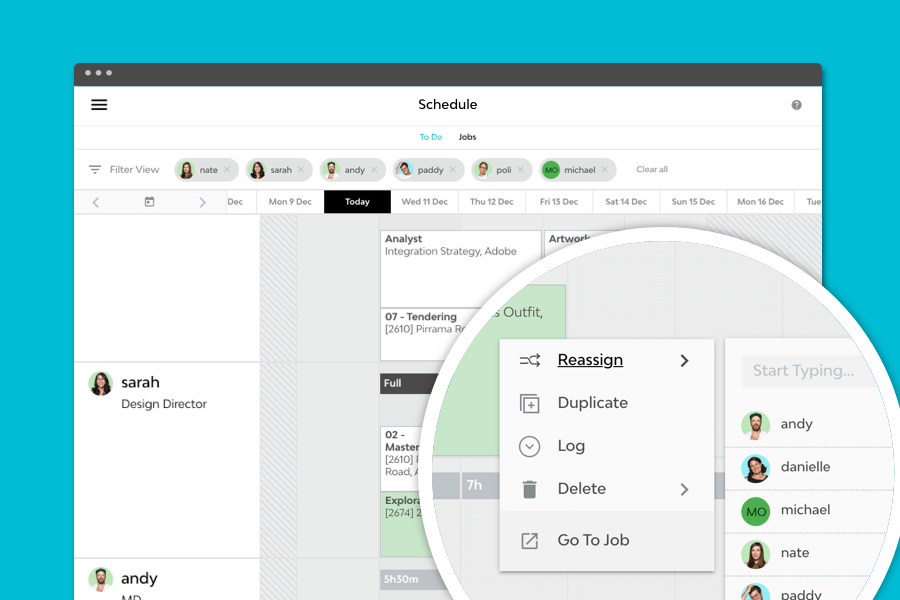
Streamtime è un potente strumento di gestione per agenzie che ti permette di creare, pianificare e gestire progetti mantenendo il team sempre aggiornato. La schermata interattiva delle cose da fare di Streamtime può sostituire i fogli ore, eliminando la necessità di rincorrere il completamento delle schede attività. Sul mercato dal 2002, Streamtime è stato riconosciuto con un Webby Award 2020 insieme a D&AD, AGDA Pinnacle e Best Design Awards.
Perché ho scelto Streamtime: Con una pianificazione dei progetti flessibile, preventivi e fatturazione automatizzati, un innovativo sistema di rilevamento del tempo, una programmazione elegante e reportistica intelligente, Streamtime offre tutte le funzionalità necessarie all'interno di un'interfaccia bella e intuitiva. Agenzie di design e pubblicità di tutto il mondo utilizzano Streamtime per migliorare la visibilità sulle prestazioni aziendali e dei clienti, oltre che sfruttare le solide visualizzazioni di pianificazione per ottimizzare la gestione della capacità e delle risorse.
Caratteristiche e integrazioni principali di Streamtime
Le funzionalità includono gestione progetti, monitoraggio del budget, collaborazione, reportistica, flussi di lavoro flessibili, accesso da mobile, calcolo dei costi lavoro, fatturazione, gestione degli asset e integrazioni con terze parti.
Le integrazioni includono Xero, Quickbooks, PayPal, Stripe, Google apps, Microsoft Office, Trello, HubSpot, Salesforce, Gmail, Microsoft Outlook, Dropbox, Google Drive e altri strumenti.

Teamwork.com
ideale per abilitare la collaborazione con i clienti
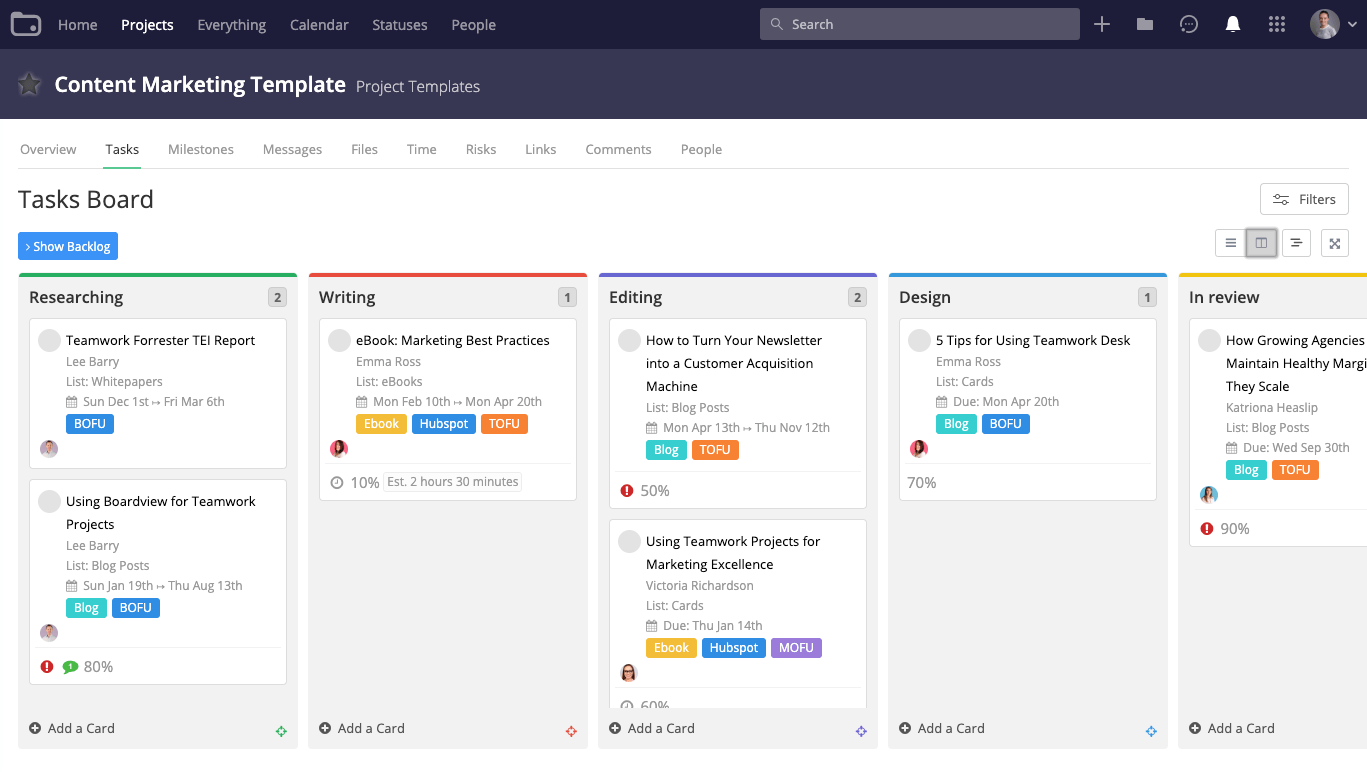
Teamwork è un software di gestione per agenzie pubblicitarie flessibile che aiuta le agenzie a diventare più produttive e redditizie. Permette alle agenzie di gestire grandi volumi di progetti per i clienti dall'inizio alla fine. Teamwork ti consente di creare flussi di lavoro personalizzati e flessibili e mette a disposizione un unico luogo centrale per visualizzare i progetti del tuo team e dei clienti.
Teamwork offre una serie di strumenti e funzionalità per aiutare le agenzie a gestire il proprio lavoro. Con la funzione Workload puoi avere una visione completa della capacità del tuo team, gestire le risorse e tenere il team sulla giusta rotta. Teamwork include anche una funzione di rilevamento del tempo integrata per registrare le ore lavorate sui compiti e monitorare le ore fatturabili. I report sulla redditività ti permettono di monitorare la performance finanziaria per progetto o membro del team e confrontarla con il budget assegnato a quel cliente.
Un aspetto particolarmente utile di questo software per agenzie è che puoi aggiungere i clienti come collaboratori gratuitamente, così che possano comunicare con il tuo team, lasciare commenti contestuali, revisionare materiali e avere visibilità sull'avanzamento del progetto.
Teamwork si integra facilmente con altri strumenti come Gmail, Harvest, Hubspot, QuickBooks, Slack, Dropbox e molti altri.
Teamwork costa a partire da $10/utente/mese. È disponibile anche una prova gratuita di 30 giorni.
Altri software per agenzie pubblicitarie
Ecco un elenco di software che non sono entrati nella lista principale, ma che meritano comunque la tua attenzione.
- Bonsai Agency Software
Ideale per gestire l'intero processo di un'agenzia pubblicitaria
- Admation
Ideale per i processi di revisione e approvazione
- FunctionFox
Ideale per team creativi e agenzie
- Parallax
Ideale per la pianificazione proattiva delle risorse
- Intervals
Migliori funzionalità di reportistica per tempo e spese
- Function Point
Ideale per identificare le dipendenze delle attività nei progetti di agenzia
- Ravetree
Il miglior software per agenzie con portali clienti in tempo reale
- Workamajig Platinum
Il miglior software per agenzie pubblicitarie per le integrazioni
- SegMetrics
Ideale per il monitoraggio delle campagne
- Mosaic
Il miglior software per agenzie pubblicitarie per visualizzare il carico di lavoro e pianificare i progetti
- Olavana
Ideale per pubblicare e revisionare banner pubblicitari HTML
- Copper
Le migliori funzionalità CRM per software di agenzie pubblicitarie
- Hubstaff
Ideale per team ibridi/remoti
- Hive
Ideale per strumenti di comunicazione e collaborazione
- Accelo
Ideale per tracciare progetti singoli e lavori ricorrenti
- VOGSY
Il miglior software per agenzie pubblicitarie per utenti di Google Workspace


Come valuto i software per agenzie pubblicitarie
Divido la mia valutazione in due livelli: una base che ogni strumento di project management per agenzie deve superare—monitoraggio delle campagne, ore fatturabili, revisione da parte del cliente—e i fattori differenzianti che distinguono i migliori.
Funzionalità core (requisiti minimi per questa lista)
Quando seleziono gli strumenti per la mia lista, ne valuto ciascuno su una scala da 0 (non offre la funzionalità) a 5 (eccelle in questa area) per ogni funzionalità core elencata di seguito. Successivamente, calcolo il punteggio totale dello strumento in percentuale. Ogni strumento deve raggiungere un punteggio minimo totale del 65% per essere considerato per l'inclusione.
- Gestione dei progetti di campagna: Cerco strumenti che permettano di lanciare progetti di campagna suddivisi in più fasi con dipendenze tra attività, traguardi e visualizzazioni temporali, così che un lancio di rebranding o una campagna stagionale rimangano sulla buona strada.
- Pianificazione delle risorse e della capacità: Le agenzie gestiscono costantemente scadenze di clienti che si sovrappongono, quindi verifico se uno strumento mostra le visualizzazioni del carico di lavoro in tempo reale e permette di riassegnare il personale quando improvvisamente una presentazione diventa prioritaria.
- Rilevazione dei tempi e controllo dei budget: Ogni ora fatturabile conta in un'agenzia. Valuto se il rilevamento dei tempi è direttamente collegato ai progetti dei clienti, con soglie di budget che segnalano gli sforamenti prima che si erodano i margini.
- Revisione creativa e approvazioni: Cerco strumenti integrati di markup e annotazione che supportino diversi tipi di file, confronto di versioni e flussi di approvazione strutturati, in modo che il ciclo di revisione di un video o di un annuncio display non rimanga incastrato nelle e-mail.
- Gestione clienti e account: Organizzare il lavoro dei clienti è fondamentale. Verifico la presenza di gerarchie a livello di account che raggruppano progetti, brief e contatti sotto ogni cliente per una navigazione e reportistica facilitata.
- Reportistica sulla redditività dell'agenzia: Valuto se uno strumento offre dashboard di redditività a livello di progetto, tassi di utilizzo e monitoraggio del budget che aiutano i responsabili delle operazioni a rispondere alla domanda "stiamo guadagnando su questo account?" senza dover esportare in un foglio di calcolo.
Una volta che ho una lista di strumenti che soddisfano questi criteri, considero ciò che distingue ogni piattaforma.
Fattori differenzianti (Cosa distingue i fornitori)
Ecco come confronto e metto a confronto i diversi fornitori:
Funzionalità distintive
Un DAM integrato fa davvero la differenza quando il tuo team riutilizza loghi, template e asset approvati su decine di account clienti—niente più ricerche infinite nei drive condivisi. Cerco anche strumenti per la raccolta di brief creativi che indirizzano le richieste strutturate direttamente nei flussi di lavoro dei progetti, eliminando quei passaggi intermedi che rallentano le fasi iniziali. I portali clienti white-label sono un'altra funzione che apprezzo, perché permettono di condividere aggiornamenti di stato e raccogliere approvazioni con il marchio dell'agenzia anziché mostrare un'interfaccia generica.
Oltre le funzionalità
L'integrazione con altri strumenti è molto importante—verifico se una piattaforma si collega ad Adobe Creative Cloud, Slack e software di contabilità come QuickBooks o Xero, poiché le agenzie dipendono da questi flussi di dati ogni giorno. Anche la struttura dei prezzi è fondamentale. Le agenzie aumentano il personale con freelance e riducono nei periodi tra le gare, quindi valuto se la licenza permette una variazione del numero di utenti senza penalizzare la presenza di revisori ospiti o clienti. Considero anche il supporto all'onboarding, in particolare se il fornitore offre template specifici per agenzie e supporto alla migrazione per ridurre il time-to-value.
Come scegliere un software per agenzie pubblicitarie
È facile perdersi tra lunghi elenchi di funzionalità e strutture tariffarie complesse. Per aiutarti a rimanere concentrato mentre affronti il tuo processo personalizzato di selezione del software, ecco un elenco di fattori da tenere a mente:
| Fattore | Cosa considerare |
|---|---|
| Scalabilità | Il software può crescere insieme alla tua agenzia? Considera il futuro carico di clienti e l'espansione del team. Cerca strumenti in grado di gestire un aumento dei dati e delle esigenze degli utenti. |
| Integrazioni | Funziona con gli strumenti che utilizzi attualmente? Verifica la compatibilità con le piattaforme CRM, e-mail e di analisi già utilizzate dal tuo team. |
| Personalizzazione | Puoi adattarlo ai tuoi flussi di lavoro? Valuta le opzioni per modificare dashboard, report e impostazioni degli utenti in base alle esigenze della tua agenzia. |
| Facilità d'uso | Il tuo team lo adotterà rapidamente? Cerca interfacce semplici e una navigazione intuitiva. Evita gli strumenti che richiedono una formazione approfondita per essere utilizzati in modo efficace. |
| Implementazione e avviamento | Quanto tempo ci vorrà per iniziare? Considera il tempo necessario per configurare lo strumento e formare il tuo team. Verifica la disponibilità di risorse come tutorial e assistenza. |
| Costo | Rientra nel tuo budget? Confronta i piani tariffari e i costi nascosti. Cerca il miglior rapporto tra funzionalità e assistenza offerta. |
| Misure di sicurezza | I dati dei tuoi clienti sono protetti? Verifica gli standard di crittografia e la conformità alle normative sulla protezione dei dati. |
| Disponibilità dell'assistenza | L'aiuto è facilmente disponibile? Verifica la presenza di un'assistenza attiva 24 ore su 24, 7 giorni su 7 e di diverse opzioni di contatto. Considera la reputazione del fornitore nel risolvere rapidamente i problemi. |
Che cos'è il software per agenzie pubblicitarie?
Il software per agenzie pubblicitarie è uno strumento progettato per aiutare le agenzie a gestire campagne, comunicazioni con i clienti e flussi di lavoro dei progetti. Professionisti come project manager, account executive e team creativi utilizzano questi strumenti per migliorare l'efficienza e la collaborazione. Le funzionalità di gestione delle attività, monitoraggio del budget e analisi aiutano a organizzare i progetti e a prendere decisioni basate sui dati. Nel complesso, questi strumenti semplificano la gestione di progetti pubblicitari complessi e migliorano la produttività del team.
Funzionalità
Quando scegli un software per agenzie pubblicitarie, presta attenzione alle seguenti funzionalità chiave:
- Gestione delle campagne: aiuta a pianificare, eseguire e monitorare le campagne pubblicitarie dall'inizio alla fine, garantendo consegne puntuali e allineamento con gli obiettivi dei clienti.
- Collaborazione con i clienti: facilita la comunicazione e la condivisione di documenti con i clienti, migliorando la trasparenza e la costruzione di relazioni.
- Report e analisi: fornisce informazioni sulle prestazioni delle campagne, consentendo di prendere decisioni basate sui dati e di ottimizzare le attività.
- Monitoraggio del budget: monitora le spese e prevede le esigenze finanziarie, aiutando le agenzie a rispettare il budget e a gestire le risorse in modo efficace.
- Pianificazione delle attività: organizza attività e scadenze, assicurando che i membri del team conoscano le proprie responsabilità e rispettino le tempistiche del progetto.
- Integrazioni: si collega agli strumenti esistenti, come le piattaforme CRM e di posta elettronica, creando un flusso di lavoro unificato e riducendo l'inserimento manuale dei dati.
- Dashboard personalizzabili: consentono agli utenti di adattare il proprio spazio di lavoro per accedere rapidamente alle informazioni e alle metriche più rilevanti.
- Misure di sicurezza: proteggono i dati sensibili dei clienti mediante la crittografia e la conformità alle normative sulla protezione dei dati.
- Interfaccia intuitiva: garantisce facilità d'uso grazie a una navigazione intuitiva, favorendo l'adozione e riducendo i tempi di formazione.
- Disponibilità dell'assistenza: offre un'assistenza clienti affidabile per risolvere rapidamente i problemi e mantenere i progetti nei tempi previsti.
Vantaggi
L'implementazione di un software per agenzie pubblicitarie offre diversi vantaggi al tuo team e alla tua attività. Ecco alcuni dei risultati che puoi aspettarti:
- Maggiore organizzazione: grazie alla pianificazione delle attività e alla gestione delle campagne, il tuo team può tenere sotto controllo scadenze e dettagli dei progetti, riducendo il caos.
- Collaborazione migliorata: le funzionalità di collaborazione con i clienti facilitano la condivisione di aggiornamenti e feedback, favorendo relazioni e comunicazioni migliori.
- Decisioni basate sui dati: report e analisi offrono informazioni sulle prestazioni, aiutandoti a prendere decisioni consapevoli e a ottimizzare le campagne.
- Controllo del budget: il monitoraggio del budget tiene sotto controllo le spese, garantendo che i progetti rispettino i limiti finanziari e che le risorse vengano utilizzate in modo oculato.
- Maggiore produttività: un'interfaccia intuitiva e dashboard personalizzabili significano meno tempo dedicato alla navigazione e più tempo per attività di valore.
- Flussi di lavoro integrati: le integrazioni con gli strumenti esistenti garantiscono un flusso regolare dei dati, riducendo l'inserimento manuale e i possibili errori.
- Sicurezza dei dati: le misure di sicurezza proteggono le informazioni dei clienti, offrendo tranquillità e preservando la fiducia.
Costi e prezzi
La scelta del software per agenzie pubblicitarie richiede la comprensione dei vari modelli di prezzo e dei piani disponibili. I costi variano in base alle funzionalità, alle dimensioni del team, ai componenti aggiuntivi e ad altro ancora. La tabella seguente riassume i piani più comuni, i relativi prezzi medi e le funzionalità tipicamente incluse nelle soluzioni software per agenzie pubblicitarie:
Tabella comparativa dei piani per il software per agenzie pubblicitarie
| Tipo di piano | Prezzo medio | Funzionalità comuni |
|---|---|---|
| Piano gratuito | $0 | Gestione di base delle attività, accesso limitato degli utenti e spazio di archiviazione minimo. |
| Piano personale | $10-$30/utente/mese | Gestione delle attività, collaborazione con i clienti, reportistica di base e integrazione con le email. |
| Piano aziendale | $50-$100/utente/mese | Analisi avanzate, monitoraggio del budget, strumenti di collaborazione del team e dashboard personalizzate. |
| Piano per grandi aziende | $150+/utente/mese | Set completo di funzionalità, assistenza prioritaria, utenti illimitati e opzioni di sicurezza avanzate. |
Domande frequenti sul software per agenzie pubblicitarie
Trova le risposte alle domande più comuni che altre persone pongono su questo argomento.
Il software per agenzie pubblicitarie può aiutare con il lavoro da remoto?
Sì, il software per agenzie pubblicitarie include spesso strumenti di collaborazione che supportano il lavoro da remoto. Funzionalità come l’archiviazione nel cloud, gli aggiornamenti in tempo reale e i canali di comunicazione facilitano la collaborazione dei team da località diverse. Questo può migliorare la produttività e mantenere tutti allineati sugli obiettivi del progetto.
Come posso assicurarmi che i miei dati siano al sicuro con il software per agenzie pubblicitarie?
Scegli un software che offra solide misure di sicurezza, come la crittografia e la conformità alle normative sulla protezione dei dati. Esamina sempre l’informativa sulla privacy e le certificazioni di sicurezza del fornitore. Potresti anche verificare se fornisce aggiornamenti di sicurezza regolari e dispone di un solido sistema di assistenza per eventuali problemi.
È difficile passare a un nuovo software per agenzie pubblicitarie?
Il passaggio può essere impegnativo, ma molti fornitori offrono risorse per aiutarti. Cerca strumenti che forniscano assistenza per l’inserimento, come tutorial e servizio clienti. Dovresti inoltre pianificare la migrazione dei dati e la formazione del team per garantire una transizione senza problemi. Valuta la possibilità di iniziare con un periodo di prova per verificare la compatibilità.
Cosa succede ora:
Se stai cercando un software per agenzie pubblicitarie, contatta gratuitamente un consulente SoftwareSelect per ricevere consigli.
Compili un modulo e fai una breve conversazione durante la quale il consulente approfondirà le tue esigenze specifiche. In seguito riceverai una selezione ristretta di software da esaminare. Ti assisterà anche durante l'intero processo di acquisto, comprese le negoziazioni sul prezzo.