

I 10 migliori software per l’automazione dei processi aziendali per il 2026

10 Elenco dei migliori software di automazione dei processi aziendali


Il software di automazione dei processi aziendali è una risorsa preziosa per le grandi aziende che desiderano ottimizzare le proprie attività. Con il software giusto, potrai velocizzare e standardizzare i principali processi aziendali per garantire che tutto funzioni in modo fluido ed efficiente. Tuttavia, trovare il giusto strumento di automazione intelligente dei processi può essere difficile, soprattutto considerando le numerose opzioni disponibili.
Basandomi sulla mia esperienza con i software di gestione dei progetti, ho testato e confrontato diversi tra i migliori software di automazione dei processi aziendali disponibili. Ho quindi raccolto i risultati in recensioni approfondite per aiutare le aziende a trovare il software migliore per le proprie esigenze specifiche. Che tu sia alle prime armi con l'automazione o conosca già bene tutti gli aspetti del settore, sono certo che nell'elenco qui sotto troverai il software di automazione dei processi aziendali più adatto alla tua azienda.
Perché fidarsi dei nostri consigli sui software
Il nostro team testa e recensisce software dal 2012. In quanto project manager noi stessi, sappiamo quanto sia difficile — e importante — scegliere il software giusto.
Per questa guida, abbiamo valutato gli strumenti attraverso test pratici e ricerche indipendenti, assegnando un punteggio agli strumenti in base ai nostri criteri di selezione. Ci basiamo inoltre sulle competenze di leader di pensiero del settore e di professionisti attivi nella gestione dei progetti.
Le nostre recensioni riflettono il nostro giudizio editoriale umano, non un discorso di vendita.
Revisori esperti:
Tabella comparativa dei software di automazione dei processi aziendali
Questa tabella comparativa riassume i dettagli sui prezzi dei migliori software di automazione dei processi aziendali che ho selezionato:
| Tool | Best For | Trial Info | Price | ||
|---|---|---|---|---|---|
| 1 | Ideale per gestire carichi di lavoro dinamici | Prova gratuita di 14 giorni + piano gratuito disponibile | Da $10/utente/mese (fatturazione annuale) | Website | |
| 2 | Ideale per l'automazione di processi altamente personalizzabile | Demo gratuita disponibile | $40/utente/mese | Website | |
| 3 | Ideale per l'automazione dei processi SAP | Demo gratuita disponibile | Prezzo su richiesta | Website | |
| 4 | Ideale per gestire attività di automazione complesse | Prova gratuita disponibile | A partire da $10,000 (licenza una tantum) | Website | |
| 5 | Ideale per l'automazione documentale nativa su Salesforce | Demo gratuita disponibile | Da $399/mese (fatturato annualmente) | Website | |
| 6 | Ideale per i flussi di lavoro interdipartimentali | Prova gratuita di 14 giorni | A partire da $9/utente/mese (con fatturazione annuale) | Website | |
| 7 | Ideale per la creazione personalizzata di applicazioni | Demo gratuita disponibile | A partire da $2.500/mese (fatturazione annuale) | Website | |
| 8 | Il migliore con oltre 1.000 connettori preconfigurati per app | Demo gratuita disponibile | Prezzo su richiesta | Website | |
| 9 | Ideale per l'automazione documentale con intelligenza artificiale | Prova gratuita disponibile + demo gratuita | Prezzo su richiesta | Website | |
| 10 | Ideale per creare integrazioni tra app senza codice | Piano gratuito disponibile | Da $19.99/mese (fatturato annualmente) | Website |


Recensioni dei migliori software di automazione dei processi aziendali
Ecco le mie analisi e panoramiche approfondite di ciascun software di automazione dei processi aziendali. Ti illustrerò i pro e i contro di ogni strumento, le sue funzionalità e i casi d’uso migliori.

Wrike
Ideale per gestire carichi di lavoro dinamici

Wrike è una potente piattaforma di automazione dei processi aziendali che aiuta i team a ridurre il lavoro manuale automatizzando le attività ricorrenti e coordinando workflow complessi tra reparti. È progettata per supportare grandi organizzazioni con carichi di lavoro dinamici, offrendo una visibilità completa su progetti, obiettivi e prestazioni—tutto in un unico posto.
Perché ho scelto Wrike: Ho scelto Wrike per le sue funzionalità di pianificazione basate sull'IA. Puoi identificare i rischi in anticipo e allocare le risorse in modo intelligente, il che aiuta a prevenire ritardi. Mi piace anche come centralizza le informazioni provenienti da tutti i reparti, rendendo più semplice individuare dipendenze e allineare i team senza perdere tempo in controlli di stato. Inoltre, la sua flessibilità permette di gestire lavori creativi, operativi o tecnici tutti sulla stessa piattaforma.
Funzionalità principali & integrazioni:
Funzionalità includono moduli di richiesta personalizzabili per raccogliere informazioni di avvio progetto in anticipo, dashboard in tempo reale per monitorare le metriche di prestazione e app mobili complete per gestire il lavoro ovunque ti trovi. Wrike offre anche funzionalità di sicurezza di livello enterprise come controlli di accesso e archiviazione crittografata per mantenere i tuoi dati al sicuro.
Integrazioni includono Salesforce, Adobe Creative Cloud, Microsoft Teams, Tableau, Power BI, Zoom, Google Drive, Microsoft SharePoint, Klaxoon, QuickBooks, Google Sheets e molte altre tramite Wrike Integrate e accesso API.
Pros and Cons
Pros:
- Workflow flessibili per qualsiasi team
- Rilevamento intelligente dei rischi tramite IA
- Accesso integrato da mobile e desktop
Cons:
- Le automazioni complesse richiedono configurazione
- Le funzionalità avanzate richiedono tempo per essere apprese
New Product Updates from Wrike

Wrike Adds Quick Search to Table View
Wrike adds Quick Search to Table View with full-table search across titles, descriptions, and fields, plus highlighted matches. This helps users find tasks faster in large tables. For more information, visit Wrike’s official site.

Ideale per l'automazione di processi altamente personalizzabile

Studio Creatio è una piattaforma no-code progettata per automatizzare i flussi di lavoro e costruire applicazioni senza la necessità di competenze tecniche. Consente agli utenti di creare soluzioni aziendali personalizzate utilizzando componenti predefiniti.
Perché ho scelto Studio Creatio: Mi piace la sua robusta piattaforma no-code, che permette agli utenti di creare e personalizzare applicazioni e flussi di lavoro senza dover programmare. Questa caratteristica è particolarmente vantaggiosa per le organizzazioni che vogliono consentire agli utenti non tecnici di sviluppare soluzioni aziendali su misura in modo efficiente. La possibilità di progettare, eseguire e monitorare processi aziendali complessi è resa possibile grazie al designer no-code intuitivo della piattaforma e al Process Designer basato su BPMN 2.0.
Funzionalità principali & integrazioni:
Le funzionalità includono architettura componibile, strumenti di validazione integrati per debug più semplice, marketplace per app pronte all'uso, scalabilità dell'architettura a più livelli, automazione con IA, ambiente di sviluppo integrato (IDE) per sviluppatori e un'app mobile.
Le integrazioni includono Microsoft Excel, Gmail, Mailchimp, Google Calendar, Microsoft Word, Tableau, Microsoft Outlook, Meta for Business, Twitter/X, Google Contacts, Brandwatch e Asterisk.
Pros and Cons
Pros:
- Altamente personalizzabile per soddisfare le esigenze specifiche dell'organizzazione
- Piattaforma no-code per utenti non tecnici
- Versatile per una vasta gamma di funzioni aziendali
Cons:
- La personalizzazione può richiedere tempo
- Curva di apprendimento iniziale per chi non conosce le piattaforme no-code
New Product Updates from Creatio AI Studio
Creatio Studio Expands AI App-Building Capabilities
Creatio Studio adds expanded AI coding agents, AI-generated pivot tables, and built-in analytics for generated apps. These updates let users build more UI, logic, and reporting components from natural-language prompts. For more information, visit Creatio Studio’s official site.

Ideale per l'automazione dei processi SAP

RunMyJobs di Redwood è progettato per le aziende che desiderano ottimizzare i propri flussi di lavoro operativi attraverso l'automazione dei processi aziendali. Offre soluzioni su misura per settori che dipendono dai sistemi SAP, affrontando le complessità dell'integrazione e dell'automazione dei processi critici di business. Sfruttando la sua architettura cloud-native e un'interfaccia low-code, RunMyJobs può trasformare il modo in cui il tuo team gestisce l'automazione dei carichi di lavoro, rendendolo una scelta interessante per le aziende che vogliono aumentare l'efficienza e l'affidabilità delle proprie operazioni.
Perché ho scelto RunMyJobs di Redwood
Ho scelto RunMyJobs di Redwood per la sua capacità unica di integrarsi perfettamente con i sistemi SAP, una caratteristica fondamentale per le aziende che fanno grande affidamento su queste applicazioni. La sua architettura cloud-native supporta ambienti ibridi, consentendo al tuo team di automatizzare i processi sia su sistemi locali che cloud. Inoltre, l'interfaccia low-code permette agli utenti di progettare e implementare workflow di automazione senza avere una vasta esperienza tecnica, rendendolo accessibile a diversi membri del team.
Caratteristiche principali di RunMyJobs di Redwood
Oltre alle sue capacità di integrazione SAP, ho trovato anche altre funzionalità degne di nota:
- Pianificazione dei lavori: Automatizza la pianificazione di flussi di lavoro complessi, garantendo che le attività vengano eseguite al momento giusto senza intervento manuale.
- Monitoraggio in tempo reale: Fornisce una visione in tempo reale dei processi in corso, aiutando il tuo team a identificare e risolvere rapidamente eventuali problemi.
- Gestione delle risorse: Assegna in modo efficiente le risorse ai diversi compiti, ottimizzando le prestazioni e riducendo i tempi di inattività.
- Monitoraggio delle attività: Tiene traccia dell'avanzamento e del completamento delle attività, offrendo una visione completa dell'efficienza dei flussi di lavoro.
Integrazioni di RunMyJobs di Redwood
Le integrazioni comprendono SAP ERP, Oracle, ServiceNow, servizi AWS, Microsoft Azure, Google Cloud, Salesforce, IBM z/OS, Kubernetes e Apache Kafka.
Pros and Cons
Pros:
- Automazione SAP nativa e profonda
- Ottimo supporto per ambienti ibridi
- Visibilità in tempo reale sui workflow
Cons:
- La configurazione può essere complessa
- Raggio d'azione limitato fuori dall'ambito ERP

Ideale per gestire attività di automazione complesse
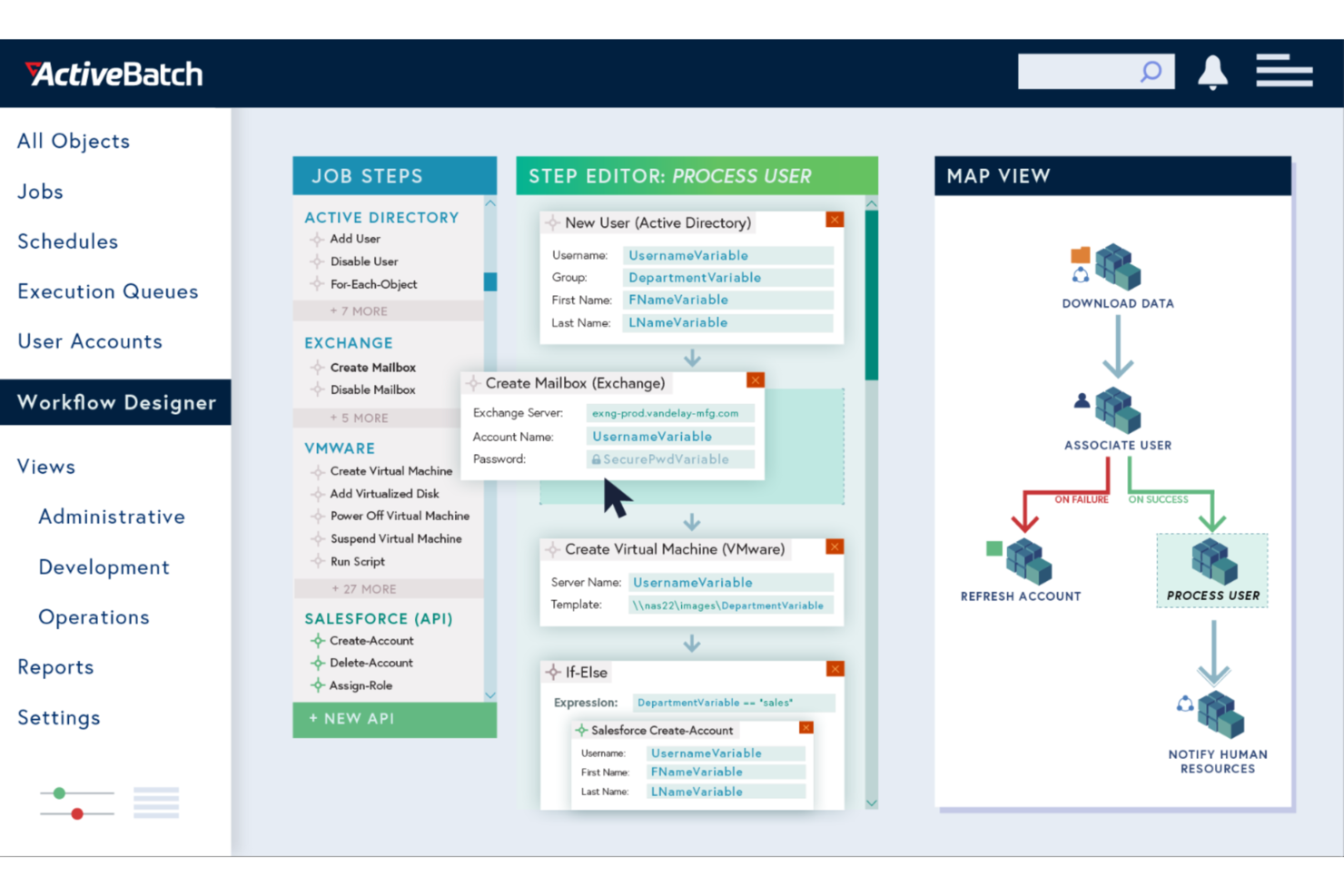
ActiveBatch consente alla tua azienda di automatizzare e orchestrare con facilità processi IT e aziendali complessi. Questo software di automazione dei processi aziendali è ideale per i settori che desiderano eliminare le attività ripetitive e migliorare l'efficienza operativa. Integrandosi perfettamente con un'ampia gamma di piattaforme, ActiveBatch ti aiuta a concentrarti sulle iniziative strategiche anziché sui processi manuali che richiedono molto tempo.
Perché ho scelto ActiveBatch
Ho scelto ActiveBatch per la sua eccezionale capacità di gestire attività complesse di automazione dei processi grazie a funzionalità come la Libreria dei passaggi dei processi e la Pianificazione basata sugli eventi. Queste funzionalità consentono al tuo team di automatizzare i flussi di lavoro senza ricorrere a una codifica estesa, un aspetto fondamentale per le aziende che puntano a ottimizzare le operazioni. Il monitoraggio in tempo reale e gli avvisi personalizzabili della piattaforma garantiscono il corretto funzionamento dei processi, riducendo il rischio di errori e tempi di inattività. Le solide misure di sicurezza di ActiveBatch proteggono ulteriormente i tuoi dati, rendendolo una scelta affidabile per gli ambienti aziendali.
Funzionalità principali di ActiveBatch
Oltre alle sue funzionalità di automazione, ho individuato anche diverse altre caratteristiche che distinguono ActiveBatch:
- Interfacce intuitive: offre un accesso intuitivo tramite una console basata sul Web e un portale self-service per la gestione da remoto.
- Gestione degli SLA: automatizza il monitoraggio e la gestione degli accordi sui livelli di servizio per garantire prestazioni ottimali.
- Reportistica e monitoraggio: include avvisi personalizzabili e un monitoraggio completo per prevenire i malfunzionamenti dei processi.
- Elevata disponibilità: offre il failover dinamico o manuale per contrastare le interruzioni del servizio.
Integrazioni di ActiveBatch
Le integrazioni includono Microsoft SQL Server, ServiceNow, SharePoint, Microsoft Azure, VMware, Oracle, Amazon Web Services (AWS), Google Cloud Platform (GCP), SAP e IBM i.
Pros and Cons
Pros:
- Progettazione dell'automazione dei flussi di lavoro con poco codice
- Flessibilità nella pianificazione basata sugli eventi
- Ampie integrazioni con i sistemi aziendali
Cons:
- Curva di apprendimento iniziale ripida
- Configurazione complessa per i team di piccole dimensioni

altaFlow
Ideale per l'automazione documentale nativa su Salesforce

altaFlow è una piattaforma di automazione dei processi aziendali progettata per organizzazioni che si affidano a Salesforce e necessitano di una gestione dei flussi di lavoro sicura e conforme. È pensata per team in settori regolamentati che desiderano automatizzare la gestione dei documenti, le approvazioni e la tracciabilità per audit, senza ricorrere a codice personalizzato.
Per chi è ideale altaFlow?
Grandi aziende in settori regolamentati che devono automatizzare flussi di lavoro documentali complessi e mantenere una rigorosa conformità negli ambienti Salesforce.
Perché ho scelto altaFlow
Ho scelto altaFlow perché offre un'automazione documentale nativa su Salesforce che va oltre i semplici trigger dei flussi di lavoro. Il mio team utilizza altaFlow per generare, instradare e archiviare documenti direttamente su Salesforce, eliminando la necessità di strumenti esterni o caricamenti manuali. Apprezzo il modo in cui supporta catene di approvazione complesse e garantisce che ogni documento sia pronto per l'audit. In pratica, significa che possiamo automatizzare la creazione di contratti e documenti di conformità senza mai uscire dal nostro CRM.
Caratteristiche principali di altaFlow
- Builder di workflow senza codice: Progetta e implementa flussi di lavoro automatizzati utilizzando un'interfaccia drag-and-drop senza scrivere codice.
- Controlli di accesso basati sui ruoli: Imposta permessi dettagliati per utenti e team per gestire le fasi sensibili dei processi.
- Tracciabilità delle modifiche automatizzata: Traccia ogni azione e modifica dei documenti ai fini di conformità e reportistica.
- Integrazione della firma elettronica: Raccogli firme legalmente vincolanti all'interno dei flussi di lavoro automatizzati direttamente da Salesforce.
Integrazioni di altaFlow
Le integrazioni includono Salesforce, NetSuite, SharePoint e altro ancora.
Pros and Cons
Pros:
- Builder di workflow senza codice per un rilascio rapido
- Raccolta firme elettroniche integrata nei workflow
- Supporta controlli di accesso dettagliati e basati sui ruoli
Cons:
- Meno template predefiniti rispetto ai concorrenti
- Incentrato principalmente su ambienti Salesforce

Ideale per i flussi di lavoro interdipartimentali
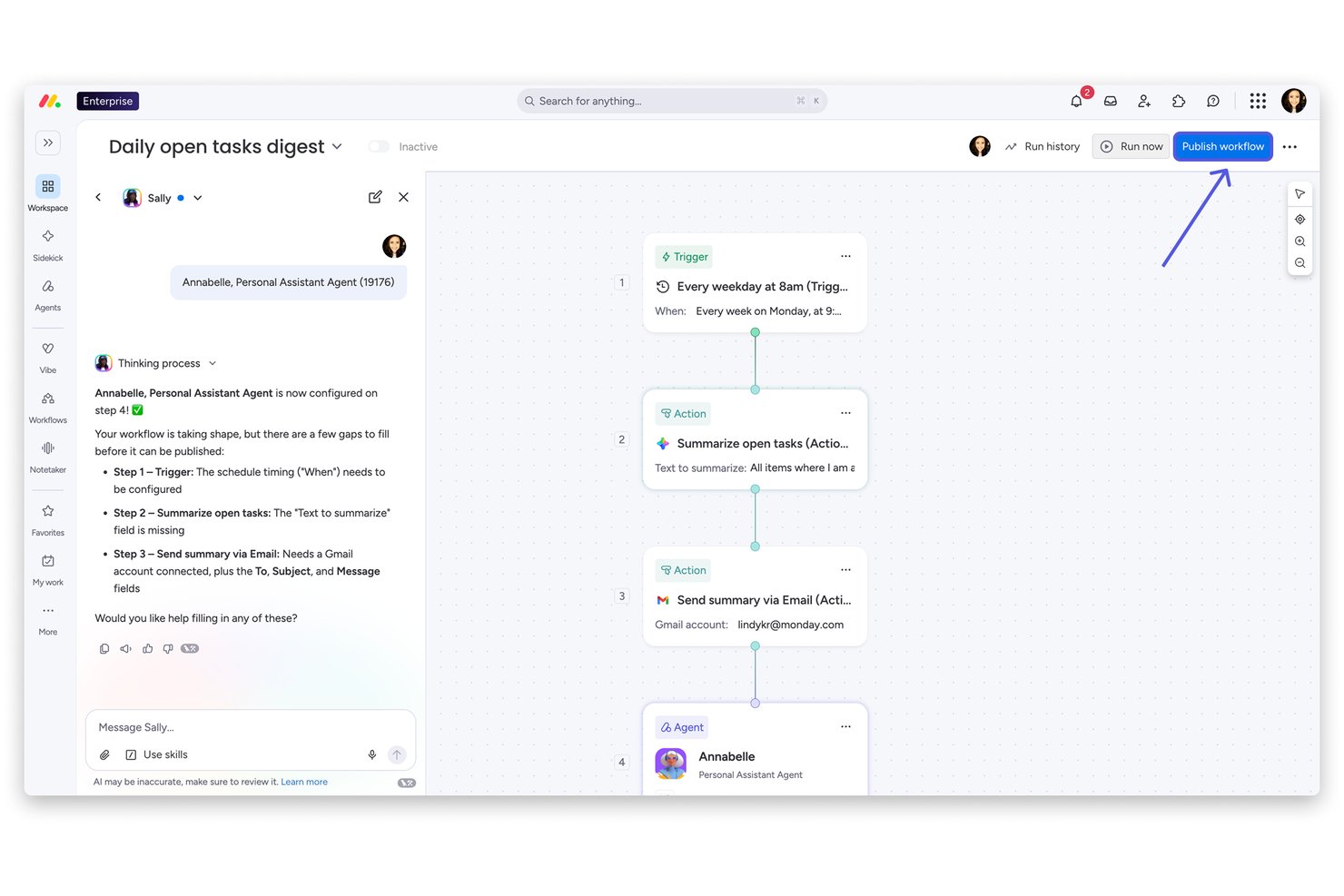
monday AI Workspace è una piattaforma nativa per l'IA di gestione del lavoro che combina l'automazione visiva dei flussi di lavoro, l'orchestrazione dei processi interdipartimentali e la creazione di app senza codice nei flussi di gestione dei progetti, dei servizi, del CRM e dello sviluppo.
Per chi è più adatto monday AI Workspace?
È una soluzione ideale per i team PMO aziendali e i responsabili delle operazioni che gestiscono flussi di lavoro complessi e interdipartimentali nelle funzioni di prodotto, IT, risorse umane, finanza e marketing.
Perché ho scelto monday AI Workspace
Ho scelto monday AI Workspace come una delle soluzioni migliori perché è stato progettato fin dall'inizio per collegare il lavoro tra reparti che normalmente operano in silos. Il generatore di flussi di lavoro basato sull'IA orchestra agenti, attivatori e azioni che coinvolgono marketing, IT, finanza e PMO su un'unica piattaforma. Mi affido anche al generatore di app nativo, che consente al mio team di creare flussi di approvazione e portali per la raccolta delle richieste di progetto senza alcun supporto ingegneristico.
Caratteristiche principali di monday AI Workspace
- Forza lavoro di agenti IA: implementa agenti IA specializzati per eseguire e automatizzare le attività di progetto direttamente nei flussi di lavoro.
- Pannelli di controllo basati sull'IA: crea pannelli di controllo personalizzati per il monitoraggio dei progetti in tempo reale, la misurazione degli SLA e l'analisi delle prestazioni.
- Autorizzazioni basate sui ruoli: configura controlli granulari per utenti e amministratori, con registri di controllo e predisposizione SCIM per la governance aziendale.
- API senza codice e centro per le integrazioni: connettiti a Jira, Slack, Google Workspace e oltre 200 app aziendali utilizzando connettori integrati e API aperte.
Integrazioni di monday AI Workspace
monday AI Workspace offre centinaia di integrazioni native tramite i connettori integrati e il mercato delle app, tra cui Slack, Jira, GitHub, Google Workspace, Outlook e HubSpot. Supporta inoltre Zapier e fornisce un'API per le integrazioni personalizzate.
Pros and Cons
Pros:
- Automatizza flussi di lavoro interdipartimentali in più fasi
- Il generatore senza codice non richiede l'intervento di sviluppatori
- Unifica i flussi di lavoro di PMO, IT, risorse umane e marketing
Cons:
- La profondità dell'automazione è inferiore a quella delle piattaforme iPaaS dedicate
- I flussi di lavoro complessi richiedono tempo per la configurazione iniziale
New Product Updates from monday AI Workspace
monday AI Workspace Adds Human Approval Routing
monday AI Workspace adds a human-in-the-loop approval block to AI Workflows, sending approval requests and routing workflow paths based on responses. For more information, visit monday AI Workspace's official site.
Kissflow
Ideale per la creazione personalizzata di applicazioni

Kissflow è una piattaforma di automazione dei processi aziendali low-code/no-code che consente ai team di creare applicazioni interne, automatizzare i flussi di lavoro e gestire le operazioni da un unico workspace. Progettata per mettere in condizione sia utenti tecnici che non tecnici di lavorare in autonomia, aiuta le organizzazioni a snellire i processi e ad aumentare la produttività su larga scala.
Perché ho scelto Kissflow: Ho scelto Kissflow per il suo equilibrio tra semplicità e funzionalità enterprise. Permette di creare applicazioni personalizzate e flussi di lavoro senza dover dipendere in modo significativo dalle risorse IT, il che è ideale per l'automazione di processi interni complessi. Apprezzo anche i suoi strumenti di governance integrati che garantiscono conformità e visibilità nei progetti di automazione su larga scala.
Caratteristiche principali & Integrazioni:
Funzionalità includono sviluppo di app assistito dall'IA per una creazione di soluzioni più rapida, orchestrazione dei flussi di lavoro per l'automazione interdipartimentale e oltre 100 modelli predefiniti per accelerare la distribuzione.
Integrazioni includono Salesforce, HubSpot, Slack, Microsoft Dynamics CRM, Microsoft Teams, Zendesk, Jira Software Cloud, Dropbox, Smartsheet, Google Forms, Twilio e Mailchimp.
Pros and Cons
Pros:
- La piattaforma low-code consente un'automazione rapida
- Estese integrazioni migliorano la connettività tra i processi
- Gli strumenti IA supportano uno sviluppo intelligente
Cons:
- L'app mobile non offre tutte le funzionalità
- Le funzionalità di reportistica restano piuttosto basilari


Celigo è una piattaforma di automazione dei processi aziendali che collega applicazioni cloud, automatizza i flussi di lavoro, gestisce le integrazioni dei dati e offre monitoraggio centralizzato per processi aziendali complessi.
Per chi è Celigo?
Grandi aziende e team IT che necessitano di automatizzare e gestire integrazioni tra più applicazioni cloud e sistemi aziendali.
Perché ho scelto Celigo
Ho scelto Celigo come uno dei migliori perché la sua libreria con oltre 1.000 connettori preconfigurati permette al mio team di automatizzare i processi su quasi tutte le piattaforme SaaS che utilizziamo. Posso collegare rapidamente Salesforce, NetSuite, Shopify e decine di altri sistemi senza sviluppi personalizzati. Questa quantità di connettori pronti ci consente di orchestrare flussi di lavoro complessi tra più app e di adattarci all'evoluzione del nostro stack tecnologico.
Caratteristiche principali di Celigo
- Progettazione dei flussi: Crea, visualizza e gestisci flussi di lavoro automatizzati tramite un'interfaccia drag-and-drop.
- Dashboard di gestione degli errori: Monitora, risolvi e gestisci gli errori di integrazione da una dashboard centralizzata.
- Controllo degli accessi basato sui ruoli: Assegna permessi e gestisci i ruoli utente per un'automazione sicura dei processi.
- Registrazione delle attività: Traccia modifiche e azioni utente nelle integrazioni per requisiti di conformità e trasparenza.
Integrazioni con Celigo
Celigo offre oltre 1.000 connettori nativi preconfigurati, tra cui Salesforce, NetSuite, Shopify, Microsoft Dynamics 365, SAP, QuickBooks, Amazon, HubSpot, Snowflake, Jira e Slack. È disponibile un'API per integrazioni personalizzate.
Pros and Cons
Pros:
- Offre oltre 1.000 connettori preconfigurati per app
- Supporta un controllo degli accessi granulare basato sui ruoli
- Fornisce log dettagliati delle attività per la conformità
Cons:
- Le funzionalità avanzate richiedono piani di livello superiore
- La configurazione iniziale può richiedere tempo
New Product Updates from Celigo
Celigo Expands Microsoft Entra Authentication for SQL Connectors
Celigo’s Azure Synapse and MS SQL connectors now support Microsoft Entra service principal authentication via client secrets and certificates, so you can connect securely without relying on SQL credentials. For more information, visit Celigo’s official site.
 .
.
TrailHQ
Ideale per l'automazione documentale con intelligenza artificiale

Nanonets è una piattaforma basata sull'intelligenza artificiale focalizzata sull'automazione dell'elaborazione documentale e dei flussi di lavoro per l'estrazione dei dati, supportando settori come finanza, sanità e logistica.
Perché ho scelto Nanonets: Nanonets eccelle nell'automazione aziendale grazie alle sue avanzate capacità di intelligenza artificiale, consentendo alle imprese di automatizzare flussi di lavoro complessi che coinvolgono molteplici applicazioni e fonti di dati. Sfruttando modelli di linguaggio personalizzati (LLM), la piattaforma supporta un'automazione su misura che si adatta ai requisiti specifici dei vari flussi di lavoro a livello aziendale, rendendola ideale per ambienti operativi complessi e dinamici. Ad esempio, può gestire l'automazione dei processi per l'estrazione dei dati, l'elaborazione delle fatture e l'approvazione dei documenti.
Caratteristiche principali & Integrazioni:
Le funzionalità includono approfondimenti basati su IA da dati non strutturati, conformità a GDPR, SOC 2 e HIPAA, una piattaforma no-code per una maggiore accessibilità da parte degli utenti, e una funzione human-in-the-loop che aggiunge un livello di supervisione per i processi che richiedono una verifica manuale.
Le integrazioni includono Salesforce, SAP, Quickbooks, Google Sheets, Dropbox e Zapier.
Pros and Cons
Pros:
- API semplice per un'integrazione facile
- Compatibile con diversi linguaggi di programmazione
- Funzioni di estrazione automatica dei dati
Cons:
- Potrebbe non essere adatto a progetti di machine learning più estesi con dataset molto grandi
- Rispetto a strumenti più avanzati, Nanonets offre meno opzioni di personalizzazione

Zapier
Ideale per creare integrazioni tra app senza codice
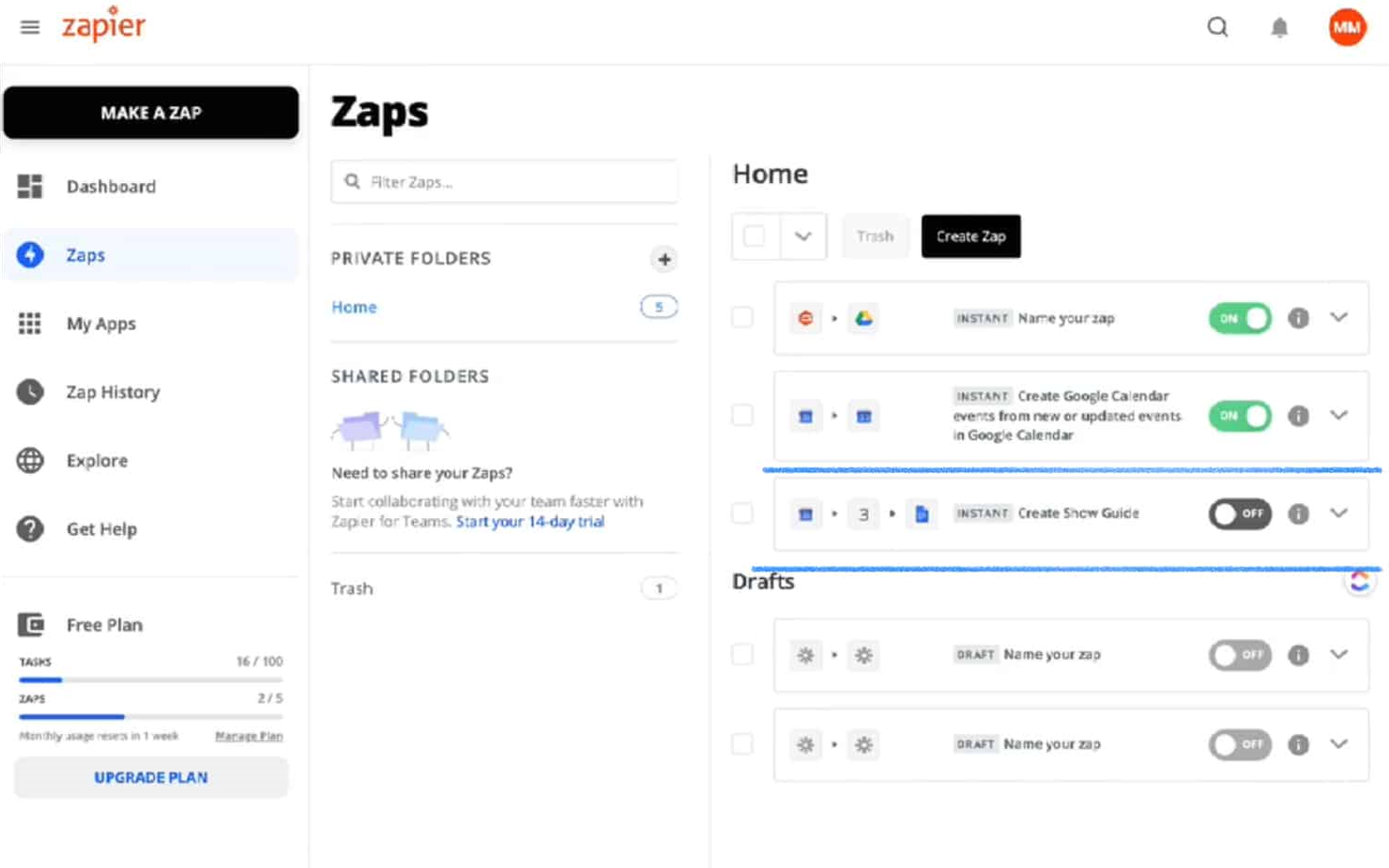
Zapier è una popolare piattaforma di orchestrazione AI che aiuta le organizzazioni a coordinare i flussi di lavoro tra migliaia di app e strumenti AI. Semplifica i processi automatizzando le attività ripetitive e coordinando le azioni tra i sistemi, consentendo ai team di costruire flussi di lavoro scalabili senza dover ricorrere allo sviluppo su misura.
Perché ho scelto Zapier: Ho scelto Zapier per questa lista per la sua capacità di orchestrare flussi di lavoro su un vasto ecosistema di applicazioni e strumenti AI senza richiedere competenze di programmazione. Zapier supporta flussi di lavoro multi-step che combinano logica aziendale, integrazioni con app e azioni guidate dall'AI, rendendo più semplice la gestione di processi complessi tra team diversi. Il suo approccio no-code mantiene l'automazione accessibile ai team aziendali, mentre la sua scalabilità e flessibilità lo rendono adatto a organizzazioni che operano su ampi set di strumenti interconnessi.
Funzionalità distintive e integrazioni:
Le funzionalità includono flussi di lavoro multi-step con logica condizionale, creazione di flussi AI-assistita con Zapier Copilot, supporto per azioni AI, agenti e chatbot, e strumenti integrati come Zapier Tables e Forms per la gestione dei dati del flusso. Funzioni di governance come permessi, log delle attività e controlli di sicurezza supportano il deployment delle automazioni all'interno dei team.
Le integrazioni comprendono Salesforce, HubSpot, Slack, OpenAI, Microsoft Dynamics CRM, Microsoft Teams, Zendesk, Jira Software Cloud e Mailchimp.
Pros and Cons
Pros:
- Flussi di lavoro senza codice accessibili anche agli utenti non tecnici
- Integra una moltitudine di app e strumenti AI
- Interfaccia intuitiva con canvas visivo per la mappatura dei flussi di lavoro
Cons:
- Nessuna app mobile
- Il piano gratuito è limitato a flussi di lavoro con massimo due passaggi
Altri software di automazione dei processi aziendali
Di seguito è riportato un elenco di altri software di automazione dei processi aziendali che ho selezionato. Sebbene non siano rientrati nella top 10, sono comunque validi e meritano ulteriori approfondimenti.
- UiPath
Ideale per guidare la trasformazione digitale
- Nintex
Ideale per la Robotic Process Automation (RPA)
- IBM Cloud Pak for Business Automation
Ideale per analytics e insight basati su AI
- Pega
Ideale per decisioni guidate dall'IA
- Automation Anywhere
Ideale per creare agenti AI personalizzati
- Process Runner
Ideale per l’automazione dei dati SAP
- Camunda
Ideale per l'orchestrazione end-to-end dei processi
- Tungsten Automation
Ideale per la fatturazione automatizzata
- SAP Signavio
Ideale per la trasformazione dei processi aziendali
- Bizagi
Ideale per l'automazione dei processi low-code


Recensioni correlate sui software di gestione dei progetti
Se non hai ancora trovato quello che cerchi, dai un'occhiata a questi altri strumenti correlati che abbiamo testato e valutato:
- Software di gestione dei progetti
- Software di gestione delle risorse
- Software di automazione dei flussi di lavoro
- Software per il monitoraggio del tempo
- Software di gestione delle attività
- Strumenti di collaborazione
- Creatore di diagrammi di Gantt
- Strumenti per la produttività
- Software per il monitoraggio dei progetti
- Software per la pianificazione dei progetti
- Software di gestione dei progetti per sviluppatori
Come Valuto i Software di Automazione dei Processi Aziendali
Valuto questi strumenti su due livelli: se riescono davvero a gestire la presa in carico, le approvazioni e i passaggi tra sistemi nei processi, e cosa distingue i leader dagli altri.
Funzionalità Principali (Requisiti Minimi per Questa Lista)
Quando seleziono gli strumenti per la mia lista, valuto ciascuno su una scala da 0 (non offre la funzionalità) a 5 (eccelle in quest'area) per ogni funzionalità chiave elencata di seguito. Poi, calcolo il punteggio totale dello strumento in percentuale. Ogni strumento deve raggiungere un punteggio minimo totale del 65% per essere considerato nell’inclusione.
- Costruttore Visuale di Workflow: Valuto se puoi mappare processi multi-step—come una sequenza dall’acquisizione di un progetto all’avvio—usando passaggi drag-and-drop invece di scrivere codice da zero.
- Integrazioni con Sistemi Aziendali: Lo strumento dovrebbe connettersi ai sistemi già utilizzati dai tuoi team, quindi verifico la presenza di connettori preconfigurati per piattaforme di gestione progetti (PM), ITSM, ERP e CRM insieme all’accesso API aperto.
- Logica Condizionale & Motore di Regole: I flussi di lavoro reali si ramificano costantemente, quindi cerco il supporto a trigger, punti decisionali e cicli—come l’escalation automatica di un’attività bloccata quando si supera una soglia SLA.
- Approvazione & Instradamento delle Attività: Verifico come la piattaforma gestisce approvazioni multilivello e assegnazioni dinamiche, ad esempio instradando una richiesta di modifica attraverso una catena di revisione in base all’impatto sul budget o al livello di rischio.
- Analisi e Monitoraggio dei Processi: Qui contano i dashboard che evidenziano dove il lavoro si blocca—valuto se puoi tracciare SLA, individuare colli di bottiglia e filtrare per team, portafoglio o tipo di processo.
- Governance & Controlli di Audit: Le implementazioni aziendali richiedono accessi basati sui ruoli, cronologia delle versioni e registri di controllo, quindi valuto quanto in dettaglio la piattaforma consente di controllare chi può modificare, pubblicare o visualizzare ogni workflow.
Una volta che ho una lista di strumenti che soddisfano i criteri, considero cosa distingue ciascuna piattaforma dalle altre.
Fattori di Differenziazione (Cosa Distingue i Fornitori)
Così confronto e metto a paragone i diversi fornitori:
Funzionalità Distintive
Ricerco capacità di IA che vanno oltre i trigger di base—come la classificazione automatica delle richieste di progetto in arrivo o il rilevamento dei workflow a rischio prima che i ritardi si accumulino. Il process mining è un altro fattore di differenziazione, specialmente quando una piattaforma è in grado di analizzare i log di esecuzione per mostrare dove i passaggi tra team rallentano. Valuto anche il supporto ai citizen developer, poiché i team PMO traggono vantaggio quando gli utenti aziendali possono costruire le proprie automazioni in ambienti controllati invece di attendere i backlog IT.
Oltre le Funzionalità
Il costo totale di proprietà è importante perché i modelli di licenza variano molto: alcuni fornitori fanno pagare per esecuzione del workflow, altri per utente, e la differenza cresce rapidamente quando si automatizza in un PMO da 200 persone. Valuto inoltre la complessità dell’implementazione, poiché i rollout aziendali spesso richiedono partner certificati e onboarding a fasi che possono dilatare i tempi. Certificazioni di sicurezza e conformità come SOC 2 Type II e ISO 27001 sono da verificare subito, soprattutto se le automazioni coinvolgono dati finanziari sensibili di progetti o dati di clienti regolamentati.
Come scegliere il software di automazione dei processi aziendali
Mentre definisci il tuo processo di selezione del software, basato sulle tue esigenze specifiche, tieni a mente i seguenti punti:
- Comprendi le esigenze della tua azienda: prima di selezionare uno strumento di automazione, definisci chiaramente gli obiettivi aziendali relativi alla gestione dei processi aziendali. Individua i processi manuali specifici che vuoi automatizzare e i risultati che desideri ottenere. Ad esempio, se la generazione di contratti ricorrenti o report sui clienti fa parte del tuo flusso di lavoro, dai priorità alle piattaforme che includono o integrano un software per la generazione di documenti per semplificare queste attività.
- Semplicità d'uso: considera quante persone nella tua azienda utilizzeranno la piattaforma e quanto sarà accessibile ai vari utenti. Potresti cercare uno strumento di automazione senza codice con un'interfaccia intuitiva basata sul trascinamento se non disponi di un team di sviluppatori che configuri e gestisca le automazioni dei processi aziendali.
- Integrazioni: esamina le integrazioni native disponibili nel software e verifica se si connetterà al tuo ecosistema tecnologico esistente. Molte soluzioni di automazione aziendale dispongono di diverse integrazioni con piattaforme CRM, ERP e di comunicazione popolari, oltre che con altri strumenti fondamentali. Tuttavia, molte offrono anche un'API che richiede una configurazione personalizzata: valuta quindi se questa soluzione è adatta alle tue esigenze o se ti serve una soluzione pronta all'uso.
- Scalabilità: qualsiasi piattaforma di automazione aziendale dovrebbe essere in grado di gestire processi complessi, carichi di lavoro elevati, un'ampia base di utenti e volumi di dati in crescita. Detto questo, se la tua azienda è ancora in fase di crescita, potresti cercare una soluzione che soddisfi ora le esigenze dei membri del tuo team e che continui a espandersi insieme a te.
- Sicurezza e conformità: l'automazione spesso comporta la gestione di dati sensibili e processi aziendali critici. Dai priorità alla sicurezza quando selezioni una soluzione, cercando funzionalità come la crittografia dei dati, i controlli di accesso degli utenti e i registri di controllo. Assicurati che la soluzione di automazione sia conforme alle normative di settore e agli standard di protezione dei dati come HIPAA o GDPR.
Tendenze dei software di automazione dei processi aziendali
Ecco alcune tendenze che ho notato nella tecnologia per l'automazione dei processi aziendali e ciò che potrebbero significare per il futuro. Ho analizzato innumerevoli aggiornamenti dei prodotti, comunicati stampa e registri delle versioni per individuare gli aspetti più importanti.
- Automazione basata sull'AI: l'automazione basata sull'AI sta guadagnando terreno. Consente di prendere decisioni in modo più intelligente e di effettuare analisi predittive. Questa tendenza è importante perché riduce l'errore umano e aumenta l'efficienza.
- Piattaforme a basso codice: le piattaforme a basso codice sono diventate più popolari. Permettono agli utenti di creare applicazioni con conoscenze minime di programmazione. Questo democratizza lo sviluppo software e accelera i tempi di distribuzione.
- Iperautomazione: consiste nell'utilizzo di più tecnologie per automatizzare processi aziendali complessi. Integra l'AI, l'apprendimento automatico e l'automazione dei processi robotici. Questa tendenza è significativa perché mira ad automatizzare ogni attività possibile all'interno di un'organizzazione.
Che cos'è il software di automazione dei processi aziendali?
Il software di automazione dei processi aziendali automatizza i processi aziendali complessi all'interno di un'organizzazione, semplificando le operazioni, riducendo il lavoro manuale e migliorando l'efficienza. Viene comunemente utilizzato dai responsabili delle operazioni, dai reparti IT e dagli analisti aziendali per automatizzare le attività ripetitive e integrare diversi sistemi aziendali.
Tra i componenti principali figurano l'automazione dei flussi di lavoro, l'integrazione dei dati e l'analisi. L'automazione dei flussi di lavoro definisce e gestisce i processi aziendali, l'integrazione dei dati garantisce un flusso continuo di dati tra i sistemi e l'analisi fornisce informazioni sulle prestazioni dei processi e sulle aree di miglioramento.
Funzionalità del software di automazione dei processi aziendali
Quando selezioni un software di automazione dei processi aziendali, considera diverse funzionalità fondamentali che possono influire significativamente sul successo dell'azienda, tra cui:
- Sviluppo senza codice e a basso codice: questa funzionalità consente agli utenti con competenze di programmazione limitate di creare e personalizzare i processi attraverso la modellazione basata su regole con trascinamento della selezione. Permette al personale non tecnico di automatizzare i flussi di lavoro senza dover possedere conoscenze approfondite di programmazione.
- Gestione dei flussi di lavoro: solide funzionalità di gestione dei flussi di lavoro consentono la creazione di moduli digitali, reportistica e analisi complete, il collegamento dei dati ai sistemi IT e l'assegnazione dinamica delle attività. Ciò garantisce che tutti i processi aziendali siano semplificati e gestiti in modo efficiente, riducendo le attività manuali.
- Elaborazione dei documenti: il software dovrebbe consentire di collegare i documenti ai processi, automatizzare l'instradamento dei documenti, velocizzare le approvazioni con le firme elettroniche e offrire il controllo delle versioni e l'archiviazione. Questa funzionalità è importante per mantenere una documentazione organizzata e facilmente accessibile. Trova qui software specifici per l'elaborazione intelligente dei documenti.
- Automazione e orchestrazione dall'inizio alla fine: l'automazione e l'orchestrazione complete dei processi dall'inizio alla fine, inclusa l'integrazione fluida delle attività svolte dalle persone e di quelle basate sui sistemi, sono essenziali per massimizzare l'efficienza operativa.
- Integrazione tramite API: le interfacce di programmazione delle applicazioni (API) consentono un'interazione fluida con applicazioni e sistemi esterni, centralizzando i dati in un unico luogo e consolidando i processi. Questa funzionalità è fondamentale per garantire che il software possa integrarsi con i sistemi esistenti.
- Robotic Process Automation (RPA): la Robotic Process Automation (RPA) è fondamentale per automatizzare in modo efficiente le attività ripetitive. Questa funzionalità consente al software di integrare bot RPA nell'ambiente di automazione, aumentando la produttività.
- Funzionalità di sicurezza: solide misure di sicurezza, tra cui la crittografia dei dati, i controlli degli accessi e le certificazioni di conformità, sono essenziali per proteggere le informazioni sensibili e garantire la conformità normativa.
- Analisi in tempo reale: la possibilità di fornire analisi e funzionalità di reportistica in tempo reale aiuta a monitorare le prestazioni dei processi, identificare i colli di bottiglia e prendere decisioni basate sui dati. Questa funzionalità è fondamentale per il miglioramento continuo e la pianificazione strategica.
- Flussi di lavoro di automazione personalizzabili: il software dovrebbe offrire flussi di lavoro di automazione personalizzabili con attivatori, azioni e logica condizionale per automatizzare processi aziendali complessi. Questa flessibilità consente alle aziende di adattare il software alle proprie esigenze specifiche.
- Integrazione con applicazioni di terze parti: una perfetta integrazione con applicazioni e servizi di terze parti, come CRM, ERP e altri sistemi aziendali, è importante per creare un flusso di lavoro unificato ed efficiente in tutta l'organizzazione.
Vantaggi del software di automazione dei processi aziendali
Ecco alcuni dei vantaggi che puoi aspettarti dall'implementazione di un sistema di automazione dei processi di livello aziendale:
- Maggiore efficienza: l'automazione delle attività di routine riduce il tempo e lo sforzo necessari per completarle, consentendo ai dipendenti di concentrarsi su attività più strategiche.
- Riduzione dei costi: riducendo al minimo il lavoro manuale e gli errori, il software di automazione aiuta le organizzazioni a risparmiare sui costi operativi e a migliorare i risultati economici.
- Maggiore accuratezza: l'automazione garantisce che le attività vengano eseguite in modo coerente e accurato, riducendo il rischio di errore umano e migliorando l'integrità dei dati.
- Conformità rafforzata: il software può essere programmato per rispettare i requisiti normativi, garantendo che tutti i processi siano conformi agli standard del settore e agli obblighi di legge.
- Scalabilità: con la crescita delle aziende, il software di automazione può adattarsi facilmente per gestire carichi di lavoro maggiori senza la necessità di risorse aggiuntive significative.
Costi e prezzi del software di automazione dei processi aziendali
La tabella seguente riassume i piani più comuni, i relativi prezzi medi e le funzionalità tipiche.
Tabella comparativa dei piani per il software di automazione dei processi aziendali
| Tipo di piano | Prezzo medio | Funzionalità comuni |
|---|---|---|
| Piano gratuito | $0 | Strumenti di automazione di base, integrazioni limitate, assistenza della community |
| Piano personale | $25 - $50/mese | Esecuzioni illimitate di automazioni individuali, integrazioni predefinite, analisi di base |
| Piano aziendale | $100 - $500/mese | Strumenti di automazione avanzati, supporto per più utenti, sicurezza avanzata, assistenza prioritaria |
| Piano per grandi aziende | $1,000+/mese | Integrazioni personalizzate, assistenza dedicata, analisi avanzate, sicurezza di livello aziendale |
Domande frequenti sul software di automazione dei processi aziendali
Ecco alcune delle domande frequenti sull’automazione dei processi aziendali:
Come integro il software di automazione dei processi aziendali con i sistemi esistenti?
L’integrazione del software di automazione dei processi aziendali con i sistemi esistenti avviene generalmente tramite API (Application Programming Interfaces), che consentono la comunicazione tra diverse applicazioni software. La maggior parte degli strumenti di automazione dei processi aziendali offre una documentazione API completa e supporto per facilitare questa integrazione. Inoltre, alcune piattaforme forniscono connettori predefiniti per sistemi aziendali diffusi come software ERP, CRM e HRM, semplificando il processo di integrazione.
Come posso misurare il ROI dell'automazione dei processi aziendali?
Per misurare il ROI dell’automazione dei processi aziendali, monitora KPI come il risparmio di tempo, la riduzione dei costi, la diminuzione degli errori, l’aumento della produttività e il miglioramento della soddisfazione dei clienti. Queste metriche forniscono una visione chiara dell’efficienza e dell’efficacia delle attività di automazione.
Quali sono le difficoltà più comuni nell'implementazione dell'automazione dei processi aziendali?
Le difficoltà più comuni includono la resistenza dei dipendenti ai cambiamenti nei flussi di lavoro consolidati, la complessità dell’automazione di processi articolati e la scarsa qualità dei dati, che può ostacolare l’efficacia dell’automazione. Inoltre, l’integrazione con i sistemi legacy può essere difficile e i processi automatizzati richiedono manutenzione e aggiornamenti continui.
Come posso garantire la conformità alle normative utilizzando il software di automazione dei processi aziendali?
Per garantire la conformità alle normative, mantieniti aggiornato sui requisiti pertinenti e implementa registri di controllo per documentare i processi automatizzati. Assicurati che siano in atto misure di sicurezza dei dati, svolgi audit periodici sulla conformità e forma i dipendenti sulle migliori pratiche.
Quali sono le migliori pratiche per la manutenzione del software di automazione dei processi aziendali?
Assicurati che il software venga aggiornato regolarmente con le patch e le versioni più recenti e monitora continuamente i processi automatizzati per verificarne le prestazioni e individuare eventuali problemi. Mantieni una documentazione completa dei flussi di lavoro, offri formazione continua ai dipendenti e istituisci un ciclo di feedback per raccogliere i suggerimenti degli utenti e apportare le modifiche necessarie.
Come gestisco le eccezioni e gli errori nei processi automatizzati?
Implementa solidi meccanismi di gestione degli errori e configura avvisi per informare il personale dei problemi, consentendo l’intervento manuale quando necessario. Esegui un’analisi delle cause principali per affrontare i problemi alla radice e migliora continuamente i processi automatizzati sulla base dei feedback e dell’analisi degli errori.
In che modo il software di automazione dei processi aziendali gestisce la sicurezza dei dati?
La maggior parte delle soluzioni software per l’automazione dei processi aziendali offre solide funzionalità di sicurezza, come la crittografia, i controlli degli accessi basati sui ruoli e la conformità a standard di settore come GDPR e HIPAA, per proteggere le informazioni sensibili. Inoltre, fornisce registri di controllo completi e aggiornamenti di sicurezza periodici per garantire una protezione continua dei dati e la conformità normativa.
Il software supporta l'elaborazione dei dati in tempo reale?
Sì, molti strumenti di automazione dei processi aziendali supportano l’elaborazione e l’analisi dei dati in tempo reale, fornendo informazioni e report aggiornati. Questi strumenti consentono alle aziende di monitorare i flussi di lavoro e le metriche delle prestazioni mentre si verificano, permettendo di apportare modifiche immediate e prendere decisioni più consapevoli. Questa funzionalità in tempo reale garantisce alle organizzazioni la possibilità di reagire rapidamente ai cambiamenti e mantenere un’efficienza ottimale nelle proprie attività.