

I 10 migliori software per la prenotazione delle risorse per i progetti nel 2026

10 Elenco dei migliori software per la prenotazione delle risorse


Assicurarsi che il team abbia accesso alle risorse giuste al momento giusto è essenziale per mantenere i progetti nei tempi previsti. Tuttavia, gestire manualmente le prenotazioni può portare a sprechi di tempo ed errori evitabili.
Il software per la prenotazione delle risorse offre una soluzione semplice. Ti aiuta a prenotare e monitorare facilmente risorse come sale riunioni, attrezzature o strumenti condivisi, riducendo i conflitti e mantenendo tutto operativo senza intoppi. Con lo strumento giusto, puoi concentrarti sul tuo lavoro invece di preoccuparti della logistica.
In questo articolo illustrerò le migliori opzioni di software per la prenotazione delle risorse disponibili oggi. Ho testato questi strumenti tenendo a mente le esigenze dei project manager e concentrandomi su funzionalità pratiche che risolvono problemi reali. Qui puoi esaminare le opzioni disponibili e trovare quella più adatta al tuo team.
Perché fidarsi dei nostri consigli sui software
Il nostro team testa e recensisce software dal 2012. In quanto project manager noi stessi, sappiamo quanto sia difficile — e importante — scegliere il software giusto.
Per questa guida, abbiamo valutato gli strumenti attraverso test pratici e ricerche indipendenti, assegnando un punteggio agli strumenti in base ai nostri criteri di selezione. Ci basiamo inoltre sulle competenze di leader di pensiero del settore e di professionisti attivi nella gestione dei progetti.
Le nostre recensioni riflettono il nostro giudizio editoriale umano, non un discorso di vendita.
Revisori esperti:
Tabella comparativa dei software per la prenotazione delle risorse
Questa tabella comparativa riassume i dettagli dei prezzi delle mie migliori selezioni di software per la prenotazione delle risorse:
| Tool | Best For | Trial Info | Price | ||
|---|---|---|---|---|---|
| 1 | Ideale per la previsione delle risorse | Prova gratuita di 14 giorni + demo gratuita disponibile | Da $19.90/utente/mese (fatturato annualmente) | Website | |
| 2 | Ideale per monitorare le risorse in relazione al budget | Prova gratuita di 14 giorni + demo gratuita disponibile | A partire da $10/mese (fatturazione annuale) | Website | |
| 3 | Ideale per la pianificazione della capacità e il monitoraggio dell'utilizzo | Prova gratuita di 30 giorni | Da $5/utente/mese (fatturazione annuale) | Website | |
| 4 | Ideale per la scalabilità | Prova gratuita di 14 giorni + piano gratuito disponibile | Da $10/utente/mese (fatturato annualmente) | Website | |
| 5 | Ideale per una pianificazione delle risorse centrata sulle persone | Non disponibile | Prezzo su richiesta | Website | |
| 6 | Ideale per la delivery collaborativa dei progetti | Prova gratuita + demo gratuita disponibili | Da $19/utente/mese (fatturato annualmente) | Website | |
| 7 | Ideale per diverse visualizzazioni delle risorse | Piano gratuito + demo gratuita disponibile | Da $7/utente/mese (fatturazione annuale) | Website | |
| 8 | Ideale per agenzie | Prova gratuita di 7 giorni disponibile | A partire da $9/utente/mese (fatturato annualmente) | Website | |
| 9 | Ideale per aziende di servizi professionali | Piano gratuito + demo gratuita disponibile | A partire da $9/utente/mese (fatturazione annuale) | Website | |
| 10 | Ideale per timesheet precompilati | Prova gratuita di 30 giorni disponibile | A partire da $7/utente/mese | Website |


Recensioni dei migliori software per la prenotazione delle risorse
Puoi utilizzare le brevi panoramiche di ogni strumento riportate di seguito per capire in cosa ciascuno si distingue dagli altri.

Scoro
Ideale per la previsione delle risorse

Scoro è un software completo di gestione del lavoro pensato per consolidare vari processi aziendali, dalla gestione dei progetti al controllo finanziario e la gestione delle risorse.
Perché ho scelto Scoro: Il suo sistema intuitivo di prenotazione delle risorse consente agli utenti di pianificare e allocare le risorse in modo efficace. I report di utilizzo di Scoro aiutano a prevedere i carichi di lavoro e a identificare in anticipo potenziali carenze di risorse, permettendo decisioni proattive.
Le funzioni di prenotazione delle risorse di Scoro includono una vista calendario dinamica che consente agli utenti di visualizzare immediatamente la disponibilità delle risorse. L'interfaccia drag-and-drop del sistema semplifica il processo di pianificazione, rendendo facile regolare le prenotazioni secondo necessità. Inoltre, le capacità di gestione delle risorse di Scoro si integrano con le linee temporali e i budget dei progetti, offrendo una panoramica completa dell'avanzamento del progetto e dell'allocazione delle risorse.
Caratteristiche e integrazioni principali di Scoro
Le caratteristiche includono un assistente di pianificazione automatizzato, che suggerisce le allocazioni ottimali delle risorse in base a disponibilità, competenze e requisiti di progetto. La piattaforma dispone anche di strumenti di pianificazione della capacità che permettono agli utenti di simulare diversi scenari di allocazione delle risorse per ottimizzare la distribuzione dei carichi di lavoro e le tempistiche dei progetti. Inoltre, l'integrazione di Scoro della prenotazione delle risorse con il monitoraggio finanziario offre informazioni sulla redditività dell'uso delle risorse.
Le integrazioni includono Google Calendar, Microsoft Exchange, Xero, QuickBooks, Sage Intacct, Exact Online, Expensify, Stripe, Jira, HubSpot, Salesforce, Google Drive, Dropbox, Okta, Azure AD e Zapier.
Pros and Cons
Pros:
- Consente campi e workflow personalizzabili
- Caratteristiche complete per la gestione aziendale
- Monitoraggio in tempo reale dei progetti e dei progressi del team
Cons:
- Alcuni utenti trovano la piattaforma complessa nella personalizzazione
- L'app mobile manca di alcune funzionalità rispetto alla versione web
New Product Updates from Scoro

Scoro Adds Time Mobile App and ELI Improvements
Scoro adds the Scoro Time mobile app for iOS/Android to track time anywhere and expands ELI with attachments, smarter filtering, and trigger-based actions. For more information, visit Scoro's official site.

Ideale per monitorare le risorse in relazione al budget
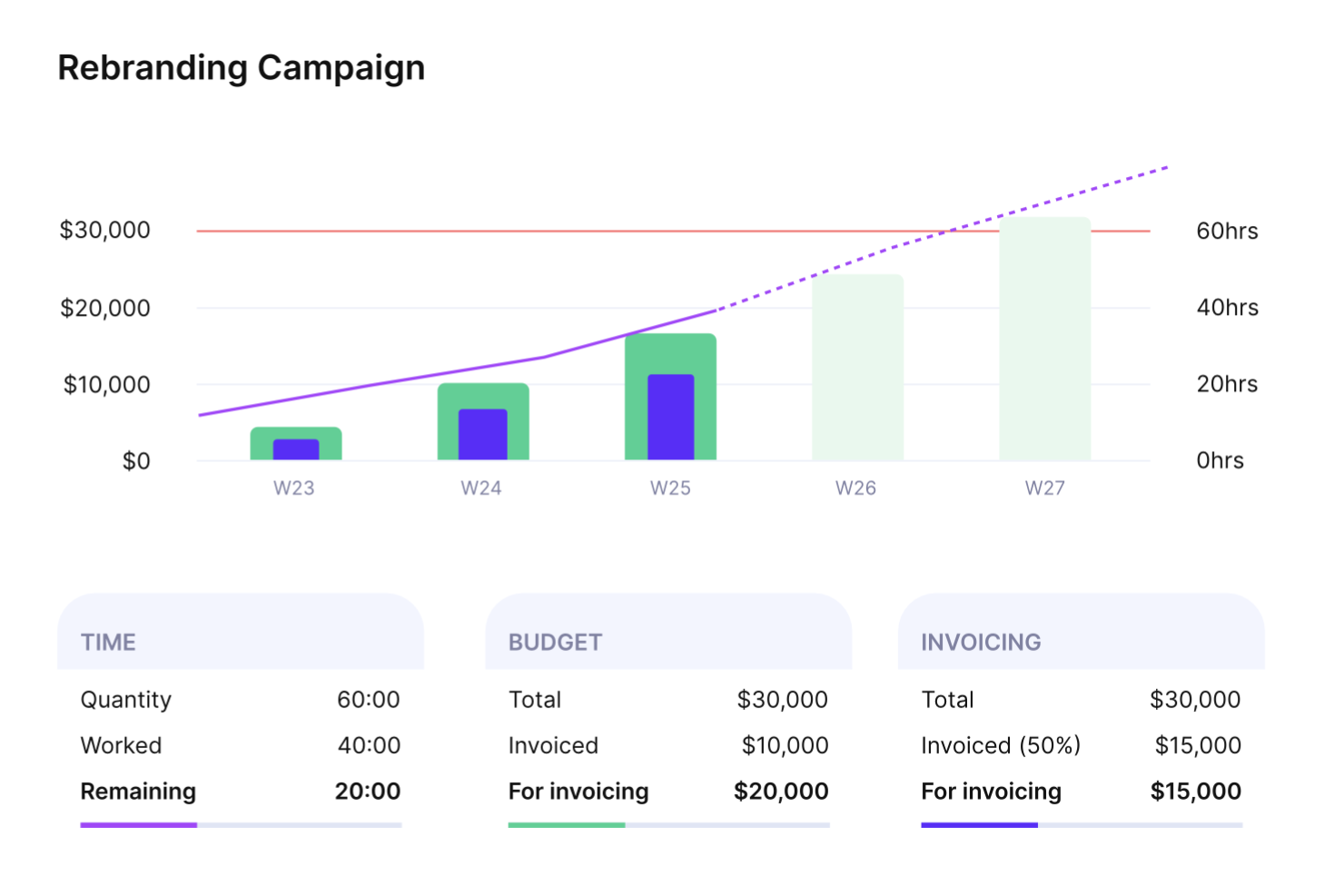
Productive è una soluzione software per la gestione delle risorse rivolta ad agenzie di ogni tipo e dimensione, progettata per darti un forte controllo sulle operazioni e sulla redditività.
Perché ho scelto Productive: Productive funge da piattaforma scalabile che aiuta le agenzie a consolidare i dati, gestire i progetti, pianificare i budget in modo efficace e organizzare l’utilizzo ottimale delle risorse.
Il software ti consente di gestire le risorse, impostare i budget dei progetti e vedere come ogni allocazione di risorse influisce sugli aspetti finanziari dei progetti. Puoi monitorare i budget e i margini di profitto, mantenere i membri del team concentrati sulle priorità e generare fatture accurate.
Funzionalità e integrazioni principali di Productive
Funzionalità includono la possibilità di assegnare segnaposto per la pianificazione futura della capacità, permettendo di prevedere le necessità di risorse anche prima che vengano assegnati membri specifici del team. Inoltre, l’integrazione di Productive tra prenotazione delle risorse e monitoraggio della redditività garantisce che le decisioni sull’allocazione delle risorse siano direttamente collegate alle prestazioni finanziarie dei progetti, facilitando così il mantenimento della redditività durante la gestione dei carichi di lavoro.
Integrazioni includono Exact, Fortnox, Google Calendar, Harvest Import, Jira, Outlook, Personio, Quickbooks, Slack e Xero.
Pros and Cons
Pros:
- Roadmap in continuo miglioramento
- Visualizzazioni flessibili
- Soluzione tutto-in-uno per agenzie
Cons:
- Problemi occasionali
- Sono necessari più filtri
New Product Updates from Productive
Productive Adds Voice Dictation, Slack Connector, Proposals, and Overtime
Productive adds voice dictation, a Slack Connector, proposal controls, and overtime tracking. These updates support faster AI interactions, client proposals, and time management. For more information, visit Productive’s official site.

Ideale per la pianificazione della capacità e il monitoraggio dell'utilizzo

Resource Guru è un software di prenotazione delle risorse progettato per aiutare i team a gestire persone, attrezzature e sale riunioni su un'unica piattaforma. Mira a rendere la pianificazione e la gestione della capacità più efficienti, offrendo visibilità sulla disponibilità delle risorse e sulla distribuzione del carico di lavoro.
Perché ho scelto Resource Guru: Ho scelto Resource Guru per la sua capacità di monitorare diversi tipi di assenze, come ferie e giorni di malattia, senza compromettere la pianificazione dei progetti. Questo facilita la pianificazione in base alla disponibilità del team e aiuta a evitare colli di bottiglia.
Mi piacciono anche i suoi report sull'utilizzo delle risorse, che mostrano il tempo fatturabile rispetto a quello non fatturabile, aiutandoti a prendere decisioni informate su allocazione e redditività. I timesheet integrati aggiungono un ulteriore livello di visibilità, consentendo di tracciare le ore lavorative direttamente all'interno della piattaforma.
Funzionalità e integrazioni principali di Resource Guru
Le funzionalità includono email di pianificazione giornaliera e dashboard personali che tengono informati i membri del team senza necessità di aggiornamenti manuali. La pianificazione tramite drag-and-drop rende l'assegnazione delle risorse veloce e intuitiva, mentre gli strumenti di gestione della capacità e di previsione dei progetti aiutano ad anticipare i bisogni futuri e prevenire il sovraccarico.
Le integrazioni includono Google Calendar, Microsoft Outlook Calendar, Apple Calendar, Calendly, Zapier, Slack, Salesforce, Microsoft Teams, Trello, Zoom, ActiveCampaign e Gmail.
Pros and Cons
Pros:
- Visione chiara e complessiva
- Report di qualità
- Utili aggiornamenti via email
Cons:
- Nessun tema scuro
- Funzionalità di ricerca limitate
New Product Updates from Resource Guru

Resource Guru Adds More Control Over Calendar Sync
Resource Guru adds more control over Google and Outlook Calendar sync, including source calendar selection and destination calendar options. These updates help users manage external events and Resource Guru bookings with less clutter. For more information, visit Resource Guru’s official site.
 .
.
Wrike
Ideale per la scalabilità

Wrike è una piattaforma tutto-in-uno per gestire progetti, organizzare il lavoro, migliorare la collaborazione e accelerare l'esecuzione in tutta l'organizzazione. È ideale per organizzazioni di tutte le dimensioni, inclusi team in crescita.
Perché ho scelto Wrike: Wrike semplifica la gestione delle risorse per massimizzare la produttività. Permette di visualizzare il carico di lavoro del tuo team e di riassegnare rapidamente i compiti per prevenire il burnout. Consente ai team di collaborare, gestire progetti, guidare iniziative strategiche e raggiungere gli obiettivi.
Puoi focalizzare le priorità e adattare i flussi di lavoro utilizzando Wrike come hub centrale. È facile definire gli obiettivi per il tuo team e aumentare la visibilità tra team e dipartimenti tramite dashboard completamente personalizzabili.
Funzionalità e integrazioni di Wrike
Funzionalità includono una vista carico di lavoro che offre una visualizzazione in tempo reale della capacità delle risorse e dell'assegnazione dei compiti per ottimizzare l'utilizzo. La sua funzione di pianificazione intelligente consente inoltre agli utenti di modificare dinamicamente le tempistiche. Inoltre, i campi personalizzati di Wrike permettono ai team di monitorare dati unici, come competenze o priorità dei compiti, mentre i report di allocazione delle risorse aiutano ad analizzare i dati storici e prevedere i futuri bisogni di risorse per una pianificazione proattiva.
Integrazioni includono Dropbox, GitHub, Google Drive, Google Sheets, Jira, Microsoft Sharepoint, Miro, Salesforce , Slack e Zoom.
Pros and Cons
Pros:
- Pianificazione potente
- Dashboard utili
- Gestione progetti flessibile
Cons:
- Funzionalità limitata per attività ricorrenti
- Le funzionalità di gestione risorse sono disponibili solo nei piani Business e superiori
New Product Updates from Wrike

Wrike Adds Quick Search to Table View
Wrike adds Quick Search to Table View with full-table search across titles, descriptions, and fields, plus highlighted matches. This helps users find tasks faster in large tables. For more information, visit Wrike’s official site.

Kantata
Ideale per una pianificazione delle risorse centrata sulle persone

Kantata è una piattaforma di prenotazione delle risorse e gestione dei progetti progettata per le organizzazioni di servizi professionali. Ti aiuta a pianificare, programmare e ottimizzare la capacità del tuo team, così da bilanciare i carichi di lavoro, migliorare l'utilizzo delle risorse e mantenere i progetti adeguatamente dotati di personale.
Perché ho scelto Kantata: La piattaforma offre strumenti robusti per la previsione, la pianificazione della capacità e la programmazione, offrendoti visibilità in tempo reale sulla disponibilità e sulla domanda del tuo team. Invece di semplicemente occupare ruoli, Kantata ti aiuta a prendere decisioni di staffing centrato sulle persone, che tengono conto di competenze, disponibilità ed equilibrio del carico di lavoro. Questo significa che i membri del tuo team sono messi nelle condizioni migliori per avere successo, mentre i tuoi progetti restano adeguatamente dotati di personale e rispettano le scadenze.
Kantata include anche un inventario dettagliato delle competenze, che allinea le richieste dei progetti con l'expertise del tuo team. Mettendo in evidenza le lacune nelle competenze e le opportunità di sviluppo, ti aiuta non solo a gestire il personale in modo più intelligente, ma anche a investire nella crescita dei dipendenti. Questo focus sulle persone rende più facile trattenere i migliori talenti e mantenere la soddisfazione dei clienti con consegne di qualità.
Caratteristiche e integrazioni distintive di Kantata
Le funzionalità includono assegnazione automatica delle risorse in base a competenze e disponibilità, pianificazione di scenari per simulare decisioni di staffing prima di impegnarsi, e avvisi in tempo reale che segnalano membri del team sovraccarichi o sottoutilizzati. Kantata consente inoltre di integrare freelance e collaboratori esterni nello stesso sistema di prenotazione, offrendoti una visione completa di tutti i talenti disponibili affinché nulla venga trascurato.
Le integrazioni includono Salesforce, Slack, Sage, NetSuite, QuickBooks, HubSpot, BambooHR, Jira, Expensify e molte altre.
Pros and Cons
Pros:
- Previsione e pianificazione delle risorse
- Inventario delle competenze per allineare i talenti ai progetti
- Capacità di reporting dettagliato con molte opzioni di personalizzazione
Cons:
- Potenziale curva di apprendimento per i nuovi utenti
- Può essere difficile vedere chi è responsabile di un'attività se vi sono assegnate più persone
New Product Updates from Kantata

Kantata Adds Access Group Change History
Kantata adds Access Groups History, letting account administrators track changes to group details, membership, and permissions in Recent History. The update also makes these events available through the Subscribed Events API for broader monitoring. For more information, visit Kantata’s official site.
 .
.
Ideale per la delivery collaborativa dei progetti

Rocketlane è una piattaforma di automazione dei servizi professionali (PSA) progettata per i team di delivery orientati al cliente, che unisce esecuzione dei progetti, gestione delle risorse, monitoraggio finanziario e un portale condiviso per i clienti in un unico luogo.
Per chi è più indicato Rocketlane?
Rocketlane si adatta perfettamente ai team di servizi professionali nelle aziende SaaS che necessitano di gestire l'onboarding dei clienti e i progetti di delivery in modo strutturato e ripetibile.
Perché ho scelto Rocketlane
Ho scelto Rocketlane come uno dei migliori perché riunisce team interni e clienti in un unico ambiente di delivery condiviso. Il portale clienti permette ai clienti di avere visibilità in tempo reale sull’avanzamento dei progetti, mantenendo il tuo team responsabile, così nessuno deve inseguire aggiornamenti di stato tramite email. Apprezzo anche il fatto che i piani di progetto, i moduli, i documenti e la chat di Rocketlane siano tutti nello stesso posto, il che significa che il mio team può passare il contesto, segnalare blocchi e portare avanti il lavoro senza dover saltare tra diversi strumenti.
Funzionalità chiave di Rocketlane
- Allocazione delle risorse e gestione del personale: Assegna i membri del team ai progetti in base a disponibilità, competenze e carico di lavoro per evitare sovrapposizioni.
- Monitoraggio del tempo: Registra le ore direttamente all'interno dei progetti, con governance integrata per mantenere i timesheet completi e le ore fatturabili accurate.
- Gestione finanziaria: Monitora budget, margini e ricavi dei progetti in tempo reale durante l’esecuzione delle attività di delivery.
- Automazioni del workflow: Imposta approvazioni automatiche, solleciti ed escalation in modo che la governance avvenga in background senza supervisione manuale.
Integrazioni di Rocketlane
Rocketlane offre integrazioni native con Slack, Salesforce, Jira, HubSpot, Google Calendar e Outlook Calendar, e si collega con Zapier e Workato per un’automazione più ampia. È inoltre disponibile una API per integrazioni e workflow personalizzati.
Pros and Cons
Pros:
- Portale clienti con visibilità del progetto personalizzabile
- Timesheet integrato e tracciamento delle ore
- Template riutilizzabili con dipendenze sui task
Cons:
- I filtri dei report non offrono personalizzazione avanzata
- Il passaggio tra più progetti è lento
New Product Updates from Rocketlane

Rocketlane Introduces Governance and Workforce Agents
Rocketlane introduces Governance Agents and Workforce Agents to automate delivery processes and recurring tasks. These updates help teams enforce rules and streamline project execution. For more information, visit Rocketlane’s official site.
 .
.
ClickUp
Ideale per diverse visualizzazioni delle risorse
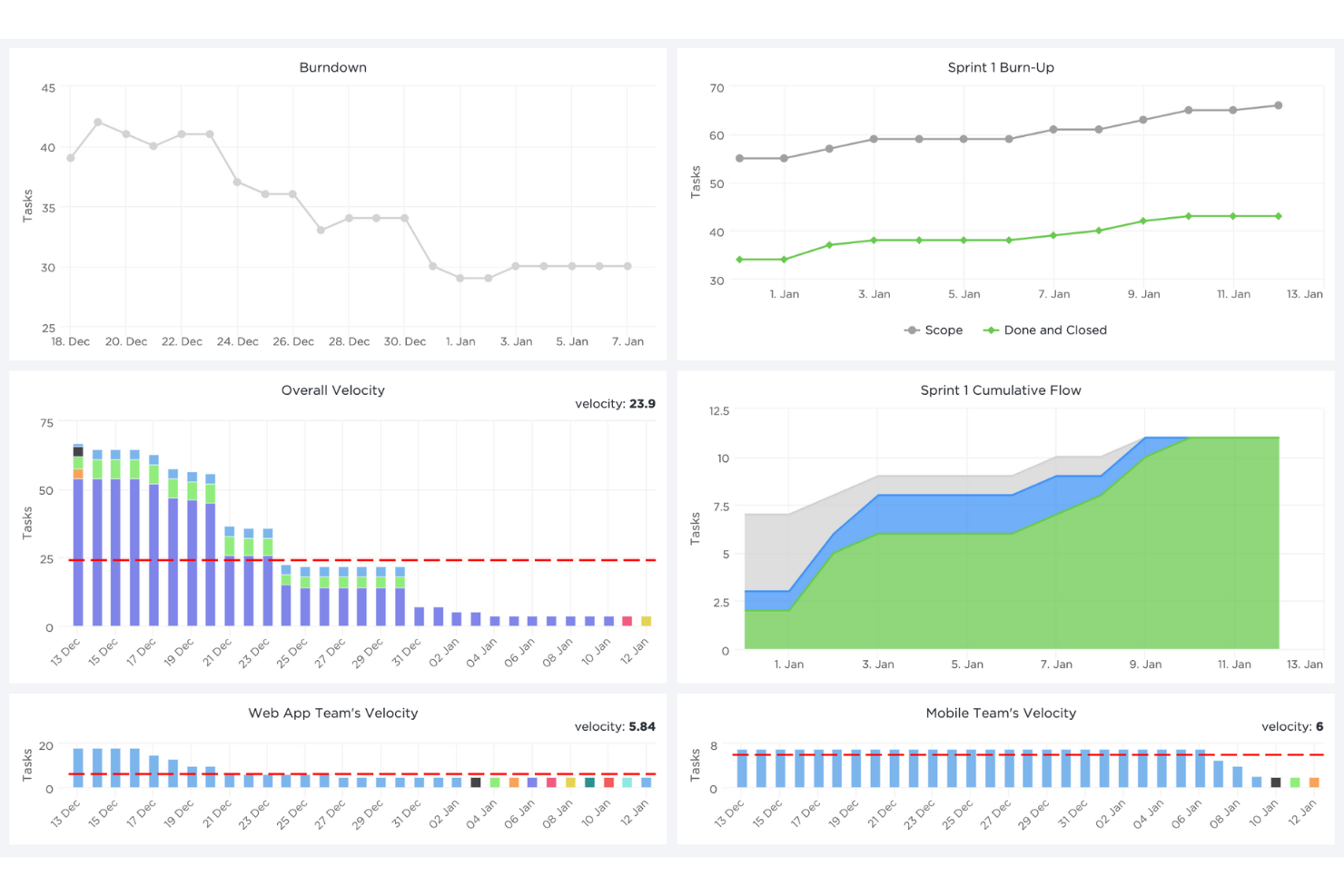
ClickUp è uno strumento di collaborazione e gestione progetti basato su cloud, adatto a tutti i tipi di organizzazioni.
Perché ho scelto ClickUp: ClickUp ti aiuta a pianificare, monitorare e gestire qualsiasi tipo di lavoro o risorsa per aumentare la produttività aziendale. La visualizzazione a riquadri mostra informazioni sulle risorse riguardo al carico di lavoro e allo stato di avanzamento delle attività specifiche, facilitando decisioni rapide.
Inoltre, puoi assegnare commenti e attività a membri specifici del team, contrassegnare commenti e attività come risolti o in corso, oppure creare stati personalizzati. Puoi visualizzare i progetti da una dashboard Agile, oppure organizzarli per assegnatario.
Funzionalità e integrazioni distintive di ClickUp
Funzionalità includono la possibilità di creare una pianificazione dettagliata della capacità grazie a campi personalizzati che ti permettono di monitorare metriche delle risorse come competenze, disponibilità e impegno. La vista Carico di lavoro offre anche funzionalità drag-and-drop per riallocare dinamicamente i task e garantire una distribuzione equilibrata. Inoltre, le Lavagne collaborative in tempo reale di ClickUp consentono ai team di pianificare e allocare visivamente le risorse discutendo strategie e allineando gli obiettivi di progetto in un unico spazio.
Integrazioni includono Dropbox, Gmail, Google Calendar, Harvest, HubSpot, Loom, Make, Slack, Unito e Zoom. Puoi anche utilizzare l’API di ClickUp per creare integrazioni personalizzate con il tuo stack tecnologico attuale.
Pros and Cons
Pros:
- Dashboard informative
- Disponibile su diversi dispositivi
- Sistema di notifiche chiaro
Cons:
- Occasionalmente lento
- Può risultare complesso
New Product Updates from ClickUp
ClickUp Adds Meetings Hub, Super Agent Templates, and ZoomInfo Integration
ClickUp adds a searchable Meetings Hub, new ways to clone and template Super Agents, and a ZoomInfo integration through the App Center. These updates improve meeting retrieval, agent reuse, and access to sales intelligence. For more information, visit ClickUp’s official site.

Ideale per agenzie

Bonsai Agency Software è una piattaforma tutto-in-uno progettata per aiutare le agenzie a gestire risorse, progetti e relazioni con i clienti.
Perché ho scelto Bonsai Agency Software: Le funzionalità di pianificazione e previsione delle risorse di Bonsai ti permettono di assegnare lavoro in base alla capacità del team e di monitorare l’utilizzo in tempo reale. Ciò garantisce un’assegnazione appropriata dei progetti, evitando sovraccarichi e promuovendo una distribuzione equilibrata dei carichi di lavoro.
Le funzionalità di monitoraggio del tempo e dei timesheet consentono al tuo team di registrare facilmente le ore, offrendo una chiara visione dell'avanzamento dei progetti e dei contributi individuali. Monitorare disponibilità e utilizzo diventa semplice, permettendo di impostare tariffe personalizzate fatturabili e di costo per membri, attività e progetti.
Funzionalità distintive e integrazioni di Bonsai Agency Software
Le funzionalità includono campi e proprietà personalizzati che permettono di monitorare dati specifici per ogni risorsa, come competenze, certificazioni o disponibilità, consentendo decisioni di prenotazione più precise. Inoltre, il portale clienti del software offre un modo trasparente di condividere le tempistiche di progetto e gli aggiornamenti delle risorse con i clienti, favorendo collaborazione e fiducia.
Le integrazioni includono QuickBooks Online, Zapier, Calendly, Xero, Google Drive, Slack, Gmail, Trello, Google Sheets, Google Calendar, ClickUp e Jira.
Pros and Cons
Pros:
- Portale clienti dall’aspetto professionale
- Buone capacità di previsione delle risorse
- Integra monitoraggio di tempo e budget
Cons:
- Potrebbe non essere adatto a realtà con operazioni ad alto volume
- L’app mobile potrebbe essere migliorata con funzionalità aggiuntive

Birdview
Ideale per aziende di servizi professionali

Birdview PSA è un software di gestione delle risorse, pianificazione e programmazione che offre funzionalità di gestione delle risorse per aiutarti nella pianificazione della capacità.
Perché ho scelto Birdview PSA: Questo strumento offre tutto ciò di cui hai bisogno per supportare i tuoi progetti attraverso il suo centro di pianificazione delle risorse. Ti permette di accedere a 3 viste principali. La prima è la pianificazione. Questa vista ti consente di prenotare le risorse in anticipo e assicurarti che la tua capacità risponda alle richieste. Birdview PSA mostra le competenze del tuo team e altre informazioni utili che ti aiuteranno a prendere decisioni informate.
Poi, c'è la vista del flusso di lavoro. Questa vista mostra i progetti in corso e l'allocazione delle risorse in tempo reale. Il sistema colorerà automaticamente per te quelle risorse che sono sovra- o sotto-impiegate e ti permetterà di gestire i conflitti con un semplice drag and drop.
L'ultima vista è la simulazione. In questa vista puoi valutare la fattibilità di lavorare su un nuovo progetto, eseguire scenari per pianificare l'assunzione di nuove risorse e creare bozze di progetto per avviare rapidamente un lavoro. Il simulatore ti permette anche di modificare le percentuali di allocazione delle risorse e cambiare i membri del team nel caso in cui qualcuno diventi sovra-impiegato dopo aver eseguito la simulazione.
Caratteristiche e integrazioni distintive di Birdview PSA
Le funzionalità includono un sistema di abbinamento basato sulle competenze che può aiutarti ad allocare risorse allineando l'esperienza dei membri del team con le esigenze del progetto per ottenere prestazioni ottimali. Inoltre, la vista di simulazione di Birdview PSA ti consente di modellare diversi scenari di risorse, valutare l'impatto di acquisire nuovi progetti e pianificare le esigenze di assunzione, offrendo così una visione senza precedenti per la pianificazione strategica della capacità.
Le integrazioni includono oltre 2000 connettori preconfigurati, tra cui MS Teams, Jira, Adobe, Hubspot, Salesforce, Slack, Zoom, Olark, TimeCamp, Xero e Invision. Inoltre, puoi collegarti a oltre 5000 app utilizzando Zapier e Workato. Entrambi richiedono un piano a pagamento.

Float
Ideale per timesheet precompilati

Float è uno strumento per la gestione della capacità delle risorse e la pianificazione del lavoro che aiuta a sfruttare al meglio le risorse a disposizione.
Perché ho scelto Float: Utilizzando Float, puoi centralizzare tutte le persone e i progetti in un'unica timeline attiva, assegnando poi il lavoro e le risorse in base alla capacità disponibile.
I timesheet vengono precompilati con le attività programmate, così i membri del team possono registrare facilmente le proprie ore, mentre i responsabili possono confrontare il tempo stimato con quello effettivo. Puoi sincronizzare gli eventi con il tuo calendario preferito, importare attività dal tuo sistema di gestione progetti e inviare le ore al software di fatturazione.
Caratteristiche e integrazioni di spicco di Float
Funzionalità comprendono una timeline in tempo reale che si aggiorna live, permettendoti di vedere immediatamente come i cambiamenti in un progetto influiscono sulla capacità complessiva delle risorse. L'interfaccia drag-and-drop consente anche di riassegnare facilmente le attività, garantendo veloci aggiustamenti alla disponibilità di risorse. Inoltre, gli strumenti di previsione di Float forniscono una panoramica sulle tendenze di carico di lavoro future, aiutandoti a pianificare in anticipo ed evitare sovraccarichi o inutilizzo delle risorse.
Integrazioni includono Asana, Google Calendar, Jira, Outlook Calendar, Slack, Teamwork, Trello, WorkflowMax e Zapier.
Pros and Cons
Pros:
- Un'unica dashboard completa
- Reportistica automatica
- Potente gestione del team
Cons:
- Opzioni di personalizzazione limitate
- Nessuna soluzione self-hosted
Altri software per la prenotazione delle risorse
Ecco alcune opzioni aggiuntive che non sono entrate nell’elenco dei migliori software per la prenotazione delle risorse.
- elapseit
Ideale per il monitoraggio del tempo integrato
- Ganttic
Ottimo per workflow basati su Gantt
- Silverbucket
Ideale per la gestione completa delle risorse
- eResource Scheduler
Ideale per la visibilità delle risorse in tempo reale
- monday AI Workspace
Ideale con raccomandazioni sulle risorse basate sull'AI
- Screendragon
Ideale per la programmazione drag-and-drop
- GoodDay
Ideale per una gestione chiara del carico di lavoro
- Runn
Ideale per la pianificazione degli scenari delle risorse
- Hub Planner by Milient
Ideale per la pianificazione della capacità del team
- Dayshape
Ideale per la schedulazione delle risorse con IA


Come valuto i software per la prenotazione delle risorse
Divido la mia valutazione in due livelli: le funzionalità di base per la pianificazione e il rilevamento dei conflitti che uno strumento deve avere, e gli elementi distintivi, come il monitoraggio delle tariffe o la pianificazione degli scenari, che separano i migliori dagli altri.
Funzionalità principali (Requisiti fondamentali per questo elenco)
Quando seleziono gli strumenti per il mio elenco, assegno a ciascuno un punteggio su una scala da 0 (non offre la funzionalità) a 5 (eccelle in quest'area) per ogni funzionalità principale elencata di seguito. Quindi calcolo il punteggio totale dello strumento convertendolo in percentuale. Ogni strumento deve raggiungere un punteggio totale minimo del 65% per essere preso in considerazione.
- Calendario per la pianificazione delle risorse: cerco una sequenza temporale visiva in cui sia possibile trascinare e rilasciare le prenotazioni su giorni, settimane o mesi, ad esempio riassegnare un designer a metà sprint senza perdere il contesto.
- Disponibilità e rilevamento dei conflitti: ogni strumento dovrebbe mostrare la disponibilità in tempo reale e segnalare quando qualcuno ha una doppia prenotazione, soprattutto quando ferie o festività si sovrappongono alle assegnazioni attive sui progetti.
- Monitoraggio della capacità e dell'utilizzo: valuto se sia possibile visualizzare a colpo d'occhio le ore prenotate rispetto a quelle disponibili, con i tassi di utilizzo suddivisi per singola persona, team o periodo di tempo.
- Filtraggio per competenze e attributi: il processo di prenotazione dovrebbe consentire di filtrare le risorse per competenze, ruolo, posizione o livello di seniority, così da abbinare rapidamente la persona giusta al progetto giusto.
- Assegnazione di progetti e attività: verifico che le prenotazioni siano collegate direttamente a progetti o attività, invece di apparire come voci indipendenti, mantenendo le assegnazioni collegate al lavoro di consegna.
- Previsioni e report: gli strumenti più efficaci consentono di modellare la domanda futura rispetto alla capacità attuale, permettendo di individuare le lacune nell'organico o i periodi di inattività settimane prima che diventino problemi.
Una volta ottenuto un elenco di strumenti che soddisfano questi criteri, valuto ciò che distingue ciascuna piattaforma.
Fattori distintivi (Ciò che differenzia i fornitori)
Ecco come confronto i diversi fornitori:
Funzionalità di spicco
La pianificazione degli scenari è un importante elemento distintivo. Cerco strumenti che consentano di modellare piani alternativi di assegnazione del personale affiancati, prima di confermare le prenotazioni, ad esempio per verificare se spostare uno sviluppatore da un progetto crei un collo di bottiglia a valle. Anche il monitoraggio delle tariffe di fatturazione e dei costi è importante, soprattutto per agenzie e società di consulenza, dove la visibilità del margine per risorsa orienta le decisioni sull'assegnazione del personale. Valuto inoltre i flussi di lavoro per le richieste e le approvazioni, che consentono ai responsabili di progetto di richiedere formalmente risorse da un pool centralizzato invece di contattare i manager tramite chat.
Oltre le funzionalità
Le integrazioni hanno un peso notevole in questo ambito. Verifico se ogni strumento si collega nativamente alle piattaforme di gestione dei progetti che il team utilizza già, come Jira, Asana e monday.com, in modo che le prenotazioni rimangano sincronizzate con il lavoro effettivo del progetto. La struttura dei prezzi è più importante del prezzo pubblicizzato: alcuni fornitori applicano un costo per risorsa prenotata, mentre altri applicano un costo per utente, facendo aumentare rapidamente le spese quando si hanno molti visualizzatori o richiedenti. Valuto inoltre quanto bene uno strumento si adatti a specifiche dimensioni di team e settori, poiché una piattaforma progettata per un'agenzia di 20 persone funziona in modo molto diverso da una pensata per gli uffici di gestione dei progetti aziendali che amministrano centinaia di risorse.
Come scegliere un software per la prenotazione delle risorse
È facile perdersi in lunghi elenchi di funzionalità e strutture di prezzo complesse. Per aiutarti a rimanere concentrato mentre affronti il tuo processo di selezione del software, ecco una lista di fattori da tenere a mente:
| Fattore | Cosa considerare |
| Scalabilità | Assicurati che il software possa crescere insieme alla tua azienda, sia che tu gestisca un piccolo team o che stia espandendo l’attività a livello globale. |
| Integrazioni | Verifica se il software si connette a strumenti come Google Calendar, Outlook, Slack o al software di gestione dei progetti che già utilizzi. |
| Personalizzazione | Cerca opzioni per adattare i flussi di lavoro delle prenotazioni, le autorizzazioni o le notifiche alle esigenze specifiche del tuo team. |
| Facilità d’uso | Scegli uno strumento intuitivo che non richieda una formazione approfondita, così il tuo team potrà iniziare a utilizzarlo subito. |
| Budget | Assicurati che la soluzione rientri nel tuo budget e offra prezzi trasparenti, senza costi nascosti. Valuta le prove gratuite o i piani freemium. |
| Misure di sicurezza | Verifica la presenza di funzionalità come l’accesso basato sui ruoli, la crittografia dei dati e la conformità al GDPR o ad altri standard pertinenti. |
| Accessibilità da dispositivi mobili | Assicurati che la piattaforma offra un’app mobile o un design responsivo, in modo da poter gestire le prenotazioni anche in mobilità. |
| Funzionalità di reportistica | Cerca strumenti di analisi per monitorare l’utilizzo delle risorse, individuare le tendenze e ottimizzare i processi di prenotazione. |
Tendenze nei software per la prenotazione delle risorse
Durante la mia ricerca, ho raccolto innumerevoli aggiornamenti di prodotto, comunicati stampa e registri delle versioni di diversi fornitori di software per la prenotazione delle risorse. Ecco alcune delle tendenze emergenti che sto tenendo d’occhio:
- Ottimizzazione basata sull'IA: Gli strumenti stanno iniziando a utilizzare l'IA per prevedere la domanda di risorse e consigliare modifiche alla pianificazione. Ad esempio, alcune piattaforme di gestione delle risorse basate sull'IA analizzano i modelli di prenotazione per ridurre al minimo i tempi di inattività o segnalare le risorse sottoutilizzate.
- Portali self-service: Un numero crescente di software offre ora portali self-service in cui gli utenti possono gestire autonomamente le prenotazioni. Questo riduce il carico di lavoro amministrativo e consente agli utenti di avere il controllo sulle proprie prenotazioni.
- Analisi in tempo reale: I cruscotti avanzati forniscono ora alle squadre informazioni immediate sull'utilizzo delle risorse. I fornitori stanno aggiungendo mappe di calore e metriche in tempo reale per aiutare i responsabili a prendere decisioni più rapide basate sui dati.
- Monitoraggio della sostenibilità: Alcune soluzioni stanno integrando funzionalità per monitorare l'impatto ambientale dell'utilizzo delle risorse, come il consumo energetico o l'impronta di carbonio. Questo risponde alle esigenze delle aziende che danno priorità agli obiettivi di sostenibilità.
- Supporto al lavoro ibrido: I fornitori stanno ora sviluppando funzionalità per rispondere alle esigenze delle squadre ibride, come la gestione degli spazi condivisi in ufficio o il coordinamento delle prenotazioni di attrezzature da remoto insieme alle prenotazioni in presenza.
Che cos'è il software per la prenotazione delle risorse?
Il software per la prenotazione delle risorse è uno strumento che aiuta le aziende a programmare e gestire risorse condivise come sale riunioni, attrezzature o spazi di lavoro. Viene comunemente utilizzato dai responsabili degli uffici, dalle squadre IT e dai coordinatori di progetto per mantenere organizzati i calendari ed evitare conflitti. Calendari centralizzati, notifiche automatizzate e accesso basato sui ruoli supportano una programmazione efficiente, riducono i tempi di inattività e migliorano l'utilizzo delle risorse. Nel complesso, questi strumenti aiutano le squadre a risparmiare tempo e a massimizzare il valore delle risorse condivise.
Funzionalità del software per la prenotazione delle risorse
Quando scegli un software per la prenotazione delle risorse, presta attenzione alle seguenti funzionalità chiave:
- Calendario centralizzato: Consente di visualizzare tutte le prenotazioni in un unico luogo, aiutando a evitare doppie prenotazioni e a monitorare facilmente la disponibilità delle risorse.
- Notifiche automatizzate: Invia avvisi per conferme, cancellazioni o modifiche alle prenotazioni, mantenendo tutti informati.
- Risoluzione dei conflitti: Segnala le prenotazioni sovrapposte e fornisce suggerimenti per risolvere i conflitti di programmazione.
- Permessi basati sui ruoli: Controlla chi può prenotare, modificare o visualizzare risorse specifiche, mantenendo ordine e sicurezza.
- Prenotazioni ricorrenti: Consente agli utenti di programmare prenotazioni ripetute senza reinserire i dettagli.
- Analisi dell'utilizzo: Monitora l'utilizzo delle risorse per aiutare le squadre a identificare le tendenze e ottimizzare l'efficienza.
- Accesso da dispositivi mobili: Fornisce un'interfaccia o un'app ottimizzata per i dispositivi mobili, così le prenotazioni possono essere gestite ovunque ci si trovi.
- Moduli di prenotazione personalizzabili: Consente agli utenti di personalizzare i campi per raccogliere i dettagli pertinenti a ciascuna risorsa o squadra.
- Integrazione con i calendari: Sincronizza strumenti come Google Calendar o Outlook per semplificare i flussi di lavoro di programmazione.
- Etichettatura delle risorse: Categorizza le risorse per tipo, posizione o altri attributi, semplificando la ricerca e la selezione.
Vantaggi del software per la prenotazione delle risorse
L'implementazione di un software per la prenotazione delle risorse offre diversi vantaggi alla tua squadra e alla tua azienda. Ecco alcuni dei vantaggi che puoi aspettarti:
- Flessibilità: Consente di gestire le prenotazioni da dispositivi mobili, supportando le squadre remote e quelle in movimento.
- Organizzazione migliorata: Mantiene tutte le prenotazioni in un unico luogo, facilitando il monitoraggio e la gestione della disponibilità delle risorse.
- Risparmio di tempo: Riduce la programmazione manuale e la risoluzione dei conflitti grazie a strumenti e notifiche automatizzati.
- Migliore utilizzo delle risorse: Monitora i dati di utilizzo per aiutarti a identificare le risorse sottoutilizzate e ad apportare le modifiche necessarie.
- Collaborazione potenziata: Fornisce un sistema di prenotazione trasparente in cui tutti possono vedere la disponibilità delle risorse e pianificare in modo efficace.
- Meno conflitti di programmazione: Gli strumenti di programmazione delle risorse impediscono le doppie prenotazioni grazie agli avvisi sui conflitti e agli aggiornamenti in tempo reale.
- Efficienza dei costi: Ottimizza il modo in cui vengono utilizzate le risorse, consentendo potenzialmente di risparmiare sulle locazioni o sugli acquisti non necessari.
Costi e prezzi del software per la prenotazione delle risorse
La scelta di un software per la prenotazione delle risorse richiede la comprensione dei vari modelli e piani tariffari disponibili. I costi variano in base alle funzionalità, alle dimensioni della squadra, agli elementi aggiuntivi e ad altri fattori. La tabella seguente riassume i piani più comuni, i relativi prezzi medi e le funzionalità tipicamente incluse nelle soluzioni software per la prenotazione delle risorse:
Tabella comparativa dei piani per il software di prenotazione delle risorse
| Tipo di piano | Prezzo medio | Funzionalità comuni |
| Piano gratuito | $0 | Prenotazione di base delle risorse, visualizzazioni limitate del calendario e notifiche via e-mail. |
| Piano personale | $5-$25/utente/mese | Accesso per un singolo utente, analisi di base, accesso da dispositivi mobili e integrazioni semplici. |
| Piano aziendale | $30-$100/utente/mese | Accesso multiutente, analisi avanzate, autorizzazioni basate sui ruoli, moduli di prenotazione personalizzabili e report. |
| Piano aziendale | $100+/utente/mese | Utenti illimitati, accesso API, sicurezza avanzata, integrazioni personalizzate e assistenza dedicata per l'account. |
Domande frequenti sul software di prenotazione delle risorse
Ecco alcune domande frequenti che altre persone pongono su questo argomento.
Che cos'è la prenotazione delle risorse?
La prenotazione delle risorse consiste nel riservare o programmare una determinata risorsa, come una sala riunioni, un’attrezzatura o del personale, per un momento o una durata specifici. Viene comunemente utilizzata nelle organizzazioni e nelle aziende che gestiscono progetti per garantire che le risorse siano allocate in modo efficiente tra i vari progetti.
In che modo il software gestisce i conflitti o le doppie prenotazioni?
Il software di prenotazione delle risorse generalmente avvisa gli utenti dei conflitti e aiuta a evitare sovrapposizioni tra progetti seguendo regole personalizzabili. Negli strumenti che utilizzano indicatori visivi, un assistente alla pianificazione basato sull’intelligenza artificiale può evidenziare i problemi con una sfumatura rossa o ambra quando una risorsa affronta un conflitto di programmazione. In altri casi, il software visualizza immediatamente un messaggio di avviso quando rileva una potenziale doppia prenotazione, rendendo la risoluzione dei conflitti più rapida e proattiva.
In che modo i diagrammi di Gantt possono aiutare nella prenotazione delle risorse?
I diagrammi di Gantt aiutano nella prenotazione delle risorse rappresentando visivamente la disponibilità delle risorse e l’equilibrio del carico di lavoro tra attività e tempistiche. Consentono ai project manager di identificare i conflitti di programmazione, ottimizzare l’allocazione delle risorse e garantire che le attività siano distribuite equamente. Questa chiarezza aiuta a evitare prenotazioni eccessive e garantisce un utilizzo efficiente delle risorse.
In che modo il software di prenotazione delle risorse può supportare la collaborazione in tempo reale?
Il software di prenotazione delle risorse supporta la collaborazione in tempo reale consentendo a più utenti di pianificare e modificare simultaneamente i programmi, garantendo al contempo che le modifiche siano immediatamente visibili a tutti i membri del team. Consente inoltre una gestione efficace delle autorizzazioni degli utenti, assicurando che solo le persone autorizzate possano modificare le prenotazioni o accedere ai dati sensibili. Questo favorisce il lavoro di squadra e riduce al minimo i conflitti di programmazione.
Posso continuare a utilizzare i fogli di calcolo per la pianificazione delle risorse?
Sebbene i fogli di calcolo possano essere utili per una pianificazione di base delle risorse, un software dedicato alla pianificazione delle risorse offre funzionalità avanzate come aggiornamenti in tempo reale, bilanciamento del carico di lavoro e rilevamento automatico dei conflitti. Questi strumenti sono più facili da usare per i progetti complessi e riducono il rischio di errori comuni nella gestione manuale dei fogli di calcolo. Nel complesso, passare dai fogli di calcolo a un software per la pianificazione delle risorse contribuisce a migliorare l’efficienza e la scalabilità con la crescita delle esigenze.
Esistono strumenti di gestione delle risorse specifici per settore?
Sì, molti strumenti di gestione delle risorse sono progettati per rispondere alle esigenze di settori specifici. Questi strumenti offrono funzionalità personalizzate, come modelli di progetto, monitoraggio della conformità o report specifici per settore. La scelta di uno strumento specifico per il settore garantisce che la pianificazione delle risorse sia in linea con esigenze operative uniche. Tra questi strumenti sono inclusi:
- Software di gestione delle risorse per agenzie
- Software di gestione delle risorse per piccole imprese
- Software di gestione delle risorse per il marketing
- Software di gestione delle risorse per consulenti
- Software di gestione delle risorse aziendali