

I 10 migliori software di gestione delle risorse per agenzie nel 2026

10 Elenco dei migliori software di gestione delle risorse per agenzie


Gestire le risorse della tua agenzia è difficile senza un software: avrai difficoltà a gestire efficacemente il personale e i budget, con conseguenti progetti falliti e una redditività inferiore. Esistono moltissimi strumenti software per la gestione delle risorse delle agenzie e scegliere l'opzione giusta può essere complicato.
Ti aiuterò a semplificare la scelta condividendo le mie selezioni dei migliori software di gestione delle risorse per agenzie, oltre alle mie esperienze personali nell'utilizzo di decine di diversi strumenti per la gestione delle risorse con varie agenzie.
Che cos'è un software di gestione delle risorse per agenzie?
Il software di gestione delle risorse per agenzie è uno strumento che aiuta le agenzie a gestire efficacemente le proprie risorse interne. Ciò include l'organizzazione degli incarichi del personale, il monitoraggio del tempo e dei budget, la supervisione dei progressi dei progetti e la promozione di una migliore collaborazione del team.
In sostanza, è una soluzione completa che consente alle agenzie di ottimizzare le proprie operazioni, dall'allocazione delle risorse alla consegna dei progetti, affinché ogni aspetto del lavoro dell'agenzia sia gestito e coordinato efficacemente.
Perché fidarsi dei nostri consigli sui software
Il nostro team testa e recensisce software dal 2012. In quanto project manager noi stessi, sappiamo quanto sia difficile — e importante — scegliere il software giusto.
Per questa guida, abbiamo valutato gli strumenti attraverso test pratici e ricerche indipendenti, assegnando un punteggio agli strumenti in base ai nostri criteri di selezione. Ci basiamo inoltre sulle competenze di leader di pensiero del settore e di professionisti attivi nella gestione dei progetti.
Le nostre recensioni riflettono il nostro giudizio editoriale umano, non un discorso di vendita.
Tabella comparativa dei software di gestione delle risorse per agenzie
Questa tabella comparativa riassume i dettagli dei prezzi delle mie migliori selezioni di software di gestione delle risorse per agenzie:
| Tool | Best For | Trial Info | Price | ||
|---|---|---|---|---|---|
| 1 | Ideale per la gestione delle risorse con visibilità finanziaria | Prova gratuita di 30 giorni disponibile | Da $7/utente pianificato/mese | Website | |
| 2 | Ideale per la gestione operativa in tempo reale | Prova gratuita di 14 giorni + demo gratuita disponibile | A partire da $19,90/utente/mese (fatturazione annuale) | Website | |
| 3 | Ideale per la pianificazione e la previsione delle risorse | Prova gratuita di 14 giorni + demo gratuita disponibile | Da $10/mese (fatturazione annuale) | Website | |
| 4 | Ideale per la pianificazione integrata di vendite e risorse | Demo gratuita disponibile | Prezzo su richiesta | Website | |
| 5 | Ideale per la gestione delle risorse e della capacità delle agenzie | Demo gratuita disponibile | Prezzi su richiesta | Website | |
| 6 | Ideale per funzionalità avanzate di gestione dei progetti | Prova gratuita di 14 giorni + piano gratuito disponibile | A partire da $10/utente/mese (fatturato annualmente) | Website | |
| 7 | Ideale per i report di pianificazione della capacità | Prova gratuita di 30 giorni | Da $5/utente/mese (fatturato annualmente) | Website | |
| 8 | Ideale per esigenze semplici di pianificazione della capacità | Prova gratuita di 14 giorni + piano gratuito disponibile | Da $9/utente/mese (fatturazione annuale) | Website | |
| 9 | Ideale per risorse orientate alle persone | Non disponibile | Prezzo su richiesta | Website | |
| 10 | Ideale per la collaborazione su progetti con i clienti | Prova gratuita + demo gratuita disponibili | A partire da $19/utente/mese (fatturazione annuale) | Website |


Panoramica dei 10 migliori software di gestione delle risorse per agenzie
Ecco una breve descrizione di ciascun software di gestione delle risorse per agenzie, del suo caso d’uso ideale e delle funzionalità più rilevanti. Ho incluso anche schermate per offrirti una panoramica dell’interfaccia utente.

Ideale per la gestione delle risorse con visibilità finanziaria
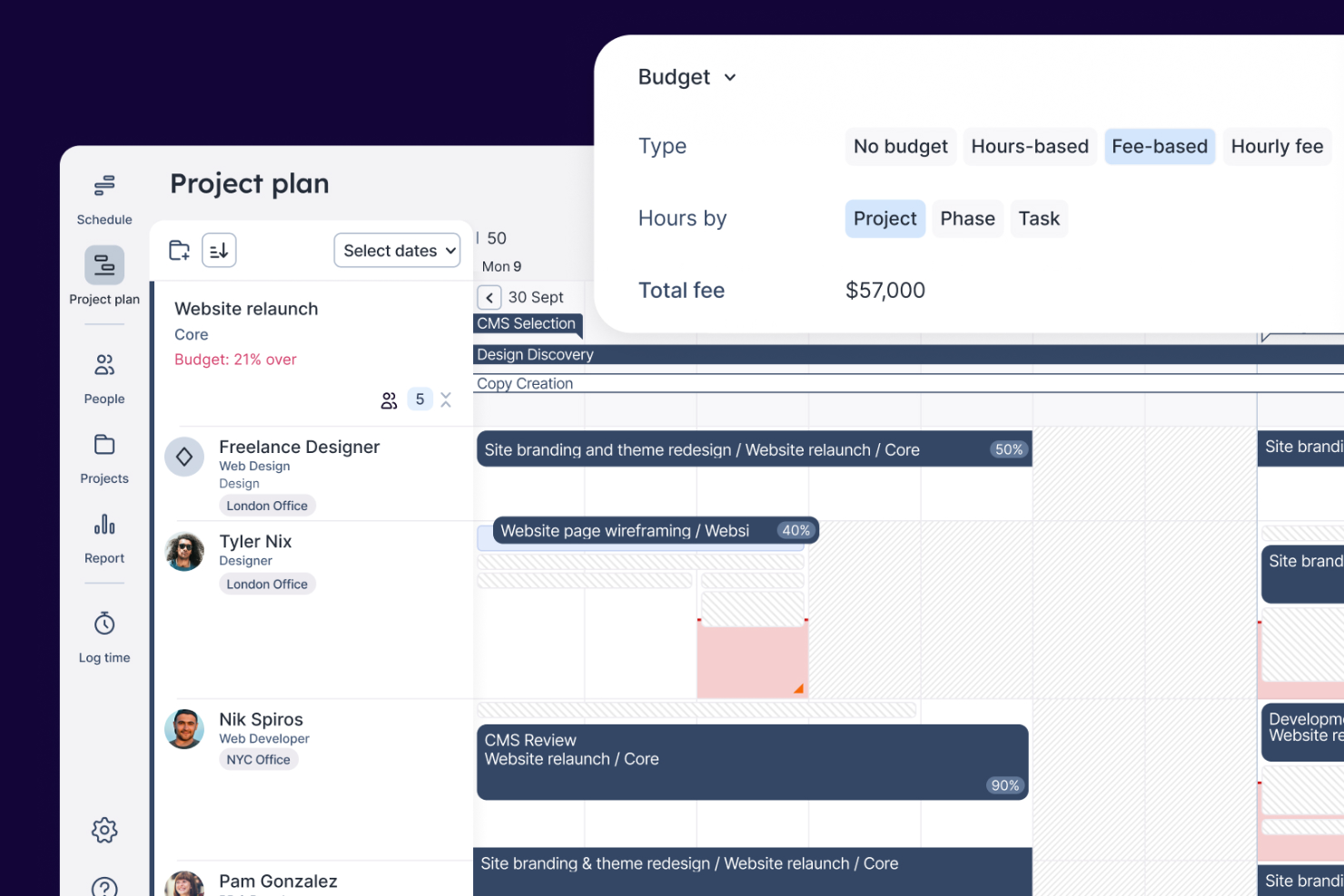
Float è una piattaforma di gestione delle risorse per agenzie che riunisce in un unico spazio la programmazione dei progetti, la pianificazione della capacità del team, il monitoraggio del tempo e la previsione finanziaria.
Per Chi È Float?
Float è ideale per agenzie creative e digitali che hanno bisogno di gestire le pianificazioni del team e i budget dei progetti in un unico posto.
Perché Ho Scelto Float
Float si guadagna il suo posto nella mia shortlist perché collega direttamente le decisioni sulle risorse ai risultati finanziari in un modo che la maggior parte degli strumenti di pianificazione non fa. Utilizzo il monitoraggio del budget di Float per confrontare in tempo reale i costi pianificati con quelli effettivi—così se un progetto sta andando fuori budget durante la consegna, posso accorgermene prima che diventi un problema. Mi piace anche la funzione di stima dei costi di progetto, che mi permette di modellare scenari di staff usando tariffe orarie reali e costi effettivi prima dell’avvio di un progetto, in modo che il margine sia incluso nel piano sin dal primo giorno, e non calcolato a posteriori.
Caratteristiche Principali di Float
- Pianificazione visiva delle risorse: Assegna il lavoro per ore o percentuali tramite una programmazione drag-and-drop, con avvisi in tempo reale di sovraccarico e indicatori di utilizzo.
- Gestione delle assenze: Imposta politiche di ferie personalizzate, flussi di approvazione e festività regionali assegnate automaticamente così da avere sempre una disponibilità accurata nella pianificazione.
- Timesheet precompilati: Float compila automaticamente i timesheet dalle allocazioni pianificate, con promemoria automatici e blocco dei timesheet per proteggere l’integrità dei dati.
- Report di utilizzo: Monitora le ore fatturabili e non fatturabili tra ruoli, team e progetti per sapere come viene effettivamente impiegato il tempo della tua squadra.
Integrazioni di Float
Float offre integrazioni native con Slack, Google Calendar, Outlook, Microsoft Teams, Asana, Jira, Trello e QuickBooks, e si collega con Zapier. È disponibile anche un’API per integrazioni personalizzate.
New Product Updates from Float.com

Float Adds Rate Cards and Multi-Currency Billing
Float introduced centralized rate cards to standardize bill rates across projects and added multi-currency support to bill clients consistently across regions. For more information, visit Float's official site.

Scoro
Ideale per la gestione operativa in tempo reale

Scoro è una piattaforma di gestione delle risorse per agenzie che riunisce pianificazione dei progetti, programmazione delle risorse, rilevamento del tempo, budgeting e strumenti di collaborazione in un unico sistema.
Per chi è ideale Scoro?
Scoro è adatto a medie agenzie e società di servizi professionali che necessitano di una piattaforma unica per gestire insieme progetti, personale e finanze.
Perché ho scelto Scoro
Ho incluso Scoro tra le mie migliori scelte per la sua efficacia nel collegare dati in tempo reale a ogni livello delle operazioni di agenzia. Quello che apprezzo di più è il cruscotto e la configurazione dei report in tempo reale: puoi monitorare spese di budget, utilizzo del team e redditività dei progetti senza dover estrarre dati da strumenti separati. La heatmap di utilizzo è particolarmente utile: mostra a colpo d’occhio chi è sovraccarico e chi ha disponibilità, così puoi riequilibrare i carichi di lavoro prima che si verifichino ritardi. Trovo inoltre la vista 'Preventivato vs Reale' davvero utile per i responsabili operativi che hanno bisogno di individuare problemi di margine durante il progetto, non solo dopo l’emissione della fattura.
Caratteristiche principali di Scoro
- Pianificazione con diagramma di Gantt: Visualizza le tempistiche dei progetti e le dipendenze tra attività tramite diagrammi di Gantt drag-and-drop che si aggiornano man mano che il lavoro progredisce.
- Gestione degli accordi di retainer: Monitora il lavoro ricorrente per i clienti, i budget e le ore all’interno di viste dedicate per retainer, per mantenere gli incarichi continuativi in linea con la pianificazione.
- Automazione della fatturazione: Genera automaticamente le fatture partendo da preventivi approvati, con elaborazione dei pagamenti integrata grazie all’integrazione con Stripe.
- Cruscotti personalizzabili: Crea cruscotti specifici per ruolo che mostrano i principali indicatori di salute dei progetti, le attività e i dati finanziari più rilevanti per ciascun membro del team.
Integrazioni di Scoro
Scoro offre integrazioni native con Google Workspace, Microsoft 365, Xero, QuickBooks, Sage, Exact e Azure. È disponibile un’API per integrazioni personalizzate.
New Product Updates from Scoro

Scoro Adds Quote Timelines, ELI Automation, and Partial Invoicing
Scoro now supports quote line start/end dates to build project timelines that carry into tasks and PDFs, expands ELI automation and conversation navigation, and adds partial invoicing by amount plus new accounting and HR integrations. For more information, visit Scoro's official site.

Ideale per la pianificazione e la previsione delle risorse
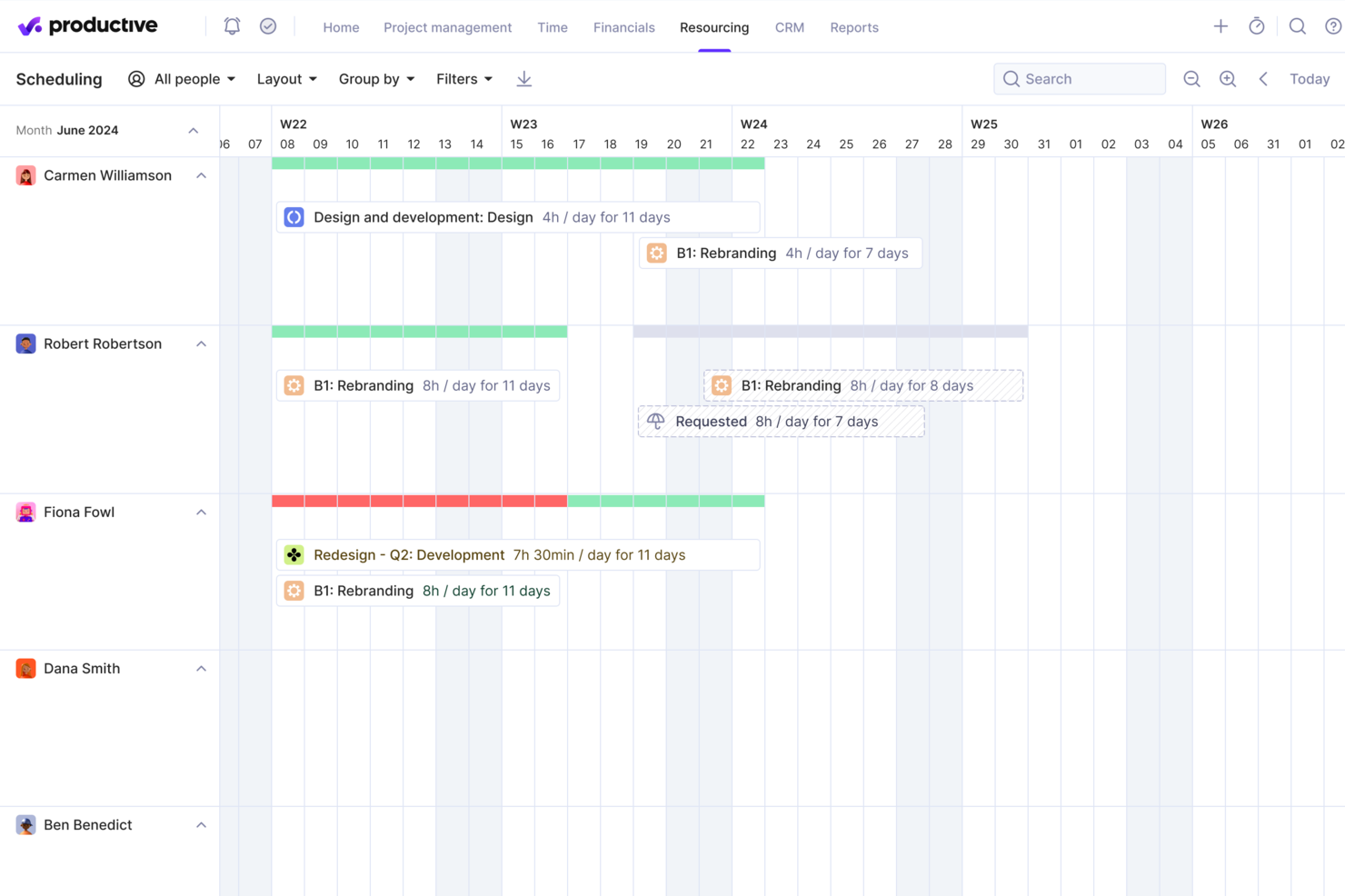
Productive è una piattaforma di gestione delle risorse per agenzie che riunisce pianificazione delle risorse, previsioni, monitoraggio dei progetti, budget e rilevazione del tempo in un unico sistema.
Per chi è ideale Productive?
Productive è progettato per agenzie e team di servizi professionali che hanno bisogno di gestire persone, progetti e budget in un unico posto.
Perché ho scelto Productive
Productive si guadagna un posto nella mia lista ristretta grazie al modo in cui le sue funzionalità di pianificazione delle risorse e di previsione sono strettamente collegate a risultati finanziari reali. Mi piace che il pianificatore delle risorse mostri disponibilità del team, assenze e capacità in un'unica vista—così, quando devo decidere se accettare un nuovo progetto, posso vedere esattamente chi ha ancora spazio e chi è già sovraccarico. Il Scenario Builder mi consente di modellare diversi risultati di pianificazione e prezzo prima di prendere impegni. Posso anche monitorare l'utilizzo fatturabile per persona, team o mese, e Productive segnala eventuali superamenti di budget prima che si verifichino.
Funzionalità chiave di Productive
- Modelli di progetto: Duplica attività, sotto-attività, descrizioni e assegnatari da un modello salvato per avviare nuovi progetti rapidamente.
- Gestione delle fasi di budget: Suddividi budget di progetti grandi o a lungo termine in fasi separate per gestire attività complesse e a più stadi per i clienti.
- Workflow di approvazione delle ore: Revisiona le ore inserite, segna le ore come fatturabili o non fatturabili e richiedi modifiche prima dell'approvazione.
- Avvisi automatici sul budget: Imposta avvisi personalizzati per essere avvisato quando un progetto raggiunge una certa percentuale del budget speso.
Integrazioni di Productive
Productive offre integrazioni native con Slack, Xero, QuickBooks, Google Calendar e HubSpot, e si collega a Zapier. È disponibile una API per integrazioni personalizzate.
New Product Updates from Productive

Productive Adds Agent Triggers, Teams Integration, and Time Controls
Productive adds automated agent triggers, broader AI file support, Microsoft Teams integration, Resource Planner improvements, and new time entry controls. These updates expand automation while improving scheduling, collaboration, and time tracking. For more information, visit Productive’s official site.

Accelo
Ideale per la pianificazione integrata di vendite e risorse
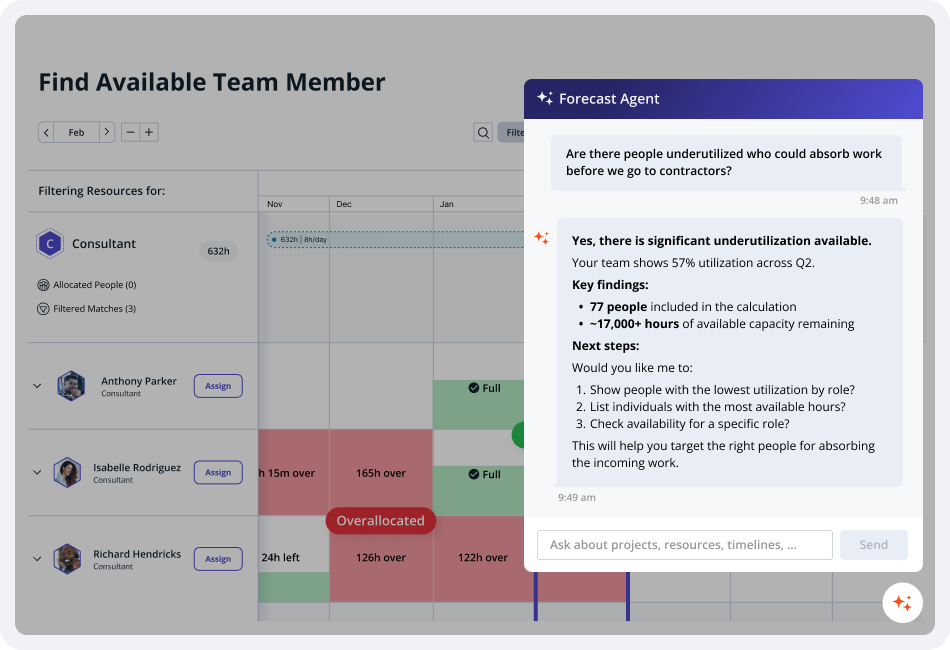
Progettato per agenzie e studi di servizi professionali, Accelo è una piattaforma PSA che copre l'intero ciclo di vita del cliente: dal pipeline e preventivazione fino alla consegna dei progetti, pianificazione delle risorse e fatturazione.
Per chi è più indicato Accelo?
Accelo è particolarmente adatto per agenzie digitali di medie dimensioni, società di consulenza IT e aziende di servizi professionali che necessitano di una piattaforma unica per gestire il lavoro dei clienti dal momento della vendita fino all'emissione della fattura.
Perché ho scelto Accelo
Ho scelto Accelo per la pianificazione integrata delle vendite e delle risorse perché è una delle poche piattaforme che collega direttamente il tuo pipeline di vendita alla previsione di capacità. Utilizza l'intelligenza artificiale per modellare sia il lavoro ipotetico che quello confermato, prevedere la domanda futura e aiutarti ad allineare assunzioni, risorse e consegne prima che i progetti vengano acquisiti. Questo fornisce ai leader delle agenzie una visione chiara della capacità futura, consentendo di decidere se accettare nuovi lavori senza dover indovinare.
Funzionalità chiave di Accelo
- Pianificazione risorse assistita dall'IA: Consiglia i membri del team più adatti ai compiti in base a competenze, disponibilità e carico di lavoro.
- Automazione dal venduto al progetto: Converte le opportunità vinte in progetti, trasferendo dati relativi al cliente, budget e attività, riducendo settaggi manuali.
- Gestione dei contratti a canone: Tiene traccia degli ingaggi ricorrenti dei clienti, registra le variazioni e monitora le performance dei contratti rispetto all’ambito concordato.
- Dashboard di redditività: Mostra in tempo reale la redditività di progetto, cliente e team per aiutare a monitorare margini e prestazioni finanziarie.
Integrazioni di Accelo
Accelo si integra con Google Workspace, Microsoft 365, Xero, QuickBooks Online, HubSpot, Salesforce, Mailchimp, Slack e Zapier. È disponibile un'API per integrazioni personalizzate.
Pros and Cons
Pros:
- Il passaggio dalla vendita alla consegna è integrato
- Prevede la domanda futura di risorse
- La rilevazione automatica dei tempi registra le ore fatturabili
Cons:
- L'interfaccia utente appare datata e si carica lentamente
- Personalizzazione dei report limitata

Ideale per la gestione delle risorse e della capacità delle agenzie

Screendragon è una piattaforma per la gestione delle risorse delle agenzie, pensata per i team che lavorano per progetti e necessitano di automazione dei flussi di lavoro, pianificazione delle risorse e pianificazione della capacità in un unico sistema.
Per chi è più adatto Screendragon?
Screendragon è particolarmente adatto alle agenzie di medie e grandi dimensioni e ai team creativi interni che devono gestire carichi di lavoro complessi e composti da più progetti, distribuiti su team numerosi.
Perché ho scelto Screendragon
Ho scelto Screendragon come una delle soluzioni migliori per la sua efficacia nella gestione della capacità su larga scala. Trovo davvero utile la possibilità di alternare viste delle risorse basate sulle attività, sulle ore e sulle percentuali: quando gestisco più progetti per diversi clienti, posso vedere immediatamente dove il mio team è sovraccarico senza dover consultare fogli di calcolo. Mi piace anche la funzione di assegnazione automatica con un clic, che abbina i membri del team ai progetti in base alle competenze e alla disponibilità, invece di affidarsi all'intuito. Include inoltre previsioni integrate della domanda, che mi consentono di modellare il carico di lavoro futuro e individuare le carenze di risorse prima che diventino un problema.
Funzionalità principali di Screendragon
- Filtri flessibili e viste basate sui ruoli: Analizza i dati in dettaglio per reparto, competenze, area geografica o ruolo personalizzato, così da trovare le persone giuste per qualsiasi progetto.
- Fogli ore e dati di progetto integrati: Collega direttamente la gestione delle risorse ai piani di progetto aggiornati e ai dati dei fogli ore per ottenere una visione unificata delle prestazioni del team.
- Gestione digitale dei flussi di approvazione: Raccogli decisioni, commenti e annotazioni in un unico luogo, con confronto tra versioni e registro di controllo automatizzato.
- Generatore visivo di flussi di lavoro senza codice: Progetta flussi di lavoro personalizzati da zero oppure utilizza modelli, mantenendo il pieno controllo sulla logica dei processi e sulle regole di automazione.
Integrazioni di Screendragon
Screendragon offre integrazioni native con Microsoft 365, Google Workspace, Slack, Jira, Salesforce, SAP, Oracle e Adobe Creative Cloud. È disponibile un'API per le integrazioni personalizzate.
New Product Updates from Screendragon
Screendragon Unveils New AI Hub
Screendragon introduced AI Hub, a new capability that lets teams build and manage AI agents directly within workflows. The update helps marketing teams automate tasks, maintain governance controls, and scale AI-driven operations more efficiently. For more information, visit Screendragon's official site.

Wrike
Ideale per funzionalità avanzate di gestione dei progetti
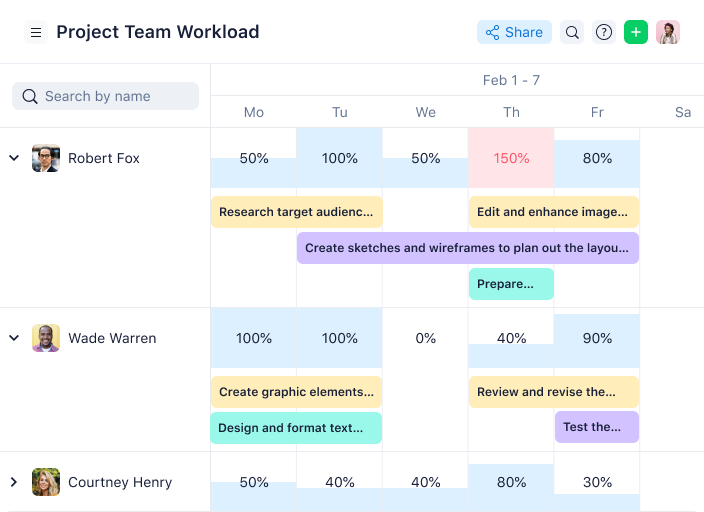
Wrike è una piattaforma per la gestione di progetti e risorse per agenzie, che riunisce il monitoraggio delle attività, la pianificazione del carico di lavoro, il monitoraggio del tempo e la collaborazione del team in un unico spazio di lavoro.
Per chi è più adatto Wrike?
Wrike è una soluzione adatta alle agenzie di medie e grandi dimensioni che hanno bisogno di una piattaforma strutturata e scalabile per gestire progetti complessi tra più team.
Perché ho scelto Wrike
Ho incluso Wrike nella mia selezione perché racchiude numerose funzionalità avanzate di gestione dei progetti in un'unica piattaforma. Apprezzo in particolare la pianificazione tramite diagramma di Gantt, che consente al mio team di mappare le dipendenze tra le attività di più progetti cliente in corso contemporaneamente e di vedere immediatamente come uno spostamento nella pianificazione di un progetto si ripercuota sugli altri. Mi affido alla funzionalità di prenotazione delle risorse: posso riservare un membro del team in base al ruolo, stimare le ore e verificarne la disponibilità prima di assegnargli un nuovo progetto. La gestione dell'impegno di Wrike mi consente di assegnare stime dell'impegno a livello di attività, rendendo molto più accurate le previsioni del carico di lavoro sull'intero portafoglio di progetti.
Funzionalità principali di Wrike
- Viste personalizzate dei progetti: Passa dalle viste Bacheca, Tabella, Gantt, Calendario e Grafico per visualizzare l'avanzamento del progetto nel formato più adatto al tuo team.
- Bacheche Scrum: Gestisci i flussi di lavoro Agile con la definizione delle priorità del backlog, la pianificazione degli sprint e la collaborazione in tempo reale su bacheche Scrum condivise.
- Moduli di richiesta esterni: Raccogli e indirizza le richieste di lavoro in arrivo da clienti o utenti non Wrike direttamente nello spazio di lavoro del tuo progetto.
- Report sulle attività degli utenti: Genera report di controllo su richiesta per monitorare ciò che ogni membro del team ha creato o modificato nel tuo account.
Integrazioni di Wrike
Wrike offre centinaia di integrazioni tramite i connettori integrati e il marketplace, inclusi strumenti come Google Workspace, Microsoft 365, Salesforce e Slack. Supporta inoltre Zapier e fornisce un'API per le integrazioni personalizzate.
New Product Updates from Wrike

Wrike Activity Reports Add Actor Type Details
Wrike’s Activity Report now displays actor type details, helping admins identify whether changes came from the UI, Automation, Wrike Agents, API, or AI via MCP. For more information, visit Wrike's official site.

Ideale per i report di pianificazione della capacità

Resource Guru è una piattaforma di gestione delle risorse per agenzie che riunisce in un unico luogo la programmazione delle risorse, il monitoraggio della disponibilità del team, l'assegnazione dei progetti e la pianificazione della capacità produttiva.
Per chi è ideale Resource Guru?
Resource Guru è adatto ad agenzie e team di servizi professionali che necessitano di uno strumento dedicato per programmare le persone su più progetti e clienti.
Perché ho scelto Resource Guru
Ho scelto Resource Guru come uno dei migliori perché i suoi report di pianificazione della capacità offrono una visione davvero chiara dello stato del tuo team. Il report sull'utilizzo delle persone e delle risorse analizza la domanda rispetto alla capacità, così puoi vedere esattamente quando il tuo team è sovraccarico e quando c'è spazio per più lavoro fatturabile. Apprezzo anche il report delle prenotazioni per tipo, che ti permette di modellare scenari in base a lavori provvisori o non approvati—così, se un cliente conferma un progetto, puoi già vedere come ciò influisce sul calendario prima che diventi un problema. La reportistica previsione vs. risultati è un'altra funzione su cui faccio affidamento, perché mostra se stai sovra o sotto-servendo i clienti e ti aiuta a fare preventivi futuri con maggiore sicurezza.
Caratteristiche principali di Resource Guru
- Gestione dei conflitti: Segnala in tempo reale i conflitti di programmazione e mantiene le prenotazioni non risolte in una lista d'attesa finché non possono essere correttamente assegnate.
- Timesheet suggeriti automaticamente: Inserisce direttamente il lavoro pianificato nel timesheet di ogni membro del team, così possono registrare una settimana intera con un solo clic.
- Campi personalizzati: Tagga le risorse con competenze, ruoli o qualsiasi attributo specifico aziendale, così puoi filtrare la programmazione per trovare la persona giusta per ogni progetto.
- Report sulle assenze: Monitora tutti i tipi di assenza—vacanza, malattia, festività, congedo parentale—così puoi pianificare in base alla disponibilità del team prima che le lacune diventino un problema.
Integrazioni di Resource Guru
Resource Guru offre integrazioni native con Outlook Calendar, Google Calendar, Jira, Slack, Microsoft Teams, Google Sheets, Salesforce, Workday, Basecamp e QuickBooks. Inoltre si collega con Zapier e fornisce un'API per integrazioni personalizzate.
New Product Updates from Resource Guru

Resource Guru Adds Flexible Total Hours Bookings
Resource Guru adds Total Hours bookings, letting teams allocate a fixed number of hours across a date range based on actual availability. The update helps schedules adapt automatically as bookings, leave, and availability change. For more information, visit Resource Guru’s official site.
 .
.
Ideale per esigenze semplici di pianificazione della capacità
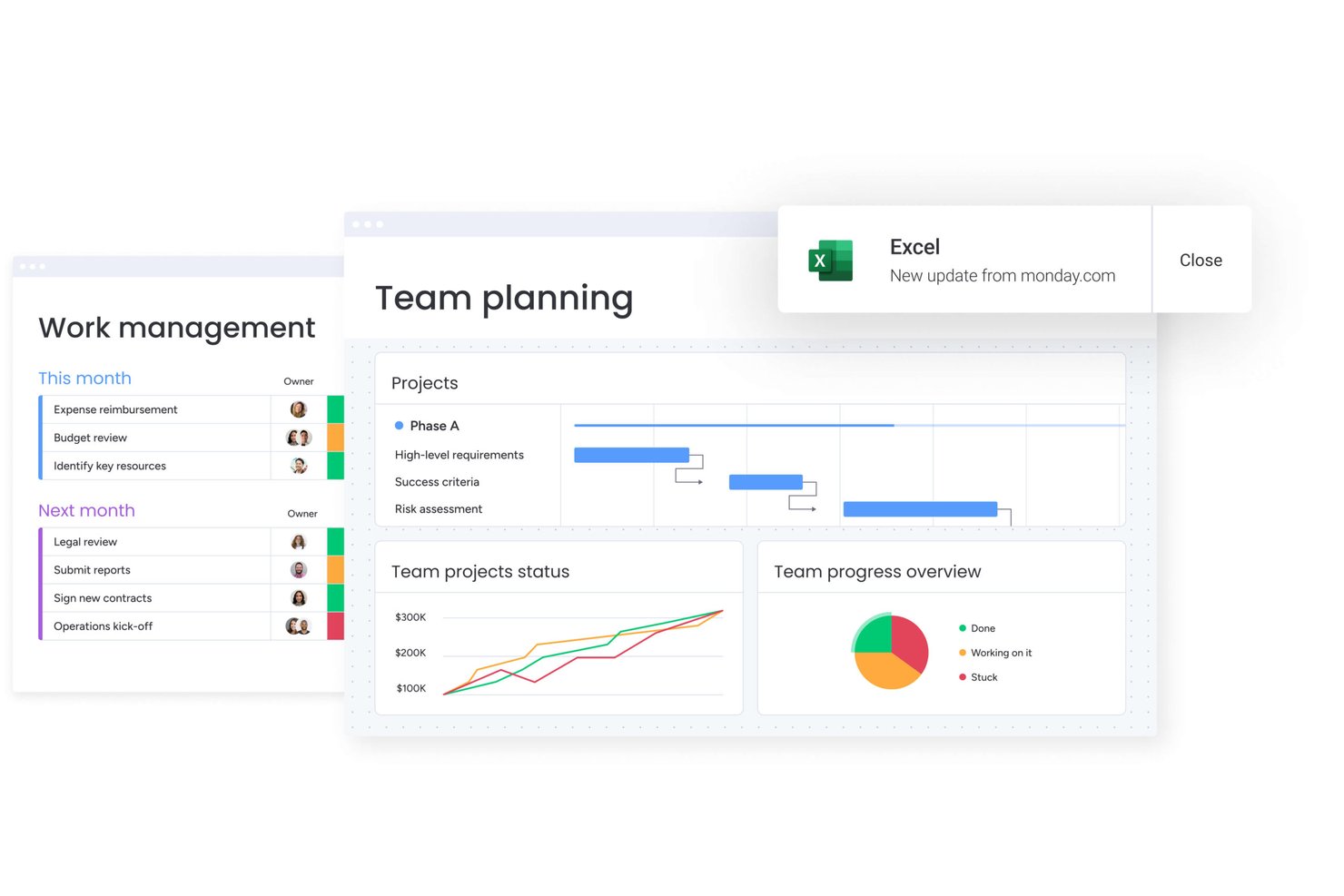
monday AI Workspace è una piattaforma di gestione del lavoro che combina la pianificazione dei progetti, la schedulazione delle risorse, il monitoraggio della capacità e l'automazione dei flussi di lavoro guidata dall'IA per team e progetti clienti.
Per chi è ideale monday AI Workspace?
monday AI Workspace è adatto ad agenzie di medie dimensioni e team operativi che desiderano un sistema operativo di lavoro flessibile senza la complessità di una piattaforma di gestione risorse dedicata.
Perché ho scelto monday AI Workspace
Ho scelto monday AI Workspace perché il suo Capacity Manager aggrega i dati sul carico di lavoro da più Resource Planner, offrendo al mio team una visione unica di chi è sovraccarico e chi ha disponibilità. Quando assegno un nuovo progetto cliente, posso filtrare la Resource Directory per ruolo, competenze o località per trovare rapidamente la persona giusta. I ruoli segnaposto mi permettono anche di segnalare eventuali lacune nel personale prima ancora che un progetto venga confermato, evitando che la pianificazione della pipeline diventi reattiva.
Funzionalità principali di monday AI Workspace
- Automazione dei flussi di lavoro guidata dall'IA: Automatizza aggiornamenti di progetto di routine, cambi di stato e assegnazioni sulla base di trigger e condizioni personalizzate.
- Dashboard personalizzabili: Offre widget visivi per timeline, grafici Gantt, carichi di lavoro e stato dei progetti, tutti configurabili secondo le preferenze dell'agenzia.
- Colonna integrata di rilevazione tempi: Permette agli utenti di registrare le ore direttamente sulle attività per una maggiore visibilità sulle bacheche progetto dei clienti.
- Resource Directory: Conserva profili ricercabili dello staff, inclusi competenze, ruoli, località e disponibilità, in un unico luogo centrale.
Integrazioni di monday AI Workspace
monday AI Workspace offre centinaia di integrazioni native tramite le sue integrazioni integrate e il marketplace, tra cui Slack, Google Workspace, Microsoft 365, Jira, Dropbox, Zoom, HubSpot, Salesforce, GitHub e Outlook. Supporta inoltre Zapier e dispone di un'API per integrazioni personalizzate.
Pros and Cons
Pros:
- Pianificazione visiva della capacità su più progetti cliente
- I ruoli segnaposto supportano la pianificazione del personale prima dei progetti
- L'IA automatizza l'assegnazione e gli aggiornamenti delle attività di routine
Cons:
- Non pensato appositamente per il monitoraggio dei tassi fatturabili
- I report non includono nativamente KPI specifici per le agenzie sull'utilizzo
New Product Updates from monday AI Workspace
monday AI Workspace Adds Human Approval Routing
monday AI Workspace adds a human-in-the-loop approval block to AI Workflows, sending approval requests and routing workflow paths based on responses. For more information, visit monday AI Workspace's official site.

Kantata
Ideale per risorse orientate alle persone

Kantata è una piattaforma di gestione delle risorse per agenzie, progettata per attività basate su progetti che necessitano di pianificazione delle risorse, gestione dei progetti, registrazione delle ore e analisi tutto in un unico sistema.
Per chi è più indicato Kantata?
Kantata è adatta per aziende di servizi professionali e agenzie che devono gestire progetti complessi, guidati dalle persone, su più clienti e flussi di lavoro.
Perché ho scelto Kantata
Ho scelto Kantata tra le migliori soluzioni proprio per la sua progettazione centrata sulle persone come unità fondamentale della delivery. Mentre molti strumenti di gestione delle risorse considerano il personale solo una variabile di pianificazione, il modulo di gestione e previsione delle risorse di Kantata consente al mio team di vedere la disponibilità per competenze, individuare carenze prima che diventino ostacoli e spostare le persone tra i progetti in tempo reale. Questo livello di dettaglio è fondamentale quando si gestiscono molteplici incarichi con scadenze sovrapposte. Mi piace anche che il motore di intelligenza artificiale Expertise Engine di Kantata apprenda dai dati dei progetti passati per proporre raccomandazioni sempre più performanti nel tempo, così le decisioni sulle risorse diventano più precise con l'utilizzo prolungato della piattaforma.
Funzionalità principali di Kantata
- Rilevamento di tempi e spese: Registra le ore fatturabili e le spese direttamente nei progetti, con l'automazione integrata per mantenere i registri accurati e permettere ai team finanziari di rispettare le scadenze di chiusura periodo.
- Gestione finanziaria: Collega l'esecuzione dei progetti a fatturazione, riconoscimento dei ricavi e monitoraggio dei margini in un unico luogo, con visibilità in tempo reale su costi e redditività.
- Kantata Pulse: Raccogli dati sul sentiment di clienti e dipendenti insieme ai parametri operativi per monitorare lo stato dei progetti e intercettare i rischi prima che si aggravino.
- Assistente di progetto AI generativa: Genera automaticamente report di stato, aggiornamenti per dirigenti e casi studio di progetto, attingendo dai dati di progetto in tempo reale.
Integrazioni di Kantata
Kantata offre integrazioni native con Salesforce, Slack, Jira, HubSpot, QuickBooks, Xero, Microsoft 365, Google Workspace, Expensify e NetSuite. Un'API è disponibile per integrazioni personalizzate.
New Product Updates from Kantata

Kantata Adds Access Group Change History
Kantata adds Access Groups History, letting account administrators track changes to group details, membership, and permissions in Recent History. The update also makes these events available through the Subscribed Events API for broader monitoring. For more information, visit Kantata’s official site.
 .
.
Rocketlane
Ideale per la collaborazione su progetti con i clienti
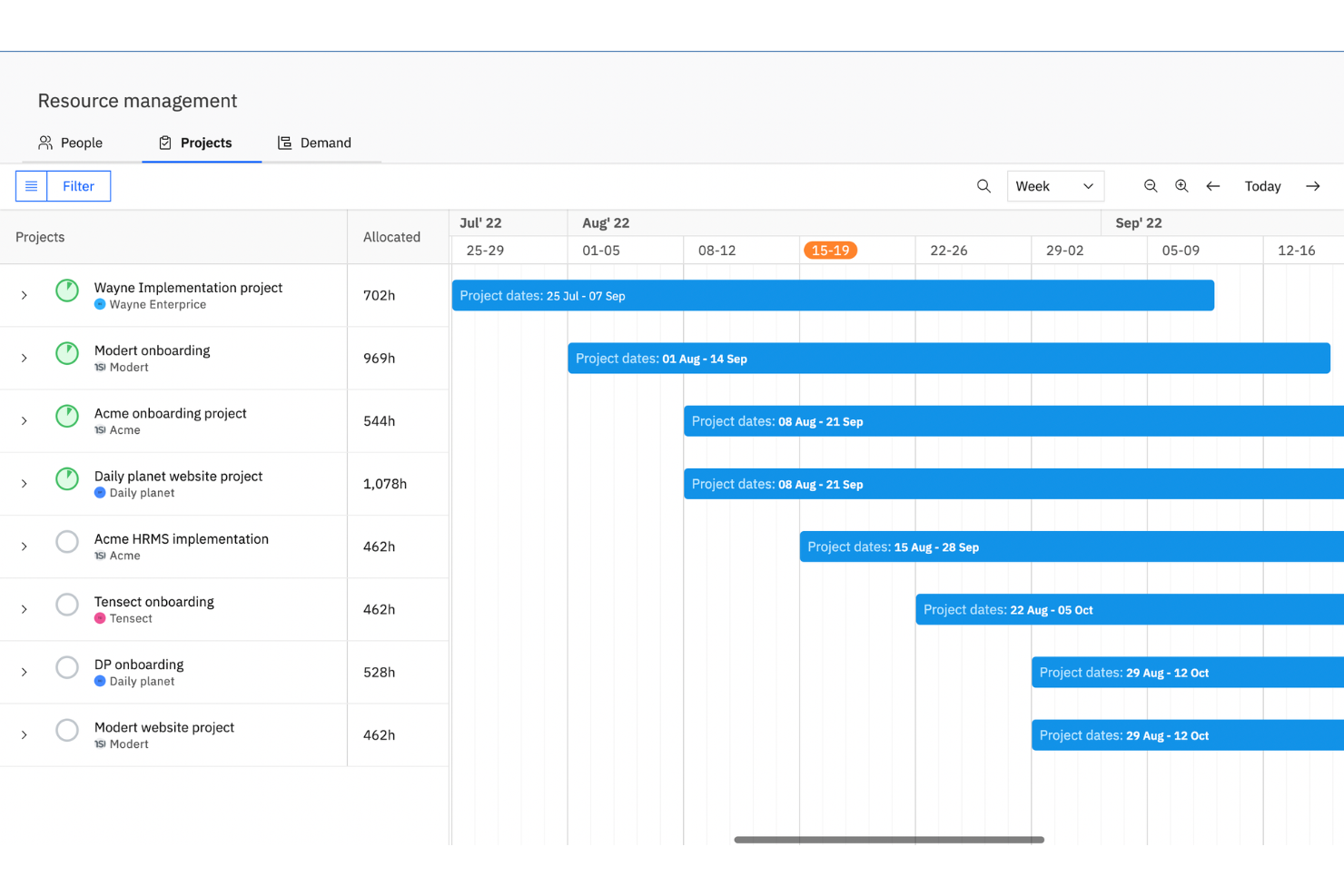
Rocketlane è una piattaforma per l'automazione dei servizi professionali che unisce pianificazione delle risorse, gestione della capacità, rilevamento delle ore lavorate, portali client e strumenti di consegna progetti in un unico ambiente di lavoro.
Per chi è ideale Rocketlane?
Rocketlane è particolarmente adatto a team di servizi professionali e team di implementazione SaaS che gestiscono progetti strutturati rivolti ai clienti su larga scala.
Perché ho scelto Rocketlane
Ho inserito Rocketlane tra le mie scelte principali perché il suo portale client personalizzato va ben oltre la semplice condivisione di progetti. I clienti dispongono di un unico punto d’accesso dove possono visualizzare i piani di progetto, accedere ai file, rispondere alle attività e monitorare l’avanzamento senza bisogno di un accesso Rocketlane. Apprezzo anche il fatto che il portale sia completamente white-label, così il marchio del tuo team rimane in primo piano per tutta la durata dell’ingaggio, non solo all’inizio. Quando gestisci più progetti per diversi clienti contemporaneamente, questo spazio di lavoro condiviso riduce gli scambi di e-mail che rallentano la consegna.
Caratteristiche principali di Rocketlane
- Pianificazione delle risorse: Assegna i membri del team ai progetti in base a disponibilità, competenze e carico di lavoro sull’intero portafoglio.
- Rilevamento delle ore lavorate: Registra le ore direttamente nelle attività e invia i timesheet per l’approvazione dei responsabili senza uscire dalla piattaforma.
- Modelli di progetto: Crea schemi di progetto riutilizzabili con attività, tempistiche e assegnatari predefiniti per standardizzare la consegna.
- Monitoraggio del budget: Tieni sotto controllo le spese dei progetti rispetto alle previsioni con tracciamento dei margini e gestione dei listini prezzi integrati.
Integrazioni di Rocketlane
Rocketlane offre integrazioni native con Slack, Salesforce, HubSpot, Jira, Google Calendar, Outlook e Zapier. È disponibile un'API per integrazioni personalizzate.
Pros and Cons
Pros:
- Il portale clienti offre ai clienti visibilità diretta sul progetto
- Modelli di progetto riutilizzabili che velocizzano l’onboarding
- Rilevamento delle ore lavorate integrato per ogni attività di progetto
Cons:
- I filtri dei report mancano di opzioni di personalizzazione avanzate
- Passare tra più progetti risulta lento
New Product Updates from Rocketlane

Rocketlane Introduces Governance and Workforce Agents
Rocketlane introduces Governance Agents and Workforce Agents to automate delivery processes and recurring tasks. These updates help teams enforce rules and streamline project execution. For more information, visit Rocketlane’s official site.
 .
.Altre opzioni
Ecco alcune altre opzioni meritevoli che non sono state incluse nella mia lista dei migliori software di gestione delle risorse per agenzie:
- Forecast
Ideale per agenzie e società di consulenza di medie dimensioni
- ActiveCollab
Ideale per piccoli team
- awork
Ideale per la pianificazione delle attività tramite IA
- Bonsai Agency Software
Ideale per monitoraggio utilizzo risorse e redditività
- ProjectManager
Ideale per agenzie IT
- Ganttic
Ideale per team remoti
- Parallax
Ideale per l'intelligenza predittiva delle risorse
- Function Point
Ideale per studi di design
- Mosaic
Ottimo per visualizzare il carico di lavoro del team
- Ravetree
Ideale per flussi di lavoro di progetto personalizzati


Come Valuto i Software di Gestione delle Risorse per Agenzie
Divido la mia valutazione in due livelli: le capacità di base che uno strumento deve avere per gestire lo staff fatturabile sui progetti dei clienti e i fattori che differenziano una piattaforma dall'altra.
Funzionalità Principali (Requisiti Indispensabili per Questa Lista)
Quando seleziono gli strumenti per la mia lista, li valuto su una scala da 0 (non offre la funzionalità) a 5 (eccelle in quest'area) per ognuna delle funzionalità principali elencate di seguito. Poi, calcolo il punteggio totale dello strumento come percentuale. Ogni strumento deve ottenere un punteggio minimo totale del 65% per essere preso in considerazione per l'inclusione.
- Pianificazione & Allocazione delle Risorse: Valuto se è possibile assegnare incarichi tramite drag-and-drop su una timeline visiva, suddividere le prenotazioni tra i progetti e individuare conflitti quando due PM pianificano lo stesso designer.
- Monitoraggio della Capacità & Utilizzo: Qui conta la visibilità in tempo reale di chi ha un utilizzo al 40% e chi è prenotato al 120%, specialmente tra reparti come creativo, sviluppo e strategia.
- Gestione Competenze & Disponibilità: Controllo se lo strumento permette di filtrare le risorse per competenze, ruolo e stato di PTO così da trovare un senior copywriter disponibile senza dover chiedere a cinque responsabili.
- Monitoraggio del Tempo & Schede Orarie: Lo strumento dovrebbe collegare le ore registrate alle allocazioni dei progetti, con flag per attività fatturabili e non, affinché i responsabili possano confrontare il tempo pianificato con quello reale per ciascun cliente.
- Previsioni & Pianificazione Pipeline: Cerco il supporto per prenotazioni provvisorie e viste pipeline che aiutino a pianificare lo staff anche su lavori proposti ma non ancora vinti, non solo su progetti confermati.
- Gestione Tariffe & Budget: Ogni strumento dovrebbe permettere di impostare costi e tariffe di fatturazione per risorsa o ruolo e tracciare il consumo di budget rispetto a tali tariffe per evidenziare il margine di progetto in tempo reale.
Una volta che ho una lista degli strumenti che soddisfano i criteri, considero cosa distingue ogni piattaforma.
Fattori Differenzianti (Cosa Distingue i Fornitori)
Ecco come confronto i vari fornitori:
Funzionalità Distintive
La pianificazione di scenari è un grande fattore differenziante: voglio simulare cosa succede alla capacità se il team vince due clienti in gara il prossimo mese, prima di iniziare a cercare nuove assunzioni. Anche la gestione di freelance e collaboratori esterni è importante, poiché la maggior parte delle agenzie integra staff interno con professionisti esterni e ha bisogno di schede tariffarie e disponibilità separate per ciascuno. Cerco anche il monitoraggio di retainer che gestisca tetti orari ricorrenti e rollover, che corrisponde a gran parte del lavoro continuativo svolto per i clienti.
Oltre le Funzionalità
Qui le integrazioni sono fondamentali: verifico se uno strumento si collega alle app di project management e finanza che l'agenzia già usa, come Jira, Asana, QuickBooks o Xero, perché i dati sulle risorse perdono valore se restano isolati. Anche la struttura dei prezzi è un fattore che considero, in particolare se il fornitore applica costi per risorsa gestita o propone posti solo visualizzazione meno costosi per i dirigenti che hanno bisogno solo delle dashboard. Valuto inoltre i report integrati per KPI tipici di agenzia come tasso di utilizzo, tasso di realizzazione e margine di progetto, dato che rifarli in un foglio di calcolo vanifica lo scopo dello strumento.
Domande frequenti sui software di gestione delle risorse per agenzie
Diamo un’occhiata ad alcune delle domande più frequenti sui software di gestione delle risorse.
Perché le agenzie hanno bisogno di un software di gestione delle risorse?
\u003cp data-start=\u0022159\u0022 data-end=\u0022854\u0022\u003eComprendere come risorse quali persone, denaro e tecnologia vengono utilizzate attualmente e potenzialmente all’interno della tua organizzazione ti consente di prevedere con precisione le opportunità future. Quando acquisisci un nuovo cliente o progetto, il software di gestione delle risorse può aiutarti a comprendere la capacità delle tue risorse e a lavorare rispettando i budget e le tempistiche del progetto. Questo garantisce la consegna del lavoro in modo da massimizzare la redditività. Le aziende di servizi professionali spesso si affidano a \u003ca href=\u0022https://thedigitalprojectmanager.com/tools/best-resource-management-software-for-professional-services/\u0022\u003estrumenti specializzati per la gestione delle risorse\u003c/a\u003e per ottimizzare l’allocazione della forza lavoro, monitorare i dati finanziari dei progetti e mantenere la visibilità su più incarichi.\u003c/p\u003e
Quali sono le funzionalità principali dei software di gestione delle risorse per agenzie?
Le funzionalità più comuni dei \u003ca href=\u0022https://thedigitalprojectmanager.com/tools/best-agency-management-system/\u0022\u003esistemi di gestione delle agenzie\u003c/a\u003e incentrati sulle risorse includono:
\u003cul\u003e
\t\u003cli\u003eMonitoraggio del tempo e schede attività\u003c/li\u003e
\t\u003cli\u003eCreazione di flussi di lavoro\u003c/li\u003e
\t\u003cli\u003eCruscotti personalizzati\u003c/li\u003e
\t\u003cli\u003ePianificazione con trascinamento della selezione\u003c/li\u003e
\t\u003cli\u003eIntegrazioni con altri strumenti di comunicazione, contabilità e gestione dei progetti\u003c/li\u003e
\t\u003cli\u003eApprovazioni automatizzate\u003c/li\u003e
\t\u003cli\u003eBacheche Kanban personalizzate, diagrammi di Gantt e altri elementi visivi\u003c/li\u003e
\t\u003cli\u003eMonitoraggio delle milestone\u003c/li\u003e
\t\u003cli\u003eNotifiche nei momenti chiave del ciclo di vita del progetto\u003c/li\u003e
\u003c/ul\u003e
Quali sono i vantaggi dell'utilizzo della gestione delle risorse nelle agenzie?
\u003cp class=\u0022p1\u0022\u003eAll’interno di un’agenzia, una pianificazione efficace delle risorse può contribuire a numerosi risultati positivi:\u003c/p\u003e
\u003cul class=\u0022ul1\u0022\u003e
\t\u003cli class=\u0022li1\u0022\u003eRiduce il rischio di esaurimento del team e mantiene felici i dipendenti!\u003c/li\u003e
\t\u003cli class=\u0022li1\u0022\u003eTiene sotto controllo le spese per garantire il rispetto del budget\u003c/li\u003e
\t\u003cli class=\u0022li1\u0022\u003eAiuta a gestire l’ampliamento incontrollato dell’ambito e a mantenere la redditività di fronte ai cambiamenti\u003c/li\u003e
\t\u003cli class=\u0022li1\u0022\u003ePrepara il team ad accogliere nuove opportunità di crescita senza sacrificare l’equilibrio tra lavoro e vita privata\u003c/li\u003e
\u003c/ul\u003e
Come si può umanizzare la gestione delle risorse dei progetti per rafforzare la cultura di un'agenzia?
L’allocazione delle risorse non riguarda solo i numeri. Quando abbiamo intervistato Morgan Megannety per il podcast The Digital Project Manager, ci ha detto:
\u003cem\u003e\u003cstrong\u003e“Per me, la parte più interessante consiste nell’evitare che le persone arrivino al burnout. Abbinare le competenze alle attività. Capire ciò che le persone… devono fare per… mantenere vivo il loro interesse per la carriera.”\u003c/strong\u003e\u003c/em\u003e
Come scelgo un software di gestione delle risorse?
Puoi scegliere un software di gestione delle risorse ponendoti alcune domande, come:
\u003cul\u003e
\t\u003cli\u003eHo bisogno di un software dedicato?\u003c/li\u003e
\t\u003cli\u003eVoglio una soluzione basata sul cloud o installata localmente?\u003c/li\u003e
\t\u003cli\u003eDispone delle integrazioni necessarie per sfruttare al meglio il software che utilizzo attualmente?\u003c/li\u003e
\t\u003cli\u003eIl prezzo è adeguato alle funzionalità che otterrò?\u003c/li\u003e
\u003c/ul\u003e
Abbiamo tutte le risposte a queste domande nella nostra \u003ca href=\u0022https://thedigitalprojectmanager.com/project-management/how-to-choose-resource-management-software/\u0022\u003eguida all’acquisto dei software di gestione delle risorse\u003c/a\u003e.