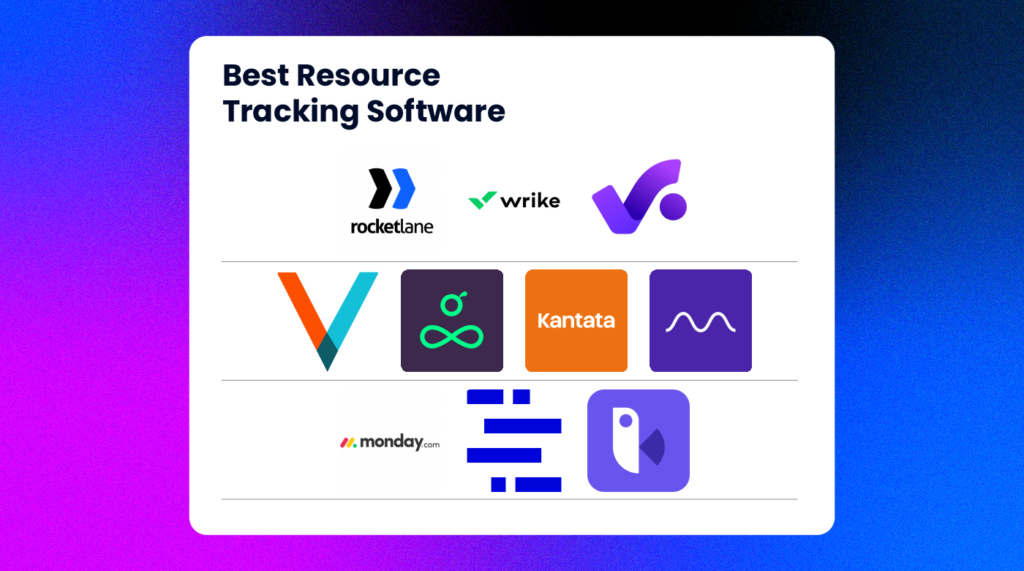
I 10 migliori software di monitoraggio delle risorse recensiti per il 2026

Elenco dei migliori software per il monitoraggio delle risorse


Il miglior software per il monitoraggio delle risorse offre visibilità in tempo reale sulla disponibilità, sui carichi di lavoro e sulla capacità del team, permettendoti di assegnare le persone giuste al lavoro giusto nel momento giusto. Questi strumenti ti aiutano a evitare il burnout, ridurre i tempi di inattività e prendere decisioni più intelligenti sull'assegnazione del personale nei vari progetti.
Con oltre 10 anni di esperienza nella gestione di progetti digitali e nella valutazione di più di 40 strumenti per la pianificazione delle risorse nel corso degli anni, ho aiutato team del settore pubblico, sanitario, della vendita al dettaglio e dei trasporti a trovare modi migliori per bilanciare i carichi di lavoro e prevedere il fabbisogno di risorse. Ho visto come una scarsa visibilità possa compromettere le tempistiche e come lo strumento giusto possa ripristinare il controllo.
In questa guida ti parlerò dei migliori strumenti che ho testato. Ogni strumento è corredato da una descrizione pensata per fornire un'idea generale delle sue funzionalità e delle caratteristiche più importanti. Spero che ti aiuti a individuare quello più adatto alle tue esigenze.
Perché fidarsi dei nostri consigli sui software
Il nostro team testa e recensisce software dal 2012. In quanto project manager noi stessi, sappiamo quanto sia difficile — e importante — scegliere il software giusto.
Per questa guida, abbiamo valutato gli strumenti attraverso test pratici e ricerche indipendenti, assegnando un punteggio agli strumenti in base ai nostri criteri di selezione. Ci basiamo inoltre sulle competenze di leader di pensiero del settore e di professionisti attivi nella gestione dei progetti.
Le nostre recensioni riflettono il nostro giudizio editoriale umano, non un discorso di vendita.
Revisori esperti:
Tabella di confronto dei software per il monitoraggio delle risorse
Questa tabella di confronto riassume i dettagli sui prezzi delle mie migliori selezioni di software per il monitoraggio delle risorse:
| Tool | Best For | Trial Info | Price | ||
|---|---|---|---|---|---|
| 1 | Ideale per la gestione delle risorse in agenzia | Prova gratuita di 14 giorni + demo gratuita disponibile | A partire da $10/mese (fatturazione annuale) | Website | |
| 2 | Ideale per dati in tempo reale sulle prestazioni del team | Prova gratuita di 14 giorni + piano gratuito disponibile | Da $10/utente/mese (fatturazione annuale) | Website | |
| 3 | Ideale per la pianificazione completa delle risorse | Prova gratuita di 14 giorni + demo gratuita disponibile | Da $19.90/utente/mese (fatturato annualmente) | Website | |
| 4 | Ideale per il tracciamento e la reportistica delle risorse in modo intelligente | Demo gratuita disponibile | Prezzi su richiesta | Website | |
| 5 | Ideale per ottimizzare l’utilizzo delle risorse | Prova gratuita disponibile | A partire da $14/utente/mese (fatturazione annuale) | Website | |
| 6 | Ideale per la gestione delle risorse orientata alle persone | Non disponibile | Prezzo su richiesta | Website | |
| 7 | Ideale per le informazioni sul carico di lavoro | 14 giorni di prova gratuita | Da $8/utente/mese | Website | |
| 8 | Ideale per il monitoraggio dei progetti di onboarding | Prova gratuita + demo gratuita disponibili | A partire da $19/utente/mese (fatturazione annuale) | Website | |
| 9 | Ideale per agenzie e società di consulenza di medie dimensioni | 14 giorni di prova gratuita | A partire da $29/postazione/mese (minimo 10 postazioni) | Website | |
| 10 | Ideale per la previsione di tempi e risorse | Prova gratuita di 7 giorni disponibile | Da $9/utente/mese (fatturato annualmente) | Website |


Panoramiche dei migliori software per il monitoraggio delle risorse
Ecco una breve descrizione di ogni strumento per il monitoraggio delle risorse, per mostrare la mia esperienza con esso e alcune caratteristiche degne di nota.

Ideale per la gestione delle risorse in agenzia
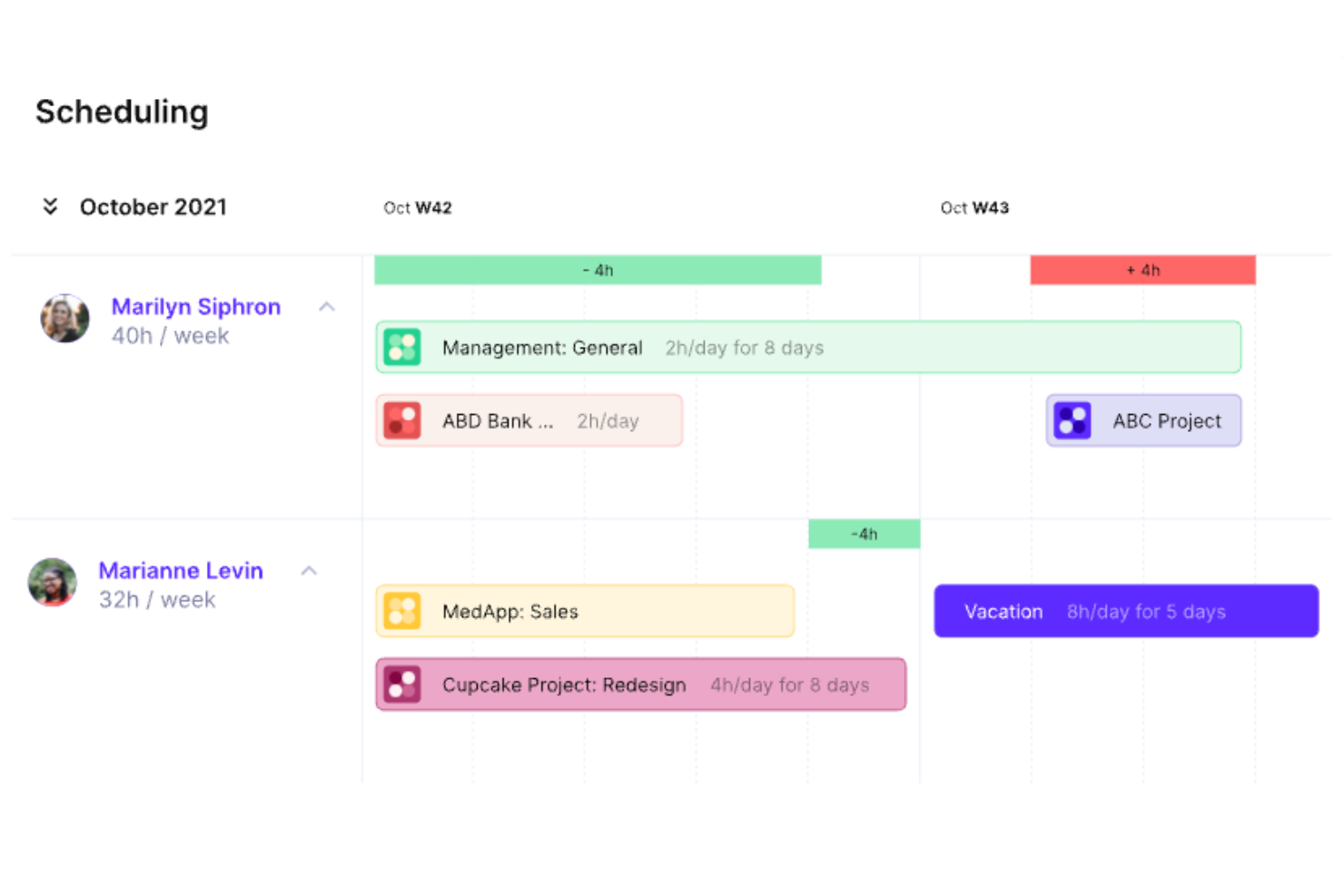
Productive è una piattaforma di gestione del lavoro tutto-in-uno pensata per soddisfare le esigenze delle agenzie. Comprende la pianificazione e il monitoraggio delle risorse oltre alla gestione di progetti e attività, budgeting e altri strumenti chiave per garantire un funzionamento efficiente dell'agenzia.
Tuttavia, come ogni strumento che copre troppe funzioni, può mancare di specializzazione in alcune aree. Productive compensa questa lacuna offrendo flessibilità integrata nella piattaforma. Parlando con Fran Vizintin di Productive riguardo al modulo delle risorse, abbiamo appreso che 'Con Productive puoi creare campi personalizzati, come le competenze, e assegnarli alle risorse per una pianificazione dettagliata.'
Perché ho scelto Productive
Le funzionalità di gestione delle risorse del software includono visualizzazioni del carico di lavoro e della disponibilità del team. Puoi raggruppare i membri del team per competenze, team o reparti per facilitare l'allocazione delle risorse in base a uno di questi fattori. Tutto questo ti aiuta ad assegnare efficacemente i compiti e a distribuire equamente il lavoro tra i tuoi collaboratori.
Il monitoraggio del tempo è integrato nella piattaforma per aiutarti a verificare come il tempo dei dipendenti viene distribuito tra i vari compiti e progetti. Questi dati possono poi essere collegati alla gestione della capacità per aiutarti a prevedere le necessità future.
Funzionalità principali di Productive
Productive offre anche una varietà di altre funzionalità che coprono diversi aspetti del monitoraggio di progetti e risorse.
- Pianificazione delle Risorse: puoi gestire efficacemente le risorse con strumenti per il monitoraggio del tempo e la gestione delle assenze.
- Gestione dei Progetti: permette di utilizzare diagrammi di Gantt, documentazione e gestione del carico di lavoro per supervisionare i progetti in modo efficace.
- Segnaposto Risorse: puoi utilizzare segnaposto per misurare la domanda di risorse per i prossimi progetti, facilitando le decisioni su assunzioni e distribuzione del carico di lavoro.
- Gestione Finanziaria: con funzionalità come budgeting, fatturazione e previsione dei ricavi, ottieni una supervisione finanziaria completa per assicurarti che i progetti restino redditizi.
Integrazioni di Productive
Le integrazioni includono Jira, Outlook, Sage, Google Calendar, HubSpot, Slack, QuickBooks e Xero.
Pros and Cons
Pros:
- Collegamento live del monitoraggio tempo ai dati di budget
- La visualizzazione della disponibilità delle risorse aiuta nella programmazione tra i progetti
- Inclusi registri orari interni e codici non fatturabili
Cons:
- La visualizzazione delle risorse manca di alcune personalizzazioni avanzate
- Può risultare eccessivo per team piccoli
New Product Updates from Productive
Productive Adds Voice Dictation, Slack Connector, Proposals, and Overtime
Productive adds voice dictation, a Slack Connector, proposal controls, and overtime tracking. These updates support faster AI interactions, client proposals, and time management. For more information, visit Productive’s official site.

Wrike
Ideale per dati in tempo reale sulle prestazioni del team
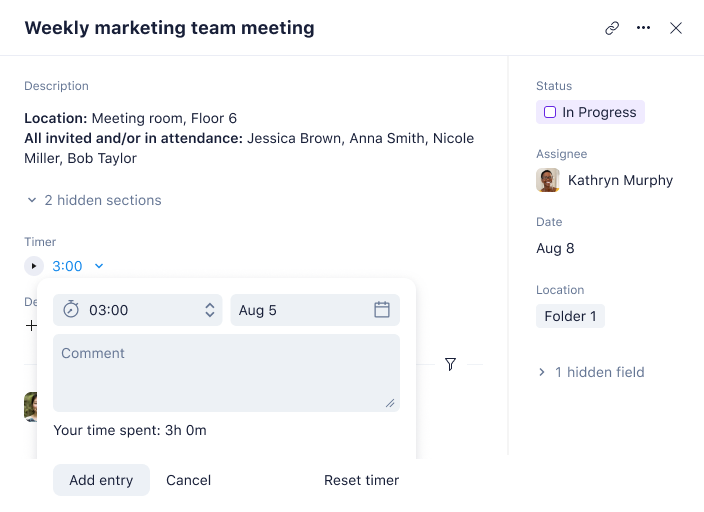
Wrike è una piattaforma di gestione delle risorse basata su cloud che offre ai team gli strumenti per collaborare sui progetti. Ti aiuta a rimanere organizzato, mantenere i progetti in carreggiata e monitorare i progressi dall'inizio alla fine. Puoi assegnare compiti, impostare scadenze, gestire i carichi di lavoro e accedere ai dati in tempo reale sulle prestazioni del team.
Perché ho scelto Wrike
Wrike ti consente di misurare le prestazioni nel tempo tracciando il tempo trascorso sui compiti o il denaro allocato per ciascun progetto. Questo rende facile individuare aree di miglioramento o sprechi per ottimizzare i processi e massimizzare la produttività. Wrike offre inoltre una varietà di opzioni di personalizzazione che ti permettono di adattare il software alle tue esigenze specifiche. Puoi creare campi personalizzati per ogni progetto o attività per assicurarti che tutti i dati rilevanti vengano registrati. Inoltre, puoi personalizzare l'aspetto di Wrike scegliendo tra diversi temi e combinazioni di colori in modo che la piattaforma rifletta l'identità del tuo marchio.
La funzione di allocazione delle risorse di Wrike ti offre visibilità sulle risorse disponibili per i vari compiti, così puoi creare scadenze realistiche e tempistiche ragionevoli. Ti permette di analizzare i progetti passati, anticipare ostacoli legati alla saturazione delle risorse e preparare i team al successo. Questa visione d'insieme ti aiuta a pianificare con precisione la programmazione del personale, l’assegnazione dei compiti, il realismo del carico di lavoro e la velocità di esecuzione dei progetti.
Funzionalità principali di Wrike
Wrike offre anche una varietà di altre funzionalità che possono aiutare te e il tuo team nel monitoraggio delle risorse.
- Dashboard di progetto ricchi di dati: Forniscono approfondimenti e visibilità istantanei per tutti gli stakeholder, così puoi assicurarti che tutti siano allineati.
- Tracciamento del tempo semplificato: Puoi massimizzare la produttività tramite timer e inserimenti manuali delle ore. Questo rende anche più facile gestire le tempistiche dei progetti.
- Bacheche Kanban personalizzate: Le bacheche personalizzabili ti aiutano a monitorare piani e progressi in modo efficace e possono adattarsi alle esigenze del tuo flusso di lavoro.
- Gantt Chart regolabili: Include una funzionalità di drag-and-drop semplice per adeguare le priorità e gestire le dipendenze, così puoi tenere i progetti sotto controllo.
Integrazioni Wrike
Le integrazioni includono Microsoft, Google, Dropbox, Salesforce e Marketo.
Pros and Cons
Pros:
- Grafici delle attività dal vivo aiutano a vedere la capacità futura
- Pianificazione multiprogetto per gestire la domanda su più portafogli
- Permessi granulari basati sui ruoli ti permettono di controllare chi vede cosa
Cons:
- La complessità di configurazione può rallentare l'adozione iniziale
- I team più piccoli potrebbero trovare il modulo delle risorse eccessivo
New Product Updates from Wrike
Wrike Adds Klaxoon MCP Integration
Wrike’s Klaxoon MCP integration is now generally available, enabling AI agents to navigate between Wrike tasks and attached whiteboards, read task context, and manage whiteboard attachments via API. For more information, visit Wrike's official site.

Scoro
Ideale per la pianificazione completa delle risorse
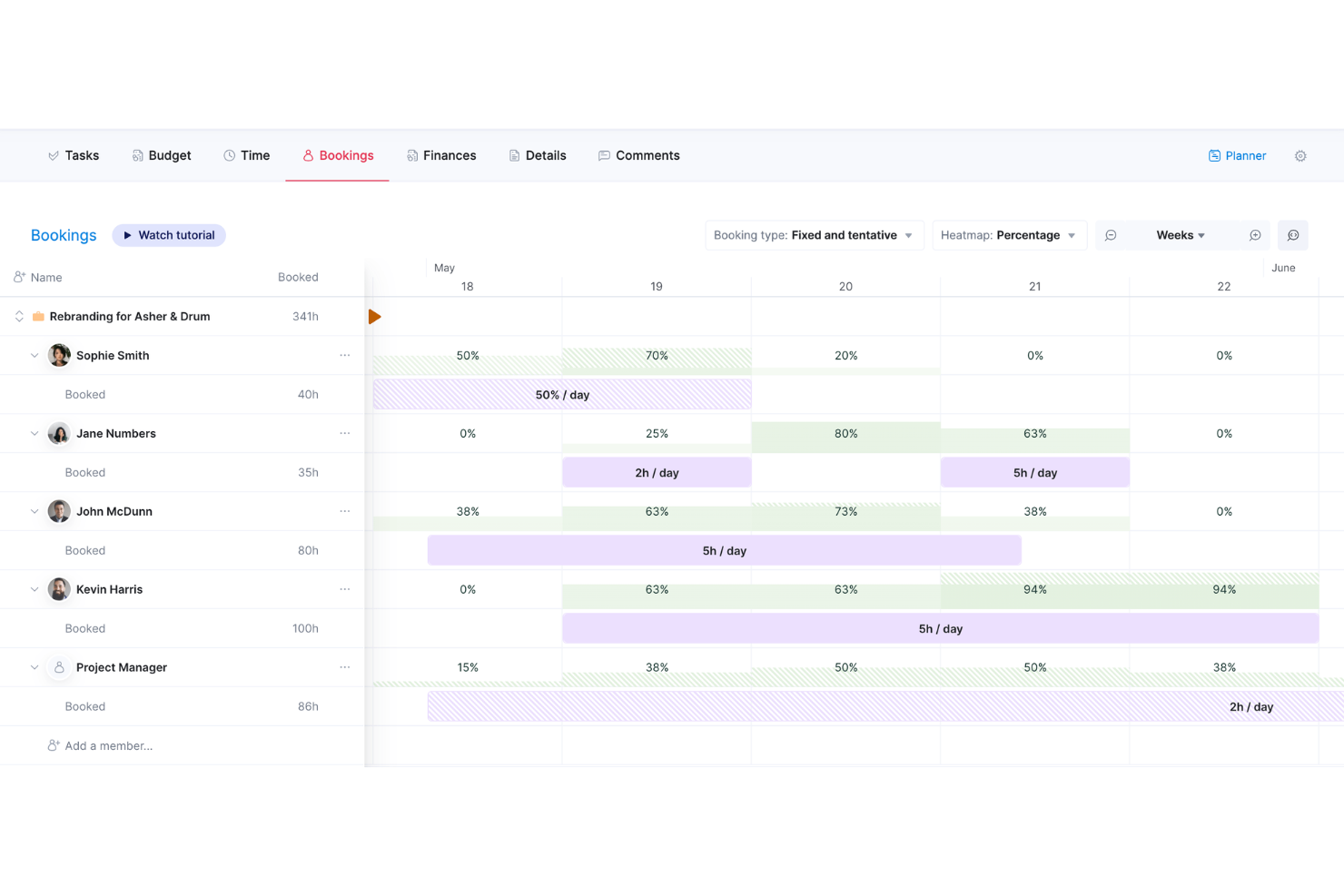
Scoro è un software di gestione aziendale tutto-in-uno progettato per agenzie, studi di consulenza e altre imprese di servizi professionali. Combina gestione di progetti, vendite e CRM, fatturazione e reportistica in un'unica piattaforma.
Perché ho scelto Scoro
La funzionalità di pianificazione delle risorse di Scoro ti consente di assegnare il lavoro in base alla disponibilità e alle competenze del team. Questo aiuta a bilanciare i carichi di lavoro ed evitare il sovraccarico o la sottoutilizzazione delle risorse. Con la visibilità in tempo reale su chi sta lavorando a cosa, puoi prendere decisioni informate per ottimizzare le tue risorse.
Lo strumento di pianificazione della capacità fornisce informazioni sul carico di lavoro del tuo team, aiutandoti a prevedere esigenze future. Analizzando i dati storici, puoi anticipare le richieste in arrivo e adeguare di conseguenza i tuoi piani. Questo approccio proattivo ti assicura di avere le persone giuste disponibili per ogni progetto.
Caratteristiche principali di Scoro
Oltre alla pianificazione completa delle risorse, Scoro offre una varietà di altre funzionalità per la gestione di progetti e risorse.
- Monitoraggio del tempo: Puoi monitorare sia le ore fatturabili che quelle non fatturabili con precisione, favorendo una fatturazione accurata e un'analisi della redditività.
- Gestione delle attività: Puoi assegnare facilmente i compiti in base alle competenze e alla disponibilità dei membri del team, assicurando che le risorse corrette siano allocate in modo efficiente.
- Diagrammi di Gantt: Ti permettono di visualizzare le tempistiche dei progetti e le dipendenze tra le attività, così da individuare eventuali ritardi e riallocare le risorse se necessario.
- Pianificazione delle attività: La funzionalità di pianificazione drag-and-drop ti consente di programmare le attività considerando le competenze e la disponibilità del team, così puoi mantenere gli obiettivi temporali del progetto.
Integrazioni di Scoro
Le integrazioni includono Google Calendar, Microsoft Exchange, QuickBooks, Xero, Stripe, Jira, HubSpot, Salesforce, Dropbox e Zapier.
Pros and Cons
Pros:
- La pianificazione della capacità offre visibilità sulla disponibilità del team
- Permessi granulari basati sui ruoli aiutano a controllare gli accessi
- Unisce dati di progetti, finanza e risorse per migliori previsioni
Cons:
- Il modulo risorse può essere troppo complesso per team piccoli
- Curva di apprendimento per la personalizzazione di dashboard e report
New Product Updates from Scoro

Scoro Adds Time Mobile App and ELI Improvements
Scoro adds the Scoro Time mobile app for iOS/Android to track time anywhere and expands ELI with attachments, smarter filtering, and trigger-based actions. For more information, visit Scoro's official site.

Ideale per il tracciamento e la reportistica delle risorse in modo intelligente

Per i team di marketing aziendali e le agenzie che cercano una soluzione per il monitoraggio delle risorse, Screendragon si presenta come una scelta versatile. Questa piattaforma di gestione del flusso di lavoro senza codice è progettata per ottimizzare le operazioni di marketing e creative, fornendo strumenti che migliorano la produttività e il processo decisionale. Automatizzando i flussi di lavoro e offrendo informazioni in tempo reale, Screendragon ti aiuta ad affrontare le complessità della gestione dei progetti e della pianificazione delle risorse, rendendola un'opzione interessante per chi mira a ottimizzare le proprie attività di marketing.
Perché ho scelto Screendragon
Ho scelto Screendragon per la sua capacità unica di integrare flussi di lavoro automatizzati con informazioni in tempo reale, qualità essenziale per un efficace tracciamento delle risorse. Il builder visivo dei flussi di lavoro della piattaforma consente al tuo team di personalizzare i processi senza dover programmare, garantendo che la gestione delle risorse sia allineata alle tue esigenze specifiche. Inoltre, la funzione di moduli personalizzati dinamici supporta la raccolta dati su misura, permettendo un monitoraggio e una gestione precisi delle risorse. Queste funzionalità rispondono alle complesse sfide dell'allocazione e dell'utilizzo delle risorse in ambienti di marketing e creativi.
Funzionalità principali di Screendragon
Oltre alle funzionalità già citate, Screendragon offre numerose altre capacità che ne aumentano l'utilità come software di monitoraggio delle risorse:
- Gestione digitale delle approvazioni: Semplifica il processo di approvazione, assicurando che tutti gli stakeholder necessari possano esaminare e approvare le risorse in modo efficiente.
- Sicurezza di livello aziendale: Fornisce misure di sicurezza avanzate per proteggere i dati sensibili sulle risorse e mantenere la conformità agli standard del settore.
- Operazioni scalabili: Supporta elevati volumi di flussi di lavoro, rendendolo adatto a grandi team di marketing che necessitano di una gestione delle risorse affidabile.
- Integrazione con strumenti di collaborazione: Migliora la collaborazione del team collegandosi agli strumenti che già utilizzi, facilitando la comunicazione e la condivisione dei dati.
Integrazioni di Screendragon
Al momento Screendragon non elenca integrazioni native.
Pros and Cons
Pros:
- Automazione dei flussi di lavoro personalizzabile e senza codice
- Controlli avanzati di approvazione e governance
- Sicurezza e permessi di livello aziendale
Cons:
- Nessuna funzione nativa di pianificazione delle capacità
- Prezzi non trasparenti pubblicamente
New Product Updates from Screendragon
Screendragon Unveils New AI Hub
Screendragon introduced AI Hub, a new capability that lets teams build and manage AI agents directly within workflows. The update helps marketing teams automate tasks, maintain governance controls, and scale AI-driven operations more efficiently. For more information, visit Screendragon's official site.

VOGSY
Ideale per ottimizzare l’utilizzo delle risorse
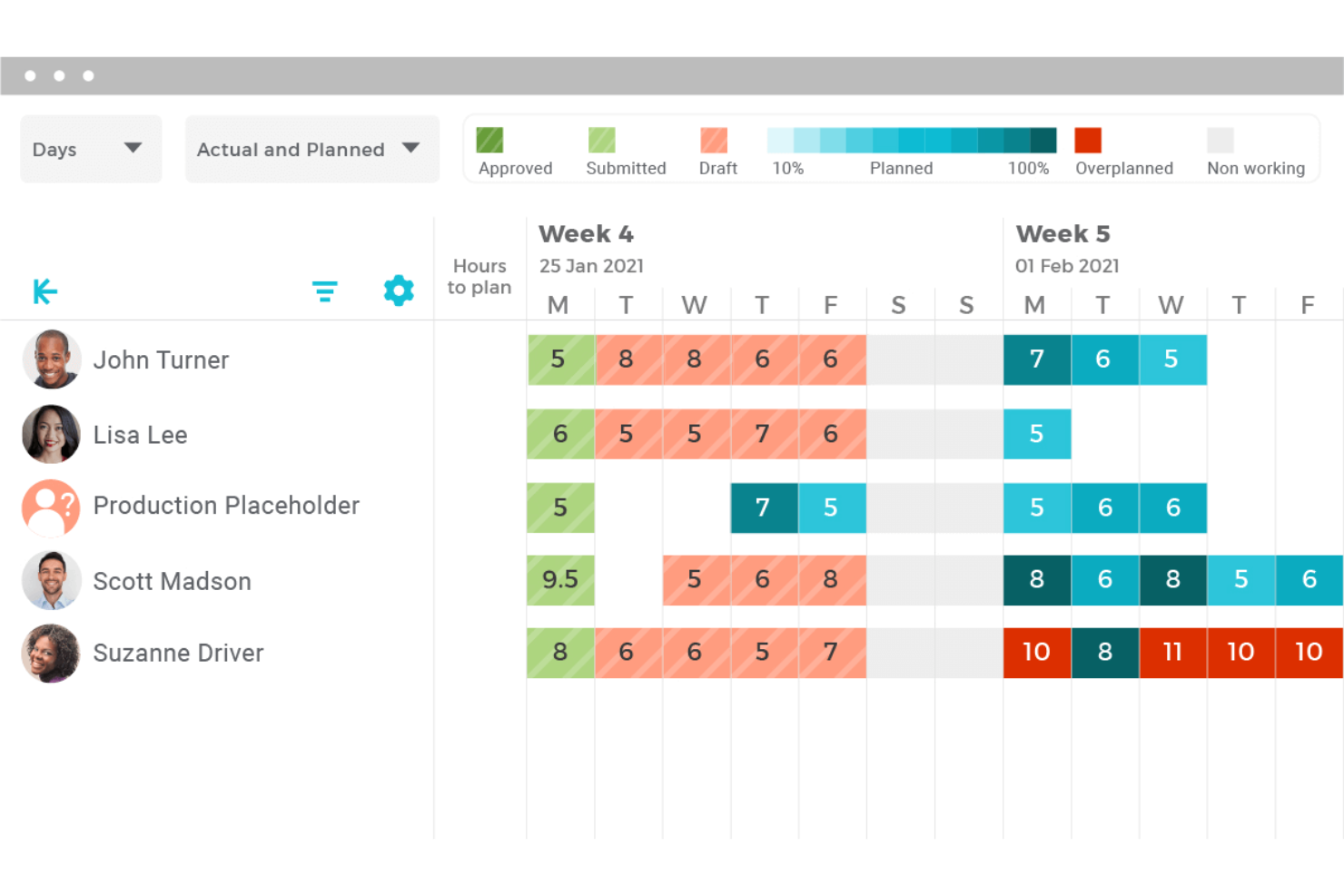
VOGSY è progettato per gestire i tuoi progetti, le tue risorse e la tua situazione finanziaria tutto in un unico posto. È pensato per team di progetto globali e rende più semplice gestire progetti in diversi paesi e valute.
Perché ho scelto VOGSY
Ho scelto VOGSY per la sua solida gestione delle risorse. Puoi tenere traccia delle risorse globali, gestire le ore, impostare obiettivi di fatturabilità e prevedere l’utilizzo per ridurre il tempo non fatturabile. Puoi gestire le risorse allineando i membri del team in base a competenze, disponibilità e costi orari, inclusi i costi intercompany in valute diverse.
Le prenotazioni di opportunità di VOGSY permettono di prevedere le esigenze di risorse, così il tuo team sarà sempre preparato per i progetti in arrivo. Inoltre, la web app mobile offre accesso a tutte le funzionalità da qualsiasi dispositivo, mantenendo il team produttivo ovunque.
Funzionalità principali di VOGSY
VOGSY offre anche varie altre funzionalità che possono aiutarti ad ottimizzare l’assegnazione delle risorse ai progetti.
- Monitoraggio di tempo e assenze: VOGSY fornisce strumenti per timesheet e timer per semplificare la rilevazione delle ore lavorate da dipendenti e collaboratori.
- Contabilità di progetto: Puoi gestire i budget finanziari, il riconoscimento dei ricavi e i crediti con report dettagliati su utili e perdite.
- Collaborazione del team: Questo permette di assegnare i dipendenti a team di progetto, gestire le attività e facilitare conversazioni in tempo reale legate a progetti specifici.
- Gestione documentale: Puoi condividere in sicurezza i file di progetto utilizzando cartelle organizzate e utilizzare modelli di documenti per una creazione efficiente dei documenti.
Integrazioni VOGSY
Le integrazioni includono QuickBooks, Deltek, Xero, Sage, Certinia, Oracle NetSuite, Exact, PHC-GO, Jira e Trello.
Pros and Cons
Pros:
- Modelli per progetti ripetibili riducono la configurazione amministrativa
- Visibilità in tempo reale delle ore fatturate vs pianificate
- Workflow, ruoli e dashboard di report personalizzati
Cons:
- La personalizzazione dei workflow richiede un certo apprendimento
- Rischio di overload di notifiche con molti progetti attivi
New Product Updates from VOGSY
VOGSY Adds Velocity Agent Verdicts for Quote Approvals
VOGSY adds Velocity agent verdicts for quote approval requests with risk levels, margin checks, discount analysis, and reasoning. This helps approvers assess quote risk before making a final decision. For more information, visit VOGSY’s official site.
 .
.
Kantata
Ideale per la gestione delle risorse orientata alle persone
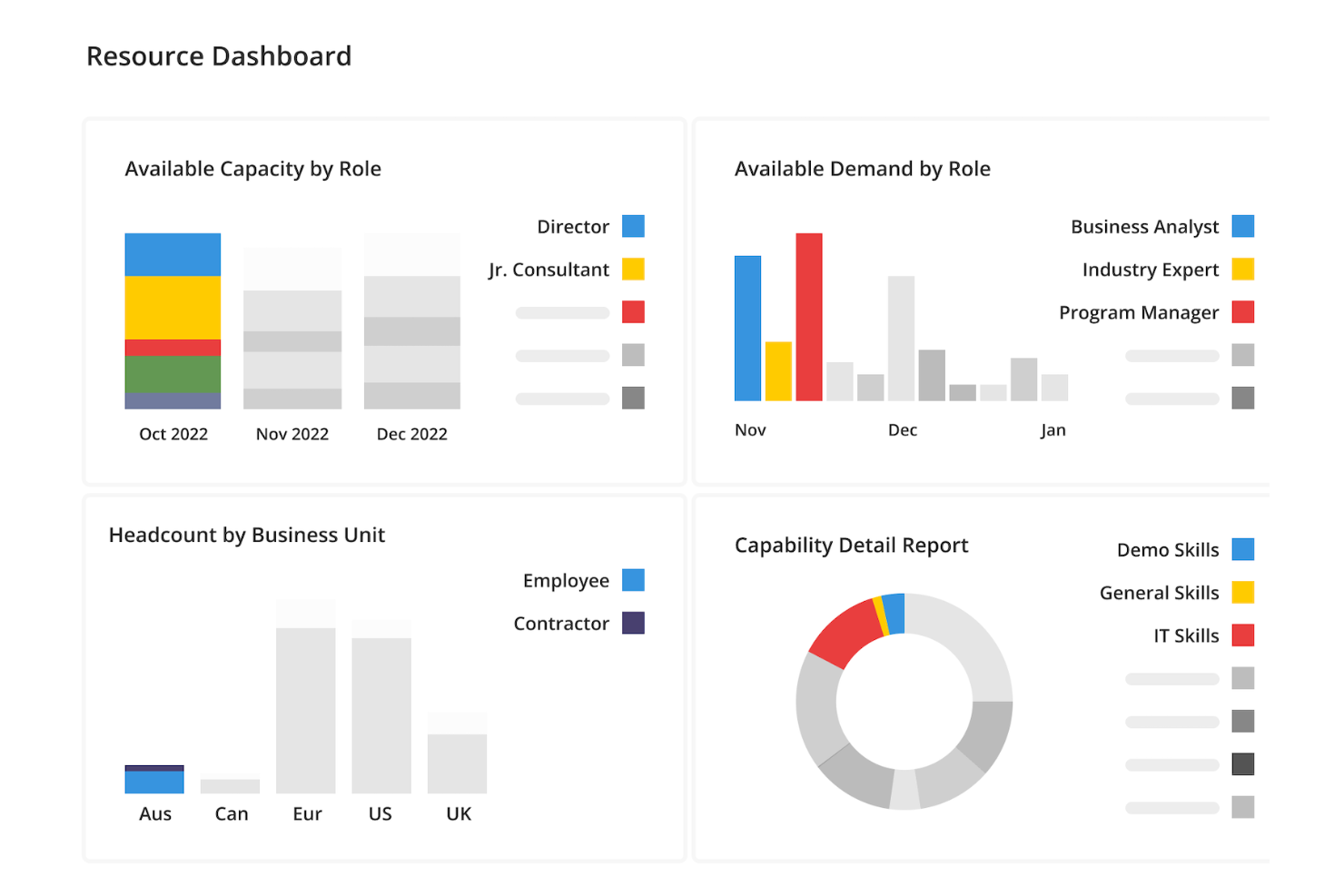
Kantata è una piattaforma di monitoraggio delle risorse creata appositamente per i team di servizi professionali che hanno bisogno di visibilità su come il personale viene assegnato ai vari progetti. Invece di concentrarsi solo su scadenze o budget, mette le persone al centro della gestione delle risorse e aiuta le organizzazioni a bilanciare i carichi di lavoro, prevenire il burnout e garantire che ogni progetto abbia la giusta combinazione di talenti.
Perché ho scelto Kantata
Ciò che rende Kantata unico è la sua capacità di monitorare sia la visione d’insieme che i dettagli della forza lavoro. I responsabili possono identificare rapidamente chi è sovraccarico, chi ha disponibilità e dove ci sono lacune di competenze. Il software include anche la pianificazione di scenari, così puoi testare diversi modelli di assegnazione del personale prima di prendere decisioni definitive e scegliere le opzioni migliori per il tuo team e per i tuoi clienti.
Per le organizzazioni che dipendono da talenti altamente specializzati, le funzionalità di abbinamento dei ruoli di Kantata sono particolarmente preziose. Collegano le richieste dei progetti alle competenze uniche delle tue persone, cosicché designer, sviluppatori, consulenti o collaboratori vengano assegnati laddove possono contribuire in modo più efficace. Questo approccio incentrato sulle persone non solo migliora i risultati dei progetti, ma crea anche opportunità di crescita e fidelizzazione dei dipendenti.
Funzionalità principali di Kantata
Kantata offre anche una varietà di altre funzionalità per monitorare le risorse e gestire progetti e team.
- Analisi e reportistica in tempo reale: Questa funzionalità ti permette di accedere a dati aggiornati per individuare tendenze, confrontare le prestazioni e prendere decisioni tempestive.
- Interfaccia centralizzata per la comunicazione: Permette la collaborazione tra reparti tramite una piattaforma unificata per la comunicazione e la condivisione delle risorse.
- Strumenti visivi per la pianificazione dei progetti: Include cronologie e grafici che migliorano la visibilità e la previsione dei progetti, offrendo approfondimenti sul loro stato di avanzamento.
- Gestione dell’inventario delle competenze: Puoi monitorare e gestire le competenze disponibili all’interno del team e assicurarti che le persone giuste vengano assegnate ai progetti più adatti.
Integrazioni di Kantata
Le integrazioni includono Salesforce, Jira, NetSuite, Xero, BambooHR, HubSpot, Slack, QuickBooks e Sage.
Pros and Cons
Pros:
- Dati finanziari dettagliati e monitoraggio del tempo in un unico sistema
- Collega le ore lavorate dai dipendenti ai budget di progetto e ai margini
- Ottimo per team di medie e grandi dimensioni con molti progetti e persone
Cons:
- Rallentamenti in caso di gestione di grandi set di dati
- La personalizzazione dei report può richiedere conoscenze avanzate
New Product Updates from Kantata

Kantata Adds Access Group Change History
Kantata adds Access Groups History, letting account administrators track changes to group details, membership, and permissions in Recent History. The update also makes these events available through the Subscribed Events API for broader monitoring. For more information, visit Kantata’s official site.
 .
.
Ideale per le informazioni sul carico di lavoro

monday.com è una piattaforma di gestione dei progetti progettata per aiutare team di tutte le dimensioni a gestire progetti, attività e operazioni aziendali. Offre una vasta gamma di funzionalità che facilitano la pianificazione, l'esecuzione e il monitoraggio dei progetti.
Perché ho scelto monday.com
Ho scelto monday.com perché può aiutarti a gestire efficacemente le tempistiche dei progetti e l'assegnazione delle attività. Queste funzionalità ti offrono gli strumenti per pianificare e monitorare il carico di lavoro del tuo team e allineare le attività agli obiettivi del progetto. Questo può aiutare il tuo team a rimanere sulla giusta strada e rispettare le scadenze. Gli strumenti di collaborazione aumentano la visibilità tra i diversi dipartimenti, rendendo più facile per te coordinarti e comunicare con i membri del tuo team.
Un altro motivo per cui ho scelto monday.com sono i suoi workflow personalizzabili, che ti permettono di adattare la piattaforma alle tue esigenze specifiche. Grazie alla flessibilità di modificare i flussi di lavoro, puoi creare un ambiente che meglio supporta le esigenze di gestione delle risorse del tuo team.
Funzionalità principali di monday.com
monday.com offre una serie di altre funzionalità per la gestione dei progetti e il monitoraggio delle risorse.
- Automazioni: Puoi impostare automazioni personalizzate per semplificare le attività ripetitive, riducendo così il lavoro manuale e aumentando l'efficienza.
- Diagramma di Gantt: Questa funzione ti permette di visualizzare le tempistiche dei progetti, le dipendenze e le tappe fondamentali, mantenendo i progetti nei tempi previsti.
- Bacheca Kanban: Puoi utilizzare le bacheche Kanban per gestire visivamente le attività e avere una panoramica chiara dell'avanzamento dei progetti e delle responsabilità del team.
- Gestione dei file: Questo ti permette di mantenere tutti i documenti e i file rilevanti organizzati in un unico posto, facilitando l'accesso e la collaborazione all'interno del team.
Integrazioni di monday.com
Le integrazioni includono Slack, Gmail, Microsoft Teams, GitLab, Mailchimp, Outlook, Docusign, Google Drive, Trello e Asana.
Pros and Cons
Pros:
- Interfaccia visivamente gradevole e facile da usare
- Le automazioni riducono il lavoro manuale e aiutano la produttività
- Flessibilità nella gestione di vari progetti e flussi di lavoro
Cons:
- La configurazione può richiedere tempo
- Le opzioni di personalizzazione possono risultare opprimenti
New Product Updates from monday AI Workspace
monday AI Workspace Adds Human Approval Routing
monday AI Workspace adds a human-in-the-loop approval block to AI Workflows, sending approval requests and routing workflow paths based on responses. For more information, visit monday AI Workspace's official site.

Ideale per il monitoraggio dei progetti di onboarding
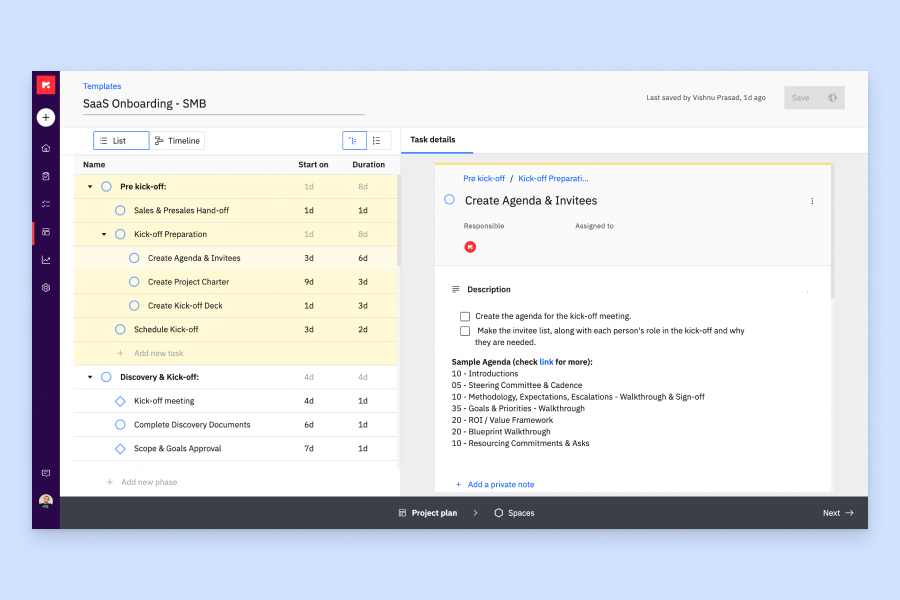
Rocketlane è una piattaforma di automazione dei servizi professionali che combina pianificazione delle risorse, gestione della capacità, rilevamento delle ore, gestione dei progetti e strumenti di collaborazione con i clienti per team di implementazione e onboarding.
Per chi è ideale Rocketlane?
Rocketlane è particolarmente adatto per le aziende SaaS con team dedicati all'onboarding dei clienti, all'implementazione o ai servizi professionali che gestiscono progetti rivolti ai clienti.
Perché ho scelto Rocketlane
Ho scelto Rocketlane tra i migliori strumenti per il monitoraggio dei progetti di onboarding perché è stato creato appositamente per questa finalità, a differenza dei tool di project management generici. Apprezzo la funzione di monitoraggio delle milestone, che permette al mio team di vedere esattamente come ogni progetto sta procedendo rispetto ai principali obiettivi di consegna, consentendoci di intervenire prima che la data di go-live sia a rischio. Insieme a Nitro Signals, che analizza le conversazioni con i clienti per individuare tempestivamente rischi di consegna, si ottiene un livello di visibilità proattiva sui progetti davvero difficile da trovare in altri strumenti di monitoraggio delle risorse.
Funzionalità principali di Rocketlane
- Resource AI: Raccomanda la composizione dei team per i nuovi progetti in base a competenze, disponibilità e carico di lavoro attuale del team.
- Monitoraggio dell'utilizzo: Controlla i tassi di utilizzo in tempo reale del tuo team per individuare risorse sovraccariche o sottoutilizzate prima che influiscano sulle consegne.
- Timesheet e rilevamento delle ore: Permette ai membri del team di registrare le ore sulle attività di progetto, con flussi di approvazione integrati per i manager.
- Gestione della capacità: Mostra la disponibilità del team su progetti attivi e futuri per pianificare le risorse senza creare sovrapposizioni.
Integrazioni di Rocketlane
Rocketlane offre integrazioni native con Slack, Salesforce, Jira, HubSpot, Google Calendar e Outlook Calendar e si collega a Zapier e Workato per ulteriori connessioni tra app. È disponibile anche un'API per creare integrazioni e flussi di lavoro personalizzati.
Pros and Cons
Pros:
- Monitora l'utilizzo del team in modo dettagliato
- Le allocazioni parziali aiutano a prevedere per tempo la disponibilità
- Assegna automaticamente le risorse in base a disponibilità e impegno
Cons:
- I filtri dei report non hanno opzioni di flessibilità avanzate
- Non è previsto l'import diretto di piani progetto da Excel
New Product Updates from Rocketlane

Rocketlane Introduces Governance and Workforce Agents
Rocketlane introduces Governance Agents and Workforce Agents to automate delivery processes and recurring tasks. These updates help teams enforce rules and streamline project execution. For more information, visit Rocketlane’s official site.
 .
.
Forecast
Ideale per agenzie e società di consulenza di medie dimensioni
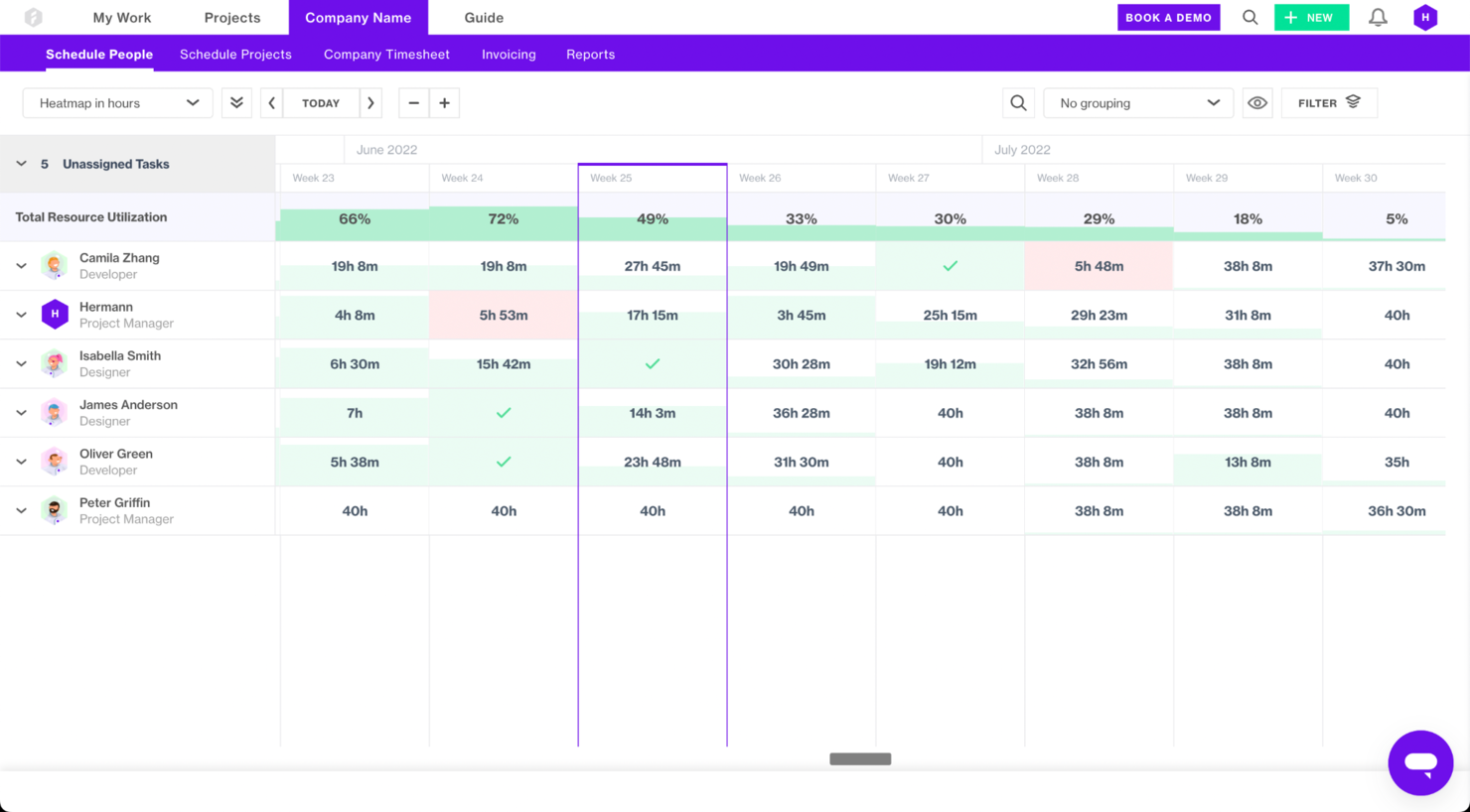
Forecast è una piattaforma di gestione progetti e risorse alimentata dall'IA che offre ai team visibilità su come vengono utilizzati persone, tempo e budget. È progettata per aiutare le organizzazioni a monitorare capacità e carichi di lavoro in tempo reale, consentendo anche di pianificare in anticipo grazie all'analisi predittiva.
Perché ho scelto Forecast
Ho scelto Forecast per la sua capacità unica di soddisfare le esigenze di agenzie e società di consulenza di medie dimensioni, unendo la gestione delle risorse guidata dall'IA con analisi di progetto approfondite. Le funzionalità di previsione automatica delle risorse e pianificazione della capacità di Forecast rispondono alle tue esigenze specifiche, aiutandoti a bilanciare i carichi di lavoro e ottimizzare l'utilizzo del team.
Le capacità di integrazione con strumenti popolari come Jira e HubSpot ti permettono di mantenere i flussi di lavoro esistenti e migliorare la visibilità sui progetti. Il focus di questo software nel fornire informazioni in tempo reale su costi, entrate e redditività aiuta le aziende di medie dimensioni a prendere decisioni informate, basate sui dati, e a migliorare i risultati dei progetti.
Funzionalità principali di Forecast
Forecast offre anche diverse altre funzionalità che possono aiutarti nel monitoraggio delle risorse e nella gestione dei progetti.
- Dipendenze tra attività: Permette di definire e gestire le sequenze delle attività, assicurando che ogni fase del progetto proceda senza intoppi e secondo i tempi previsti.
- Gestione delle spese: Consente di mantenere il controllo finanziario tracciando le spese legate al progetto, facilitando la pianificazione del budget e la gestione finanziaria.
- Diagrammi di Gantt: Offrono una rappresentazione visiva delle tempistiche di progetto, aiutano a prevedere la capacità e consentono di adattare le risorse di conseguenza.
- Fatturazione: Semplifica i processi di fatturazione automatizzando la generazione delle fatture e permettendo una fatturazione accurata e puntuale ai clienti.
Integrazioni di Forecast
Le integrazioni includono Azure DevOps, BambooHR, GitHub, Google Calendar, HubSpot, Jira, QuickBooks, Salesforce, Slack, Trello, Xero e Sage Intacct.
Pros and Cons
Pros:
- Allocazione automatizzata delle risorse che si adatta al carico di lavoro del team
- Avvisi predittivi di rischio aiutano ad affrontare i problemi in anticipo
- Capacità di modellare la disponibilità delle risorse nel tempo
Cons:
- La personalizzazione delle regole delle risorse può richiedere una configurazione tecnica
- Rallentamenti occasionali con un gran numero di risorse e progetti

Ideale per la previsione di tempi e risorse
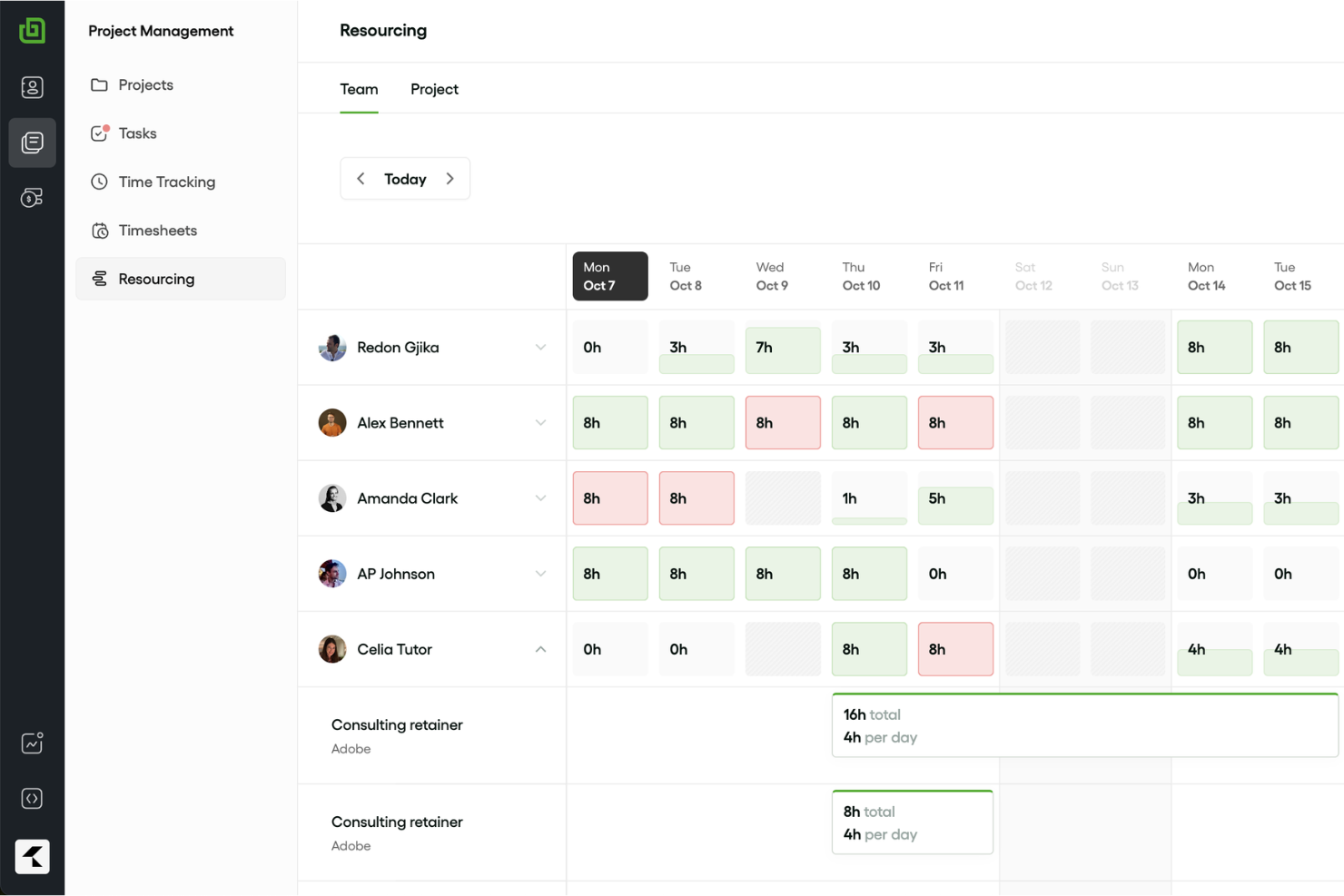
Bonsai è un software aziendale completo che offre una gamma di strumenti per il monitoraggio delle risorse, la gestione dei progetti, la rilevazione del tempo e la fatturazione. Aiuta agenzie, società di consulenza e servizi professionali a semplificare i flussi di lavoro e consolidare le funzioni aziendali essenziali in un unico posto.
Perché ho scelto Bonsai
Ho scelto Bonsai per la sua capacità di aiutarti a prevedere tempi e risorse. Con funzionalità come il monitoraggio della capacità in tempo reale e lo scoping integrato, Bonsai ti permette di prendere decisioni informate sul personale e ottimizzare i risultati dei progetti.
La capacità della piattaforma di trasformare rapidamente l'ambito di un progetto in prenotazioni ti offre la chiarezza necessaria per gestire efficacemente le risorse. Queste funzionalità ti aiutano a bilanciare la capacità del team e le richieste dei progetti, rendendo Bonsai una risorsa preziosa per le aziende orientate ai servizi.
Funzionalità Principali di Bonsai
Bonsai offre una serie di altre funzionalità su misura per il monitoraggio e la gestione delle risorse.
- Strumenti di Gestione Clienti: Puoi gestire le interazioni con i clienti grazie a funzionalità CRM, proposte e accordi che mantengono i dati dei clienti organizzati e accessibili.
- Gestione delle Attività: Ti consente di suddividere i progetti in attività gestibili con scadenze e responsabilità chiare, affinché il tuo team rimanga in carreggiata.
- Monitoraggio del Budget: Puoi tenere sotto controllo la salute finanziaria dei tuoi progetti con strumenti che monitorano le spese, la fatturazione e l'allocazione generale del budget.
- Insights in Tempo Reale: Hai a disposizione dati aggiornati sulla disponibilità del team e sulla redditività dei progetti, che ti aiutano a prendere decisioni rapide e informate.
Integrazioni di Bonsai
Le integrazioni includono Xero, Calendly, Zapier, QuickBooks e HiBob.
Pros and Cons
Pros:
- La timeline visiva del carico di lavoro ti aiuta a vedere la disponibilità
- Fatturazione e ore risorse collegate per una visione chiara dei costi di progetto
- Gli avvisi di sovraccarico impediscono che il tuo team venga sovraccaricato
Cons:
- Non adatto ad agenzie di grandi dimensioni (oltre 50 membri del team)
- Personalizzazione limitata del layout dello spazio di lavoro
Altre opzioni
Ecco alcune altre opzioni che non sono entrate nell’elenco principale, ma che vale la pena prendere in considerazione se vuoi ampliare la tua ricerca.
- Birdview
Ideale per la gestione delle risorse in base alle competenze
- Parallax
Ideale per le analisi delle risorse
- Silverbucket
Ideale per il monitoraggio del tempo dei dipendenti
- eResource Scheduler
Ideale per analisi finanziarie e monitoraggio in tempo reale
- Resource Guru
Ideale per report di previsione dei progetti
- Smartsheet
Ideale per la gestione del portafoglio progetti
- Celoxis
Ideale per l’analisi dei costi e delle performance di progetto
- ClickTime
Ideale per fogli presenze personalizzabili
- Accelo
Ideale per aziende di servizi professionali
- Float.com
Ideale per pianificazione avanzata
- GoodDay
Ideale per flussi di lavoro personalizzabili
- Saviom
Ideale per la gestione scalabile delle risorse aziendali
- Runn
Ideale per la pianificazione delle risorse in tempo reale
- Hub Planner by Milient
Ideale per grandi aziende
- TaskRay
Ideale per la gestione progetti nativa su Salesforce
- Dayshape
Ideale per le visualizzazioni in timeline delle risorse
- Retain
Ideale per viste di lavoro consolidate


Come valuto il software di tracciamento delle risorse
Valuto ogni strumento su due livelli: se è effettivamente in grado di gestire la pianificazione delle assegnazioni di un team di 50 persone, poi cosa lo distingue per i responsabili delle risorse che utilizzano queste piattaforme quotidianamente.
Funzionalità chiave (requisiti minimi per questa lista)
Quando seleziono gli strumenti per la mia lista, valuto ciascuno su una scala da 0 (non offre la funzionalità) a 5 (eccelle in questa area) per ogni funzionalità chiave elencata di seguito. Successivamente, calcolo il punteggio totale dello strumento trasformandolo in una percentuale. Ogni strumento deve raggiungere un punteggio totale minimo del 65% per essere considerato per l'inclusione.
- Allocazione e pianificazione delle risorse: Cerco interfacce di pianificazione visiva dove sia possibile trascinare e rilasciare le assegnazioni su una timeline, come riassegnare un designer a metà sprint quando cambiano le priorità.
- Monitoraggio della capacità e dell'utilizzo: Ogni strumento dovrebbe mostrare dati aggiornati sul carico di lavoro per persona. Verifico se posso individuare subito uno sviluppatore sovraccarico senza dover accedere ai singoli profili.
- Rilevazione e registrazione del tempo: Valuto come la piattaforma collega le ore registrate alle stime pianificate, poiché il divario tra tempo programmato e reale è dove la maggior parte dei budget di progetto si incrina silenziosamente.
- Previsione e pianificazione delle risorse: Qui sono fondamentali le viste previsionali della capacità. Cerco la funzione di sovrapporre prenotazioni di progetti ipotetici a quelli confermati, in modo da poter pianificare assunzioni o collaboratori mesi prima.
- Gestione delle competenze e delle disponibilità: I profili delle risorse devono andare oltre nomi e ruoli. Verifico se lo strumento permette di filtrare per competenze, vedere le ferie (PTO) e gli orari part-time, e memorizzare i costi o le tariffe di fatturazione per persona.
- Reportistica e analisi: Le dashboard dovrebbero coprire tassi di utilizzo, ripartizione tra attività fatturabili e non, e andamento di progetto. Valuto se i report sono personalizzabili abbastanza sia per le esigenze quotidiane di un resource manager sia per le revisioni mensili di un PMO director.
Una volta individuati gli strumenti che soddisfano i criteri, valuto cosa distingue ciascuna piattaforma.
Fattori di differenziazione (cosa distingue i fornitori)
Ecco come confronto e metto a confronto i diversi fornitori:
Funzionalità distintive
La pianificazione degli scenari è un importante elemento distintivo. Cerco strumenti che permettano di simulare l’inserimento di un progetto potenziale rispetto al team attuale senza modificare le pianificazioni vive. Anche l’associazione del monitoraggio finanziario alle allocazioni è rilevante: vedere come i margini previsti cambiano riassegnando le risorse aiuta i PMO a decidere i team con dati reali. Controllo anche se i project manager possono inviare richieste di risorse direttamente in piattaforma, poiché tale flusso di lavoro sostituisce le interminabili mail e i fogli di calcolo che in genere rallentano le decisioni di staffing.
Oltre le funzionalità
La profondità dell’integrazione è uno dei primi aspetti che valuto. Un tracciatore di risorse che non si sincronizza con il tuo tool di project management—sia esso Jira, Asana o Smartsheet—crea una doppia immissione dati che ostacola l’adozione. Anche la struttura dei prezzi merita attenzione: alcune piattaforme addebitano per risorsa gestita, altre per utente, e la differenza è rilevante se hai 20 stakeholder che necessitano solo dell’accesso in sola lettura ai dashboard di capacità. Considero anche la scalabilità, perché uno strumento che funziona per un’agenzia di 15 persone potrebbe cedere se devi gestire le assegnazioni di oltre 200 persone.
Come scegliere il software per il monitoraggio delle risorse
È facile perdersi in lunghi elenchi di funzionalità e strutture tariffarie complesse. Per aiutarti a rimanere concentrato mentre affronti il tuo processo di selezione del software, unico per le tue esigenze, ecco un elenco di fattori da tenere presenti:
| Fattore | Cosa considerare |
|---|---|
| Scalabilità | Cerca un software in grado di crescere insieme al tuo team. Dovrebbe gestire un numero crescente di risorse e progetti senza problemi di prestazioni, garantendo una validità a lungo termine. |
| Integrazioni | Assicurati che il software si integri con gli strumenti che già utilizzi, come i sistemi di gestione dei progetti, CRM e quelli finanziari, per semplificare i flussi di lavoro e la condivisione dei dati. |
| Possibilità di personalizzazione | Verifica se il software offre funzionalità personalizzabili per adattarsi ai processi specifici del tuo team, come dashboard, report e flussi di lavoro. |
| Facilità d'uso | Scegli uno strumento con un'interfaccia intuitiva e una curva di apprendimento ridotta, in modo che il tuo team possa adottarlo rapidamente senza una formazione approfondita. |
| Budget | Esamina i piani tariffari per assicurarti che rientrino nel tuo budget. Considera eventuali costi aggiuntivi per funzionalità o utenti man mano che il team cresce. |
| Misure di sicurezza | Verifica che il software disponga di solide misure di sicurezza, come la crittografia dei dati e i controlli di accesso degli utenti, per proteggere le informazioni sensibili da violazioni e accessi non autorizzati. |
Tendenze nei software di monitoraggio delle risorse
Durante la mia ricerca, ho raccolto innumerevoli aggiornamenti di prodotto, comunicati stampa e registri delle versioni di diversi fornitori di software per il monitoraggio delle risorse. Ecco alcune delle tendenze emergenti che sto tenendo d’occhio:
- Analisi basate sull’intelligenza artificiale: L’intelligenza artificiale viene utilizzata sempre più spesso per fornire analisi predittive e informazioni utili, aiutando le squadre a prevedere il fabbisogno di risorse e a ottimizzare le assegnazioni. I fornitori stanno integrando la gestione delle risorse basata sull’intelligenza artificiale per migliorare il processo decisionale, prevedendo i colli di bottiglia dei progetti e suggerendo soluzioni.
- Collaborazione in tempo reale: Gli strumenti si concentrano sul miglioramento della collaborazione in tempo reale tra i membri della squadra. Funzionalità come pannelli di controllo condivisi e aggiornamenti in tempo reale stanno diventando standard, consentendo alle squadre di sincronizzarsi istantaneamente e prendere decisioni rapidamente.
- Ottimizzazione del lavoro da remoto: Con la diffusione del lavoro da remoto, i software si stanno adattando offrendo funzionalità che supportano le squadre distribuite. Ciò include la gestione virtuale delle risorse e strumenti per il monitoraggio da remoto, garantendo che le squadre rimangano connesse indipendentemente dalla loro posizione.
- Monitoraggio della sostenibilità: Si presta sempre maggiore attenzione al monitoraggio dell’impatto ambientale dell’utilizzo delle risorse. Alcuni fornitori stanno integrando funzionalità che consentono alle aziende di monitorare e ottimizzare le proprie pratiche di gestione delle risorse in linea con gli obiettivi di sostenibilità.
- Miglioramenti dell’esperienza utente: Si punta a migliorare l’esperienza utente complessiva con interfacce più ordinate e una navigazione più intuitiva. I fornitori stanno investendo nella ricerca sull’esperienza utente per rendere i propri strumenti più semplici da usare e accessibili a una gamma più ampia di utenti.
Che cos’è un software di monitoraggio delle risorse?
Il software di monitoraggio delle risorse è uno strumento che consente di monitorare in tempo reale attrezzature, spazi fisici, disponibilità della squadra, assegnazioni ai progetti e capacità complessiva. Viene utilizzato dai responsabili di progetto e dai responsabili delle risorse per bilanciare i carichi di lavoro, individuare le lacune e migliorare la redditività prendendo decisioni informate sul personale.
Il software di monitoraggio delle risorse è essenziale per evitare sovrapposizioni nelle prenotazioni, prevedere il fabbisogno e mantenere i progetti in linea con i piani.
Funzionalità
Ecco le funzionalità principali che ogni ottimo software di monitoraggio delle risorse dovrebbe offrire:
- Monitoraggio in tempo reale: Puoi ricevere aggiornamenti in tempo reale sull’allocazione, sull’utilizzo e sulla disponibilità delle risorse per individuare immediatamente problemi o opportunità.
- Pannelli di controllo personalizzabili: Puoi creare visualizzazioni personalizzate per monitorare le risorse più importanti e ottenere informazioni rapide a colpo d’occhio senza dover analizzare i dati.
- Avvisi automatici: Riceverai notifiche istantanee quando le risorse sono utilizzate eccessivamente, sottoutilizzate o prossime a soglie critiche, così potrai agire rapidamente e mantenere i progetti in linea con i piani.
- Report dettagliati: Puoi generare report completi che mostrano come vengono utilizzate le risorse nel tempo, individuare tendenze, motivare i budget e pianificare il futuro.
- Controllo degli accessi basato sui ruoli: Puoi impostare le autorizzazioni in modo che solo le persone appropriate possano visualizzare o modificare risorse specifiche, proteggendo così le informazioni sensibili e riducendo il rischio di modifiche accidentali.
- Funzionalità di integrazione: Puoi collegarti ad altri strumenti, come piattaforme di gestione dei progetti o di contabilità, consentendo ai dati di fluire senza problemi e senza inserimenti manuali.
- Accessibilità da dispositivi mobili: Puoi accedere e gestire le informazioni sulle risorse dal telefono o dal tablet, rimanendo facilmente aggiornato indipendentemente da dove ti trovi.
- Previsione delle risorse: Puoi anticipare la domanda futura con strumenti predittivi e pianificare il personale, l’inventario o i finanziamenti prima che si presenti un periodo di particolare pressione.
- Registri di controllo: Puoi visualizzare registri dettagliati delle modifiche apportate ai dati delle risorse, rendendo più semplice tracciare le responsabilità e garantire la responsabilità.
Funzionalità di intelligenza artificiale da cercare nei software di monitoraggio delle risorse
Spesso i software di monitoraggio delle risorse includono anche funzionalità basate sull’intelligenza artificiale per aiutarti a lavorare in modo più efficiente:
- Analisi predittiva: puoi utilizzare l'IA per prevedere il fabbisogno di risorse sulla base dei dati storici, delle tendenze stagionali e delle tempistiche dei progetti, oltre a pianificare in modo proattivo.
- Pianificazione automatizzata: puoi lasciare che l'IA ottimizzi l'allocazione e la pianificazione delle risorse, riducendo i conflitti e assicurandoti che le risorse siano disponibili quando necessario.
- Rilevamento delle anomalie: questo ti aiuta a identificare schemi insoliti o potenziali problemi, come uso eccessivo, colli di bottiglia o sottoutilizzo, prima che abbiano un impatto sui tuoi progetti.
- Raccomandazioni intelligenti: puoi ricevere suggerimenti basati sull'IA per riallocare le risorse, modificare le tempistiche o migliorare l'efficienza, personalizzati in base al tuo flusso di lavoro.
- Query in linguaggio naturale: puoi interagire con il software utilizzando un linguaggio semplice e colloquiale per generare report o trovare rapidamente informazioni.
- Inserimento automatizzato dei dati: puoi ridurre il lavoro manuale lasciando che l'IA estragga e inserisca i dati sulle risorse da e-mail, documenti o altre piattaforme integrate.
- Pianificazione della capacità: puoi utilizzare l'IA per simulare diversi scenari e consigliare i modi migliori per soddisfare le esigenze future senza sovraccaricare il tuo team o il tuo budget.
Domande frequenti
Trova le risposte alle domande comuni che altre persone pongono su questo argomento.