

I 10 migliori software di gestione dei progetti contabili per il 2026

10 Elenco dei migliori software di gestione dei progetti contabili
- 9. BigTime


Il software di gestione dei progetti contabili consente di monitorare in tempo reale i dati finanziari, i budget e i progressi dei progetti, così da mantenere sotto controllo budget e tempistiche e prendere decisioni consapevoli dall'inizio alla fine. Senza lo strumento giusto, non avrai una visione chiara dei costi del progetto, delle fatture e della redditività, e il progetto rischierà di superare il budget.
Ho utilizzato i miei oltre 15 anni di esperienza nella gestione dei progetti per testare e valutare concretamente decine di strumenti software per la gestione dei progetti contabili. Con così tante opzioni disponibili, scegliere quella più adatta può diventare rapidamente complicato.
Leggi la mia analisi di ogni strumento, delle funzionalità principali e dei casi d'uso qui sotto per trovare lo strumento giusto che ti aiuti a tenere sotto controllo l'utilizzo del budget, le spese del progetto e la fatturazione, così da mantenere redditizi i progetti (e la tua organizzazione).
Perché fidarsi dei nostri consigli sui software
Il nostro team testa e recensisce software dal 2012. In quanto project manager noi stessi, sappiamo quanto sia difficile — e importante — scegliere il software giusto.
Per questa guida, abbiamo valutato gli strumenti attraverso test pratici e ricerche indipendenti, assegnando un punteggio agli strumenti in base ai nostri criteri di selezione. Ci basiamo inoltre sulle competenze di leader di pensiero del settore e di professionisti attivi nella gestione dei progetti.
Le nostre recensioni riflettono il nostro giudizio editoriale umano, non un discorso di vendita.
Revisori esperti:
Tabella comparativa dei software di gestione dei progetti contabili
Questa tabella comparativa riassume i dettagli sui prezzi delle mie migliori selezioni di software per la gestione dei progetti contabili:
| Tool | Best For | Trial Info | Price | ||
|---|---|---|---|---|---|
| 1 | Ideale per fatturazione e gestione dei pagamenti | Prova gratuita di 14 giorni + demo gratuita disponibile | A partire da $19.90/utente/mese (fatturato annualmente) | Website | |
| 2 | Ideale per insight sulla redditività potenziati dall'IA | Prova gratuita di 14 giorni + demo gratuita disponibile | A partire da $10/utente/mese (fatturazione annuale) | Website | |
| 3 | Ideale per gestire il lavoro dei clienti di uno studio contabile | Demo gratuita disponibile | A partire da $79/utente/mese | Website | |
| 4 | Ideale per monitorare le spese rispetto al budget totale | Piano gratuito disponibile; prova gratuita di 14 giorni; demo gratuita disponibile | A partire da $9.99/utente/mese (fatturato annualmente) | Website | |
| 5 | Ideale per monitorare più account | Demo gratuita disponibile | Da £1,200/mese | Website | |
| 6 | Ideale per grandi aziende | Demo gratuita disponibile | Prezzo su richiesta | Website | |
| 7 | Ideale per le funzionalità di gestione clienti e risorse | Prova gratuita + demo gratuita disponibile | Da $29/utente/mese | Website | |
| 8 | Non disponibile | Prezzo su richiesta | Website | ||
| 9 | Demo gratuita disponibile | A partire da $20/utente/mese | Website | ||
| 10 | Ideale per l'automazione dei servizi professionali | Demo gratuita disponibile | Prezzo su richiesta | Website |


Recensioni dei migliori software di gestione dei progetti contabili
Di seguito trovi riepiloghi dettagliati delle mie selezioni dei migliori software per la gestione dei progetti contabili. Per ogni strumento analizzo le funzionalità principali, i pro e i contro, le integrazioni e i casi d’uso ideali, per aiutarti a trovare la soluzione più adatta.

Scoro
Ideale per fatturazione e gestione dei pagamenti

Scoro è un software gestionale versatile progettato per migliorare le operazioni aziendali integrando gestione dei progetti, CRM, fatturazione e reportistica in un'unica piattaforma.
Perché ho scelto Scoro: Il software offre approfondimenti finanziari in tempo reale, consentendo agli utenti di monitorare la redditività dei progetti e gestire efficacemente i budget. Le sue funzionalità di fatturazione automatica e tracciamento delle spese semplificano gli aspetti finanziari della gestione dei progetti, garantendo precisione e riducendo il lavoro manuale.
Inoltre, le funzionalità integrate di fatturazione e gestione dei costi di Scoro sono particolarmente vantaggiose per la gestione dei progetti. Il software permette di monitorare le ore fatturabili e non fatturabili, assicurando una fatturazione accurata ai clienti. I suoi strumenti di gestione dei costi aiutano anche a monitorare e controllare le spese di progetto, prevenendo sforamenti di budget.
Caratteristiche principali e integrazioni di Scoro
Caratteristiche includono reportistica e analisi sulle operazioni complessive dell'agenzia (anziché solo sui singoli progetti), fornendo informazioni su progressi, risultati e prospettive future in termini finanziari e di performance dell'agenzia. Lo strumento include anche la fatturazione automatica dei contratti ricorrenti per essere pagati più velocemente e mantenere la redditività.
Integrazioni includono Google Calendar, Xero, QuickBooks, Sage Intacct, Exact Online, Expensify, Stripe, Jira, HubSpot, Salesforce, Google Drive, Dropbox, Okta, Azure AD e Zapier.
Pros and Cons
Pros:
- Monitoraggio in tempo reale dei progetti e dei progressi del team
- Buone capacità di gestione delle risorse
- Funzionalità complete per la gestione aziendale end-to-end
Cons:
- Le opzioni di personalizzazione possono presentare una curva di apprendimento iniziale
- L'app mobile potrebbe essere più avanzata
New Product Updates from Scoro

Scoro Adds Time Mobile App and ELI Improvements
Scoro adds the Scoro Time mobile app for iOS/Android to track time anywhere and expands ELI with attachments, smarter filtering, and trigger-based actions. For more information, visit Scoro's official site.

Ideale per insight sulla redditività potenziati dall'IA
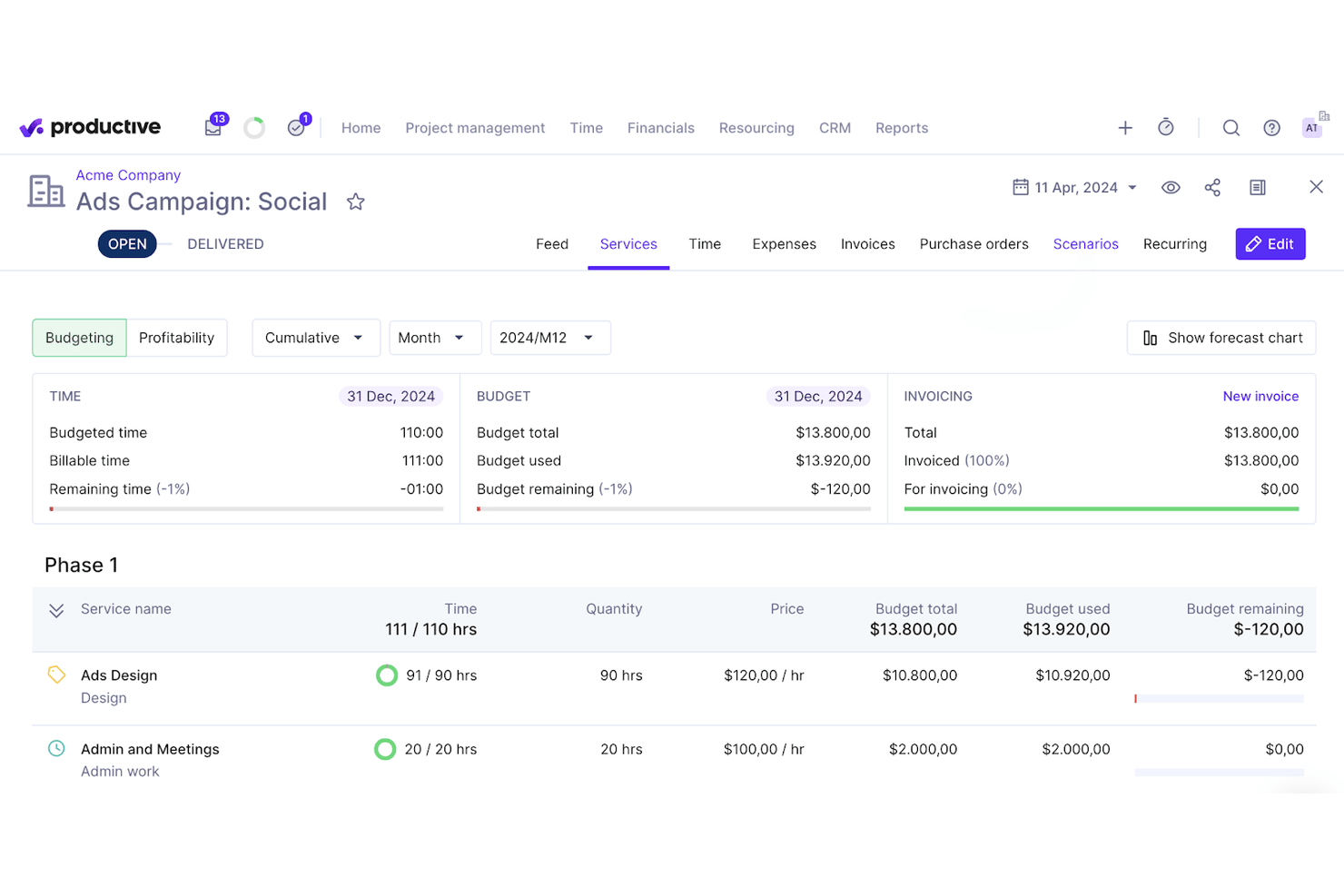
Productive è una piattaforma di automazione per i servizi professionali che combina gestione dei progetti, pianificazione delle risorse, monitoraggio del tempo, budgeting, fatturazione e reportistica finanziaria potenziata dall'IA in un unico sistema pensato per le aziende di servizi.
Per chi è ideale Productive?
Productive è particolarmente adatto a studi contabili di medie dimensioni e alle società di servizi contabili che gestiscono contemporaneamente molteplici incarichi per clienti, personale fatturabile e budget di progetto.
Perché ho scelto Productive
Productive merita un posto nella mia lista perché collega in modo preciso i dati di tempo, budget e redditività a livello di progetto. Mi piace che l'IA per la reportistica evidenzi i margini per cliente, servizio o risorsa senza che debba creare da zero report personalizzati. Il 'Scenario Builder' mi permette di modellare le previsioni di ricavo prima di prendere decisioni su assunzioni, così posso vedere l'impatto finanziario di aggiungere o rimuovere personale su un account prima che accada.
Funzionalità principali di Productive
- Pianificazione delle risorse: Assegna personale, monitora la disponibilità e regola i carichi di lavoro su diversi progetti cliente.
- Gestione delle assenze: Tieni traccia delle ferie del team e automatizza le approvazioni per garantire una pianificazione accurata delle capacità.
- Fatturazione e invio fatture: Genera fatture pronte per i clienti sulla base delle ore fatturabili tracciate e delle spese.
- Reportistica avanzata: Crea ed esporta report personalizzati su progetti, aspetti finanziari e tassi di utilizzo per una visione complessiva dello studio.
Integrazioni di Productive
Productive offre oltre 15 integrazioni native, tra cui QuickBooks Online, Xero, Sage, Slack, Jira, Google Calendar, HubSpot CRM, Personio, BambooHR, Gusto, Rippling e Microsoft Outlook. È disponibile un'API per integrazioni personalizzate.
Pros and Cons
Pros:
- Pianificazione delle risorse con grafici di utilizzo in tempo reale
- Analisi di redditività e ricavi potenziate dall'IA
- Portale clienti integrato per la condivisione dei documenti
Cons:
- Nessun modello preimpostato per workflow contabili
- Funzionalità limitate per la dichiarazione dei redditi
New Product Updates from Productive
Productive Adds Voice Dictation, Slack Connector, Proposals, and Overtime
Productive adds voice dictation, a Slack Connector, proposal controls, and overtime tracking. These updates support faster AI interactions, client proposals, and time management. For more information, visit Productive’s official site.

Karbon
Ideale per gestire il lavoro dei clienti di uno studio contabile
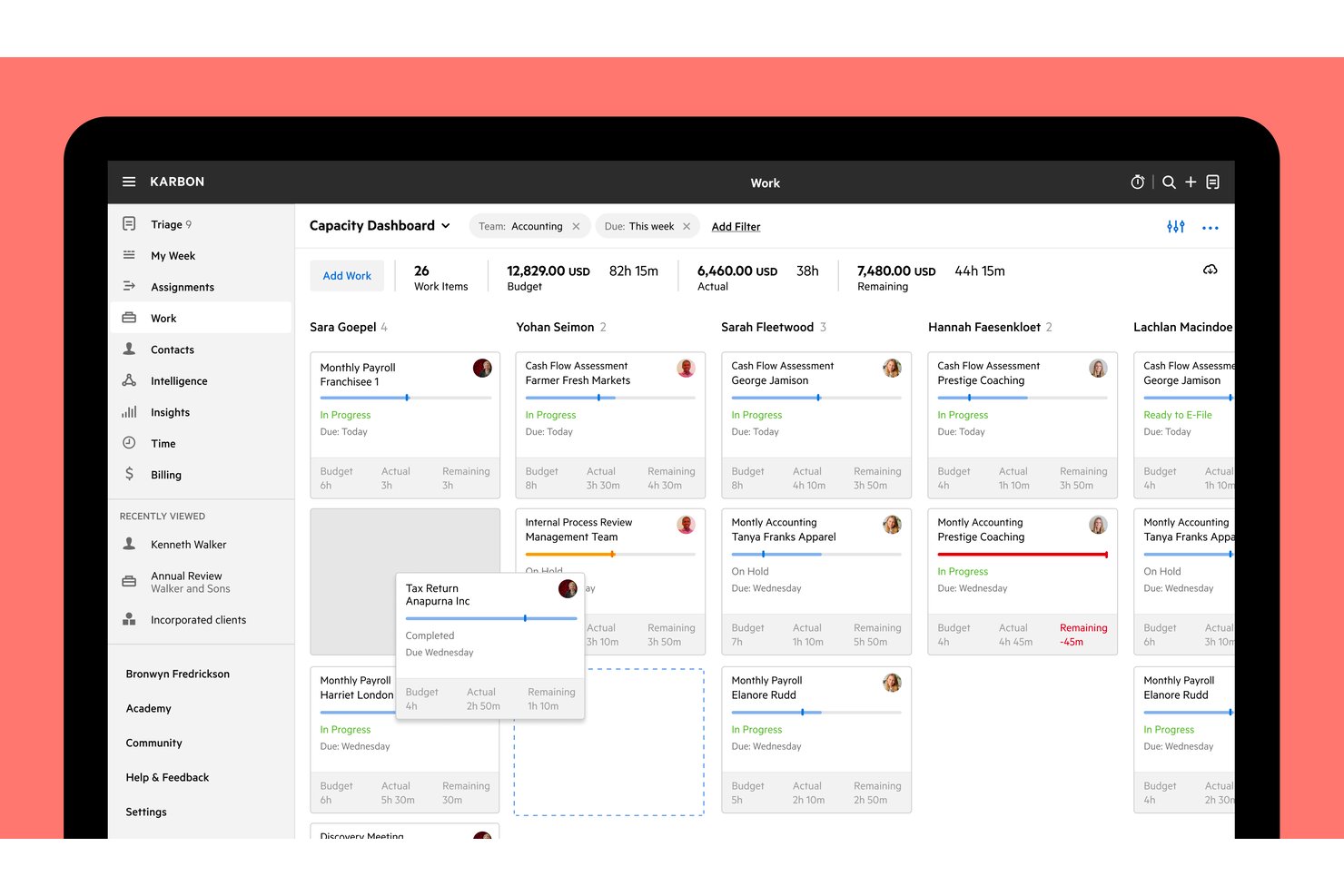
Karbon è un software di gestione della contabilità progettato specificamente per gli studi contabili, che combina il monitoraggio del lavoro per i clienti, la gestione integrata delle email, la gestione di tempi e fatturazione, l'automazione dei flussi di lavoro e la reportistica WIP in un'unica piattaforma.
Per chi è più adatto Karbon?
Karbon è progettato per gli studi contabili che devono gestire il lavoro per i clienti, la fatturazione e i flussi di lavoro del team in un unico luogo.
Perché ho scelto Karbon
Karbon è entrato nella mia lista ristretta perché è progettato appositamente in base al modo in cui gli studi contabili gestiscono realmente il lavoro per i clienti. Apprezzo molto il fatto che la reportistica WIP e quella sulla redditività siano integrate nello stesso spazio di lavoro del monitoraggio dei progetti, così posso vedere quali incarichi hanno superato il budget e cosa non è ancora stato fatturato senza dover cambiare strumento. I modelli per il lavoro ricorrente con scadenze per gli adempimenti consentono al mio team di automatizzare l'intero ciclo di pianificazione delle attività della stagione fiscale, collegando automaticamente ogni nuovo elemento di lavoro alla cartella del cliente corretto.
Funzionalità principali di Karbon
- Portale clienti: Offre ai clienti uno spazio dedicato per completare le richieste, caricare documenti e visualizzare le attività in sospeso collegate direttamente agli elementi di lavoro attivi.
- Creazione di lettere d'incarico: Crea proposte con servizi, prezzi, condizioni e firme digitali, quindi converte automaticamente gli incarichi firmati in piani di lavoro.
- Riepilogo giornaliero IA di Kai: Mostra in un'unica vista un riepilogo di inizio giornata delle email non lette, del lavoro bloccato, degli elementi in ritardo e delle richieste dei clienti aperte.
- Autorizzazioni utente granulari: Controlla separatamente per ogni membro del team l'accesso alla fatturazione, agli importi in dollari, ai fogli presenze, ai dati dei contatti e alla reportistica.
Integrazioni di Karbon
Karbon offre oltre 80 integrazioni native, tra cui QuickBooks Online Accountant, Xero, ProConnect, Dext, Dropbox, Microsoft SharePoint e Google Drive. Le sue API e i webhook supportano connessioni personalizzate ed è disponibile anche Zapier.
Pros and Cons
Pros:
- Il lavoro dei clienti e le email rimangono contestualizzati
- La reportistica WIP e quella sul budget facilitano il controllo
- I modelli ricorrenti organizzano scadenze e richieste
Cons:
- La configurazione del flusso di lavoro richiede tempo e precisione
- Alcuni clienti trovano poco intuitive le attività del portale

Ideale per monitorare le spese rispetto al budget totale
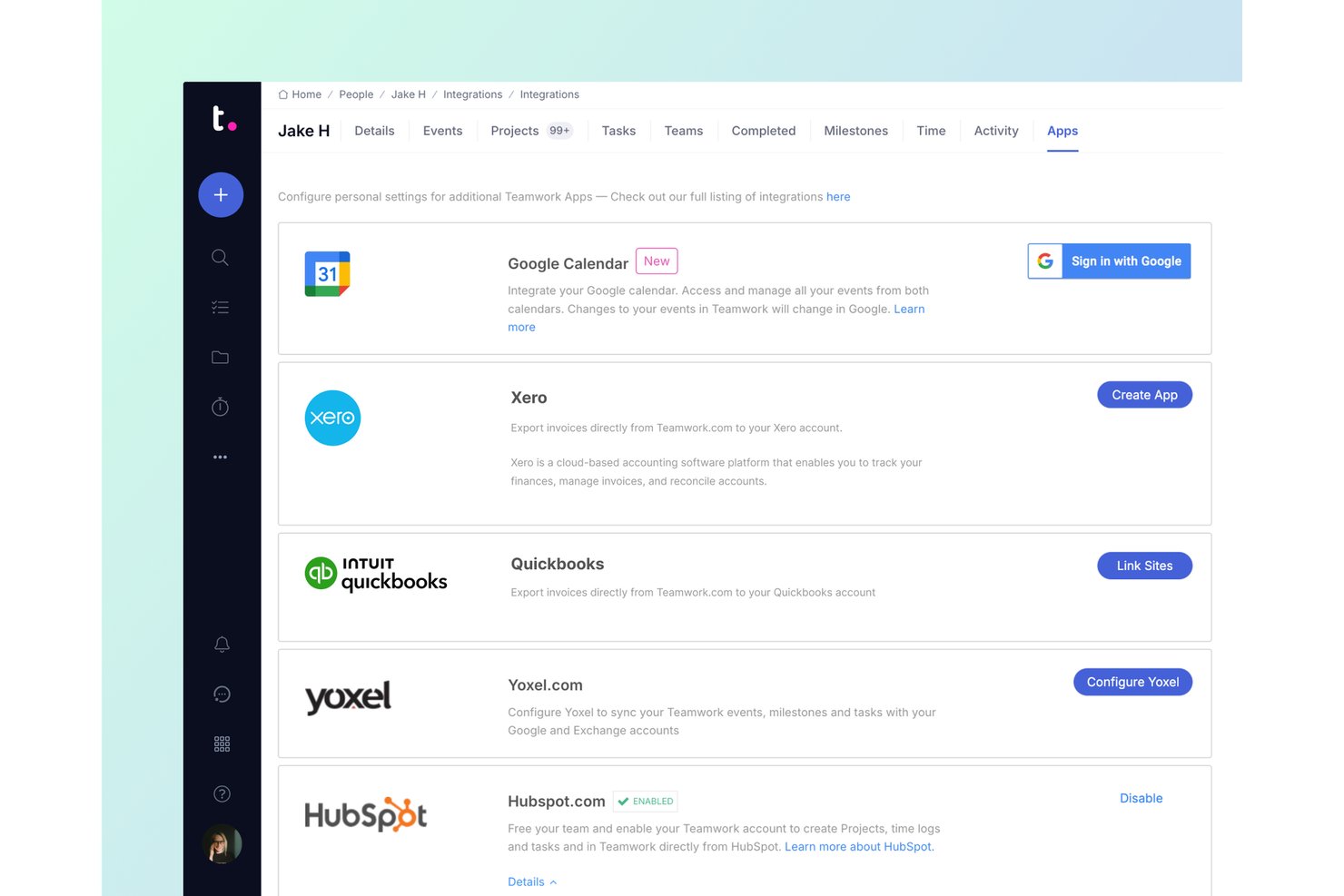
Teamwork.com è una piattaforma di gestione dei progetti pensata per il lavoro con i clienti, che combina monitoraggio dei progetti, monitoraggio del tempo, gestione del budget, fatturazione e report sulla redditività.
Per chi è più adatto Teamwork.com?
Teamwork.com è particolarmente adatto ai team di servizi professionali che devono monitorare le spese dei progetti rispetto ai budget totali, gestendo al contempo la fatturazione dei clienti e il tempo in un unico spazio.
Perché ho scelto Teamwork.com
Ho scelto Teamwork.com come una delle migliori soluzioni perché è l'unico strumento del mio elenco che consente di monitorare le spese direttamente rispetto al budget totale di un progetto, offrendo una visualizzazione in tempo reale dei costi rispetto al budget nell'intestazione del progetto man mano che le spese si accumulano. Apprezzo soprattutto il suo report sulla redditività, che calcola il margine come ore fatturabili moltiplicate per le tariffe, meno i costi registrati e le spese ammissibili, così puoi vedere esattamente dove un progetto sta perdendo denaro prima che sia troppo tardi. Le notifiche al superamento delle soglie di budget fanno inoltre sì che tu non debba controllare manualmente per sapere quando un progetto si sta avvicinando al proprio limite.
Funzionalità principali di Teamwork.com
- Monitoraggio nativo del tempo: Registra il tempo fatturabile e non fatturabile utilizzando timer, fogli presenze e promemoria direttamente all'interno dei progetti.
- Fatturazione dei clienti: Crea fatture a partire dal tempo e dalle spese registrati, oppure crea fatture a prezzo fisso con numeri d'ordine d'acquisto opzionali.
- Tariffe fatturabili personalizzate: Imposta tariffe di costo e fatturabili per membro del team, ruolo, progetto o cliente, per supportare strutture tariffarie diverse.
- Integrazione con QuickBooks Online: Esporta le fatture dei progetti in QuickBooks Online e trasmetti in tempo reale i dettagli del tempo fatturabile con l'integrazione Advanced.
Integrazioni di Teamwork.com
Teamwork.com offre oltre 150 integrazioni, tra cui connessioni native con QuickBooks Online, Xero Online, Xero File, NetSuite, Harvest, FreshBooks Classic e Blinksale. La sua API e i webhook supportano integrazioni personalizzate.
Pros and Cons
Pros:
- Monitora le spese rispetto ai budget dei progetti
- Collega direttamente le ore fatturabili alle fatture
- I recensori apprezzano i flussi di lavoro unificati per i progetti dei clienti
Cons:
- I report finanziari sono soggetti al piano e vengono forniti in ritardo
- Le lacune nello scambio di file con i clienti frustrano gli studi contabili

Ideale per monitorare più account
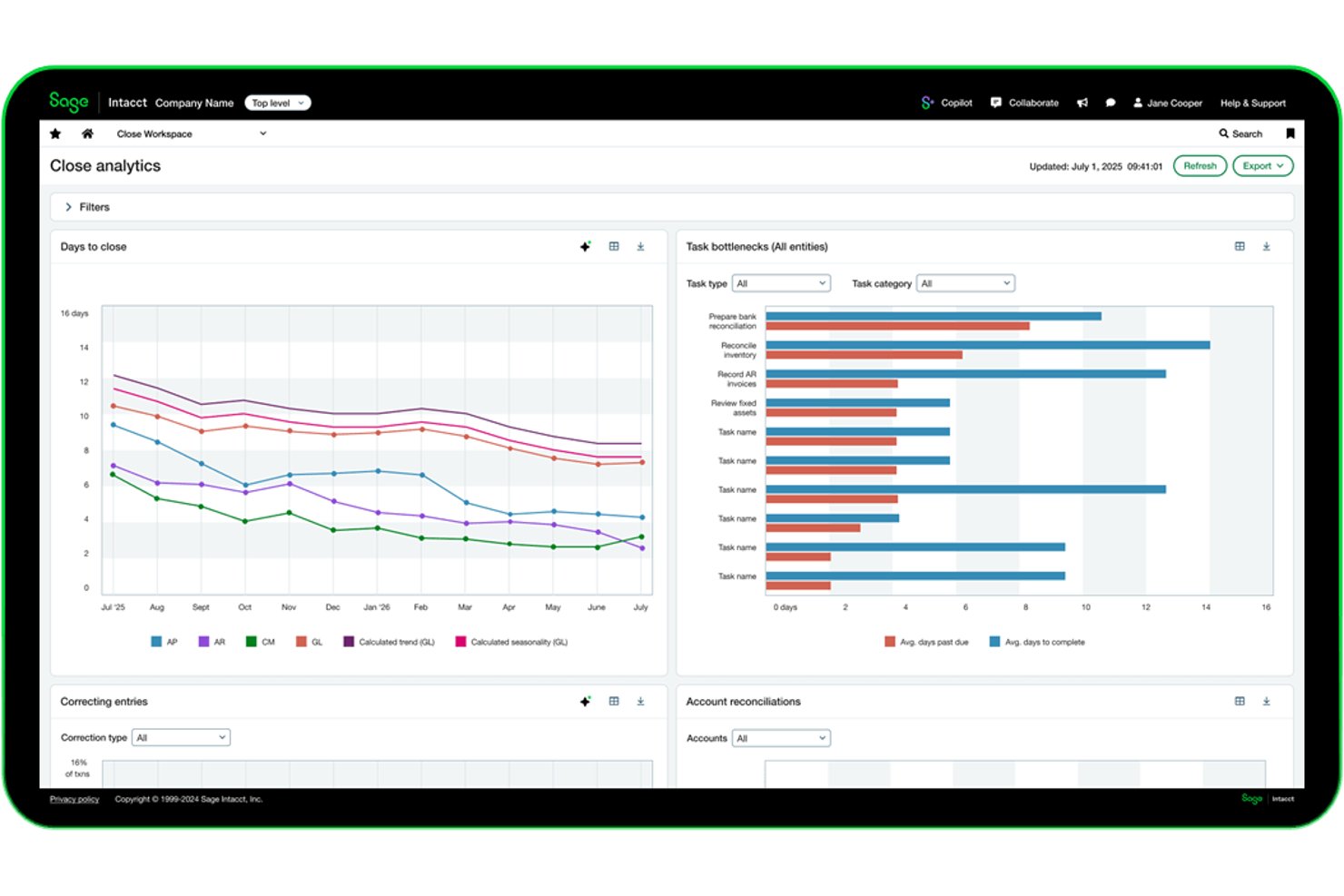
Sage Intacct è una piattaforma di gestione finanziaria e contabilità basata sul cloud che comprende la pianificazione del budget dei progetti, la reportistica multi-entità, la determinazione dei costi e la fatturazione dei progetti, il monitoraggio delle ore e la rilevazione dei ricavi tra diversi incarichi dei clienti.
A chi è più adatto Sage Intacct?
Sage Intacct è adatto ai responsabili finanziari di aziende di medie dimensioni basate su progetti che devono monitorare budget, costi e fatturazione per diversi incarichi dei clienti gestiti contemporaneamente.
Perché ho scelto Sage Intacct
Ho scelto Sage Intacct come una delle soluzioni migliori perché offre prestazioni eccellenti quando si devono gestire le finanze di diversi account cliente contemporaneamente. La sua reportistica multi-entità offre una visione consolidata di tutti i progetti, consentendo al contempo di analizzare in tempo reale i dati a livello della singola entità. Apprezzo anche la possibilità, nella fatturazione dei progetti, di combinare diversi termini di fatturazione, come tempo e materiali per un incarico e tariffe fisse per un altro, in un'unica fattura consolidata.
Funzionalità principali di Sage Intacct
- Suggerimenti per i fogli presenze assistiti dall'IA: Sage Intelligent Time utilizza il calendario, le email e l'attività lavorativa per proporre voci del foglio presenze da esaminare prima dell'invio.
- Reportistica basata sulle dimensioni: Contrassegna le transazioni con più dimensioni per suddividere i dati finanziari e dei progetti tra clienti, reparti o entità aziendali.
- Pianificazione della rilevazione dei ricavi: Separa i programmi di rilevazione dei ricavi dai programmi di fatturazione, utilizzando traguardi, percentuale di completamento o metodi basati sul completamento del progetto.
- Allocazioni automatizzate: Suddivide automaticamente i costi tra progetti, reparti o entità utilizzando regole predefinite per supportare l'analisi delle prestazioni organizzative.
Integrazioni di Sage Intacct
Sage Intacct offre integrazioni tramite marketplace con Salesforce, HubSpot, Tipalti, Expensify, Stripe, GoCardless e Shopify, con oltre 100 app e strumenti aziendali collegati. Le integrazioni REST, Web Services e Zapier supportano la connettività personalizzata.
Pros and Cons
Pros:
- Consolida la reportistica finanziaria multi-entità
- Supporta la fatturazione mista tra i progetti dei clienti
- I dashboard dei progetti mostrano gli scostamenti dal budget in tempo reale
Cons:
- I suggerimenti per i fogli presenze richiedono comunque una revisione manuale
- La migrazione e la configurazione possono richiedere assistenza esterna

Ideale per grandi aziende

La piattaforma di project management di NetSuite fa parte di una più ampia suite di strumenti di gestione aziendale, rendendola una buona soluzione per team di medie e grandi dimensioni.
Perché ho scelto Oracle NetSuite: In alcuni casi, l’ampia suite di strumenti di NetSuite può essere eccessiva per i progetti e i team contabili. Tuttavia, ho scelto questa piattaforma perché offre alcune funzioni che non sono disponibili in altri strumenti e potrebbe essere ideale per grandi aziende o anche start-up contabili in rapida crescita che puntano a un futuro da impresa. Per quanto riguarda i progetti, NetSuite supporta sia metodologie agili che tradizionali, offrendo un’elevata flessibilità.
Alcune delle caratteristiche che rendono NetSuite unica in questo elenco includono la gestione delle idee, la prioritizzazione, i modelli e i flussi di lavoro progettati intorno ai metodi agili più diffusi. I team contabili che fanno parte di organizzazioni più grandi possono utilizzare questa piattaforma per collaborare facilmente con altri dipartimenti e stakeholder esterni. NetSuite può essere più costoso rispetto ad altri strumenti presentati e può richiedere un maggiore supporto tecnico interno, motivo per cui tende a funzionare meglio per organizzazioni di grandi dimensioni.
Caratteristiche e integrazioni principali dello strumento
Caratteristiche includono funzionalità di analisi e reportistica che forniscono approfondimenti completi sull’uso delle risorse, così puoi individuare inefficienze e prendere decisioni informate. I dashboard integrati di tipo finanziario e operativo dello strumento ti offrono inoltre una visione unificata di costi, tempistiche e risorse.
Integrazioni includono tutti i prodotti software compatibili con NetSuite. È inoltre possibile utilizzare strumenti di terze parti per connettere altre app.
Pros and Cons
Pros:
- Project management robusto
- Adatto a grandi aziende
- Processi personalizzabili
Cons:
- Relativamente costoso
- Curva di apprendimento ripida
- Assistenza clienti e tecnica limitata

Ravetree
Ideale per le funzionalità di gestione clienti e risorse

Ravetree è una piattaforma di gestione del lavoro tutto-in-uno che copre non solo la gestione dei progetti, ma anche la gestione dei clienti e la pianificazione delle risorse.
Perché ho scelto Ravetree: Questo software è entrato nella mia lista per la sua capacità di centralizzare diversi aspetti della gestione del lavoro. Oltre agli strumenti di pianificazione dei progetti e gestione delle attività, offre anche un CRM integrato, portali per i clienti e funzionalità per l'allocazione delle risorse. Per studi contabili e commercialisti che lavorano con più clienti, questa è una scelta valida.
Le funzionalità di project management comprendono specificamente la suddivisione dei progetti in attività che possono essere poi assegnate a membri specifici del team e dettagliate con azioni e checklist. Puoi anche salvare i piani di progetto come modelli per un riutilizzo futuro. I membri del team ricevono notifiche sui compiti in arrivo e puoi monitorare l’utilizzo delle risorse tramite una vista cronologica. È incluso anche il monitoraggio del tempo, che consente di suddividere le stime rispetto al tempo effettivamente speso su progetti e attività specifici. Questi dati possono poi essere utilizzati per pianificazioni future.
Caratteristiche principali di Ravetree & Integrazioni
Le funzionalità comprendono una suite di strumenti per aiutare i team a collaborare meglio, come le visualizzazioni a bacheca e i workflow che puoi personalizzare per supportare meglio il modo in cui il tuo team lavora e si passa le attività. Lo strumento include anche una funzione di previsione che puoi utilizzare per determinare i budget di progetto in base alle risorse e al tempo richiesti.
Le integrazioni includono Box, Dropbox, Facebook, HubSpot, Instagram, Github, Google Drive, Gmail, OneDrive, Outlook, QuickBooks e Stripe.
Pros and Cons
Pros:
- Onboarding personalizzato
- Gestione di progetti, risorse e finanze in un'unica soluzione
- Supporto tramite video e chat
Cons:
- Il vasto set di funzionalità comporta una curva di apprendimento
- Strumenti di comunicazione interna limitati

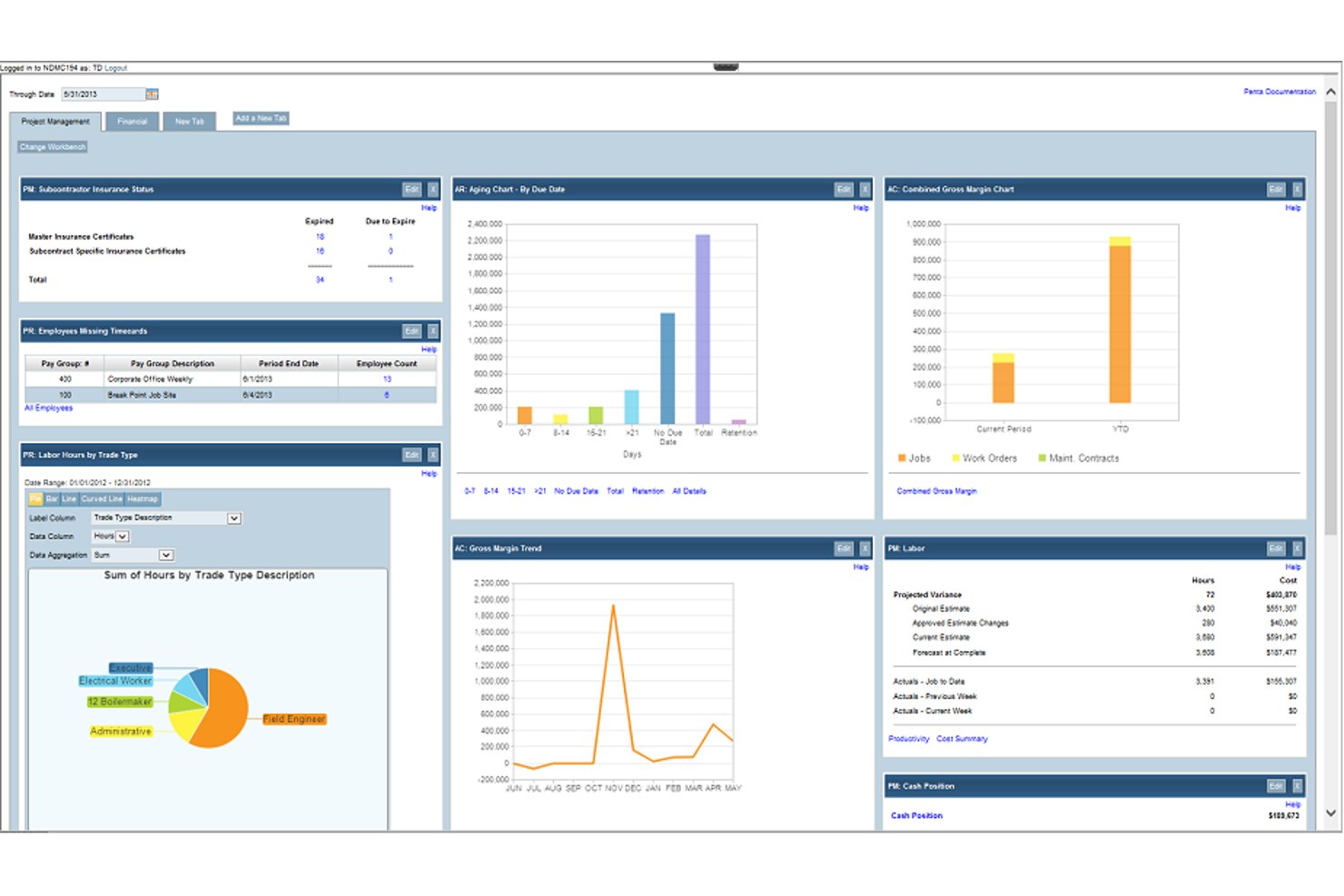
PENTA Contabilità dei progetti è un ERP per l'edilizia che riunisce contabilità analitica dei progetti, gestione finanziaria, paghe, assistenza sul campo e integrazione con la contabilità generale in un'unica piattaforma per gli appaltatori.
Per chi è più adatta PENTA Contabilità dei progetti?
PENTA Contabilità dei progetti è pensata per appaltatori di medie e grandi dimensioni che necessitano di contabilità analitica dei progetti, gestione delle paghe e della contabilità generale in un unico sistema connesso.
Perché ho scelto PENTA Contabilità dei progetti
Ho scelto PENTA Contabilità dei progetti come una delle migliori perché la sua contabilità analitica dei progetti e la sincronizzazione con la contabilità generale funzionano insieme in un modo difficile da replicare senza un ERP specifico per l'edilizia. I costi dei progetti derivanti da paghe, debiti, crediti e acquisti confluiscono nella contabilità generale in tempo reale non appena i fogli presenza vengono approvati, quindi non è necessaria alcuna fase di riconciliazione manuale. Mi piace anche il fatto che si possano confrontare i dati effettivi con le stime a livello di progetto, fase o codice di costo, con l'aggiornamento automatico continuo della previsione a finire man mano che arrivano i costi.
Funzionalità principali di PENTA Contabilità dei progetti
- Report finanziari multilivello: È possibile eseguire il drill-down nelle gerarchie dei progetti principali e secondari per visualizzare le prestazioni finanziarie a qualsiasi livello della struttura del progetto.
- Paghe con salario prevalente e multi-sindacali: Applica automaticamente alle elaborazioni delle paghe le regole salariali configurate, i calcoli voce per voce dei benefit accessori e le regole di reciprocità sindacale.
- Dispatching intelligente dell'assistenza sul campo: Pianifica e assegna i tecnici in base alle competenze, alla posizione e alla disponibilità in tempo reale direttamente all'interno della piattaforma.
- API PentaConnect: Le API aperte consentono di collegare Penta a sistemi esterni, con integrazioni nominate tra cui Procore, SAP Concur e Avalara AvaTax.
Integrazioni di PENTA Contabilità dei progetti
PENTA Contabilità dei progetti offre integrazioni documentate con Procore, SAP Concur, Avalara AvaTax, Hyland OnBase, REQUORDIT, DTI, Rhumbix e XOi Vision. Le API PentaConnect supportano integrazioni personalizzate.
Pros and Cons
Pros:
- La visibilità sui costi dei progetti collega la spesa allo stato del progetto
- Le previsioni in tempo reale segnalano tempestivamente gli sforamenti dei costi
- I report sulla redditività coprono progetti e contratti
Cons:
- Il caricamento lento ritarda la revisione di tempi e costi
- Le esportazioni finanziarie ordinate possono richiedere più report

BigTime
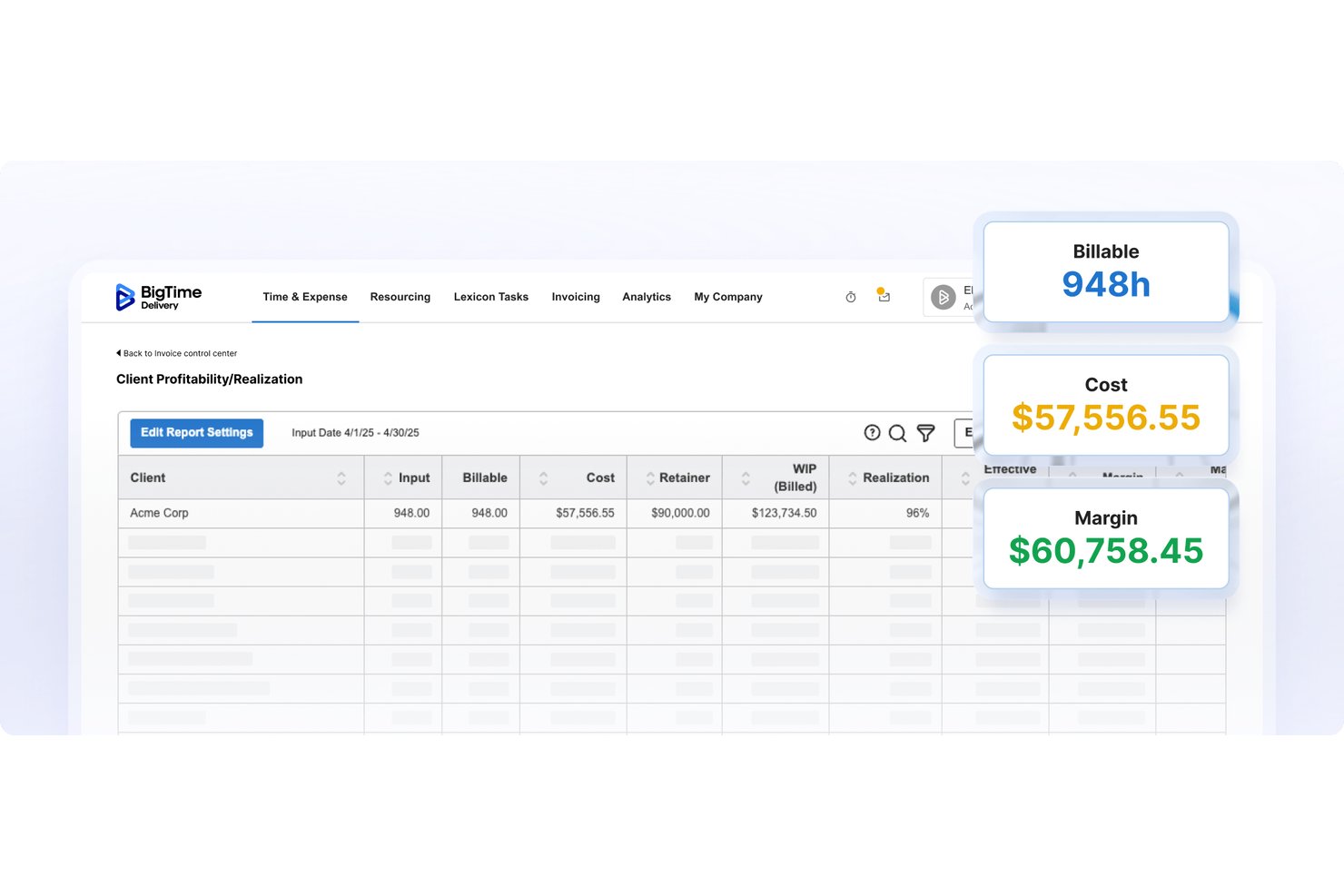
BigTime è una piattaforma di automazione dei servizi professionali progettata per gli studi contabili, che combina il monitoraggio del tempo, la pianificazione del budget dei progetti, la reportistica WIP, la fatturazione e l'integrazione con i sistemi contabili in un unico posto.
Per chi è più adatto BigTime?
BigTime è una soluzione particolarmente adatta agli studi contabili che devono monitorare il tempo fatturabile, gestire i budget degli incarichi e mantenere visibile il WIP tra diversi progetti per i clienti.
Perché ho scelto BigTime
BigTime si è guadagnato un posto nella mia selezione perché mostra il WIP di ogni incarico in un unico posto. Apprezzo in particolare i pannelli di controllo in tempo reale relativi a redditività, utilizzo e lavoro non fatturato, che consentono ai partner degli studi contabili di vedere esattamente dove è stato registrato del tempo non ancora fatturato. Il monitoraggio del budget rispetto ai dati effettivi collega il compenso di ogni incarico al tempo e alle spese effettivamente registrati, così nulla sfugge prima della fatturazione. Questo livello di visibilità sul WIP è davvero raro negli strumenti progettati per i flussi di lavoro degli studi contabili.
Funzionalità principali di BigTime
- Approvazioni multilivello: consente di configurare flussi di approvazione per tempi, spese e fatture tra dipendenti, responsabili di progetto e partner prima della fatturazione.
- Integrazione con QuickBooks e Sage Intacct: sincronizza bidirezionalmente le registrazioni delle ore e le fatture con il sistema contabile, mantenendo allineati i dati dei progetti e quelli finanziari.
- Pianificazione della domanda e della capacità delle risorse: mette in relazione la disponibilità, le competenze e le tariffe dei dipendenti con la domanda dei progetti, così è possibile assegnare le persone giuste prima che sorgano conflitti.
- Pagamenti tramite portale clienti: offre ai clienti una pagina di destinazione sicura per programmare ed elaborare direttamente i pagamenti delle fatture, con i dati delle carte gestiti da un elaboratore conforme allo standard PCI di livello 1.
Integrazioni di BigTime
BigTime offre integrazioni native con QuickBooks Online e QuickBooks Desktop, oltre a integrazioni con Sage Intacct, Xero, NetSuite, Lacerte e Microsoft Business Central. La sua API REST supporta integrazioni personalizzate.
Pros and Cons
Pros:
- Il WIP a livello di incarico evidenzia il lavoro non fatturato
- La reportistica del budget rispetto ai dati effettivi aiuta a segnalare gli sforamenti
- Le registrazioni delle ore dei progetti alimentano la fatturazione
Cons:
- I report personalizzati possono richiedere lavoro aggiuntivo
- I calcoli delle fatture e i saldi dei pagamenti a volte riportano dati errati

Accelo
Ideale per l'automazione dei servizi professionali
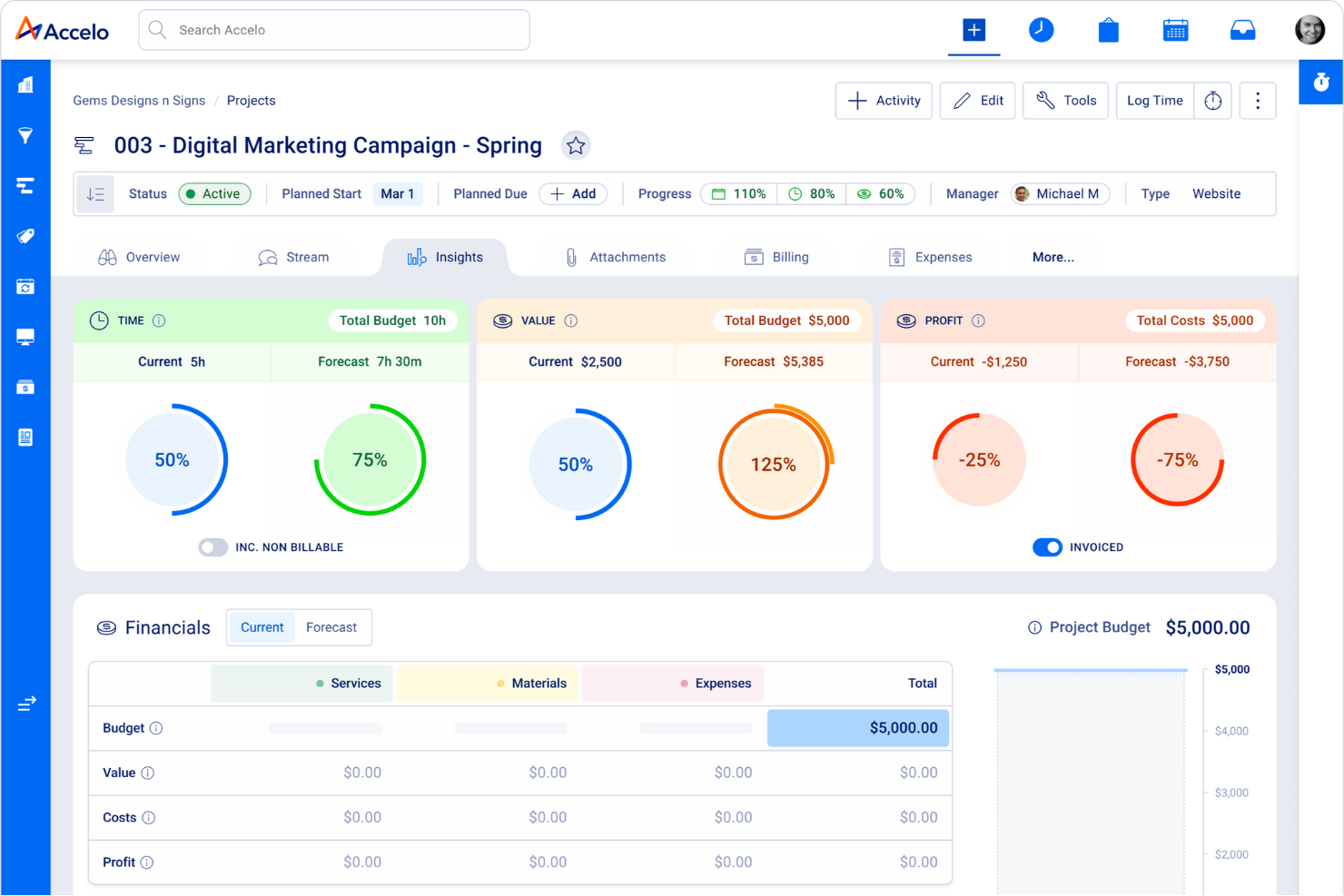
Accelo è una piattaforma cloud per la gestione del lavoro con i clienti, progettata per le aziende di servizi professionali, inclusi gli studi di commercialisti. Integra diversi processi aziendali—come la gestione dei progetti, il monitoraggio del tempo e la fatturazione—in un unico sistema.
Perché ho scelto Accelo: Accelo offre una funzione di monitoraggio del tempo integrata che registra automaticamente il tempo trascorso su email, riunioni e incarichi, garantendo una fatturazione accurata senza inserimenti manuali. Questa caratteristica consente al team di concentrarsi sul lavoro per i clienti mantenendo record precisi per la fatturazione. Automatizza inoltre molte altre attività, come la conversione di preventivi in progetti e la fatturazione.
In aggiunta, Accelo mette a disposizione un portale clienti sicuro dove i clienti possono accedere a preventivi, utilizzo dei contratti e storico delle fatture. Questa trasparenza aumenta la fiducia dei clienti e riduce la necessità di comunicazioni ripetute, consentendo al team di concentrarsi sulla qualità dei servizi offerti.
Funzionalità e integrazioni di punta di Accelo
Funzionalità includono strumenti di reportistica avanzati che raccolgono dati lungo l’intero percorso del cliente, offrendo una visione completa della salute finanziaria dello studio. I trigger personalizzati permettono di automatizzare i flussi di lavoro adattandoli ai processi specifici del team, aumentando l’efficienza. La piattaforma supporta anche la gestione del lavoro ricorrente.
Integrazioni includono Google Workspace, Microsoft 365, Microsoft Exchange & Microsoft Outlook, Xero, QuickBooks Online, HubSpot, Mailchimp, Salesforce, Zapier, Microsoft Power BI, Expensify, Gusto e Google Analytics.
Pros and Cons
Pros:
- Funzionalità di monitoraggio del tempo automatizzate
- Informazioni in tempo reale sulle prestazioni aziendali e dei progetti
- Personalizzabile per adattarsi a diversi flussi di lavoro dei progetti
Cons:
- Nessuna prova gratuita per testare la piattaforma
- Potrebbe offrire più integrazioni
New Product Updates from Accelo

Accelo Rebuilds Mobile App for Project and Time Management
Accelo rebuilds its mobile app with task management, new work creation, and mobile timesheets for Forecast customers. This helps teams keep project and time data current while working away from a desktop. For more information, visit Accelo’s official site.
Altri software di gestione dei progetti contabili
Ecco alcune altre opzioni che non sono rientrate nella mia lista principale, ma che vale comunque la pena prendere in considerazione.
- ProWorkflow
Ideale per monitoraggio costi e fatturazione
- Kantata
Ideale per la collaborazione con le parti interessate
- TaxDome
Ideale per automatizzare i flussi di lavoro degli studi fiscali
- Financial Cents
Ideale per la fatturazione basata sul tempo fino all'emissione della fattura negli studi contabili
- Slash
Ideale per la gestione delle spese e l'analisi


Recensioni correlate sui software di gestione dei progetti
Se non hai ancora trovato quello che cerchi, dai un'occhiata a questi strumenti strettamente correlati ai software di gestione dei progetti contabili che abbiamo testato e valutato.
- Software di gestione dei progetti
- Software di gestione delle risorse
- Software per il monitoraggio del tempo
- Software di gestione delle attività
- Strumenti per la produttività
- Software per il monitoraggio dei progetti
- Strumenti di business intelligence (BI)
- Strumenti di fatturazione per agenzie digitali
- I migliori software di gestione dei progetti con fatturazione
- Software di gestione dei progetti per commercialisti
Come Valuto i Software di Gestione Progetti Contabili
Valuto gli strumenti su due livelli: i requisiti fondamentali imprescindibili come il monitoraggio dei progetti a livello di cliente e i flussi di lavoro ricorrenti per le dichiarazioni fiscali, e i fattori differenzianti che distinguono le migliori soluzioni per studi di commercialisti.
Funzionalità di Base (Requisiti Essenziali per Questa Lista)
Quando seleziono gli strumenti per la mia lista, valuto ciascuno su una scala da 0 (non offre la funzionalità) a 5 (eccelle in quest’area) per ogni funzionalità di base elencata di seguito. Successivamente, calcolo il punteggio totale dello strumento in percentuale. Ogni strumento deve raggiungere un punteggio minimo totale del 65% per poter essere incluso.
- Monitoraggio delle Attività del Cliente: Verifico se ciascuno strumento consente di organizzare i progetti per cliente, così da poter visualizzare una cronologia completa delle attività — dichiarazioni passate, audit e consulenze — in un unico posto.
- Modelli di Flusso di Lavoro Contabile: Qui è importante la presenza di modelli predefiniti per processi ricorrenti come la chiusura di fine mese, la preparazione fiscale o il lavoro di campo per audit. Cerco modelli personalizzabili e riutilizzabili per ogni ciclo.
- Integrazione con la Rilevazione dei Tempi e la Fatturazione: Valuto quanto sia stretta la connessione tra il rilevamento dei tempi, le tariffe, i budget e la fatturazione, così che lo staff possa registrare le ore su un'attività cliente e trasferire quei dati direttamente in una fattura.
- Gestione delle Attività e delle Scadenze: Ogni strumento dovrebbe permettere l’assegnazione dei compiti, l’impostazione delle scadenze e la segnalazione delle date di conformità. Cerco funzioni come il monitoraggio delle dipendenze e i promemoria automatici per le scadenze fiscali.
- Integrazioni con Software Contabili: Sono fondamentali le connessioni con piattaforme come QuickBooks, Xero e i principali strumenti per la preparazione fiscale. Valuto la profondità di ogni integrazione—se sincronizza i dati o si limita a esportarli.
- Pianificazione della Capacità e delle Risorse: Osservo quanto bene uno strumento mostra la disponibilità e il carico di lavoro dello staff, in modo che i manager possano bilanciare le assegnazioni nei periodi di picco come la stagione fiscale.
Una volta ottenuta una lista di strumenti che soddisfano questi criteri, considero cosa distingue ciascuna piattaforma.
Fattori Differenzianti (Cosa Distingue i Fornitori)
Ecco come confronto e metto a confronto diversi fornitori:
Funzionalità Distintive
Un calendario della conformità che mappa le scadenze nei vari territori permette agli studi di evitare la gestione di tracciatori separati su fogli di calcolo. Valuto anche se uno strumento include liste automatiche di richieste PBC—durante la stagione fiscale, l’invio di richieste documentali strutturate con promemoria incorporati per il cliente fa risparmiare ore di solleciti. Dashboard per la redditività degli incarichi e per i lavori in corso sono un altro fattore che considero, poiché i partner desiderano visibilità in tempo reale sulla redditività delle attività invece di attendere i report di fine mese.
Oltre le Funzionalità
La dimensione dello studio e l’adeguatezza sono aspetti fondamentali. Un professionista autonomo che gestisce pochi clienti ha esigenze molto diverse rispetto a uno studio multi-sede con decine di dipendenti—osservo se i prezzi si adattano in modo ragionevole e se lo strumento può gestire volumi crescenti di clienti. La sicurezza è un’altra area che valuto attentamente, poiché queste piattaforme archiviano dati finanziari sensibili. Verifico la certificazione SOC 2 e i permessi granulari per ruolo. Anche il supporto all’implementazione fa la differenza, specialmente per gli studi che abbandonano i fogli di calcolo per la prima volta e necessitano di onboarding guidato.
Come scegliere un software di gestione dei progetti contabili
È facile perdersi in lunghi elenchi di funzionalità e strutture tariffarie complesse. Per aiutarti a rimanere concentrato mentre affronti il tuo processo di selezione del software, unico per le tue esigenze, ecco una checklist dei fattori da tenere a mente:
| Fattore | Cosa considerare |
|---|---|
| Scalabilità | Assicurati che il software possa crescere insieme alla tua azienda e gestire più utenti, progetti e dati senza compromettere le prestazioni. |
| Integrazioni | Cerca strumenti che si integrino con i tuoi strumenti di contabilità, il sistema ERP e altri sistemi aziendali fondamentali, così da evitare l'inserimento manuale dei dati. |
| Personalizzazione | Scegli un software che ti permetta di adattare flussi di lavoro, pannelli di controllo e report alle esigenze e alle preferenze specifiche del tuo team. |
| Facilità d'uso | Scegli un'interfaccia intuitiva con una navigazione semplice, in modo che il tuo team possa adottarla rapidamente senza una formazione approfondita. |
| Budget | Trova una soluzione in linea con il tuo budget e che offra un equilibrio tra funzionalità essenziali e valore a lungo termine. Fai attenzione ai costi nascosti. |
| Misure di sicurezza | Verifica che il software disponga di solide funzionalità di sicurezza, come la crittografia dei dati e le autorizzazioni degli utenti, per proteggere le tue informazioni finanziarie. |
| Strumenti di reportistica | Assicurati che il software fornisca report personalizzabili per monitorare l'avanzamento dei progetti e le prestazioni finanziarie. |
| Opzioni di assistenza | Verifica che il fornitore offra un'assistenza clienti affidabile attraverso più canali, come chat dal vivo, e-mail o telefono, così da poter risolvere rapidamente eventuali problemi. |
Che cos'è un software di gestione dei progetti contabili?
Il software di gestione dei progetti contabili è uno strumento che consente di monitorare le finanze e gestire i progetti insieme. Commercialisti, responsabili di progetto e titolari d'azienda lo utilizzano per gestire budget, spese e fatturazione, tenendo sotto controllo le scadenze dei progetti.
Grazie alle funzionalità per monitorare le finanze e le attività dei progetti in un unico posto, puoi vedere esattamente come vengono utilizzati i tuoi fondi e prendere decisioni più efficaci sui progetti e sulle finanze in ogni fase. Questo tipo di software aiuta a migliorare i processi finanziari, ridurre il rischio di errori e garantire che i dati finanziari siano sincronizzati con l'avanzamento dei progetti.
Funzionalità dei software di gestione dei progetti contabili
Quando scegli un software di gestione dei progetti contabili, presta attenzione alle seguenti funzionalità principali:
- Gestione delle attività: ti aiuta a migliorare i flussi di lavoro dei progetti e ad assegnare, monitorare e stabilire le priorità delle attività per i membri del team. Include anche automazioni dei flussi di lavoro, che possono ridurre alcune attività manuali e ripetitive eseguendole al posto tuo.
- Monitoraggio del tempo: questa funzionalità consente di monitorare le ore fatturabili e non fatturabili per una fatturazione accurata e una gestione efficace dei costi dei progetti.
- Strumenti per la definizione del budget: lo strumento dovrebbe aiutarti a impostare limiti finanziari, monitorare le spese e confrontare la spesa effettiva con il budget.
- Allocazione delle risorse: ti consente di assicurarti che i membri del team, i materiali e le attrezzature vengano utilizzati in modo efficiente tra più progetti.
- Fatturazione automatizzata: consente di semplificare la fatturazione con modelli preconfigurati, fatture ricorrenti e integrazione con i sistemi contabili.
- Condivisione dei documenti: il software dovrebbe consentire un accesso sicuro e centralizzato ai file relativi ai progetti, per favorire una migliore collaborazione.
- Reportistica: lo strumento dovrebbe consentire di generare informazioni utili sulle prestazioni, sui costi e sulla redditività dei progetti, per prendere decisioni basate sui dati.
- Pannelli di controllo personalizzabili: dovresti poter adattare visualizzazioni, report e pannelli di controllo per accedere rapidamente alle metriche e ai dettagli dei progetti pertinenti.
- Integrazioni di terze parti: molti team che lavorano per progetti traggono vantaggio dall'utilizzo di software di gestione dei progetti che si integra con QuickBooks e con altri strumenti, come i sistemi ERP e le piattaforme di comunicazione, per creare flussi di lavoro coordinati.
- Monitoraggio della conformità: questa funzionalità ti aiuta ad assicurarti di rispettare le normative finanziarie e gli standard del settore automatizzando i controlli di conformità.
Domande frequenti sul software di gestione dei progetti per la contabilità
Ecco alcune risposte alle domande comuni sul software di gestione dei progetti per la contabilità.
La gestione dei progetti è utile ai commercialisti?
Sì. La gestione dei progetti finanziari è utile ai commercialisti in molti modi, tra cui:
- Gestire e pianificare tutti i diversi conti di cui si occupano in qualsiasi momento.
- Riuscire a rispettare scadenze rigide, soprattutto durante la stagione fiscale.
- Collaborare con altre persone del proprio ufficio per completare i progetti in tempo e avere tutta la documentazione pertinente in un unico luogo.
- Monitorare più progetti a colpo d’occhio utilizzando i cruscotti.
Quali sono le funzionalità principali dei software di gestione dei progetti per commercialisti?
Ogni studio o squadra di contabilità ha esigenze diverse, ma alcune funzionalità principali comuni sono importanti nella maggior parte dei casi.
- Opzioni per modelli personalizzati: I modelli aiutano a evitare di iniziare da zero con il lavoro di progetto, aumentando la produttività per tutta la durata del progetto.
- Strumenti di reportistica: Il software di contabilità dei progetti dovrebbe offrire numerose opzioni per estrarre i dati sui progetti—e per esportarli in altri programmi—aiutando i responsabili dei progetti e i portatori di interesse a rimanere informati.
- Monitoraggio del tempo: I commercialisti sanno che il tempo è denaro e la possibilità di monitorare accuratamente il tempo dedicato ai progetti è fondamentale per la fatturazione dei clienti.
- Opzioni per i cruscotti: I cruscotti visivi che includono diagrammi, grafici e altre informazioni consentono alle squadre e ai responsabili di comprendere a colpo d’occhio le prestazioni dei progetti.
- Strumenti di collaborazione: Le squadre lavorano meglio insieme quando possono comunicare rapidamente in diversi modi, condividere e delegare le attività e tenersi reciprocamente informate sui progressi, sulle difficoltà o sui passaggi successivi.