

I 10 migliori software per la gestione delle attività con IA recensiti nel 2026

Elenco dei migliori strumenti di gestione delle attività con IA


Gestire attività per più progetti e con più scadenze può essere caotico. Potresti ritrovarti a dedicare più tempo all'organizzazione delle attività che al loro effettivo completamento. I gestori delle attività con IA offrono un modo più intelligente per gestire il carico di lavoro, stabilire le priorità, automatizzare le azioni ripetitive e mantenere il team allineato.
In questo articolo condividerò le mie scelte tra i migliori gestori delle attività con IA. Ogni consiglio si basa su una ricerca e una fase di test approfondite. Troverai informazioni sulle loro funzionalità, sui vantaggi e gli svantaggi e su come possono affrontare le tue sfide più urgenti.
Perché fidarsi dei nostri consigli sui software
Il nostro team testa e recensisce software dal 2012. In quanto project manager noi stessi, sappiamo quanto sia difficile — e importante — scegliere il software giusto.
Per questa guida, abbiamo valutato gli strumenti attraverso test pratici e ricerche indipendenti, assegnando un punteggio agli strumenti in base ai nostri criteri di selezione. Ci basiamo inoltre sulle competenze di leader di pensiero del settore e di professionisti attivi nella gestione dei progetti.
Le nostre recensioni riflettono il nostro giudizio editoriale umano, non un discorso di vendita.
Revisori esperti:
Tabella comparativa dei software di gestione delle attività con IA
Questa tabella comparativa riassume i dettagli sui prezzi dei migliori software di gestione delle attività con IA che ho selezionato:
| Tool | Best For | Trial Info | Price | ||
|---|---|---|---|---|---|
| 1 | Ideale per la gestione visiva dei progetti | Prova gratuita di 14 giorni + piano gratuito disponibile | A partire da $9/utente/mese (fatturazione annuale) | Website | |
| 2 | Ideale per il monitoraggio dei progetti | Prova gratuita di 14 giorni + piano gratuito + demo gratuita disponibile | A partire da $5/utente/mese (fatturazione annuale) | Website | |
| 3 | Ideale per automatizzare le attività di routine | Prova gratuita di 14 giorni + piano gratuito disponibile | Da $10/utente/mese (fatturazione annuale) | Website | |
| 4 | Ideale per insight di progetto potenziati dall’IA | Prova gratuita di 15 giorni + piano gratuito + demo gratuita disponibili | Da $4/utente/mese (fatturazione annuale) | Website | |
| 5 | Ideale per l'accesso all'IA tramite Claude o ChatGPT | Prova gratuita di 30 giorni + piano gratuito disponibile | A partire da $7.65/utente/mese (fatturato annualmente) | Website | |
| 6 | Ideale per attività personalizzabili | Piano gratuito + demo gratuita disponibile | Da $7/utente/mese (fatturato annualmente) | Website | |
| 7 | Ideale per la prioritizzazione delle attività | Piano gratuito + demo gratuita disponibile | Da $10.99/utente/mese (fatturato annualmente) | Website | |
| 8 | Ideale per la pianificazione automatizzata | Prova gratuita disponibile | A partire da $29/postazione/mese | Website | |
| 9 | Ideale per l’integrazione tra app | Piano gratuito disponibile | Da $19.99/mese (fatturati annualmente) | Website | |
| 10 | Ideale per la pianificazione individuale delle attività | Piano gratuito disponibile e prova gratuita di 7 giorni | A partire da $5/mese (fatturati annualmente) | Website |


Recensioni dei migliori gestori delle attività con IA
Di seguito sono riportati riepiloghi dettagliati dei migliori software di gestione delle attività con IA che sono entrati nel mio elenco. Scopri in dettaglio le funzionalità principali, i vantaggi e gli svantaggi, le integrazioni e i casi d’uso ideali di ogni strumento, per trovare quello più adatto alle tue esigenze.

Ideale per la gestione visiva dei progetti
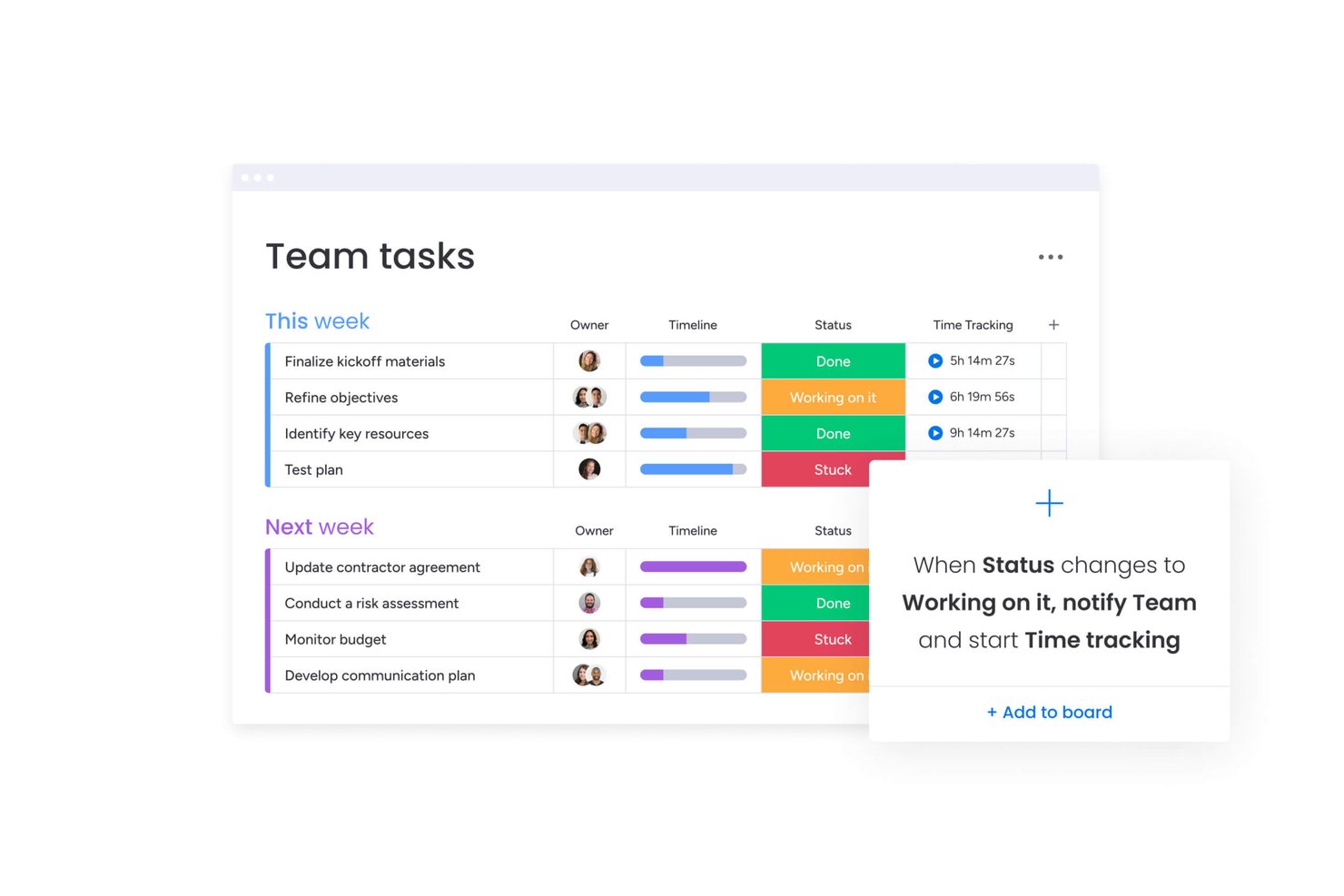
monday AI Workspace è una piattaforma di gestione del lavoro visiva che combina agenti AI, generazione intelligente di attività e automazione dei flussi di lavoro per aiutare i team a pianificare, assegnare e monitorare il lavoro su bacheche, cronologie e portafogli.
Per chi è più indicato monday AI Workspace?
È una soluzione ideale per team di medie e grandi dimensioni che gestiscono progetti complessi e interfunzionali in ambito prodotto, ingegneria e operazioni.
Perché ho scelto monday AI Workspace
Ho incluso monday AI Workspace nella mia selezione per l’integrazione diretta e intuitiva dell’IA nell’interfaccia visiva delle bacheche. Apprezzo in particolare gli AI Blocks, che popolano automaticamente le bacheche con aggiornamenti di stato, scadenze e assegnatari in base al contesto del progetto, eliminando l’inserimento manuale di dati che rallenta i team. Utilizzo anche l’AI Sidekick all’interno delle viste delle bacheche per generare aggiornamenti di attività e proporre le prossime azioni senza dover cambiare contesto o strumento.
Funzionalità principali di monday AI Workspace
- Notaio AI per riunioni: Trascrive le riunioni in tempo reale, identifica gli oratori e crea sintesi strutturate.
- Agenti AI personalizzati: Consente di configurare agenti che eseguono autonomamente attività ricorrenti di gestione dei progetti.
- Integrazione con oltre 200 strumenti: Si connette nativamente a piattaforme come Slack, GitHub, Google Drive, Salesforce e HubSpot.
- Dashboard di portafoglio: Permette di visualizzare, monitorare e generare report su più progetti tramite dashboard live personalizzabili.
Integrazioni di monday AI Workspace
monday AI Workspace offre centinaia di integrazioni native tra cui Slack, Google Workspace, Microsoft 365, Salesforce, Jira, GitHub, Zoom, Dropbox, HubSpot e Zendesk. Sono inoltre supportati Zapier e un’API per integrazioni personalizzate.
Pros and Cons
Pros:
- Le bacheche visive rendono immediatamente chiaro lo stato del progetto
- Gli agenti AI automatizzano le attività gestionali ripetitive
- Solido tracciamento a livello di portafoglio su più progetti
Cons:
- Le funzionalità AI sono disponibili solo nei piani di fascia superiore
- L’allestimento delle bacheche può risultare caotico su ampia scala
New Product Updates from monday AI Workspace
monday AI Workspace Adds Human Approval Routing
monday AI Workspace adds a human-in-the-loop approval block to AI Workflows, sending approval requests and routing workflow paths based on responses. For more information, visit monday AI Workspace's official site.
Hive
Ideale per il monitoraggio dei progetti
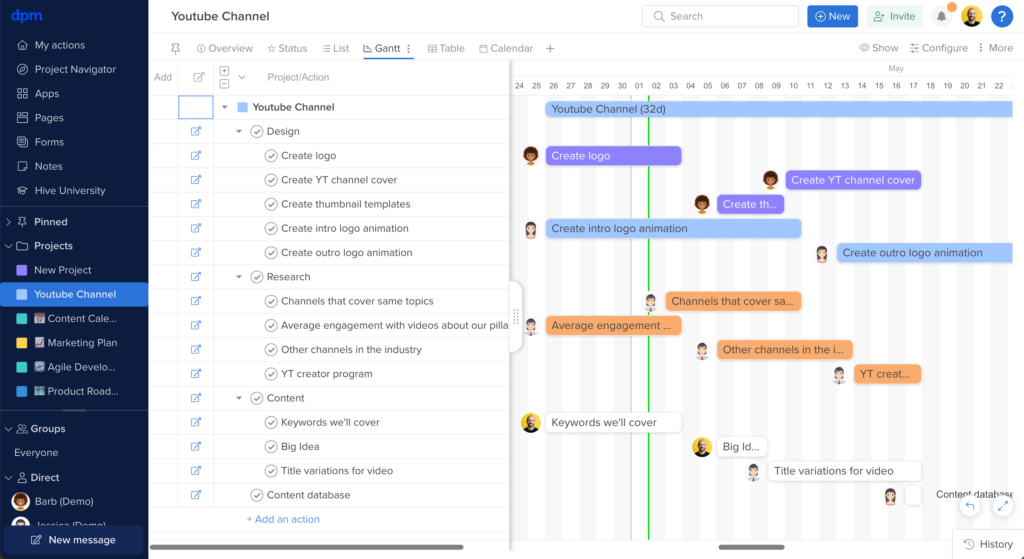
Hive è una piattaforma di gestione progetti e attività alimentata dall'IA che riunisce in un unico spazio di lavoro la creazione automatica delle attività, l'ottimizzazione dei flussi di lavoro, il monitoraggio dei progetti e la collaborazione del team.
Per Chi è Ideale Hive?
Hive è adatto a team di medie dimensioni nei settori tecnologico, marketing e creativo che necessitano di uno spazio di lavoro centralizzato per gestire attività, progetti e collaborazioni trasversali.
Perché Ho Scelto Hive
Ho scelto Hive tra i migliori strumenti per il monitoraggio dei progetti perché offre un modo flessibile per seguire il lavoro in ogni fase di un progetto. Mi piace che si possa passare tra viste Gantt, Kanban, timeline, portfolio e riepilogo senza dover ricostruire nulla—il mio team può monitorare lo stesso progetto dalla prospettiva più adatta al lavoro da svolgere. La vista portfolio è particolarmente utile quando devo gestire diversi progetti contemporaneamente, perché mostra lo stato di tutti in un unico colpo d'occhio. Le dashboard personalizzabili di Hive estraggono dati in tempo reale da tutto lo spazio di lavoro, così posso creare una visualizzazione a livello di progetto per il mio team e un riepilogo a livello generale per la dirigenza senza duplicare il lavoro.
Funzionalità Principali di Hive
- Hive AI: Genera automaticamente attività, scrive punti d'azione e riepiloga gli aggiornamenti dei progetti.
- Monitoraggio del tempo: Registra le ore direttamente sulle attività e sulle azioni, con schede orarie aggregate tra i progetti per i report.
- Revisione e approvazioni: Rivedi e annota i file direttamente in Hive, con flussi di lavoro di approvazione per gestire le fasi di validazione degli asset.
- Gestione delle risorse: Visualizza il carico di lavoro del team tra i progetti per vedere chi ha disponibilità e riassegna le attività in base alle risorse disponibili.
Integrazioni di Hive
Hive offre integrazioni native con Slack, Zoom, Google Drive, Dropbox, Box, Jira, Salesforce, GitHub, OneDrive e Microsoft Teams. Si collega anche con Zapier e fornisce un'API per integrazioni personalizzate.
Pros and Cons
Pros:
- Viste progetto personalizzabili
- Monitoraggio del tempo completo
- Adatto a team numerosi
Cons:
- Può risultare complesso per i nuovi utenti
- Capacità offline limitate

Wrike
Ideale per automatizzare le attività di routine

Wrike è una piattaforma di gestione del lavoro potenziata dall'intelligenza artificiale per team che desiderano automatizzare i flussi di lavoro delle attività, gestire progetti e centralizzare la collaborazione in un unico posto.
Per chi è migliore Wrike?
Wrike è adatto per team di medie e grandi dimensioni nei settori marketing, prodotto e servizi professionali che necessitano di flussi di lavoro strutturati per i progetti e visibilità trasversale sulle attività.
Perché ho scelto Wrike
Wrike si guadagna un posto nella mia selezione perché la sua automazione va oltre i semplici trigger basati su regole. Utilizzo il builder di automazione in linguaggio naturale di Wrike per descrivere un flusso di lavoro in italiano e vedere il sistema generare il set completo di regole—senza configurazione manuale. Lo strato di agenti AI è particolarmente utile: gli agenti analizzano le richieste dei moduli di raccolta, completano automaticamente i campi personalizzati e attribuiscono un punteggio alle attività in base a criteri come sforzo e impatto, senza intervento umano. Wrike Copilot mi permette di interrogare un'intera cartella progetto e visualizzare rischi o aggiornamenti sullo stato in pochi secondi.
Caratteristiche principali di Wrike
- Viste di progetto personalizzate: Passa tra le viste Gantt, Board, Tabella, Calendario e Grafico per adattarti al modo in cui il tuo team monitora e visualizza l'avanzamento delle attività.
- Gestione dello sforzo: Assegna stime di sforzo direttamente alle attività per prevedere il carico di lavoro e assegnare la persona giusta prima dell'inizio.
- Approfondimenti AI: Wrike mette in evidenza modelli e priorità dai dati di progetto, trasformando l'attività grezza delle attività in segnali chiari su cosa richiede attenzione.
- Board Scrum: Gestisci sprint Agile con prioritizzazione del backlog, collaborazione in tempo reale e dashboard integrate direttamente nella piattaforma.
Integrazioni di Wrike
Wrike offre centinaia di integrazioni tramite il suo marketplace, inclusi strumenti come Google Workspace, Microsoft 365, Salesforce e Slack. Supporta anche Zapier e fornisce un'API per integrazioni personalizzate.
Pros and Cons
Pros:
- Copilot conversazionale risponde istantaneamente
- L'AI generativa redige e modifica i testi
- Prevede rischi di progetto in modo proattivo
Cons:
- Le funzioni AI avanzate richiedono il piano a pagamento
- Preoccupazioni per la privacy dei dati AI
New Product Updates from Wrike

Wrike Adds Quick Search to Table View
Wrike adds Quick Search to Table View with full-table search across titles, descriptions, and fields, plus highlighted matches. This helps users find tasks faster in large tables. For more information, visit Wrike’s official site.

Ideale per insight di progetto potenziati dall’IA

Zoho Projects è una piattaforma di gestione dei progetti pensata per i team che desiderano il monitoraggio delle attività guidato dall’IA, l’automazione dei flussi di lavoro, la programmazione delle risorse e l’analisi dei progetti tutto in un unico posto.
Per chi è ideale Zoho Projects?
Zoho Projects è una soluzione ideale per team piccoli e medi che lavorano già nell’ecosistema Zoho e hanno bisogno di una gestione strutturata dei progetti con funzionalità di intelligenza artificiale integrate.
Perché ho scelto Zoho Projects
Zoho Projects si è guadagnato il suo posto nella mia shortlist grazie a Zia, l’assistente IA integrato, che evidenzia le informazioni più importanti sui progetti senza che sia necessario consultare manualmente i report. Apprezzo in particolare la funzionalità di analisi dati di Zia, che traduce le metriche di attività e progetti in osservazioni di facile comprensione—così, quando uno sprint è in ritardo, posso vedere esattamente dove si trova il collo di bottiglia invece di doverlo dedurre da grafici grezzi. Uso anche la creazione attività tramite IA di Zia, che genera elenchi di attività partendo dalla descrizione di un progetto o dai dettagli delle milestone, riducendo il tempo che avrei altrimenti speso nell’impostazione iniziale dei progetti.
Caratteristiche principali di Zoho Projects
- Automazione dei flussi di lavoro Blueprint: Progetta flussi di lavoro passo dopo passo che aggiornano automaticamente i campi delle attività, assegnano i membri giusti del team e attivano avvisi in base al cambiamento dello stato delle attività.
- Diagramma di Gantt con tracciamento delle dipendenze: Visualizza la sequenza delle attività, imposta dipendenze fine-inizio o inizio-inizio, e riprogramma le attività direttamente dalla vista grafica.
- Gestione delle risorse: Visualizza in tempo reale il carico di lavoro di ogni membro del team e riassegna le attività quando qualcuno ha un carico eccessivo o insufficiente.
- Earned Value Management: Confronta indicatori previsti e reali di tempi, costi e calendario per misurare le prestazioni del progetto e prevedere i risultati.
Integrazioni con Zoho Projects
Zoho Projects offre integrazioni native con Zoho CRM, Zoho Desk, Zoho Analytics, Google Drive, Microsoft Teams, Slack, GitHub, Bitbucket, Dropbox e Zapier. È disponibile un’API per integrazioni personalizzate.
Pros and Cons
Pros:
- Automazione avanzata e personalizzazione dei flussi di lavoro
- Monitoraggio del tempo e fatturazione integrati
- Prezzi accessibili per team in crescita
Cons:
- L’interfaccia ha una curva di apprendimento più ripida
- Esperienza mobile meno completa
New Product Updates from Zoho Projects
Zoho Projects Adds CodeX Scripts for Custom Modules
Zoho Projects now supports CodeX Scripts for custom modules, enabling conditional logic and rules for creating, updating, and deleting records. For more information, visit Zoho Projects' official site.
 .
.
Quire
Ideale per l'accesso all'IA tramite Claude o ChatGPT

Quire è uno strumento di gestione dei progetti basato su gerarchie infinite di attività nidificate, con diversi tipi di visualizzazione—Kanban, Sequenza temporale, Calendario, Tabella e Cruscotto—e un livello di integrazione con l'IA basato su un server MCP proprietario che si connette direttamente a Claude o ChatGPT.
Per chi è più adatto Quire?
Quire è particolarmente adatto ai responsabili di progetto esperti di tecnologia e ai team Scrum che utilizzano già Claude o ChatGPT e vogliono che la loro IA legga e scriva direttamente nei dati dei loro progetti.
Perché ho scelto Quire
Ho scelto Quire come uno dei migliori perché è l'unico strumento importante di gestione dei progetti con un server MCP proprietario, il che significa che Claude o ChatGPT possono leggere e scrivere direttamente nei dati aggiornati del progetto. Ho utilizzato le richieste MCP per trasformare appunti grezzi di riunioni in gerarchie strutturate di attività, con assegnatari e scadenze, prima di approvare una singola modifica. L'IA può anche preparare bozze di rapporti settimanali sullo stato del progetto recuperando gli stati aggiornati delle attività raggruppati per assegnatario, senza bisogno di alcuna compilazione manuale.
Funzionalità principali di Quire
- Elenco infinito di attività nidificate: Suddividi i progetti in livelli illimitati di sottoattività, preservando l'intera gerarchia padre-figlio in tutte le visualizzazioni e interazioni con l'IA.
- Tabella Kanban con controlli WIP: Gestisci visivamente le fasi del flusso di lavoro con corsie e limiti di lavoro in corso per mantenere sotto controllo la capacità dello sprint.
- Visualizzazione dinamica della sequenza temporale: Pianifica attività e traguardi tra diverse date con il monitoraggio delle dipendenze, per mantenere visibile la sequenza nell'intero progetto.
- Segnalazione del carico di lavoro tramite richieste MCP: Chiedi alla tua IA connessa di elencare le attività aperte di ogni membro del team per la settimana e di segnalare chiunque superi una soglia di attività definita.
Integrazioni di Quire
Quire dispone di integrazioni native con Slack, Microsoft Teams, Google Calendar, Google Drive, GitHub, Microsoft OneDrive, Dropbox e Box. Il suo server MCP proprietario connette Claude e ChatGPT, mentre n8n, un'API REST e Zapier supportano flussi di lavoro personalizzati.
Pros and Cons
Pros:
- L'IA legge e scrive nei dati aggiornati del progetto
- Gerarchie infinite di attività con struttura padre-figlio completa
- Approvazione umana per tutte le azioni dell'IA
Cons:
- Richiede la connessione a un'IA esterna come ChatGPT
- Nessun assistente IA integrato per le azioni rapide
New Product Updates from Quire

Quire Adds Task and Standalone Reminders
Quire adds task reminders and standalone reminders with shared notifications, recurring schedules, and automatic date tracking. These updates help teams stay ahead of deadlines and manage reminders that do not need a task. For more information, visit Quire’s official site.
 .
.
ClickUp
Ideale per attività personalizzabili

ClickUp è una piattaforma di gestione delle attività basata sull'IA che consente ai team di organizzare, automatizzare e monitorare il lavoro utilizzando flussi di lavoro personalizzabili, elaborazione del linguaggio naturale e strumenti di collaborazione integrati.
Per chi è ClickUp?
ClickUp è particolarmente indicato per team tecnici e di prodotto che necessitano di una configurazione di gestione delle attività estremamente adattabile per flussi di lavoro complessi e multilivello.
Perché ho scelto ClickUp
ClickUp è una delle mie scelte preferite perché adoro quanto si possa personalizzare ogni attività senza mai dover uscire dalla piattaforma. Utilizzo campi personalizzati per aggiungere direttamente alle attività menu a tendina, cifre di budget, tag regionali e dimensioni delle trattative, così che ogni voce porti il contesto esatto di cui il mio team ha bisogno. Le Attività Auto-prioritizzanti di ClickUp Brain riordinano automaticamente il lavoro quando cambiano le priorità, evitandomi di dover sempre riorganizzare i backlog quando varia il perimetro. L'AI Task Builder estrae informazioni da chat e documenti per generare attività strutturate complete, assicurando che nulla venga perso nei thread di conversazione.
Funzionalità chiave di ClickUp
- Sotto-attività generate dall'IA: ClickUp Brain suddivide automaticamente le attività complesse in sotto-attività strutturate in base alla descrizione dell'attività.
- Obiettivi e traguardi: Imposta obiettivi misurabili collegati direttamente alle attività e monitora i progressi in tempo reale.
- Gestione degli sprint: Pianifica e gestisci sprint con il monitoraggio della velocità integrato, punti sprint e grafici burndown.
- Lavagne digitali: Organizza visivamente flussi di lavoro, idee e piani di progetto su una tela collaborativa collegata direttamente alle attività.
Integrazioni di ClickUp
ClickUp offre oltre 50 integrazioni native, tra cui Slack, GitHub, GitLab, HubSpot, Everhour, Toggl, Harvest, Google Drive, OneDrive, Dropbox, Outlook, Google Calendar, Figma, Zoom, Bitbucket, Microsoft Teams, Intercom, Box, Zendesk e Front. Si integra anche con Zapier e offre un'API per integrazioni personalizzate.
Pros and Cons
Pros:
- Ampia libreria di template
- Potenti funzionalità di automazione
- Adatto a diversi settori
Cons:
- Richiede tempo per configurazione e setup
- Funzionalità offline limitate
New Product Updates from ClickUp
ClickUp Adds Meetings Hub, Super Agent Templates, and ZoomInfo Integration
ClickUp adds a searchable Meetings Hub, new ways to clone and template Super Agents, and a ZoomInfo integration through the App Center. These updates improve meeting retrieval, agent reuse, and access to sales intelligence. For more information, visit ClickUp’s official site.

Asana
Ideale per la prioritizzazione delle attività

Asana è una piattaforma di gestione del lavoro per team che combina gestione delle attività potenziata dall’intelligenza artificiale, automazione dei flussi di lavoro, monitoraggio dei progetti e viste personalizzabili per organizzare e gestire i compiti.
Per chi è Asana?
Asana è ideale per team di medie e grandi dimensioni nei settori tecnologici e digitali che necessitano di un metodo strutturato per gestire progetti e carichi di lavoro trasversali.
Perché ho scelto Asana
Asana merita di essere tra i migliori della mia selezione per come gestisce la priorità delle attività su larga scala. La vista Le mie attività raccoglie tutti gli assegnamenti in un unico posto, e mi piace che si possano ordinare per data di scadenza, priorità o campi personalizzati, bloccando quell’ordine tramite regole di automazione così che le attività si spostino nella sezione corretta senza bisogno di riordinare manualmente. Quando il mio team si trova a gestire uno sprint insieme a un lancio di prodotto, questo tipo di organizzazione automatica permette a tutti di concentrarsi su ciò che deve davvero essere fatto per primo. Inoltre, l’intelligenza artificiale di Asana genera automaticamente i campi personalizzati di priorità per un progetto non appena lo nomini, riducendo così il tempo di preparazione quando parte un nuovo flusso di lavoro.
Funzionalità principali di Asana
- Colleghi AI: Aggiungi agenti AI direttamente nei tuoi flussi di lavoro per agire sulle attività, seguire gli assegnamenti e portare avanti il lavoro in modo autonomo.
- Cruscotti di reportistica: Visualizza lo stato dei progetti e i dati sui carichi di lavoro con grafici in tempo reale creati da attività e campi aggiornati su tutti i progetti.
- Portfoli: Monitora più progetti collegati da una sola vista, tenendo traccia di stato, avanzamento e dipendenze tra team.
- Regole di flusso di lavoro: Imposta regole di automazione basate su trigger che spostano attività, aggiornano campi o notificano colleghi quando si verificano condizioni specifiche.
Integrazioni Asana
Asana offre centinaia di integrazioni native, tra cui Slack, Google Drive, Microsoft Teams, Jira, GitHub, Salesforce, Zoom, Dropbox, Figma, Zendesk e ServiceNow. Si connette anche con Zapier e offre un'API per integrazioni personalizzate.
Pros and Cons
Pros:
- Cronoprogramma visivo del progetto
- Gestione delle dipendenze tra attività
- Gestione del carico di lavoro del team
Cons:
- Richiede configurazione e impostazione
- Capacità offline limitate

Motion
Ideale per la pianificazione automatizzata

Motion è un task manager potenziato dall'IA che combina pianificazione intelligente, priorità automatizzate e gestione del calendario per team e singoli utenti.
Per chi è ideale Motion?
Motion è adatto a professionisti individuali e piccoli team che gestiscono carichi di lavoro elevati e necessitano che l’IA prenda automaticamente le decisioni di pianificazione.
Perché ho scelto Motion
Motion si merita un posto nella mia lista per il modo in cui gestisce la pianificazione automatizzata—è davvero diverso da qualsiasi altro strumento che io abbia provato. Quando aggiungo un’attività con una scadenza e una durata stimata, l’IA di Motion la inserisce automaticamente a blocchi nel mio calendario e riottimizza tutto l’orario se qualcosa cambia. Apprezzo particolarmente la distinzione tra 'Data di esecuzione' e 'Data di scadenza', dove Motion segnala in anticipo le attività a rischio invece di attendere che una scadenza venga mancata. L’Assistente Calendario IA pianifica anche le riunioni in orari che proteggono i blocchi di concentrazione, così il tempo dedicato al lavoro profondo non viene frammentato da call consecutive.
Funzionalità principali di Motion
- Workflow IA: Crea modelli riutilizzabili per progetti ripetitivi e SOP in modo che Motion possa assegnare e sequenziare automaticamente le attività ogni volta che parte un nuovo progetto.
- Gantt Chart IA: Visualizza le tempistiche di progetto con pianificazione automatica inclusa, così il diagramma si aggiorna da solo quando cambiano le attività o le scadenze.
- Pianificazione capacità IA: Visualizza in tempo reale il carico di lavoro di ciascun membro del team e lascia che Motion bilanci le assegnazioni delle attività in base alla capacità disponibile dell’intero team.
- Notetaker IA per riunioni: Cattura automaticamente note e riepiloghi delle riunioni così i punti d’azione vengono registrati senza che nessuno debba scriverli manualmente dopo la call.
Integrazioni di Motion
Motion offre integrazioni native con Google Calendar, Outlook, Gmail, Zoom, Google Meet, Siri, HubSpot, Salesforce, Microsoft Teams e Slack. Si collega anche a Zapier e dispone di un’API per integrazioni personalizzate.
Pros and Cons
Pros:
- Si adatta ai cambiamenti di programma
- Fornisce analisi dettagliate sull’utilizzo del tempo
- Migliora la concentrazione con time blocking
Cons:
- Può essere complesso da configurare
- Opzioni di personalizzazione limitate


Zapier è una piattaforma di automazione dei processi alimentata dall’AI che collega e gestisce workflow tra migliaia di app, consentendoti di automatizzare compiti ripetitivi e coordinare azioni tra diversi strumenti.
Per Chi È Zapier Più Adatto?
Zapier è particolarmente indicato per project manager e team operativi che devono automatizzare flussi di lavoro tra più app senza scrivere codice.
Perché Ho Scelto Zapier
Ho incluso Zapier tra le mie scelte migliori perché nessun altro strumento si avvicina alla sua profondità di integrazione tra app per l’automazione dei processi. Con collegamenti a oltre 8.000 app, il mio team utilizza Zapier per connettere strumenti come Jira, Asana, Slack e Google Workspace in un unico workflow automatizzato—senza scrivere una riga di codice. Mi piace particolarmente la funzione Paths, che ti permette di indirizzare i compiti a team diversi in base a logiche if/then, così una segnalazione di bug ad alta priorità in Jira può attivare automaticamente un avviso su Slack e creare un’attività di follow-up in Asana. La funzione Zapier Agents va oltre, permettendoti di creare agenti alimentati dall’AI che monitorano l’attività ed eseguono azioni nelle app connesse su comando.
Funzionalità Chiave di Zapier
- Template Zap: Workflow di automazione predefiniti che puoi attivare istantaneamente per collegare le combinazioni di app più comuni senza partire da zero.
- Zaps a più passaggi: Collega più azioni tra diverse app in un unico flusso automatizzato attivato da un solo evento.
- Tabelle: Una funzione di database integrata che memorizza, traccia e attiva dati di compiti direttamente all’interno dei tuoi workflow su Zapier.
- Storico delle attività: Un registro di ogni azione automatizzata eseguita da Zapier, così puoi effettuare audit, risolvere problemi e ripetere task falliti.
Integrazioni Zapier
Zapier offre integrazioni native con oltre 8.000 app, tra cui Google Workspace, Slack, Asana, Trello, Jira, Salesforce, HubSpot, Microsoft 365, Airtable e Dropbox. È disponibile una API per integrazioni personalizzate.
Pros and Cons
Pros:
- Ampio catalogo di app
- Non servono competenze di coding
- Automazione a più passaggi
Cons:
- Può essere complesso per i principianti
- Le funzionalità avanzate richiedono piani superiori

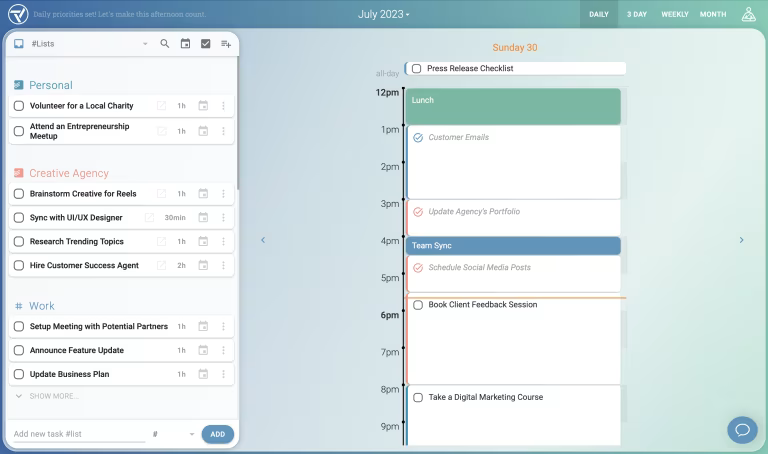
Trevor AI è una piattaforma di gestione delle attività alimentata da intelligenza artificiale che ti aiuta a organizzare, pianificare e dare priorità alle attività utilizzando la pianificazione quotidiana automatizzata e il time blocking intelligente.
Per Chi è Ideale Trevor AI?
Trevor AI è particolarmente adatto a collaboratori individuali e liberi professionisti che devono gestire il proprio carico di lavoro personale e la pianificazione quotidiana, senza necessità di funzionalità di collaborazione di team.
Perché Ho Scelto Trevor AI
Ho incluso Trevor AI nella mia selezione per la sua eccellente gestione della pianificazione delle attività individuali tramite il time blocking supportato dall'intelligenza artificiale. Mi piace la possibilità di trascinare le attività da una lista di cose da fare collegata direttamente sul calendario e che l'IA suggerisca le migliori finestre temporali disponibili in base agli impegni già fissati. La visualizzazione della pianificazione giornaliera mantiene chiare le priorità quotidiane, senza il rumore di un'intera bacheca di progetto. Per la gestione personale delle attività, questo approccio mirato è davvero difficile da replicare con strumenti più orientati al lavoro di squadra.
Funzionalità Principali di Trevor AI
- Modalità Focus: Ti permette di lavorare su una sola attività alla volta utilizzando un timer integrato, un campo per le note e una suddivisione dell'attività in cinque passaggi generata dall'IA.
- Attività ricorrenti: Imposta attività programmate e non programmate da ripetere, così da poter monitorare lavori continuativi e costruire abitudini costanti.
- Coda di pianificazione intelligente: Aggiungi attività o intere liste a una coda prioritaria che Trevor ti aiuta attivamente a pianificare, anche in modalità bulk.
- Modello IA personale: Si adatta nel tempo ai tuoi schemi di pianificazione per migliorare la precisione delle previsioni sulla durata delle attività e dei suggerimenti sulle fasce orarie.
Integrazioni di Trevor AI
Trevor AI offre integrazioni native con Google Calendar, Outlook Calendar, Todoist e Google Tasks. È disponibile un'API per integrazioni personalizzate.
Pros and Cons
Pros:
- Interfaccia intuitiva
- Grande attenzione alla privacy dell'utente
- Suggerimenti personalizzati dell'IA
Cons:
- Piano Pro necessario per le funzionalità avanzate
- Nessuna funzione di collaborazione di team
Altri strumenti software per la gestione delle attività con IA
Ecco alcune opzioni aggiuntive per la gestione delle attività con IA che non sono entrate nel mio elenco, ma che vale comunque la pena prendere in considerazione:


Cómo evalúo herramientas de IA para la productividad de desarrolladores
Cada herramienta en esta lista debe ir más allá del autocompletado básico: busco IA que realmente acelere la forma en que los desarrolladores escriben, revisan y entregan código. Divido mi evaluación en funcionalidad principal, que una herramienta debe cumplir para calificar, y factores diferenciadores que destacan la mejor opción para distintos equipos y flujos de trabajo.
Funcionalidad principal (lo indispensable para esta lista)
Cuando selecciono herramientas para mi lista, califico cada una en una escala del 0 (no ofrece la funcionalidad) al 5 (sobresale en esta área) según cada funcionalidad principal listada a continuación. Luego, calculo la puntuación total de la herramienta como un porcentaje. Cada herramienta debe alcanzar una puntuación total mínima del 65% para ser considerada para su inclusión.
- Generación de código impulsada por IA: Evalúo qué tan bien una herramienta genera código utilizable a partir de indicaciones en lenguaje natural y contexto en línea, desde autocompletados de una sola línea hasta el esqueleto completo de funciones.
- Integración con IDE y flujos de trabajo: Las herramientas deben integrarse directamente en los entornos que los desarrolladores ya usan, como VS Code, IDEs de JetBrains, herramientas de línea de comandos y plataformas Git.
- Conciencia del contexto del código: Busco herramientas que hagan referencia a tu repositorio y estructura de proyecto en general, no solo el archivo abierto, para entregar sugerencias relevantes.
- Soporte multilenguaje: Es importante la cobertura de lenguajes populares como Python, TypeScript, Java, Go y Rust, junto con el reconocimiento de frameworks populares.
- Revisión y calidad de código con IA: Verifico si la herramienta puede detectar errores, alertar sobre problemas de seguridad o sugerir refactorizaciones durante la revisión de código, como encontrar vulnerabilidades en una PR.
- Automatización de tareas para desarrolladores: Automatizar tareas repetitivas como generar pruebas unitarias, escribir docstrings o redactar mensajes de commit ahorra tiempo real a lo largo del día de un equipo.
Una vez que tengo una lista de herramientas que cumplen los criterios, considero qué es lo que diferencia a cada plataforma.
Factores diferenciadores (lo que distingue a los proveedores)
Así es como comparo y contrasto diferentes proveedores:
Funciones destacadas
La ejecución agéntica de tareas es un diferenciador importante: busco herramientas que puedan planificar y realizar de forma autónoma trabajos de varios pasos, como resolver un error desde el reporte hasta el PR fusionado. La elección del modelo también importa, ya que los equipos se benefician al cambiar entre diferentes LLM para equilibrar velocidad, costo y calidad de salida según la tarea. También evalúo los análisis de productividad de equipos, que ayudan a los responsables técnicos a rastrear la adopción de IA y las tasas de aceptación de código en la organización.
Más allá de las funciones
La seguridad y la protección de la propiedad intelectual pesan mucho en mi evaluación: reviso si un proveedor garantiza que el código no se utiliza para entrenar modelos y si ofrece despliegue autogestionado o en VPC para equipos con bases de código sensibles. La transparencia en los precios también importa, ya que algunas herramientas cobran por usuario y otras usan modelos basados en uso que pueden sorprender a los equipos a gran escala. También analizo las integraciones con el ecosistema, especialmente las conexiones nativas con GitHub, GitLab, Jira y flujos de CI/CD, ya que una herramienta que se integra en tu flujo de trabajo existente impulsa una adopción más rápida.
Come scegliere uno strumento di gestione delle attività con IA
È facile perdersi in lunghi elenchi di funzionalità e strutture tariffarie complesse. Per aiutarti a rimanere concentrato mentre affronti il tuo specifico processo di selezione del software, ecco una lista di fattori da tenere a mente:
| Fattore | Cosa considerare |
|---|---|
| Scalabilità | Assicurati che lo strumento possa crescere insieme al tuo team. Cerca funzionalità che supportino team più numerosi e flussi di lavoro più complessi con l'evolversi delle tue esigenze. |
| Integrazioni | Verifica se lo strumento si integra con le app che già utilizzi, come Slack, Google Workspace o Salesforce, per ottimizzare i flussi di lavoro senza dover cambiare piattaforma. |
| Personalizzazione | Cerca opzioni per adattare i flussi di lavoro e le interfacce alle esigenze specifiche del tuo team, così da migliorare efficienza e produttività. |
| Facilità d'uso | Valuta l'interfaccia utente e la navigazione. Uno strumento facile da usare aiuterà il tuo team ad adottarlo rapidamente senza una formazione approfondita. |
| Budget | Considera il costo in rapporto alle funzionalità offerte. Assicurati che il prezzo rientri nel tuo budget e valuta se la fatturazione annuale consente di risparmiare. |
| Misure di sicurezza | Verifica se lo strumento offre funzionalità di sicurezza, come la crittografia dei dati e la conformità agli standard del settore, per proteggere le tue informazioni sensibili. |
| Opzioni di supporto | Cerca un'assistenza completa, come chat attiva 24 ore su 24, 7 giorni su 7, supporto via e-mail e forum della community, per rispondere alle esigenze del tuo team. |
| Set di funzionalità | Individua le funzionalità in linea con le esigenze di gestione dei tuoi progetti e assicurati che lo strumento soddisfi i requisiti fondamentali. |
Tendenze nei software di gestione delle attività con IA
Nella mia ricerca, ho raccolto innumerevoli aggiornamenti sui prodotti, comunicati stampa e registri delle versioni di diversi fornitori di strumenti di gestione delle attività con IA. Ecco alcune delle tendenze emergenti che sto tenendo d’occhio:
- Integrazione dei comandi vocali: Sempre più strumenti aggiungono funzionalità per i comandi vocali, consentendo agli utenti di gestire le attività senza usare le mani. Questo risponde alle esigenze dei professionisti impegnati, che devono aggiornare rapidamente le attività senza inserimenti manuali.
- Esperienze utente personalizzate: L’IA viene utilizzata per adattare le interfacce e le funzionalità in base al comportamento degli utenti e rendere gli strumenti più intuitivi. I cruscotti personalizzati e i suggerimenti adattivi sulle attività stanno diventando sempre più comuni.
- Miglioramenti nella collaborazione da remoto: Con la diffusione del lavoro da remoto, i gestori di attività con IA aggiungono funzionalità per supportare la collaborazione virtuale dei team, come lavagne virtuali e strumenti di videoconferenza migliorati.
Che cos’è un gestore di attività con IA?
Un gestore di attività con IA è uno strumento software che utilizza l’intelligenza artificiale per aiutare a gestire, stabilire le priorità e automatizzare le attività. Viene comunemente utilizzato da responsabili di progetto, responsabili di team e liberi professionisti per aumentare la produttività e mantenere l’organizzazione.
Funzionalità come l’automazione delle attività, le analisi generate dall’IA e i suggerimenti personalizzati aiutano a ottimizzare i flussi di lavoro, favorire la collaborazione e adattarsi ai diversi stili di lavoro. Questi strumenti fanno risparmiare tempo e rendono la gestione delle attività più efficiente.
Funzionalità dei software di gestione delle attività con IA
Quando scegli un gestore di attività con IA, presta attenzione alle seguenti funzionalità principali:
- Automazione delle attività: Automatizza le attività ripetitive per risparmiare tempo e ridurre il lavoro manuale. Queste funzionalità sono spesso condivise con i software di automazione delle attività, rendendo i gestori di attività con IA preziosi sia per l’esecuzione delle attività sia per la semplificazione dei flussi di lavoro.
- Analisi basate sull’IA: Analizza i dati per fornire informazioni sulla produttività e individuare le inefficienze.
- Integrazione dei comandi vocali: Consente di gestire le attività senza usare le mani tramite comandi vocali.
- Flussi di lavoro personalizzabili: Permette di adattare i processi di gestione delle attività alle esigenze del proprio team.
- Esperienze utente personalizzate: Offre interfacce e funzionalità basate sul comportamento degli utenti per un’esperienza più intuitiva.
- Funzionalità di suddivisione del tempo: Aiuta ad allocare periodi specifici alle attività per migliorare concentrazione e produttività.
- Cronologie visive: Fornisce una panoramica chiara dell’avanzamento del progetto e delle scadenze.
- Prioritizzazione delle attività: Assicura che le attività importanti siano evidenziate e completate per prime.
- Strumenti di collaborazione: Facilitano la comunicazione e la cooperazione tra i membri del team.
- Misure di sicurezza: Proteggono le informazioni sensibili tramite la crittografia dei dati e standard di conformità.
Vantaggi degli strumenti di gestione delle attività con IA
L’implementazione di uno strumento di gestione delle attività con IA offre diversi vantaggi al team e all’azienda. Ecco alcuni dei benefici che puoi aspettarti:
- Aumento della produttività: L’automazione e la prioritizzazione delle attività aiutano il team a concentrarsi sulle attività ad alto impatto.
- Migliore collaborazione: Gli strumenti di collaborazione facilitano la comunicazione e mantengono tutti allineati e informati.
- Migliore gestione del tempo: Le funzionalità di suddivisione del tempo aiutano ad allocare il tempo in modo efficace e a ridurre le distrazioni.
- Decisioni basate sui dati: Le analisi basate sull’IA forniscono dati preziosi e aiutano a prendere decisioni informate.
- Flussi di lavoro adattabili: I flussi di lavoro personalizzabili permettono di adattare i processi alle esigenze specifiche del team.
- Esperienza utente migliorata: Le interfacce e le funzionalità personalizzate rendono più semplice per i membri del team navigare nello strumento e utilizzarlo in modo efficiente.
- Gestione sicura dei dati: Le misure di sicurezza proteggono le informazioni sensibili e offrono tranquillità.
Costi e prezzi dei software di gestione delle attività con IA
La tabella seguente riassume i piani più comuni, i relativi prezzi medi e le funzionalità generalmente incluse nelle soluzioni di gestione delle attività con IA:
| Tipo di piano | Prezzo medio | Funzionalità comuni |
|---|---|---|
| Piano gratuito | $0 | Gestione di base delle attività, integrazioni limitate e strumenti di collaborazione di base. |
| Piano personale | $5 - $15/utente/mese | Definizione delle priorità delle attività, flussi di lavoro personalizzabili e analisi di base. |
| Piano aziendale | $20 - 40/utente/mese | Automazione avanzata, migliori funzionalità di collaborazione ed esperienze utente personalizzate |
| Piano per grandi aziende | $50 - $100/utente/mese | Misure di sicurezza complete, assistenza dedicata e ampie opzioni di personalizzazione. |