

10 migliori alternative a Workfront per i team di progetto nel 2026

Elenco delle migliori alternative a Workfront


Le migliori alternative a Workfront offrono funzionalità efficaci per gestire attività, progetti e flussi di lavoro. Se Workfront non è proprio la soluzione più adatta al tuo team, l'alternativa giusta ti aiuterà a migliorare il monitoraggio dei progetti agili e la collaborazione tramite un'interfaccia intuitiva.
Ho utilizzato la mia esperienza nella gestione dei progetti e oltre 3 anni di test del software per esaminare decine di strumenti e selezionare la mia lista delle migliori alternative a Workfront. Ognuna delle mie raccomandazioni si adatterà meglio al tuo flusso di lavoro, aiutandoti a gestire e monitorare le attività e a realizzare un lavoro di grande impatto per i tuoi clienti.
Cosa sono le alternative a Workfront?
Le alternative a Workfront sono strumenti di gestione dei progetti che aiutano i team a organizzare il lavoro, monitorare i progressi e portare a termine i progetti insieme. Offrono funzionalità simili a Workfront, ma potrebbero avere un'interfaccia più intuitiva, funzionalità aggiuntive che Workfront non offre o maggiori possibilità di personalizzazione per adattarsi alle tue esigenze.
I responsabili di progetto, i responsabili dei team e il personale operativo utilizzano queste opzioni per pianificare le attività, monitorare le fasi dei progetti e mantenere tutti sincronizzati. Questi strumenti ti aiutano a capire a che punto è il lavoro, individuare i colli di bottiglia e rimanere connesso, così i progetti possono avanzare senza confusione.
Perché fidarsi dei nostri consigli sui software
Il nostro team testa e recensisce software dal 2012. In quanto project manager noi stessi, sappiamo quanto sia difficile — e importante — scegliere il software giusto.
Per questa guida, abbiamo valutato gli strumenti attraverso test pratici e ricerche indipendenti, assegnando un punteggio agli strumenti in base ai nostri criteri di selezione. Ci basiamo inoltre sulle competenze di leader di pensiero del settore e di professionisti attivi nella gestione dei progetti.
Le nostre recensioni riflettono il nostro giudizio editoriale umano, non un discorso di vendita.
Revisori esperti:
Tabella di confronto delle alternative a Workfront
| Tool | Best For | Trial Info | Price | ||
|---|---|---|---|---|---|
| 1 | Ideale per l'automazione dei flussi di lavoro | Demo gratuita disponibile | Prezzi su richiesta | Website | |
| 2 | Ideale per il project management agile | Prova gratuita di 14 giorni + piano gratuito disponibile | Da $10/utente/mese (fatturazione annuale) | Website | |
| 3 | Ideale per sistemi unificati | Piano gratuito disponibile | A partire da $10/utente/mese (fatturazione annuale) | Website | |
| 4 | Ideale per i moduli pre-costruiti per la raccolta delle richieste di progetto | Prova gratuita di 14 giorni + demo gratuita disponibile | A partire da $8/utente/mese (fatturato annualmente) | Website | |
| 5 | Ideale per il controllo centralizzato dei progetti | Prova gratuita di 14 giorni + demo gratuita disponibile | A partire da $45/mese (fatturazione annuale) | Website | |
| 6 | Ideale per la tracciabilità dei progetti dei clienti | Prova gratuita di 30 giorni + demo gratis disponibile | A partire da $9.99/utente/mese (fatturato annualmente) | Website | |
| 7 | Ideale per la gestione delle dipendenze tra attività di progetto | Piano gratuito disponibile | A partire da $15/utente/mese (fatturato annualmente) | Website | |
| 8 | Ideale per spazi di lavoro personalizzabili | Prova gratuita di 30 giorni + piano gratuito + demo gratuita disponibile | A partire da $11.20/utente/mese (fatturato annualmente) | Website | |
| 9 | Ideale per una gestione progetti flessibile | Piano gratuito disponibile + prova gratuita di 7 giorni | A partire da $3/utente/mese (fatturato annualmente) | Website | |
| 10 | Ideale per flussi di lavoro Agile e Scrum | Prova gratuita + demo gratuita disponibile | A partire da $29/utente/mese | Website |


Recensioni delle migliori alternative a Workfront
Ecco la mia analisi dettagliata e la panoramica di ciascuna alternativa a Workfront. Esamino i vantaggi e i limiti di ogni strumento e fornisco informazioni sulle funzionalità e sugli scenari in cui eccellono maggiormente.

Ideale per l'automazione dei flussi di lavoro

Screendragon è un software di gestione del lavoro progettato per i team di marketing e le agenzie. Centralizza la gestione delle attività di progetto, le risorse, i flussi di lavoro e i budget, migliorando la produttività e la collaborazione.
Perché è una valida alternativa a Workfront: Ho scelto Screendragon perché offre avanzate capacità di automazione dei flussi di lavoro. La piattaforma permette di creare flussi di lavoro personalizzati che guidano i progetti dall'inizio alla fine, garantendo che le attività passino attraverso tutte le fasi necessarie. Apprezzo anche la funzione di previsione dell'utilizzo delle risorse, che aiuta nella pianificazione per assicurare che il tuo team disponga delle risorse giuste al momento giusto.
Caratteristiche distintive & integrazioni:
Le funzionalità includono strumenti di pianificazione della capacità che ti aiutano ad allocare efficacemente le risorse tra diversi progetti, garantendo la consegna puntuale. Il software offre anche visibilità attraverso i progetti, consentendoti di individuare i colli di bottiglia e migliorare la pianificazione.
Le integrazioni includono MS Power BI, Slack, MS Teams, Office 365, Google Drive, OneDrive, Salesforce, Jira, Trello, NetSuite, SAP e PeopleSoft.
Pros and Cons
Pros:
- Flessibilità nella creazione di flussi di lavoro personalizzati
- Gli strumenti di gestione delle risorse sono utili per allineare le risorse
- Capacità di scalare con le esigenze di progetti in crescita
Cons:
- La piattaforma può risultare più complessa da navigare per team di grandi dimensioni
- Supporto limitato per applicazioni mobile
New Product Updates from Screendragon
Screendragon Unveils New AI Hub
Screendragon introduced AI Hub, a new capability that lets teams build and manage AI agents directly within workflows. The update helps marketing teams automate tasks, maintain governance controls, and scale AI-driven operations more efficiently. For more information, visit Screendragon's official site.

Wrike
Ideale per il project management agile
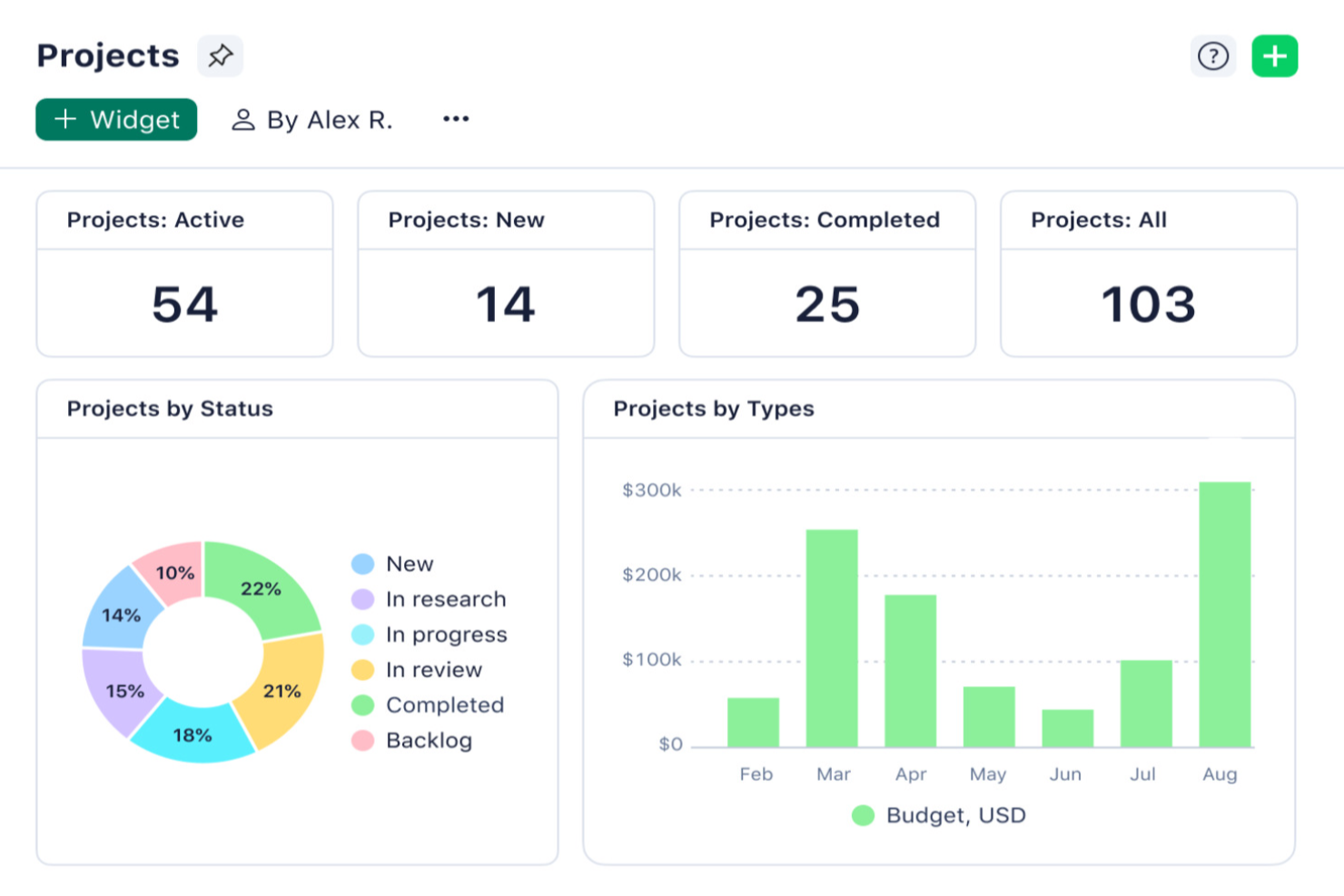
Wrike è un software di project management completo pensato per migliorare i flussi di lavoro e la collaborazione all'interno dei team. Offre una piattaforma versatile che supporta la gestione delle attività, la pianificazione dei progetti e la collaborazione in tempo reale, risultando adatta ad aziende di qualsiasi dimensione.
Perché è una buona alternativa a Workfront: Wrike si distingue per la sua facilità d'uso, le funzionalità di collaborazione in tempo reale e le ampie opzioni di personalizzazione. Sebbene Workfront sia noto per l'automazione strutturata dei flussi di lavoro, la flessibilità di Wrike lo rende particolarmente adatto a team che adottano metodologie di project management agile. Il supporto di Wrike per le pratiche agili, come i moduli di richiesta dinamici e le strutture di scomposizione del lavoro scalabili, garantisce ai team una rapida risposta ai cambiamenti e il mantenimento del ritmo di progetto.
Caratteristiche principali & integrazioni:
Le caratteristiche includono moduli di richiesta dinamici, collaborazione in tempo reale, strutture di scomposizione del lavoro (WBS) scalabili, dashboard a 360°, flussi di lavoro automatizzati, analisi intelligenti, funzionalità di cross-tagging, collaborazione con utenti esterni e un alto grado di personalizzazione.
Le integrazioni comprendono Google Drive, Dropbox, Microsoft OneDrive, Salesforce, HubSpot, Marketo, Slack, Microsoft Teams, Zoom, Google Calendar, Outlook, Jira, GitHub, Trello, Asana, Evernote e Zendesk.
Pros and Cons
Pros:
- Piattaforma altamente personalizzabile
- Buone funzionalità di gestione delle attività con workflow di approvazione e revisione
- Capacità di gestione delle risorse e dei carichi di lavoro
Cons:
- L'app mobile non è robusta come la versione desktop
- Potrebbe essere necessario un po' di tempo per apprendere la piattaforma
New Product Updates from Wrike
Wrike Adds Klaxoon MCP Integration
Wrike’s Klaxoon MCP integration is now generally available, enabling AI agents to navigate between Wrike tasks and attached whiteboards, read task context, and manage whiteboard attachments via API. For more information, visit Wrike's official site.

Notion
Ideale per sistemi unificati
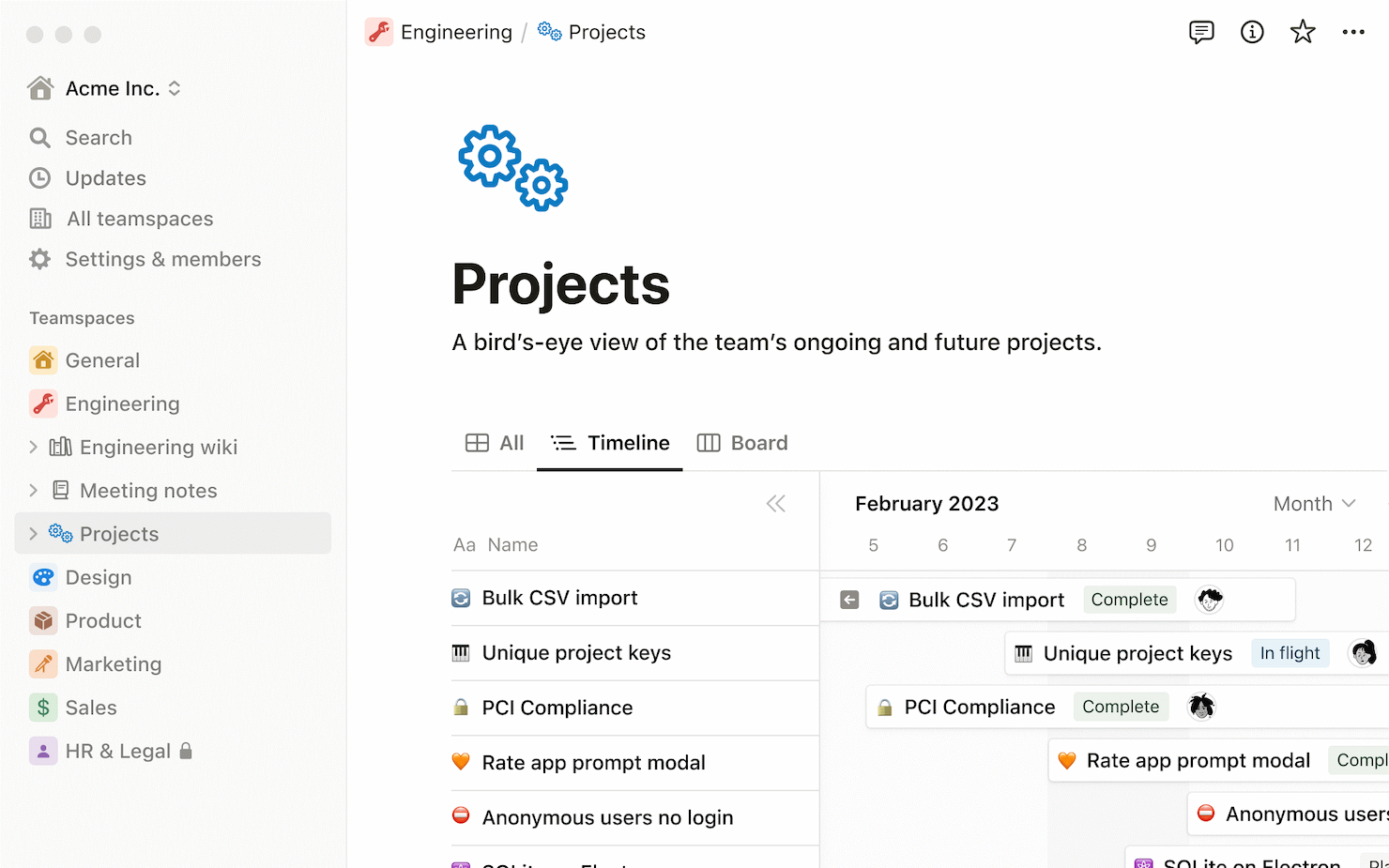
Notion è uno strumento versatile di produttività e organizzazione che combina molteplici funzionalità in un'unica piattaforma. È ideale per sistemi unificati grazie alla sua capacità di integrare la presa di appunti, la gestione delle attività, i database e l'archiviazione di documenti, permettendo di incorporarli in varie configurazioni.
Perché è una buona alternativa a Workfront: Ho scelto Notion per questa lista perché offre una combinazione unica di documentazione, gestione dei dati e monitoraggio dei progetti in un'unica piattaforma. Questo lo rende un'alternativa interessante a Workfront, soprattutto per i team che cercano un approccio più integrato alla gestione del lavoro.
Funzionalità principali e integrazioni:
Le funzionalità includono modelli personalizzabili, collaborazione in tempo reale, supporto per contenuti multimediali, fogli di calcolo e database incorporati, bacheche Kanban, viste calendario, supporto markdown, liste di cose da fare, promemoria e un sistema gerarchico di organizzazione per pagine e sottopagine.
Le integrazioni includono Slack, Google Drive, Figma, GitHub, Trello, Asana, Jira ed Evernote.
Pros and Cons
Pros:
- Spazio di lavoro tutto-in-uno versatile
- Ampie opzioni di personalizzazione
- Piano gratuito disponibile per i membri del team
Cons:
- Può risultare complesso per i nuovi utenti
- Funzionalità offline limitate

Workzone
Ideale per i moduli pre-costruiti per la raccolta delle richieste di progetto
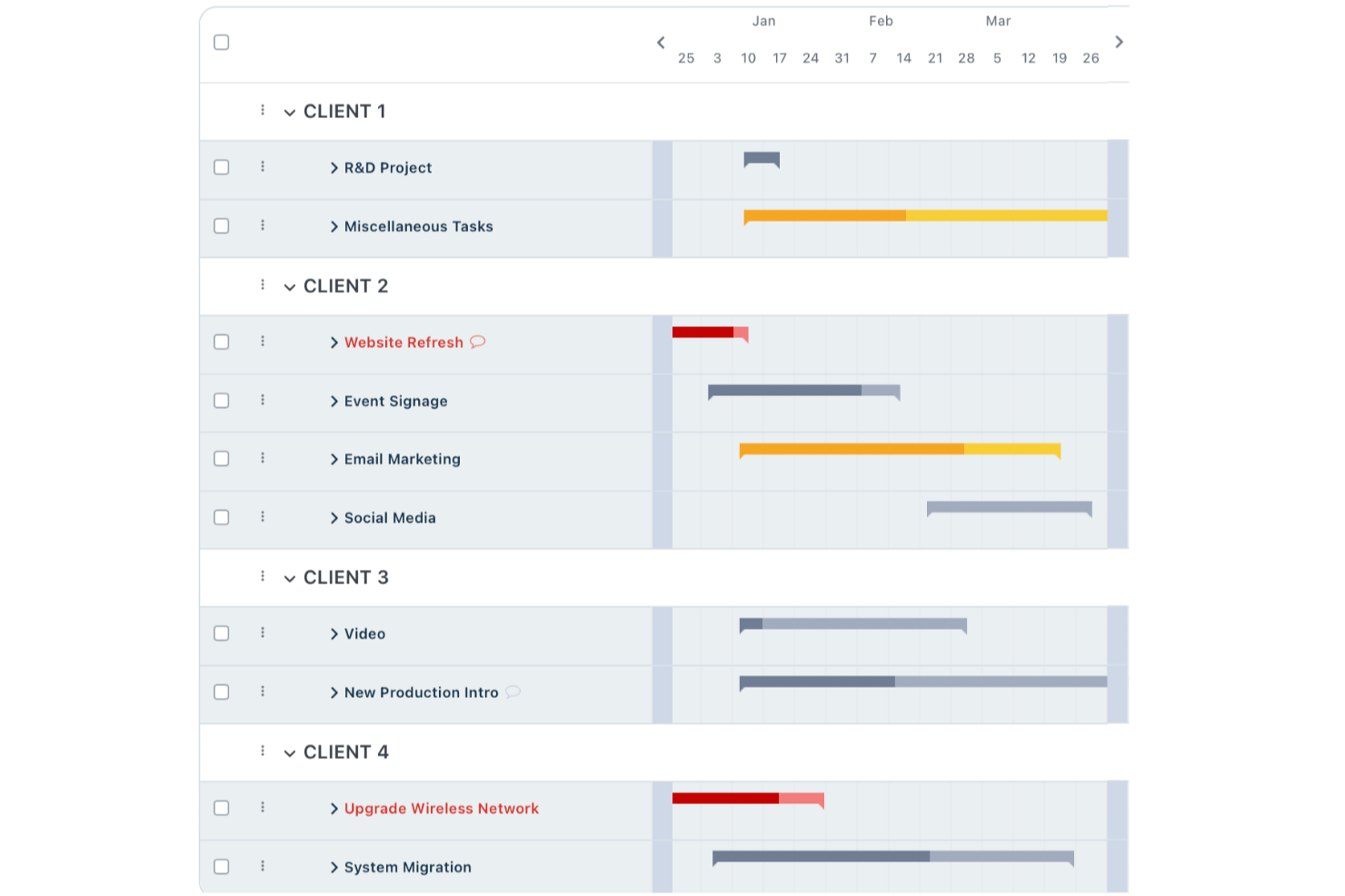
Workzone offre una soluzione di project management facile da usare, pensata per team di marketing, operations, IT e altri settori. Potrai apprezzare la visibilità in tempo reale sui progetti e la gestione organizzata delle richieste, elementi che alleggeriscono le comuni difficoltà nella gestione di più stakeholder e attività urgenti. Migliorando la collaborazione grazie a strumenti efficienti e integrandosi con piattaforme come Slack e Google Drive, Workzone si distingue come alternativa flessibile a Workfront.
Perché ho scelto Workzone
Ho scelto Workzone per la sua enfasi sulla visibilità dei progetti in tempo reale e sulla gestione organizzata delle richieste, funzionalità fondamentali per i team che stanno passando da Workfront. Apprezzerai come i moduli predefiniti di Workzone semplifichino la raccolta delle richieste di progetto, riducendo il sovraccarico di email inutili. Inoltre, la gestione centralizzata delle richieste è in linea con le esigenze dei team che gestiscono più progetti contemporaneamente, assicurando il monitoraggio delle priorità senza perdere il focus. Queste caratteristiche rendono Workzone una scelta adeguata per chi cerca un’alternativa a Workfront.
Funzionalità principali di Workzone
Oltre alla particolare attenzione all’accoglienza dei progetti e alla gestione delle richieste, ho riscontrato anche diverse altre funzionalità che ne aumentano l’attrattiva come alternativa a Workfront.
- Report predefiniti: Workzone offre report predefiniti per la gestione del carico di lavoro e del budget, fornendo al tuo team una panoramica sullo stato dei progetti e sulla distribuzione delle risorse.
- Modelli specifici per settore: Con oltre 1.000 modelli, puoi avviare rapidamente progetti calibrati sulle esigenze specifiche dell’industria, risparmiando tempo nella configurazione.
- Formazione e assistenza illimitate: Workzone garantisce un’adozione fluida grazie a formazione e assistenza illimitate, permettendo al tuo team di sfruttare al massimo il potenziale della piattaforma.
- Flussi di lavoro personalizzabili: Puoi adattare i flussi di lavoro ai processi unici del tuo team, migliorando efficienza e collaborazione.
Integrazioni di Workzone
Le integrazioni includono Slack, Microsoft Teams, Google Drive, Dropbox, Box, Outlook, OneDrive, Salesforce, QuickBooks e SharePoint.
Pros and Cons
Pros:
- Ottima visibilità e monitoraggio dei progetti
- Revisione e approvazione dei documenti integrate
- Gestione strutturata delle richieste e dei carichi di lavoro
Cons:
- Ecosistema di integrazioni più limitato rispetto ai concorrenti
- Esperienza mobile meno performante rispetto a desktop
New Product Updates from Workzone

Workzone Enterprise Adds Multi-Stage Approval Workflows
Workzone Enterprise now includes Approval Workflows, enabling multi-stage document approvals to standardize complex processes and reduce manual effort. For more information, visit Workzone's official site.
 .
.
ProofHub
Ideale per il controllo centralizzato dei progetti
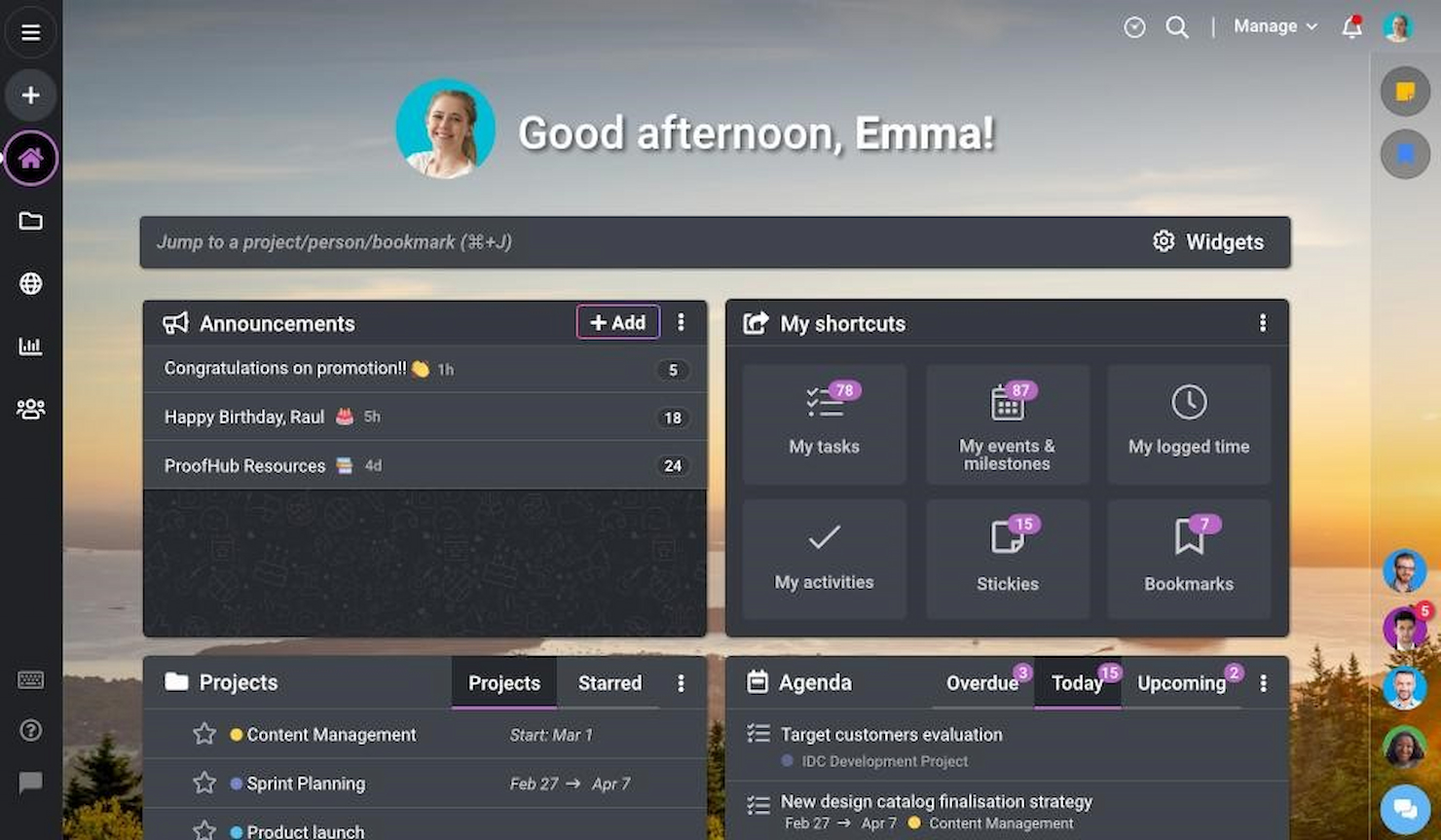
ProofHub è un software di gestione progetti e collaborazione di squadra che centralizza il controllo sui progetti. È ideale per il controllo centralizzato dei progetti perché offre una piattaforma unica per pianificare, eseguire, monitorare e gestire i progetti, assicurando che tutti siano allineati e informati.
Perché è una buona alternativa a Workfront: Ho scelto ProofHub per questa lista perché offre una vasta gamma di strumenti per la gestione centralizzata dei progetti, fondamentale per i team che necessitano di mantenere un alto livello di organizzazione e collaborazione in tempo reale. La sua capacità di centralizzare il controllo sui progetti lo rende una delle migliori alternative a Workfront, specialmente per i team che richiedono una visione unificata dei propri progetti e attività.
Funzionalità e integrazioni principali:
Le funzionalità includono gestione delle attività con più visualizzazioni come tabella, bacheca e diagramma di Gantt, collaborazione in tempo reale, discussioni e chat, condivisione file e controllo delle versioni, ruoli personalizzati e autorizzazioni, monitoraggio del tempo, calendario e pianificazione, note, annunci, report, strumenti di revisione e feedback.
Le integrazioni includono Google Drive, Dropbox, Box, OneDrive, FreshBooks, QuickBooks e Xero.
Pros and Cons
Pros:
- Vista unificata per la gestione di progetti e attività
- Interfaccia intuitiva
- Prezzo a tariffa unica che si adatta bene alla crescita
Cons:
- Opzioni di personalizzazione limitate
- Mancano funzionalità avanzate di project management

Ideale per la tracciabilità dei progetti dei clienti

Teamwork è un software di gestione progetti e collaborazione progettato per aiutare i team a organizzare, monitorare e gestire il proprio lavoro. Si distingue per il monitoraggio di attività, tempistiche, stato dei progetti e minuti fatturabili, rendendolo ideale per la tracciabilità dei progetti dei clienti.
Perché è una buona alternativa a Workfront: Ho scelto Teamwork per questa lista perché offre un focus specializzato sulla gestione dei progetti per i clienti, essenziale per le aziende che devono gestire più progetti cliente contemporaneamente. La sua capacità di fornire un monitoraggio dettagliato e una gestione accurata di attività, scadenze e minuti fatturabili lo rendono un’alternativa a Workfront di rilievo.
Funzionalità e integrazioni principali:
Le funzionalità includono gestione delle attività con sotto-attività e dipendenze, monitoraggio del tempo, diagrammi di Gantt, traguardi, collaborazione in tempo reale, gestione dei documenti, strumenti di reportistica, pianificazione delle risorse, bacheche Kanban, registro dei rischi, fatturazione e gestione delle fatture, portali per i clienti e modelli personalizzabili.
Le integrazioni includono HubSpot, QuickBooks, Xero, Dropbox, Google Drive, Box e Microsoft Office.
Pros and Cons
Pros:
- Specializzato nella tracciabilità dei progetti dei clienti
- Offre una prova gratuita di 30 giorni
- Capacità di gestione delle risorse
Cons:
- Non menziona un piano gratuito
- Richiede un minimo di 5 utenti
Ideale per la gestione delle dipendenze tra attività di progetto
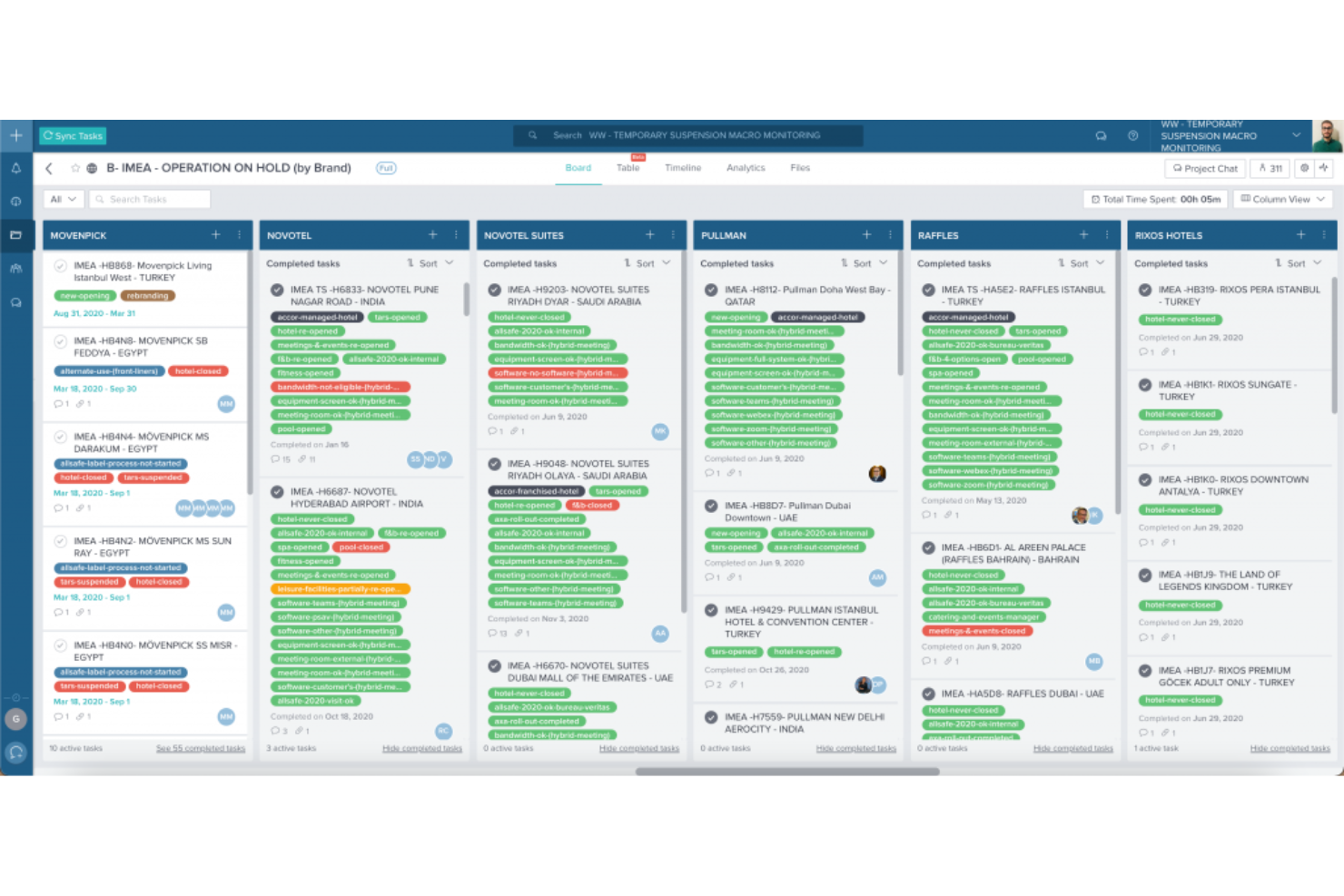
Taskworld è uno strumento di gestione dei progetti progettato per aiutare i team a organizzare le attività, comunicare efficacemente e monitorare i progressi. Offre diverse funzionalità per supportare la pianificazione, il monitoraggio e il completamento rapido ed efficiente dei progetti.
Perché è una valida alternativa a Workfront: Ho scelto Taskworld come ottima alternativa a Workfront per le sue ampie capacità di gestione delle attività, che consentono di suddividere facilmente i progetti in compiti più piccoli e gestibili, assegnandoli a specifici membri del team. Questa struttura favorisce la collaborazione e la responsabilità, poiché ogni attività può avere i propri dettagli, scadenze e discussioni, mantenendo tutto organizzato in un unico luogo. Le dipendenze tra le attività di Taskworld permettono inoltre di impostare una sequenza di completamento, assicurando che nulla venga lasciato incompleto e fornendo una chiara roadmap anche per i progetti più complessi.
Caratteristiche principali & integrazioni:
Le funzionalità includono la visualizzazione della timeline, modelli di progetto, commenti alle attività, funzionalità drag-and-drop, cronologia dei progetti, feed delle attività, liste di attività private, condivisione di file, bacheche visuali, monitoraggio dei sotto-attività, etichette colorate e aggiornamenti quotidiani sui progressi.
Le integrazioni includono Google Calendar, Google Meet, Google Drive, Box.com, Dropbox, GitHub, Slack, Microsoft Teams, Zapier e DocuSign.
Pros and Cons
Pros:
- Visualizzazione intuitiva di attività e progetti
- Notifiche personalizzabili evitano il sovraccarico
- Le dipendenze tra attività creano flussi di lavoro chiari
Cons:
- Personalizzazione limitata in alcune visualizzazioni
- L'app mobile potrebbe essere più robusta
Podio
Ideale per spazi di lavoro personalizzabili

Podio è uno strumento di gestione progetti versatile che facilita la collaborazione tra i membri del team e il monitoraggio dei progetti. È ideale per spazi di lavoro personalizzabili grazie alla sua piattaforma flessibile, che può essere adattata a qualsiasi progetto o flusso di lavoro.
Perché è una valida alternativa a Workfront: Ho scelto Podio come alternativa a Workfront per la sua interfaccia altamente personalizzabile e la sua struttura tariffaria accessibile, che la rendono alla portata di piccole e medie imprese, pur essendo abbastanza solida per le grandi aziende. Supporta una vasta gamma di flussi di lavoro e processi grazie alla configurazione basata su app, permettendo agli utenti di adattare la piattaforma alle esigenze specifiche dei loro progetti.
Caratteristiche principali e integrazioni:
Caratteristiche includono gestione delle attività, marketplace di app con app predefinite e personalizzate, automazione dei flussi di lavoro, visualizzazione dei dati tramite report e viste, comunicazione in tempo reale tramite chat e commenti, condivisione di file, integrazione con calendario, integrazione email, controllo accessi basato sui ruoli e collaborazione con utenti esterni.
Le integrazioni comprendono Google Drive, Dropbox, Evernote, Zendesk, GoToMeeting, FreshBooks, Campaign Monitor, Excel e Gmail.
Pros and Cons
Pros:
- Ampie opzioni di personalizzazione
- Gestione delle attività integrata
- Flussi di lavoro automatizzati
Cons:
- Curva di apprendimento più ripida per i nuovi utenti
- Può risultare costoso per le piccole imprese
nTask
Ideale per una gestione progetti flessibile

nTask è una piattaforma di gestione progetti online progettata per aiutare te e il tuo team a gestire in modo efficiente attività, progetti e collaborazioni.
Perché è una buona alternativa a Workfront: Le funzionalità di project management di nTask ti permettono di creare e gestire più progetti con facilità. Puoi impostare date di inizio e fine, definire traguardi e allocare le risorse in modo efficace. La piattaforma offre diverse visualizzazioni, tra cui elenco, griglia, calendario, diagramma di Gantt e bacheca Kanban, consentendoti di visualizzare i tuoi progetti nel modo più adatto al tuo flusso di lavoro. Questa flessibilità aiuta a monitorare i progressi e a garantire il completamento puntuale delle attività.
Caratteristiche principali & integrazioni:
Le funzionalità includono gestione delle riunioni, gestione delle attività, collaborazione del team, condivisione dei documenti, liste di cose da fare, pianificazione dei progetti, allocazione delle risorse, fogli presenze, ruoli e permessi, personalizzazione dello spazio di lavoro, monitoraggio del budget, traguardi e sotto-attività.
Le integrazioni includono Google Calendar, Microsoft Teams, Outlook Calendar, Zapier, Asana, monday.com, ClickUp e Microsoft Outlook.
Pros and Cons
Pros:
- Diagrammi di Gantt intuitivi
- Funzionalità di collaborazione in tempo reale
- Gestione completa delle attività
Cons:
- La versione mobile è meno robusta rispetto a quella desktop
- Mancano funzionalità avanzate di automazione

Ravetree
Ideale per flussi di lavoro Agile e Scrum

Ravetree è una piattaforma di gestione progetti progettata per riunire tutte le esigenze di project management in un unico luogo. Grazie alla sua suite di funzionalità, supporta i team nella gestione di progetti, risorse e interazioni con i clienti.
Perché è una buona alternativa a Workfront: Ho scelto Ravetree come alternativa a Workfront per le sue potenti funzionalità di gestione dei progetti, che permettono ai team di gestire attività, tempistiche e risorse, supportando al contempo flussi di lavoro Agile e Scrum. Offre anche portali per i clienti per una migliore comunicazione, strumenti di pianificazione delle risorse per gestire la capacità del team e funzioni integrate di monitoraggio di tempi e spese per mantenere i budget sotto controllo – tutto in un'unica piattaforma che fornisce una visione completa dei tuoi progetti.
Caratteristiche principali e integrazioni:
Funzionalità includono l'integrazione con CRM, che permette di gestire i contatti, le pipeline di vendita e le interazioni con i clienti tutto in un unico posto. La gestione della fatturazione è un'altra caratteristica fondamentale, che permette di gestire fatture e pagamenti senza uscire dalla piattaforma. Le informazioni finanziarie in tempo reale ti danno una visione chiara della salute finanziaria del tuo progetto, aiutandoti a prendere decisioni basate sui dati.
Le integrazioni includono Dropbox, Google Drive, One Drive, Outlook, Gmail, Box, Hubspot, Google Calendar, Quickbooks, Xero, Stripe ed Exchange.
Pros and Cons
Pros:
- Offre una visione olistica di tutti i progetti e del loro stato
- Supporta Scrum e Kanban, soddisfacendo le esigenze dei team Agile
- Favorisce una comunicazione più fluida e trasparente con i clienti
Cons:
- L'interfaccia ricca di funzionalità può risultare affollata a causa delle numerose funzionalità
- Offre meno flessibilità nella personalizzazione dell'interfaccia e dei flussi di lavoro rispetto ai concorrenti
Altre alternative a Workfront
Ecco alcune ulteriori alternative a Workfront che ho selezionato. Non sono rientrate tra le prime 10, ma vale la pena prenderle in considerazione se non hai trovato una buona alternativa qui sopra.
- Trello
Ideale per l'organizzazione visiva delle attività
- Jira
Ideale per lo sviluppo software in modalità Agile
- Zoho Projects
Ideale per la pianificazione versatile dei progetti
- RoboHead
Ideale per revisioni e approvazioni creative direttamente in-app


Trova altre opzioni in questo elenco di alternative a Coda.
Recensioni correlate sui software di gestione dei progetti
Se non hai ancora trovato quello che cerchi qui, dai un'occhiata a questi altri strumenti correlati che abbiamo testato e valutato:
- Software di gestione dei progetti
- Software di gestione delle risorse
- Software di automazione dei flussi di lavoro
- Software per il monitoraggio del tempo
- Software di gestione delle attività
- Strumenti di collaborazione
- Creatore di diagrammi di Gantt
- Strumenti di produttività
- Software per il monitoraggio dei progetti
- Software per la pianificazione dei progetti
Come valuto le alternative a Workfront
Divido la mia valutazione in requisiti di base, come la reportistica del portafoglio e la pianificazione delle risorse, e fattori distintivi che separano gli strumenti progettati per i PMO aziendali da quelli che lo sembrano soltanto.
Funzionalità di base (requisiti imprescindibili per questo elenco)
Quando seleziono gli strumenti da inserire nel mio elenco, assegno a ciascuno un punteggio su una scala da 0 (non offre la funzionalità) a 5 (eccelle in quest'area) per ogni funzionalità di base elencata di seguito. Quindi converto il punteggio totale dello strumento in una percentuale. Ogni strumento deve raggiungere un punteggio totale minimo del 75% per essere preso in considerazione.
- Gestione del lavoro aziendale: cerco piattaforme che consentano di organizzare il lavoro tra più team e reparti: per esempio, gestire il lancio di un prodotto in cui marketing, ingegneria e progettazione necessitano tutti di strutture di progetto nidificate all'interno di un unico programma.
- Pianificazione delle risorse e della capacità: ogni strumento dovrebbe offrire viste del carico di lavoro e funzionalità di allocazione, così da poter individuare i membri del team sovraccarichi e ribilanciare le assegnazioni tra progetti simultanei prima che le scadenze slittino.
- Flussi di lavoro personalizzati e automazione: valuto se sia possibile creare moduli di richiesta, catene di approvazione e automazioni basate su regole, come l'instradamento automatico di un brief creativo dal richiedente al responsabile di progetto e poi al responsabile della progettazione, in base al tipo di progetto.
- Reportistica e dashboard del portafoglio: in questo caso sono importanti i riepiloghi tra progetti e le dashboard configurabili. Verifico se la dirigenza può ottenere aggiornamenti di stato in tempo reale su un intero portafoglio senza dover inseguire i responsabili di progetto per aggiornamenti manuali.
- Revisione e collaborazione sui contenuti: per i team che revisionano contenuti creativi, considero gli strumenti nativi di annotazione, il controllo delle versioni e i flussi di lavoro di approvazione: quelli in cui un progettista carica un contenuto revisionato e i revisori lo confrontano fianco a fianco con la versione precedente.
- Integrazioni e governance aziendali: la piattaforma dovrebbe connettersi agli strumenti già utilizzati dai team (Jira, Salesforce, fornitori SSO) e offrire autorizzazioni basate sui ruoli, tracce di audit e controlli amministrativi adatti a implementazioni su larga scala.
Una volta ottenuto un elenco di strumenti che soddisfano questo criterio, considero ciò che distingue ciascuna piattaforma.
Fattori distintivi (ciò che differenzia i fornitori)
Ecco come confronto e metto in contrapposizione i diversi fornitori:
Funzionalità di spicco
La gestione strategica del portafoglio è un importante fattore distintivo: valuto se uno strumento consente di collegare il lavoro di progetto agli OKR o agli obiettivi aziendali, in modo che la dirigenza possa stabilire le priorità degli investimenti, anziché limitarsi a monitorare le attività. Per i team delle agenzie e dei servizi professionali, considero anche il monitoraggio nativo del tempo e la gestione delle tariffe fatturabili, poiché questi team hanno bisogno di visibilità sul rapporto tra budget e consuntivo senza aggiungere uno strumento separato. Anche la collaborazione con clienti e ospiti è importante. Quando le parti interessate esterne devono revisionare i risultati finali o approvare le tappe fondamentali, portali dedicati agli ospiti mantengono il flusso di lavoro all'interno della piattaforma.
Oltre le funzionalità
Un motivo importante per cui i team abbandonano Workfront è il vincolo imposto dall'ecosistema Adobe, quindi valuto se ciascuna alternativa si integri autonomamente con gli strumenti di marketing e creativi, senza costringerti ad adottare lo stack di un unico fornitore. Anche i tempi di implementazione hanno un peso significativo. Le implementazioni di Workfront possono protrarsi per diversi trimestri, quindi verifico se una piattaforma offre modelli predefiniti per PMO e marketing che riducano il tempo necessario per ottenere valore. Anche il costo totale di proprietà è importante, soprattutto in presenza di prezzi trasparenti per utente e costi prevedibili per i componenti aggiuntivi, che i team del mercato intermedio possano effettivamente prevedere a budget.
Perché utilizzare un'alternativa a Workfront?
Potresti cercare un'alternativa a Workfront se:
- Hai bisogno di un costo inferiore: Workfront potrebbe essere troppo costoso se sei una piccola azienda o una startup con un budget limitato.
- Lo trovi troppo complesso: Potresti trovare Workfront troppo complesso o ricco di funzionalità e desiderare un'alternativa più semplice, più facile da usare e da gestire.
- Hai bisogno di funzionalità specifiche: Hai bisogno di funzionalità specifiche non offerte da Workfront, come analisi avanzate, strumenti migliori per la gestione agile dei progetti o integrazioni CRM più approfondite.
- Preferisci un'esperienza utente migliore: L'interfaccia e l'esperienza utente di Workfront sono inferiori a quelle offerte da altri strumenti e potresti preferire uno strumento più intuitivo.
- Hai bisogno di qualcosa che cresca insieme alla tua azienda: Hai bisogno di una soluzione che si adatti alla crescita del tuo team e dei tuoi progetti o che offra un supporto e una formazione migliori per i team più grandi.
- Hai bisogno di più opzioni di integrazione: Se Workfront non offre integrazioni con gli altri strumenti che stai utilizzando, è meglio cercare un'opzione che le offra.
Funzionalità principali delle alternative a Workfront
Ecco alcune funzionalità principali che la tua alternativa a Workfront dovrebbe offrire o migliorare per essere adatta alle tue esigenze:
- Automazione dei flussi di lavoro: L'automazione delle attività aumenta la produttività riducendo il lavoro manuale e migliorando i processi. Ciò consente ai membri del team di concentrarsi su attività più strategiche.
- Strumenti di collaborazione: Una comunicazione centralizzata migliora il coordinamento del team, la trasparenza dei progetti e il processo decisionale.
- Gestione delle campagne: Dovresti poter gestire e monitorare campagne multicanale da un'unica piattaforma. Ciò garantisce messaggi coerenti e un facile monitoraggio delle prestazioni sui vari canali.
- Gestione delle risorse: Gli strumenti di gestione delle risorse consentono di bilanciare i carichi di lavoro e assegnare le attività in modo efficace. Potrai ottimizzare il rendimento del team e prevenire il burnout.
- Reportistica e analisi: Con i dati giusti, puoi prendere decisioni più strategiche e identificare tendenze, colli di bottiglia e opportunità. Questo ti aiuta a essere un manager più proattivo e a perfezionare i tuoi processi.
- Dashboard personalizzabili: Puoi adattare report e presentazioni alle esigenze specifiche del progetto o dell'organizzazione, fornire agli stakeholder informazioni pertinenti e migliorare la comprensione e la comunicazione.
- Monitoraggio del tempo: Ciò fornisce report dettagliati sulla durata dei progetti e delle attività, consentendoti di fatturare accuratamente i clienti e allocare le risorse, valutare la produttività e garantire che i progetti rispettino il budget e le tempistiche.
- Gestione dei documenti: Conservare i documenti del progetto in un luogo centralizzato garantisce un accesso coerente ai membri del team di progetto, facilitando una migliore collaborazione e continuità.
- Funzionalità di integrazione: Lo strumento scelto dovrebbe connettersi a tutti gli altri strumenti utilizzati per migliorare l'efficienza del flusso di lavoro e creare un ecosistema tecnologico che supporti le esigenze operative.
- Accessibilità da dispositivi mobili: Ciò garantisce che i membri del team possano rimanere aggiornati e contribuire indipendentemente dalla loro posizione. Questo favorisce la flessibilità e la connettività continua nel tuo ambiente di lavoro.