

Die 10 besten Document360-Alternativen für Hilfedokumentation im Jahr 2026

10 Auswahl der besten Document360-Alternativen


Die Verwaltung internen Wissens sollte sich nicht wie eine Behelfslösung anfühlen. Wenn Document360 nicht die Flexibilität, Integrationen oder Skalierbarkeit bietet, die Ihr Team benötigt, verbringen Sie wahrscheinlich mehr Zeit mit der Pflege Ihrer Wissensdatenbank, als sie zu verbessern.
Das richtige Wissensmanagement-Tool sollte Reibungsverluste verringern – und nicht zusätzliche verursachen. Nach der Prüfung und dem Vergleich führender Alternativen habe ich die besten Optionen anhand von Benutzerfreundlichkeit, Anpassungsmöglichkeiten, Integrationen und langfristiger Eignung eingegrenzt.
In diesem Leitfaden finden Sie die besten Document360-Alternativen, ihre Stärken und Schwächen sowie die Teamtypen, für die sie sich am besten eignen – damit Sie eine Plattform auswählen können, die die Arbeitsweise Ihres Teams tatsächlich unterstützt.
Was ist Document360?
Document360 ist eine Software zur Wissensverwaltung, die Sie und Ihr Team dabei unterstützt, Informationen effizient zu organisieren und zu teilen. Sie wird häufig von Projektmanagern, Kundensupport-Teams und IT-Fachleuten eingesetzt, die ein zuverlässiges Tool zur Verwaltung von Dokumentationen benötigen.
Der Funktionsumfang mit Versionskontrolle, Analysen und einem benutzerfreundlichen Editor hilft dabei, übersichtliche und leicht zugängliche Wissensdatenbanken zu pflegen. Insgesamt optimiert Document360 die Erstellung, Pflege und den Zugriff auf Informationen durch Ihr Team.
Zusammenfassung der besten Document360-Alternativen
Diese Vergleichstabelle fasst die Preisinformationen meiner wichtigsten Document360-Alternativen zusammen und hilft Ihnen dabei, die beste Lösung für Ihr Budget und Ihre geschäftlichen Anforderungen zu finden.
| Tool | Best For | Trial Info | Price | ||
|---|---|---|---|---|---|
| 1 | Am besten für schlanke interne Wissenszentralen | Kostenloser Tarif verfügbar | Ab $6/Nutzer/Monat (jährlich abgerechnet) | Website | |
| 2 | Am besten für integrierte Teamtools geeignet | Kostenloser Tarif verfügbar | Ab 12 $/Benutzer/Monat (jährlich abgerechnet) | Website | |
| 3 | Am besten für KI-gestützte Selbstbedienung | Kostenloser Plan verfügbar | Ab $49/Autor/Monat (jährlich abgerechnet) | Website | |
| 4 | Am besten für datengestützte zentrale Wissenswerkzeuge | Kostenlose Demo verfügbar | Preis auf Anfrage | Website | |
| 5 | Am besten für dynamische Dokumentation geeignet | Kostenlose 14-Tage-Testversion verfügbar | Ab $80/Monat | Website | |
| 6 | Am besten zur Verbesserung des Kundenerlebnisses | Kostenlose Demo verfügbar | Preise auf Anfrage | Website | |
| 7 | Am besten für Arbeitsbereiche zur Teamzusammenarbeit | Kostenlose Testversion + kostenloser Plan verfügbar | Ab $5.42/Benutzer/Monat | Website | |
| 8 | Am besten geeignet für anpassbaren und kontrollierten Inhaltszugriff | 30-tägige kostenlose Testversion | Ab $100/Monat | Website | |
| 9 | Am besten für die Nachverfolgung von Nutzerfeedback geeignet | 10-tägige kostenlose Testversion + kostenloser Tarif + kostenlose Demo verfügbar | Ab $29/Sitz/Monat (jährlich abgerechnet) | Website | |
| 10 | Ideal für entwicklerorientierte API-Dokumentation | 14-tägige kostenlose Testversion + kostenloser Tarif verfügbar | Ab 65 $/Website/Monat + 12 $/Nutzer/Monat (jährlich abgerechnet) | Website |
Warum Sie unseren Software-Empfehlungen vertrauen können
Unser Team testet und bewertet Software seit 2012. Als Projektmanager wissen wir selbst, wie schwierig – und wichtig – es ist, die richtige Software auszuwählen.
Für diesen Leitfaden haben wir Tools mithilfe von praktischen Tests und unabhängiger Recherche bewertet und dabei unsere Bewertungskriterien angewendet. Zudem greifen wir auf Erkenntnisse von Branchenvordenkern und praktizierenden Projektmanagement-Experten zurück.
Unsere Bewertungen spiegeln unser menschliches redaktionelles Urteilsvermögen wider, keine Verkaufsstrategie.
Expertenprüfer:
Tests der besten Document360-Alternativen
Nachfolgend finden Sie meine detaillierten Zusammenfassungen der besten Document360-Alternativen, die es in meine Auswahl geschafft haben. Meine Tests bieten einen detaillierten Überblick über die wichtigsten Funktionen, Vor- und Nachteile, Integrationen und idealen Einsatzmöglichkeiten jedes Tools, damit Sie die beste Lösung für sich finden.

Nuclino
Am besten für schlanke interne Wissenszentralen
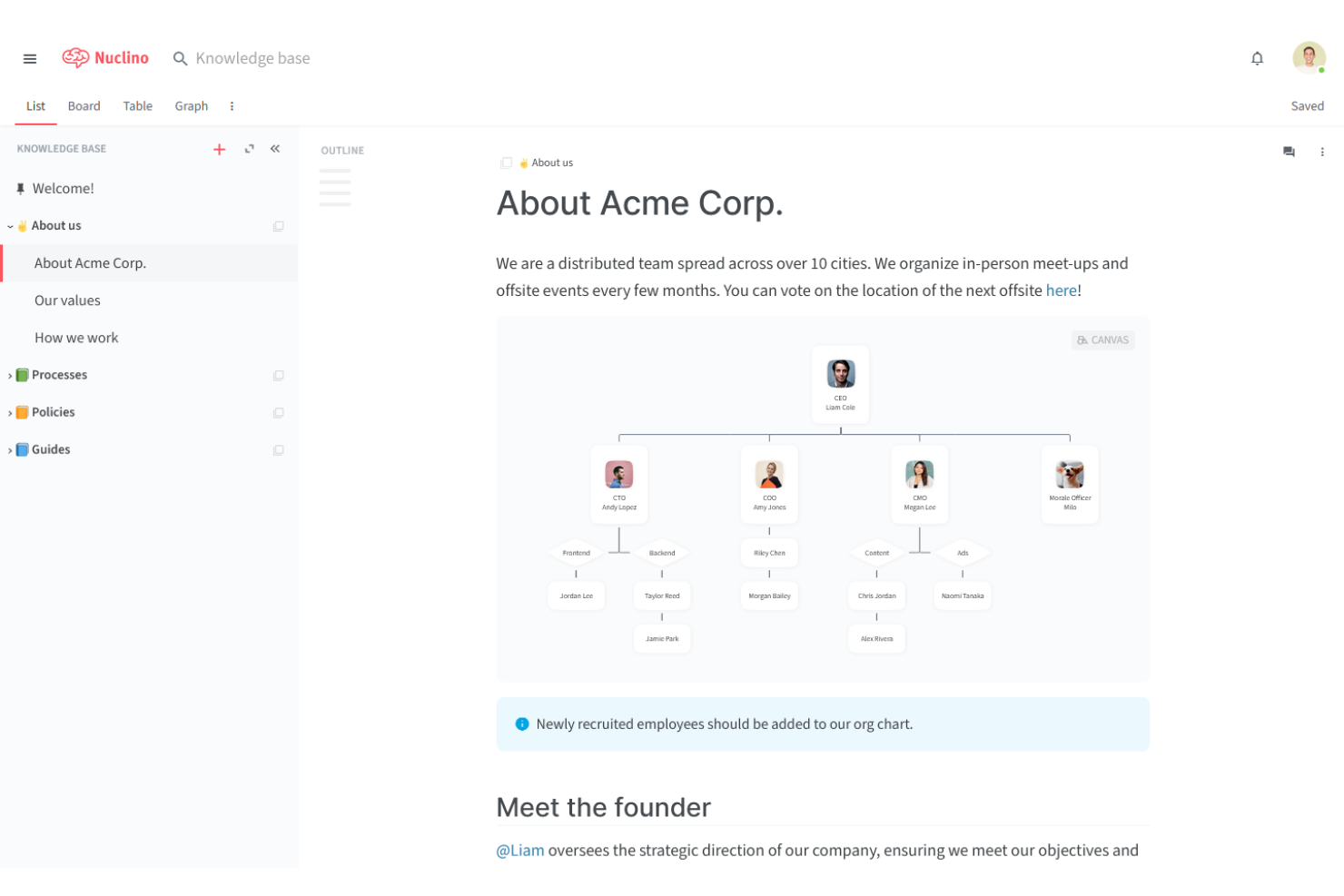
Nuclino ist ein kollaboratives Wissensmanagement-Tool, das ideal für kleine Teams ist, die Informationen mühelos organisieren und teilen möchten. Es ist bei Start-ups, kleinen Unternehmen und agilen Teams beliebt, um ihre Dokumentations- und Kommunikationsprozesse zu optimieren.
Warum es eine gute Document360-Alternative ist: Nuclino bietet einen visuellen Arbeitsbereich, eine Sofortsuche und Zusammenarbeit in Echtzeit, wodurch Wissen auf intuitivere Weise organisiert wird. Die Möglichkeit, verwandte Elemente über interne Links zu verknüpfen, sowie das schlanke Design machen Nuclino zu einer überzeugenden Wahl für Teams, die ihr Wissensmanagement optimieren möchten.
Herausragende Funktionen und Integrationen:
Zu den Funktionen gehört ein visueller Arbeitsbereich, der Ihrem Team hilft, Projekte und Ideen zu strukturieren. Mit der Sofortsuche finden Sie schnell die benötigten Informationen. Die Plattform unterstützt außerdem die Markdown-Formatierung für eine einfache Gestaltung und Erstellung von Inhalten.
Zu den Integrationen gehören Slack, Google Drive, GitHub Gist, Dropbox, OneDrive, Microsoft Teams, Figma, Lucidchart und mehr.
Pros and Cons
Pros:
- Einfaches und intuitives Design
- Sofortsuche
- Unterstützt Markdown-Formatierung
Cons:
- Eingeschränkte Massenoperationen
- Ineffizienter API-/Datenexport
Coda
Am besten für integrierte Teamtools geeignet

Coda ist eine vielseitige Plattform zur Dokumentverwaltung, die Dokumente, Tabellenkalkulationen und Apps in einem einheitlichen Arbeitsbereich vereint. Sie ist bei Projektmanagern, Produktteams und Start-ups beliebt, um Aufgaben zu organisieren und effizient zusammenzuarbeiten.
Warum es eine gute Alternative zu Document360 ist: Coda bietet interaktive Tabellen, anpassbare Vorlagen und Zusammenarbeit in Echtzeit, wodurch verschiedene Teamtools in einer Plattform integriert werden.
Besondere Funktionen und Integrationen:
Funktionen umfassen interaktive Tabellen, mit denen Ihr Team Daten ähnlich wie in Tabellenkalkulationen verwalten kann. Sie können anpassbare Vorlagen verwenden, um neue Projekte schnell einzurichten. Die Plattform unterstützt außerdem die Zusammenarbeit in Echtzeit, sodass Teammitglieder effektiv zusammenarbeiten können.
Integrationen umfassen Slack, Google Kalender, Jira, GitHub, Figma, Salesforce und weitere.
Pros and Cons
Pros:
- Vereint Dokumente und Tabellenkalkulationen
- Unterstützt die Zusammenarbeit in Echtzeit
- Integriert verschiedene Teamtools
Cons:
- Eingeschränkte Markdown-Unterstützung
- Es gelten API-/Synchronisierungslimits

Am besten für KI-gestützte Selbstbedienung
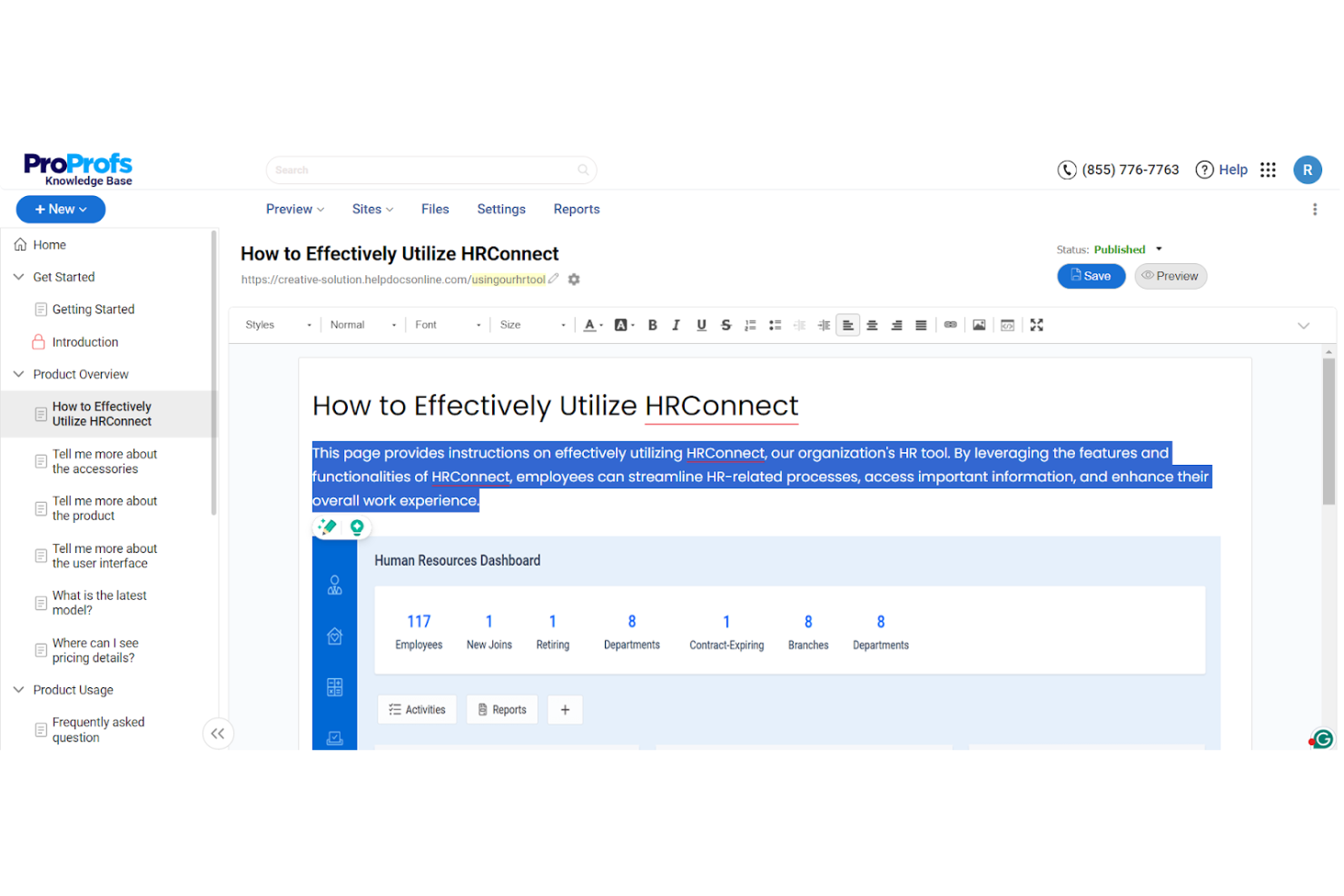
ProProfs Knowledge Base ist ein KI-gestütztes Wissensmanagement-Tool für Teams, die effiziente Dokumentation und Selbsthilfelösungen benötigen. Es wird von Kundenservice-, Vertriebs- und IT-Teams eingesetzt, um Support-Tickets zu reduzieren und den Zugang zu Informationen zu verbessern.
Warum es eine gute Alternative zu Document360 ist: ProProfs Knowledge Base zeichnet sich durch KI-gestützte Inhaltserstellung, einen anpassbaren Markenauftritt und Sicherheitskontrollen aus, die den Aufbau maßgeschneiderter und sicherer Wissenszentralen unterstützen. Außerdem bietet es kontextbezogene Hilfeelemente, integrierte Analysen, die zeigen, wie Nutzer mit den Inhalten interagieren, sowie KI-gestützte Einblicke für einen auf Automatisierung ausgerichteten Ansatz im Wissensmanagement.
Hervorstechende Funktionen und Integrationen:
Funktionen umfassen die KI-gestützte Inhaltserstellung, mit der Ihr Team effizient Artikel erstellen kann. Sie können den Markenauftritt an die Identität Ihres Unternehmens anpassen. Die Plattform unterstützt über 90 Sprachen und ist damit vielseitig für internationale Teams einsetzbar.
Integrationen umfassen Google Analytics, Zendesk, Freshdesk, Salesforce, Slack, Jira und mehr.
Pros and Cons
Pros:
- Mehrsprachige Unterstützung verfügbar
- Zusammenarbeit in Echtzeit
- Sichere Zugriffskontrollen
Cons:
- Grundlegende Nachverfolgung der Versionskontrolle
- Begrenzte Möglichkeiten für Massenaktionen bei Inhalten

Am besten für datengestützte zentrale Wissenswerkzeuge
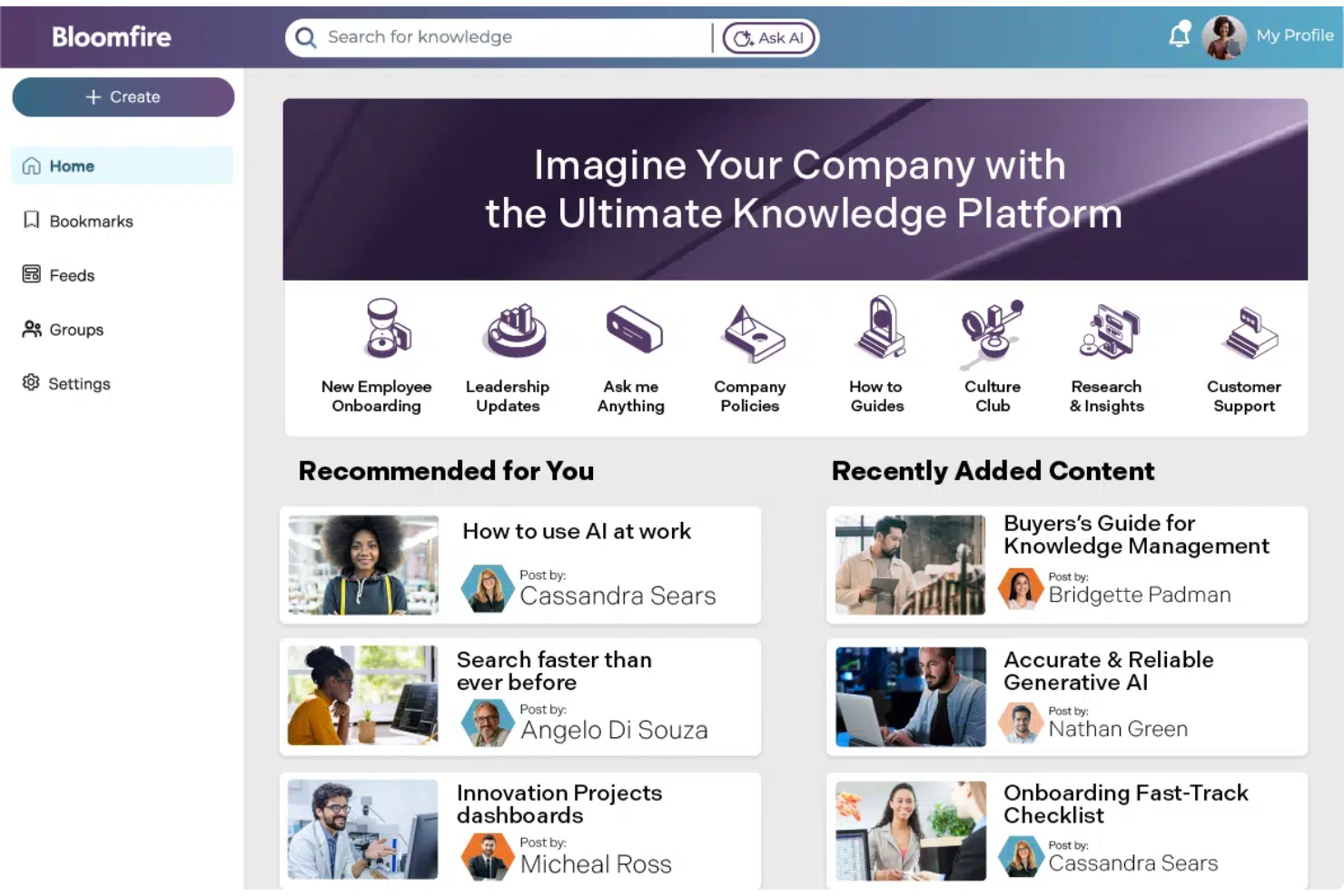
Bloomfire ist eine Plattform zum Teilen von Wissen, die Teams dabei unterstützt, Erkenntnisse effizient abzurufen und zu teilen. Sie wird hauptsächlich von Vertriebs-, Marketing- und Kundenservice-Teams eingesetzt, um die Zusammenarbeit und Entscheidungsprozesse zu verbessern.
Warum es eine gute Alternative zu Document360 ist: Bloomfire bietet erweiterte Suchfunktionen, Inhaltskategorisierung und Analysen, mit denen sich Datenerkenntnisse effektiver gewinnen lassen. Der Fokus auf datengestützte Entscheidungsfindung und die einfache gemeinsame Nutzung von Inhalten machen die Plattform zu einer geeigneten Wahl für Teams, die ihr Wissensmanagement mit umsetzbaren Erkenntnissen verbessern möchten.
Herausragende Funktionen und Integrationen:
Zu den Funktionen gehören anpassbare Inhaltsmarkierungen, die Ihrem Team helfen, Informationen schnell zu organisieren und abzurufen. Sie können den Frage-und-Antwort-Bereich nutzen, um interaktive Diskussionen zu fördern und Wissen zu teilen. Die Plattform unterstützt außerdem multimediale Inhalte, sodass Sie Videos, Bilder und Dokumente problemlos teilen können.
Zu den Integrationen gehören Salesforce, Slack, Microsoft Teams, Google Drive, Zendesk, SharePoint, Okta und weitere.
Pros and Cons
Pros:
- Unterstützt multimediale Inhalte
- Erweiterte Suchfunktionen
- Fördert interaktive Diskussionen
Cons:
- Die Suche erfordert eine genaue Formulierung
- Die Inhaltsindizierung verzögert sich gelegentlich

Archbee
Am besten für dynamische Dokumentation geeignet
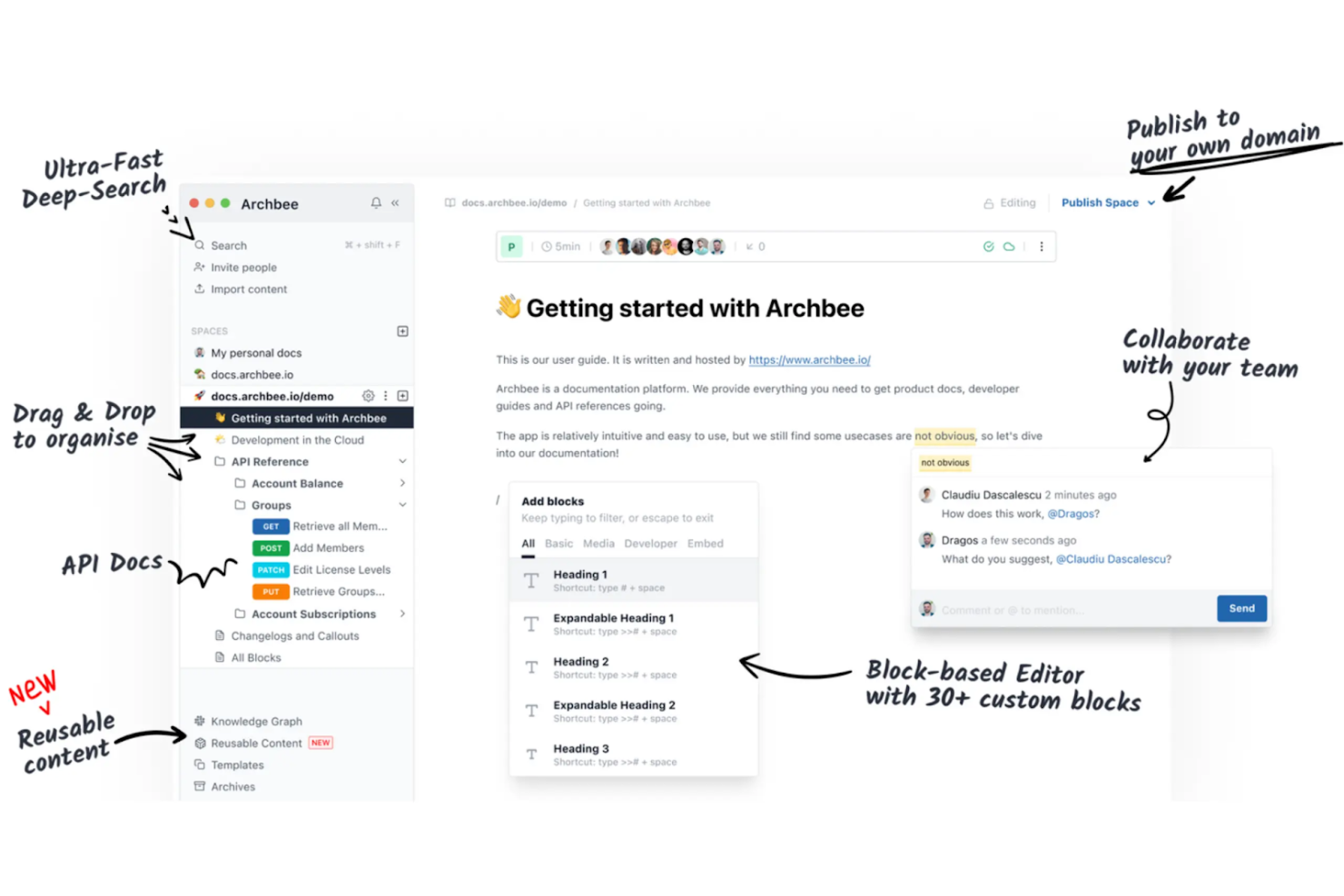
Archbee ist eine Dokumentationsplattform für Softwareteams und Start-ups, mit der sich Wissen effizient erstellen, verwalten und teilen lässt. Sie wird von Entwicklern und technischen Redakteuren genutzt, um dynamische Dokumentationen zu pflegen, die sich gemeinsam mit ihren Projekten weiterentwickeln.
Warum es eine gute Alternative zu Document360 ist: Archbee bietet gemeinsames Bearbeiten in Echtzeit, Markdown-Unterstützung und benutzerdefinierte API-Dokumentation, wodurch Inhalte aktuell und zugänglich bleiben. Der Fokus auf interaktive Dokumentation macht Archbee zu einer geeigneten Wahl für Teams, die ihre Kommunikation schnell anpassen müssen.
Hervorstechende Funktionen und Integrationen:
Zu den Funktionen gehört ein integrierter Diagrammeditor, mit dem Ihr Team komplexe Prozesse visualisieren kann. Mit dem Versionierungssystem können Sie Änderungen nachverfolgen und bei Bedarf rückgängig machen. Die Plattform unterstützt außerdem das Hosting unter einer benutzerdefinierten Domain für ein professionelles Erscheinungsbild.
Zu den Integrationen gehören Slack, GitHub, Google Analytics, Intercom, Trello, Jira, Zapier, Figma und weitere.
Pros and Cons
Pros:
- Hosting unter einer benutzerdefinierten Domain
- Gemeinsames Bearbeiten in Echtzeit
- Unterstützt benutzerdefinierte API-Dokumentation
Cons:
- Begrenzte Auswahl an Exportformaten
- Begrenzte Massenaktionen für Inhalte
Knowmax
Am besten zur Verbesserung des Kundenerlebnisses
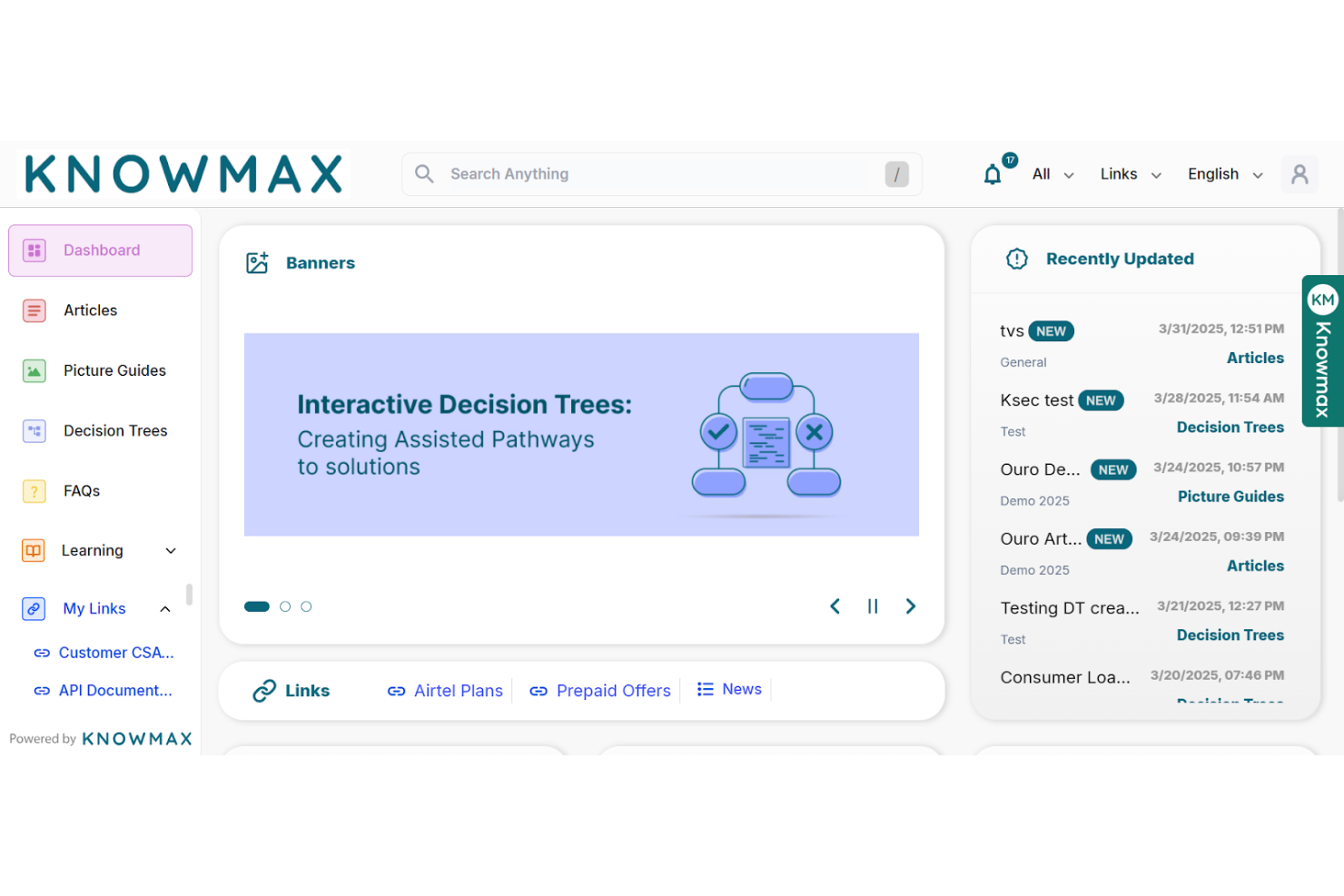
Knowmax ist eine KI-gesteuerte Wissensmanagementplattform, die darauf ausgelegt ist, das Kundenerlebnis in Branchen wie Telekommunikation, Banken und Gesundheitswesen zu verbessern. Sie wird von Kundenerlebnisteams eingesetzt, um schnellen Zugriff auf umsetzbares Wissen zu ermöglichen und die Servicebereitstellung zu verbessern.
Warum es eine gute Document360-Alternative ist: Knowmax bietet geführte Abläufe, visuelle Anleitungen zur Fehlerbehebung und Selbstbedienungskanäle, die Antwortzeiten verkürzen und die Kundenzufriedenheit erhöhen. Der Fokus auf KI-gesteuertes kontextbezogenes Wissen macht die Plattform ideal für Teams, die die Lösungsquote beim Erstkontakt und die allgemeine Servicequalität verbessern möchten.
Hervorzuhebende Funktionen und Integrationen:
Funktionen umfassen geführte Abläufe, die Ihrem Team helfen, Probleme schneller zu lösen. Visuelle Anleitungen zur Fehlerbehebung machen komplexe Prozesse leichter verständlich. Die Plattform unterstützt außerdem Selbstbedienungskanäle, um sich wiederholende Supportanfragen zu reduzieren.
Integrationen umfassen Salesforce, Zendesk, SAP, Freshdesk, Genesys und weitere.
Pros and Cons
Pros:
- Verbessert die Lösungsquote beim Erstkontakt
- Unterstützt mehrere Branchen
- Verkürzt die durchschnittliche Bearbeitungszeit
Cons:
- Grundlegende Funktionen für die Zusammenarbeit
- Unflexible Rollenberechtigungen

Am besten für Arbeitsbereiche zur Teamzusammenarbeit
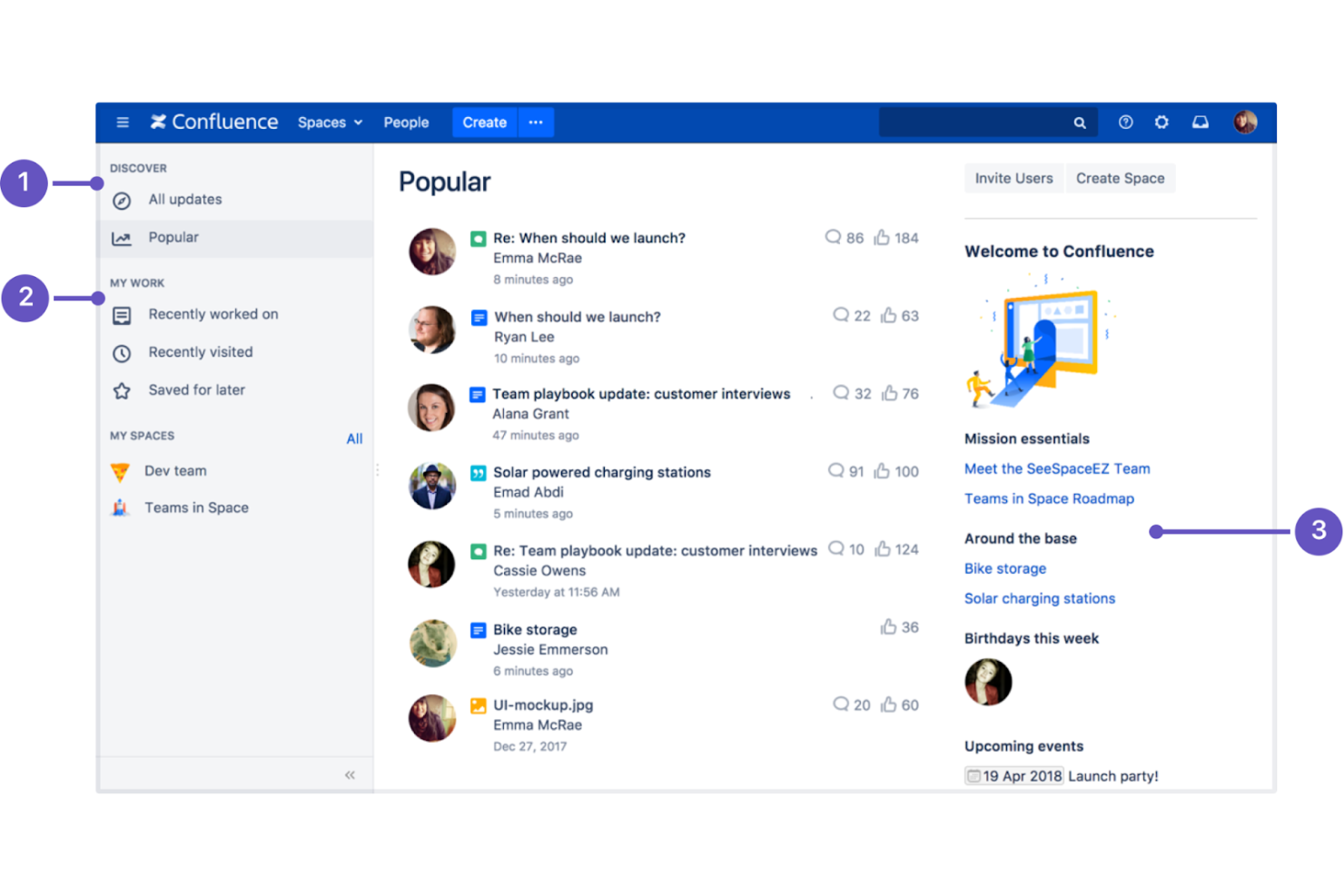
Confluence ist eine Software für kollaborative Arbeitsbereiche, die für Teams entwickelt wurde, die ihre Arbeit an einem Ort erstellen, organisieren und besprechen möchten. Sie wird häufig von Projektmanagern, Softwareentwicklern und IT-Fachleuten eingesetzt, um die Zusammenarbeit im Team und die Dokumentationsprozesse zu verbessern.
Warum es eine gute Document360-Alternative ist: Confluence bietet Bearbeitung in Echtzeit, anpassbare Vorlagen und einen Rich-Text-Editor für die gemeinsame Erstellung von Inhalten. Der starke Fokus auf Teamarbeit und die Integration mit anderen Atlassian-Produkten machen es zu einer vielseitigen Wahl für Teams, die ihre Kommunikation und ihr Content-Management verbessern möchten.
Hervorstechende Funktionen und Integrationen:
Zu den Funktionen gehört ein Seitenversionssystem, mit dem Sie Änderungen nachverfolgen und den Dokumentverlauf verwalten können. Sie können Aufgabenverwaltungstools verwenden, um Arbeit innerhalb Ihres Teams zuzuweisen und nachzuverfolgen. Die Plattform bietet außerdem eine Reihe von Vorlagen zur Verwaltung der Inhaltserstellung.
Zu den Integrationen gehören Jira, Trello, Bitbucket, Slack, Microsoft Teams, Google Drive, Dropbox, Zoom, GitHub, Lucidchart und weitere.
Pros and Cons
Pros:
- Unterstützt die Bearbeitung in Echtzeit
- Integration mit Atlassian-Tools
- Umfangreiche Vorlagenbibliothek
Cons:
- PDF-Exporte weisen häufig Formatierungsfehler auf
- Komplexe Einrichtung der Berechtigungen

Am besten geeignet für anpassbaren und kontrollierten Inhaltszugriff
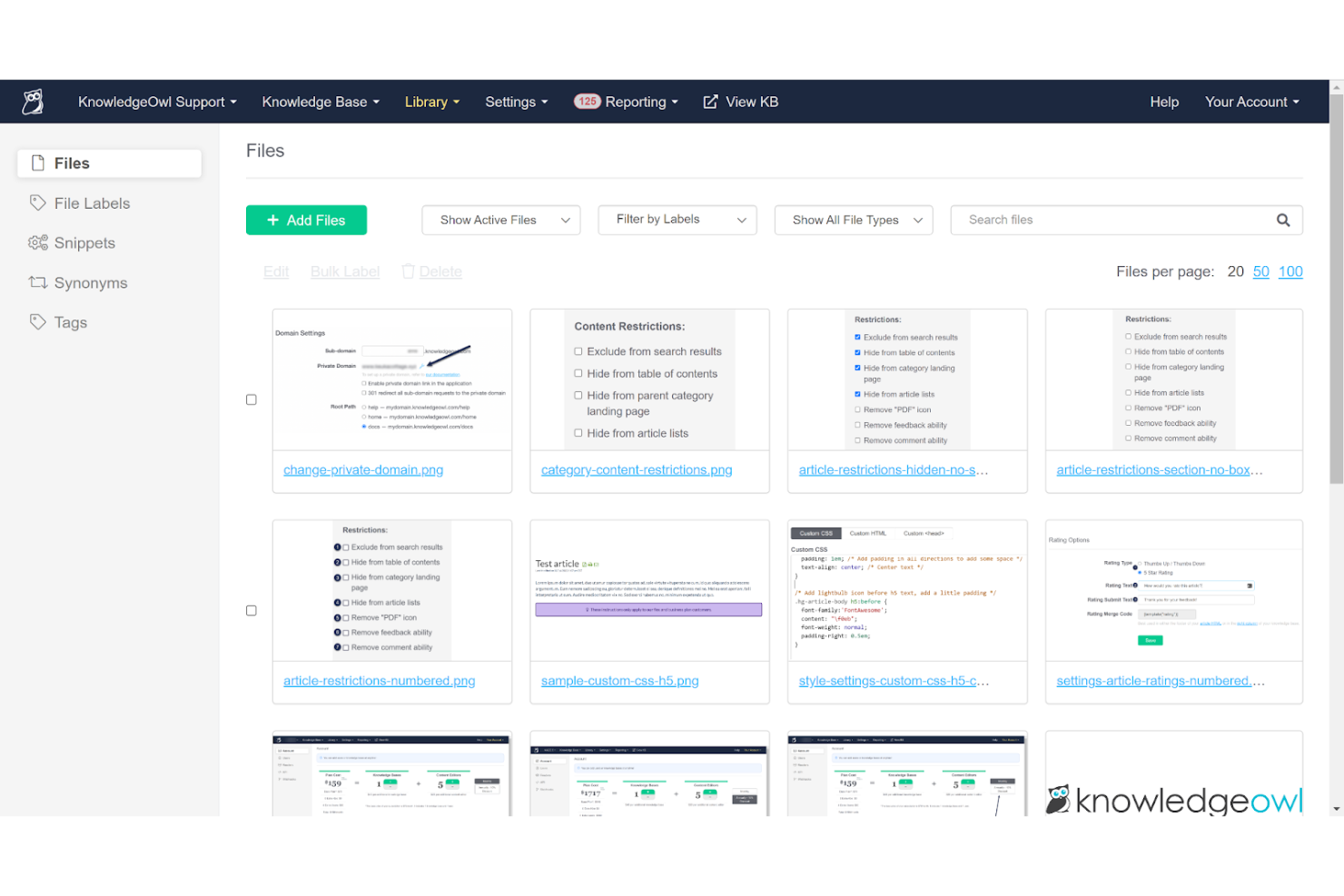
KnowledgeOwl ist eine Software für Wissensdatenbanken, die Unternehmen dabei unterstützt, Online-Dokumentationen und Supportportale zu erstellen und zu verwalten. Sie wird von Kundenserviceteams und technischen Redakteuren genutzt, um organisierte und leicht zugängliche Informationen bereitzustellen.
Warum es eine gute Document360-Alternative ist: KnowledgeOwl bietet anpassbare Sicherheitseinstellungen, Inhaltskategorisierung und Analysen, die für sichere und gut organisierte Wissensdatenbanken sorgen. Durch die Möglichkeit, Sicherheitsfunktionen individuell anzupassen, bleiben Ihre Informationen geschützt und für die richtigen Benutzer zugänglich.
Herausragende Funktionen und Integrationen:
Zu den Funktionen gehört ein Editor zum Ziehen und Ablegen, mit dem Ihr Team Inhalte einfach erstellen und aktualisieren kann. Sie können das Erscheinungsbild Ihrer Wissensdatenbank an Ihre Marke anpassen. Die Plattform unterstützt außerdem einen Versionsverlauf, mit dem Sie Änderungen im Laufe der Zeit verfolgen können.
Zu den Integrationen gehören Salesforce, Zendesk, Freshdesk, Google Analytics, Slack, Mailchimp, Zapier und weitere.
Pros and Cons
Pros:
- Hochgradig anpassbare Sicherheitseinstellungen
- Unterstützt detaillierte Analysen
- Editor zum Ziehen und Ablegen für Inhalte
Cons:
- Das Hochladen von Dateien mit mehr als 200 MB wird blockiert
- Begrenzte integrierte Erweiterungen

Am besten für die Nachverfolgung von Nutzerfeedback geeignet
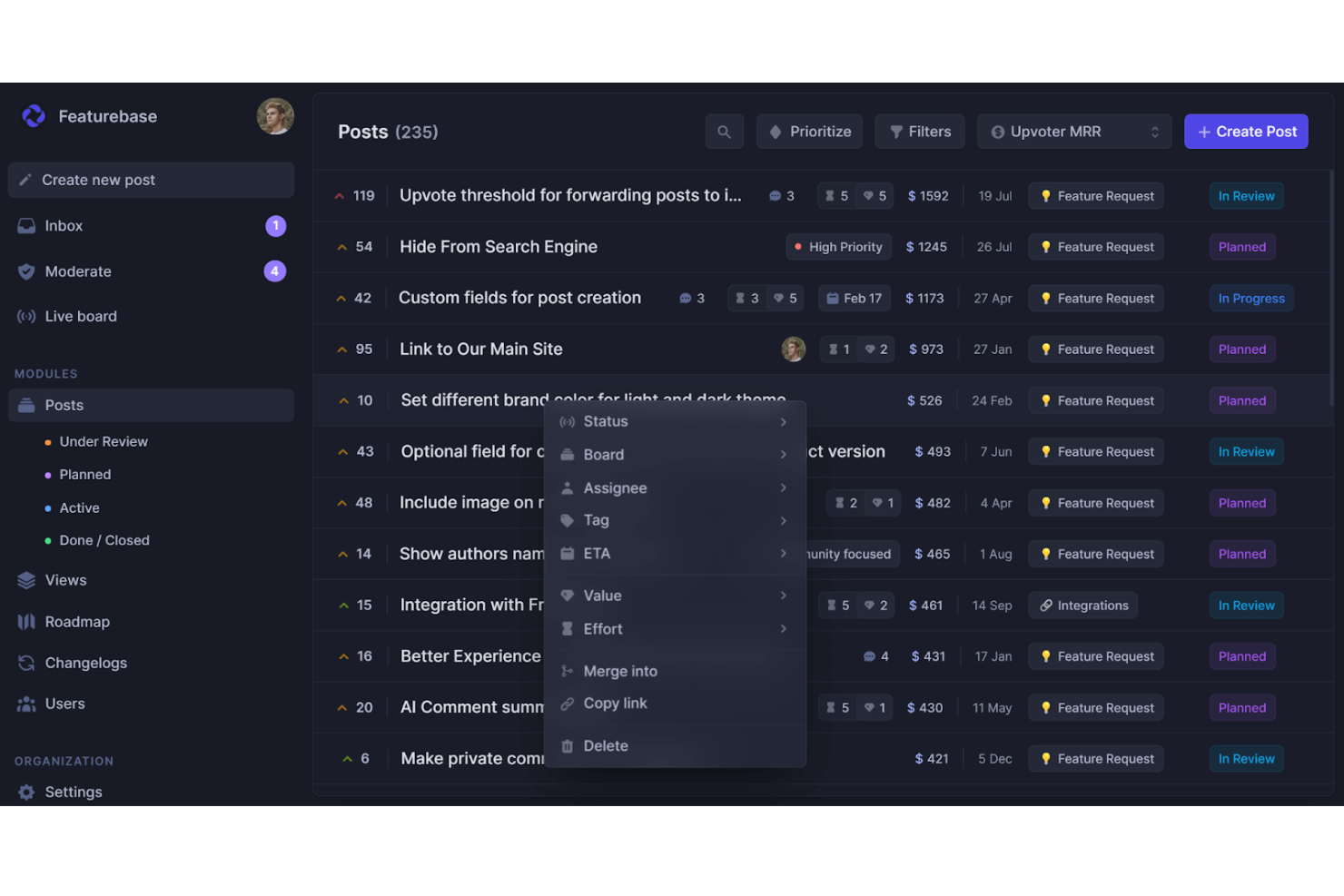
Featurebase ist eine cloudbasierte Plattform für Produktteams, die Feedback-Management, die Veröffentlichung einer Wissensdatenbank, Kundensupport und Produktänderungsprotokolle an einem Ort vereint. Sie wird von kleinen bis mittelgroßen SaaS-Teams genutzt, die Nutzerfeedback, Dokumentation und Produktaktualisierungen zentralisieren möchten.
Warum es eine gute Document360-Alternative ist: Featurebase umfasst ein integriertes Hilfezentrum zum Erstellen öffentlicher oder privater Dokumentation. Das einbettbare Hilfe-Widget ermöglicht Unterstützung innerhalb der App, während eine KI-gestützte Suchmaschine Nutzern hilft, schnell die richtigen Antworten zu finden. Mit Branding, Anpassungsoptionen und Unterstützung für mehrsprachige Inhalte bietet es die Funktionen einer dedizierten Wissensdatenbankplattform und zusätzlich den Vorteil einer integrierten Feedback-Nachverfolgung.
Hervorzuhebende Funktionen und Integrationen:
Zu den Funktionen gehören eine öffentliche und interne Wissensdatenbank mit Berechtigungskontrollen, sodass Sie entscheiden, wer Zugriff erhält. Der Editor im Notion-Stil macht die Erstellung von Artikeln intuitiv, und die Unterstützung von mehr als 40 Sprachen hilft Ihnen, ein globales Publikum zu erreichen. Außerdem erhalten Sie Echtzeitanalysen zu Artikelaufrufen und ihrer Leistung.
Zu den Integrationen gehören Slack, Intercom, GitHub, Jira, ClickUp, Zendesk, Segment, Discord und mehr.
Pros and Cons
Pros:
- Mehrsprachige Wissensdatenbank
- Analysen zur Artikel-Leistung
- Hilfe-Widget innerhalb der App
Cons:
- Keine dedizierte mobile App
- Nicht ideal für die Dokumentationsanforderungen großer Unternehmen


GitBook ist eine kollaborative Dokumentationsplattform, die für Entwickler und technische Teams entwickelt wurde, um API-Dokumentation zu erstellen und zu verwalten. Sie wird von Softwareentwicklern und Produktteams verwendet, um klare und zugängliche technische Inhalte zu erstellen.
Warum es eine gute Alternative zu Document360 ist: GitBook bietet Live-Codeblöcke, Versionskontrolle und kollaboratives Bearbeiten, was beim Erstellen und Pflegen aktueller API-Dokumentation hilft. Die intuitive Benutzeroberfläche und der Fokus auf technische Dokumentation machen GitBook zur idealen Wahl für Teams, die APIs effektiv dokumentieren müssen.
Herausragende Funktionen und Integrationen:
Zu den Funktionen gehören ein Echtzeit-Editor für die Zusammenarbeit, der Ihrem Team eine effektive Arbeitsweise ermöglicht. Mit der Markdown-Unterstützung können Sie Ihre Dokumente einfach formatieren. Die Plattform bietet außerdem benutzerdefinierte Domains, damit Ihre Dokumentation professionell wirkt.
Zu den Integrationen gehören Slack, GitHub, Google Analytics, Intercom, Segment, Sentry, Trello, Jira, Figma und weitere.
Pros and Cons
Pros:
- Unterstützt die Zusammenarbeit in Echtzeit
- Unterstützt Live-Codeblöcke
- Bietet Versionskontrolle
Cons:
- Eingeschränkte Anpassungsmöglichkeiten
- Grundlegende Werkzeuge für die Zusammenarbeit
Weitere Document360-Alternativen
Hier sind einige weitere Document360-Alternativen, die es nicht in meine Auswahl geschafft haben, aber dennoch einen Blick wert sind:
- Helpjuice
Ideal für die KI-gestützte Inhaltserstellung
- MadCap Flare
Am besten geeignet für technische Dokumentation auf Unternehmensniveau
- HelpDocs
Am besten geeignet für die Erstellung von Self-Service-Hubs für Kunden


Wie ich Document360-Alternativen bewerte
Ich bewerte Tools auf zwei Ebenen: die grundlegenden Muss-Kriterien—wie versionierte Wissensdatenbankstrukturen, gemeinsames Autorenarbeiten und Zugriffskontrollen—sowie Unterscheidungsmerkmale wie PMO-Integrationen und KI-Funktionen.
Kernfunktionen (Grundvoraussetzungen für diese Liste)
Wenn ich Tools für meine Liste auswähle, bewerte ich jedes einzelne auf einer Skala von 0 (bietet die Funktionalität nicht) bis 5 (übertrifft die Anforderungen in diesem Bereich) für jede unten aufgeführte Kernfunktionalität. Anschließend rechne ich die Gesamtpunktzahl des Tools in einen Prozentsatz um. Jedes Tool muss eine Mindest-Gesamtpunktzahl von 65% erreichen, um in Betracht gezogen zu werden.
- Wissensdatenbank-Erstellung: Ich achte auf strukturierte, mehrstufige Kategoriehierarchien, mit denen Sie Projektdokumente so organisieren können, wie Ihr PMO tatsächlich denkt—nach Phase, Arbeitsstrang oder Ergebnistyp.
- Leistungsstarker Editor: Egal ob Markdown oder WYSIWYG, ich bewerte, wie gut der Editor Tabellen, Codeblöcke, eingebettete Diagramme und Hinweise verarbeitet, wie sie typisch für technische Projektdokumentation sind.
- Versionskontrolle & Historie: Jede gute Wissensdatenbank verfolgt Überarbeitungen, aber ich prüfe Side-by-Side-Vergleiche und Wiederherstellungsoptionen, damit Sie ein Runbook während eines Sprints sicher aktualisieren können, ohne das Original zu verlieren.
- Gemeinsames Autorenarbeiten: Teams brauchen mehr als gemeinsames Bearbeiten. Ich achte auf Prüf-Workflows, Inline-Kommentare und rollenbasierte Berechtigungen, die widerspiegeln, wie funktionsübergreifende Projektteams tatsächlich beitragen.
- Suche & Auffindbarkeit: Eine Wissensdatenbank ist nur dann nützlich, wenn die Nutzer finden, was sie brauchen. Ich bewerte die Qualität der Volltextsuche, Tag-Filterung und wie gut Ergebnisse über umfangreiche Dokumentensätze hinweg angezeigt werden.
- Veröffentlichung & Zugriffskontrolle: Ich prüfe, ob Sie sowohl ein privates internes Wiki für Ihr Lieferteam als auch ein externes, kundenorientiertes Portal mit eigenem Branding und separaten Leser-Berechtigungen pflegen können.
Nachdem ich eine Liste von Tools habe, die diese Kriterien erfüllen, betrachte ich, was jede Plattform besonders macht.
Unterscheidungsmerkmale (Was Anbieter auszeichnet)
So vergleiche und bewerte ich verschiedene Anbieter:
Herausragende Funktionen
Ich achte besonders darauf, wie gut sich eine Plattform mit Projekttools wie Jira, Asana oder ClickUp verknüpfen lässt—das Verknüpfen von KB-Artikeln mit aktiven Tickets oder Epics hält Dokumentationen aktuell. Eingebaute Analysen sind ebenfalls wichtig. Ich möchte sehen, welche Artikel ungelesen bleiben oder bei welchen Suchanfragen keine Treffer erscheinen, damit PMOs Dokumentationslücken erkennen können. Vorlagen für Projektaufträge, Retrospektiven und RAID-Protokolle sind ein weiteres Unterscheidungsmerkmal, da sie Teams helfen, die Dokumentation über mehrere Projekte hinweg zu standardisieren, ohne von vorne beginnen zu müssen.
Über die Funktionen hinaus
Die Preisstruktur ist hier sehr entscheidend. Manche Plattformen berechnen pro Autor, während Leser kostenlosen Zugriff auf Inhalte haben—das passt für PMOs mit großen Teams, die Dokumente konsumieren, aber nur wenige Beiträge leisten. Migrationsunterstützung ist ein weiterer Faktor, den ich bewerte—der Wechsel von Document360 oder Confluence mitten im Projekt ist mühsam ohne solide Importfunktionen und Einführungsunterstützung. Sicherheits- und Compliance-Zertifikate wie SOC 2 und SSO-Unterstützung haben ebenfalls großes Gewicht, besonders für Teams, die sensible Projektdaten verwalten oder mit Unternehmenskunden zusammenarbeiten, die strikte Zugriffsrichtlinien verlangen.
Warum nach einer Alternative zu Document360 suchen?
Document360 ist zwar eine gute Wahl für Wissensmanagement-Software, aber es gibt mehrere Gründe, warum manche Nutzer nach alternativen Lösungen suchen. Vielleicht suchen Sie nach einer Alternative zu Document360, weil …
- Sie mehr Anpassungsmöglichkeiten benötigen.
- Ihr Team bessere Integrationsmöglichkeiten benötigt.
- Sie nach einer kostengünstigeren Lösung suchen.
- Sie Unterstützung für mehrere Sprachen benötigen.
- Ihr Team bessere Funktionen für die Zusammenarbeit benötigt.
- Sie erweiterte Analysen und Berichte benötigen.
Wenn Sie sich in einem dieser Punkte wiedererkennen, sind Sie hier richtig. Meine Liste enthält mehrere Softwarelösungen für Wissensmanagement, die besser für Teams geeignet sind, die mit diesen Herausforderungen bei Document360 konfrontiert sind und nach alternativen Lösungen suchen.
Die wichtigsten Funktionen von Document360
Hier sind einige der wichtigsten Funktionen von Document360, die Ihnen dabei helfen, die Angebote alternativer Lösungen gegenüberzustellen und zu vergleichen:
- Wissensdatenbank-Portal: Bietet erweiterte Editor- und Verwaltungsfunktionen für Ihre Anforderungen an die Inhaltserstellung.
- Wissensdatenbank-Website: Passen Sie öffentliche oder private Wissensdatenbanken für Ihre Benutzer an.
- Assistent für die Wissensdatenbank: Nutzen Sie ein einbettbares Widget, um einfach aus Ihren SaaS-Produkten oder Websites auf Wissensdatenbanken zuzugreifen.
- Integrationen und Erweiterungen: Verbinden Sie verschiedene Tools von Drittanbietern, um den Funktionsumfang zu erweitern.
- Plattform-API: Interagieren Sie über eine REST API direkt mit der Wissensdatenbank und profitieren Sie von größerer Flexibilität.
- Professionelle Analysen: Gewinnen Sie Einblicke in das Benutzerverhalten und die Leistung Ihrer Inhalte, um Ihre Wissensdatenbank zu verbessern.
- Individueller Workflow-Builder: Passen Sie Workflows an die spezifischen Anforderungen und Prozesse Ihres Teams an.
- Support-Ticket-Vermeidung: Reduzieren Sie Support-Tickets, indem Sie Benutzern relevante Artikel aus der Wissensdatenbank bereitstellen.
- Medienspeicher: Speichern und verwalten Sie Mediendateien effizient innerhalb der Plattform.
- Eddy AI: Nutzen Sie generative KI für eine verbesserte Unterstützung bei der Dokumentation.
Wie geht es weiter:
Wenn Sie gerade Software für Wissensmanagement recherchieren, wenden Sie sich an einen SoftwareSelect-Berater und erhalten Sie kostenlos Empfehlungen.
Sie füllen ein Formular aus und führen ein kurzes Gespräch, in dem die Details Ihrer Anforderungen besprochen werden. Anschließend erhalten Sie eine Auswahlliste von Software zur Prüfung. Die Berater unterstützen Sie sogar während des gesamten Kaufprozesses, einschließlich der Preisverhandlungen.