

10 Accelo-Alternativen für professionelle Dienstleistungen im Jahr 2026

Beste Alternativen zu Accelo – Auswahlliste


Wenn Sie sich von der Verwaltung von Projekten überfordert fühlen, sind Sie nicht allein. Viele Projektmanager haben Schwierigkeiten damit, Aufgaben zu organisieren und Teams aufeinander abzustimmen. Accelo passt möglicherweise nicht perfekt zu Ihren Anforderungen, und das ist in Ordnung.
Software zur Automatisierung professioneller Dienstleistungen kann diese Probleme lindern, indem sie Funktionen bietet, die zu Ihren spezifischen Herausforderungen passen. Meiner Erfahrung nach kann die Wahl des richtigen Tools einen großen Unterschied für die Produktivität und Arbeitsmoral Ihres Teams machen.
In diesem Artikel stelle ich Ihnen meine bevorzugten Alternativen zu Accelo vor. Ich habe sie gründlich getestet, um sicherzustellen, dass sie unterschiedlichen Anforderungen gerecht werden. Sie finden klare, unvoreingenommene Bewertungen, die Ihnen dabei helfen, die beste Lösung für Ihr Unternehmen auszuwählen.
Was ist Accelo?
Accelo ist eine Software zur Automatisierung professioneller Dienstleistungen (PSA), die Unternehmen dabei unterstützt, Kundenprojekte effizient zu verwalten. Sie wird häufig von Beratern, Buchhaltern und Digitalagenturen eingesetzt, die Projekte, Kunden und Finanzen organisiert halten müssen. Funktionen zur Projektverfolgung, Kundenverwaltung und Rechnungsstellung helfen dabei, die Produktivität aufrechtzuerhalten und Kundenbeziehungen zu verbessern. Accelo bietet einen Mehrwert, indem es alle Aspekte der Kundenarbeit auf einer einzigen Plattform zentralisiert und es Ihnen und Ihrem Team erleichtert, Projekte von Anfang bis Ende zu verwalten.
Zusammenfassung der besten Alternativen zu Accelo
Diese Vergleichstabelle fasst die Preisinformationen meiner bevorzugten Alternativen zu Accelo zusammen, damit Sie die beste Lösung für Ihr Budget und Ihre geschäftlichen Anforderungen finden.
| Tool | Best For | Trial Info | Price | ||
|---|---|---|---|---|---|
| 1 | Beste ganzheitliche Lösung für kleine Unternehmen | 7-tägige kostenlose Testversion und kostenloser Tarif verfügbar | Ab $39/Monat | Website | |
| 2 | Am besten für KI-gestützte Projektdurchführung | 14-tägige kostenlose Testversion + kostenlose Demo verfügbar | Ab $19/Nutzer/Monat (jährlich abgerechnet) | Website | |
| 3 | Am besten für integrierte Kundenportale geeignet | 14-tägige kostenlose Testversion verfügbar | Ab $19/Monat | Website | |
| 4 | Am besten für anpassbare Workflows geeignet | 30-tägige kostenlose Testversion + kostenlose Demo verfügbar | Ab $24/Benutzer/Monat | Website | |
| 5 | Am besten für die Zusammenarbeit im Team und die Zielverfolgung geeignet | Kostenloser Tarif verfügbar | Ab $10.99/Benutzer/Monat (jährliche Abrechnung) | Website | |
| 6 | Am besten für MSP-Workflows geeignet | Kostenlose Demo verfügbar | Preise auf Anfrage | Website | |
| 7 | Am besten für All-in-One-Projektmanagement | Kostenloser Tarif + kostenlose Demo verfügbar | Ab $11.95/Monat | Website | |
| 8 | Am besten für Kundenbuchungen und Abrechnung geeignet | Kostenlose Demo + 14-tägige kostenlose Testversion verfügbar | Ab $29/Monat (jährlich abgerechnet) | Website | |
| 9 | Am besten geeignet für Architektur- und Ingenieurbüros | Kostenlose Demo verfügbar. | Preise auf Anfrage | Website | |
| 10 | Am besten für Kreativprofis, die ein CRM benötigen | 7-tägige kostenlose Testversion | Ab $7/Monat (jährlich abgerechnet) | Website |
Warum Sie unseren Software-Empfehlungen vertrauen können
Unser Team testet und bewertet Software seit 2012. Als Projektmanager wissen wir selbst, wie schwierig – und wichtig – es ist, die richtige Software auszuwählen.
Für diesen Leitfaden haben wir Tools mithilfe von praktischen Tests und unabhängiger Recherche bewertet und dabei unsere Bewertungskriterien angewendet. Zudem greifen wir auf Erkenntnisse von Branchenvordenkern und praktizierenden Projektmanagement-Experten zurück.
Unsere Bewertungen spiegeln unser menschliches redaktionelles Urteilsvermögen wider, keine Verkaufsstrategie.
Expertenprüfer:
Bewertungen der besten Alternativen zu Accelo
Nachfolgend finden Sie meine ausführlichen Zusammenfassungen der besten Alternativen zu Accelo, die es in meine Auswahlliste geschafft haben. Meine Bewertungen bieten einen detaillierten Einblick in die wichtigsten Funktionen, Vor- und Nachteile, Integrationen und idealen Anwendungsfälle jedes Tools, damit Sie die beste Lösung für sich finden.

Flowlu
Beste ganzheitliche Lösung für kleine Unternehmen

Flowlu ist eine ganzheitliche Online-Arbeitsmanagementplattform für kleine und mittelständische Unternehmen. Zu den Hauptnutzern gehören Marketingagenturen, IT-Abteilungen, Rechtsfachleute, Bildungseinrichtungen und Veranstaltungsplaner. Die Plattform bietet Werkzeuge für Projektmanagement, CRM, Rechnungsstellung, Finanzmanagement und Zusammenarbeit.
Warum es eine gute Accelo-Alternative ist: Flowlu bietet eine umfassende Suite von Werkzeugen und ist damit ideal für kleine Unternehmen, die nach einer ganzheitlichen Lösung suchen. Die Plattform umfasst Funktionen für das Projekt- und Aufgabenmanagement, darunter Gantt-Diagramme und Kanban-Boards, die Ihnen helfen, alles organisiert zu halten. Workflow-Automatisierung und Finanzüberwachung sorgen für Effizienz und Kontrolle über Ihre Abläufe, während die Kommunikationstools für Teams die Zusammenarbeit fördern und dafür sorgen, dass alle auf dem gleichen Stand bleiben.
Herausragende Funktionen und Integrationen:
Zu den Funktionen gehören Finanzmanagement-Tools, mit denen Sie Ausgaben und Einnahmen effizient verfolgen können, sowie CRM-Funktionen, die Ihrem Team eine effektive Verwaltung von Kundenbeziehungen ermöglichen. Automatisierte Workflows helfen Ihnen dabei, Aufgaben zuzuweisen, Benachrichtigungen an Teammitglieder zu senden, Projektaktualisierungen bereitzustellen und neue Projekte zu erstellen.
Zu den Integrationen gehören Slack, Google Calendar, Microsoft Outlook, QuickBooks, Xero, Dropbox, Mailchimp, Trello und weitere.
Pros and Cons
Pros:
- Ganzheitliche Plattform
- Unterstützt die Workflow-Automatisierung
- Erleichtert die Teamkommunikation
Cons:
- Gelegentliche Fehler bei der E-Mail-Integration
- Das Berichtsmodul bietet nur wenige Anpassungsmöglichkeiten

Am besten für KI-gestützte Projektdurchführung
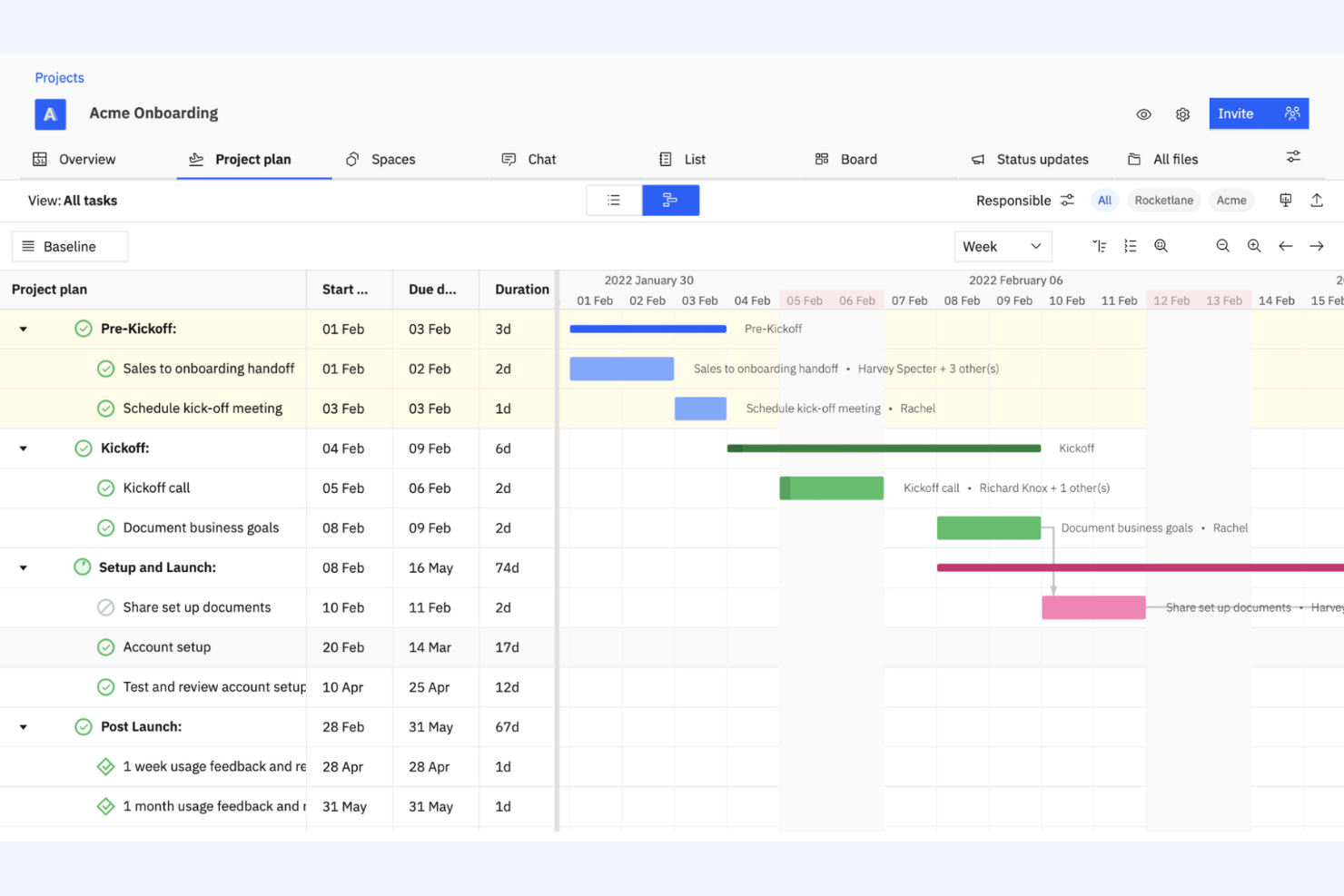
Rocketlane ist eine agentenbasierte, ganzheitliche Projektmanagementplattform für Teams, die ihre Projektabwicklungsprozesse verbessern müssen. Sie wird von Unternehmen eingesetzt, die Zusammenarbeit, Transparenz und Effizienz bei der Projektdurchführung steigern möchten.
Warum es eine gute Accelo-Alternative ist: Rocketlane bietet KI-gestützte Werkzeuge für die Projektdurchführung, die zu Unternehmen passen, die ihre Projektausführung optimieren möchten, wobei KI-Agenten einen Teil der operativen Arbeit übernehmen. Projektvorlagen helfen Ihrem Team, Arbeitsabläufe zu standardisieren und Zeit zu sparen, während die Werkzeuge der Plattform für die Zusammenarbeit in Echtzeit sicherstellen, dass alle während des gesamten Projekts abgestimmt und informiert bleiben. Der Fokus von Rocketlane auf KI-gestützten Erkenntnissen liefert Ihrem Team wertvolle Daten, um Projektstrategien und -ergebnisse zu verfeinern.
Herausragende Funktionen und Integrationen:
Zu den Funktionen gehört die Zeitleistenverwaltung, die Ihrem Team hilft, Projekte im Zeitplan zu halten, während die Ressourcenverwaltungstools der Plattform eine optimale Verteilung der Arbeitsleistung Ihres Teams sicherstellen. Anpassbare Übersichten bieten Einblicke in den Projektfortschritt und die Projektleistung.
Zu den Integrationen gehören Slack, Salesforce, Microsoft Teams, Google Calendar, Jira, GitLab, HubSpot, Asana, Zapier, monday.com und weitere.
Pros and Cons
Pros:
- KI-gestützte Erkenntnisse und Automatisierung
- Unterstützt die Standardisierung von Projekten
- Bietet Echtzeitdaten
New Product Updates from Rocketlane

Rocketlane Introduces Governance and Workforce Agents
Rocketlane introduces Governance Agents and Workforce Agents to automate delivery processes and recurring tasks. These updates help teams enforce rules and streamline project execution. For more information, visit Rocketlane’s official site.
 .
.
Am besten für integrierte Kundenportale geeignet

SuiteDash ist eine umfassende Plattform zur Geschäftsverwaltung, die für kleine und mittelständische Unternehmen entwickelt wurde und Werkzeuge für Projektmanagement, CRM und Kundenportale bereitstellt. Sie ist ideal für Unternehmen, die mehrere Funktionen in einer einzigen Plattform integrieren möchten.
Warum es eine gute Accelo-Alternative ist: SuiteDash bietet eine Komplettlösung, die Projektmanagement mit CRM und Kundenportalen kombiniert, und ist damit ideal für eine zentrale Geschäftsplattform. Die Funktionen zur Kundenverwaltung helfen Ihrem Team, starke Kundenbeziehungen aufrechtzuerhalten. Mit den Werkzeugen der Plattform zur Projektverfolgung kann Ihr Team Aufgaben und Fristen effektiv verwalten. Der Fokus von SuiteDash auf die Integration wichtiger Geschäftsfunktionen in einer einzigen Plattform macht die Lösung zu einer geeigneten Wahl für alle, die ihre Abläufe vereinfachen möchten.
Besondere Funktionen und Integrationen:
Zu den Funktionen gehören anpassbare Dashboards und die sichere Dateifreigabe, die den sicheren Austausch vertraulicher Dokumente gewährleistet. Automatisierte Abrechnungen und Rechnungsstellungen helfen, Finanzprozesse zu optimieren und den manuellen Aufwand zu reduzieren.
Zu den Integrationen gehören QuickBooks, Stripe, PayPal, Zapier, Google Calendar, Microsoft Office 365, Plaid, Slack, Zoom, WordPress und weitere.
Pros and Cons
Pros:
- Unbegrenzte Benutzer auf allen Preisstufen
- Unterstützt die Kundenverwaltung
- Vereinfacht Finanzprozesse
Cons:
- Die Ersteinrichtung kann komplex sein
- Eingeschränkte Anpassungsmöglichkeiten für fortgeschrittene Anforderungen
Kintone
Am besten für anpassbare Workflows geeignet
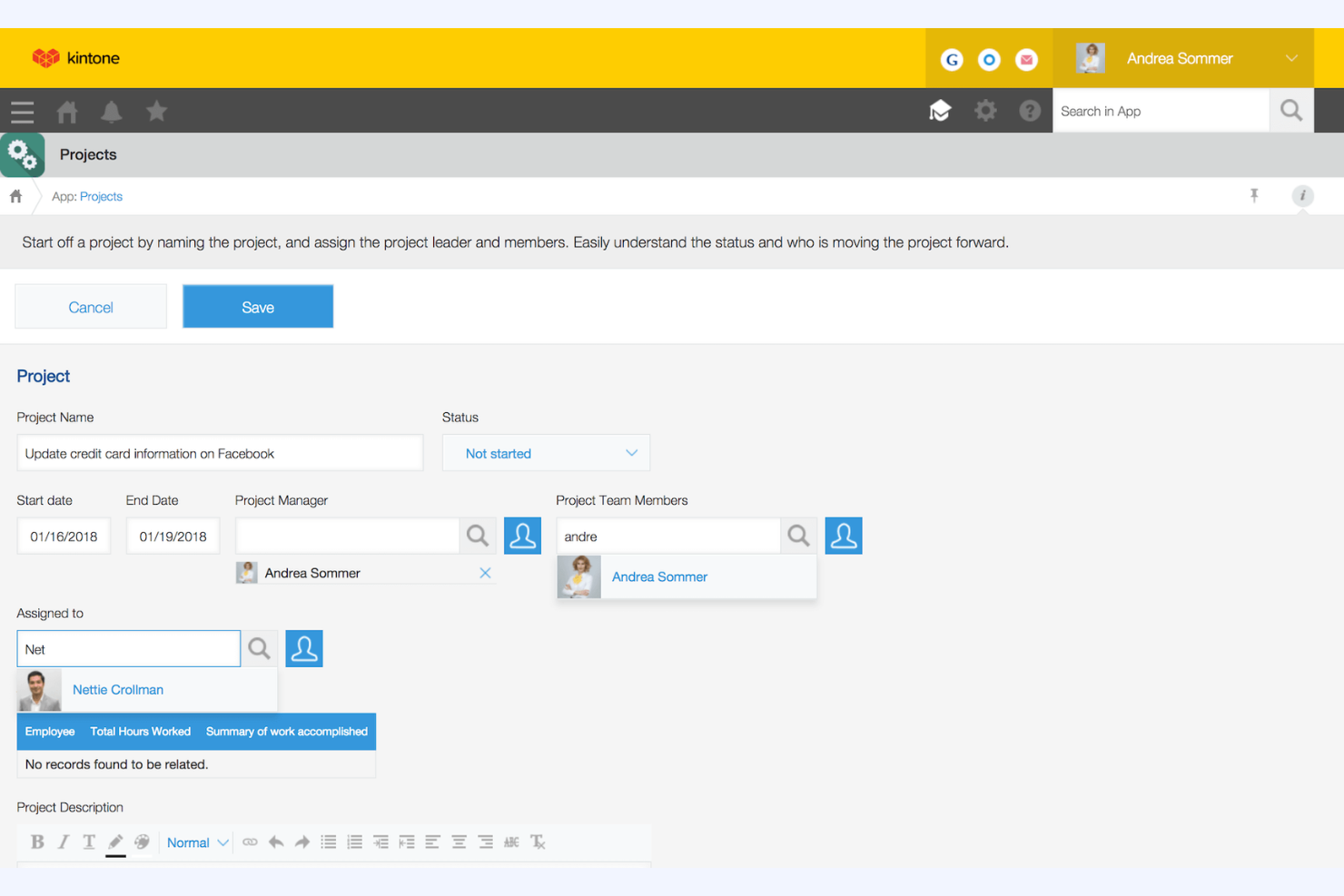
Kintone ist eine anpassbare Workflow- und Kollaborationsplattform, die von Teams zur Verwaltung von Daten und zur Automatisierung von Prozessen verwendet wird. Sie ist bei Unternehmen beliebt, die maßgeschneiderte Lösungen für Projektmanagement, Datenverwaltung und Zusammenarbeit benötigen.
Warum es eine gute Accelo-Alternative ist: Kintone bietet anpassbare Workflows und ist damit ideal für Teams, die maßgeschneiderte Projektmanagementlösungen benötigen. Sie können benutzerdefinierte Apps erstellen, die zu Ihren Geschäftsprozessen passen, und Daten effizient verwalten. Außerdem erleichtert die Plattform die Zusammenarbeit, indem sie Ihrem Team ermöglicht, Informationen zu teilen und Aufgaben in Echtzeit zu verfolgen. Die flexible Anpassung an verschiedene geschäftliche Anforderungen macht Kintone zu einer geeigneten Wahl für alle, die einen personalisierten Ansatz suchen.
Herausragende Funktionen und Integrationen:
Zu den Funktionen gehört die Erstellung von Apps per Drag-and-drop, mit der Ihr Team benutzerdefinierte Anwendungen ohne Programmierung erstellen kann. Die Berichtstools der Plattform liefern Einblicke in die Leistung und unterstützen datengestützte Entscheidungen. Die Aufgabenverwaltungsfunktionen helfen Ihrem Team außerdem, organisiert zu bleiben und den Überblick zu behalten.
Zu den Integrationen gehören Slack, Zapier, Google Calendar, Dropbox, Salesforce, QuickBooks, Microsoft Office 365, HubSpot, Mailchimp, Box und weitere.
Pros and Cons
Pros:
- Hochgradig anpassbare Workflows
- Erleichtert die Zusammenarbeit im Team
- Ermöglicht die Aufgabenverfolgung in Echtzeit
Cons:
- Mindestens fünf Benutzer
- Einarbeitungszeit für die Anpassung

Asana
Am besten für die Zusammenarbeit im Team und die Zielverfolgung geeignet
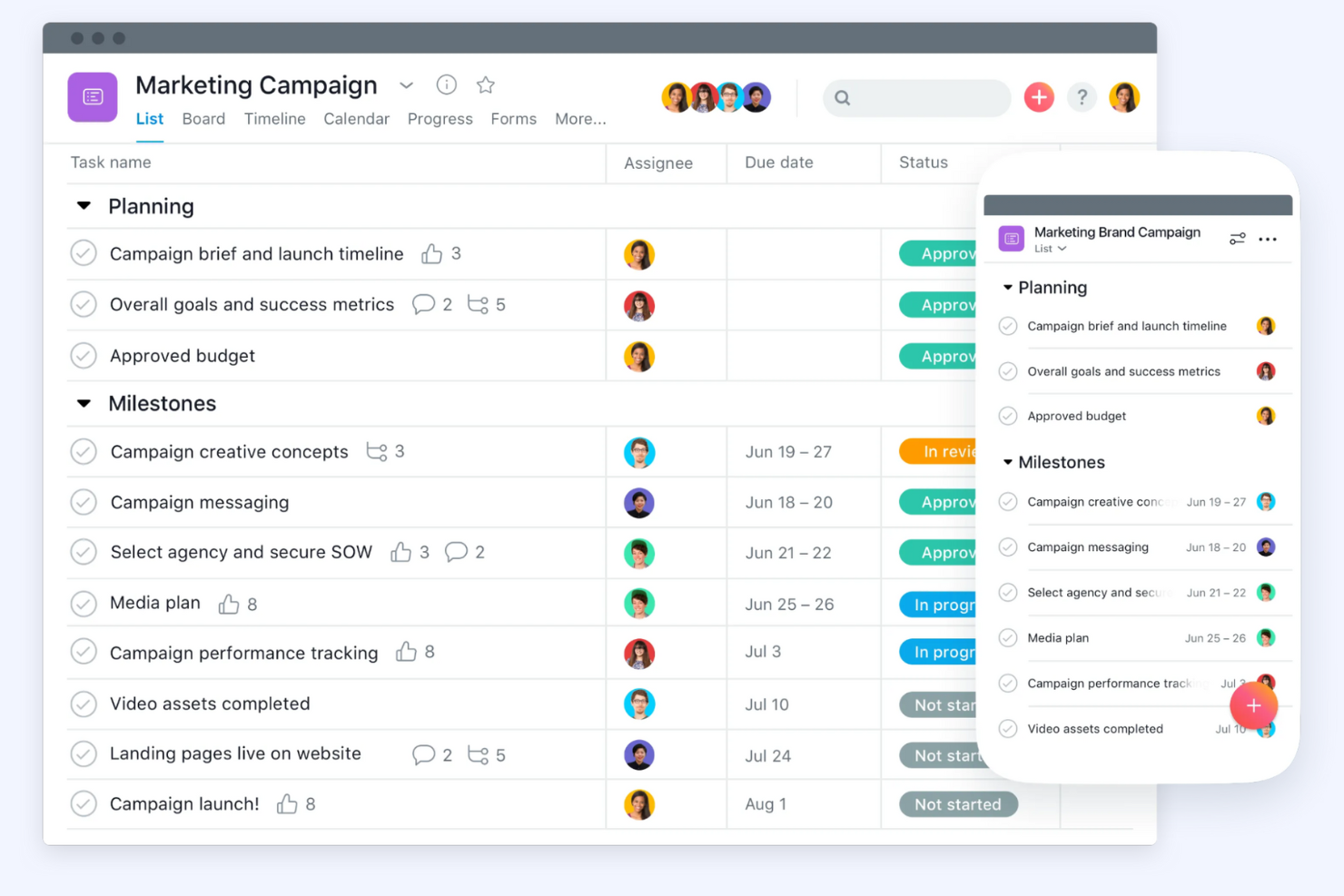
Asana ist eine Projektmanagementplattform, die Teams dabei unterstützt, ihre Arbeit effizient zu organisieren und zu verfolgen. Sie wird hauptsächlich in verschiedenen Branchen eingesetzt, um Projekte zu verwalten, Arbeitsabläufe zu automatisieren und Ziele zu verfolgen.
Warum es eine gute Accelo-Alternative ist: Asana konzentriert sich darauf, die Teamarbeit zu unterstützen und Ziele effektiv zu verfolgen. Die Plattform bietet Funktionen für Projektmanagement, Workflow-Automatisierung und Zielverfolgung und ist damit ideal für Teams, die bei ihren Zielen aufeinander abgestimmt bleiben müssen. Ressourcenmanagement und KI-Funktionen tragen zusätzlich dazu bei, Produktivität und Klarheit zu steigern. Die benutzerfreundliche Oberfläche und die Tools für die Zusammenarbeit machen Asana zu einer ausgezeichneten Wahl, um die Kommunikation im Team zu verbessern.
Besondere Funktionen und Integrationen:
Zu den Funktionen gehören Projektmanagementtools, mit denen Sie Aufgaben einfach erstellen, organisieren und priorisieren können. Die Workflow-Automatisierung hilft Ihrem Team, manuelle Arbeit zu reduzieren und sich auf das Wesentliche zu konzentrieren, während die Zielverfolgung sicherstellt, dass alle aufeinander abgestimmt sind und auf dieselben Ziele hinarbeiten.
Zu den Integrationen gehören Slack, Microsoft Teams, Google Drive, Dropbox, Salesforce, Zoom, Jira, Adobe Creative Cloud, Trello, Microsoft Outlook und weitere.
Pros and Cons
Pros:
- Umfangreiche Funktionen für die Zusammenarbeit im Team
- Einfache Zielverfolgung
- Benutzerfreundliche Oberfläche
Cons:
- Erfordert eine kurze Einarbeitungszeit
- Kann für größere Teams teuer sein

Am besten für MSP-Workflows geeignet
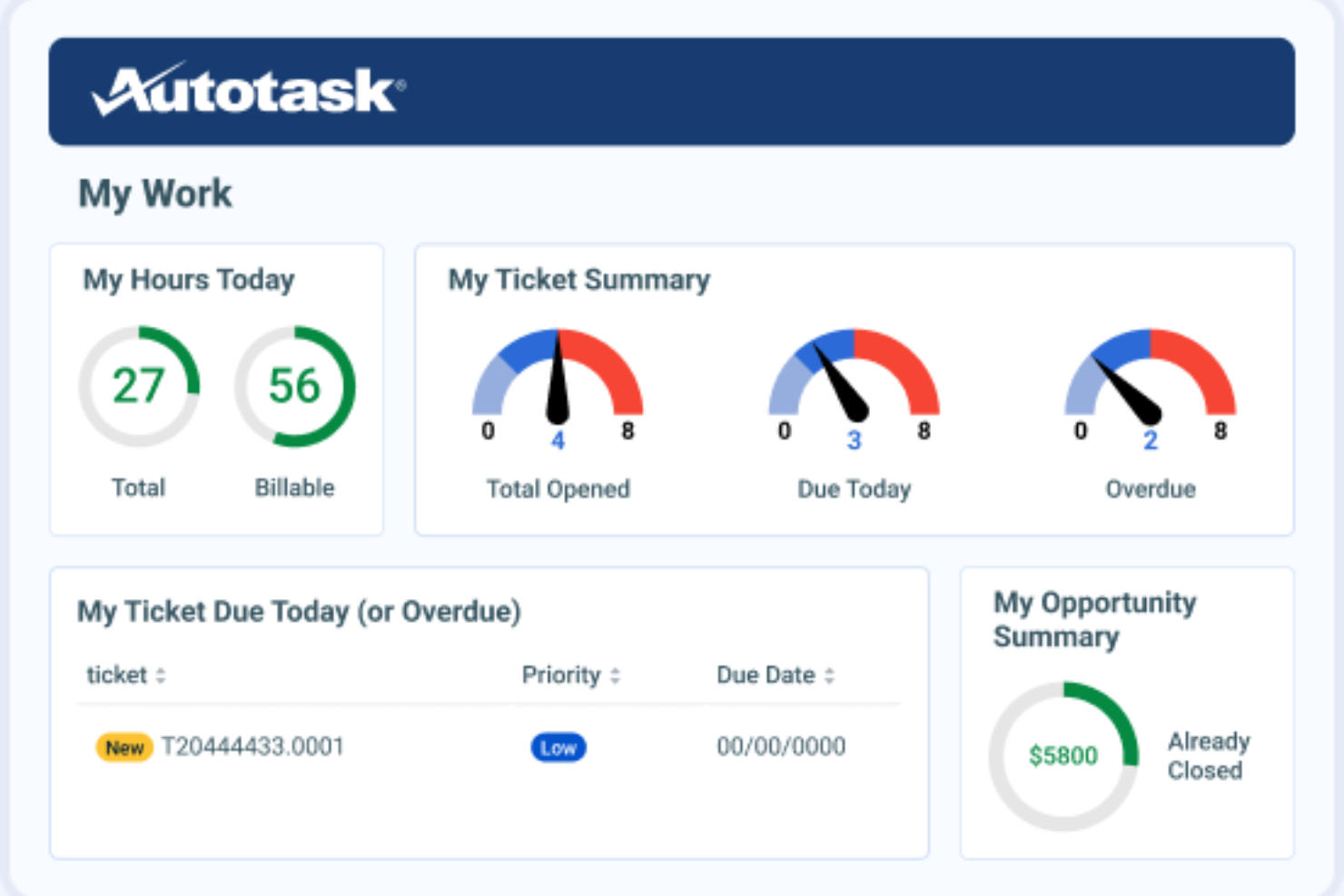
Autotask ist eine Software zur Automatisierung professioneller Dienstleistungen, die für Managed-Service-Provider und IT-Dienstleistungsunternehmen entwickelt wurde. Sie unterstützt das Projektmanagement, die Servicebereitstellung und die Abrechnung, um die betriebliche Effizienz zu steigern.
Warum es eine gute Alternative zu Accelo ist: Autotask bietet integriertes IT-Management und ist daher ideal für MSPs, die eine Komplettlösung benötigen. Die Software umfasst Projektverfolgung und Ticketverwaltung, sodass Sie Dienstleistungen effizient bereitstellen können. Außerdem sorgen die Abrechnungs- und Rechnungsfunktionen für ein präzises Finanzmanagement.
Besondere Funktionen und Integrationen:
Zu den Funktionen gehört die Ticketverwaltung, mit der Ihr Team Serviceanfragen effizient bearbeiten kann. Berichtstools liefern Einblicke in die Leistung Ihres Unternehmens und unterstützen die Entscheidungsfindung. Die Ressourcenverwaltung gewährleistet eine optimale Zuweisung der Zeit und Fähigkeiten Ihres Teams.
Zu den Integrationen gehören QuickBooks, Xero, ConnectWise, Salesforce, Slack, Zapier, Microsoft Teams, Google Workspace und weitere.
Pros and Cons
Pros:
- Auf MSPs zugeschnitten
- Integriertes IT-Management
- Möglichkeiten zur Projektverfolgung
Cons:
- Erfordert Einrichtung und Konfiguration
- Möglicherweise nicht für Nicht-IT-Branchen geeignet
Avaza
Am besten für All-in-One-Projektmanagement

Avaza ist ein All-in-One-Projektmanagement- und Kollaborationstool für Unternehmen jeder Größe. Es unterstützt Projektmanagement, Zeiterfassung, Spesenverwaltung und Rechnungsstellung und ist damit eine vielseitige Lösung für verschiedene Teams.
Warum es eine gute Accelo-Alternative ist: Avaza bietet detaillierte Projektmanagementfunktionen und ist damit ideal für Unternehmen, die eine All-in-One-Lösung benötigen. Es umfasst Funktionen wie Aufgabenverwaltung und Zeiterfassung, die Ihrem Team helfen, organisiert und effizient zu bleiben. Die Spesenverwaltungs- und Rechnungsstellungstools der Software bieten finanzielle Übersicht, während die benutzerfreundliche Oberfläche und die Funktionen für die Projektzusammenarbeit sie für Teams geeignet machen, die ihre Produktivität steigern möchten.
Herausragende Funktionen und Integrationen:
Zu den Funktionen gehört die Ressourcenplanung, die Ihrem Team hilft, Ressourcen effektiv auf verschiedene Projekte zu verteilen. Mit den Berichtstools der Software können Sie Einblicke in die Projektleistung gewinnen und datengestützte Entscheidungen treffen. Die Dateifreigabe ermöglicht es Ihrem Team, Projektdokumente einfach zu speichern und darauf zuzugreifen.
Zu den Integrationen gehören Xero, QuickBooks, Slack, Google Drive, Dropbox, Zapier, Salesforce, Trello, Mailchimp und mehr.
Pros and Cons
Pros:
- Integrierte Rechnungsstellung und Spesenverfolgung
- Für Unternehmen verschiedener Größen geeignet
- Umfasst Funktionen zur Zeiterfassung
Cons:
- Erweiterte Funktionen könnten fehlen
- Die Automatisierungsoptionen sind begrenzt

vCita
Am besten für Kundenbuchungen und Abrechnung geeignet
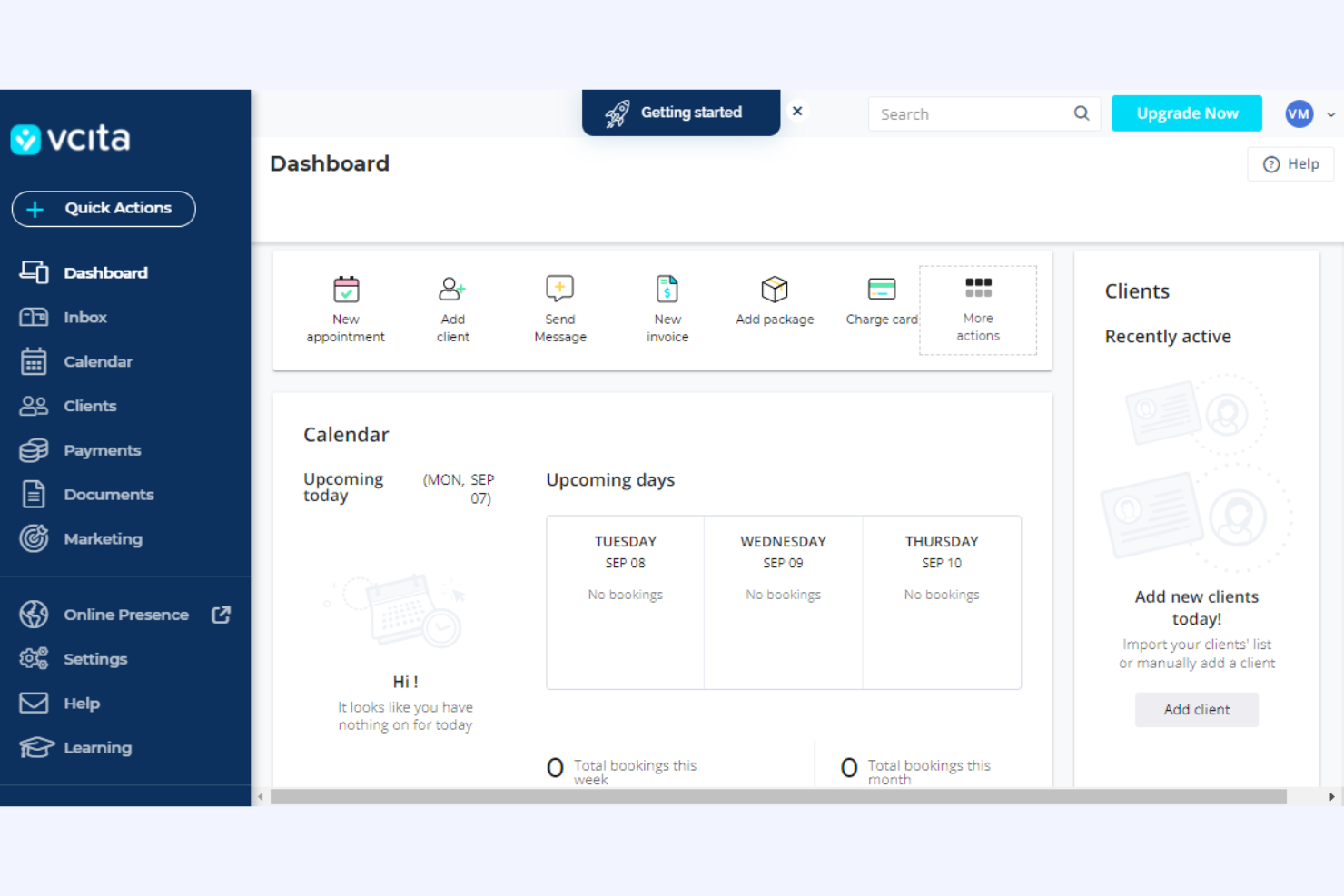
vcita ist eine Geschäftsverwaltungsplattform für kleine Unternehmen und Dienstleister, die Tools für Kundenverwaltung, Abrechnung und Terminplanung bietet. Sie wird von Fachleuten genutzt, die Kundeninteraktionen optimieren und Geschäftsabläufe effizient verwalten müssen.
Warum es eine gute Accelo-Alternative ist: vcita bietet ein Kundenportal für Agenturen mit Online-Terminplanung, sodass Kunden Termine bequem zu einem passenden Zeitpunkt buchen können. Die Abrechnungs- und Rechnungstools der Plattform vereinfachen das Finanzmanagement durch die Automatisierung von Zahlungsvorgängen. Der Fokus von vcita auf Kundenkommunikation und Geschäftsverwaltung macht die Plattform zu einer geeigneten Wahl für Agenturen, die eine integrierte Lösung wünschen.
Hervorragende Funktionen und Integrationen:
Zu den Funktionen gehören E-Mail-Marketing-Tools, die Ihrem Team dabei helfen, mit Kunden in Kontakt zu treten und Dienstleistungen zu bewerben. Mit der CRM-Funktion können Sie Kundenbeziehungen verwalten und Interaktionen nachverfolgen. Die Dokumentenfreigabe erleichtert zudem den sicheren Austausch wichtiger Dateien mit Kunden.
Zu den Integrationen gehören QuickBooks, PayPal, Stripe, Zoom, Mailchimp, Google Calendar, WordPress, Facebook Messenger, Square, Zapier und mehr.
Pros and Cons
Pros:
- Bietet ein markenbezogenes Kundenportal für integrierte Rechnungszahlungen
- Geeignet für kleine Unternehmen
- Unterstützt Terminplanung und Abrechnung
Cons:
- Automatisierungen sind auf höhere Zahlungsstufen beschränkt
- Möglicherweise nicht für größere Organisationen geeignet

Am besten geeignet für Architektur- und Ingenieurbüros
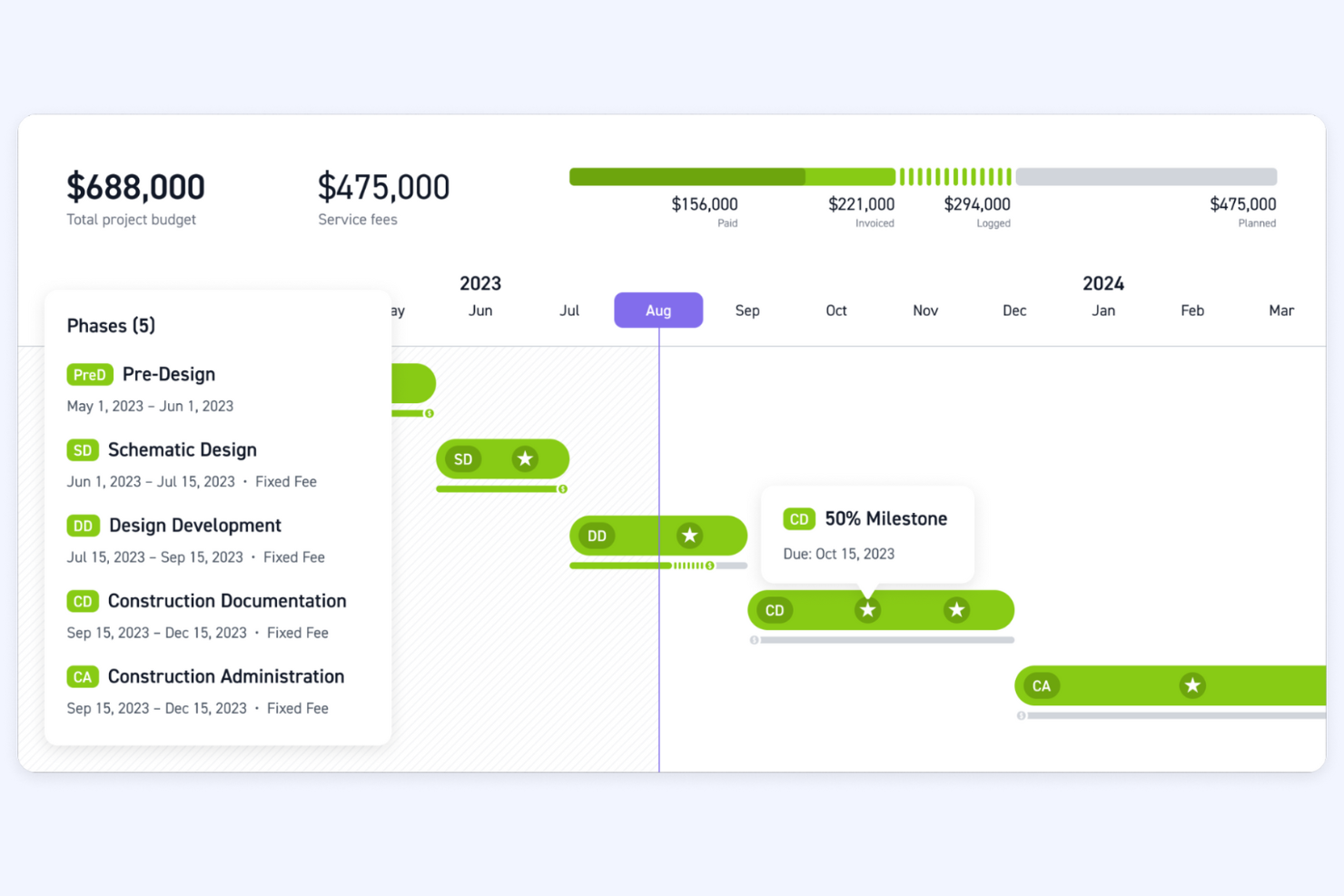
Monograph ist ein Projektmanagement-Tool, das speziell für Architektur- und Ingenieurbüros entwickelt wurde. Es unterstützt die Projektverfolgung, das Ressourcenmanagement und die Finanzplanung und ist damit eine wertvolle Lösung für diese Branchen.
Warum es eine gute Alternative zu Accelo ist: Monograph bietet spezialisierte Tools für Architektur- und Ingenieurbüros mit Schwerpunkt auf Projekt- und Ressourcenmanagement. Die umfangreichen Funktionen helfen Ihnen, komplexe Projekte effizient zu verwalten und sicherzustellen, dass Ihr Team über mehrere Projekte hinweg optimal eingesetzt wird. Monographs Schwerpunkt auf Finanzplanung und branchenspezifischen Arbeitsabläufen macht die Lösung ideal für Unternehmen, die detaillierte Kontroll- und Planungskapazitäten benötigen.
Herausragende Funktionen und Integrationen:
Zu den Funktionen gehören Projektzeitpläne, mit denen Ihr Team den Projektfortschritt visualisieren kann, Budgetverfolgung zur Einhaltung finanzieller Grenzen sowie Ressourcenzuweisung, um die Zeit und Fähigkeiten Ihres Teams effizient einzusetzen.
Zu den Integrationen gehört QuickBooks.
Pros and Cons
Pros:
- Auf Architektur und Ingenieurwesen zugeschnitten
- Unterstützt die Finanzplanung
- Effiziente Ressourcenzuweisung
Cons:
- Möglicherweise nicht für den Einsatz in nichttechnischen und architektonischen Branchen geeignet
- Keine All-in-one-Lösung

Bloom
Am besten für Kreativprofis, die ein CRM benötigen
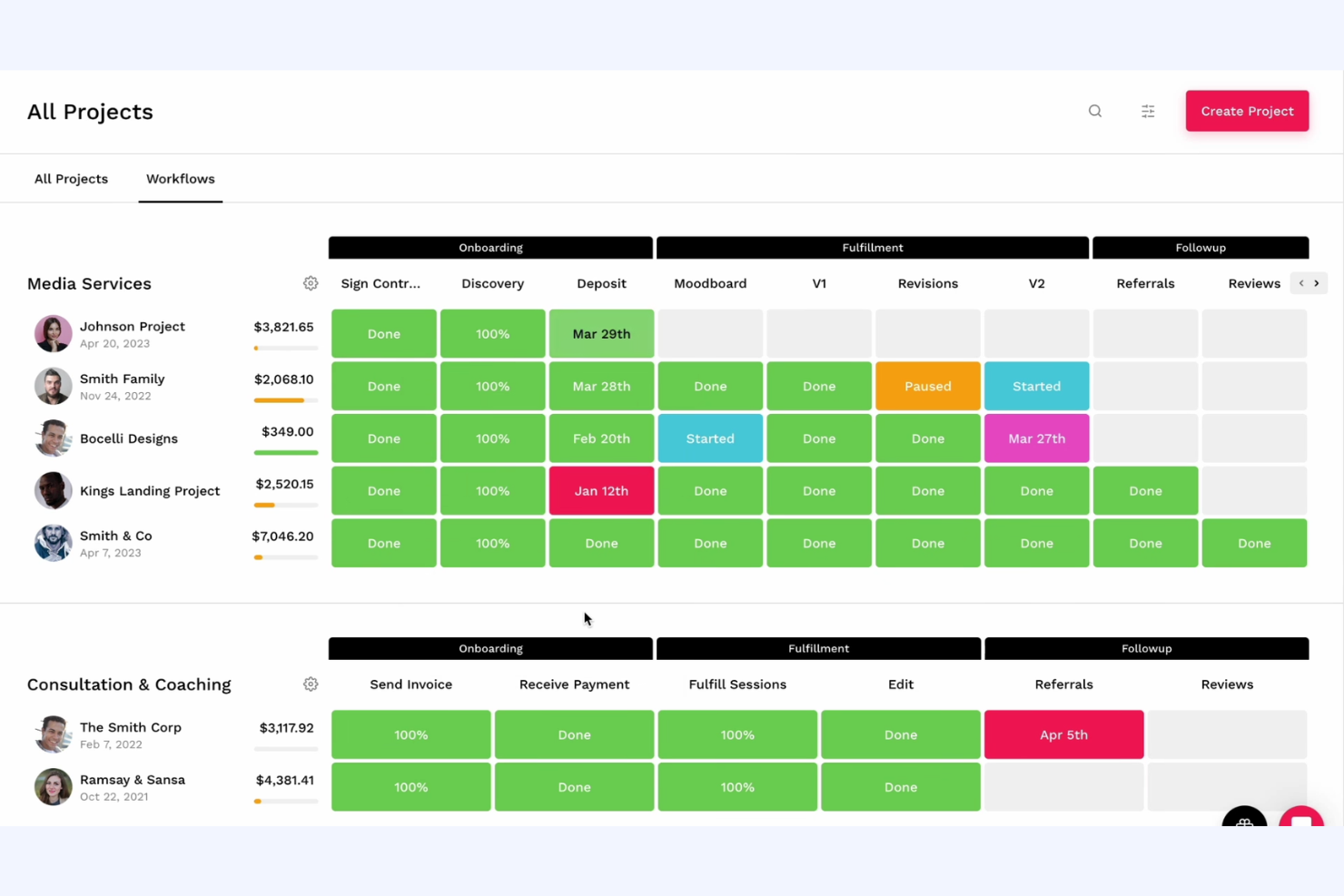
Bloom ist eine Geschäftsmanagementplattform für Kreativprofis und bietet Tools für Kundenverwaltung, Projektverfolgung und Rechnungsstellung. Sie wird von Fotografen, Designern und Freiberuflern genutzt, die ihre Geschäftsabläufe effizient verwalten müssen.
Warum es eine gute Accelo-Alternative ist: Bloom richtet sich an Kreativprofis und bietet eine Reihe von Tools, die Kundenverwaltung und Projektverfolgung vereinfachen. Die Plattform verfügt über automatisierte Workflows, die dabei helfen, sich wiederholende Aufgaben zu optimieren, sodass Sie sich auf Ihre Kreativität konzentrieren können. Das Kundenportal der Plattform ermöglicht eine einfache Kommunikation und Zusammenarbeit. Durch die Kombination von CRM und Projektmanagement ist Bloom eine passende Wahl für Kreative, die eine Komplettlösung suchen.
Hervorstechende Funktionen und Integrationen:
Zu den Funktionen gehören anpassbare Verträge zum schnellen Erstellen und Versenden professioneller Vereinbarungen. Die Rechnungsfunktion stellt sicher, dass Sie Kunden effizient abrechnen und Zahlungen im Blick behalten können. Mit der Buchungsverwaltung können Kunden Termine planen, wodurch die Organisation Ihres Kalenders erleichtert wird.
Zu den Integrationen gehören Google Calendar, QuickBooks, Stripe, PayPal, Square, Zapier, Mailchimp, Slack, Zoom, Xero und weitere.
Pros and Cons
Pros:
- Auf Kreativprofis zugeschnitten
- Unterstützt die Kundenverwaltung
- Vereinfacht die Projektverfolgung
Cons:
- Möglicherweise nicht für kreative Branchen geeignet
- Begrenzte erweiterte Funktionen
Weitere Alternativen zu Accelo
Hier sind einige weitere Alternativen zu Accelo, die es nicht in meine Auswahlliste geschafft haben, aber dennoch einen Blick wert sind:
- Basecamp
Am besten für unkompliziertes Projektmanagement
- ConnectWise
Am besten für IT-Dienstleistungsunternehmen
- Function Point
Am besten für die Verwaltung von Kreativagenturen geeignet
- Ravetree
Am besten für integriertes Projektmanagement geeignet
- ManyRequests
Am besten für Kundenportale von Agenturen geeignet
- StartingPoint
Am besten für die Automatisierung von Arbeitsabläufen geeignet
- BigTime
Am besten für PSA mit KI-gestützten Erkenntnissen
- Scoro
Am besten für Projektfinanzen vom Angebot bis zum Zahlungseingang


So bewerte ich Accelo-Alternativen
Ich bewerte diese Werkzeuge in zwei Ebenen: die Kernfunktionen – Zeiterfassung, Kundenabrechnung und Verwaltung von Pauschalvereinbarungen –, die jede Accelo-Alternative zuverlässig beherrschen muss, sowie die Differenzierungsmerkmale, die gute von herausragenden Lösungen unterscheiden.
Kernfunktionen (Grundvoraussetzungen für diese Liste)
Bei der Auswahl der Werkzeuge für meine Liste bewerte ich jedes einzelne Werkzeug für jede der unten aufgeführten Kernfunktionen auf einer Skala von 0 (bietet die Funktion nicht an) bis 5 (zeichnet sich in diesem Bereich aus). Anschließend rechne ich die Gesamtpunktzahl des Werkzeugs in einen Prozentsatz um. Jedes Werkzeug muss eine Mindestgesamtpunktzahl von 65 % erreichen, um für die Aufnahme infrage zu kommen.
- Projektmanagement: Ich achte auf Aufgabenzuweisungen, Abhängigkeiten, Meilensteine und mehrere Ansichten wie Gantt und Kanban, mit denen sich gleichzeitig laufende Kundenprojekte verwalten lassen.
- Zeiterfassung und Abrechnung: Jedes Werkzeug sollte erfasste Stunden mit abrechenbaren Sätzen und Rechnungsstellung verknüpfen, damit Teams ihre Stundenzettel nicht in ein separates Abrechnungstool exportieren müssen.
- Kunden- und CRM-Verwaltung: Ich prüfe, ob die Plattform Kundenkontakte, Kommunikationsverläufe und Phasen von Geschäftsabschlüssen an einem Ort speichert, anstatt ein eigenständiges CRM zu erfordern.
- Pauschalvereinbarungen und wiederkehrende Arbeiten: Für Agenturen mit laufenden Pauschalvereinbarungen bewerte ich, wie die einzelnen Werkzeuge wiederkehrende Abrechnungen, Budgetverfolgung und die Übertragung von Stunden handhaben.
- Ressourcen- und Kapazitätsplanung: Auslastungsansichten und Planungsfunktionen sind hier besonders wichtig, vor allem für Unternehmen, die mehrere Kundenkonten mit einem gemeinsamen Team betreuen.
- Finanzberichte und Rentabilität: Ich prüfe, ob sich Berichte zu Projektmargen, Auslastung und Soll-Ist-Vergleichen von Budgets abrufen lassen, ohne Daten in eine Tabellenkalkulation exportieren zu müssen.
Sobald ich eine Liste von Werkzeugen zusammengestellt habe, die diese Kriterien erfüllen, prüfe ich, wodurch sich die einzelnen Plattformen voneinander unterscheiden.
Differenzierungsmerkmale (wodurch sich Anbieter unterscheiden)
So vergleiche ich die verschiedenen Anbieter:
Hervorstechende Funktionen
Kundenportale sind ein wichtiges Differenzierungsmerkmal. Ich suche nach Werkzeugen, mit denen Kunden den Projektstatus einsehen, Ergebnisse freigeben und auf Rechnungen zugreifen können, ohne dass Ihr Posteingang überflutet wird. Auch die Automatisierung vom Angebot bis zum Zahlungseingang ist für Unternehmen wichtig, die möchten, dass Angebote direkt in aktive Projekte und Abrechnungszyklen übergehen. Eine integrierte Ticketverwaltung ist ebenfalls eine Bewertung wert, da viele Agenturen strukturierte Projektarbeit parallel zu spontanen Kundenanfragen bearbeiten, die weiterhin erfasst und abgerechnet werden müssen.
Über die Funktionen hinaus
Integrationen spielen hier eine große Rolle. Ich prüfe, ob sich ein Werkzeug nativ mit Buchhaltungsplattformen wie QuickBooks oder Xero verbinden lässt, denn die doppelte Eingabe von Rechnungen macht den Zweck eines Komplettsystems zunichte. Auch die Preistransparenz fließt in meine Bewertung ein. Einige Anbieter bieten Abrechnungs- oder Funktionen für Pauschalvereinbarungen erst in höheren Tarifen an. Daher prüfe ich, ob der tatsächlich benötigte Tarif klar ausgewiesen ist. Außerdem berücksichtige ich die Unterstützung bei der Einführung, insbesondere Migrationsmöglichkeiten für Teams, die mit ihren bestehenden Kunden- und Projektdaten von Accelo wechseln.
Warum nach einer Alternative zu Accelo suchen?
Accelo ist zwar eine gute Wahl für Software zur Automatisierung professioneller Dienstleistungen, doch es gibt mehrere Gründe, warum einige Nutzer nach alternativen Lösungen suchen. Vielleicht suchen Sie nach einer Alternative zu Accelo, weil …
- Sie mehr Anpassungsmöglichkeiten benötigen.
- Ihr Team bessere Integrationsmöglichkeiten benötigt.
- Sie nach wettbewerbsfähigeren Preisen suchen.
- Sie Unterstützung für ein größeres Team benötigen.
- Ihr Unternehmen in Regionen mit eingeschränktem Accelo-Support tätig ist.
- Sie erweiterte Berichtsfunktionen wünschen.
Wenn einer dieser Punkte auf Sie zutrifft, sind Sie hier richtig. Meine Liste enthält mehrere Optionen für Software zur Automatisierung professioneller Dienstleistungen, die besser für Teams geeignet sind, die mit diesen Herausforderungen bei Accelo konfrontiert sind und nach alternativen Lösungen suchen.
Die wichtigsten Funktionen von Accelo
Hier sind einige der wichtigsten Funktionen von Accelo, damit Sie die Angebote alternativer Lösungen gegenüberstellen und vergleichen können:
- Automatisierte Arbeitsabläufe: Automatisieren Sie sich wiederholende Aufgaben, damit Ihr Team mehr Zeit für wichtigere Arbeiten hat.
- Zentrale Kundenverwaltung: Verwalten Sie alle Kundeninteraktionen und -daten an einem Ort, damit sie einfach zugänglich und organisiert sind.
- Zeiterfassung: Erfassen Sie die für Aufgaben und Projekte aufgewendete Zeit, um die Abrechnungsgenauigkeit und das Projektmanagement zu verbessern.
- Projektüberwachung: Legen Sie Projektzeitpläne und Fristen fest und überwachen Sie diese, damit Ihr Team im Zeitplan bleibt.
- Verwaltung von Honorarvereinbarungen: Erstellen und verwalten Sie Honorarvereinbarungen, um beständige und planbare Einnahmequellen sicherzustellen.
- Umsatzprognosen: Prognostizieren Sie Umsätze, damit Ihr Team Ressourcen effektiv planen und zuweisen kann.
- Rechnungsstellung: Stellen Sie Kunden gesammelt Rechnungen, um Ihren Abrechnungsprozess zu vereinfachen und den Cashflow zu verbessern.
- KPI-Überwachung: Erstellen und verfolgen Sie wichtige Leistungskennzahlen, um den Erfolg Ihres Teams zu messen und Verbesserungsmöglichkeiten zu erkennen.
- Umwandlung von Angeboten in Projekte: Wandeln Sie Leads und Angebote in Projekte um, um Ihre Vertriebs- und Projektmanagementprozesse zu organisieren.
- Kundenkommunikation: Arbeiten Sie direkt innerhalb der Plattform mit Kunden zusammen und kommunizieren Sie mit ihnen, um Transparenz und Kundenbeziehungen zu verbessern.
Wie geht es weiter?
Wenn Sie gerade professionelle Software zur Automatisierung von Dienstleistungen recherchieren, wenden Sie sich kostenlos an einen SoftwareSelect-Berater, um Empfehlungen zu erhalten.
Sie füllen ein Formular aus und führen ein kurzes Gespräch, in dem Ihre individuellen Anforderungen besprochen werden. Anschließend erhalten Sie eine Vorauswahl an Softwarelösungen, die Sie prüfen können. Die Berater unterstützen Sie sogar während des gesamten Kaufprozesses, einschließlich der Preisverhandlungen.