

QuickBooks ile Entegre Olan En İyi 10 Proje Yönetimi Yazılımı

QuickBooks ile Entegrasyon Sağlayan En İyi Proje Yönetimi Yazılımları Kısa Listesi


QuickBooks ile entegre olan doğru proje yönetimi yazılımını bulmak göz korkutucu bir görev olabilir. Proje iş akışlarınız içindeki finansal yönetimi kolaylaştıran bir çözüm arıyorsunuz, ancak seçeneklerin çokluğu bunaltıcı olabilir.
QuickBooks ile sorunsuz bir şekilde senkronize olan çeşitli araçları test ederek zamandan tasarruf etmenize ve hataları azaltmanıza yardımcı oldum. Aşağıda, iş akışınıza uyan ve projelerinizin (ve finans işlerinizin) sorunsuz ilerlemesini sağlayan seçeneği bulabilmeniz için en iyi seçenekleri açıklayacağım.
Why Trust Our Software Recommendations
Our team has been testing and reviewing software since 2012. As project managers ourselves, we know how difficult—and important—it is to choose the right software.
For this guide, we evaluated tools using hands-on testing and independent research, scoring tools using our selection criteria. We also draw on insights from industry thought leaders and practicing project management experts.
Our reviews reflect our human editorial judgment, not a sales pitch.
Expert reviewers:
QuickBooks ile Entegrasyon Sağlayan En İyi Proje Yönetimi Yazılımları Özeti
Bu karşılaştırma tablosu, bütçeniz ve işletme ihtiyaçlarınız için en iyi yazılımı bulmanıza yardımcı olmak üzere QuickBooks entegrasyonlarına sahip proje yönetimi yazılımı seçimlerimin fiyatlandırma ayrıntılarını özetler.
Score legend (out of 5)
- Excellent 4.5–5
- Good 4–4.4
- Average 3–3.9
- Below average 2–2.9
- Poor 1–1.9
| Tool | Starting Price | Website | |||||||
|---|---|---|---|---|---|---|---|---|---|
| Best for comprehensive project tracking | 3.8 out of 5 | 4 | 4 | 4 | 3 | 4 | 4 | $17/user/month 14-day free trial | Book Demo |
| Best for agency project management | 3.7 out of 5 | 4 | 3 | 4 | 3 | 5 | 3 | $10/user/month 14-day free trial | Book Demo |
| Best for workload management | 2.5 out of 5 | 3 | 2 | 2 | 2 | 5 | 1 | $10/user/month Free plan + 14-day trial + demo available | Book Demo |
| Best for consulting retainer billing | 3.7 out of 5 | 4 | 3 | 3 | 4 | 5 | 3 | Pricing upon request Free demo available | Website |
| Best for client-facing agency billing | 3.5 out of 5 | 4 | 3 | 3 | 3 | 5 | 3 | $9.99/user/month Free plan + 14-day free trial + free demo available | Website |
| Best for construction job costing with QuickBooks | 3.7 out of 5 | 3 | 3 | 4 | 4 | 5 | 3 | Pricing upon request 14-day free trial for Procore Estimating + free demo available | Website |
| Best for construction job tracking and billing | 3.5 out of 5 | 3 | 4 | 4 | 4 | 3 | 3 | Pricing upon request Free demo available | Website |
| Best for trade contractor job costing with QuickBooks | 3.7 out of 5 | 3 | 3 | 4 | 4 | 4 | 4 | $149/month Free trial + free demo available | Website |
| Best for PMO-level QuickBooks billing sync | 3.5 out of 5 | 3 | 3 | 3 | 4 | 4 | 4 | $3/user/month Free plan available; 14-day free trial | Website |
| Best for resource planning with billing sync | 3.5 out of 5 | 4 | 2 | 3 | 3 | 5 | 4 | $39/user/month Free plan + free trial + free demo available | Website |
QuickBooks ile Entegrasyon Sağlayan En İyi Proje Yönetimi Yazılımları İncelemeleri
Bir şey her değiştiğinde muhasebe sisteminizi manuel olarak güncellemek zorunda kalmadan proje zaman çizelgelerini ve bütçelerini yönetmek yeterince zordur. Proje yönetimi yazılımınız ile QuickBooks birbirleriyle iletişim kuramıyorsa tekrarlanan veri girişi, uyuşmayan rakamlar ve gerçek işler yerine mutabakata harcanan saatlerle karşı karşıya kalırsınız.
Bu nedenle QuickBooks entegrasyonuna sahip doğru proje yönetimi yazılımını bulmak oyunun kurallarını değiştirir. Faturalandırma, gider takibi ve finansal raporlamayı kolaylaştırır; böylece muhasebe sorunlarıyla uğraşmadan projelerinizi planlandığı gibi sürdürebilirsiniz. QuickBooks ile sorunsuz bir şekilde senkronize olan çeşitli araçları test ederek zamandan tasarruf etmenize ve hataları azaltmanıza yardımcı oldum. Aşağıda, iş akışınıza uyan ve projelerinizin (ve finans işlerinizin) sorunsuz ilerlemesini sağlayan seçeneği bulabilmeniz için en iyi seçenekleri açıklayacağım.
QuickBooks ile entegre olan en iyi proje yönetimi araçlarına ilişkin incelemelerim burada; seçim nedenlerime dair notları ve nasıl çalıştıklarını göstermek için bir ekran görüntüsünü de ekledim. En uygun seçeneği belirlemenize yardımcı olmak için öne çıkan özelliklerini, yazılım entegrasyonlarını ve fiyatlandırma ayrıntılarını da vurguladım.

Scoro
Best for comprehensive project tracking

Scoro is a work management platform that combines project tracking, time logging, resource planning, budgeting, and invoicing in one place, with a native QuickBooks Online integration for syncing financial data.
Who Is Scoro Best For?
Scoro is a good fit for professional services teams—like agencies, consultancies, and IT firms—that need to manage projects and finances in a single platform.
Why I Picked Scoro
Scoro earns its spot on my shortlist because it tracks every dimension of a project in one place—tasks, time, budgets, and billable work—without needing a patchwork of tools. I especially like how the Gantt chart updates in real time as team members log hours, so I can see actual vs. estimated costs as work happens. The QuickBooks Online sync means invoices I generate from completed project milestones in Scoro flow directly into QuickBooks, keeping financial records accurate without manual data entry.
Scoro Key Features
- Resource management: View your team's capacity across projects and assign tasks based on availability and workload.
- Project dashboard: Track project status, budget consumption, and task progress from a single summary view.
- Quotes and proposals: Build detailed quotes that convert directly into projects, with line items that feed into billing.
- Retainer tracking: Set up recurring work agreements and monitor hours and budgets against each retainer period.
Pros and Cons
Pros:
- Comprehensive project management features
- Effective time tracking capabilities
- Robust reporting and analytics
Cons:
- Mobile app could be improved
- Some time tracking features are limited to higher-tier plans
New Product Updates from Scoro

Scoro Adds Time Mobile App and ELI Improvements
Scoro adds the Scoro Time mobile app for iOS/Android to track time anywhere and expands ELI with attachments, smarter filtering, and trigger-based actions. For more information, visit Scoro's official site.
 .

Best for agency project management

Productive is a project management platform built for agencies and professional services teams, combining project planning, time tracking, resource management, budgeting, invoicing, and financial forecasting in one place.
Who Is Productive Best For?
Productive is a strong fit for digital agencies, creative studios, and consulting firms that need to manage client projects, track billable time, and monitor project profitability in one place.
Why I Picked Productive
Productive earns its spot as one of the best on my shortlist because it's one of the few tools built from the ground up for agency operations—not just adapted for them. I particularly like how project budgets, billable time, and invoicing all live in the same system, so when I create an invoice in Productive, I can export it directly into QuickBooks without re-entering any data. The per-project profitability tracking is also something I find genuinely useful: I can see exactly where a project is burning budget in real time, not just after the fact.
Productive Key Features
- Resource planning: Schedule team members across projects using availability views and capacity data to avoid over-allocation.
- Gantt chart timeline: Visualize project schedules, set task dependencies, and adjust timelines with a drag-and-drop Gantt view.
- Sales pipeline CRM: Track leads and deals from first contact through to active project delivery without switching tools.
- Custom reporting dashboards: Build reports across utilization, costs, and revenue using real-time project data.
Pros and Cons
Pros:
- Customizable features cater to specific agency needs
- Robust resource planning and tracking capabilities
- Comprehensive features for financial management and reporting
Cons:
- Could have more integrations
- Initial setup can be time-consuming
New Product Updates from Productive
Productive Adds Email and Calendar Integrations for Agents
Productive adds Gmail, Outlook, Google Calendar, and Outlook Calendar connectors for its AI agents. These integrations let agents manage emails and create calendar events directly within Productive. For more information, visit Productive’s official site.
 .

Wrike
Best for workload management

Wrike is a project management platform that combines task tracking, Gantt charts, time tracking, budgeting, and workflow automation with a native QuickBooks integration for billing and invoicing.
Who Is Wrike Best For?
Wrike is a strong fit for mid-size to enterprise teams in professional services, marketing, or operations who need structured project oversight across multiple workstreams.
Why I Picked Wrike
Wrike earns its spot on my shortlist because its workload management tools give me a real-time view of who's over capacity before it becomes a problem. I rely on Wrike's workload charts to see individual task loads by assignee and drag tasks to balance work across the team without leaving the view. Paired with effort estimates on tasks, I can match assignments to actual availability rather than just guessing.
Wrike Key Features
- Interactive Gantt charts: Visualize project timelines with dependencies, milestones, and drag-and-drop task scheduling in a single view.
- Built-in time tracking: Log hours directly on tasks and generate time reports that feed into QuickBooks for accurate client billing.
- QuickBooks integration: Export tracked time entries from Wrike into QuickBooks to keep project data and financial records in sync.
- Workflow automation: Set up rule-based triggers to auto-assign tasks, change statuses, or send notifications when conditions are met.
Pros and Cons
Pros:
- Comprehensive project management features with high customization
- Effective time tracking and workload management
- Robust reporting and analytics capabilities
Cons:
- Learning curve for new users
- Mobile app lacks some desktop features
New Product Updates from Wrike

Wrike Redesigns Workspace Search With New Filters
Wrike introduces a redesigned Workspace Search interface with recent search shortcuts, item type and location filters, and parent-task context. These updates help users find relevant work items and navigate search results efficiently. For more information, visit Wrike’s official site.
 .

Forecast
Best for consulting retainer billing
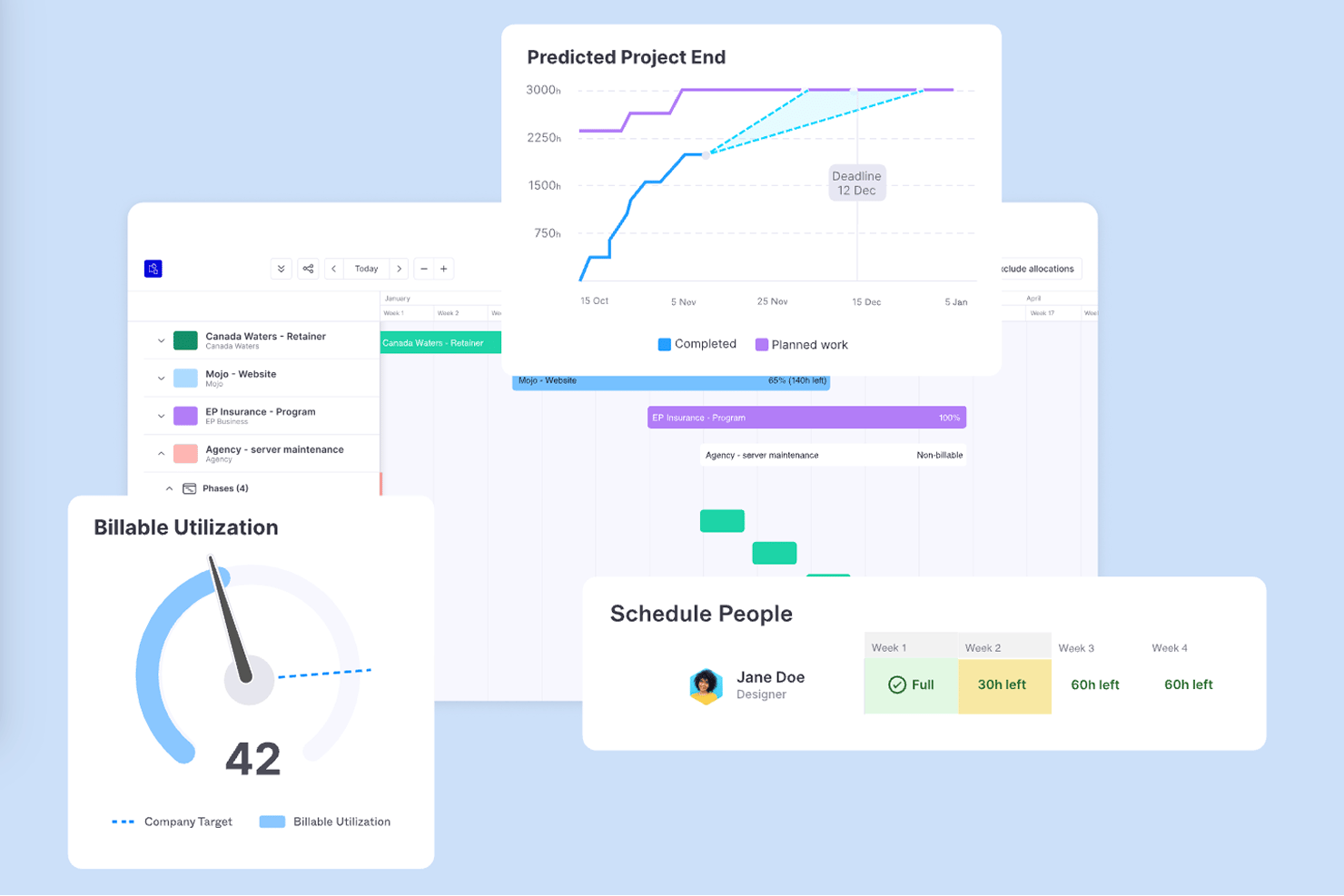
Accelo is a professional services automation platform that connects project management, time tracking, resource planning, invoicing, and QuickBooks financial sync in one place.
Who Is Accelo Best For?
Accelo is a strong fit for professional services firms—consultancies, agencies, and managed service providers—that need to connect client work, time tracking, and billing in one place.
Why I Picked Accelo
I picked Accelo as one of the best because its AI-driven milestone tracking and revenue forecasting go well beyond basic project planning. I like that it uses embedded machine learning to predict project completion dates and flag budget risks before they become problems. New invoices sync to QuickBooks Online automatically, so billable time captured against tasks flows through to accounting without manual rekeying.
Forecast Key Features
- Branded client portal: Share project health, milestones, timelines, and retainer usage with clients through a custom-branded workspace.
- Resource scheduling: Assign team members to projects based on skills, availability, and workload across your portfolio.
- Timesheet approvals: Enable submission and approval workflows that lock time entries and make approved hours available for invoicing.
- QuickBooks Online purchase sync: Sync Accelo purchases to QuickBooks Online as bills, including vendor details, line items, rates, and tax codes.
Accelo Integrations
Accelo has a documented native QuickBooks Online integration for invoices, payments, customers, and purchases. It also lists Sage Intacct, Xero, Jira, Slack, Microsoft 365, and Zapier, plus a RESTful API and Forms API for custom integrations.
Pros and Cons
Pros:
- Forecasts delivery risks and team capacity
- Links tracked time to billing workflows
- Connects client records with project milestones
Cons:
- Mobile app limits deeper project work
- Reports can be hard to tailor
Best for client-facing agency billing
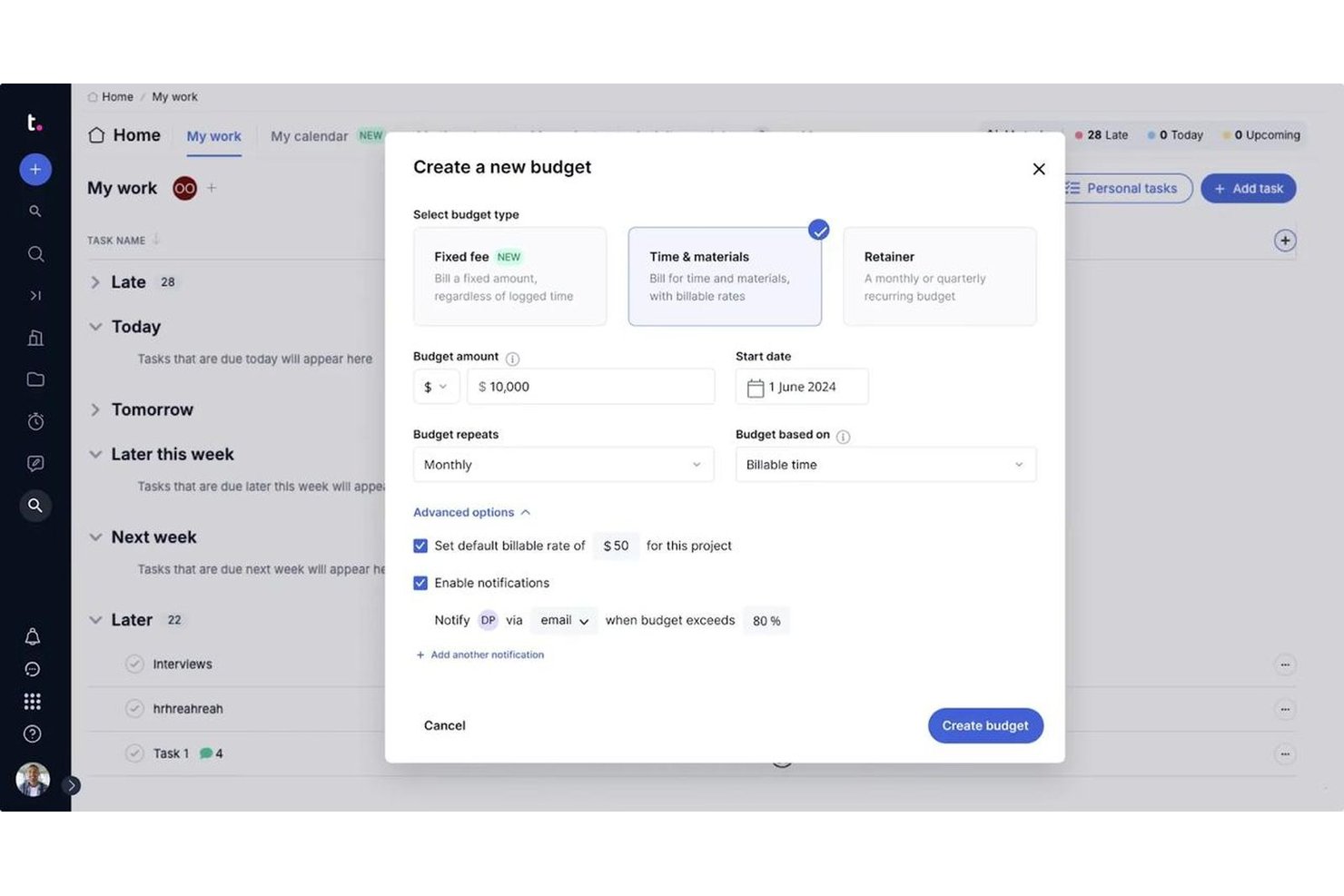
Teamwork.com is a project management platform built for client-facing work, combining task management, time tracking, retainer billing, resource planning, and QuickBooks Online integration for agencies and professional services teams.
Who Is Teamwork.com Best For?
Teamwork.com is a strong fit for agencies and consultancies that need to manage client projects, track billable hours, and push invoices directly into QuickBooks Online.
Why I Picked Teamwork.com
I picked Teamwork.com as one of the best because it's purpose-built for agencies billing clients, with retainer tracking, billable time logging, and invoice creation all living inside the same platform. I love that the QuickBooks Online Advanced integration automatically pushes time logs from Teamwork.com into QuickBooks, mapping each entry to the right client and rate without manual exports. When a project wraps, I can generate an invoice from logged hours and push it directly to QuickBooks Online Basic in just a few clicks.
Teamwork.com Key Features
- Resource workload and capacity planning: View team workloads, identify resourcing bottlenecks, and reassign tasks to balance capacity across projects.
- Client intake forms: Collect project requests through customizable forms that automatically convert submissions into tasks.
- Retainer and recurring budget tracking: Set up and monitor recurring time or cost retainers alongside standard project budgets.
- Project portfolio management: View health, progress, and status across multiple projects from a single portfolio dashboard.
Teamwork.com Integrations
Teamwork.com lists 150+ integrations, including native QuickBooks Online Basic and Advanced, Xero, NetSuite, Salesforce, HubSpot, Slack, Microsoft Teams, and Google Calendar integrations. It also supports API access and Zapier for custom connectivity.
Pros and Cons
Pros:
- Project profitability reports aid planning
- Billable time supports client invoicing
- Client task updates keep work visible
Cons:
- Finding settings and reports takes effort
- Frequent timer toggles can distort logs

Procore
Best for construction job costing with QuickBooks
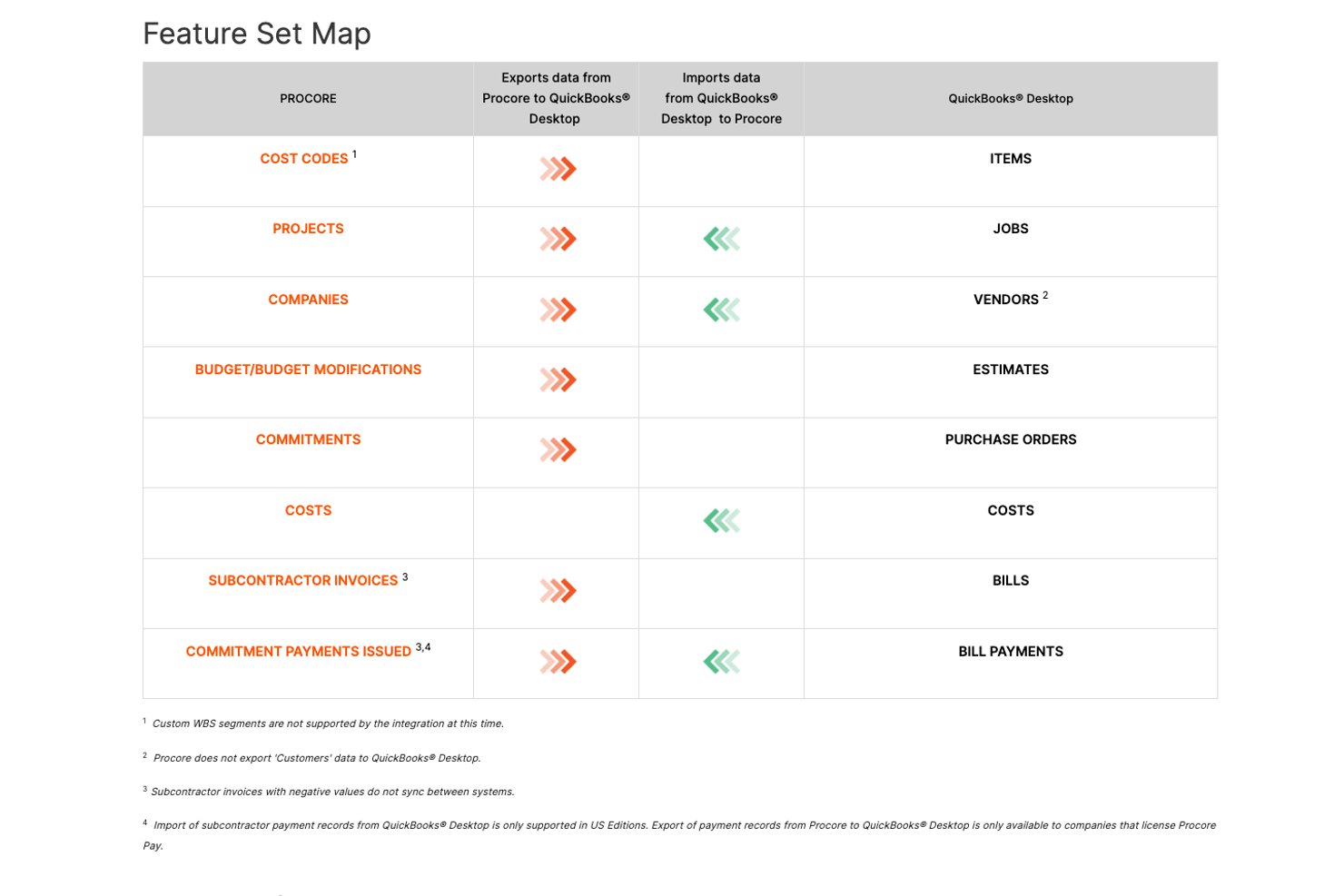
Procore is a construction project management platform that brings together scheduling, document control, RFIs, submittals, daily logs, job costing, and QuickBooks integration across both office and field teams.
Who Is Procore Best For?
Procore is built for construction project managers who need job costing, scheduling, and QuickBooks sync in one platform.
Why I Picked Procore
I picked Procore as one of the best because it's purpose-built for construction job costing in a way that no generic project management tool matches. I like how it exports your Procore budget to QuickBooks Desktop as an Estimate, including original amounts and modifications, then pulls actual job costs back in as Direct Costs once the sync is live. Change orders, subcontractor invoices, and progress billings all feed into the same cost-code framework, keeping your financials traceable from the field to the books.
Procore Key Features
- Mobile offline field access: Teams can view drawings, log daily reports, and capture photos on iOS and Android without a network connection, syncing updates when connectivity returns.
- Four-type schedule dependencies: Scheduling supports Finish-to-Start, Start-to-Finish, Start-to-Start, and Finish-to-Finish dependencies with lag specified in days.
- Progress billings workflow: Subcontractors submit invoices through an emailed invite, which a Procore Admin reviews before export to QuickBooks.
- 360 Reporting financials dataset: Company-wide reports pull budgets, direct costs, commitments, and invoices across active and inactive projects into one dashboard.
Procore Integrations
Procore offers 500+ marketplace integrations and apps, including QuickBooks Connector, Oracle NetSuite, Sage, Viewpoint Spectrum, Xero, Microsoft Project, and Smartsheets. It also provides REST APIs and webhooks for custom integrations.
Pros and Cons
Pros:
- Change orders connect with budget tracking
- Offline field updates reach office teams
- Construction records stay in one workspace
Cons:
- Built around construction, not service firms
- Navigation can feel cluttered and slow

Best for construction job tracking and billing
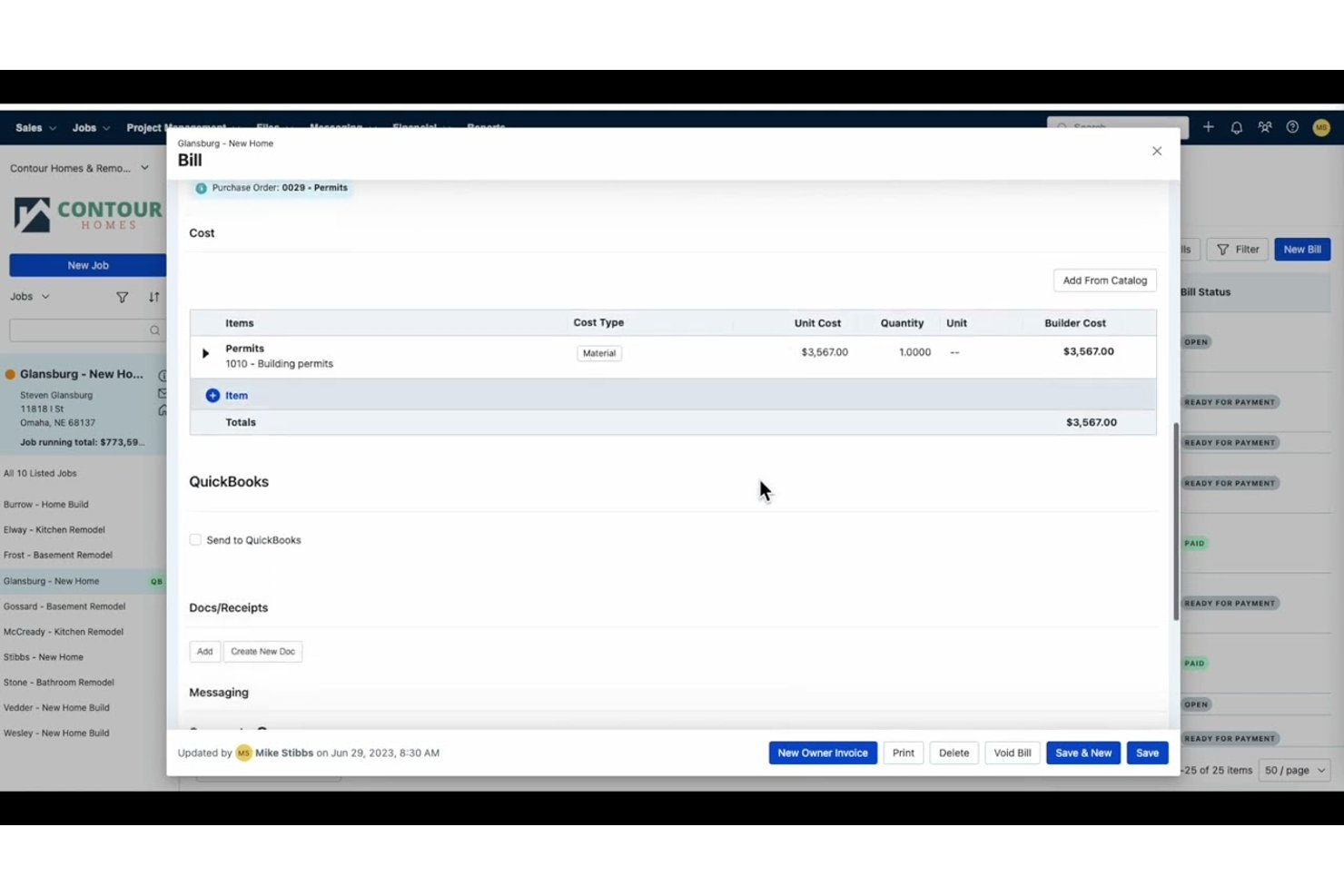
Buildertrend is a construction management platform that brings together project scheduling, job costing, budgeting, client communication, and QuickBooks integration into a single system built specifically for builders and contractors.
Who Is Buildertrend Best For?
Buildertrend is purpose-built for residential builders and general contractors who need job costing, scheduling, and QuickBooks sync in one construction-specific platform.
Why I Picked Buildertrend
I picked Buildertrend as one of the best because it's purpose-built for construction job tracking and billing in a way generic project tools simply aren't. Its Job Costing Budget breaks down costs by cost code, showing actuals, committed costs, and projected costs alongside client pricing, and it pulls QuickBooks expenses directly into that view. The WIP report then layers in earned revenue, percent complete, and over/under-billing calculations, giving you a real financial picture of every open job.
Buildertrend Key Features
- Change order management: Create flat-fee or itemized change orders with digital client approval and optional automatic invoice generation on approval.
- Client portal: Give clients access to project schedules, files, selections, and updates, with the ability to approve change orders and complete assigned tasks.
- Mobile time clock: Let field crews clock in and out, log breaks, and assign hours to cost codes directly from the job site, with offline sync support.
- Work-in-progress report: View earned revenue, percent complete, and over/under-billing calculations across all open jobs in a single report.
Buildertrend Integrations
Buildertrend offers marketplace integrations with QuickBooks, Sage Intacct, Xero, Gusto, HubSpot, Salesforce, Pipedrive, and Bluebeam. It also provides an API for custom integrations.
Pros and Cons
Pros:
- Mobile logs keep jobsite updates moving
- Shared schedules coordinate crews and clients
- Job-cost reports clarify project profitability
Cons:
- Cost-code setup can demand substantial cleanup
- Complex commercial schedules can feel too simple

Knowify
Best for trade contractor job costing with QuickBooks
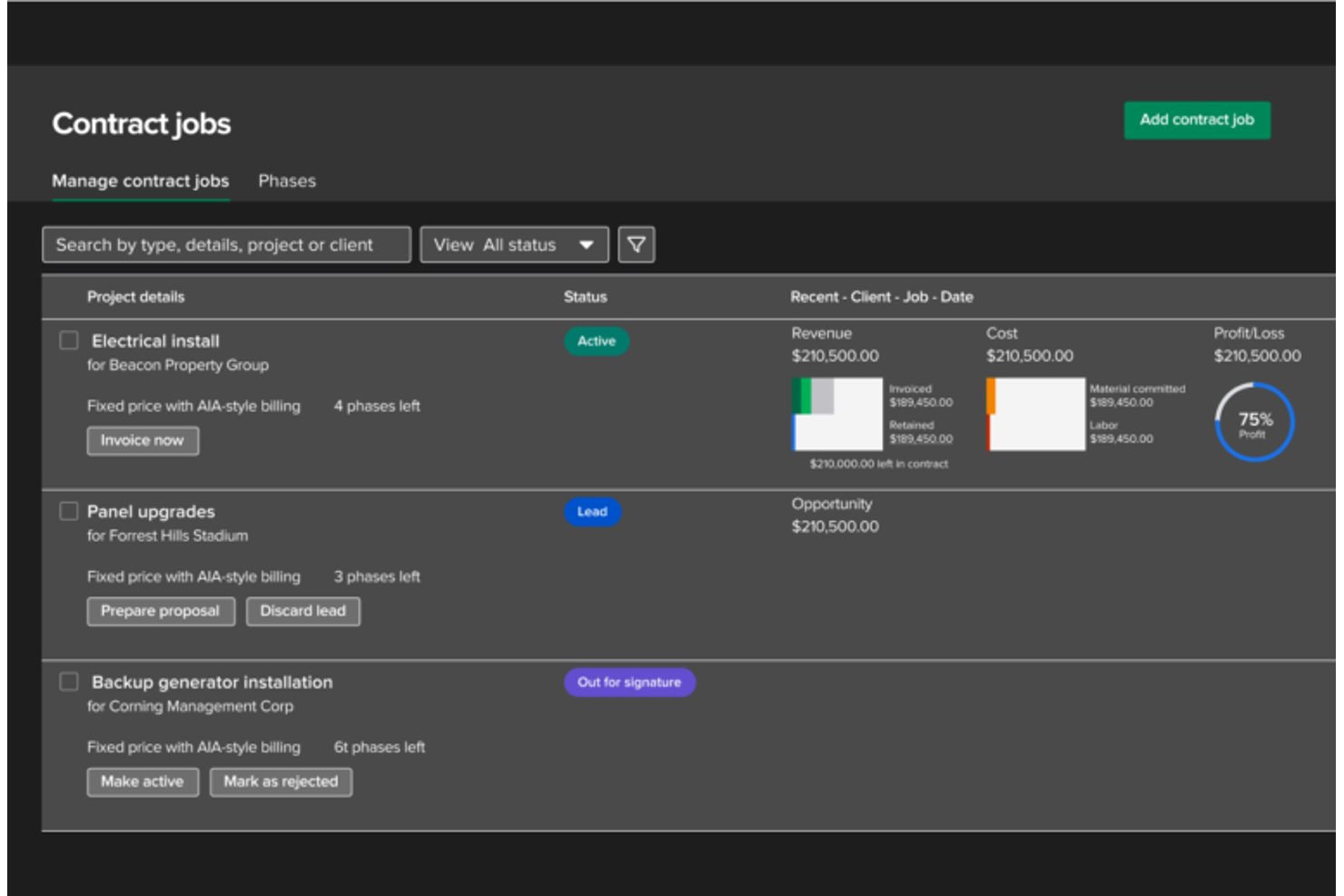
Knowify is a project and financial management platform built for trade contractors, combining job costing, estimating, progress billing, scheduling, and QuickBooks integration in a single tool.
Who Is Knowify Best For?
Knowify is a strong fit for small to mid-size trade contractors—electricians, plumbers, HVAC crews—who need job costing and QuickBooks billing in one place.
Why I Picked Knowify
I picked Knowify as one of the best because it's purpose-built for trade contractors who need job costing and QuickBooks billing to work together without manual reconciliation. I love how it tracks costs by project phase and cost category (labor, materials, subcontractors) in real time, then syncs invoices, bills, payments, and retainage directly with QuickBooks Online. The AIA pay application support is a genuine differentiator: my team can generate G702/G703 forms with schedules of values and change-order reconciliation already built in.
Knowify Key Features
- Drag-and-drop scheduling: Assigns employees, subcontractors, and equipment to project phases with availability views and a live map of last check-ins.
- Client portal: Shares project status, photos, change orders, and invoice history with clients through a branded, login-free portal link.
- Subcontractor management: Tracks subcontractor budgets, costs, licenses, insurance documents, and expiration dates from one place.
- Mobile app: Lets field crews clock in and out, upload job photos, and record expenses from iOS or Android devices.
Knowify Integrations
Knowify offers native integrations with QuickBooks Online, QuickBooks Desktop, Intuit Enterprise Suite, QuickBooks Payroll, QuickBooks Payments, QuickBooks Time, and CompanyCam. It also supports Zapier and provides an MCP connector for compatible AI assistants.
Pros and Cons
Pros:
- Responsive support helps resolve setup questions
- AIA billing handles retainage and change orders
- Clear job-cost visibility across project phases
Cons:
- Mobile time tracking can glitch or close
- Reports can require spreadsheet reconciliation

Best for PMO-level QuickBooks billing sync
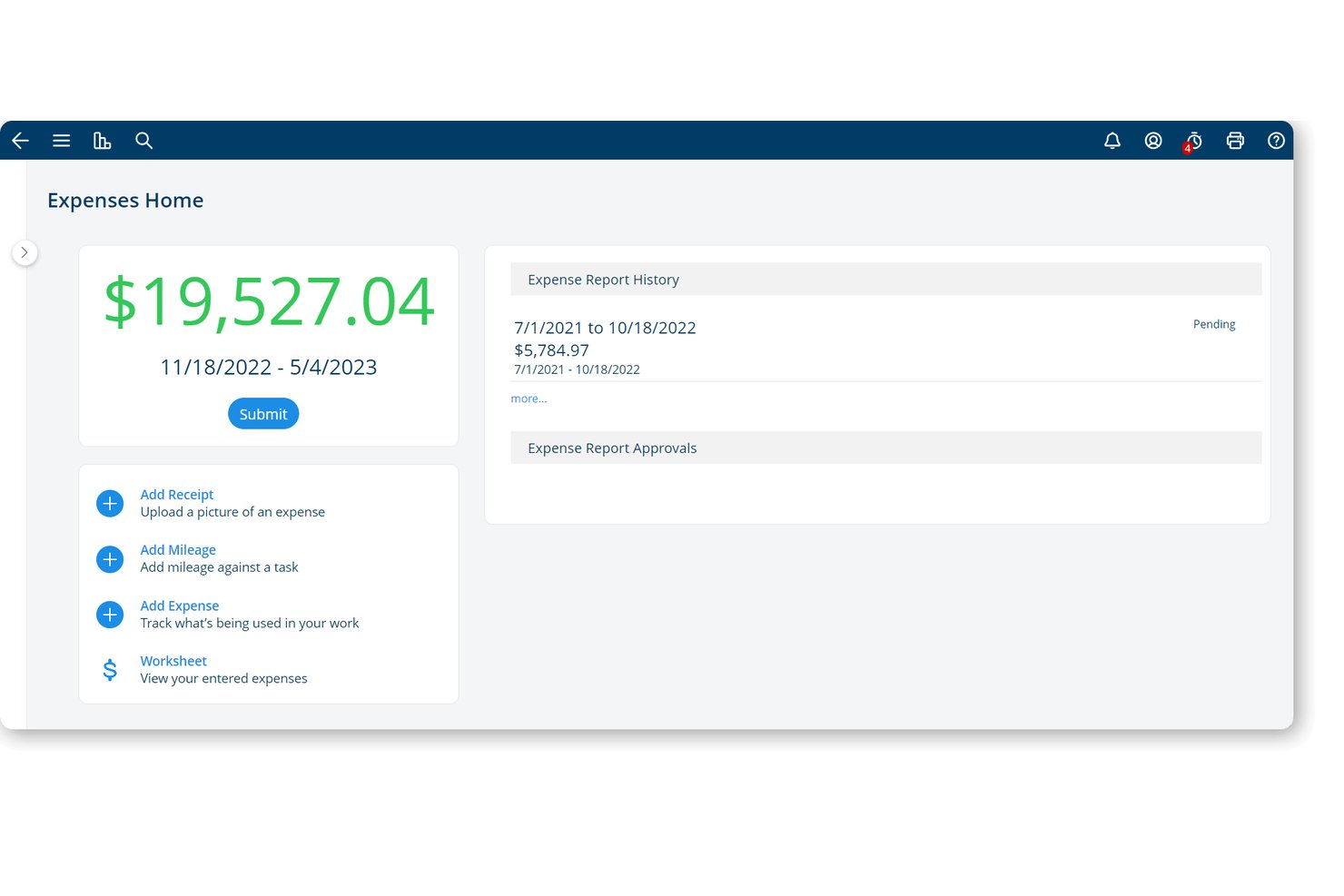
Project Insight is a work and project portfolio management platform that centralizes project planning, time tracking, expense management, invoicing, and QuickBooks billing workflows across teams and portfolios.
Who Is Project Insight Best For?
Project Insight is a strong fit for PMO leaders and operations managers who need to connect portfolio-level project work directly to QuickBooks billing workflows across multiple teams.
Why I Picked Project Insight
I picked Project Insight as one of the best because it's built specifically around the idea that approved project work should flow directly into QuickBooks without anyone retyping it. On the Business plan, you get native QuickBooks Online sync that pushes approved timesheets, expenses, and invoice line items across automatically, with field mappings connecting your project codes, time codes, and cost categories to the right QuickBooks records. I also like that invoice records can be built from time entries, expenses, or milestones in a single workflow, which keeps PMO-level billing tied directly to actual project delivery.
Project Insight Key Features
- Portfolio-wide capacity planning: View resource demand across teams, departments, programs, and portfolios, including work in progress or paused.
- AI-generated project templates: Generate project plans from existing processes, specifications, or best practices using built-in AI.
- Scenario modeling: Simulate scope, staffing, schedule, or priority changes to see potential effects before committing to the live plan.
- Agile and sprint planning: Manage Agile, waterfall, or hybrid sprints, track velocity, and run cross-project backlogs in a single workspace.
Project Insight Integrations
Project Insight offers a native QuickBooks Online integration and a QuickBooks Desktop integration through the QuickBooks Web Connector, supporting approved timesheets, expenses, and invoice data. It also has native integrations with Jira Software and Azure DevOps, plus a REST API for custom integrations.
Pros and Cons
Pros:
- Reviewers value configurable dashboards for leadership reporting
- Budget-versus-actual views support project cost oversight
- Portfolio-wide capacity exposes cross-team resource conflicts
Cons:
- Complex reports can require staff assistance
- Invoice records need final customer-facing formatting

Ravetree
Best for resource planning with billing sync
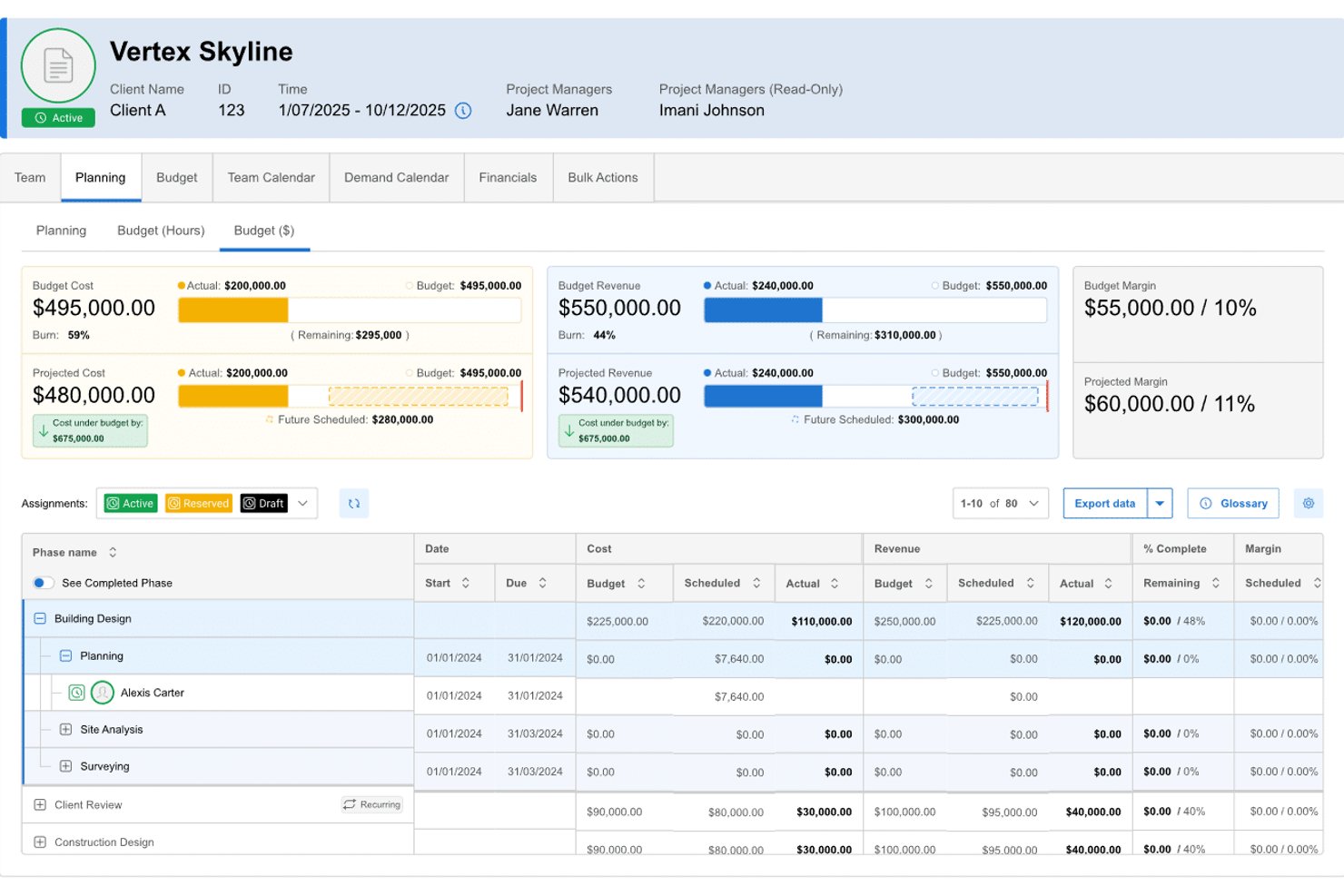
Ravetree is an all-in-one work management platform for project-based service firms that combines project management, resource planning, time tracking, billing, and QuickBooks integration.
Who Is Ravetree Best For?
Ravetree is a strong fit for professional services firms and agencies that need to connect resource planning, time tracking, and billing in one place.
Why I Picked Ravetree
I picked Ravetree as one of the best because it's built specifically for project-based service firms that need resource planning and billing to work together without manual reconciliation. I particularly like how approved time logs flow directly into invoices, which then sync to QuickBooks Online with matching invoice numbers, covering payment status updates in both directions. Phase-based and percentage billing add real precision when you're managing multi-stage client projects.
Ravetree Key Features
- Resource utilization tracking: View team utilization by hours or percentage, broken down by individual, team, department, or office.
- Retainer management: Automate retainer invoices, track earned and unearned revenue, and configure budget rollover, overages, and recurring billing periods.
- Client portal: Give clients real-time access to project updates, file approvals, task assignments, and direct communication in one place.
- Gantt chart with dependencies: Build project timelines with finish-to-start, start-to-finish, and other dependency types to track sequenced work visually.
Ravetree Integrations
Ravetree offers native integrations with QuickBooks, Xero, Stripe, Google Calendar, Outlook Calendar, Google Drive, Dropbox, OneDrive, Box, HubSpot, and GitHub. It also provides a REST API for custom integrations.
Pros and Cons
Pros:
- Reviewers praise project billing and time reports
- Gantt dependencies connect schedules to tasks
- Phase budgets support percentage-based billing
Cons:
- Work-item structure takes team adjustment
- Mobile access trails desktop workflows
QuickBooks ile Entegrasyon Sağlayan Diğer Proje Yönetimi Yazılımları
Aşağıda, kısa listeme aldığım ancak en iyi listeye giremeyen ek proje yönetimi yazılımlarının bir listesi yer alıyor. Kesinlikle göz atmaya değer.
- BigTime
For billing time to QuickBooks projects
- Kantata
For professional services billing ops
- Paymo
For tracking billable hours to QuickBooks invoices
- Avaza
For all-in-one billing and task tracking
- Function Point
For agency job costing with QuickBooks
- Contractor Foreman
For construction billing tied to QuickBooks
- Projectworks
For consulting firm billing and QuickBooks sync
- CoConstruct
For construction field-to-books sync
- Birdview PSA
For professional services billing and delivery
- JobTread
For construction job budget tracking


İlgili Proje Yönetimi İncelemeleri
Burada aradığınızı hâlâ bulamadıysanız sizin için derlediğimiz diğer proje yönetimi aracı incelemelerine göz atın:
- Gantt Şeması Oluşturucu
- Verimlilik Araçları
- Proje Takip Yazılımı
- Proje Planlama Yazılımı
- Proje Yönetimi Yazılımı
- Kaynak Yönetimi Yazılımı
How I Evaluate Project Management Software That Integrates With QuickBooks
I split my evaluation into three parts, giving the most weight to core functionality: syncing QuickBooks, assigning tasks, and tracking job costs against budgets. Then I consider features such as mobile field access or change-order tracking. Finally, I weigh onboarding support and pricing value for field crews or service teams.
Core Functionality (Table Stakes For This List)
When I'm selecting tools for my list, I score each one on a scale from 0 (does not offer the functionality) to 5 (excels in this area) for each core functionality listed below. I then convert the total into a percentage to help assess each tool's overall fit, with extra weight on any functionalities I’ve deemed essential.
- QuickBooks Integration (Essential): I look for an officially supported connection that syncs customer, expense, and invoice data between project work and accounting.
- Project Task Management (Essential): I check for task assignment, due dates, progress tracking, and scheduling views to manage shifting plans across concurrent projects.
- Budget And Job Costing: I assess whether teams can compare budgets with actual labor, materials, and expenses by project, phase, or cost code.
- Time Tracking: I look for hours logged to projects and tasks, billable status, and a path from approved time entries to client billing.
- Invoicing And Billing: I evaluate whether teams can create invoices from project work and sync them with QuickBooks without re-entering billing details.
- Financial Reporting: I check whether reports connect project revenue and costs to profitability and reconcile with QuickBooks data across projects.
Once I have a list of tools that meet the criteria, I consider what sets each platform apart.
Differentiating Factors (What Sets Vendors Apart)
Here's how I compare and contrast different vendors:
Standout Features
I look for mobile field access that lets crews log time, expenses, and updates without a desktop—essential when teams split across job sites. Change order management matters just as much; I check whether a tool tracks scope changes and links them to budget and billing impacts automatically. I also evaluate client portal access, where clients can review status, approve estimates, and pay synced invoices in one branded space.
Beyond Features
I check whether a tool supports QuickBooks Online, Desktop, or both—some vendors only cover one, and Desktop connectors sometimes rely on middleware that adds cost and fragility. Sync reliability matters just as much; I look at how each platform handles conflicts when data changes in both systems and whether it logs errors for reconciliation. I also evaluate pricing models, since some vendors lock QuickBooks sync behind higher-tier plans or charge per user in ways that penalize large field crews who only need time-entry access.
QuickBooks ile Entegre Olan Proje Yönetimi Yazılımı Nasıl Seçilir?
Kendinize özgü yazılım seçimi sürecinizi yürütürken aşağıdaki noktaları göz önünde bulundurun:
- Entegrasyon Yetenekleri: QuickBooks Online ile proje yönetimi aracı arasında sorunsuz veri akışı sağlayan yazılımı seçin. Bu entegrasyon, manuel veri girişi gerektirmeden doğru finansal kayıtların tutulması açısından kritik öneme sahiptir. Örneğin Quickbase ve Wrike, gerçek zamanlı güncellemelere ve daha az hataya olanak tanıyan bu düzeyde bir entegrasyon sunar.
- İş Akışı Otomasyonu: QuickBooks'a ve QuickBooks'tan veri aktarımını otomatikleştiren bir çözümü tercih edin. Bu otomasyon, tekrarlayan görevlere harcanan zamanı önemli ölçüde azaltabilir ve insan hatası olasılığını en aza indirebilir. Örneğin Scoro ve ActiveCollab, proje değişikliklerine bağlı olarak QuickBooks'u otomatik şekilde güncelleyerek verimliliği artırabilir.
- Özelleştirme ve Esneklik: Yazılım, işletmenizin özel gereksinimlerine uyarlanabilir olmalıdır. Hem planlanmış hem de isteğe bağlı veri senkronizasyonuna olanak sağlamalıdır. Birdview PSA ve BigTime, çeşitli iş akışlarına uyum sağlamak için kapsamlı özelleştirme seçenekleri sunan araçlara örnektir.
- Kullanıcı Yorumları ve Uzman Tavsiyeleri: Diğer kullanıcıların ve uzmanların yazılım hakkında neler söylediğini araştırın. Bu geri bildirimler, yazılımın etkililiği ve kullanıcı memnuniyeti hakkında değerli bilgiler sağlayabilir. GetApp, karar verme sürecinize yön vermek üzere uzman görüşlerini ve kullanıcı yorumlarını bulabileceğiniz bir platformdur.
- Destek ve Kaynaklar: Yazılım sağlayıcısının kapsamlı destek ve eğitim materyalleri sunduğundan emin olun. Eğitimler ve bir yardım merkezi de dahil olmak üzere güçlü bir destek sistemi, yazılımın avantajlarını en üst düzeye çıkarmak için gereklidir. QuickBooks'un kendisi, kullanıcılarına çok sayıda destek seçeneği ve öğrenme kaynağı sunan bir platform örneğidir.
QuickBooks ile Entegre Olan Proje Yönetimi Yazılımlarındaki Trendler
Proje yönetimi yazılımları gelişiyor. QuickBooks entegrasyonu, verimlilik arayan işletmeler için kritik bir odak noktası olmaya devam ediyor.
- Gerçek Zamanlı Veri Senkronizasyonu: Proje yönetimi yazılımları ile QuickBooks arasındaki gerçek zamanlı veri senkronizasyonu standart hâline geliyor. Bu trend, projelerdeki finansal verilerin anında güncellenmesine olanak tanıyor. Doğru bütçelerin ve tahminlerin korunması açısından kritik önem taşıyor.
- Gelişmiş Mobil Erişilebilirlik: Entegre çözümler için mobil erişilebilirlik gelişiyor. Kullanıcılar artık projeleri ve finansı hareket hâlindeyken daha kolay yönetebiliyor. Bu durum, esnekliğe ve sürekli bağlantıya ihtiyaç duyan ekipler için önem taşıyor.
- Yapay Zekâ Destekli Analizler: Yapay zekâ, proje yönetimi araçlarındaki finansal verileri analiz etmek için kullanılıyor. Yapay zekâ, daha bilinçli kararlar alınmasına yardımcı olan öngörücü bilgiler sağlıyor. Bu trend, finansal riskleri azaltma potansiyeli nedeniyle dikkat çekiyor.
- Özelleştirilebilir İş Akışı Otomasyonu: Belirli iş süreçlerine göre uyarlanabilen iş akışı otomasyonu yaygınlaşıyor. Özelleştirme, finansal yönetimin proje iş akışlarıyla sorunsuz şekilde uyum sağlamasını güvence altına alıyor. Bu, kendine özgü operasyonel yöntemlerini korumak isteyen işletmeler için önem taşıyor.
- Gelişmiş Güvenlik Özellikleri: Entegre proje yönetimi ve muhasebe yazılımlarının veya muhasebeciler için proje yönetimi yazılımlarının güvenliği daha gelişmiş hâle geliyor. Şifreleme ve çok faktörlü kimlik doğrulama yaygın şekilde benimseniyor. Bu trend, hassas finansal verilerin korunması açısından kritik önem taşıyor.
QuickBooks Entegrasyonuna Sahip Proje Yönetimi Yazılımı Ne Anlama Gelir?
Proje yönetimi yazılımı; planlama, görev yönetimi, iş birliği ve raporlama araçları sağlayarak ekiplerin projeleri düzenlemesine, izlemesine ve tamamlamasına yardımcı olur. QuickBooks ile entegre edildiğinde bu yazılım, giderler, faturalandırma ve bütçeleme gibi finansal verilerin doğrudan proje yönetimi platformu içinde sorunsuz şekilde senkronize edilmesine olanak tanır.
Bu proje muhasebesi araçları genellikle proje yöneticileri, muhasebeciler ve işletme sahipleri tarafından proje faaliyetlerini finansal kayıtlarla senkronize etmek için kullanılır. Kullanıcılar, proje zaman çizelgelerini yönetme, kaynakları tahsis etme ve projenin finansal durumunu tek bir yerden izleme olanağından yararlanır; böylece projelerin zamanında ve bütçe dâhilinde tamamlanması sağlanır.
QuickBooks ile Entegre Olan Proje Yönetimi Yazılımlarının Özellikleri
QuickBooks ile çalışan proje yönetimi yazılımlarını ararken, finansal ve proje denetimini destekleyen özellikleri dikkate almak önemlidir. Bu özellikler proje yürütümünü geliştirmeli ve finansal verilerin sistemler arasında akışını sağlamalıdır. Aranması gereken başlıca özellikler şunlardır:
- Bütçeleme ve Finansal Takip - Bu özellik, giderleri ve geliri izlemenize yardımcı olarak projelerin kârlı kalmasını sağlar.
- Zaman Takibi - Bu özellik yalnızca doğru faturalandırma için yararlı olmakla kalmaz, aynı zamanda görevlerde harcanan süreyi kaydetmenizi de sağlar; bu da faturalandırma ve ekip verimliliğinin değerlendirilmesi açısından hayati önem taşır.
- Planlama ve Zamanlama - Bu özellik, proje zaman çizelgelerinin düzenlenmesine, sorumlulukların atanmasına ve son teslim tarihlerine uyulmasına olanak tanır.
- Faturalandırma - Faturalandırma, faturalama süreçlerini kolaylaştırmanıza ve doğrudan QuickBooks'a bağlanabilen faturalar oluşturmanıza yardımcı olarak finansal yönetimi basitleştirir.
- Raporlama - Yerleşik raporlama özellikleriyle çeşitli proje unsurları hakkında anında raporlar oluşturabilir, karar alma ve strateji geliştirme süreçlerine katkıda bulunabilirsiniz.
- İş Birliği - Bu özellik, tartışmalar için platformlar sunar, ekip iletişimini ve dosya paylaşımını geliştirir ve ortak planlamayı merkezileştirerek ekip uyumunu sağlar.
- Kaynak Yönetimi - İş yüklerini öngörüp planlayarak projelerin uygun kaynaklarla desteklenmesini garanti edebilirsiniz.
- Satış ve CRM Yönetimi - Bu özellik, müşteri ilişkilerinin sürekliliği açısından faydalı olan müşteri etkileşimlerini ve satışları takip etmenize yardımcı olur.
- Sürekli Hizmet Sözleşmelerinin Takibi - Sürekli hizmet sözleşmesi modelleriyle çalışan işletmeler için bu özellik, devam eden müşteri çalışmalarını denetlemek ve sürdürülen müşteri etkileşimlerini yönetmek açısından kritik öneme sahiptir.
- Entegrasyonlar - e-postanız gibi diğer araçlarla veya diğer muhasebe yazılımlarıyla entegre olabilme özelliği, verilerin tutarlı kalmasını ve iş akışlarının kesintisiz sürmesini sağlayarak yazılımınızın kullanım alanını genişletir.
QuickBooks ile sorunsuz bir şekilde entegre olan doğru proje yönetimi aracını seçmek, verimli proje takibi ve finansal yönetim için önemlidir. Bu özelliklerin pratik kullanım alanlarını ve önceliklendirebileceğiniz diğer günlük görevleri inceleyerek değerli bir referans çerçevesi oluşturabilirsiniz. Bu yaklaşım, finansal denetimi sürdürürken projeleri etkili bir şekilde yönetmek için en iyi aracı belirlemenize yardımcı olur.
QuickBooks ile Entegre Olan Proje Yönetimi Yazılımının Faydaları
QuickBooks ile entegre olan proje yönetimi yazılımı, finans ve muhasebe işlevlerinizin verimliliğini ve etkinliğini artırabilecek çeşitli avantajlar sunmanın yanı sıra proje yönetimi aracınızın kullanım alanını da genişletir. İşletmeler, proje yönetimi yeteneklerini QuickBooks'un muhasebe özellikleriyle tek bir finansal proje yönetimi aracında birleştirerek belirli operasyonları kolaylaştırabilir ve otomatikleştirebilir. Kullanıcıların ve kuruluşların bekleyebileceği beş temel fayda şunlardır:
- Gerçek Zamanlı Finansal Denetim - Proje yönetimi yazılımının QuickBooks ile entegre edilmesi, kullanıcılara finansal verilere gerçek zamanlı erişim sağlayarak hızlı ve bilinçli kararlar almalarına ve proje yaşam döngüsü boyunca proje bütçesini kontrol altında tutmalarına olanak tanır.
- Kolaylaştırılmış Faturalandırma ve Fatura Kesme - Entegrasyon, faturalandırılabilir saatlerin ve giderlerin proje yönetimi yazılımından QuickBooks'a otomatik olarak aktarılmasını sağlayarak faturalandırma ve fatura kesme sürecini basitleştirir; manuel veri girişini ve hata olasılığını azaltır.
- Geliştirilmiş İş Birliği - Finansal ve proje verileri merkezileştirildiğinde ekipler daha etkili bir şekilde iş birliği yapabilir; böylece tüm ekip üyeleri en güncel bilgilere erişebilir ve proje hedeflerine ulaşmak için verimli biçimde birlikte çalışabilir.
- Proje Kârlılığının Daha İyi Takibi - İşletmeler, proje faaliyetlerini finansal kayıtlarla ilişkilendirerek proje kârlılığını daha doğru bir şekilde takip edebilir; bu da maliyet tasarrufu sağlanabilecek alanların belirlenmesine ve genel finansal performansın iyileştirilmesine yardımcı olur.
- Basitleştirilmiş Vergi Hazırlığı - Finansal işlemler ve proje verileri uyumlu hale getirildiğinde vergi dönemine hazırlanmak daha az zahmetli olur; çünkü gerekli finansal raporlar QuickBooks içinde hazır ve güncel olarak bulunur.
Proje yönetimi yazılımının QuickBooks ile entegrasyonu, proje teslim süreçlerini ve finansal yönetimlerini geliştirmek isteyen işletmeler için dönüştürücü olabilir. Kuruluşlar bu avantajlardan yararlanarak yalnızca zamandan tasarruf edip hataları azaltmakla kalmaz, aynı zamanda daha iyi iş sonuçlarını destekleyen değerli içgörüler elde eder.
QuickBooks ile Entegre Olan Proje Yönetimi Yazılımının Maliyetleri ve Fiyatlandırması
QuickBooks ile entegre olan proje yönetimi yazılımını seçerken yazılım alıcıları, sunulan çeşitli plan seçeneklerini ve fiyatlandırmayı değerlendirmelidir. Aşağıda, QuickBooks ile entegre olan proje yönetimi yazılımı için plan seçeneklerini ve fiyatlandırmayı özetleyen bir tablo yer almaktadır:
QuickBooks ile uyumlu Proje Yönetimi Yazılımı için Plan Karşılaştırma Tablosu
| Plan Türü | Ortalama Fiyat | Yaygın Özellikler |
| Ücretsiz Seçenek | $0 | Sınırlı özellikler, temel proje yönetimi yetenekleri, QuickBooks entegrasyonu sınırlı olabilir |
| Standart | $12/ kullanıcı/ay | Kanban kullanarak proje takibi, gerçek zamanlı içgörüler, QuickBooks fatura senkronizasyonu (tek yönlü), iş birliği |
| Profesyonel | $24/ kullanıcı/ay | Gelişmiş proje özelleştirme, güçlü güvenlik protokolleri, ayrıntılı raporlama, QuickBooks entegrasyonu |
| Temel | $399/ay | Sınırsız kullanıcı, taşeron portalı, garanti yönetimi, QuickBooks entegrasyonu |
| Gelişmiş | $699/ay | Sınırlı özellikler, temel proje yönetimi yetenekleri ve QuickBooks entegrasyonu sınırlı olabilir |
| Eksiksiz | $999/ay | Kapsamlı proje yönetimi araçları, ev sahibi ödemelerinin takibi, QuickBooks entegrasyonu |
| Özel Fiyatlandırma | Değişken | Belirli iş ihtiyaçlarına göre uyarlanmış çözümler, tam QuickBooks entegrasyonu, premium özellikler |
QuickBooks ile entegre olan proje yönetimi yazılımlarını değerlendirirken, yazılım alıcıları her planda sunulan özellikleri işletmelerinin ihtiyaçları ve bütçeleriyle karşılaştırmalıdır. Finansal kapsama uygun olan ve projeleri etkili bir şekilde yönetmek ve finansal bütünlüğü korumak için gerekli araçları sağlayan bir plan seçmek önemlidir.
QuickBooks ile Entegre Olan Proje Yönetimi Yazılımı SSS
Proje yönetimi yazılımları hakkında bana sıkça sorulan sorulardan bazıları şunlardır.
QuickBooks kendi proje yönetimi araçlarını sunuyor mu?
QuickBooks, platformu içinde temel proje yönetimi özellikleri sunarak kullanıcıların proje ilerlemesini, kârlılığı, giderleri ve zamanı takip etmesine olanak tanır. Ancak daha gelişmiş proje yönetimi yetenekleri için kullanıcılar genellikle QuickBooks’u özel proje yönetimi yazılımlarıyla entegre eder.
QuickBooks ile entegre olan popüler proje yönetimi araçlarından bazıları nelerdir?
Trello, Asana ve ClickUp dahil olmak üzere çeşitli proje yönetimi araçları QuickBooks ile entegre olur. Bu entegrasyonlar, finansal verilerin proje yönetimi faaliyetleriyle senkronize edilmesini sağlayarak proje durumu ve finansal sağlık hakkında daha kapsamlı bir genel bakış sunar.
Proje yönetimi yazılımını QuickBooks ile entegre etmek işletmeme nasıl fayda sağlar?
Proje yönetimi yazılımını QuickBooks ile entegre etmek, finansal takibi iyileştirebilir, veri girişi hatalarını azaltabilir ve proje maliyetleri ile kârlılığı hakkında gerçek zamanlı içgörüler sağlayabilir. Ayrıca kaynakların daha iyi tahsis edilmesine yardımcı olur ve faturalama ile ödeme alma süreçlerini kolaylaştırır.
Proje yönetimi yazılımında zamanı takip edip QuickBooks ile senkronize edebilir miyim?
Evet, QuickBooks ile entegre olan birçok proje yönetimi aracı zaman takip özellikleri sunar. Bu araçlarda kaydedilen zaman, doğru bordro işlemlerini ve faturalamayı kolaylaştırmak için QuickBooks ile senkronize edilebilir.
Proje giderlerini QuickBooks'ta yönetmek mümkün mü?
QuickBooks, kullanıcıların proje giderlerini doğrudan platform içinde yönetmesine olanak tanır. Proje yönetimi yazılımıyla entegre edildiğinde giderler kategorilere ayrılabilir ve belirli projelere atanabilir; bu da finansal raporlamanın doğruluğunu artırır.
QuickBooks ile entegre olan bir proje yönetimi aracında nelere dikkat etmeliyim?
QuickBooks ile entegre olan bir proje yönetimi aracı seçerken entegrasyon kolaylığını, sunulan müşteri desteğinin düzeyini, senkronizasyon yeteneklerini ve aracın özel proje yönetimi ihtiyaçlarınızı karşılayıp karşılamadığını göz önünde bulundurun
QuickBooks ile entegre olan sektöre özel proje yönetimi araçları var mı?
Evet, inşaat veya bilişim gibi belirli sektörler için tasarlanmış ve QuickBooks ile entegre olan proje yönetimi araçları vardır. Bu araçlar genellikle ilgili sektörlerin kendine özgü ihtiyaçlarına göre uyarlanmış özellikler içerir.
Proje yönetimi yazılımım ile QuickBooks arasında entegrasyonu nasıl kurarım?
Entegrasyon kurulumu genellikle proje yönetimi aracına QuickBooks hesabınıza erişim yetkisi verilmesini içerir. Bu işlem çoğunlukla QuickBooks veya proje yönetimi platformu içindeki uygulamalar ya da Entegrasyonlar bölümü üzerinden yapılır. Başarılı bir entegrasyon için yazılım sağlayıcıları tarafından sunulan özel talimatları izlemek önemlidir.