

2026 İçin İncelenen En İyi 10 Ücretsiz İşbirliği Aracı

En İyi Ücretsiz İş Birliği Araçları Kısa Listesi


İş birliği araçları her şirket için değerli bir varlıktır. Doğru yazılımla ekipler uzaktan veya yüz yüze daha verimli bir şekilde birlikte çalışabilir ve önemli görevlerde uyumu koruyabilir. Ancak, özellikle bu kadar çok seçenek mevcutken doğru iş birliği aracını bulmak zor olabilir.
Proje yönetimi yazılımı konusundaki deneyimimi kullanarak, mevcut en iyi iş birliği araçlarından birkaçını test edip karşılaştırdım. Ardından sonuçlarımı, işletmelerin kendilerine özgü ihtiyaçları için en iyi yazılımı bulmalarına yardımcı olmak üzere kapsamlı incelemeler hâline getirdim. İster küçük bir işletme ister büyük bir kuruluş olun, bir sonraki iş birliği aracınızı aşağıdaki listede bulacağınızdan eminim.
Why Trust Our Software Recommendations
Our team has been testing and reviewing software since 2012. As project managers ourselves, we know how difficult—and important—it is to choose the right software.
For this guide, we evaluated tools using hands-on testing and independent research, scoring tools using our selection criteria. We also draw on insights from industry thought leaders and practicing project management experts.
Our reviews reflect our human editorial judgment, not a sales pitch.
Expert reviewers:
Ücretsiz İş Birliği Araçları Karşılaştırma Tablosu
Bu karşılaştırma tablosu, en iyi ücretsiz iş birliği araçları seçimlerimin fiyatlandırma ayrıntılarını özetlemektedir:
| Tool | Starting Price | Website | |
|---|---|---|---|
| Best for flexible, collaborative workflows | 4.6 out of 5 | $9/user/month Free plan + 14-day trial available | Book Demo |
| Best for shared inbox team collaboration | 4.8 out of 5 | $14/user/month 30-day free trial available | Website |
| Best for video conferencing | 4.5 out of 5 | $14.16/user/month Free plan available | Website |
| Best for asynchronous video messaging | 4.7 out of 5 | $18/month Free demo available | Website |
| Best for secure file sharing | 4.5 out of 5 | $9.99/month Free plan available | Website |
| Best for integrated productivity tools | 4.6 out of 5 | $7/user/month 14-day free trial available | Website |
| Best for visual task management | — | $5/user/month Free plan + free trial available | Website |
| Best for complex project tracking | 4.3 out of 5 | $8.48/user/month Free plan available | Website |
| Best for visual collaboration and brainstorming | 4.8 out of 5 | $8/user/month Free plan + 14-day trial available | Book Demo |
| Best for team communication | 4.6 out of 5 | $7.25/user/month Free plan available | Website |
En İyi Ücretsiz İş Birliği Araçları İncelemeleri
Bu bölüm, her bir ücretsiz iş birliği aracının kapsamlı bir analizini ve genel görünümünü sunar. Her birinin avantajlarını ve dezavantajlarını, özelliklerini ve en uygun kullanım alanlarını ele alacağım.

Best for flexible, collaborative workflows
monday.com is a work management platform for teams that lets you organize projects, assign tasks, share files, and collaborate in real time using customizable boards and workflows.
Who Is monday.com Best For?
monday.com is a good fit for cross-functional teams in tech, marketing, and product who need a flexible, visual workspace to manage collaborative work across multiple projects.
Why I Picked monday.com
I picked monday.com as one of the best because of how genuinely flexible its board structure is for cross-functional collaboration. My team uses it to run everything from sprint planning to content calendars on the same platform, switching between Kanban, Gantt, and list views without rebuilding anything. I also like the customizable workflow automations—for example, set a rule that notifies a designer when a developer marks a task "ready for review," cutting down on a lot of back-and-forth. The Workdocs feature lets you embed live board data directly into a document, so your project brief and your task tracker stay connected instead of drifting apart.
monday.com Key Features
- Guest access: Invite external collaborators—like clients or contractors—to specific boards without giving them full account access.
- Dashboard reporting: Build real-time dashboards that pull data from multiple boards to give stakeholders a consolidated view of project status.
- @mentions and updates: Tag teammates directly in task updates to keep conversations tied to specific items rather than scattered across email threads.
- Forms: Create intake forms that feed submissions directly into a board, so incoming requests from other teams land in the right place automatically.
monday.com Integrations
monday.com offers hundreds of native integrations through its marketplace, including Slack, Google Workspace, Microsoft Teams, Zoom, Salesforce, HubSpot, Dropbox, GitHub, Trello, and Outlook. It also supports Zapier and provides an API for custom integrations.
What's Free?
monday.com offers a free-forever plan for up to 2 users, limited to 3 boards and 3 docs. Integrations and automations are not included on the free plan.
Pros and Cons
Pros:
- Clarity and visibility across projects help distributed teams stay aligned
- Highly customizable boards let teams build workflows around their own processes
- Strong support for remote collaboration with real-time updates and mobile access
Cons:
- Free and Basic plans are very limited and don’t include key views or automation features.
- Without customization and thoughtful setup, boards can become messy as projects scale.
New Product Updates from monday AI Workspace
monday AI Workspace Adds Human Approval Routing
monday AI Workspace adds a human-in-the-loop approval block to AI Workflows, sending approval requests and routing workflow paths based on responses. For more information, visit monday AI Workspace's official site.
 .
Missive
Best for shared inbox team collaboration
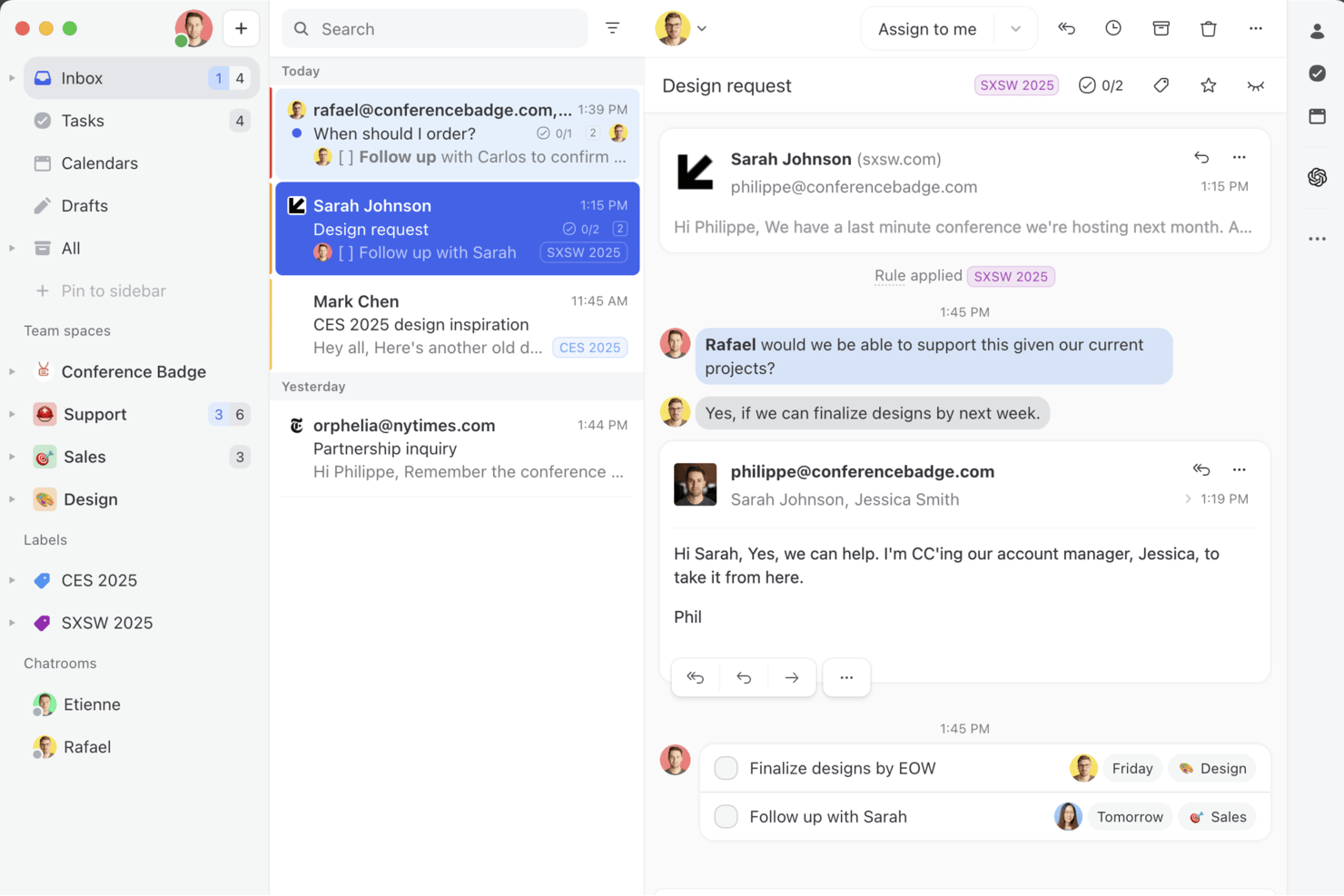
Missive is a collaborative email and chat platform built for teams who need shared inboxes, multi-channel communication, and real-time internal collaboration features.
Who Is Missive Best For?
Agency account managers and client-facing teams who need a shared inbox for multi-channel communication and real-time collaboration.
Why I Picked Missive
I picked Missive because I rely on shared inboxes for true team email collaboration. Assigning conversations, adding internal comments, and inviting guests into threads streamlines client communications. Real-time collaborative drafting means my team never steps on each other’s toes when replying.
Missive Key Features
- Team spaces: Create separate workspaces for different teams, each with its own inbox, chat, and tasks.
- Audit trail: Track every user action and message change by time and person for full transparency.
- Rules engine for automation: Automate assignments, replies, and follow-ups through a flexible, no-code rules builder.
- Multi-channel inbox: Manage emails, SMS, WhatsApp, Instagram, Messenger, and live chat from a unified interface.
- Missive MCP Server: Connect external AI tools (like Claude or ChatGPT) to query collaboration threads, check calendars, and draft replies—while keeping team review required before sending.
Missive Integrations
Missive offers 30+ native integrations, including Google Drive, Dropbox, HubSpot, Salesforce, Pipedrive, Asana, ClickUp, Trello, Zoom, Twilio, and Slack. It also integrates with Zapier, Make, provides a public API for custom workflows, and includes its new MCP Server on Productive and Business plans (requires admin activation).
What's Free?
Missive offers a 30-day free trial with access to all features. After the trial, you’ll need a paid plan—there’s no free-forever option. The free trial includes unlimited users and channels, so you can test full team collaboration.
Pros and Cons
Pros:
- Guest access for external collaborators
- Unified inbox for email and chat
- Collaborative drafting of emails and comments
Cons:
- Task management tied to email threads
- No free plan for ongoing use
New Product Updates from Missive

Missive Adds Multi-Step Automations With Timed Rules
Missive adds time-based rule steps that let automations run through multiple stages on the same conversation. This helps teams build follow-ups and SLA escalations without creating separate rules. For more information, visit Missive’s official site.
 .

Zoom
Best for video conferencing

Zoom is a cloud-based collaboration platform that brings together video meetings, chat, screen sharing, and whiteboarding for teams who need real-time communication.
Who Is Zoom Best For?
Zoom is a strong fit for distributed and hybrid teams of any size that rely on frequent video meetings as their primary mode of collaboration.
Why I Picked Zoom
Zoom earns its spot on my shortlist because it's the most widely recognized video conferencing tool available, and its free tier is genuinely usable for real team collaboration. I like that the free plan supports meetings with up to 100 participants, which covers most sprint reviews or cross-functional syncs my team runs. The multi-speaker view automatically shifts focus to whoever is talking, so I'm not manually managing layouts mid-meeting. Breakout rooms are also available on the free plan, which means I can split a larger group into smaller working sessions without upgrading.
Zoom Key Features
- Screen sharing: Share your full screen, a specific application window, or a portion of your screen during any meeting.
- In-meeting chat: Send messages, links, and files to all participants or specific individuals without interrupting the call.
- Zoom Whiteboard: Collaborate visually using a shared digital canvas with sticky notes, shapes, and drawing tools.
- Meeting recording: Record meetings locally to your device and revisit discussions or share them with teammates who couldn't attend.
Zoom Integrations
Zoom offers native integrations with Google Workspace, Microsoft 365, Slack, Salesforce, HubSpot, Dropbox, Box, Trello, Asana, and Zapier. An API is available for custom integrations.
What's Free?
Zoom offers a free-forever plan that allows unlimited one-on-one meetings and group meetings for up to 100 participants, with a 40-minute limit on group sessions. Some advanced features and integrations are only available on paid plans.
Pros and Cons
Pros:
- Robust security features
- User-friendly interface
- High-quality video and audio
Cons:
- Requires stable internet connection
- Free plan only allows for 40 minutes of meeting time

Loom
Best for asynchronous video messaging

Loom is a video collaboration platform that lets teams record, share, and organize screen and webcam videos for asynchronous communication and feedback.
Who Is Loom Best For?
Loom is a strong fit for remote and distributed teams—especially in product, engineering, and design—who rely on async communication across time zones.
Why I Picked Loom
Loom is one of my top picks because I love how it replaces the kind of meeting that really should've been a video. My team uses Loom to record quick screen walkthroughs with a camera bubble overlay, so the person watching gets both the visual context and the face-to-face feel without scheduling anything. The viewer insights feature is genuinely useful too—I can see exactly who watched a video and how far they got, which tells me whether my message actually landed. Timestamped comments let teammates respond directly to a specific moment in the recording rather than sending a vague follow-up message.
Loom Key Features
- Transcriptions and closed captions: Loom auto-generates transcripts and captions for every video in 50+ languages.
- Speaker notes: Add notes visible only to you while recording, so you stay on track without a separate script.
- Libraries: Organize videos into personal, shared, and team libraries so recordings are easy to find and manage.
- Video privacy controls: Set per-video privacy settings, including password protection and email-gated viewing.
Loom Integrations
Integrations include Slack, Microsoft Teams, Jira, Confluence, GitHub, Google Workspace, Salesforce, Zendesk, Intercom, Trello, and Notion.
What's Free?
Loom offers a free-forever plan for up to 50 users per workspace. Free users can record up to 25 videos per person, each with a maximum length of 5 minutes.
Pros and Cons
Pros:
- Secure sharing
- AI transcription
- Easy video recording
Cons:
- Requires internet connection
- Free plan lacks importing & downloading

Dropbox
Best for secure file sharing

Dropbox is a cloud-based collaboration platform that lets teams store, share, and work together on files and documents in one place.
Who Is Dropbox Best For?
Dropbox is a good fit for distributed teams that regularly share and collaborate on files across departments or with external stakeholders.
Why I Picked Dropbox
Dropbox earns its spot as one of the best on my shortlist because of how seriously it handles secure file sharing. I like that every file shared through Dropbox is protected with 256-bit AES and SSL/TLS encryption, and I can set password protection and expiration dates on shared links so access doesn't linger longer than it should. When I need to pull back access, revoking permissions on a file or folder takes just a few clicks. The version history and file recovery features also give my team a safety net when working on shared documents across multiple contributors.
Dropbox Key Features
- Dropbox Paper: A built-in collaborative document editor where your team can write, comment, and assign tasks directly within a shared doc.
- File request: Send a link that lets anyone upload files directly to your Dropbox folder without needing a Dropbox account.
- Dropbox Replay: A dedicated tool for reviewing and leaving timestamped feedback on video files without leaving Dropbox.
- Smart Sync: Control which files are stored locally or kept cloud-only, so team members can access the full folder structure without using up local storage.
Dropbox Integrations
Dropbox offers native integrations with Google Workspace, Microsoft 365, Slack, Zoom, Trello, DocuSign, Canva, Adobe Creative Cloud, Salesforce, and Okta. An API is available for custom integrations.
What's Free?
Dropbox offers a free-forever Basic plan with up to 2 GB of storage for individual users. This plan has limited features and does not include advanced sharing controls or most integrations.
Pros and Cons
Pros:
- Cross-device access
- Easy file sharing
- Strong security features
Cons:
- Requires internet access
- Limited free storage

Best for integrated productivity tools

Google Workspace is a cloud-based collaboration suite that brings together document editing, file sharing, team chat, video meetings, and email in one platform.
Who Is Google Workspace Best For?
Google Workspace is a natural fit for teams of any size that are already working within the Google ecosystem and need a single platform for communication, document collaboration, and file management.
Why I Picked Google Workspace
I chose Google Workspace because its deep tool integration is difficult to match. I like that when I'm in Google Docs, I can start a Google Meet call, pull in a comment from Google Chat, and share the file via Gmail without ever leaving the browser tab. The real-time co-editing in Docs, Sheets, and Slides means my team can work on the same file simultaneously, with changes appearing in real time and a full revision history tracking every edit. Google Drive ties it all together as a shared file system that every other tool in the suite connects back to natively.
Google Workspace Key Features
- Google Meet: Host video calls directly from your calendar, Gmail, or Chat with screen sharing and in-meeting chat built in.
- Google Chat spaces: Create dedicated spaces for specific projects or teams where you can share files, assign tasks, and thread conversations.
- Shared drives: Store files at the team level rather than tied to individual accounts, so access persists regardless of team changes.
- Google Calendar: Schedule meetings, set shared team calendars, and view colleagues' availability directly within the Workspace environment.
Google Workspace Integrations
Google Workspace offers native integrations across the Google ecosystem, including Google Drive, Google Meet, Google Chat, Google Calendar, and Gmail. An API is available for custom integrations.
What's Free?
Google Workspace offers a 14-day free trial with access to all core features. After the trial, you’ll need to choose a paid plan to continue using the service; there is no free-forever plan.
Pros and Cons
Pros:
- Strong security features
- Seamless integration across tools
- Comprehensive tool suite
Cons:
- Syncing delays
- Limited offline access


Trello is a collaboration and project management platform that uses boards, lists, and cards to help teams organize tasks, share files, and coordinate work visually.
Who Is Trello Best For?
Trello is a great fit for small to mid-sized teams that prefer a visual, low-overhead approach to organizing and tracking collaborative work.
Why I Picked Trello
Trello earns its spot as one of the best on my shortlist because its Kanban board interface makes it easy to see where every task stands at a glance. I love how cards carry all the context—checklists, due dates, attachments, and comments—so my team doesn't have to chase down status updates in Slack. The Timeline view is useful: when sprint priorities shift, I can drag and drop cards to adjust dates on the fly without rebuilding the whole plan. For visual task management, Trello's board-first design is hard to replicate with tools that treat the list view as the default.
Trello Key Features
- Automation rules: Set trigger-based rules in Trello's built-in Butler automation to move cards, assign members, or update due dates without manual input.
- Custom fields: Add structured data to cards—like dropdowns, numbers, or text fields—to tailor boards to your team's specific workflow.
- Inbox: Capture tasks from emails, Slack messages, and other sources directly into a central Trello Inbox before assigning them to a board.
- AI writing assistance: Use built-in AI on cards to brainstorm ideas, organize action items, and condense long text into concise summaries.
Trello Integrations
Trello offers over 200 native integrations, including Slack, Jira Cloud, Miro, GitLab, Google Calendar, Deskpro, Zoho Desk, Mailbutler, Ganttify, and Droplr. An API is available for custom integrations.
What's Free?
Trello offers a free-forever plan for up to 10 boards per workspace and unlimited users. The free plan includes basic features, but limits you to 250 workspace command runs per month and one Power-Up (integration) per board.
Pros and Cons
Pros:
- Easy to use
- Highly customizable boards
- Flexible workflows
Cons:
- Limited advanced features
- No offline mode

Jira
Best for complex project tracking

Jira is a project management and collaboration platform designed for teams who need advanced issue tracking, customizable workflows, and agile board features.
Who Is Jira Best For?
Jira is a strong fit for software development and product teams that need structured issue tracking and agile project management across multiple workstreams.
Why I Picked Jira
Jira earns its spot on my shortlist because of how well it handles multi-layered project tracking across teams. I particularly like the dependency mapping feature, which lets my team connect engineering, product, and design work so nothing falls through the cracks during a big launch. The timeline view gives me a live read on where every workstream stands, and I can switch between board, list, and calendar views depending on what I need to see. Custom workflows and granular permission controls also mean I can configure Jira to match how my team actually works, not the other way around.
Jira Key Features
- Agile boards: Run Scrum sprints or Kanban boards to visualize work in progress and manage team capacity across active workstreams.
- Intake forms: Let partner teams submit requests directly into Jira projects, keeping all incoming work in one trackable place.
- Automation rules: Set trigger-based rules that automatically update issue statuses, send reminders, or reassign tasks without manual input.
- Reporting dashboards: Access built-in reports like burndown charts and cycle time metrics to monitor team performance and delivery pace.
Jira Integrations
Jira offers native integrations with Confluence, Bitbucket, Trello, Slack, GitHub, Microsoft Teams, Google Drive, Dropbox, Zendesk, and Salesforce. An API is available for custom integrations.
What's Free?
A free trial is available for the Product Management Dashboard for Jira, but details on user limits or feature restrictions are not specified on the site.
Pros and Cons
Pros:
- AI-driven task suggestions
- Real-time data insights
- Customizable workflows
Cons:
- Comes with a learning curve
- Complex setup process

Miro
Best for visual collaboration and brainstorming

Miro is an online collaborative whiteboard platform that lets teams create, share, and organize visual boards for brainstorming, planning, and project collaboration.
Who Is Miro Best For?
Miro is a good fit for cross-functional teams in product, design, and engineering who need a shared visual space for planning and ideation.
Why I Picked Miro
Miro is one of my top picks because I love how its infinite multiplayer canvas turns a brainstorm into something you can act on. My team uses Miro to run live ideation sessions where everyone adds sticky notes simultaneously, and the AI clustering feature automatically groups those notes by theme or sentiment. That alone cuts the time we'd normally spend manually sorting ideas in half. I also rely on Talktrack to record async walkthroughs of our boards, so teammates in different time zones can review decisions and leave comments directly on the canvas without waiting for a meeting.
Miro Key Features
- Templates library: Access 7,000+ pre-built, customizable templates for use cases like journey mapping, Agile planning, and wireframing.
- Voting: Run live polling and dot-voting sessions directly on the board to gather team input and prioritize ideas.
- Presentation mode: Present board content in a structured, slide-by-slide format while keeping full canvas access for live edits and comments.
- Workshop facilitation tools: Use built-in timers, reactions, and facilitation controls to run structured, interactive team sessions.
Miro Integrations
Miro offers native integrations with Slack, Microsoft Teams, Google Drive, Jira, Asana, Trello, Zoom, Confluence, Dropbox, and Box. It also connects with Zapier and provides an API for custom integrations.
What's Free?
Miro offers a free-forever plan that allows unlimited team members but limits you to 3 editable boards. Some advanced features and integrations are only available on paid plans.
Pros and Cons
Pros:
- Real-time collaboration
- Extensive template library
- AI-powered tools
Cons:
- Occasional lag with large boards
- Limited advanced analytics
New Product Updates from Miro
Miro Adds Japan Data Residency for Enterprise Customers
Miro has introduced Japan data residency for enterprise customers, offering in-region storage for production data, backups, and metadata, plus in-region compute infrastructure. For more information, visit Miro's official site.
 .

Slack
Best for team communication

Slack is a collaboration platform for teams that brings together real-time messaging, organized channels, file sharing, and integrations with other workplace tools.
Who Is Slack Best For?
Slack is a strong fit for tech and digital teams of any size that need a dedicated space for real-time communication across multiple projects and departments.
Why I Picked Slack
Slack is on my shortlist because its channel-based structure handles team communication at scale. I use channels to separate conversations by project, team, and topic, so nothing gets buried in a shared inbox or a long email thread. Slack's Huddles feature lets my team jump into a quick audio or video call directly from any channel without scheduling a meeting. Slack Connect brings external partners and clients into shared channels, keeping cross-org communication in one place rather than bouncing between email and chat.
Slack Key Features
- Message threading: Reply directly to specific messages in a thread to keep conversations organized without cluttering the main channel.
- Workflow Builder: Create automated workflows for routine tasks like onboarding requests or status updates without writing any code.
- Canvas: Create and share rich documents, notes, and project briefs directly inside a Slack channel for easy team reference.
- Search and message history: Search across all messages, files, and channels to find past conversations and shared documents quickly.
Slack Integrations
Slack offers over 2,400 native integrations through its App Directory, including Google Workspace, Microsoft Office, Zoom, Salesforce, GitHub, Dropbox, HubSpot, Webex Meetings, Adobe Creative Cloud, and Microsoft Teams. It connects with Zapier and provides an API for custom integrations.
What's Free?
Slack offers a free-forever plan with unlimited users, but limits access to the most recent 90 days of message history and restricts some advanced features and integrations.
Pros and Cons
Pros:
- User-friendly mobile app interface
- Customizable notifications
- Organized communication channels
Cons:
- Can be overwhelming for new users
- Limited video conferencing features
Diğer Ücretsiz İş Birliği Araçları
Aşağıda kısa listeme aldığım ek ücretsiz iş birliği araçlarının bir listesi yer almaktadır. En iyi 10 araç arasına girmemiş olsalar da yine de değerlidir ve daha fazla araştırmaya değerdir.
- Hive
For team-based project management
- Asana
For goal-oriented project management
- Freedcamp
For comprehensive project management
- Taskworld
For task and project visualization
- Airtable
For no-code custom app building
- Nifty
For project timeline tracking
- Quire
For visual task management
- Lucidspark
For collaborative brainstorming
- Bitrix24
For integrated communication tools
- OneDrive
For cloud storage and file sharing
- Excel
For data analysis and spreadsheets
- same-page.com
For real-time team collaboration


İlgili Proje Yönetimi Yazılımı İncelemeleri
Aradığınızı hâlâ burada bulamadıysanız, test edip değerlendirdiğimiz şu diğer ilgili araçlara göz atın:
- Proje Yönetimi Yazılımı
- Kaynak Yönetimi Yazılımı
- İş Akışı Otomasyonu Yazılımı
- Zaman Takibi Yazılımı
- Görev Yönetimi Yazılımı
- Video İş Birliği Araçları
- Gantt Şeması Oluşturucu
- Verimlilik Araçları
- Proje Takip Yazılımı
- Proje Planlama Yazılımı
- Eş Zamanlı Olmayan İş Birliği Araçları
How I Evaluate Free Collaboration Tools
I split my evaluation into two layers: baseline criteria a tool must clear—like real multi-user collaboration on a free plan—and the differentiators that separate the best from the rest.
Core Functionality (Table Stakes For This List)
When I'm selecting tools for my list, I rank each one on a scale from 0 (does not offer the functionality) to 5 (excels in this area) for each core functionality listed below. Then, I calculate the tool's total score into a percentage. Each tool needs to achieve a minimum total score of 65% to be considered for inclusion.
- Genuine Free Plan: I check whether the tool offers a permanent free tier rather than a short trial, since teams need long-term access to plan sprints, manage backlogs, and run ongoing projects.
- Shared Workspaces: Each tool should let multiple people work inside the same project space, whether that's a Kanban board in Trello, a space in ClickUp, or a channel in Slack.
- Task & Project Tracking: I look for the ability to create, assign, and track tasks with due dates and statuses, the kind of structure you need to keep a product launch or client deliverable on schedule.
- Real-Time Communication: Built-in commenting, threaded discussions, or chat features matter here because context-rich conversations attached to tasks reduce the back-and-forth of scattered emails.
- File Sharing & Storage: Teams constantly share design mockups, specs, and docs, so I evaluate whether the free plan supports uploading, previewing, and organizing files within project spaces.
- Multi-User Collaboration: A free collaboration tool needs to support more than one person, so I look at how many team members you can invite before hitting a paywall.
Once I have a list of tools that meet this criteria, I consider what sets each platform apart.
Differentiating Factors (What Sets Vendors Apart)
Here's how I compare and contrast different vendors:
Standout Features
Guest and client access is a big differentiator for me. Agency producers and freelancers regularly need to loop in external stakeholders without paying for extra seats. I also evaluate whether a tool offers multiple project views—switching between a Kanban board during daily standups and a timeline view for executive updates makes a real difference in how teams consume information. Free-tier automation is another factor I look at, like auto-assigning tasks when a status changes or triggering deadline reminders in tools like Asana or ClickUp.
Beyond Features
Integrations matter a lot when you're on a free plan. I check whether a tool connects to apps teams already depend on—like Slack, Google Workspace, or GitHub—without requiring an upgrade. Free plan scalability is another key factor; I evaluate how restrictive user, project, and storage caps become as a team grows from five to fifteen people. Security is worth a close look too, since even free-tier users should have access to two-factor authentication and data encryption to keep project data protected.
Ücretsiz İş Birliği Araçları Nasıl Seçilir?
Kendinize özgü yazılım seçimi sürecinizi yürütürken aşağıdaki noktaları göz önünde bulundurun:
- Kullanım Kolaylığı: Ekip tarafından hızlıca benimsenmesini sağlamak için araç sezgisel ve kullanımı kolay olmalıdır. Aşırı karmaşık bir araç, üretkenliği yavaşlatabilir ve ekip üyelerini aracı kullanmaktan caydırabilir.
- Entegrasyon Yetenekleri: Aracın ekibinizin mevcut teknoloji yığınıyla entegre olacağından emin olun. Bu, iş akışlarını kolaylaştırabilir ve farklı uygulamalar arasında geçiş yapma ihtiyacını azaltabilir. Örneğin, ekibiniz dosya depolama için Google Drive kullanıyorsa Google Drive ile entegre olan bir iş birliği aracı seçmek zaman kazandırır ve verimliliği artırır.
- Özelleştirme Seçenekleri: Farklı ekiplerin farklı iş akışları ve tercihleri vardır; özelleştirilebilir bir çözüm, üretkenliği artırmak için çeşitli çalışma biçimlerine uyum sağlar. Örneğin, kişiselleştirilmiş panolara ve iş akışı otomasyonuna izin veren bir araç, her ekip üyesinin kendine özgü ihtiyaçlarını karşılar.
- Güvenlik Özellikleri: Hassas bilgileri korumak çok önemlidir. Araç, kullanıcı verilerini güvence altına almak için güçlü güvenlik önlemlerine sahip olmalıdır. Örneğin, ekibiniz gizli müşteri bilgilerini işliyorsa güçlü şifreleme sunan ve veri koruma düzenlemelerine uyan bir araç seçmek veri ihlallerini önlemeye yardımcı olur.
- Maliyet ve Bütçe: Burada listelenen araçların tümü ücretsiz seçenekler sunsa da ekibiniz büyüdükçe premium özelliklerle veya ölçeklendirmeyle ilişkili olası maliyetleri göz önünde bulundurun. Küçük bir ekip için ücretsiz sürüm yeterli olabilir; ancak ekibiniz büyüdükçe ilave özellikler için ücretli bir plana yükseltme yapmanız gerekebilir.
Ücretsiz İş Birliği Araçlarındaki Trendler
En iyi çevrim içi iş birliği araçları arasında fark ettiğim bazı trendler ve bunların gelecek için ne anlama gelebileceği şunlardır. En önemli içgörüleri ortaya çıkarmak için sayısız ürün güncellemesini, basın bültenini ve sürüm kaydını inceledim.
- Yapay Zekâ Destekli Özellikler: Yapay zekâ, görevleri otomatikleştirmek için iş birliği araçlarına entegre ediliyor. Bu, manuel çalışmayı azaltır ve verimliliği artırır; ekiplerin daha stratejik faaliyetlere odaklanmasını sağladığı için bu durum büyük önem taşır.
- Platformlar Arası Entegrasyon: İş birliği araçları çeşitli platformlarla giderek daha uyumlu hâle geliyor ve farklı cihazlar arasında kesintisiz iş akışı sağlıyor. Ekiplerin farklı teknolojiler kullanması gerekir.
- Gelişmiş Güvenlik: Ücretsiz araçlar, şifreleme ve çok faktörlü kimlik doğrulama dâhil olmak üzere daha iyi güvenlik özellikleri sunuyor. Hassas bilgileri korumak çok önemlidir.
- Özelleştirilebilir İş Akışları: Kullanıcılar artık iş akışlarını kendi özel ihtiyaçlarına göre uyarlayabiliyor. Bu esneklik üretkenliği ve kullanıcı memnuniyetini artırır. Kişiselleştirilmiş proje yönetimine olanak tanıması ilgi çekicidir.
Ücretsiz İş Birliği Araçları Nedir?
Ücretsiz iş birliği araçları, bireylerin ve ekiplerin projeler üzerinde ücretsiz olarak birlikte çalışmasını sağlayan yazılım uygulamalarıdır. Bu araçlar uzaktan çalışan ekipler, serbest çalışanlar ve küçük işletmeler tarafından dosya paylaşmak, iletişim kurmak ve görevleri yönetmek için yaygın olarak kullanılır. Kullanıcıların çabaları koordine etmek, bilgi paylaşmak ve herkesin proje hedefleri konusunda aynı doğrultuda olmasını sağlamak için bu araçlara ihtiyacı vardır.
Ücretsiz iş birliği araçları dosya paylaşımı, görsel iş birliği, gerçek zamanlı mesajlaşma, görev yönetimi ve video konferans özelliklerini içerebilir. Bu özellikler ekiplerin etkili bir şekilde iletişim kurmasına, ilerlemeyi takip etmesine ve belgeler ile görevler üzerinde merkezi bir platformda iş birliği yapmasına olanak tanır.
Ücretsiz İş Birliği Araçlarının Özellikleri
Doğru iş birliği aracını seçmek, sanal ve yüz yüze ekip çalışmasını geliştirmek ve ekip üyelerinin aynı doğrultuda kalmasını sağlamak için çok önemlidir. Ücretsiz bir iş birliği aracı seçerken, işletmenin başarısını önemli ölçüde etkileyebilecek aşağıdaki gibi bazı temel özellikleri göz önünde bulundurun:
- Birleşik İletişim: Bu özellik e-postaları, sohbetleri, belgeleri ve takvim etkinliklerini tek bir platformda birleştirir. Birden fazla uygulama arasında geçiş yapma gereksinimini ortadan kaldırarak ilgili tüm bilgilere ve iletişime merkezi bir merkezden kesintisiz erişim sağlar.
- Gerçek Zamanlı İş Birliği: Bu özellik ekip üyelerinin güncellemeleri paylaşmasına ve anında geri bildirim sağlamasına olanak tanır. Coğrafi sınırları aşan dinamik ve etkileşimli bir ortam oluşturarak üretkenliği ve ekip uyumunu artırır.
- Takvim Entegrasyonu: Takvim etkinliklerini daha geniş iletişim bağlamlarıyla bağlar. Bu işlev, kullanıcıların ekip etkinliklerinden haberdar olmasına, son tarihleri takip etmesine ve ilgili görüşmeler ile belgeleri kapsamlı bir şekilde değerlendirerek toplantılar planlamasına yardımcı olur.
- Sesli Arama ve Ekran Paylaşımı: Dağıtık ekipler içinde ilgi çekici, yüz yüze etkileşimleri kolaylaştırır. Bağlamsal farkındalıkla bir araya getirildiğinde bu özellikler ekip görüşmelerinin ve karar alma süreçlerinin kalitesini yükseltir.
- Güvenlik ve Gizlilik: Hassas verileri korumak ve gizliliği sağlamak için güçlü güvenlik önlemleri uygular. Veri şifreleme, güvenli erişim denetimleri ve düzenli güvenlik güncellemeleri gibi özellikler, kullanıcı verilerinin bütünlüğünü ve gizliliğini korumak açısından kritik öneme sahiptir.
- Üçüncü Taraf Uygulamalarla Entegrasyon: Proje yönetimi araçları, dosya depolama platformları ve üretkenlik uygulamaları gibi popüler uygulamalarla entegre olarak iş birliği yazılımını geliştirir. Bu entegrasyon iş akışlarını kolaylaştırır ve iletişim süreçlerini tek bir platformda birleştirir.
- Özelleştirme ve Kişiselleştirme: Bu özellik, kullanıcıların temalar seçerek, tercihlerini belirleyerek ve çalışma alanlarını düzenleyerek iş birliği deneyimlerini özelleştirmesine olanak tanır. Kişiselleştirilmiş ve keyifli bir kullanıcı deneyimi sunarak üretkenliği destekler.
- Kullanıcı Dostu Arayüz: Platformun kolayca gezilebilir ve kullanılabilir olmasını sağlar. Temiz ve sezgisel bir düzen, öğrenme eğrisini en aza indirerek kullanıcıların karmaşık gezinme işlemleri veya kafa karıştırıcı düzenlerle uğraşmak yerine işlerine odaklanmasına olanak tanır.
- Çevrimiçi Olma ve Durum Göstergeleri: Bu özellik ekip üyelerinin uygunluk durumunu ve durumunu gösterir. Kullanıcıların kimin çevrimiçi, meşgul veya uzakta olduğunu görmesine ve en uygun etkileşim biçimini seçmesine olanak tanıyarak verimli ve zamanında iletişime yardımcı olur.
- Canlı Güncellemeler ve Yorumlar: Hızlı yineleme ve iletişimi kolaylaştırmak için gerçek zamanlı güncellemeler ve canlı yorumlar sunar. Bilgi akışını sürdürmek ve tüm ekip üyelerinin aynı anlayışa sahip olmasını sağlamak için gereklidir.
Ücretsiz İş Birliği Araçlarının Avantajları
Ücretsiz iş birliği araçlarını kullanmanın beş temel avantajı şunlardır:
- Zamandan ve Kaynaklardan Tasarruf: Ücretsiz iş birliği araçları iletişimi ve proje yönetimini kolaylaştırarak idari görevlere harcanan zamanı azaltır. Bu, çalışanların daha kritik faaliyetlere odaklanmasını sağlayarak genel üretkenliği artırır.
- Üretkenliği Artırma: İş birliği araçları rutin görevleri otomatikleştirip iş akışlarını basitleştirerek ekiplerin daha kısa sürede daha fazla iş tamamlamasını sağlar. Bu, daha yüksek verimlilik sağlar ve çalışanların stratejik girişimlere yoğunlaşmasına olanak tanır.
- İletişimi Geliştirme: Bu araçlar gerçek zamanlı iletişimi ve bilgi paylaşımını kolaylaştırarak tüm ekip üyelerinin aynı bilgiye sahip olmasını sağlar. Bu durum, yanlış iletişim riskini en aza indirdiği ve önemli güncellemelerin gözden kaçmamasını sağladığı için özellikle uzaktan veya hibrit ekipler açısından faydalıdır.
- Uzaktan İş Birliğini Geliştirme: Ücretsiz iş birliği araçları, ekiplerin farklı konumlardan birlikte çalışmasını kolaylaştırır. Belge paylaşımı, proje takibi ve iletişim için merkezi bir platform sunarak uzaktan çalışma ortamında üretkenliğin korunması açısından temel bir rol oynar.
- Ekip Moralini Yükseltme: Çalışanlar verimli ve etkili bir şekilde çalışabilecek araçlara sahip olduğunda bu durum iş memnuniyetinin ve moralin artmasını sağlayabilir. İş birliği araçları ayrıca ekip üyelerinin birbirlerinin katkılarını tanımasını ve takdir etmesini kolaylaştırarak olumlu bir çalışma ortamını destekler.
İş Birliği Araçlarının Maliyetleri ve Fiyatlandırması
İş birliği araçlarını seçmek, mevcut çeşitli fiyatlandırma modellerinin ve planların anlaşılmasını gerektirir. Yukarıda belirtilen araçların tümü ücretsiz bir sürüm veya deneme sunarken, bunların tamamında ek özellikler ve işlevler içeren ücretli planlar da bulunur. Aşağıdaki tabloda yaygın planlar, bu planların ortalama fiyatları ve tipik özellikleri özetlenmektedir.
İş Birliği Araçları için Plan Karşılaştırma Tablosu
| Plan Türü | Ortalama Fiyat | Yaygın Özellikler |
| Ücretsiz Plan | $0 | Temel görev yönetimi, sınırlı depolama, temel entegrasyonlar, sınırlı kullanıcı erişimi |
| Bireysel Plan | $5-$10/ay | Geliştirilmiş görev yönetimi, daha fazla depolama alanı, gelişmiş entegrasyonlar, daha fazla kullanıcı erişimi |
| İşletme Planı | $10-$20/ay | Gelişmiş proje yönetimi, geniş depolama alanı, premium entegrasyonlar, ekip iş birliği araçları |
| Kurumsal Plan | $20+/ay | Özelleştirilebilir özellikler, sınırsız depolama alanı, kurumsal düzeyde entegrasyonlar, gelişmiş güvenlik ve uyumluluk özellikleri |
Ücretsiz İş Birliği Araçları Hakkında SSS
Ücretsiz iş birliği araçları hakkında sık sorulan bazı soruları burada bulabilirsiniz.
Ekibim için en iyi ücretsiz iş birliği aracını nasıl seçerim?
Ekibiniz için en iyi ücretsiz iş birliği aracını seçmek, özel ihtiyaçlarınızı değerlendirmeyi ve bunları çeşitli araçların sunduğu özelliklerle karşılaştırmayı gerektirir. Ekibinizin büyüklüğü, projelerinizin niteliği ve diğer yazılımlarla gereken entegrasyon düzeyi gibi faktörleri göz önünde bulundurun. Güçlü iletişim özellikleri, görev yönetimi özellikleri ve dosya paylaşma seçenekleri sunan araçları arayın. Ayrıca, değerlendirdiğiniz araçlardan diğer ekiplerin nasıl yararlandığını anlamak için kullanıcı yorumlarını ve örnek olay incelemelerini okuyun.
Ücretsiz iş birliği araçlarını kullanmanın herhangi bir sınırlaması var mı?
Evet, ücretsiz iş birliği araçlarının genellikle ücretli muadillerine kıyasla sınırlamaları vardır. Bu sınırlamalar arasında kısıtlı depolama alanı, sınırlı sayıda kullanıcı, daha az entegrasyon ve azaltılmış müşteri desteği bulunur. Bazı araçlar oluşturabileceğiniz proje veya görev sayısını da sınırlayabilir. Ekibinizin ihtiyaçlarını kesintilere neden olmadan karşıladığından emin olmak için ücretsiz sürümün hüküm ve koşullarını incelemeniz önemlidir.
Ücretsiz iş birliği araçları diğer yazılımlarla entegre olabilir mi?
Birçok ücretsiz iş birliği aracı, diğer popüler yazılımlarla entegrasyon sunar; ancak bu entegrasyonların kapsamı değişebilir. Yaygın entegrasyonlar arasında e-posta platformları, bulut depolama hizmetleri, proje yönetimi araçları ve iletişim uygulamaları bulunur. Ekibinizin kullandığı diğer yazılımlara düzenli olarak bağlanabildiğinden emin olmak için aracın entegrasyon özelliklerini web sitesinden veya uygulama içinden kontrol edin.
Ücretsiz iş birliği araçları ne kadar güvenlidir?
Ücretsiz iş birliği araçlarının güvenliği önemli ölçüde değişebilir. Saygın araçlar genellikle güvenlik açıklarına karşı koruma sağlamak için veri şifreleme, güvenli oturum açma protokolleri ve düzenli güncellemeler gibi temel güvenlik özellikleri sunar. Ancak bunlar, genellikle iki faktörlü kimlik doğrulama, uyumluluk sertifikaları ve özel güvenlik desteği gibi gelişmiş özellikleri içeren ücretli sürümlerle aynı güvenlik düzeyini sağlamayabilir. Her zaman aracın güvenlik politikalarını inceleyin ve kuruluşunuzun güvenlik gereksinimlerini karşılayıp karşılamadığını değerlendirin.
Ücretsiz iş birliği araçlarını kullanırken karşılaşılan yaygın zorluklar nelerdir?
Ücretsiz iş birliği araçlarını kullanırken karşılaşılan yaygın zorluklar arasında sınırlı özellikler, kullanıcı kısıtlamaları ve olası veri güvenliği endişeleri bulunur. İhtiyaçları arttıkça ekipler ölçeklenebilirlikle ilgili zorluklarla da karşılaşabilir ve ücretli bir plana veya tamamen farklı bir araca geçmeleri gerekebilir. Ayrıca ücretsiz araçların müşteri desteği daha az güvenilir olabilir; bu da teknik sorunlar ortaya çıktığında problem yaratabilir.
Ücretsiz bir iş birliği aracından ücretli bir sürüme veya başka bir araca veri aktarabilir miyim?
Ücretsiz iş birliği araçlarının çoğu, ücretli sürümlerine sorunsuz veri aktarımı seçenekleri sunar. Ancak verileri farklı bir araca aktarmak daha karmaşık olabilir ve verilerin belirli biçimlerde dışa aktarılmasını veya üçüncü taraf veri aktarımı hizmetlerinin kullanılmasını gerektirebilir. Veri aktarımıyla ilgili ayrıntılı talimatlar için aracın belgelerini veya destek kaynaklarını kontrol etmeniz önerilir.
Ücretsiz iş birliği araçları kullanıcı izinlerini ve rollerini nasıl yönetir?
Ücretsiz iş birliği araçları genellikle temel kullanıcı izni ve rol yönetimi özellikleri sunar. Bunlar arasında yönetici, düzenleyici ve görüntüleyici rollerinin atanması ve belirli projelere veya dosyalara erişim izinlerinin ayarlanması bulunabilir. Ancak bu izinlerin ayrıntı düzeyi, ücretli sürümlere kıyasla sınırlı olabilir. Ekibinizin iş birliği ortamı üzerindeki kontrolü korumak için seçtiğiniz aracın kullanıcı rollerini etkili bir şekilde yönetmenize olanak tanıdığından emin olun.